$3.00
June
1984
TABLE OF CONTENTS
EPROM Programmer for the Kaypro ... 5
Digital Plotters, A Graphic Description ... 8
I/O Byte: A Primer ...
.1
0
Sticky Kaypros ... 12
Pascal Procedures ... 14
SBASIC Column ... 18
Kaypro Column ... 24
86 World ... 28
FOR1Hwords ... 30
Talking Serially to Your Parallel Printer ... 33
Introduction to Business COBOL ... 34
C'ing Clearly ... 36
Parallel Printing with the Xerox 820 ... 41
Xerox 820, A New Double .. Density Monitor ... 42
On 'Your
Own ...
48
.,.:
U)w
::Jo
w
a:
Zo
>
Q.
o
(,)
w
w
a:
&L
~
Zcs:
a:
a:
;
Q
w
!::
~
:::i
~
Q o(7)
a:
::Jo
&L
o
U) ~a:
w
t-w
::tt-O
t-t;
w
..,
CD
::J
U)
w
Q
cs:
~ U)
W ...I
"THE ORIGINAL BIG BOARD"
OEM - INDUSTRIAL - BUSINESS - SCIENTIFIC
SINGLE BOARD COMPUTER KIT!
Z-80 CPU! 64K RAM!
(DO NOT CONFUSE WITH ANY OF OUR FLATTERING IMITATORSI)
THE BIG BOARD PROJECT: With thousands sold worldwide and over two years of field experience, the Big Board may just be one of the most reliable single board computers available today. This is the same design that
was licensed by Xerox Corp. as the basis for their 820 computer.
$259
00
(64KKIT
* *
BASIC 1/0)The Big Board gives you the right mix of most needed computing features ali on one board. The Big Board was designed from scratch to run the latest version of CP/M·. Just imagine all the off-the-shelf software that can be run on the Big Board without any modifications needed.
SIZE: 8'12 x 133f. IN. SAME AS AN 8 IN. DRIVE. REQUIRES: +5V @ 3 AMPS + - 12V @.5 AMPS. FULLY SOCKETEDI FEATURES: (Remember, all this on one board!)
64K RAM 24 X 80 CHARACTER VIDEO
Uses Industry standard 4116 RAM's. All 64K Is available to the user, our VIDEO With a crisp, flicker-free display that looks extremely sharp even on small and EPROM sections do not make holes In system RAM. Also, very special care monitors. Hardware scroll and full cursor control. Composite video or split video was taken In the RAM array PC layout to eliminate potential noise and glitches. and sync. Character set Is supplied on a 2716 style ROM, making customized fonts easy. Sync pulses can be any desired length or polarity. Video may be Z-80 CPU Inverted or true. 5 x 7 Matrix - Upper & Lower Case.
Running at 2.5 MHZ. Handles all 4116 RAM refresh and supports Mode 2
INTERUPTS. Fully buffered and runs 8080 software. FLOPPY DISC CONTROLLER
Uses WD1771 controller chip with a TTL Data Separator for enhanced reliability. SERIAL I/O (OPTIONAL) IBM 3740 compatible. Supports up to four 8 Inch disc drives. Directly compatible with standard Shugart drives such as the SA800 or SA801. Drives can be Full 2 channels using the Z80 SIO and the SMC 8116 Baud Rate Generator. FULL configured for remote AC off-on. Runs CP/M" 2.2 .
RS2321 For synchronous or asynchronous communication. In synchronous mode, the clocks can be transmitted or received by a modem. Both channels can
be set up for either data-communication or data-terminals. Supports mode 21nl. TWO PORT PARALLEL I/O (OPTIONAL) Price for all parts and connectors: $39.95 Uses Z-80 PIO. Full 16 bits, fully buffered, bl-dlrectlonal. Uses selectable hand
shake polarity. Set of all parts and connectors for parallel 110: $19.95 BASIC I/O
Consists of separate parallel port (Z80 PIO) for use with an ASCII encoded REAL TIME CLOCK (OPTIONAL)
keyboard for Input. Output would be on the 80 x 24 Video Display. Uses Z-80 CTC. Can be configured as a Counter on Real Time Clock. Set of all parts: $9.95
~
BLANK PC BOARD - $99.95 CP/M* 2.2 FOR BIG BOARDThe popular CP/M" D.O.S. to run on Big Board is available for $139.00.
:j
The blank Big Board PC Board comes complete with fullcs:
documentation (Including schematics), the character ROM, the PFM 3.3 MONITOR ROM, and a diskette with the source of our BIOS, BOOT, and PFM 3.3 MONITOR.DOUBLE DENSITY ADAPTER BOARD - $149.95 (A&T) Requires no cuts or MODS to an existing Big Board. Gives up to 670K storage on a single sided 8 In. diskette. With software to patch your CP/M" 2.2. PFM 3.3 2K SYSTEM MONITOR
. The real power of the Big Board lies In Its PFM 3.3 on board monitor. PFM commands Include: Dump Memory, Boot CP/M", Copy, Examine, Fill Memory, Test Memory, Go To, Read and Write 110 Ports, Disc Read (Drive, Track, Sector), and Search PFM occupies one of the four 2716 EPROM locations provided. Z-80 Is a Trademark of Zilog.
Digital Research Computers
(OF TEXAS)
P.O. BOX 461565 • GARLAND, TEXAS 75046. (214) 271-3538
TERMS: Shipments will be made approximately 3 to 6 weeks after we receive your order. VISA, MC, cash accepted. We will accept COD's (for the Big Board only) with a $75 deposit. Balance UPS COD. Add $4.00 shipping.
MICRO CORNUCOPIA
P.O. Box 223
Bend, Oregon 97709
503-382-8048
Editor
&Publisher
David
J.
Thompson
Assistant Editor
Eric Belden
Graphic Design
Sandra Thompson
Technical Department
Dana Cotant
Eric Roby
Advertising Director
Alice Holbrow
Staff Assistants
Dorcas Dsenis
Tracey Braas Cary Gatton
Typography
Patti Morris
&Martin White
Irish Setter
MICRO CORNUCOPIA is the single board systems journal sup-porting systems programming lan-guages and single board systems-including the Big Board, Big Board II, Xerox 820, Kaypro, and Slicer. MICRO CORNUCOPIA is pub-lished six times a year by Micro Cor-nucopia of Oregon, P.O. Box 223,
Bend, Oregon 97709.
SUBSCRIPTION RATES:
1 yr.(6 issues) $16.00 1 yr.(first class) $20.00 1 yr.(Canada & Mexico) $20.00 1 yr. (other foreign) $26.00 Make all orders payable in U.S. funds on a U.S. bank, please. ADVERTISING RATES: Available on request.
CHANGE OF ADDRESS: Please send your old label and new ad-dress.
SOFTWARE, HARDWARE, AND BOOK VENDORS: We would very much like to review your CP/M & MSDOS compatible products. Send materials to the Review Depart-ment, Micro Cornucopia.
CPIM is a trademark of Digital Research, Inc. Copyright © 1984 by Micro Cornucopia
All rights reserved
IICla CD.RUCD.II
June 1984
The Single Board Systems Journal
No. 18
Y'all
Come
SOG
Before you read further, take a look at the SOG article in this issue. That way you'll know if you need to throw any-thing more into your duffle bag for July 26! Don't forget to bring the family! Dr Dobbs
The People's Computer Company has given up control of Dr Dobbs, the maga-zine that for many years combined heavy-weight technicality and high volity. In the last few years, the high fri-volity has been pretty much displaced. (It's title used to be "Dr Dobbs Journal of Computer Calisthenics and Orthodon-tia," simply one way of saying "Running light without over byte.")
The People's Computer Company is the non-profit computer educational group that published Dr Dobbs and be-came the focal point for the public-do-main, forth, and small-c, folks.
M&T Publishing, the U.S. subsidiary of a large German software firm, has purchased two computer magazines as it
begins its push into the U.S. software market. One magazine covers business software, the other (Dr Dobbs) is aimed at the technical market.
I talked to Michael Swain, newly ap-pointed editor in chief. He is a long-time Dr Dobbs reader who was hired away from Info World. I enjoyed my visit with Mike and I really appreciate his desires to keep Dr Dobbs from going totally commercial. (But then he's not really sure what kinds of directives will come down from the brass at M&T.)
The magazine changed a lot while it was under the PCC's thumb and has al-ready lost a lot of its original hacker audi-ence (though its circulation is 30,000).
You see, article submissions have dropped to almost nothing and they are even having trouble getting enough let-ters to the editor. That's quite a change from the days when Gary Kildall wrote a major treatise for Dr Dobbs entitled "The History of CP/M." (Gary wrote CP/M, so he should know.)
A number of Micro C subscribers have commented that we remind them of the early Dr Dobbs. And though I have only subscribed for a couple of years, I have read Dr Dobbs avidly for many years. (Does that sound familiar?)
In light of all this, I was really struck when Michael introduced me to other Dr Dobbs staffers as the editor of Micro C, the magazine that looks a lot like the ear-ly Dr Dobbs.
Hopefully Micro C can avoid out-growing its present nitch.
The Little Board
This is an absolutely tiny 64K Z80 sin-gle board computer (similar to the Kay-pro). It is manufactured by Ampro.
This board does not contain a video monitor (you have to connect it to a sepa-rate terminal) but it is so small that it mounts flat against the side of a 5" drive. In fact, the holes on the board match the mounting holes on the side of most drives.
The board uses the same power con-nector and the same supply as the 5" drives (+5V and + 12V) and it draws so little power that the drive supply proba-bly won't notice the board is there. In fact, a single-chip switcher (on the board) generates -12V for the serial ports.
Drive compatibility doesn't stop there, however, for the data connector on the back of the board is the same card edge type as the drives. The board plugs into the data cable the same way the drives do.
LITTIRS
Dear Editor,
Some time back I bought a Kaypro ZCPR disk and got it installed. I seldom use the number pad, but when I read the Kaypro column in issue #l6, I checked and found it didn't work under my ZCPR. I then tried the patch listed in the Kaypro column.
I've tried that patch at least 20 times, and I still can't get the keypad to work. I've tried the patch just as listed, and then, because I thought any changes made by DDT had to be "saved", I tried "save 34 ZCPM.COM" after DDT. That didn't work either, nor did anything else I tried.
I've followed the instructions, even re-installing ZCPR several times when trying to modify it. But nothing seems to make the keypad work. (I get nothing with "I", Control-L with "4", etc.) Any suggestions?
W. F. Gephart 7117 Joyce Way Dallas TX 75225
Editor's note:
Start with the system tracks from the CP M master disk. Edit INSTALL. SUB as follows:
Delete the first line (MOVCPM**). Insert the folowing 4 lines at the top of the file. 1st) SYSGEN
2nd) A
3rd) I (Hold down shift key and hit n\,) 4th)
Dear Editor,
I received my copy of Micro C, and just finished reading it for the first time. I was quite surprised to see my name in the letter department. I was even more em-barrasse9. to think that I might have asked dumb questions.
I am running on my very small genera-tor right now. I had to write when I saw my name in type. Since I took the 3rd 6 volt battery off line to power my dune buggy, so I can save that 500 foot walk to the shop many times a day, I have not been using the KayPro. I also have to make a bigger heat sink. After about 20 minutes it gets too hot to touch, so I am afraid to run it for very long.
I must tell you about a few problems I
have encountered. I took the trusty Kay-Pro over to a friend who wants one so bad, but can't seem to come up with cash right now.
He is very interested in computers in general and knows everyone who has one of each kind. So I thought I would dazzle him and his wife with mine.
They have a business with lots of names to mail to, but it's a business that doesn't make much profit. I had the Per-fect Writer up and was letting Phyllis do a little typing, while Fred and I went and fed the horses (now there is the waste of cash needed to buy the computer). When we came back, Phil came running out of the house yelling Mayday!
She wanted to know about all the ????????????? filling the screen. So did I. I figured the computer had been on a few hours and had heated up and on the 5 MHz something gave up. This was cured after I switched to the 2.5 and booted up. I am being very daring since I am on the 5 MHz right this very moment (I did a lot of skydiving for 6 years). I wanted to see if it was going to go out on me too. I save every few minutes!
You know, you are causing me to get . bitten worse with this computer. I keep on reading more and wanting to learn more programming. It's just a monu-mental task for me to grasp all of the knowledge. I have taught myself so much, in so many fields, that my RAM is spilling over. I guess I'll have to have my head fitted with a 100 MB hard disk. Gary Stookey
5000 Foots Creek Road Gold Hill, OR 97525
Editor's note:
They weren't dumb questions, Gary. We all start at zero in this business. It's like start-ing at the bottom of a well and spendstart-ing the rest of your life climbing out. The people we all look up to for guidance may be a little high-er in the well, but their view is often no betthigh-er than ours.
Dear Editor,
I have the Spellsys;it works great. You should include in the ad that it works with WordStar files. I had to call you to find out. I felt for $29.95 it wouldn't. I am very happy with it and use it for letters.
I would use it now but this pen doesn't make as much noise as the Hy-type; ev-eryone is in bed.
Mike Cochran 3920 W 41 Place Tulsa OK 74107
Dear Editor,
I am considering building a clock board for my Kaypro 4. One thing the clock needs to do is be able to turn on the Kaypro at a set time. The Kaypro would then auto-boot some program. An appli-cation for this would be long distance communications when the rates are cheap (and I'm asleep).
What I need to know is whether it's okay to turn my Kaypro on and off with a disk in the drives. I presently have the original Tandon 100-4's installed but in-tend to replace them with 96 tpi drives as soon as you wizards have settled on a "monitor to end all monitors." Are there 96 tpi drives that will/won't allow me to start up loaded?
Lewis Sternberg 1142 NW10 Corvallis OR 97330
Editor's note:
We've generally had pretty good luck turn-ing machines on and off with disks in the drives; we don't make it a practice, but pub-lishers can be human too (some of us are par-ticularly human). Anyway, disk drives are made to sense voltage drop so they can avoid writing during power-down. The TEAC and CDC quad density drives have head load sele-noids so they should be even safer than the Tandons.
Also, you might consider leaving your Kaypro running. Some people simply tum down the screen brightness and leave their systems running constantly. They feel that the Kaypro will actually last longer that way than if the system were powered up and down every day. They might be right.
Dear Editor,
I found these BASIC statements affect my BASIC Texas Big Board in a strange manner.
Print chr$(27); chr$(41) causes the cur-sor and anything following to flash.
Print chr$(27);chr$(40) will reset the display to normal.
In CP/M:
A> cntl-[ ) causes flashing A> cntl-[ ( return to normal
I hope all our BBI friends can find some use for these commands. I use the on-board video and keyon-board.
Paul Weber
Dear Editor,
I would like to announce to the Micro C community that my BBI computer is now operating as a remote CP/M sys-tem. One part of the system is used by my wife's software sales business for product distribution and support. The other part of the system, however, is open to the public with the goal of sup-porting CP/M public domain software in general and the ZCPR software system in particular.
The system is up 24 hours a day at 617-965-7259 (phone will be busy when we are using the machine) and answers au-tomatically at either 300 or 1200 baud. However, the modem is not very happy with our local phone system and pro-duces a weak carrier that sometimes causes problems at 1200 baud. The logon password is "BIGBOARD", which I hope readers of Micro C can remember without too much trouble!
We have three Shugart 800 drives that, with the excellent double-density mod from SWP, give us a little over 2MB of space. The software includes the ZCPR2 system with the menu front-end and the MINICBBS bulletin board program.
We already have some software spe-cifically for the Kaypro and would love to provide more support for the BB/Kay-pro/Xerox family of machines. We would welcome any contributions. JayP. Sage
1435 Centre Street Newton Centre MA 02159
Dear Editor,
I modified my Kaypro II to access a114k of a 2732A, in anticipation of bigger and greater things. I did the chip select de-coding a bit different from the method described in your December issue. I sim-ply bent up pin 1 of U60 and jumpered it to pin 8 (ground). This changes U60 to a 1-of-4 decoder using outputs 0, 2, 4, and 6 which decode on 4k boundaries. The CRTCE isn't affected sinc.e outputs 6 and 7 are ORed together anyway. This meth-od eliminates the need to add in an extra gate and the accompanying jumpers. Greg DeHoogh
15711 Williams St. #172 Tustin CA 92680
Editor's note:
Thanks a lot Greg. Dana and I hadn't even thought about doing it this way. We tried it and it works fine! This is a great device select shortcut for all of you who are upgrading a Kaypro II to a 4.
Micro Cornucopia, Number 18, June 1984
BIG BOARD
COLOR GRAPHICS
$2995:~~~d
TMS 9918A Based Graphics System
256H-192V
*
16 Colors
*32 Simultaneous Fast Moving Sprites
*
Composite Video Output
*
Highest Quality PC Construction
*
Software Includes Character & Sprite Editor
Demo Program In Pascal & Basic
*
Drivers Are Above The Monitor For Use
With High Level Languages
Requires 1 trace cut and 1 jumper (see adding 6K of Ram MicroC#7) Plugs Into U70 (U70 Still Available for Prom with Jumper)
TMS9918A Graphics Chip
'34
95~
Check
*
Money Order
*
COD
~
GRAPHTECH
P.O. Box 1185, McPherson, KS 67460 - (316) 241-6330 Call for Availability & Price of Parts Kit
Kansas Residents Add 4 % Tax/Include $3 For Postage & Handling Allow Four to Six Weeks for Delivery
Dear Editor,
I would like to ask a quick question that you may want to answer in a future column. I've installed both the Pro-Character and Pro-Monitor ROMs pur-chased from you. I've also purpur-chased Plu-Perfect Writer and Keypad up-grades.
In their manual, they mention that some of 5 MHz upgrades will not work with their system. I'm wondering if you have had any feedback relating to their software and the speed-up you've out-lined in your column? I would like to do the 5 MHz,. but would hate to lose my Plu-Perfect software in the process.
If you keep publishing all those tech-nical goodies in your column, I'll never be able to keep the cover on my com-puter.
Bill Ballhorn 1032 Marion Place Sheridan WY 82801
Editor's note:
Your Plu-Perfect will work fine with our speed-up mod. Also, don't worry about hav-ing a scantily clad KayPro; ours are kinda' shy of their covers too.
Dear Editor,
I just finished installing the 5 MHz mod in my KayPro II. The local supplier was temporarily out of stock on the Z80B, but I did the wiring mods in antici-. pation of getting the chip in the next day
or so. Imagine my surprise (and delight) when the silly thing ran at 5 ·MHz with the original chip. Yes, it crapped out af-ter I put the cover back on and the CPU had time to warm up, but at least I was able to check out the mods. '
A note on DASM. Even if you use the END command, be sure that the address range (using the Prolog command) does not exceed the address range of the pro-gram, or labels lying beyond the end of the program and within the r.ange of the P command will not be created. For ex-ample, if the program ends at BFF and a CCOO, E ha~ been issued, P100, FFF will ignore any potential labels in the range COO to FFF. The documentation is not clear on this.
Don E. Sweet, 2161 Snowberry Road Tustin CA 92680
(Letters. continu~d on page 44)
Main/Frames
SINGLE BOARD
COMPUTER
CHASSIS
&
POWER
SUPP~AI~~
$275
2901
Built like a tank
won't break the bank!
SINGLE BOARD COMPUTER CHASSIS AND
REGULATED POWER SUPPLIES COMPLETELY
ASSEMBLED AND TESTED.
Cabinet size: 20"w x 22.4"d x 7.5"h. Cabinet painted dove grey; front, back and side accents black. Mounts 2 SHUGART SA851 R EIGHT INCH FLOPPY DISK DRIVES or MECHANICAL EQUIVALENT-. Lighted reset switch on front panel. Lamp supplied, but not connected. 4 D825, 1 Delta 50, 1 Centronics connector cutouts, two switched ac receptacles, 6' three wire line cord, EMI filter, 70CFM fan with washable dust filter, line fuse, power switch on rear panel. P2901 removable module power supply: + 5@3A, [email protected] [email protected] for computer; [email protected], [email protected] peak, [email protected] for disk drives. Includes power cable from power supply to computer (unter-. minated wires at computer end) and power cable to 2
disk drives (specify single or double sided drives when ordering).
POWER SUPPLY
&
ENCLOSURE AVAILABLE
SEPARATELY
8620 Roosevelt Ave./Vlsalla, CA 93291 209/651·1203
EPROM Programmer for the Kaypro
By R. Bardarson
With a handful of IC's and support components, you can build a simple EPROM programmer for your Kaypro. What Are EPROMs?
An EPROM is Erasable Programmable Read Only Memory. The name is often shortened to PROM or ROM though technically an EPROM, a PROM, and a ROM are each a somewhat different ani-mal. Though we will use all three names, we are talking about EPROMs in this ar-ticle.
You can erase EPROMs by exposing them to strong ultraviolet light. You pro-gram them by putting address and data information on the address and data pins along with the programming volt-age (usually 25V) and the proper selects.
The beauty of an EPROM is that unlike RAM, it doesn't lose its mind when you shut the power off. Its information is ready and waiting to tell your system how to boot your system disk when you turn on the power. (Remove your sys-tem EPROM sometime and then turn on the power if you want to see how your system reacts when there is nothing to tell it what to do. Then power-down be-fore reinstalling the EPROM.)
The Programmer
The programmer can handle 2716's, 2732's, and the newer electrically eras-able 2816 PROMs. The circuit is simple to keep the cost down (should be under $25 if all parts are purchased new) and to al-low parts substitution.
The software is not burdened by fancy features or dependent on the actual hardware chosen. I put the hardware driving software routines in macros, so you can make hardware substitutions. For example, suppose you used 7476's for the address counter, then only the re-set macro and the initial data (INITDAT equate for the reset bit) need to be changed.
And, for the sake of simplicity, the software doesn't check to see if you've made a reasonable input.
The programmer has its own 555 timer so it isn't affected by the Kaypro's clock speed.
Theory
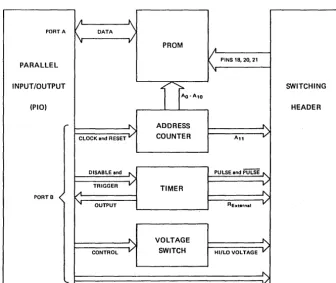
Figure 1 is a block diagram of the
pro-Micro Cornucopia, Number 18, June 1984
grammer. The general purpose PIO on the Kaypro is used to drive the program-mer, with port A handling the bidirec-tional data exchange and port B control-ling the programmer's operation.
The current sinking and sourcing re-quirements will allow the direct connec-tion shown to the PROM. Two port B outputs are provided to the header for read/write control.
The PROM socket is just a Zero Inser-tion Force (ZIF) socket with all the pins except 18,20, and 21 permanently wired to signals. Connections to these last three pins are determined by the type of ROM being programmed.
The address counter provides the PROM address; this function is best han-dled with hardware since most PROM programming is done sequentially. The 12-bit binary counter gets its input from 2 bits on port B. One bit is used for reset-ing the counter, the other for countreset-ing.
[image:7.620.219.556.445.728.2]The first 11 address bits (AD to AID) are wired to the PROM, All is routed to the header. The counter may be made of any combination of binary counter IC's as
Figure 1 - EPROM Programmer Block Diagram
It ...
PORTA 1/ DATA \
1\ /
P.O. Box 223
Calverton, NY 11933 516-369-7334
long as 12 bits of output are provided, a common reset line is used, and all bits clock on the same edge.
The Timer
The timer is a monos table circuit which provides the programming pulse to the PROM; the programming pulse-width is RC controlled. The timer has 2 port B outputs for reset/disable and trig-ger, and 1 port B input for timing control to inform the software when the pulse has completed.
The timer output to the header is both normal and inverted, since 2716s and 2732s require opposite types of program-ming pulses. Another timer line is sup-plied to the header for use with the tim-ingresistor, so differentpulsewidths can be used for different EPROMs.
Voltage Control
The Voltage Switch provides two ad-justable voltage levels. One port B out-put is used to control voltage level selec-tion. The high voltage is generally
(continued next page)
"
vPROM
A
V PINS 18. 20. 21
PARALLEL 1\
'i
INPUT/OUTPUT
f}-A"
SWITCHING(PIO) HEADER
r -" ADDRESS
'"
'-I
CLOCK and RESET v COUNTER An v
DISABLE and " PULSE and PiJffi
"-TRIGGER V TIMER V
A
"-PORTB
'"
OUTPUT RExt.,no' V"
VOLTAGE"-CONTROL V SWITCH HIILO VOLTAGE V
...J'"
'-READ/WRITE V
EPROM PROGRAMMER FOR THE KA YPRO
-(continued from page 5)required for programming and the low voltage for reading.
The following resistor values assume a .1 uFd capacitor and the LM555 being the timer chip. Note that the pulsewidth with 330K is about 37ms which is below the 2716 minimum specification of 45 ms, however no problems have been experi-enced with these values.
A 2716 header is created by: a. Jumpering 1 to 16 b. Jumpering 2 to 15
c. Jumpering 4 to 14
d. Adding a 330K resistor between pins 7 and 10
A 2732 header is created by: a. Jumpering 12 to 16 b. Jumpering 4 to 15 c. Jumpering 3 to 14
d. Adding a 330K resistor between pins 7 and 10
A 52B13/2816 header is created by: a. Jumpering 2 to 16
b. Jumpering 5 to 15 c. Jumpering 12 to 14
d. Adding a lOOK resistor between pins 7 and 10
Program
The program is menu driven with the following options supplied:
A. Check that each PROM address contains FF Hex; any address that does not contain FF, is reported to the screen. B. Select 2716 2K UV EPROM type. This is the default PROM type, and this selection is only necessary when C or D has been previously selected.
C. Select 2732 4K UV EPROM type. This selection changes the default values stored for the 2716; when programming 2732's this must be the first selection made.
D. Select INTEL 2816A or SEEQ 52B13 2K EE PROM type. This selection chang-es the default valuchang-es stored for the 2716 and erases the EE PROM. When pro-gramming 52B13's or 2816's this must be the first selection made.
E. Read a file into memory: Load a file into the programming data area at 4000H.
F. Create a File from memory (File size
= PROM size). The file written is an im-age of the programming data area.
G. Program a PROM with memory data: located at 4000H. This takes about PROMSIZE*(PROGRAMMING PULSE) seconds. A verify is NOT performed since this is a reliable operation.
H. Read a PROM into memory: For copying or verification purposes.
I. Cyclic Redundancy Check on mem-ory data: A quick and useful check on the programming data area's contents.
J.
Dump of memory data: Similar to DUMP.COM, and again no line control is provided. The listed addresses are re-lated to the PROM, showing -OOOOH though the data really begins in memory at4000H.Caution
One caution. During power up and power down on the PROM, the pro-gramming voltage MUST be turned on AFTER VCC is applied and the program-ming voltage must be turned off BE-FORE VCC is removed. Since both sup-plies are switched, this is an important caution. .
I know of no simple way to prevent the operator from applying the power incor-rectly (a PROM costs about $4, the pro-tection circuit shouldn't cost too much more for THIS type of programmer). Al-so, there is no protection against insert-ing a ROM backwards. Either error will destroy the ROM.
Schematic
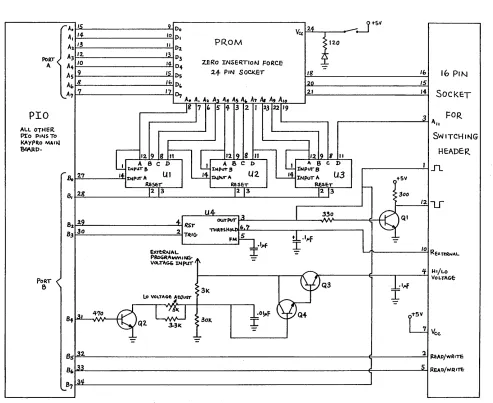
Figure 2 is the schematic. Note that power to the ICs is not shown and that .01 uFd capacitors should be used across the power pins. The circuit is based on the parts I had on hand.
The external programming voltage can be any adjustable supply with a range of 20 to 27 volts that is capable of delivering at least 50 milliamps. A TL431 works fine.
The four transistors I used came from the parts box, Ql and Q2 were un-marked NPN's in a TO-5 can, Q3 and Q4 were 2N1490's because they were on hand and the TO-5s were failing.
ur
to U3 are 7493's and U4 is a LM555. Addi-tional components needed:1-24 pin Zero Insertion Force Socket
2-40 pin ZIFS if the Kaypro Connec-tion is used (figure 3)
l-switch
l-Light Emitting Diode in the color of your choice
3-bypass capacitors, .01 uFd, at least 1 for the 7493's, PROM, and LM555
?-16 pin headers, depends how many PROM varieties being pro-grammed
Miscellaneous support items such as a board, wire, soldering iron, burn oint-ment, etc.
Construction
The programmer requires two parallel I/O ports, and the simplest way to obtain access to them is to use the general pur-pose PIa (U54) socket. To accomplish this, I soldered a 40 pin ZIF socket to a 40 pin header and plugged it into U54's socket.
When I need a parallel printer, I plug the PIa chip into the ZIF socket. When I use the programmer, I plug a 40-pin wire-wrap socket on the programmer board into the ZIF socket in U54 and plug the PIa chip plugs into another ZIF socket on the programmer board.
The ZIF socket on the programmer is soldered to the wire-wrap socket and all pins from the wire-wrap socket except the A and B port pins (see schematic) plug into U54 (see Figure 3). The pro-grammer gets its 5V from the PIa socket.
Someday I'll reprogram the monitor and rewire the main board to shift the printer to the B port on the System PIa since I occasionally experience problems with this mechanically.
The remainder of the programmer is constructed on a 3" by 5" piece of IC pro-totype board.
Software
The software to run this programmer is on Kaypro disk K26. The software in-cludes both the .COM and . MAC files, so you get it as source and ready torun.
Figure 2 -EPROM Programmer Schematic and Header Chart
HEADERS
2716 2732 52813
16 1 12 2
i5 2 4 5
Figure 3 -Socket Detail
0 - - PRoG-RAM ~
Z'FS
r I
REMOVED
WIRE WRAP~
"'"
PORT PINPINS
s
0
-~U54ZIF
5
14 4 3 12 ~ .- .'
,., .. .,..- ~KAYPR.O MAl'" BOAR.D
RExt 330K 330K lOOK (orH~R COMPONE~TS
NOT SHOWN)
rAe It: 9 Do 2.4
JtS'I
Vee J
A, 14 10 D,
PROM
~12.0A1/3 II [)2
i
A3 12. 13 D3
Pot
T <10 14 0-J Z.ERo INSERTION FORCE
A ...
2.4- PIN SOCl<.ET 18 16 16 PIN
As 9 ~Ds
A" 8 1& D" I,n 15
17 21
'"
SOCkETA'1 7
,--0., A. A. 1.2 A, A .. As A A, A. A, A'II
I'
171'
S f 3 2 I 231
22 193 FOR
PIO
1. ..
SWITCHING
ALL OTI-II<R
1>9
'~I2I"~.I
.. "
PIo P,NSTo KAyP(to M41~
HEADER
"Bq4.p.o.
I
' B c l > 1 . B C D
1
I ' 8 C D' n
I INPUT & :tNPIIT B rNPvr 8
r 2.7 I UI l]),UI<IrA U2. 1 rNPUTA U3
( tSV
.80 I~Pur
A~~,-A.ES£;T RE5E:T
to--8, 2g
123
12 1
3 ~3 \,30012Lr
U4
OUTPuT 13
I
330r;?
QI82 2.9 ~ RST
6.'1
83 30 2
TltlG-.".aeSH _
4:.
I}lFI
FMf---:L.
.IJofI
-=-10
Re"T~"'-E1.Tf:RNAL I
C:~~'~I~
q J-I'/LO VOLTA6-£:
PoRT
~Q3
.I,of6 3k
I
l.D VOLTAGf:
J.OJun-470 'llr.
J
t·~F
( Q4G
8 .. 131
..
....
Q2....
30k 3.31<)-Vee.
-=-
.:-8s 32- :1 ~AD/wA'TS
8(,133 5 REAO/WRrTc
,y'l
1~4Digital Plotters, a Graphic Description
By Gary Shipley
A
bou t eight years ago, as a very green technician working for a micro-wave company in California, I was given an analog X-Y plotter to repair. It was used to plot the output characteristics of klystron, traveling wave, and backward wave oscillator tubes.I was fascinated! My immediate reac-tion was "With two A to D converters, I could interface it to my Intel SDK-85 and create works of art."
A Costly Plot
Then I learned how much the thing cost. The cheap ones were around $2500; I decided that I didn't need a plotter so badly after all.
About this time, BYTE magazine pub-lished several articles about digital plot-ters. They were mostly home made and had poor resolution. They always had complicated hardware, even more com-plicated software, and were still expen-sive. The only one which I could afford was built from a modified ETCH-a-SKETCH! I decided to wait a little longer.
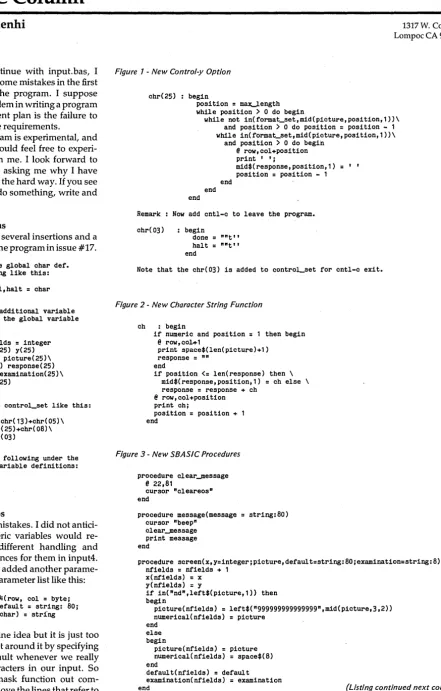
[image:10.613.87.559.534.727.2]Two years ago, I became interested in doing custom computer aided printed circuit design. I originally thought that I could do the design on my Exidy Sorcer-er using its high resolution graphics and then dump the design to a dot matrix printer, but decided that the output would not be high enough quality.
Figure 1 -Plotted PC Board Layout
71 . .
D
D
D
A search for the "ideal computer" led me to the Big Board and a software house suggested I buy a digital plotter. I bought some design software, and here I am. A Cheap Plot
The plotter that I bought is a Mauro Engineering model MT -350 which cost $800. With it, I can create color pictures, camera ready printed circuit artwork (on mylar!), schematics, and even text on pa-per up to 11 inches by 17 inches. The plotter paid for itself fairly quickly. What an excuse to buy a toy!
The interface that the plotter uses is a parallel 8-bit bus from the BB port 2. Each line actually controls a stepper mo-tor control line. I use a machine language driver which does nothing but draw straight lines with a resolution of 200 steps/inch. With that kind of resolution, I could put a whole screen of an APPLE or IBM in an area of about two inches square!
The Plot Quickens
Digital plotters have come a long way since those early days when I was repair-ing test equipment. Costs have come down a lot. I know of a least three high quality digital plotters which list for un-der $800. Radio Shack has a miniature four-pen model for about $249. They are much more intelligent than my plotter.
781 West 2300 North Provo UT 84604
Some of the functions available on to-day's plotters are:
1. Text generation in several fonts and sizes. Text can be printed upside down, vertically, and at almost any angle. Some models can even act as the LST: device for CP/M.
2. Circle and polygon functions. These plotters accept commands and generate shapes all by themselves. They can shade or fill an area such as a circle or box very quickly without computer over-head.
3. Automatic scaling. These new plot-ters can be told both the physical area on the paper for the plot and the scale to use. For example, an area of 4 inches by three inches can be sectioned off (hard clip) and then scaled to something like 1980 to 1984 (in years maybe) on one axis and -100,000 to 100,100 (dollars?) on the other axis. Some plotters will even gen-erate frames, grids, and tick marks. The plotter handles all overhead. On my sys-tem, I had to write all of that software.
4. Some plotters can change up to eight pens under computer control. This allows different colors and line widths. A more expensive option is the ability to change paper without human interven-tion.
5. Many plotters will return the pen position to the computer, so you can use the plotter as a digitizer.
la
a
D D D
1731
'D""
II
.~--D
a
aD D D D
I
6. Resolution varies from 200 steps/ inch to 1000 steps/inch. Compare that to any graphics terminal you have ever seen! And remember that the plotter draws a continuous line with a pen. There are no 'jaggies' as there are on graphics terminals.
Not all plotters have all of these func-tions, and of course, some will be better than others. My opinion is that Hewlett-Packard plotters win hands down. They sell a very nice model with six pens for under $1300.
Interfacing to a digital plotter these days is fairly simple. The common inter-faces are RS-232, GPIB (has anyone ever made a GPIB interface for the BIG BOARD?), and Centronics parallel. If
you can talk to a printer, you can talk to a plotter!
Plotting Along
Communication with a plotter is also fairly simple. Most plotters these days communicate via ASCII text. Com-mands are in English and are descrip-tive. Examples are 'PEN 1,' 'SCALE,' 'FILL,' 'DRAW,' 'BOX,' and 'CIRCLE.'
[image:11.618.39.571.233.744.2]If you want to draw a circle with a radi-us of 200 units (according to the current scale) at location 500, a typical command would be 'CIRCLE 500,200.' Another command could shade in the circle in a different color.
Figure 2 -Sample Plotted Design
Micro Cornucopia, Number 18, June 1984
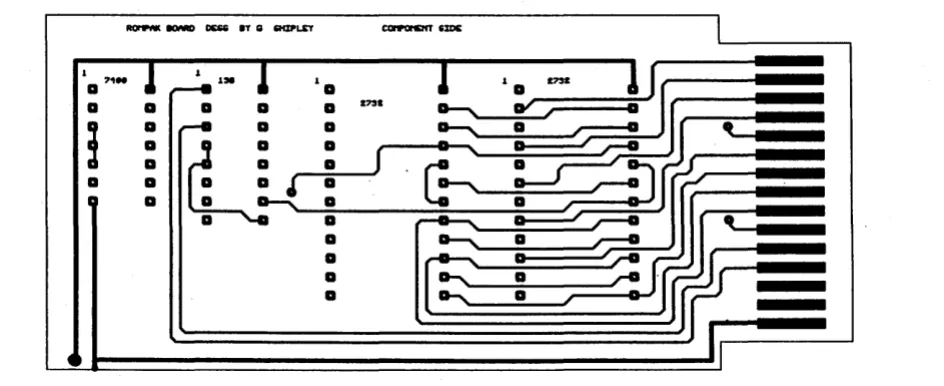
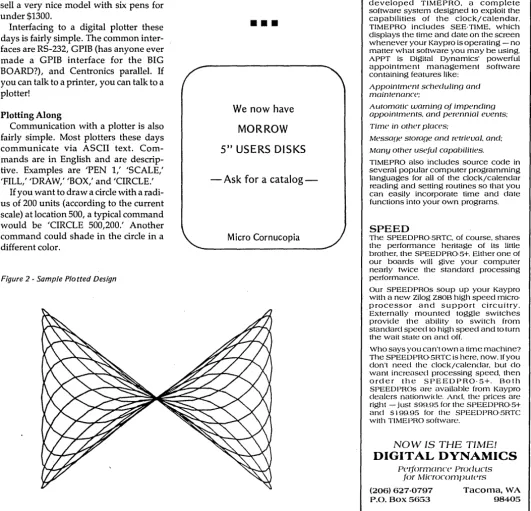
The first sample plot which I have in-cluded is one side of a ROM PC board which I designed using 2732s. The sec-ond plot is something I did with BASIC. In summary, a digital plotter makes an excellent addition to a home or business as a tool for creating effective data pre-sentations. It is easy to interface to your computer, has powerful features built in, and can be downright fun.
•••
We now have
MORROW
5" USERS DISKS
- Ask for a
catalog-Micro Cornucopia
Digital Dynamics'
SPEEDPRO-5RTC It's
time for your Kaypro.
Be the master of your time by equipping your Kaypro 11 or 4 with our SPEEDPRG '5RTC accessory board and TIMEPRO software. Offering the high speed performance of our popular SPEEDPRG 5+. the SPEEDRRG5RTC adds the fourth dimension to your computing capabilities - TIME! With its built·in. battery backed·up clock/calendar and powerful appointment tracking software. the SPEEDPRO'5RTC makes your Kaypro work like no Kaypro has before.
TIMEPRO
To compliment the clock/calendar of the SPEEDPRO-5RTC. Digital Dynamics has developed TIMEPRO. a complete software system designed to exploit the capabilities of the clock/calendar . TIMEPRO includes SEE-TIME. which displays the time and date on the screen whenever your Kaypro is operating - no matter what software you may be using. APPT is Digital Dynamics' powerful appointment management software containing features like:
Appointment schedulinf} and maintenance;
Automatic warning of impending appointments, and perennial events; Time in other places;
Messaf}e storage and retrieval, and: Many other useful capabilities.
TIMEPRO also includes source code in several popular computer programming languages for all of the clock/calendar reading and setting routines so that you can easily incorporate time and date functions into your own programs.
SPEED
The SPEEDPRO-5RTC, of course, shares the performance heritage of its little brother. the SPEEDPRO-5+. Either one of our boards will give your computer nearly twice the standard processing performance.
Our SPEED PROs soup up your Kaypro with a new Zilog Z80B high speed micro· processor and support circuitry. Externally mounted toggle switches provide the ability to switch from standard speed to high speed and to turn the wait state on and off.
Who says you can't own a time machine? The SPEEDPR05RTC is here. now. If you don't need the clock/calendar, but do want increased processing speed. then order the SPEEDPRO-5+. Both SPEED PROs are available from Kaypro dealers nationwide. And, the prices are right - just S99.95 for the SPEEDPRO-5+ and S 1 99.95 for the SPEEDPRO-5RTC with TIMEPRO software.
NOW IS THE TIME!
DIGITAL DYNAMICS
perrormonce Products .1()r Microcomputers
(206) 627-0797 P.O. Box 5653
Tacoma, WA 98405
lID
Byte: A Primer
By Norman Doty
This is a short primer on use of the I/O byte function of CP/M. The 110 byte is one of those little-understood portions . of this popular operating system that
few people are willing to talk about. This article is very general so that it will be easy to understand, but I cover the things you need to do to use this handy function. In particular, I'll cover the printer fUnction, but the other I/O byte functions are very similar.
The 110 byte is justwhatit's called, it is one byte in memory, located at 03H. Its 8 bits are usually divided up as follows:
Bits Device
0, 1- Console (CON:) 2,3- Reader (RDR:) 4,5- Punch (PUN:) 6,7- List (LST:)
All this is probably very confusing. Two bits don't look anything like a con-sole (or a punch). Well, with two bits you make four choices so when your pro-gram outputs something to the console, it calls CP/M. CP/M then looks at bits 0 and 1 in the I/O byte (console output re-member) to see where to send the out-put.
If, instead, you were outputting to the List device, CP/M would look at the con-tents of bits 6 and 7 to find out where to send the data.
Now you may be wondering why Console doesn't just go to the console and List go to the printer and so forth. Well, this is CP/M's attempt to redirect input and output. In other words, the I/O byte makes it easy to send data that would normally go to the terminal (con-sole) to a serial port (punch) or a printer (List). You don't have to rewrite your program, you just change the appropri-ate two bits in byte 3.
STAT.COM (on the system diskette) lets you can change the two bits for each device. The default is usually 00 binary . (TTY).
A Two-bit Switch
Remember, you are only changing two bits to switch to a different option for the specific device. The instructions on how to use the STAT. COM program are in the CP/M manual"An Introduction to CP/M Features and Facilities." (Believe it
3242 Walden Ave. #4 Depew NY 14043
or not, their explanation even makes sense).
Translation for humans: These are the options and changes
that STAT displays and allows for each device.
CON: - Console .
BAT: - This selection makes the sys-tem input from whatever is assigned to the RDR: and output to whatever is de-fined as the PUN:.
Contents: 00 01 10 11 Loc.
0,1 CON:=TTY: CRT: 2,3 RDR:=TTY: PTR: 4,5 PUN:=TTY: PTP: 6,7 LST:=TTY: CRT:
BAT: UCl UR1: UR2 UP1: UP2 LPT: ULl
CRT: - Video terminal (stands for Cathode Ray Tube).
[image:12.618.241.560.239.686.2]LPT: - A printer (stands for Line PrinTer).
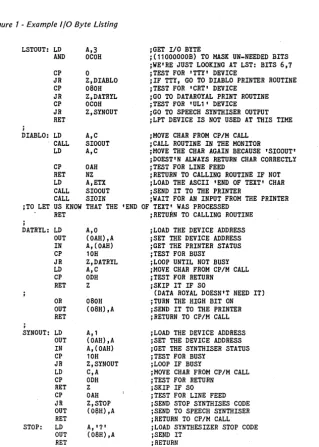
Figure 1 -Example I/O Byte Listing
LSTOUT: LD A,3
AND OCOH CP 0 JR Z,DIABLO CP 080H JR Z,DATRYL CP OCOH JR Z,SYNOUT RET
j
DIABLO: LD A,C CALL SIOOUT LD A,C CP OAH RET NZ LD A,ETX CALL SIOOUT CALL SIOIN JTO LET US KNOW THAT THE
RET
,
DATRYL: LD A,O OUT (OAH),A IN A, (OAH) CP 10H JR Z,DATRYL LD A,C CP ODH RET Z OR 080H OUT (08H),A RET
,
SYNOUT: LD A,' OUT (OAH),A IN A,(OAH) CP 10H JR Z,SYNOUT LD C,A CP ODH RET Z CP OAH JR Z,STOP OUT (O~H) ,A RET
STOP: LD A, '7'
OUT (08H) ,A RET
j GET I/O BYTE
j(11000000B) TO MASK UN-NEEDED BITS jWE'RE JUST LOOKING AT LST: BITS 6,7 JTEST FOR 'TTY' DEVICE
jIF TTY, GO TO DIABLO PRINTER ROUTINE JTEST FOR 'CRT' DEVICE
jGO TO DATAROYAL PRINT ROUTINE JTEST FOR 'UL1' DEVICE jGO TO SPEECH SYNTHISER OUTPUT jLPT DEVICE IS NOT USED AT THIS TIME jMOVE CHAR FROM CP/M CALL
jCALL ROUTINE IN THE MONITOR
jMOVE THE CHAR AGAIN BECAUSE 'SIOOUT' jDOEST'N ALWAYS RETURN CHAR CORRECTLY JTEST FOR LINE FEED
jRETURN TO CALLING ROUTINE IF NOT jLOAD THE ASCII 'END OF TEXT' CHAR jSEND IT TO THE PRINTER
jWAIT FOR AN INPUT FROM THE PRINTER 'END OF TEXT' WAS PROCESSED
jRETURN TO CALLING ROUTINE jLOAD THE DEVICE ADDRESS j SET THE DEVICE ADDRESS jGET THE PRINTER STATUS ;TEST FOR BUSY
jLOOP UNTIL NOT BUSY ;MOVE CHAR FROM CP/M CALL JTEST FOR RETURN
j SKIP IT IF SO
(DATA ROYAL DOESN'T NEED IT) ;TURN THE HIGH BIT ON ;SEND IT TO THE PRINTER jRETURN TO CP/M CALL jLOAD THE DEVICE ADDRESS jSET THE DEVICE ADDRESS jGET THE SYNTHISER STATUS JTEST FOR BUSY
jLOOP IF BUSY
;MOVE CHAR FROM CP/M CALL JTEST FOR RETURN
jSKIP IF SO JTEST FOR LINE FEED jSEND STOP SYNTHISES CODE jSEND TO SPEECH SYNTHISER jRETURN TO CP/M CALL jLOAD SYNTHESIZER STOP CODE jSEND IT
jRETURN
LST: - A printer (stands for a LiST de-vice).
PTP: - Paper Tape Punch (often a cas-sette tape output).
PTR: - Paper Tape Reader (often a cassette tape reader).
PUN: - PUNch device (often an alter-nate printer, NOT a play on words).
TTY: - Typewriter terminal (stands for TeleTYpe).
UCI: - Another console (a human op-erated input/output device).
ULI: - Other printer or serial output. UPI/2: - Other serial output devices. URI/2: - Other serial input devices. You can use any device definition you want since CP/M doesn't use them for built-in function.
Port-of-Call
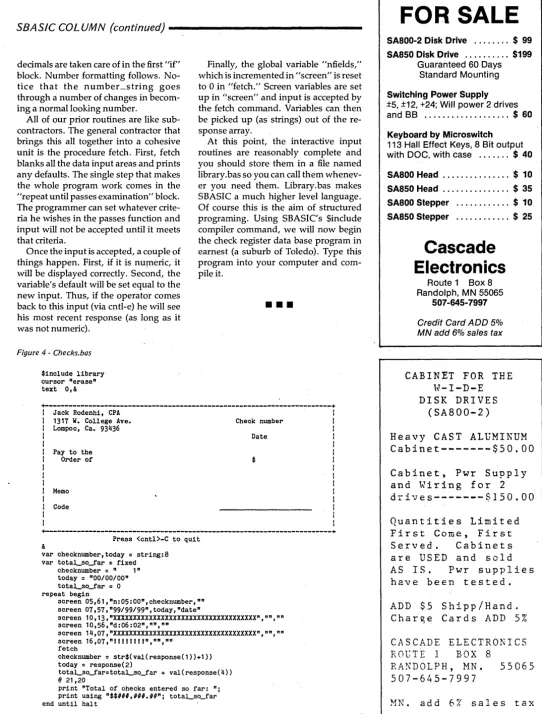
See Figure 1 for an example of how I use them in my CBIOS to control the printers and voice synthesizers on my system. It is written for use with the CROWE assembler.
Note on Figure 1 that the line printer and the speech synthesizer both use the same ports. I use the high nibble (4 bits) of port B for the status bits and the low nibble of port B for the device address, which is decoded with a 74154 4 to 16 line decoder.
•••
Micro Cornucopia, Number 18, June 1984
GET IN THE
F A
S
T LANE
WITHOUT BURNING YOUR WALLET
with
a
U. S.
ROB
0
TIC
S
1200 BAUD MODEM
Product:Auto Dial 212A: Password: Password 300: Telpac: Lamp:
Features: Cash Price: 1-4 5+mix List: 1200/300 baud, auto answer/dial •• $425 •. $405 •• $599 Coat-pocketable Auto Dial 212A ... $339 •. $319 .• $449 300 baud version of Password . . . $159 .• $147 .. $199 Modem Software from USR .•....••••. $69 .•. $59 .•. $79 CPM/80 Modem Software from Widener Consulting.$20 Latest Technology---Fewer Parts---Two Year Warranty All units are direct connect, full or half duplex, 1200/300 baud, software compatible with the Hayes Smartmodems. 1'he Auto Dial has two RJIIC jacks, analog self test, status LED's and a metal case~
Password has a smaller plastic case, no status LED's and a built-in RS232 cable with choice of male or female connector. Password 300 available soon. S-100 and IBMPC board modems also available. Lamp is based on YAM from BBUD #9.
---NEW PRODUCTS FOR BB AND
KAYPRO!---All those who have lusted after several add-ons for the Big Board I, but been discouraged by the shortage of parallel ports, take notice! Now you can run all the add-ons at once with the
Parallel Port Expander . . . $189 assembled, $59 board + instructions - eight I/O ports, compatible with Big Board 1&11 and Kaypro II&IV. - operate 2 parallel printers, rom burner, hard disk, and Dynadisk! - and if you are a real hog, parallel four expanders for 32 ports! - bios with three printer drivers (1 serial) selected by IOBYTE. - installation instructions for all mentioned devices included. - adapt Big Board add-ons to the Kaypro.
THE ULTIMATE
255 CONTINUOUS CHARACTER AND REVERSE VIDEO CURSOR BIG BOARD I AND KAYPRO'II/IV MOD
Now you can have a significant increase in the writ.ing power of your system, with the ability to key in, display, edit, and print 212 characters, including continuous line graphics. Other features are blinking or constant reverse video cursor, charact.er sets to match NEC 8023 and C.ltoh Prowriter, key labels, reverse video fields, install program for Perfect Writer, a growing library of software, and improvements in the monitor rom. The mod comes assembled and tested and requires about 45 minutes to install. Software included to define custom characters and down-load them to printers. Coming features include graphics software, circuit board layout tools and prototyping services, and H19 and IBMPC emulation.
NEC Extended character set (C.ltoh has same set, just re-arranged):
~ •• ~ /. t,lo2.J. ... ~+ ( ) "CQ;?'y4S~~ PO"'Oro~Ki:a:V.<2.j3t;1)e 1±U1("~$-'t<tW~.J7 S91. .=O;X"O;A~
_ _ _ • • • • • 1 ,~ • • • +..L-r-l.~-- 1.1 r., L.J r-'
'----=
~::t:::i ~ .. .., ~. • • ~ • 0 / " X ._. : ...;...,.. ··1 I· '';'The Ultimate Video Mod ....••...•••••.••••...•••••..••••.••• $189.00 Perfect Writer .•...•....••....•...•....•••••••••.•••.• $209.00
Cash price with U.S. shipping~ Visa/MC/Net30 add 3%, COD $6. Dealer inquiries invited - quantity discounts available.
Widener Consulting
2835 NE Brogden
Hillsboro, OR 97124
(503) 648-0363
Sticky Kaypros
By Humphrey Liu
With the advent of video display ter-minals (VDT's), moving a visual cursor on the screp.n became important. Cursor keys were a natural way to do this.
For some activities, however, analog, or analog-type controls, are the most us-able. For example, it might be interesting trying to steer a car with push-buttons.
Likewise, video games use several types of analog controllers. These in-clude joysticks, game paddles, and trackballs.
Joystick or Switchstick?
Most home video games use a simple type of joystick called a "switch-stick." The switch-stick is simply four momen-tary on/off switches that are arranged in a directional configuration and are con-trolled by a central stick. Switch-sticks can only control direction and not true position.
In home video games, with the proper software decoding, these switch-sticks can also be used to control other move-ment parameters. For example, which switch is closed can give direction infor-mation while how long it is closed can determine velocity.
Some computers, such as the Spec-travideo, build joysticks into the key-board. But, alas, my own Kaypro II has but four cursor control keys, and, horror of horrors, they're not even arranged in a diamond pattern!
Key Organizations
it occurred to me one day, that if a sim-ple keyboard is only an array of switch-es, and a joystick is similarily an array of switches, why can't the latter be used in place of the former? Since the warranty on my machine had just expired, and I am the curious type, only six screws kept me from finding out the answer. (Kaypro II owners: the plastic tabs on the sides of the keyboard need not be removed.)
A quick look inside the keyboard showed that it was indeed a simple key-board. The keys contained mechanical switches, not any of the more sophisti-cated capacitance or magnetic jobs. So far, so good.
Off to the store I went in search of the cheapest joystick. After a bit of shop-ping, I happened upon a Taiwanese copy of the Atari 2600 in a toy store for a
[image:14.617.232.571.115.267.2]101 Carrollton Terrace #4 Charlottesville VA 22903
Figure 1
-Joystick Pins
Figure 2 - Joystick Connections
5 4 3 2 I ' ( 0 •
• •
1
•
0•
~~~~
t
1
I
9 a 7 6 1- UP
2-DOWN 3-LEFT 4- RIGHT 6-FIRE
a-COMMON KEYBOARD
mere $7. The box indicated that the joy-stick was usable on Atari, Sears and Commodore Vic 20 home computers.
The connector looked familiar to me, much like the common DB-25 connector but smaller and with only 9 pins. I had seen this used on some computers as a serial connector.
A trip next door to Radio Shack for the male half of this connector proved equal-ly successful (RS part #276-1537) and in-expensive at only $1.99. Total invest-ment was less than $10.
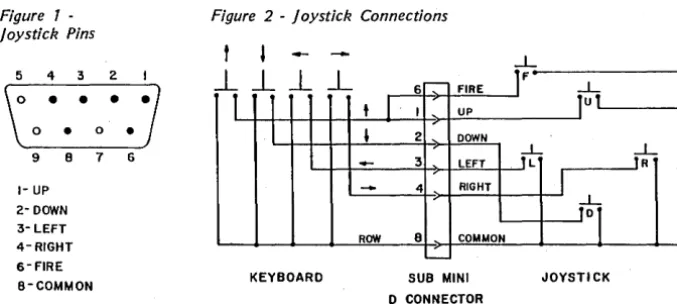
Inside the joystick, I found the five switches (4 directional and 1 fire button) and traced them to the female connector with an Ohm meter. The pins for the joy-stick connector (looking into the female half) are shown in Figure 1.
As seen in the righ t half of figure 2, the five switches all connect to a common wire (pin 8) when closed. Inside the key-board I found a similiar situation for the four cursor control keys. The keyboard apparently uses a row by column decod~ ing scheme and fortunately, since the cursor keys are in the same row, they all have one common connection.
Figure 2 shows the overall schematic of the connections that had to be made. Initially, I left the fire button on the joy-stick unconnected.
Configuring it as the space bar would have been great since that key is used as the fire button in one game that comes with Kaypro, but unfortunately the space bar does not share any common connections with the cursor keys. I'have since connected the fire button so that is identical to the up position of the joy-stick. This has turned out to be quite usa-ble for game playing.
6 - FIRE IF -L
t
I·
I , UP1
ut
,
2 DOWN-
3 , LEFT,t-
~
I
-
4 RIGHT,
1
ROW a COMMON
L
-SUB MINI JOYSTICK D CONNECTOR
Stick Construction
Only three parts are needed: the joy-stick, the connector and some wire. I used some six-conductor ribbon cable that I had lying around. A couple of ma-chine screws, nuts and spacers are need-ed if you wish to mount the connector inside the case as I eventually did.
Its easy to see the cursor key solder pads on the bottom of the keyboard printed circuit board. Soldering in the connections was staightforward.
After surgery, it was "plug it in and try it out." At first, I left the ribbon cable loose and had the connector peeking out from the edge of the numeric pad. But after it all worked as it should, I spent some time carefully drilling and filing, and mounted the connector inside the case.
Configuring the Kaypro II
One nice feature of the Kaypro II is its ability to reconfigure the cursor control keys to suit the requirements of the ap-plication software. Different word proc-essors may use different ASCII charac-ters for cursor control, for example. The default cursor control characters for the Kaypro II are shown in figure 3.
First, I tried the joystick out with Per-fect Writer. Without any changes at all, I was able to move the cursor around with joystick. I have always had some trouble with linear arrangement of the cursor keys, but now, with the joystick, direc-tions mean something.
ADD,
MOR TO YOUR
KAYPRO®
STOR.MOR L VU.MOR"
~~1iT:~~EDIA ~ "'~,,- ' '''~ E-Z VIEW 2·YEAR WARRANTY= .
=
S '~ COPY STAND DELPHI 15 MB HARD==
.1 "12"x17"ABS PLASTIC DISK SYSTEM ~~== 7 "MOUNTS EASILY ON 'Enclosure 'Switching.. I ~ FRONT EDGEPower Supply - - ONLy ... $1995 'SASI Controller 'WINIF Host Adapter 'Also for Chameleon, Compaq, Otro 'Cables 'CP/M 2.2 Software
'Supports most CP/M Computers COMPONENTS/KITS AVAILABLE
15MB SYSTEM ... $1999.00
TWICE.Mo'R UPGRADE YOUR II or 4 to a 4 or 8 ... twice the storage on FLOPPY DISK DRIVES
'DSDD Drives (390K) ... $22500
'QUAD DENSITY 96TPI (794K) ... $27900
CLlP.MOR LEXAN C-THRU PAGE HOLDER SUPPORTS NOTEBOOKS, BOOKS'-'--'~ PAPERS 4"x4"x11f2"
ONLy ... $495 .. ""'"), STAND.MOR Solid Oak KAYPRO®
\~"''''.'''''.''''- ".J'~
STAND" ANGLED FOR E - Z - < : , VIEWING 20"x14" ... $5995PLAY.MOR
ROM GENERATES 23 GAME CHARACTERS 'Patch into PAC MAN,
LADDER, SPACE INVADERS, STAR TREK
'1 YR WARRANTY
ROM ... : ... $2495 ACCENT.MOR
ROM & PATCH FOR WORDSTAR™
*DISPLAYS/PRINTS-DIACRITICAL ACCENTS *French *Spanish *German ael DUn
*E-Z Installation *1 YR WARRANTY
*SUPPORTS PRINTERS
.lei aun
with Vertical Motion aetou~Index Control a~16Qh ROM ... $20000! i l..$«; ... &* () _
+-1234567890-=' DESCRIPTION OTY COST Total WT SHIP BEE,MOR ENTERPRISES
22-182nd Avenue East Sumner, WA 98390 (206) 862-6310
/MC//VISA/ 9-5 Pacific Time
Terms: M/C, VISA, COD, Money Order Registered Check. Two week delay for checks.
Shipping: UPS in Continental US P.P. insured Outside US, Prepaid. Tax 7.8% for Washington Residents Kaypro is a registered Trademark of Kaypro Corp., WordStar is a trademark of MicroPro PacMan is a trademark of Atari, Ladder Yahoo Software, Chameleon by Seequa Campaq Computor Corp, Otrona Advanced Systems.
t
~
~ ~Default OB OA 08 OC
CATCHUM, 38 32 34 36 LADDER ( 8) (2) (4) (6 )
ALIENS 20 2E 2C 2F
[image:15.620.43.561.31.392.2](SP) (
.
) (,
) (I)Figure 3 -Cursor Key Assignments (HEX)
hold the stick in one position and have the auto repeat move the cursor too rap-idly.
Games, however, are a different story altogether. The Kaypro II now comes with a games disk. Three of the games use key strokes to move the protagonist aroun<t.
Two of these, LADDER and CAT-CHUM use four keys in the numeric pad to control movement. The other game, ALIEN, uses three keys in the bottom row near the space bar for movement.
I had always had some trouble keep-ing those keys straight. But now, with
Micro Cornucopia, Number 18, June 1984
STaR. MaR Delphi 15MB Hard Disk 2 TWICE. MaR DSDD 390K Floppy 3 TWICE. MaR Quad Den. 96TPI 794K 4 VU.MOR COpy STAND
5 CLIP. MaR LEXAN PAGE HOLDER 6 STAND. MaR SOLID OAK STAND 7 PLAY.MOR GAME ROM
8 ACCENT.MOR Diacrit. Accent ROM
Name Tele #
Address
City ST
D
Master Ch0
VISAthe joystick, things are much, much bet-ter. I was even able to break 10,000 points in CATCHUM, something I just couldn't seem to do with the keys.
But to play any of these games with the joystick, some simple key redefini-tion is necessary. This is easily accom-plished with the CONFIG program on the CP/M system diskette supplied with the Kaypro. Suggested cursor key as-signments for the two sets of games are also in figure 3.
It is unfortunate that the joystick pushbutton could not be made to gener-ate the space code. Then it would be usa-ble with both LADDER (as the jump but-ton) and ALIENS (as the fire butbut-ton). It is also unfortunate that the CONFIG pro-gram does not take effect immediately, but requires the change to be written to disk B and that the disk be cold-booted.
One simple solution is to make two separate disks with the two groups of games on each. Another solution is to have programs which can change key definitions on line. Presently, I do not have the technical details to write these programs, but would be interested if an-yone has this information.
$1,999.00 12# $6
22500 4 $3
27900 4 $3
1995 3 $3
495 11 NC with VU.MOR
5995 12 $6
2495 $2
20000 $2
SUB TOTAL Tax/Shipping ZIP Total
Expiration Date
Editor's note:
Most of the games on our users' disks have the information required in the. DOC files to redefine what inputs the games need for direc-tional control, so the games can be reconfi-gured rather than your cursor control keys. (For example PACMAN on disk K3 and ALIENS on disk K9).
Another interesting note about this joy-stick modification, compared with the joyjoy-stick article in the last issue of Micro C, is that MicroSphere has a new color board that will
work on the Kaypro 10 and new Kaypro 4's. This board actually runs off the SIO instead of the PIO so the joystick capabilities as de-scribed in issue #16, "Extending MicroS-phere's Color Graphics System", no longer apply to this new board.
The joystick described in this issue will
work fine with new or the old color graphics board since, in the absence of a joystick, the cursor control keys are used to determine di-rections.
•••
Pascal Procedures
By John P. Jones
Many times I have been asked if I ev-er use BASIC for programming. The an-swer is no, not any more, and in this col-umn we will look at why.
BASIC Interpretation
Speaking to friends who still use BAS-IC routinely, I found that they prefer the language because of its convenience. The most popular BASICs are interpret-ed and have a built-in source interpret-editor of some kind, eliminating the need for a separate compile before execution. This makes the edit/test cycle in program-ming very fast, especially since most BASICs reference erroneous source code by line number.
On the other hand, few, if any, inter-preted BASICs allow for structuring of programs. This means that most pro-grams will require multiple eOTO's and can be extremely difficult to maintain. All variables in interpreted BASIC are global throughout the program, making unwanted side effects more likely.
There are a few BASICs available which allow structured programming and local variables in subroutines, SBA-SIC and CB-80 (CBASBA-SIC) for example. Both require a separate edit and compile of the source before the program can be tested or run. This separate edit and compile requirement has been the major objection to PASCAL among BASIC pro-grammers.
Turbo to the Rescue
Turbo Pascal eliminates this objection. With its built-in editor and ability to compile memory resident source to memory resident executable code, Turbo has many of the speed advantages of an interpreted language. Programs small enough to compile in memory, compile so quickly that the extra step is not a problem. And, if you forget to compile before entering the Run command, Tur-bo will do the compile for you.
To illustrate, let's look at a practical problem that many people would have solved with BASIC.
Recently, I purchased a new printer. After shopping around, I decided the best price/performance ratio in a small dot-matrix printer was the Star Mi-cronics Delta 10. This printer has an im-pressive array of features including a custom programmable character set.
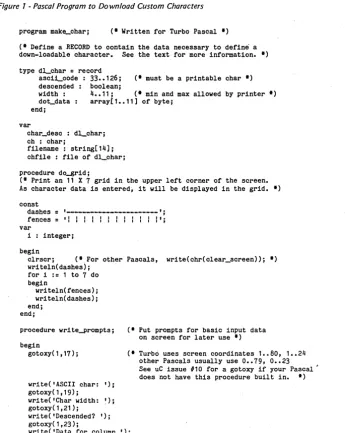
To make downloading custom charac-ters easier, I wrote the program in figure 1. Though not fancy, it gets the job done. That listing along with its companion program to read the data file and send it to the printer were completely written and debugged in less than three hours. For me, at least, the same programs in BASIC would have taken considerably longer.
Ink Dots
Before getting into the specifics of down-loading characters, let's discuss how a dot-matrix printer works.
6245 Columbia Ave. St. Louis MO 63139 (314) 645-1596
Most newer matrix printers use a nine-dot (vertical) print head. As the print head moves across the paper, each wire strikes the paper through the rib-bon producing a visible dot. The basic pattern of dots that makes up a character is usually 5 dots wide by 7 dots high. Since there are nine wires in the print head, there are two additional dots for descenders.
[image:16.618.232.578.297.731.2]In order to improve the quality of print, the matrix is usually expanded horizontally by allowing dots to be print-ed at half dot spacing. This expands the matrix to 9 wide by 7 high but because of
Figure 1 -Pascal Program to Download Custom Characters
program make_Char; (* Written for Turbo Pascal *) (* Define a RECORD to contain the data necessary to define a down-loadable character. See the text for more information. *) type d~char
=
recordasci~code : 33 •• 126; (* must be a printable char *) descended: boolean;
width: 4 •• 11; (* min and max allowed by printer *) dot_data array[1 •• 11] of byte;
end;
var
char_desc : d~char;
ch : char;
filename: string[14]; chfile : file of d~char;
procedure dO-8rid;
(* Print an 11 X 7 grid in the upper left corner of the screen. As character data is entered, it will be displayed in the grid. *) const
dashes
= ,---';
fences = 'I I I I I I I I I I I I'; vari : integer; begin
clrscr; (*.For other Pascals, write(chr(clear_screen»; *) writeln(dashes); .
for i := 1 to 7 do begin
writeln(fences); writeln(dashes); end;
end;
procedure write-prompts; C* Put prompts for basic input data on screen for later use *) begin
gotoxy(1,17); (* Turbo uses screen coordinates 1 •• 80, 1 •• 24
writeC'ASCII char: I);
gotoxy(1,19);
write( 'Char width: '); gotoxyC1,21);
write('Descended? I);
gotoxy( 1 ,23) ;
writeC'Data for column '); end;
other Pascals usually use 0 •• 79, 0 •• 23 See uC issue #10 for a gotoxy if your Pascal -does not have this procedure built in. *)
the mechanics of dot wire movement, you cannot print dots next to one anoth-er horizontally except in full-dot incre-ments.
Descended characters are printed with the lowermost 7 print wires while nor-mal'above the line' characters are print-ed with the upper seven. To provide space between characters, at least one full dot width is allocated. The character then will be a 9 half dot wide by 7 dot
high pattern within a 6 dot wide by 9 dot high grid.
The Star Micronics printers allow you to completely redefine the printable characters by downloading dot data into the printer's memory. Using this meth-od, it is possible to print Hebrew, Arabic, Cyrillic (Russian), or any of the other non-Roman alphabets.
The Delta series can also proportional-ly print these custom characters. With
procedure display_colum~data (col: integer);
(. As each byte of dot data is entered, display it in the grid on screen so that we have some idea of what the character will look like • • )
var
x,y,temp : integer; begin
x := col • 2;
temp := char_desc.dot_data[col]; (. copy dot byte to local variable .) highvideo; (. For another compiler you can omit this statement,
or write a small procedure to write the control sequence for high intensity to the terminal. .) for y := 1 to 7 do (. Only the 7 low order bits are significant .) begin