.
--
AT&T
I ...
~:.:.:.:.:.:.:.:~;~;
... :.:.:.:.:.: .. ::.-I·
:; ... ; ... :. ... .
:.:.:.:.:
·
...
.:.:.:.:. :.:.:. :.:.:.:.:
..
~.~~.~
..
-...
• • • • • • • • • • • • • • • • • • • a •-
'-.
.
·
.
... .
. .
.
. . . .
. . .
. . .
.
. . .
.
I • • • • • • • • • • • • • • • • • • • • • • • • • • • • • • • • • • • • • • • ~.~.
:::::::::::::::::::
::::::::: :::::::::::
..
t._ .••...••••.••••••••••••••••• : •
'
... .
I
· . .
• • • • • • • • • • • • • • • • •. .
.
.
. . .
. . .
.
.
.
~. '.~..
, ••••••••••••••••
a.a.-I e ••••••••• _._._._._ ••••••••••••••• : . - .
~:.:.:.:.
:.:
.:.:.:.:.:.:.:.:.:.:.:.:~~. ,·
...
. . .
. . .
:~:. _..
:.: -:
· '0 · · ·
...
:.:.
:.:.:.:.:.:.:.:.:.:.:.:~...;.~~;;.~
· .
I • • • • • • • • • • • • • , ,
-._.1
· .
•••••••••••••••••••••••
. ... .
... .
... .
307-184
ATlaT 3B2 Computer
UNIX™ System V
Advanced Programming Utilities
Issue 1
Release Notes
©1986 AT&T
All Rights Reserved Printed in USA NOTICE
The information in this document is subject to change without notice. AT&T assumes no responsibility for any errors that may appear in this document.
Table of Contents
Introduction
1Overview 1
Conventions Used in This Document 2
Contents of the Release
3Software Features
5Advanced C Utilities 5
Shared Library Upward Compatibility 6 Extended Software Generation Utilities 7
Source Code Control Utilities 8
SCCS Commands 8
Software Installation Information
10Prerequisites 10
Software Dependencies 10
Storage Requirements 10
Installing APU 11
Software Notes
12Documentation
16Related Documents 16
List of Figures
Introduction
Overview
These Release Notes contain information about the Advanced Program-ming Utilities (APU). APU is a set of tools that are useful to programmers who
• do extensive programming in the C language,
• need tools to do advanced programming and symbolic debugging,
• want to create shared libraries,
• or work in an environment where it is necessary to track and main-tain versions of files and programs.
APU includes the following packages:
• Advanced C Utilities, containing tools such as cxref, drace, cflow, and lint for the C language programmer, plus libraries, and mkshlib (to create shared libraries)
• Extended Software Generation Utilities, containing tools such as m4 (a macro processor), yacc (Yet Another Compiler-Compiler), sdb (a symbolic debugger), lex (a generator of lexical analyzers), and make (a program construction tool)
• Source Code Control Utilities (SeCS), a system used to track changes made to files and to maintain a record of all versions
APU runs on any model of the AT&T 3B2 Computer running UNIX System V Release 2.0 or later releases.
Introduction
Conventions Used in This Document
In this document, certain typesetting conventions are followed when command names, command line format, files, and directory names are described. There are also conventions for displays of terminal input and output.
• You must type words that are in bold font exactly as they appear.
• Italic words are variables; you substitute the appropriate values. These values may be file names or they may be data values.
• CRT or terminal output and examples of source code are presented in
constant-width font.
• In output and source code examples, a backslash (\) at the end of a line indicates that the line wraps around without a break.
• A command name followed by a number, for example, prof(l), refers you to that command's manual page, where the number refers to the section of the manual. These manual pages appear in the
Programmer's Reference Manual, unless otherwise noted.
Contents of the Release
APU comes on three diskettes:
• Advanced C Utilities, Issue 4, on 1 diskette
• Extended Software Generation Utilities, Issue 4, on 1 diskette • Source Code Control Utilities, on 1 diskette
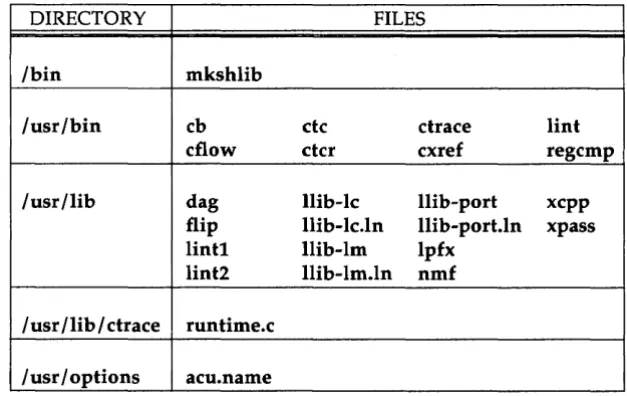
The directory structure and files are presented in the following tables.
DIRECTORY FILES
Ibin mkshlib
lusr/bin cb etc ctrace lint cflow etcr cxref regcmp lusr/lib dag llib-Ie llib-port xcpp
flip llib-Ie.1n llib-port.ln xpass lintl llib-lm lpfx
lint2 llib-lm.ln nmf
I usr I lib I ctrace runtime.c
[image:9.452.74.388.204.402.2]Contents of the Release
DIRECTORY FILES
/usr/bin lex prof yaee
mes sdb
/usr/lib libg.a liby.a sdbs
libl.a sdbp yaeepar
/ usr /lib flex neform nrform
/ usr / options esg.name
/bin make
fete install
Figure 2: Extended Software Generation Utilities
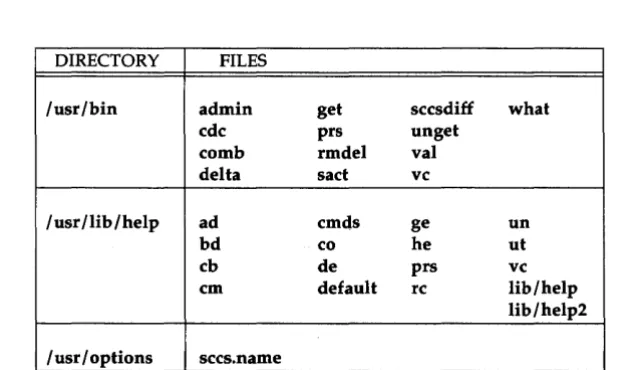
DIRECTORY FILES
/usr/bin admin get seesdiff what
ede prs unget
eomb rmdel val
delta sad ve
/usr/lib/help ad emds ge un
bd eo he ut
eb de prs ve
em default re lib/help
lib/help2
/ usr / options sees. name
Figure 3: Source Code Control Utilities
[image:10.452.98.391.56.251.2] [image:10.452.56.377.304.489.2]Software Features
The following paragraphs contain brief descriptions of the features and some of the commands in this issue of APU. You may be familiar with some of these features, while others may be new to you. Even though this is the first release in which all of these features are part of the same pro-duct, most of these features have been available in other software packages.
Advanced C Utilities
Below are some of the Advanced C Utilities and their functions: cxref is a C cross-reference listing generator
ctrace is a statement-by-statement execution trace facility cflow produces a graph of program dependencies lint detects faulty and non-portable code. cb displays the structure of code
regcmp compiles regular expressions
All of these tools are described in the UNIX System V Programmer's Guide and
the UNIX System V Programmer's Reference Manual.
Software Features
Shared Library Upward Compatibility
Shared library compatibility is an important issue. These paragraphs explain how to build upward-compatible shared libraries. For more detailed information, see the "Shared Libraries" chapter in the UNIX System V
Programmer's Guide.
Comparing Previous Versions of the Library
Shared library developers normally want newer versions of a library to be compatible with previous ones. a.out files will not execute properly oth-erwise. There are procedures that let you check libraries for compatibility. In these tests, two libraries are said to be compatible if their exported sym-bols have the same addresses.
To compare two target shared libraries, we look at their symbols and delete everything except external symbols. Then we create lists of symbol names and values for the new and old libraries, and compare the symbol values to identify differences.
If all symbols in the two libraries have the same values, the libraries are compatible. If some symbols are different, the two libraries may be incom-patible. The procedure for comparing shared libraries outlined above is explained in detail in the "Shared Libraries" chapter of the UNIX System V Programmer's Guide.
Dealing With Incompatible Libraries
When you determine that two libraries are incompatible, you have to deal with the incompatibility. You can rebuild all the a.out files that use your library, or you can give a different target path name to the new ver-sion of the library. The host and target path names are independent, so you don't have to change the host library path name. New a.out files will use your new target library, but old a.out files will continue to access the old library.
You should try to avoid multiple library versions. If too many copies of the same shared library exist, they might actually use more disk space and more memory than the equivalent relocatable version would have.
Software Features
Extended Software Generation Utilities
The following list describes some of the tools in the Extended Software Generation Utilities package:
• mcs(l) is used to manipulate the .comment sections in object files. (.comment sections are created by #ident.) mcs can be used to delete, print, compress, or add to .comment sections.
• The symbolic debugger, sdb(l), is used to examine C language exe-cutable files and core files and provides a controlled environment for their execution. When testing C language programs symbolically, breakpoints can be set at executable lines of the source code. These breakpoints force the program to pause at the specified point so that an inspection can be made of the current state of the program. • The make(l) program helps users build and maintain up-to-date
ver-sions of programs. make simplifies the job of keeping track of which files depend on other files, recently modified files, files that need recompiling after changes, and the sequence of operations needed to make a new version of a program.
• lex(l) generates programs to be used in simple lexical analysis of text. lex reads a file containing specifications of strings to be matched and associated C code. Whenever the lexical analyzer produced by lex matches a specified string in its input, it executes the associated C code.
• yacc(l) (Yet Another Compiler-Compiler) is a software tool that accepts an LALR(l) grammar specification and associated C code frag-ments that represent actions to be taken when a found grammar rule is reduced.
Software Features
Source Code Control Utilities
The Source Code Control System (SeeS) can be used to record all enhancements and changes to files, along with comments on each version, to maintain a history of the changes made. Some sees functions are
• retrieving any recorded version of a file with comments, • storing a new version of a file,
• and comparing two versions of an sees file.
sees takes custody of a file and, when changes are made, identifies and stores them in the file with the original source code and/ or documentation. As other changes are made, they too are identified and retained in the file. Each separate set of changes is called a delta. History data can be stored with each version: why the changes were made, who made them, when they were made.
Retrieval of the original or any set of changes is possible. Any version of the file as it develops can be reconstructed for inspection or additional modification.
SCCS Commands
Here is a list of sees commands: get retrieves versions of sees files
unget undoes the effect of a get -e prior to the file being delta'd delta applies deltas (changes) to sees files and creates new versions admin initializes sees files, manipulates their descriptive text, and
controls delta creation rights
prs prints portions of an sees file in user specified format sael prints information about files that are currently out for edit help gives explanations of error messages
rmdel removes a delta from an sees file. Allows rem.oval of deltas created by mistake
Software Features
cdc changes the commentary associated with a delta
what searches any UNIX System file(s) for all occurrences of a special pattern and prints out what follows it. Useful in finding identi-fying information inserted by the get command
sccsdiffshows differences between any two versions of an SCCS file
comb combines consecutive deltas into one to reduce the size of an SCCS file
val validates an SCCS file
vc a filter that may be used for version control
Software Installation Information
You will use the System Administration menu command, sysadm, to install the Advanced Programming Utilities on your 3B2 Computer.
Prerequisites
The following paragraphs describe CPLU storage requirements and software dependencies.
Software Dependencies
Before you can install and use APU, you must have installed the Direc-tory and File Management Utilities. Also, if your operating system is UNIX System V Release 3.0 or a later release, you must have installed the System Header Files that came with your operating system.
Issue 1 of APU will be supported on systems running UNIX System V Release 2.0 or later releases. However, the mkshlib command will only work on UNIX System V Release 3.0 and later releases, which support the shared library feature.
Storage Requirements
You must meet the following requirements before you begin installa-tion.
• Memory requirements. The minimum memory requirement for the APU is 420K of main memory .
• Storage space. There must be six megabytes of free disk storage. Installation will fail if there isn't adequate storage space. You can use the df(lM) command to check free disk storage.
You need to have about 250 blocks of free space in your root direc-tory (I), and about 3000 blocks of free storage in lusr.
Software Installation Information
Installing APU
1. Make sure lusr is mounted. Type mount to see what is mounted. If lusr has not been mounted, mount it with the mount command
mount Idev/dsk/cXdYsZ lusr
where X is replaced by the controller number, Y is replaced by the drive number, and Z is replaced by the section or slice number where lusr is to be mounted.
2. Type the following command line: sysadm installpkg
This executes the system administration subcommand installpkg. 3. Insert the first floppy diskette in the Extended Software Generation
Utilities set and press RETURN as instructed. After all the utilities on the first diskette have been installed, you will see a message that tells you to remove the first diskette and insert the next one. When you have repeated this procedure for all the diskettes in the pack-age, you will see a message telling you to type q to signal the last diskette in the package.
Software Notes
This section lists points of interest and workarounds that programmers might need to know about.
1. Functions that use floating point may not be placed in a user-defined shared library. Applications that build their own shared libraries must arrange to place floating point code in a non-shared portion of the host archive shared library.
2. The command mcs -d will corrupt a.outs and object files where the comment section is not the last section. Use mcs -d -ax instead. 3. When compiling C programs that are the output of drace, expect to
see warning messages of the form:
"/usr/lib/ctrace/runtime. e", line DIm warning:
illegal pointer canbination, op
=
4. The following C library functions do not have lint library definitions: mkdirO rmdirO sigsetO sigholdO sigignoreO sigrelseO sigpauseO getmsgO putmsgO pollO dup20 getdentsO opendirO readdirO closedirO telldirO seekdirO lockfO cfreeO fpgetmaskO fpgetroundO fpgetstickyO fpsetmaskO fpsetroundO fpsetstickyO isnandO getutentO getutidO getutlineO pututlineO endutentO setutentO utmpnameO
5. The following C library functions have incorrect lint library definitions:
setvbuf signal
6. The files /usr/options/acu.name and /bin/mkshlib are not removed when the Advanced C Utilities diskette is un-installed.
Software Notes
7. On UNIX System V Release 2.0 systems, sdb might look as though it has failed at startup. This is due to the kernel sending a signal to the process when it queries the kernel about its floating point capa-bility. sdb reports something like:
Bad System Call (12) (sig 12) at
fpstart1.c: No such file or directory Ox808????? in sys3b:No lines in file
When this message appears, type c to continue.
8. In early issues of some C compilation systems, all relocatable object files (.0 files) produced by the assembler and relocated object files (a.out files) produced by the link editor had only three sections: .text, .data, and .bss. However, the assembler in Issue 4 of the C Programming Language Utilities can generate object files with an arbitrary number of sections in an arbitrary order; and the link edi-tor can generate an arbitrary number of sections. This is because of the following features:
o Addition of a .comment section in most object files. (See "#ident
Preprocessor Directives" in this document.)
o Elimination of zero-length .bss or .data sections in.o files. This
change was introduced to enhance performance of the compila-tion process.
o Addition of any number of user-defined sections for
special-purpose applications, such as initialization code in some compi-lation systems.
Some programs make assumptions about the number of sections in
.0 and a.out files. If you use Issue 4 of the C Programming Language
Software Notes
examining the f_nscns field of the file header. See filehdr(4) and Idfhread(3X) for details.
For example, if you are writing installable device drivers, you should keep in mind that some versions of the lboot program (which makes a bootable UNIX System from the kernel and driver modules) assume that the installable drivers have three sections. You need to do two things to your driver's object files before run-ning lboot:
D Use the mcs( 1) command, as shown:
mcs -d drivername.o
This will delete the .comment section from the .0 file.
D Add a .bss section to the .0 file using the ld command, as shown:
ld -r drivername.o - 0 drivername
This takes drivername.o and produces the relocatable object driver-name, attaching an empty .bss section to the input file.
If you are using Basic 1.0 and linking .0 files created from C source files, you should follow this same procedure.
9. You should not use sdb to debug any process which uses shared libraries.
10. The following table lists argument/return value types that have changed. (In the second column, the entry "arg2" means "the second argument to the function," "arg3" means "the third argument," etc.) Function Name Argument Changed
-->
ToFrom
fread arg2 int
-->
size t fwrite arg2 int-->
size t strncat arg3 int-->
size t strncmp arg3 int-->
size t strncpy arg3 int-->
size_t dime argl long-->
time_t localtime argl long-->
time_t gmtime argl long-->
time_tFor definitions of the new argument value types, use
#include < sys/types.h
>
Software Notes
11. The mkshlib command does not accept full path names for the -h
Documentation
These APU Release Notes (select code 307-184) come with APU. The
Release Notes contain a description of APU and its main features, installation information, prerequisites, and storage requirements.
Related Documents
The following documents contain more information about features of APU and can be ordered as described in the next section.
1. The C Programming Language Utilities Issue 4 and Advanced Program-ming Utilities Issue 1 Product Overview (select code 307-182) contains a brief technical description of the C Programming Language Utilities, Issue 4, and the Advanced Programming Utilities Issue 1. The Pro-duct Overview is especially useful for new users.
2. The UNIX System V Programmer's Guide (select code 307-225) contains descriptive information about SCCS (Source Code Control System), the Link Editor Specification Language, yace, lex, make, the sym-bolic debugging program sdb, shared libraries, programming on a UNIX System, the C language and associated libraries, the C com-piler, and much more.
3. The UNIX System V Programmer's Reference Manual (select code 307-226) contains reference material in the form of manual pages for programming commands, system calls, subroutines, libraries, file for-mats, macro packages, and character-set tables.
4. The C Programmer's Handbook (select code 307-135) contains reference material for the C language. Topics covered include syntax, data types, operators and expressions, statements, functions, declarations, program structure, libraries, formatted input/output, and portable C programs.
Documentation
How to Order Documents
Additional copies of any document or optional documents can be ordered by calling AT&T Customer Information Center (CIC):
1-800-432-6600 (toll free within the continental United States)
1-317-352-8556 (outside the continental United States)
or by writing to:
AT&T Customer Information Center Customer Service Representative P. O. Box 19901