Part No. 119347-A Rev. A September 1997
Marketing Version Number 5.1
4401 Great America Parkway 8 Federal Street Santa Clara, CA 95054 Billerica, MA 01821
Copyright © 1997 Bay Networks, Inc. All rights reserved. Printed in the USA. September 1997.
The information in this document is subject to change without notice. The statements, configurations, technical data, and recommendations in this document are believed to be accurate and reliable, but are presented without express or implied warranty. Users must take full responsibility for their applications of any products specified in this document. The information in this document is proprietary to Bay Networks, Inc.
The software described in this document is furnished under a license agreement and may only be used in accordance with the terms of that license. A summary of the Software License is included in this document.
Trademarks
Bay Networks is a registered trademark and Remote Annex, BayStack,
Quick2Config, System 5000, Bay Networks Press, and the Bay Networks logo are trademarks of Bay Networks, Inc.
Microsoft, MS, MS-DOS, Win32, Windows, and Windows NT are registered trademarks of Microsoft Corporation.
All other trademarks and registered trademarks are the property of their respective owners.
Restricted Rights Legend
Use, duplication, or disclosure by the United States Government is subject to restrictions as set forth in subparagraph (c)(1)(ii) of the Rights in Technical Data and Computer Software clause at DFARS 252.227-7013.
Notwithstanding any other license agreement that may pertain to, or accompany the delivery of, this computer software, the rights of the United States Government regarding its use, reproduction, and disclosure are as set forth in the Commercial Computer Software-Restricted Rights clause at FAR 52.227-19.
Statement of Conditions
SUCH PORTIONS OF THE SOFTWARE ARE PROVIDED “AS IS” AND WITHOUT ANY EXPRESS OR IMPLIED WARRANTIES, INCLUDING, WITHOUT LIMITATION, THE IMPLIED WARRANTIES OF
Bay Networks, Inc. Software License Agreement
NOTICE: Please carefully read this license agreement before copying or using the accompanying software or installing the hardware unit with pre-enabled software (each of which is referred to as “Software” in this Agreement). BY COPYING OR USING THE SOFTWARE, YOU ACCEPT ALL OF THE TERMS AND CONDITIONS OF THIS LICENSE AGREEMENT. THE TERMS EXPRESSED IN THIS AGREEMENT ARE THE ONLY TERMS UNDER WHICH BAY NETWORKS WILL PERMIT YOU TO USE THE SOFTWARE. If you do not accept these terms and conditions, return the product, unused and in the original shipping container, within 30 days of purchase to obtain a credit for the full purchase price
1. License Grant. Bay Networks, Inc. (“Bay Networks”) grants the end user of the Software (“Licensee”) a personal, nonexclusive, nontransferable license: a) to use the Software either on a single computer or, if applicable, on a single authorized device identified by host ID, for which it was originally acquired; b) to copy the Software solely for backup purposes in support of authorized use of the Software; and c) to use and copy the associated user manual solely in support of authorized use of the Software by Licensee. This license applies to the Software only and does not extend to Bay Networks Agent software or other Bay Networks software products. Bay Networks Agent software or other Bay Networks software products are licensed for use under the terms of the applicable Bay Networks, Inc. Software License Agreement that accompanies such software and upon payment by the end user of the applicable license fees for such software.
RADIUS Attributes Reference
from the date Software is first shipped to Licensee. Bay Networks will replace defective media at no charge if it is returned to Bay Networks during the warranty period along with proof of the date of shipment. This warranty does not apply if the media has been damaged as a result of accident, misuse, or abuse. The Licensee assumes all responsibility for selection of the Software to achieve Licensee’s intended results and for the installation, use, and results obtained from the Software. Bay Networks does not warrant a) that the functions contained in the software will meet the Licensee’s requirements, b) that the Software will operate in the hardware or software combinations that the Licensee may select, c) that the operation of the Software will be uninterrupted or error free, or d) that all defects in the operation of the Software will be corrected. Bay Networks is not obligated to remedy any Software defect that cannot be reproduced with the latest Software release. These warranties do not apply to the Software if it has been (i) altered, except by Bay Networks or in accordance with its instructions; (ii) used in conjunction with another vendor’s product, resulting in the defect; or (iii) damaged by improper environment, abuse, misuse, accident, or negligence. THE
FOREGOING WARRANTIES AND LIMITATIONS ARE EXCLUSIVE REMEDIES AND ARE IN LIEU OF ALL OTHER WARRANTIES EXPRESS OR IMPLIED, INCLUDING WITHOUT LIMITATION ANY WARRANTY OF MERCHANTABILITY OR FITNESS FOR A PARTICULAR PURPOSE. Licensee is responsible for the security of its own data and information and for maintaining adequate procedures apart from the Software to reconstruct lost or altered files, data, or programs.
4. Limitation of liability. IN NO EVENT WILL BAY NETWORKS OR ITS LICENSORS BE LIABLE FOR ANY COST OF SUBSTITUTE
PROCUREMENT; SPECIAL, INDIRECT, INCIDENTAL, OR
CONSEQUENTIAL DAMAGES; OR ANY DAMAGES RESULTING FROM INACCURATE OR LOST DATA OR LOSS OF USE OR PROFITS ARISING OUT OF OR IN CONNECTION WITH THE PERFORMANCE OF THE SOFTWARE, EVEN IF BAY NETWORKS HAS BEEN ADVISED OF THE POSSIBILITY OF SUCH DAMAGES. IN NO EVENT SHALL THE LIABILITY OF BAY NETWORKS RELATING TO THE SOFTWARE OR THIS
AGREEMENT EXCEED THE PRICE PAID TO BAY NETWORKS FOR THE SOFTWARE LICENSE.
5. Government Licensees. This provision applies to all Software and
documentation acquired directly or indirectly by or on behalf of the United States Government. The Software and documentation are commercial products, licensed on the open market at market prices, and were developed entirely at private expense and without the use of any U.S. Government funds. The license to the U.S. Government is granted only with restricted rights, and use, duplication, or disclosure by the U.S. Government is subject to the restrictions set forth in subparagraph (c)(1) of the Commercial Computer Software––Restricted Rights clause of FAR 52.227-19 and the limitations set out in this license for civilian agencies, and subparagraph (c)(1)(ii) of the Rights in Technical Data and Computer Software clause of DFARS 252.227-7013, for agencies of the Department of Defense or their successors, whichever is applicable.
RADIUS Attributes Reference
agrees to notify Bay Networks of any such intended examination of the Software and may procure support and assistance from Bay Networks.
7. Term and termination. This license is effective until terminated; however, all of the restrictions with respect to Bay Networks’ copyright in the Software and user manuals will cease being effective at the date of expiration of the Bay Networks copyright; those restrictions relating to use and disclosure of Bay Networks’ confidential information shall continue in effect. Licensee may terminate this license at any time. The license will automatically terminate if Licensee fails to comply with any of the terms and conditions of the license. Upon termination for any reason, Licensee will immediately destroy or return to Bay Networks the Software, user manuals, and all copies. Bay Networks is not liable to Licensee for damages in any form solely by reason of the termination of this license.
8. Export and Re-export. Licensee agrees not to export, directly or indirectly, the Software or related technical data or information without first obtaining any required export licenses or other governmental approvals. Without limiting the foregoing, Licensee, on behalf of itself and its subsidiaries and affiliates, agrees that it will not, without first obtaining all export licenses and approvals required by the U.S. Government: (i) export, re-export, transfer, or divert any such Software or technical data, or any direct product thereof, to any country to which such exports or re-exports are restricted or embargoed under United States export control laws and regulations, or to any national or resident of such restricted or embargoed countries; or (ii) provide the Software or related technical data or information to any military end user or for any military end use, including the design,
development, or production of any chemical, nuclear, or biological weapons. 9. General. If any provision of this Agreement is held to be invalid or
unenforceable by a court of competent jurisdiction, the remainder of the provisions of this Agreement shall remain in full force and effect. This Agreement will be governed by the laws of the state of California.
Should you have any questions concerning this Agreement, contact Bay Networks, Inc., 4401 Great America Parkway, P.O. Box 58185, Santa Clara, California 95054-8185.
Revision Level History
Revision Description
Contents
About This Guide
Before You Begin . . . xi
Conventions . . . xii
Acronyms . . . xiii
Ordering Bay Networks Publications . . . xv
Bay Networks Customer Service . . . xv
How to Get Help . . . xvi
RADIUS Attributes RADIUS Authentication Attributes . . . 2
User-Name (1) . . . 2
User-Password (2) . . . 2
CHAP-Password (3) . . . 3
NAS-IP-Address (4) . . . 3
NAS-Port (5) . . . 4
Service-Type (6) . . . 6
Framed-Protocol (7) . . . 9
Framed-IP-Address (8) . . . 10
Framed-IP-Netmask (9) . . . 11
Framed-Routing (10) . . . 11
Filter-Id (11). . . 12
Framed-MTU (12) . . . 13
Framed-Compression (13) . . . 13
Login-IP-Host (14) . . . 14
Login-Service (15) . . . 15
Login-TCP-Port (16) . . . 16
Unassigned (17) . . . 16
Reply-Message (18) . . . 16
Callback-Number (19) . . . 17
Callback-Id (20) . . . 17
Unassigned (21) . . . 18
Framed-Route (22) . . . 18
Framed-IPX-Network (23) . . . 19
State (24) . . . 19
Class (25) . . . 19
Vendor-Specific (26) . . . 20
Session-Timeout (27) . . . 20
Idle-Timeout (28) . . . 21
Termination-Action (29). . . 21
Called-Station-Id (30) . . . 22
Calling-Station-Id (31) . . . 22
NAS-Identifier (32) . . . 22
Proxy-State (33) . . . 23
Login-LAT-Service (34) . . . 23
Login-LAT-Node (35) . . . 24
Framed-AppleTalk-Link (37) . . . 24
Framed-AppleTalk-Network (38) . . . 24
Contents
CHAP-Challenge (40) . . . 25
NAS-Port-Type (41) . . . 25
Port-Limit (42) . . . 26
Login-LAT-Port (43) . . . 26
RADIUS Accounting Attributes . . . 27
Acct-Status-Type (40) . . . 27
Acct-Delay-Time (41) . . . 29
Acct-Input-Octets (42). . . 29
Acct-Output-Octets (43) . . . 29
Acct-Session-Id (44) . . . 30
Acct-Authentic (45) . . . 30
Acct-Session-Time (46) . . . 30
Acct-Input-Packets (47) . . . 31
Acct-Output-Packets (48) . . . 31
Acct-Terminate-Cause (49) . . . 32
Acct-Multi-Session-Id (50) . . . 33
Acct-Link-Count (51) . . . 33
Bay Networks Vendor-Specific Attributes. . . 34
Annex-Filter (VSA Bay Networks 28) . . . 34
Annex-CLI-Command (VSA Bay Networks 29) . . . 35
Annex-CLI-Filter (VSA Bay Networks 30) . . . 35
Annex-Host-Restrict (VSA Bay Networks 31) . . . 36
Annex-Host-Allow (VSA Bay Networks 32) . . . 37
Annex-Product-Name (VSA Bay Networks 33) . . . 37
Annex-SW-Version (VSA Bay Networks 34) . . . 38
Annex-Local-IP-Address (VSA Bay Networks 35) . . . 38
Annex-Tunnel-Type (VSA Bay Networks 36) . . . 39
Annex-Tunnel-Medium-Type (VSA Bay Networks 37) . . . 39
Annex-Tunnel-Client-Endpoint (VSA Bay Networks 38) . . . 40
Annex-Tunnel-Server-Endpoint (VSA Bay Networks 39) . . . 40
Annex-Tunnel-Id (VSA Bay Networks 40) . . . 41
Annex-Tunnel-Connection-Id (VSA Bay Networks 41) . . . 41
Annex-Callback-Port-List (VSA Bay Networks 42) . . . 42
About This Guide
If you are responsible for configuring and/or managing RADIUS security on any of the following platforms, you need to read this guide.
• Remote Annex 2000
• Remote Annex 4000
• Remote Annex 6100
• Remote Annex 6300
• Model 5399 Remote Access Concentrator (RAC)
• Model 8000 RAC
For the sake of brevity, this document usually refers to all of the above as RACs.
Before You Begin
Before using this document, you must complete the following procedures. For a new RAC or Annex:
• Install the hardware and boot the unit, as described in the appropriate hardware installation manual (for example, for the Model 8000 RAC, this is the Bay Networks publication
Installing the Model 8000 Remote Access Concentrator).
• Install the software.
• Make sure that the unit is operational.
• Have a RADIUS server available on your network.
• Change any of the default RADIUS parameter values that are not appropriate for your environment.
For information on Go to
RADIUS Authentication attributes page 2
RADIUS Accounting attributes page 27
About This Guide
Also, it is recommended that you configure the basic software aspects of your RAC or Annex system before you enable any kind of security, including RADIUS.
Conventions
special type In examples, special type indicates system output.
special type Bold special type indicates user input.
<cr> In command examples, this notation indicates that pressing the Returnkey enters the default value.
lowercase bold Lowercase bold indicates commands, pathnames, or filenames that must be entered as displayed.
lowercase italics In the context of commands and command syntax, lowercase italics indicate variables for which the user supplies a value.
[ ] In command dialogue, square brackets indicate default values. Pressing the Returnkey selects this value. Square brackets appearing in command syntax indicate optional arguments.
About This Guide
| In command syntax, a vertical line (|) separates the different options available for a parameter.
CTRL-X This notation indicates a two-character sequence for control characters. To enter the control character, hold down the Control key (often labeled CTRL) and press the character specified by X.
Acronyms
ACP Access Control Protocol
AUI Attachment Unit Interface
BFS Block File Server
BootP Bootstrap Protocol
BRI Basic Rate Interface
CAS Channel Associated Signalling
CCITT International Telegraph and Telephone Consultative Committee (now ITU-T)
CSMA/CD Carrier Sense Multiple Access with Collision Detection DLCMI Data Link Control Management Interface
erpcd expedited remote procedure call daemon FTP File Transfer Protocol
GUI Graphical User Interface
IP Internet Protocol
Notes provide important information.
Warnings inform you about conditions that can have adverse effects on processing.
About This Guide
ISDN Integrated Services Digital Network
ISO International Organization for Standardization ITU-T International Telecommunications Union–
Telecommunications (formerly CCITT)
LAN local area network
MAC media access control
MAU media access unit
MMP Multisystem Multilink PPP
MP Multilink PPP
MDI-X media-dependent interface with crossover NBMA nonbroadcast multi-access
OSI Open Systems Interconnection
PPP Point-to-Point Protocol
PRI Primary Rate ISDN
RIP Routing Information Protocol
RAC Bay Networks Remote Access Concentrator RADIUS Remote Authentication Dial In User Service SMDS Switched Multimegabit Data Service SNMP Simple Network Management Protocol
TCP/IP Transmission Control Protocol/Internet Protocol Telnet Telecommunication Network
TFTP Trivial File Transfer Protocol
TPE twisted-pair Ethernet
UDP User Datagram Protocol
About This Guide
Ordering Bay Networks Publications
To purchase additional copies of this document or other Bay Networks
publications, order by part number from Bay Networks Press™ at the following numbers:
• Phone--U.S./Canada: 888-422-9773
• Phone--International: 510-490-4752
• FAX--U.S./Canada and International: 510-498-2609
The Bay Networks Press catalog is available on the World Wide Web at support.baynetworks.com/Library/GenMisc. Bay Networks publications are available on the World Wide Web at support.baynetworks.com/Library/tpubs.
Bay Networks Customer Service
You can purchase a support contract from your Bay Networks distributor or authorized reseller, or directly from Bay Networks Services. For information about, or to purchase a Bay Networks service contract, call either your local Bay Networks field sales office or one of the following numbers:
Information about customer service is also available on the World Wide Web at support.baynetworks.com.
Region Telephone number Fax number
United States and Canada
800-2LANWAN; then enter Express Routing Code (ERC) 290, when prompted, to purchase or renew a service contract
508-916-8880 (direct)
508-916-3514
Europe 33-4-92-96-69-66 33-4-92-96-69-96
Asia/Pacific 61-2-9927-8888 61-2-9927-8899
About This Guide
How to Get Help
If you purchased a service contract for your Bay Networks product from a distributor or authorized reseller, contact the technical support staff for that distributor or reseller for assistance.
If you purchased a Bay Networks service program, call one of the following Bay Networks Technical Solutions Centers:
Technical Solutions Center Telephone number Fax number
Billerica, MA 800-2LANWAN 508-916-3514
Santa Clara, CA 800-2LANWAN 408-495-1188
RADIUS Attributes
RADIUS clients and servers use attributes to exchange authentication, authorization, and accounting information. The RAC supports most of the attributes defined in IETF RFCs 2138 and 2139, as well as a number of Bay Networks vendor-specific attributes (VSAs) and vendor-specific enumerations of attributes (VSEs).
This document lists all the RADIUS attributes in numerical order, indicating which attributes the RAC supports and which it does not. Supported attributes are described, with each description containing:
• A brief definition
• Usage information
• An indication of whether or not multiple instances of the attribute are allowed in the same packet
• Dependencies (if appropriate)
In the descriptions that follow:
• Attribute numbers are enclosed in parentheses, for example, Service-Type (6).
• Enumeration numbers are enclosed in square brackets, for example Login [1].
To use RADIUS, you must set the RAC auth_protocol parameter to radius, which is not the default.
Once auth_protocol is set to radius, all RADIUS attribute and enumeration values supersede RAC configuration parameter values as well as values established in the ACP and
configuration files, except for the value set by the
address_origin parameter. This parameter setting determines how addresses are assigned to local and remote peers.
For information on RAC configuration parameters, see the
RADIUS Attributes
RADIUS Authentication Attributes
User-Name (1)
Specifies the name of the user attempting access.
Usage: This is a string of 1 through 253 ASCII-printable characters.
Multiple Instances Allowed: No.
Dependencies: Must be present in Access-Request packets.
User-Password (2)
Specifies either the password of the user attempting access or the password entered by the user in response to an Access-Challenge. The password is encrypted when transmitted to the RADIUS server.
Usage: This can be a fixed password (such as a PAP password) or a one-time password (such as a SecurID password). It is a string of 1 through 128 characters.
Multiple Instances Allowed: No.
RADIUS Attributes
CHAP-Password (3)
Specifies the PPP CHAP user’s response to the challenge. It is encrypted when transmitted to the RADIUS server.
Multiple Instances Allowed: No.
Dependencies: Used in Access-Request packets only. Must be present if User-Password (2) is not.
NAS-IP-Address (4)
Specifies the RAC’s IP address as a form of identification.
Usage: This attribute cannot be used by the server to look up the RADIUS secret; the IP header must be used for that purpose.
Multiple Instances Allowed: No.
RADIUS Attributes
NAS-Port (5)
Indicates the number of the port to which the user is connected.
Usage: The representation of this number depends on the value of the radius_port_encoding configuration parameter (as set via na or admin).
If radius_port_encoding is set to device (the default), the port number for physical connections is a number from 1 through the total number of possible RAC ports of a given type, as defined by NAS-Port-Type (61).
If NAS-Port-Type (61) = Virtual [5], NAS-Port (5) indicates the RAC virtual port number, which is represented as follows:
For example, if two users are connected via FTP at the same time, the port number of the first user to connect is 2001, and the port number of the second user is 2002.
Port Number Virtual Device Type
2000+port_index VCLI and FTP
3000+port_index Dialout
4000+port_index Ethernet (en0) 5000+port_index VPN (for MMP links)
RADIUS Attributes
If radius_port_encoding is set to channel, the port number for physical ports is a five-digit decimal value of the form twwcc, where:
• t is the type of device: 1 for digital, 2 for analog
• ww is the number of the WAN interface: 01 or 02
• cc is the channel
For example, the first ISDN channel used on WAN 2 would be reported as 10201.
If
radius_port_encoding is set to channel and the NAS-Port-Type (61)is
Virtual [5], the port number is represented as:Multiple Instances Allowed: No.
Dependencies: Used only in Access-Request and Accounting-Request packets.
Port Number Virtual Device Type
200+port_index VCLI and FTP
300+port_index Dialout
400+port_index Ethernet (en0)
500+port_index VPN (for MMP links)
RADIUS Attributes
Service-Type (6)
Specifies the type of service permitted for the user.
Usage: Can be used in both Access-Request and Access-Accept packets. The RAC sends an Access-Request packet indicating the type of service by which the user has connected to the RAC. If the server does not return the same service type, the RAC rejects the user. (If no service type is returned from the server, the RAC allows the user any type of access.)
• Login [1] - The user is connected to a host via a terminal service protocol.
• Framed [2] - The user is connected via a framed protocol, such as PPP. If the protocol in use matches the protocol specified, the RAC starts a framed protocol session. Framed protocol users are permitted asynchronous CLI access to the RAC. They are prompted for login information and converted to the specified protocol service after authentication.
• Callback-Login [3] - The user is disconnected and dialed back, then connected to a host via a terminal-service protocol.
• Callback-Framed [4] - The same as Framed [2], except that the RAC terminates the connection and calls the user back before starting a framed protocol session.
• Outbound [5] - A Telnet user is granted access to an outgoing serial device, such as a port server. Either the user has connected to RAC TCP port number 5000+n, where n is the desired port, or the user has supplied a port number in response to a prompt.
RADIUS Attributes
• Authenticate-Only [8] - The user is authenticated and the current service is authorized automatically without requiring a server request or response. Typically, this is for internal use by proxy clients and servers and is not coded in a user database.
• Callback-NAS-Prompt [9] - The same as NAS-Prompt [7], but the user is dialed back before being granted CLI access.
Multiple Instances Allowed: No.
Dependencies:
• The Framed [2] service type allows the user to connect either to a given framed protocol or to the CLI. After authorization, the RAC converts the CLI session to a SLIP, PPP, or ARAP session.
• Service types Login [1] and NAS-Prompt [7] require that the user has not connected via a framed protocol (such as PPP).
• If the service type is Login [1] and a Login-Service (15) has not been specified, the user is placed at the CLI.
• If the service type is Login [1] and a Login-Service (15) has been specified, but no Login-IP-Host (14) or Login-LAT-Node (35) has been specified, the user is prompted for a target host.
RADIUS Attributes
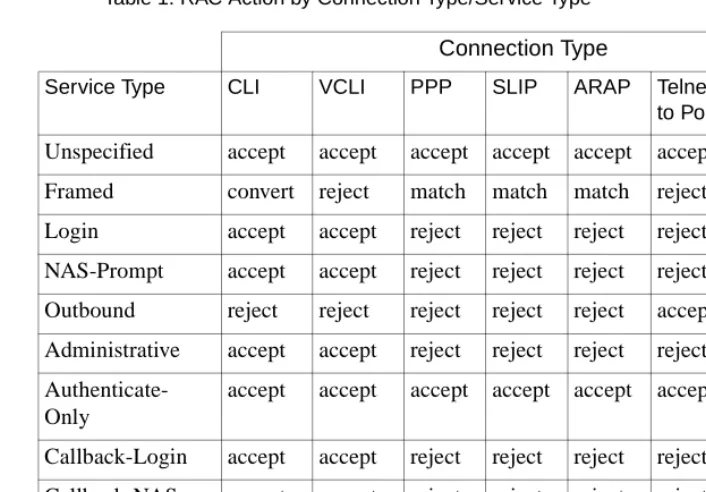
Table 1. RAC Action by Connection Type/Service Type
Connection Type
Service Type CLI VCLI PPP SLIP ARAP Telnet
to Port FTP
Unspecified accept accept accept accept accept accept reject Framed convert reject match match match reject reject Login accept accept reject reject reject reject reject NAS-Prompt accept accept reject reject reject reject reject Outbound reject reject reject reject reject accept reject Administrative accept accept reject reject reject reject accept
Authenticate-Only
accept accept accept accept accept accept reject
Callback-Login accept accept reject reject reject reject reject
Callback-NAS-Prompt
accept accept reject reject reject reject reject
Callback-Framed convert convert accept accept accept reject reject
RADIUS Attributes
Framed-Protocol (7)
Specifies the link-level protocol type permitted for the user.
Usage: Supported values are:
• PPP - The user accessing the RAC can use PPP or MP. If any other type of framing is in use, the call is rejected.
• SLIP
• ARAP
Unsupported values are: Gandalf SL/MLP, IPX/SLIP
When the user is already running a framed protocol (that is, Service-Type (6) is Framed [2]), the RAC sends the Framed-Protocol attribute value in the Access-Request as a hint to the RADIUS server. The server returns the authorized framed service in the Access-Response. If the returned value does not match the protocol in use, the RAC rejects the user.
When the user is running a framed protocol and the server does not return the Framed-Protocol attribute, the RAC allows the use of any framed protocol. However, if this attribute is not returned when the user is connected to the CLI and Service-Type (6) is Framed [2], the RAC leaves the user at the CLI. The user can then run SLIP, PPP, or ARAP by issuing the CLI command slip, ppp, or arap.
Multiple Instances Allowed: No.
RADIUS Attributes
Framed-IP-Address (8)
Specifies the IP address to be assigned to the remote user.
Usage: Used in both Access-Request and Access-Accept packets.
If the RAC configuration parameter address_origin is set to auth_server
and the RADIUS server specifies a Framed-IP-Address (8) in the Access-Accept packet, the RAC uses that framed address as the IP network address of the remote user.
If the server does not return a Framed-IP-Address (8) attribute, or if address_origin is set to local, the RAC uses the IP address specified by the RAC remote_address configuration parameter. For information about remote_address and address_origin, see the Remote Access
Concentrator Software Reference or the Remote Annex Administrator’s
Guide for the platform you are using.
RADIUS defines two special values for Framed-IP-Address (8):
• 255.255.255.255, which indicates that the RAC allows the remote user to negotiate the address.
• 255.255.255.254, which indicates that the RAC uses DHCP to assign an address for this user. If the server returns
255.255.255.254, the RAC uses DHCP, if DHCP is supported and configured (see Managing the Remote Access Concentrator
Using Command Line Interfaces). Otherwise, the RAC uses the
RADIUS Attributes
Framed-IP-Netmask (9)
Specifies the IP subnet mask of the remote user’s subnet.
Usage: If included in an Access-Accept packet, this attribute specifies the IP subnet mask of the remote connection. This attribute is used only when the remote system is a router. The mask indicates what packets are to be forwarded to the remote subnet. Note that the RAC will still establish an interface route to the user whether or not this attribute is specified.
Multiple Instances Allowed: No.
Dependencies: This attribute is meaningful only for framed IP connections. The RAC ignores it for other connection types.
Framed-Routing (10)
Specifies the routing method that the RAC uses for a framed IP connection.
Usage:
• None [0] - The RAC neither sends nor listens for routing packets.
• Send [1] - The RAC sends routing packets but does not listen for them.
• Listen [2] - The RAC listens for routing packets but does not send them. This is the RADIUS default.
• Send-And-Listen [3] - The RAC sends and listens for routing packets.
The RAC default is none of the above. In general, the RAC only routes across a link to a different subnet. The precise default behavior is described in Managing the Remote Access Concentrator Using Command
Line Interfaces or the Remote Annex Administrator’s Guide for the
RADIUS Attributes
Multiple Instances Allowed: No.
Dependencies: This attribute is meaningful only for framed IP connections. The RAC ignores it for other connection types.
Filter-Id (11)
Identifies a filter list to be applied to the user’s session.
Usage: The value of this attribute is the name of a filter list. It is sent in an Access-Accept packet. Upon receiving this attribute, the RAC issues a new Access-Request using the value of the returned Filter-Id (11) attribute for Name (2) and the special value "Filter-Id" for User-Password (2). The RAC then waits for an Access-Accept that contains the actual list of filters to be used. The filter list is a series of Annex-Filter (VSA Bay Networks 28) attributes, each of which is a filter.
In creating filters, the server must follow the rules defined for the filter keyword in the RAC’s acp_userinfo file. See Managing the Remote
Access Concentrator Using Command Line Interfaces.
Multiple Instances Allowed: No.
RADIUS Attributes
Framed-MTU (12)
Specifies the maximum transmission unit size (packet size) to use for the connection between the RAC and the remote peer.
Usage: Supported for SLIP and PPP, but not for ARAP. For PPP, the value of this attribute is used only if no MTU is specified by the peer.
Framed-MTU (12) must be at least 576 bytes for IPX traffic and 599 bytes for AppleTalk traffic.
Multiple Instances Allowed: No.
Dependencies: Overridden for PPP if the RAC receives an MTU value from the remote peer.
Framed-Compression (13)
Specifies the type of compression (if any) to be used on the connection.
Usage: The RAC supports values of None [0] and VJ TCP/IP [1]. The default is None [0].
Multiple Instances Allowed: Yes.
RADIUS Attributes
Login-IP-Host (14)
Specifies the IP address of the host to which the user is to connect automatically.
Usage: This attribute is meaningful only when Login-Service (5) is Telnet [1] or Rlogin [2]. Otherwise, the RAC ignores it.
The RAC handles this attribute as follows:
• If the attribute is specified when Service-Type (6) is Login and Login-Service (15) is Telnet or Rlogin, a terminal service connection is started for the user immediately after login.
• If the attribute is not specified for a Login Service (5) user, the RAC displays the CLI prompt.
• If the value of the attribute is 255.255.255.255, the user is allowed to select an IP address. The RAC prompts the user for this address and then issues the appropriate CLI command.
• If the value of the attribute is 0 or omitted, the RAC uses the value of the port parameter dedicated_arguments.
Multiple Instances Allowed: No.
RADIUS Attributes
Login-Service (15)
Specifies the terminal service protocol used for a login connection.
Usage: This attribute is used only when Service-Type (6) is Login [1]. Terminal service to the specified host is started immediately after the user dials in.
Valid values are:
• Telnet [0]
• Rlogin [1]
• LAT [4]
If Service-Type (6) is Login [1] and this attribute is omitted, the RAC places the user at the CLI.
Multiple Instances Allowed: No.
Dependencies: The RAC ignores this attribute if Service-Type (6) is anything other than Login [1]. The attribute value is handled as follows:
• If the value is Telnet [0] or Rlogin [1], the Login-IP-Host (14) attribute must be specified. If it is not, the RAC prompts the user for a target host.
RADIUS Attributes
Login-TCP-Port (16)
Specifies the TCP port number for a terminal services connection.
Usage: This optional attribute is used in Access-Accept packets when the Login-Service (15) attribute is Telnet [0] or Rlogin [01]. The attribute value specifies the number of a TCP port on the target host. The default is port 23 for Telnet and 513 for Rlogin.
Multiple Instances Allowed: No.
Dependencies: The RAC ignores this attribute for connection types other than Telnet or Rlogin.
Unassigned (17)
RADIUS has not assigned Attribute 17.
Reply-Message (18)
Contains the text of a prompt or a message.
Usage:
• In Access-Accept packets, this message is displayed to a terminal service user after login and authentication.
RADIUS Attributes
Multiple Instances Allowed: Yes; all instances are concatenated. Messages are displayed in the order in which they appear in the packet.
Dependencies: On some vendor’s systems, this text overrides default error or termination messages.
Callback-Number (19)
Specifies a telephone number at which the RAC is to call the user back.
Usage: This attribute is used only when Service Type (6) is Callback-Login [3] or Callback-Framed [4]. If specified, this attribute indicates the number for the RAC to dial. If the attribute is omitted, the RAC prompts the user for the telephone number.
Multiple Instances Allowed: No.
Dependencies: The RAC ignores this attribute for connection types other than callback.
Callback-Id (20)
Specifies the name of a location to be called back.
Usage: The RAC does not support this attribute. Instead, it supports Callback-Number (19).
Multiple Instances Allowed: No.
RADIUS Attributes
Unassigned (21)
RADIUS has not assigned Attribute 21.
Framed-Route (22)
Specifies a static IP route to be added to the RAC routing table. This route applies only to IP Framed [3] or Callback-Framed [4] services, and exists only for the duration of the RADIUS session.
Usage: The route specification should use the format:
dest/[mask] gateway metric
The arguments are:
• dest is the IP address, in dotted decimal notation, of the
destination.
• (optional) mask specifies the subnet mask for the destination address. Enter this as the number of 1 bits in the subnet mask, from left to right. For example, /24 indicates a subnet mask of 255.255.255.0.
• gateway is the IP address, in dotted decimal notation, of the
gateway the RAC uses as the next hop to the destination. If 0.0.0.0 is specified for gateway, the RAC uses the remote user’s IP address as the gateway address.
• metric is one or more decimal metrics separated by spaces. The
RADIUS Attributes
Framed-IPX-Network (23)
Specifies the decimal value of the IPX network number of the remote user.
Usage: This attribute is used only for a Service Type (6) of Framed [2] or [4] and a protocol type of PPP or IPX.
Multiple Instances Allowed: No.
Dependencies: The RAC ignores this attribute for connection types other than those listed in Usage.
State (24)
Specifies internal state information about the RADIUS server.
Usage: This server sends this attribute in an Access-Challenge and the RAC echoes it in the subsequent Access-Request packet. The
information in the attribute depends on the server.
Multiple Instances Allowed: Yes.
Class (25)
Contains information from the authorization database to be used for accounting purposes.
Usage: One or more of these attributes are sent in an Access-Accept from the server to the RAC, then held in the session and passed on in RADIUS Accounting-Request messages for logging. The server can use this attribute to pass on any sort of user information desired.
RADIUS Attributes
Vendor-Specific (26)
Provides Bay Networks attribute extensions that follow the RFC 2058 recommendations for vendor type encoding.
Usage: The fields in this attribute include a Bay Networks vendor ID of 1584, followed by a sequence of Bay Networks vendor-specific attributes. The attributes supported are described in Bay Networks Vendor-Specific
Attributes on page 34.
Multiple Instances Allowed: Yes.
Session-Timeout (27)
Specifies the number of seconds that the user can be dialed into the RAC before the RAC terminates the session.
Usage: This optional attribute is used to restrict the duration of a user’s session.
Multiple Instances Allowed: No.
RADIUS Attributes
Idle-Timeout (28)
Specifies the number of continuous seconds of inactivity allowed in a user session before the session is terminated.
Usage: This optional attribute prevents inactive sessions, left open inadvertently or deliberately, from wasting a modem or port resource.
Multiple Instances Allowed: No.
Dependencies: This attribute applies to all types of RAC sessions.
Termination-Action (29)
Specifies the action that the RAC takes upon termination of a CLI session.
Usage: This optional attribute can be used in conjunction with other attributes, such as Annex-CLI-Command (VSA Bay Networks 29), to script the user’s session. The default terminates the entire user session.
Multiple Instances Allowed: No.
RADIUS Attributes
Called-Station-Id (30)
Specifies the telephone number that the user called to gain access.
Usage: The RAC sends this information, when available, in Access-Request and Accounting-Access-Request packets.
Multiple Instances Allowed: No.
Dependencies: Applicable to digital service only.
Calling-Station-Id (31)
Specifies the telephone number from which the user called.
Usage: The RAC sends this information, when available, in Access-Request and Accounting-Access-Request packets.
Multiple Instances Allowed: No.
Dependencies: Applicable to digital service only.
NAS-Identifier (32)
Uniquely specifies the NAS.
RADIUS Attributes
Proxy-State (33)
This attribute is sent by a proxy server to another RADIUS server to maintain the proxy’s status until an Access-Accept packet arrives.
Usage: Ignored; the RAC is not a proxy RADIUS server.
Multiple Instances Allowed: Yes.
Dependencies: None.
Login-LAT-Service (34)
Specifies the name of the LAT service to which the RAC connects the user (via the CLI connect command).
Usage: This attribute is used when Login-Service (15) is LAT (4) to restrict the user to a LAT service pool.
If Login-Service (15) is LAT (4) and Login-LAT-Service (34) is not specified, the RAC puts the user in CLI command mode.
Multiple Instances Allowed: No.
RADIUS Attributes
Login-LAT-Node (35)
Specifies the LAT node to which the RAC connects the user. This attribute allows the selection of a specific node when multiple nodes are
advertising the same service. Otherwise, the RAC requests the node with the highest-rated service.
Usage:This optional attribute contains a node name.
Multiple Instances Allowed: No.
Dependencies: This attribute is meaningful only for LAT Login-Service connections. The RAC ignores it for other connection types.
Framed-AppleTalk-Link (37)
Indicates the AppleTalk Network number which should be used for the link to another AppleTalk router.
Usage: Not supported.
Multiple Instances Allowed: No.
Framed-AppleTalk-Network (38)
RADIUS Attributes
Framed-Appletalk-Zone (39)
Specifies the default AppleTalk zone to be used.
Usage: Not supported.
Multiple Instances Allowed: No.
CHAP-Challenge (40)
Specifies the CHAP challenge sent by the RAC to the remote user.
Usage: Used in Access-Request packets only.
Multiple Instances Allowed: No.
Dependencies: 16-byte challenges can be specified in the Request Authenticator field instead of as an attribute.
NAS-Port-Type (41)
Specifies the hardware type of the RAC port to which the user is connected.
Usage: The following values are supported:
• Async [0]
• Sync [1]
• ISDN Sync [2]
• ISDN Async V.120 [3]
• ISDN Async V.110 [4]
• Virtual [5] -- NAS-Port (5) further encodes the type of virtual RAC port as described on page 4.
RADIUS Attributes
Port-Limit (42)
Specifies the maximum number of concurrent link sessions permitted for a Multilink PPP user.
Usage: If this attribute is not specified, the maximum is one link.
Multiple Instances Allowed: No.
Dependencies: This attribute is meaningful only for PPP Framed connections. The RAC ignores it for other connection types.
Login-LAT-Port (43)
Specifies the LAT port to which a reverse LAT connection is to be made.
Usage: This optional attribute is used to further specify LAT connections.
Multiple Instances Allowed: No.
RADIUS Attributes
RADIUS Accounting Attributes
Acct-Status-Type (40)
Specifies the event that triggered the accounting log.
Usage: The following events are logged:
• Start [1] -- The user session started.
• Stop [2] -- The user session stopped.
• Call-Start [4] -- The user dialed in.
• Call-Stop [5] -- The user hung up.
• Accounting-On [7] -- The RAC began RADIUS accounting. This occurs after the RAC is rebooted.
• Accounting-Off [8] -- The RAC stopped RADIUS accounting. This is recorded when the RAC reboots; it indicates that all sessions have been terminated.
• User-Reject [VSE Bay Networks 10389025] -- The user was authenticated but not authorized to start a session.
• Call-Reject [VSE Bay Networks 10389026] -- The call was rejected before user authentication.
• IPCP-Start [VSE Bay Networks 10389027] -- IPCP has come up. The log contains the negotiated IP address.
• IPXCP-Start [VSE Bay Networks 10389028] -- IPXCP has come up. The log contains the negotiated IPX address.
RADIUS Attributes
• Accounting-Restart [VSE Bay Networks 10389030] -- The RAC administrator has enabled security after previously disabling it (by using the enable_security parameter and then issuing the na or admin command reset annex security).
• Accounting-Shutoff [VSE Bay Networks 10389031] -- The RAC administrator has disabled security after previously enabling it (by using the enable_security parameter and then issuing the na or admin command reset annex security).
• Tunnel-Start [VSE Bay Networks 10389032] -- A Layer 2 or Layer 3 tunnel was established.
• Tunnel-Stop [VSE Bay Networks 10389034] -- A Layer 2 or Layer 3 tunnel was destroyed.
• Tunnel-Reject [VSE Bay Networks 10389035] -- A Layer 2 or Layer 3 tunnel failed peer authentication.
• MP-Start [VSE Bay Networks 10389038] -- A Multilink PPP bundle was created.
• MP-Stop [VSE Bay Networks 10389039] -- A Multilink PPP bundle was destroyed.
RADIUS Attributes
Acct-Delay-Time (41)
Indicates the number of seconds that the RAC has been trying to log this event.
Usage: When the RAC issues an accounting request for a particular event, it subtracts the time at which the event occurred from the current time and puts the result in the Acct-Delay-Time attribute in the same accounting request.
Multiple Instances Allowed: No.
Dependencies: None.
Acct-Input-Octets (42)
Indicates the number of input octets for the session.
Usage: Used only at the end of a session (that is, when Acct-Status-Type (41) is Stop [2]).
Multiple Instances Allowed: No.
Dependencies: Available only for physical or tunneled connections.
Acct-Output-Octets (43)
Indicates the number of output octets for this session.
Usage: Used at the end of a session (that is, when Acct-Status-Type (41) is Stop [2]).
Multiple Instances Allowed: No.
RADIUS Attributes
Acct-Session-Id (44)
Specifies a unique identifier for each session.
Usage: The RAC session identifier is an eight-digit uppercase hexadecimal number. For the first session after a reboot, the first four digits are randomly assigned, the next three digits are zeros, and the final digit is 1. For each subsequent session, the RAC increments the previous session identifier by 1.
Multiple Instances Allowed: No.
Acct-Authentic (45)
Indicates the user authentication method.
Usage: For RADIUS users, the method indicated is always RADIUS [1].
Multiple Instances Allowed: No.
Dependencies: This is recorded in each Accounting-Request packet when Acct-Status-Type (40) = Start [1].
Acct-Session-Time (46)
Indicates the duration of the user session.
RADIUS Attributes
Acct-Input-Packets (47)
Indicates the number of input packets for the user session.
Multiple Instances Allowed: No.
Dependencies: Recorded at the end of a session (that is, when Acct-Status-Type (41) is Stop [2]). Applies only to physical or tunneled connections.
Acct-Output-Packets (48)
Indicates the number of output packets for the user session.
Multiple Instances Allowed: No.
RADIUS Attributes
Acct-Terminate-Cause (49)
Specifies the reason for the RAC terminating the user session.
Usage: The reasons are:
• User-Request [1] - The user logged out.
• Lost-Carrier [2] - A carrier loss occurred.
• Idle-Timeout [4] - An inactivity timer timed out. This is set using the Idle-Timeout (28) attribute or one of the following na or admin configuration parameters: cli_inactivity,
inactivity_timer, or net_inactivity.
• Session-Timeout [5] - The maximum connect time was exceeded. The na or admin configuration parameter max_logon defines this maximum.
• Admin-Reset [6] - The administrator reset the connection by using, for example, the na or admin reset port command.
• Port-Error [8] - A port error, such as a failed dialin attempt or a modem failure, occurred.
• Callback [16] - The RAC terminated the session in order to dial back the user and start a new session.
• User-Error [17] - The user made an error entering input.
Multiple Instances Allowed: No.
RADIUS Attributes
Acct-Multi-Session-Id (50)
Indicates a unique identifier for related sessions. All related sessions have different unique Acct-Session-Id (44) values but the same multisession identifiers.
Usage: Used in Accounting-Request messages.
Multiple Instances Allowed: No.
Dependencies: Meaningful only for MP connections.
Acct-Link-Count (51)
Indicates the current count of links for a multilink session.
Usage: This optional attribute can appear in any Accounting-Request message for a session with multiple links.
Multiple Instances Allowed: No.
RADIUS Attributes
Bay Networks Vendor-Specific Attributes
The vendor ID used in the Bay Networks vendor-specific attribute (VSA) header is 1584, as allocated to Bay Networks by the Internet Assigned Numbers Authority. Bay Networks vendor-specific attributes 1 through 27 are reserved for the Nautica product line.
Annex-Filter (VSA Bay Networks 28)
Specifies an IP routing filter to be applied to this user’s session.
Usage: The filter attribute has the same format as that used for the filter keyword in the acp_userinfo file, except that the filter and end keywords are omitted. For example, the following defines a filter that discards any outbound IP packets destined for address 132.245.4.33:
output include dst_address 132.245.4.33 discard
For complete information on filter formats, see Managing Remote Access
Concentrators Using Command Line Interfaces or the Network
Administrator’s Guide that applies to the Remote Annex you are using.
Multiple Instances Allowed: Yes. Each filter must be specified in a separate attribute.
RADIUS Attributes
Annex-CLI-Command (VSA Bay Networks 29)
Specifies a CLI command that the RAC executes on behalf of the user immediately after login. Multiple instances of the attribute allow the specification of multiple commands. These commands can be used for various purposes, including session restrictions, host logins, and protocol links.
Usage: This attribute is optional in the Access-Accept packet; if present, it contains the full CLI command name.
Commands are executed in the order received. Each command must be in a separate RADIUS attribute. If the RAC detects an error, the error is syslogged, the remaining commands are ignored, and the session is terminated.
Multiple Instances Allowed: Yes. Each attribute is treated as a separate CLI command.
Dependencies: This attribute applies to Service-Type NAS-Prompt [7] (CLI) sessions only.
Annex-CLI-Filter (VSA Bay Networks 30)
Specifies a CLI command that the RAC does not allow the user to execute. Multiple instances of the attribute permit the specification of multiple commands.
Usage: This attribute is optional in the Access-Accept packet; if present, it contains the full CLI command name.
Multiple Instances Allowed: Yes. Each attribute is treated as a separate CLI command.
RADIUS Attributes
Annex-Host-Restrict (VSA Bay Networks 31)
Specifies a host that the CLI user is restricted from accessing.
Usage: This optional attribute specifies a host and a transport-level port to which the user is denied access. By default, access is unrestricted.
More than one attribute can be specified. These attributes, along with Annex-Host-Allow (VSA Bay Networks 32) attributes, are processed in the order in which they appear, on a first-match basis. The format of the attribute is as follows:
• The first string of characters specifies the dotted decimal IP address of the host whose access is to be restricted. A zero in one address component matches any value; for example, 132.254.9.0 matches any host on subnet 9.
• One space must separate the host address and the port numbers (if any).
• The subsequent characters specify the TCP or UDP ports on the host to which access is to be restricted. Use commas to specify multiple ports, and a dash to specify a port range. The following example specifies ports 17 through 23, port 30, and ports 45 through 50:
17-23,30,45-50
If no ports are specified, access to all ports is denied.
RADIUS Attributes
Annex-Host-Allow (VSA Bay Networks 32)
Specifies a host to which the CLI user is allowed access.
Usage: This optional attribute specifies a host and a transport-level port to which the user is allowed access. Since the default is to allow access to all hosts, this attribute is meaningful only when used in conjunction with the Annex-Host-Restrict (VSA Bay Networks 31) attribute.
More than one attribute may be specified, in which case these attributes, along with Annex-Host-Allow (VSA Bay Networks 32) attributes, are processed in the order in which they appear, on a first-match basis. The format for this attribute is the same as that for Annex-Host-Restrict (VSA Bay Networks 31).
Multiple Instances Allowed: Yes. Each attribute is treated as a separate host and port specification.
Dependencies: This attribute applies to Service-Type (6) NAS-Prompt [7] or Login [1].
Annex-Product-Name (VSA Bay Networks 33)
Identifies the type of RAC or Remote Annex in use.
Usage: Contains one of the following product names: RA2000, RA4000, RA6100, RA6300, 5390, 5391, 5399, or 8000.
Multiple Instances Allowed: No.
RADIUS Attributes
Annex-SW-Version (VSA Bay Networks 34)
Indicates the RAC software version.
Usage: This attribute contains a character string, such as "R14.0."
Multiple Instances Allowed: No.
Dependencies: Always included in Access-Request and Accounting-Request packets.
Annex-Local-IP-Address (VSA Bay Networks 35)
Specifies the IP address of the local port.
Usage: If the configuration parameter address_origin is auth_server and this attribute is specified in an Access-Accept packet, the RAC uses the attribute value as the IP network address of the local RAC port (interface). If the attribute is not specified, or if address_origin is local, the IP address defaults to the value specified by the na or admin port parameter local_address.
RADIUS defines two special values for this attribute:
• 255.255.255.255, which indicates that the RAC allows the remote peer to negotiate the address.
RADIUS Attributes
Annex-Tunnel-Type (VSA Bay Networks 36)
Indicates to the RAC the type of tunnel to be started.
Usage: Supported values are L2TP [3] and Bay DVS [4].
This attribute is required in Access-Accept packets to inform the RAC that tunnel service is to be initiated.
Multiple Instances Allowed: No.
Dependencies: This attribute is meaningful only for tunneled applications.
Annex-Tunnel-Medium-Type
(VSA Bay Networks 37)
Indicates to the RAC the medium over which a tunneling protocol is to run.
Usage: The RAC supports the value IP [1].
Multiple Instances Allowed: No.
RADIUS Attributes
Annex-Tunnel-Client-Endpoint
(VSA Bay Networks 38)
Specifies the IP address of the RAC that is on the client side of a network tunnel.
Usage: This is a string attribute specifying the IP address in dotted decimal notation.
Multiple Instances Allowed: No.
Annex-Tunnel-Server-Endpoint
(VSA Bay Networks 39)
Specifies the address of the server side of a network tunnel.
Usage: This is a string attribute with the following format:
n.n.n.n port-type:DCLI
The arguments are:
• n.n.n.n is the IP address of the server in dotted decimal notation.
• port-type (optional) is the type of connection. Valid values,
which must be preceded by a space, are none, sl, ppp, and fr.
RADIUS Attributes
Annex-Tunnel-Id (VSA Bay Networks 40)
Specifies a tunnel identifier that is unique to the client-server tunnel pair.
Usage: This is a character string. It can be used with the Annex-Tunnel-Type (VSA Bay Networks 36), Annex-Tunnel-Medium-Annex-Tunnel-Type (VSA Bay Networks 37), Annex-Tunnel-Client-Endpoint (VSA Bay Networks 38), and Annex-Tunnel-Server-Endpoint (VSA Bay Networks 39) attributes to specify a tunnel uniquely.
Multiple Instances Allowed: No.
Dependencies: The format of this attribute depends upon the value of the Annex-Tunnel-Type (VSA Bay Networks 36) attribute. For L2TP [3], this is the 16-bit Tunnel ID.
Annex-Tunnel-Connection-Id
(VSA Bay Networks 41)
Specifies a tunnel connection identifier that is unique among all connections in that tunnel.
Usage: This is a character string. It can be used with the Annex-Tunnel-Type (VSA Bay Networks 36), Annex-Tunnel-Medium-Annex-Tunnel-Type (VSA Bay Networks 37), Annex-Tunnel-Client-Endpoint (VSA Bay Networks 38), Annex-Tunnel-Server-Endpoint (VSA Bay Networks 39), and Annex-Tunnel-Id (VSA Bay Networks 40) attributes to specify a tunnel uniquely.
Multiple Instances Allowed: No.
RADIUS Attributes
Annex-Callback-Port-List (VSA Bay Networks 42)
Specifies the asynchronous ports from which the RAC can dial back the user.
Usage: This is a bit mask for asynchronous ports. Each bit corresponds to a port; for example, the fortieth bit is for port 40.
Multiple Instances Allowed: No.
Dependencies: This attribute is meaningful only when Service-Type (6) is Callback-Login [3], Callback-Framed [4], or Callback-NAS-Prompt [9]. The attribute is primarily useful for Remote Annex Models 2000, 4000, and 6100, on which there are numbered