TiTAN: Exploring Midair Text Entry
using Freehand Input
Hui-Shyong Yeo University of St Andrews Fife, Scotland, UK [email protected]
Woontack Woo GSCT, KAIST
Daejeon, Republic of Korea [email protected]
Xiao-Shen Phang
NEC Corporation of Malaysia Kuala Lumpur, Malaysia [email protected]
Aaron Quigley University of St Andrews Fife, Scotland, UK
Taejin Ha Virnect
Seoul, Republic of Korea [email protected]
Permission to make digital or hard copies of part or all of this work for personal or classroom use is granted without fee provided that copies are not made or distributed for profit or commercial advantage and that copies bear this notice and the full citation on the first page. Copyrights for third-party components of this work must be honored. For all other uses, contact the Owner/Author. Copyright is held by the owner/author(s).
CHI’17Extended Abstracts, May 06-11, 2017, Denver, CO, USA. ACM 978-1-4503-4656-6/17/05.
http://dx.doi.org/10.1145/3027063.3053228
Abstract
TiTAN is a spatial user interface that enables freehand, midair text entry with a distant display while only requiring a low-cost depth sensor. Our system aims to leverage one’s familiarity with the QWERTY layout. It allows users to input text, in midair, by mimicking the typing action they typically perform on a physical keyboard or touchscreen. Here, both hands and ten fingers are individually tracked, along with click action detection which enables a wide variety of inter-actions. We propose three midair text entry techniques and evaluate the TiTAN system with two different sensors.
Author Keywords
Text entry; midair interaction; typing in thin air; gesture;
ACM Classification Keywords
H.5.2. [Information Interfaces and Presentation (e.g. HCI)]: User interfaces—Input devices and strategies;
Introduction
in midair, can be useful in many walk-up-and-use scenarios where an external device or touch screen is not available. Hence, effective text entry should not be limited to the avail-ability of mechanical devices or fixed touch surfaces alone.
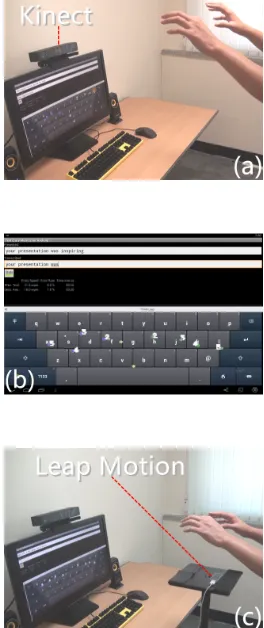
Figure 1:(a) System setup using Kinect (b) System screen-shot (c) System setup using Leap Motion.
This paper proposes and prototypes a novel approach to midair text entry interaction which leverages the dexterity of human hands and fingers. Taking text entry beyond ex-isting mechanical devices or fixed touch surfaces, our sys-tem offers extended mobility with an on-demand text entry solution. Here we presentTiTAN: Typing in Thin Air Nat-urally, a virtual keyboard system that enables midair text entry on a distant display, requiring only a low-cost depth sensor. It supports “walk-up-and-use” and on-demand inter-active capabilities, with no calibration required. Our goal is to support users simply raising their hands to start typing in midair. Each finger tapping action inputs a different charac-ter based on the common QWERTY layout. This leverages potential skill transfer, from the physical keyboard, for ev-eryday computer users. We also describe two formative studies comparing the performance of the three proposed techniques i) hunt-and-peck ii) touch typing and iii) shape writing, using a Kinect v2 [13] and a Leap Motion [9].
Related Work
Earlier midair text entry techniques have taken two primary forms: i) selection or ii) gesture based. Each technique is further differentiated by the device it uses, be it controller-based, marker-based or freehand input. Yet, existing ap-proaches for midair text entry often suffer from inherent constraints, such as requiring a user to hold an external device (Wiimote) [6] or even wearing multiple reflective markers that are tracked by expensive infrastructure [12]. Whereas other device-free approaches [5, 7] only allow single character entry at a time, and only utilize one hand, which can be ineffective or may cause strain on that hand.
Selection-based Techniques
Using a Wiimote controller with ray-casting technique over projected keyboard, Shoemaker et al. [18] were able to achieve 18.9 WPM with their best layout. It is worth noting that, unlike recent unconstrained text entry evaluation [24], their system does not allow further inputs upon error oc-currence, with the addition of tactile feedback. Using IR reflective markers tracked by multiple infrared cameras (Vi-con/Optitrack), Markussen et al. [11] were able to achieve 9.5 WPM on the first session and 13.2 WPM by the sixth session. Taking a more affordable approach, Ren et al. [16] prototype a midair typing solution using a Microsoft Kinect and were able to achieve 6.11 WPM by the first day and 8.57 WPM on the fifth day. Their method uses either dwell or push forward as a delimiter, which is slow and tiring in addition to suffering from hand tremor and hand drift. Simi-larly, Hincapié-Ramos et al. [5] discuss the problem of con-sumed endurance of midair interaction and demonstrated a free-hand text entry speed of 4.55 WPM, using a dwell technique with only one hand.
Gesture-based Techniques
the user to learn new layouts or gestures and may impose a steep learning curve. Recently, Vulture [12] adopted shape writing [8] as a midair text entry solution. It reports 11.8 WPM and 20.6 WPM on the first and the tenth session. Similarly, SWiM [26] incorporated shape writing with tilting a large phone and achieved 15 to 32 WPM. Shape writing is easy to learn and exhibits advantages when writing English words but not with abbreviation, email addresses or pass-words. Sridhar et al. [20] explore chording in midair using a Leap Motion but only measured the peak performance. Unfortunately, chording is not commonly understood and requires more learning. Finally, ATK [27] is the state-of-the-art system that tracks each finger to input text and achieves 23-29 WPM. It is similar work to us, except ATK is limited to very short range only (roughly 30 cm) and relies heavily on word-level correction. In contrast, our system supports front-facing interaction from a distance between 1-2 meters.
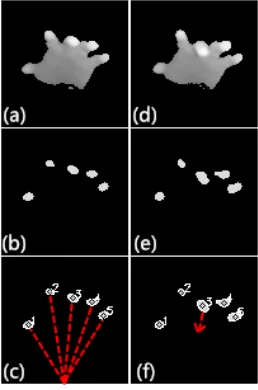
Figure 2:(a-c) Fingertip detection (d-f) Tap detection.
Design and Implementation
In this section, we outline the design of the virtual keyboard for midair text entry and describe how the interaction works. Our goal is to allow freehand input without requiring us to instrument the users with any controller or markers. Given that interactions with the midair system are usually short-lived, it is essential to support walk-up-and-use with minimal training while achieving acceptable text entry rate at the same time. Whereas physical a keyboard offers three input states (hovering, resting and depressing a key), midair key-board offers only the first and third state (no resting). There is also no separate signal for pressure and touch feedback, making midair typing a significant challenge. With this in mind, we propose three techniques for midair text entry:
Bi-manual Hunt-and-Peck TypingExtending on previous works on selection-based text entry [5, 11, 16, 17, 18], our technique supports bi-manual entry utilizing both hands
while without requiring holding controller or marker. The user controls two on-screen pointers that hover on a virtual keyboard. The user can perform a finger tapping action to select a character, akin to the two fingers hunt-and-peck typing on a physical keyboard or a touch surface.
Ten Finger Touch TypingWe propose a novel ten finger midair typing approach that attempts to mimic the touch-typing action of average computer users on a physical key-board. The user controls ten on-screen pointers that hover on a virtual keyboard with QWERTY layout, where each pointer corresponds to each finger. The user can tap any finger to insert a character based on the pointer’s current position. In addition, right thumb and left thumb are re-served for inserting a space or backspace, which minimize the time required for homing for the keys that are far away.
One Hand Shape WritingSimilar to Vulture [12], we adapted shape writing [8] technique to midair with using finger pinch as the delimiter. The difference is we are exploring and in-vestigating how midair shape writing compares to other techniques using only a low-cost commodity depth sensor.
Implementation
We developed a proof-of-concept prototype, shown in fig-ure 1 and supplementary video, using low-cost sensors such as Kinect v2 and Leap Motion. Kinect supports longer range but has no finger tracking capabilities while Leap Mo-tion supports robust finger tracking, albeit at much shorter range. Our system is able to track the 3D position of hands and individual fingers, whether they are clicked or hovering.
Palm and Finger Recognition
them independently. In order to extract the fingertips that are pointing towards the camera, we use depth threshold-ing startthreshold-ing from the palm center and extract the remainthreshold-ing blobs (figure 2b). The blobs are eroded and smoothed with Gaussian blur. Then, we find the moments and calculate the center of gravity of each extracted blob (figure 2c). As we know the handedness tracked by Kinect, we can rec-ognize each finger based on its orientation (figure 2c) by sorting the fingertip of the left hand in a counter-clockwise order, relative to a reference point at the bottom of the ROI (clockwise order for the right hand). Finally, all fingertip po-sitions are smoothed using Kalman filter to reduce jitter. For Leap Motion [9], rather robust finger tracking is already provided in the SDK, similar to the one used in ATK [27].
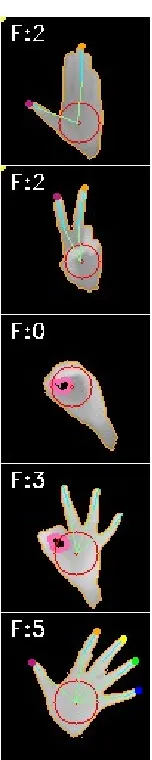
Figure 3:Different static gestures can be recognized, top to bottom: L, lasso, O, OK, rotation.
Midair Finger Tapping Detection
The finger recognition step above yields the spatial position (X, Y, Z) of the ten fingers. We then classify each finger that accelerates fast towards the center of palm as a finger tap, much like a typing action (figure 2f). To reduce false posi-tives when the hand is moving or shaking, we compute the distance traveled for all five fingers within a time window and reject any click if the palm movement is high. We also adapted this rejection technique to Leap Motion. To com-pensate for the lack of tactile feedback, each keystroke is accompanied by an audible “click” sound. We further reject a burst of clicks to prevent accidental input as a result of flickering between click states in quick succession.
Static Gesture for Text Manipulation
In a virtual keyboard system, it is important to support text manipulation. Our system allows text manipulation (selec-tion, copy, paste, etc.) without requiring the user to home in for a mouse, by mapping different static hand gestures into different keyboard commands. Various static gestures are recognized based on a heuristic approach [25] (figure 3).
Evaluation
By evaluating the three proposed techniques with contrast-ing points in a design space, this study aims to provide a better understanding of midair text entry. Due to the small pool of participants and relatively short study, we focus on the immediate usability for walk-up-and-use scenarios.
Participants and Apparatus
We recruited 6 paid students (male), ages ranged from 22-28 (M=24). They have no previous experience on midair text entry nor shape writing technique. Their written English skills were between 3 and 4 (M=3.5) on a 7-point scale. The study was conducted on a 27 inch display. The partic-ipants stood 1.2 meters away from the Kinect. The virtual keyboard is roughly 53 cm x 15 cm in dimension. We used TEMA [3] to administer our study, which present random phrases and log the transcribed text. We analyzed the log file using StreamAnalyzer [24]. We emulated an Android system in a Windows environment. Thus, we can test our techniques on any commercially optimized soft keyboards such as Swype [21] or SwiftKey without reinventing the wheel. For consistency, Swype is used for all three tech-niques, with the correction, text-prediction, and auto-spacing features disabled.
Procedure
Study Design
We used a within-subjects design with one independent factor beingtechnique. We designed a short study to avoid fatigue. Participants completed 1 session for each tech-nique, where each session consists of 2 blocks of 5 phrases sampled randomly from the Mackenzie and Soukoreff cor-pus [10]. This resulted in a total of 6 participants x 3 tech-niques x 1 session x 2 blocks x 5 phrases = 180 phrases.
We analyzed text-entry rate and accuracy. Text-entry rate is measured in Words Per Minute (WPM). The accuracy is measured in total error rate (TER) which consists of cor-rected error rate (CER) and uncorcor-rected error rate (UER) [24]. However, only uncorrected error rate is included for the shape writing technique due to the difference in measure-ment of the error rate of word-based technique.
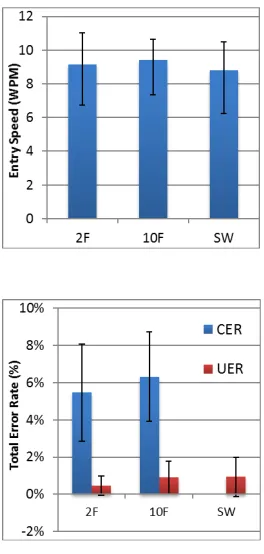
Figure 4:(a) Entry speed and (b) Error rate on Kinect V2. Error bars equal +/- 1 SD.
Quantitative Results
Figure 4 shows the mean text-entry rate and error rates for each technique. WPM for two fingers (2F), ten fingers (10F) and shape writing (SW) are 9.16 WPM (SD=1.9), 9.4 WPM (SD=1.2) and 8.78 WPM (SD=1.7), respectively. TERs are 5.9% and 7.2% for 2F and 10F. UERs remain below 1%.
We conducted a one-way ANOVA for WPM and UER. There was no significant effect of technique on WPM (F(2,10)=1.030, p>.05) and UER (F(2,10)=1.265, p>.05).
Follow-up Study (Leap Motion)
We performed a follow-up study using state-of-the-art finger tracking technology (Leap Motion). We use the same pro-cedure and a within-subjects design as the previous study.
We recruited 6 paid students (male) who did not participate in the first study, ages between 22-30 (M=26.2), with no experience of midair text entry nor shape writing technique. Their written English skills were between 2 and 5 (M=3.83).
[image:5.792.37.169.122.399.2]Quantitative Results
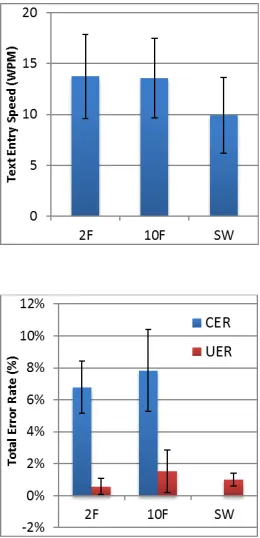
Figure 5 shows the mean text-entry rate and error rates for each technique. Entry rate for two fingers (2F), ten fingers (10F) and shape writing (SW) are 13.76 WPM (SD=4.1), 13.57 WPM (SD=3.9) and 9.92 WPM (SD=3.7), respec-tively. TERs are 7.3% and 9.4% for 2F and 10F. UERs re-main below 1.6% for all techniques.
We conducted a one-way ANOVA for WPM and UER. There was a significant effect of technique on WPM (F(2,10)=14.413, p<.001) and UER (F(2,10)=3.2, p<.05). In the post-hoc analysis, we performed the Scheffe adjustment for equal variance assumption (WPM and UER). There is a signifi-cant difference on WPM on all techniques (p<.001) except 2F and 10F. There is no significant difference on UER on all techniques except between 2F and 10F (p<.05).
Discussion
Interactions with midair systems are usually short-lived. Therefore, such systems should be easy to learn and sup-port walk-up-and-use. Our proposed techniques (hunt-and-peck and touch-typing) aim to leverage these advantages because they are familiar to an average computer user.
exam-ple, one of the authors was able to achieve more than 20 WPM (Kinect) and 30 WPM (Leap Motion) using 10 fingers. Nonetheless, our results are still far from the entry speed of touch keyboard (25 WPM) or physical keyboard (60 WPM).
Figure 5:(a) Entry speed and (b) Error rate on Leap Motion sensor. Error bars equal +/- 1 SD.
Text entry rates were improved for all three techniques when using a short range sensor with more robust finger-tip tracking technology. There is 50.2%, 44.4% and 12.9% improvement each on 2F, 10F and SW, respectively. Our tracking technique on Kinect is rather limited, which sug-gests a better tracking [22] can improve the performance further. Surprisingly, error rates also increased slightly. One explanation is when using more robust tracking, users tend to be less cautious to the tracking limitations and start typ-ing naturally. This is what we’d hope for in an ideal tracktyp-ing system. But in a less ideal system, it increases error rates.
Both the touch-based and the midair shape writing are fast [8, 12] for expert users but less so for novice users, as shown in our study. The speed improvement when us-ing a better trackus-ing technology is also limited (only 12.9% as opposed to 50.2% and 44.4% of other techniques). One explanation is that shape writing is a technique that already includes aspects of text-prediction. In addition, it only uti-lizes a single point to drag over all the characters, thus de-manding more arm movement. Therefore, we believe that hunt-and-peck and touch typing have more potential and room for improvement when using even better tracking [22].
It is interesting that there is no significant difference of speed between 2 fingers and 10 fingers, even when using more robust tracking. TiTAN aimed to leverage the memory and motor skill transfer from physical keyboards to midair typing, by allowing them to mimic the typing action on QW-ERTY layout. However, we observe many users do not use a traditionally correct mapping between fingers and the key (e.g., using left ring finger to hit “q” instead of their pinky
finger). Therefore, directly applying touch-typing to midair system by mapping individual finger to a set of characters is actually counter effective for some users. Yet, we are confi-dent that a “true” touch typist would not be affected by this issue and we are keen to explore this in the future. Finally, Feit et al. [4] also found that users using fewer fingers can achieve performance levels comparable with touch typists.
Limitation and Future Work
Our system provides only visual and audio feedback. How-ever, midair interaction is difficult because the lack of haptic feedback leads to input errors, and can suffer from hand tremor and drift. Our participants mentioned difficulty in focusing on four different things: i) presented text ii) tran-scribed text iii) on-screen pointers and iv) hand pose. Cur-rently, our simple finger tracking technique requires the user to maintain a gap between their fingers. It is also not robust against hand rotation, which causes self-occlusion.
In future work, we aim to improve the tracking [22] and sup-port haptic feedback [2]. We are also interested in study-ing the learnstudy-ing effect, evaluatstudy-ing the performance of each technique by conducting longitudinal user studies and var-ious UUI interface usability metrics [15]. Finally, we aim to evaluate on how auto-correction and text-prediction can further improve the performance and usability.
Conclusion
References
[1] Doug A Bowman, Vinh Q Ly, and Joshua M Campbell. 2001. Pinch keyboard: Natural text input for immersive virtual environments. (2001).
[2] Tom Carter, Sue Ann Seah, Benjamin Long, Bruce Drinkwater, and Sriram Subramanian. 2013. UltraHap-tics: Multi-point Mid-air Haptic Feedback for Touch Surfaces. InProceedings of the 26th Annual ACM Symposium on User Interface Software and Technol-ogy (UIST ’13). ACM, New York, NY, USA, 505–514.
DOI:http://dx.doi.org/10.1145/2501988.2502018
[3] Steven J. Castellucci and I. Scott MacKenzie. 2011. Gathering Text Entry Metrics on Android Devices. InCHI ’11 Extended Abstracts on Human Factors in Computing Systems (CHI EA ’11). ACM, New York, NY, USA, 1507–1512. DOI:http://dx.doi.org/10.1145/ 1979742.1979799
[4] Anna Maria Feit, Daryl Weir, and Antti Oulasvirta. 2016. How We Type: Movement Strategies and Perfor-mance in Everyday Typing. InProceedings of the 2016 CHI Conference on Human Factors in Computing Sys-tems (CHI ’16). ACM, New York, NY, USA, 4262–4273.
DOI:http://dx.doi.org/10.1145/2858036.2858233
[5] Juan David Hincapié-Ramos, Xiang Guo, Paymahn Moghadasian, and Pourang Irani. 2014. Consumed Endurance: A Metric to Quantify Arm Fatigue of Mid-air Interactions. InProceedings of the SIGCHI Confer-ence on Human Factors in Computing Systems (CHI ’14). ACM, New York, NY, USA, 1063–1072. DOI:
http://dx.doi.org/10.1145/2556288.2557130
[6] Eleanor Jones, Jason Alexander, Andreas Andreou, Pourang Irani, and Sriram Subramanian. 2010. Ges-Text: Accelerometer-based Gestural Text-entry Sys-tems. InProceedings of the SIGCHI Conference on Human Factors in Computing Systems (CHI ’10). ACM, New York, NY, USA, 2173–2182. DOI:
http://dx.doi.org/10.1145/1753326.1753655
[7] Per Ola Kristensson, Thomas Nicholson, and Aaron Quigley. 2012. Continuous Recognition of One-handed and Two-handed Gestures Using 3D Full-body Motion Tracking Sensors. InProceedings of the 2012 ACM International Conference on Intelligent User Interfaces (IUI ’12). ACM, New York, NY, USA, 89–92. DOI:http: //dx.doi.org/10.1145/2166966.2166983
[8] Per-Ola Kristensson and Shumin Zhai. 2004.
SHARK2: A Large Vocabulary Shorthand Writing Sys-tem for Pen-based Computers. InProceedings of the 17th Annual ACM Symposium on User Interface Soft-ware and Technology (UIST ’04). ACM, New York, NY, USA, 43–52. DOI:http://dx.doi.org/10.1145/1029632. 1029640
[9] Leap Motion 2014. Leap Motion. (2014). https://www. leapmotion.com/.
[10] I. Scott MacKenzie and R. William Soukoreff. 2003. Phrase Sets for Evaluating Text Entry Techniques. InCHI ’03 Extended Abstracts on Human Factors in Computing Systems (CHI EA ’03). ACM, New York, NY, USA, 754–755. DOI:http://dx.doi.org/10.1145/ 765891.765971
[11] Anders Markussen, Mikkel R. Jakobsen, and Kasper Hornbæk. 2013. Selection-Based Mid-Air Text Entry on Large Displays. Springer Berlin Heidelberg, Berlin, Heidelberg, 401–418. DOI:http://dx.doi.org/10.1007/ 978-3-642-40483-2_28
[12] Anders Markussen, Mikkel Rønne Jakobsen, and Kasper Hornbæk. 2014. Vulture: A Mid-air Word-gesture Keyboard. InProceedings of the 32Nd Annual ACM Conference on Human Factors in Computing Systems (CHI ’14). ACM, New York, NY, USA, 1073– 1082. DOI:http://dx.doi.org/10.1145/2556288.2556964
[14] Tao Ni, Doug Bowman, and Chris North. 2011. AirStroke: Bringing Unistroke Text Entry to Freehand Gesture Interfaces. InProceedings of the SIGCHI Conference on Human Factors in Computing Sys-tems (CHI ’11). ACM, New York, NY, USA, 2473–2476.
DOI:http://dx.doi.org/10.1145/1978942.1979303
[15] Aaron Quigley. 2009. From GUI to UUI: Interfaces for Ubiquitous Computing. InUbiquitous Computing Fundamentals(1st ed.), John Krumm (Ed.). Chapman & Hall/CRC, Chapter 6.
[16] Gang Ren and Eamonn O’Neill. 2013. Freehand Ges-tural Text Entry for Interactive TV. InProceedings of the 11th European Conference on Interactive TV and Video (EuroITV ’13). ACM, New York, NY, USA, 121– 130. DOI:http://dx.doi.org/10.1145/2465958.2465966
[17] Helena Roeber, John Bacus, and Carlo Tomasi. 2003. Typing in Thin Air: The Canesta Projection Keyboard - a New Method of Interaction with Elec-tronic Devices. InCHI ’03 Extended Abstracts on Human Factors in Computing Systems (CHI EA ’03). ACM, New York, NY, USA, 712–713. DOI:
http://dx.doi.org/10.1145/765891.765944
[18] Garth Shoemaker, Leah Findlater, Jessica Q. Dawson, and Kellogg S. Booth. 2009. Mid-air Text Input Tech-niques for Very Large Wall Displays. InProceedings of Graphics Interface 2009 (GI ’09). Canadian Infor-mation Processing Society, Toronto, Ont., Canada, Canada, 231–238. http://dl.acm.org/citation.cfm?id= 1555880.1555931
[19] J. Shotton, A. Fitzgibbon, M. Cook, T. Sharp, M. Finoc-chio, R. Moore, A. Kipman, and A. Blake. 2011. Real-time Human Pose Recognition in Parts from Single Depth Images. InProceedings of the 2011 IEEE Con-ference on Computer Vision and Pattern Recognition (CVPR ’11). IEEE Computer Society, Washington, DC, USA, 1297–1304. DOI:http://dx.doi.org/10.1109/CVPR.
2011.5995316
[20] Srinath Sridhar, Anna Maria Feit, Christian Theobalt, and Antti Oulasvirta. 2015. Investigating the Dex-terity of Multi-Finger Input for Mid-Air Text Entry. InProceedings of the 33rd Annual ACM Confer-ence on Human Factors in Computing Systems (CHI ’15). ACM, New York, NY, USA, 3643–3652. DOI:
http://dx.doi.org/10.1145/2702123.2702136
[21] Swype 2014. Swype. (2014). http://www.swype.com. [22] Jonathan Taylor, Lucas Bordeaux, Thomas Cashman,
Bob Corish, Cem Keskin, Toby Sharp, Eduardo Soto, David Sweeney, Julien Valentin, Benjamin Luff, Ar-ran Topalian, Erroll Wood, Sameh Khamis, Pushmeet Kohli, Shahram Izadi, Richard Banks, Andrew Fitzgib-bon, and Jamie Shotton. 2016. Efficient and Precise Interactive Hand Tracking Through Joint, Continuous Optimization of Pose and Correspondences. ACM Trans. Graph.35, 4, Article 143 (July 2016), 12 pages.
DOI:http://dx.doi.org/10.1145/2897824.2925965
[23] Daniel Wigdor and Ravin Balakrishnan. 2003. Tilt-Text: Using Tilt for Text Input to Mobile Phones. InProceedings of the 16th Annual ACM Sympo-sium on User Interface Software and Technology (UIST ’03). ACM, New York, NY, USA, 81–90. DOI:
http://dx.doi.org/10.1145/964696.964705
[24] Jacob O. Wobbrock and Brad A. Myers. 2006. Ana-lyzing the Input Stream for Character- Level Errors in Unconstrained Text Entry Evaluations. ACM Trans. Comput.-Hum. Interact.13, 4 (Dec. 2006), 458–489.
DOI:http://dx.doi.org/10.1145/1188816.1188819
[26] Hui-Shyong Yeo, Xiao-Shen Phang, Steven J. Castel-lucci, Per Ola Kristensson, and Aaron Quigley. 2017. Investigating Tilt-based Gesture Keyboard Entry for Single-Handed Text Entry on Large Devices. In Pro-ceedings of the 2017 CHI Conference on Human Factors in Computing Systems (CHI ’17). ACM, New York, NY, USA. DOI:http://dx.doi.org/10.1145/3025453. 3025520
[27] Xin Yi, Chun Yu, Mingrui Zhang, Sida Gao, Ke Sun, and Yuanchun Shi. 2015. ATK: Enabling Ten-Finger Freehand Typing in Air Based on 3D Hand Tracking Data. InProceedings of the 28th Annual ACM Sym-posium on User Interface Software and Technology (UIST ’15). ACM, New York, NY, USA, 539–548. DOI: