Turnector: Tangible Control Widgets For Capacitive Touchscreen Devices
First author Edward Kingsley Rutter
Second author Tom Mitchell
Third author Chris Nash
ABSTRACT
This paper details the development of Turnector, a control system based upon tangible widgets that are manipulated on the touchscreen of a capacitive touch device. Turnector widgets are modelled on rotary faders and aim to connect the user to parameters in their audio software in a man-ner analogous to the one-to-one control mapping utilised in analogue studio equipment. The system aims to streamline workflow and facilitate hands-on experimentation through a simple and unobtrusive interface. The physical widgets provide the users with the freedom to glance away from the touchscreen surface whilst maintaining precise control of multiple parameters simultaneously.
Related work in this area, including interaction design and TUIs in the context of musical control, is first dis-cussed before setting out the design specification and man-ufacturing process of the Turnector widgets. A number of unique methods for widget detection, tracking are pre-sented before closing the paper with initial findings and conclusive remarks.
1. INTRODUCTION
Touchscreens form the main interface mechanism for an increasing number of portable electronic devices, but whilst they respond to touch they typically rely solely on visual cues to provide the user with feedback. These devices ad-equately provide a versatile, adaptable system for visual-ising and interacting with software in many situations, but for precise musical control, performers are required to ob-serve their device interactions closely due to the lack of meaningful tactile feedback issued by the device.
Music performers, engineers and composers are growing less dependant on dedicated synthesis and signal process-ing hardware and more reliant on general-purpose puter based based audio software. Technological and com-putational advances facilitate high quality, accurate approx-imations of analogue units using Digital Signal Process-ing (DSP), allowProcess-ing composers and performers to work entirely within a computer environment. Studio equip-ment, particularly mixing desks, usually provide individ-ual controls for every parameter, and in turn demand a large amount of space. Although the processing capabil-ities of general purpose computers and dedicated hardware
Copyright: c2014 First author et al. This is an open-access article distributed under the terms of theCreative Commons Attribution 3.0 Unported License, which permits unrestricted use, distribution, and reproduction in any medium, provided the original author and source are credited.
are comparable, application specific control interfaces are being lost. This has an effect on the way music is pro-duced, resulting in composers reliance on auto- mated pa-rameter control. The decline of dedicated tangible control interfaces means that parameter automation is increasingly drawn via a mouse and live, human input is being lost.
[image:1.595.308.532.320.391.2]For years rotary faders have been widely adopted as a means of parameter control inputs and therefore familiar-ity with them is ubiquitous. By combining the flexibil-ity and capabilities afforded by touchscreen interfaces with the precision provided by tangible controls, Turnector aims to unite the tactility of a rotary faders with the two dimen-sional motions associated with touchscreens.
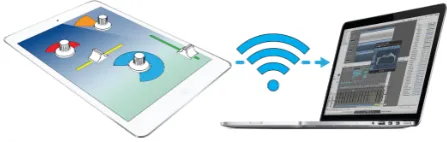
Figure 1. Turnector control system concept
2. RELATED WORK 2.1 Interaction design
The rotary fader is a well established tactile interface com-ponent which is frequently used adopted used to control audio parameters. Their application in computer music systems is often in the form of indirect manipulation, as parameters governing digital audio processes are abstract attributes that have no physical analogues [1].In the con-text of traditional acoustic musical instruments, the tonal parameters are intimately connected with the interaction mechanisms. With the introduction of digital controllers music interfaces have become completely decoupled from their control mechanisms [2] [3]. An example of this is a MIDI keyboard controlling a synthesiser in which the physical controls may be easily mapped to any of the pa-rameters of synthesis.
2.2 Tangible User Interfaces (TUIs)
The core principles of direct manipulation [4] are impor-tant to follow when designing a tangible interface. Utilis-ing these principles enables understandUtilis-ing of the system to be gained quickly and intuitively, which creates confident users and reduces anxiety [4]. The direct manipulation of virtual Graphical User Interface (GUI) parameters using tangibles is just one layer of control. The virtual rotary faders are indirectly controlling audio processes. Isotonic devices [5], for example reacTable blocks [3], provide con-stant resistance and variable position and are well suited to the control of GUIs based on direct manipulation [1].
2.3 Comparable systems 2.3.1 CapWidgets
Kratz et al. [6] built and tested CapWidgets, capacitive touch control widgets. Their user study, selecting scene changes in video footage, showed that the CapWidget pro-vided similar accuracy when compared to normal touch-screen control, but slower performance. It should be noted that in a video production environment selecting frames us-ing a small rotary fader is not typical, so may have affected the results gathered.
2.3.2 reacTable
reacTable [3] provides a model of synergy between music and Human-Computer Interaction (HCI). The public re-sponse, ease of use and addictive interaction indicate fu-ture growth of this type of tangible interface. Jord´a et al. explore the differences between traditional music per-formance, where one musician affects the many nuances of a single instrument, and laptop performances, where the artist conducts higher level alterations affecting many sounds simultaneously [3]. Although reacTable succeeds in providing a meaningful interface it is impractical in for many studio applications due to the computer-vision sys-tem and projector.
2.3.3 Squeezy
The tangible widget, Squeezy [7], developed by Wang et al. demonstrates two methods of adding additional dimen-sions of input control to a location based touch device. Ad-ditional rotation and pressure sensitivity controls are pro-vided through a squeezy ball placed on the surface of a touchscreen. The paper also explains the requirement for at least three touchpoints to detect 360 rotations.
2.3.4 Hexler: TouchOSC
TouchOSC [8], shown in Figure 2, is a customisable con-trol system for iOS and Android devices. It facilitates easy creation of a control interface through its TouchOSC Edi-tor [8] desktop application. It is versatile but provides little in the way of tactile feedback, meaning that without large amounts of practice and coordination, the user must ob-serve the screen to accurately and reliably adjust parame-ters.
2.3.5 Ion: Scratch2GO
Figure 2 also displays the recent Ion Scratch2Go [9] wid-get set, that provides tangible controls to be used on the screen of an iOS device with compatible software. These widgets are placed over virtual faders and jog wheels to allow manipulation of the parameters. These widgets pro-vide tactile feedback, and combined with TouchOSC [8], create a stable control system. The main drawback of this system is the inability to instantly alter the patch layout on the device.
2.3.6 Mrmr
[image:2.595.313.534.286.366.2]A similar app to TouchOSC [8], in terms of musical con-trol, is Mrmr [10]. This multi-platform application pro-vides the user with a customisable wireless control system that can be edited on the device itself. Mrmr [10] is an open source project, so support and recognition of Turnec-tor widgets could be implemented.
Figure 2. TouchOSC [8] customisable control system and Scratch2Go [9] capacitive touch widgets
3. SYSTEM DESIGN
Turnector focuses on giving as much control and freedom to the user as possible. This is done in a simple manner, without becoming intrusive or distracting the user from the task at hand. The use of tangibles provides tactile feed-back, reducing the reliance on visual observation of their interactions. When using an analogue mixing desk there is generally a one-to-one mapping of interface controls. Digital Audio Workstations (DAWs) provide all the func-tionality of an analogue system but lack the comprehensive one-to-one physical control. DAWs possess many control options, but they are hidden away within menus and sub-windows. This abstraction can create a hindrance to the creativity and workflow of composers or performers.
Figure 3. Turnector prototype widget in use
3.1 Design Specification
The design specifications for Turnector was as follow
• Multi-dimensional controls (3D) with direct,
One-to-one control mapping of parameters.
• Different distinguishable tangibles.
• Wireless communication to a computer system.
• Can be operated with device outside of central vi-sion.
• Clear visual feedback.
Control Ap-plication
X-axis translation
Y-axis translation
Rotation
Equaliser Frequency Gain Q Mixer
Chan-nel Pan Level Aux. send
[image:3.595.70.289.381.453.2]Compressor Gain Threshold Ratio
[image:3.595.308.533.541.704.2]Table 1. Possible control configurations for musical appli-cations.
Table 1 shows possible mappings for the three dimen-sions of control provided by Turnctor. The proposed map-pings aim to mimic the typical movement of GUI or hard-ware interactions. The mixer channel example uses the left-right movement of a widget to move a sound left or right in the stereo field, the up-down movement to bring the audio level up or down and the rotational input to control an auxiliary send level (as is typical of large format desks), in a similar manner to the sound stage control scheme dis-cussed by Gelineck et al. [12].
The iOS platform was selected for the project as it is the most popular platform [13] and Apple also has a well docu-mented Software Development Kit (SDK). Figure 1 shows a visual representation of how the Turnector system works.
4. TANGIBLE DESIGN
To create the widgets, it was important to understand how an iOS touchscreen functions. iOS devices are designed to recognise finger contact, so an investigation was made
into how this interaction could be simulated. As detailed in Barrett and Omote’s article [14], iOS devices use projected capacitance (pro-cap), more specifically mutual-capacitance touchscreens which potentially allow for an unlimited num-ber of contact points. When a finger touches or moves into close proximity of the touchscreen, the user’s body capac-itance is added to the Resistor-Capacitor (RC) network of that part of the screen. This change in the RC network is interpreted by the Integrated Circuit (IC) in the device to calculate the coordinates of the touchpoint. To create tan-gible widgets that function on this type of screen, there are a few options:
• Passive widgets that are made of conductive mate-rial to facilitate charge transfer when touched, in the same way that a stylus does.
• Active widgets [7] that utilise electronic systems to alter the RC network.
• Passive Untouched Capacitive Widgets (PUCs) [15]
that facilitate charge transfer to another part of the device itself.
Active widgets were dismissed early on in the develop-ment process due to the hardware complexity involved. Experimentation thus began with conductive materials to simulate touchpoints. Firstly, a stylus was investigated and it was noted that the soft tip was not recognised until pres-sure was applied that increased the area of contact. Con-tact area was obviously a critical factor so an investiga-tion into the smallest recognisable contact point was un-dertaken. Aluminium was machined to create different size contacts for testing. This material was used as it is easy to machine and is an adequate conductor. For the purpose of the investigation, circular contact points were used for ease of machining and because they approximately repre-sent the elliptical contact shape of a finger. Contacts with a diameter of 2-10mm (+/- 0.05mm) in 1mm increments were created and tested on the screen. It was found that a contact point smaller than 5mm diameter was not detected; with the use of a screen protector a contact point of at least 6mm was required.
A software application was written to allow detection and analysis of points, detailed in Section 5. To complement the software prototype, hardware prototypes were also built, at first by attaching styluses together in various two contact point arrangements, and later three contact point arrange-ments. These provided confirmation that the system could work but to further the development, more solid, refined and adjustable widgets were constructed. A baseplate was machined in aluminium along with three pairs of contact assemblies that screw together through the baseplate, with 5mm diameter circular contact points. The design allowed a range of geometrically different contact point arrange-ments to be created, without the need of tools or further machining. A calibration jig, shown in Figure 4, was made to allow accurate, reproducible arrangements to be config-ured. Some of the possible contact point configurations can be seen in Figure 5. The position of the points, and there-fore shape of the widget, allow the user tactile feedback to differentiate between them without visual aid.
Figure 5. A possible design for a set of Turnector rotary faders (conductive material in red, non-conductive in grey) with contact points arranged using an 11 point polar array.
[image:4.595.312.489.487.568.2]In the final iteration the shape of the rotary fader or other tactile device will be used to allow differentiation between the widgets, without the need for visual cues. The cur-rent prototype features contact points made from an Ace-tol based conductive polymer and an aluminium knob body shown in figure 6.
Figure 6. Components of the current prototype widget utilising conductive plastic contact points.
5. APPLICATION DEVELOPMENT
The application was developed predominantly in Objec-tive C, using core frameworks from the Apple SDK to
al-low forward and backward compatibility. Apple’s gesture recognition classes were trialled as a method for translat-ing touch data into musical control data, but did not grant the degree of flexibility and expandability required. These classes allowed two points to be used to monitor the posi-tional movements (XY) and rotation (Z) through an affine transform, with the distance between the points giving the tangible an ID. Using these methods meant that only a small number of distinguishable tangibles could be created before either the touchpoints became too close together to be identifiable, or the widget size had to be increased. An-other factor was that tangibles with contact points close together provide less precise rotation tracking, due to in-herent inaccuracies in touchpoint detection. This method was sufficient to test the system but would not fulfil the goal of creating an expandable elegant product.
5.1 Tangible Detection Algorithm
The tangible detection algorithm analyses touch location data created when the contact points of the widget come into contact with the touchscreen and the rotary fader is in contact with the user.
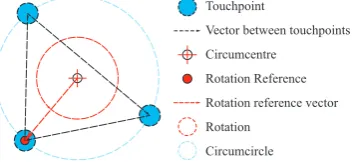
Figure 7 helps to illustrate the algorithm. First, the con-tact points are detected. If the number of touchpoints is three, then vectors between them are calculated. The mag-nitude of the vectors are compared with stored values and if a match is found, a known tangible is detected. Once a known tangible has been detected the circumcentre of the 3 points is calculated, this is taken as the centre of rota-tion and the centre for the GUI element displayed. One of the contact points is then selected as the rotation refer-ence point. The points are tracked, and a data stream of XYZ values are created as the widget is manipulated on the touchscreen; where X and Y are the Cartesian coordi-nates of the widget with respect to the screen and Z is its rotation angle.
Touchpoint
Vector between touchpoints
Circumcentre
Rotation Reference
Rotation reference vector
Rotation
Circumcircle
Figure 7. Detection algorithm illustration
5.2 Control and Communication
[image:4.595.105.249.496.632.2]5.3 Feedback and Graphical User Interface
A minimal interface was employed to give easy to com-prehend feedback without distracting the user from their work. Turnector shares the visual design ideologies as re-acTable [3], elegantly visualising information whilst avoid-ing any purely decorative elements. The core GUI ele-ments are coloured arcs that are displayed around the phys-ical widgets, as shown in Figure 1. Different widgets are displayed with different colours. The XY position on the touchscreen can be detected, tactilely, kinaesthetically and visually. It is more difficult to determine the widgets orien-tation so the GUI is used to supplement the passive-haptic feedback.
The GUI gives the user feedback from all three dimen-sions of control. An arc is displayed around the widget, its centre position governed by the circumcentre of the wid-gets contact points and its angle controlled by the rotation of the widget. The expanding arc exhibits obvious parallels to rotary inputs seen in both hardware and software. Wid-get movements on the X axis alter the arcs opacity with the radius of the arc affected by the Y axis. These subtle feedback devices are designed to subconsciously reinforce the user’s confidence in the system but without distraction from their workflow.
6. RESULTS
Contact points of 6mm can accurately and reliably be de-tected. As the touchpoint circumcircle diameter is reduced below 30mm the level of accuracy decreases due to preci-sion errors in the touchscreen. With larger radii tangibles begin to function as PUCs.
An initial user study was conducted in a quiet university lab. Three widgets were mapped to separate bands on a parametric equaliser. The X and Y coordinates mapped to frequency and gain with rotation mapped to Q. The partici-pants, who were already conversant with DAWs, were able to understand and use the system in less than a minute.
7. CONCLUSION AND FUTURE DEVELOPMENT This paper has presented Turnector, a widget based system used to interface with a computer. The research of simi-lar systems and observation of others using Turnector has shown that tangible control systems are an effective tool for HCI. The development of the widgets and application has been successful, but requires user testing to determine its effectiveness as a control interface.
The future of the project is focused on improving the tracking algorithm to allow the use of multiple widgets si-multaneously. New widget prototypes will also be devel-oped with defined tactile differences for use in formal user studies to enable reliable performance and usability data to be gained.
8. REFERENCES
[1] R. W. Lindeman, “Bimanual interaction, passive hap-tic feedback, 3d widget representation, and simulated
constraints for interaction in immersive virtual envi-ronments,” May 1999.
[2] J. d’Escriv´an,Cambridge Introduction to Music: Mu-sic Technology. Cambridge, New York: Cambridge University Press, 2012.
[3] S. Jord´a, G. Geiger, M. Alonso, and M. Kaltenbrunner, “The reactable: Exploring the synergy between live music performance and tabletop tangible interfaces,” in Proceedings of Tangible, Embedded and Embodied In-teraction, February 2007, pp. 139–146.
[4] Y. Rogers, H. Sharp, and J. Preece,Interaction Design; Beyond Human-Computer Interaction. Chichester, West Sussex: John Wiley & Sons Ltd., 2012.
[5] S. Zhai, “Human performance in six degree of freedom input control,” 1995.
[6] S. Kratz, T. Westermann, M. Rohs, and G. Essl, “To-wards an interface for music mixing based on smart tangibles and multitouch,” inProceedings of CHI, May 2011, pp. 1351–1356.
[7] J. Wang, N. d’Alessandro, S. Fels, and B. Pritchard, “Squeezy: Extending a multi-touch screen with force sensing objects for controlling articulatory synthesis,” inProceedings of New Interfaces for Musical Expres-sion, June 2011, pp. 531–532.
[8] Hexler. (2014) Touchosc. [Online]. Available: http: //hexler.net/software/touchosc
[9] ION. (2013) Scratch2go. [Online]. Available: http: //www.ionaudio.com/products/details/scratch-2-go [10] E. Redlinger. Mrmr osc controller.
[On-line]. Available: https://itunes.apple.com/gb/app/ mrmr-osc-controller/id294296343?mt=8
[11] S. Gelineck, D. Overholt, M. B¨uchert, and J. Andersen, “Towards an interface for music mixing based on smart tangibles and multitouch,” inProceedings of New In-terfaces for Musical Expression, May 2013, pp. 180– 185.
[12] S. Gelineck, M. B¨uchert, and J. Andersen, “Music mix-ing surface,” inProceedings of ITS, October 2013. [13] C. E. Segundo, “Despite weak quarter, apple remains
on top of tablet market in q3,” IHS Pressroom, October 2013. [Online]. Available: http://press. ihs.com/press-release/design-supply-chain-media/ despite-weak-quarter-apple-remains-top-tablet-market-q3 [14] G. Barrett and R. Omote, “Frontline technology:
Projected-capacitive touch technology,” Information Display, vol. 26, no. 3, pp. 16–21, March 2010. [15] S. Voelker, N. Nakajima, C. Thoresen, Y. Itoh, K. I.
![Figure 2. TouchOSC [8] customisable control system andScratch2Go [9] capacitive touch widgets](https://thumb-us.123doks.com/thumbv2/123dok_us/633609.564425/2.595.313.534.286.366/figure-touchosc-customisable-control-andscratch-capacitive-touch-widgets.webp)