BubbleType:
Enabling Text Entry within a Walk-Up Tabletop Installation
Uta Hinrichs
1Holly Schmidt
1Tobias Isenberg
1,2Mark Hancock
1Sheelagh Carpendale
1 1University of Calgary, Canada
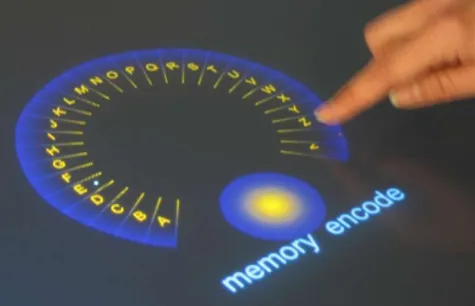
{hinrichu|msh|sheelagh}@cpsc.ucalgary.ca holly [email protected]
2
University of Groningen, The Netherlands
ABSTRACT
We address the issue of enabling text entry for walk-up-and-use in-teractive tabletop displays located in public spaces. Public tabletop installations are characterized by a diverse target user group, multi-person interaction, and the need for high approachability and intu-itiveness. We first define the design constraints of text-entry meth-ods for public tabletop installations such as clear affordances, au-dience expertise, support of direct-touch interaction, visual appear-ance, space requirements, multi-user support, and technical simplic-ity. We then describe an iterative design process that was informed by these constraints and led to the development of two stylus key-board prototypes—BubbleQWERTY and BubbleCIRCLE—for use in interactive public tabletop installations.
Categories and Subject Descriptors
H.5.2 [Information Interfaces And Presentations]: User Inter-faces—Graphical user interfaces (GUI), Input devices and strate-gies, Interaction styles, Screen design; I.3.6 [Computer Graph-ics]: Methodology and Techniques—Interaction techniques
1.
INTRODUCTION
In recent years, general excitement has developed around large dis-play technology such as wall and tabletop disdis-plays. The increasing size and resolution of digital displays together with direct-touch interaction mechanisms offer new opportunities to present, manip-ulate, and interact with information. Large interactive tabletop dis-plays that we are focusing on in this paper provide support, in par-ticular, for collaborative activities involving multiple people [13, 14]. Their size and high resolution provide much more screen real estate than traditional desktop displays, and the horizontal orienta-tion affords communicaorienta-tion and group coordinaorienta-tion [13]. Borrow-ing from interactions observed from collaborative work on tradi-tional tables and enhancing these interaction techniques with com-putational power can make tabletop displays a rich collaborative work environment.
Since the introduction of the Digital Desk by Wellner in 1993 [19], many tabletop systems and tabletop interfaces have been developed.
Cite as:
Hinrichs, U., Schmidt H., Isenberg, T., Hancock, M., and Carpen-dale, S. (2008). BubbleType: Enabling Text Entry within a Walk-Up Tabletop Installation.Report 2008-893-06, Department of Computer Science, University of Calgary, Calgary, Alberta, Canada. February 2008.
However, after more than ten years of research, few tabletop sys-tems can be found outside of research laboratories. Digital tables such as the Caf´e Table by PHILIPS [4], The Pond by St˚ahl et al. [16], or floating.numbers by ART+COM [2], were found to be particularly successful when installed in public spaces such as mu-seums because they are highly approachable and intuitive to use [6]. These systems are mainly used for interactive information presenta-tion but do not go beyond informal informapresenta-tion explorapresenta-tion.
While a lot of research has been done to investigate and develop methods to manipulate and interact with digital information on ta-bletop displays, techniques toenterinformation such as text into a tabletop system are still largely unexplored. Entering text, however, is a basic activity that needs to be facilitated in many applications. On common desktop computers, we frequently use the keyboard to enter text for labeling items, searching keywords, taking notes, or writing messages. While the keyboard may provide a reason-able solution for desktop computers, it is much more problematic for horizontal displays. For instance, it is unclear how a keyboard should be placed or shared between multiple people, and, in addi-tion, it interferes with the nuance established by touch interaction. These difficulties are even more significant in the walk-up-and-use scenario that we are considering.
In this paper, we address the problem of enabling text entry on public walk-up-and-use tabletop installations. Targeting a diverse user group, public tabletop installations require interfaces and in-teraction techniques that are highly approachable and intuitive to use. These specific characteristics need to be addressed when de-signing and developing text-entry mechanisms and techniques for these forms of tabletop systems.
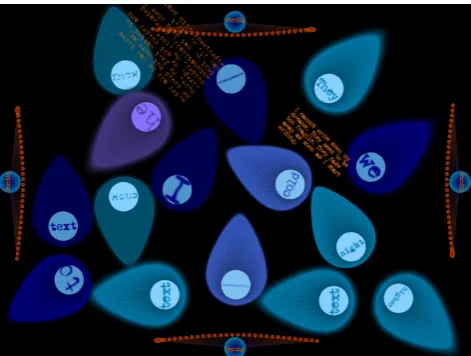
We will first examine the conceptual aspects of enabling text en-try for walk-up-and-use tabletop installations leading to design con-straints that can be applied to this particular application area. After this we analyze in particular stylus keyboards regarding their po-tential for public walk-up-and-use tabletop installations. We then describe the iterative design process that led to BubbleQWERTYand BubbleCIRCLE, two virtual keyboard prototypes that were designed in particular for tabletop displays installed in public spaces. Both prototypes have been developed within the context of an interactive tabletop installation calledmemory [en]code[1] that evolved from an art+science collaboration.
the unique characteristics of tabletop displays such as size, orien-tation, and direct-touch interaction via styli or fingers for general manipulation of virtual objects, common existing text-entry tech-niques can be cumbersome when applied to tabletop displays. In addition, tabletop displays invite simultaneous interaction of multi-ple peomulti-ple, which needs to be supported by text-entry methods.
As a first approach to this problem, Hinrichs et al. [9] have exam-ined groups of existing text-entry methods for desktop computers and mobile devices regarding their potential for use on tabletop dis-plays. The examined text-entry methods contained common physi-cal keyboards, small mobile keyboards known from cell phones or personal digital assistants (PDAs), speech recognition techniques, natural handwriting recognition, gestural alphabets such as Graf-fiti [3], and virtual stylus keyboards. The evaluative criteria Hin-richs et al. applied for their survey include the visual appearance of the text-entry method, its performance (efficiency and ease of learning), and how the method complements environmental factors special to tabletop displays such as space requirements, rotatability, direct-touch interaction, mobility, and simultaneous interaction [9]. It was found that all examined groups of text-entry methods have certain strengths and weaknesses that make them more appropri-ate for certain tabletop applications and less suitable for others [9]. Not surprisingly, the targeted user group and application area are important factors to consider when choosing or designing a table-top text-entry method.
For memory [en]code, a public interactive tabletop installation (see Figure 1), we prioritized Hinrichs et al.’s [9] evaluative criteria based on the impact each might have on walk-up-and-use tabletop displays. From the criteria we determined to be most important, we derived design constraints that were used in the iterative design process we will describe in Section 4.
One of the most important requirements of walk-up-and-use tech-nology in general is that the interface be both intuitive and self-explanatory. Walk-up-and-use installations need to be immersive enough to draw people’s attention, to enhance the information dis-played, and to convey a certain experience. Furthermore, the tar-geted user group of such interfaces is particularly diverse, ranging from young to old and highly-experienced computer users to com-plete novices. By narrowing the evaluative criteria described by Hinrichs et al. [9], we identified the following factors as most im-portant for the design of text-entry methods for walk-up-and-use tabletop installations.
2.1
Clear Affordances
While efficiency is usually seen as the most important factor for text-entry methods [10], intuitiveness and immediate usability are more important for walk-up-and-use interfaces. The interaction pe-riod with public walk-up-and-use interfaces is usually short and often non-recuring. Interaction techniques that require instruction or a long training period are, therefore, not suitable. This elimi-nates many typing methods that do not have some sort of visual or physical representation to indicate how they are used, e. g. gestu-ral alphabets that respond to certain gestures based on (non-visual) gestural representations of each character [3].
2.2
Audience Expertise
[image:2.595.318.555.53.214.2]For designing intuitive tabletop text-entry methods, it is also im-portant to estimate the typing expertise of the potential audience that will interact with the tabletop display. In a North American museum or art gallery, for instance, one should expect people very
Figure 1: memory [en]code at a public gallery.
familiar with computers and text entry, people unfamiliar with the latest technology (e. g., very young or elderly), native speakers, peo-ple unfamiliar with the English language, and peopeo-ple who fall some-where between these extremes. It might be reasonable to expect that a large portion of the audience would be familiar with theQWERTY
keyboard layout, but no design should prevent someone unfamiliar from entering text. The use of a character layout that is fast once learned, but unfamiliar to most people would be ill-advised (e. g., a
DVORAKcharacter layout [5]).
2.3
Direct-Touch Interaction
Most tabletop displays support direct-touch interaction via styli or fingers for manipulating virtual artifacts in the tabletop workspace. Direct-touch interaction has been shown to be most intuitive and suitable for interactions on large digital tables [7]. It is, thus, im-portant to integrate text-entry methods on tabletop displays without interfering with this form of interaction. Common physical key-boards, for instance, force people to switch back and forth between different input techniques—direct touch and an external input de-vice. Alternating between direct-touch interaction and an external input device can be disruptive on a large horizontal display since people can easily lose their focus point within the large tabletop workspace when they have to switch from touch interaction to typ-ing with an external keyboard and vice versa.
2.4
Visual Appearance
For public tabletop systems, approachability and aesthetics are high-ly important. Therefore, design and visual representation of text-entry methods need to be tailored toward the content and visual appearance of the tabletop interface and the location where the ta-bletop display is installed. Common external keyboards, e. g., may ruin the created illusion of a tabletop interface by pointing out that the underlying technology is a computer. In general, on-screen sty-lus keyboards that are controlled through direct-touch interaction in the virtual tabletop workspace have the advantage that their visual representation can easily be tailored toward the presented content.
2.5
Space Requirements
method, consequently, must be closely considered. The text-entry interface or device should not be too small, since this could cause usability issues, but also cannot take up too much space. External text-entry devices such as physical keyboards or small mobile key-boards do not take up virtual workspace at all but they can occupy the periphery of tabletop displays, e. g., the outer edge of the ta-bletop display where people might want to lean. Stylus keyboards can occupy virtual tabletop workspace, which can limit the space available for other visual feedback from the system. When consid-ering multi-user support, space requirements become in particular important since more than one (physical or virtual) typing device may have to be provided.
2.6
Multi-User Support
Since the physical appearance of tabletop displays invites several people to interact with the system at the same time [13], multi-user interaction needs to be supported by tabletop text-entry methods. As described by Hinrichs et al. [9], this is relatively easy with some text-entry methods such as handwriting, gestural alphabets, small mobile keyboards, and speech recognition since every person inter-acting with the tabletop display can be easily equipped with a text-entry device. With physical keyboards or stylus keyboards, either several instances of the device can be provided, or the keyboard needs to be shared between people. The latter can be cumbersome, in particular, with physical keyboards. For public tabletop instal-lations, where the concurrently interacting people do not necessar-ily know each other, social inhibition might also prevent extensive sharing.
2.7
Technical Simplicity
Technical simplicity is a factor that does not appear in the evaluative criteria described by Hinrichs et al. [9] but is highly important for public tabletop installations. We define technical simplicity as the avoidance of additional hardware that requires people to interact with or wear an extra device other than the tabletop display in order to enter text, e. g., cell phones or microphones. Extra hardware devices can distract people from the actual tabletop interface and destroy the immersive experience.
The factors described above can be regarded as design constraints that inform the process of designing text-entry methods for public walk-up-and-use tabletop installations. They help to eliminate cer-tain groups of text-entry methods (physical keyboards, small mo-bile keyboards, speech recognition, and gestural alphabets), leav-ing us with handwritleav-ing and stylus keyboards as possible text-entry methods for our public tabletop installation. Formemory [en]code we discarded handwriting as well since it is better suited to small an-notations than more elaborate passages of text [9, 10]. Despite the shortcomings mentioned above, stylus keyboards have the visual flexibility to allow both an intuitive design and a creative appear-ance, and, thus, seem to have the most potential for public tabletop installations such asmemory [en]code. Before we discuss the iter-ative design process that led to the virtual stylus keyboards Bub-bleQWERTY and BubbleCIRCLE, we describe related stylus key-boards that have been previously developed for small mobile de-vices.
3.
RELATED WORK
In summary, the advantages of stylus keyboards for walk-up-and-use tabletop installations are their visual adjustability, their poten-tial for the easy integration of direct-touch and simultaneous multi-person interaction, and that they do not require additional hardware.
The group of stylus keyboards can be divided intosoft keyboards
and gesture-based keyboards[9]. Both categories have different characteristics that need to be considered for walk-up-and-use ta-bletop displays as described in the following sections.
3.1
Soft Keyboards
Soft keyboards are generally virtual mappings of traditional phys-ical keyboards. For entering text, the touch-typing known from traditional physical keyboards is directly mapped to touch-tapping on a graphical representation of the keyboard in the virtual work-space. Therefore, people familiar with physical keyboards or even mechanical typewriters will intuitively understand how to enter text with a soft keyboard.
Q W E R T Y
A S D F
Z X C
G
V
U I
H
B N M
J K L
O P
[image:3.595.327.550.208.301.2]SPACE
Figure 2: The standardQWERTYlayout.
Q K C G V J
S I N D
H E
U O R L
Z B F Y P X
W T
A M
(a)OPTIlayout by MacKenzie et al. [11].
Z V C H W K
F I T A L Y
N E
G D O R S B
Q J U M P X
(b)FITALY layout by Textware [image:3.595.319.556.351.470.2]Solutions [20].
Figure 3: TheOPTIandFITALYkeyboard layouts.
K
W
M
U
Q
C
H
J
T
O
F
Z
‘
.
I
E space N
G
B
V
R
S
A
D
ret
,
X
P
L
Y
shift
Figure 4: The Metropolis layout by Zhai et al. [20].
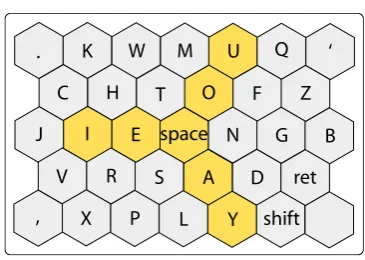
[image:3.595.344.527.507.637.2]A large variety of different character layouts have been developed ranging from the traditionalQWERTYlayout to alphabetical layouts to approaches that seek to minimize distances between consecutive characters (digraphs) for improved performance (see Figures 2, 3, and 4) [11, 20]. Although some alternative character layouts have been shown to be more efficient than theQWERTYcharacter lay-out [20], they were not adapted by the general population. The improved efficiency does not seem to be significant enough for people—most of them familiar with theQWERTYlayout—to invest time and effort to get used to a new character layout. As mentioned in Section 2.2, the character layout is an important factor for text-entry methods for walk-up-and-use tabletop displays, since it deter-mines the performance of the keyboard and how intuitive people will perceive the soft keyboard to be [21]. Although high efficiency is not required for public tabletop systems, a character layout un-familiar to people might prevent them from entering text into the system.
3.2
Gesture-based Keyboards
In contrast to soft keyboards, gesture-based keyboards support con-tinuous strokes for selecting consecutive characters. Using Cirrin, for instance, a gesture-based keyboard developed by Mankoff and Abowd [12], the finger or stylus is not lifted from the display sur-face while moving from character to character (see Figure 5). With
D U
K
B
Y
Q
X
P
J
V
Z
C
G
W
M
S
A
T
H
E
R
O
N
I
F L
[image:4.595.342.527.52.193.2]FINISHED
Figure 5: Cirrin: gesture-based keyboard by Mankoff and Abowd [12].
gesture-based keyboards, characters are often spread out, for in-stance, in a circular shape to make them selectable by strokes. A circular shape has the advantage that the average distance between any pair of letters can be minimized [12]. However, arranging 26 characters plus punctuation keys in a circular shape can lead either to a circle with a big radius or to a very small selection area for each character. Both can make text entry cumbersome. The T-Cube sys-tem by Neiberg and Venolia [17] solves this problem by dividing up characters into eight groups leading to octants within the circu-lar layout. Touching one of the octants opens up a new menu that shows the corresponding character group.
[image:4.595.102.246.321.467.2]The Dasher system by Ward et al. [18] (see Figure 6) uses a vertical layout that combines dynamic motion of characters with a probabil-ity function that determines which character is likely to follow a previously typed one. Characters are aligned vertically in alphabet-ical order on the right edge of the screen. A person enters text by altering the path of motion as characters fluidly change their size and horizontal position depending on the person’s gesture and the probability of a character to follow another.
Figure 6: Dasher keyboard by Ward et al. [18].
In general, as mentioned in Section 2.5, stylus keyboards need to provide a minimal character size in order to guarantee a certain ac-curacy while typing. High error rates based on character keys that are too small could be perceived as frustrating. However, large sty-lus keyboards can slow down the selection of character keys due to long distances that need to be traveled with the finger or sty-lus. They also occupy a lot of workspace, in particular, if several keyboard instances are installed for supporting multi-person inter-action. A compromised size needs to be found that provides enough space for comfortable and accurate typing but leaves enough room for the actual content displayed.
Although fluid gestures are highly elegant for direct-touch inter-action, gesture-based keyboards can cause problems in walk-up-and-use interfaces because it is not immediately obvious to people how to enter text. Usually, people are used to the point-and-click metaphor from common desktop computers so that continuous ges-tures might initially feel new and awkward. In this respect, soft keyboards are preferable over gesture-based keyboards for walk-up-and-use tabletop interfaces. Combinations of both might also be suitable.
The related stylus keyboards described above were mostly devel-oped for small mobile devices and, thus, were designed and tested for single-handed (one finger or stylus) text entry. On tabletop dis-plays it might be more intuitive and comfortable to type with two hands since tabletop displays have the affordances of traditional ta-bles where people often use both hands to type on common physical keyboards.
In the iterative design process described in the following section, we explored different design ideas for a stylus keyboard for mem-ory [en]code, leading to two prototypes called BubbleQWERTYand BubbleCIRCLE.
4.
A VIRTUAL KEYBOARD WITHIN
MEMORY [EN]CODE
memory cells get created continuously and, over time, a rich collec-tion of thoughts and memories evolves, created by people that were passing by the installation.
memory [en]codereflects different dynamic aspects of human mem-ory such as forgetting and remembering and dynamic change of memories over time triggered by new experiences. Each memory cell has a certain lifetime that causes it to die eventually. People’s interaction with memory cells can refresh the cells’ lifetime. Mem-ory cells can also be fused together. Fusing cells generates a new cell whose appearance and textual content is determined by its “par-ent” cells [1].
Being aninteractivetabletop installation, the success ofmemory [en]codestrongly depends on the active participation of people. Active participation is not only defined by the interaction of peo-ple with the available memory cells withinmemory [en]code but mostly by the active creation and adding of new cells to the pool of memory cells. In turn, people’s willingness to create cells—typing in memories and thoughts into the system—strongly depends on the intuitiveness and appeal of the text-entry method offered by the sys-tem. Rather than just describing our two final stylus keyboard pro-totypes that were developed for this installation—BubbleQWERTY
and BubbleCIRCLE—we will explain the iterative design process that led to these prototypes. This process contained insights that are of general interest for the development of virtual keyboards for public tabletop installations.
4.1
Iterative Design Process
While designing the virtual stylus keyboard formemory [en]code, our main concern was to create an appealing appearance of the key-board that would significantly differ from the look of common phys-ical keyboards. memory [en]codewas intended to be a dynamic and inspiring environment, so we wished to hide as much as possi-ble that the underlying technology was a computer. A keyboard too similar in appearance to a physical one might have destroyed this illusion. Since the appearance ofmemory [en]codefollows the look of natural cells in a liquid environment, we intended to design a stylus keyboard that would follow this metaphor. With this ad-ditional constraint in mind, we designed our two virtual keyboard prototypes through an iterative design process.
existing stylus keyboards
circular keyboard design
branch
three-arcs
single arc
[image:5.595.318.556.217.370.2]BubbleQWERTY
BubbleCIRCLE
Figure 7: Iterative process.
Figure 7 shows the progression of this design process. Based on our review of existing stylus keyboards, we first developed a circular keyboard design. The encountered issues with this first approach motivated the development of several paper prototypes that were informally tested for their potential. The insights from these tests finally led to the design of BubbleQWERTYand BubbleCIRCLE— two different stylus keyboard variations that address the same prob-lem. The iteration steps are described in detail in the following sections.
4.1.1
Iteration I—Circular Layout
The first stylus keyboard we designed and developed is based on a circular shape since we found a round keyboard shape would fit best to the cell environment surrounding it (see Figure 8). The
Figure 8: Circular typing device.
characters are arranged in an arc of 315◦in order to avoid occlu-sion problems that are often caused by people’s hands and wrists and mostly affect characters in the bottom quadrant of a circle. The character layout of this first prototype follows the order of the alpha-bet. The location and orientation of the stylus keyboard is flexible, making it easy to pass between multiple people.
Even without extensive testing we quickly encountered severe prob-lems with this keyboard design. As mentioned in Section 3.2 the circular design of the keyboard either leads to very small space for each character key or to a keyboard with a large radius. Since we limited the circular layout to 315◦this problem became even more apparent. We found that the keyboard radius necessary to achieve reasonably-sized character keys resulted in a layout with an unrea-sonably large travel distance between characters and a keyboard that took up an unreasonable amount of space.
Another severe problem was caused by the alphabetical character layout. Although the character keys were arranged in a predictable way (for people who know the alphabet), selecting the appropri-ate character took a frustratingly long time. The reason for this is that an alphabetical layout is quite uncommon compared to aQW
[image:5.595.56.293.511.698.2]struc-ture was given that would have helped to find the next character. During informal evaluations with colleagues, we found that this keyboard design would likely prevent people from typing elaborate thoughts and memories into the system. Our insights from this first prototype led to the design of our next prototypes where we tried to apply more visual structure.
4.1.2
Iteration II—More Visual Structure
The following prototypes were not implemented but prepared and informally tested on paper in order to be able to quickly identify their potential. For these prototypes we sought to group charac-ters so that certain character keys would be easier to find. We also supposed that character grouping would help to keep the keyboard more compact, while assigning each character key enough space to make it easily selectable. We kept reasonable space between the character groups to enable gesture strokes in addition to touch-tapping to select character keys. The keyboard prototypes that re-sulted from these reflections are shown in Figures 9, 10, and 11.
a b c d kj i e h gf m l r s t uv wx y z n o p q
(a) Initial setup.
a b c d kj i e g f m l r t u vw
xy z
n o p q h s h s
[image:6.595.321.560.56.220.2](b) Layout during interaction.
Figure 9: Branch character layout.
a
b c
d f g h j k l m
s z x v n
i
e r t u
w
y o
p q
(a) Initial setup.
a b c k j g
f l z x v nm
i
e r t u
w y o p q s h d h s
(b) Layout during interaction.
Figure 10: Three-arcs character layout.
The “branch” layout (see Figure 9) divides the character keys into two groups. In order to reduce the vertical space of this layout, and
a b c
k j g f m l
v x z
n i
e
r
t u w y
o pq
d
h s
(a) Initial setup.
a b c
k j g f m l
v x z
n i
e
r
t u w y
o pq
d h s
h s
[image:6.595.57.292.259.390.2](b) Layout during interaction.
Figure 11: Single-arc character layout.
therefore its overall size, the two groups of characters are arranged into two arched branches. Arranging the two branches opposite from each other separates the two groups of characters visually and allows people to select characters in a smooth stroke-based way or through touch-tapping. Since this layout can lead to long travel distances, it is enhanced by a function that moves characters with the highest probability of following the last-typed character toward an imaginary line (see the dashed line in Figure 9(b)). In the ideal case, a person would only have to move the pen back and forth along this line and could more easily find the right character. In the example shown in Figure 9(b) the last entered character is ‘t.’ After ‘t’ has been selected, the characters ‘h’ and ‘s’ move toward the dashed line, since they are predicted to be the most likely to follow ‘t.’ The probabilities for each character to follow one another could, for instance, be calculated based on a training corpus containing common English words and sentences.
Informal trials with the “branch” layout paper prototypes revealed several problems. With 13 character keys in each group, the “branch” layout still takes a lot of vertical space within the tabletop work-space if the character keys have a reasonable size (approximately 1.5 cm in diameter). Arranged on one of the edges of the tabletop workspace the layout looked interesting but extended too much to-ward the middle of the workspace. Characters were hard to reach and the travel distance between the selection of two consecutive characters was too far despite the next-character probability calcu-lation. The character layout was also perceived as awkward by peo-ple who tried it since it does not have anything in common with the well-knownQWERTYlayout.
[image:6.595.81.268.425.637.2]In order to improve space-efficiency, we designed the “single-arc” keyboard that huddles itself against an edge of the tabletop work-space and, therefore, consumes little vertical work-space (see Figure 11(a)). Characters are arranged in alphabetical order and, equivalent to the “branch” and “three-arcs” layout, long travel distances are avoided using the same predictive method (see Figure 11(b)). However, this prototype was still perceived as unintuitive and awkward to use. As our informal observations revealed, the selection time of characters was long, because the grouping of characters is no longer available in this layout.
While none of these keyboard designs was satisfying enough to be acceptable for our interactive tabletop installation, their devel-opment and the problems we encountered with them led us to the design of BubbleQWERTY, a stylus keyboard design that is based on the commonQWERTYlayout, and BubbleCIRCLE, a refined cir-cular keyboard based on the findings of our first prototype from It-eration I. Both, BubbleQWERTYand BubbleCIRCLEare enhanced with an opening and closing mechanism and the next-character pre-diction functionality as described in the following section.
4.2
BubbleType
With the two stylus keyboard prototypes, BubbleQWERTYand Bub-bleCIRCLE, we address the three issues that became apparent in the previous iteration steps: the keyboard size vs. character size prob-lem, the issue of supporting the text-entry process in a fun and intuitive way, and the problem of finding an appropriate charac-ter layout for our stylus keyboard that would visually fit to mem-ory [en]codeand still be intuitive to use. The first problem is ap-proached by enhancing the stylus keyboard with an opening and closing mechanism. That is, the keyboard remains hidden when it is not in use and can be opened up on demand by tapping a ded-icated area of the screen. The opening and closing mechanism is animated, which adds to the visual appeal of the stylus keyboard and enhances the illusion of not interacting with a computer. Fig-ure 12 shows the appearance of closed BubbleQWERTYand Bub-bleCIRCLEkeyboards arranged on the edges of the tabletop work-space.
Considering that the design of our stylus keyboard needs to visually fit to the overall look-and-feel ofmemory [en]code, we chose an abstract style for the closed stage of the stylus keyboard. People approaching the installation do not immediately know that a virtual stylus keyboard is hiding on each edge of the workspace. What they see initially is a number of orange circles that could represent water plants within a fluid environment. However, touching the blue circular area which is labeled with the word “typing” (see Fig-ure 12(b)) triggers the opening mechanism revealing the keyboard’s full functionality (see Figure 13(a) and Figure 15(a)).
Sincememory [en]codeis an interactive tabletop installation that aims for the active participation of visitors, this particular interac-tion design adds immersive features to the interface that can en-hance visitors’ curiosity and willingness to explore the tabletop in-terface. Opening and closing mechanisms for areas in the tabletop workspace that contain tools, such as stylus keyboards, could also be useful for tabletop work applications because they allow people to adjust their personal workspace depending on their current activ-ities [15].
To facilitate the text-entry process and make it more intuitive we ap-plied the next-character probability calculation to the size of each character, instead of their location as in the “branch”, “single-arc”,
(a) Closed keyboards within the tabletop workspace.
[image:7.595.320.556.52.230.2](b) One of the closed keyboards—close-up (same for Bub-bleQWERTYand BubbleCIRCLE).
Figure 12: Closed stylus keyboards.
and “three-arcs” layouts. Characters that are likely to follow a pre-viously entered character are visually magnified (see Figures 13(b), 13(c) and 15(b)). This magnification makes characters likely to follow another character look more prominent, so that people unfa-miliar with the provided character layout can find the appropriate character more easily.
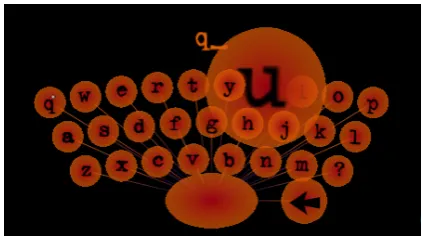
The magnification effect is only applied visually to character keys while the selection area of each key remains the same. Thus, charac-ters with a low probability of following a previously typed in char-acter are still easily selectable (see Figure 14). In addition, charac-ter keys are semi-transparent so that a characcharac-ter with a high proba-bility cannot occlude neighboring characters. Figure 14 shows an example where the character ‘q’ has been entered. Since the char-acter ‘u’ has a very high probability to follow ‘q,’ it is strongly magnified, partially occluding its neighboring characters. However, these characters are still visible and easily selectable.
Both, BubbleQWERTY and BubbleCIRCLE, have an opening and closing mechanism and next-character prediction functionality scal-ing certain characters. Each of these stylus keyboard prototypes, however, is an individual approach toward the third problem—find-ing an appropriate design and character layout for our stylus key-board.
4.2.1
BubbleQWERTY
The BubbleQWERTYstylus keyboard is based on the design and layout of a traditional physical keyboard, enhanced with the con-cepts described above. While we followed the traditionalQWERTY
(a) BubbleQWERTYkeyboard open—initial setup.
(b) BubbleQWERTYkeyboard while typing.
[image:8.595.330.542.52.170.2](c) BubbleQWERTYkeyboard in use.
Figure 13: BubbleQWERTYdesign.
the traditionalQWERTYcharacter layout into account without re-minding people of the look and feel of a computer environment. The result is shown in Figure 13. Not surprisingly, informal tests of this keyboard layout showed that it was perceived as the most intu-itive thus far. Furthermore, the compact arrangement of characters allowed people to use both hands for typing in messages, an interac-tion that the previous keyboard designs did not explicitly support.
4.2.2
BubbleCIRCLE
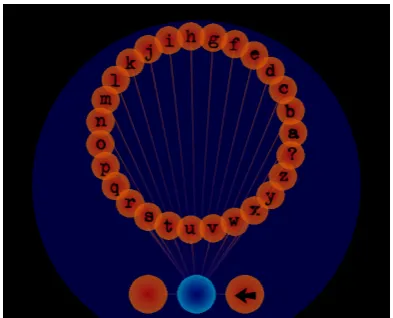
As with BubbleQWERTY, BubbleCIRCLEincorporates the general concepts described previously, but is based on the circular keyboard design from the layout described in Iteration I (see Section 4.1.1). Since there is no benefit to motor-memory from experience using a
QWERTYlayout in a circular keyboard design, we chose an alpha-betical character layout for this prototype (see Figure 15). We are aware, however, that there might be more suitable character layouts for a circular keyboard design, as for instance shown within the Cir-rin keyboard [12] (see Figure 5). We intend to explore other layouts
Figure 14: Visual-only magnification of semi-transparent char-acter keys makes selection of other keys still possible.
in the future.
The BubbleCIRCLElayout demonstrates how the prototype of It-eration I (see Figure 8) can be improved by applying the next-character probability calculation to the visual magnification of char-acter keys. While informal tests of the circular prototype in It-eration I showed that people had difficulties finding certain keys, the visual magnification of character keys facilitates fast selection by providing a more distinctive visual structure throughout the cir-cle. In addition, the circular design of BubbleCIRCLEsupports both touch-tapping and gesture strokes for selecting the appropriate keys, whereas the more compact design of BubbleQWERTYonly allows touch-tapping.
Although both BubbleQWERTYand BubbleCIRCLEwere promis-ing candidates for a public walk-up-and-use tabletop system such asmemory [en]code we opted for the BubbleQWERTYin our ac-tual installation since the QWERTYlayout was found to be most comfortable for people during informal testing.
In the following section we describe how people interacted with BubbleQWERTYduring the public exhibition ofmemory [en]code.
5.
PRACTICAL USE OF BUBBLE
QWERTY memory [en]codewas installed as an interactive tabletop installa-tion in a public gallery for one week. This gave us the opportunity to informally observe how people used BubbleQWERTY. During this week, 70 to 100 people of all ages interacted with the system. BubbleQWERTY was successful in the sense that it was intuitive and easy to use and, therefore, actively invited people to enter text messages into the system. This becomes visible in the massive amount of memory cells that were created during the exhibition. Many cells hold extensively long and elaborate text messages. In addition, many people actually visited the installation several times in order to enter new thoughts.People perceived the overall visual appearance ofmemory [en]code and BubbleQWERTYas highly appealing. They seemed to immerse themselves into the system, spending a considerable amount of time (up to 45 min) with the system and sometimes even visiting the installation several times [1]. In this way, the visual design of Bub-bleQWERTYwas successful since it enhanced the look-and-feel of memory [en]codeand helped to draw people into a “dialog” with the system.
[image:8.595.73.280.335.474.2](a) BubbleCIRCLEkeyboard open—initial setup.
[image:9.595.76.273.52.211.2](b) BubbleCIRCLEkeyboard while typing.
Figure 15: BubbleCIRCLEdesign.
because the displayed characters inQWERTYlayout suggest a typ-ing device. Not surpristyp-ingly, people intuitively mapped the touch-typing mechanism known from traditional physical keyboards to the touch-tapping mechanism that BubbleQWERTYsupports. Al-though we designed BubbleQWERTY for two-handed typing, we observed that most people used a single finger to type in messages, especially when they were using the keyboard for the first time. The two-handed typing with BubbleQWERTY seems to require some learning since we found that people who visited the installation sev-eral times became more used to the look-and-feel of BubbleQWERTY
and started to use both hands. These observations require closer ex-amination in future studies.
The resizing of characters based on the probability calculation was noticed by people but not consciously recognized as a support func-tion. In fact, people perceived it as a visual feature to improve the appearance of the interface. We cannot be certain of the effect of the probability feature on people’s performance. Future studies will show if visually resizing a character based on its probability to fol-low a previously typed in character can improve typing speed in this setting.
Triggering the opening mechanism of the BubbleQWERTYkeyboards caused some minor problems, as people often did not understand immediately how to open the virtual keyboard. Watching others
in-teract with the installation, however, typically solved this problem. While we still think that the opening and closing mechanisms we developed for BubbleQWERTYand BubbleCIRCLEare important in order to save workspace when the keyboard is not needed, further iterations of the keyboard designs need to better visually suggest this functionality.
The most severe problems we encountered with our installation were due to hardware limitations. We used Smart Technologies’1 DViT input technology, which only supports two simultaneous in-puts. However, we installed four fixed BubbleQWERTYkeyboards, one on each of the four edges of the tabletop workspace and, in addition, allowed people to interact with the memory cells floating in the tabletop workspace. Thus, the two provided inputs were oc-cupied most of the time. The system, therefore, often appeared too slow to enable fluid and fast typing. People suggested that the typ-ing devices were ignortyp-ing their input due to the number of people interacting with the system. For public tabletop installations it is highly important to enable as many simultaneous inputs as possi-ble. For public tabletop systems that wish to enable smooth and efficient text entry for as many people as can fit around the display (in our case, often as many as 10 people), supporting such input be-comes even more important. Other technologies, such as frustrated total internal reflection (FTIR) [8], support as many simultaneous inputs and may eliminate such hardware problems.
6.
CONCLUSION
Although a significant amount of research has been done to inves-tigate how digital information can be manipulated within digital tabletop workspaces, there are no standard methods to enter infor-mation, in particular text. Enabling text entry for tabletop displays may make them a more viable option for many real-world applica-tions. In this paper, we have analyzed the specific characteristics of large walk-up-and-use tabletop displays in public spaces and used this analysis to inform the design and development of text-entry methods, in particular stylus keyboards. Based on these character-istics we have identified certain aspects and design constraints that need to be considered when designing text-entry methods for walk-up-and-use tabletop displays. These include clear affordances, the expertise of the target audience, the support of direct-touch interac-tion and the interacinterac-tion of multiple people, the visual appearance of the method and how it fits to the tabletop system aesthetically, and its spatial and technological requirements.
We have described the iterative design process of two virtual key-board prototypes, BubbleQWERTYand BubbleCIRCLE, which we designed to work withinmemory [en]code, an interactive tabletop installation. While both BubbleQWERTYand BubbleCIRCLEare still in a prototypical stage and need to be refined, we can make the case that virtual stylus keyboards are one valid and intuitive way to enable text entry on tabletop displays. Specifically their variability makes them in particular attractive for entertainment and art-based applications, such asmemory [en]code.
7.
FUTURE WORK
In the future we would like to explore more design possibilities for stylus keyboards, moving away from the dominantQWERTY char-acter layout. As we continue to design prototypes, we will base our future designs on the experiences gained from the ones described in this paper. We are in the process of designing more formal user
studies to evaluate the performance of these prototypes. Specifi-cally, we would like to determine if there is a design that is both highly efficient and viable in a public setting, or if it is inherently necessary to sacrifice efficiency for intuitiveness and visual aesthet-ics.
ACKNOWLEDGMENTS
We would like to thank Saul Greenberg for providing his plasma display for our installation. We also thank Christopher Collins for his suggestions concerning the design of virtual keyboards. We also thank all class members and instructors of the ASTecs course and all ilab members for their insightful comments and suggestions as well as our funding agencies SMART Technologies Inc., Alberta Ingenuity, iCore, NSERC, and CFI.
8.
REFERENCES
[1] Reference omitted for blind review.
[2] ART+COM, Berlin. floating.numbers. ART+COM, Berlin, Website http://www.artcom.de/, 2004. Visited April 10, 2007. [3] C. H. Blickenstorfer. Graffiti: Wow! Pen Computing
Magazine, pp. 30–31, January 1995.
[4] O. de Bruijn and R. Spence. Serendipity within a Ubiquitous Computing Environment: A Case for Opportunistic
Browsing. InProc. of Ubicomp 2001, volume 2201 ofLNCS, pages 362–370, Berlin, 2001. Springer-Verlag.
[5] A. Dvorak, N. L. Merrick, W. L. Dealey, and G. C. Ford.
Typewriting Behaviour. American Book Company, 1936. [6] T. Geller. Interactive Tabletop Exhibits in Museums and
Galleries.IEEE Computer Graphics and Applications, 26(5):6–11, Sept./Oct. 2006.
[7] V. Ha, K. M. Inkpen, R. L. Mandryk, and T. Whalen. Direct Intentions: The Effects of Input Devices on Collaboration around a Tabletop Display. InProc. of Tabletop 2006, pages 177–184, Los Alamitos, 2006. IEEE Computer Society. [8] J. Y. Han. Low-Cost Multi-Touch Sensing Through
Frustrated Total Internal Reflection. InProc. of UIST 2005, pages 115–118, New York, 2005. ACM Press.
[9] U. Hinrichs, M. Hancock, C. Collins, and S. Carpendale. Examination of text-entry methods for tabletop displays. In
Proceedings of the IEEE International Workshop on Horizontal Interactive Human-Computer Systems
(Tabletop’07), page to appear, 2007.
[10] I. S. MacKenzie and R. W. Soukoreff. Text entry for mobile computing: Models and methods, theory and practice.
Human-Computer Interaction, 17(2):147–198, 2002. [11] I. S. MacKenzie and S. X. Zhang. The Design and
Evaluation of a High-Performance Soft Keyboard. InProc. of CHI 1999, pages 25–31, New York, 1999. ACM Press. [12] J. Mankoff and G. D. Abowd. Cirrin: A Word-Level
Unistroke Keyboard for Pen Input. InProc. of UIST 1998, pages 213–214, New York, 1998. ACM Press.
[13] Y. Rogers and S. Lindley. Collaborating Around Vertical and Horizontal Large Interactive Displays: Which Way Is Best?
Interacting with Computers, 16(6):1133–1152, Dec. 2004. [14] K. Ryall, M. Ringel Morris, K. Everitt, C. Forlines, and
C. Shen. Experiences with and Observations of Direct-Touch Tabletops. InProc. of Tabletop 2006, pages 89–96, Los Alamitos, 2006. IEEE Computer Society.
[15] S. D. Scott, M. S. T. Carpendale, and K. M. Inkpen.
Territoriality in Collaborative Tabletop Workspaces. InProc. of CSCW 2004, pages 294–303, New York, 2004. ACM Press.
[16] O. St˚ahl, A. Wallberg, J. S¨oderberg, J. Humble, L. E. Fahl´en, A. Bullock, and J. Lundberg. Information Exploration Using The Pond. InProc. of CVE 2002, pages 72–79, New York, 2002. ACM Press.
[17] D. Venolia and F. Neiberg. T-Cube: A Fast, Self-Disclosing Pen-Based Alphabet. InProc. of CHI 1994, pages 265–270, New York, 1994. ACM Press.
[18] D. J. Ward, A. F. Blackwell, and D. J. C. MacKay.
Dasher—A Data Entry Interface Using Continuous Gestures and Language Models. InProc. of UIST 2000, pages 129–137, New York, 2000. ACM Press.
[19] P. Wellner. Interacting with Paper on the DigitalDesk.
Communications of the ACM, 36(7):87–96, July 1993. [20] S. Zhai, M. Hunter, and B. A. Smith. The Metropolis
Keyboard—An Exploration of Quantitative Techniques for Virtual Keyboard Design. InProc. of UIST 2000, pages 119–128, New York, 2000. ACM Press.
[21] S. Zhai, P.-O. Kristensson, and B. A. Smith. In search of effective text input interfaces for off the desktop computing.
![Figure 1: memory [en]code at a public gallery.](https://thumb-us.123doks.com/thumbv2/123dok_us/8580860.369744/2.595.318.555.53.214/figure-memory-en-code-at-a-public-gallery.webp)
![Figure 6: Dasher keyboard by Ward et al. [18].](https://thumb-us.123doks.com/thumbv2/123dok_us/8580860.369744/4.595.102.246.321.467/figure-dasher-keyboard-by-ward-et-al.webp)