Professional
Software Testing with
Visual Studio
®
2005 Team System
Tools for Software Developers
and Test Engineers
Tom Arnold
Dominic Hopton
Andy Leonard
Mike Frost
Professional Software Testing with
Visual Studio
®2005 Team System
Introduction . . . xxiii
Chapter 1: Introduction to VSTEST and VSTESD . . . 1
Chapter 2: A Quick Tour of VSTEST and VSTESD . . . 15
Chapter 3: Unit Testing with VSTEST and VSTESD . . . 41
Chapter 4: Testing the Database . . . 73
Chapter 5: Web Testing . . . 125
Chapter 6: Using Manual, Ordered, and Generic Test Types . . . 165
Chapter 7: Load Testing . . . 191
Chapter 8: Using Code Analysis and Dynamic Analysis. . . 243
Chapter 9: VSTEST and VSTESD within the Software Development
Life Cycle . . . 273
Appendix A: Installing Team Explorer . . . 305
Appendix B: Creating and Running a Web Test: A High-Level
Walk-Through . . . 313
Appendix C: Creating and Running a Unit Test: A High-Level
Walk-Through . . . 319
Appendix D: Creating and Running a Load Test: A High-Level
Walk-Through . . . 327
Appendix E: Creating and Running a Manual Test: A High-Level
Walk-Through . . . 339
Appendix F: Other Sources of Information . . . 347
Professional
Software Testing with
Professional
Software Testing with
Visual Studio
®
2005 Team System
Tools for Software Developers
and Test Engineers
Tom Arnold
Dominic Hopton
Andy Leonard
Mike Frost
Professional Software Testing with Visual Studio
®2005 Team
System: Tools for Software Developers and Test Engineers
Published by
Wiley Publishing, Inc.
10475 Crosspoint Boulevard Indianapolis, IN 46256 www.wiley.com
Copyright©2007 by Wiley Publishing, Inc., Indianapolis, Indiana Published simultaneously in Canada
ISBN: 978-0-470-14978-2
Manufactured in the United States of America 10 9 8 7 6 5 4 3 2 1
Library of Congress Cataloging-in-Publication Data
Professional software testing with Visual Studio 2005 team system : tools for software developers and test engineers / Tom Arnold. . .[et al.].
p. cm. Includes index.
ISBN 978-0-470-14978-2 (paper/website)
1. Computer software–Testing. 2. Microsoft Visual studio. I. Arnold, Tom,
1967-QA76.76.T48P76 2007 005.1’4–dc22
2007026308
No part of this publication may be reproduced, stored in a retrieval system or transmitted in any form or by any means, electronic, mechanical, photocopying, recording, scanning or otherwise, except as permitted under Sections 107 or 108 of the 1976 United States Copyright Act, without either the prior written permission of the Publisher, or authorization through payment of the appropriate per-copy fee to the Copyright Clearance Center, 222 Rosewood Drive, Danvers, MA 01923, (978) 750-8400, fax (978) 646-8600. Requests to the Publisher for permission should be addressed to the Legal Department, Wiley Publishing, Inc., 10475 Crosspoint Blvd., Indianapolis, IN 46256, (317) 572-3447, fax (317) 572-4355, or online athttp://www.wiley.com/go/permissions.
Limit of Liability/Disclaimer of Warranty:The publisher and the author make no representations or warranties with respect to the accuracy or completeness of the contents of this work and specifically disclaim all warranties, including without limitation warranties of fitness for a particular purpose. No warranty may be created or extended by sales or promotional materials. The advice and strategies contained herein may not be suitable for every situation. This work is sold with the understanding that the publisher is not engaged in rendering legal, accounting, or other professional services. If professional assistance is required, the services of a competent professional person should be sought. Neither the publisher nor the author shall be liable for damages arising herefrom. The fact that an organization or Website is referred to in this work as a citation and/or a potential source of further information does not mean that the author or the publisher endorses the information the organization or Website may provide or recommendations it may make. Further, readers should be aware that Internet Websites listed in this work may have changed or disappeared between when this work was written and when it is read.
For general information on our other products and services please contact our Customer Care Department within the United States at (800) 762-2974, outside the United States at (317) 572-3993 or fax (317) 572-4002.
For Siobhan. I love you.
— Tom Arnold
To all the underappreciated testers in the world.
— Dominic Hopton
To Christy, Stevie Ray, and Emma Grace.
— Andy Leonard
To my family for their love and support all these years, especially Dad for encouraging my interest in computers.
And to Sarah, who makes my life complete.
About the Authors
Tom Arnoldwas a program manager for Microsoft Visual Studio 2005 Team System, specifically for the testing tools. He has also managed other commercial testing tools projects by Microsoft and Rational Software and has spoken at such industry conferences as STAR, Microsoft Tech Ed, Internet World, and many others. In addition to two other books on software testing, he has produced three video series on the topic and co-founded a 250-employee software testing company (later sold to Lionbridge/Veritest). Tom is currently a program manager at Microsoft on theOfficeLive.comteam. Tom can be reached at http://www.msvstest.com.
Dominic Hoptonis a software development engineer on the Visual Studio Enterprise Test team at Microsoft. One of the original team members, Dominic helped fashion the new development and testing tools in Visual Studio 2005. He is currently working on the next version of testing tools for Visual Studio.
Andy Leonardis a SQL Server database developer, MVP, and engineer. He is a co-author of
Professional SQL Server 2005 Integration Services. He founded and managesVSTeamSystemCentral.com. Andy’s experience includes web application architecture and development, VB.NET, ASP, and ASP.NET; SQL Server Integration Services (SSIS); data warehouse development using SQL Server 2000 and 2005; and test-driven database development.
Credits
Executive Editor
Robert Elliott
Development Editor
Kelly Talbot
Technical Editors
Paul Schafer Chris Massie Bill Barnett Michael Fanning
Production Editor
Debra Banninger
Copy Editor
Cate Caffrey
Editorial Manager
Mary Beth Wakefield
Production Manager
Tim Tate
Vice President and Executive Group Publisher
Richard Swadley
Vice President and Executive Publisher
Joseph B. Wikert
Proofreader
Nancy Carrasco
Indexer
Melanie Belkin
Project Coordinator, Cover
Adrienne Martinez
Anniversary Logo Design
Acknowledgments
Tom Arnold:Thank you to Wiley Press and Wrox for inviting me to participate: Bob Elliott, Kelly Tal-bot, Debra Banninger, and everyone else. Siobhan Quinn, thank you for joining me at countless coffee shops while I typed and you laughed at my cheesy jokes. To the Visual Studio team — specifically Sam Guckenheimer, Jim Sather, Chris Lucas, Gabriel Marius, and my fellow Program Managers — thank you for the chance to be a part of something that reaches literally millions of developers worldwide. Rob Arnold, my brother and mentor, thank you for your constant encouragement. My co-authors — Dominic, Andy, and Mike — thank you guys for signing up! Thank you to our technical editors — Paul, Chris, Bill, and Michael — for keeping us honest. Mikky Anderson, Bruce Johnson, and Sridhar Chandrashekar, thank you for supporting my efforts. Thank you, Mom and Dad, for everything.
Dominic Hopton:Thanks have to go to the people who enabled me to understand and learn my product and be part of it. Without their guidance and encouragement, I wouldn’t have understood enough to be able to write this book. I won’t remember all your names, but I must thank Tom Marsh, Joe Rohde, James Su, and David Williamson for nurturing me. I also have to thank Tom Arnold for encouraging me to do the book with him — and his constant nagging! Finally, I have to thank Joanne Cunningham for the special and unique encouragement she provided that allowed me to put pen to paper. Thank you.
Andy Leonard:Thanks to Rob Caron, Gert Drapers, Matt Nunn, Sachin Rekhi, and Cameron Skinner for their blog posts about Visual Studio Team Edition for Database Professionals. I learned a lot about creating custom test conditions from blog posts and samples by Sachin Rekhi and Gert Drapers. For help with C# coding, thanks to my friends: John Brown, Craig Dahlinger, Jason Gerard, Frank La Vigne, and Chris Massie. Many thanks to the author team: Tom, Mike, and Dominic — you guys are awesome! Thanks to Kelly Talbot, editor and ‘‘coach,’’ and our entire Wrox Team at Wiley: Bob Elliott, Colleen Hauser, and Helen Russo; to name a few. Whenever I sign on to write, so does Christy. Thanks for your encouragement and inspiration, Beautiful.
Professional
Software Testing with
Contents
Introduction
xxiii
Chapter 1: Introduction to VSTEST and VSTESD
1
The Software Development Process and Software Development Life Cycle (SDLC)
1
Planning, Analysis, Design, and Development 1 Existing Tools in the Marketplace 3
Where VSTEST and VSTESD Fit in the SDLC
6
What VSTEST and VSTESD Do
7
VSTEST Features 7
VSTESD Features 10
How Do They Help the SDLC? 11
Why Choose VSTEST Over Other Tool Sets? 12
Summary
13
Chapter 2: A Quick Tour of VSTEST and VSTESD
15
Test Types
15
The Manual Test Type 16
The Unit Test Type 17
The Web Test Type 17
The Load Test Type 18
The Ordered Test Type 18
The Generic Test Type 18
Future/Third-Party Test Types 19
The Test User Interface
19
The UI for Creation and Authoring of Tests 19 The UI for Management of Tests 27 The UI for Test Execution and Results 30
Analysis Tools
37
Code Analysis 37
Performance Measurements 38
Chapter 3: Unit Testing with VSTEST and VSTESD
41
Overview of Unit Testing
41
Why Unit Test? 41
Approaches to Unit Testing 42
What Unique Unit Testing Features Do VSTEST and VSTESD Have? 43
Creating Your First Unit Test
45
Creating a Sample Library 45
Generating Unit Tests 46
Running Unit Tests 48
A Tour of Unit Testing in VSTEST
48
Anatomy of a Test Class 49
Passing and Failing a Test 49
Code Generation 49
Customizing Your Test Methods 54
Unit Testing Assertions 56
Debugging Unit Tests 57
Advanced Unit Testing
58
MSTest Command-Line Tools 60
Unit Test Life Time 65
ASP.NET 69
Data-Driven Testing 69
Test Context 72
Summary
72
Chapter 4: Testing the Database
73
Database Testing Is Different
73
Developing a Database Project
74
Exploring the Project 75
Adding Schemas, Tables, and Constraints 78 Adding Views and Stored Procedures 83 Inside the Development Database 87
Rename Refactoring
88
Database Project Deployment
90
Generating Test Data
92
Unit Testing
94
Unit Test Stored Procedures 97
Developing Custom Unit Tests
114
Adding the Custom Test Condition Project 114 Building the Custom Test Condition 115
Developing a Unit Test with the Custom Test Condition 123
Summary
124
Chapter 5: Web Testing
125
Basic Web Tests
125
Recording a Test 126
Using the Web Test Editor 127
Components of a Web Test 129
Making Web Tests Dynamic
135
Context Parameters 136
Data-Driven Web Tests 139
Capturing Data During a Web Test
142
Extraction Rules 142
Default (Auto-Captured) Fields 144
Verifying the Response with Validation Rules
144
Built-in Validation Rules 144
Adding a Validation Rule to a Request 145
Validation Level 146
Custom Rules
147
The Response Page
150
Testing a Web Service
150
HTTP Request-Based Testing Does Not Test the UI
151
You Cannot Test Your Web UI and Client-Side Script Using a Web Test 151 Dynamic Test Data That Is Affected by Scripts 152
Running a Web Test
152
Important Settings in the .testrunconfig File 152
Running the Test 153
Examining the Results
154
Reviewing Each Request and Response in the Web Test Viewer 154
Request Panel 154
Details Panel 155
Investigating Failures 155
Maintaining the Tests
157
Coded Web Tests
158
Coded versus Basic 158
Converting from a Web Test 158 Aspects of a Coded Web Test 159
Plug-ins
162
Web Test Plug-ins 162
Web Test Request Plug-ins 162
Web Tests and AJAX
163
Summary
164
Chapter 6: Using Manual, Ordered, and Generic Test Types
165
Manual Test Type
165
Defining a Manual Test Scenario 166
Creating a Manual Test 167
Properties of a Manual Test 170
Executing a Manual Test 173
Ordered Test Type
177
Creating an Ordered Test 177
Properties of an Ordered Test 178
Executing an Ordered Test 181
Generic Test Type
182
Creating a Generic Test 182
Properties of a Generic Test 186
Executing a Generic Test 190
Summary
190
Chapter 7: Load Testing
191
Basic Terminology
191
Working with Load Tests in VSTEST
193
Creating a Load Test
193
Components of a Load Test
195
Scenarios 195
Counter Sets 201
Run Settings 205
SQL Tracing
209
SQL Tracing Specific Run Settings 209
Viewing SQL Trace Data 210
Using a Test Rig
211
Determining Hardware Requirements 211
Setting Up the Test Rig 214
Managing the Test Rig 215
Results Store
219
Creating a Results Store in an Existing SQL Server 219 Results Store Database Schema 220
Best Practices
221
Working from Clear Goals 221
Knowing When to Load Test 223
Walk Before You Run 223
Running a Load Test
225
Important Settings in the .testrunconfig File 225
Starting the Load Test 226
Examining in Progress Test Data 226 Using the Load Test Analyzer 227
Investigating Results
232
Understanding Your Application 233
Using Rules 233
Checking the Test Computers 234
Analyzing a Test Run 235
If There Are No Errors 240
Reporting Results
240
Summary
241
Chapter 8: Using Code Analysis and Dynamic Analysis
243
Code Analysis
243
Static Analysis Tools 243
Coding Standards 244
Enabling Code Analysis 245
Understanding Errors 246
Suppressing Errors 249
Dynamic Analysis
251
Other Tools to Use 251
Profiling 257
Code Coverage 265
Off-Roading on the Command Line 269
Summary
272
Chapter 9:
VSTEST and VSTESD within the Software Development
Life Cycle
273
VSTFS at a High Level
273
The Software Development Life Cycle
275
Collaborating with Your Team
276
Installing Team Explorer 276
Connecting to a Project 278
High-Level View of the Project 279
How the VSTEST and VSTESD Tools Fit
283
Associating Tests with Work Items 294
Team Build Process 297
Associating Work Items with Test Results 300
Publishing Test Results 302
Summary
303
Appendix A:
Installing Team Explorer
305
Installing Team Explorer
305
Appendix B:
Creating and Running a Web Test: A High-Level
Walk-Through
313
Appendix C:
Creating and Running a Unit Test: A High-Level
Walk-Through
319
Appendix D:
Creating and Running a Load Test: A High-Level
Walk-Through
327
Appendix E:
Creating and Running a Manual Test: A High-Level
Walk-Through
339
Appendix F:
Other Sources of Information
347
Author Sites
347
Blogs
347
Forums
348
Conferences
348
Other
348
I n t r o d u c t i o n
I’ve had the good fortune of being a part of many startups, both where there were three of us working to build a company that eventually went to 250 employees and $14 million in sales annually, and also in a corporate setting where a new division was being formed. In every case, we struggled with the question of what tools we needed to use on our team, how they would integrate, and how the team would put those tools to use effectively so that we could bring a quality product to market in as short a period of time as possible.
Typically this has meant building our own ‘‘stack’’ of tools: an open source version control system like CVS (Concurrent Versions System), a defect and issues tracking system such as Team Track by Serena Software, automation tools for web and load testing by Mercury Interactive, open source unit testing tools such as JUnit and NUnit, code coverage analysis tools such as C Cover by Bullseye Testing Technology, test library manager by Rational Software, collaboration software for sharing documentation by Plumtree (BEA Systems) or SharePoint (Microsoft Corporation), and more.
Once we figured out our tool stack, we also had to agree on the process we were following for our project’s life cycle. Were we taking a waterfall approach, Agile, spiral, Rational Unified Process (RUP), Microsoft Solution Framework (MSF), or something completely new? These were the questions that had to be answered if we expected to move effectively as a team.
With our tools and process selected, the team then had to weave a thread between those tools to allow version control, code coverage, dynamic analysis, test results, and a host of other applications by using our ad hoc queries and applications like Microsoft Excel to paint a picture of how our project was doing. This would answer the important question of whether we were going to be shipping our software on time.
While having the big picture of the health of our project was important to us as a team, it was critically important when we had investors — whether they were venture capitalists, the corporate VP sponsoring the new effort, or our friends and family who loaned us the start-up capital — who wanted to know what progress was being made with the money they had so graciously provided and placed at risk.
Enter Visual Studio 2005 Team System: a suite of tools addressing the needs of software architects, devel-opers, test engineers, program managers, and those footing the bill for the project. Not only does VSTS provide the ‘‘stack’’ of tools right out of the box, but it also has critical integration points allowing those tools to work together, whether it’s helping the team get a large build completed each night or getting a current snapshot of the bug trends. This was a huge undertaking by Microsoft to create such a suite, and they created and delivered it to rave reviews.
It all sounds so daunting when I look back on it, but it was a matter of taking things one step at a time and breaking each of our needs and requirements into manageable components. This book breaks out two of those components from VSTS and explores the tools provided by developers and test engineers
Developers (VSTESD) and Visual Studio Team Edition for Software Testers (VSTEST), which are part of the overall Visual Studio Team System.
The goals of this book are to:
❑ Introduce you to the Visual Studio Team System big picture.
❑ Walk you through the overall user interface of the VSTEST and VSTESD development and testing tools.
❑ Dive deep into each of the test types available to test engineers and software developers.
❑ Help you understand how to effectively put the code analysis and dynamic analysis tools to use.
❑ Pull together the pieces to see how they integrate into a team setting.
My co-authors, editors, and I wrote this book because many of us were either on the Microsoft team that helped create these testing tools or are in the industry putting those tools to use effectively day in and day out. We want to share with you what has worked for us and how these tools are intended to be used so that you can be effective as a software developer or test engineer on your team as quickly as possible.
Who This Book Is For
VSTS blurs the line between software test engineers and developers, and as a result we have two main audiences who will find this book essential in their use of the test and analysis tools. Software developers will be interested in the unit testing, code analysis, and profiling tools to help them better understand how to write quality code. Test engineers will want to use the unit tests written by the developers and possibly write some of their own unit tests, as well as create web, load, and manual tests to help create a complete approach to testing their product. Both testers and developers will want to make use of the code coverage results from running their tests and the user interface for creating, organizing, and maintaining those tests; as well as leveraging the libraries they create for such things as having those tests run against each new build before it is determined worth installing for testing purposes. Both audiences will also want to understand the integration points of where the tools plug in to other aspects of VSTS.
The assumption is that you already have a working knowledge of Visual Studio. This is an easier assump-tion to make for the audience comprised of software developers since many of them are already using Visual Studio. This is not so easy for those who are focused on the tool from a software tester’s role if they haven’t already been writing source code, because this is the first time testing tools have been integrated into Visual Studio from the ground up. Regardless, there is not sufficient space for us to go into great depth regarding Visual Studio itself. We instead focus mainly on the testing and analysis tools found specifically in the VSTEST and VSTESD editions of VSTS.
We do not discuss in detail any specific testing methodologies or recommend any particular software development life cycle. VSTEST and VSTESD stand on their own and are able to integrate into whatever approach your team chooses to take in applying them to your project. We have recommended links to further educate you on such practices in Appendix F.
What This Book Covers
This includes:
❑ The user interface for creating, authoring, executing, and managing tests, including:
❑ Unit tests (including database unit tests)
❑ Web tests
❑ Load tests
❑ Manual tests
❑ Ordered tests
❑ Generic tests
❑ Third-party tests
❑ Analysis tools:
❑ Code analysis (also known as static analysis)
❑ Dynamic analysis (profiling and code coverage)
❑ Integration points into Visual Studio Team Foundation Server
The scope is very simple in the case of this book because we don’t have to worry about previous versions of these tools. This is the first time these test types and analysis tools have been integrated into Visual Studio. We will be looking in detail at how these tools are put to use in your project.
How This Book Is Str uctured
It is not an easy task to write a book for two disparate audiences — software testers and developers. It is true that testers and developers are both engineers and will be using testing tools to ensure the quality of the software project. However, depending on the team’s approach and methodologies, the tools can come into play at different stages of development. As noted above, there are many different testing methodologies and software development life cycles. Rather than limiting the book to one particular methodology or life cycle, we have focused, instead, on how you actually use VSTEST and VSTESD and how you can integrate them into your processes, regardless of what type they might be.
Here is how we organized this book:
❑ Chapter 1, Introduction to VSTEST and VSTESD— An introduction to where VSTEST and VSTESD fit into the big picture.
❑ Chapter 2, A Quick Tour of VSTEST and VSTESD— Exploring the user interface necessary to create, author, execute, and manage tests.
❑ Chapter 3, Unit Testing with VSTEST and VSTESD— Using unit tests in general.
❑ Chapter 4, Testing the Database— Leveraging unit tests to test against a database.
❑ Chapter 5, Web Testing— Recording your interactions with a web site and optionally rendering it into source code.
❑ Chapter 8, Using Code Analysis and Dynamic Analysis— Analyzing your code as part of the compilation step as well as at run time.
❑ Chapter 9, VSTEST and VSTESD within the Software Development Life Cycle— Using the tools as part of a team setting, specifically with Visual Studio Team Foundation Server (VSTFS).
❑ Appendixes— How-to’s and walk-throughs to help you see the workflow at a quick glance:
❑ Appendix A, Installing Team Explorer— Connecting your installation of Visual Studio to your team’s VSTFS server.
❑ Appendix B, Creating and Running a Web Test: A High-Level Walk-Through— Web test walk-through.
❑ Appendix C, Creating and Running a Unit Test: A High-Level Walk-Through— Unit test walk-through.
❑ Appendix D, Creating and Running a Load Test: A High-Level Walk-Through— Load test walk-through.
❑ Appendix E, Creating and Running a Manual Test: A High-Level Walk-Through— Manual test walk-through.
❑ Appendix F, Other Sources of Information— Information about Web sites, forums, conferences, and more.
If you are completely new to VSTS, you will want to start with Chapters 1 and 2 to understand what exactly defines the VSTEST and VSTESD tools and then move into the chapters for the tools most appli-cable to your situation. If you are familiar with these tools already and are looking more for in-depth coverage of a particular type of test or tool, you can jump directly to those particular chapters, found in Chapters 3 through 8. If you want to understand how the tests and tools integrate with Visual Studio Team Foundation Server (VSTFS) used in a team setting, Chapter 9 will be immediately helpful to you. If your goal is to get a quick understanding of the flow of how a particular test type is added to your project, authored, and finally executed, then Appendixes B through E are where you will want to start.
Conventions
To help you get the most from the text and keep track of what’s happening, we’ve used several conven-tions throughout the book.
Boxes like this one hold important, not-to-be forgotten information that is directly relevant to the surrounding text.
Tips, hints, tricks, and asides to the current discussion are offset and placed in italics like this.
As for styles in the text:
❑ We highlight new terms and important words when we introduce them.
❑ We show keyboard strokes like this: Ctrl+A.
❑ We present code in two different ways:
The gray highlighting is not used for code that’s less important in the present con-text, or has been shown before.
Source Code
As you work through the examples in this book, you may choose either to type in all the code manually or to use the source code files that accompany the book. All of the source code used in this book is avail-able for download athttp://www.wrox.com. Once at the site, simply locate the book’s title, Professional
Software Testing with Visual Studio 2005 Team System (either by using the Search box or by using one of the
title lists), and click the Download Code link on the book’s detail page to obtain all the source code for the book.
Because many books have similar titles, you may find it easiest to search by ISBN; this book’s ISBN is 978-0-470-14978-2.
Once you download the code, just decompress it with your favorite compression tool. Alternately, you can go to the main Wrox code download page athttp://www.wrox.com/dynamic/books/download.aspx to see the code available for this book and all other Wrox books.
Errata
We make every effort to ensure that there are no errors in the text or in the code. However, no one is perfect, and mistakes do occur. If you find an error in one of our books, like a spelling mistake or faulty piece of code, we would be very grateful for your feedback. By sending in errata you may save another reader hours of frustration, and at the same time you will be helping us provide even higher-quality information.
To find the errata page for this book, go tohttp://www.wrox.comand locate the title using the Search box or one of the title lists. Then, on the book details page, click the Book Errata link. On this page you can view all errata that have been submitted for this book and posted by Wrox editors. A complete book list including links to each book’s errata is also available atwww.wrox.com/misc-pages/booklist.shtml.
If you don’t spot ‘‘your’’ error on the Book Errata page, go towww.wrox.com/contact/techsupport .shtmland complete the form there to send us the error you have found. We’ll check the information and, if appropriate, post a message to the book’s errata page, and fix the problem in subsequent editions of the book.
p2p.wrox.com
For author and peer discussion, join the P2P forums atp2p.wrox.com. The forums are a Web-based system for you to post messages relating to Wrox books and related technologies and interact with other readers and technology users. The forums offer a subscription feature to e-mail you topics of interest of your choosing when new posts are made to the forums. Wrox authors, editors, other industry experts, and your fellow readers are present on these forums.
3.
Complete the required information to join as well as any optional information you wish to provide and click Submit.4.
You will receive an e-mail with information describing how to verify your account and complete the joining process.You can read messages in the forums without joining P2P, but in order to post your own messages, you must join.
Once you join, you can post new messages and respond to messages other users post. You can read messages at any time on the Web. If you would like to have new messages from a particular forum e-mailed to you, click the Subscribe to this Forum icon by the forum name in the forum listing.
Introduction to VSTEST
and VSTESD
As part of introducing you to Visual Studio Team Edition for Software Testers (VSTEST) and Visual Studio Team Edition for Software Developers (VSTESD), we need to see where these tools fit within the life cycle of software development. To give you, the reader, a better understanding of this, we’re going to discuss briefly the general software development process.
The Software Development Process and
Software Development Life Cycle (SDLC)
The software development processes provide a general framework for developing software. The ‘‘software development process’’ in and of itself is not a set of guidelines by which to develop soft-ware. Rather, it’s a set of terms in which you can describe and discuss many different development methodologies — Waterfall, CMMI, Scrum, and eXtreme are all different software development processes that vary greatly in their actual implementation but share common phases in one form or another. These are all under the larger umbrella of ‘‘Software Development Life Cycle (SDLC).’’
Often, these different processes are formalized by different organizations, and sometimes gov-ernment organizations. CMMI, for example, is managed by the Software Engineering Institute, or Rational Unified Process by IBM.
Planning, Analysis, Design, and Development
Planning
Planning is the phase in which you decide what needs to be built (e.g., the problem that the ultimate end product will solve) and who is to be involved in the project, set target dates, and make other decisions that need to be determined before you can start developing an application.
You must understand at a very high level the problem you are trying to solve. You will also begin to set some preliminary dates and time periods for the task at hand.
The planning phase is something that varies significantly from business to business, and project to project. With the ever increasing desire of teams to produce more and produce it faster, agile processes are changing how people think about planning. Instead of it being a lengthy process in which many details are set out (dates, what language to use, etc.), they are being moved out in the development pro-cess to be considered closer to the point at which they are needed, rather than in a disconnected propro-cess that may have little or no context related to the questions that need to be answered at the time.
Analysis
During the analysis phase, you gain knowledge of what the software needs to do to be considered suc-cessful. Through gathering of requirements and analysis of these requirements, you can scope the project into that which is truly needed to solve the problems that your customers (be they internal or external) need to be solved.
There are tools and processes in the marketplace that can help you manage your requirements and your requirements gathering. These provide a great way to track requirements against actual implementation — something that can be lost in the heat of software development. Some of these tools include CaliberRM from Borland and MindManager from Mindjet software. CaliberRM has integration into TFS to provide a rich linking interface with other work items such as test results, bugs, and any other work item type.
Design
After one has collected and digested the requirements, it is possible to start designing the application. This ranges from the high-level component architecture to the layout of the UI. This could easily stray into the development of the project, but ideally one usually avoids the nitty-gritty at this stage.
Development and Testing
These two phases are where, in case you hadn’t deduced it, the Visual Studio toolset can really help. However, we’ll save that discussion for later. Right now, it’s important to note that both of these phases are catered to extensively by Visual Studio. Development is the process of taking your design and turning it into a real living and breathing piece of software. This is what we all know and love as ‘‘programming’’ — writing lines of code, creating UI, and building new functionality and experiences.
Implementation and Maintenance
Once you’ve built an actual system, your job is not done. You need to deploy the system to your cus-tomers so that they can reap the benefits of the wonderful application you have created. Often this is called deployment or implementation, in which you roll out the application in your customer’s environ-ment and your users use it every day, which will undoubtedly result in issues and defects being reported. This neatly brings us to maintenance.
Even after your application has shipped, its development is not complete. There will be issues with your application once it’s been deployed to customers, and these often will need to be resolved. This is where you will need to maintain your application.
Existing Tools in the Marketplace
Testing has been around since the first computer programmers. This has often been a painful and labo-rious process: calling multiple functions with different inputs; moving through long, drawn out steps in an end-to-end scenario; making specific HTTP requests — the list goes on. Because of the need to per-form these actions often and repeatedly, several different tools have been created over the years. We’re going to take a look at some of the most common tools that match VSTEST for functionality, specifically unit testing and web/load testing. There are other features around testing and development, but for the purposes of this discussion, these are the ones that are standout features.
Unit Testing (NUnit, MbUnit)
Unit testing has been recently popularized by Kent Beck as part of eXtreme programming. By no means does this mean that the only use of unit testing is within eXtreme programming — it has many uses in many different development processes ranging from the standard waterfall model to the most agile processes today. It even has a place in the hobbyist developer’s toolbox, providing a great way to validate the units of your code in an automated and repeatable fashion that, no matter how small or large your development project is, provides an enormous amount of value.
The name unit testing is the key to understanding what unit testing brings to the table: the ability to test individual units of code. A class, function, SQL stored procedure, web page, or even a specific part of a protocol (or maybe the whole protocol) can be considered a ‘‘unit.’’ Similar to the way the manufacturing world may have different units that combine to produce a complete product, units combine to form the complete application.
Using this approach, you can see that, as you build the units of your application, creating a set of validation tests to validate your components can give you significantly higher confidence when combining those units later on. By extension, this allows you to develop and fix bugs with greater confidence.
NUnit
NUnit is the .NET port of the xUnit framework created by Kent Beck. However, it is more than a straight port — the NUnit team embraced some of the advantages provided by the .NET platform to create a much more holistic feel to the tests that are written. As a platform, NUnit provides a command line and GUI runner with different user experiences depending on the intended use. Additionally, it pro-vides attributes, assertion classes (above the standardDebug.Assertclasses), and configuration files for manipulating the environment for running the tests.
At the simplest level, a unit test within NUnit is simply a method appropriately attributed to indicate that they should be considered tests. However, those methods must reside within a class that has a different set of attributes on it. Here is a canonical example:
[TestFixture]
public class SampleTestFixture {
[Test]
public void Test1() {
Assert.Fail("This test does nothing meaningful"); }
}
As one can see, the attributes make it easy to create and identify the test classes and test functions within a set of source code.
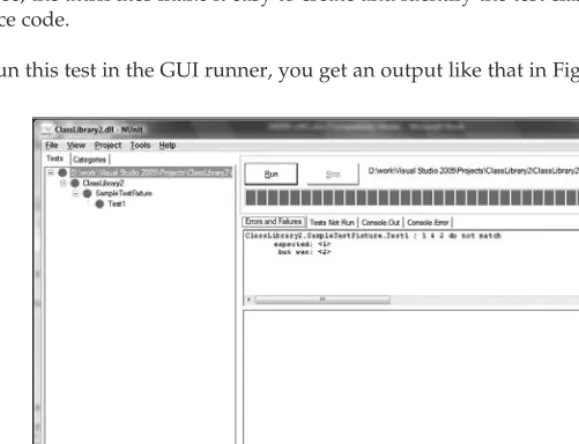
[image:35.612.107.397.350.572.2]When you run this test in the GUI runner, you get an output like that in Figure 1-1.
Figure 1-1
right-hand pane. As you can see from the sample test, our single test case failed — with the error message that was provided to theAssert.Failcall. This allows for easier diagnosis when your tests fail; having an error like
ClassLibrary2.SampleTestFixture.Test1 : expected: <1>
but was: <2>
is unhelpful. However, an error like
ClassLibrary2.SampleTestFixture.Test1 : 1 & 2 do not match expected: <1>
but was: <2>
is much more helpful, providing you with some context as to what the assertion was actually intended to validate, which can be invaluable when trying to diagnose test-case failures with code that you do not understand well. In the case of one specific test — or even tens of tests — this is not an issue, as the set of code that you have to understand is small. But when you have many hundreds of test cases, the code that you need to understand to diagnose and fix the failures may be prohibitively large.
In addition to the standard ‘‘unit testing’’ duties of providing an execution environment and assertion framework, NUnit actually goes to the next level by providing unit testing for both Windows forms and ASP.NET. These provide simple, but powerful, object model type unit testing functionally for the Windows forms and ASP.NET frameworks. It should be noted that these are not functional tests that simulate user clicks and mouse movements, but rather, they merely invoke and wrap the necessary methods that are required to simulate the events being fired on the controls. This is often just as powerful as functional testing, but it has its own set of caveats.
The last remaining piece of the NUnit puzzle is that it provides mock objects’ functionality. Mock objects allow you to simulate the implementation of an interface or class without having to do the full implementation of that interface or class. This is performed by providing skeletal code that allows your real code to function as though it were using a real implementation. This is extremely powerful for validating when your code is consuming interfaces without having the potential headaches of a real implementation (e.g., IHeartMonitor is difficult to test without a real heart monitor).
MbUnit
On the surface, MbUnit looks like any other unit testing framework: It provides assertions, declarative markup, and execution tools. However, MbUnit is potentially very much more powerful than the other unit testing frameworks. This is because of the focus that MbUnit has on extensibility and allowing people easily and simply to extend and customize how tests are executed. The most obvious scenario is data-driven tests, which with MbUnit can be declared inline:
[TestFixture]
public class DivisionFixture {
[RowTest]
{
Assert.AreEqual(result, num / denom, 0.00001 ); }
}
As can be seen, you can simply, easily, and clearly declare that a test is minimally data driven while providing a small set of values to be passed into the test. Additionally, because of the strong typing on the test methods’ parameters, the actual test can be more clearly written. It’s important to remember that these types of extensions can be written such that your custom attributes appear as first class citizens within your tests. This means that rather than having some alternative and unclear way of setting test behavior, it is right there with the test in a way that is integrated and clear. This gives a very different experience from creating your own solutions to the same problem, which results in you ending up with code that just isn’t as clear.
It is interesting to note that it is the NUnit model that VSTEST is following rather than MbUnit. MbUnit is a recent entrant into the market and has certainly shaken it up somewhat, with the NUnit team looking closely to see what can be learned in the area of extensibility.
Web and Load Testing
With today’s typical application being more than just a single form-based application written in Visual Basic sitting on a single user’s computer, load testing has become a much more significant part of the software life cycle. This combined with the primary platform these days being a web-based one, web testing and load testing are the most common types of non-developer-orientated testing being done by organizations. Within this market there is only one clear leader today — Mercury Load Runner. This is a very expensive product, but it provides the whole gamut of load and web testing, from simple http testing through to SOAP testing, and profiling of those services.
Additionally, the Mercury toolset provides a tight integration across a wide range of testing tools, from test-case management to business process testing.
Where VSTEST and VSTESD F it in the SDLC
The Visual Studio Team System attempts to provide tools and technology to cover the whole life cycle — bug/work item tracking, source code control, automated build system, testing, architecture, and so on. From the names Visual Studio Team Edition for Software Developers and Visual Studio Team
Edition for Software Testers, it should be clear in which part of the SDLC these products fit — testing
and developing.
VSTEST provides an ability to author tests, run tests, and, most importantly in the context of SDLC, publish and share the results with your team and the management of your team. This is thanks to the reporting functionality of the Team Foundation Server (TFS), which allows you to create reports covering all aspects of the data within TFS — Source Control checkins (number of files, number of changed lines, changes, code reviewer), work item changes, code coverage, and test results — over time within a SQL Reporting Services environment.
What VSTEST and VSTESD Do
Visual Studio Team Edition for Software Testers and Visual Studio Team Edition for Software Developers are editions of Microsoft Visual Studio that go above and beyond the Visual Studio Professional Edition experience by providing role-specific extensions to the IDE experience. VSTEST is specifically targeted at the tester role by providing a set of features for testing applications and services. VSTESD provides tools enabling people in developer roles to have a greater understanding of their code — through perfor-mance, code analysis tools, and unit testing. This section only provides a very high-level overview of the features in VSTEST and VSTESD. For more information, see Chapter 2 (a general overview of VSTEST and VSTESD) and the specific chapters and appendixes for the specific areas of functionality.
VSTEST Features
With the focus in VSTEST being on testing, one can see that all of the extra functionality is testing based, focusing on several different test types that the user can take advantage of to test his or her application. Some of these are useful to the developer-focused tester (such as unit testing and web testing), while others are very much for the non-developer-focused tester (such as load testing and manual tests).
The experience for the user is intended to be the same across all test types — whether you are running a unit test or a load test, the basic experience is intended to be the same. This enables you to take advantage of a core set of experience when working with tests in VSTEST. Later in this book, all the test types and areas of the product will be covered in much more detail, where some of this shared user experience will become evident.
Unit Testing
The unit testing functionality provided by VSTEST is very similar to that of NUnit. You author the actual test code in the same fundamental way as NUnit, by adding appropriate attributes to the methods and classes that you wish to be considered tests. Additionally, unit testing in VSTEST supports being data driven, and also another type of test called ASP.NET tests. These are not to be confused with web tests. All of the main Microsoft programming languages are supported out of the box — Visual Basic, C#, and C++/CLI (formerly called Managed C++). Other languages are also supported; however, there is no integrated IDE support for running tests in those languages. An example here might be Visual J#: You can author tests in this language, but you will have to use the command line tools to execute these tests.
The data-driven support revolves around each test being executed N times (where N is the number of rows in a database table) and the test being provided with the data row for each invocation. Any ADO.NET consumable database may be used for data driving a unit test; however, XML (as an arbitrary markup) is not supported.
The ASP.NET support is twofold. Firstly, it allows your tests to be executed under the ASP.NET runtime environment, allowing access to all the standard System.Web namespace objects you have access to in a normal ASP.NET application. Secondly, your test has access to the System.Web.Forms.Page object that represents the page being requested for that unit test. This allows access to the controls, methods, and other items that are relevant to unit testing ASP.NET code.
Web Testing
The underlying technology used to implement the web testing functionality in VSTEST is HTTP requests. The testing that VSTEST provides here is not a browser-based web testing solution — it won’t drive your mouse clicks through your HTML and script. However, it is a very powerful HTTP-based web testing solution, providing everything from an easy-to-use browser-based recorder to a set of complex extensions for data validation of the returned data (extraction and validation rules), and being drivable from a database.
The Web Test Recorder allows you to simply record a web test by navigating between pages, filling any forms along the way. All the data are captured and turned into a full web test, which can be customized to your heart’s content.
At a basic level, as long as your requests return ‘‘OK’’ responses as determined by the HTTP response code, then your tests will pass. But as is always the case, this is unlikely to meet your needs, which is where extraction and validation rules become useful. They allow you to extract certain pieces of information from the HTTP response and also to validate that response against a set of criteria. Addi-tionally, it is possible to create your own rules — these require programming, but can be very power-ful. All parts of the request (URL, form data, etc.) can be driven out of a database to ensure that not every test is identical. An example is if you have a URL that takes a query string parameter (such as http://localhost/viewOrder.aspx?orderid = 1234), you can use a database to fill in the ‘‘1234’’ part with different order ID, using the URL as a template.
Finally, any web test can be turned into a ‘‘coded Web test,’’ a code-based web test that will allow the authors of a test to have extremely fine-grained control over the test. This includes request parameters, choices/branches based on certain responses, and anything else one chooses to put in code.
Chapter 5 contains a deep overview of all the web testing functionality to be found in VSTEST. A walk-through of creating your first unit test can be found in Appendix C, which is a step-by-step guide showing you details of each step.
Load Testing
Within VSTEST, there are many test types, and those test types can be extended by third parties. It may be that many of these test types are exactly the kind of test that you would like to run against a server as a set of load tests. Both unit tests and web tests fit this criterion out of the box, and one can imagine many other types of tests that might fulfill the same role.
The load test functionality in VSTEST and VSTESD is a container test type. It contains many other tests (of any test type) and allows the user to set parameters for execution (number of users, variance over time). This powerful feature allows for great flexibility in how you author your tests. It allows you to author the test in the most appropriate way, rather than having to shoehorn one type of testing paradigm into another, that is, web tests as unit tests.
Chapter 7 contains a thorough discussion of the load testing functionality found in VSTEST, including discussion of analyzing the graphs of performance. Appendix D contains a walk-through for creating your first load test. Additionally, there is a discussion of performance analysis in Chapter 8 in the context of profiling your application.
Manual Testing
The manual testing functionality in VSTEST is somewhat limited, as it only provides a simple text docu-ment of steps that need to be performed along with pass/fail results and user comdocu-ments. This is useful for small-scale projects but does not really scale out to managing thousands of test cases that need to be performed by many users who need to report bugs, screenshots, issues, and other pieces of information that may be relevant to the test.
It is important to note that there are two types of manual test in VSTEST, text-based and Microsoft Word-based. The text-based tests are just that, simple text documents. The Word-based tests allow you to author the test documents in Microsoft Word in any way that can be exported to HTML. Note that one area of the HTML that is restricted is the support for inline ActiveX objects — this is to ensure a secure environment when running manual tests.
Chapter 6 covers manual testing in more detail, with a walk-through for creating manual tests being provided in Appendix B.
Generic Testing
One problem that the Visual Studio Team Test development team encountered during the development was requests from users to be able to integrate their existing custom test harnesses into the Visual Studio Team System. People were looking for a low cost of entry, and a custom test type did not have this. Additionally, the existence of custom test types implies a desire to keep authoring tests in that manner. Many customers wanted to switch over to the Visual Studio Team System without having to lose many thousands of test cases. The solution was generic tests.
Generic tests are a test type that merely invokes a given executable with a specific environment and waits for the process to terminate, and depending on the return code determine a pass/fail of that test. This allows many automated tests to be integrated into VSTEST quickly and easily.
In the case of the pass/fail, or one high-level result not being fine-grained enough, the test harness can also output XML conforming to a specific schema. This output will be interpreted to provide detailed results and better integration of legacy test harnesses.
Chapter 6 provides detailed coverage of generic tests, and a walk-through is provided in Appendix E.
Ordered Testing
Ordered tests are the VSTEST solution to this problem. They allow you to combine any set of tests (including different types, such as unit with web tests) and specify an explicit order for them to run in. You can also choose to have the ordered test ‘‘fail’’ if any of its contained (or ‘‘inner’’) tests fail, or it can continue. When you run the tests, the order is as you explicitly specified it. When you are viewing results, you have to drill down into the ordered test results to see any specific results of the contained tests.
Chapter 6 covers ordered testing detail, and Appendix F provides a walk-through of creating ordered tests.
Code Coverage
The final high-level feature of VSTEST is code coverage. Code coverage allows you to see which parts of your application are being executed by your automated and manual test cases. It provides line-by-line information as to which have been executed and which have not. This allows for some great insights — both from the ‘‘we’re not testing enough’’ and the ‘‘this code is never executed, it is dead code’’ perspectives — providing valuable insight into your testing and your application.
Code coverage works through instrumenting the application binaries on disk. One of the things VSTEST can do is to instrument the binaries each time you run tests to ensure that your coverage is collected.
VSTESD Features
It’s important to note that the only shared feature area between VSTEST and VSTESD is unit testing (and ordered testing). This is the exact same feature that you see in VSTEST, but transplanted into VSTESD. It is the only part of the testing functionality that is available in VSTESD. The rest of the features are targeted toward developers.
Code Analysis
Static analysis or code analysis is a technique for inspecting the correctness of applications without actu-ally executing the applications. This can include inspecting source code directly or using tools to examine the binary code directly. Within VSTESD, there are two sets of tools to analyze your code: PREfast (for C++) and FxCop, referred to as Code Analysis inside the Visual Studio IDE.
Both of these tools check for common programming errors and validate against a set of rules, which in the case of FxCop are extensible to enable an organization to enforce its own common programming rules. These may be as simple as spelling errors or naming conventions but also extend to ensuring that certain code-based security practices are taken into account.
Profiling
When your application is having a performance problem, it can often be very difficult to identify where the bottleneck is at the code level. Through the use of profiling, one can find these bottlenecks. This involves either running your application through the scenarios that show the performance bottleneck while sampling CPU-based ‘‘counters,’’ or using instrumentation. After the data have been collected, the Visual Studio toolset will allow you to see where that bottleneck is.
Main Differences Between VSTEST and VSTESD
VSTEST provides a set of testing tools that encompass all aspects of testing — test types (from web, to unit, to manual testing), remote execution, and simple test-case management. On the other hand, VSTESD provides tools enabling you to write better applications as a developer — unit testing, profiling, and code analysis.
Feature VSTEST VSTESD
Unit testing X X
Web testing X
Load testing X
Generic testing X
Manual testing X
Ordered testing X X
Code coverage X X
Test manager X
Remote execution X
Code analysis X
Profiling X
Remote execution is a feature of VSTEST that enables you to run your tests on a remote set of machines — an agent in the terms of the product. However, all the components to run your tests remotely are not provided with VSTEST, and additional software is required. The Visual Studio 2005 Team Test Load Agent product provides both Controller and Agent components of remote execution that are licensed per CPU. Installing these two pieces of software is a simple process, and enabling remote execu-tion from a VSTEST is as simple as editing the Test Run Configuraexecu-tion to set the remote machine to execute on. For more details about editing the test run configuration, see Chapter 2. It is important to note that the Load Test Agent is not a free product and must be purchased.
How Do They Help the SDLC?
One of the biggest challenges in any software team is being able to manage and track the work that is being undertaken. In the context of testing, this means being able to see your results over time as well as being able to actually perform the work that is required (i.e., test your product).
VSTEST helps you achieve this through its many testing features: unit testing, web testing, load testing, manual testing, generic testing, result publishing, and code coverage. Each of these individual compo-nents allows you to fulfill a different part of the SDLC, but when they are combined, they allow you to succeed with your testing across your entire product.
While seeing that you have 90 percent of your tests passing today is great, you need context to see what has happened over time. What were the results last week? What were the results a month ago? Tomor-row, when the results show only a 10 percent passing rate, you can see that this is a significant change from the previous day. This moves you from merely testing your product into being able to know about the state of your product over time. You can then plan throughout the product cycle, knowing your history and trends across both testing and development.
The key factor here is that there is an integrated experience across the whole of the Visual Studio Team System products that provides an integrated experience for the whole of the SDLC, and VSTEST dovetails into this by providing a great solution for testing.
Why Choose VSTEST Over Other Tool Sets?
The primary advantage VSTEST provides over other tool sets is the integration into Visual Studio. No other set of tools integrates into Visual Studio as VSTEST does. It is a first class citizen within the IDE, providing high-level windows for authoring, executing, and managing tests that have a consistent look and feel with the rest of the Visual Studio IDE. Although there might be programs in the industry that can compete in a limited capacity, when you look at VSTEST and VSTESD as part of an integrated solution, their power and reliability are much more compelling than a set of cobbled together tools from around the industry.
Integration into the IDE
Within the IDE, VSTEST provides several integration points: test projects and the Test View, Test Man-ager, and Test Results windows. These all serve a specific purpose. Note that Test Manager is not available in VSTESD — it is a VSTEST-only feature. These windows are what you need to know about to get around the product. For a deeper look at the individual parts of the IDE, take a look at Chapter 2, which will walk you through all the basic functionality of VSTEST and VSTESD.
Test Project
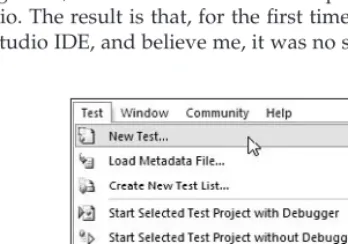
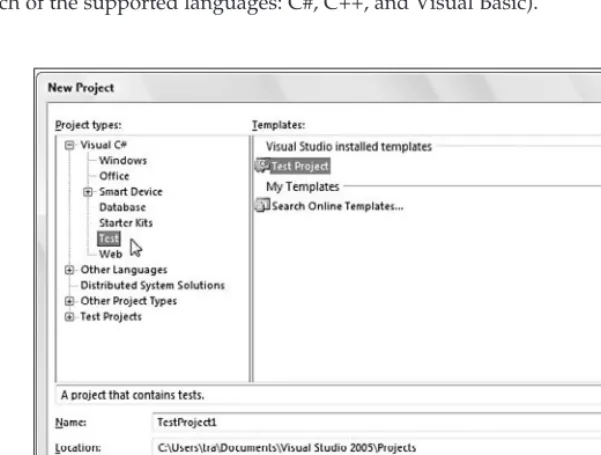
Test projects are the biggest unit of granularity when it comes to managing your tests. A test project is just like a class library project, except that it holds tests as well as source code. It provides all the normal project features (source control, folders, debugging, etc.) and comes in the three lan-guage flavors — Visual Basic, C#, and C++/CLI. You can find test projects under File➪New➪Project➪ <Language>➪Test in the Visual Studio IDE. When looking in the other test windows, it’s important to note that only tests in test projects in the currently open solution will show up.
Test View
Test View is the primary window for viewing and running tests. It provides a linear, flat list of all the tests currently loaded. Double clicking a test in this window will open the test in its editor. You can use the Test View toolbar for running, debugging, grouping (one level tree like view), and filtering the list of tests. You can access this window from either the Test toolbar, or from the Test➪Windows menu item at the top of the IDE.
Test Manager
use of a ‘‘metadata’’ file that is shared across the solution. It provides a very similar interface to Test View, but with the added functionality of categorization, both for viewing and running the tests.
Test Results
This is the primary window where you will monitor and view your results. It provides both a flat list as well as a category view (a la Test Manager), with the same filtering/grouping functionality from Test View/Test Manager. You can re-run, pause, and stop a run that is currently in progress, as well as see results that have already completed during a run in progress. One important feature when you are using remote agents is the ability to disconnect from the run. This means you don’t need to be connected for a 12-hour load test run. You can also save specific results and full runs from here for sharing with your team.
Integration with TFS
The final part of the VSTEST puzzle when being compared against other toolsets, is the integration with the Team Foundation Server. VSTEST provides several valuable integration points with TFS, allowing you to get test data into TFS easily. A step-by-step guide for installing and using the Team Explorer functionality of TFS can be found in Appendix A.
The simplest of these is being able to file a bug directly from a test result: When you see that failing test case, you can right-click on the test result and select ‘‘Create Work Item.’’ This will open the Create Bug form in TFS, pre-filling in the title and description with error details and attaching the results file to the bug. This means that when someone else comes to look at the bug, they have all the relevant information required to take a first pass at investigating the bug without having to try re-running the test.
Secondly, and arguably much more complicated, is the ability to publish your results into TFS. These results are associated with a build within TFS and are tracked as part of those builds over time. You can also associate failing test cases with bugs and see which bugs are tracking which failures at any given time. As you publish your results, you slowly build up a historical view over time, being able to see the total number of test cases, pass/fail rates, trending, and code coverage numbers for your test cases over time. While initially the data appear to be mostly academic in nature, they allow you to start building reports in which you can compare the actual performance of your team against the predicted/required performance to hit milestones.
Summar y
The SDLC is a complex and huge area of discussion whose surface cannot even begin to be scratched with what we’ve covered here. However, we have shown that there are several areas where testing can help improve the quality of your applications by allowing those tools to fulfill parts of the SDLC.
We’ve also looked at the tools that are out there other than VSTEST and VSTESD, and what unique advantages those tools have. Also, we took a very brief overview of what features VSTEST and VSTESD have and what they bring specifically to the SDLC.
A Quick Tour of VSTEST
and VSTESD
Now that you have an overview from Chapter 1 of Visual Studio Team Edition for Software Testers (VSTEST) and Visual Studio Team Edition for Software Developers (VSTESD), let’s look at what has changed in the Visual Studio integrated development environment (IDE), then dive into each of those areas in Chapters 3 through 9.
This chapter first looks at the test types in VSTEST and VSTESD and moves on to the user interface (UI) directly related to working with those test types. The chapter finishes by looking at addi-tional tools useful for testing that do not fit into a specific test type (that is, static and dynamic analysis tools incorporated into Visual Studio).
After you complete this chapter, you will have a good understanding of what has been included in the editions of Visual Studio for Testers and for Developers and be ready to dive into the specific details of each of the features.
Test Types
The Microsoft team that designed the testing tools, framework, and overall architecture in Visual Studio 2005 put a stake in the ground and started with the most popular test types on the market today. This includes addressing how to create and manage manual tests, unit tests, web tests, and load tests. This also included creating a type of container test that encapsulates the most basic test types.
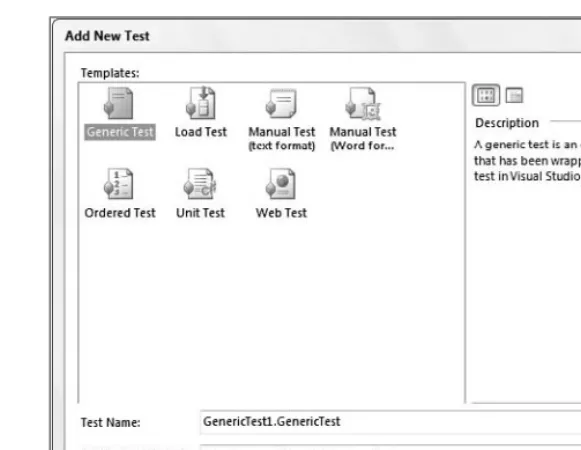
Figure 2-1
The six test types (see Figure 2-1) included in VSTEST (with a subset included in VSTESD) are:
❑ Manual (two formats: rich-text and plain text) (available only in VSTEST)
❑ Unit (available in both VSTEST and VSTESD)
❑ Web (available only in VSTEST)
❑ Load (available only in VSTEST)
❑ Ordered (available in both VSTEST and VSTESD)
❑ Generic (available only in VSTEST)
You should note that manual, web, load, and generic test types are available only in the Visual Studio Team Edition for Software Testers version of Visual Studio Team System 2005, and as a result, the screenshots you see may differ depending on whether you are using VSTEST or VSTESD.
The Manual Test Type
The simplest of the test types, the manual test provides you with a way to integrate those tests to be completed by human interaction with the rest of your tests. For example, if you have a test that is too difficult or time-consuming to write code to complete, enter it as a manual test. Many developers and testers will later turn these tests into coded solutions, but complete them manually in the interim (we go into more detail on manual tests in Chapter 6).
checks for losing the connection mid-transfer. This could be simulated by writing some code to interact with the network drivers to ‘‘lose’’ the connection. But this is a bit time-consuming, espe-cially if you’re new to working with the network drivers in Microsoft Windows. Instead, you can create a manual test whereby you physically unplug the network cable while transferring data. Should you wish to automate it later, you can then remove the manual test and replace it with the automated version.
This test type is available in two formats. One is called a Word Format, which allows for richer formatting capabilities, such as bold, italic, and underlined text, as well as a choice of fonts and the option of embedding graphics. The other format is a text file that can be edited in Visual Studio’s editor. The thinking behind this is that if you have Microsoft Word installed, why not give you the option of creating a richer manual test document? However, it was not the goal to require that Microsoft Word be installed.
The manual test type is available only in Visual Studio Team Edition for Software Testers. For a walk-through of using this test type, see Appendix E. Chapter 6 also goes into more detail about using this test type.
The Unit Test Type
A unit test, in short, is code that tests code. One of the most popular tools on the market is JUnit (for Java programmers) with an NUnit version available for .NET programmers. The unit test type is Microsoft’s approach to unit testing: Developers write test methods (unit tests) that call methods in their production code to verify they receive the expected results. Testing each unit of code in this way, to verify that key functionality in their code has not broken because of other teammates’ efforts in a shared codebase, is extremely valuable in catching bugs quickly and early. On some teams, for example, it is a requirement that a developer run unit tests for a given code module prior to submitting any changes. (Chapter 3 has a more in-depth analysis of unit tests, Chapter 4 goes into detail on using the unit test type for testing databases, and Chapter 9 discusses tests as a whole, including unit tests, being required as part of the check-in process.)
Another approach to using unit tests is to write the tests before writing the code. Commonly referred to as test-driven development (TDD), this helps developers think through the parame-ters and return values for the methods they will be writing in the future. Tests continue to report as ‘‘failed’’ until the developer implements the actual code. The Visual Studio IDE is not completely set up to support TDD, that is, stubs (method declarations with minimal or no definition) must be written for the code to compile. The refactoring support in Visual Studio c