for all
Developing ASP Components
Second Edition
Shelley Powers
Developing ASP Components, Second Edition by Shelley Powers
Copyright © 2001, 1999 O’Reilly & Associates, Inc. All rights reserved. Printed in the United States of America.
Published by O’Reilly & Associates, Inc., 101 Morris Street, Sebastopol, CA 95472.
Editor: Ron Petrusha
Production Editor: Leanne Clarke Soylemez
Cover Designer: Hanna Dyer
Printing History:
April 1999: First Edition.
March 2001: Second Edition.
Nutshell Handbook, the Nutshell Handbook logo, and the O’Reilly logo are registered trademarks of O’Reilly & Associates, Inc. ActiveX, JScript, Microsoft, MSDN, Visual Basic, Visual C++, Win32, Windows, and Windows NT are registered trademarks and Active Directory is a trademark of Microsoft Corporation. Many of the designations used by manufacturers and sellers to distinguish their products are claimed as trademarks. Where those designations appear in this book, and O’Reilly & Associates, Inc. was aware of a trademark claim, the designations have been printed in caps or initial caps. The association between the image of an asp and developing ASP components is a trademark of O’Reilly & Associates, Inc.
While every precaution has been taken in the preparation of this book, the publisher assumes no responsibility for errors or omissions, or for damages resulting from the use of the information contained herein.
About the Author
Shelley Powersis a consultant/author with her own company, Burning Bird Enter-prises. In the last several years, she has worked with a variety of distributed, Internet, and Web development applications, for different platforms and using a variety of tools. Shelley has authored or coauthored books on Dynamic HTML, JavaScript, Java, CGI, Perl, P2P, general Web technologies, and more. Shelley can be reached at [email protected], and her book support site can be found at http://www.burningbirdenterprises.com.
Colophon
Our look is the result of reader comments, our own experimentation, and feed-back from distribution channels. Distinctive covers complement our distinctive approach to technical topics, breathing personality and life into potentially dry subjects.
The animal on the cover ofDeveloping ASP Components, Second Edition, is an asp, which is a term applied to various venomous snakes, including the depicted asp viper (Vipera aspis) of Europe as well as the Egyptian cobra (Naja haje), thought to have been the means of Cleopatra’s suicide.
Needing to eat at least 50-60% of their body weight in food per week, European asp vipers hunt by lying in wait for approaching prey. After grabbing and biting a small rodent or other prey, they release it and wait several minutes for it to stop moving; the generally sluggish viper rarely chases prey. Vipers know their home territory very well, which allows quick escape from their asp-kicking natural enemies, serpent eagles, and hedgehogs. This trick hasn’t helped them escape from their greatest threat, the expansion of human civilization, which frequently wipes out large sections of their territory.
The chemical composition of asp viper venom can vary from one population to the next, hampering initial antivenin development until 1896, but few viper bite fatalities occur in Europe today.
Leanne Soylemez was the production editor and proofreader for Developing ASP Components, Second Edition. Norma Emory was the copyeditor, Mary Anne Weeks Mayo and Colleen Gorman provided quality control, and John Bickelhaupt wrote the index.
Archive. Emma Colby produced the cover layout with QuarkXPress 4.1 using Adobe’s ITC Garamond font.
David Futato designed the interior layout based on a series design by Nancy Priest. Judy Hoer converted the files from MSWord to FrameMaker 5.5 using tools created by Mike Sierra. The text and heading fonts are ITC Garamond Light and Gara-mond Book; the code font is Constant Willison. The illustrations that appear in the book were produced by Robert Romano using Macromedia FreeHand 8 and Adobe Photoshop 5. This colophon was written by Nancy Wolfe Kotary.
Table of Contents
Preface
...xi
1. Writing ASP Components
...1
The Role ASP Components Play ... 2
Why Use ASP Components? ... 3
COM+ Services and ASP Components ... 5
Accessing Data with ASP Components ... 8
Windows 2000 Technologies Accessible from ASP Components ... 10
A Rose by Any Other Name: Programming Language Choice ... 11
What About ASP.NET? ... 13
2. Setting Up the ASP Development Environment
...14
Configuring the IIS Environment ... 15
Remote Administration of IIS ... 27
Using ADSI to Administer IIS Programmatically ... 29
IIS Admin Object Overview ... 46
The IIS Base Admin Objects ... 59
3. ASP Components and COM
...69
Overview of COM for ASP Component Developers ... 70
How COM Is Implemented ... 76
Notable COM Interfaces ... 80
COM Datatypes ... 87
4. ASP Components, Threads, and Contexts
...91
What Are Threads? ... 92
The Threading Models ... 96
What Are COM+ Contexts? ... 110
5. COM+ Services and ASP Components and Applications
...114
Developing Component-Based Systems ... 114
The COM+ Interfaces ... 116
Porting MTS Packages to COM+ Applications ... 124
Activating COM+ Applications ... 125
COM+ Services ... 127
6. ASP Interaction: Scripting and ASP Components
...136
Scripting Language Support Within ASP ... 136
Instantiating Components ... 139
COM+ Datatypes and Script/Component Interaction ... 145
Passing Arrays as Parameters ... 159
Error Handling Between Component and Script ... 174
7. Creating a Simple Visual Basic ASP Component
...180
Creating an In-Process or Out-Of-Process Component ... 181
Component Instancing ... 182
Component Execution and Threads ... 184
Creating an ASP Project ... 187
Creating Component Methods ... 188
Generating, Registering, Installing, and Testing the Component ... 190
Adding Support for COM+ Services ... 191
Converting MTS Components for Use with COM+ ... 201
Accessing the ASP Built-in Objects ... 202
Error Handling ... 220
Debugging ... 222
Performance Issues ... 222
8. Creating ASP/ADO Components
...225
Accessing ADO from a VB Component ... 226
Creating a Simple ADO Component ... 227
The ADO Model ... 233
File and Directory Access with ADO Streams and the Record Object ... 256
Persisting Data ... 262
9. Creating an ASP Middle Tier with ADO
...266
How Separate Should the Layers Be? ... 267
Defining Business Objects ... 281
Other Data Integrity Issues ... 295
10. Server-Side XML Through VB ASP Components
...298
XML Basics ... 298
Formatting XML ... 302
Working with XML in ASP Applications ... 307
XML and ADO: Saving Recordsets as XML ... 315
11. Take a Message: Accessing CDO from ASP Components
...321
A Brief Overview of CDO ... 322
The CDO Object Model ... 322
Send This URL to a Friend ... 324
Working with the Message Body ... 328
Retrieving and Reading Messages ... 338
12. Working with Active Directory from ASP Applications
...344
A Brief Overview of Active Directory in Windows 2000 ... 345
Setting Up an Isolated Active Directory Environment ... 345
A Refresher on ADSI ... 347
Binding to Active Directory Objects ... 349
Using the Active Directory Services Viewer ... 355
Manipulating Containers ... 357
Searching Active Directory with ADO ... 362
ASP Example: Add and Manage Users Through the Web ... 366
13. Working with MSMQ Components
...380
MSMQ/ASP Basics ... 380
Working with Queues ... 382
Working with MSMQ Messages ... 389
Using Transactions ... 394
Journaling ... 407
A Brief Word on Message Security ... 412
14. Creating C++ ASP Components
...414
ATL or MFC ... 415
Using ATL AppWizard to Generate the Basic ASP Component Project .... 416
Adding an ATL Object ... 421
Code Changes Based on Adding a New Object ... 426
Adding Methods to the Interface ... 427
Converting MTS Components for Use with COM+ ... 440
Accessing the ASP Built-in Objects ... 444
Error Handling ... 463
15. Adding Data Access to C++ Components with ADO
...468
ADO Access in Visual C++ ... 468
The ADO Object Model ... 469
The Connection Object ... 470
The Recordset Object ... 479
The IADORecordBinding Interface ... 486
The Command Object ... 490
Stream and Record Objects ... 497
16. The CDO Interfaces from C++ Components
...506
Accessing CDO Interfaces in C++ ... 506
Creating and Sending a Message ... 509
Retrieving and Reading Messages ... 521
17. Accessing Active Directory from C++ Components
...528
Binding to Active Directory Objects ... 529
ADSI Helper Functions ... 536
Filtering Collections ... 538
Creating and Removing Active Directory Objects Using ADSI ... 540
Searching Active Directory with IDirectorySearch ... 544
18. Accessing MSMQ from C++ ASP Components
...550
Adding Support for MSMQ to the C++ Project ... 550
Working with Queues ... 553
Searching for a Specific Queue ... 560
Working with MSMQ Messages ... 568
Using Transactions ... 574
19. Persistence with ASP Components Using ATL and MFC
...581
Combining MFC and ATL ... 581
File Access from ASP Components ... 584
Creating a Serializable Class ... 588
Persistence Through Object Serialization ... 591
20. ASP Components Created with Java
...596
Creating Java Components ... 597
Working with COM+ Services ... 611
The ASP Built-in Object and Helper Interfaces ... 619
Accessing ADO from Java Components ... 633
21. Creating ASP Components with Delphi
...642
Using the COM Wizards to Create ASP Components ... 642
Manually Adding Support for COM+/ASP ... 653
Working with the ASP Objects ... 660
Working with ADO ... 668
Working with Windows 2000 Functionality: CDO ... 672
22. Perl-Based Components Using ActiveState’s PDK
...677
Setting Up PDK ... 678
Building a Basic Perl Component ... 679
Accessing the ASP Built-in Objects ... 689
Working with Data ... 709
Working with the Win2K Environment ... 716
23. Creating Scripting Language Components
...719
The Windows Script Components Architecture ... 719
Elements of a WSC File ... 722
Script Components and ADO ... 733
The WSC Wizard ... 736
Creating Script Components with JScript ... 741
Accessing Windows 2000 Functionality ... 744
A. ASP Built-in Object Quick Reference
...751
B. The Weaver Database
...776
Preface
Developing ASP components requires knowledge not just of one tool or of one technology, but of many. You have to become familiar with one or more develop-ment tools, such as Visual Basic or Visual C++ (this book covers both, along with Visual J++, Delphi, and Perl), and of course you also have to become familiar with the tools’ underlying language. However, you can’t stop there.
ASP components are nothing more than specific types of COM-based compo-nents; that is, they’re COM components designed to interface with Active Server Pages and, most commonly, with Microsoft’s Internet Information Server (IIS). Consequently, you need to develop a certain level of familiarity with COM, the Component Object Model that underlies much of Microsoft’s technology. Becom-ing familiar with COM development in turn requires that you become familiar with threads, so that you can understand how a COM component interacts with a cli-ent as well as the performance issues involved with clicli-ents and componcli-ents that are based on different threading models.
Once you’ve become familiar with working with a tool that supports COM compo-nent development and you’re aware of some of the issues involved with COM development, you still have other new technologies to learn. As you develop ASP components, you need to become familiar with web-based development in gen-eral and with the ASP environment in particular. The way in which your compo-nents interact with the “world” they find themselves in—with the web server, the browser, or the web page reader—occurs through built-in objects that Microsoft has provided for ASP development.
features (such as transaction management, just-in-time activation, and object pool-ing) that are increasingly important for middle-tier components. So you are going to need to become familiar with COM+ as well.
This seems like a very formidable list of tools and technologies, and it is. But we’re not finished yet. Most applications—including more and more ASP applica-tions—require some form of data access. If you need to provide support for data access, then you need to become familiar with ActiveX Data Objects (ADO), the data access technology from Microsoft that’s built on top of OLE DB. Frequently, the content of an ASP page is assembled from data found in a message store, or conversely the data gathered from the user’s interaction with an ASP page is sent in an email or placed in a message store. For applications such as these, you need to become familiar with Collaborative Data Objects for Windows 2000 (CDO). Under Windows 2000 and IIS, a good deal of system information is stored in Active Directory; to retrieve information from and write information to Active Directory, you should know the Active Directory Service Interface (ADSI). Finally, ASP applications, and particularly ASP e-commerce applications, often require communication across systems and involve events that can occur at different times (as, for example, when a user orders products online and a pick list is needed by a system in the warehouse for printing). To take advantage of such loosely cou-pled events, you should be familiar with Microsoft Message Queue (MSMQ).
Finally, once you know the programming language used for the component, the tool used to build the component, the implications of developing a COM-based component, the functionality available through built-in and COM+–supplied objects, and how you can access data and the other services needed by your application, then and only then you can take on the functionality that your com-ponent needs to provide. Then, you add additional functionality such as file input and output, object serialization, access to other Windows functionality, and so on.
So, do you feel tired before you even start? Well, I want to tell you that develop-ing ASP components really isn’t all that bad, and in fact, you are about to start hav-ing some fun. Not only that, you are also gohav-ing to learn to work with technology that faces directly on that road racing to the future: the road to distributed and component-based development.
Following this introduction, the book then covers component development using Visual Basic and Visual C++. In the case of Visual Basic, chapters include access-ing the intrinsic ASP objects from a Visual Basic component, accessaccess-ing data usaccess-ing ADO, incorporating messaging with CDO for Windows 2000, using MSMQ, and using components to generate XML. The Visual C++ chapters discuss some of this same material (accessing ASP intrinsics, data access using ADO, using MSMQ), along with persistence using the Microsoft Foundation Classes (MFC) and the ActiveX Template Library (ATL). But if your organization is like so many others nowadays, your group is probably not using just one tool in its web development efforts. It’s just not that unusual for shops to program in Visual C++ and Java, Visual Basic and Delphi, or Visual Basic and Perl. Rather than focus this book on one or two languages, I picked the tools/languages most likely to be used. Conse-quently, separate chapters examine issues in component development using Java, Delphi, and Perl. Each of these chapters is based on the earlier chapters that cover component development using Visual Basic and explores techniques and issues in component development using that language or tool.
Who This Book Is For
This book is geared to the developer who has worked with one of the target lan-guages/tools but either has not created COM objects before or has not worked with developing ASP components or ASP applications. I hope that the book pro-vides enough of an introduction to COM and threads to make you feel more com-fortable with these topics if you haven’t worked with them before and to provide a good review if you have. The book does not provide an exhaustive overview of COM+ and developing COM+ components but does provide, again, enough of an overview so you feel comfortable working as a developer in a COM+ environ-ment.
The book also provides a comprehensive overview of the ASP component envi-ronment, including using tools and wizards in each language/tool to assist in creat-ing the components, and covercreat-ing every aspect of accesscreat-ing the built-in ASP components essential for your development effort. In addition, the book also pro-vides good coverage of data access using ADO, messaging using CDO for Win-dows 2000, and message queuing using MSMQ.
How This Book Is Structured
want to develop an ASP component rather than rely on a simple ASP script. It also mentions some of the technologies (COM+ services, ActiveX Data Objects, and Active Directory, to name just three) that you can draw on in developing your components. Chapter 2, Setting Up the ASP Development Environment, examines how to set up your development environment to insure that you can develop with maximum productivity and that your testing doesn't impact on a production sys-tem. In addition, the chapter covers programmatic administration of IIS using Active Directory and the IIS Admin Objects. Chapter 3,ASP Components and COM, examines Microsoft's Component Object Model (COM), which provides the basis for developing all types of components. Chapter 4,ASP Components, Threads, and Contexts, provides developers with the information that they need to know about threading models when developing ASP components, and particularly when accessing global data from the ASP Application object. It also examines the notion of context (a grouping of objects that share the same requirements), an under-standing of which is essential to working successfully with COM+. Chapter 5, COM+ Services and ASP Components and Applications, examines the new inter-faces supported by COM+, shows how components written to take advantage of COM+'s predecessor, Microsoft Transaction Server (MTS), can be ported to COM+, and examines range of services provided by COM+. Chapter 6, ASP Interaction: Scripting and ASP Components, covers an often-neglected component develop-ment topic: your component may be accessed by any of a number of scripting lan-guages—VBScript, JScript, PerlScript, Python, Rexx, etc.—and communication between script and component is often not as seamless as you'd like. The chapter looks at what you can do when developing your ASP component to insure that it can work with as many scripting languages as possible.
The second portion of the book, which consists of seven chapters, focuses on component development using Visual Basic. In addition, its chapters serve as a kind of model for how to develop ASP components if you're using a high-level language like Visual Basic that masks much of the complexity of COM and COM+. Chapter 7,Creating a Simple Visual Basic ASP Component, introduces Visual Basic as a tool for ASP component development and examines how to access the ASP object model from Visual Basic. Chapter 8, Creating ASP/ADO Components, looks at accessing data in heterogeneous sources using ActiveX Data Objects (ADO). Chapter 9,Creating an ASP Middle Tier with ADO, discusses component design for multi-tier applications, focusing particularly on the degree of separation between the middle tier and the client tier. The remaining chapters focus on individual technologies that developers frequently use when creating ASP Components. These include the following:
• XML is discussed in Chapter 10,Server-Side XML Through VB ASP Components.
• Active Directory is discussed in Chapter 12, Working with Active Directory from ASP Applications.
• Microsoft Message Queue (MSMQ) is examined in Chapter 13, Working with MSMQ Components.
The third portion of the book, consisting of six chapters, treats component devel-opment using Visual C++. In addition, its chapters serve as a kind of model for ASP component development using a high-level language like Visual C++ that exposes much of the complexity of COM and COM+. Chapter 14, Creating C++ ASP Components, introduces Visual C++ as a tool for ASP component develop-ment and examines how to access the ASP intrinsic objects from a Visual C++ component. Chapter 15,Adding Data Access to C++ Components with ADO, exam-ines accessing data in heterogeneous sources using ADO. The next three chapters cover the following individual technologies that are often used in developing com-ponents for IIS 5.0:
• Collaborative Data Objects (CDO) for Windows 2000 is covered in Chapter 16, The CDO Interfaces from C++ Components.
• Active Directory is discussed in Chapter 17, Accessing Active Directory from C++ Components.
• Microsoft Message Queue (MSMQ) is examined in Chapter 18, Accessing MSMQ from C++ ASP Components.
Finally, coverage of Visual C++ and ASP component development ends with Chapter 19, Persistence with ASP Components Using ATL and MFC, which dis-cusses ways in which your component can save its data to the filesystem.
The final portion of this book features individual chapters on component develop-ment using the following programming languages and environdevelop-ments:
• Java is covered in Chapter 20,ASP Components Created with Java.
• Delphi is discussed in Chapter 21,Creating ASP Components with Delphi.
• Perl is covered in Chapter 22,Perl-Based Components Using ActiveState’s PDK.
• Windows Script Components (WSC), a scriptable yet powerful development environment for creating ASP components, is discussed in Chapter 23, Creat-ing ScriptCreat-ing Language Components.
Obtaining the Sample Code
All of the example source code fromDeveloping ASP Components, Second Edition, along with the sample Weaver database discussed in Appendix A, is freely down-loadable from the O’Reilly & Associates web site at http://vb.oreilly.com. Just fol-low the link to the book’s title page, then click on theExamples link.
Conventions Used in This Book
Throughout this book, we have used the following typographic conventions:
Italic
Represents intrinsic and application-defined functions, the names of system elements such as directories and files, and Internet resources such as web doc-uments. New terms are also italicized when they are first introduced.
Constant width
Indicates a language construct such as a language statement, a constant, or an expression. Interface names appear in constant width. Lines of code also appear in constant width, as do function and method prototypes.
Constant width italic
Indicates replaceable parameter names in prototypes or command syntax and indicates variable and parameter names in body text.
Indicates a note or tip.
Indicates a warning.
Comments and Questions
Please address comments and questions concerning this book to the publisher:
O’Reilly & Associates, Inc. 101 Morris Street
(800) 998-9938 (in the United States or Canada) (707) 829-0515 (international or local)
(707) 829-0104 (fax)
We have a web page for this book, where we list errata, examples, or any addi-tional information. You can access this page at:
http://www.oreilly.com/catalog/devaspcom2
To comment or ask technical questions about this book, send email to:
For more information about our books, conferences, software, Resource Centers, and the O’Reilly Network, see our web site at:
http://www.oreilly.com
For technical information on Visual Basic programming, to participate in VB dis-cussion forums, or to acquaint yourself with O’Reilly’s line of Visual Basic books, you can access the O’Reilly Visual Basic web site at:
http://vb.oreilly.com
Acknowledgments
I want to thank the book’s tech reviewers, Daniel Creeron and Matt Childs, for their thorough reviews and helpful comments. I also want to thank Bob Herbst-man and Tatiana Diaz, members of the O’Reilly editorial staff, for their hard work and dedication to this project.
I also want to thank my long-suffering editor, Ron Petrusha. This is the second edi-tion of this particular book, and he’s done a terrific job of editing both of them. I also want to thank my coworkers at Skyfish.com for being a terrific group of peo-ple. Specifically, I want to thank a certain group of Australians in the company— guys, the best to you all, and may your dreams find you.
Chapter 1
1
Writing ASP
Components
When Microsoft first released Active Server Pages (ASP) with the company’s web server, Internet Information Services (IIS), the functionality included with this early release amounted to little more than an ability to handle server-side scripting. If you haven’t worked with server-side scripting, it is the inclusion of script, such as VBScript or JScript, in web pages so that the script is processed on the server rather than on the client. This early ASP release soon gave way to the ASP we have now, a sophisticated server-side application-building environment that still supports server-side scripting, but also includes integration with other Microsoft server products such as COM+ Services and allows ASP pages to access COM/ COM+ objects.
This book is about writing COM/COM+ objects to work within this ASP environ-ment. Since they are COM/COM+-based, you know that whatever functionality you can implement with COM/COM+ components, you can also implement with ASP components. This means that you can create an instance of an ASP compo-nent and use that compocompo-nent instance to do things such as query a database, open a file, or send an email to a client. However, ASP components are created for a specialized environment, and there are certain things you might consider doing with COM objects that you probably wouldn’t consider doing with ASP compo-nents. For instance, because an ASP component resides on the server, you aren’t going to use any message windows to communicate with the user; all communica-tion is handled through IIS.
The information available to an ASP component is also available to ASP scripting blocks, so why use components when you can use scripting, especially since scripting is fairly simple to use and can be learned relatively quickly?
The first and foremost reason to use ASP components instead of in-page ASP scripting blocks is reusability. It’s difficult to package an ASP script in such a way that it can be used over and over again in many different pages. Additionally, if you or your company is considering packaging some ASP functionality for resale or distribution, the use of ASP scripting becomes insupportable. You probably won’t be in business long if people can both see and modify your source code.
Another reason to use ASP components is that the components themselves can reside virtually anywhere, even on different machines. You can create an ASP application that may update a customer database and that uses one component to update the person’s address and another component to update the person’s prefer-ences. One or both of these components can reside on the same machine as the web server, but one or both of these components can as easily reside on other machines, with remote COM+ being used to access the component. While you can distribute web pages containing script on various machines, the maintenance and access issues become much more complicated and usually require hardcoding the physical addresses of the pages within the application. With COM+-based func-tionality, only the operating system COM+ manager needs to know where the ASP components reside. Moving components is a matter of changing the location of a component once on the client machine; all accesses to the component now occur at its new location.
An additional reason to use ASP components is that they can incorporate the full-est range of functionality on the server, including database access, file access, archiving, messaging, and other functionality difficult or impossible to do with script. You can even transcend object systems and access CORBA-based compo-nents with the support of products such as Iona’s COM-CORBA Bridge and others.
The Role ASP Components Play
of view, this book could actually be about writing COM+ components, albeit with a specific focus.
Having said that an ASP component is really no different than any other COM+ component, I want to add that the focus of writing an ASP component can alter how that component is created. First, the component will usually reside on the same server as the client of the component, with the client for ASP being the web server. I sayusuallywith some reservation, since there is no requirement that ASP componentsmust reside on the same machine as the client application.
In addition, an ASP component is almost always an in-process (ActiveX DLL) com-ponent, though you can use out-of-process components if you wish. However, ASP is optimized for in-process access of components.
As in-process COM+ objects, ASP components are usually created using the apart-ment- or both-threaded model or the new neutral-threaded apartment model. ASP components are not and should not be created using the single-threaded model, since the component locks down all access to a single thread, which causes access problems in a multiuser environment such as the Web and a multiuser application such as a web server. The component shouldn’t be created using the free-threaded model either, since all communication between the ASP page and the component must then be marshaled, a process that can impact on the ASP application’s per-formance.
There is an additional constraint if you’re using a multithreaded model such as the both-threaded model: the ASP components must be safe. What’s a thread-safe ASP component? One that does not contain global data, that does not yield control internal to the processing of the component, and that is safely reentrant. Chapter 4, ASP Components, Threads, and Contexts, goes into more depth on threads and apartments. That chapter also covers how threads and the new COM+ contexts work together to provide optimized management of the components.
Now that you have a basic idea of what ASP components are, the next section dis-cusses why you would use ASP components instead of creating the ASP applica-tion using scripting exclusively.
Why Use ASP Components?
In the beginning of the chapter, I started listing some reasons to use ASP compo-nents instead of scripting. In this section, I want to discuss this topic in a little more detail.
output. These operations cannot be done from within a scripting language such as JScript or VBScript. The IIS scripting engine can be extended to other scripting lan-guages, such as Tcl or PerlScript, which do support direct filesystem access or calls to the Win32 API. However, the use of these scripting languages comes at a cost: the code is a little more difficult to read, a little more difficult to maintain, and a whole lot more difficult to secure against editing from external sources. If the code needs to remain unaltered, perhaps to enforce standards compliance or universal data access, the code should be contained within binary components.
Along with implementing functionality that is either unsupported or not easily sup-ported by scripting languages, ASP components are also developed to be reusable and to wrap routines that are commonly called in ASP applications, something that isn’t as easy to implement with script. This means that, if the code needs to change, the change then needs to be propagated to all the pages that use the code. In contrast, reusable code is more easily and efficiently managed through components. All ASP applications can access a single physical component. And when that component needs to be modified or revised, the change needs to be made in just a single place. So for code that needs to be reusable, an ASP compo-nent is a better choice than ASP scripting.
ASP components can be used to modularize an application, splitting off discrete, manageable bits of functionality that can then be coded by several people in paral-lel or even purchased from some other party. An additional advantage to modular-ization of code in components is that the components can themselves be distributed on different machines, and component access can be handled remotely through DCOM or some other equivalent technology. This approach ensures that the application is more scalable and will be able to handle increasingly larger numbers of accesses. If the ASP components are also configured and coded as COM+ components, transaction management for all of the components can be handled directly by COM+ regardless of where the component resides. Though transactions can be used with scripting and ASP pages can be located on other machines, the management of pages containing straight scripting blocks instead of components under such conditions can become more complicated.
If an organization is considering building an application that is n-tier rather than fitting within the traditional client-server paradigm, ASP components are an excel-lent tool to use to implement one or more of the application layers. A classic approach is to implement the business layer of an ASP application as one or more ASP components and handle the presentation layer in the web page using HTML and client-side scripting, including the newer Dynamic HTML (DHTML). The data access layer would be contained within the database used in the application.
with a certain look, the data presentation functionality can be maintained within ASP components in a layer between the web pages and the business logic and used for all database queries.
COM+ Services and ASP Components
ASP Components within the Windows 2000 environment can use one of several COM+-managed services to enhance the performance of both the component and the component’s ASP application.
One popular COM+ service is just-in-time (JIT) activation. JIT is used to instanti-ate the component when the component’s methods are called, not when it’s instantiated in the ASP script. JIT also deactivates the component when it’s no longer active, though the ASP page may still be processing other component method calls. This late instantiation/early release model helps free up scarce sys-tem resources such as memory and database connections, as described in more detail in Chapter 5,COM+ Services and ASP Components and Applications.
Another COM+ service isobject pooling. Object pooling is used to create a pool of ASP components that are then used to process component method requests, rather than creating a new component for every request. Object pooling can increase the speed with which components are instantiated. However, only components that meet certain criteria, as described in Chapter 5, can take advantage of object pooling.
Resource Management
Resource pooling recognizes that some resources—such as database connections, threads, and other finite resources—are expensive. By preallocating a pool of resources, access to the resource happens more quickly. Since quick allocation of the resource is assured, the developer will most likely write code that allocates the resource, uses it, and releases it as soon as possible. When the developer uses this type of coding practice, the pool of available resources can be kept as small as possible. By keeping the resource pool as small as possible, the whole system per-forms better, and the developer receives positive feedback—a nicely performing application or component—encouraging the developer to continue using the sound coding practices that actually assist in the well-behaved application or com-ponent. This is just the kind of cycle that should be encouraged with development.
limited resources are managed finitely and controls are maintained on the number of resources allocated.
Database connections are the most widely known resource that participates in resource pooling, but any resource can be managed in this manner by creating the appropriate resource dispenser. COM+ provides for resource pooling of ASP or other components by providing an object called ObjectControl that actually allows the component to be used within a resource-pooling context. Additionally, for spe-cific resources, developers can actually create resource dispensers that manage allocation of the resource connections for any resource they believe would bene-fit from this process.
In addition to supporting resource pooling, COM+ also provides for just-in-time activation, which means that when a client makes a connection to a component managed by COM+, it is really getting a connection provided by COM+ and not directly by the component. If the component signals that it is finished with its pro-cess using the SetComplete or SetAbort methods on the component’s associated ObjectContext object (discussed in the next section) COM+ knows that it can mark the component for release, even while the client still maintains the connection to the component. When the client next accesses a method on the component, COM+ loads a new instance of the component, and the client is never aware that it is no longer using the original “component reference.”
COM+ also provides for transaction management, as described in the next section.
Transaction Management
If an ASP component performs a task that begins and finishes within a single func-tion call, transacfunc-tion management is not that much of an issue. However, ASP components can call other components and perform other actions such as data-base activity, each of which requires some form of overall transaction support.
One of the problems with a distributed application (and an ASP application can be distributed) is transaction management across several different application nents and potentially across several different machines. For instance, one compo-nent can update an address in a database, and another compocompo-nent can update an associated name. If the address update fails, the associated name update should also fail in order to maintain consistency of the data. If both the updates occur within the same component, this isn’t a problem, since both database transactions can be rolled back. Rolling back a change means that the impacted database data exists in the same state as it did before the change was attempted.
update—calls the other component that performs the address updating. The com-ponent performing the address update returns a value signifying success or failure of its operation. If the update failed, the first component would not make its update. Though workable, the approach is cumbersome, and neither component is able to work independently of the other.
Another approach is to handle transaction management within an ASP page or by a third component that creates both updating components, tests the return state of both components, and commits or rolls back all of the changes based on the results returned by either component. This is a better solution, since now both components can make their updates without having to worry about what is hap-pening with any other component. However, in a larger application that makes multiple changes of this type, having the application itself maintain consistency between the data updates of all the components can become overwhelming at some point.
The best solution of all is to have some other process manage the transaction state of the components and test to see whether each component has succeeded in its operation or whether one of the components has failed. If any one of the compo-nents fails, then the changes made byall of the components are rolled back. This is where COM+ comes in.
COM+ provides a two-phase commit transaction management scheme that ensures that, unless all participants in a transaction complete successfully, none of the par-ticipant updates are committed. You might say that this first phase of the commit operation consists of a pass made of all participants in a transaction to ask if they are ready to commit their changes. The second pass then checks to make sure all of the components have made updates without errors.
ASP applications can participate in COM+ transactions, and transaction manage-ment can occur within an ASP page, an ASP component, or both. A transaction can be created within an ASP page and then used for all of the components cre-ated directly from the page or crecre-ated from within another component accessed in that page. Failure in any one component means all of the updates made by all of the components within the transaction are rolled back. Components themselves do not have to create transactions directly but can be registered with COM+ in such a way as to participate in an existing transaction or have COM+ automatically create a new transaction for the component when the component is created.
finished its processing and can be unloaded from memory. The following code is an example of using the ObjectContext SetAbort method from within a Visual Basic component:
Dim objContext As ObjectContext Set objContext = GetObjectContext() ...
objContext.SetAbort
By using the ObjectContext object’s SetAbort method, COM+ knows that the com-ponent has finished its processing but that the processing was not successful. In a two-phase commit paradigm, the object passes the first phase successfully—it is finished with its processing. The second pass of the process would operate on the information that this component failed, which means that the transaction failed and that none of the updates made by any component in the transaction are com-mitted.
Using the SetAbort method also lets COM+ know that it can unload the compo-nent from memory even if the client of the compocompo-nent still maintains a pointer to the component. When the client next accesses the component, COM+ loads a new version of it and passes all component references to the new component. This is an example of JIT that was discussed earlier.
Each of the language-specific chapters of the book (Chapters 7, 14, and 20–23) covers the use of transactions from within components.
Transactions are particularly important if your ASP components are making updates to a persistent data source using data objects such as ActiveX Data Objects (ADO), discussed next.
Accessing Data with ASP Components
There are few applications, Internet-based or otherwise, that do not perform data access in one form or another. ASP applications are no exception. There are actu-ally several methodologies that an ASP application and an ASP component can use to manage or query data.
RDO and DAO: Earlier Data Access Techniques
If the data source has an ODBC driver, the ODBC call-level interface could be used instead. The advantage to using ODBC is that the same techniques used to query and manage data for one data source can also be used for another data source, as long as both data sources provide a compliant and compatible ODBC driver. However, this technique requires a fairly in-depth understanding of ODBC.
Microsoft provided Data Access Objects (DAO) for access to the Jet database engine that ships with Visual Basic and Access. The advantages of DAO are that it is optimized for ISAM or Jet database access, and it can support single queries against multiple data sources. The disadvantages to using DAO are that it is not an optimum approach to access data from relational data sources, and it requires more memory than other approaches, such as the Remote Data Objects (RDO) dis-cussed next. Also, before the release of ODBCDirect, DAO could not be used with ODBC data sources. ODBCDirect now provides RDO functionality from DAO objects, though the other limitations remain.
RDO objects are really wrapper objects for the ODBC API that lessen the complex-ity of using ODBC. RDO provides for powerful functionalcomplex-ity, including the use of local cursors and batch operations. RDO is also fast and efficient, but its perfor-mance can actually degrade or it can even fail when used with ISAM data sources.
The previous generation of data access techniques tended to support particular types of data access. Some, like DAO, are geared for ISAM data access, and oth-ers, like RDO, are geared more toward relational database access. In addition, none of the approaches are designed to access data from text files, email, or any other of the many data sources that we use on a day-to-day basis. To address the gaps in data access, Microsoft proposed the concept of Universal Data Access, dis-cussed next.
Universal Data Access
Universal Data Access is nothing more than a single data access technology that can be used with different types of data, regardless of the format or structure of the data source. This means that the same objects can be used to access an ISAM data source, a relational database, a text file, and even data from an email.
To support the concept of Universal Data Access, Microsoft used COM as an implementation paradigm and created OLE DB. OLE DB is a set of interfaces based on COM that provide for data access through data providers that produce and control data anddata consumersthat use the data. In this context, SQL Server is considered a data provider, and an ASP component that uses OLE DB directly is a data consumer.
OLE DB, Microsoft also provided ActiveX Data Objects (ADO), a set of objects implemented on top of OLE DB that can be used with any programming language or tool that has COM access.
ADO consists of a very small set of objects that can be accessed either hierarchi-cally or directly. One of the disadvantages of both DAO and RDO is that their objects form an enforced hierarchy, and any one object can only be accessed from its parent objects within the hierarchy. With ADO, an object like a result set can be accessed and used directly without having to access it from either a command or a database connection, unless this hierarchical access is what you want.
In Chapter 8, Creating ASP/ADO Components, ADO is used to demonstrate basic data access techniques with ASP components created using Visual Basic, though the techniques can apply to ADO access from any language. Chapter 9, Creating an ASP Middle Tier with ADO, describes some of the techniques and issues to be aware of when developing a component for the middle tier. In addition, Chapter 15, Adding Data Access to C++ Components with ADO, covers the use of ADO from Visual C++, and the other language chapters in the final section of the book each demonstrate how to use ADO with that specific language.
Windows 2000 Technologies Accessible
from ASP Components
An ASP component within the Windows 2000 operating system environment has access to a wealth of technologies that can be used to send or read emails, post deferred messages, manage an LDAP directory, and so on.
Microsoft has provided the Active Directory Service Interface (ADSI) to work with Active Directory. Directory services are used to manage users, groups, and system resources, including controlling application access, and issues of security. The ADSI is used to manage the IIS environment, as detailed in Chapter 2, Setting Up the ASP Development Environment. ADSI can also be used to provide LDAP direc-tory service functionality to an ASP application. Using ADSI is demonstrated using Visual Basic in Chapter 12, Working with Active Directory from ASP Applications; using ADSI with Visual C++ is discussed in Chapter 17,Accessing Active Directory from C++ Components.
The Microsoft Message Queue (MSMQ) technology is used to create deferred application-specific messages. For instance, a salesperson in the field can get sev-eral orders that are stored in his laptop. At some point he can connect to the com-pany’s server process and upload the orders as MSMQ messages, to be processed immediately or at a later time.
To work with MSMQ technology, you can use MSMQ COM objects, as described in Chapter 13, Working with MSMQ Components, or you can access the MSMQ func-tions from Visual C++, as described in Chapter 18, Accessing MSMQ from C++ ASP Components.
The mechanics of using each of these technologies is covered in the Visual Basic chapters of this book, and demonstrations of how to use them within an environ-ment where more of the COM+ infrastructure is exposed is covered in the chap-ters devoted to demonstrating C++.
Though much of the Windows 2000 functionality covered in this book is demon-strated with Visual Basic or Visual C++, you can implement the same functionality in your COM-compliant language. Each of the languages covered in the final por-tion of the book—Delphi’s Pascal, Perl, and Java—as well as scripting languages can access any of the functionality just discussed. To do so, read the Visual Basic chapters first in order to get an overview of the technology. Then apply the tech-niques exposed in either Visual Basic or Visual C++ to your own language.
Each of the language chapters takes one aspect of the Windows 2000 technolo-gies and demonstrates how it can be accessed in the specific language.
A Rose by Any Other Name:
Programming Language Choice
In actuality, there is no “right” tool or language to use for writing ASP compo-nents. Any tool that is capable of creating COM-compatible objects can be used to create ASP components. This includes C++ (through tools such as Visual C++ or Inprise’s C++ Builder), Visual Basic, and Java (through Visual J++ or through the Java SDK, depending on the functionality you include in your component).
This also includes languages considered as “not traditional” ASP programming lan-guages, such as Pascal, through Delphi from Inprise (formerly Borland), and Perl, with the help of the Perl Dev Kit from ActiveState.
particularly for a shop that has primarily used tools such as PowerBuilder or Visual Basic for most application development. If a shop is porting a traditional Visual Basic client/server application to an n-tier system, the continued use of Visual Basic also makes sense.
However, for a Delphi or Perl shop, it makes no sense to switch to Visual Basic when you can use either of these languages in your component development. Both provide modules or wizards you can use to facilitate your ASP component development.
For Delphi or Perl developers, the Visual Basic chapters in this book provide overviews of the technology being demonstrated in the chapter, such as CDO, as well as examples of using CDO with VB components. You can benefit from both the overview and the dem-onstrations in these chapters, even though you program in a differ-ent language. Consider Visual Basic as the closest “pseudocode” language we can find when it comes to demonstrating techniques.
If your exposure to development has been primarily with scripting, then you can also use scripting languages such as JavaScript/JScript or VBScript to create your components, by using the Windows Script Components (WSC). How to use the WSC is described in Chapter 23,Creating Scripting Language Components.
Visual C++ exposes more of an ASP component’s underlying COM architecture and can be used to create efficient and speedy components. However, that same exposure to COM also makes using Visual C++ a more difficult choice. If the shop creating the components has no C++ or Visual C++ experience, this approach becomes prohibitive. However, if a shop has used Visual C++, then Microsoft has provided the ActiveX Template Library (ATL) to assist in implementing ASP com-ponents; it handles almost all of the details associated with the implementation of a COM component. Using ATL and accessing the ASP built-in objects are covered in Chapter 14, Creating C++ ASP Components.In addition, Chapter 19,Persistence with ASP Components Using ATL and MFC, provides coverage of file I/O in addi-tion to serializing informaaddi-tion for persistence beyond the life span of an ASP appli-cation.
As for concerns about interoperability, considering that ASP components are COM components, they are by their very nature interoperable within a COM environ-ment. Even within an organization that uses CORBA rather than COM+, there are COM/COM+-to-CORBA bridges to handle communication between the two com-ponent management/communication approaches.
What About ASP.NET?
As you move into the future with your ASP development, you’ll eventually start moving your applications over to ASP.NET rather than the existing ASP. How will this new environment and framework impact on your component development?
Actually, you’ll find that ASP components work equally well in an ASP.NET envi-ronment as in an ASP envienvi-ronment. In fact, the whole concept of ASP.NET is that any language—including those demonstrated in this book—can be used to create ASP.NET applications.
Instead of using separate script blocks using JScript and VBScript, you can use programming languages such as C++, Perl, Visual Basic, or the new C# (pro-nounced “C sharp”) to create functionality within an ASP.NET page or within an externally accessed COM+ component. The underlying infrastructure compiles the language code into a common Intermediate Language (IL) code.
The ASP objects change with ASP.NET, so you’ll want to consider using the ASP built-in objects from your component code sparingly, if at all.
Chapter 2
2
Setting Up the ASP Development
Environment
ASP is a web development tool and environment and thus requires that a web server be available. Originally, only Microsoft supplied web servers that provided the necessary support to run an ASP application. It wasn’t long, though, before companies such as Chili!Soft extended support for ASP to other web servers such as Apache, Netscape’s servers, and even O’Reilly’s web server, all of which increased the popularity of ASP as a web development tool. However, IIS is still the primary web server used with ASP.
IIS can be installed as an option when you install Windows 2000. If you’re upgrad-ing, IIS is installed automatically if the upgrade process detects an existing copy of the web server. You can also install IIS at a later time. Once IIS is installed, though, additional work is necessary to configure the environment to support ASP, depending on whether the web server is a standalone server set up for develop-ment or a production machine accessed internally through an intranet or exter-nally through the Internet.
IIS can be configured and administered locally or remotely through the use of tools that Microsoft has provided. In addition, IIS also has a support data structure known as the IIS Metabase, which can be manipulated programmatically using objects provided with IIS or using the Active Directory Services Interface (ADSI).
Though this chapter focuses exclusively on IIS, you should be able to install another web server and add support for ASP with Chili!Soft or another comparable ASP support application. The components discussed in this book have been tested only within a Windows 2000 environment, in both Advanced Server and Professional installa-tions. Many of the components use features and facilities that are specific to Windows 2000, such as COM+ support. Because of this, there is no guarantee that the components demonstrated throughout the book will work with any other operating system.
Configuring the IIS Environment
ASP first appeared as an ISAPI extension with Version 3.0 of IIS. Since that time, the capabilities of ASP have grown from a server-side scripting technique to a rich n-tier and web-based application development environment. As ASP has grown in functionality, so has the support environment, and this includes IIS.
IIS 5.0, included with Windows 2000, provides for a high degree of control of the web server environment, including being able to create more than one web site in the same IIS administration context, as well as being able to create one or more
virtual directories, each of which can emulate a totally separate web environment. In addition, each web site can be configured to handle specific numbers of con-nections and allow open or restricted access; each virtual directory can have its access constrained; and both the web site and virtual directories can be opened for general or restricted access based on NT roles.
Each of these options and others are discussed in this section, but first, let’s make sure IIS is installed correctly.
You will need Administrative privileges to install and set up IIS on a particular machine.
Installing IIS
You’re given the choice whether to install IIS when you do a clean Windows 2000 installation. If, however, you install Windows 2000 as an upgrade to an existing system, IIS is installed automatically only if the previous installation also had IIS installed. As such, an automatic installation of IIS occurs only when you’re upgrad-ing an NT 4.0 server. Then the Windows 2000 installation tries to match, as closely as possible, the configuration of your existing server. If you’re installing Windows 2000 Professional over Windows 95 or 98, you’ll need to install IIS as a separate component at a later time.
The procedure to install IIS is, fortunately, relatively simple. First, make sure IIS 5.0 isn’t already installed by checking for the Internet Services Manager menu item, located in the Administrative Tools menu folder if you are using Windows 2000 Server. If you are using Windows 2000 Professional or Server, you can access the Internet Services Manager from the Administrative Tools folder contained in the Control Panel.
To install IIS, access the Add/Remove Application option in the Control Panel. Select the option to add or remove Windows components. From the window that opens, click on the checkbox next to Internet Information Services to install the IIS component, or click the Details button to fine-tune your selection. If disk space is at a premium, you might want to skip the installation of FTP, NNTP, and other web applications. You should, though, choose to install the default web server, checked by default.
Once you’ve made your choice, the Windows Components Wizard installs IIS with default values. You can test your installation by accessing the IIS introduction page using the following URL:
http://localhost/localstart.asp
This opens a page introducing IIS and also opens a separate window containing IIS documentation. Become familiar with this page and the documentation, since you will be using it throughout this book and in your development efforts.
After IIS is installed and you’ve had a chance to become familiar with the startup page and documentation, the next step to setting up a development environment is to create a separate development web server. In the Internet Information Ser-vices snap-in service component, you should see the name of your IIS server (the machine’s name), and below this you should see the default web server and administration web server, which are already defined.
For the purposes of this book, we’ll redefine the default web server as the Devel-opment server. To do this, you’ll rename the server and also point it to your devel-opment subdirectory.
First, use Windows Explorer to create a new top-level directory named
Right-click on the default web server name and select Properties from the menu that opens. In the Properties window, select the Web Site tab, and type in the new web server name,Development. You can also turn off logging, unless your devel-opment effort is dependent on web logs.
After renaming the web server, select the Home Directory tab. Find the Local Path text box in the page and type in or browse for the location of the development directory you created. In addition, rename the Application name toDevelopment. You’re now ready to access the development content using thelocalhost IP alias.
If you are working with Windows 2000 Professional, the version of IIS installed in this environment will not let you create separate Administration and default web servers, nor can you create a new web server—only one server is allowed. However, you can change the location of this server to point to the directory where you will be creating your test ASP pages. Additionally, you can also create multi-ple virtual directories as detailed in the later section, “Creating Sepa-rate ASP Applications with Virtual Directories.”
If the default web server is being used for other purposes, you can create a sepa-rate development server. To do this, right-click on the Windows 2000 server name—the topmost object in the Console window—and from the pop-up menu, select New, then select Web Site. The Web Site Creation Wizard opens up and will guide you through the server setup.
Stepping through the Wizard pages, you’ll enter a description of the web server first—in this case, you’ll type inDevelopment. Next, you’ll need to specify IP and port settings. Unless the web server needs to be accessed from an intranet, for shared access, or from the Internet (not a good idea for a development test server), you’ll want to leave the setting of All Unassigned as is, or use the IP of 127.0.0.1, also known as the local loopback address. You’ll be able to access your web site using the uniquely defined DNS value of localhost with either of these settings.
If you want to support more than one web server using the same IP address but with a different physical location and with different property settings, you can cre-ate the new server with a different TCP port number. Then, to access each web server, you specify the port number, as follows:
http://localhost:8000/default.asp
you’re using the separate port approach to create a development web server, use port number 8000 unless it’s already assigned to another service.
As an alternative, if you are setting up a site with multiple IP addresses, you can take advantage of site socket pooling implemented with IIS 5.0. With socket pool-ing, web sites served from different IPs can use the same port, which, in turn, allows each of the sites to use the same socket. This decreases the overhead required for all of the sites. However, if you have only one IP address, such as on a standalone machine, and you want to try different sites, use different ports.
The next setup option is to pick the physical directory where your host will reside. You’ll want to type in or browse for the development directory, created earlier. You’ll also want to leave the checkbox labeled Allow Anonymous Access checked, unless you’re in a shared or exposed environment.
Going on to last setup page, the Web Site Creation Wizard provides you with options to set the Access Permissions for the web site. You’ll want to accept the default values of Read and Run Scripts at this time.
Access permissions and user and role security issues will be dis-cussed a bit later in this chapter, in the section titled “Securing the Development Environment.”
Once the web server is created, you can configure it to fit your needs. Since we’re setting up a development environment, the next step is to configure the server to run in an isolated environment, discussed next.
Domain Names and the HOSTS File
Localhost is predefined in theHOSTSfile in Windows 2000. You can see this file in the Windows OS directory, under \system32\drivers\etc. HOSTS con-tains the IP-to-name mapping; the first entry will be “localhost,” and its IP address will be 127.0.0.1. In a small intranet, you can use the HOSTS file to specify domain name aliases and IPs for all members of the intranet, without having to use DNS.
For fun, and if your computer is isolated from a network, renamelocalhostto whatever name you would like to use with your development effort, such as
Creating an Isolated ASP Development Environment
ASP became very popular primarily because of its ease of use—all a developer needed to do to add server processing was embed a few lines of script within an HTML page. To make the environment even more attractive for developers, Microsoft added support for ASP components in IIS 3.0. By adding in support for components—basically COM server objects—developers could create objects in a variety of programming languages and access these components from more than one web page.
As powerful as ASP components are, folks quickly encountered a problem with them: if a developer loads a web page into a browser that accesses a component and then tries to make a code change and recompile the component, the follow-ing error results:
Permission Denied
The reason is that IIS, in an effort to improve performance, keeps the component loaded, hence locked, even when you are no longer accessing the page that con-tains the component. In fact, IIS will continue to hold the component until the web service is shut down—notice I say web service and not web server—or some other event causes the component to be unloaded.
With IIS 3.0, ASP component developers tried shutting down the web server they used to access the component, but the permission problem still remained. The rea-son is that shutting down the web server won’t release the hold on the compo-nent; it is the actual web service, IISADMIN, that maintains the lock on the component, and it is this service that must be shut down.
The most common way to stop this service and release the locks on any compo-nents was to issue a network stop command, for example:
NET STOP IISADMIN /y NET START W3SVC
TheNET STOPcommand stops a network service—the IISADMIN service—and the /y option forces a release of all resources the service had when it was stopped. The web service and server are then both started with the second network service command,NET START, giving it the overall web server nameW3SVC.
To address this problem, Microsoft added the ability to IIS Version 4.0 to run an ASP application in isolation in order to be able to unload a specific application. Once the application was unloaded, the component accessed by the application was unlocked and could then be recompiled.
With IIS Version 5.0, you have three options to control ASP application isolation:
• You can create a new web server that runs within the shared IIS process envi-ronment (throughInetinfo.exe).
• You can set your application to run within a pooled environment (through
dllhost.exe).
• Your application can run as an isolated application (again, throughdllhost.exe).
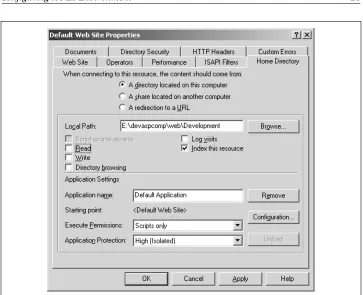
By default, the web server is set up to run within a pooled environment, but this can be changed in the server’s Properties page. To change the setting for the new development web server, right-click on the server in the Internet Information Ser-vices console snap-in, and pick Properties from the menu that opens. Then, select the Home Directory tab from the window that opens, as shown in Figure 2-1. The program isolation setting is an option labeled Application Protection. Set this to High (Isolated) to be able to unload the application and release any locks on com-ponents without having to shut down either the web server or the web service.
You can change several other properties for the server, including performance tun-ing and setttun-ing security for the site, from the Properties window. But first, time to try out your test environment. To do this, you’ll need a test ASP component.
To test the environment, you’ll need an ASP component you can use to make sure the application isolation is set correctly and you can unload the web site without having to shut it down. Then you’ll need to create a simple ASP page that accesses the component. For this example, we’ll create a component using Visual Basic.
If you aren’t using Visual Basic and are running this test using the component copied from the code examples, you can still test out the application isolation feature. Instead of trying to recompile the com-ponent, try deleting it. Without unloading the server application first, you should get a Sharing Violation error and a message about the component being in use. Unload the server application and then try again to delete the component—this time you shouldn’t have any problems removing it.
The details of creating a Visual Basic ASP component are covered in Chapter 7,
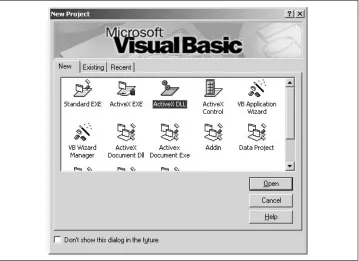
Creating a Simple Visual Basic ASP Component, but for now create the
asp0201.vbp. A class is automatically created for a project such as this; rename this clasststweband the class file tstweb.cls. Accept all the defaults for the project and the class.
The next step in creating the test component is to add in the class code, in this example a very simple function that returns a very traditional message to the ASP page, as shown in Example 2-1.
[image:42.612.125.488.107.402.2]Once you’ve added the code to the class, compile the component by accessing the File menu and clicking on the “Make asp0201.dll” menu item. A dialog box opens
Figure 2-1. Setting the isolation level for the new development web server using the server Properties dialog box
Example 2-1. Simple Visual Basic Component to Return a “Hello, World!” Message
Option Explicit
' tests new Development Web Function tstNewWeb() As String
tstNewWeb = "Hello, World!"
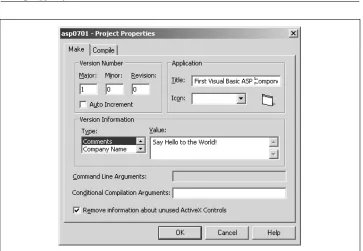
that contains a default name for the component (the name of the project with a DLL extension). In this dialog box, you can change the component’s name and location and other application options, which we won’t go into until Chapter 7. For now, accept everything at its default value and compile the component.
Visual Basic creates the component file and also registers it as a COM object acces-sible from applications. If you don’t have Visual Basic, you can also copy the test component from the downloadable code examples and register in on your machine using theregsvr32 utility as follows:
regsvr32 asp0201.dll
Performance Issues with Application Isolation
As you’ll read in Chapter 3,ASP Components and COM, IIS applications require a runtime executable in order to work. An ASP application running in the IIS process environment operates within a shared-environment executable that has been tuned to work efficiently in the IIS environment. Therefore it per-forms better and has much less overhead then an application defined to be pooled or isolated.Pooled and isolated web servers use a standard COM/COM+ host,dllhost.exe, which provides an individual executable en