Master of Science thesis
The adaptive presentation assistant
Using grammar-based recognition to support the process of presenting
Laurens Satink
August 21
th, 2009
Graduation committee
Dr. R.J.F. Ordelman (first supervisor)
Dr. A.J. van Hessen
2
Abstract
Giving presentations has changed significantly over the last decades. Although the main reason why someone wants to give a presentation remains the same, the way it is done has changed significantly. During the last 30 years of the twentieth century, overhead slides displayed on an overhead projector were used for broadcasting the information. Over the past decades, these analogue overhead slides have been replaced by digital slides, projected by a beamer on a screen. More than the way of projecting, it is the slide itself that has changed teh most. Transparent overhead slides limited the information displayed to text, drawings, and with the possibility to photo copy on slides, figures and photo’s. Using digital slides made it possible to add enriched multimedia content, such as sound fragments, animations, (moving) pictures, movies, and appearing and vanishing text.
These changes strongly influence the way a presentation can be given. In this thesis, we explore the possibility to apply speech and language technology (SLT) such as automated speech recognition (ASR) to allow the presenter to use (natural) speech to navigate through presentation.
Several approaches were explored, developed and evaluated. First, a command-driven presentation assistant is created, after which titles and content of other slides are included. For each approach, a series of experiments is conducted and interpreted to evaluate the performance.
The outcome shows that the presentation assistants in most cases are able to support the presenter in showing the correct slide at almost the correct time. A small but noticeable delay is inevitable when speech is used as a basis for the determination process, as the presenter discusses the next slide before the transition is initiated.
3
Preface
This thesis contains the research, development, implementation and evaluation of several presentation assistants that together define my graduation project for the HMI chair within the faculty of Electrical Engineering, Mathematics and Computer Science at the University of Twente.
The start of this project was back in July 2005. Due to unforeseen circumstances, completing it has taken significantly more time than expected or planned. For standing patiently besides me, offering me help and advice whenever needed or possible, I would like to sincerely and profoundly thank my graduation committee, especially Roeland and Arjan, for their time and effort. These last months have been intense, and their support has been invaluable.
In addition, I want to extend my thanks to professor Wambacq, of the University of Leuven, for offering support and help using SPRAAK, and for providing the necessary models.
Also, I would like to thank a lot of faculty members for enabling me to graduate in this way: Sharon Vonk, Hans Romkema, Gerda Olthof and all the others that helped me to finish my study.
A special thanks to my parents, for enabling me to study at this university, and for their continuous support throughout all these years. I could not have come this far without you.
Off course I cannot forget my friends and fellow students, for making my study time so worthwhile, just as much within the educational setting as during all the spare time we spent together.
My colleagues from Telecats, for allowing me to continue and finish my study next to my job, and for allowing me to take days and hours off whenever it was needed.
Last, I want to thank Tabitha for sticking with me and aiding me where possible during these last stressful months.
4
Contents
Abstract ... 2
Preface ... 3
1 Introduction ... 8
1.1 Problem description ... 8
1.2 Towards understanding a presenter ... 8
1.3 Problem statement ... 9
1.3.1 Initiating slide transitions with ASR... 10
1.4 Research goal ... 10
1.5 Outline ... 10
2 Related work ... 11
2.1 Jabberwocky ... 11
2.2 Adapting the presentation... 11
2.3 Generating presentations ... 12
2.4 Standards ... 13
3 Presentations ... 15
3.1 History and context ... 15
3.2 Structure ... 15
3.2.1 MLMI Recordings ... 16
3.3 Building blocks ... 16
3.4 Navigation... 17
3.4.1 Navigation within a slide ... 17
3.4.2 The speech dilemma ... 18
3.5 Relevance measure ... 18
3.5.1 Existing numbers ... 19
4 Automated Speech Recognition ... 20
4.1 From audio to speech ... 20
5
4.2.1 Lexicons ... 21
4.2.2 Keyword spotting ... 21
4.2.3 Grammar based recognition ... 22
4.2.4 Finite state grammars ... 23
4.2.5 Filler models ... 23
4.3 Probabilistic approach ... 23
4.4 Performance ... 24
4.4.1 Influences ... 25
4.5 Towards developing an assistant ... 26
5 Approach ... 27
5.1 Overview ... 27
5.2 Context ... 27
5.2.1 Sub systems ... 27
5.2.2 Presenting ... 27
5.2.3 Intra-slide transitions ... 28
5.2.4 Relevance and distinction... 28
5.3 Speech Recognition Systems ... 28
5.3.1 Spraak... 29
5.4 Command types ... 29
5.4.1 Grammars in Spraak ... 30
5.4.2 Commands... 30
5.4.3 Costs ... 31
5.4.4 Spraak datafiles... 31
5.5 The first assistant ... 32
5.5.1 Activation ... 32
5.6 Transition on titles ... 33
5.6.1 Access to all slide titles ... 33
5.6.2 Enforcing linear presenting ... 33
5.6.3 Topic clustering ... 34
5.7 Transition on content ... 34
6
5.7.2 Parsing content ... 34
5.7.3 Prioritizing content ... 35
5.8 Parsing text ... 35
5.8.1 Numbers ... 35
5.8.2 Abbreviations... 36
5.8.3 Symbol translation ... 36
5.9 Operating the assistant ... 36
5.9.1 Stopping the assistant ... 36
5.10 Implementation ... 36
6 Evaluation ... 37
6.1 Evaluating a presentation assistant... 37
6.2 Slide transition timing ... 37
6.2.1 Learning process ... 37
6.3 Performance measures ... 37
6.3.1 Word error rate ... 38
6.3.2 Transition accuracy ... 38
6.3.3 Transcriptions ... 38
6.4 Experiment setup ... 39
6.4.1 Testing the different approaches ... 39
6.4.2 Topic and duration ... 39
6.4.3 Preparation ... 39
6.4.4 Recording speech ... 39
6.4.5 Wizard of Oz ... 40
6.5 Results ... 40
6.5.1 Speaker profiles ... 40
6.5.2 Clipping... 41
6.6 Obtaining, calculating and interpreting results ... 41
6.7 Issuing commands ... 42
6.8 Command-based transitions ... 43
6.9 Title transition ... 43
7
6.9.2 Sidestep: global title transitions ... 44
6.10 Content-based transitions ... 45
6.11 Interpretation of the results ... 46
6.11.1 Issuing commands ... 46
6.11.2 Silence periods... 46
6.12 Strong and weak aspects of the assistants ... 47
6.12.1 Content length ... 47
6.12.2 Command confusion ... 47
6.12.3 Performance analysis ... 47
7 Conclusions ... 49
7.1 The assistant ... 49
7.1.1 Limitations ... 49
7.2 The approach ... 49
7.2.1 Using Spraak ... 49
7.2.2 Research goal... 50
7.3 Future work ... 50
7.3.1 Using additional speech and language processing methods ... 50
7.3.2 Speech/non speech detection ... 50
7.3.3 Classification instead of recognition ... 51
7.3.4 Extending presentation content ... 51
7.4 Final thoughts ... 51
[image:7.595.69.529.68.608.2]8 Bibliography ... 52
Table of figures and tables ... 54
Tables ... 54
Figures ... 54
8
1 Introduction
Giving presentations is a common good. It has been incorporated into most aspects of corporate, as well as educational, academic and even personal life. Most presenters support their presentations with digital slides, prepared in advance. During the presentation, the exact sequence in which the slides are displayed is specified
directly using a keyboard, mouse or other device. The presenter uses these devices to output a signal, which is interpreted by the software to execute an action, typically displaying the next slide. However, this is a static action-response environment.
What if this direct interaction could become obsolete?
1.1 Problem description
Our environment has been made more and more aware of our presence during the last few decades. Connecting the light outside ones house to a motion detector, equipping a car with a transmitter and the garage door with a corresponding receiver and sliding doors are just basic examples of this notion. However, far more advanced issues such as engaging in dialogues with computers or computer systems, interactive route planning and all sorts of sensor systems are present in everyday life as well. The domain of giving presentations is no exception to this phenomenon.
During a typical presentation, presenters direct the sequence in which the slides are displayed by executing actions. Back in the days of the analogue overhead projector, these actions consisted of selecting the next slide from an (ordered) set of slides and putting it on the overhead projector. Since the dawning of the digital era and the arrival of software solutions such as PowerPoint, this set of actions has been replaced by selecting the next slide from the ordered set of digital slides. This action is easily carried out by pressing a button on a device connected in some way to the computer containing the presentation, after which the desired slide is shown. It does however still require the presenter to manually carry out that action.
This thesis attempts to rule out that necessity by adapting the sequence of the presentation to the speech of the presenter. This is carried out by applying methods and techniques from the field of Speech and Language Processing (SLP) technology to the domain of presenting. Issuing commands will be made possible with the aid of keyword spotting (KWS). Further analysis of the content of slides will be a means to construct grammars, which will be loaded into an automated speech recognition (ASR) system.
1.2 Towards understanding a presenter
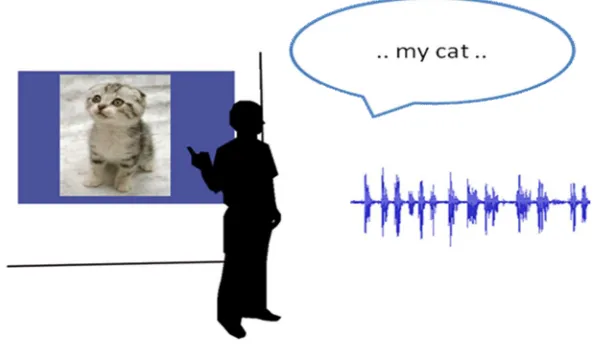
Imagine a presentation environment in which the presenter is no longer required to prepare a presentation, but can just bring along a repository of rich content that illustrates his topic. When the presentation starts, he loads his assistant and just starts speaking. The assistant listens and understands what the presenter is talking about, and displays appropriate illustrative content.
9
Figure 1 A presentation assistant listening to a presenter and displaying relevant content
Although this presentation assistant is far from being realised, some projects have contributed towards it. For example, there is the Radio Oranje demo1, a spoken document retrieval system based on the recordings of Queen Wilhelmina during the 2nd World War. The recordings have been automatically indexed offline based on the research of Ordelman et al (2005) and allow the user to query these recordings. The relevant parts of recordings can be selected and played. The speech is aligned with the audio, highlighting the uttered words. During the playback, a photograph or other image related to the current segment is displayed. The relation between the speech and selected image is largely based on available metadata of the images.
Another project within the HMI chair demonstrates the use of advanced multimedia retrieval techniques to make the Dutch news broadcasts searchable. Each broadcast is segmented based on topic detection or speaker changes, after which recognising and indexing is performed. The user can query the recent broadcasts on either the subtitles (available for every broadcast) or the recognition results. The results are ranked and presented to the user, who is then able to view the parts of the broadcasts that were returned2.
The technology used in both showcases is of great value to the future assistant, as they can be applied to a presenter’s speech to retrieve a relevant video stream, picture or any other multimedia element to illustrate the current topic.
This thesis will attempt to contribute towards developing the futuristic presentation assistant focussing on presentations and the presenter’s speech.
1.3 Problem statement
Most presentations are given nowadays with the aid of PowerPoint or a similar software product. Prior to the presentation, the presenter prepared a set of slides, which is most likely shown in a linear fashion. Displaying a next slide is initiated by the presenter by means of clicking a mouse (or a similar action). It would be more convenient if the presentation would adapt to what the speaker is saying: based on the speech of a presenter, the appropriate slide should be displayed automatically. This is not necessarily the next slide in the presentation.
This thesis assesses the (im) possibilities of the appliance of speech and language processing (SLP) methods and information retrieval (IR) techniques in order to this.
1 The Radio Oranje demo is available at http://hmi.ewi.utwente.nl/showcase/Radio Oranje demo
10
1.3.1 Initiating slide transitions with ASR
Given a traditional (linear) presentation, the next appropriate slide to display after the current one is almost every time the next slide in the presentation. If we assume this to be true, transitioning to the next slide could be triggered automatically. The speech of a presenter is transformed into text with the aid of Automated Speech Recognition (ASR). This (recognized) text can be analyzed by applying several techniques in order to wait a little bit longer, or to decide to display the next appropriate slide. The following methods will be evaluated for their performance:
The ASR can be configured to identify commands such as ’next slide’ or ’show previous’, which will trigger the transition to the desired slide. The process of extracting keywords in the speech is called keyword spotting (KWS).
An ASR can process complex structures conveyed in grammars to extend the parsing of keywords into parsing words in a context. The required grammars are constructed from the content of the slides and are used to determine when the presenter starts speaking about the next slide, thus initiating a slide transition.
1.4 Research goal
To determine when a slide transition is in order, several presentation assistants will be designed and implemented. These assistants analyze the (recognized) speech from the presenter and compare them to the slides of the presentation. The ASR models will be increasingly complex and are based on knowledge confined within the presentations.
This thesis attempts to prove the following hypothesis:
A presentation assistant using ASR is able to determine when a slide transition is in order.
In order to prove this hypothesis, each of the assistants will be evaluated for their accuracy and performance.
1.5 Outline
1. Introduction This chapter describes the context in which thesis can be placed and derives the research
goals.
2. Related work. Related projects and research are briefly touched in this chapter.
3. Presentations In this chapter presentations and the process of presenting are examined more thoroughly.
4. Automated speech recognition This chapter covers the required methods and techniques from the field of
SLP to construct the required configuration for the ASR.
5. Approach This chapter covers the different approaches that are used to construct the presentation
assistant. It describes the detailed construction of these grammars, along with a global design of the assistants.
6. Evaluation This chapter first defines a set of performance measures used to evaluate the assistants. Next,
it describes the chosen evaluation approach after which the performance measures are established for the different assistants.
7. Conclusions This chapter formulates an answer to the research goal, along with noticeable side
11
2 Related work
This chapter glances at the context in which this project can be placed. It provides an overview of related projects and offers a view on the possible applications
2.1 Jabberwocky
One of the closest related projects to this thesis is the Jabberwocky system designed and implemented by Franklin et al. (2000). It is part of the greater Intelligent Classroom project, which aims at designing a multi-modal interactive classroom. The focus is to provide an intelligent environment in which “the user expresses
what he wishes to do, and the environment recognizes his intentions and attempts to accommodate the user”
(Infolab, 2007).
Jabberwocky is a speech-based interface to Microsoft’s presentation software tool, PowerPoint (Microsoft Corporation, 2007). In essence, it is a system that learns how to aid speakers during the rehearsal of their presentations. It parses the content of the slides of the presentation for extraction of keywords and phrases and associates them with their places in the presentation. The system generates synonymous sentences for each content element of the presentation for matching the speaker’s utterances with the elements. Syntactic and semantic rules are applied for the generation of alternatives, thus creating a large set of keywords and (partial) key phrases. Other NLP methods such as stemming are applied as well, in order to assist the user in using natural language instead of the condensed word groups often find in presentations. These sets may expand during each rehearsal, making the system in principle quite extensive and speaker-specific. Franklin et al. (2000) found that before rehearsals, Jabberwocky extracted 192 words and phrases. After three rehearsals, on the used presentation in the experiment, Jabberwocky increased its knowledge with 85 new phrases, and rediscovered a total of 37 phrases in the second and third rehearsal from the previous one(s). The strong increase from the rehearsals compared to the base presentation is largely due to the consistency both in transitions and the speech recognizer (mis)matching certain phrases.
Since the purpose of the system is to initiate a slide transition at the appropriate time, the position of the speaker in the presentation is tracked. A window of the current and the next slide is monitored in order to determine the moment the transition should take place. Assuming presenters will address each of the elements present on a slide; this tracking can be quite accurate with the rehearsal system. It also imposes a restriction on the system: a presenter is more or less forced to narrate a presentation in roughly the same way each time, since the system is trained for (a set of) certain phrases.
2.2 Adapting the presentation
Opposed to the semi-fixed narration that a system as Jabberwocky imposes and the fixed linear fashion in which slides are presented by most presentation tools, Moscovich et al. (2004) investigate a different approach: adapting the presentation to the current needs of the presenter. These needs can change throughout a presentation, especially when the interaction with the audience is allowed. Temporal constraints placed upon the presentation can raise the need for changing the speed or order in which the slides are displayed.
12
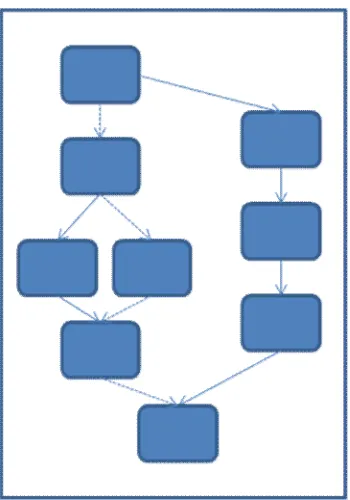
Figure 2 Example of a presentation with multiple paths. The presenter can follow any path depicted by the lines in order to meet the requirements for the current presentation. The dotted lines are an example of a taken path.
Given a fixed set of slides, the presenter is presented the ability to prepare a set of presentations based on those slides. This can result in a set of distinct presentations, each for its own high level purpose. It also allows the presenter to adapt the presentation on-the-fly. Moscovich et al. (2004) constructed and tested a tool that allows navigation through a presentation in more ways than just linear. These customizable presentations allow nested sub-paths, presenting the presenter the opportunity to take a certain branch whilst presenting, thus satisfying changing temporal constraints or perhaps the changing interest or focus from the audience. Figure 1 schematically depicts a set of slides resulting in 3 possible presentations; the chosen path is indicated by the dotted lines.
These customizable presentations are a great step towards adapting a static presentation to the current needs during a talk. It also voids the necessity to create a distinct presentation for every high level intent, since the tool can be used to construct another path through the slides, which basically is a distinct view on the set.
2.3 Generating presentations
So far, the presentations all have been designed in detail by the presenters. The higher intention of the presenter, giving a lecture or a short talk, can be conveyed in a rhetorical structure. The presenter is required to translate this high level intent structure directly into a final presentation, for each intent. Rutledge et al. (2000) have investigated generating presentation structures based on rhetorical structures. The high level intent can be encoded in a set of spatial, temporal and navigational constraints, after which these constraints are sought to be satisfied when constructing the final presentations.
Presenting information with a given set of constraints is something that is already applies in everyday life: HTML defines the layout of data without explicitly prescribing the final presentation. On each interpreter, whether it is a browser at a certain resolution or a mobile phone with UMTS, WAP or any other means of connecting to the internet, the same data is interpreted and translated into a final presentation.
[image:12.595.72.247.67.317.2]13
[image:13.595.72.415.240.466.2]rendering to take place on a great variety of media. The constraints cannot always be satisfied: overflow of spatial or temporal constraints is something that will very likely occur on different presentation media. It triggers an overflow mechanism, which uses other constraints to try and satisfy the overflowed constraints. For example, if a construction of information elements results in a spatial overflow, temporal constraints can be applied to try and solve this. Instead of displaying the information, taking the spatial constraints in regard, on one screen, multiple screens can be used if the temporal constraints are not violated. This compensation mechanism is an important factor in satisfying the constraints defined in a presentation space and allows a greater set of presentations that satisfy the constraints set as a whole.
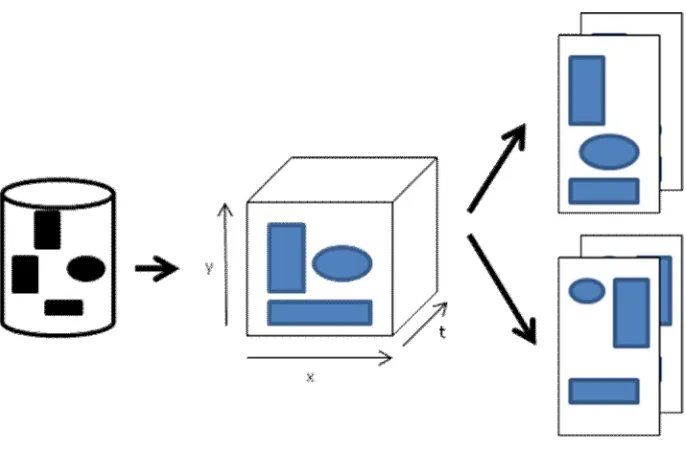
Figure 2 illustrates the generation of content. Based on a repository with elements, and a set of spatial (x and y) and time (t) constraints, a set of potential presentations is generated that satisfy these constraints. The user can then select the desired presentation and make the final changes to it, if needed.
Figure 3 Given a repository with content elements, and set of spatial (x and y) and temporal constraints (t), the system generates a set of possible presentations satisfying these requirements.
The research of Rutledge et al. (2000) is applicable to all presentation media, not just the common presentation used during a talk or lecture. However, applying spatial and temporal constraints on an information repository is the high level intent of any presenter. Talks for different audiences on different presentation media result in different sets of constraints. The result of applying these results is a set of presentations, each suited for a high level intent.
2.4 Standards
One last aspect that deserves our attention is standards. Knowledge is distributed through a variety of media, amongst which the presentation. Over the last decade, digital presentations have been based on the same propriety file format of mostly PowerPoint. An abstract description of a presentation, allowing for (tagged) multimedia content, and an open standard would allow for a greater variety of presentation tools, and tools to develop the presentations.
14
anchoring: the mechanism for addressing or referring to locations or items within the individual components (Halasz and Schwartz, 1994).
This approach strongly focuses on links between information elements and expresses the data in an XML like language. This model puts emphasis on the hypertext relations between individual components and is thus less applicable to the plain presentation environment. However, the separation of content, relations and run-time designing has had a great influence on a variety of presentation systems.
Bordegoni et al. (1997) proposed a standard reference model for intelligent multimedia presentation systems. They recognize the need for such a reference model from the rise of media content. They view multi-media not as a single entity, but as composition of multiple information elements. The final presentation of the multi-media content should be described in more than just the final product. They acknowledge several projects are initiated to do that purpose, but a standard reference model does not yet exist.
15
3 Presentations
This chapter provides an introduction to presentations. The most common structures and navigational issues will be shortly discussed and referenced against the presentations of the MLMI of 2004 (IDIAP research institute, 2004).
3.1 History and context
Exchanging information is one of the fundamental interactions between humans. Distributing pieces of information can be achieved in two ways: actively or passively. The most common examples of passive knowledge distribution are books. Information is written down and thus stored in an information carrier (e.g. a book or a magazine). Whenever the need arises, anyone can consult the information carrier and extract the desired piece(s) of information.
Active knowledge distribution requires interaction between the one(s) holding the information and the people requesting it. The information can be (partially) contained in an information carrier and is managed by the one(s) holding the desired information. The knowledge is to be distributed from the information carrier to the requesters. This process is often realized by giving an (oral) presentation. The person holding the desired information broadcasts the information and the audience receives it. The presenter is more often than not assisted by some passive information carriers such as figures, tables and text, often contained in a presentation.
Transparent overhead slides and overhead projectors as well as chalkboards have supported this form of knowledge distribution for several decades. A presenter carried with him (or her) a set of transparent overhead slides that were placed sequentially on an overhead projector, thus projecting it on a board or screen. Displaying another slide was initiated by removing the current slide, selecting the appropriate next slide from the set and positioning it on the projector. An alternative presenting aid was the slide projector, allowing the presenter to project small slides on a screen. Navigating through the set of slides occurred in the same manner as with the transparent slides: the presenter consciously selects the desired item from a given set and inserts it into the projector. The major downside of displaying information this way is that information once written down is hard to change or remove. Using multiple overhead slides at the same time, or writing on the slides during the presentation are the options a presenter had of adapting the information during the presentation.
Since the nineties, computers equipped with software presentation tools such as PowerPoint typically replaced the overhead projector and slide projector in assisting the presenter. The analogue skudes are replaced with digital slides, which convey the same information elements such as text, enumerations and figures. Additionally, multimedia content such as movies, pictures and demonstrations can be included as well. Modifications and other operations are possible on both analogue and digital slides, but are simplified in a digital environment: insertions, deletions and changes can be made, thus supporting adapting the presentation on the fly. The information has become volatile; changing the information has become as easy and accessible as reading it, and changes can be reverted at any given time.
3.2 Structure
Given the notion that presentations are given with the purpose of transferring information, this goal can be aided by giving presentations a certain structure. Many presentation guidelines recommend presentations to start out with an introduction and a layout of the presentation, followed by the body of the presentation and ending with conclusions and recommendations:
Introduction. A presenter should introduce both himself and the subject. Background information on the
16
knowledge of the presentation domain, a short introduction can be used to both introduce the basic concepts and/or terminology as well as setting the boundaries for the topic.
Overview. In order to inform the audience how the presentation will unroll, the introduction is often
followed by explicitly stating the exact structure of the presentation, often contained in a table of contents or a similar overview. This allows the audience a clear view on the issues to be addressed and can provide a sense of progression throughout the presentation.
Body. The body of a presentation consists of addressing the topics indicated in the introduction and/or
table of contents. The related information of each of the indicated topics is contained on one or more slides. When starting a new topic, presenters often explicitly state that they are, sometimes referring to the table of contents or by displaying a short overview of the subtopic. The terms mentioned in the table of contents frequently reappear as titles of the slides containing that topics content. This repetition can serve two purposes: it allows the audience to keep track of how far the presentation has progressed, and second, explicitly state the topic that is currently addressed.
Conclusion. After the body of the presentation, some sort of conclusion and/or some recommendations
are presented. These can often accompanied by a short summary, especially if the presentation tends to be a larger one. After presenting the conclusions and the recommendations, the presenter typically ends the presentation with asking the audience for questions.
We assume presentations to follow these top-level guidelines. Apart from the fact that every guideline or presentation aid suggests this layout, from a logical point of view it is the structure that makes a coherent and continuous whole.
3.2.1 MLMI Recordings
No exact numbers are available, but according to presentation guides and good practices, a well-prepared presentation should follow the following ratios of introduction, body and conclusion: 10–20%, 60–80% and 10– 20% respectively. The MultiModal Interaction Machine Learning Algorithms, or MLMI (IDIAP research institute, 2004) workshop publishes the presentations that are given during the workshop. Considering most of the presentations are given by well-experienced presenter, we will use them as a point of reference.
The recordings of the 2004 workshop support the notion of structure: ratios of 11%, 76% and 13% were found for introduction, body and conclusion, respectively.
3.3 Building blocks
As well as the presentation as an entity, the individual slides contain a certain structure as well. This section will provide a quick glance at the building blocks of presentations.
Textual elements
17
Tables, figures and other graphics
Although plain text can be used to display any information required, there are better structures to display (structured) data. Tables are used to present relations between two or more entities and provide a clear overview for the audience. Graphical data such as graphs or images are placed in figures.
Multimedia content
Additional multimedia content can be embedded into presentations. Movies, sound files, even (links to) demonstrations of software can be incorporated. The actual handling of multimedia content is often done by third-party software and is usually not embedded within the presentation. Therefore, we consider multimedia content not to be a part of the presentation itself and as such will be discarded for all purposes.
3.4 Navigation
The most intuitive way of navigating any ordered set is sequentially selecting an item, processing it and moving on to the next item. Since a presentation is most likely given in a linear fashion, the presenter will start at slide one and continuously select the next slide until the last slide is reached. Presentation software products let presenters initiate the slide transitions by having them carry out a single action.
This action can be pressing a key on a keyboard, pressing a mouse button or sending a signal to the computer by almost any gadget. However, initiating the action twice (or even more often), triggers the software to repeatedly display the next slide. This may have an unwanted effect, since the wrong slide can be displayed on the background. Carrying out an action more than once can easily be triggered by human aspects, such as nervousness or agitation, as well as technical aspects such as an unstable signal or interference on the frequency. This potentially leads to unwanted behaviour of the system and raises the need of correctional actions, such as selecting the previous slide.
Another aspect of presentation navigation is the addressing of questions from the audience. The presenter may want to directly navigate the presentation in order to display a certain slide. This navigation process requires a detailed knowledge of the slides, since only the presenter knows if and which slide contains the desired information.
These aspects combined raise the necessity of at least the following navigation abilities:
Selecting the next slide Selecting the previous slide
Selecting a specific slide anywhere within the presentation
Most presentation software products support these actions and thus allow the user to actively navigate the presentation.
3.4.1 Navigation within a slide
18
For all intents and purposes, we consider displaying the next slide within this thesis as a singular action, and will address implementing speech for partial slides during designing and evaluating the presentation assistants.
3.4.2 The speech dilemma
Using speech in order to navigate a presentation can be done in two ways: actively and passively. When a presenter utters a command to execute a navigational action (e.g. ‘Show the next slide’), speech is actively used to navigate through the slides.
A presentation assistant that listens and, to a degree, understands what the presenter is saying could be developed to display the correct slide; speech is then used in a passive way. It does introduce a fundamental problem: when an assistant decides that the speech of the presenter covers information of the next slide, and decides to initiate the slide transition, it is already too late. Compared to the current situation, where a presenter first initiates a slide transition, and only then starts covering the content of that slide, a delay is inevitable. Minimizing this delay should be an assistant’s priority.
Another way of implementing speech-driven navigation is by matching the speech to the current slide, and initiating a slide transition, if and only if the information elements of the current slide have been discussed. The largest downside of this approach is that skipping content is no longer an option, and missed elements can only be compensated for by explicitly listing them in order to satisfy the requirement of completeness.
Both passive approaches are based on the assumption that a presenter’s speech is related to the content of the slides.
3.5 Relevance measure
The slides of the presentation are supposed to support and aid the presenter in giving the presentation. The content of the slides should be related to the current speech of the presenter in order to fulfil that purpose. This relation can be very strong and exact if the presenter is reading aloud the contents of that slide or can be a bit weaker if the slides is a mere example of the concepts the presenter is talking about. Whether this relationship is strong or weak, we assume for this thesis that: There is a relation between the speech of the
presenter and the current displayed slide.
In order to interpret how strong this relationship is, we need to define a relevance measure. This measure relates the utterances of a speaker to the content of the slides by examining their overlap. We introduce Si, 1 ≤
i ≤ #slides to be the set of words and other content contained on the ith slide of a given presentation and Pi the
speech as a sequence of words uttered during the display of slide Si. Since both are sets of words, let Ri be their
overlap using the following definition:
This measure can easily be extrapolated to assigning a value to the overlapping speech of a presenter and the content of the slides for a whole presentation by enumerating over all slides within that presentation and averaging the totals:
This equation expresses the content that has been used exactly as on the slides during the presentation. Please note that the interpretation of what a speaker is uttering is not taken into account here, so the actual relevance measure can be significantly higher than the outcome of equation 2.
Equation 1 Relevance of a slide
19
3.5.1 Existing numbers
The MLMI Recordings (IDIAP research institute, 2004) showed this relevance measure exists. Analysis of four (representative) presentations of the recordings show that the majority of the text (or an equivalent textual representation) contained in the slides is uttered literally during the presentation. Assuming we can view these recordings as representative for well-prepared, structured and presented presentations, it strengthens the assumption that the relationship between speech and the slides is valid.
Note that the boundaries in the speech are assigned manually during the analysis of the MLMI recordings. Longer pauses in between sentences typically indicate a topic change. Along with the assumption that slides contain unique information, a topic change is typically accompanied by a slide transition. When this explicit pause is absent, this boundary between slides has been assigned arbitrarily. The assignment of boundaries should be automated in order to prevent the presenter from actively interacting with the presentation.
20
4 Automated Speech Recognition
This chapter briefly glances at the statistical approaches used in Automated Speech Recognition (ASR), after which keyword spotting and grammar-based recognition is discussed.
4.1 From audio to speech
Speech is essentially nothing but a series of sound waves. A speech recognizer transforms this signal into a sequence of words. This process can be broken down to the following phases (Rietveld and Heuven, 2001):
1. The speech signal is captured by a microphone or a similar recording device.
2. The analogue sound waves are transformed into a digital equivalent.
3. The digitized speech signal is divided into sequences of phones.
4. Using a pronounce dictionary, several recognition candidates are generated.
5. The word with the highest probability is chosen. Syntactic analysis and the aid of advanced language models (LM) are common tools for calculating the probabilities.
A lot of information can be obtained from just the waveform, such as presence of voicing, stop closures and fricatives (Jurafsky and Martin, 2000). Other aspects require a different representation: spectral features. These are based on a Fourier transformation of the waveform and represent the different frequency components of the wave. Most modern speech recognizers smooth the spectrum using Linear Predictive Coding (LPC). This algorithm makes it easier to spot the spectral peaks, better known as formants. The LPC spectrum can be represented by a feature vector, containing two features for each of the five formants and two additional features for spectral tilt (Jurafsky and Martin, 2000). A phone is identified by aspects of the formants, enabling recognition of phones and thus syllables and words.
The task of any ASR system is to find the most probable sentence Ŵ by computing P(W|O) for every possible
sentence W given an acoustic observation O:
P(O|W) is the likelihood that a certain observation is made given the sentence W and P(W) the prior probability that W is obtained using the language model(s) (Jurafsky and Martin, 2000). Since the acoustic observation O always has the same probability and only the relative values are relevant, 4.1 reduces to calculating P(O|W)P(W). Maximizing this probability over all words results in the most probable sentence Ŵ :
Since the speech of a presenter needs to be recognized into its textual equivalent, these formulas provide the basics for recognizing that speech.
Equation 3 Acoustic observation
21
4.2 Language models
Recognizing speech is more complicated than gathering the phonemes and doing a lookup in the lexicon. Often some words are more likely to occur then others; sometimes the outcome space is limited to a (small) subset of the lexicon (e.g. keyword spotting and grammar-based recognitions; see below). When recognizing natural or conversational speech, statistical models are used to calculate the outcome.
This statistical model is often conveyed in a hidden Markov Model, or HMM. This depicts a directed weighed graph defining the possibilities of transforming phonemes into words. Another common structure is an N-gram. Here, N stands for the number of previous observations to take into account when calculating the current observation. State of the art speech recognition systems have up to N=4 grams language models.
For further reading, we refer to Jurafsky et al (2000)
When developing a presentation assistant, using a relatively small and closed vocabulary language model such as keyword spotting or grammar-based models promise to yield better results, which will be investigated in the next sections.
4.2.1 Lexicons
Since acoustic observations have to be transformed into words, knowledge of how words are constructed is required. A lexicon is a transcription of acoustic observations unambiguously to words. A word can have multiple acoustic observations, but each sequence of observations can lead to only one word.
Lexicons use phonemes to depict the acoustic observations. The phonetic alphabet comes in a lot of varieties, of which Sampa (UCL, 2009) is perhaps one of the more widely accepted ones. It has adaptations for over 25 languages and has been extended to X-SAMPA to be language-independent.
Lexicons define the outcome space of transforming acoustics into words. Language models are used to determine the likelihood of the translation process, but a word not defined in the lexicon that the language model uses results in the impossibility of recognizing the words. Uttered words not in a lexicon are often referred to as Out-Of-Vocabulary (OOV) words and are typically recognized as words that have a similar phonetic transcription.
4.2.2 Keyword spotting
The isolation of words in continuous speech is often referred to as keyword spotting (KWS). In the late 1980’s, customers of a telephone company were able to use a speech-driven telephone operating system, which could assist them with a number of tasks, such as requesting a collect call, asking for an operator, etc. (Wilpon et al., 1988). It became clear that customers were reluctant to utter only the required words, but rather placed them in fluent speech. Hence, the need for searching keywords in continuous speech utterances became apparent. Wilpon et al. (1990) show that hidden Markov Models can be used to identify keywords in unconstrained speech, which resulted in a recognition rate of 95,1% of spoken words in fluent speech spoken over long-distance telephone network.
22
4.2.3 Grammar based recognition
Instead of recognizing specific words, the recognition of certain sequences or repetitions of words is demanded as well. In order to define the exact sequences, alternations and/or repetitions, something is needed to define the exact structure. Grammars are the best candidate to convey the desired structure. A grammar consists of a
quintuple (N,Σ, P, S):
N: a set of non-terminal symbols
Σ: a set of terminal symbols, disjoint from N
P: A set of production rules of the form A -> B, where A ε N and
S: The start symbol
Grammars can be defined using the same operators as regular expressions. Take for example a speech recognition system to substitute a regular remote control for common electronic devices such as televisions, stereo sets and DVD players. It should support the same functionalities as the remote control, such as turning the device on and off and switching to channel between 1 and 99. The first rule of a grammar used for this system should enumerate the possible top-level commands, such as turning the machine on or off and switching to a certain channel. The alternatives can be derived further in additional rules. The example of a grammar for a speech-driven control a set of electronic devices is given in figure 4.1 and is based on the
example given by Pellom and Hacıoğlu (2004).
S → $cmd*
$cmd → turn power $power_state [the] $device | $device
$power_state | [go] [to] channel $channel;
$power_state → on | off;
$device → tv | dvd | vcr | stereo;
$channel → $digit | $teens | $tens [$digit]
$digit → one | two | three | four | five | six | seven | eight |
nine
$teens → ten | eleven | twelve | thirteen | fourteen | fifteen |
sixteen | seventeen | eighteen | nineteen;
$tens → twenty | thirty | forty | fifty | sixty | seventy | eighty
| ninety;
Figure 4 Grammar for a speech-driven remote control; several devices can be turned on or off with this grammar; or a channel between 1 and 99 can be selected.
The tokens not starting with a dollar sign are the literals in this grammar. Assuming a background lexicon with the transcriptions for all the literals, an ASR is able to recognize the structure this grammar denotes, in this case a set of commands to turn on or off a certain electronic device, or switch to a certain channel.
23
4.2.4 Finite state grammars
An alternative approach is defining grammars as finite state grammars, or FSGs. In this notation, the grammar is defined using states and arcs:
S: A set of states
A: A set of directed arcs of type S->S, with a symbol X.
Depending on the implementation, the following features can be added:
A start state S0 and a set of accepting states <Saccept>.
A function weight W(S->S) assigning a cost or a probability to each arc.
A function O(S->S) assigning output symbols to each arc.
In speech recognition systems, the system will load in a start state. The acoustic observations, translated to words using the language model and lexicon are used to determine which arc is a possible transition. Only arcs with symbol X that matches the incoming token are added to the possible set <P>. The next token is parsed and matched against the arcs starting from each state in <P>. When a state in <P> has no matching symbol <X> matching any outgoing arcs, the set is removed from <P>.
This process is repeated until all the incoming tokens and parsed, and the resulting set <P> defines the reachable states given that input.
If the particular system has the ability to define accepting states, it only accepts incoming when there is at least one accepting state in <P> after parsing the input tokens. Typically, this is accompanied by an output symbol, so an external entity can keep track of which path (or rule) has been taken to accept the income.
4.2.5 Filler models
In keyword spotting approaches, the modelling of out-of-vocabulary (OOV) and non-speech sounds such as lip smacking, coughing or throat clearing is done by designing filler models. The first approach is to explicitly restrict the utterances in the template recognition network. Since it can be predicted what will be uttered next under the assumption that no other phenomena occur, high performance is reached at the cost of flexibility. Only explicitly defined sequences are allowed. The next approach allows the ASR to focus on segments of the keywords. Only (sequences) of phonemes are accepted that are defined by the grammar rules, the rest is ignored.
Zhang et al. (2004) describe two ways in which filler models can be constructed. The first is train Hidden Markov Models (HMM) that exactly model extraneous speech prior to using the KWS system.
The other approach is to create filler models on demand, calculating the probability scores for both the filler HMM and the keyword HMM for each text frame (Rose and Paul, 1990). The latter enables the construction and re-use of filler models whenever a grammar is changed.
The latter approach is also the more desirable one for a presentation assistant. The speech will a presenter utters during the presentation will hardly follow a defined pattern to its every phoneme without filler words such as “uh” and “ah”, or any non-speech sounds.
4.3 Probabilistic approach
24
rule in the grammar is assigned a probability p and thus becomes of the form A -> B[p]. The weight of all the rules given the same start symbol A should sum up to 1.
Calculating accurate values for the individual probabilities is typically an automated task. For example, when using grammar-based recognition to recognize the name of a subject, taking into account the number of occurrences of that particular name provides a good basis.
Another use of probabilistic derivation is to disambiguate sentences (discussed in Jurafsky and Martin (2000)). When analyzing a sentence that can have multiple semantic meanings, the probabilistic values can aid in disambiguating the sentence. An example: the sentence “Jan ziet Piet met de verrekijker” (Jan sees Piet with
binoculars) has two meanings. The first meaning is that Jan views Piet through binoculars; the second is that is
Jan sees Piet holding binoculars. Statistically, the former is more likely to have the correct meaning than the second, which can be resolved by assigning a higher probability to the derivation tree that leads to that interpretation.
4.4 Performance
In order to define a generic performance measure for speech recognition, it is essential to first look at the different type of errors that can typically occur during the recognition process. As a first, a certain word can be identified by the ASR, whereas there was no word spoken: insertion. The opposite of this is that a spoken word is ignored: deletion. Last, a spoken word can be wrongly recognized: substitution.
Since multiple errors can occur for a single recognition, the number of insertions, substitutions and deletions between a wrongly recognized word and its correct equivalent in the corpus can be counted. Wagner and Fischer (1974) named the minimum amount of errors the minimum edit distance (MED) and provided an algorithm to calculate it. The probability that a certain word matches an entry in the corpus is estimated by minimizing the MED for the entries. Summing these MEDs required for the matching in a certain transcript gives the most common performance measure for speech recognition: the word error rate (WER):
An example (taken from Jurafsky et al, 2000) of calculating the WER for a given utterance (REF) that was recognized (HYP):
REF i *** ** UM the PHONE IS i LEFT THE portable **** PHONE UPSTAIRS
HYP i GOT IT TO the **** FULLEST i LOVE TO portable FROM OF STORES
eval I I S D S S S I S S
Word Error Rate = 100* (3+6+1)/14=71,43%
Figure 5 Example calculation of a WER. The recognized text (HYP) has 3 insertions, 6 substitutions and 1 deletion on a total of 14 words in the utterance (REF).
Jurafsky and Martin (2000) report that around 2000 the best recognizers for free speech have a word error rate between 20% (Chen et al., 1999)) and 40% (Hain et al., 1999).
25
4.4.1 Influences
Rietveld and Heuven (2001) investigated a number of factors that influence the performance:
Bandwidth. If the speech signal is transmitted using a large frequency range, a speech recognizer will achieve a higher performance compared to transmitting using a small bandwidth (e.g. 300-3300 Hz for telephone; 14-44 KHz for microphone).
Open or closed vocabulary. If the set of uttered words is expected to be a fixed set, closed vocabulary is used.
Signal parameters. Using formants is just one of the possible ways to parametrize the signal. However, others will not be investigated in this report.
Corpus size. The amount of available training material is crucial for performance. If the training corpus is qualitative and qualitative very good, performance will improve. Every word uttered that is not included in the lexicon automatically results in an error.
In addition, we identify the following performance aspects as well:
Clipping. A microphone (or any recording device) is expected to have a maximum input level. If this level is exceeded, the information above that level is lost. The audio signal is flattened at the maximum level, losing all formant information. When computing the phonemes, the required information is very limitedly available, resulting in a difficult recognition process. This symptom is known as clipping and can severely influence the performance of recognition. A great deal of microphones use some form of automatic gain control (AGC) to counter this phenomenon.
Background noise and non-speech sounds. When the audio signal recorded with a microphone or similar device is fed directly to the speech recognition system, it will attempt to map each sound wave to a known phoneme. Even without diving into that process in detail, it is evident that mapping non-speech sound waves or utterances in the background from other speakers will result in raising false identified phonemes. This aspect can be largely nullified by using pre-processors that analyze and transform the audio signal.
Weintraub et al. (1996) studied how spontaneous speech differs from other types of speech. They conducted a series of experiments on sentences with identical transcripts that varied in the speaking style and found that speaking style is a very dominant factor in the performance of large vocabulary continuous speech recognizers: performance degraded from a WER of 29% (careful dictation) to 53% (spontaneous speech).
Given a typical presentation environment, we expect the audio to be of microphone quality. The amount of background noise at a typical presentation should be reasonably low, as attendees of a presentation are (supposed to) quietly pay attention, save the incidental interruption.
Given this high quality audio, the speech recognition system is enabled to properly identify the phonemes.
26
of a clearly speaking presenter to be between the indicated values at the last bullet, under the assumption that the background lexicon will at least contain transcriptions for every word contained in the presentation.
4.5 Towards developing an assistant
As depicted in this chapter, the availability of high quality audio is an important factor towards developing a presentation assistant. We expect the circumstances of a typical presentation to satisfy that requirement. As the audience will typically silently pay attention and only occasionally interrupt or generate background noise, the recorded audio signal will most likely contain only the soundwaves uttered by the presenter.
27
5 Approach
This chapter discusses the approach for creating a presentation assistant. We will start out by defining the limits and context of the presentation assistant and the choice for a particular ASR system. Next, the construction of grammars is described in-depth.
5.1 Overview
The main purpose of the presentation assistant will be to determine the moment a slide transition is in order. It will determine that moment by analyzing the speech of the presenter, recognized by an automated speech recognition system. The ASR uses the constructed grammars for its recognition and the output will be matched against the models created of the slides. In order to design and create the assistant, we will first define the context in which the assistant operates. Next we will move on to the choice of an automated speech recognition system, with the restriction it must be able to support grammar-based recognition. The construction of these grammars is the main focus of this chapter, and will be discussed at length for each operation mode of the system, and the content types typically found on slides.
5.2 Context
We assume the presenter is familiar with presenting, and confident at it. Nervousness often leads to incoherent sentences, unclear utterances, a lot of pauses and an excessive use of breaks like ”ehm”, which may severely interfere with the system’s performance. The presenter has a microphone, which is typically used to boost the speaker’s volume in front of large audiences, but is mandatory for this system. The microphone is connected to a computer running the system and has access to a real-time speech recognition system. Prior to starting the presentation, the presenter allows the system to index the slides, and load the set(s) of grammar(s) into the ASR.
5.2.1 Sub systems
The presentation assistant will be a piece of software that operates on a Windows-based system. It has access to an automated speech recognition that recognizes the speech of the presenter and offers the textual equivalent to the assistant. The ASR is required to support grammar-based recognition.
The assistant has access to the presentation slides, requiring them to be digital. We chose to use PowerPoint as the presentation carrier, since it is the most common and wide-spread software solution for presentations on Windows-based systems, as well as the fact that it allows for other software to directly access its contents via the OLE (Object Linking and Embedding) technology. Network communication allows each of the components to be located on different physical computers, as long as a stable and fast network connection between them is present.
5.2.2 Presenting
28
5.2.3 Intra-slide transitions
With PowerPoint, presenters are enabled to define actions within a slide. Animations, displaying and removing content elements and playing sound files are all accessible to the presenter. These actions can be time based (e.g. triggered after 10 seconds from the start of the slide), or can explicitly be initiated by the presenter.
A speech-enabled presentation assistant would have no issue displaying a slide that contains time based content. Content triggered by actions however introduce a problem. We do not want the presenter to issue a command for every action defined on a slide, as we consider this very intrusive for the presenting process. A presenter would be required to stop the conversational speech, utter a command, and continue to present the slide for every action. Therefore, we expect require the slides to be singular entities, from a display point of view.
5.2.4 Relevance and distinction
The requirement for relevance between the presenter and the content of the presentation has been established in section 3.5. If there is no strong relationship between the speech and the content, determining the slide transition by the assistant will evidently be virtually impossible.
In addition, there is a need for distinction of the slides. If the content of the individual slides show a great similarity, some approaches will perform significantly worse. Relationships between slides such as causality, enumeration sequences or discussing (different) aspects of a certain topic are still allowed, but including slides that share almost the same content is not desirable. We therefore impose that slides have to be unique within any given presentation.
Now that the context of the presentation assistant is defined, we will discuss the choice of an automated speech recognition system.
5.3 Speech Recognition Systems
Automated Speech Recognition (ASR) systems extract the linguistic entities from the speech waves and transform them into a textual representation (Rietveld and Heuven, 2001). This transformation of sound waves into textual representations of speech provides access to text analysis algorithms, which the presentation assistant will require.
There is a great variety of speech recognition systems available, amongst which the following:
Philips SpeechMagic focuses on document creation from domain-specific speech, as well as template based dictations. The latter offers high performance for domain-specific tasks in for example the medical sector (Philips, 2007)
Dragon Naturally Speaking allows personal users to interact with their software products (such as Word and Excel, instant messaging and emailing) by voice. The medical and legal business benefit from the adaptations to their fields, although general corporate life has access to the same interaction as personal users (Nuance, 2007).
IBM’s ViaVoice offers client/server solutions for a range of speech-driven applications, such as authentication mechanisms, platform-independent access to information repositories and management of voicemail, email and faxes (IBM, 2007).
29
SHOUT is not so much as an off-the-shelf speech recognition system, but rather a toolkit to design, create and adapt speech recognition systems (Huijbregts, 2009).
Spraak is developed by the ESAT department of the university of Gent (ESAT, 20009) as a part of the STEVIN project Spraak (STEVIN, 2009). It is a large vocabulary continuous speech recognizer, fully adaptable and extensible at every step in the process.
Especially SpeechMagic and Naturally Speaking are extended with an extensive programmable interface, allowing easy use of the systems. They also enable the users to deploy a rich variety of applications that use speech technology. However, these are commercial systems, requiring (expensive) licenses. Its core technology is protected, making it impossible to control the exact parameters for speech recognition. These factors render these speech recognitions less attractive for the use in this thesis.
Given that Spraak is relatively new and unexplored within the Human Media Interaction department, we chose Spraak as the speech recognition system for this thesis.
5.3.1 Spraak
Spraak is a large vocabulary continuous speech recognition system. It has been developed by the ESAT department of the University of Leuven (ESAT, 2009) within the STEVIN project SPRAAK. The first release was in 2006, after which development continued to today.
Spraak is developed in such a way, that all libraries are externally accessible and comes with extensive API documentation (Spraak API, 2009). Its architecture and implementation have been developed in such a way, that every step in the recognition process is influenceble or extendable.
Models
The Radboud University developed a generic acoustic model for Dutch in Spraak, which will be incorporated in this thesis. As it is a generic acoustic model, no explicit gender detection is used.
Accompanying the acoustic model is a 4-gram language model based on parts of the Corpus Gesproken Nederlands (corpus conversational Dutch) (CGN, 2009) and the Twente News Corpus (TwNC, 2009). The words used in the language model are available in a lexicon, which will be used as the basis for generating phonetic descriptions of the content of the slides.
When words are not in the available lexicon, the experimenter provides a phonetic transcription before constructing the models.
5.4 Command types
The remainder of this chapter discusses several approaches for creating a presentation assistant. All these approaches have in common, that they require the existence of a certain command structure: the presentation system has to perform actions given the speech. Different types of actions can be distinguished, which we will define here. The complete set of commands will be defined as C and will contain the following types:
Next(). The next slide of the presentation is to be displayed. If the last slide is reached, this action will not
be executed.
Previous(). The previous slide of the presentation is to be displayed. If the first slide is selected, this action
will not be executed.
30
Any developed system should be able to support this commands to allow for direct interaction with the presentation.
5.4.1 Grammars in Spraak
In order to support the recognition of commands in speech, we need to define the grammars that correctly recognize the tokens contained in the commands. As described in the previous chapter, several approaches exist to describe grammars.
The support for context-free grammars, or grammars in Breibach Normal Form is limited, whereas finite state grammars are well-documented and ready to be used. For this reason, we choose to describe the grammars in a finite state model.
This imposes some restrictions on the models:
All the words generated from the content of the slides must be available in the background lexicon with a correct phonetic description. These can be retrieved either from the background lexicon, or will be provided by the experimenter when required.
We define a single starting state S0=”0” and a single ending state in order to measure if a stream of tokens
is accepted by the grammar.
In the remaining of this chapter we will show how the grammars used by the presentation assistant are constructed and extended.
5.4.2 Commands
In order to navigate through the presentation, the presenter must have the ability to at least access the following commands:
Command (Dutch) Meaning Command type
(Toon de) volgende slide (Show) next slide Next
(Toon de) vorige slide (Show) previous slide Previous
[image:30.595.63.537.434.537.2]Toon slide <x> Show slide <x> Jump(x)
Table 1 Available commands for the presenter
This command structure can be translated into a FSG by starting with one accepting string and gradually expanding the grammar with new rules. The command “toon de volgende slide” is accepted by the following grammar:
Figure 6 Basic next() command grammar
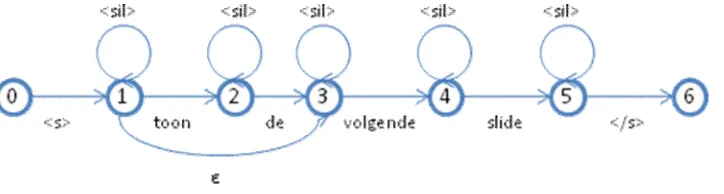
31 Figure 7 Next() command grammar, now with silences
Spraak uses <s> and </s> to explicitly mark the start and end of a speech segment. These must be included in the grammar as well, introducing a new start and end state. In addition, we want the Next() command to allow for uttering “volgende slide” as well instead of always being preceded by “toon de”. Spraak allows for arcs
without an explicit symbol, called ε arcs. Including these features results in the following grammar:
Figure 8 Next() command, as implemented in Spraak’s FSG
Adding the other commands is trivial, with the exception of the jump(x) command. This command will be implemented by having “toon [slide/sheet]” in 2 states, followed by as many arcs and states as there are slides in the presentation. This way, a presenter cannot navigate to a slide outside the boundaries of the presentation, nor can a false positive recognition to such a slide occur.
5.4.3 Costs
Since Spraak allows for the arcs to be weighed with a cost measure, we assign the following values:
If an arc is in an accepting line (e.g. a word part of a command), the cost for travelling that arc is set to 0. If a silence period occurs in a given state, it will be awarded the low cost of 3. This way, silences are not
discarded, but are also not encouraged.
We do not want to allow more than one silence period in a recognition. This can be realized by setting the fail cost to -5. Two silences would cost -6, which means the derivation fails.
If the interpreter is no longer able to continue accepting tokens (e.g no token is provided that has an arc defined from the current set of possibles <P>), we do want to allow for restarting the rule, but not influencing the total cost. This is implementing by using the Spraak “fallback” feature, which allows falling back from a given state to another state for a certain cost. We set this cost to be the same as for failure: -5.
This configuration allows for single silences within a single command recognition as well as restarting the grammar if the provided token