JointZone
An Adaptive Web-based Learning Application
Muan Hong Ng1, Ray Armstrong2, Wendy Hall3and Pat Maier4
1,3Intelligence, Agents and Multimedia Research
University of Southampton SO17 1BJ Southampton, United Kingdom
Email:fmhn99r
1, wh3
2Rheumatology Unit, Mail Point 78
Southampton General Hospital SO16 6YD Southampton
United Kingdom
Email:[email protected]
4Center of Learning and Teaching
University of Southampton SO17 1BJ Southampton, United Kingdom
Email:[email protected]
Technical Report Number: ECSTR-IAM02-002
ISBN:0854327711 c
Abstract
Contents
1 Introduction 1
1.1 Project Description . . . 2
1.2 The Pedagogical Rationale . . . 2
2 Implementation 6 2.1 The System Architecture . . . 6
2.2 The Adaptation Model . . . 7
2.3 The Authoring of JointZone . . . 9
3 Domain Modeling 12 3.1 Structural and Keyword Representation of Content . . . 12
3.2 Discussion . . . 14
3.2.1 Previous Work on Domain Modeling . . . 14
3.2.2 Scalability . . . 15
4 User modeling 16 4.1 Modeling Knowledge level . . . 16
4.2 Modeling Browsing History . . . 17
4.2.1 Motivation for Effort Index Generation . . . 18
5 The Adaptive Features 20 5.1 Personalised Site Map . . . 20
5.2 Personalised Topic Map . . . 21
5.3 Adaptive Reading Room . . . 22
5.4 Personalised Messages . . . 22
5.5 Adaptive Assignment of Case Studies . . . 23
6 Discussion 24
7 Conclusion 25
8 Acknowledgements 26
List of Figures
1 The examination stage of a case study for advanced level . . . 3
2 The feedback mechanism in beginner level of case study serves to model expert thinking in problem solving . . . 4
3 The system architecture of JointZone . . . 7
4 The adaptation model of JointZone . . . 8
5 An example of a referential link . . . 9
6 An example of associative link . . . 11
7 The Gaussian graph for the effort index estimation . . . 19
8 A screen shot of the Reading Gauge . . . 20
9 A screen shot of the personalised site map where history-based link annotation can be seen. . . 21
10 Personalised topic map . . . 21
11 A screen shot of the adaptive reading room with the combination of link hiding and link annotation . . . 22
1
Introduction
1.1
Project Description
This work stems from a project funded by the Arthritis Research Campaign (ARC) to develop a web site, JointZone, for the study of Rheumatology primarily for un-dergraduate medical students. A table of contents sets out various sub-categories which comprise some basic science, a section describing rheumatic disorders, a description of history taking and examination of the locomotor system, the inves-tigation of rheumatic disease and disease management. In an additional section, there is a total of 30 case histories. These ”virtual patients” present rheumatic dis-orders represented in a variety of clinical scenarios, most of which arise frequently in the typical District General Hospital rheumatology clinic. The cases are subdi-vided into three groups designated ”Beginner”, ”Intermediate” and ”Advanced”. The layout of these cases differs according to category and the nature of the inter-activity reflects the assumed degree of expertise of the user. The remainder of the content exists in the form of an ”electronic online textbook” which is liberally il-lustrated. More than 80 documents and over 700 illustrations have been included. There are also 43 video clips, all but one of which have been especially produced for this application. The user is given the choice of either streaming these across the internet from the website server or playing them from a CD-ROM. The latter provides high resolution video playback. The majority of the video clips illustrate technique for examining the musculoskeletal system and some illustrate specific findings in patients with various rheumatic disorders. In addition to this, there is a detailed illustrated glossary. Hyperlinks to this glossary exist throughout the website in the form of highlighted words in the text. The site has a sophisticated search engine and there are context-sensitive links to educational material held on the external ARC website.
1.2
The Pedagogical Rationale
JointZone provides a rich source of material to enrich users’ domain (declarative) knowledge in: basic science, rheumatic disorders, approach to patient, investi-gation and disease management. This network of information can be used by all readers in a browsing or goal-directed learning mode. The materials are suit-able for medical students and practising doctors. However, domain competence is more than domain knowledge, it also comprises a whole range of skills and for medicine, skills based competence is vital. These skills are:
physical, e.g. equipment and procedures and
cognitive, e.g. analysis, interpretation and decision-making.
are able to match the content level with the student’s knowledge through inter-active case studies. A case study approach was adopted for JointZone as it can holistically represent the complexity of clinical reasoning. Students are then able to develop their procedural knowledge, which elaborates how doctors approach problems, interpret clinical information and make decisions (DesCoteaux & Ha-rasym, 1998).
The case study in JointZone are graded into three levels: advanced, intermedi-ate and beginner to develop students’ clinical reasoning skills within the domain of Rheumatology. The advanced case studies were developed to simulate a clini-cal decision making process by an expert practitioner.
Our analysis reflects the cognitive skills identified by (Nkanginieme, 1997), namely that physicians:
obtain and recognise symptoms in the patient,
identify the appropriate system involved,
speculate on the pathological processes,
differentiate pathological processes,
identify the possible causes of the pathology,
[image:7.595.126.470.459.658.2]Evaluate all pieces of information and make a clinical diagnosis.
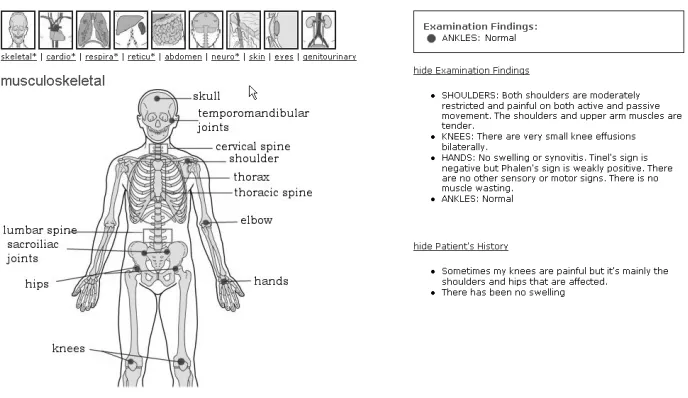
Figure 1: The examination stage of a case study for advanced level
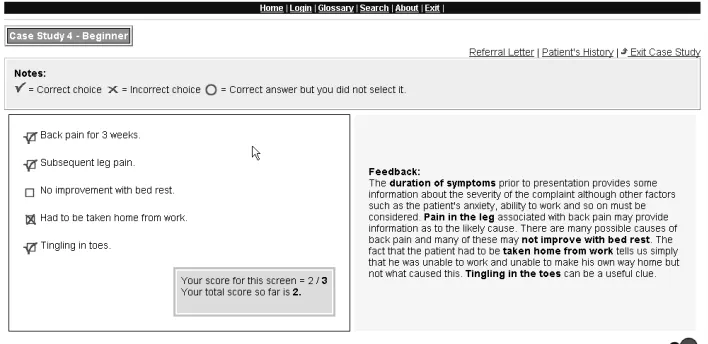
clinical observations they gather by working through the case study are recorded so the students have ongoing access to this information as they proceed (figure 1). At the diagnostic stage, students are given a complete record of the examination findings and investigations. If the system feels insufficient or inappropriate infor-mation has been gathered this will be pointed out to the student. From a list of possible diagnoses, students select their preference based on their interpretation of clinical information gathered. They then obtain subsequent feedback on why that diagnosis is likely to be appropriate. This feedback, and the feedback across all case studies, makes explicit the expert’s heuristics of clinical reasoning. This is an attempt to share that clinical expertise through a modelling or a cognitive appren-ticeship (Collins, Brown, & Newman, 1998) approach, and it displays the under-lying principles and rationale of the clinical diagnosis and completes the process. This enables students to develop their cognitive skills, providing a framework for problem solving and hence clinical reasoning. Case studies for beginners and
in-Figure 2: The feedback mechanism in beginner level of case study serves to model expert thinking in problem solving
[image:8.595.120.474.348.520.2]2
Implementation
JointZone is implemented in a web-based environment, built within the Java Server Pages(JSP)1 platform. The content of the website is structured using Extensible Markup Language(XML)2and displayed through the Extensible Style-sheet Lan-guage(XSL)3. The user database for adaptation and linkbases for link storage are implemented using a commercial database which offers fast retrieval and an effi-cient search mechanism.
JSP offers the facility to generate dynamic web content, a fundamental ele-ment in building adaptive hypermedia application. JSP allows Java programming code to be embedded into the web pages to describe how content is to be gener-ated. JSP also provides the mechanism of session tracking to identify individual users across multiple HTTP requests. Session tracking is conveniently incorpo-rated in the session management component of JSP, a layer transparent to the web developer. The session management maintains a state or identity of a user across multiple HTTP requests through the idea that all of the user’s request for web pages during a given period of time are included in a session. This process estab-lishes a unique session for each individual user during a client-server interaction, fulfilling the inadequacy of HTTP stateless protocol. On the client side, a session starts with the loading of a web browser and normally ends with the closing of the browser, unless intentionally disconnected by an external program.
2.1
The System Architecture
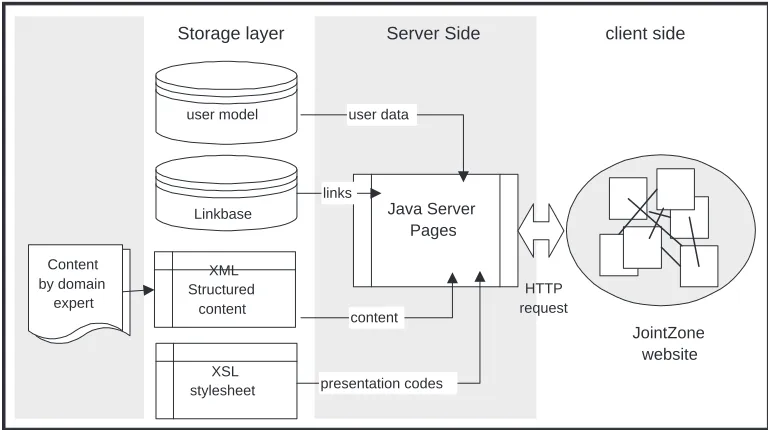
The system architecture as shown in figure 3 presents a view of separation of
concern in the implementation of Jointzone. Content provided by the domain
expert is structured using XML which is rendered by the web browser based on the XSL stylesheet . This process allows presentation code to be separated from information and encourages information re-use. For example, the same XSL style sheet can be used to display more than one XML page. Likewise, only one copy of XML content is maintained even if it is presented in different ways in the browser. The structural representation of content using XML will also facilitate content customization for the purpose of adaptation(see section 3.1).
The JSP acts as a shell to include the XML content, XSL presentation codes and Java codes before the web pages are presented to the users. The JSP pages
1JSP is a Java-based technology developed by the Sun Microsystems to simplify the process of
developing dynamic web sites.
2XML, the universal format for structured documents and data on the Web, developed by World
Wide Web Consortium (W3C). More on http://www.w3.org/XML/
user model Linkbase Content by domain expert XML Structured content XSL stylesheet Java Server Pages
Storage layer Server Side client side
[image:11.595.104.488.128.343.2]links JointZone website HTTP request presentation codes content user data
Figure 3: The system architecture of JointZone
also connect with the database through the JDBC driver4 to pull in links or user information during an adaptive decision making.
2.2
The Adaptation Model
Figure 4 shows the adaptation model of JointZone. It comprises three essential building blocks for an adaptive system: a domain model, a user model and an adaptive layer. The domain model is derived from an offline process that draws its input from XML formatted content. The domain modeling is described in detail in section 3.1. The user model establishes dual-communication channels by providing user data to the adaptive layer during an adaptive decision making. In turn, all changes of a user’s status during a session of user-application interaction are fedback to update the user model. The user modeling of this application is described in section 4. The adaptive layer is responsible for mapping user data to the domain model in the process of adapting information to users. It is achieved by JSP programming that involves if/else Java statements to make decisions on what links or content to be shown to the users. An example of this is shown below, the Java statements (<% ... %>) are embeded among the html codes in the Java
server pages to provide different links and content based on user’s status:
<% //decide on query to use based on usergroup %> <% if (usergroup.equals(”advanced”))f%>
<% query = queryExpert; %>
<A href=”?usergroup=beginner”>Beginner</A> <A href=”?usergroup=intermediate”>Intermediate</A> <SPAN class = ”big”>Advanced</SPAN>
<%gelse if(usergroup.equals(”beginner”))f%> <% query = queryNovice; %>
<SPAN class = ”big”>Beginner</SPAN>
<A href=”?usergroup=intermediate”>Intermediate</A> <A href=”?usergroup=advanced”>Advanced</A> <%gelse if(usergroup.equals(”intermediate”))f%>
<% query = queryInt; %>
<A href=”?usergroup=beginner”>Beginner</A> <SPAN class = ”big”>Intermediate</SPAN> <A href=”?usergroup=advanced”>Advanced</A> <%g%>
content user model
domain model
offline processing
Adaptive Layer
retrieval update
JSP request
HTTP request
JointZone Website
Server Side
[image:12.595.144.450.333.639.2]Client Side
2.3
The Authoring of JointZone
Web technology offers JointZone a built-in browsing and navigation functionality. This basic navigation mechanism is built upon simple linking strategies where a simple link is generated from a single source to a single destination. In author-ing JointZone, we have expanded on this basic notion of linkauthor-ing usauthor-ing linkbases. This idea is adopted from Microcosm (Fountain, Hall, Heath, & Davis, 1990) where links are maintained in databases(linkbases) separated from the documents to which these links apply. JointZone employs the use of different types of links in order to better manage the linking of information piece. These links are classified into structural links, referential links and associative links, adopted from the link taxonomy by (Lowe & Hall, 1996).
Structural links provide an illustration of the structural layout of the web site.
[image:13.595.128.470.389.653.2]They are built upon the simple one to one linking mechanism. These links include ’jump’ links within a page to provide direct access to page fragments,’next’ and ’previous’ page links that ensure coherency between the documents, and the pro-vision of the ’table of contents’ to give a meaningful overview of the information site.
Figure 5: An example of a referential link
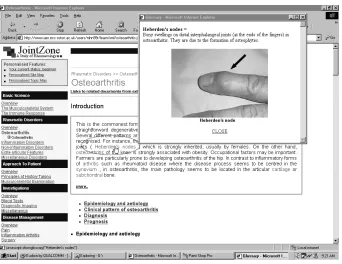
Referential links in JointZone are essentially glossary links that relate a word
(Hall, Davis, & Hutchings, 1996) where links are stored in linkbases and they can appear anywhere in any document where a glossary word exists. These links are not handcrafted but automatically generated using an offline processing mech-anism. A document is first parsed to insert a glossary tag for any glossary word that appears on this document. The glossary links will appear highlighted in green on the web browser to differentiate them from normal links. They are resolved in real time from the linkbases once the links are followed by the users. The effect will be a pop up window explaining the word that a user has selected (see figure 5).
Associative links are stored in a linkbase where each of them is indexed or
retrieved based on a keyword or concept. They are so called because they associate two or more documents based on a common concept. They are generated based on the usual phenomenon of users browsing in the current context wanting to find more information about a particular concept. For example, when users are reading a document or solving a problem that concerns concept ’X’, links to other documents are suggested, which they could find out more about ’X’. In JointZone, associative links are used to provide context-sensitive links to documents from external sites. This mechanism expands a user’s reading scope beyond JointZone so that they can gain more understanding on the current concept (see figure 6).
3
Domain Modeling
3.1
Structural and Keyword Representation of Content
This chapter explains how content in JointZone are organised to make adapta-tion feasible. In the domain modeling of JointZone, the idea of text processing is adopted from the area of information retrieval to identify the semantics of the con-tents. Text processing is applied to the domain in order to extract keywords that can be used as indexing terms for the documents. Indexing terms are (document) words whose semantics reflect the document’s main themes, they are used to in-dex or summarize a document (Baeze & Ribeiro, 1999). The keywords extraction methods used produce both single word and dependent bigrams5indexing.
In the case of single word indexing, a medical dictionary (Dark, 2000) is used to identify significant words in the documents. In order to reduce the set of rep-resentative keywords, the documents are first parsed to eliminate stopwords (such as articles and connectives). Stemming is used to reduce distinct words to their grammatical roots. Each word in the remaining text is then checked with the dictionary, if it exists in the dictionary, it is chosen as a keyword. In terms of extracting bigrams, a statistical method called fisher exact test(Pedersen, 1996) is used to extract dependent bigrams. A dependent bigram is one where two words occur together not purely by chance, for example this ’fine wine’ or ’rheumatoid arthritis’. The fisher exact test decides if a bigram (XY ) is dependant based on the frequency of appearance of each word that constitutes the bigram (X , Y ) in all documents in the domain. The test computes the frequency distribution of XY ,
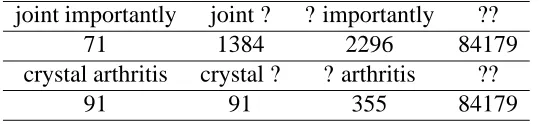
XY , XY and XY . For example for the bigram ’joint importantly’, the variable X is
[image:16.595.164.436.578.640.2]used to denote the presence(X ) or absence(X ) of ’joint’ in the first position of each bigram. Likewise, the variable Y is used to denote the presence(Y ) or absence(Y ) of ’importantly’ in the second position of each bigram.
Table 1: A contigency table denoting the frequency of possible combination of the variable values for bigram ’joint importantly’ and ’crystal arthritis’.
joint importantly joint ? ? importantly ??
71 1384 2296 84179
crystal arthritis crystal ? ? arthritis ??
91 91 355 84179
As shown in the table 1 below, the relationship of the frequency distribution will decide the degree of dependance of the bigram. In this case, the first bigram ’joint importantly’ will be rejected as a dependent bigram because both ’joint’
and ’importantly’ appear to be a common variable to form other bigrams rather than ’joint importantly’. On the other hand, ’crystal arthritis’ is accepted as a dependent bigram because the combination of crystal and arthritis as a bigram is significant since almost all appearances of the word ’crystal’ are followed by the word ’arthritis’.
The keywords with their respective document URLs are then stored as links in a database known as a linkbase(Carr, De Roure, Hall, & Hill, 1995).
<link>
<id>179</id>
<concept>bone scan</concept>
<context>Miscellaneous Disorders in Rheumatic Disorders</context> <title>Algodystrophy Reflex Sympathetic Dystrophy</title>
<url>http://softly:8080/xml/algodystrophy.jsp#intro</url> </link>
<link>
<id>2156</id>
<concept>Osteoporosis</concept>
<context>Non-inflammatory Disorders in Rheumatic Disorders</context> <title>Bone Disease</title>
<url>http://softly:8080/xml/bonedisease.jsp#Osteoporosis</url> </link>
As shown from the two examples of link entries from the linkbase above, each keyword extracted from a document contributes to a link entry.
the id is an auto-generated unique number for each entry.
the concept is a keyword extracted from a section on the document through
text processing as described above.
the context is formulated from the structural layout of the document where
the keyword exists. For example, the entry with the title ’Bone Disease’ appears under the subheading ’Non-inflammatory Disorders’ which in turns comes under the heading of ’Rheumatic Disorders’. Hence, ’Non-inflammatory Disorders in Rheumatic Disorders’ is the context for this entry.
the title refers to the title of a section in the document where the keyword
appears.
the url consists of an address pointing to not just the document but
specifi-cally the section of the page where the keyword exists.
for adaptation since different link entries can be shown to different users. This is achieved by adaptive link hiding or incremental linking to provide link-level adaptation. The provision of incremental linking puts restrictions on the num-ber of links displayed based on the user’s knowledge level. An empirical study by (Specht, 1988) has shown that there is an improvement in learning for stu-dents who use the incremental linking of hypertext. Advanced users are given a wider range of documents than those with less knowledge. For example for the learning topic of ’psoriatic arthritis’, advanced students are provided with access to documents about the concepts: ’psoriatic, psoriasis, spondylitis, pitting and onycholysis’ from the linkbase while intermediate students are directed to less concepts namely ’psoriasis arthritis, pitting and onycholysis’, and beginners are simply shown ’psoriasis arthritis’. The domain expert identifies these three sets of concepts for each case study, which is an easier task for them compared to deliver-ing a prerequisite network of documents. However, in order to be consistent with the philosophy of an unobtrusive learning environment, there is no restriction for any user group should they wish to investigate further, i.e. the sub-concept titles for advanced level are still accessible to a beginner.
3.2
Discussion
3.2.1 Previous Work on Domain Modeling
3.2.2 Scalability
4
User modeling
A user model is a database storing information about users, accessed by the func-tions of initialization, update and retrieval. User modeling is a major component of any adaptive hypermedia system since data about users needs to be learned be-fore any information can be adapted to the users. In JointZone, the user model captures two aspects of the students’ differences: their individual browsing his-tory and their knowledge level in the Rheumatology domain. Our model presents the novel idea of using individual effective reading speed to identify pages which the users have or have not read. The user’s knowledge level is initialized based on his/her first entry registration details and this knowledge value can evolve through the user engagement with the application.
4.1
Modeling Knowledge level
Users’ knowledge levels in the domain are captured in order to adapt them to the various difficulty levels of learning materials. The users are stereotyped into one of the following categories: expert, intermediate or beginner, upon their registra-tion into the applicaregistra-tion. This categorizaregistra-tion is based on two quesregistra-tions asked in the online registration:
Are you a medical professional, medical student or non-medical
profes-sional?
How much do you know about Rheumatology? ( none/ a little/ average/ a
lot)
[image:20.595.103.505.560.624.2]A heuristic categorization is given based on the answers. Please see table 2:
Table 2: Heuristic Categorization of user group based on registration
Prior Knowledge / Status Medical Professional Medical Student Non-medical Professional
none intermediate beginner beginner
a little intermediate intermediate beginner
average expert intermediate beginner
a lot expert expert beginner
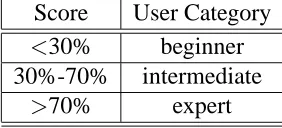
Table 3: User categorization based on the prior knowledge test Score User Category
<30% beginner
30%-70% intermediate
>70% expert
Rheumatology. The categorization is based on their scores (see table 3) and will overwrite the initial categorization in the registration.
The system assumption of users’ knowledge can evolve as the users engage in the interaction with the application. This is based on their performance in the case study. Thresholds are set to migrate users from one group to another. A user’s current knowledge is measured based on the scores of the attempted case studies in his/her user group. If more than a 50% score is achieved for every case study (10 cases in the current level), he/she will be promoted to the next level of user group in the hierarchy. In this case, the user will be informed of any change of status should any user group migration take place.
4.2
Modeling Browsing History
effort index
Optimal time
Time Spent 100%
[image:22.595.176.420.125.303.2]0
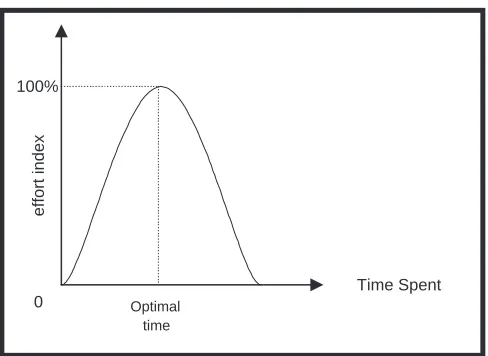
Figure 7: The Gaussian graph for the effort index estimation
Effective reading speed=reading rate
1 2
(comprehension rate+prior knowledge) (1)
Optimal reading time for a page=
total number of words in the page
Effective reading speed (2)
Effort index estimation;G(x)=exp(
(x optimalTime)
2
2σ2 ) (3)
4.2.1 Motivation for Effort Index Generation
5
The Adaptive Features
JointZone offers some adaptive features based on the effort index (see section 4.2) and knowledge level (see section 4.1) modeled from the users. Two adaptive techniques are used:
Adaptive link annotation(Brusilovsky, 2001) is achieved by annotating extra
information about the links. In JointZone, links are annotated with the users browsing history to form the history-based annotation
Adaptive link hiding (Brusilovsky, 2001) is performed by hiding irrelevant
links from users in an attempt to limit the users to only the set of links relevant to their interest or goal. In Jointzone, links are hidden or shown based on the users’ knowledge level in the domain.
The effort index is used as a basis to form the history-based link annotation in JointZone. The users see this as a tri-value reading gauge , a visual representa-tion of the amount of time they have spent reading individual pages (see figure 8). On the other hand, the user’s knowledge level captured in the user modeling is used in link hiding. In general, users with different knowledge levels (beginner, intermediate or expert)see different sets of links to documents. This incremen-tal style of linking mechanism attempts to show beginners less documents and knowledgeable users more documents.
Figure 8: The tri-value reading gauge: indicated by low(effort index = 0-30 %), medium (effort index30 %) and high (effort index70 %)
5.1
Personalised Site Map
Figure 9: A screen shot of the personalised site map where history-based link annotation can be seen.
5.2
Personalised Topic Map
The adaptive mechanism of the personalised topic map is based on the user’s browsing history , knowledge level and learning goal (a topic of learning, e.g. ’gout’). A combination of history-based link annotation and link hiding tech-niques is used in this case. As seen in figure 10, users need to manually select a
Figure 10: A screen shot of the personalised topic map with the combination of link hiding and history-based link annotation
[image:25.595.131.471.433.587.2]5.3
Adaptive Reading Room
[image:26.595.132.468.209.368.2]The adaptive reading room appears at the end of every case study on the site (see figure 11). Its purpose is to provide an opportunity for further reading in order to find out more in depth of a topic or concept related to the case study.
Figure 11: A screen shot of the adaptive reading room with the combination of link hiding and link annotation
Again, link hiding and history-based link annotation are used to suggest a personalised list of documents for further reading on the site. The number of documents shown is reflected by the users’ status and each link is marked by the reading gauge icon.
5.4
Personalised Messages
Figure 12: An example of some personalised messages on the ’home’ page
Figure 13: Adaptive assignment of case study: A screen shot of the table of con-tent showing the annotated links for case study, in this case, the user is prompted to the beginner level
5.5
Adaptive Assignment of Case Studies
6
Discussion
The primary aim of making web-based learning adaptive is to reduce cognitive overload, prevent ’lost in hyperspace’ and improve the process of learning on-line. The integration of adaptive mechanisms into JointZone is done in an unobtrusive manner. This can be seen from the options provided to the users: to register on the site or select free browsing, in which the web site can be used without its adaptive features. The controversial use of link hiding, as some users would want to see all links that other users see, is neutralised through the option offered to users to see links that are hidden from them.
On-going research in adaptive hypermedia has given contradictory results with regards to its benefits to users. Among the most widely used approach is to eval-uating adaptive hypermedia systems is the ’with’ and ’without’ adaptivity evalu-ation design. This raises issues with regard to the functionality of the applicevalu-ation without the adaptive features. Most adaptive systems are developed with the de-sign of adaptivity in mind, hence if the adaptive features are removed, the systems basically loose their efficiency in their basic functionality. Hence, any evalua-tion approach using both adaptive and non-adaptive version of the system will not bring a fair comparison. To avoid this, the basic non-adaptive design of JointZone was optimised before any adaptive mechanism was integrated into the site. We ensure the basic functionality of the website is not overshadowed by the advan-tages given by the adaptive mechanisms. This can be seen from the evidence that options are given to users to use the non-adaptive version of the site.
A usability study of the website with adaptive features has been carried out with 29 students who were all taking a computer science module on human-computer interaction. The result of this study showed a positive degree of us-ability in JointZone and helped us to erradicate some minor usus-ability problems. This ensures that the usability aspect of the website will not be an issue should there be any negative outcome from future evaluation of the adaptive mechanisms in JointZone.
An evaluation is currently being undertaken with the real users (medical stu-dents) to see the outcome of the adaptive mechanisms integrated into JointZone. The evaluation is adopted from the layered evaluation approach proposed by (Kara-giannidis, Sampson, & Brusilovsky, 2001). This approach suggests two layers of assessment:
Interaction Assessment Layer - Assess if the conclusion drawn by the
sys-tem concerning characteristics of user-computer interaction is valid. e.g. the reading gauge validation test
Adaptation Decision Layer - Assess if the adaptation decision is valid and
adaptive features
The benefits of this layered approach can be seen when adaptation is unsuc-cessful since problem findings can be done in both layers. The layered approach gives two possibilities for adaptation failure. Firstly it can be the case that the adaptation decisions are reasonable, but they are based on incorrect system as-sumptions; or that the system assumptions are correct but the adaptation decision is not meaningful (Brusilovsky, Karagiannidis, & Sampson, 2001).
Our evaluation followed the guidelines above by concentrating on first finding out whether the system makes a correct assessment or assumption of the user’s reading gauge, their current knowledge level and the system’s matching of con-cepts to documents. The second phase of the evaluation will focus on the adap-tation decision making, basically finding out whether the adaptive features are meaningful to users. The result of this evaluation will provide some answers to the following hypothesis:
The adaptive features fascilitate the process of learning in Jointzone by
re-ducing the time taken and avoid cognitive overload.
The adaptive features improve learning in JointZone as compared to
learn-ing without the presence of any adaptive mechanism.
This evaluation will hopefully give us some insights into whether adaptive web-based learning really benefits the students or whether it is merely a technology-driven technique in a learning paradigm.
7
Conclusion
8
Acknowledgements
References
Baeze, Y. R., & Ribeiro, N. B. (1999). Modern Information Retrieval. Addison-Wesley.
Brusilovsky, P. (2001). Adaptive hypermedia. User Modeling and User Adapted
Interaction, 11, 87–101.
Brusilovsky, P., Eklund, J., & Schwarz, E. (1998). Web-based education for all: A tool for developing adaptive courseware. In Proceedings of Seventh
In-ternational World Wide Web Conference, pp. 291–300.
Brusilovsky, P., Karagiannidis, C., & Sampson, D. (2001). The benefits of layered evaluation of adaptive applications and services. In Workshop on Empirical
Evaluations of Adaptive Systems, UM2001.
Brusilovsky, P., Schwarz, E., & Weber, G. (1996). Elm-art: An intelligent tutoring system on world wide web. In Frasson, C., Gauthier, G., & Lesgold, A. (Eds.), Intelligent Tutoring Systems, Lecture Notes in Computer Science. Springer Verlag, Berlin.
Carr, L., De Roure, D., Hall, W., & Hill, G. (1995). The distributed link service: A tool for publishers, authors and readers. World Wide Web Journal, 1(1), 647–656.
Collins, A., Brown, J. S., & Newman, S. (1998). Cognitive apprenticeship: Teach-ing the craft of readTeach-ing, writTeach-ing & mathematics.. In Resnick, L. B. (Ed.),
Knowing, Learning and Instruction: Essays in honor of Robert Glaser.
Hillsdale, New Jersey: Erlbaum.
Dark, G. (1997-2000). Online medical dictionary.
http://cancerweb.ncl.ac.uk/omd/.
De Bra, P., & Calvi, L. (1998). Aha: a generic adaptive hypermedia system. In
Proceedings of the 2nd Workshop on Adaptive Hypertext and Hypermedia
Pittsburgh, USA.
DesCoteaux, J. G., & Harasym, P. (1998). Procedural knowledge! how important is it to converting novices to experts?. The Bulletin, 4(6).
Duchastel, P. (1992). Towards methodologies for building knowledge-based in-structional systems.. Inin-structional Science, 20(5-6), 349–358.
Dyson, M., & Haselgrove, M. (2000). The effects of reading speed and reading patterns on our understanding of text read from screen. Journal of Research
in Reading, 23, 210–223.
Fountain, M. A., Hall, W., Heath, I., & Davis, H. C. (1990). Micrososm: An open model for hypermedia with dynamic linking. In Rizk, A., & Andre, J. (Eds.), Proceedings of Hypertext: Concept, Systems and Applications.
Hall, W., Davis, H., & Hutchings, G. (1996). Rethinking Hypermedia The
Micro-cosm Approach. Kluwer Academic Publishers, Dordrecht, Netherland.
Horton, W., Taylor, L., Ignacio, A., & Hoft, N. L. (1996). The Web page Design
Cookbook. John Wiley, New York.
Huey, E. B. (1908). The Psychology and Pedagogy of Reading. The Macmillan Company.
Jackson, M. D., & McClelland, J. (1979). Processing determinants of reading speed. Journal of Experimental Psychology: General, 108, 151–181.
Karagiannidis, C., Sampson, D., & Brusilovsky, P. (2001). Layered evaluation of adaptive and personalised educational applications and services. In Gilbert, J., Hubscher, R., & Puntambekar, S. (Eds.), Workshop on Assesment
Meth-ods in Web-based Learning Environement and Adaptive Hypermedia at AI-ED 2001.
Kinshuk (2001). Intelligent learning systems for cognitive skills development. In
Informing Science: Challenges to Informing Clients: A Transdiciplinary Approach Krakow, Poland.
Lowe, D., & Hall, W. (1996). Hypermedia and the Web - An engineering
Ap-proach. John Wileys & Sons.
Mayes, T., Kibby, M., & Anderson, T. (1990). Learning about learning from hypertext. In Jonassen, D., & Mandl, H. (Eds.), Designing Hypermedia for
Learning. Springer-Verlag, Berlin, Heidelberg, New York.
Ng, M., Hall, W., Maier, P., & Armstrong, R. (2002). Using effective reading speed to integrate adaptivity into web-based learning. In Proceedings of
2nd International Conference on Adaptive Hypermedia and Adaptive Web Based Systems Malaga, Spain.
Nkanginieme, K. E. O. (1997). Clinical diagnosis as a dynamic cognitive process: Application of bloom’s taxonomy for educational objectives in the cognitive domain.. Med Educ Online, 2(1), 1–8.
Pedersen, T. (1996). Fishing for exactness. In Proceedings of the South-Central
SAS Users Group Conference Austin, TX.
Poulton, E. C. (1958). Time for reading and memory. The British Journal of
Psychology, 49, 230–245.
ReadingSoft.com (2000). Speed reading test online. http://www.readingsoft.com.
Romanes, G. J. (1885). Mental Evolution in Animals. Appleton & Co, New York.
Specht, M. (1988). Empirical evaluation of adaptive annotation in hypermedia. In Proceedings of EdMedia and Ed-Telecom, pp. 1372–1378 Freiburg, Ger-many.
Spiro, R. J., Feltovich, P. J., Jacobson, M. J., & Coulson, R. L. (1992). Cog-nitive flexibility, constructivism and hypertext: Random access instruction for advanced knowledge acquisition in ill-structured domains.. In Duffy, T., & Jonassen, D. (Eds.), Constructivism and the Technology of Instruction. Hillsdale, NJ: Erlbaum.
Stern, M., & Woolf, B. P. (2000). Adaptive content in an online lecture system. In
Proceedings of the International Conference on Adaptive Hypermedia and Adaptive Web-Based Systems, pp. 291–300 Trento, Italy.
Thuring, M., Hannemann, J., & Haake, J. M. (1995). Hypermedia and cognition: Designing for comprehension. Communication of ACM, 38(8).