© 2017 IJSRST | Volume 3 | Issue 7 | Print ISSN: 2395-6011 | Online ISSN: 2395-602X Themed Section: Science and Technology
Design of Fixture for Booster Rocket to Optimize Manufacturing Process
Basawaraj S Hasu
1, K Kiran Kumar
2, B Yamini
31
Professor & HOD, Department of Mechanical Engineering, AVN Institute of Engineering & Technology, Hyderabad, India
2
Assistant Professor, Department of Mechanical Engineering, AVN Institute of Engineering & Technology, Hyderabad, India
3
PG Student, Department of Mechanical Engineering, AVN Institute of Engineering & Technology, Hyderabad, India
ABSTRACT
The Process planning acts as a bridge between design and manufacturing, by translating design specifications into manufacturing process detail. Boosters are generally necessary to launch spacecraft into Earth orbit or beyond. The booster is dropped to fall back to Earth once its fuel is expended, a point known as booster engine cut-off (BECO). The rest of the launch vehicle continues flight with its core or upper-stage engines. The booster may be recovered and reused, as in the case of the Space Shuttle. Design specification ensures the functionality aspect. Next step to follow is to assemble these components into final product. In manufacturing, the goal is to produce components that meet the design specifications. Missile parts should be manufactured with high accurate dimensions. Due to its complicated structure, it requires fixture to stop vibrations while machining and to reduce number of setups as well as the production rate also increases by reducing machining time. Because of its complexity in manufacturing, there is a demand to design fixture which reduces the machine time and setups. This project deals with the 3d modeling and fixture design for Booster rocket using NX-CAD software. This project also deals with development of manufacturing process plan of missile component (Booster Rocket used in missile) using CAM software (NX 7.5) which is exclusively CAM software used to generate part program by feeding the geometry of the component) and defining the proper tool path and thus transferring the generated part program to the required CNC machine with the help of DNC lines. The operator thus executes the program with suitable requirements.
Keywords: Booster Rocket, Manufacturing Process, BECO, CAM, NX-CAD Software, CNC, DNC, FEM, 3D Model
I.
INTRODUCTION
ABOUT THE COMPONENT
Boosters are necessary to launch spacecraft into Earth orbit or beyond. The booster is dropped to fall back to Earth once its fuel is expended, a point known as Booster Engine Cutoff (BECO). The rest of the launch vehicle continues flight with its core or upper-stage engines. The booster is recovered and reused, as in the case of the Space Shuttle.
UNIGRAPHICS INTRODUCTION
by using included machining modules. The NX software integrates knowledge-based principles, industrial design, geometric modelling, advanced analysis, graphic simulation, and concurrent engineering. The software has powerful hybrid modelling capabilities by integrating constraint-based feature modelling and explicit geometric modelling. In addition to modelling standard geometry parts, it allows the user to design complex free-form shapes such as airfoils and manifolds. It also merges solid and surfaces modelling techniques into one powerful tool set.
II.
LITERATURE SURVEY
HAMEED FARHAN, 2013: Production is one of the most significant factors in manufacturing processes due to the high level of market competition. In this regard, Modular Fixtures (MFS) Play a vital role in practically improving the productivity in flexible manufacturing systems (FMSs) due to this technology high productive Computer Numerical Control (CNC) machines are used. MFs consist of devices called fixtures and jigs for accurately holding the work piece during different machining operations. The design process is complex, and traditional methods of MF design were not sufficiently productive.
Burley and Corbett, 1998: A Jig is defined as a manufacturing aid that is used either to hold a part or itself located on the part and is fitted with devices that are used to guide a cutting tool ensuring the exact location of the path of the machining relative to the part.
A Fixture is defined as specially made manufacturing aid for fixing, holding and locating parts during processes like machining or assembly operations, which do not provide conclusive guidance for the cutting tools
Tooling is used as the generic name for jigs and fixtures and also the tools set from the master gauges for calibrating jigs and fixtures
Hence, Jigless Assembly is the assembly without the use of jigs; it requires that parts which are manufactured to sufficient accuracy to ensure correct assembly; it is not necessarily fixtureless [or toolless] assembly.
Iain Boyle: Various approaches have been adopted to develop tools that assist the designer, regardless of the actual artefact being designed. This chapter presents a review and critique of various tools and methodologies that have been used to aid design. Initially, various types of CAFD systems and techniques are examined, followed by a discussion of more general design theories. Specifically, case-based reasoning, axiomatic design and decision-based design using utility analysis techniques are described and critiqued.
Shrikant V.Peshatwar: A fixture is a unique tool for holding a work piece in proper position during the machining operation. It is provided with a device for supporting and clamping the work piece. Fixture eliminates frequent checking, positioning, proper marking, vacillate uniform quality in manufacture. This increases productivity and reduces operation time. The fixture is widely used in the industry for efficient production because of feature and advantages.
III. COMPUTER AIDED DESIGN (CAD)
Computer-Aided Design (CAD), is also known as Computer-Aided Design and Drafting (CADD), is the use of computer systems to assist in the creation, modification, analysis, or optimization of the design. Computer-Aided Drafting describes the approach of creating a technical drawing by the use of computer software. CAD software is used mainly to improve the quality of design, improve communications through documentation, to increase the productivity of the designer and to create a database for manufacturing. CAD output is mainly in the form of electronic files for print or machining operations. CAD software uses either vector based graphics to depict the objects of traditional drafting, or may also produce raster graphics showing the overall appearance of designed objects.
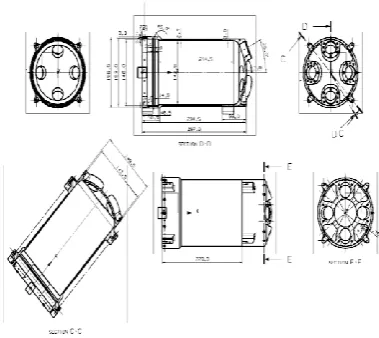
3.1 DEVELOPMENT OF 2D DRAWING
Figure 1. D inputs of Booster Casing
3.2 STEPS INVOLVED IN 3D MODELLING OF BOOSTER CASING 3D MODEL ARE DESIGNED BY USING NX CAD SOFTWARE.
Sketching:
Below is the sketch required to obtain the 3D model of the Booster Casing from the above 2D drawing.
Below image shows the design of the Booster Casing. Below image shows the resolve option.
Figure 2. Sketch of the Booster Casing
Figure 3. Revolve option
Figure 4. Threaded hole option
Figure 5. Instant Feature option
Figure 6. Unite option for generating single part of entire outer casing
Below image shows the sketch.
Figure 7. Sketch option for holes on locking part
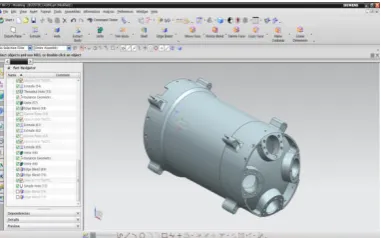
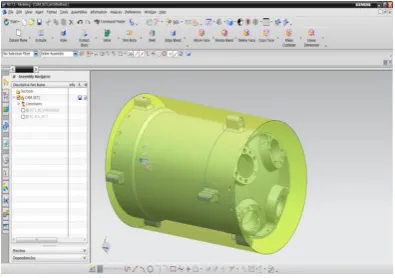
Figure 8. shows Final 3D Model of Booster Casing
IV. COMPUTER AIDED MANUFACTURING
4.1 COMPUTER AIDED MANUFACTURING (CAM)
CAM is the use of computer software which is used to control machine tools and related machinery in the manufacturing of work pieces. This is not only just definition for CAM, but it is the very common aspect of CAM; CAM also refers to the use of a computer to assist in all operations of a manufacturing plant, including planning, management, storage and transportation. Its primary purpose is to create a faster production process and components and to tool with more precise dimensions and material consistency, which in some cases, uses only the required amount of raw material (thus minimizing waste), while concurrently reducing energy consumption. CAM is a consecutive computer-aided process after computer-computer-aided design (CAD) and sometimes computer-aided engineering (CAE), as the model generated in CAD and verified in CAE can be input into CAM software, which then controls the machine tool. Historically, CAM software was seen to have several shortcomings that necessitated an overly high level of involvement by skilled CNC machinists. CAM software would output code for the less capable machine, as each machine tool control added on to the standard G-code set for increased flexibility. In some cases, such as improperly set up CAM software or specific tools, the CNC machine required manual editing before the program will run properly. None of this issue is so insurmountable that a thoughtful engineer or skilled machine operator could not overcome for prototyping or small production runs; G-Code is a simple language. In high production or high precision shops, a different set of problems were encountered where an experienced CNC machinist must both hand-code programs and run CAM software.
4.2 IDENTIFY SUITABLE MACHINE
TYPE OF CNC MACHINE USED IN THIS PROJECT
For this Project, both 5 Axis Milling & 4 Axis Turning Machines are used for generating Booster Casing.DMG 5-axis milling machine is used for manufacturing rock drill component. In DMG 5-axis milling machine X, Y, Z, B, C are five vectors, X & Y are tool movement, and Z is for upward table movement, B for spindle movement, C for table rotation. High rigidity with Integrated Spindle up to 12000rpm, Spindle is directly coupled to the motor. Vertical Operations, Integrated rotary table of 1200mm X 700mm with rotary dia 700mm. Horizontal Operations, With head tilting at 90deg.Angular and 5-axis simultaneous machining, Capable of machining from + 30 deg to -120 deg head tilting. Machine accuracies, Positional Accuracy +/- 0.005mm, Repeatability +/- 0.003mm
4.3 SELECTING SUITABLE TOOLS FOR MANUFACTURING BOOSTER CASING COMPONENT
Selection of tools plays a major role in the manufacturing of any component. Proper tools, be selected otherwise in manufacturing process improper tools results in damage of work piece or damage to the tools, tool holders. Suitable tools for manufacturing rock drill are listed below.
SPOT_DRILLING
This operation sub type allows the tool to pause at the tool tip or shoulder depth of the tool by a specified number of seconds or revolutions.
DRILLING
This operation sub type allows you to do basic point-to-point drilling.
FACE_MILLING
FACE_MILLING is the main Face Milling operation subtype. A milling cutter that cuts metal with its face. Face milling creates large flat surfaces.
FACE_MILLING_AREA
Face Milling Area is a Face Milling operation subtype that is customized to recognize a cut area and wall selection.
END MILL
bottom and edges of the milling cutter. An end mill is a type of milling cutter, a cutting tool used in industrial milling applications. It is distinguished from the drill bit in its application, geometry, and manufacture. While a drill bit can only cut in the axial direction, a milling bit can cut in all directions, though some cannot cut axially.
Figure 9
ROUGHING END MILL
Roughing end mills remove large portions of material very quickly and are termed as material removal rate (MRR). This kind of end mill utilizes wavy tooth forms cut on the periphery. These wavy teeth form many successive cutting edges producing very small chips, resulting in a relatively rough surface finish. During cutting, multiple teeth are in contact with the work piece reducing chatter and vibration.
Figure 10
DRILL BITS
Drill bits are used as cutting tools to create cylindrical holes, always of circular cross-section. Bits are held in a tool called a drill, which rotates them and provides axial force and torque to create the hole. Specialized bits are also available for non-cylindrical-shaped holes.
4.5 FIXTURE USED FOR MANUFACTURING BOOSTER CASING
3D model is designed by using NX cad software. Sketching:
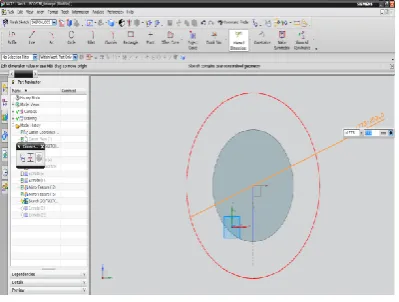
Below is the sketch required to obtain the 3D model of the Fixture from the above 2D drawing. Below image shows the SKETCH of the Fixture.
Figure 11. sketch option
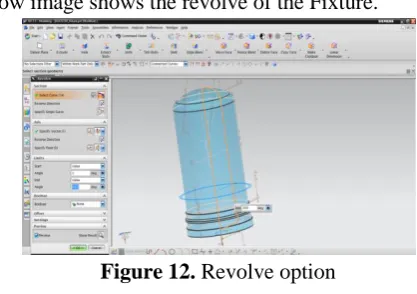
Below image shows the revolve of the Fixture.
Figure 12. Revolve option
Below image shows the SKETCH of the Fixture.
Figure 13. sketch option for generating holes
Below image shows Instant Feature of the holes.
Below image shows the SKETCH of the Fixture base.
Figure 15. Sketch option for Fixture base
Below image shows extrude of the Fixture base.
Figure 16. Extrude option for Fixture base
Below image shows the Final 3D model of the Fixture used for Booster Casing.
Figure 17. shows the final design for Fixture
TOOL PATH GENERATION OF FIXTURE Below image shows blank of the fixture.
Figure 18. shows blank of fixture
Below image shows facing operation.
Figure 19. shows facing operation
Below image shows verification of Rough turn OD operation.
Figure 20. shows verification of rough tum OD
Below image shows verification of Groove OD operation.
Below image shows verification of drilling operation.
Figure 22. shows verification of drilling operation
Process plan of fixture
Figure 23. shows plan fixture
email – [email protected] ®RamTech www.ramtechind.com
Operations
Operations contain all the information necessary to create tool paths:
Feedrate Spindle Speed
Cutting Tool OptionsDisplay
Cutting Pattern Geometry
Other Information Operation
Figure 24. operation contains all the information to create tool path
Specify part and blank
Part: the final component to be obtained Blank: initial raw material to be machined
TOOL PATH GENERATION ON BOOSTER CASING
The series of movements made by the tip of a cutting tool. X and Z codes indicate a tool path within a part program. The path through space that the tip of a cutting
tool follows on its way to producing the desired geometry of the work piece. Booster casing material Aluminium alloys are alloys in which aluminium (Al) is the predominant metal. Aluminium alloys are used in engineering structures and components where light weight or corrosion resistance is required. Alloys composed mostly of aluminium have been very important in aerospace. Manufacturing since the introduction of skinned metal aircraft. Aluminium-magnesium alloys are both lighter than other aluminium alloys and much less flammable than alloys that contain a very high percentage of magnesium. Below image shows the Blank of Booster casing
Figure 25. Blank of Booster Casing
GENERATING TOOL PATH ON MISSILE SHIELD
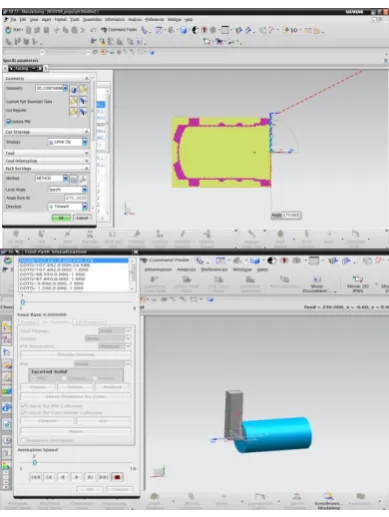
Figure 26. facing operation and verification
Below image shows ROUGH_TURN_OD_1 operation
Figure 27. ROUGH_TURN_OD_1 operation
Milling operations on semi finished booster rocket Raw material for milling operations
Figure 28. semi-finished part
Below image shows planar milling process and verification.
Figure 29. planar milling process and verification
Figure 30. drilling operation and verification
Figure 31. operation navigator
V.
RESULT
5.1 Manufacturing of booster rocket without fixture
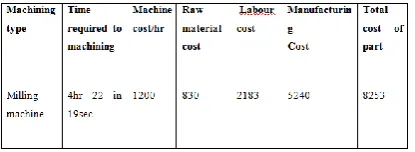
Time is taken to manufacture a single component without fixture on CNC machine = 4hr 22min 19sec= 262min
If the time in seconds is above 30 then it is taken as 1min, if it is below 30 then it is exception
Manufacturing cost of CNC milling machine per hour = 1200rs/hr
Manufacturing cost of single booster rocket = (1200/60)*262= 5240rs
Direct Labour Cost = Tm * Man Hour Rate Rs. Man Hour Rate = 500 Rs.
Tm =(262/60) hrs= 4.4hrs
Direct Labour Cost = 4.4*500= 2183 Rs.
Table: 5.1.Manufacturing of booster rocket without fixture
Total cost of part =raw material cost + labour cost +manufacturing cost =
830+2183+5240= 8253
5.2 Manufacturing of booster rocket with fixture
Time is taken to manufacture a single component with fixture on CNC machine = 2hr 56min 2sec=176min If the time in seconds is above 30 then it is taken as 1min, if it is below 30 then it is exception
Manufacturing cost of CNC milling machine per hour =. 1200rs
Machining cost per piece for milling operations (machining cost per min x machining time in min) = (1200/60)*176= 3520rs
The manufacturing cost of single booster rocket=. 3520rs
Man Hour Rate = 500 Rs. Tm =(176/60) hrs= 2.9hrs
Direct Labour Cost = 2.9*500= 1467 Rs.
Table: 5.2 Manufacturing of booster rocket with fixture Total cost of part =raw material cost + labour cost +manufacturing cost =
830+1467+3520= 5817
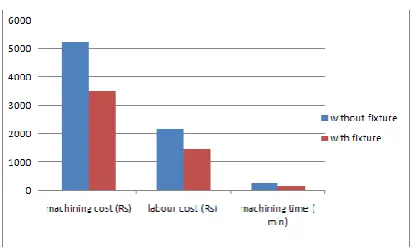
Graphical representation
Figure 32. Graphical representation of fixture
VI. CONCLUSION
Using designed fixture, there is a reduction of manufacturing time, manufacturing cost, labour cost. Reduction of time and cost are represented in graphical and shown in results. There is a drastic reduction of reworks and rejection rate using the designed fixture.
VII.
REFERENCES
[1]. ERROR BUDGETING AND THE DESIGN OF
LARGE AERO-STRUCTURES by G. Burley, J. Corbett Kihlman, H, Engström, M, (2006) Flexible Fixtures with Low Cost and Short Lead-Times, Aerospace Manufacturing and Automated Fastening Conference & Exhibition Robotics and Computer-Integrated Manufacturing Volume 27 Issue 1, February 2011
[2]. CAFixD - A Case-Based Reasoning Method for
Fixture Design by Iain Boyle
http://www.researchgate.net/publication/26385453 3_DESIGN_AND_DEVELOPMENT_OF_HYDR AULIC_FIXTURE_FOR_MACHINING_HYDR AULIC_LIFT_HOUSING
[3]. Tool design by Herman W. Pollack2 editions - first published in 1976
[4]. The International Journal of Advanced Manufacturing Technology, A literature survey of fixture design automation by J. C. Trappey, C. R. Liu. August 1990, Volume 5, Issue 3, pp 240 - 255
[5]. International Journal of Engineering Research & Technology, Design & Development Of Rotary Fixture For CNC With An Approach Of Developing Pre-Mortem Tool For Mass Balancing Vol.2 - Issue 1 (January - 2013).
[6]. "NASA - Solid Rocket Boosters". NASA Archived from the original on 2013-04-06.