Prioritizing Emails and Protect from Spam by
Effectively Using Identity and Address Book Features
1
Venkata SanyasiRao Sasipalli, 2 Krishnam Raju Gottumukkala, 3 K.S. Murthy Naidu
1
Faculty of Applied Sciences of Matter, Hiroshima University, Higashi-Hiroshima, Hiroshima 739-8511, Japan
2,3
Center for Excellence in Computer Technology, Visakhapatnam City, AP 530001, India
Abstract – Priority always adds value to activity. Unorganized emails sometimes cause irritation. Most of the time spam or unwanted emails trouble us in reading emails. Some features of email clients are not fully explored to prioritize and organize the emails effectively. Address book can be effectively used to prioritizing emails and also to protect from spam emails. This paper proposes a method to prioritize and organize emails and further separate spam or unwanted emails by utilizing the features of address book in email clients.
Keywords – Prioritizing Emails, Spam Emails, Email Clients, Header Information, Address Book.
1. Introduction
The emergence of social networks has a great impact on the usage of emails in respect of data exchange and time spending on them. People exchange most of the information through the social networks, while important information is still sent through emails. Email has its own credibility [1]. Emails can be divided into two major categories: public domain emails such as Google, Yahoo, MSN, etc., and private domain emails such as company emails, personal mobile emails, etc. For convenience, let us use public domain and private domain nomenclature only to make things understandable, not technical meaning. Majority of people use both public and private domain emails, while, public domain emails are used for general purpose and private domain emails are used for personal / work / business purposes.
Nowadays people spend nearly equal time in social networks to that of emails. Compared to the past, time allocation for reading emails is reduced. In such reduced
time, all emails cannot be read or replied. Users have to read and respond to the important emails only. This needs a kind of pre-organization of emails, to identify important emails. In addition, if spam or unwanted emails penetrate into inbox the problem becomes more complicate. Users have to spend some time to handle these unwanted emails. In order to optimize the time for email reading, replying, etc., we need to look into some method or technique to handle wanted or correct and unwanted or spam emails. And though handling unwanted emails is another major domain of research, we try to give a partial solution this this spam mails problem in our method or technique.
For the first and important problem of separating wanted / unwanted emails and prioritizing wanted emails, we go narrower to get close to the prioritizing wanted emails. In order to optimize the time, pre-organization or prioritization of emails is one technique. This task has been taken care by the respective public domain owners and private domain owners as well. Implementation of this technique requires common email client or clients with common functionality. However, private domain owners have no common choice or a common email client or even a common functionality that can be plugged into all email clients in business unit.
For busy people, reading emails is a time consuming if they are unorganized. If the emails are unorganized, users can miss important emails that need urgent response or quick review. Therefore, organization of emails is very important issue to be dealt with. As well, unwanted emails make a lot of problems, such as storage problems, traffic problems, and even destroy the organization of emails. As a result, unwanted emails cause users spend a lot of time to identify and clean unwanted emails and also cause reliability of information security [3].
In recent years, the increasing popularity and low cost of emails have attracted the attention of direct marketing with mischievous message pretending legitimate marketing. Users receive large number of such unwanted emails. This causes the inbox to get full and let users struggle to attend to correct emails. The proposed algorithm or technique can help the users to filter out unwanted emails greatly. We use identifiers and filtering techniques in our algorithm. Let us first check what identifiers and filters are available.
2. Present Identifiers & Filters
Let us check how the present identifiers and filters play their role helping the user in handling emails.
2.1 Identification
Present identifiers mainly look for spam emails. Public domain emails are partially protected from spam with identifiers that identify the pre-defined tags or bulk emails, or restricted domains, etc., at domain level. Even then the spam emails penetrate into inbox. On the other hand, not all private domain owners have such functionality at domain level.
2.2 Spam Protection through Filtering
Despite domain level identifiers, there are several other ways to filter out unwanted emails. One of them is setting up of filters at account level based on personal taste and interest. This filters setup is possible both in public domain emails and private domain emails. No special methodology is required for this setup.
However, the present identifiers or filters are not addressing the separation of wanted and unwanted emails and organization of wanted emails.
3. Proposed Algorithm
3.1 Identification of Emails in Address Book
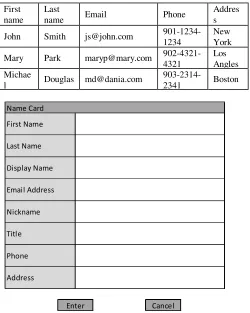
The separation of wanted and unwanted emails and further organization of wanted emails require identification first. Since our focus is private domains, which are prone to more risk and which are used personal / business purposes, we talk about only the email clients that are installed in local machines. Mostly all email client softwares come with “identity” configuration functionality, where the email account holder can set his identifying name. And “address book” resource with minimum features, where one can set his / her list of contacts or emails in the Name Cards and store email addresses and the related information as shown in Table 1. And the Name Card of an entry is shown in Fig.1. Mandatory fields are First name, Last name and Email address. Other fields help narrowing the search. When Display Name is empty the Display Name shall take the form of “First name Last name” and is automatically inserted into Display Name field upon Enter.
Table 1: Address Book with Minimum Features
First name
Last
name Email Phone
Addres s
John Smith [email protected]
901-1234-1234
New York
Mary Park [email protected]
902-4321-4321
Los Angles Michae
l Douglas [email protected]
903-2314-2341 Boston
Name Card
Phone
Address
Enter Cancel
First Name
Last Name
Display Name
Email Address
Nickname
Title
Once the Name Cards are configured for each person in the address book in a client machine, identification by search and filter activities can take place for each name card in the address book as and when required.
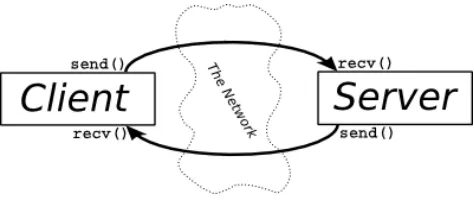
Now, send and receive emails is simply a task between client – server – client machines which are having email client on client machines and mail software on server machine, see figure below.
Fig. 2 Client – Server – Client Communication
Pattern
Each end user has his own IDENTITY (name setting) Each end user can have his own address book to store & pickup addresses
All this information and configuration reside in his local machine
When Sending Email
“From Name” is automatically loaded from the IDENTITY settings into the From Name address field “To Name” is inserted when a name / email address is selected from Address book.
Sender Client - Mail Server – Receiver Client
When sending email, From Name is also sent along with other information to the mail server
Fig. 3 Client – Server Communication
This From Name is sent to the Recipient as is.
The mail client (whatever is used at the other end) displays the From Name as is whatever is received from mail server.
Observation
1) From Name sent from sender client may be different from the one stored in the recipient address book. 2) Since most people remember person names not their
email addresses, From Name or Identity plays an important role in handling emails.
3) Danger of ignoring or keep last in reading priority might happen often if the From Name is not the one the recipient remembers. It means incorrect identification of sender.
Idea and Implementation
As of now, address book and Identity are playing roles only when *sending* email.
But, make use of these resources and features extensively when *receiving* emails also.
Modify the Name in received email based on Identify or stored in address book in the recipient machine being used.
This implementation does not violate the standards [4] of 1) Email Structure (RFC 5322, RFC 2045 – 2047, and RFC 2231); 2) Email Protocols (RFC 5321, RFC 3501, RFC 4551, RFC 1939); 3) Email Security (RFC 2595, RFC 3207, RFC 5246, and RFC 6376) as we are not touching the mail server or outside of the local email box.
3.2 Methodology
Develop mail client as a whole or a plug-in in such a way that it handles the following tasks:
1. For identification and Prioritization
Lookup: When an email is downloaded from mail server to client machine, before entering the mails into inbox, lookup each name card in the local address book
Search: Search the sender email in local address book Abstraction: If it is found, acquire the Display Name of the sender registered in local address book
Replacement: Replace the From Name of the sender with the one acquired from Address book
2. For Filtering Spam
If sender email is not registered in local address book, the From Name can be displayed as is and the mail can be treated as spam after applying some filters
If address is found in the address book but Display Name not registered, concatenate the From Name with “Registered Person”.
If address is found in the address book, but empty name string is received from the server, then replace the From Name with “Registered Person”
If no email address or name are received either in From field or To field, the email can be straightaway forward to spam box.
All these checking and modifications should be done before storing in Inbox.
Similarly To Name can be handled. Pick up the To Name string from Address Book
3.3 Examples
Client Mail Server
Email from John Smith to Michael Douglas John Smith (local info)
Identity: Smith
Address Book entry of Michael Douglas: Michael Michael Douglas (local Info)
Identity: Douglas
Address Book entry of John Smith: John
Mail Server Mail Server No change between servers
Mail Server Client
Email headers (POP before our method) From John Smith to mail server
From: Smith [email protected] To: Michael [email protected]
From mail server to Michael Douglas From: Smith [email protected]
To: Michael [email protected]
How the receiver Michael Douglas recognizes when receiving this email
From: Smith [email protected] who is this Smith ?
To: Michael [email protected] whose mail is this ? myself ???
Email headers (POP after our method) From John Smith to mail server From: Smith [email protected] To: Michael [email protected]
Michael Douglas mail client changes and displays as below
From: John [email protected]
To: Douglas [email protected]
Michael Douglas feeling when receiving this email From: John [email protected] oh, mail from John, let me see it first
To: Douglas [email protected] good he remembers me as Douglas.
4. Advantages
The extensive use of Address Book and proper Identity configuration, let users Identify and Prioritize reading emails. Further spam mails can be controlled effectively. The main advantages one can enjoy with this mailer or plugin are 1. Avoid wrong name and bulling names, 2. Less possibility to ignore or wrongly handle important emails (i.e., priority in reading, replying, etc.) 3. Always keeps sender name remembered, 4. Effectively use Identity and Address Book resources, 5. You can configure how you want the header names to be.
5. Conclusion
Acknowledgments
This research is partially supported by Research Grant #2016SW01RTG of RAMTEJ Technologies Corp., Japan. Authors hereby express gratitude for the grant.
References
[1] Laura. A. Dabbish, et.al., “Understanding Email Use: Predicting Action on a Message”, Carnegie Mellon University, CHI, 2005, April 2-7, 2005.
[2] Douglas Aberdeen, et.al., “The Learning Behind Gmail Priority Inbox” Google Inc., Zurich, Switzerland, 2011. [3] Mary Mallard, “How to Organize Your Email Inbox
Today”, Off the Ground, Sep 10, 2014.
[4] Email Standards,
https://www.fastmail.com/help/technical/standards.html.
Author Profile:
Venkata SanyasiRao Sasipalli holds doctorate in Information Engineering from Hiroshima University and an active researcher in interdisciplinary areas of Computer Technology, Electronics & Communications, and Mathematical algorithms.
Krishnam Raju Gottumukkala an expert in Fluid dynamics, Mathematical algorithms, and Information Technology. He is a professor emeritus of Andhra University and active researcher.