www.ijaera.org 103
An Automated Data Driven Continuous
Testing Framework
Arjun Rana1*,Vinay Rishiwal2
1
Student, Department of Computer Science, MJP Rohilkhand University, Bareilly Bareilly, Uttar Pradesh, INDIA, *E-mail: [email protected]
2
Assistant Professor, Department of Computer Science, MJP Rohilkhand University, Bareilly Bareilly, Uttar Pradesh, INDIA
Abstract: Automation testing plays crucial role to facilitate a user with quality software. The challenge begins when end user demands the quality software with constrained resource and time. To achieve this objective, continuous integration can be used to ensure that web applications are automatically tested via scripts as opposed to manually. Here, Data Driven automation can play the major role because of its ability to increases the test coverage by executing test cases iteratively unless the volume of the test cases is gigantic. In this paper, a data driven continuous testing framework has been proposed. In this framework multiple scripts can be run efficiently. This framework uses an excel spreadsheet to execute various test cases. This framework has been implemented in conjunction with selenium. Various test cases have been used to check the efficiency of the proposed data driven framework. These cases are being run on the anvil of different parameters. Results of the paper show that framework has the capability to handle a large volume of test cases and it can produce accurate results as per the test case. This framework completely reduces the manual dependency in automation testing.
Keywords: Automation Testing, Continuous testing, data Driven Framework, Selenium
I. INTRODUCTION
Software testing is the process to check the working efficiency of the software under defined conditions and to reconcile the bugs. Testing of the software also validate the accuracy and working of the desired software according to user demands. Software testing is the main phase of Software development life cycle in IT industries. It should be done during the software development process. Frequently incorrect designs, lacking of flexibility for innovation, unchecked redundancy are the few factors that are responsible for the failure of any software. The level of success of the test automation does not meet its target that it could. To enhance and examine the efficiency and accuracy of the resultant product i.e. software automated testing is the best tool that investigated and tested with the help of automation tools. Selenium is a recognized open source automation tool that is widely used for testing web-based applications and run on cross platforms such as Windows, Linux and Macintosh. It also supports almost all modern browsers such as Safari, Firefox, chrome, IE, Opera, etc.
www.ijaera.org 104 Data-driven testing, Modularity-driven testing, Keyword-driven testing and Hybrid testing are the few examples of the automation frameworks.
In the framework, test scripts are shaped to run together with the related data sets that entirely autonomous with the test automation tool, and this process is called Data driven tasting. These automated tests can be used repeatedly for other testing as well and maintenance issues are also very irrelevance due to less handling complexicity.
A number of the advantages of data driven testing can be listed in following points:
Large data fetching can be possible using the data sheet that could be continually used for execution of test case.
No need of special maintenance and Reusability.
If the functionality of the application under test changes, specific modification or updating required in the single script representing a “Business Function”.
Extremely customizable components exist in the framework.
Automation Testing reduces the need of manual or human involvement, repetitive or redundant tasks with the help of automation tool. In the perspective of limited time consumption, automated software testing is the one of the most cost effective tool for improvement in the accuracy and test coverage. These cost effectiveness and less time consumption capability are the particular advantages of test automation in the context of progression in the long-term efficiency of a software team’s testing processes. Most of the research work is carried out on a particular application related to software test automation. However, less work has been done on the problems occurred in the framework development and their well-organized solutions.
II. RELATED WORK
To frame the research work, it is necessary to highlights the review of literature of the area of related problem i.e. automation framework design for Data Driven Frameworks. Artzi et al. [1], describes rudimentary test automation framework for perform feedback-directed test generation for JavaScript web applications. This paper presented the case study of a specific system (rather than general or all web applications) also it needed access to AUT’s source code. Manpreet Kaur et al. [2] have presented Xml Schema Based Approach for Testing of Software Components mentions apt use of XML format for representing test data. Authors in [3] suggested Development of Test Automation Framework for Testing Avionics Systems and they describes aptly some basics for implementing data driven frameworks but again it does not give a generic model or architecture for general design. Tsai et al. presented a case study on XML based framework named Coyote explanation that was designed for web services testing. It observed from above reported research that majority of research work on test automation frameworks was concentrated on case or feasibility studies [5-10]. Yalla and Shanbhag [12] has reported that reusable automated testing Framework combined with open source automation tool is the way out to curtail the testing application timing and cost.
www.ijaera.org 105 (SAF) based on Selenium are the one to best way to achieve high effectiveness and accuracy. MindTree Selenium Automation Framework has strengths of SeleniumRC, TestNG, JAVA, ReportNG and ANT. These specialities strengthened the fact that the Framework will match the required automation objectives. However, some limitations is also exists here, such as not using the WebDriver API, which has more functionality than SeleniumRC.
III. PROPOSED WORK: IMPLEMENTATION OF CONTINUOUS TESTING FRAMEWORK WITH SELENIUM
STEP 1 : Creating Project Structure For Framework STEP 2 : Add jar Files In Project's Build Path. STEP 3 : Creating Required Class Files STEP 4 : Add Required .xls Files Of Data
STEP 5 : Add .xls File Reading And Writing Utility In Framework STEP 6 : Creating Sample Data Reading Test In Framework STEP 7 : Implementing Data Reading Test In Both Test Suites STEP 9 : Adding testng.xml file To Run Suites From One Place STEP 10 : Reporting Test Suite Execution Status
STEP 11 : Add Test Case Skip Function In automation framework STEP 12 : Add Data Skip Function In Framework For Selenium STEP 13 : Reporting Test Failure In TestNG Reports .
STEP14 : Capturing Screenshot On Failure Or Pass STEP15 : Implement Logging Using Log4j
STEP16 : ANT - Generate XSLT Reports
STEP17 : Run WebDriver Test From Batch(.bat) File STEP18: Store the test data in an Excel File.
STEP19: Store the Environment related Information in a property File.
STEP20: Store various objects in the application on which user action needs to be taken in object repository file.
STEP21: Test suite contains the logic to verify acceptance criteria mentioned in the requirement. STEP22: Execute the script on various browsers as per need.
STEP23:Generate the reports capturing screenshots and pass/fail results. To achieve advance results TestNG is used.
We used data driven continues testing in Selenium to automate the following testing scenarios for Paytm.com as under:-
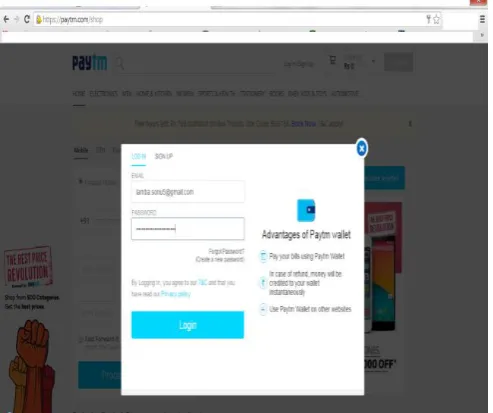
(1) User should only be able to logging its account, when we entered correct id and password otherwise not.
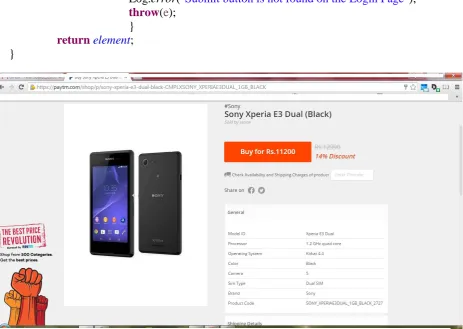
(2) If the login credentials are valid, then user clicked on one of the Product categories.
(3) After selecting a Product Category, user clicked on the subcategories and picked an available Product.
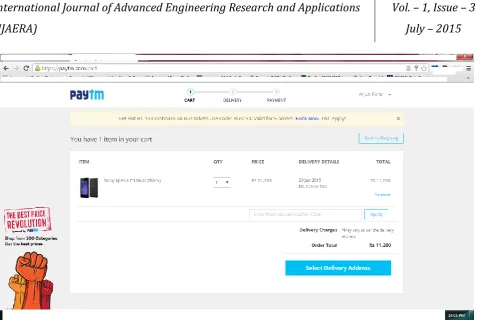
(4) Add the selected Product into the Cart.
(5) Now, user provides Payment details from the Excel file (TestData.xls).
(6) If the credentials are valid, transaction proceeds and this procedure is repeated with different Product name and Category.
(7) If the credentials are not valid, then the test case fails and this event is reported in form of HTML in test reports folder.
www.ijaera.org 106 between them is essential for the proper synchronization of the components of the system work. Different packages which are used in proposed work are shown and discussed below:
Config :- Keeps all the configuration files such as property files App Modules :- contains all the modules of the Application :-
(1) Check_Out_Action.java (2) Confirmation_Action.java (3) Payment_Details_Action.java (4) Product_Select_Action.java (5) Sign_in_Action.java
(6) Verification_Action.java
Page Objects :- contains all the Page Objects of the Application :- (1) BaseClass.java
(2) CheckOut_Page.java (3) Confirmation_Page.java (4) Home_Page.java
(5) Login_Page.java (6) Product_List_Page.java (7) Product_Selection_Page.java
Screenshots :- contains screenshots of various test cases
Test Cases: - Contains the test cases for the Application testing. Test Data: - Contains an Excel Sheet from which data is to be fetched. Utility:- Contains various utility functions like:-
(1) Excel_Utils.java (2) Logs.java (3) Constants.java (4) LogUtils.java
IV. TESTING FRAMEWORK,RESULTS AND DISCUSSION
Various test cases that are being used to check the proper functionality of data driven continuous testing framework, are namely login including user name and password, retrieval of data, validation of payment details. The visual representations of the considered test cases are shown in Figure 2 to Figure 5 in the form of snap shots, captured during the test cases execution.
www.ijaera.org 107 Modules used for this test case:-
We have a Constant.java class where we declared all the constant values used in the testing of the App. This class looks like this:-
Publicclass Constant {
publicstaticfinal String URL = "https://paytm.com/shop"; publicstaticfinal String Username = "testuser_1";
publicstaticfinal String Password ="Test@123"; publicstaticfinal String Path_TestData = "F://SetUp2//EclipsePortable//Data//workspace//Day1//src//testData//";
publicstaticfinal String File_TestData = "TestData.xlsx";
//Test Data Sheet Columns
publicstaticfinalint Col_TestCaseName = 0; publicstaticfinalint Col_UserName =1 ; publicstaticfinalint Col_Password = 2; publicstaticfinalint Col_Browser = 3; publicstaticfinalint Col_ProductType = 4; publicstaticfinalint Col_ProductNumber = 5; publicstaticfinalint Col_FirstName = 6; publicstaticfinalint Col_LastName = 7; publicstaticfinalint Col_Address = 8; publicstaticfinalint Col_City = 9; publicstaticfinalint Col_Country = 10; publicstaticfinalint Col_Phone = 11; publicstaticfinalint Col_Email = 12; publicstaticfinalint Col_Result = 13; publicstaticfinal String Path_ScreenShot = "F://SetUp2//EclipsePortable//Data//workspace//Day1//src//Screenshots//";
}
We have a LogIn.java class where the methods are defined. publicstatic WebElement txtbx_UserName() throws Exception{ try{
element = driver.findElement(By.id("log"));
Log.info("Username text box is found on the Login Page"); }catch (Exception e){
Log.error("UserName text box is not found on the Login Page");
throw(e);
}
return element; }
publicstatic WebElement txtbx_Password() throws Exception{ try{
www.ijaera.org 108 Log.error("Password text box is not found on the Login Page");
throw(e);
}
return element; }
publicstatic WebElement btn_LogIn() throws Exception{ try{
element = driver.findElement(By.id("login")); Log.info("Submit button is found on the Login page"); }catch (Exception e){
Log.error("Submit button is not found on the Login Page");
throw(e);
}
return element; }
www.ijaera.org 109 Figure 4: Retrieving Data From Excel Sheet
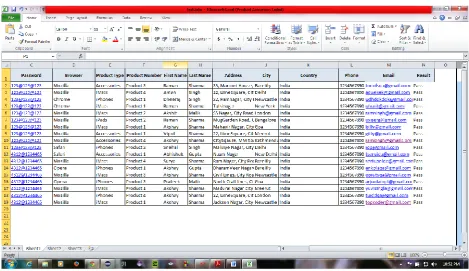
We have ExcelUtils.java class which contains all the methods needed for retrieving the data from ExcelSheet. This class contains methods:-
// This method is used to set the file path.
publicstaticvoid setExcelFile(String Path,String SheetName)
//This method is to read the test data from the Excel cell, in this we are passing parameters as Row num and Col num
publicstatic String getCellData(int RowNum, int ColNum)
//This method is to write in the Excel cell, Row num and Col num are the parameters publicstaticvoid setCellData(String Result, int RowNum, int ColNum)
publicstaticint getRowContains(String sTestCaseName, int colNum)
publicstaticint getRowUsed()
Logs:
www.ijaera.org 110 Figure 5: Snapshot of Excel Sheet used in the Data Driven Automaton Framework.
For the proposed work, results are generated in the form of report using testNG which is a well accepted report generation framework used for the Java programming language. The TestNG framework is introduced to overcome the limitations of JUnit framework. The manual analysis of the generated results changed to automatic report generation with the Inclusion of TestNG in selenium web driver. A report which is generated using TestNG is shown in Figure 6. This report is clearly showing all the execution steps performed over the considered test scenarios.
www.ijaera.org 111 V. CONCLUSIONS AND FUTURE WORK
In this paper, a data driven continuous testing framework has been proposed and tested over different test cases. This framework can be used directly across any application without incurring much time. This framework can also be run efficiently on any web browser. This framework is robust enough to handle a large size of test cases. The limitation of data driven framework is that non-technical users can not use it well and sometimes it cannot explore the reusability of library functions at their best. To remove/improve these limitations a hybrid framework is required which can facilitate the non technical user with keyword driven approach as well as which can make use of reusability feature as much as possible. Another important issue which may arise in data driven approach is that when the test cases becomes gigantic then an efficient procedure/algorithm will be required to run the test cases on a faster rate as compare to traditional test case algorithms.
VI. REFERENCES
[1] Artzi, S., Dolby, J., Jensen, S. H. , Møller, A. and Tip, F. (2011). A Framework for Automated Testing Of Javascript Web Applications. Proc. 33rd international conference on Software engineering, ICSE ’11, pp. 571–580, New York, NY, USA, ACM.
[2] Kaur, M., Sharma, N., & Kaur, R. K. (2010). Xml Schema Based Approach for Testing of Software Components. International Journal of Computer Applications, 6(11), 7-11.
[3] Jha, A. K. (2010, October). Development of test automation framework for testing avionics systems.
In Digital Avionics Systems Conference (DASC), 2010 IEEE/AIAA 29th (pp. 6-E). IEEE.
[4] Tsai, W. T., Paul, R., Song, W., & Cao, Z. (2002). Coyote: An xml-based framework for web services testing. In High Assurance Systems Engineering, 2002. Proceedings. 7th IEEE International Symposium on (pp. 173-174). IEEE.
[5] C. Merchant, M. Tellez, and J. Venkatesan, "A Browser yu6Agnostic Web Application UI Test Framework: Motivation, Architecture, and Design", Proceedings of the 6th International Conference on Information Technology New Generations, April 2009, pp. 748-751.
[6] Lidie, S., & Walsh, N. (2002). Mastering Perl/Tk: Graphical User Interfaces in Perl. " O'Reilly Media, Inc.".
[7] Google Charts: http://code.google.com/apis/chart/image/docs/chart_playground.html and Perl module: http://search.cpan.org/~dmaki/Google-Chart-0.05014/lib/Google/Chart.pm
[8] Holmes, A., & Kellogg, M. (2006, July). Automating functional tests using selenium. In Agile
Conference, 2006 (pp. 6-pp). IEEE.
[9] Kuhn, D. R., Wallace, D. R., & Gallo Jr, A. M. (2004). Software fault interactions and implications for software testing. Software Engineering, IEEE Transactions on, 30(6), 418-421.