© 2018, IRJET | Impact Factor value: 6.171 | ISO 9001:2008 Certified Journal | Page 409
A SHOULDER SURFING RESISTANCE USING HMAC ALGORITHM
Mrs. L.K. Shoba
1, Ms. P.I. Nishitha
2, Ms. J. Abirami
31Assistant professor, Department of Information Technology, Jeppiaar Engineering College, Chennai, Tamil Nadu, India.
2, 3Department of Information Technology, Jeppiaar Engineering College,
Chennai, Tamil Nadu, India.
---***---Abstract -
Authentication based on passwords is usedlargely in applications for computer security and privacy. However, human actions such as choosing bad passwords and inputting passwords in an insecure way are regarded as” the weakest link” in the authentication chain. Rather than arbitrary alphanumeric strings, users tend to choose passwords either short or meaningful for easy memorization. With web applications and mobile apps piling up, people can access these applications anytime and anywhere with various devices. This evolution brings great convenience but also increases the probability of exposing passwords to shoulder surfing attacks. Attackers can observe directly or use external recording devices to collect users’ credentials. To overcome this problem, the user is provided with the two-optional authentication system for the user using HMAC and base64 algorithm. The forget password module is designed with an innovative idea. Based on idea of framing forget password questions on the user’s handheld device. Blocking the user account if wrong password injected to the server frequently and intimate the user through Email and user’s alternative mobile number via SMS about current location of the mobile.
Key Words: Graphical Passwords, Authentication, Shoulder Surfing Attack.
1. INTRODUCTION
Textual passwords have been the most widely used authentication method for decades. Comprised of numbers and upper- and lower-case letters, textual passwords are considered strong enough to resist against brute force attacks. Image-based passwords are vulnerable to shoulder surfing attacks (SSAs). This type of attack either uses direct observation, such as watching over someone’s shoulder or applies video capturing techniques to get passwords, PINs, or other sensitive personal information. To provides authentication by blocking the user account if wrong password injected to the server frequently but recover password using SMS verification.
2. LITERATURE SURVEY
2.1Cryptanalysis of password authentication schemes: Current status and key issues
In this paper, we presented the survey of all currently available password based authentication schemes and classified them in terms of several crucial criteria. This
study will help in developing different password based authentication techniques, which are not vulnerable to different attack scenarios. Two and three party key exchange protocols require secure authentication mechanism for achieving the required goals and satisfying the security requirements of an ideal password based authentication scheme. Smart cards, which are used in financial transactions, require highly secure authentication protocols.
2.2 Graphical Password Authentication: Cloud Securing Scheme
In this paper we are representing the authentication given to cloud by using graphical password. We have proposed cloud with graphical security by means of image password. We are providing one of the algorithms which are based on selection of username and images as a password. By this paper we are trying to give set of images on the basis of alphabet series position of characters in username. Finally cloud is provided with this graphical password authentication.
2.3 Against Spyware Using CAPTCHA in Graphical Password Scheme
We propose a new scheme, using CAPTCHA (Completely Automated Public Turing tests to tell Computers and Humans Apart) that retaining the advantages of graphical password schemes, while simultaneously raising the cost of adversaries by orders of magnitude.
2.4 Covert Attention Shoulder Surfing: Human Adversaries Are More Powerful Than Expected
© 2018, IRJET | Impact Factor value: 6.171 | ISO 9001:2008 Certified Journal | Page 410 of our knowledge, this is the first work to model and
defend the new form of attack through human performance modeling. Real attack experiments and user studies are also conducted.
2. 5 S3PAS: A Scalable Shoulder-Surfing Resistant Textual-Graphical Password Authentication Scheme
In this paper, we propose a Scalable Shoulder-Surfing Resistant Textual-Graphical Password Authentication Scheme (S3PAS). S3PAS seamlessly integrates both graphical and textual password schemes and provides nearly perfect resistant to shoulder-surfing, hidden-camera and spyware attacks. It can replace or coexist with conventional textual password systems without changing existing user password profiles. Moreover, it is immune to brute-force attacks through dynamic and volatile session passwords. S3PAS shows significant potential bridging the gap between conventional textual password and graphical password. Further enhancements of S3PAS scheme are proposed and briefly discussed. Theoretical analysis of the security level using S3PAS is also investigated
3. EXISTING SYSTEM
The Existing system the users upload or select the pre-defined image that provided by the server as a password image. If user selected the image as password the server process with the image and split the password image to 7x11 grids and display all grid images to the user, and user select the single grid as a password grid for the particular image. And user upload with multiple images as user need and select each grid as a password for an image. And while login the user is provided with the login indicator (temporary password). The login indicator is only visible while holding the proximity sensor of the user device and the holding the screen in circle image. Now the user is provided with the login indicator, here the user now displayed with the gridded password image with movable horizontal alphabetic bar and movable vertical numeric bar. Your login indicator will be in the form of A6. In vertical and horizontal bar, the alphabets and numeric values will be mismatch in order. The user can move the bar values by using navigation keys provided bellow. By moving the user should move the value A vertically straight to the password grid. And move value 6 horizontal straight to the password grid. And press OK the grid will be authenticated. And user provided with next image with new login indicator. User should authenticate the images till the last image provided by the user will registration.
4. PROPOSED SYSTEM
In our system, we are providing authentication by two optional authentication systems for the user (one is the existing and another model is proposed by us). Proposed model provides the user friendly and the interactive
environment for the user. The efficient and the innovative banking service provided for the authentication system. The forget password module is designed with an innovative idea. Based on idea of framing forget password questions on the user’s handheld device. Blocking the user account if wrong password injected to the server frequently and intimate the user through e-mail and user’s alternative mobile number via SMS about current location of the mobile.
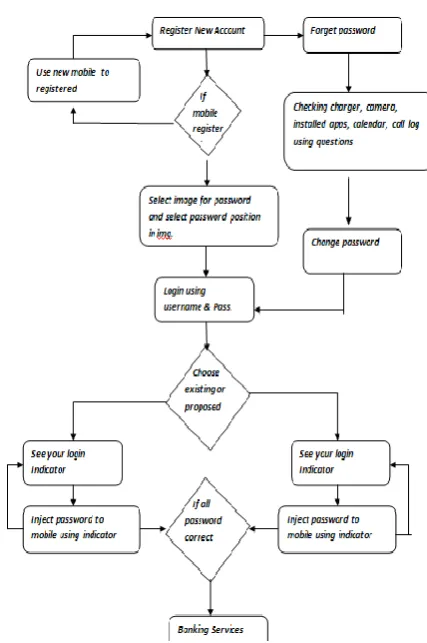
[image:2.595.336.550.218.540.2]5. BLOCK DIAGRAM
Fig.5.1. Architecture diagram of shoulder surfing resistance using HMAC algorithm.
6. MODULES
1. Account creation and registering your
password.
2. Authentication using existing graphical
authentication.
3. Authentication using proposed graphical
authentication.
4. Forget password and recovering module 5. Banking services.
6.1 Account creation and registering your password:
© 2018, IRJET | Impact Factor value: 6.171 | ISO 9001:2008 Certified Journal | Page 411 users upload or select the pre-defined image that provided
by the server as a password image. If user selected the image as password the server process with the image and split the password image to 7x11 grids and display all grid images to the user, and user select the single grid as a password grid for the particular image. And user upload with multiple images as user need and select each grid as a password for an image. If you click finish your password will be stored and account will be registered.
6.2 Authentication using existing graphical authentication:
While login the user is provided with the login indicator (temporary password). The login indicator is only visible while holding the proximity sensor of the user device and the holding the screen in circle image. Now the user is provided with the login indicator, here the user now displayed with the gridded password image with movable horizontal alphabetic bar and movable vertical numeric bar. Your login indicator will be in the form of A6. In vertical and horizontal bar, the alphabets and numeric values will be mismatch in order. The user can move the bar values by using navigation keys provided bellow. By moving the user should move the value A vertically straight to the password grid. And move value 6 horizontal straight to the password grid. And press OK the grid will be authenticated. And user provided with next image and new login indicator. After completing all image authentications, if the entered is correct your services will be provided.
6.3 Authentication using proposed graphical authentication:
Our proposed idea of login gives you the user-friendly authentication system. The system provides the login indicator from the numeric values 0 to 9. Using the proximity sensor and holding the screen using hands to see the indicator to avoid the shoulder surfing attack. After seeing the indicator, the user moves to the authentication activity, there the image uploaded by the user will be loaded and above the image the numeric numbers will scattered throughout the screen. If you touch the single numeric value and drag it. The whole scattered numbers will be moved with respective to the numeric value that you are dragging. You can drag any of the number and you should place your indicator on the image password position you selected during registration.
6.4 Forget password and recovering module:
In forget password and recovery module, we achieve this using an innovative idea of security questions about the user handset such as charging percentage in last 2 days. Have you used camera in last two days? And have you installed any of the application. We concentrate on the log files (camera, battery usage, calendar information, call log, installed applications) of the user mobile and frame the questions based on that.
6.5 Banking services:
The banking services we provide are called virtual money concept, initially the user credited with rupees and if user is in need to transfer the money to some other account the user go to his withdrawal and enter the amount to transfer. The voucher id generated for the amount you entered. You can share the voucher id to the particular user. He moves to the deposit link and enter the voucher id given by you. The amount will be DEBITED from your account and CREDITED to depositor account.
7. WORK IMPLEMENTATION
Create more number of users and each user must have a separate login id and password. Implemented the HMAC and BASE64 algorithm for authentication. Password recovered by using mobile verification through SMS.
7.1 BASE64 ALGORITHM
A keyed-hash message authentication code (HMAC), a mechanism for message authentication using cryptographic hash functions. HMAC can be used with any iterative Approved cryptographic hash function, in combination with a shared secret key. The cryptographic strength of HMAC depends on the properties of the underlying hash function. The HMAC specification in this standard is a generalization of Internet RFC 2104, HMAC, Keyed-Hashing for Message Authentication, and ANSI X9.71, Keyed Hash Message Authentication Code.
© 2018, IRJET | Impact Factor value: 6.171 | ISO 9001:2008 Certified Journal | Page 412 8. SCREENSHOTS
Fig 8.1 CONNECTION
Fig 8.2 REGISTER
Fig 8.3 Login
9. CONCLUSION AND ENHANCEMENT
The efficient banking application to inject the account password to the server in the indirect manner using some temporary login indicator in the user interactive manner. And effective banking service using the virtual money concept. Securing the bank account while entering the wrong password frequently, by blocking account. And the innovative idea of forget password and recover module. Proposed model provides the user friendly and the interactive environment for the user. The efficient and the innovative banking service provided for the authentication system. The forget password module is designed with an innovative idea. Based on idea of framing forget password questions on the user’s handheld device. Blocking the user account if wrong password injected to the server frequently and intimate the user through Email and user’s alternative mobile number via SMS about current location of the mobile.
10. REFERENCES
[1] S. Sood, A. Sarje, and K. Singh, “Cryptanalysis of password authentication schemes: Current status and key issues,” in Methods and Models in Computer Science, 2009. ICM2CS 2009. Proceeding of International Conference on, Dec 2009, pp. 1–7.
[2] S. Gurav, L. Gawade, P. Rane, and N. Khochare, “Graphical password authentication: Cloud securing scheme,” in Electronic Systems, Signal Processing and Computing Technologies (ICESC), 2014 International Conference on, Jan 2014, pp. 479–483.
1[3] K. Gilhooly, “Biometrics: Getting back to business,” Computerworld, May, vol. 9, 2005.
[4] R. Dhamija and A. Perrig, “Deja vu: A user study using images for authentication,” in Proceedings of the 9th conference on USENIX Security Symposium-Volume 9. USENIX Association, 2000, pp. 4–4.
[5] A. De Angeli, M. Coutts, L. Coventry, G. Johnson, D. Cameron, and M. Fischer, “Vip: a visual approach to user authentication,” in Proceedings of the Working Conference on Advanced Visual Interfaces. ACM, 2002, pp. 316–323.
[6] I. Jermyn, A. Mayer, F. Monrose, M. Reiter, and A. Rubin, “The design and analysis of graphical passwords,” in Proceedings of the 8th conference on USENIX Security Symposium-Volume 8. USENIX Association, 1999, pp. 1–1
© 2018, IRJET | Impact Factor value: 6.171 | ISO 9001:2008 Certified Journal | Page 413 [8] A. Paivio, T. Rogers, and P. Smythe, “Why are pictures
easier torecall than words?” Psychonomic Science, 1968.
[9] D. Nelson, U. Reed, and J. Walling, “Picture superiority effect,” Journal of Experimental Psychology: Human Learning and Memory, vol. 3, pp. 485–497, 1977.
[10] S. Brostoff and M. Sasse, “Are passfaces more usable than passwords? a field trial investigation,” PEOPLE AND COMPUTERS, pp. 405–424, 2000.
BIOGRAPHIES
Ms. J. ABIRAMI
Pursuing degree in Information Technology at Jeppiaar SRR Engineering college, Chennai, Tamil Nadu.
Ms. P. I. NISHITHA