User Assistance for Effective Data Mining
Pankaj S. Kulkarni
Lecturer, Computer Engg. Dept., Shatabdi Institute of Technology, Nashik,India.
Varsha C. Belokar
Lecturer, Computer Engg. Dept., Shatabdi Institute of
Technology, Nashik, India.
S. S. Sane,
PhDH.O.D. Comp. Engg. Dept., K. K. Wagh Institute of Engineering, Education &
Research, Nashik, Maharashtra, India
ABSTRACT
Today, several tools are available for solving data mining problems, both in open source and commercial category. For solving classification problems these tools provide variety of strategies such as decision tree, neural networks, lazy classifiers etc. For each strategy, the tools allow the user to select specific values for large number parameters[1] for e.g. in case of a neural network classifier, user needs to provide values for parameters such as epochs, learning rate, momentum etc . Although default setting for such parameters is provided by tools, it is often found that the classifier performance (accuracy) may be enhanced by making series of experiments with different values for these parameters. Thus, for a novice user it is difficult to guess proper values for these parameters and the only option is to try with series of experiments which is time consuming. This paper aims at developing a database to record the nature of data such as number and type of attributes, presence or absence of missing values etc along with various values for building classifier models and the accuracy of the classifier. Such a data is then can be made available to novice users to build a model based on past experience. The work also aims at developing required forms reports
Keywords- Data Mining, classification, classifier, filter, WEKA etc.
1. INTRODUCTION
In the real world we are overwhelmed with data. The amount of data in the real world, in our lives seems to go on and on increasing and there is no end insight. Most of the information is in raw form data. There is a huge amount of information that is hidden in the raw data.[1]
Data mining is the extraction of implicit, previously unknown, and potentially useful information from data. The idea is to build computer program that sift through databases automatically, seeking regularities or patterns. Several tools are available for solving data mining problems, both in open source and commercial category. [1] [2]
Because of the WEKA is open source it is widely used by many organizations. [4] WEKA provides variety of strategies such as decision tree, neural networks, lazy classifiers etc. [3] For each strategy, the tools allow the user to select specific values for large number parameters for e.g. in case of a neural network classifier, user needs to provide values for parameters such as epochs, learning rate, momentum etc[4] . Although default setting for such parameter is provided by tools, it is often found that the classifier performance (accuracy) can be enhanced by making series of experiments with different values for these parameters. Thus, for a novice user it is difficult to guess proper values for these
parameters and the only option is to try with series of experiments which is time consuming.
This project aims at developing a database that records performance of the classifiers and nature of data along with different values used for building classifier. This information is to be provided in both textual as well as graphical form so as to guide the novice users based on such past experiments.
2.
WEKA
(WAIKATO
ENVIRONMENT
FOR KNOWLEDGE ANALYSIS) :
WEKA was developed at the University of Waikato in New Zealand[4] [3]. “WEKA” stands for the Waikato Environment for Knowledge Analysis[4]. The system is written in Java, an object oriented programming language that is widely available for all major computer platforms, and WEKA has been tested under Linux, Windows, and Macintosh operating systems. Java allows us to provide a uniform interface to many different learning algorithms, along with methods for pre and post processing and for evaluating the result of learning schemes on any given dataset[4].
WEKA provides implementations of learning algorithms that you can easily apply to your dataset. [4] It also includes a variety of tools for transforming datasets, such as the algorithms for discretization. [5] You can preprocess a dataset, feed it into a learning schema, and analyze the resulting classifier and its performance-all without writing any program code at all. [4]
The workbench includes methods for all the standard data mining problems: regression, classification, clustering, association rule mining, and attribute selection. All algorithms take their input in the form of a single relational table in the ARFF format, which can read from a file or generated by a database query. [3] [4]
One way of using WEKA is to apply a learning method to a dataset and analyze its output to extract information about the data. Another is to apply several learners and compare their performance in order to choose one for prediction. The learning methods are called classifiers. [4]
tag, the attribute information using @attribute, and a @data line; save the file as raw text—and you’re done! [4]
[image:2.595.60.287.158.417.2]In the following example we assume that your data is stored in a Microsoft Excel spreadsheet, and you’re using Microsoft Word for text processing. Of course, the process of converting data into ARFF format is very similar for other software packages. Figure 1 shows an Excel spreadsheet containing the weather data.
Figure 1. Weather data in Microsoft Excel
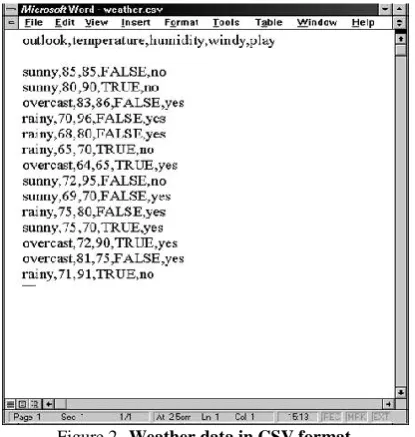
It is easy to save this data in comma-separated format. First, select the Save As… item from the File pull-down menu. Then, in the ensuing dialog box, select CSV (Comma Delimited) from the file type popup menu, enter a name for the file, and click the Save button. (A message will warn you that this will only save the active sheet: just ignore it by clicking OK.) Now load this file into Microsoft Word. Your screen will look like Figure 2. [3] [4]
[image:2.595.329.556.245.413.2]The rows of the original spreadsheet have been converted into lines of text, and the elements are separated from each other by commas. All you have to do is convert the first line, which holds the attribute names, into the header structure that makes up the beginning of an ARFF file. Figure 3 shows the result. The dataset’s name is introduced by a @relation tag, and the names, types, and values of each attribute are defined by @attribute tags. The data section of the ARFF file begins with a @data tag. Once the structure of your dataset matches Figure3, you should save it as a text file. Choose Save as… from the File menu, and specify Text Only with Line Breaks as the file type by using the corresponding popup menu. Enter a file name, and press the Save button. Rename the file to weather.arff to indicate that it is in ARFF format. Note that the classification schemes in Weka assume by default that the class is the last attribute in the ARFF file, which fortunately it is in this case. [3] [4]
Figure 3. Weather data in ARFF format
3.
LOADING
THE
DATA
INTO
THE
EXPLORER:
Let’s load this data into the Explorer and start analyzing it. Fire up WEKA to get the panel shown in fig. 4 Select Explorer from the four graphical user interface choices.
Figure 4. WEKA GUI
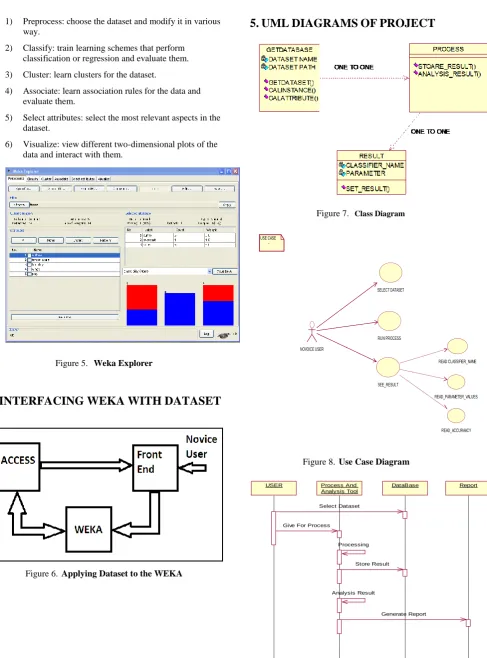
[image:2.595.297.546.515.706.2] [image:2.595.69.277.536.755.2]1) Preprocess: choose the dataset and modify it in various way.
2) Classify: train learning schemes that perform classification or regression and evaluate them.
3) Cluster: learn clusters for the dataset.
4) Associate: learn association rules for the data and evaluate them.
5) Select attributes: select the most relevant aspects in the dataset.
6) Visualize: view different two-dimensional plots of the data and interact with them.
Figure 5. Weka Explorer
[image:3.595.67.555.56.715.2]4. INTERFACING WEKA WITH DATASET
:
Figure 6. Applying Dataset to the WEKA
5. UML DIAGRAMS OF PROJECT
Figure 7. Class Diagram
Figure 8. Use Case Diagram
Figure 9. Sequence Diagram USE CASE
SELECT DATASET
RUN PROCESS
SEE_RESULT NOVOICE USER
READ CLASSIFIER_NAME
READ_PARAMETER_VALUES
READ_ACCURAACY
Report
USER Process And
Analysis Tool
DataBase
Select Dataset
Give For Process
Processing
Store Result
Analysis Result
[image:3.595.70.310.70.406.2]6. DATABASE DETAILS
This project has two database tables Dataset_Info and Classifier_Result. Dataset_Info table has 6 fields that store details about dataset. Classifier_Result table has 9 fields that store analysis result.
A. Dataset_Info:
COLUMN NAME CONSTRAINTS DATA TYPE
Id Primary key Number
Dataset Name Not Null Varchar
No_Attributes Not Null Number
Instances Not Null Number
Classes Not Null Number
Missing_value_status Not Null Number
B. Classifier_Result:
COLUMN NAME CONSTRAINTS DATA TYPE
Id Foreign Key Number
Classifier Not Null Varchar
Para1 Not Null Varchar
Para2 Not Null Varchar
: : :
ParaN Not Null Varchar
Accuracy Not Null Number
Time_To_Build Not Null Time
[image:4.595.59.284.494.711.2]7. RELATIONSHIP DIAGRAM
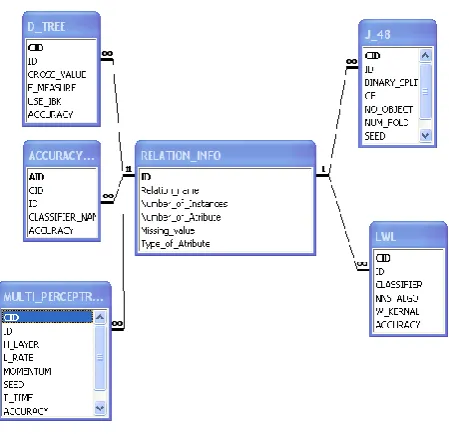
Figure 10. Relationship diagram
8. CONCLUSIONS
This project aims at developing a database to record the nature of data such as number and type of attributes, presence or absence of missing values etc along with various values for building classifier models and the accuracy of the classifier. Such a database is then can be made available to novice users to build a model based on past experience. The work also aims at developing various reports.
9. ACKNOWLEDGEMENT
We have great pleasure to express our deep sense of gratitude towards our parents & Prof. Dr. Sane S. S. for their support and information. Their valuable suggestions and encouragement were the driving force for us to work with high spirit and enthusiasm and allowing us to present this paper and giving us moral support.
We would also thank Prof. Mrs. P. R. Mogal, Prof. S. R. Upasani, Prof. G. B. Katkade, Prof. N. L. Bhale, Jitendra Muradnar, Prof. H. P. Bhabad, Prof. C. R. Ghuge for their support & encouragement. We would also thank the entire staff of computer engineering department for their support. We would also like to thank our friends and dear ones for supporting us during some tough and frustrating time and encouraging us all the way through this project.
10. AUTHORS PROFILE
Mr. Pankaj S. Kulkarni
Has completed Bachelors degree in Computer Engineering from K. K. Wagh Institute of Engineering, Education & Research, Nashik. Pursuing M.Tech in Information Technology from Rajasthan Technical University, Kota. Currently Working as lecturer in Shatabdi Institute of Technology, Agaskhind, Nashik. Has presented more than 5 research papers at international level.
Ms. V. C. Belokar
Completed her Bachelor’s degree in Information Technology from Mumbai Education Trust’s Bhujbal College of Engineering, Nashik. Pursuing M.Tech in Information Technology from Rajasthan Technical University, Kota. She is presently working as lecturer in Shatabdi Institute of Technology, Agaskhind, Nashik. She has more than 5 international papers on her name.
Dr. S. S. Sane
11. REFERENCE
[1] Data Mining: A Knowledge Discovery Approach, K. Cios, W. Pedrycz, R. Swiniarski, L. Kurgan, Springer, ISBN: 978-0-387-33333-5, 2007.
[2] Data Mining: Concepts, Models, Methods, and Algorithms, Mehmed Kantardzic, ISBN: 0471228524, Wiley-IEEE Press, 2002.
[3] Ian Witten and Eibe Frank, Data Mining: Practical Machine Learning Tools and Techniques, 2nd Edition, Morgan Kaufmann, ISBN 0120884070,2005.
[4] WEKA manual.