Web Application testing with eValid
A. Sakthivel
M.phil Research Scholar Erode Arts & Science College
Erode
R. Sankarasubramanian
Associate Professor of Computer Scince Erode Arts & Scince College
Erode
K. Velusamy
M.phil Research Scholar K.S.R College of Arts &
Science Tiruchengodu
ABSTRACT
The web based applications are powerful and have the ability to provide feature rich content to a wide audience spread across the globe at an economical cost
.
Hence it is a daunting task to test these applications and with more and more featuresand testing these applications is becoming even more complex. This work covers some of the challenges faced when testing these applications with a testing tool called eValid.eValid is a software developed by Software Research, Inc. It is a test engine that provides client side quality checking. eValid is a testing tool suite built into an IE browser. eValid performs every function needed for detailed WebSite static and dynamic testing, regression testing, QA/Validation, page timing and tuning, transaction monitoring, and realistic & scalable server loading.
eValid is used by webmasters, WebSite development teams, WebSite QA/Test teams, WebSite content providers, and IT managers. It is used to perform functional tests, to determine server load capacity, to check detailed timings, to verify WebSite integrity, to monitor Quality of Service (QoS) and to verify Quality of Experience (QoE). This work focuses on some of the research that has been done on web testing using eValid.
Keywords
eValid, Web Testing, Black Box, white Box, Protocal, HTTP.
1.
INTRODUCTION
The process of creating a program consists defining a problem, designing a program, building a program, analyzing performances of a program, and final arranging of a product. According to this classification, software testing is a component of the third phase, and means checking if a program for specified inputs gives correctly and expected results.
1.1
Software Testing
Software testing is an important component of software quality assurance. The goal of testing is systematical detection of different classes of errors( error can be defined as a human action that produces an incorrect result) in a minimum amount of time and with a minimum amount of effort.
Software can be tested in following ways,
1.1.1 Black Box testing
It is testing software based on output requirements and without any knowledge of the internal structure or coding in the program.
1.1.2 White Box testing
This method can be shortly as testing software with the knowledge of the internal structure and coding inside the program.
1.1.3 Gray box testing.
It is defined as testing software while already having some knowledge of its underlying code or logic.
1.2
Classification of Test Techniques
The most important test techniquesFigure1 General Classification of Test Techniques
2. WEB TESTING
Web testing is the name given to software testing that focuses on web applications. A successful web application can be summarized to as being: usable, secure, saleable, reliable, maintainable and highly available.
2.1 Specific Testing Areas
These are specific testing areas that require special attention regarding website testing.
2.1.1
Static Testing
Content Checking
Browser Syntax Compatibility Visual Browser Validation Test Browsing
Browsing the Site
2.1.2 Functional Testing
Browser-Page Tests Transaction Testing
2.1.3 Non-Functional Testing
Configuration Testing Usability
Performance Scalability Security
2.2 Website Architectural Factors
A WebSite can be quite complex, and that complexity is what provides the power, that can be a real impediment in assuring WebSite Quality. Here are the major pieces of Websites. Display Technologies
Navigation Object Mode Server Response
Interaction & Feedback Concurrent Users Browser
2.3 Website Test automation requirements
Assuring WebSite quality requires conducting sets of tests, automatically and repeatedly, that demonstrate required properties and behaviors. Here are some required elements of tools that aim to do this.2.3.1 Test Sessions
Typical elements of tests involve these characteristics:
Browser Independent: Tests should be realistic, but not be dependent on a particular browser
No Buffering, Caching: Local caching and buffering should be disabled
Fonts and Preferences: Most browsers support a wide range of fonts and presentation preferences, and these should not affect how quality on a WebSite is assessed or assured.
Object Mode: Object mode operation is essential to protect an investment in test suites and to assure that test suites continue operating when WebSite pages experience change
2.3.2 Test Context
Tests need to operate from the browser level for two reasons: (1) this is where users see a Website, so tests based in browser operation are the most realistic; and (2) tests based in browsers can be run locally or across the Web equally well. Local execution is fine for quality control, but not for performance measurement work, where response time including Web-variable delays reflective of real-world usage is essential.
2.4 Website Dynamic Validation
Confirming validity of what is tested is the key to assuring. WebSite quality is the most difficult challenge of all. Here are four key areas where test automation will have a significant impact [10].
2.4.1
Operational Testing
It involve a variety of checks on individual pages in the Website
Page Consistency Table, Form Consistency Page Relationships Performance Consistency
2.4.2
Test Suites
It contains hundreds of tests, and it is run in a variety of modes:
Unattended Testing Background Testing. Distributed Testing Performance Testing Random Testing. Error Recovery
2.4.3
Content Validation
The content should be checked either exactly or approximately.
Here are some ways that content validation could be accomplished:
Structural
Checkpoints, Exact Reproduction Gross Statistics
Selected Images/Fragments
2.4.4
Load Simulation
Load analysis needs to proceed by having a special purpose browser act like a human user. This assures that the performance checking experiment indicates true performance -not performance on simulated but unrealistic conditions. Sessions should be recorded live or edited from live recordings to assure faithful timing. There should be adjustable speed up and slow down ratios and intervals.
Load generation should proceed from:
Single Browser Sessions.
Multiple Independent Browser Sessions
3. E-VALID TESTING SYSTEM
3.1 eValid - General Description
eValid, is a testing tool suite built into an IE browser. eValid performs every function needed for detailed WebSite static and dynamic testing, regression testing, QA/Validation, page timing and tuning, transaction monitoring, and realistic & scalable server loading. eValid runs on Windows 2000/XP. eValid tests any kind of web applications or website naturally and efficiently.
mapping and QA, functional testing and regression suite development, website timing and tuning, and server loading, and server capacity analysis.
3.2 General Features
Full capability browser (100% IE compatible).
Intuitive in-the-browser GUI and on-line documentation and help.
Record and playback of sessions in full ObjectMode with Adaptive Playback.
Rich and powerful User Preferences.
Easy-to-edit playback script files; logfiles are 100% spreadsheet, database ready.
A convenient Page Metrics Popup that details facts about the current page.
Full support for testing every type of user-interaction: HTML/S, XML, forms, Java applets, ActiveX controls, modal dialogs, JavaScript, Dot-Net applications, multiple sub-windows, pop-ups -- in short, everything and anything that a browser can render.
3.3 Functional Testing
eValid provides functional testing for web browser enabled applications using powerful techniques based on analysis of the internal properties of the Document Object Model(DOM). Powerful features like Adaptive Playback assure that recorded test scripts function even if there are minor changes to pages. Sets of eValid functional tests are ideal for testing Ajax applications, asynchronous JavaScript and XML or dynamic web page updates. Those tests are easy to integrate into a Regression Test Suite using eV.Manager.
[image:3.595.316.552.504.697.2]eValid's record/play test engine takes advantage of eValid's implementation a browser using InBrowser technology. By combining browser-internal data, timers, event counters, and direct DOM access, eValid records and replays user activity with unprecedented accuracy and reproducibility. The record/play capability as is guaranteed to handle the testing needs of any web enabled application. eValid is ideal dynamic HTML/XHTML based or Ajax-style client-side XML/XSLT & JavaScript centric web development methodologies.
Figure 2 eValid Pagemap
3.4 LoadTest Server Loading
eValid's LoadTest applies multiple independent parallel browser sessions to the job of loading the server with total realism. Because each session is 100% accurate 100% real load is had in real time.
eValid's approach to imposing server load meets the twin goals of total realism and complete reliability. eValid's LoadTest engine has no virtual users. Only simulated actual users that impose server load in real time. eValid's approach to server loading involves:
Use of regular eValid Functional Tests in a LoadTest scenario.
Parallel execution of multiple eValids under central control. Independent, repeated operation of each functional test. Inter-browser data collection and consolidation. Cacheless operation for maximum accuracy for all tests.
3.5 Rich Internet Application Monitoring
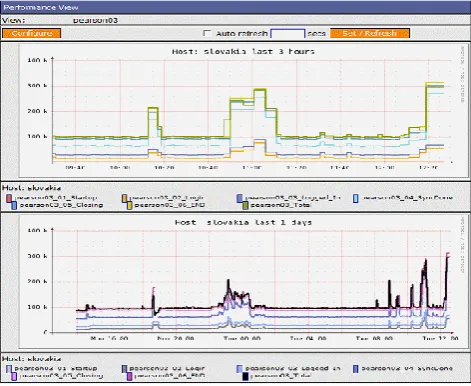
eValid's Rich Internet Application Monitoring Services are hosted, managed automated testing of secure web transactions with 100% reality and repeatability. Operating at frequencies as high as 10/hour, eValid Rich Internet Application Monitoring Services act to confirm essential availability of end-to-end E-commerce applications.eValid's web rich internet application monitoring watches the performance and integrity of the end-to-end business applications in real time. Operating at established regular intervals 24/7, the eValid robot test engine sends status, warnings and failure notices to in real time, based on the results of tests as they play back automatically. Timely information like this alerts one to any problems in the web applications and network monitoring software before the users experience them. Typical eValid rich internet application monitoring services report with regular email, and via and account on the special Nagios-Based reporting system, with sample performance reports as shown below.
3.6 Site Analysis System
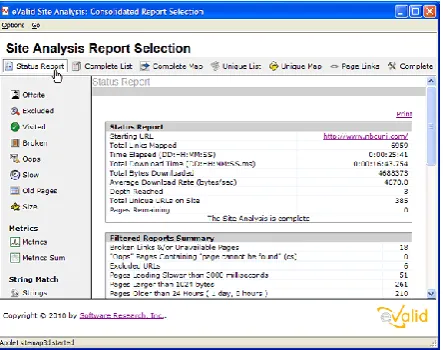
The eValid web site analysis process produces a detailed performance analysis, using a build in page spidering engine. Subject to user constraints and controls, it searches every page at/below a designated starting page and, along the way, applies a series of quality checks to each page, and accumulates page dependency data and performance analysis to drive a powerful 3D-SiteMap Display that shows page interactions and properties.
eValid site analysis uses a powerful page scanner that, beginning with the starting page, creates a list of links to visit and then visits them, in turn adding to the list of "to be visited links". This list is pruned according to user instructions, and can exclude URLs based on string matches.
[image:4.595.56.278.321.496.2]As each page is downloaded into the eValid browser it is passed through a series of site analysis quality filters and violations of the quality rules produce entries in the output reports. In addition, the scan and search engine keeps a complete list of page dependencies, used to produce a Complete Map of pages or a 3D-SiteMap display of dependencies.
Figure 4 Size Analysis Report
3.7 Example Uses
Early application of the eValid system has been very effective in producing experiments and collecting data that is very useful for WebSite checking. While eValid is expected to be the main engine for a range of WebSite quality control and testing activities, two of the most typical -- and most important -- applications are chosen to illustrate how eValid can be used.
3.8 Performance Testing Illustration
To illustrate how eValid measures timing a set of Public Portal Performance Profile TestSuites are built that have these features:
Top 20 Web Portals. 20 commonly available WebSites are selected on which to measure response times. These are called the "P4" suites.
User Recording. One user's excursion is recorded through these suites and saved that keysave file (playback script).
User Recording. The scripts are played back on a 56 kbps modem so that a realistic comparison can be had of how long it would take to make this very-full visit to selected 20 portals.
P4 Timings. The elapsed time it took for this script is measured to execute at various times during the day. The results from one typical day's executions showed a playback time range of from 457 secs. to 758 secs (i.e. from -19% of the average to +36% of the average playback time).
Second Layer Added. A set of links is added to the base script to each page referenced on the same set of 20 WebSites. This yielded the P4+ suite that visit some 1573 separate pages, or around 78 per
WebSite. The testsuite takes around 20,764 secs (~5 Hrs 45 mins)
to
execute, or an average of 1038 secs per WebSite. Lessons Learned. It is relatively easy to configure a sophisticated test script that visits many links in a realistic way, and provides realistic user-perceived timing data.eValid is presently used in support of various customers' WebSite quality control activities.
4. CONCLUSION
This work demonstrates the software testing models, web testing strategies and the analysis and testing of web application using eValid. eValid tests any WebSite or web application, extranet or intranet, or web service. In fact, eValid tests any kind of system that is viewed with a browser. eValid's unique and powerful technology focuses on every part of WebSite quality. eValid is a different technology where test and analysis functions are all built inside the eValid browser. Unlike client/server methods, and HTTP proxy/wrapper techniques, eValid delivers + efficient, accurate, repeatable, unambiguous, real WebSite and Rich Internet Application (RIA) behavior testing. One can rely on eValid to make sure his application is top quality.
5. REFERENCES
[1] Buie, E.,Testing, http://www.testingstandards. co. uk /living_glossary.htm, February 08.
[2] Burdman, J., Collaborative Web Development: Strategies and Best Practices for Web Teams, Addison-Wesley,1999.
[3] Courtney. P, Testing e-commerce. Applications Development Trends, 24-34, 1999.
[4] Crispin, L. , Stranger in a Strange Land: Bringing QA to
a Web Startup,:
http://www.stickyminds.com/docs_index/XUS247559file 1.doc, 2001.
[5] Driscoll,S., Systematic Testing of WWW Applications, 2001 http://www.oclc.org/webart/paper2/.
[6] Gerrard, P Risk-Based E-Business Testing: Part 2 – Test
Techniques and Tools,
http://www.evolutif.co.uk/articles/EBTestingPart2.pdf
[8] Goldsmith, Robin F. Information on the V-Model,
Software Development Magazine,
http://www.sdbestpractices.com/documents/s=8815/sdm 0208e/, 2002.
[9] Hayes, L. Testing distributed applications: Unraveling the Web, Datamation,108-114, Jul,1996.
[10] http://searchsoftwarequality.techtarget.com/sDefinition/si d92_gci1242903 html, February 08, 2009.
[11] Janardhanudu, Girish, “White Box Testing”, https://buildsecurityin.us-
cert.gov/daisy/bsi/articles/bestpractices/ white-box/259-BSI.html, February 08, 2009.
[12] Los Alamitos, “IEEE Standard Glossary of Software Engineering Terminology” IEEE Computer Society Press, 1990.
[13] MacIntosh, A. & Strigel, W., “The Living Creature” –
Testing Web Applications,
http://www.stickyminds.com/docs_index/XUS11472file1 .PDF, 2000.
[14] Marrik, Brian. Classic Testing Mistakes and New
Models for Test Development,
http://www.testing.com/writings/writings.html, 1999.
[15] Mikucionis, Marius, Larsen, Kim, Nielsen, Brian, Online On-the-Fly Testing of Real-time systems, http://www.brics.dk/RS/03/49/BRICS-RS-03-49.pdf, February, 2009.
[16] Miller, E., Website Testing,
http://www.soft.com/eValid/Technology /White.Papers/ website.testing.html, 2002.
[17] Patton, Ron, Software Testing, 2000.
[18] Ritter, D., Web Testing Is Not an Oxymoron, Intelligent Enterprise, 66-69, 1999.
[19] Samaroo, A., Allott, S., & Hambling, B. (1999). E-ffective Testing for E-Commerce, http://www.stickyminds.com/docs_index/XML0471.doc, 2001
[20] Shea, B., Software Testing & Quality Engineering Magazine, 42-46, May 2000.
[21] Smith, R. Behind Closed Doors: What every tester should know about web privacy. Software Testing & Quality Engineering Magazine, 43-48, Jan 2001.
[22] Software Engineering Research Network, University of
Calgary, Alberta, Canada.
http://sern.ucalgary.ca/~sdyck/courses/seng621/webdoc.h tml#Unit
[23] Stout, G.A, Testing a Website: Best Practices http://www.reveregroup.com/exchange/articles/stout2.pd f, 2001
[24] Swebok, Guide to the Software Engineering Body of Knowledge, A project of the IEEE Computer Society Professional Practices Committee, 2004.