138
ARE YOU TRIGGERING?
Tan King Hiyang
Universiti Tun Hussein Onn Malaysia
ABSTRACT
Technology provides a tool for solving instructional problems. However, technology integration into instructional design requires creative and strategic effort. Current education focus is on student-centred learning. To motivate student participation and instil meaningful learning require flexible and nonlinearly designed interface. High skill level and advance technological mastery is not an ultimate necessity. Trigger for example, is a wonderful gadget embedded inside Powerpoint® that can assist teachers to transform into a technological expert. Trigger allows object/s to be animated only when a specific object on the Slide Show is clicked, hence triggering the animations. Trigger can transform your instructional material into dynamic, flexible and interactive learning support materials. This paper is intended to share the skill and pedagogical knowledge of integrating trigger into slide presentation. Basic steps is demonstrated to allow for mastery experience. A few creative and effective applications of triggers into instructional materials have been suggested. Hopefully, such experiences will trigger the reader to explore further regarding the magic of triggering.
Keywords: trigger, instructional design, animation
INTRODUCTION
139
feedback, expert advice, and questions and answers keep learners interested and reinforce skills (Hick 1997). Teaching and learning is a process of communication, in which content is encoded into instructional symbol deliver through a channel of media. The symbol is decoded by learner into understandable information and digest, then store into short term or long term memory depending on the level of been triggered. Trigger is just like the media channel, inculcate the sender to deliver flexibly, efficiently and interactively, its encoded content so that, the learner will be learning meaningfully.
THE BASIC OF TRIGGER
Trigger is a feature introduced in PowerPoint XP / 2002 and the later versions. It is not new to the presentation software. However, seldom have I notice any creative local application in school or education institution.
Trigger allows object/s to be animated only when a specific object on the Slide Show is clicked, hence triggering the animations. It is just like our household electrical switch, once press, will trigger the turning on/off of our electrical appliances. It could be any object designed into the slide, such as a picture, a button, text box, paragraph or even a hidden object function as a hotspot – that will set off an action when the user click it. The trigger action can be an activation of a movie, a sound play, an animation or even a sequence of actions during the slide show.
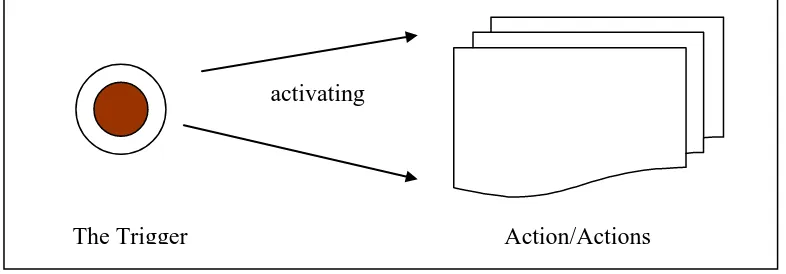
[image:2.595.101.494.539.676.2]Trigger requires two components as illustrated by the figure 1 below. The action must be planned earlier. It must be designed into the slide show, at its appropriate location and with its designated action. Then the triggering object ( which can be either a word, a line of text, a paragraph, a picture, a graphic or any hotspot integrated in the slide) must be identified. Once integrated, the trigger can be utilized during slide show. To activate the action/actions, the user has to click the TRIGGER to turn on the animation of the ACTION component.
Figure 1: Components of Trigger
STEPS IN EMBEDDING TRIGGER
The Trigger Action/Actions
140
Using the figure1 above, we wish to display the action graphic with a box in animation when the trigger button is clicked. These are the steps,
[image:3.595.192.417.175.388.2]i. Insert any AutoShapes to act as the trigger button and any AutoShapes to function as the action graphic. Animate the action graphic with a Box In entrance animation.
Figure 2: Custom Animation
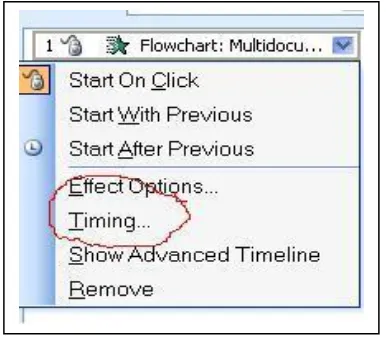
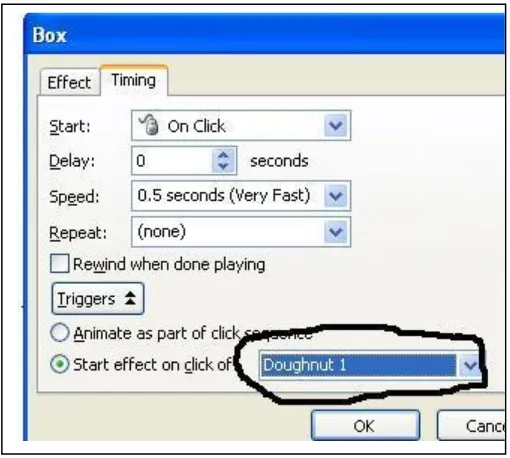
ii Click at the animation line and select Timing(figure 3), then, click the Triggers button(figure 4).
[image:3.595.191.384.488.657.2]141 Figure 4: Tiggers
iii. Click at the start effect on the click of and select the triggering object. Click OK to complete the animation.
Figure 5: Select the Trigger Object
142 TRIGGER APPLICATION
Triggering Graphics
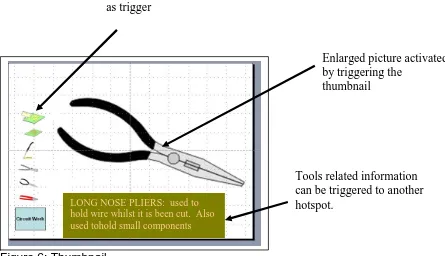
[image:5.595.85.530.387.643.2]Trigger can be integrated into graphical presentation to enhance interactivity between student-content, student-student and teacher-student. Visual provide a concrete referent for ideas (Smaldino et.al.2005) and it motivates learners by attracting their attention, holding their attention and generating emotional responses. During a lesson on identification of tools and equipment for circuit work, different pictures of related tools can be reduced into thumbnails (figure 6 ). Such design interface will arouse the curiosity of the students. Student can select which thumbnail to view or the selection of thumbnail can be flexible depending on situational requirement. Triggering is activated when the thumbnail is clicked. It will trigger the display of a larger picture in the centre of the slide. Discussion and information sharing can be conducted. Picture thumbnails that has been integrated with triggers can motivate the student continuously to explore and encourage interpersonal communications.
Figure 6: Thumbnail
Triggering Text
Using the enlarged picture as the trigger object (figure 6), boxes of text can be displayed with a trigger set to the enlarged picture. Presentation of visual enabling student with visual learning style to understand the content better. If we display graphic and information simultaneously, student will a longer
Enlarged picture activated by triggering the
thumbnail Thumbnail functioning
as trigger
LONG NOSE PLIERS: used to hold wire whilst it is been cut. Also used tohold small components
143
moment to familiar themselves with the screen display and then, they will require time to adjust and refocus on the respective area. It may also distract attention and interfering the meaningful learning. Screen display components that need to be trigger to reappear can and will, adding flexibility to instructional implementation and inspire the instructor to experiment with different teaching strategies.
Triggering Hotspot
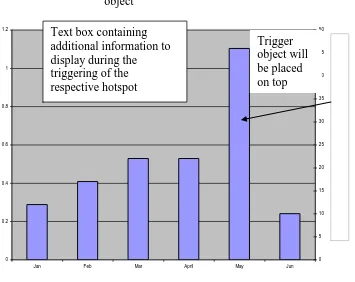
Triggering require the presence of two objects, a trigger and a triggered action. At times, we require multiple triggers to different actions, but, the inserted graphic cannot be ungrouped, so, restrict the integration of multiple triggering design. To solve this problem require creative manipulation to slide design. A transparent Hotspot can be inserted to function as the trigger. Looking at the figure 7 below, the designer intent to utilise each chart bar as the triggers, to activate a text box of information to strengthen or justify the chart display. First of all, insert any AutoShape(preferably identical shape with the background object). Format the object and adjust the level of fill transparent to 100 per cent. Select the No Line option, the object should be transparent on screen. Place the transparent object on the selected background and trigger it as usual to its designated text box. Repeat the similar process to other triggers.
0 0.2 0.4 0.6 0.8 1 1.2
Jan Feb Mar April May Jun
[image:6.595.96.451.388.670.2]0 5 10 15 20 25 30 35 40 45 50
Figure 7: Transparent Hotspot
Trigger object Text box containing
144 Triggering Chart Display
Presentation of chart during a meeting or during the course of teaching in the classroom is intended to be utilised as aids for discussion. A lot of information need to go into the charts, such as results, highlighting notes, justification findings, labelling etc. Displaying all information concurrently will result in distraction and lost of focus. Chart display can be interactive by integrating trigger and the chart animation tab embedded in the effect option of the custom animation pane.
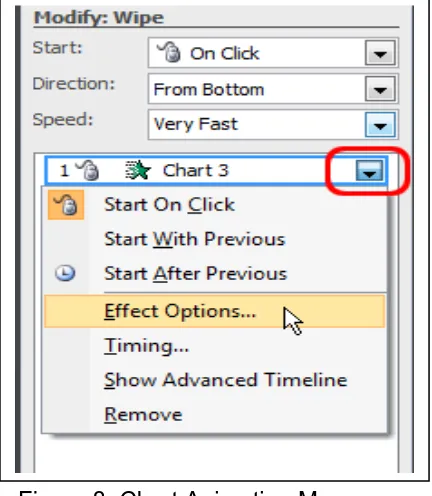
Insert the chart with the Insert Chart option. Animated the chart display with the Custom Animation. Click on the animation tap to display the animation menu box. Click on the Chart Animation tap to display the option of chart display format. Every chart has its own characteristics, but, the format of display should be identical. Exploring the different format such as by series, by categories, by
element in series, by element in categories will alter the sequence of presenting
[image:7.595.112.328.393.641.2]the information according to designated objective. Addition information can be integrated into the chart to highlight certain abnormality within the chart area. If excel chart is inserted, a hotspot trigger object may be required to place on top of the respective chart area. Using a text box to key in additional information and trigger the display of information to the hotspot. With such additional features, the presentation will definitely be more interactive and effective.
145 Figure 9: Chart Animation Display Variation
Triggering Music
Music is a universal language central to every culture of the world (Ron & Nancy Brown 2010). Music reduces mental fatigue, calms tension, focus thinking and greatly impacts creativity and sensitivity. Music will motivate students of all ages. Dissemination of learning information through music is effective because it provides a learning pathway to different types of learning style such as auditory, kinesthetic/tactile (movement), and tactual (elicits emotion) and visual if lyrics are presented. Music or audio material can be integrated into the instructional design as supporting component or as the main media for specific purpose. However, continuous or uncontrollable playing of music can be a nonsense if managed unprofessionally. Trigger will not only resolve that problem but it will also improve and enhance the interactivity of the design.
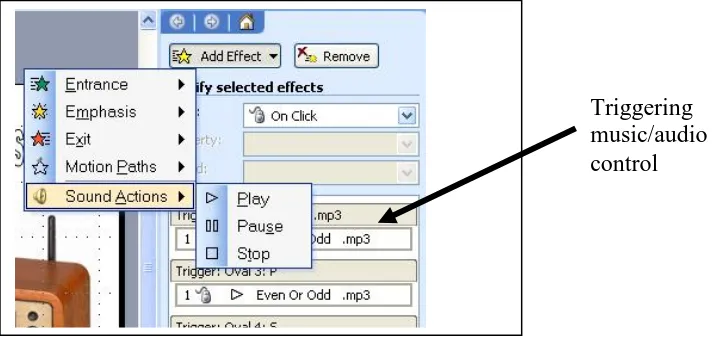
Insert the selected music or audio file into the slide. Click the audio icon and click the Add Effect icon to display the Sound Action menu, three control setting is available to be selected– Play, Pause and Stop. Click and insert the three setting individually to the respective sound file. The setting can be activated during slideshow.
Figure 10: Sound Animation Menu
[image:8.595.130.486.542.712.2]146 Triggering Interactive Quiz
[image:9.595.85.431.234.409.2]Multiple choice quizzes is a form of formative assessment aiming to evaluate the understanding of the student during the course of active learning. Powerpoint quizzes can be student controlled or teacher directed. There are two suggestions to integrate trigger into the quizzes - instant respond and question tips. The object of A, B and C will be functioning as triggers to trigger its respective responses. When student click on the button A, it will trigger the display of √ while clicking on button B or C will trigger the display of X (figure 11).
Figure 11: Quiz with Triggered Respond
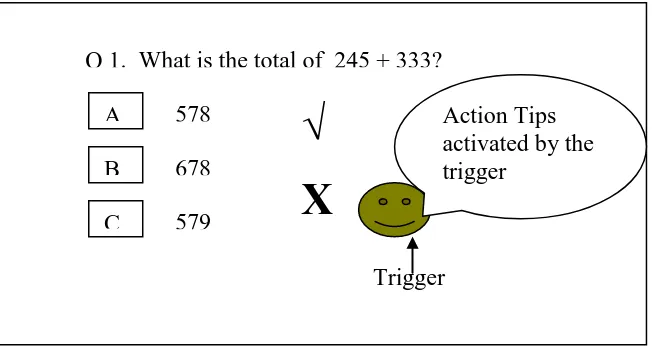
Quizzes can also be interactive by integrating triggering tips. Looking at figure 12, the student who require reminder or revision of the subject matter, can click on the tips object and additional information will be displayed allowing the student to study before answering the quizzes.
Figure 12: Quiz with Triggered Tip
At times, if we develop student learning materials and the student is given the quiz to do it individually and to prevent the student from guessing the correct answer by clicking every buttons, a controlling mechanism can be developed to allow student to try only once on every question. That means, if the student
Q 1. What is the total of 245 + 333?
A
B
C
578
678
579
√
X
Triggered Action
Trigger
Q 1. What is the total of 245 + 333?
A
B
C
578
678
579
√
X
Action Tips activated by the trigger
[image:9.595.86.414.526.699.2]147
click at button A, button B and C will be locked by the mechanism and forcing the student o proceed to the next question. To develop such mechanism, Transparent object (refer to section on Triggering Hotspot) have to be inserted to cover (bring to front) the respective answer buttons. If any button is clicked by the student, it will also trigger the appearing of the transparent object and blocking the buttons underneath. For example, when object A is clicked, the transparent object will cover object B and C; When object B is clicked, the transparent object will cover the object A and C respectively. Such design is best incorporated into student learning materials.
CONCLUSION
As the proverb says, “ Give a man a fish and you feed him for one day. Teach
him to fish and you feed him for a lifetime‖, this paper is intended to share my
experiences for the past few years as instructional design lecturer. Most of the ideas were contributions from the world wide web and my personal experimental encounter with my students and research students over the years. All these suggested applications have been tested and a very positive responses were collected from various sources. Last but not least, I sincerely hope that it has already triggering your professional impulses to start triggering and making your lesson fun, interesting, interactive and meaningful.
REFERENCES
Cennamo K.S., Ross J.D., Ertmer R. (2010). ―Technology Integration for Meaningful Classroom Use‖ USA: Wadsworh.
Hick S. (1997) ―Benefits of Interactivity Multimedia Courseware‖ Trican Multimedia Solutions Inc. http://http-server.carleton.ca.
Ron & Nancy Brown, (2010), ―Why Music? Use Music to Teach‖. INTELLI-TUNES, http://intelli –tunes.com.
Smaldino S.E.,Russell J.D.,Heinich R.,Molenda M. (2005) ‖Instructional Technology and Media For Learning‖ Ohio: Pearson.
Tan King Hiyang, Lee Ming Foong (2010) ―Instructional Design Mediated Interactivity‖ paper presented in The 3rd
Regional Conference on Engineering Education & Research in Higher Education, Kuching.