Systems Reference Library
IBM 1620
BOTRAN
Interpretive Programming System
This reference manual explains the GOTRAK system, a subset of 1620 FORTRAK language. The text progresses step by step from basic fundamentals to complete sample problems that facilitate the writing of GOTRAN programs. Some familiarity with the 1620 computer, mathematics, and data processing is assumed.
© 1961 by International Business Machines Corporation
Page
IBM 1620 GOTRAN... 5
Communication with Computers.. . . .. 6
Machine Language ... 6
Symbolic Programming Systems ... 7
FORTRAN ... 7
IBM GOTRAN . . . .. 7
The IBM 1620 Data Processing System ... 9
The GOTRAN Language... 10
Mode of Arithmetic ... 10
Constants, Variables, and Subscripts ... 10
Arithmetic Statements .. ... 11
Fixed-Point Arithmetic Statements ... 11
Floating-Point Arithmetic Statements ... 12
Control Statements .. ... 14
Unconditional GO TO Statement ... 14
IF Statement ... . DO Statement ... . DO's within DO's ... . CONTINUE Statement . ~ ... . PAUSE Statement ... . STOP Statement END Statement ... . 14 14 15 17 17 17 17
Contents
Page Input/Output Statements . ... " 18 READ Statement ... 18PUNCH Statement ... " 19 PRINT Statement ... 19
PLOT Statement ... 20
Specification Statement .. ... " 22 DIMENSION Statement ... ,... 22
Summary of GOTRAN Statements ... 23
An Example Problem .. ... " 24 GOT RAN Operating Procedures .. ... " .. '" 26 Phase I: Loading the GOTRAN Compiler/Interpreter Program ... 26
Phase II: Loading and Compiling the Source Program ... ; ... 27
Phase III: Program Execution ... 28
Restart Procedures ... 29
Core Storage Arrangement ... 29
Electronic computers are already being widely used in the fields of science and engineering and their use is growing rapidly. Because the application of these ma-chines to problems requiring precise and accurate calculations in large volume relieves the engineer of a tremendous burden of paper work, the digital computer has become firmly established as one of his important tools.
There exist, however, many problems for whose solution the computer is not being utilized. In these instances, it is usually because the problem is not con-sidered sufficiently complex or voluminous to warrant the application of a computer, or because the engineer is not thoroughly familiar with computing techniques and is reluctant to program his problem for the machine. In short, the engineer finds communication with the computer a barrier.
IBM has developed a programming system for the IBM
IBM 1620 GOTRAN
1620 Data Processing System, that enables the engineer to surmount the communication barrier between man and computer with a minimum of effort. This system, which is known as the 1620 GOTRAN, uses a language that is a subset of the 1620 FORTRAN language. It exe-cutes programs directly, that is, without the need to convert GOTRAN statements into machine language in-structions first. For this reason, the user is relieved of any consideration of the actual characteristics of the computer and thus is permitted to concentrate on the problem itself.
This manual gives the specifications of the GOTRAN system, to allow those who have had little computer background to learn the language and to use the system profitably. A section containing a general description of programming and a brief description of the 1620 is included.
Communication with Computers
Computers, despite their well-deserved reputation for speed and power of calculation, cannot think nor solve any and all problems by themselves. To solve a partic-ular problem, the computer must be supplied with a step-by-step plan of operation. This plan is called a
program.
Machine Language
All computers can perform to some degree such opera-tions as add, multiply, compare, etc. Many of the operations it performs are quite elementary; however, it is the combination of a large number of elementary operations arranged in logical sequence that makes it possible for the computer to carry out meaningful proc-essing tasks. This sequence of operations constitutes the program.
Each operation defines a precise function that the machine is to perform; therefore, the procedure must be detailed to a degree not required by manual methods. For example, in assigning a problem to some-one, one might instruct him to "solve this equation." To accomplish this with a computer, it is necessary to define each single step that it must perform to solve the equation and then write the program accordingly.
After the computer is loaded with the necessary
pro-/ LINE LABEL OPERATION OPERANDS & REMARKS (
3 5 6 II 12 15 16 20 25 30 35
o I 0 DO RG 10000.
.0,2 0 START. .T,FM .. + 3 o. ,T,A,B,L £-8
10,3,0 A,M, ~H I 8 B I. o 4 0 CMPA~E eM - 23 I 0 L L L ... L . ..L
lO.5 0 TF WRITE-#-6 CMPARE+h
o 6 0 AM WRITE+(P I
o 7 0 RCTY .I
lOB ,0 WRITe WN,T,Y
J
109,0 eM CMPA~E""(p END
\
I 0 0 8N E S T A ~T + I 2"'.
,\
I I 0 U I I
I ,2.0 r,A. g,L E DS 8 soo
.
I,\
gram, it can be directed to execute the instructions composing the program. Normally, the program is exe-cuted in a sequential manner. The computer starts with the first instruction and progresses serially through the program, analyzing and executing each instruction. The sequence of operations can be altered if desired, by the use of instructions that direct the computer to an instruction located at other than the next sequential position. The last instruction of a program may be used to return control to the first instruction, and to begin the sequence anew for a new set of data.
In addition to writing the program precisely, another requirement is that it be written in code. Whereas in-structions to a human might be given in ordinary language, as:
Multiply A by B
Divide the product by C Compare the result with D Etc.,
the computer must be addressed in a much more concise numerical language. The instruction "Multiply A by B" must be presented to the computer in a form such as 23 08125 16501 called machine language in which the number represents the information needed to perform the operation. Expressing problems in terms of the code of the computer (machine language) can be a deterrent to the user.
10000
[image:6.613.55.302.510.698.2]Symbolic Programming
Systems
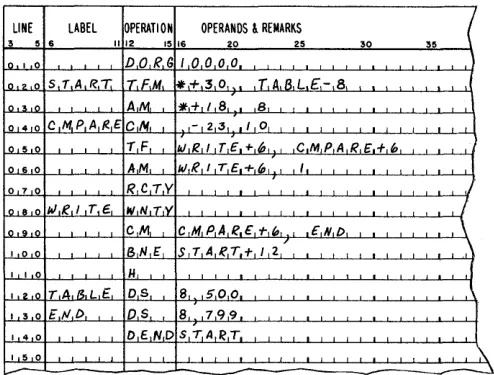
To allow programmers to express their problems in a language more easily comprehensible than machine language, a considerable effort has been made to develop Symbolic Programming Systems. These pro-gramming systems employ symbols, mnemonic operation codes, and English words or abbreviations in developing the program. Associated with the program-ming system is a machine language program, called a processor. The processor accepts the program written in symbolic language which is termed the source program, and converts it to a machine language, or object, program that can be loaded into the machine and executed to accomplish the aSSigned task. Figure 1 illustrates a short program written in 1620 symbolic language and the resulting machine language program.
FORTRAN
Al though symbolic programming systems greatly simplify programming, they are essentially machine-oriented; that is, they require the programmer to think in terms of the command structure of the particular machine. With the advent of compilers such as FORTRAN, a highly significant step was taken in the development of programming systems. FORTRAN made it possible, for the first time, for coding systems to be designed in terms of the language of the problem to be coded, instead of in terms of a specific data processing system. The FORTRAN language is now used to formulate mathe-matical problems for several data processing systems including the 1620. Source programs written in FORTRAN
Problem
Gotran Statements
Input Iv\edia
( Cards
I~I
or
language (a language that resembles the ordinary language of mathematics) must be converted into a machine language program before they become useful. The program that accomplishes this translation is called a FORTRAN compiler.
The programming systems described in the preceding paragraphs enable a programmer to write a program in a language more familiar to him than machine language. They are converted into machine language by a processor program, and the output of the processor program, which is the object program, is loaded back into the machine to perform useful work. The machine language program can be loaded into the machine at the discretion of the user, and can be re-executed at any future time simply by reloading it. This technique is particularly effective for large programs that must be used time and time again with varying data and for which it is most economical to process the source pro-gram just once.
IBM GOTRAN
Many problems require only one run or possibly a few runs on the computer, after which they are supple-mented by a different problem that requires not only new data but a new program. Here, it is desirable to find a means to solve these, singly or in batches, without the need to create a different object program each time (perhaps to gather dust after its first use). This would enable the powers of the computer to be effectively harnessed to a host of new problems still being attacked by slower, less efficient methods.
1620
1 - - - ,
I I
I
.!
11 1~ ~ I
I
1 1
I
I
8
j
:
I I
1
I
Answers
~
1--4-1
---
~
. . . 1 ' -.1 Pseudo-Tape
or
~
-
....
--\~
r
Console Typewriter
Figure 2. Structure of the GOTRAN System
I 1 - -_ _ _ _ Instructions - - '
I
I
I 1
I _ _ _ _ _ _ _ _ _ _ _ _
J
Tape
Typed Output
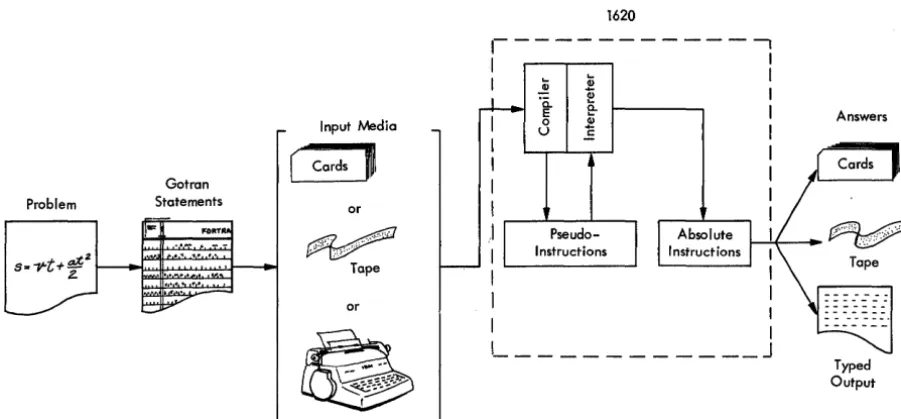
[image:7.617.57.508.497.706.2]The IBM 1620 GOTRAN System has been developed to fill this need. It compiles the problem-oriented source statements into pseudo-instructions within the machine; the computer then interprets and executes them without recourse to the conventional machine language output program. Such a system is called an interpretive system and the pseudo-instructions (which the programmer never sees) are referred to as interpretive language.
Figure 2 illustrates the basic structure of the GOTRAN System.
One great advantage of the GOTRAN System is that the compiler, once loaded, remains in the machine; it is effectively a part of the computer until removed. There-fore any number of different problems may be presented to the computer, singly or in batches, with solutions forthcoming at once. The time-consuming tedium of
loading the system, creating the object deck or tape, loading the object program, etc., for each job, is elim-inated. All that the user need be concerned with is the GOTRAN language because conversion to the interpretive language and subsequent execution of the instructions is entirely automatic. There is, naturally, a price exacted for this: that price is a somewhat reduced speed of operation as well as sacrifice of the portion of core storage that must be occupied by the compiler. The user must decide, on the basis of the individual job, whether GOTRAN is the system which is best for him.
The 1620 GOTRAN System language falls within the framework of the IBM 1620 FORTRAN System. (t
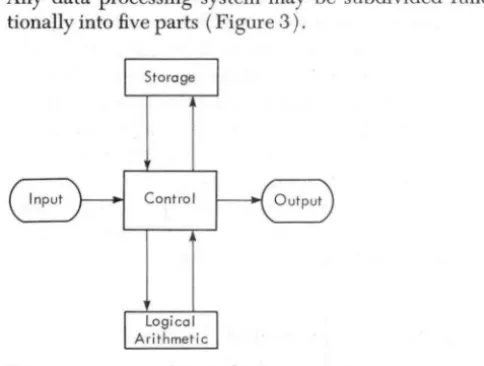
Any data processing system may be subdivided func-tionally into five parts (Figure 3).
Control
Figure 3. Functional Parts of a Computer
The Input Sec~on
The input section accepts external information and
con-verts it into a form in which it can be manipulated and
stored internally. In the 1620, input information may be
inserted by means of punched cards, punched paper
tape, or the console typewriter. Figure 4 shows an
[image:9.622.77.319.153.336.2]input/output component of the 1620, the IBM 1622 Card Read Punch.
Figure 4. IBM 1622 Card Read Puneh
The IBM 1620 Dat
a Pro
c
essing System
Storage Section
The storage section of a computer contains both the
coded instructions that specify the actions to be
per-formed (the program) and the data that is to be
manipulated (added, multiplied, compared, etc.) by
the instructions.
The 1620 utilizes magnetic core storage; its capacity
ranges from 20,000 to 60,000 digits.
Logical-Arithmetic Section
The logical-arithmetic section is the place where data
manipulation is actually performed. The control section
decodes and interprets the instructions in storage and
monitors the progression of the program through its
planned sequence.
Output Section
The output section translates the internal information
to some convenient external form. In the 1620, this ex-ternal form may be punched cards, punched paper tape,
or a printout at the console typewriter (Figure 5).
Although the speeds of the input/output devices are
very rapid when compared to manual methods, they
are still generally quite slow in comparison with the
internal speeds of data -handling.
Figure 5. IBM 1620 Console Typewriter
[image:9.622.324.574.477.709.2] [image:9.622.49.298.481.715.2]The
GOT RAN
Language
The GOTRAN language consists of 13 different kinds of statements which may be grouped into four classifica-tions: arithmetic statements, control statements, input/ output statements, and a specification statement.
Before explaining the GOTRAN language, there are some other considerations bearing on the statements that need to be explored. These are: (1) Mode of arithmetic and (2) Kinds of numbers, i.e., constants, variables, and subscripted variables.
Mode
of
Arithmetic
Generally speaking, arithmetic in computers is done in either a fixed-point or floating-point mode. These two terms indicate the form in which the numbers are ex-pressed. Numbers expressed as integers are considered fixed point. Thus, the integers 3, 52, and 724 are fixed-point numbers.
Floating-point arithmetic is a technique used to eliminate the complex programming required for cor-rect placement of a decimal point in arithmetic operations. This complex programming results from the fact that computers do not generally recognize the decimal point present in any quantity during calcula-tions, and therefore cannot recognize the magnitude of the result. Floating point is a method in which in-formation regarding the magnitude of all numbers accompanies the quantities in the calculation. This is accomplished by expressing all numbers as decimal fractions times a power of ten. For example:
427.93456 is expressed as .42793456 x 103 .0009762 is expressed as .9762 x 10-3
•
Internally these numbers are carried as 5342793456 and 4797620000 where the first two digits are the character-istic (i.e., the power of ten with 50 added to avoid a negative characteristic) and the remaining eight digits are the mantissa. In floating point the decimal is always moved to the left of the first nonzero digit, with proper adjustment to the exponent. This is called normalizing the number.
In GOTRAN either fixed-point or floating-point num-bers can be used, subject to the rules described under ARITHMETIC StATEMENTS.
Constants, Variables and Subscripts
Within the framework of fixed-point and floating-point arithmetic, the system must provide for expressing con-stants and variables.
Whereas in ordinary computations these quantities are expressed routinely and with considerable freedom, very definite rules must be observed in GOTRAN state-ments, as the computer is incapable of exercising
judgment in interpreting the wishes of the programmer. Also, a floating-point variable may be subscripted so that it becomes one element of a one-dimensional array. The GOTRAN programmer will encounter these four kinds of numbers in writing arithmetic statements.
1. Fixed-Point Constants 2. Fixed-Point Variables 3. Floating-Point Constants
Since the arithmetic statements define the numerical calculations that a program is to execute, they will, no doubt, constitute the heart of most GOTRAN programs. An arithmetic statement resembles, but is not, in fact, a simple statement of equality. It consists of a variable to be computed, followed by an equal sign, followed by an expression.
The mode of arithmetic used in an arithmetic state-ment can be either fixed point or floating point, but cannot be mixed. The mode is determined by the con-ventions used to write the statement.
By its nature, fixed-point notation is somewhat re-stricted. Thus it is expected that most statements will be in floating-point form. The following descriptions are divided into sections on fixed-point and floating- . point statements.
Fixed-Point Constants
Fixed-point constants may consist of one to three deci-mal digits. A preceding plus or minus sign is optional
Examples:
+
729 -438
Fixed-Point Variables
Fixed-point variables must be represented by one of the alphabetic characters I,
J,
K, L, M, or N.Examples: I
M
K
Fixed-Point Arithmetic
Statements
The expression to the right of the equal sign in a fixed-point arithmetic statement may contain a constant and a variable and one operation symbol. The operation symbols in fixed-point statements are restricted to + and -. Fixed-point multiplication and division are not allowed. Thus, a fixed-point statement must be in one of the following forms:
v=c v=v+c v=v-c
where v represents a variable and c a constant. Examples:
J
=765M=J+42 L=N-372
Arith metic Statements
The results of a fixed-point arithmetic operation are restricted to a maximum of three digits. If a result greater than three digits is generated, only the three low-order (rightmost) digits are carried as the result.
The equal sign in any arithmetic statement means is to be replaced by rather than is equal to. A statement such as N = N -40 is therefore valid. The quantities represented by a fixed-point variable must, of course, be fixed point. Fixed-point variables may not be sub-scripted.
Floating-Point Constants
Floating-point constants may consist of any number of decimal digits (up to 20) with a decimal point at the beginning, at the end, or between two digits. A preced-ing plus or minus sign is optional.
Examples: 562.
-0.0583 3.1415926
An alternative way of expressing floating-point con-stants is to affix a one-digit or two-digit decimal ex-ponent preceded by an E (for exponent). The E must immediately follow the last digit of the number.
Examples: 14.2E3=14.2 x 10³ or 14200.
5243.7E-5=5243.7 x 10-5 or .052437 3.0E11 =3.0 x 10¹¹ or 300000000000. In GOTRAN, floating-point constants are expressed in "external" form by the user ( i.e., in either of the two forms shown as examples), and are converted auto-matically to the form in which they are carried internally (see MODE OF ARITHMETIC). Internally, float-ing-point constants become ten-digit quantities in the form:
c m
X'X'
I xxx~xxxx'\where c is the characteristic, m the mantissa, and the original number is m x 10c-50
•
The magnitude of the number thus expressed must be zero or must lie between 10-50 and 1049
•
Floa~ing-point
numbers that contain more than eight digits (up to 20 digits) have their magnitude properly maintained by correct adjustment to the characteristic. Only the eight high-order (leftmost) significant digits, however, are carried as the mantissa.Floating-Point Variables
Floating-point variables are expressed as one to four
alphabetic or numerical characters (no special charac-ters ). The first of these characcharac-ters must be alphabetic, but may not be I,
J,
K, L, M, or N, since these are reserved for fixed-point variables.Examples: B
HIT2 PRES
SUBSCRIPTED FLOATING-POINT VARIABLES
A floating-paint variable may be subscripted by ap-pending to it one fixed-point variable enclosed in parentheses. The floating-point variable can thus be made to represent any member of a one-dimensional array. The subscripts are fixed-point variables with values that determine which member of the array is meant.
Examples: C (I) TEMP (N)
The use of a fixed-point subscript with a floating-point variable does not violate the rule of mixing modes in an arithmetic statement.
Functions
A GOTRAN floating-point statement may contain anyone of six functions and its argument. The functions are: LOG (X) meaning LOGe of X
EXP (X) meaning eX SQR (X) meaning
VX
SIN (X) meaning SINE of X COS (X) meaning COSINE of XATN (X) meaning ARC TANGENT of X
The name of the function to be evaluated must be written with the three characters shown, followed by the argument in parentheses. The argument must be a floating-point variable; it mayor may not be sub-sCripted.
Examples: SIN (B) LOG (Q (N)) SQR (RAD)
Floating-Point Arithmetic
Statements
Floating-point constants, variables, and functions have been defined, but before examining some floating-point arithmetic statements, it is necessary to state a few general rules: ,
The variable to the left of the equal sign must be a
The expression to the right of the equal sign must contain no more than one operation symbol. This symbol may be:
+ for addition - for subtraction
:!~ for multiplication j for division
:!~ :!~ for involution (raising to a power)
Examples: 1. TORQ = - 7.5
2. SUM=AREA+3.14E-2. 3. RAD=W:!¢T
4. PER=1.0jF 5. ANG2= Y :!~ :!~ 3. 6. A=B
7. C=ATN (Y)
8. A (I) =B (}) +C (K)
Example No.2 follows the rule of only one operation symbol per statement although it appears to have two signs; the minus sign merely denotes a negative ex-ponent. Statements such
as
C = - D + E and A = - Bare invalid. The latter statement must be written A=O.O-B to be acceptable in the GOTRAN language. The former, C= -D+E, must be broken into two statements, each containing one operation symbol, thus:C=O.O-D C=C+E
for solution to be effected by GOTRAN.
As stated previously, in GOTRAN language, the equal sign means "is to be replaced by" and not "is equal to." Therefore, the result of the first statement is that C is replaced by (-D). The result of the second statement is that C (which is now ( - D)) is replaced by C + E, which is -D+E. The solution is complete.
Coding a Typical Formula
As a further illustration of the manner in which arith-metic formulas containing more than one operation symbol must be broken down into several statements, consider the formula:
at2 s=vt+
2
[image:12.617.309.510.103.271.2]CODING STATEMENTS
state-~
C FOR COMMENT STATEMENT 1iNUMBER <3 1 5 67
7,. jf 2 • 0 )
Figure 6. Breakdown of the Equation s = vt
+ -
ae
2COMMENTS
An entry beginning with a C followed by two blanks is considered to be a comment. It is not processed. If the first character of a statement to be processed is C, only one blank may follow it. Comments may be used at any point in a program; they are typed out at the console during compilation.
The third and fourth statements of Figure 6 again illustrate the fact that an equal sign in an arithmetic statement means is to he replaced hy rather than is equal to. This concept may be better understood if we consider for a moment the internal functioning of the machine.
The basic IBM 1620 has 20,000 positions of core stor-age, each of which is capable of holding a single digit of information. Each core storage position has a unique 5-digit address; addresses run sequentially from 00000 to 19999. Thus, each single digit of information is ad-dressable. When several digits are to be treated as a single quantity (e.g., a 10-digit floating-point number), it too is addressable by a unique address that references the low-order position of the field. The high-order posi-tion is identified by a
flag
hit. Therefore, the machine language instruction 22 15000 19000 is a command to subtract (22 is the machine operation code for subtract) the quantity stored at address 19000 from the quantity stored at address 15000. The result of the operation isstored at address 15000; the quantity at 19000 remains unaltered.
In GOTRAN, the letters or names used for variables are merely convenient methods of noting machine ad-dresses. The GOTRAN instruction A=B-C can be trans-lated literally as "subtract the quantity stored at C from that stored at B and place the result in location A." In this operation, the previous quantity stored at A is replaced by the quantity B-C; quantities Band C re-main the same.
In Figure 6, then, the second statement sets up a temporary storage location (TEM2) in which the value of t2 is stored. The next statement multiplies this quan-tity by a, and stores the value of at2 back in the same
storage location. The fourth statement divides the result of the previous statement by 2, and the value of at2 is
now replaced by at2
/2.
Another important point is illustrated in Figure 6. The divisor in the fourth statement and the exponent in the alternate second statement are constants. Normally they would be written as integers. In this example, however, the statements are written in floating-point form and therefore the integer (2), which is considered a fixed-paint notation in GOTRAN, must abide by floating-point conventions and contain a decimal floating-point.
[image:13.613.69.354.62.224.2]Control Statements
The second class of GOTRAN statements comprises seven control statements. These are so named because they permit the programmer to control the How of his pro-gram. Their format and use are explained in this section.
Unconditional
GO TO StatementGENERAL FORM: GO TO n
Ordinarily, the computer executes instructions sequen-tially; if it is desired to vary this pattern, the GO TO state-ment is used. It causes the program to branch to some statement ( n ), other than the next sequential statement, where n represents the statement number. Any un-signed integer from 1 to 999 may be used. Statement numbers are used merely for cross-referencing within a program; they need not be assigned in numerical sequence, nor do all statements require statement numbers.
The GO TO is unconditional in that execution of this instruction always causes a branch to statement nand the program proceeds from that point.
A blank must separate the words GO and TO.
If
StatementGENERAL FORM: IF (
a )
nt,n2, n3
wherea
is a floating-point variable (subscripted or not) and nl,n2, n3
are statement numbers. A blank must follow the word IF.The IF statement says: if (a)
<
0, go to nl ( a)=
0, go ton2
( a)
>
0, go ton3
~
C FOR COMMENT STATEMENT iNUMBER .3
1 5 67
Thus, the IF statement provides a means of conditionally branching on the basis of the value of the floating-point variable (a). For example, the statement
IF (A (I)) 5,10,12
causes the subscripted variable A (I) to be tested. If it is negative, the program branches to statement 5; if it is zero, to statement 10; if it is positive, to statement 12.
Branching out of the main line sequence of a program when a number is negative can be done by using an IF statement as shown in Figure 7. Statement 15 could be the first of a series of instructions treating the negative number is a special way. At the end of this sequence, it might be desired to branch back to the main line sequence of the program. Thus, the last instruction of the sequence beginning with statement 15 might be the statement GO TO 6. These techniques of branching con-ditionally and unconcon-ditionally are shown to illustrate examples of the use of the IF and GO TO statements. Other uses will suggest themselves in the course of using GOTRAN.
DO Statement
range index limit increment
~ ~ r-"--. ~
GENERAL FORM: DO n 1,
=
rnb rn2 , rn3where n is a statement number,
i is a fixed-point variable and
rnl, rn2 , rn3 are unsigned, fixed-point constants.
rn3 may be omitted, in which case it is understood to be 1.
rnl, rn2 , rn3, must not exceed 3, 3, and 2 digits,
[image:14.613.305.541.429.484.2]The DO statement is perhaps the most powerful of all
in the GOTRAN language. It is a command to execute repeatedly a group of succeeding statements (a loop).
n specifies the range of the DO (or DO loop). The range is the sequence of consecutive statements immediately following the DO statement, up to and including the
statement numbered n.
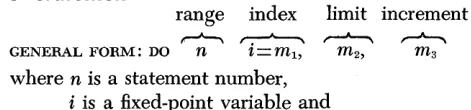
The index of the DO is the fixed-paint variable i which is set at the value m1 for the first execution of the loop and is increased each time by the increment ( m3) until it is about to exceed the limit ( m2 ) •
As previously stated, if the increment (m3) is not specified in a DO statement, it is assumed to be 1.
Thus, the first time the range is executed, i = ml, then i=m1
+
1, and so on until i=m2 •Throughout the range, i is available for computation, either as an ordinary fixed-point variable or as a sub-script (see also INDEX VALUES).
The DO statement says: Execute the following state-ments down through n. Start with i=m1 • Each time statement n is executed, increase the value of i by m:3
and begin again with the first statement following the
DO. Continue in this way so long as i does not exceed m2 •
When a further increase in i will cause it to exceed
m2 , proceed to the next statement following statement n.
Figure 8 illustrates three typical DO statements.
~lIT
DO 30 I=
1, 5, 1 DO 6 I = 2, 10, 2DO 12 1= 1, 20
Figure 8. Typical DO Statements
~
c FOR COMMENT STATEMENT iNUMBER .3
1 5 67
Figure 9. DO Loop for an Array
The Index as a Subscript
For an example of the use of the index of a DO statement
as a subscript, consider the statements shown in Figure 9.
In this program it is desired to calculate A = B
+
C for twenty values of Band C. Mathematically, this is ex-pressed: Ai = Bi+
C i, i = 1, 2, ... 20. Assume the twenty values of Band C (arrays Band C, respectively) are al-ready in storage and control has reached statement 10. The range of the DO is statement 11, and the index is 1.The DO sets I equal to 1 and control passes into the range. B ( 1 )
+
C ( 1) is computed and stored in A ( 1 ). Now because statement 11 is the last statement in therang~
of the DO and the DO is unsatisfied, I is increased to 2 and control returns to the beginning of the range, statement 11. B (2)+
C (2) is computed and stored in A( 2). This continues until statement 11 has been exe-cuted with 1=20, thus completing the formation of array A. Since the DO is satisfied, the program proceedsto statement 12.
The following rules must be observed with regard to DO loops:
Rule 1. No two DO statements in the same program may have the same value of n.
Rule 2. The program must not branch to the last state-ment (n) of a DO loop.
Rules 1 and 2 may be summarized as follows: Once a statement number appears in a DO, another DO, IF, or GO TO must not refer to this same statement. Rule 3. The last statement in the range of a DO must not
be a branch, either conditional or unconditional. In other words, it must not be an IF or GO TO statement.
DO's Within DO's
One or more DO statements may be included within the range of another DO statement, provided a fourth rule is
observed.
DO 1st Level DO DO 2nd Level
[
DO 3rd Level
I
DO[
DO 3rd LevelI
DO 2nd Level
DO 3rd Level DO 4th Level
I
CORRECT INCORRECT
Figure 10. Nested DO Loops
Rule 4. If the range of a DO statement includes another DO statement, all statements in the range of the
in-cluded statement must also be within the range of the encompassing statement. Figure 10 illustrates this rule.
A set of DO'S satisfying this rule is called a nest of DO'S. As can be seen from Figure 10, more than one level
of DO loops is possible. In GOTRAN, as many as six levels of DO loops in one nest are permitted. Any number of loops may exist within each level. All DO loops, whether nested or single, must obey rules 1, 2, and 3. Rule 4 applies only to nested DO'S.
Index Values
A significant aspect of DO loops is the use and preserva-tion of index values. As previously indicated, the index is a fixed-point variable and hence must be represented by one of the six characters reserved for this purpose: I,
J,
K, L, M, or N. In a nest of DO'S, each DO loop level begins before the loop of the previous level has been completed. Therefore, the index of the inner DO loop must not be the same as the succeeding higher levels of loops. For this reason the levels of DO loops in anyoneDO
[
of the second level. Assume both DO'S in this level use the index M. This is permissible because the index value of the first loop is completely used before the second loop is begun. Anyone or all of the letters I, K, L, N can be used for the third level.
Program control may leave the DO loop in one of two ways: either as a result of the DO becoming satisfied, or as a transfer out of the DO range by an IF or GO TO statement (see Figure 11). With the DO becoming satis-fied and control passing to the next statement after the range, the exit is said to be a normal exit. After a normal exit from a DO occurs, the value of the index controlled by that DO is the value of m2 or the highest value in the sequence that does not exceed m2 • In this case and in
the case in which the exit occurs by a transfer out of the DO range, the current value of the index remains available for any subsequent use. If the exit occurs by a transfer that is in the range of several DO'S, the current value of all the indexes controlled by these DO'S are preserved for any subsequent use.
in-~C FOR COMMENT
Sr,.~~~T ~
FORTRAN{ 1 5 67
Do I 2, I = I
,
1,00~
Ocl.T,
=
ANGI - AN,G2(I)IF ,(,DEL T,) /I , 2,0 I I
/.1 CONT,INU,E 12 CON,T,INUE
13 X )( X X X,X. ,(,1/ 0 AWGL£ FOUND R.OUT.INE.)
)
,
J
,20 IV,Y,y,V,Y,Y, ,CA,N,S L £ F 0 (j tV./) Ro U T,I N E,)
"
~
,
,
,
,
,
,
-
--Figure 11. Table Search
index during the execution of the DO loop can lead to unexpected results unless due caution is exercised.
CONTINUE
Statement
This is a nonexecutable dummy statement. It consists merely of the word CONTINUE and is analogous to the in-struction NO OP which is found in nearly all computer command structures.
CONTINUE is frequently used in the range of a DO to fill the requirement that the last statement in the DO loop cannot be a branch statement. As an example of a program that requires CONTINUE statements, consider the table search program shown in Figure II.
This program examines the 100-entry angle table until it finds an entry that equals ANGl, whereupon it will exit to statement 20, with the successful value of I available for fixed-point use: if no entry in the array equals ANGl, a normal exit to statement 13 ultimately occurs. The same program without the two CONTINUES would not work because
A) the IF statement (a conditional branch) must not refer the program to the last statement of the DO loop, and
B) the last statement in the range of a DO is a branch. Another use of the CONTINUE statement is in a nest of DO loops. A rule of DO nesting is that no two DO state-ments can end in the same statement number. Figure 12 illustrates the manner in which CONTINUES are used to achieve the effect of having a common statement
ter-minating several DO loops, without violating the rule of two DO'S ending with the same statement.
PAUSE
Statement
This statement consists of the word PAUSE. The program will halt upon execution of the PAUSE statement. Press-ing the Start key causes the program to resume opera-tion with the next GOTRAN statement. Inserting PAUSE statements into the program gives the programmer the opportunity to check its performance at critical points.
STOP Statement
This statement consists of the word STOP. Execution of the statement causes the program to halt. Prior to halt-ing, the machine will print out: STOP END OF PROGRAM. Depressing the Start key conditions the machine to ac-cept another GOTRAN program. Stop statements may be inserted in the program to indicate various conditions beyond which the programmer does not want the pro-gram to progress.
END
Statement
This statement consists of the word END. It must appear as the last statement of the GOTRAN program. The END statement informs the GOTRAN compiler that there are no more source statements to be compiled. As a result of the END statement, the phrase END OF PROGRAM is com-piled and the program halts. Pressing the Start key now causes the program to be executed. END OF PROGRAM will print when execution is completed.
C FOR COMMENT
~EMENT
NUMBER ~Fe
1 567
I
,
DO 7 ,1,=,1 -, 1.0,,
,
,
, ,\)
,
DO 6 J=/,/.O,
i~ 00 ,5 ,K=,/ .. ,/.O, ,
,
,
, , , I,
I
I , ,
, ,
,
,
I , , , •A,( I,) • ,B (,J.) C'( K,)
}
..t5 PRINT ,
.
\.1
,
"
CONTINUE I,
,
, I,
I ,7 CONT./ NU€'
.
,,
~ I , , , •
,
I,
I I
,
, I ,, ,
,
,
I , ,,
"I
,
,.
-Figure 12. Use of CONTINUES with DO Loops
[image:17.620.72.312.66.330.2] [image:17.620.327.569.490.706.2]In put/Output Statements
In order to execute the GOTRAN program, the machine must be provided with values corresponding to the variables used in the statements. This input data may be brought into core storage via punched cards, paper tape, or the console typewriter. Answers to problems and other intelligence from the computer must be furnished to the user. This output data may take the form of punched cards, punched paper tape or a printout from
the console typewriter.
There are four GOTRAN statements concerned with the transmission of data between core storage and the var-ious input/output devices of the 1620, i.e., the 1620 Paper Tape Reader, the 1622 Card Read Punch, the 1624 Tape Punch, and the Console Typewriter. Three of these statements are the conventional Read, Punch, and Print commands. The fourth is a powerful new statement for plotting curves.
READ Statement
A READ statement causes the program to read data into core storage from punched cards (a 1620 equipped with a 1622 Card Read Punch) or from punched paper tape (a 1620 equipped with a 1621 Paper Tape Reader). The same statement used in conjunction with a console switch causes either system to accept data entered manually at the console typewriter. It must be borne in mind that the program is calling into the com-puter variable data, not GOTRAN statements, and that this is occurring during the execution phase. The man-ner in which GOTRAN statements (including the READ statement itself) are loaded into the machine is de-scribed under GOTRAN OPERATING PROCEDURES.
GENERAL FORM: READ, List of Variables~
where the list consists of from 1 to 5 fixed-point or float-ing-point variables (they may be intermingled), sep-arated by commas.
The READ statement causes input data records (each value is one record) to be brought into core storage until the complete list has been read in. When each variable in the list (up to five) has received a value, the list is said to be satisfied.
Examples: READ, A, B, L, M, TEMP READ, D,
J,
X (K)(Note that the last item in the list is not followed by a comma. )
The records (card, tape, or console typewriter) are brought ~nto the machine, converted to internal nota-tion if floating pOint, and stored in the locations specified in the list of the READ statement.
Card Input
Each card is one record; each card may therefore con-tain the value assigned to one variable. To satisfy a list of 5 variables requires 5 cards.
The value to be aSSigned to a variable is punched in the card in any columns from 1 through 72. Each float-ing-point number can contain up to 20 digits, of which the eight high-order significant digits will be used. The internal characteristic will be adjusted to reflect the magnitude of the number.
For example, the number
00161473902.75 is brought into the machine as
161473902.75 and converted to
5916147390
If the number is beyond the range of values that can be expressed with 20 digits, it is necessary to express it in exponential form (see FLOATING-POINT CONSTANTS). Neither an end-of-line character nor a record mark is required on the card. The order of the input data records (cards) must be the same as the order of the list associ-ated with the READ statement that brings the data in. For example, the list of the statement
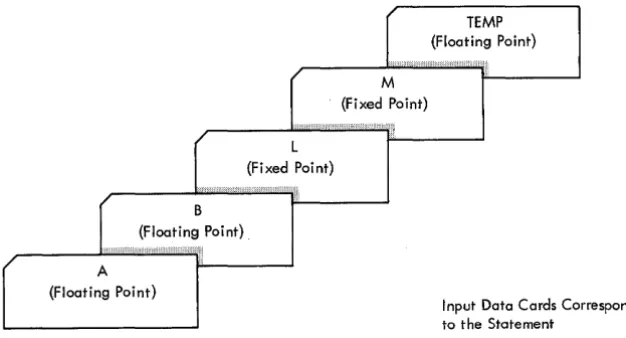
READ, A, B, L, M, TEMP
calls for two floating-point numbers, two fixed-point numbers, and one floating-point number, in that order
(see Figure 13).
Paper Tape Input
r
(Floating Point) TEMPr
/
r
r
L{Fixed Point}
B {Floating Point}.
M
{Fixed Point}
A
{Floating Point}
Input Data Cards Corresponding to the Statement
[image:19.615.70.383.65.234.2]READ, A, B, L, M, TEMP Figure 13. Input Data Records
digits, of which only the eight high-order sienificant digits will be used. When expressed in exponential form, the E must follow immediately after the last digit of the number. The plus or minus sign may separate the exponent from the E.
Console Typewriter Input
If Program Switch 1 is set to OFF during execution, and a READ statement is executed, the program selects the console typewriter as an input device and halts. It is up to the operator to enter the input data manually, in the same order and in the same mode as called for in the list of the READ statement responsible for the halt. An EOL character must be typed at the end of each input value in the list.
PUNCH
StatementGENERAL FORM: PUNCH, List of Variables
where the list consists of from 1 to 5 fixed-point or float-ing-point variables separated by commas. The PUNCH statement causes the program to punch data into cards or paper tape until the complete list has been satisfied.
Examples: PUNCH, A, C, P (J) /
PUNCH, B, D, L, M, X
A maximum of five variables can be punched out by any one PUNCH statement.
Each variable is punched as a separate record; that is, one variable is punched per card if the 1622 Card Read Punch is used. If the output is produced on the 1624 Tape Punch, the last character of each variable punched is followed by an EOL.
GENERAL FORM: PRINT, List of Variables
where the list consists of from 1 to 5 fixed-point or floating-point variables separated by commas. The PRINT statement causes the GOTRAN program to type output data on the console typewriter.
Examples: PRINT, A, C, P (J)
PRINT, B, D, L, M, X
One line of data is typed for each PRINT statement. A maximum of five variables is typed per line.
The typewriter carriage returns before the value of the first variable listed in the PRINT statement is typed. Tabulation occurs between the typing of each variable. The tab stops must be set by the operator. Typing con-tinues until all variables specified in the list have been printed.
Output Data Format
The numbers punched or printed are in the same mode and same order as the names of the corresponding vari-abIes that represent them in the source program state-ment. Fixed-point numbers are in the same form as in-put fixed-point ,constants (see FIXED-POINT CONSTANTS); the value is signed only when it is negative. Floating-point numbers are in one of the following two forms:
l. Eight digits with a decimal point at the beginning, end, or between two digits, preceded by a - sign,
when applicable. For example:
3.0000000 -17.437986 .79340000
O.O~
~ Any number that contains all zeros in the mantissa appears as 0.0 during output.
~
C FOR COMMENT STATEMENT iNUMBER 8
[image:20.613.39.258.75.203.2]1 5 67
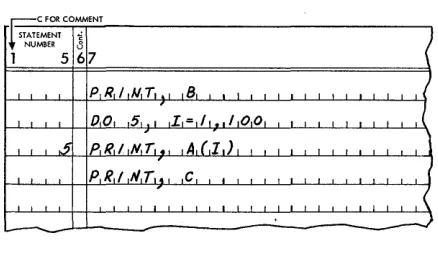
Figure 14. Output DO Loop
2. Eight digits with a decimal point between the first two, followed by a decimal exponent consisting of a signed (if negative) two-digit fixed-point num-ber preceded by an E. The numnum-ber is preceded by a - sign if it is negative.
Examples: 4.1000000E09
1.7986437E-12 -1.6147390E03
The selection of either one of the preceding forms for floating-point numbers being printed or punched is un-der the control of the GOTRAN system. Whenever pos-sible, output values are in the form first shown. If the output quanity is beyond the range of values covered by this form, the number is printed or punched in the ex-ponential form. Hence, the output values always con-tain all the significant digits computed.
Use of Input/Output DO Loops
No indexing, (e.g., READ, A (1) 1=1, 5) is allowed with-in a list. Thus, every item with-in a list corresponds to one and only one quantity read into or out of the machine when the associated READ, PUNCH, or PRINT statement is executed. Arrays with members that are so numerous that itemizing them requires a large number of input (or output) statements may be handled by using one input/output statement and including it in the range of an indexed DO statement. For example, suppose quan-tities B, A, and C are to be printed, in that order, and A represents a one-dimensional array of 100 elements. The statement PRINT, B, (A( 1) 1= 1,100), C is not valid because no indexing is allowed within a list. Specifying each element of the 100-element array requires twenty PRINT statements, thus rendering this method cumber-some and impractical. The solution employed is shown in Figure 14. Note that the statement to print the array is included within the range of a DO statement.
PLOT
StatementWith this statement it is now possible to plot curves on the console typewriter of the 1620.
GENERAL FORM: PLOT ( V, c)
where v is a floating-point variable and c is the charac-ter to be used in the plot.
The PLOT statement spaces the carriage laterally the number of spaces that is equal to the integral part of the variable v and prints the character specified as c. This character may be any 1620 character, except the record mark.
~
C FOIt COMMENT STATEMENT iNUMBER .3
1 5 67 FORTRAN STATEMENT
[image:20.613.39.462.511.715.2]Examples: PLOT (X, ~:~)
PLOT (BETA,-)
Only a PRINT statement returns the carriage, thus functions of more than one variable may be plotted by suitable programming and scaling.
If the standard margin and tab settings(/< are used, the variable v should be scaled between 0 and 66.
Since only one point is plotted for each PLOT state-ment, the statement should be made part of a DO loop
to plot the entire curve. Such a DO loop is illustrated in
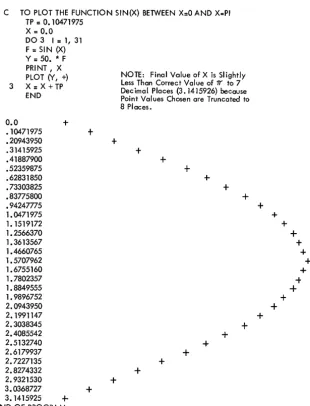
Figure 15. This program plots the function sin (x) for 31 values of x ranging from 0 to ."..
C TO PLOT THE FUNCTION SIN(X) BETWEEN X=O AND X .. PI TP = O. 10471975
X., 0.0 DO 3 1= 1, 31 F = SIN (X)
Y = 50. * F PRINT, X
NOTE: Final Value of X is Slightly PLOT t'(, +)
Less Than Correc t Val ue of 17' to 7 3 X = X + TP Decimal Places (3.1415926) because
END Point Values Chosen are Truncated to 8 Places.
0.0
+
.10471975
+
.20943950
+
.31415925
+
.41887900
+
.52359875
+
.62831850 +
.73303825
+
.83775800
+
.94247775 1.0471975 1.1519172 1.2566370 1.3613567 1.4660765 1.5707962 1.6755160 1.7802357 1.8849555 1.9896752 2.0943950 2.1991147
2.3038345
+
2.4085542
+
2.5132740
+
2.6179937
+
2.7227135
+
2.8274332
+
2.9321530
+
3.0368727
+
[image:21.617.77.387.300.706.2]3.1415925
+
END OF PROGRAMFigure 16. Machine Plot of SIN (X)
The value chosen for
TP
is approximately 1l' /30, se-lected so that 30 points on the curve (31 including zero) are plotted.The statement
y
=
50 ::~ F is needed to scale the func-tion to a realistic value for representafunc-tion as spaces of the typewriter carriage. The actual curve produced at the console typewriter, along with the corresponding values of x, is shown in Figure 16.NOTE: The PLOT statement is not compatible with IBM 1620 FORTRAN.
4See MARGIN AND TAB SETTINGS.
+
++
+
+
++
+
+
+
+
+
+
Specification Statement
The final class of statements in the GOTRAN language is the specification statement of which there is but one: DIMENSION. This is a nonexecutable statement that sup-plies the GOTRAN compiler with necessary information regarding arrays.
DIMENSION Statement
GENERAL FORM: DIMENSION V1 (n1 ), V2 (n2)
where each v is a subscripted floating-point variable and each n represents a fixed-point constant (the sub-script). A blank must separate DIMENSION from the first variable.
The DIMENSION statement provides the information necessary to allocate storage for arrays. Each floating-point variable that appears in subscripted form in a program must appear in a DIMENSION statement of that program; the DIMENSION statement must precede the first appearance of that variable. It lists the maximum
number of elements in the arrays; references to these arrays must never exceed the specified dimension.
In the following example, E is specified as a IO-ele-ment array, V as a 75-element array, and R as a I5-ele-ment array. Only one-dimensional arrays may be speci-fied.
DIMENSION E (10), V (75), R (15)
A single DIMENSION statement may specify the di-mension of any number of arrays as long as the entire statement does not exceed 72 characters.
A DIMENSION statement cannot be used in conjunc-tion with an input/output statement in an attempt to transmit an entire array. For example,
DIMENSION X (60) READ, X
The following summary, Table 1, presents the thirteen GOTRAN statements in condensed form. Note that all of the arith;metic statements, both ordinary and function, are counted as one statement in the total.
Table l. SUMMARY OF GOTRAN STATEMENTS
Class General Form Remarks
Arithmetic
Ordinary A=B+C Addition A=B-C Subtraction A=B ~:~ C Multiplication
A=B/C Division
A=B ~:~ ~:~ C Involution Function A=LOG (X) Loge (X)
A=EXP (X) eX
A=SQR (X)
V'X
A=SIN (X) Sine (X) A=COS (X) Cosine (X) A=ATN (X) Arc Tangent (X)
Control GOTOn Blank must follow "GO" IF (A) nl, n2, n3 Blank must follow "IF" DO n i = ml, m2, m3 m3 = 1 if Omitted CONTINUE
PAUSE STOP
END Must be last statement
Input/Output READ, A, B, C, D, E PUNCH, A, B, C, D, E PRINT, A, B, C, D, E
PLOT (v, c) c Any character but t
S pecifica tion DIMENSION Specifies size of arrays
Summary of GOTRAN Statements
[image:23.617.68.312.228.519.2]An
Example' Problem
This section presents a problem illustrating some of the thirteen different GOTRAN statements that have been explained and examines, in detail, a program using many of them.
Problem: Compute the square root of each of the numbers from 1 to 15.
The solution is based upon successive iterations of the formula
RT
B
I I
2
where RT=the square root to be found
STATEMENT
B = the number whose square root is to be found (the argument)
R=the successive approximations of RT.
One solution to the problem is presented, along with a comment elaborating on the purpose of each state-ment used. Figure 17 shows this program.
STATEMENT
B =0.0
PURPOSE
The argument (B) is initially set to zero.
It is a floating-point number. All variables that appear on the right side of the equal sign must be previously defined, i.e., they must have appeared on the left side of an equation or they must have been part of an input list. This statement defines the variable B.
~C FOR COMMeNT
~
NUMBER FORTRAN STATEMENT
1 5 67 72
C A P R,D,G R A,M. Too C,OMPUr,E T.H E S,Q,(J,A R,€. R.OOT O,F. THE N {/ MII3.E I?,s F.ROM I ,'TO 15 1
I 8=0.01 I I I I • I I I , I , I 1 I 1
Do S. I= I I So. / , I I 1 I , 1 , I , 1 I I . I I , 1 I I I I ,
I R= I • 0 I I I
.
,18,= 8+ I • 0 1 1
, ,
I I I·
I II RT,= B,/,R I 1 , • I I I I I 1 I , I I I , I
~I , I? T,=I/?'Td,R. I I 1 , • I , I I , , I 1
R T. = R T /,2 • 0 , I I I I I , , I I I
·
2 R""RT, I , , I I , I I • I I I I I • I
I I R T,"" B'/,i I I I , , ,
.
I I I,
I , I I I 1 IRT=R7".+R, ,
·
I ,I
,
R,T,:= RT'/,Z • 0 , I I I I I·
·
,
I IT,F,s 7i
=
R. - RoT. I I , I I I , I I I,
.
,
I , I I I I I·
iT,f:,S To= T,€'S.T.- .• 00.0 0000 I I
.
I I . II IF ,(, T E $ T,) I ,4,. 4, ~ 2 I I I I I • I I I I I I I I " "
I 14 CO,N Td N,U, £, 1 I .L...l I I I I I I I I I I I I I • I I I I I I I ,
5 P,R,/,NT.. 6
R.r.
I I I I I I [image:24.615.39.538.343.698.2]STATEMENT
DO 5 I = 1, 15, 1
R= 1.0
B = B
+
1.0RT=B/R
RT=RT+R
RT = RT/2.0
2 R=RT
RT=B/R }
RT=RT+R RT=RT/2.0
TEST = R-RT
001 002 003 004 005 006 007 008 009 010 011 012 013 014 015
END OF PROGRAM
PURPOSE
A DO loop is set up to accomplish 15
passes through the succeeding state-ments, down through statement No. 5. The final 1 in the statement can be omitted.
R is set to 1.0 as an initial approxi-mation.
The value of B is increased by 1. This new value of B then replaces
the old, in accordance with the spe-cial meaning of the equal sign in
GOTRAN.
The first actual operation of the formula. B is divided by R and the result replaces RT.
R is added to RT and the result replaces RT. RT now consists of
B/R
+
R.This statement completes one itera-tion of the formula. RT now has been evaluated once.
The value of R is replaced by the computed value of RT. The next iteration uses this new value of R. This statement is given a number because it is referred to in a subse-quent statement. Certain other statements have been assigned num-bers for the same reason.
Another iteration using the previ-ously computed value of RT for the new value of R.
The value of RT as found in the latest iteration is subtracted from the previous value (R ) and the result replaces TEST. The statement
is used to seek convergence - the
1.0000000 1.4142135 1.7320508 2.0000000 2.2360679 2.4494897 2.6457513 2.8284271 3.0000000 3. 1622776 3.3166247 3.4641016 3.6055512 3.7416573 3.8729833
Figure 18. Printout of Square Root Problem
STATEMENT PURPOSE
point at which two successive itera-tions are nearly equal.
TEST =-= TEST -.00000001 The value of TEST is adjusted down-ward by .00000001. If the disparity between the last two iterations is no greater than this amount, the root has been found to the desired
IF (TEST) 4, 4, 2
accuracy.
If TEST is zero or negative, no more
iterations using the current argu-ment are necessary. Proceed with the program. If TEST is positive, one or more additional iterations are re-quired. Go back to Statement 2. 4 CONTINUE This dummy statement is inserted
to fulfill the requirement that a branch ( conditional or. uncondi-tional) must not send the program to the last statement of a DO loop. Thus the preceding IF statement references the CONTINUE statement. 5 PRINT, B, RT The final statement of the DO loop. B is printed along with its square root, RT. The program returns to the first statement following the DO
statement, increments I and pro-ceeds to compute the square root of B
+
1.0. The process of comput-ing, testcomput-ing, and printing continues through the time that I (and B) equal 15, after which the program proceeds to END.END The last statement required for any
GOTRAN program. It Signals the compiler that there are no further statements to be compiled.
The answers, typed out as a result of Statement 5, are shown in Figure 18.
GOTRAN Operating Procedures
The operating procedures for the IBM 1620 GOTRAN sys-tem can be divided into three phases (Figure 19) :
1. Loading the GOTRAN compiler/interpreter pro-gram.
2. Loading and compiling the source program. 3. Executing the interpretive program.
Phase I: Loading the GOTRAN
Compiler/Interpreter
ProgramLoading the GOTRAN system into the 1620 varies slightly depending upon whether the input is via the 1621 Paper Tape Reader or the 1622 Card Read Punch.
Paper Tape Input
To initiate the loading of the GOTRAN system tape, a
Read instruction must be manually entered from the console. The procedure is as follows:
1. Depress the Reset key 2. Depress the Insert key
3. Type the Instruction: 360000000300 4. Depress the Release key
5. Depress the Start key
After the GOTRAN compiler/interpreter program has been loaded into storage, the 1620 will halt and await entry of the source statements.
Punched Card Input
Console Program Switch #1 must be S€t before the sys-tem deck is loaded. If the switch is OFF, all subroutines are loaded. If the switch is ON, SIN, COS and ATN are omitted.
1620
Phase I
Loading the System
Phase II
Loading and Compiling the Source Program
I
I I
I I
I I I I
___ J
Compiler Interpreter
I
; __ L-i
!
'Ii
lI
~
I
...-S-ym-b .... o-I..., P","do - >-'
I
I
Table Inst'uct;on,
i
i
I
J
IL _______
I
I
I
1 - - - _ - - - ---.J
Phase III
Executing the Interpretive
Sub -routines
/
[image:26.612.51.511.375.721.2]Therefore if the trigonometric functions are not needed, they may be left out and the storage saved may be utilized for a larger program.
The procedure for loading the system deck is: 1. Set console switch
#
12. Depress the Reset key
3. Place system deck in Read hopper 4. Depress the Load key
The system deck will now feed through the 1622, causing the compiler/interpreter program to be loaded into 1620 core storage. When loading of the program has been completed, the machine will come to a halt.
Phase II: Loading and Compiling the
Source Program
Switch Settings
During the halt that follows the loading of the compiler/interpreter program, the console program switches must be set for the loading and compilation of the source program. The settings of the switches dur-ing this operation designate the followdur-ing:
SWITCH ON
1 Source program is being en-tered on paper tape (tape system) or punched cards (card system).
2 Source statements are punched on paper tape (tape system) or into cards (card system) as they are entered.
3 Source statements are printed at console (either system) .
4 This switch is used only when an error is made while entering source statements at the console typewriter. It is normally OFF. When a typing
error is made, it i'!; turned ON,
the Release and Start keys are depressed, and it is turned OFF. The operator
may now retype the state-ment that was in error.
OFF
Source program is being entered via console type-writer (either system).
Source statements are not punched (either system).
Source statements are not printed (either system).
All Console Check switches are set to PROGRAM. After the program switches are set according to the method of entering the source program, the appropriate action is taken to initiate loading.
Source Program Entered on Paper Tape
1. Load the tape containing source statements onto the 1621 Paper Tape Reader.
2. Depress Start key on the console.
The source statements will now be loaded into core storage and compiled. After compilation the program will halt to permit the operator to prepare the machine for the next phase of GO'TRAN.
Source Program Entered on Punched Cards
1. Place deck containing source statements into 1622 Read hopper.
2. Depress Start key on 1622. 3. Depress Start key on console.
The source statements load and the program halts, as before.
Source Program Entered by Console Typewriter
Since Program Switch 1 is off, the typewriter will be selected as the input device by the program.
1. Depress Start key on console 2. Type first source statement 3. Depress Release key 4. Depress Start key
5. Type next source statement, etc.
When the last source statement has been entered, and the Release key depressed, the program halts as before. The switches may now be set for the execution phase.
Error Messages
The following error messages may be typed out during the compilation phase of GOTRAN:
Message Meaning
Error Cl Symbol table has been exceeded Error C2 Unacceptable function name
Error C3 Improper operation symbol in arith-metic statements
Error Al MAR check or any other indicator turned on
After such an error message appears, the program halts, preventing the statement that caused the message from being compiled. The operator may then enter a corrected version of the statement on the console type-writer. The procedure is as follows:
1. If Console Switch 1 is ON, set it OFF.
2. Depress the Start key on the console. The pro-gram will select the console and· await the entry
of the typed statement. 3. Enter the corrected statement.
4. Depress the Release and Start keys (if switch 1 was ON originally to accept input from cards or paper tape, it must be restored to this position after entry of the corrected statement).
Phase ",: Program Execution
Switch Settings
During the halt following the compilation phase of the GOTRAN program, the console switches must be set for the execution phase. During this phase the console pro-gram switches are interpreted as follows:
SWITCH ON
1 Input data to be entered on paper tape (tape system) or punched cards ( card sys-tem).
2 Result of each arithmetic statement is printed (this is known as the trace mode). 3 Not used except in restart
procedures.
4 This switch is used during the execution phase for a typ-ing error on input data. It is used similarly during the compilation phase for a typ-ing error on a source state-ment (see LOADING AND COMPILING THE SOURCE
PRO-GRAM). Normally, switch 4 is OFF. When a typing error is made, it is turned ON, the Release and Start keys are depressed, and it is turned
OFF. The operator may now
retype the data that was in error.
OFF
Input data to be entered via console typewriter.
Not used.
All Console Check switches are set to PROGRAM.
Table 2. ERROR MESSAGES
Message Operation
Error El Floating Point, Add or Subtract
Error E2 Floating Point, Add or Subtract
Error E3 Floating Point, Multiply
Error E4 Floating Point, Multiply
Error E5 Floating Point, Divide
Error E6 Floating Point, Divide
Error E7 Floating Point, Divide
Error Fl SIN (X) or COS (X)
Error F2 LOG (X)
Error F3 LOG (X)
Error F4 EXP (X)
Margin and Tab Settings
During the execution phase, the left margin on the con-sole typewriter should be set at 10 and the right margin at 95. Tab settings should be at 28, 46, 63, 80, and 94.
Tape Data Input
1. Load data tape on 1621 2. Depress Start key on console
The compiled GOTRAN program will now be executed, utilizing the data furnished and calling it in as needed under program control.
Card Data Input
1. Place data cards in Read hopper of 1622 2. Depress Start key on 1622 to run in cards 3. Depress Start key on console
The compiled GOTRAN program will now be executed, reading data cards under program control.
Typewriter Data Input
1. Depress Start key
Program execution proceeds until such time as the program calls for data input. The console type-writer is selected and the program awaits the manual entry of data.
2. Type in data 3. Depress Release key 4. Depress Start key
Meaning Result in Storage
Overflow All nines
Underflow All zeros
Overflow All nines
Underflow All zeros
Overflow All nines
Underflow All zeros
Attempt to divide All nines
by zeros
Loss of all sig- All nines
nificance in function