A Novel Method to Access BIOS through Client Server
Technology
R. Priya
Assistant Technical Officer Department of Computer Science Bharathiar University, Coimbatore–46
T.Devi
, Ph.DAssociate Professor & Head i/c, Department of Computer Applications,
Bharathiar University, Coimbatore–46
ABSTRACT
Everyone has secrets and some have more than others. Each and every one wanted to have their data and information to be more secure and confidential. There are many ways to maintain the data and information to be safe. The main objective of this paper is to be maintained the file or data to be secure. In this paper, proposed design has developed for controlling full security in computer system through networks. i.e., the proposed design developed to access BIOS password through client server technology with network.
KEYWORD
System security, password security, Bios password setting, Bios password security
1. INTRODUCTION
Everyone wants to be their data is more secure. Baldwin says that “scholars are apt to talk past each other, and policy-makers [will] find it difficult to distinguish between alternative policies without an understanding of security concepts” [1]. A Bios based password program runs before control of the computer is given to any disk based software. This prevents an unauthorized user from accessing data by starting the computer from a floppy disk or using other means to change the disk based software [2]. Having a BIOS password will also guard from making changes that end up making system no longer work. Basic Input Output System is what BIOS stands for and is the bone structure on which the operating system and all of the hardware are controlled [3].
The user can set a BIOS password to protect the system. The BIOS password will never change and can be changed only with known password. The BIOS is a best method for system security. The BIOS password were designed to protect the computer from suffering mindless changes and abuse from pranksters, coworkers, crackers and even family members.
2. EXISTING MODEL
Control Program for Microcomputers was a mass-market operating system created by Gary Kildall, Digital Research for Intel 8080/85 for microcomputers. In 1975, IBM PC compatible computer Basic Input/Output System (BIOS) also known as System BIOS, ROM BIOS or PC BIOS is a firmware interface [4]. Client computers such as desktops and laptops rely on the Bios to initialize their hardware during boot [5]. The system or method according to the inventive principles as disclosed in connection with the preferred embodiment, may be produced in a single computer system having separate elements or means for performing the individual functions or steps described or claimed or one or more elements or means combining the performance of any of
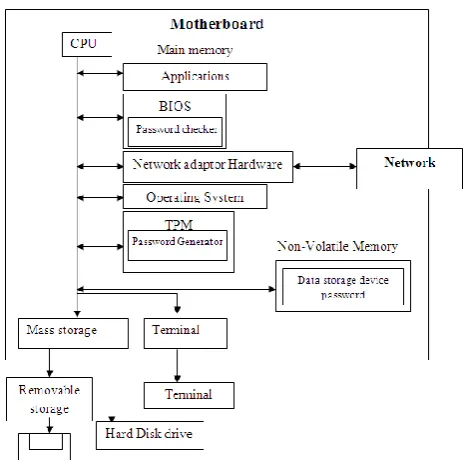
the functions or steps disclosed or claimed, or may be arranged in a distributed computer system, interconnected by any suitable means as Would be known by one of ordinary skill in the art [6]. In Fig 1 shows the block diagram of an information processing system, according to an embodiment.
Figure 1. Block diagram of an information processing system [7]
2.1 Algorithm of existing model
Procedure BIOS PASSWORD SETTING() 1. System Boot ;
2. [Get password from user] Read: password ;
3. [Retrieve the password from system] Set syspassword := Read: BIOS password ; 4. [Check the equality]
If password := syspassword, then Allow user to enter system hard drive else:
write: password incorrect [end of if]
5. Exit.
2.2 Working method for existing model
program for inputting a password, a password check routine, a connection determination routine of external hardware (to be described later as a password canceller) [9]. Normally, BIOS passwords are worked in two ways: (1) to prevent modification of the BIOS settings; (2)to completely stop the computer process from booting. The BIOS have all the code for control keyboard, display screen, disk drives, serial communications and a number of miscellaneous functions. The motherboard’s BIOS setup program provides a “user password setup”. It’s used to allows users for setting or changing password. If the correct password is not entered, the system will not boot and access to the setup will be denied [10]. The settings are then stored in a dedicated, battery-backed memory that retains the information even when the power is turned off. To start the BIOS setup utility:
1. Turn on or reboot system.
2. Press <F2> during POST (F4 on remote console) to start the BIOS setup utility.
3. Then click first option of Basic CMOS Configuration for setting the bios password. Set password with “Set Supervisor password” option.
4. Select user password and user will be prompted to enter a password. User should now enter a password of up to eight characters (most BIOS’s are limited to eight characters unfortunately). These letters are case sensitive.
5. The BIOS will then prompt user to confirm the password, just type the same thing again.
6. Now press F10 to SAVE AND EXIT from your BIOS setup. The computer will restart and ask for the password.
2.3 Basic source code for bios password
setting (Existing method)
#define BIOS_PWD_ADDR 0x041e #include <stdio.h>
#include <stdlib.h> #include <unistd.h> #include <sys/types.h> #include <sys/uio.h> ……
int pwd() {
FILE *f;
struct dumpbuff b; int i;
long j=1054; char pwd[18]; char crap;
printf("\n Enter Pwd :\n(16 caratcters max)\n"); for (i=0;i<18;i++)
{
pwd[i]=' '; }
scanf("%s%c",&pwd,&crap); for (i=0;i<=15;i++)
{
b.tab[2*i]=pwd[i]; b.tab[2*i+1]=' '; }
f=fopen("/dev/mem","r+"); fseek(f,j,SEEK_SET);
fwrite (&b, sizeof(struct dumpbuff),1,f); printf("\n[Buffer Uptdated]\n"); fclose(f);
return 0;
}
int main(void) {
char choiceval=0; char crap;
char tab3[100]; while(choiceval !='x') {
printf("[Keyboard buffer manipulation]\n"); printf("==============================\n"); printf("\n 1 - Display Password\n");
printf(" 2 - Clear Keyboard Buffer\n"); printf(" 3 - Enter Password\n"); printf("\n x - Quit\n");
scanf("%c%c",&choiceval,&crap); ……….
if (choiceval=='3') pwd(); } return 0; }
Figure 2. Source code for bios password setting [11]
2.4 Disadvantage of existing method
If user forgets the bios password, then remove the jumper and turn the computer on. In some cases, It can either be reset with disconnecting the CMOS battery. The BIOS password automatically erased. Not only have this methods, user can easily deleted the BIOS password with cracking methods. Many cracking methods are there for BIOS password cracking [12].
3. PROPOSED DESIGN FOR BIOS
PASSWORD
THROUGH
CLIENT
SERVER TECHNOLOGY
[image:2.595.316.548.509.739.2]The main objective of the research work is to make novel method to client BIOS with network. The proposed work based on client server technology. The server is used to store the BIOS access and stores the physical address and the BIOS password of its clients. The client accesses its BIOS through authentication from server.
In this proposed method, server is controlled overall BIOS password for all client systems through networks. When client turns on, network connection is established between client and server. Then password enters by user. Total productive maintenance (TPM) works as a password generator [fig. 3]. Now, server authenticates the password. If password is correct, servers allows to user enter client system and BIOS allow working with hard drive, applications. Otherwise user cannot enter the client system.
3.1 Algorithm for proposed design
In this algorithm have two procedures. One is store password in server and other is BIOS password through client server technology (BIOS-CLSETECH).
3.1.1 Algorithm for stored password in server Procedure storepassword()
The procedure stores the various system passwords in server system.
1. Set a server system. 2. [Define data structure.]
Node := servpassword ; {
Char physicaladdress ; Char domainname ; Char password ; }
3. Make network connection.
4. For i := Every system in network do (a) [Get physical address of system.]
Set sysphy := Read : Address[i]; (b) [Get password from Admin.]
Read : password ;
(c) [Create a object for servpassword.] Node servpassword sp[i]; (d) [Store in Server.]
[image:3.595.316.544.96.535.2] [image:3.595.59.297.279.693.2](i) Set sp[i].physicaladdress := sysphy; (j) Set sp[i].servdomain := domainname; (k) Set sp[i].password := password; [end of for]
5. Exit
Figure 4. Design of stored password in server
In fig 4 shows the design of stored bios password in server through network. Physical addresses, domain name and BIOS passwords stored in file of server. Each system has individual physical address and BIOS password.
3.1.2 Algorithm for BIOS password through client server technology (BIOS-CLSETECH)
Procedure BIOS-CLSETECH
The procedure allow the client machine enter into system. 1. [Get password from user.]
Read : password ; Read : Domainname ; 2. [Entering into BIOS setting.] 3. [Make network connection.]
Connect client server ; 4. [Retrieve physical address.]
Set phyadd := Read : address ; 5. [Validate password.]
For i:= every system in network, do if sp[i].physicaladdress := phyadd, then
if sp[i].password := password, then
Enter in to system; Else :
Write : Incorrect password; [End of if.]
[End of if.] [End of for.] 6. Exit
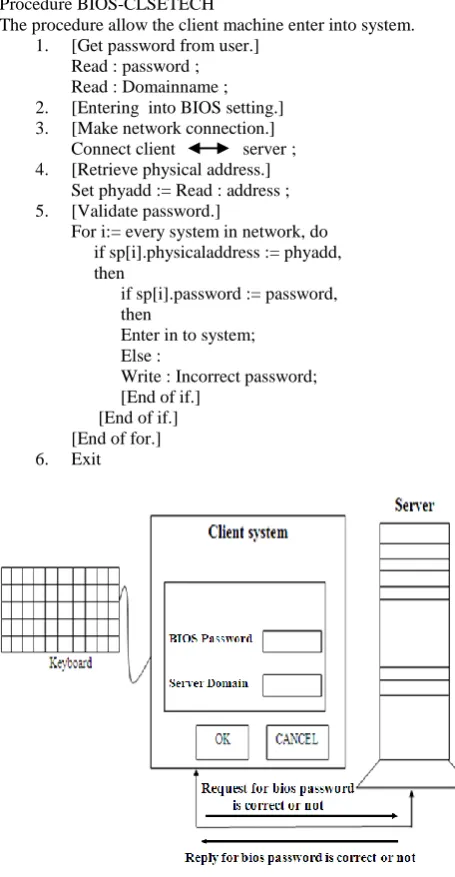
Figure 5. Working Design for BIOS password through client server technology
In fig 5 shows the design of BIOS password access with network through client to server technology. In this design user enter the BIOS password and server domain into the client system. If BIOS password and server domain is correct, the server allow to user enter to the client system. Otherwise user cannot enter to the system.
4. PROPOSED DESIGN FOR BIOS
PASSWORD
SETTING
CLIENT
SERVER TECHNOLOGY
server whether the password is correct or wrong. If the password is correct, then client can work with system. Working process of this design is given below in fig 5, First users enter wants to enter the system with password. In this process have two options. In first option belongs to bios password and second option is based on server domain. The user should be type both options correctly. In this method, all client systems BIOS password stored in encrypted format at Server. If user enters both options correctly, server domain name allows checking whether the BIOS password is correct or not through network. If the BIOS password is correct, the server decrypts the BIOS password and allows using the system. The goal of cryptography has been to check the password with securely in this client server technology [13]. In this proposed method, In server side, databases are maintained with three data. One is the physical address of the each system. Second data is Bios password of the system. In this database, each system has one physical address and one bios password. So the server checks the bios password with matched physical address of the system. Third data is server domain name. The server domain is same as all system in particular network.
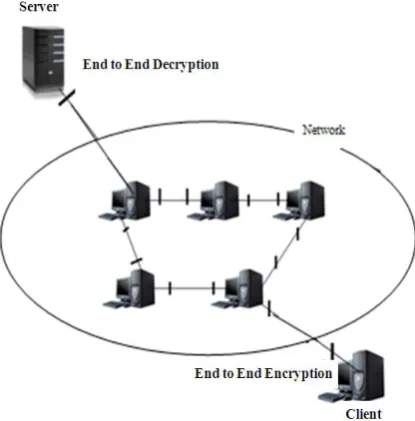
Figure 6. Design of Proposed Model for Bios Password through Network
In particular network connections, all client system bios password are saved in Server. Server will check whether the bios password is correct or not. If password is correct, the server will allow to client for entering the system. In this method, password saved in server. So unauthorized person cannot trace that password and cannot enter to server. They should know password and domain of the server also.
5. IMPLEMENTATION OF PROPOSED
SYSTEM
In this proposed system, bios password for all client systems stored in server through Network. So the password entered by user on client system and password retrieved from server through network. Fig.7 shows password retrieved from server file for enters to the client system. Fig. 8 shows password stored in server. In server file have physical addresses of the client system, bios passwords and domain name. If user enters the password in client system, server checks the physical address of the system and compares the bios password with user password in particular domain.
//Ask Pwd...
printf("\n Enter Pwd :\n(16 caratcters max)\n"); for (i=0;i<18;i++)
{
pwd[i]=' '; }
scanf("%s%c",&pwd,&crap); for (i=0;i<=15;i++)
{
b.tab[2*i]=pwd[i]; b.tab[2*i+1]=' '; }
f=fopen(“,"\\server\\temp\\a.txt","r+"); fseek(f,j,SEEK_SET);
fwrite (&b, sizeof(struct dumpbuff),1,f); printf("\n[Buffer Uptdated]\n"); fclose(f);
[image:4.595.61.269.302.513.2]return 0; }
Figure 7. Basic source code BIOS password through client server technology (BIOS-CLSETECH)
int main(void) {
int listenfd = 0,connfd = 0; struct sockaddr_in serv_addr; char sendBuff[1025]; int numrv;
listenfd = socket(AF_INET, SOCK_STREAM, 0); printf("socket retrieve success\n");
memset(&serv_addr, '0', sizeof(serv_addr)); memset(sendBuff, '0', sizeof(sendBuff)); serv_addr.sin_family = AF_INET;
serv_addr.sin_addr.s_addr = htonl(INADDR_ANY); serv_addr.sin_port = htons(5000);
bind(listenfd, (struct
sockaddr*)&serv_addr,sizeof(serv_addr)); if(listen(listenfd, 10) == -1){
printf("Failed to listen\n"); return -1;
} while(1) {
connfd = accept(listenfd, (struct sockaddr*)NULL ,NULL); // accept awaiting request
printf("processing file:%s\n",file->f_name); strcpy(fname,"\\server\\temp\\a.txt"); strcat(fname,file->f_name);
if((fp = fopen(fname, "r")) == NULL) { printf("could not read the file\n"); return(-1);
}
Figure 8. Basic source code for stored password in server (Server side)
6.
COMPARISON
OF
EXISTING
METHOD
WITH
PROPOSED
DESIGN
Sl. No.
BIOS password (Existing method)
BIOS-CLSETECH (Proposed design) 1. BIOS often boots in
16-bit real mode
BIOS-CLSETECH often boots in 32-bit or 64-bit protected mode
2. BIOS used chip, it is not always the fastest
the process also runs with fastest.
3. BIOS routines are generally inefficient
BIOS-CLSETECH OS have their own hardware routines and depend on drivers
4. Some of the devices the BIOS initializes are obsolete. Some BIOSes still have the initial types of bugs from the PC-XT days.
BIOS-CLSETECH working with client server technology. So any modern system can use for this method.
5. BIOS EEPROMS can be overwritten or destroyed by users when updating the BIOS.
BIOS-CLSETECH cannot be overwritten or destroyed by users when updating the BIOS.
6. If CMOS battery or jumper removed and
replaced in
motherboard, BIOS password destroyed.
BIOS-CLSETECH password stored in other system. So BIOS password never destroyed while CMOS battery or jumper removed and replaced in motherboard
7. DISCUSSION ABOUT PROPOSED
METHOD
The main advantage of this proposed architecture is used to find and modify the BIOS password in client system is too hard.
But it also has a drawback. When the system is powered ON, there is no connection established between local system and Server before Operating System (OS) booting. In between OS processing, all drivers will be established one by one. Network Card or Ethernet Card is also accessing after OS booting. So client server connection establishing is not possible before OS booting.
The proposed model does not fit the present architectures of the operating system. Because network connection should establish before the Operating System booting. So, Operating System’s program should be change for establish network connection before OS booting.
8. CONCLUSION
This research work aims at developing concepts and design in a novel method to access Bios password through client server technology to improve system security. A detailed study on Analysis on existing Bios password methods have been carried out. A novel technique to maintain password security with Bios through network has been invented, an algorithm is carried out. User wants to enter the system; they should know correct server domain name and correct Bios password. So user should be entered bios password and server domain name correctly. In server side, server checks the bios password with
matched physical address of the system. If password is correct, the server will allow to client for entering the system. In this method, unauthorized person cannot trace password. So this proposed system is 100% secure method.
In existing method, user can crack Bios password in particular system and can erase Bios password easily. But, this proposed system has developed with Bios password stored in Server. So user cannot delete or modify this password. In future, the Bios password not only saved in LAN server, password can be saved in anywhere and it can also control all the client system from anywhere in global network.
9. REFERENCES
[1] Baldwin and David. “The concept of security”, Review of International Studies 23 (1997): 5-26.
[2] Patrick A. Dums and Mark Pulver, “Hard disk password lock”, patent number 6199163, 2001
[3] Leaqea.com, “The advantages of using bios passwords on your new laptop”, 2008, http://www.leaqea.com/the-advantages-of-using -bios-passwords-on-your-new-laptop-14794. html
[4] http://en.wikipedia.org/wiki/BIOS
[5] Andrew Regenscheid and KarenScarfone, “Bios integrity measurement guidelines (draft)”, NIST Special Publication 800-155 (Draft), December 2011
[6] Daryl Cromer, Howard J. Locker, Cary, Randall S. Springfield, Chapel Hill and Rod D. Waltermann, “Random password automatically generated by bios for securing a data storage device”, Pub. No.: US 2007/0234073 A1, 2007
[7] Masayo Yamaki, “Password processing system”, United States Patent Number: 5,485,622, 1996
[8] Mark A.Piwonka, Bernard D.Desselle and David J.DeLisle, “Bios password security using modified scan codes”, 2009, application number 11/261, 134
[9] John E. Canavan, “Fundamentals of network security”, ISBN 1-58053-176-8 , QA76.9.A25 C364 2000
[10] Chang-Hyun Ryu, “Computer security system having a password recovery function which displays a password upon the input of an identification number”, United States Patent No. 6,067,625, 2000
[11] Endrazine, “ Bios bumper”, 2005 at Endrazine @pulltheplug .org
[12] http://wiki.answers.com/Q/What_are_the_Advantages_a nd_Disadvantages_of_Basic_Input_Output_System