Thomson, S (2015) Taking the tablets - should you bring your own or use those prescribed? In:
Smart Learning – teaching and learning with smartphones and tablets in post compulsory education.
MELSIG & Sheffield Hallam University, 158 - 171. ISBN 1843873834, 978-1843873839
Link to Leeds Beckett Repository record:
http://eprints.leedsbeckett.ac.uk/1476/
Document Version:
Book Section
Creative Commons: Attribution-Noncommercial-No Derivative Works 3.0
The aim of the Leeds Beckett Repository is to provide open access to our research, as required by
funder policies and permitted by publishers and copyright law.
The Leeds Beckett repository holds a wide range of publications, each of which has been
checked for copyright and the relevant embargo period has been applied by the Research Services
team.
We operate on a standard take-down policy.
If you are the author or publisher of an output
and you would like it removed from the repository, please
contact us
and we will investigate on a
case-by-case basis.
— should you bring your own or use
those prescribed?
Simon Thomson
Background
During the academic year 2012/13 Leeds Beckett University (previously Leeds Metropolitan University) sought to examine the potential of a 1-to-1 tablet deployment experience with a specific focus on learning and teaching. The project was a collaborative activity between the Students Union and the Centre for Learning & Teaching. It was internally funded by the University and the evaluation activity was supported through consultancy as part of the Changing the Learning Landscape partnership managed by the Leadership Foundation. One course was selected and over the period of a single semester staff and students on that course were supported in the use of tablet devices.
Course Selection
The selection of courses for the Phase 2 pilot was undertaken through an application process. We had seen from the previous pilot that when a course volunteers to be involved we are likely to see improved motivation from individuals and increased impact and output from the overall user experience. All courses in the University were invited to make a request to be involved in the project based on some selection criteria:
• the application was co-ordinated through the Course Leader; • a maximum of 75 tablet devices per Faculty was available. Any
course with more than 75 students could still apply to be part of the project as long as it could run a cohort experience of 75 students or less e.g. at a single level of study within the course;
• all staff working with the cohort have agreed to participate; • the course team was prepared to undertake development
activities.
Levels of study for participating students
The process of selection was facilitated by the Centre for Learning and Teaching with discussions with the Students Union and Faculty Associate Deans for student experience (who would be overseeing the local support for the pilot).
The final selected courses represented all levels and included full and part-time study modes.
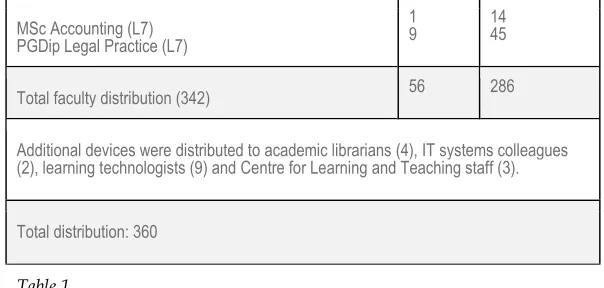
Faculty and level Staff Students
Faculty of Arts Environment & Technology
BSc Computer Forensics (L5) BA Performance (L5) BA Design Product (l5)
7 4 6
68 16 44
Faculty of Health & Social Sciences
BSc Physiotherapy (L4) & MSc Physiotherapy (L7) 15 51
Carnegie Faculty
BA Early Childhood Education (l4)
BSc Hospitality Leadership & Management (L5 & L6) 5
9 19 29
MSc Accounting (L7) PGDip Legal Practice (L7)
1
9 14 45
Total faculty distribution (342) 56 286
Additional devices were distributed to academic librarians (4), IT systems colleagues (2), learning technologists (9) and Centre for Learning and Teaching staff (3).
[image:5.595.146.448.67.211.2]Total distribution: 360
Table 1.
Project Management
The project was overseen by the University's Centre for Learning & Teaching (CLT), and in particular the Head of E-Learning. The strategic driver for this was due to the fact that the centre had been instrumental in securing the internal funding and co-ordinating the bid between the students union, faculties and other key services such as library and IT. CLT would also be responsible for the deployment of the devices, development activities and data collection through surveys and focus groups.
Within each Faculty the Associate Dean with responsibility for Student Experience would support course teams and, where necessary, provide additional local resources. Each course also has their own identified Academic Librarian who would also be issued with a device to support the provision of resources for mobile use. Although based in the Library, they would liaise directly with course teams to identify and purchase necessary resources for the course delivery. The project also had support from the IT services team, specifically in identifying areas of poor wireless connection and where necessary the rapid deployment of Wi-Fi architecture to support the project.
Learning Landscape fund which was used to run third party focus groups for staff and students.
Deployment, development and support
All tablet devices were registered and deployed through the Centre for Learning & Teaching (CLT). Prior to the students receiving their devices the staff undertook an induction activity where the devices were handed out and set up for use i.e. integrated with Google logins and email/calendar access etc. This gave staff at least two weeks access to the hardware before the students. During Semester 2 Welcome Week the students on the selected courses undertook an additional induction activity around the tablet project. The rationale for the project and planned activity was introduced to the students and the devices handed out. It was not a requirement for the students to take part in the research but only one of the student participants declined.
In terms of device ownership, we had seen from the first pilot that if the staff and students feel that the device is theirs they will invest more time into its use. Staff are able to keep their devices once the project comes to an end and whilst they are still employees of the University (there is also provision for them to purchase the device under a staff purchase system if they leave the University).
Students were also given the option to purchase the device after the project had finished for £50 (a significant saving on the retail price of £199).
CLT provided two additional development sessions for each course/cohort team throughout the semester as well as developing online resources to support the staff and students. CLT undertook the role of also being the first point of contact for any technical issues as well as learning and teaching support in order for us to be able to capture the full range of problems that might arise.
Key observations
staff responses (34%). There was a significant reduction in the responses to the second survey and anecdotal evidence suggests that this is due to the increased demands on staff and students at that time of the semester. However the data gathered is still representative of all cohorts and courses.
Observation 1: Personal vs Professional Use
Survey data indicated that students were much more likely to use their devices for personal use as well as learning and teaching use. Staff were less likely to use the device in a personal capacity, despite being allowed and encouraged to do so.
In the figure below it is clear that students have a fairly even spread of use in both personal and study use, whereas the staff tend to focus on using the device only for work. In fact 23% of the staff indicated that they used the device entirely for work use. Based on further conversations with staff on this it appears to be related to two main points:
• That staff have historically tended to keep work and personal
activity separate (i.e. separate staff PC to home PC etc.) and this was partly habitual;
• Staff still saw the device as being owned by the University and so
potentially reluctant to place personal accounts (e.g. Facebook) on the device.
STAFF: On this scale 1 would be equivalent to 100% personal use and 10 would signify 100% use for their work.
Student discussions clearly indicated that they just saw it as a “device” with certain capabilities and were happy to put what they needed on the device as they would do with their own smart devices.
Observation 2: Usage Frequency
Staff and students used their devices on average 2-3 days a week, with a significant number of staff (48%) and students (45%) indicating that they used the device daily at the point of Survey One.
Staff Device Use - Survey One
Student Device Use - Survey Two
Staff Device Use - Survey Two
As was anticipated, based on our earlier experience of the Phase One pilot, there was a drop is usage once the “novelty” of having the device had worn off. However it is significant to note that for both staff and students over 70% were using their devices at least 2-3 days a week.
Observation 3: Learning and Teaching Activities
As we were specifically interested in the use of the devices in a learning and teaching context all course teams were encouraged (but not required) to integrate the device use into learning and teaching activities. These experiences ranged from accessing the lecture slides for note taking during the lecture, to identifying specific applications for use in fieldwork activities.
In Survey One 77% of students indicated that they were using the devices in learning and teaching activities despite only 43% of staff indicating that they were using the devices as part of a taught session.
Students - Survey One
This apparent discrepancy was further repeated in Survey Two where 67% of students indicated they were using the devices in taught sessions and only 37% of staff were using them as part of a taught session.
Students - Survey Two
It appears from this (and subsequent focus groups) that students are using the devices in sessions even when staff had not specifically designed activities for their use. The free form comments on the surveys indicate that the reason for this is that students are using them particularly in lectures to access slides, make notes and to refer to extended readings or access the Internet on the subject(s) being covered.
Notable Additional Observations: Expecting the Unexpected
The study also identified a number of additional observations that are of interest to the team and ones which we did not necessarily intend to observe.
1. We saw increased access to the student email system. Due to the fact that the devices were linked to the students’ Google accounts they were more likely to access their student emails. Many students do not link their student email to personal mobile devices. As part of Pilot Two we added a question related to student email and 62% of students stated that having the device had increased their use of their student email account.
2. Increased access to the VLE (with Blackboard Mobile). A significant number of students were not aware of the Blackboard Mobile app which was a required install on their tablet devices. With the app installed students were more regularly accessing discussion areas and resources on the VLE.
3. Equality of learning experience was improved. Whilst a number of our students arrive on campus with devices, a significant number are from low socio-economic backgrounds. Having a device provided by the University means that everyone is equal in terms of device capability and functionality.
4. Staff confidence is improved with a single device deployment. Staff focus groups indicated that preparing resources, information and activities for multiple devices (BYOD) was almost impossible to achieve satisfactorily. With a single device staff had confidence in both developing activities and resources for devices, but also trouble shooting problems with students. In two identified cases students were supporting staff in the use of the devices and recommending apps for learning and teaching activities.
Staff, however, more strongly favoured a system where “Staff and students have the same/similar device (Staff and students same operating system and app store)”.
Please indicate your preference to any potential future decisions around technology use in learning & teaching
Staff and students have the same/similar device. (Staff and students same operating system and store)
74% n. 14
Students bring their own devices. (BYOD) and staff choose their own devices (Staff and students have different devices and stores)
5% 1
Staff provided with the same devices, students bring their own devices. (Staff have the same device. Students have the different devices and app stores)
5% 1
Students provided with the same devices and staff choose their own. (Students have the same device. Staff have different devices and app stores)
0% 0
Other 16% 3
Next Steps
It is clear from the experience of this project that both staff and student experiences were significantly enhanced with the provision of tablet devices. There is also evidence to suggest that from a learning and teaching perspective having a single device deployed for all staff and students increased staff confidence and their capacity to integrate such technology into their learning and teaching practices.
confidence and capacity in staff abilities sooner. Both of these issues can be easily resolved with appropriate resource planning.
We now have to analyse our data and experience in order to make informed decisions on any future plans with regards to BYOD and 1-to-1 tablet deployment activities. What we have observed and recorded from this activity is that staff and students have an appetite for using mobile devices in learning and teaching, and that it is not just “students at universities and colleges (who) have ever-increasing expectations of being able to learn on these devices whenever and wherever they may be” (Johnson, 2012, p.6) but also our staff.
The University of East London has already provided its students with a device, perhaps recognising not just the learning and teaching benefits of a single device but also the ability to preload content and promote this as a unique selling point to students.
Whatever the future holds, whether it be BYOD or 1-to-1 deployment the growth of the mobile, smartphone and tablet market in leisure and business can no longer be ignored in educational establishments. As more and more primary and secondary schools make tablet purchases the expectations of future students in Higher Education will need to be met.
Reference
Johnson, L. (2012). Horizon Report, 2012: higher education edition. New Media Consortium/EDUCASE. Online at: http://www.nmc.org/pdf/2012-horizon-report-HE.pdf
This chapter is released with a Creative Commons licence
You may share this work for non-commercial purposes only provided you give attribution to the copyright owner, contributing authors and the publisher. You do not have permission to publish a commercial version of this work.
When referring to the chapters and other contributions in this text you are required to acknowledge the respective authors according to common academic practice.
Middleton, A., ed. (2015). Smart learning: Teaching and
learning with smartphones and tablets in post compulsory
education. Media-Enhanced Learning Special Interest Group
and Sheffield Hallam University.
You can download the whole book from: