Digitalized Interactive Dining Table:
A Review
Rutuja K. Deshmukh1, Prof. H. R. Vyawahare2
P.G. Student, Department of Computer Science & Engineering, Sipna COET, Amravati, Maharashtra, India1
Assistant Professor, Department of Computer Science & Engineering, Sipna COET, Amravati, Maharashtra, India2
ABSTRACT: In recent traditional paper menu cards are over all expensive, monotonous, difficult to maintain and over the period therefore to challenge all such obstacle and to enhance restaurant’s guest experience and exquisiteness of the establishment Touch-screen Based electronic menu card is proposed. The other dimension to propose this new system is to reduce need of excess manpower and to eliminate excess time spend on giving manual order through waiter. The order can be placed by simply touching the available food menus. This automated menu card system gains many advantages over traditional menu ordering system. Using this interactive dining table there is no chances to misprint customer’s order.
KEYWORDS: IR camera, projector, glass table, touch, wood dust.
I. INTRODUCTION Touch Technology
Touch has been implemented in several different ways, depending on the size and type of interface, to apply on which object. The most popular form is mobile devices, tablets, touch tables and walls this all can be used as touch surface. Both touch tables and touch walls project an image through acrylic or glass, and then back-light the image with LEDs. Touch surfaces can also be made pressure-sensitive by the addition of a pressure-sensitive coating that flexes differently depending on how firmly it is pressed, altering the reflection after pressing on it. Handheld technologies use a panel that carries an electrical charge. When a finger touches on the screen, the touch disrupts the panel's electrical field and create current. The disruption is registered as a computer event (gesture) and may be sent to the software, which may then initiate a response to the gesture event. This touch technology can be very useful in interactive dining table.
There are two types of Touch Technology:
Single Touch
Resistive touch
Multi-Touch
Capacitive touch
Optical touch
The proposed Touch-screen based menu card system has capacity to overcome time delays in traditional ordering system. Along with this it reduces the staff members need in restaurant business. As it is a gadget it doesn’t need leave or vacation and thus work efficiently 24x7. This paper highlights the drawbacks in the traditional menu ordering system compared to the proposed Touch-screen based menu card system.
Capacitive Touch-screen: Itdisplays rely on the electrical properties of the human body to detect when and where on a display the user touches. Because of this, capacitive displays can be controlled with very light touches of a finger and generally cannot be used with a mechanical stylus or a gloved hand. Capacitive touch is very sensitive where it can detect only by finger touch.
Optical Touch-Screen: Most optical touch screens use two cameras placed in the corners at the top of the screen. These cameras are used to look across the entire touch surface for touch events. When an object touches the screen.
Multi-touch refers to the ability of a touch-sensing surface (usually a touch screen or a track pad) to detect or sense input from two or more points of contact simultaneously which is use to zoom in or zoom out. We can make multi-touch of a multi-touch screen (screen, table, wall, etc.) or multi-touchpad, as well as software that recognize multiple simultaneous touch points at the same time, as opposed to the standard touch screen. Multi-touch displays are interactive graphics devices that combine camera and tactile technologies for direct on-screen manipulation. It is a method of interacting with multi-touch screens using multiple fingers without using traditional mouse and keyboard. Various multi-touch screens are developed using the two main techniques i.e. capacitive (sensor based technology) and optical (camera based technology).
The proposed dining consists of a tempered glass on the top of the table, a rear film under the glass, a short focus projector under the table, and an IR camera fixed aside the projector. The projector and the IR camera are connected to a personal computer. As a video signal transmitted from the computer, the projector will recover the image on the rear film of the table. The IR camera under the table will capture the user’s finger tips. In other case due to human error the wrong order is taken by customer and served to consumer. Also India being an overly populated country, very often people finds themselves standing in long queues to place their orders in fast food restaurants. Having placed their order, the customer must then wait near the counter until their order is ready for collection. So to address these issues we have come up with an idea of touch-screen based ordering system for restaurants. With this our goal is to develop a user friendly touch-screen based menu card which will be placed on every table at the user side. Now the user will need to select the menu items by pressing on items displayed on table [7].
II. LITERATURE SURVEY
Other Available Ordering System
Starting from the time when it was realized that hospitality, service and presentation have great impact on restaurant business transactions, many new ordering and serving scheme has been proposed up till now. These menu ordering techniques are as follows –
Paper based menu card
Self service food ordering KIOSK technology
QORDER
Computerized ordering system
Paper Based Menu Card
This system is used mostly in restaurants where menu cards offered to customers are made of Paper, hard board and waiters use notepad to write the order of customers. The records are stored on paper. Working approach of this system is very simple. Whenever customer visits restaurant, occupy his table and selects his menu from available menu card. When waiter arrives, he notes down order of customer in his notepad according their choice [9].
Simply menu card once printed cannot be changed. Moreover, after some days the menu card lost its worthy look. From the customer’s point of view, this system is time consuming and it is not convenient for the customer. As, one has to wait until the waiter comes to take the order, one has to call waiter number of times till he notices it, there can be misinterpretation while the waiter is writing your order on paper, and it might be possible that you are served with a wrong dish sometimes it can happen.
Self Service Food Ordering KIOSK Technology
Kiosk is free standing counter which is similar to self check out. It displays all menus including food items available on the restaurant along with payment mode. Whenever, customer visits the restaurant they would navigate through the menu present on KIOSK display and they can select the food item from available list then pays the bill with payment options. Each customer will be given an order number. The order will be automatically routed to kitchen with physical connection. When order is completed from kitchen, order number is announced and displayed on screen then customer have to pick their food item from respective counter. This system is mainly useful in fast-food restaurants where it saves time. Customers don’t have to wait for waiter to take order there is self service. Imagine a customer visits restaurant with his family for dinner and have to pick his food from counter not even able to have a talk with their family, customer have to concentrate on their order number this is the biggest disadvantage of this system. Person will have to wait for his order. While during rush hour, customers will be queued for placing their orders [5].
QORDER
Other Advancement in menu ordering in hospitality industry is QORDER which is a portable ordering system. It is a portable handheld device that runs the complete QMP POS software on android device. It requires a WIFI to connect the remote corner. This system also involves waiter as in case of paper based menu card system. In this, the waiter no longer approaches the table with his notepad instead with the portable device known as QORDER, and then takes the order from customer. Then sends order to kitchen for further processing. Once the customer finishes order, the waiter prints the bill.
This technique is too advanced because the portable QORDER device uses wireless technology to communicate with kitchen. However, the problem arises during rush hour when large number of people visits restaurant at the same time, the work load on waiter along with QORDER device increases customers may have to wait for an arrival of waiter so that they can place their orders. Also if during the meal customer needs something then he have to call waiter. This ordering system is totally depends on manpower where need to approach customers to take order. Due to limited number of portable devices and manpower this system leads to failure. An error while taking order can still occur and the customer ends up with unsatisfactory experience. Also important thing to be noted in this system is that the customer doesn’t get fully customized order.
Computerized Ordering System
This ordering system is somewhere same as KIOSK ordering system in aspect of order placing but differs in aspect of serving. Here food is served by waiters, but order is written on computer by restaurant staff. It can store all customers who enter the restaurant, he has to orally tell his required menu list from available menus to counter where staff member notes down his order. At the same time name of customer is also noted along with their order. When customer finishes his meal, at the counter he gets his bill. This system looks advance due to use of computerized order but when large no of people visits restaurant, it becomes inconvenient to place order on the same system at that time customer have to wait until placed order.
III. PROPOSED WORK & OBJECTIVES
quality of service. The newly suggested system is emphasized on increasing user friendly interface, simple navigation and low cost, increasing service range of wireless communication used and decreasing order of processing time it is very convenient to customer.
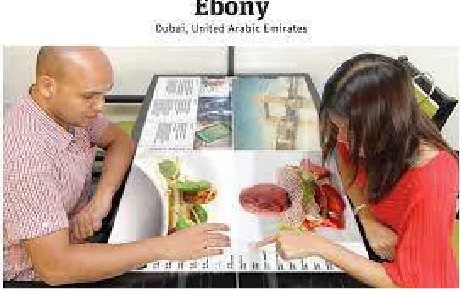
The proposed dining consists of a tempered glass on the top of the table, a rear film under the glass, a short focus projector under the table, and IR camera fixed beneath of the table. The projector and the IR camera are connected to a personal computer. As a video signal transmitted from the computer, the image on the rear film of the table will recover by the projector. The user of the table will watch the content which is necessary for an interactive function. Then, the user can give a response to the content by touching certain location of the glass and select menu. The IR camera under the table will capture the user’s finger tips using bright points in the picture. The captured picture will be sent to the personal computer for recognition purpose. This paper investigates the deployment of the touchable dining table in a restaurant environment to enrich customer’s dining experience with family.
For this multi touch table following components are required:
1. IR camera
2. Projector
3. Glass table
4. Glass sheet
Structure of Menu Table
.
Objectives:
1. Implementing interactive Touch dining table.
2. The interface of the Touch table consisting of projector, camera, and glass table. 3. Implementing automated ordering and billing in restaurants.
4. Our aim is to develop a cost effective system.
IV. CONCLUSION
mistakes. It can also help in reducing child labor problem, which is a huge problem in countries like India. Using this system it avoids the problem like exchange of order.
REFERENCES
1. Shweta S. Tanpure, Priyanka R. Shidankar, Madura M. Joshi, “Automated Food Ordering System With Real-Time Customer Feedback”, International journal of Advanced Research in Computer Science and Software Engineering, Volume 3,Issue 2, February 2013.
2. Swapna, M. Firdouse Ali Khan, “Design and Implementation of Ordering System for Restaurants”, International Journal of Engineering Research & Technology (IJERT), Vol. 1, Issue 10, December 2012.
3. RajatVerma, Preksha Gupta, Prof. C. Malathy.” Multi-touch table with RFID technology for hotels” IJERA Vol. 3 Issue 2, (2013) pp. 497-503. 4. Snehal S. Dambhare, Mangesh A. Parjane, Dhananjay M. Deore, “Touch screen based menu ordering and displaying system for restaurents”,
International Journal of Computer Engineering and Technology, Volume 3, Issue 2, July-September(2012), pp.297-30.
5. G. Saidu, M. Momoh, A. S. Mindaudu, “Temperature monitoring and logging system suitable for use in hospitals, incorporating GSM text messaging”, International Journal of Information Science and Techniques (IJIST), Vol.3, No.1, January 2013.
6. P. Isenberg, D. Fisher, M. Morris, K. Inkpen, and M. Czerwinski, “An exploratory study of co-located collaborative visual analytics around a tabletop display” In Proc. IEEE Visual Analytics Science and Technology (VAST), pages 179-186, 2010.
7. Ling-Erl Cheng, Chao-Hsuing Tseng, and Chun-Lin Lu, “Design and implementation of the smart dining table,” Consumer electronics, Communications and networks(CECNet), Xianning, China, April 2011, pp 4887~4889.
8. Ashutosh Bhargave, Niranjan Jadhav, Apurva Joshi, Prachi Oke, Prof. S. R. Lahane, “ Digital Ordering System for Restaurant using android”, International Journal of Scientific and Research Publications, VOL. 3, Issue 4, April 2013.
9. V. Shridhar, “Image based password authentication for illiterates with touch screen”, International Journal of Science, Engineering and Technology Research (IJSETR) Volume 1, Issue 3,September 2012.