EA
R 1000
/
2
000
A
DRA
1000
/
2000
Installation
and
Release 2 June 2002
EAR 1000/2000 and ADRA 1000/2000
NOTICE
This publication refers to the EAR 1000/2000 and the ADRA 1000/2000, Release 2. Additional copies of this manual may be obtained from Aleen Technologies
Reproduction of this manual or parts thereof without written permission from Aleen Technologies is strictly prohibited.
Aleen Technologies reserves the right to modify the hardware and software described in the manual without prior notice. However, changes made to the hardware or software described do not necessarily render this publication invalid.
WARRANTY
In the event that the product proves to be defective in workmanship or materials within a period of one year from date of shipment, Aleen Technologies shall repair or replace the product at its discretion. Transportation will be the responsibility of the dealer/distributor.
Under no circumstances shall Aleen Technologies be liable for consequential or special damages, loss of revenue or user/dealer expenses arising out of or in connection with the use or performance of the product, whether based on contract, tort, or any other legal agreement.
TABLE OF CONTENTS
1. INTRODUCTION...1-1
SECTION I
EAR 1000/2000 INSTALLATION AND PROGRAMMING
Table of Contents
ii EAR/ADRA Installation and Programming Manual
4.2.3 Menus Handling ... 4-6 4.2.4 Busy Menu Handling... 4-8 4.2.5 Advanced Features ... 4-9 5. CHANGING THE OPENING GREETING ... 5-1 6. PROGRAMMING EXAMPLE ... 6-1
SECTION II
ADRA 1000/2000 INSTALLATION AND PROGRAMMING... 1
Table of Contents
1. INTRODUCTION
SECTION I:
EAR 1000/2000
2.
OVERVIEW OF EAR 1000/2000
The EAR 1000 is a one port auto attendant system. The EAR 2000 is a two port auto attendant system. Both systems have 9 minutes of recording time.
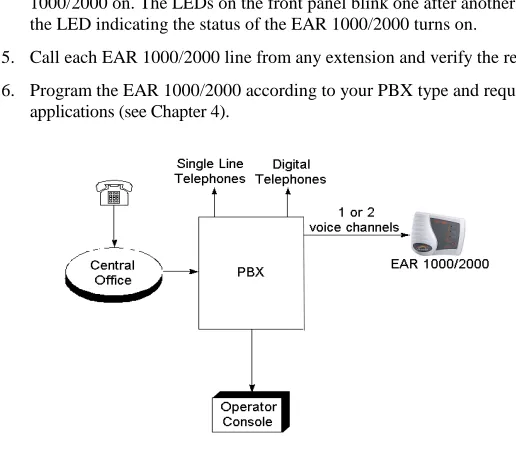
The EAR 1000/2000 can be integrated with most types of PBX through the analog ports and programmed by a touch-tone telephone.
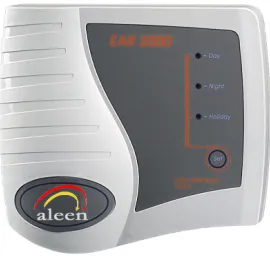
Figure 2-1. EAR 2000 General View
2.1 Features and Services
The EAR 1000/2000’s features includes the following features:
• Opening Greetings: Day, Night, Holiday for each line.
• Call Transfer
Overview of EAR 1000/2000
2-2 EAR 1000/2000 Installation and Programming Manual
− Non-Supervised. The EAR 1000/2000 transfers the call immediately without verifying the status of the extension.
− Semi-Supervised. The EAR 1000/2000 checks for a busy signal before transferring the call to the extension.
• Up to 9 minutes of recording time.
• High quality recording.
• Non-volatile memory (Flash memory).
• Adjustable flash time.
• Busy detect using call progress tone or DTMF codes.
• Busy menu play back.
• Remote programming and recording.
3.
DESCRIPTION AND INSTALLATION
3.1 Physical Description
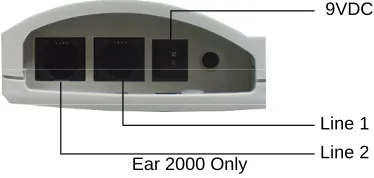
The functional components of the EAR 1000/2000 are located in its bottom side panel. The LEDs are located on the front panel. The back panel has two indented holes for wall mounting.
3.1.1 Bottom Panel
9VDC
Line 1
Line 2 Ear 2000 Only
Description and installation
3-2 EAR 1000/2000 Installation and Programming Manual
The following description corresponds to the labels in Figure 3-1.
1. Power Supply Connector Connects the EAR 1000/2000 to the external power supply
2. 1/2 RJ-11 Sockets Connects the EAR 1000/2000 to PBX extensions
3.1.2 Front Panel
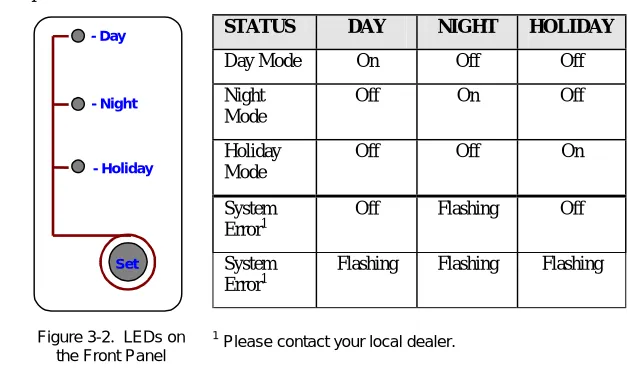
The following figure and table describe the function of the three LEDS on the front panel.
Set - Day
- Night
- Holiday
Figure 3-2. LEDs on the Front Panel
STATUS DAY NIGHT HOLIDAY
Day Mode On Off Off Night
Mode
Off On Off Holiday
Mode
Off Off On System
Error1
Off Flashing Off System
Error1
Flashing Flashing Flashing
Description and installation
3.2 Installation
The EAR 1000/2000 is delivered completely assembled. It is designed for mounting on a wall, close to the PBX.
3.2.1 Installing the EAR 1000/2000
To install the EAR 1000/2000:
1. Mount the unit on a wall close to the PBX cabinet. Use the drill template to place the two screws.
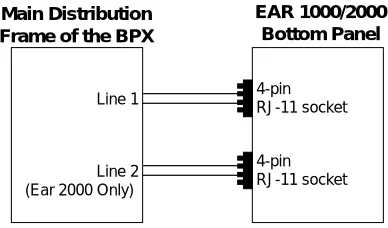
2. Connect the RJ-11 connector on one end of the cables to the RJ-11 sockets on the bottom panel of the EAR 1000/2000. Connect the other end of the cables to one analog telephone line on the Main Distribution Frame (MDF) of the PBX (see Figure 3-3).
EAR 1000/2000 Bottom Panel Main Distribution
Frame of the BPX
Line 1 4-pinRJ-11 socket
Line 2 4-pinRJ-11 socket
(Ear 2000 Only)
Description and installation
3-4 EAR 1000/2000 Installation and Programming Manual
3. On the bottom panel of the EAR 1000/2000, plug the 9VDC adapter jack into the power supply connector.
4. Plug the 9 Vdc adapter into the main power supply outlet to turn the EAR 1000/2000 on. The LEDs on the front panel blink one after another and then the LED indicating the status of the EAR 1000/2000 turns on.
5. Call each EAR 1000/2000 line from any extension and verify the replay. 6. Program the EAR 1000/2000 according to your PBX type and required
applications (see Chapter 4).
4. DTMF
PROGRAMMING
The EAR 1000/2000 is programmed by telephone using DTMF tones. For the EAR 2000, both lines can be programmed and recorded using DTMF tones from one of the lines.
Note: A confirmation tone is heard every time a programming command is entered.
4.1 Entering and Exiting the Programming Mode
The EAR 1000/2000 does not handle calls when in the programming mode.
To enter the programming mode:
1. Call the Ear 1000/2000 Ext. from any touch-tone telephone.
2. Wait until the EAR 1000/2000 answers and plays the opening greeting or plays a tone if no menu is recorded. Next, dial *900.
3. Dial the System Administrator’s password (the default password is 1234) to enter the programming mode.
To exit the programming mode: • Dial *900.
DTMF Programming
4-2 EAR 1000/2000 Installation and Programming Manual
4.2 DTMF Programming Commands
The following tables include the DTMF commands available for the EAR 1000/2000 system.
4.2.1 Script Messages
OPERATION COMMAND DEFAULT
Record a script message.
In the Ear 2000 it is possible to define whether to use different greetings for lines 1 and 2 or to use the same greetings for these lines. Refer to command *112 below.
*100 + XX + Beep + Record + #
where
XX = 00 ; Day greeting
XX = 10 ; Night greeting
XX = 20 ; Holiday Mode greeting
XX = 22 ; Busy greeting
XX = 01 ; Transfer greeting The following are only available for the second line of EAR 2000
XX = 50 ; Day greeting
XX = 60 ; Night greeting
XX = 70 ; Holiday greeting
Play a script message *101 + XX
where
DTMF Programming
Delete a script message
Deletes the message and returns its parameters to default values.
*102 + XX
where
XX = Script message number (Same as *100)
Define the set of scripts to be used when the second line is called (see also *100).
Note: For EAR 2000 only
*112 + X
where
X = 0 ; Uses scripts 00, 10, 20 for both lines
X = 1 ; Uses scripts 00, 10, 20 for line 1 and 50, 60, 70 for line 2
DTMF Programming
4-4 EAR 1000/2000 Installation and Programming Manual
4.2.2 PBX Parameters
OPERATION COMMAND DEFAULT
Number of digits in extension.
*300 + X
where
X = Number of digits in extension (1-6)
3
Number of rings before line is answered.
*310 + X + Y
where
X = Line number (1 or 2)
Y = Number of rings (1-9)
Line 1 Y = 1 Line 2 Y = 2
Operator ID digit. When this digit is dialed during any script, the caller is transferred to the operator. (also see *360).
*330 + X
where
X = Digit to be dialed by caller (0-9)
0
Non/Semi supervised transfer
*350 + X + Y
where
X = 1 ; All extensions except the operator
X = 2 ; Operator extension only
Y = 0 ; Non supervised
Y = 1 ; Semi supervised
DTMF Programming
Operator extension number
*360 + X + Ext. + #
where
X = 1 ; Day operator
X = 2 ; Night + Holiday operators
Ext. = Operator Ext. number
Ext. = 0
Flash Time *370 + XXX
XXX – A 3 digit number (000-980) in steps of 20 ms.
600 ms
Busy, disconnect and DTMF on/off time.
*371 + X + YYYY
where
X = 1 ; Busy off time
X = 2 ; Busy on time
X = 3 ; Disconnect off time
X = 4 ; Disconnect on time
YYYY = Cadence in ms (0100-3000) in steps of 20ms
DTMF Programming
4-6 EAR 1000/2000 Installation and Programming Manual
PBX Transfer code and Recall from Busy code.
*380 + X + Code + #
where
X = 1 ; Transfer code.
X = 2 ; Recall from busy code.
Code– respective DTMF code that contains up to four digits including 0-9, #, * and A-D.
Special digits
*0 for Ext. *4 for # *7 for C *1 for Pause *5 for A *8 for D *2 for Flash *6 for B ** for *
Flash + Ext. Flash
4.2.3 Menus Handling
OPERATION COMMAND DEFAULT
Transfer call to an extension at the end of the script message or when the caller dials a digit during a script playback.
*120 + XX + B + Ext. + #
where
XX = Script message number (Same as *100)
B = Digit to be dialed by caller or * at the end of message playback.
DTMF Programming
Transfer the call to an operator at the end of the script message.
Operator Ext. is defined by command *360
*125 + XX + #
where
XX = Script message number (Same as *100)
Disconnect the call at the end of the script message.
*140 + XX + * + #
where
XX = Script message number (Same as *100)
Direct transfer to an extension. Enables the user to directly dial an extension during playback of a script message
*170 + XX + first digit(s) + #
where
XX = Script message number (Same as *100)
first digit(s) = First digit(s) of extension. Up to four different digits can be entered.
Reset Scripts to default values. This command does not delete the recorded script messages.
*190 + XX + #
where
DTMF Programming
4-8 EAR 1000/2000 Installation and Programming Manual
Reset value in Script to default values. This command does not delete the recorded script messages.
*190 + XX + Y + #
where
XX = Script message number (Same as *100)
Y = Specific digit value to reset in the script.
4.2.4 Busy Menu Handling
OPERATION COMMAND DEFAULT
Return to the opening greeting when caller dials return digit during playback of Busy script.
*115 + B
where
B = Digit to be dialed by caller or * at the end of greeting playback
Note: This option is valid only for the Busy menu (script 22).
Place a call on hold.
Enables the call to remain on hold. The caller is put on hold for ten seconds before trying to transfer the call again.
*180 + B
where
B = Digit to be dialed by caller to put the call on hold or * to put the call on hold at the end of playback
DTMF Programming
Blind Transfer to a busy extension. An immediate attempt is made to transfer the call to the extension when the user dials the transfer digit.
*185 + B
where
B = Blind transfer digit to be dialed by the caller or * at the end of greeting playback
Note: This option is valid only for the Busy menu (script 22).
4.2.5 Advanced Features
OPERATION COMMAND DEFAULT
Time for End Of Message action.
*105 + XX + Y + #
where
XX = Script message number (Same as *100)
Y = 0-9 (sec)
5
Selecting DTMF code or Call Progress tone detection. This command is valid in semi-supervised transfer mode.
*220 + X
where
X = 0 ; Busy detect using Call Progress tones.
X = 1 ; Busy detect using DTMF codes.
Note: Option X=1 is valid only if the ports assigned to the Ear 1000/2000
DTMF Programming
4-10 EAR 1000/2000 Installation and Programming Manual
in the PBX are defined as VM ports.
Defining the DTMF code for the busy condition.
*221 + Code + #
where
Code – Each DTMF code can contain up to four digits including 0-9. To enter #, *, A-D use the following DTMF combinations:
*4 for # *7 for C *5 for A *8 for D *6 for B ** for *
Note: This option is valid only if the ports assigned to the Ear 1000/2000 in the PBX are defined as VM ports.
Disconnection code *333 + Code + #
where
Code = Disconnection code. Same as Code table in *221
# # #
Greeting volume level *369 + X
where
X = Volume level (0-9) 9 is the highest volume level
DTMF Programming
Busy signal cadence setup.
Setup of busy on/off-time cadence.
*375 + XXXX + #
where
XXXX – Busy extension number. Setting-up the Busy on/off-time cadence by dialing the busy extension number.
Change system
administrator password.
*600 + * + Old password + New password + #
Password must include 4 digits. Do not use the digits * and #. This password cannot be disabled.
1234
Change operator’s password. Used by the operator to change the opening greeting (Day, Night, or Holiday).
*601 + * + Old password + New password + #
Password must include 4 digits. Do not use the digits * and #. To disable the password enter ‘0000’ as a new paaword.
1234
Resetting the EAR 1000/2000.
Returns to default factory settings and deletes all script messages.
5.
CHANGING THE OPENING GREETING
Changing the opening greeting between Day, Night and Holiday is performed in one of the following methods:
1. Press the button on the EAR 1000/2000 front panel.
2. Call one of the EAR 1000/2000 extensions and during the opening greeting dial:
*8 + XXXX + Y
where
XXXX = Operator password (default=1234)
Y = 0 ; Day Mode (default)
Y = 1 ; Night Mode
Y = 2 ; Holiday Mode
Note: Operator password can be skipped if canceled using command *601.
6. PROGRAMMING
EXAMPLE
The following paragraphs are examples for EAR 1000/2000 configuration. These examples consider a PBX with a 3 digit extension size, an extension from 400 to 599, and Hook Flash value of 600ms.
Day Opening Greeting (Script 00)
“Welcome to ITS.
If you know the extension number you require, please dial it now. For Help Desk dial 1. (Ext.440)
For Marketing dial 2. (Ext. 450) For Management dial 3. (Ext. 460) For the operator dial 0 or wait on the line.”
Night Opening Greeting (Script 10)
“Welcome to ITS.
If you know the extension number you need, please dial it now.
Our offices are currently close, our working hours are: Monday to Friday 8am-5pm.
Thank you and goodbye.”
Extension Busy Greeting (Script 22)
“The extension required is busy. To stay on hold dial 1.
Programming Example
6-2 EAR 1000/2000 Installation and Programming Manual
EAR 1000/2000 DTMF Commands
Command Meaning
* 900 1234 Enter programming mode * 300 3 The Ext. numbers are 3 digits long * 330 0 The digit for operator ID is 0 * 370 600 Hook Flash value is set to 600ms * 360 1 400 # In Day mode operator Ext. is 400
* 170 00 4 5 # Enable direct call when either the digit 4 or 5 is dialed during script message 00 (Day)
* 120 00 1 440 # Transfer the call to Ext. 440 when the digit 1 is dialed during script message 00 (Day)
* 120 00 2 450 # Transfer the call to Ext. 450 when the digit 2 is dialed during script message 00 (Day)
* 120 00 3 460 # Transfer the call to Ext. 460 when the digit 3 is dialed during script message 00 (Day)
* 125 00 # At the end of script message 00 transfer call to operator Ext.
Programming Example
Command Meaning
* 140 10 * # At the end of script message 10 (Night) disconnect the call
* 350 1 1 Set all Ext. except operator Ext. to be semi-supervised * 350 2 0 Set operator Ext. to be non-supervised
* 180 1 # When an Ext. is busy, place the call on hold, if the digit 1 is dialed
SECTION II:
ADRA 1000/2000
7.
OVERVIEW OF ADRA 1000/2000
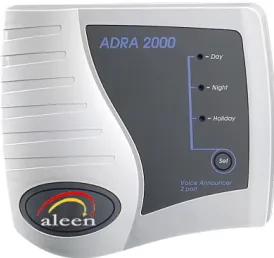
The ADRA 1000 is a one port Auto-Announcer System. The ADRA 2000 is a two port Auto-Announcer System. Both systems have up to 9 minutes of recording time. The ADRA 1000/2000 can be integrated with most types of PBX through their analog ports, and can be programmed by a touch-tone telephone.
Figure 7-1. ADRA 2000 General View
7.1 Features and Services
The ADRA 1000/2000 has the following features:
• Opening Greetings: Day, Night, Holiday for each line.
• Call Transfer
Overview of ADRA 1000/2000
7-2 ADRA 1000/2000 Installation and Programming Manual
− Non-supervised. The ADRA 1000/2000 transfers the call immediately, without verifying the status of the extension.
−−−− Semi-supervised. The ADRA 1000/2000 checks for a busy signal before
transferring a call to an extension.
• Up to 9 minutes of recording time.
• High quality recording.
• Non-volatile memory (Flash memory).
• Adjustable flash time.
• Busy status detection using call progress tone or DTMF codes.
• Busy Extension playback message.
• Remote programming and recording.
8.
DESCRIPTION AND INSTALLATION
8.1 Physical Description
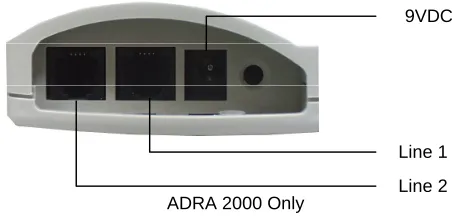
The functional components of the ADRA1000/2000 are located on its bottom panel. The LEDs are on the front panel. The back panel has two indented holes for wall mounting.
8.1.1 Bottom Panel
9VDC
Line 1
Line 2 ADRA 2000 Only
Description and installation
8-2 ADRA 1000/2000 Installation and Programming Manual
The following description corresponds to the labels in Figure 8-1. 1. Power Supply
Connector
Connects the ADRA1000/2000 to the external power- supply.
2. 1/2 RJ-11 Sockets Connects the ADRA1000/2000 to PBX extensions.
8.1.2 Front Panel
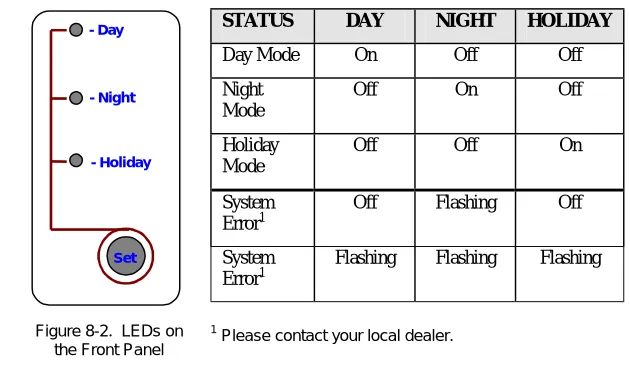
The following figure and table describe the function of the three LEDS on the front panel.
Set - Day
- Night
- Holiday
Figure 8-2. LEDs on the Front Panel
STATUS DAY NIGHT HOLIDAY
Day Mode On Off Off Night
Mode
Off On Off Holiday
Mode
Off Off On System
Error1
Off Flashing Off System
Error1
Flashing Flashing Flashing
Description and installation
8.2 Installation
The ADRA 1000/2000 is delivered completely assembled. It is designed for mounting on a wall, close to the PBX.
8.2.1 Installing the ADRA 1000/2000
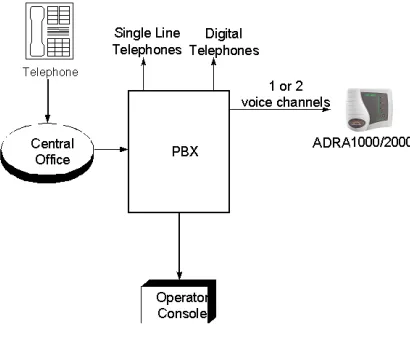
Figure 7-3 describes the system installation.
Description and installation
8-4 ADRA 1000/2000 Installation and Programming Manual
To install the ADRA 1000/2000:
1. Mount the unit on a wall close to the PBX cabinet. Use the drill template to place the two screws.
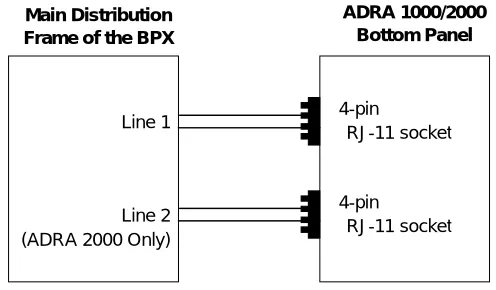
2. Connect the RJ-11 connector to the RJ-11 socket on the bottom panel of the ADRA 1000/2000. Next, connect the other end of the cable to an analog telephone line on the Main Distribution Frame (MDF) of the PBX (see Figure 8-4).
ADRA 1000/2000 Bottom Panel Main Distribution
Frame of the BPX
Line 1 4-pin
RJ-11 socket
Line 2 4-pin
RJ-11 socket (ADRA 2000 Only)
Figure 8-4. Analog Line Connections
Description and installation
3. Plug the 9VDC adapter into the main power supply outlet. The LEDs on the front panel blink one after the other, then the LED indicating the status of the ADRA 1000/2000 turns on.
4. Call each ADRA 1000/2000 line from any extension, and verify a confirmation tone (short beep).
9. DTMF
PROGRAMMING
The ADRA 1000/2000 is programmed by telephone using DTMF tones. For the ADRA 2000, both lines can be programmed and recorded using DTMF tones from one of the lines.
Note: A confirmation tone is heard every time a programming command is entered.
9.1 Entering and Exiting the Programming Mode
The ADRA 1000/2000 does not handle calls when in programming mode.
To enter the programming mode:
1. Call the ADRA 1000/2000 Ext. from any touch-tone telephone.
2. Wait until the ADRA 1000/2000 answers and plays the opening greeting, or a clear tone is heard (if no greeting is recorded). Next, dial *900.
3. Dial the System Administrator’s password (the default password is 1234) to enter the programming mode.
DTMF Programming
9-2 ADRA 1000/2000 Installation and Programming Manual
9.2 DTMF Programming Commands
The following tables show the DTMF commands available for the ADRA 1000/2000 system.
9.2.1 Script Messages
OPERATION COMMAND DEFAULT
To Record an Opening Greeting.
In the ADRA 2000 it is possible to define whether to use different greetings for lines 1 and 2 or to use the same greetings for both lines. Refer to command *112 below.
Note: In case of re-recording, it’s
recommended to first delete the existing message.
*100 + XX + Beep + Record + #
where:
XX = 00 ; Day greeting
XX = 10 ; Night greeting
XX = 20 ; Holiday greeting
XX = 22 ; Busy greeting
XX = 01 ; Transfer greeting The following are only available for the second line of ADRA 2000
XX = 50 ; Day greeting
XX = 60 ; Night greeting
XX = 70 ; Holiday greeting
DTMF Programming
Play an Opening Greeting. *101 + XX
where:
XX = Opening Greeting (same as *100)
Delete an Opening Greeting.
*102 + XX
where:
XX = Opening Greeting (same as *100)
Define the set of greetings to be used when the second line is called.
Note: For ADRA 2000 only.
*112 + X
where:
X = 0 ; Uses greeting No. 00, 10, 20 for both lines.
X = 1 ; Uses greeting No. 00, 10, 20 for line 1 and 50, 60, 70 for line 2
DTMF Programming
9-4 ADRA 1000/2000 Installation and Programming Manual
9.2.2 PBX Parameters
OPERATION COMMAND DEFAULT
Number of rings before line is answered.
*310 + X + Y
where:
X = Line number (1 or 2)
Y = Number of rings (1-9)
Line 1 Y = 1 Line 2 Y = 2
Non/Semi-supervised transfer.
Note: When the required extension is the Operator or another extension.
*350 + X + Y
where:
X = 1 ; For all extensions except the operator’s extension.
X = 2 ; Operator extension only
Y = 0 ; Non-supervised.
Y = 1 ; Semi-supervised.
All Ext. Non-supervised.
Operator extension number.
*360 + X + Ext. + #
where:
X = 1 ; Day operator
X = 2 ; Night + Holiday operators
Ext. = Operator Ext. number
DTMF Programming
Flash Time. *370 + XXX
XXX – A 3 digit number (000-980) in steps of 20 ms.
600 ms
Busy and disconnect DTMF on/off time.
*371 + X + YYYY, where:
X = 1 ; Busy off time
X = 2 ; Busy on time
X = 3 ; Disconnect off time
X = 4 ; Disconnect on time
YYYY = Cadence in ms (0100-3000) in steps of 20ms
0500 ms 0500 ms 0240 ms 0240 ms
PBX Transfer code and Recall from Busy code.
*380 + X + Code + #
where:
X = 1 ; Transfer code.
X = 2 ; Recall from busy code.
Code– respective DTMF code that contains up to four digits including 0-9, #, * and A-D.
Special digits
** for * *4 for # *1 for Pause *5 for A *6 for B *2 for Flash *7 for C *8 for D *0 for Ext.
DTMF Programming
9-6 ADRA 1000/2000 Installation and Programming Manual
9.2.3 Greeting Handling
OPERATION COMMAND DEFAULT
Transfer a call to an extension at the end of the Opening Greeting.
*120 + XX + * + Ext. + #
where:
XX = Opening Greeting number (same as *100)
Ext = Extension (contains up to six digits).
Transfer the call to the operator’s ext. at the end of the Opening Greeting. Operator Ext. Is defined by command *360
*125 + XX + #
where:
XX = Opening Greeting number (same as *100)
Disconnect the call at the end of the Opening Greeting.
*140 + XX + * + #
where:
XX = Opening Greeting number (same as *100)
Reset Opening Greeting to default values. This command does not delete the recorded script messages.
*190 + XX + #
where
DTMF Programming
9.2.4 Busy Menu Handling
OPERATION COMMAND DEFAULT
Place a call on hold at the end of a BUSY greeting message (script 22).
Enables the call to remain on hold. The caller is put on hold for 10 seconds before trying to transfer the call again.
*180 + *
where:
* = Puts the call on hold at the end of a Busy greeting message
Blind Transfer to a busy extension. An immediate attempt is made to transfer the call to the extension.
*185 + *
DTMF Programming
9-8 ADRA 1000/2000 Installation and Programming Manual
9.2.5 Advanced Features
OPERATION COMMAND DEFAULT
Selecting DTMF code or Call Progress tone detection.
*220 + X
where:
X = 0 ; Busy detect using Call Progress tones.
X = 1 ; Busy detect using DTMF codes.
Note: This option is valid only if the ports assigned to the ADRA 1000/2000 in the PBX are defined as VM ports.
Call Progress
Defining the DTMF code for the busy condition.
*221 + Code + #
where:
Code – Each DTMF code can contain up to four digits including 0-9, #, * and A-D.
Special digits
** for * *4 for # *5 for A *6 for B *7 for C *8 for D
DTMF Programming
Disconnection code. *333 + Code + #
where:
Code = Disconnection code. Same as Code table in *221
# # #
Greeting volume level. *369 + X
where:
X = Volume level (0-9) 9 is the highest volume level
5
Busy signal cadence learn.
Checks the busy signal by dialing the busy extension number and implements the recorded values.
*375 + XXXX + #
where:
XXXX – Busy extension number
Change system
administrator password.
*600 + * + Old password + New password + #
Password must include 4 digits. This password cannot be disabled.
Warning: Do not use the * or # keys.
DTMF Programming
9-10 ADRA 1000/2000 Installation and Programming Manual
Change operator’s password. Used by the operator to change the Day, Night, and Holiday greetings.
*601 + * + Old password + New password + #
Password must include 4 digits. To disable the password enter ‘0000’.
Warning: Do not use the * or # keys.
1234
Resetting the ADRA 1000/2000.
Returns to default factory settings and deletes all opening greetings.
10. CHANGING THE OPENING GREETING
Changing the opening greeting between Day, Night, and Holiday, is possible in one of the following methods:
1. Using the button on the unit’s front panel.
2. Dialing to one of the unit’s extensions and when the current greeting is played using the following DTMF code:
*8 + XXXX + Y where:
XXXX = Operator password (default=1234). Y = 0 ; Day greeting (default).
Y = 1 ; Night greeting. Y = 2 ; Holiday greeting.
APPENDIX A EAR/ADRA SPECIFICATIONS
The following are the EAR 1000/2000 and ADRA 1000/2000 specifications:
DC Power Supply 9 Vdc/800 mA
Line Voltage 24 to 72 Vdc
DC Leakage Current < 10 µA
On-hook Insulation Resistance between Line Terminal and
the Ground
0 to 100 Vdc > 5 MΩ 100 to 200 Vdc > 30 KΩ 500 Vac/50 Hz > 20 KΩ 100 Vac/25 Hz > 100 KΩ
Ring Capacitor 0.47 µF ± 10%
On-hook Impedance @ 50 Vdc, 40 Vac/25 Hz > 3000 Ω
Ring Detect 27 to 100 Vac/16 to 60 Hz
DC Resistance (off-hook) 24 to 66 Vdc @ 20 to 100 mA
Impedance (off-hook) 300 to 3400 Hz 500 to 700 Ω
Imbalance Ratio 300 to 3400 Hz > 46 db
Return Loss 300 to 3400 Hz > 18 db
Current during Break < 700 µA
DTMF Transmission:
Frequency Tolerance
Frequency Level (High Group) Frequency Level (Low Group)
+1.5% -6 to -8 dBm -8 to -10 dBm
Inter-digit Pause in Tone Dialing 70 to 80 ms
Aleen Technologies