NetVanta 1000 Series Switch
Hardware Installation Guide
1200500L1 NetVanta 1224 1200504L1 NetVanta 1224ST 1200510L1 NetVanta 1224STR 1200520L1 NetVanta 1224R
Trademarks NetVanta 1000 Series Switch Hardware Installation Guide
Trademarks
Any brand names and product names included in this manual are trademarks, registered trademarks, or trade names of their respective holders.
To the Holder of the Manual
The contents of this manual are current as of the date of publication. ADTRAN reserves the right to change the contents without prior notice.
NetVanta 1000 Series Switch Hardware Installation Guide Conventions
61200500L1-34C © 2004 ADTRAN, Inc. 3
Conventions
Notes provide additional useful information.
Cautions signify information that could prevent service interruption.
Safety Instructions NetVanta 1000 Series Switch Hardware Installation Guide
Safety Instructions
When using your telephone equipment, please follow these basic safety precautions to reduce the risk of fire, electrical shock, or personal injury:
1. Do not use this product near water, such as a bathtub, wash bowl, kitchen sink, laundry tub, in a wet basement, or near a swimming pool.
2. Avoid using a telephone (other than a cordless-type) during an electrical storm. There is a remote risk of shock from lightning.
3. Do not use the telephone to report a gas leak in the vicinity of the leak.
4. Use only the power cord, power supply, and/or batteries indicated in the manual. Do not dispose of batteries in a fire. They may explode. Check with local codes for special disposal instructions. 5. The socket-outlet shall be installed near the equipment and shall be easily accessible.
Save These Important Safety Instructions
NetVanta 1000 Series Switch Hardware Installation Guide FCC-Required Information
61200500L1-34C © 2004 ADTRAN, Inc. 5
FCC-Required Information
FCC regulations require that the following information be provided in this manual:
1. This equipment complies with Part 68 of FCC rules and requirements adopted by ACTA. Each registered interface has a label that contains, among other information, a product identifier in the format US:AAAEQ##TXXXX. If requested, provide this information to the telephone company. 2. If this equipment causes harm to the telephone network, the telephone company may temporarily
discontinue service. If possible, advance notification is given; otherwise, notification is given as soon as possible. The telephone company will advise the customer of the right to file a complaint with the FCC.
3. The telephone company may make changes in its facilities, equipment, operations, or procedures that could effect the proper operation of this equipment. Advance notification and the opportunity to maintain uninterrupted service are given.
4. If experiencing difficulty with this equipment, please contact ADTRAN for repair and warranty information. The telephone company may require this equipment to be disconnected from the network until the problem is corrected or it is certain the equipment is not malfunctioning. 5. This unit contains no user-serviceable parts.
6. This equipment is designed to connect to the telephone network or premises wiring using an FCC-compatible modular jack, which is compliant with Part 68 and requirements adopted by ACTA. 7. The following information may be required when applying to the local telephone company for
leased line facilities:
8. The REN is useful in determining the quantity of devices you may connect to your telephone line and still have all of those devices ring when your number is called. In most areas, the sum of the RENs of all devices should not exceed five. To be certain of the number of devices you may connect to your line as determined by the REN, call your telephone company to determine the maximum REN for your calling area.
9. This equipment may not be used on coin service provided by the telephone company. Connection to party lines is subject to state tariffs. Contact your state public utility commission or corporation commission for information.
Part Number
Registration
Number Service Type REN/SOC FIC USOC
1200861L1 US:HDCDENAN1200861L1 56 Kbps Digital Interface 64 Kbps Digital Interface
6.0F 04DU5-56 04DU5-64
RJ-48S
1200862L1
US: HDCDENAN1200863L1
1.544 Mbps - SF
1.544 Mbps - SF and B8ZS 1.544 Mbps - ESF
1.544 Mbps - ESF and B8ZS
6.0N 04DU9-BN 04DU9-DN 04DU9-1KN 04DU9-1SN RJ-48C 1200863L1 1202862L1 US: HDCDENAN1202863L1 1202863L1
1200872L1 US: HDCDENAN1200872L1
FCC Radio Frequency Interference Statement NetVanta 1000 Series Switch Hardware Installation Guide
FCC Radio Frequency Interference Statement
This equipment has been tested and found to comply with the limits for a Class A digital device, pursuant to Part 15 of the FCC Rules. These limits are designed to provide reasonable protection against harmful interference when the equipment is operated in a commercial environment. This equipment generates, uses, and can radiate radio frequency energy and, if not installed and used in accordance with the instruction manual, may cause harmful interference to radio frequencies. Operation of this equipment in a residential area is likely to cause harmful interference in which case the user will be required to correct the interference at his own expense.
Electromagnetic Compatibility (EMC) Table for the NetVanta 1224STR/1224R
NetVanta Module P/N and Name NetVanta 1224STR/1224R
1200861L1 56K/64K NIM FCC Part 15, Class A
EN55022 Class A
1200862L1 T1/FT1 NIM FCC Part 15, Class A
EN55022 Class A 1202862L1 T1/FT1 NIM, 2nd Gen FCC Part 15, Class A
EN55022 Class A
1200863L1 T1/FT1+DSX-1 NIM FCC Part 15, Class A
EN55022 Class A 1202863L1 T1/FT1+DSX-1 NIM, 2nd Gen FCC Part 15, Class A
EN55022 Class A
1200866L1 Serial NIM FCC Part 15, Class A
EN55022 Class A EN55024 EN61000-3-2 EN61000-3-3
1200867L1 SHDSL NIM FCC Part 15, Class A
EN55022 Class A EN55024 EN61000-3-2 EN61000-3-3
1200864L1 Analog Modem DIM FCC Part 15, Class A
EN55022 Class A 1200865L1
1200875L1
ISDN BRI DIM ISDN S/T DIM
FCC Part 15, Class A EN55022 Class A EN55024 EN61000-3-2 EN61000-3-3
1200868L1 E1/FE1 NIM FCC Part 15, Class A
NetVanta 1000 Series Switch Hardware Installation Guide Industry Canada Compliance Information
61200500L1-34C © 2004 ADTRAN, Inc. 7
Industry Canada Compliance Information
Notice: The Industry Canada label applied to the product (identified by the Industry Canada logo or the “IC:” in front of the certification/registration number) signifies that the Industry Canada technical specifications were met.
Notice: The Ringer Equivalence Number (REN) for this terminal equipment is supplied in the documentation or on the product labeling/markings. The REN assigned to each terminal device indicates the maximum number of terminals that can be connected to a telephone interface. The termination on an interface may consist of any
combination of devices subject only to the requirement that the sum of the RENs of all the devices should not exceed five (5).
Canadian Emissions Requirements
This digital apparatus does not exceed the Class A limits for radio noise emissions from digital apparatus as set out in the interference-causing equipment standard entitled “Digital Apparatus,” ICES-003 of the Department of Communications.
Affidavits NetVanta 1000 Series Switch Hardware Installation Guide
Affidavits
Affidavit Requirements for Connection to Digital Services
• An affidavit is required to be given to the telephone company whenever digital terminal equipment without encoded analog content and billing protection is used to transmit digital signals containing encoded analog content which are intended for eventual conversion into voiceband analog signals and transmitted on the network. • The affidavit shall affirm that either no encoded analog content or billing information is being transmitted or that
the output of the device meets Part 68 encoded analog content or billing protection specifications.
• End user/customer will be responsible for filing an affidavit with the local exchange carrier when connecting unprotected customer premise equipment (CPE) to 1.544 Mbps or subrate digital services.
NetVanta 1000 Series Switch Hardware Installation Guide Affidavits
61200500L1-34C © 2004 ADTRAN, Inc. 9
Affidavit for Connection Of Customer Premises Equipment to 1.544 Mbps And/or Subrate Digital Services
For the work to be performed in the certified territory of ___________________(telco name)
State of ________________
County of ________________
I, _______________________ (name), _____________________________(business address),
____________________ (telephone number) being duly sworn, state:
I have responsibility for the operation and maintenance of the terminal equipment to be connected to 1.544 Mbps and/or ________ subrate digital services. The terminal equipment to be connected complies with Part 68 of the FCC rules except for the encoded analog content and billing protection specifications. With respect to encoded analog content and billing protection:
( ) I attest that all operations associated with the establishment, maintenance, and adjustment of the digital CPE with respect to analog content and encoded billing protection information continuously complies with Part 68 of the FCC Rules and Regulations.
( ) The digital CPE does not transmit digital signals containing encoded analog content or billing information which is intended to be decoded within the telecommunications network.
( ) The encoded analog content and billing protection is factory set and is not under the control of the customer.
I attest that the operator(s)/maintainer(s) of the digital CPE responsible for the establishment, maintenance, and adjustment of the encoded analog content and billing information has (have) been trained to perform these functions by successfully having completed one of the following (check appropriate blocks):
( ) A training course provided by the manufacturer/grantee of the equipment used to encode analog signals; or
( ) A training course provided by the customer or authorized representative, using training materials and instructions provided by the manufacturer/grantee of the equipment used to encode analog signals; or
( ) An independent training course (e.g., trade school or technical institution) recognized by the manufacturer/grantee of the equipment used to encode analog signals; or
( ) In lieu of the preceding training requirements, the operator(s)/maintainer(s) is (are) under the control of a supervisor trained in accordance with _________ (circle one) above.
I agree to provide ______________________ (telco’s name) with proper documentation to demonstrate compliance with the information as provided in the preceding paragraph, if so requested.
_________________________________Signature
_________________________________Title
_________________________________ Date
Transcribed and sworn to before me
This ________ day of _______________, _______
_________________________________ Notary Public
My commission expires:
FCC Radio Frequency Interference Statement NetVanta 1000 Series Switch Hardware Installation Guide
FCC Radio Frequency Interference Statement
This equipment has been tested and found to comply with the limits for a Class A digital device, pursuant to Part 15 of the FCC Rules. These limits are designed to provide reasonable protection against harmful interference when the equipment is operated in a commercial environment. This equipment generates, uses, and can radiate radio frequency energy and, if not installed and used in accordance with the
instruction manual, may cause harmful interference to radio frequencies. Operation of this equipment in a residential area is likely to cause harmful interference in which case the user will be required to correct the interference at his own expense.
Changes or modifications to this unit not expressly approved by the party
NetVanta 1000 Series Switch Hardware Installation Guide Warranty and Customer Service
61200500L1-34C © 2004 ADTRAN, Inc. 11
Warranty and Customer Service
ADTRAN will repair and return this product within the warranty period if it does not meet its published specifications or fails while in service. Warranty information can be found at: http://support.adtran.com (Click on Warranty and Repair Information, under Support.)
Product Registration
Registering your product helps ensure complete customer satisfaction. Please take time to register your products on line at http://support.adtran.com. Click on Service/Support and then on Product Registration
under Support.
Product Support Information
A return material authorization (RMA) is required prior to returning equipment to ADTRAN. For service, RMA requests, training, or more information, use the following contact information:
Repair and Return
If you determine that a repair is needed, please contact our Customer and Product Service (CaPS) department to have an RMA number issued. CaPS should also be contacted to obtain information regarding equipment currently in house or possible fees associated with repair.
Identify the RMA number clearly on the package (below address), and return to the following address:
Pre-Sales Inquiries and Applications Support
Your reseller should serve as the first point of contact for support. If additional pre-sales support is needed, the ADTRAN Support web site provides a variety of support services such as a searchable knowledge base, latest product documentation, application briefs, case studies, and a link to submit a question to an Applications Engineer. All of this, and more, is available at:
When needed, further pre-sales assistance is available by calling our Applications Engineering Department.
CaPS Department (256) 963-8722
ADTRAN Customer and Product Service 901 Explorer Blvd. (East Tower)
Huntsville, Alabama 35806 RMA # _____________
http://support.adtran.com
Product Support Information NetVanta 1000 Series Switch Hardware Installation Guide
Post-Sale Support
Your reseller should serve as the first point of contact for support. If additional support is needed, the ADTRAN Support web site provides a variety of support services such as a searchable knowledge base, updated firmware releases, latest product documentation, service request ticket generation and trouble-shooting tools. All of this, and more, is available at:
When needed, further post-sales assistance is available by calling our Technical Support Center. Please have your unit serial number available when you call.
Installation and Maintenance Support
The ADTRAN Custom Extended Services (ACES) program offers multiple types and levels of installation and maintenance services which allow you to choose the kind of assistance you need. This support is available at:
For questions, call the ACES Help Desk.
Training
The Enterprise Network (EN) Technical Training Department offers training on our most popular products. These courses include overviews on product features and functions while covering applications of
ADTRAN's product lines. ADTRAN provides a variety of training options, including customized training and courses taught at our facilities or at your site. For more information about training, please contact your Territory Manager or the Enterprise Training Coordinator.
http://support.adtran.com
Technical Support (888) 4ADTRAN
http://www.adtran.com/aces
ACES Help Desk (888) 874-ACES (2237)
Training Phone (800) 615-1176, ext. 7500 Training Fax (256) 963-6700
61200500L1-34C © 2004 ADTRAN, Inc. 13
Table of Contents
Introduction . . . 19
NetVanta 1224 and NetVanta1224ST . . . 19
NetVanta 1224STR and NetVanta 1224R . . . 19
Unpacking and Inspecting the System . . . 20
Product Specifications . . . 21
Physical Description . . . 22
Front Panel RJ-45 Ports and LEDS . . . 22
Front Panel Gigabit Ethernet Interfaces and LEDs . . . 22
Other Front Panel LEDs . . . 22
Reviewing the Rear Panel Design . . . 24
Option Modules . . . 25
Network Interface Modules . . . 26
Dial Backup Interface Modules . . . 32
Unit Installation . . . 34
Tools Required . . . 34
Mounting Options . . . 35
Supplying Power to the Unit . . . 37
Installing Dial Backup and Network Interface Modules . . . 38
Installing the NetVanta VPN Accelerator Card (1202368L1) . . . 40
61200500L1-34C © 2004 ADTRAN, Inc. 15
List of Figures
Figure 1. NetVanta 1224 Front Panel Layout . . . 22
Figure 2. NetVanta1224ST Front Panel Layout . . . 22
Figure 3. NetVanta 1224STR Front Panel Layout . . . 23
Figure 4. NetVanta 1224R Front Panel Layout . . . 23
Figure 5. NetVanta 1224 and NetVanta1224ST Rear Panel Layout . . . 24
Figure 6. NetVanta 1224STR and NetVanta 1224R Rear Panel Layout . . . 24
Figure 7. NetVanta 56K/64K NIM . . . 26
Figure 8. NetVanta T1/FT1 NIM . . . 27
Figure 9. NetVanta T1/FT1+DSX-1 NIM . . . 28
Figure 10.NetVanta Dual T1 NIM . . . 29
Figure 11.NetVanta Serial NIM . . . 30
Figure 12.NetVanta E1/FE1 NIM . . . 31
Figure 13.Repositioning the Mounting Bracket for a Wallmount Installation . . . 37
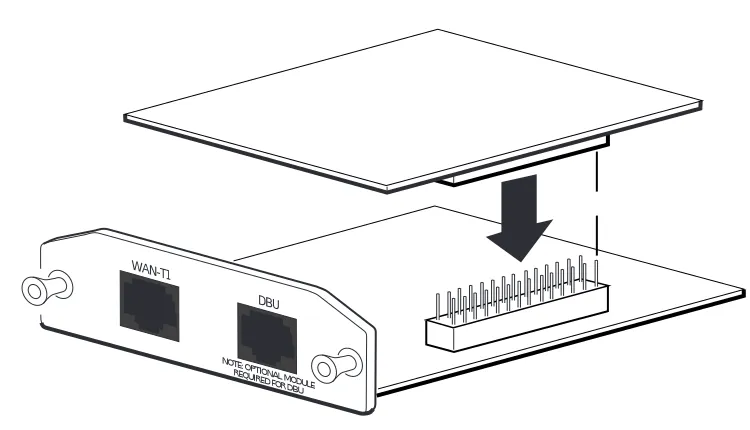
Figure 14.Installing DIMs . . . 38
Figure 15.NIM and DIM Installation . . . 39
61200500L1-34C © 2004 ADTRAN, Inc. 17
List of Tables
Table 1. Front Panel LED Descriptions . . . 23
Table A-1. Console Port Interface (DCE) . . . 41
Table A-2. SFP Slots . . . 41
Table A-3. 10/100 BaseT Ports . . . 42
Table A-4. 1000 BaseT Ports . . . 42
Table A-5. WAN-DDS Connector Pinouts . . . 43
Table A-6. WAN-T1 Connector Pinouts. . . 43
Table A-7. WAN-E1 Connector Pinouts. . . 43
Table A-8. DSX-1 Connector Pinouts . . . 44
Table A-9. G.703 Connector Pinouts. . . 44
Table A-10. Serial NIM Connector Pinouts . . . 45
Table A-11. DBU Connector Pinouts . . . 46
61200500L1-34C © 2004 ADTRAN, Inc. 19
1.
INTRODUCTION
This hardware installation guide lists the NetVanta 1000 Series units’ specifications, describes the physical characteristics of the units, introduces basic functionality, and provides installation instructions. All NetVanta 1000 Series units run the ADTRAN Operating System (OS) and are managed through an EIA-232 CONSOLE port (DB-9) located on the rear panel. See Console Interface on page 24 for more information. For more information on switch configuration for a specific application, refer to the
documents provided on the ADTRAN OS Documentation CD. For details on the command line interface, refer to the Command Reference Guide (also included on the CD).
NetVanta 1224 and NetVanta1224ST
The NetVanta 1224and the NetVanta1224ST are managed switches housed in a 1U-high metal enclosure that can be rackmounted. The rear panel EIA-232 CONSOLE port (DB-9) manages the unit, which includes a universal AC power supply. Both the NetVanta 1224and the NetVanta1224ST front panels contain twenty-four 10/100BaseT Mbps Ethernet ports (RJ-45). In addition, the NetVanta1224STfront panel containstwo Gigabit Ethernet interfaces which provide two fixed RJ-45 connectors and two standard small form-factor pluggable (SFP) slots for connectivity over fiber. (Use either the RJ-45 connectors or the SFP slots.)
NetVanta 1224STR and NetVanta 1224R
The NetVanta 1224STR and NetVanta 1224R are managed switches containing a multi-service router, housed in a 1-U high rackmountable metal enclosure that includes a universal AC power supply. The front panels of the NetVanta 1224STR and NetVanta 1224R contain twenty-four 10/100 Mbps Ethernet ports, with the NetVanta 1224STR including a single Gigabit Ethernet interface, accessed via a fixed RJ-45 connector or an SFP (small form-factor pluggable) slot for fiber connectivity. In addition, both units contain a single Network Interface Module (NIM) slot on the rear panel which supports the following modules:
In this document, the term “NetVanta” means the NetVanta 1224, NetVanta1224ST,
NetVanta 1224STR, and NetVanta 1224R. If a statement only applies to one particular unit, the text refers to the unit individually.
1200861L1 NetVanta 56k/64k Network Interface Module 1200862L1 NetVanta T1/FT1 Network Interface Module 1200863L1 NetVanta T1/FT1+DSX-1 Network Interface Module 1200872L1 NetVanta Dual T1 Network Interface Module 1200864L1 NetVanta V.34 DBU Module
1200865L1 NetVanta ISDN BRI DBU Module 1200866L1 NetVanta Serial Interface Module 1202368L1 NetVanta Encryption Module
Introduction NetVanta 1000 Series Switch Hardware Installation Guide
Unpacking and Inspecting the System
Each NetVanta 1000 Series unit is shipped in its own cardboard shipping carton. Open each carton carefully and avoid deep penetration into the carton with sharp objects. After unpacking the unit, inspect it for possible shipping damage. If the equipment has been damaged in transit, immediately file a claim with the carrier and contact ADTRAN Customer Service (see Warranty and Customer Service on page 11).
Contents of ADTRAN NetVanta 1000 Series Shipments
The NetVanta 1000 Series ships with the following items:
• NetVanta 1000 Series Unit
• A detachable power cable with a grounded, three-prong plug
• ADTRAN OS Documentation CD
NetVanta 1000 Series Switch Hardware Installation Guide Product Specifications
61200500L1-34C © 2004 ADTRAN, Inc. 21
2.
PRODUCT SPECIFICATIONS
1 224 12 24ST 12 24ST R 122 4R Physical Interfaces
10/100BaseT Ethernet ports on the front panel 24 24 24 24
1000BaseT Gigabit Ethernet interfaces on the front panel (SFP slots for connectivity
over fiber / RJ-45 connectors for copper connectivity) 0 2 1 0
Integrated DB-9, EIA-232 console port (DCE) on the rear panel 1 1 1 1
Modular network interface on the rear panel N/A N/A 1 1
Front Panel Status LEDs
Power D D D D
LAN: link, activity D D D D
Stacking D D D D
Spanning Tree Support (802.1D and 802.1w) D D D D
Link Aggregation (802.3ad) D D D D
VLAN Support (802.1Q), up to 255 active VLANs D D D D
Priority QoS (802.1p) D D D D
Management
Console D D D D
Telnet CLI D D D D
SSH CLI D D D D
SNMP V2 D D D D
Port Mirroring D D D D
Power
AC Power: 100-250 VAC, 50/60 Hz D D D D
Power Dissipation: 25 Watts (85 BTUs/hour) D D D D
Mechanical Specifications
Housing: 1-U high metal enclosure (17.22” W x 8” H x 1.72” D) D D D D
10/100 BaseT Ethernet: Twenty-four ganged RJ-45 jacks D D D D
10/100/1000BaseT Ethernet: SFP slots / standard RJ-45 jacks 0 2 1 0
Console Port: DB-9, female D D D D
Environmental Specifications
AC Input Power: 100–250 VAC, 400 mA D D D D
Storage Temperature: -20
°
C to 70°
C D D D DOperating Temperature: 0
°
C to 50°
C D D D DPhysical Description NetVanta 1000 Series Switch Hardware Installation Guide
3.
PHYSICAL DESCRIPTION
Front Panel RJ-45 Ports and LEDS
The NetVanta front panels contain twenty-four 10/100BaseT Mbps Ethernet ports (RJ-45). Theses ports are consecutively numbered one through twenty-four, from left to right, with the numbers screened directly above each port. Status LEDs for each of these ports are located directly over these numbers. (See
Figures 1 through 4.)
Front Panel Gigabit Ethernet Interfaces and LEDs
In addition to the Ethernet ports, the NetVanta1224ST front panel contains two Gigabit Ethernet interfaces, and the NetVanta 1224STR contains one Gigabit Ethernet interface. These interfaces are provided as SFP slots and RJ-45 jacks. Use either the SFP slots (see SFP Modules on page 23) or the RJ-45 jacks. These interfaces are labeled G1 / G2, and their status LEDs are located to the left of RJ-45 port 1 (they are labeled as G1 and G2), above the LED labeled STAT.
Other Front Panel LEDs
To the lower left of RJ-45 port 1 is an LED labeled STAT which indicates the unit’s status. The
NetVanta 1224STR and NetVanta 1224R also contain LEDs labeled WAN and DBU. These LEDs indicate the status of the interfaces added by an installed module (WAN-network interface module or DBU-dial backup module). Table 1 on page 23 describes all of these LEDs, and Appendix A shows the pinouts for the connectors.
NetVanta 1000 Series Switch Hardware Installation Guide Physical Description
61200500L1-34C © 2004 ADTRAN, Inc. 23
Figure 3. NetVanta 1224STR Front Panel Layout
Figure 4. NetVanta 1224R Front Panel Layout
SFP Modules
The NetVanta1224ST contains two SFP slots and the NetVanta 1224STR has one. All accept a number of industry-standard SFP modules. The SFP modules provide Gigabit connectivity over fiber for high-speed uplinks or switch stacking. The following modules are available for purchase (both of these modules require fiber optic cable with LC connectors):
• 1200480L1 1000BaseSX Multi-Mode SFP Module • 1200481L1 1000BaseLX Single-Mode SFP Module
Table 1. Front Panel LED Descriptions
LED Color Indication
STAT Green (blinking) On power-up STAT LED blinks rapidly for five seconds, during which time the user may escape to boot mode from the CONSOLE port.
Green (solid) The power is on and self-test passed.
Red (solid) The power is on, but the self-test failed or the boot code could not be booted.
PORT Off The port is administratively disabled or does not have a
link.
Green (solid) The port is enabled and has a link. Amber (blinking) The port has activity (transmit or receive).
WAN Off No NIM is installed or interface is administratively down.
Green (solid) The link is up and everything is okay.
Red (solid) An alarm condition is occurring on the WAN interface, or there is a self-test failure.
Physical Description NetVanta 1000 Series Switch Hardware Installation Guide
Reviewing the Rear Panel Design
Figures 5 and 6 show the rear panels. All NetVanta rear panels contain a power connection and a single DB-9 (female) interface, labeled CONSOLE, for connecting to a VT100 terminal or a PC running VT100 terminal emulation software. In addition, the NetVanta 1224STR and NetVanta 1224R contain a modular network interface that accepts a variety of modules (see Option Modules on page 25). Appendix A shows the pinouts for the connectors.
Console Interface
The CONSOLE interface is an integrated EIA-232 console port (DCE) which provides local management and configuration (via the DB-9 female connector).
DBU Off No DIM is installed.
Green (solid) The DIM is ready. For the ISDN BRI DIM, green solid indicates that the negotiation with the switch is complete. Green (blinking) The unit is in dial backup.
Red (solid) An alarm condition is occurring on the DBU interface, or there is a self-test failure.
Yellow (solid) The unit is in test.
Connection directly to an external modem requires a cross-over cable. Table 1. Front Panel LED Descriptions (Continued)
NetVanta 1000 Series Switch Hardware Installation Guide Option Modules
61200500L1-34C © 2004 ADTRAN, Inc. 25
4.
OPTION MODULES
The NetVanta 1224STR and NetVanta 1224R offer several option modules designed to meet a variety of networking requirements. The option modules are of two types: plug-in Network Interface Modules (NIMs) and plug-on Dial Backup Interface Modules (DIMs).
NIMs are cards which plug directly into the option module slot (labeled SLOT x NET/DBU), located on the rear of the base unit. These cards provide the following types of interfaces:
• NetVanta 56K/64K NIM (P/N 1200861L1) on page 26
• NetVanta T1/FT1 NIM (P/N 1200862L1 and 61202862L1) on page 27
• NetVanta T1/FT1+DSX-1 NIM (P/N 1200863L1 and 61202863L1) on page 28 • NetVanta Dual T1 NIM (P/N 1200872L1) on page 29
• NetVanta Serial NIM (P/N 1200866L1) on page 30 • NetVanta E1/FE1 NIM (P/N 1200868L1) on page 31
DIMs are plug-on cards which plug directly on to the NIM prior to installation into the base unit. A DIM must be plugged on to a NIM in order for the DBU port on the NIM to be active. The NetVanta supports two DIMs:
• NetVanta Analog Modem DIM (P/N 1200864L1) on page 32 • NetVanta ISDN BRI DIM (P/N 1200865L1) on page 33
This section describes each module, providing individual card specifications and features. Refer to
Option Modules NetVanta 1000 Series Switch Hardware Installation Guide
Network Interface Modules
NetVanta 56K/64K NIM (P/N 1200861L1)
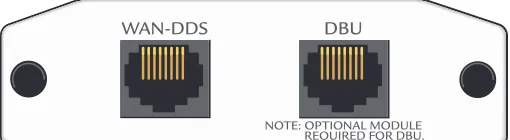
The 56K/64K NIM (shown in Figure 7) provides a WAN interface for the NetVanta. This module provides a single 56K or 64K DDS network interface. Refer to Table A-5 on page 43 for the WAN-DDS connector pinout, and Table A-11 on page 46 for the DBU connector pinout. An optional DIM is required for dial backup applications.
Figure 7. NetVanta 56K/64K NIM
Features and Specifications
Operating Modes
• Dedicated DDS (leased line)
DDS Interface
• RJ-48C
• 4-wire, full duplex
• -45 dB receiver sensitivity all rates • Data Rates: 56K, 64K, and Auto
Clock Source
• Network
• Internal
Diagnostics
• CSU and DSU Loopbacks
Relevant Requirements/Standards
• EMC - see Electromagnetic Compatibility (EMC) Table for the NetVanta
1224STR/1224R on page 6. • ACTA/FCC Part 68 • Industry Canada CS03 • UL and CUL
• AT&T TR 62310
Environmental
• Operating Temperature: 0 °C to 50 °C • Storage Temperature: -40 °C to 85 °C • Relative Humidity: Up to 95%
non-condensing
Physical
NetVanta 1000 Series Switch Hardware Installation Guide Option Modules
61200500L1-34C © 2004 ADTRAN, Inc. 27
NetVanta T1/FT1 NIM (P/N 1200862L1 and 61202862L1)
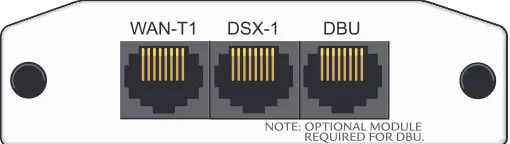
The T1/FT1 NIM (shown in Figure 8) provides a T1 WAN interface for the NetVanta. This provides a full T1 or fractional T1 network interface. Refer to Table A-6 on page 43 for the WAN-T1 connector pinout, and Table A-11 on page 46 for the DBU connector pinout. An optional DIM is required for dial backup applications.
Figure 8. NetVanta T1/FT1 NIM
WAN-T1 DBU
Features and Specifications
Operating Modes
• T1/FT1 Frame Relay • T1/FT1 PPP
T1/FT1 Interface
• Line Rate: 1.544 Mbps +/- 75 bps • Line Code: AMI or B8ZS
• Framing: D4 (SF) or ESF
• FT1 Line Rate: DS0 Channelized (multiples of 56/64 kbps)
• Input Signal: 0 to -36 dB (DS-1) • Line Build-Out: 0, -7.5, -15, -22.5 dB • Connector: RJ-48C
• DS0 Assignment: Programmable
Clock Source
• Network
• Internal
Diagnostics
• Test pattern generation and detection: QRSS and 511
• Network loopbacks (local and remote); responds to both INBAND and FDL loop
codes
• Alarm generation and detection
• Network and user sets of performance data (15 minute and 24 hour)
Relevant Requirements/Standards
• EMC - see Electromagnetic Compatibility (EMC) Table for the NetVanta
1224STR/1224R on page 6. • ACTA/FCC Part 68 • Industry Canada CS03 • UL and CUL
• T1 Interface: Pub 62411 • ESF Format Interface: TR. 194
• ESF Performance Monitoring: TR. 54016 and T1.403
Environmental
• Operating Temperature: 0 °C to 50 °C • Storage Temperature: -40 °C to 85 °C • Relative Humidity: Up to 95%
noncondensing
Physical
Option Modules NetVanta 1000 Series Switch Hardware Installation Guide
NetVanta T1/FT1+DSX-1 NIM (P/N 1200863L1 and 61202863L1)
The T1/FT1 + DSX-1 NIM (see Figure 9) provides a T1 WAN interface for the NetVanta, a full or fractional T1 network interface, and a DSX-1 interface. See the pinouts in Table A-6 on page 43 for the WAN-T1 connector, Table A-8 on page 44 for the DSX-1 connector, and Table A-11 on page 46 for the DBU connector. An optional DIM is required for dial backup applications.
Figure 9. NetVanta T1/FT1+DSX-1 NIM
WAN-T1 DSX-1 DBU
Features and Specifications
Operating Modes
• T1/FT1 Frame Relay • T1/FT1 PPP
T1/FT1 Interface
• Line Rate: 1.544 Mbps +/- 75 bps • Line Code: AMI or B8ZS
• Framing: D4 (SF) or ESF
• FT1 Line Rate: DS0 Channelized (multiples of 56/64 kbps)
• Input Signal: 0 to -36 dB (DS-1) • Line Build-Out: 0, -7.5, -15, -22.5 dB • Connector: RJ-48C
• DS0 Assignment: Programmable
DSX-1 Interface
• Line Interface: DSX-1 per ANSI T1.102 • DSX Receiver Input Range: -10 dB dsx to
+6 dB dsx
• Line Rate: 1.544 Mbps • Capacity: 1 to 24 DS0s
Diagnostics
• Test pattern generation and detection: QRSS and 511
• Network loopbacks (local and remote); responds to both INBAND and FDL loop codes (T1 interface only)
• Alarm generation and detection
• Network and user sets of performance data (15 minute and 24 hour)
Relevant Requirements/Standards
• EMC - see Electromagnetic Compatibility (EMC) Table for the NetVanta
1224STR/1224R on page 6. • ACTA/FCC Part 68 • Industry Canada CS03 • UL and CUL
• T1 Interface: Pub 62411 • ESF Format Interface: TR. 194
NetVanta 1000 Series Switch Hardware Installation Guide Option Modules
61200500L1-34C © 2004 ADTRAN, Inc. 29
NetVanta Dual T1 NIM (P/N 1200872L1)
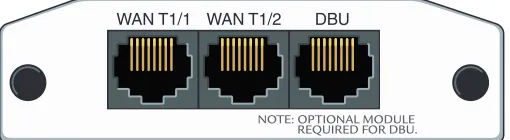
The NetVanta Dual T1 NIM (see Figure 10) provides two WAN T1 interfaces for the NetVanta. Refer to Table A-6 on page 43 for the pinouts. Refer to Table A-11 on page 46 for the DBU connector pinout. An optional DIM is required for dial backup applications.
Figure 10. NetVanta Dual T1 NIM Features and Specifications
Operating Modes
• T1/ FT1
T1 Interface
• Line Rate: 1.544 Mbps +/- 75 bps • Line Code: AMI or B8ZS
• Framing: D4 (SF) or ESF
• FT1 Line Rate: DS0 Channelized (multiples of 64 kbps)
• Input Signal: 0 to -36 dB (DS-1) • Line Build-Out: 0, -7.5, -15, -22.5 dB • Connector: RJ-48C
• DS0 Assignment: Programmable
Clock Source
• Network
• Internal
• Through
Diagnostics
• Test pattern generation and detection: QRSS, 215-1, 220-1, 511
• Network loopbacks (local and remote) • Responds to both inband and FDL loop
codes
• Alarm generation detection
• Network performance data (15 minutes and 24 hours)
Relevant Requirements/Standards
• EMC - see Electromagnetic Compatibility (EMC) Table for the NetVanta 1224STR/1224R on page 6. • ACTA/FCC Part 68
• Industry Canada CS03 • UL and CUL
• T1 Interface: Pub 62411 • ESF Format Interface: TR. 194
• ESF Performance Monitoring: TR. 54016 and T1.403
Environmental
• Operating temperature: 0 °C to 50 °C • Storage Temperature: -40 °C to 85 °C • Relative Humidity: Up to 95%
noncondensing
Physical
Option Modules NetVanta 1000 Series Switch Hardware Installation Guide
NetVanta Serial NIM (P/N 1200866L1)
The NetVanta Serial NIM (shown in Figure 11) is user-configurable to be either a V.35 or X.21 (V.11) interface. This module supports rates up to a maximum of 10 Mbps. An additional V.35 (ADTRAN P/N 1200873L1) or X.21 (ADTRAN P/N 1200874L1) cable is required (see Caution, below). Refer to Table A-10 on page 45 for the SERIAL connector pinout, and Table A-11 on page 46 for the DBU connector pinout. An optional DIM is required for dial backup applications.
Figure 11. NetVanta Serial NIM Cable length for the Serial NIM should not exceed 25 feet.
SERIAL DBU
Features and Specifications
Operating Mode
• DTE only
Serial Interface
• Provides V.35 or X.21 (V.11) electrical interface
• CTS, DCD, DSR, TM options are IGNORE
or CONNECT
• DTR, RTS options are NORMAL or FORCED ON
• 0 to 2.048 Mbps
• 26-pin smart serial (DTE) connector
Relevant Requirements/Standards
• EMC - see Electromagnetic Compatibility (EMC) Table for the NetVanta
1224STR/1224R on page 6.
• EN60950
• UL and CUL • ISO 4903 (X.21)
• CCITT V.35 Synchronous (V.35)1
Environmental
NetVanta 1000 Series Switch Hardware Installation Guide Option Modules
61200500L1-34C © 2004 ADTRAN, Inc. 31
NetVanta E1/FE1 NIM (P/N 1200868L1)
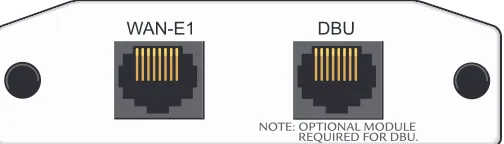
The NetVanta E1 module (see Figure 12) provides a WAN/E1 interface for the NetVanta meeting the requirements of ITU-T G.703/G.704. The module provides a single 2.048 Mbps network interface. Refer to Table A-7 on page 43 for the pinouts. Refer to Table A-11 on page 46 for the DBU connector pinout.
Figure 12. NetVanta E1/FE1 NIM
WAN-E1 DBU
Features and Specifications
Operating Modes
• E1/FE1
WAN-E1 Interface
• Connector: RJ-48C
• Line Rate: 2.048 Mbps +/- 50 PPM • Line Code: AMI or HDB3
• Framing: FAS with optional CRC-4 • FE1 Line Rate: Channelized Timeslot (in
multiples of 64 kbps)
• Timeslot Assignment: Programmable • Receiver Sensitivity: -30 dB
Clock Source
• Network
• Internal
Diagnostics
• Network loopbacks
• Network performance data (15-minute and
24-hour)
• Test pattern generation and detection: QRSS, 511
• Alarm generation and detection
Relevant Requirements/Standards
• ACIF S016
• ACA TS001
• ETSI TBR 12 / TBR 13
• EMC - see Electromagnetic Compatibility (EMC) Table for the NetVanta
1224STR/1224R on page 6.
• ITU G.703, ITU-T G.704 (CRC-4), ITU-T G.823, ITU-T G.797
Environmental
• Operating temperature: 0 °C to 50 °C
Physical
Option Modules NetVanta 1000 Series Switch Hardware Installation Guide
Dial Backup Interface Modules
NetVanta Analog Modem DIM (P/N 1200864L1)
The Analog Modem DIM provides a modem with data rates up to 33.6 kbps for the NetVanta. This DIM is a plug-on card that connects to the NIM. For installation instructions, see Installing Dial Backup and Network Interface Modules on page 38.
Features and Specifications Features
• ITU V.90 compliant
• Async
Relevant Requirements/Standards
• EMC - see Electromagnetic Compatibility (EMC) Table for the NetVanta 1224STR/1224R on page 6.
• ACTA/FCC Part 68 • Industry Canada CS03 • UL and CUL
Environmental
• Operating Temperature: 0 °C to 50 oC • Storage Temperature: -40 °C to 85 oC
• Relative Humidity: Up to 95% noncondensing
Physical
NetVanta 1000 Series Switch Hardware Installation Guide Option Modules
61200500L1-34C © 2004 ADTRAN, Inc. 33
NetVanta ISDN BRI DIM (P/N 1200865L1)
The NetVanta ISDN BRI DIM provides dial backup access to the public switched telephone network (PSTN) via Basic Rate ISDN for the NetVanta. This DIM is a plug-on module that connects to the NIM. For installation instructions, see Installing Dial Backup and Network Interface Modules on page 38.
Features and Specifications Features
• Clear Channel and BONDING Mode 1 call protocols
• Network support for 64 kbps (1B channel) or 128 kbps (2B channels)
• D channel switch compatibility with AT&T 5ESS, Northern Telecom DMS-100, and National ISDN-1
• V.54 network loopback support
Relevant Requirements/Standards
• EMC - see Electromagnetic Compatibility (EMC) Table for the NetVanta 1224STR/1224R on page 6.
• ACTA/FCC Part 68 • Industry Canada CS03 • UL and CUL
Environmental
• Operating Temperature: 0 °C to 50 °C • Storage Temperature: -40 °C to 85 °C
• Relative Humidity: Up to 95% non-condensing
Physical
Unit Installation NetVanta 1000 Series Switch Hardware Installation Guide
5.
UNIT INSTALLATION
The instructions and guidelines provided in this section cover hardware installation topics such as mounting options, supplying power to the unit, and installing option cards. These instructions are presented as follows:
• Mounting Options on page 35
• Supplying Power to the Unit on page 37
• Installing Dial Backup and Network Interface Modules on page 38 • Installing the NetVanta VPN Accelerator Card (1202368L1) on page 40
For information on configuring a specific application, refer to the quick start documents provided on your
ADTRAN OS Documentation CD or the Command Line Reference Guide (also included on your CD).
Tools Required
The customer-provided tools required for the hardware installation of the NetVanta are:
• Ethernet cables
• Network cables (module-dependent)
• DSX-1 cable (T1/FT1 + DSX-1 module only)
• DBU cable (dial backup functions require an optional DIM) • Phillips-head screwdriver (rackmounting applications only)
To prevent electrical shock, do not install equipment in a wet location or during a lightning storm.
NetVanta 1000 Series Switch Hardware Installation Guide Unit Installation
61200500L1-34C © 2004 ADTRAN, Inc. 35
Mounting Options
The unit may be installed in a rackmount, wallmount, or tabletop configuration. The following sections provide step-by-step instructions for rackmounting and wallmounting.
Rack Mounting the NetVanta
The NetVanta is a 1-U high, rack-mountable unit which can be installed into a19-inch equipment rack. The following steps guide you in mounting the NetVanta into a rack.
If you have purchased the VPN Accelerator Card, install it first (see Installing the NetVanta VPN Accelerator Card (1202368L1) on page 40).
Instructions for Rack Mounting the NetVanta
Step Action
1 To allow proper grounding, scrape the paint from the rack around the mounting holes where the NetVanta will be positioned.
2 Position the NetVanta in a stationary equipment rack. This unit takes up 1 U of space.
3 Have someone else hold the unit in position as you install two mounting bolts through the unit’s brackets and into the equipment rack using a #2 Phillips-head screwdriver.
4 Apply power to the unit (see Supplying Power to the Unit on page 37).
Unit Installation NetVanta 1000 Series Switch Hardware Installation Guide
Wall Mounting the NetVanta
By following these instructions exactly, the NetVanta can be safely mounted to the wall.
Instructions for Wall Mounting the NetVanta
Step Action
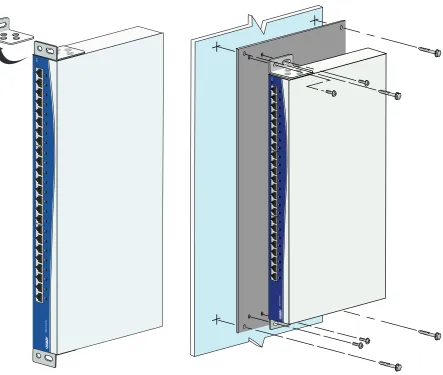
1 Remove the mounting ears. Rotate them 90 degrees so that the portion of the bracket with the mounting holes is flush with the bottom of the chassis. Reattach the mounting ears to the chassis (see Figure 13 on page 37).
2 Decide on a location for the NetVanta. Keep in mind that the unit needs to be mounted at or below eye-level so that the LEDs are viewable.
3 Prepare the mounting surface by attaching a board (typically plywood, 3/ 4" to 1" thick) to a wall stud.
Important! Mounting to a stud ensures stability. Using sheetrock anchors may not provide sufficient long-term stability.
4 Have someone else hold the unit in position as you install two #6 to #10 (1 1/ 2" or greater in length) wood screws through the unit’s brackets and into the mounted board (see Figure 13 on page 37).
5 Proceed to the steps given in Supplying Power to the Unit on page 37.
NetVanta 1000 Series Switch Hardware Installation Guide Unit Installation
61200500L1-34C © 2004 ADTRAN, Inc. 37
Figure 13. Repositioning the Mounting Bracket for a Wallmount Installation
Supplying Power to the Unit
Unit Installation NetVanta 1000 Series Switch Hardware Installation Guide
Installing Dial Backup and Network Interface Modules
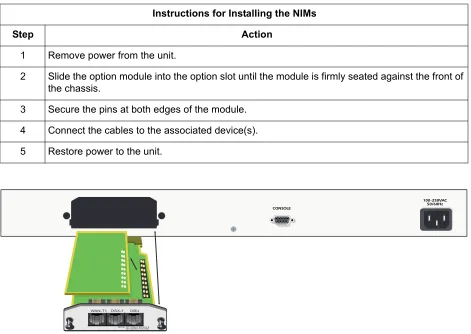
The DIM plugs on to the NIM. The NIM is then installed into the rear panel option module slot. The following tables list the installation steps. Also see Figure 15 on page 39.
Always remove power from the unit prior to removing or installing a module.
Improper installation may result in damage to the modules.
Instructions for Installing the DIMs
Step Action
1 Remove power from the unit.
2 If the NIM is already in the NetVanta chassis, release the pins at both edges of the NIM faceplate and slide the module out of the chassis.
3 Carefully align the P1 connector on the NIM with the J1 connector on the DIM. Using only fingertip pressure so that neither circuit board bends or flexes, ensure that the connectors are firmly seated. Secure the DIM to the NIM using the screws and standoff posts supplied. See Figure 14.
NetVanta 1000 Series Switch Hardware Installation Guide Unit Installation
61200500L1-34C © 2004 ADTRAN, Inc. 39
Figure 15. NIM and DIM Installation
Your NetVanta is now ready to be configured and connected to the network. For more information on configuration for a specific application, refer to the quick start documents provided on your ADTRAN OS Documentation CD. For details on the command line interface, refer to the Command Reference Guide
(also included on your CD).
Instructions for Installing the NIMs
Step Action
1 Remove power from the unit.
2 Slide the option module into the option slot until the module is firmly seated against the front of the chassis.
Unit Installation NetVanta 1000 Series Switch Hardware Installation Guide
Installing the NetVanta VPN Accelerator Card (1202368L1)
The optional VPN Accelerator Card plugs into a 32-bit PCI slot and is designed to be used in the
NetVanta 1224STR to provide encryption/decryption and security acceleration services. The card provides the following security services to the host processor: DES, Triple-DES, AES, SHA-1, MD5, and Random Number Generation. Performance metrics include 528 Mbps-DES, 176 Mbps-3DES, and 422 Mbps-AES. The power consumption of the card does not exceed 2 Watts.
Instructions for Installing the VPN Accelerator Card
Step Action
1 Remove power from the unit.
2 Remove the nine screws and, if necessary, two mounting brackets (see Figure 16).
3 Using a 3/16” hex driver, remove the two jack screws located on either side of the DB-9 port. 4 Carefully lift and remove the unit’s cover to expose the circuit board.
5 Gently slide the accelerator card into the PC card slot as shown. The card is keyed to fit into the slot only one way. To avoid damaging the card pins, do not use excessive force.
61200500L1-34C © 2004 ADTRAN, Inc. 41
APPENDIX A.
CONNECTOR PIN DEFINITIONS
Table A-1. Console Port Interface (DCE)
Pin Description
1 Carrier Detect (output) 2 Receive Data (output) 3 Transmit Data (input) 4 Data Terminal Ready (input)
5 Signal Ground
6 Data Set Ready (output) 7 Request to Send (input) 8 Clear to Send (output)
9 No Connect
Table A-2. SFP Slots
Pin Description Pin Description
1 RX_LOS 11 RGND
2 RGND 12
RX_DAT-3 RGND 13 RX_DAT+
4 MOD_DEF(0) 14 RGND
5 MOD_DEF(1) 15 VddR
6 MOD_DEF(2) 16 VddT
7 TX_DISABLE 17 TGND
8 TGND 18 TX_DAT+
9 TGND 19
Appendix A. Connector Pin Definitions NetVanta 1000 Series Switch Hardware Installation Guide
Table A-3. 10/100 BaseT Ports
Pin Description
1 TD+
2
TD-3 RD+
4 No Connect
5 No Connect
6
RD-7 No Connect
8 No Connect
Table A-4. 1000 BaseT Ports
Pin Description
1 TRD0+
2
TRD0-3 TRD1+
4 TRD2+
5
TRD2-6
TRD1-7 TRD3+
TRD3-NetVanta 1000 Series Switch Hardware Installation Guide Appendix A. Connector Pin Definitions
61200500L1-34C © 2004 ADTRAN, Inc. 43
Network Interface Module Pinouts
Table A-5. WAN-DDS Connector Pinouts
Pin Name Description
1 R1 Transmit data to the network–Ring 1
2 T1 Transmit data to the network–Tip 1
3-6 — Unused
7 T Receive data from the network–Tip
8 R Receive data from the network–Ring
Table A-6. WAN-T1 Connector Pinouts
Pin Name Description
1 R1 Receive data from the network–Ring 1
2 T1 Receive data from the network–Tip 1
3 — Unused
4 R Transmit data toward the network–Ring
5 T Transmit data toward the network–Tip
6-8 — Unused
Table A-7. WAN-E1 Connector Pinouts
Pin Name Description
1 R1 Receive data from the network
2 T1 Receive data from the network
3 — Unused
4 R Transmit data toward the network
5 T Transmit data toward the network
Appendix A. Connector Pin Definitions NetVanta 1000 Series Switch Hardware Installation Guide
Table A-8. DSX-1 Connector Pinouts
Pin Name Description
1 R Transmit data toward the DTE–Ring
2 T Transmit data toward the DTE–Tip
3 — Unused
4 R1 Receive data from the DTE–Ring 1
5 T1 Receive data from the DTE–Tip 1
6-8 — Unused
Table A-9. G.703 Connector Pinouts
Pin Name Description
1 R Transmit data toward the DTE
2 T Transmit data toward the DTE
3 — Unused
4 R1 Receive data from the DTE
5 T1 Receive data from the DTE
NetVanta 1000 Series Switch Hardware Installation Guide Appendix A. Connector Pin Definitions
61200500L1-34C © 2004 ADTRAN, Inc. 45
Table A-10. Serial NIM Connector Pinouts
Pin Name Pin Name
1 TD_A 14 TD_B
2 ETC_A 15 ETC_B
3 TCLK_A 16 TCLK_B
4 RCLK_A 17 RCLK_B
5 RD_A 18 RD_B
6 DCD_A 19 Unused
7 DTR_A 20 Unused
8 RTS_A 21 Unused
9 RTS_B (V.11 only) 22 Unused
10 CTS_B (V.11 only) 23 Unused
11 CTS_A 24 Unused
12 DSR_A 25 Unused
Appendix A. Connector Pin Definitions NetVanta 1000 Series Switch Hardware Installation Guide
Dial Backup Interface Module Connectors
Table A-11. DBU Connector Pinouts
Pin Name Description
1-3 — Unused
4 T Network–Tip
5 R Network–Ring
6-8 — Unused
Table A-12. E1 DBU Connector Pinouts
Pin Name Description
1,2 — Unused
3 R1 Network–Ring1
4 R Network–Ring
5 T Network–Tip
6 T1 Network–Tip1
7,8 — Unused
61200500L1-34C © 2004 ADTRAN, Inc. 47
Index
Numerics
1202368L1, accelerator (encryption) card40
C
connecting to an external modem24 console port description24
D
DBU LED24
Dial Backup Interface Modules (DIMs) 1200864L1, Analog Modem card32 1200865L1, ISDN BRI card33 DIMs, installing38
E E1/FE131
external modem, connecting to24
F front panel description22 LEDs23 I installation
rackmount instructions35 wallmount instructions36 installing DIMs38
installing the unit34
L
LEDs, description of23
N
NetVanta 1224, brief description19 NetVanta 1224R, brief description19 NetVanta 1224ST, brief description19 NetVanta 1224STR, brief description19 Network Interface Modules
1200861L1, 56K/64K module26 1200862L1, T1/FT1 module27 1200863L1, T1/FT1+DSX-1 module28 1200866L1, Serial module30
1200868L1, E1/FE1 module31 1200872L1, Dual T1 module29
O
option modules discussion25
P
physical description of products22 pinouts
10/100 BaseT ports42 1000 BaseT ports42
console port interface (DCE)41 DBU Interface46
DSX-1 Interface44 E1 DBU Interface46 Serial Interface45 SFP slots41 WAN/DDS43 WAN/T1 Interface43 WAN-E1 Interface43 power, supplying to unit37 product overview22 product registration11 product specifications21
environmental specifications21 management21
mechanical specifications21 physical interfaces21 power21
stacking21
R
rackmounting35 rear panel 24
S
SFP module descriptions23 shipment
contents of20
damage during transit20 inspection of22
W
wallmount instructions36 WAN LED23