NARP
AN ASSEMBLER FOR THE XDS 940
JULY 1971
TYMSHARE, INC.
0.0 1.0
2.0
3.0 4.0
Preface - Difference Between NARP and ARPAS . Introduciion. . . . 1.1 Pseudo-history of assembly languages . .
"
1.2 Assembly languages: some basic constituents and concepts . . . .
Basic constituents of NARP . .
2.1 2.2 2.3 2.4 2.5 2.6
Character set . . . . Statements and format.
Symbols, numbers, and string constants Symbol definitions . . . . .
Expressions and literals . Opcode classification Instructions.
Directives . .
4.1 ASC Generate text (3 characters per word) 4. 2 BES Block ending symbol .
4.3 BSS Block starting symbol 4. 4 COpy Mnemonic for RCH. 4.5 DATA Generate data . . . .
4. 6 DEC Interpret integers as decimal . . 4.7 DELSYM Do not output any symbols 4.8 END End of assembly . . . . 4.9 EQU Equate a symbol to a value . . 4. 10 EXT Define a symbol as external. . 4.105 FIILIB FORTRAN II Library Routines.
0-1 1-1 1-1 1-4 2-1 2-1 2-1 2-3 2-4 2-7 2-11' 3-1 4-1 4-3 4-4 4-5 4-6 4-7 4-8 4-9 4-10 4-11 4-12 4-12a
5.0
4.13 IDE NT Identification of a package . . 4. 14 LIST Set listing controls. . . .
4.143 LOCAL ~estore normal external meaning . . 4. 15 NOLIST Reset listing controls .
4. 16 OCT Interpret integers as octal. 4.17 OPD Define an opcode . . . .
4. 18 PAGE Begin a new page on the listing. 4.19 POPD Define a' programmed operator.
4.20 RELORG Assemble relative with absolute origin 4.21 REM Type out remark . . . .
4.22 RETREL Return to relocatable assembly 4.23 TEXT Generate text (4 characters per word) . Conditional assemblies and macros . . . . 5.1
5.2 5.3
IF, ELSF .. ELSE, and ENDF If statements RPT, CRPT, and ENDR Repeat statements Introdu.ction to macros .
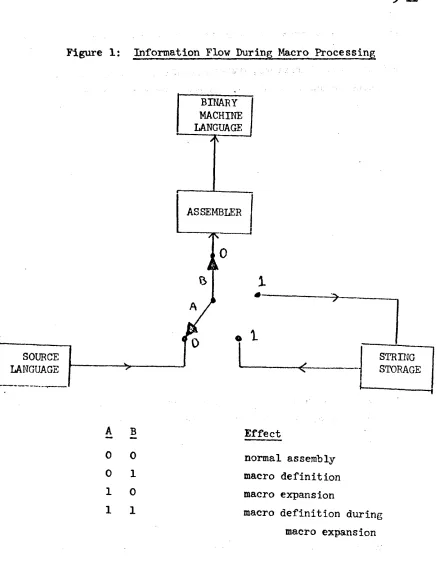
Figure 1 Information Flow During Macro Processing 5.4 MACRO, LMACRO, and ENDM Macro definition
5.4.1 Dummy arguments . . . 5. 4. 2 Generated symbols 5.4.3 Concat enation . . . .
4-17 4-18 4-18 4-19 4-21 4-22 4-23 4-24 4-25 4-27 4-28 4-29 5-1 5-1 5-4 5-9 5-11 5-15 5-17 5-20 5-22 5. 4. 4 Conversion of a value to a digit string. 5 - 23 5.4.5 A note on subscripts . . . . . . . 5-24 5.5 NARG and NCHR Number of arguments and number
5.6 5.7
of characters. Macro calls . . .
Examples of conditional assembly and macros.
6.0 Operating NARP . . . .
6.1 6.2
6.3 Appendix A:
Starting an assembly., 7 •
Multiple program assembly . . Assembly of multiple f~l~s . . .
List of all pre-defined opcodes and pre-defined symbols . . . . ~ ~-. . . ~--.- . -'~'-.. . . . . .
6-1 6-1 6-2
6-3
.
.
Al-lCertain sections of the following reference manual are written in a primer-like style, especially parts of the introduction and the dis-cuss-ion of macros. However, it is assumed that the reader is familiar with the logical operation of general-purpose digital computers, and, in particular, is acquainted with the SDS 940 instruction set (see the SDS publication, SDS 940 Computer Reference Manual, No. 90 06 40A, August, 1966.
The preface contains a discussion of the differences between NARP and ARPAS.
Acknowledgment
Much of this manual is similar to the ARPAS manual (ARPAS,
Reference Manual for Time-Sharing Assembler for the SDS 930, Document R-26, February 24, 1967), written by Wayne Lichtenberger, and some paragraphs are taken verbatim- from the ARPAS manual.
0.0 Differences Between N.ARP and ARPAS
NARP (new ARPAS) has supplemented ARPAS as the assembler for
- r
-assembly langu~ge programs written for Tymshare's X~S 940. The
execution speed of NARP is considerably greater than that of ARPAS, and that is the main reason for the changeover. All users are encouraged to
.,
change their programs over to the NARP language as soon as practicable
\
and new program~ should surely be written in NARP. DDT and FOS will load programs assembled in either language or both.
NARP is by and large a superset of ARPAS, but there are some
notable exceptions, the majority of which are described below.
The following list of differences between
NARP
and
ARPAS
is
ordered after the
ARPAS
manual, with a few exceptions.
To avoid
am-biguities, a blank character fs often denoted by a
.'.J..' •
•
1)
NARP
is a one-pass assembler, not a two-pass assembler
like
ARPAS.
Thus any sections of programs which depend
on the fact that ARPAS is two passes will in all
proba-bility have to be carefully rewritten before
NARP
can
handle it.
2)
In addition to the opcodes listed in the ARPAS manual,
Appendix A,
NARP
handles many additional opcodes.
See
NARP
manual, Appendix A.
3) A symbol in NARP is a string of letters and digits that
is not a number.
A number is anyone of the following:
a)
a string of digits.
b)
a string of digits followed by the letter
'D'
c)
a string of digits followed by the letter
I B'd)
a string of digits followed by the letter
'B'followed by a single digit. Thus,
14D2
and 14BlO
4)
The seven characters
!
II
1
&
8 \ ,~~ tare recognized by
'~:NARP.
Thus they may be used freely" usually -in strings
Jbut not
always, since some of them have meaning in
NARP.
Except
for 135B (multiple blank) and l55B (carriage return), all
characters with a value greater than
77B
are ignored by
NARP.
5)
The classification of opcodes has been completely revised
in NARP:
class
0:
the opcode may or may not have .an operand
(e
.g.~ NOP)I
class
1:
the ope ode has no operand (e.g. ,
CLA)class
2:
the ope ode has an operand
(e.~.,. ADD)In addition to its class, a given operand is either a
shift 1nstruction ora non-shift instruction (note:
this
has nothing to do with whether the action of the
instruc-tion involves shifting, but is simply a way of
distinguish-ing between two types of instructions). For a non-shift
instruction, the operand is computed mod 214
an~merged
into the instruction.
For a shift instruction the
follow-ing happens:
a)
if the indirect bit is set by
'*'
or
,~,then the
value of the opcode is trimmed so that blO-b23 are
zero and the instruction is treated as if it were
a non-shift instruction.
b)
if the indirect bit is not set as above then the
oper-and is computed mod 29 oper-and merged into the instruction;
in this case, the operand must be defined and absolute.
(note: With reference to NARP, the statement that a
symbol is defined means it is defined at that instant
and not at some later point in the program.)
6)
A
numbe~may appear in the
opcod~field.
In such a case,
the
vaiue of this number is placed in bO-b8 of the
in-atruction. The opcode has class .0 (i.e •• operand optional).
7) NARP does not keep track of null symbols_.
8) The tag field of an instruction must be defined (in the
NARP sense, see 5b above) and absolute.
9)
In ARPAS an expression may have a relocation factor of
either 0 (absolute) or 1 (relocatable). In NARP, however,
an expression may have any relocation factor, including a
negative one.
10)
The ARPAS notation «letter string» for operators does
not exist in NARP:
ARPAS
...
NARP
(NOT)
•
(R)
does not exist, see
16
be~ow(LSS)
<
(GRT)
>
(EQU)
=
(AND)
&
'(OR)
.
,
(EOR)
%
'II)
The precedence of operators is different in NARP than it
is in ARPAS (see 17 below).
In most cases this makes little
difference and need only be worried about for things like
(AND) (maybe not even in this case, since the description
in the ARPAS manual may not correspond with reality).
13) A
NARP expression may contain any number of relational
operators.
14)
String constants are right-justified. Thus 'A' -
'~At _• A' -
..a...a.;'A'
. L : ' : . J . .'A' - ' A'
.&..1.: :.J..= •
.a.::.J.. •A'
Also, a string
con-stant may be at most four characters long; if
i tis longer,
then an error message is typed and the first four
charac-ters of the string are taken as the
v~lll:~.•
~ : • , . . . . ~ .> . ., ~"":~' ."
15) A NARP expression has the following BNF description:
<primary>'.d::
~
<symbol>
I<constan~>
I
[<expre_~sion>]
<basic expression> ::
=
<primarY>I<primary> <binary operator>
<basic
expr~ssion><expression> :: - <basic expression>l<unary operator>
<bas ic' expres s ion>. .
:3 ' 1 . ' l c o
The main point in the above syntax is that two operators
may never be adjacent, so A
&
8Bis . illegal (write it as
OB
&
A).
. c
16) NARP is less finicky than ARPAS about relocation
fC!.~.tors.Thus a relocatable quantity can be mUltiplied by an absolute
quantity, yielding a relocation factor other than 0 or 1,
e.g., (R)ALPHA when used to produce a string pointer becomes
simply 3*ALPHA.
The unary operator (R) does not exist in
NARP (likewise, the directive RAD does not exis"t in
~ARP)•
The following table shows the permissible relocation factors
for the operands of the various operators, as well as the
relocation factor of the result (see 17 below for
descrip-tions of all the operators).
NOTE:
In the following table, Rl is a symbol with relocation factor
relocation factor(s)
relocation factor
operator
of operand(s)
of result
example
tI
t
all operands absolute
absolute
2t4=16,
•
Rltl(error)
at least one rfactor
found by multi-
3*R2 has
*
must be absolute, the plying the value
rfactor of 6
other is arbitrary
of the absolute
Rl*Rl(error)
operand
t~esthe
rfactor of the
otner operand
/
all operands absolute
absolute
4/2-2,
RIll
(error)
..
+ -
found by applying
Rl+R2 has
(unary and
arbitrary rfactors
operator to the
relocation
binary)
relocation factors factor of 3
of the operands
< <_
aarbitrary relocation
Rl-Rl is
11
>-
>factors, but must be
absolute .'
true
equal
R2>Rl(error)
& ~
all operands absolute
absolute
7&3=3,
ex.
ORl(error)
17) The table below lists all the operators that may be used in
NARP expressions, along with their precedence (the higher
°eerator
Precedence
CODIDent
t
6
exronentiation; exponent must be
> 0*
5
mu tiplication
I
5
integer division
+
~u)
4
unary plus (effectively a nop)
u)
4
negation
+
4
addition
4
subtraction
<
3
less than
<-
3
less than or equal to
-
3equal to
#
3
not equal to
>-
J
greater than or equal to
>
3
greater than
"
&2
1
logical not
logical and
•
0logical or
•
'1
0logical exclusive or
1S)
At
th~moment, the following
ARPAS
opcodes are undefined
in NARP (there is more on these opcodes in subsequent
pages): ORG, RAD,
EN~Y19)
tEXT,
ASC:
The
ARPAS
option of specifying the length of
the string instead of enclosing it in quotes is not allowed.
However, the string delimiting
character!~snot restricted
to a quote, but may be any printing character except blank
or semicolon. Thus TEXT %QUOTE MARK:
'Yo
is legal. Of
course, the first character encountered is taken as the
delimiting character. Within a string, blanks, commas, and
semicolons have no special meaning; they are treated just
like the other characters in the string.
20) EQU:
The
express~on mus~be
d~~ined(the ARPASmanual also
says this is necessary, _but in many cases it isn't because
ARPAS
has two passes). The relocation factor of the
21)
EXT:
In the option <symbol>
EXT,
the symbol must be defined
(again this is what the ARPAS manual says, but the two-pass
nature of ARPAS makes it possible to ignore this).
In the
option <symbol> EXT <expression>, it is not necessary that
the symbol be defined, but the expression must be defined
(its relocation factor is arbitrary). At present ENTRY is
not implemented.
See 40 below for a detailed discussion of
symbol, definitions, both external and otherwise.
22) OPD, POPD:
Because of the different opcode classification
scheme in NARP, the format of an OPD is rather different
than in ARP AS :
syntax:
<symbol> OPD <value>[ ,<op sit>[ ,<shiftk>]]
semantics:
<symbf>l> - becomes defined as an opcode; if .the symbol is
already an opcode than
'WI
is typed as a warning
and the previous definition is overwritten.
Note:
All of the following may be arbitrary expressions, but they
must be defined and absolute.
If an optional expression does not
appear then the value 0 is assumed.
<value> - computed mod 224 and used as the value for the
opcode (see important note below).
<op sit> - operand situation: must have a value of 0,1, or
2, with the following meanings:
o -
operand optional
1 - no operand
2 - operand
r~quired<shiftk> - shift kludge; must have a value of 0 or 1
with the following meanings:
o -
non-shift instruction
Note:
Although an opcode that takes operands can be defined with
bits blO-b23 set, the user must be careful of what he is doing.
In
particular, if such an opcode appears in an instruction which
contains a
literal or an undefined value then bits blO-b23 of the
opcode will be set to zero.
Warning:
The usual
ARPAS
opcode definition of <value>,l,l will
result in a
NARP
opcode which takes no operands.
Thus such an
ARPAS
program will cause no error messages when assembled by
NARP,
but it will surely not run when loaded.
23)
ORG:
This does not exist in
NARP.
There is no reasonable
way in which a one-pass assembler (that doesn't assemble
directly into core) can handle
ORG.
24)
RAn:
this does not exist in
NARP
because of the freer
i':~;
relocation rules that do away with
(R).
25)
IDENT:
Only the first six characters of the preceding
symbol and the word 'IDENT' are printed.
26)
The concatenation symbol '.' used in
ARPAS
is replaced by
r .&'
in
NARP.
This makes it po'ssible to use the character
' . ' in macro definitions, in particular within strings
(of course
'.&'
within a string will get removed).
The
ordinary use of
'.&'
is to separate a reference to a
pre-ceding alphanumeric character.
In all other cases
'.&'
is superfluous, although legal.
During a macro definition,
'.&'
is detected at all levels ("level" here refers to the
nesting of
MACRO: ENDM pairs), but is only removed at the
top level. Thus the following will work fine, even if D(I)
is
the null string:
A
MACRO
B
MACRO
TEXT
ENDM
ENDM
D
E
27) Whole-line comments (i.e., lines
~ftext ,beginning with an
'asterisk) are not
sav~d'
as part:' of a macro definition, but
- . '
comments'following instructions 'are. Thus it behooves the
programmer to use these comments ,sparingly as they only
-
-gobbl~
up core space.
28)
A
d~ysubscript may not have value -1.
Instead of
follow-in~ amacroc~llwith
an asterisk to set the, indirect bit
on some argument, the
,~,convention should be used.
Anasterisk following a macro call or a directive is an error.
29)
The conventions concerning a dummy subscript
~_~value zero
are somewhat different. First of all, D(O) and D(l-l) are
completely equivalent as far as NARP is
~oncerned(only the
subscript value, not its syntax, is considered), and the
appear&nce of either of them has no effect whatever on
wheth-er a symbol in the label field of the macro call gets defined.
, '
.
An
occurrence of
D(O)is
replac~dby,
~h~.. label field of the
macro call during expansion; if this field is empty,
D(O)expands
~s th~null string.
In any event,
D(O)will be at
most seven characters long, namely the first six characters
of the symbol in the label field preceded by
'$'
if the label
field begins with a
'$'.
30)
Dummy subscripts (including all the subscripts appearing
between
'(Iand
I)',e.g., e2 and e3 as well as el in
D(el$e2,e3», generated symbol subscripts, and expressions
between
'($'
and
I)'may be arbitrary NARP expressions.
Fur-thermore, these expressions may contain references to dummy
variables, generated symbols, and value-to-digit-string
ex-pressions.
Thus ($4+D(I*D(3») is legal.
Any
undefined symbols occurring in these expressions are
31) The construct
D:{)no longer expands to all the arguments
'0£
a macro call, but instead
e~pandsto the first argument
only (without enclosing parentheses). To achieve the effect
that
D~()has in
~PAS,use
D(,)
i~ ~ARP.32) NARP
allows more syntactical forms of
ref~rencFsto.
dummy.
variables than
ARPAS
does.
Before describinB all the
pos-sible combinations,
a
few conventions are convenient:
a) In the following, "argument" will refer to the
character string, as given in the macro call,
after po'ssiblE! enclosing .parentheses have been
(
removed.
b) The number of arguments supplied at the call is
n (n
..
> 0) •c)
The number of characters in an argument i is n(ei).
d)
The structure ei for i an integer stands for an
expression (its value stands for some argument
usually, so ei will be used somewhat ambiguously
to stand for an
expres~ionor the value of an
expression).
With the above in mind, we consider the three kinds of
references to dummy variables:
1.)
D(el)
This expands to argument el (which may be the null string),
where 0
~el
~n •
. '"
Special notation:
D()
=D(l)
ii.)
D(el,e2)
If el
>e2 then this expands to the null string (the range
of values of el and e2 is arbitrary), otherwise this expands
argument enclosed in parentheses and a comma inserted
be-tween each argument. For example, 0(3,3) - (0(3».
Special notation:
D(,)
aD(l,n)
D(,el) - D(l,el)
D(e1,) .. D(el,n)
iii.)
D(el$e2,e3)
In all cases, 0
~el
S
n must be true.
If e2
>e3 then
this expands to the null string (range of values of e2 and
e3 is arbitrary), otherwise it expands to characters e2
through e3 of argument e1.
Special
~otations:D(el$,)
=
D(e~$l,n(el»D(el$,e2)
~D(e1$1,e2)
D(el$e2,)
=
"D(e1$e2,n(el»
D(el$e2)
=
D(e1$e2,e2)
-, , ~
D(e1$)
=D(e1$1)
=D(e1$1,1)
In any of the above six forms,
el may be missing; if so 1 is
assUmed.
Note on special notations:
A general rule which will help
in remembering what the special notations mean is the
fol-lowing:
"Whenever an expression is missing from a form,
the value 1 is assumed, unless the expression is missing
from a place where an upper bound is expected (as in 0(3,)
or D(3$2,», in which case the largest "reasonable" value
is assumed."
The observant reader will have noted that in the above
description of the form D(el$e2,e3), no mention was made of
the bounds of an e2 and e3 in case e2
<e3. This was
in-=
things can be done, although they should not be played with
lightly since they depend on the implementation of macro
calls in NARP.
When a macro call is made, the arguments
are laid out in core in one contiguous string, with each
argument surrounded by parentheses and followed by a comma.
For example'$BETA AMAC
(GAMMA),(~DELTA~EPSLON~),
ZETA causes
the following argument string to be laid out in core:
($BETA),(G~lliA),(~DELT~EPSLON~),(ZETA),
Each argument has
a pointer associated with it which points to the left
pa-renthesis preceding the argument, and when a form like
D(el$e2,e3) is expanded, the values of e2 and e3 are simply
added to el's pointer, delimiting the string which is to
replace the dummy reference.
By picking e2 and e3
appro-priately, this string may include parts of argument el-l and
•
el+l (as well as argument el) or even the entire argument
string. The only restr?iction on e2 and e3 is that when
added to the pointer for el, the resulting pointer must not
be outside the entire argument string for the macro call.
Examples:
(Assuming the call shown above is being processed)
D(I$-1,7)
= ,
(GAMMA),D(2$-4,4)
=
MA)J(~DELD(2$18,2!)
=ZETA
D(1$-9,-1) is an error because the -9 points one
charac-ter to the left of the entire argument string
D(2$-l6,23)
= ($BETA)J(GAMMA),(~DELTA~EPSLON~),(ZETA),Altho~gh
this feature
m~yhave limited uses, it is there for
the programmer to utilize if he finds a use for it.
33)
The format of an
argume~tgiven to a macro when it is called
may be slightly different in NARP than in ARPAS ("may belt
precise ARPAS format). The essential thing is this:
any
biaoks,
commas, semicolons,or parentheses occurring between
lingle quotes ("between" here means between an "odd-quote"
and an "even-quote", where the first quote encountered is
odd, the next is even, etc., thus Band D are between single
~
quotes in the following, but A, C, and E aren't:
A'B'C'D'E)
are' treated exactly like other characters between single
quotes, i.e., they do not serve as terminators, separators,
or the like.
In effect, when the argument collector in NARP
is collecting arguments for a macro call, the occurrence of
a single quote causes it to stop looking for special
charac-ters except for quotes (and, of course, carriage
re~urn,which is an absolute terminator). Thus, in the following,
when a blank, comma, semicolon, or parenthesis is referred
to,
i~is understood that the character is
E£!
between single
quotes.
The argument string for a macro call has the following format:
<arg>,<arg>, ••. ,<arg> <terminator> where <terminator> is a
blank, semicolon, or carriage return. There are essentially
three forms of <arg>:
i.) <arg> may be the null string.
ii.) If the first
char~cterof <arg> is not a left
paren-thesis then <arg> is a string of characters not
con-taining blank, connna, semicolon, or carriage return
(remember:
blanks, commas, and semicolons may appear
in
<ar~if they are between single quotes).
iii.) If the first character of <arg>
1!
a left parenthesis,
innnediately terminates <arg>." Again, remember that
bl~~ks,
commas,
sem~colons, ~n~parenthesis between
single quotes are ignored when <arg> is being
de-limited. The initial left parenthesis and its
match-ing right parenthesis (note that this right
paren-thesis need not be the last character of <arg» are
removed from <arg> before it is transmitted to the
macro.
Examples:
AMAC
(,~;~,),,'HOUSE,~ROGER'D(l)
=
'.J..;..1..'
D(2) is the null string
D(3)
=
'HOUSE'.J..ROGER'
AMAC
,(PAR(STRING'),'PAR»MORE,AB'~'CD(l) is the null string
D(2)
=
PAR(STRING'),'PAR)MORE
D(3)
=
ABr~'c34) There is no limit on the number of arguments that can be
given to a macro (except the size of the core, of course).
35)
When constructing a 'generated symbol, the digit string
formed is preceded by one zero.
Thus the first time
A
MACRO
G(2)
NOP
ENDM
D,G,3
is expanded, G(2)
become~G02.
The second time it will
become G05.
Sinc~only the
f~rstsix
characte~~of a
symbol are meaningful, the user should keep the generated
symbol very short to avoid nasty problems.
A generated
symbol subscript must be within the range [I,m], where
m is the upper limit specified in the macro head (note:
1
~m
~l023must be true).
36)
In the value-to-digit-string conversion, if the value is
37) NARG may only appear within a macro body, but it is legal
within
~nymacro body (i.e., even if no dummy variable was
specified by a given macro, NARG is still legal within that
macro and yields the value zero) •
.,
38) NCHR has been changed so that its operand has precisely the
8am~
format as an argument to a macro. Thus, the operand
ends when a carriage return is encountered, or on the first
b1arik, comma, or semicolon not within single quotes unless
the first character of the operand is a left parenthesis.
In the latter case, blanks, commas, and semicolons are
shielded as described above in the discussion of macro
argu-ments (see 33). By scanning for NCHR and enclosing its
operands in parentheses, most
AR~ASprograms can be easily
conver~ed
to NARP programs as far as NCHR is concerned.
The only case for which this will not work is when
the,op-erand contains unmatched parentheses that are not within
single quotes.
39) The RPT option RPT <expression> has been extended to
RPT <expression>[,<increment list>], where <increment list>
is of the form «symbol>=<el>[ ,<e2>])
(.'~.)
••• ( ••• )
Note, however, that the expression is evaluated before
the increment list is processed, so its value should not
depend on symbols initialized in the increment list.
Example:
RPT
4,(J=2,3)
DATA
Jt3
ENDR
When expanded results in the following values:
~ . ~8
125
512
1331
40)
Symbol definitions and external symbols:
Symbols are defined in three ways:
By being assigned
values with EQU directives (or equivalently, by appearing
in an RPT or CRPT increment list), by appearing as labels,
and by being used with the EXT directive in a certain way.
Symbols
~ayalso
bedeclared as external in two ways, by
preceding' them with
$
when they are
defi~ed,or by giving
them
as parameters to the directive EXT ,after they are'
defined. These cases are discussed in greater detail
below:
a)
Symbol defined as a label:
If the symbol is already
defined, either as a label or by EQU, the error
mes-sage
'D'
is typed; the old definition is completely
•
replaced by the new one.
b)
Symbol defined by EQU:
If the symbol is already
defined as
alabel than the error message
'D'
is
typed and the old definition is completely replaced
by the new one; if the symbol is already defined by
EQU
then its value is changed,- and if a$ is
prese~tthe symbol is marked as external; the operand of EQU
must. be defined and must have an rfactor in the range
[-15,15].
c)
Symbol defined by EXT:
See e.) below.
d)
Declared external by
$:
For a label this is obvious;
for an EQU'ed symbol, a
$
need appear only once,
suc-cessive EQU's of the symbol will preserve the external
mark.
e)
Declared external by EXT:
Two cases:
i.)
EXT has no operand:
The symbol in the label
been marked as external or may even have
a
$
preceding it.
ii.) EXT has an operand:
The operand must be a
defined expression; the symbol is immediately
output as an external symbol with value the
same as the operand value; no local definition
of
the symbol is made, in fact no table look-up
or addition to the table occurs.
Note:
ARPAS and NARP output external symbol definitions
at different times; it is possible that this can have an
effect on a program if the user has done something kludgy.
Except for case ii.) under e.) above, NARP outputs no
ex-ternal definitions until the
ENDdirective is encountered.
,
ARPAS, however, outputs external definitions as soon as
itcan. Thus,
$A EQU 3 ~
A
EQU
4
E~D
will cause ARPAS to output an external definition of A
with value 3, while NARP will output an external definition
of A with value 4.
41)
It is conceivable that the manner in which undefined
ex-pressions are handled by NARP could lead to difficulties
in very obscure cases which are at best vaguely defined
anyway. -WhenNARP encounters an undefined expression
which involves more than a single undefined symbol, the
expression is saved until every undefined symbol in it
becomes defined.
At the moment when this happens, the
Thus
A
A
B
DfA
~
E1
U
E~U
END
A+B
o
1
2
will cause a data,word of value 3 (not 2) to be output.
42)
Operating
NARP:
When started,
NARP
asks for,the
specifi-cation
of
a source file, an object file, and an optional
text file.
Only one confirmation character is needed,
namely, a carriage return at the end of the object file
specif~cation.
Then
NARP
immediately begins processing,
typing only IDENT's and error messages until the
END
directive
is
encountered (don't be surprised when
NARP
types an
IDENT
immediately after
i tstarts processing;
remember that it is one-pass).
At the end of the assembly, a line of the following
fo~is typed:
2 SEC
2
SEC:
3 ERRORS
101
(65)WORDS
(S:413,O:10,L:87,M:2033,U:73)
This is the time required for assembly as measured
by
BRS
88.
Timing begins after all files are opened
and ends before any file is closed.
'3
ERRORS:
The number of error messages typed during the
assembly.
lOl(65)WORDS:
The value of the location counter when the
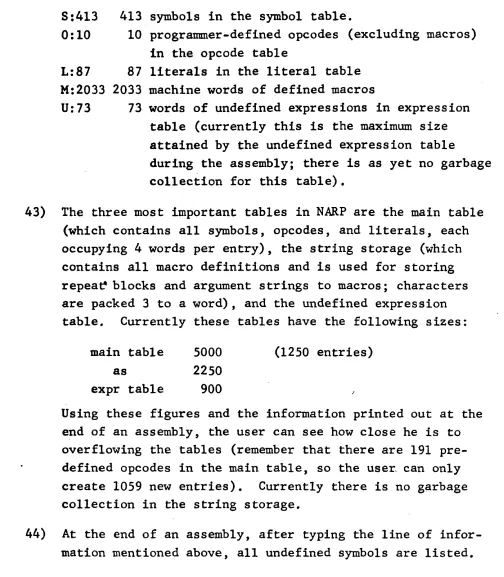
8:413
0:10
413 symbols in the symbol table.
10 programmer-defined opcodes (excluding macros)
in the opcode table
L:87
87
literals in the literal table
M:2033
2033
machine words of defined macros
U:73
73
words of undefined expressions in expression
table (currently this is the maximum size
attained by the undefined expression table
during the assembly; there is as yet no garbage
collection for this table).
43) The three most important tables in
NARP
are the main table
(which contains all symbols, opcodes, and literals, each
occupying
4
words per entry), the string storage (which
contains all macro definitions and is used for storing
repea~
blocks and argument strings to macros; characters
are packed
3
to a word), and the undefined expression
table.
Currently these tables have the following sizes:
main table
as
5000
2250
expr table
900
(1250
entries)
Using these figures and the information printed out at the
end of an assembly, the user can see how close he is to
overflowing the tables (remember that there are 191
pre-defined opcodes in the main table, so the user. can only
create 1059 new entries). Currently there is no garbage
collection in the string storage.
44)
At the end of an assembly, after typing the line of
1.0 Introduction
. HARP
(~ewARPAS)
is a one-pass assembler for theSDS
940
with
literal, subprogram, conditio~al assembly, and macro facilities. The source language for NARP,primarily a one-for-one rep~esentation,
of machine language written in symbolic form,is very similar to that for ARPAS (another assembler for the
940),
but there are notable exceptions making it necessary to do a
certain amount of transliteration to convert an ARPAS program to
a
~RP program. No further ment ion will be made ofARPAS
in this manual; for more details see ARPAS, Reference Manual for Time-Sharing Assembler for the SDS
930,
Doc. No. R~26,February
24, 1967.
To motivate the various facilities of the assembler, the following pseudo-historical development of assembly languages is presented.
1.1 Pseudo-history of assembly languages
A program stored in the main memory of a modern computer
con~ists of an array of tiny circular magnetic fields, some
oriented clockwise, others oriented counterclockwise. Obviously, • _. - y
if a progrruamer had to think in these terms when he sat down to write a progr~~, -few problems of any complexity would be
~olved by computers, and the cost of keeping programmers sane would
be prohibitive. To remedy this situation, utility programs called assemblers have been developed to translate programs from a symbolic form convenient for human use to the rather tedious bit patterns that the computer handles. At first these assemblers were quite prtmitive, little more than number converters, in fact. Thus, for example:
Tag Opcode Address
76
55
would be converted irito three computer instructioIls which.would
~ .. ~~
ad~ together the contents of cells 4~ and 4~1 and' place the result in cell 4~. An assembler for doing this type of conver-sion is trivial to construct.
After a time, some irritated programmer who could never
remember the numerical value of the operation "load the A register witli'the contents of a cell of memory" decided that it would not
be~too 'difficult to write a more sophisticated assemb,~er wJ:1ich would allow him~o write a short mnemonic word in place of the number' representing the hardware operation. Thus, the seque~ce of instructions ~hown above became:
'~
LDA~¢4¢.~
~
ADD ¢¢4¢1
'/> STA ¢¢4¢2
This innovation cost something, however, namely the assembler bad to be more clever. But not much more clever. The programmer
in charge of the assembler simply added a table to the assembler which consisted of all the mnemonic operation names (op~odes) and an associated number, namely the numerical value of the opcode. When a mnemonic name, say tADD t , was encountered by the assembler during the conversion of a program, the opcode table was scanned until the mnemonic name was found; then the associated numerical value (in this case,
55)
was used to form the instruc-tion. Within a month, no programmer could tell you the numerical value of XMA.In a more established field, the innovation of these mnemonic names would have been quite enough for many years and many
theoretical papers. However, programmers are an irritable lot, and furthermore, are noted for their ability to get rid of sources of irritation, either by writing more clever programs or by
asking "the 'engineers to refrain from making such awkward machines. And the use of numbers to represent addresses in memory was a
large source of irritation. To see this we need another example:
PCLA
fJ
LDX¢¢4¢¢
2 STA
'/YIJ5
¢7Assuming cell
4¢¢
contains-7,
this sequence stores zeroes in cells 5~ through 5¢6 provided tha.t' the sequence is loaded in memory so that the STA instruction is in cell3fJfJ
(otherwise, the BRX instruction would have to be modified). This was the crux of the problem: Once a program was written, it could only run from a fixed place in memory and could only operate on fixed cells in memory. This was especially aW~Nard when a program was changed, since inserting an instruction anywhere in a program would generally require changes in many, many addresses. One day aclever programmer saw that this problem could be handled by a generalization of the scheme used to handle opcodes, namely, let the programmer use symbolic names (symbols) for addresses and have the assembler build a table of these symbo~s as they are defined Bnd then later distribute the ntunerical values associated with the symbols as they are used. Thus the example becomes:
LOOP
CLA
LDX
STABRX
TABLEN
TABEND,2 LOOP
(Note that at the same time the programmer decided to move the tag field to after the address field (simply for the sake of ~eadability) and to even dispense with it entirely in case it was 'zero.) The assembler now has two tables, the fixed opcode table with predefined names in it, and a symbol table which is
.
initially empty. There is also a special cell in the assembler called the location counter (LC) which keeps track of how many cells of program have been assembled; LC is initially zero. There is another complication: In the above example, when the symbol TABLEN is encountered, it may not be defined yet, so the assembler doesn't know what numerical value to replace it with. There are several clever ways to get around this problem, but the most obvious is to have the a.ssembler process the program to be assembled twice. Thus, the first time the assembler scans the program it is mainly interested in the symbol definitions in the left margin (a symbol used to represent a memory address is called a label). In our example, when LOOP is encountered,
it is preceded by two cells; remember that LC keeps t!8ck of this). At the end of pass 1, all symbols defined in the program are in the symbol table with numerical values corresponding to
their
addresses in the memory. So when pass2
begins, the symbol table is used exactly as the opcode table is used, namely, when, for example,LOOP
is encountered in theBRX
instruction above, it is looked up in the symbol table and replaced by the value 2.If the program should later be changed, for example to
LOOP \
CLA
LDB
LDX
STP
EAX BRX
EIGHT
TABLEN
TABEND,2 1,2
LOOP
then the assembler will automatically fix up
LOOP
to have the value3
(because of the inserted LDB instruction) and will convert BRxLOOP
to BRX3
instead of to BRX 2 as before. Thus, the programmer can forget about adjusting a lot of numerical addresses and let the assembler do the work of assigning new values to the symbols and distributing them to the points where the symbols are used. In addition to the greater flexibility achieved, symbols with mnemonic value can be used to make the program more readable.The use of symbols to stand for numerical values which
are computed by the assembler and not the programmer is the basic characteristic of all assembly languages. Its inception was
'".
-a fund-ament-al bre-akthrough in m-achine lan~a.ge ~rogrammin~,dispensing with much dullness and tedium. And a new ~reed of proP7ammer
was born: the assembler-writer. To justify. his existence, the assembler--writer began to add all sorts of bells and whistles to his products; the primary ones are discussed in the next
secti~n (with reference to NARP).
1.2 Assembly languages: some basic constituents and concepts " Times: assembly time: when a program in symbolic form is
load. time: when a binary program is converted by a loader to actual machine language in the main memory of the computer.
rum time: when the loaded program is executed.
source program - - - 4 ) assembler binary program ---~) loader object program
,
Expres.ions: The idea of using a symbol to stand for an address 1s generalized to allow an arithmetic expression (possibly
containing symbols) to stand for an address. Thus, some calcu-lations can be performed at assembly time rather than at run time, making programs more efficient.
Literals: Rather than writing LDA 141 and somewhere else defining
Ml
to be a cell containing-1,
the literal capability allows the programmer to write the contents of a cell in the address fieldinstead of the address of a cell. To indicate this, the expression is preceded by
,=t.
The assembler automatically assigns a cell for the value of the expression (at the end' of the program):WOP
CIA
LDBLDX
STP
EAX
BRX
=8
=-16*2
TABBEG+l6*2,2 1,2
LOOP
require relocation, the difference here being that the relocation calculation should apply to all
24
bits of the940'
word, not just to the address field. The assembler accounts for this difference automatically.Subprograms and external symbols: Programs often become quite large or fall into logical divisions which are almost independent. In either case it is convenient to break them into pieces and assemble (and even debug) them separately. Separately assembled
,
.
parts of the t rune program are called subprograms (or pack~ges).
Before a program assembled in pieces as subprograms can be run it
.
-is necessary to load the pieces into memory and link them'. The symbols used in a given subprogram are generally local to that subprogram. Subprograms do, hovTever, need to refer to symbols ,defined in other subprograms. The linking process takes care of
such cross references. I Symbo~s used for it are called external symbols.
Directives:
A
directive (pseudo-opcode is a message to the assembler serving to change the assembly process in some way. Directives are also used to create data:MESSAGE
START
LIST
TEXT
LDA'THIS
IS A PIECE OFTEXT'
ALPHA
The LIST directive will cause the program to be listed during assembly, while the TEXT directive will cause the following text to be stored in memory, four characters to a word.
Conditional assembly: It is frequently desirable to permit the assembler to either assemble or skip a block of statements depending on the value of an expression at assembly time; this is called conditional a.ssembly. vlith this facilitJj totally
different object programs can be generated, depending on the values of a few parameters.
Macros: A macro is a block of text defined somewhere in the program and given a name. Later references to this name cause the reference to be replaced by the block of text. Thus, the macro facility can be thought of as an abbreviation or shorthand
facility is more powerful than this, however, si. e a ~acro mi.} have formal arguments which are replaced by actu,- ar c . .ll~.ents v:'nc:~ the macro is called.
One~pass assembly: Instead of processiDg a sour .. >~ pr(~ram twice
2.0 Basic constituents of NARP
2.1 Character
set
All the characters listed in Appendix B have meaning in NARP except for ~ '?t and " ' . The following classification of the character set is useful:
"
letter: octal digit: digit:
alpha.numeric cha.rncter: terminator:
operator: delimiter:
A-Z
0-7
0-9
letter or diBit or·colon
, , blank
eR
(denotes carriage return)#%&*+-/<=>@
t" $ ' ( ) [ ] . +
-The multiple-blank character (1358) may appear an.)t~vhere that a blank ls allowed. All chara.cters vTith wIues gre~ter than 778 are
ignored except for multiple-blank character (1358' and carriage return (155
8).
2.2 Sta.tements and forma,t
The logica.l unit of input to NARP is the" statement, a sequence of characters terminated by a semi-colon or a carriage return. There a.re five kinds of statements:
empty: A statement ma.y consist of no characters at all, or only
of' blank characters.
comment: If the very first charfl.cter of a statement is an asterisk) then the entire statement is treated as a comment containing information for a huma,n reader. Such statements generate no output.
The format for the next three kinds of statements is split into four fie Ids:
la.bel field: This field is used primarily for symlJol definition; it begins with the first cha.racter of the statement anq ends on the first non-alphanumeric character (usua.lly a
opcode field: This field contains a directive name, a macro name, or an instruction (i.e.~ any 0vcode ot~er than a directive or macro). The field begins with the first non-blank character after the label field and terminates on the first non-alphanumeric character; legal terminators for this field are blank, asterisk, semi-colon, and
carriage return.
ooerand field: The operand for an instruction, macro, or
directive appears in this field, it begins with the first non-blalK character followipg the opcode field and terminates on the first blank, semi-colon, or carriage return. Note that a. statement may terminate before the operand fiel:!. conunent field: This field contains no informa.tion for f'.IA...RP but
may be used to help clarify a program for a human reader. The field starts with the first non-blank: character after the operand field (or after the opcode field if the opcode takes no ope'rand) and ends on a semi-colon or carriage return. Now we continue describing the kinds of statements:
instruction: If the opcode field of a statement does not contain a directive name or a macro n~~e, then the statement is an instruction. An instruction usually has fin expression as an opera.nd. and generates a single m8chine word of program. See section 3 for a detailed description of instructions.
directive: If a directive na.me appears in the opcode field, then it is a directive statement. The action of each directive is unique and thus each one is described separately (in section 4).
macro: A macro name in the opcode field of a statement indica.tes that the body of text associnted with the macro na.me should be processed (sec section
5).
Example of various kinds of state:nents:
. *
FOLLOvTING ARE THO DIRECTIVES (r.1ACRO J El'IDtt1) WHICH DEFINF.'*
THE MACRO SKAP*
NOW SKAP IS CJ\LLED:LDA ALPHA
SKAP; BRU BAD IF NEGATIVE THEN ERROR
OKA Y ADD BETA NOW A=ALPHA. +BETA ; BRU GOOD
In subsequent sections the details of instructions, directives, and macros will be explained, but first some basic constituents and concepts common to all of these statements will be discussed.
2.3
S~nbols, numbers, and string constantsAny string of alphanumeric characters not forming a number is a. symbol, but only the first six characters distinguish the symbol (thus Q,l23}~5 is the same symbol as Q,123456). Note that a symbol may begin with a dieit, and that a colon is treated as a letter (as a. matter of good programming practice, colons should be rarely used in symbols, although they 'are often useful in macros and other obscure places to avoid conflicts with other names). In the next section the definition and the rfa.ctors of symbols nre discussed.
A nuniber is anyone of the follovTing:
a) A string of digits
b) A string of digits follol'Ted by the letter
'D'
c) A string of digits follo\ofed by the letter 'B t
d) A string of digits fo llowed by the letter
'B'
follo\,led by a single digit.
A
D-suffix indicates the number is decimal, whereas a B-suffix indicates an octal number. If there is no suffix, then the current radix is used to interpret the ntmlber (the current ra.dix is initially 10 but it may be changed by the OCT and DEC directives).If
the digit8
or9
is encountered in an octal number, then an error message is typed. 'If the value ofa
number exceeds 223_ 1 overflo"T results; NARP does not check for this condition, and in general it should be avoided. A B-suffix followed by a digit indicates an octal scaling; thus, 71lB3=74¢¢¢B.Examples: symbols: numbers:
START IN CALCULATE l4D2 l4BlO
A string constant is one of the follo'\oring:
a)
A string of 1 to3
characters enclosed in double quotes(rt).
b) A string of 1 to
4
characters enclosed 1n single quotes (,).In
the first case the characters are considered to be8
bits each (thus only3
can be stored in one machine word), while inthe second case they are considered to be
6
bits each. In both cases, strings of less than the max~um length(3
or4,
as the case may be) are right-justified. Thus'A' _.
- 3.J..1A' -
- ~Art-" A"
-.J.)'where ~ denotes a blank. I f a string constant is too long, then
an error message is typed and only the first 3 (or 4) characters are taken. Normally string consta.nts are not very useful in address computation, but are most often used as literals:
LDA WORD
SKE ='GOt
BRU STOP
Both numbers and string constants are absolute, i.e., their rfactor is zero.
2.4
Symbol definitionsSince NARP is a one-pess assembler, the statement that a symbol or expression is "defined" usually means that it is defined at that instant nndnot so~ewhere later in the program. Thus, assuming ALPHA is defined nowhere else, the follo'\odng
BETA
ALmA.
EQU BSS
ALPHA
3
is an error because the EQU directive demands a defined operand and ALPHA is not defined until the next statement. This convention is not strictly adhered to, however, since sometimes the state-ment ''XYZ is not defined n will mean that XyZ is defined nowhere
in the program.
A symbol is defined in one of two ways: by appearing as a.
equivalently, by being assigned a value by NARG, NCHR, EXT (see belo,",) J or by be_ing used in the increment list of a RPl'
or CRPT statement). The latter type of symbols are called
equated sYmbols.
Labels:. I f a symbol t;tppears in the label field of an instruction (or in the label field of some directives)
then it
is defined withthe
current value ofthe
iocation counter (rfactor=l). If the symbol is already defined, either as a label or as an equated symbol, the error message' (Symbol) REDEFINED' is typed and the old definition is completely replaced by the new one.Equated symbols: These symbols are usually defined by EQU, getting the value of the eXpression in the operand field of the EQU directive. This expression must be defined
8lld have an rfactor in the range [-15,15]. If the symbol
ha.s been previously defined as a label, then the error
message '(Symbol) REDEFINED' is typed and the old definition
is completely replaced by the new one; if the symbol has already been defined as an equated symbol, then no error message is
given, but the old value and rractor are replaced by the new ones. Thus, an equated symbol ~an be defined over and over again, getting a new value each time.
A
defined symbol is always local, a.nd may also be external. If a symbol in package A is referred to from package B, it must be declared external in package A. This is done in one of the following ways:Decle.red external by
$:
If a label or equated symbol is preceded by a$
when$LABELI
IAB'EL2 $GAf.11Mit is defined, then it is declared external. LDA ALmA
Declared external by the EXT direct! ve : There are two cases:
. i) EXT has no operand: The symbol in. the label field is declared external; it must be a de~ined symbol, but it may have_already been declared external.or may even have a
$
precedingit.
ii) EXT bas an operand: This case is treated exactly like the case: $label EQU 0I>€rand.
Certain symbols are pre-defined in
NARP,
i.e., they already/
have va+ues when an assembly .begins and need not be defined by t.he :prog~arnme:~: .
:ZERO:
:IC :
This is 8. relocatable zero (~.e., valu~;
= 0,
rractor=
1).
This' symbol. is initia.lly zero (rfactor=l) and remains..
so until the END directive is encountered and all literals are output, at which time it gets the value of the location counter. See the description of FREEZE for a discussion of the use of this sym~ol.
Syntactically this is not 8. symbol, but semantically it acts like one.
At
any given moment,*
has the value of the location counter (rfa.ctor=l), and can thus be used to avoid c:reating a lot of local la.bels.Thus CIA; LDX LENGTH
LOOP
STA
TABLE, 2;
BRX
LOOP
can be written
as
CIA;
IJ)X LENGTH; STA TABLE,2; BRX *-12.5
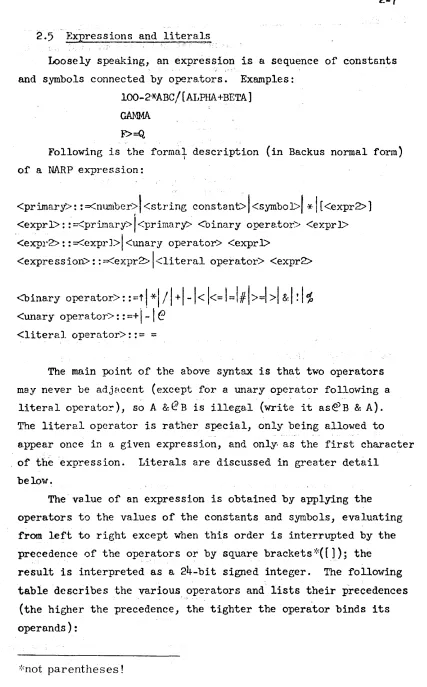
Expressions and lit:ralsLoosely speaking, an expression is a sequence of constsnts
and symbols connected by opera.tors. Examples:
lOO-2-xABC
I
[AIJPHA +BETA ]GAMMA
F>=Q.
Following is the formal description (in Backus normal form)
I
of a NARP e:x-pression:
<primary.>: : =<number>t <string constant>
I
<symboJ>1*
I
[<expr2> ) <exprl>: :::.<primary>j<primary> <binary opere,tor> <exprl> "<expr2>: ::::.<exprJ>1 <unary operator> <exprl><expression>::=<expr2>\<literal operator> <expr2>
<binary operator>:: =t
1*\ /
1+1-1< 1<=
1=1#1>=1
>1
&/
!1'$
<unary operator>::=+\-Ie <literal
operator>::=
=
The main point of the above syntax is that two operators may never be adjHcent (except for a unary operator follovring a
literal operato!'), s~ A &@B is illegal (write it as@B & A). The literal operator is rather special, only being allowed to a.ppear once in a given expression, and only- as the first character . of
the
expression. Literals are discussed in greater detailbelow.
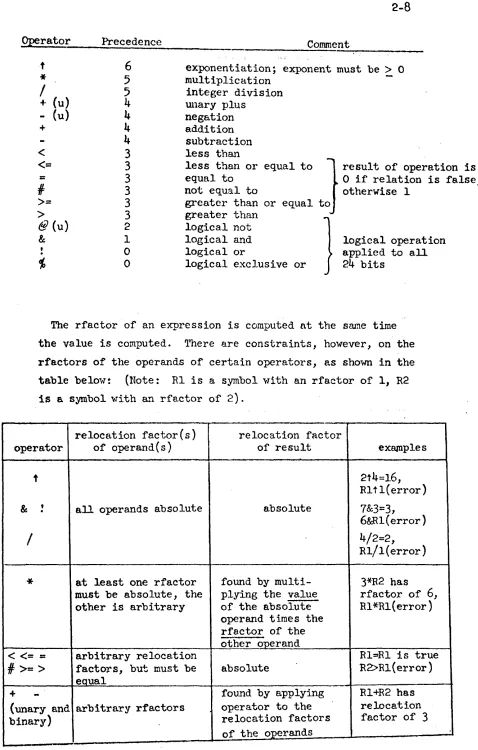
The va.lue of an expression is obtained by applying the operators to the values of the constants and symbols, evaluating from left to right except when this order is interrupted by the precedence of the oper.ators or by square brackets ,:,{ [ ] ); the result is interpreted as a 24-bit signed integer. The following
table describes the various. ?perators and lists their precedences
(the higher the precedence, the tighter the operator binds its operands):
Operator Precedence
t
6
*
5
/
5
+ (u)
4
- (u)
4
+
4
4
<
3<=
3=
3II
3>=
3>
3@ (u) 2
& 1
0
'f,
0Comment
exponentiation; exponent must be ~ 0 multiplication
integer division wlary plus
negation a.ddition subtraction less than
less than or equal to equal to
otherwise 1 not equal to
greater than or greater than
logical not
J
result of operation is
o
if relation is ~alse,equal to
logical and logical or
logical exclusive or }
logical operation applied to all
24
bitsThe rfactor of an expression is computed at the srune time the value is computed. 'l'here are constraints, however, on the rfactors of the operands of certain operators, as shown in the table belo1-T: (Note: Rl is a symbol "lith an rfactor of 1, R2 is a symbol with ~~ rfactor of 2).
relocation factor(s) relocation factor
operator of operand ( s ) of result eXEijIlples
t 2t4=16,
Rltl(error) &
.
,
all operands absolute absolute 7&3=3,6&Rl(error}
/
4/2=2,Rl/ 1 ( error)
*
at least one rfactor found by multi- 3*R2 has must be absolute, the plying the value rfactor of6,
other is arbitrary of the absolute Rl*Rl{error)operand time s the rractor of the other operand
<
<= =
arbitrary relocation Rl==Rl is true11=
>=
>
factors, but must be absolute R2>Rl(error)equal
+
-
~ound by applying Rl+R2 has(unary a.nd arbitrary rfactors operator to the relocation
binary) relocation factors factor of 3
The final rfactor of an expression must be in the range
[-8191, 81911.
I f an expression contains an undefined symbol or if' it is a literal, then the entire expression is undefined.
Although
a
literal isa~special
kind of expression, it is,
. Programmers f'requently write such things as
",here FIVE is ~~e n8fI1e o~ a~ .~e~. con~aip:~ng t~e constant
5.
Theprogrammer must remember to include the datum
FIVE
in his program• • ' , ~... < - ~ • ~ , , • •
somewhere. This can be avo~ded~1 th~ use of a literal.
LOA
=5
will automatically produce a location containing the correct constant i~ ti~e program. Such a construct is called a literal. When a literal is encountered, the assembler first evaluates the expression and looks up its value in a table of literals constructed for each subprogram. If it is not found in the table, the value is placed there. In any case the literal itself is replaced by the location of its value in the literal table.
At
the end of assembly the literal table is placed after the sub-program.The following are examples of literals:
=10 =4B6 =ABC*20-DEF/l2
=
'HELP'=2>AB (This is a conditional literal. Its value will
be 1 or 0 depending on ~mether 2>AB at assembly time. )
Some progr.ammers tend to forget that the literal table follows the subprogram. This could be harmful if the program ended with the declaration of a large array using the statement
ARRAY
BSS
1
It is not strictly correct to do this, but some progr~ers
attempt it anyway on the theory that all they want to do is to name the first cell of the array. The above statement will do that, of course, but only one cell will be reserved for the array .. If any literals were used in the subprogram, they would
,be placed in the following cells which now fall into the array. This is, of course, an error. Other than this exception, the .programmers need not concern himself with the locations of
the
As mentioned above, there are three types of opcodes! directives, macros, and instructions (those opcodes which are neither directives nor macros). A~ide from its type, each opcode has a class which indicates whether it takes an operand.
class ~: operand optional (e.g., NOP, EXT) class 1: no operand (e.g., CIA, DEC)
class 2: operand required (e .g., ADD, DATA)
Note that for class
¢
opcodes, if the operand is missing, then the comment field must be empty because otherwise the first itemin the comment field will be taken as an operand:
NOP THIS IS A Crn~NT
is the Bame as
NOP THIS
causing THIS to be treated as a symbol. To get around the problem, write
NOP THIS IS A CQ,\1MENT
On
the other hand, class 2 opcodes have no operand field at all:CIA
THIS IS A COMMENT3.0 Instructions
There are three different syntactical forms of instruction statements, depending on the class of the in~truction in the opcode field: (In the follo"fTing, synta.ctical elements enclosed in square bre.ckets ar