Browsing Help for Faster Document Retrieval
Eric Crestan
Sinequa, SinequaLabs 51-54, rue Ledru-Rollin 92400 Ivry-sur-Seine, France
Laboratoire Informatique d’Avignon B.P. 1228 Agroparc
339 Chemin des Meinajaries 84911 Avignon Cedex 9, France
Claude de LOUPY
Sinequa, SinequaLabs 51-54, rue Ledru-Rollin 92400 Ivry-sur-Seine, France
MoDyCo, Université de Paris 10 Laboratoire MoDyCo - UMR 7114 Université Paris 10, Bâtiment L
200, avenue de la République 92001 Nanterre Cedex, France
Abstract
In this paper, the search engine Intuition is described. It allows the user to navigate through the documents retrieved with a given query. Several “browse help” functions are provided by the engine and described here: conceptualisation, named entities, similar documents and entity visualization. They intend to “save the user’s time”. In order to evaluate the amount of time these features can save, an evaluation was made. It involves 6 users, 18 queries and the corpus is made of 16 years of the newspaper Le Monde. The results show that, with the different features, a user get faster to the needed information. fewer non-relevant documents are read (filtering) and more relevant documents are retrieved in less time.
1 Introduction
During the last 10 years, TREC (Harman, 1993) allowed many researchers to evaluate their search engines and helped the field to progress. In 2000, Donna Harman studied the evolution of 2 search engines from 1993 (Harman, 2000). She showed that, after an improvement period, the performances have been almost the same for several years. This observation seems now classic: improving the heuristics or adding linguistic knowledge to a "good" engine does not dramatically improve its results. The problem is that even the best engines do not come up to the expectations of most users. So, if the performances do not really rise anymore, how can we rise users’ satisfaction?
In fact, there are other ways to evaluate search engines than recall and precision. Time spent to find answers seems to be the most important one for the users and several papers present such an
evaluation (Borlund and Ingwersen, 1998) (Järvelin and Kekäläinen, 2002). Considering the time factor, it is quite easy to improve the performances using procedures in order to help the user in his/her search.
In this paper, we present the different 'browse help' features proposed to the users by Intuition, the search engine of Sinequa. First of all, we present the search engine itself (section 2). Then four types of help features are presented in section 3: conceptualisation, named entities filtering, similar documents and entity visualization. Section 4 describes the experiments done in order to evaluate the different browsing features and section 5 presents the results. These results show that using browsing help can decrease the time spent on searching.
2 Intuition search engine
Intuition, the search engine of Sinequa, is based both on deep statistics and linguistic knowledge and treatments (Loupy et al., 2003). During indexing, the documents are analysed with a part of speech tagging, and a lemmatization procedure. But the most original linguistic feature of Intuition
is the use of a semantic lexicon based on the "see also" relation (Manigot and Pelletier, 1997). In fact, it is based on bags of words containing units linked by a common seme. For instance, the bag of words "Wind" contains wind, hurricane, to blow,
This analysis allows a thematic characterization of a document. Secondly, it increases both precision and recall. When a query is submitted to Intuition, two searches are made in parallel. The first one is the standard search of documents containing the words (lemmas) of the query or synonyms. The second one searches for documents with similar subjects that are having a close vector. Each document of the corpus has two scores and they are merged according to a user defined heuristic. The advantage of such an approach is that the first documents retrieved not only contain the words of the query but are also closely related to the subject of the query. Lastly, this vector representation of words and documents allows the disambiguation of words semantically ambiguous.
3 Navigation Features 3.1 Conceptualization 3.1.1 Description
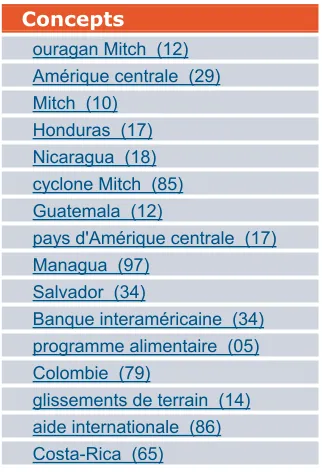
The “concepts part” of the interface shows several links represented by short noun phrases. When the user clicks on one of these links, a new query is submitted to the engine. The documents retrieved by the first query are then filtered and only the ones that contain the selected noun phrase are kept. This is a very convenient way to select relevant topics. The user can select the appropriate concept corresponding to his/her expectations in order to reduce the search space. For instance, the concepts retrieved with the ‘ouragan “Amérique Central” 1998’ (hurricane “Central America”) query are the following (numbers in brackets give the number of documents in which the concepts occur):
Concepts
ouragan Mitch (12) Amérique centrale (29) Mitch (10)
Honduras (17) Nicaragua (18) cyclone Mitch (85) Guatemala (12)
pays d'Amérique centrale (17) Managua (97)
Salvador (34)
Banque interaméricaine (34) programme alimentaire (05) Colombie (79)
glissements de terrain (14) aide internationale (86) Costa-Rica (65)
Figure 1: Concepts for query ‘ouragan “Amérique Centrale” 1998’
Because concepts are extracted from the top list of relevant documents (according to the relevance score), they can be seen as a summary mined across them. The list contains different types of concepts, from noun groups to proper nouns. In the top of the list comes the answer to the current question (Q1056): ouragan Mitch, Mitch and
cyclone Mitch (Mitch hurricane, Mitch and Mitch cyclone). A click on one of those links will directly lead to the document containing the text string, and thus, to the relevant documents.
This way of browsing is even more useful when the engine is not able to get rid of an ambiguity. In a perfect world, a query divides the document space in two parts, the relevant and non-relevant documents. However, what might be relevant regarding to a query, might not be relevant according to the user. Everybody knows that a search engine often returns non-relevant documents. This is due to both the complexity of languages and the difficulty to express an information in some words. Because an engine may not fit correctly the needs of the user, the proposed way to browse within the retrieved documents is very handy. The user can then select the relevant concepts. Of course, it is also possible to select several concepts, to eliminate several others and then resubmit a query.
3.1.2 Concept detection
As the search engine indexes the documents, several linguistic analysis are applied on each of them in order to detect all possible concepts. Morpho-syntactic analysis is needed by concept detection because most of the patterns are based on Part-of-Speech sequences. The concept detection itself is based on Finite State Automata. The automata were built by linguists in order to catch syntactic relation such as the ones cited above. For each document, the potential concepts are stored in the engine database.
3.1.3 Concept selection
3.2 Named entities
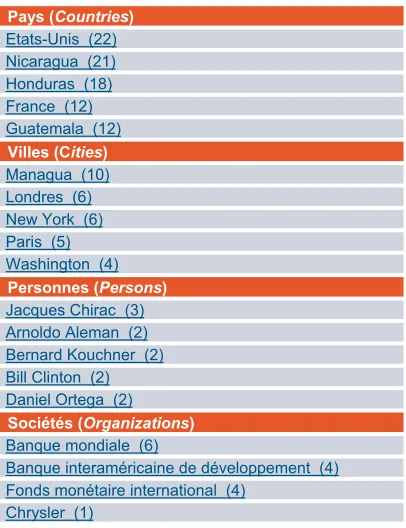
The last area of the interface shows several named entities: locations, people and organizations (see section 4.1 for a description of the named entity recognition procedure). Like it is done with meta-data, entities can be used in order to restrict search space. We can filter the documents retrieved by the original query and get only those, which contain Managua.
Pays (Countries) Etats-Unis (22) Nicaragua (21) Honduras (18) France (12) Guatemala (12)
Villes (Cities) Managua (10) Londres (6) New York (6) Paris (5) Washington (4)
Personnes (Persons) Jacques Chirac (3) Arnoldo Aleman (2) Bernard Kouchner (2) Bill Clinton (2) Daniel Ortega (2)
Sociétés (Organizations) Banque mondiale (6)
Banque interaméricaine de développement (4) Fonds monétaire international (4)
Chrysler (1)
Figure 2: Named entities distribution for query Concepts for query ‘ouragan “Amérique Centrale”
1998’
Named entities become very useful when doing statistics on a corpus. For a given query, the distribution for each entity type can be computed and sorted according to a scoring function. Document frequency (DF) is usually a good way to sort the result. But the information provided by the search engine is very useful against the query. The scoring function used by Intuition is based on document score ϑ and document rank j (1<j<N) for a given category v:
The parameter α modifies the importance given to the document score, and the parameter β modifies the importance given to the document ranking. Figure 2presents the entities for locations, persons and organizations for the query ‘ouragan “Amérique Centrale” 1998’. Numbers in parenthesis represent the entity score.
3.3 Named Entities visualization
Sometimes, additional information is insufficient or not at all present in the documents. In order to increase the browsing possibilities, specific information can be automatically extracted from texts. For this purpose, we use a document analysis process based on transducers in order to detect named entities. This system has been previously developed in order to participate to question/answering task in TREC evaluation campaign (Voorhees, 2001). The commonly established notion of names entities has been extended in order to include more types. More than 50 different types of entities are recognized in French and English.
The document analysis system can be decomposed in two main tasks. First, a morpho-syntactic analysis is done on the documents. Every word is reduced to its basic form, and a Part-of-Speech tag is proposed. In addition to the classical POS tags, the lexicon includes semantic information. For example, first names have a specific tag (“PRENOM”). These semantic tags are used in the next phase for entity recognition. Transducers are applied in cascade. Every entity recognized by one transducer can be used by the next one. The analysis results in a list of entity type, value, position and length in the original document.
Figure 3: Visualization of named entities
Entity recognition and extraction opens up new perspectives for browsing within documents. The most trivial use is to display certain entities in color according to their type. Users can then quickly filter documents talking about the right persons or places. He can also immediately find interesting passages. Figure 3 shows a document with highlighted entities.
100 )
( = ×
δ
δ
v vscore where
(
)
1 1
v
j
N
j M
i v
j
σ
ϑ
β α
δ
=
∑∑
×
= =
and
v
v
i=
≠
v
v
→
→
(
(
v
v
)
)
=
=
1
0
ji
j
σσ
It is clear that this allows an easier quick reading because the most representative parts of the documents are highlighted.
(e.g. Amérique Centrale, Salvador, Honduras,
Nicaragua, Managua, etc).
4 Task description
The evaluation includes six interfaces with different features for the most of them. They were designed in order to evaluate whether the navigation facilities proposed to users improve their ability to find relevant documents. The six interfaces query the same document base: 775 000-article collection extracted from the French newspaper LeMonde (years 1989 to 2002). The features used for each interface are listed in Table 1.
Interface name Features
Interface1 Classical search Interface2 Concept navigation Interface3 Named entity navigation Interface4 Named entity visualization Interface5 Similar documents Interface6 All features
Table 1: Interface profiles
Interface1: No additional navigation facilities are provided to users. A simple query box is supplied in order to query Intuition search engine (see Section 2). A summary of 10 documents per page is presented to the user. It gives the article title, the relevance score and an abstract consisting in the first 250 bytes from the document.
Interface2: Equivalent to Interface1, it features in addition a list of concepts in summary presentation. Concepts are extracted according to the user query (see Section 3.1).
Interface3: Equivalent to Interface1, it displays also four lists of named entities related to the documents returned by the engine. In the left side column are listed the persons, cities, counties
and companies the most representative (see Section 3.2).
Interface4: Alike Interface1, the only difference resides in the named entities highlighting (persons, dates, cities, counties and
companies) when users open the articles (see Section 3.3).
Interface5: Same as Interface1, it enables, when opening a document, to navigate through one of the 3 similar documents proposed into an additional frame.
Interface6: It figures a compilation of additional features used in all the other interfaces.
All the user actions are stored into the search engine log file, so that we can evaluate how many users employ additional features. On each visited
article, users were asked, through buttons, to precise whether the document was relevant (VALIDATION button) or not (ANNULATION
button). Information such as time and user id was stored in the log file as well.
5 Experiment
In order to evaluate the six interfaces, a set of queries had to be built according to the number of subjects available for the experiment. Furthermore, a specific framework has been set for each user.
5.1 Material
Two sets of queries were used for this evaluation. The first is composed of 12 task description queries, which originate from TREC-6 ad-hoc campaign (Voorhees and Harman, 1997). Twelve descriptions were selected among the fifty proposed for the task according to their applicability to a French newspaper corpus. We deliberately selected the description part in order to have a more precise idea of what document should be considered has relevant. Moreover, supplying a short description (2-3 words) would have lead to equivalent queries at the first stage. Users would have probably copied the proposed keywords in order to compose their queries. Then, they were translated into French by an external person (not involved in the evaluation process). The second set is composed of 6 factual questions inspired from the previous TREC Question/Answering evaluation campaigns (Voorhees, 2003) and translated. The subjects were asked to retrieve documents containing the answer.
ID Queries
301 Identify organizations that participate in international criminal activity, the activity, and, if possible, collaborating organizations and the countries involved.
304 Compile a list of mammals that are considered to be endangered, identify their habitat and, if possible, specify what threatens them.
305 Which are the most crashworthy, and least crashworthy, passenger vehicles?
310 Evidence that radio waves from radio towers or car phones affect brain cancer occurrence.
311 Document will discuss the theft of trade secrets along with the sources of information: trade journals, business meetings, data from Patent Offices, trade shows, or analysis of a competitor's products. 322 Isolate instances of fraud or embezzlement in the
international art trade.
326 Any report of a ferry sinking where 100 or more people lost their lives.
327 Identify a country or a city where there is evidence of human slavery being practiced in the eighties or nineties.
331 What criticisms have been made of World Bank policies, activities or personnel?
339 What drugs are being used in the treatment of Alzheimer's Disease and how successful are they? 342 The end of the Cold War seems to have intensified
economic competition and has started to generate serious friction between nations as attempts are made by diplomatic personnel to acquire sensitive trade and technology information or to obtain information on highly classified industrial projects. Identify instances where attempts have been made by personnel with diplomatic status to obtain information of this nature. Q215 Who is the prime minister of India?
Q250 Where did the Maya people live? Q924 What is the average speed of a cheetah? Q942 How many liters in a gallon?
Q1056 What hurricane stroked Central America in 198? Q1501 How much of French power is from nuclear energy?
Table 2: Sets of queries
5.2 Evaluation framework
The definition of the framework was constraint by the number of subjects available for this evaluation. Because it was an internal experiment, only six persons tested the interfaces. The group was composed of 3 linguists and 3 computer scientists (2 females and 4 males) with different aptitude levels with search engines. Each subject was given 3 queries (2 descriptive queries and 1 question) per interface starting with Interface1 and finishing with Interface6. A cross-evaluation was used so that two subjects would not employ the same interface with the same question. At the end, the 18 queries were evaluated with each interface.
Because of the corpus nature (newspaper), subjects need a certain amount of time to read the article in order to judge it relevant or not. The time available for each query was limited to 10 minutes during which the subject was asked to retrieve a maximum of relevant documents. It is twice the time devoted to a similar task presented in (Bruza
et al., 2000)1. We consider that the time needed to find relevant documents on a newspaper collection is greater than on the Internet for many reasons: First, the redundancy is much higher on the Internet; Second, we mostly find long narrative articles on a newspaper collection though web documents seems more structured (section title, colors, bold and italic phrase, table, figures, etc.). This last enables a quicker reading of the document.
1 Bruza et al. have compared three different kinds of interactive Internet search: The first was based on
Google search engine; the second was a directory-based search via Yahoo; and the last was a phrase based query reformulation assisted search via the Hyperindex Browser.
6 Results
During the evaluation, participants could take a break between each research because of the 3 hours required for the full experiment. Several criteria have been used for performance judgement:
• Time to find the first relevant document, • Number of relevant documents
retrieved, • Average recall.
They are described in the following sections.
6.1 Relevance judgment
For each visited article, the subjects were asked to click on one of the two following buttons:
• VALIDATION: document is judged relevant,
• ANNULATION: document is judged non-relevant.
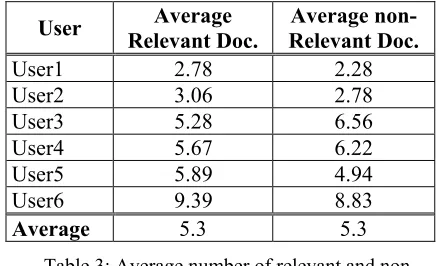
An average of 4.9 documents was assessed relevant per query and user. Table 3 shows the average of relevant and non-relevant documents found by every user:
User Average
Relevant Doc.
Average non-Relevant Doc.
User1 2.78 2.28 User2 3.06 2.78 User3 5.28 6.56 User4 5.67 6.22 User5 5.89 4.94 User6 9.39 8.83
Average 5.3 5.3
Table 3: Average number of relevant and non-relevant document found by participant
6.2 Time to first relevant document
Time is a good criterion for navigation effectiveness judgment. How long does it take for users to find the first relevant document? This question is probably one of the most important in order to judge navigability gain over the six interfaces. When no-relevant documents were found for a query, the time was set to the maximum research time: 600s.
The results, presented in Table 4, show the mean time over users/queries to the first relevant document. Responding to our expectations,
Interface Mean time to first rel. doc. (in s)
Interface1 248.0 Interface2 189.3 Interface3 174.3 Interface4 242.8 Interface5 240.8 Interface6 121.8
Table 4: Mean time to find the first relevant document
It shows that an interface with all features is better than having only one or none of them. According to the different results, it also appears that a search interface featuring the concepts or the named entities as navigation alternative decreases the search time toward the first relevant document. The other interfaces seem to be of little help. In some way, that was predictable since Interface4
and Interface5 do not present navigation alternative at the summary page level.
In this table, no standard deviation is given because the considered data are not homogeneous (different users with different interfaces for different queries). For instance, the average time spent by User 1 (naïve user) on Interface 4 is 452 s while the expert user 6 spent an average time of 31 s in order to find the first relevant document.
6.3 Number of relevant documents retrieved
The time to first relevant document should not be the only criterion in order to judge the navigation effectiveness. Therefore, some
interfaces can require longer getting to the first relevant document, but after that it can fully benefit from additional features.
Interface Relevant Average Non-RelevantAverage
Interface1 3.83 7.17
Interface2 4.78 5.17
Interface3 5.50 3.50
Interface4 6.17 7.11
Interface5 5.22 4.39
Interface6 6.56 4.28
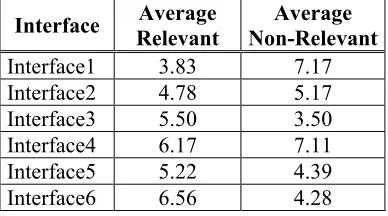
Table 5: Average number of relevant and non-relevant documents / interface
As expected, Interface6 (all features available to users) gives maximum relevant documents in average. It scores almost twice as Interface1. Concerning the non-relevant documents, we see that interfaces 2,3,5 and 6 allow the filtering of non-relevant documents or the navigation from a relevant document to another one. The consistency between Interface1 and Interface4 is logical because the user has to look in both cases at the document to know it is not relevant.
6.4 Average recall
In order to combine the two previous criteria, we computed the average recall over all users and all queries, for a given interface. In order to compute the recall for a query q, the total number of relevant documents was approximated to the total
0 0,05 0,1 0,15 0,2 0,25 0,3 0,35 0,4 0,45 0,5
0 20 40 60 80
100 120 140 160 180 200 220 240 260 280 300 320 340 360 380 400 420 440 460 480 500 520 540 560 580 600
Time (in s)
A
ver
ag
e reca
ll
I1 I2 I3 I4 I5 I6
number of documents marked as relevant over subjects for q. The recall at time t for a query q, a user u is then computed with the following formula:
(
)
(
( )
)
q
N
t
u
q
N
,
,
t
u,
q,
Recall
≅
where N(q,u,t) is the number of relevant documents assessed by user u at time t for query q
and N(q) is the total number of unique relevant documents found by all the users for query q.
The average recall at time t is computed by averaging the recall over the users and the queries. Figure 4 presents the curves of average recall according to time at a sampling rate of 10 seconds.
First of all, this figure shows that using any of the browsing features improves the document retrieval performances. The two better curves are obtained with entity filtering or using all the features. It is however a little bit strange that
Interface3 rises over Interface6 on the first 120 seconds. Extensive tests should be carried on to corroborate these results.
7 Conclusion
In this paper, several ways to help the user in his/her search are presented. We think that it is now necessary to have such kind of high-level interaction with the user. The evaluations showed that the navigation features provided here can decrease the time spent on a query. Firstly, that is true because the first answer is got more quickly. Secondly, even if the total number of relevant documents is not increased, they are retrieved in less time. Thirdly, the concepts and entities filters decrease the number of non-relevant documents the user will read.
There are some biases in this evaluation. Almost all the users, even if they are not experts in document retrieval, knew the search engine and the features used. Having said, (Bruza et al., 2000) trained their user before the real evaluation. It depends on the targeted users. Furthermore, 6 users and 18 queries do not seem to be enough to evaluate 6 different interfaces. We plan to reproduce this evaluation with more users.
One of the important points of the features presented in this paper is that most of them are based on linguistic analysis. If the use of linguistic in classical document retrieval is controversial, we think linguistic knowledge and treatments give the easiest way to interact with users.
8 Acknowledges
We wish to warmly thank the six participants (Vanessa C., Elise L., Frederik C., Eric B., Arnaud
D. et Luc M.) to volunteer and their patience. We also thank the newspaper Le Monde to make their corpus available for us.
References
P. Borlund and P. Ingwersen. 1998. Measures of relative relevance and ranked half-life: performance indicators for interactive IR. In:Croft, B.W, Moffat, A., van Rijsbergen, C.J, Wilkinson, R., and Zobel, J., eds. Proceedings of the 21st ACM Sigir Conference on Research and Development of Information Retrieval. Melbourne, Australia: ACM Press/York Press, pp. 324-331.
P. Bruza, R. McArthur and S. Dennis. 2000. Interactive Internet search: keyword, directory
and query reformulation mechanisms compared. Proceedings of the 23rd annual international ACM SIGIR conference on Research and development in information retrieval. Athens, Greece, pp. 280-287.
D. Harman. 1993. Overview of the First Text REtrieval Conference. National Institute of Standards and Technology Special Publication 500-207. (1993).
D. Harman.2000. What we have learned and not learned from TREC. Proceeding of the 22nd Annual Colloquium on IR Research. Sidney Sussex College, Cambridge, England.
K. Järvelin, and J. Kekäläinen. 2002. Cumulated gain-based evaluation of IR techniques. ACM Transactions on Information Systems (ACM TOIS) 20(4), pp. 422-446.
C. de Loupy, V. Combet and E. Crestan. 2003.
Linguistic resources for Information Retrieval. in ENABLER/ELSNET International Roadmap for Language Resources.
L. Manigot , B. Pelletier. 1997. Intuition, une approche mathématique et sémantique du traitement d'informations textuelles. Proceedings of Fractal'1997. pp. 287-291.
G. Salton. 1983. Introduction to Modern Information Retrieval, McGraw-Hill.
E. M. Voorhees. 2003. Overview of the TREC 2002 Question Answering Track, The Eleventh Text Retrieval Conference, NIST Special Publication: SP 500-251.