Thank you for purchasing a Panasonic Digital Super Hybrid System, Model KX-TD612. Please read this manual before connecting the Digital Super Hybrid System.
2
Features Guide
Introduction
About this Features Guide
This Features Guide describes every basic, optional, and programmable features in
alphabetical order. It also provides information about the conditions, connection references, programming required, related features, and operation for every feature.
Terms used in this Features Guide
• The Digital Proprietary Telephone is abbreviated as "DPT". • The Single Line Telephone is abbreviated as "SLT".
• "Console" is a generic designation of Digital DSS Console (KX-T7240/KX-T7440) and Digital Attendant Console (KX-T7441).
Installation Manual References
Lists any additional hardware required to use the feature.
Refer to "Installation" section in the Installation Manual for detailed information.
Programming Guide References
The related and required programming titles are noted for your reference.
System Programming should be done with a PC.
Refer to "System Programming" section in the Installation Manual for detailed information.
Station Programming is individual programming executed by each Digital Proprietary
Telephone (DPT) user at his or her own DPT. They can customise their DPTs based on their personal needs.
Refer to "Station Programming" section in the User Manual for detailed information.
Features Guide References
The related feature titles described in this Features Guide are noted for your reference.
User Manual References
The operation required to implement the feature is noted for your reference.
Refer to "Station Features and Operation" section in the User Manual for detailed information.
About the other manuals
Features Guide
3
Installation Manual
Provides instructions for installing the hardware.
Programming Guide
Provides programming instructions for a digital proprietary telephone.
User Manual
Designed for users of Digital Super Hybrid System, KX-TD612.
4
Features Guide
Table of Contents
1
General Features... 9
1.1 General Features... 10
Absent Message Capability ... 10
Account Code Entry... 11
Alert Indication ... 13
Alternate Calling — Ring/Voice ... 14
Answering, Direct CO Line ... 15
Automatic Adjust Time... 16
Automatic Callback Busy (Camp-On)... 17
Automatic Configuration ... 18
Automatic Overflow and Hurry-Up Transfer ... 20
Automatic Station Release... 22
Background Music (BGM) ... 23
Background Music (BGM) — External... 24
Budget Management ... 25
Built-in Voice Message ... 26
Busy Lamp Field... 30
Busy Station Signalling (BSS)... 31
Button, Direct Station Selection (DSS) ... 32
Button, Flexible... 33
Button, Loop-CO (L-CO) ... 36
Button, Single-CO (S-CO)... 37
Buttons on Digital Proprietary Telephones... 38
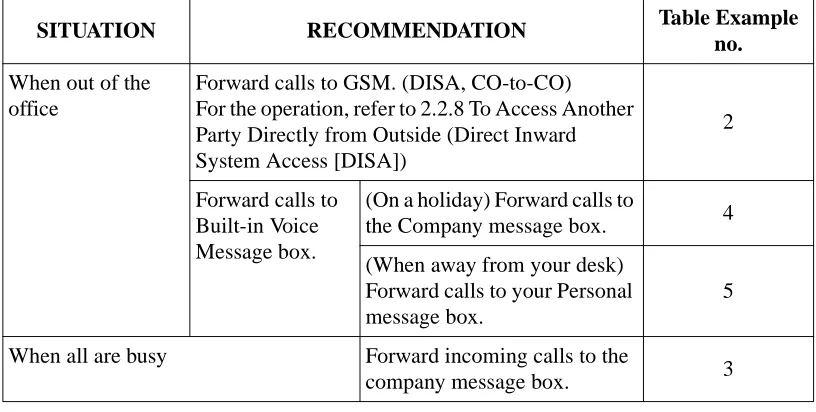
CALL FORWARDING FEATURES — SUMMARY... 41
Call Hold — CO Line ... 50
Call Hold — Intercom ... 51
Call Hold Retrieve — CO Line... 52
Call Hold Retrieve — Intercom ... 53
Call Hold, Exclusive — CO Line ... 54
Call Hold, Exclusive — Intercom... 55
Call Log, Incoming ... 56
Call Park... 58
Call Pickup Deny ... 59
Call Pickup, CO Line... 60
Call Pickup, Directed ... 61
Call Pickup, Group ... 62
Call Retrieving, Telephone Answering Machine (TAM)... 63
Call Splitting ... 64
Call Transfer, Screened — to CO Line ... 65
Call Transfer, Screened — to Extension... 66
Call Transfer, Unscreened — to Extension... 67
Call Waiting ... 68
Calling/Connected Line Identification Presentation (CLIP/COLP) ... 70
Calling/Connected Line Identification Restriction (CLIR/COLR)... 71
Charge Fee Reference ... 72
Features Guide
5
CO Incoming Call Information Display ...75
CO Line Connection Assignment ...77
CO Line Connection Assignment — Outgoing...78
Completion of Calls to Busy Subscriber (CCBS)...79
Conference ...80
Conference, Unattended ...81
Confirmation Tone ...82
Console ...84
Data Line Security ...87
Day/Night Service ...88
DDI/CLIP Key ...90
Department Codes ...91
Dial Tone, Distinctive ...92
Direct Inward System Access (DISA) ...94
Display Contrast Adjustment...98
Display, Call Information ...99
Display, Self-Extension Number ...101
Display, Time and Date...102
Do Not Disturb (DND) ...103
Do Not Disturb (DND) for Intelligent Call Handling 1:1 Call...104
Do Not Disturb (DND) Override ...106
Door Opener ...107
Doorphone Call...108
Doorphone Call Forwarding to CO Line ...109
Electronic Station Lockout ...111
Emergency Call...112
End-to-End DTMF Signalling (Tone Through)...113
Executive Busy Override — CO Line ...114
Executive Busy Override — Extension ...115
Extension Connection Assignment...116
Extension Group ...117
External Relay ...118
EXtra Device Port (XDP) ...119
Flexible Numbering ...120
Floating Number ...124
Full One-Touch Dialling ...126
Handset/Headset Selection ...127
Handsfree Answerback ...128
Handsfree Operation ...129
Hold Recall ...130
Host PBX Access...131
Hunting Group ...132
Integrated Services Digital Network (ISDN)...133
Integrated Services Digital Network (ISDN) Extension...135
Integrated Services Digital Network (ISDN) Service Access ...138
Intelligent Call Handling — Distribution of Incoming Outside Calls...139
Intercept Routing ...154
Intercom Calling ...156
6
Features Guide
LED Indication, CO Line... 171
LED Indication, Intercom ... 173
Line Access, Automatic ... 174
Line Access, CO Line Group... 175
Line Access, Direct... 176
Line Access, Individual ... 177
Line Preference — Incoming (No Line/Prime Line/Ringing Line) ... 178
Line Preference — Outgoing (Idle Line/No Line/ Prime Line) ... 179
Live Call Screening (LCS)... 180
Lockout ... 182
Log-In/Log-Out ... 183
Manager Extension ... 184
Message Waiting ... 185
Microphone Mute ... 187
Mixed Station Capability ... 188
Music on Hold ... 189
Mute ... 190
No Reply Group... 191
Notebook Function ... 192
Off-Hook Call Announcement (OHCA)... 193
Off-Hook Monitor... 194
One-Touch Dialling ... 195
One-Touch Transfer by DSS Button ... 196
Operator ... 197
Operator Call... 199
Outgoing Message (OGM) ... 200
PAGING FEATURES — SUMMARY... 203
Paralleled Telephone ... 207
Pause Insertion, Automatic ... 208
Phantom Extension ... 209
Pickup Dialling ... 211
Power Failure Restart... 212
Predial ... 213
Privacy, Automatic ... 214
Private Call... 215
Quick Dialling... 216
Redial, Automatic ... 217
Redial, Last Number ... 218
Redial, Saved Number ... 219
Remote Station Lock Control ... 220
Ring Group ... 221
Ringing Tone Selection for CO Buttons ... 222
Ringing Tone Selection for the INTERCOM Button ... 223
Ringing, Discriminating... 224
Second Ringer... 225
Secret Dialling ... 226
Special Display Features (Call Log, Outgoing)... 227
Special Display Features (Extension Dialling) ... 228
Features Guide
7
Special Display Features (System Feature Access Menu) ...230
Special Display Features (System Speed Dialling) ...231
Station Hunting ...232
Station Message Detail Recording (SMDR)...235
Station Programme Clear...238
Station Programming ...239
Station Programming Data Default Set ...241
Station Speed Dialling ...242
System Data Default Set ...243
System Programming and Diagnosis with Personal Computer ...244
System Programming with Digital Proprietary Telephone...246
System Speed Dialling...247
System Working Report...248
Terminal Portability for ISDN Extension ...250
Terminate ...251
Time-Out, Variable ...252
Timed Reminder ...254
Toll Restriction ...255
Toll Restriction Override by Account Code Entry ...262
Toll Restriction Override for System Speed Dialling ...264
Trunk (CO Line) Answer From Any Station (TAFAS) ...265
Two-Way Recording into Voice Mailbox ...266
Uniform Call Distribution (UCD) ...267
Voice Mail Integration ...272
Voice Mail Integration for Digital Proprietary Telephones ...278
Volume Control — Speaker/Ringer ...280
10
Features Guide
1.1
General Features
Absent Message Capability
Description
Once set this option provides a message, on the display of the calling extension, to show the reason for the called extension's absence. Nine messages can be programmed as desired which are available for every extension user. There are 6 pre-programmed default messages. Setting or cancelling a message can be done by individual extension users but only callers with a display telephone can receive the message.
Conditions
• Six default messages, which are changeable, are shown below. The "%" means a parameter to be entered when assigning a message at individual extension.
a)
Will Return Soonb)
Gone Homec)
At Ext %%% (extension number)d)
Back at %% : %% (hour : minute)e)
Out until %%/%% (date)f)
In a Meeting• An extension user can select only 1 message at a time. The selected message is displayed every time the user goes off-hook.
• If Voice Msg Full is displayed because the total recording time of your Built-in Voice
Message resource becomes less than 5 minutes, none of the absent messages will be displayed on the calling extension when going off-hook, even if you have set an absent message.
Programming Guide References
• [008] Absent Messages • [100] Flexible Numbering
Features Guide References
None
User Manual References
Features Guide
11
Account Code Entry
Description
An account code is used to identify incoming and outgoing outside for accounting and billing purposes. The account code is appended to the Station Message Detail Recording (SMDR) call record. For incoming outside call, account codes are optional. For outgoing outside call there are 3 modes available to enter an account code: Verified — All Calls mode; Verified — Toll Restriction Override mode; and Option mode. One mode is selected for each extension on a Class of Service basis.
In Verified — All Calls mode, the user must always enter a pre-assigned account code when making any of the following calls unless it has previously been stored in memory:
• Call Forwarding — to CO Line • Line Access, Automatic • Line Access, CO Line Group • Line Access, Direct
• Line Access, Individual • Notebook Function • One-Touch Dialling • Pickup Dialling • Redial, Saved Number • Station Speed Dialling • System Speed Dialling
In Verified — Toll Restriction Override mode, the user can enter a pre-assigned account code only when the user needs to override toll restriction.
In Option mode, the user can enter any account code when needed.
Conditions
• An account code can be stored into Memory Dialling (System/Station Speed Dialling; Notebook Function; One-Touch Dialling; Pickup Dialling; Call Forwarding — to CO Line). • The Account button may be used in place of the feature number. A flexible button on the
digital proprietary telephone set can be programmed as the Account button.
• If the account code stored in location 01 of the programming table is used, the dialled number is not printed out to SMDR (Private Call).
12
Features Guide
Programming Guide References
• [005] Flexible CO Button/PF Key Assignment • [100] Flexible Numbering
• [105] Account Codes
• [508] Account Code Entry Mode • [990] System Additional Information
Features Guide References
• Toll Restriction Override by Account Code Entry
User Manual References
• 2.2.5 Calling without Restrictions • 4.1.3 Customising the Buttons
Features Guide
13
Alert Indication
Description
If the following situations occur, the pre-warning indication is displayed on the digital proprietary telephone of Operator 1.
Memory: When the system finds the wrong system data, the indication System Data
Err 1 is displayed.
Printer: When the paper of the printer for SMDR runs out or the printer is out-of-service,
the indication Check Printer is displayed. Check the printer.
Built-in Voice Message resource: When the rest of the total recording time of the assigned
BV resource becomes less than 5 minutes, Voice Msg Full is displayed. (If the extension is assigned to Jack 1-1, the indication of both resource 1 and 2 will be displayed.)
Conditions
None
Programming Guide References
No programming required.
Features Guide References
None
User Manual References
14
Features Guide
Alternate Calling — Ring/Voice
Description
This system offers 2 methods of Intercom Calling: Calling or Voice-Calling. Ring-Calling informs the called party of an incoming call with a ring tone, while the Voice-Ring-Calling uses the calling party's voice. The called extension user, if a digital proprietary telephone, can select tone or voice calling. If the user selects Voice-Calling, the calling party can talk to the user immediately after confirmation tone. The calling extension user is able to change the calling method pre-selected once at a time by the called extension by pressing ; Ring-Calling can be switched to Voice-Calling, and vice versa. This operation is available for both
proprietary and single line telephone users during calling.
Conditions
Single line telephone users can only receive Ring-Calling call.
Programming Guide References
No programming required.
Features Guide References
• Handsfree Answerback
User Manual References
Features Guide
15
Answering, Direct CO Line
Description
Allows the digital proprietary telephone user to answer an incoming call by simply pressing the appropriate CO button without lifting the handset or pressing the SP-PHONE button. The user can specify the line to be answered when multiple incoming lines are ringing.
Conditions
None
Programming Guide References
No programming required.
Features Guide References
• CO Line Connection Assignment
User Manual References
16
Features Guide
Automatic Adjust Time
Description
The system synchronises the time with the standard time when the first outgoing call is made through ISDN line after 3 o'clock each morning.
Conditions
• If the Date and Time setting is programmed, after synchronising the time, the programmed time is valid until the first outgoing call is made after the 3 o'clock of the next morning. • The full date (day/month/year) and local time (hour:minutes) are captured by the system
from the network.
Programming Guide References
No programming required.
Features Guide References
None
User Manual References
Features Guide
17
Automatic Callback Busy (Camp-On)
Description
If the line is busy when a call is made, callback ringing will inform the caller when the line becomes free.
Automatic Callback — Extension
When the caller answers the callback ringing, other extension's number is automatically dialled.
Automatic Callback — CO Line
When the caller answers the callback ringing, the line is automatically selected to allow the user to make an outside call.
Conditions
• If the callback ringing is not answered in 4 rings (within 10 seconds) the callback is cancelled.
• More than 1 extension user can set this function for the same extension or CO line.
Programming Guide References
• [100] Flexible Numbering
Features Guide References
None
User Manual References
18
Features Guide
Automatic Configuration
*1Description
The system sends the VPS data which contains the extension number configuration
information and the VPS automatically creates mailboxes with this data (Quick Setup). Time and date information is also sent to the Voice Processing System (VPS), so that the VPS and PBX have the same time and date.
Conditions
• Automatic Configuration should be executed:
1) after extension numbers have been set ([003] Extension Number Set)
2) after Voice Mail Integration for Digital Proprietary Telephones has been set ([126] Voice Mail Number Assignment)
3) after the time has been set ([000] Date and Time Set) The order of 1) 2) 3) does not matter.
• Automatic Configuration can be executed from the VPS using DIP-switch initialisation or Personal Computer (PC) with VT100 emulation software.
(When you execute using PC with VT100 emulation software and choose the type of PBX, select the "KX-TD612" if it is on the list. If not, select the "KX-TD816/KX-TD1232" instead.)
• The data is transmitted to the VPS on the lowest jack port.
• If 2 or more lines are connected with the VPS, the port(s) with lower number(s) on the system need to be connected to one(s) with lower number(s) on the VPS.
<Example>
Programming Guide References
No programming required.
Features Guide References
• Voice Mail Integration for Digital Proprietary Telephones
*1 Available when the Digital Super Hybrid System is connected to a Digital Proprietary Telephone capable Panasonic Voice
Features Guide
19
User Manual References
20
Features Guide
Automatic Overflow and Hurry-Up Transfer
Description
When Operator 1 is busy and the outside call reaches the Operator 1 directly, the incoming call can be waited until the waiting queue is over assigned number. When the incoming call is over assigned number, the last call will be transferred to the Operator 2.
(Automatic Overflow)
Operator 1 can refer the waiting queue with the indicator of the Hurry-Up button, and transfer the first waiting call to the pre-assigned extension with the Hurry-Up button. (Hurry-Up Transfer)
Conditions
• Automatic Overflow does not function in the following cases;
a)
The waiting queue is set "0."b)
Operator 2 is not set.c)
Operator 1 belongs to a Station Hunting Group.• Hurry-Up Transfer does not function in the following cases;
a)
The waiting queue is set "0."b)
Hurry-Up Button is not assigned.c)
Operator 1 belongs to a Station Hunting Group.Programming Guide References
• [005] Flexible CO Button/PF Key Assignment • [129] Operator Queue
Features Guide References
• Operator
Queue An incoming call
Automatic Overflow
Hurry-up Transfer
Features Guide
21
User Manual References
22
Features Guide
Automatic Station Release
Description
After going off-hook, if an extension user fails to dial any digits within a specified time period, the user will be disconnected from the line after reorder tone is sent. To get a line again, the user must go back on-hook and then off-hook.
Conditions
This function works in the following cases: When making an intercom call
1)
The first digit has not been dialled within 10 seconds.2)
After a digit is dialled, the next one is not dialled within 10 seconds (Intercom call only).Programming Guide References
No programming required.
Features Guide References
None
User Manual References
Features Guide
23
Background Music (BGM)
Description
Allows the digital proprietary telephone user to listen to background music from the monitor speaker on the telephone.
Conditions
• The system has an external music jack. It is required to connect a user-supplied music source. One source can be connected to the system.
• It is required to select a music source used for BGM by System Programming. • The BGM is interrupted while off-hooked.
Installation Manual References
• 2.4.8 External Music Source Connection
Programming Guide References
• [803] Music Source Use
Features Guide References
• Background Music (BGM) — External • Music on Hold
User Manual References
24
Features Guide
Background Music (BGM) — External
Description
Background music (BGM) can be broadcasted in your office through external pager. The BGM can be turned on and off by operator.
Conditions
• It is required to connect an external pager and an external music source. These are user-supplied items. One pager and 1 external music source can be connected to the system. • The pager can be programmed to send BGM or not.
• The access priority to external pager is: (1) TAFAS; (2) Paging; (3) BGM. Higher priorities will override BGM.
Installation Manual References
• 2.4.8 External Music Source Connection
Programming Guide References
• [100] Flexible Numbering • [803] Music Source Use • [804] External Pager BGM
Features Guide References
• Background Music (BGM)
User Manual References
Features Guide
25
Budget Management
Description
Limit the telephone usage to a pre-assigned amount. For example, the limit may be the amount deposited during a hotel at check-in. If the pre-assigned limit is reached, the extension user cannot make further calls until she receives authorisation from the operator.
Conditions
None
Programming Guide References
• [010] Budget Management
• [014] Budget Management on ISDN Port • [990] System Additional Information
Features Guide References
None
User Manual References
26
Features Guide
Built-in Voice Message
Description
This function is only available if an optional card KX-TD61291 is installed in the main unit KX-TD612. Installing this optional card enables you to use these features.
• Internal/External (Intelligent Call Handling 1:1) callers forwarded to your message box can leave their messages in it.
• External callers guided by company outgoing messages can leave their messages in the company (operator) message box. (Refer to 3.2.3 Recording Company Greeting Outgoing Messages in User Manual.)
• Replay or delete the recorded messages from your extension. A password is necessary for remote replaying or deleting through CO lines.
• The Direct Message function:
Allows you to leave a voice message in another extension's personal message box, even if the extension has not been set to forward an incoming call to its personal message box nor has recorded the OGM.
Note
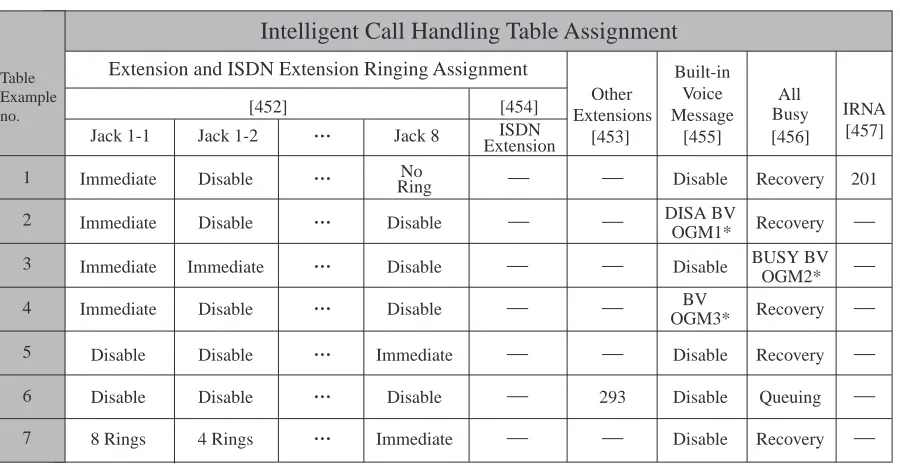
• Be sure to assign the Intelligent Call Handling table beforehand. Otherwise, outside caller cannot access the company message box. (Refer to Intelligent Call Handling —
Distribution of Incoming Outside Calls)
• When the call information of the Built-in Voice Message is overwritten, the voice message itself is deleted at the same time.
• You can set either the Built-in Voice Message (BV) feature or the Voice Mail (VM) feature at a time, but not both. If you set VM, the functions of an optional voice message card KX-TD61291 cannot be used. In other words, BV, OGM and Direct Inward System Access (DISA) cannot work when VM is used. Before setting VM, be sure to listen to voice messages of BV and then delete call log entries if stored. Otherwise, you can do nothing with it after setting VM.
Conditions
Built-in Voice Message Feature
• The voice message card has 2 resources. In default setting, resource 1 is for Jack1-1 and 2-1. Resource 2 is for the other jacks. The personal message box for each extension can be changed to either resource. Each resource can have maximum of 128 voice messages (including OGMs).
Features Guide
27
• Replaying/deleting company voice messages is only possible for the operator or the manager.
Operator 1 > Operator 2 > Manager/if not assigned, Jack 1-1
• You can choose the total recording time for the Built-in Voice Message feature (including OGM) out of 60 minutes/30 minutes/20 minutes per resource. (Default: 30 minutes) Refer to [822] Built-in Voice Message Total Recording Time.
• When the rest of recording time becomes less than 5 minutes, "Voice Msg Full" will be displayed, and you will hear dial tone 6 when going off-hook.
• When the rest of the total recording time of your BV resource becomes less than 5 minutes, the display will show the information. (Refer to [627] Voice Message Resource
Assignment.)
Display example: Voice Msg Full
• If the rest of recording time of the BV resource is 0, after the OGM was replayed to the end an outside call rings at the extension in the order of priority described below:
Operator 1 > Operator 2 > Manager > Jack 1-1
• If the rest of recording time becomes 0, an incoming call cannot be forwarded to message box. In this case, called extension will ring.
• The LED indicator of the MESSAGE button is lit red, if there are any voice messages not yet heard.
• If you go off-hook and a new message has been recorded in the voice message box, dial tone 5 will sound.
• If Call Forwarding to Built-in Voice Message has been set, dial tone 2 will sound when you go off-hook.
• In Timed Reminder feature, if you cannot access your voice message resource or have not recorded Timed Reminder OGM, dial tone 3 will sound.
1 s
1 s
28
Features Guide
• If a call fails to have access to the voice message box, with an internal call, the called extension will ring; with an external call, a telephone will ring depending on the Intelligent Call Handling table.
• The callback of Automatic Callback Busy (Camp-On) and Hold Recall cannot be forwarded to the voice message box even if the called party set this feature.
• The Built-in Voice Message, the Voice Mail and the Message Waiting features share the function of the MESSAGE button. For the detailed operation, refer to 2.5.1 Built-in Voice Message in User Manual.
• Even the telephone which sets this feature can pick up the calls on other extensions. • Intercept Routing No Answer (IRNA) can provide automatic redirection of an external call
to the company (operator) voice message box.
• Even if you perform system data clear, OGM cannot be deleted. To delete an OGM, follow the steps described in 2.5.1 Built-in Voice Message and 3.2.3 Recording Company Greeting Outgoing Messages in User Manual. To delete all voice messages and OGMs at once, refer to programme [895] OGM and Voice Message Clear.
Voice Message Call Log
• The call log feature is only available for T7433, T7436, T7230 and KX-T7235.
• Callers information can be logged by 3 methods.
1. The automatic call log when no one can answer the call. 2. The call log by pressing the LOG button during a conversation. 3. The automatic call log of the voice message.
• Up to 128 incoming calls can be logged on an extension basis. This is owned jointly with incoming call log. The 129th call overwrites the oldest call log. If the call log entry of the voice message is overwritten, the voice message itself is deleted at the same time.
• The displayed information of the call log are as follows:
a)
The receiving CO line number and name (max. 10 characters)b)
The caller's number (KX-T7436/KX-T7235: max. 24 digits) or the extension number and name (max. 16 characters)c)
The order of the logged numberd)
The day and time the call was madee)
KX-T7436/KX-T7235 only: The calling attempt count of the same person.• When there is another call from the same caller and the caller leaves a message, the calling attempt will not be counted and it will be logged separately.
• A log entry will be deleted automatically when its message is deleted.
• Even though you delete a message from outside, the call log entry cannot be deleted.
Features Guide
29
• If the company (operator) message box receives a message, a call log entry will be stored in an extension according to the priority as follows.
Operator 1 > Operator 2 > Manager > Jack 1-1
• If nothing is stored, such as the caller's name, that part will be blank.
• It is possible to prevent an other user from referring to the call log on the extension. The operator can cancel the prevention feature remotely (Call Log Lock Control).
• The display will change as follows after you see a call log entry.
Display example: OLD3 NEW1 OLD4 NEW0
This is not applicable when you replay the message by entering the feature number. In this case, the LED indicator of the MESSAGE button turns off.
• If you change call log information, the change cannot be cancelled.
• Rotate the jog dial to the right or press VOLUME button — UP to see the next call log entry. Rotate the jog dial to the left or press VOLUME button — DOWN to see the previous call log entry.
• LCR cannot be used when you call back by using a call log.
Programming Guide References
• [222] OGM Recording Time
• [223] Built-in Voice Message Recording Time • [455] Built-in Voice Message for Call Handling • [456] Call Handling When All Busy
• [457] Intercept Extension
• [625-626] Built-in Voice Message for Extension — Day/Night • [627] Voice Message Resource Assignment
• [628] Built-in Voice Message Access Code through CO Line • [820] OGM Recording
• [822] Built-in Voice Message Total Recording Time • [895] OGM and Voice Message Clear
Features Guide References
• Call Log, Incoming
• Intelligent Call Handling — Distribution of Incoming Outside Calls • Message Waiting
• Outgoing Message (OGM)
User Manual References
• 2.5.1 Built-in Voice Message
• 2.9.1 Calling Using the Call Log (Incoming Call Log) [KX-T7433, KX-T7436, KX-T7230, KX-T7235 only]
30
Features Guide
Busy Lamp Field
Description
The LED (Light Emitting Diode) indicators of the DSS (Direct Station Selection) buttons, each of which corresponds to a selected extension, tell whether the corresponding extensions are receiving a call, idle, busy or in Do Not Disturb (DND) mode.
Conditions
• This function is available for DSS buttons on Consoles and for flexible CO buttons assigned as DSS buttons on digital proprietary telephones.
• A DSS button indicator lights red if the corresponding extension is busy or in DND mode. • The DSS indicator on a digital proprietary telephone also informs you of incoming calls
except for the Intelligent Call Handling 1:N and door phone call to the corresponding extensions. You can pick up calls by pressing the corresponding flashing DSS button.
Programming Guide References
• [005] Flexible CO Button/PF Key Assignment
Features Guide References
• Button, Direct Station Selection (DSS) • Console
User Manual References
Features Guide
31
Busy Station Signalling (BSS)
Description
When attempting to call a busy extension, Busy Station Signalling allows you to signal the user on the phone to answer your call. The called extension user hears a Call Waiting tone and is able to answer the call.
Conditions
• This feature only works if the called extension has activated Call Waiting. If it is activated, the caller will hear ringback tone.
• If the called party has been set to activate the Off-Hook Call Announcement (OHCA) or Whisper OHCA function, the caller can announce the call through the speaker or the handset.
• If none of 3 features, Call Waiting, Off-Hook Call Announcement (OHCA) or Whisper OHCA is set at the called party, the caller will hear a reorder tone.
Programming Guide References
No programming required.
Features Guide References
• Call Waiting
• Off-Hook Call Announcement (OHCA) • Whisper OHCA
User Manual References
32
Features Guide
Button, Direct Station Selection (DSS)
Description
The digital proprietary telephone user can access other extension users with one touch of this button.
Conditions
• A flexible CO button on a digital proprietary telephone can be assigned as a DSS button using either System Programming with Digital Proprietary Telephone or Station
Programming.
• DSS buttons are provided on Consoles with default setting. Changing the setting is possible from the paired telephone using Station Programming.
• Once a button is assigned as a DSS button, it provides Busy Lamp Field (BLF) status. • The mode of a DSS button can be programmed to disconnect the CO line and calls the
extension or hold and transfer the call to the extension (One-Touch Transfer by DSS Button).
Programming Guide References
• [005] Flexible CO Button/PF Key Assignment • [108] One-Touch Transfer by DSS Button
Features Guide References
• Busy Lamp Field • Console
• One-Touch Transfer by DSS Button
User Manual References
Features Guide
33
Button, Flexible
Description
The use of flexible buttons is determined by either System Programming with Digital Proprietary Telephone or Station Programming. The following 3 types of flexible buttons are provided on digital proprietary telephones (DPT) and Consoles:
• Flexible CO buttons (provided on DPT only) • Flexible DSS buttons (provided on Console only) • Programmable Feature (PF) buttons
The below-mentioned table shows all of the features which can be assigned to flexible buttons. In the table, " " indicates that the feature can be assigned to the button.
Button CO DSS PF
Features to be assigned (DPT) (DSS) (DSS)
Button, Single-CO (S-CO) Button, Loop-CO (L-CO) Hurry-Up
Log-In/Log-Out*1
DDI/CLIP
Call Forwarding — from Hunting Group*1
Call Pickup Deny*1
Call Waiting*2
Calling Line Identification Restriction (CLIR)*1
Connected Line Identification Restriction (COLR)*1
Direct Station Selection (DSS)
Do Not Disturb for Direct Dialling In Call (DND for Intelligent Call Handling 1:1)*1
Doorphone Call Forwarding to CO Line*1
Executive Busy Override Deny*1
Live Call Screening (LCS)*3
Live Call Screening Cancel*3
34
Features Guide
Conditions
• A CO line can only appear on 1 Single-CO button of any given telephone. A station can only appear on 1 DSS button of any given telephone or Console.
• It is possible to have multiple appearances of the same Loop-CO buttons on the same telephone. Incoming and outgoing calls on the line are shown on the button in the following Night*1
Paging Deny*1
Paralleled Telephone Connection*1
Phantom Extension
Pickup Dialling (Hot Line)*1
Two-Way Record*3
Two-Way Transfer*3
Account Code Entry Conference
FWD/DND
One-Touch Dialling
One-Touch Dialling with Auto Hold Saved Number Redial
Terminate
Voice Mail Transfer ISDN Service Key
*1 The buttons which alternate the on/off setting of the corresponding feature. *2 Pressing this button changes the setting as follows:
Receiving Call Waiting Tone OHCA Whisper OHCA none of these
*3 Available when the Digital Super Hybrid System is connected to a Digital
Proprietary Telephone capable Panasonic Voice Processing System (one that supports digital proprietary telephone integration).
Button CO DSS PF
Features Guide
35
priority:
Single-CO > Loop-CO
Programming Guide References
• [005] Flexible CO Button/PF Key Assignment
Features Guide References
• Buttons on Digital Proprietary Telephones • Console
User Manual References
36
Features Guide
Button, Loop-CO (L-CO)
Description
All CO lines can be assigned to a flexible CO button on a digital proprietary telephone (DPT). The assigned button serves as a Loop-CO (L-CO) button. An incoming call on any CO line arrives at the L-CO, unless there is an S-CO button associated with the line or unless the button is already in use. To make an outside call, the DPT user can simply press the dedicated L-CO button.
Conditions
• No L-CO button is originally provided on a DPT. A flexible CO button can be assigned as an L-CO button in either System or Station Programming.
• Pressing the L-CO button provides the same operation as entering the automatic line access code.
• Immediate, delayed, no ringing or no incoming call (disable) can be selected on an extension-CO line basis.
• The digital DPT user can choose a desired ringer frequency for each L-CO button by System or Station Programming.
Programming Guide References
• [005] Flexible CO Button/PF Key Assignment • [400] CO Port Connection Assignment
• [605-606] Outgoing Permitted CO Line Assignment — Day/Night
Features Guide References
• Answering, Direct CO Line • Line Access, Automatic • Line Access, Direct
• Ringing Tone Selection for CO Buttons
User Manual References
• 2.2.1 Basic Calling • 2.3.1 Answering Calls
Features Guide
37
Button, Single-CO (S-CO)
Description
A Single-CO (S-CO) button is a CO line access button. This allows the digital proprietary telephone user to access a specific line by pressing an S-CO button. An incoming call can be directed to an S-CO button.
Conditions
• An S-CO button provides CO Line status.
• Incoming calls appear on the digital proprietary telephone, when an extension is assigned as the incoming call destination and an S-CO and/or L-CO button is assigned.
• Immediate, delayed, no ringing or no incoming call (disable) can be selected on an extension-CO line basis.
• The digital proprietary telephone user can choose a desired ringing tone type for the S-CO button by System or Station Programming.
Programming Guide References
• [005] Flexible CO Button/PF Key Assignment • [400] CO Port Connection Assignment
• [605-606] Outgoing Permitted CO Line Assignment — Day/Night
Features Guide References
• Answering, Direct CO Line • Line Access, Direct
• Line Access, Individual
• Ringing Tone Selection for CO Buttons
User Manual References
• 2.2.1 Basic Calling • 2.3.1 Answering Calls
38
Features Guide
Buttons on Digital Proprietary Telephones
Description
Digital proprietary telephones are provided with the feature/line access buttons listed below:
KX-T Digital Proprietary Telephones:
Buttons 7030 7230 7235 7431 7433 7436
AUTO ANSWER/MUTE*1
AUTO DIAL/STORE*1
CO*1*2
(12) (24) (12) (12) (12) (12) CONF*1
R button
Function (10) (10)
FWD/DND*1
HOLD INTERCOM*1
Jog Dial MESSAGE*1
MODE PAUSE
PF (Programmable Feature) (4) PROGRAM
REDIAL SELECT SHIFT*1
Soft (3) (3) (3) (3)
SP-PHONE*1
Features Guide
39
: The button is provided on the designated telephones.
(x) : Shows the number of buttons only if multiple buttons are provided.
The functions of the listed buttons are described below:
AUTO ANSWER/MUTE: This dual function button is used for extension auto-answer and
microphone mute during a conversation.
AUTO DIAL/STORE: Used for System Speed Dialling and storing programme changes. CO (Central Office line): Can make or receive an outgoing call or can be re-assigned to a
different CO or to various feature buttons.
CONF (Conference): Used to establish a three-party conference.
R button: Sends a flash signal to the Central Office or a host PBX to access their features
(External Feature Access). This button is applicable when the PBX has CO lines, not when it only has ISDN lines.
Function: Used to perform the displayed function/operation.
FWD/DND (Call Forwarding/Do Not Disturb): Used to program Call Forwarding and set
Do Not Disturb.
HOLD: Used to place a call on hold.
INTERCOM: Used to make or receive intercom calls.
Jog Dial: Used to adjust the ringer, speaker, handset and headset volume and the display
contrast. It can also be used to select data of the Memory Dialling and the System Feature Access Menu on the display.
MESSAGE: Used to send a message or display current message. MODE: Used to shift the display in order to access various features. PAUSE: Inserts a pause in a speed dial number.
PF (Programmable Feature): This flexible button can be programmed to be a One-Touch
Dialling, FWD/DND, Save, Account, Conference, Terminate or Voice Mail Transfer button, as desired.
PROGRAM: Used to enter and exit Programming mode. REDIAL: Used for Last Number or Automatic Redial.
SELECT: Used to select the displayed function or to call for the displayed phone number. SHIFT: Used to access the second level of Soft button function.
Soft: Pressing a Soft button performs the function/operation appearing on the bottom line of
the display.
SP-PHONE (Speakerphone) Used for handsfree operation. Pressing the button causes the
telephone to switch between handset and handsfree operation.
TRANSFER: Transfers a call to another extension or external destination.
VOLUME: Used to adjust the ringer and speaker volume and the display contrast.
Conditions
• Certain buttons are equipped with light indicators (LED's) to show line or feature status. • CO buttons can be classified as the following 3 types:
Single-CO (S-CO) button/Loop-CO (L- CO) button.
*1 The button is provided with Light Emitting Diode (LED).
40
Features Guide
Programming Guide References
• [005] Flexible CO Button/PF Key Assignment
Features Guide References
None
User Manual References
Features Guide
41
CALL FORWARDING FEATURES — SUMMARY
Description
Call forwarding enables you to have your calls forwarded to a specified destination. You may specify the circumstances under which your calls are forwarded. The following Call
Forwarding features are available:
Call Forwarding — All Calls Call Forwarding — Busy
Call Forwarding — Busy/No Answer Call Forwarding — by ISDN Line Call Forwarding — Follow Me
Call Forwarding — from Hunting Group Call Forwarding — No Answer
Call Forwarding — to CO Line
Assignable forwarding destinations are: (1) extension, (2) ISDN extension, (3) Hunting Group, or (4) Voice Mail extension.
There can be up to 4 stages of Call Forwarding. The fifth stage will be disregarded. If disregarded, the call will be treated according to the condition of the fourth destination. It is only possible to call an original extension or Hunting Group from the destination extension or Hunting Group immediately before it (Boss Secretary function).
<Example>
Conditions
• Although calls are forwarded, Message Waiting is not. The MESSAGE button indicator is lit on the extension which was originally called.
• Setting this function cancels any other Call Forwarding functions. • Intelligent Call Handling 1:N calls can only be forwarded 1 stage.
• If the final destination of the Call Forwarding is Voice Processing System, the mailbox number of the extension which was originally called is automatically sent (Follow On ID), even if it is forwarded more than 1 stage.
• The call will not return to the calling extension by the call Forwarding function. <example> Forward set Call Original extension
Hunting group 1
BOSS SECRETARY
FWD FWD
FWD
42
Features Guide
Call Forwarding — All Calls
Description
This feature is used when you want all your calls to be automatically re-directed to another extension.
Conditions
• Types of calls which are forwarded by this feature are:
Outside calls — Intelligent Call Handling 1:1; Intelligent Call Handling 1:N; Intercept
Routing; DND transfer; Call forwarding; Station Hunting
Intercom calls — Extension; Transfer; Call Forwarding; Station Hunting
Programming Guide References
• [005] Flexible CO Button/PF Key Assignment • [100] Flexible Numbering
Features Guide References
None
User Manual References
Features Guide
43
Call Forwarding — Busy
Description
A call directed to your extension is forwarded to another extension when your telephone is busy.
Conditions
• Types of calls which are forwarded by this feature are:
Outside calls — Intelligent Call Handling 1:1; Intelligent Call Handling 1:N; Intercept
Routing; DND transfer; Call forwarding; Station Hunting
Intercom calls — Extension; Transfer; Call Forwarding; Station Hunting
Programming Guide References
• [005] Flexible CO Button/PF Key Assignment • [100] Flexible Numbering
Features Guide References
• Call Forwarding — Busy/No Answer
User Manual References
44
Features Guide
Call Forwarding — Busy/No Answer
Description
Your calls are forwarded to another extension when your extension is busy or you do not answer the call in a pre-determined time.
Conditions
• Types of calls which are forwarded by this function are:
Outside calls — Intelligent Call Handling 1:1; Intelligent Call Handling 1:N; Intercept
Routing; DND transfer; Call forwarding; Station Hunting
Intercom calls — Extension; Transfer; Call Forwarding; Station Hunting
• This function operates the same way as Call Forwarding — Busy and Call Forwarding — No Answer.
Programming Guide References
• [005] Flexible CO Button/PF Key Assignment • [100] Flexible Numbering
• [202] Call Forwarding — No Answer Time
Features Guide References
• Call Forwarding — Busy • Call Forwarding — No Answer
User Manual References
Features Guide
45
Call Forwarding — Follow Me
Description
When you forget to set Call Forwarding — All Calls before you leave your desk or when you move from pre-set place to another, this allows you to set the same function from the
destination extension.
Conditions
• Same as the conditions of Call Forwarding — All Calls.
• It is programmable to enable or disable this feature on Class of Service basis.
Programming Guide References
• [005] Flexible CO Button/PF Key Assignment • [100] Flexible Numbering
• [991] COS Additional Information
Features Guide References
• Call Forwarding — All Calls
User Manual References
46
Features Guide
Call Forwarding — No Answer
Description
Calls to your extension are forwarded to another extension when you do not answer the call in a pre-determined time.
Conditions
• Types of calls which are forwarded by this function are:
Outside calls — Intelligent Call Handling 1:1; Intelligent Call Handling 1:N; Intercept
Routing; DND transfer; Call forwarding; Station Hunting
Intercom calls — Extension; Transfer; Call Forwarding; Station Hunting
Programming Guide References
• [005] Flexible CO Button/PF Key Assignment • [100] Flexible Numbering
• [202] Call Forwarding — No Answer Time
Features Guide References
• Call Forwarding — Busy/No Answer
User Manual References
Features Guide
47
Call Forwarding — to CO Line
Description
All calls directed to your extension will be sent to an external destination. The outside telephone number must be pre-programmed.
Conditions
• Types of calls which are forwarded by this function are:
Outside calls — Intelligent Call Handling 1:1; Intercept Routing Intercom calls — Extension; Transfer
• The forwarding extension's Toll Restriction and Account Code Entry requirements still apply.
• Class of Service programming determines the extensions that are able to perform this function.
Programming Guide References
• [005] Flexible CO Button/PF Key Assignment • [100] Flexible Numbering
• [504] Call Forwarding to CO Line
Features Guide References
None
User Manual References
48
Features Guide
Call Forwarding — by ISDN Line (CFU/CFB/
CFNR)
Description
The call forwarding service provided by ISDN can be assigned on an extension basis. The following features are available.
Call Forwarding — Unconditional (CFU)
All incoming calls to an extension are transferred by an ISDN line.
Call Forwarding — Busy (CFB)
An incoming call to an extension is transferred by an ISDN line when the extension is busy.
Call Forwarding — No Reply (CFNR)
An incoming call to an extension is transferred by an ISDN line when the extension does not answer within a pre-assigned time.
Conditions
• Class of Service programming determines the extensions that are able to perform this function.
Programming Guide References
• [005] Flexible CO Button/PF Key Assignment • [100] Flexible Numbering
• [518] CFU/CFB/CFNR Assignment
Features Guide References
None
User Manual References
Features Guide
49
Call Forwarding — from Hunting Group
Description
Pre-assigned extension users can forward calls arriving at any Hunting Group or calls arriving just at your own Hunting Group. The destination can be another Hunting Group or a specific extension, or a voice mail extension (DPT Integration).
Conditions
• Types of calls which are forwarded by this function are:
Outside calls — Intelligent Call Handling 1:1; Intelligent Call Handling 1:N; Intercept
Routing; DND transfer; Call forwarding; Station Hunting
Intercom calls — Extension; Transfer; Call Forwarding; Station Hunting
• You can turn on and off from a digital proprietary telephone. (Refer to 4.1.3 Customising the Buttons in User Manual.)
• Class of Service programming determines the extensions that are able to perform this function.
• Do not forget to set the Station Hunting group type for each group you wish to use; the default is "disable".
• This feature does not work if the Station Hunting type of the forwarding Hunting Group is Voice Mail (VM) or Automated Attendant (AA).
Programming Guide References
• [005] Flexible CO Button/PF Key Assignment • [100] Flexible Numbering
• [131] Hunting Group Assignment
• [520] Call Forwarding from Hunting Group • [813] Floating Number Assignment
• [990] System Additional Information
Features Guide References
• Station Hunting • Hunting Group
• Voice Mail Integration for Digital Proprietary Telephones
User Manual References
50
Features Guide
Call Hold — CO Line
Description
Allows the digital proprietary telephone user to put an outside call on hold. The held call can be retrieved from the user who held it or from any other extension.
Conditions
• Call hold tone is sent to the party on hold. If Music on Hold is active, music is sent to the party on hold.
• If a call on hold is not retrieved in a specific period of time, Hold Recall results. • If an outside party is placed on hold and not retrieved in 15 minutes, it is automatically
disconnected.
Programming Guide References
• [100] Flexible Numbering • [200] Hold Recall Time
Features Guide References
• Call Park • Hold Recall • Music on Hold
User Manual References
Features Guide
51
Call Hold — Intercom
Description
This is used to place an intercom call on hold for the digital proprietary telephone user. The held call can be retrieved from the user who held it or from any other extension.
Conditions
• Only 1 intercom call can be placed on hold in a telephone at a time; however multiple calls can be placed on hold using a different feature. (see Call Park).
• If a call on hold is not retrieved in a specific period of time, Hold Recall results.
• Call hold tone is sent to the party on hold. If Music on Hold is active, music is sent to the party on hold.
• If an outside party is placed on hold and not retrieved in 15 minutes, it is automatically disconnected.
Programming Guide References
• [100] Flexible Numbering • [200] Hold Recall Time
Features Guide References
• Call Park • Hold Recall • Music on Hold
User Manual References
52
Features Guide
Call Hold Retrieve — CO Line
Description
Allows the extension user to retrieve a call that has been placed on hold by another extension, except for the exclusive hold.
Conditions
Confirmation tone is sent to the user when the call is retrieved by the feature number. Eliminating the tone is programmable.
Programming Guide References
• [100] Flexible Numbering
• [990] System Additional Information
Features Guide References
• Call Hold — CO Line
User Manual References
Features Guide
53
Call Hold Retrieve — Intercom
Description
Allows the extension user to retrieve a call that has been placed on hold by another extension, except for the exclusive hold.
Conditions
Confirmation tone is sent to the user when the call is retrieved by the feature number. Eliminating the tone is programmable.
Programming Guide References
• [100] Flexible Numbering
• [990] System Additional Information
Features Guide References
• Call Hold — Intercom
User Manual References
54
Features Guide
Call Hold, Exclusive — CO Line
Description
Allows the extension user to prevent any other extension users from retrieving a held outside call. Only the user who held it can retrieve the call.
Conditions
• If a call on hold is not retrieved in a specific period of time, Hold Recall results. After Hold Recall results, the held call can be retrieved from any other extension.
• If an outside party is placed on hold and not retrieved in 15 minutes, it is automatically disconnected.
• Call hold tone is sent to the party on hold. If Music on Hold is active, music is sent to the party on hold.
• With a single line telephone, either 1 outside or intercom call can be held.
Programming Guide References
• [200] Hold Recall Time
Features Guide References
• Hold Recall • Music on Hold
User Manual References
Features Guide
55
Call Hold, Exclusive — Intercom
Description
Allows the extension user to prevent any other extension users from retrieving a held intercom call. Only the user who held it can retrieve the call.
Conditions
• Only 1 intercom call can be placed on Call Hold or Exclusive Call Hold at a time.
• If a call on hold is not retrieved in a specific period of time, Hold Recall results. After Hold Recall results, the held call can be retrieved from any other extension.
• Call hold tone is sent to the party on hold. If Music on Hold is active, music is sent to the party on hold.
Programming Guide References
• [200] Hold Recall Time
Features Guide References
• Hold Recall • Music on Hold
User Manual References
56
Features Guide
Call Log, Incoming
Description
Allows you to have information of the external calling party which provides Calling Line Identification Presentation (CLIP) on the display of a digital proprietary telephone when the extension user does not answer the call. The phone number, name and time can be logged automatically or manually. Modification and calling back are possible.
The displayed information is as follows;
a)
The receiving CO line number and name (max. 10 characters)b)
The caller's number (KX-T7436/KX-T7235: max. 24 digits) or the extension number and name (max. 24 characters)c)
The order of the logged numberd)
The day and time the call was madee)
KX-T7436/KX-T7235 only: The calling attempt time of the same personThis feature is owned jointly with the call log of the Built-in Voice Message. (Refer to Built-in Voice Message.)
Note
When the call information of the Built-in Voice Message is overwritten, the voice message itself is deleted at the same time.
Conditions
• This feature is only available for KX-T7433, KX-T7436, KX-T7230 and KX-T7235. • Callers information can be logged by 3 methods.
1. The automatic call log when no one can answer the call. 2. The call log by pressing the LOG button during a conversation. 3. The automatic call log of the voice message.
• Up to 128 incoming calls can be logged on an extension basis. The 129th call overwrites the oldest call log entry. If the call log entry of the voice message is overwritten, the voice message itself is deleted at the same time.
• The call log entry can be confirmed either pressing the VOLUME button or rotating the jog dial.
The VOLUME button (UP)/the jog dial (clockwise): from the oldest call log entry to the
newest.
The VOLUME button (DOWN)/the jog dial (counter-clockwise): from the newest call
log entry to the oldest.
• If you get a call when the caller's information has already been stored, the day/time the call was made and the calls count will change.
Display example
21 Aug 00 6:20 22 Aug 00 8:32
2 calls 3 calls
Features Guide
57
• If something is not stored, such as the caller's name, that part will be blank.
• When the outside call rings at multiple extensions (1:N reception), the information will be logged at the DPT with the lowest extension number.
• If the LED indicator of the SHIFT button is red, there are unanswered calls. • Once you change call log information, the change cannot be cancelled.
• It is possible to prevent an other user from referring to the call log on the extension. The operator can cancel the prevention feature remotely (Call Log Lock Control).
• The display will change as follows after you see a call log entry.
Display example: OLD3 NEW1 OLD4 NEW0
• LCR cannot be used when you call back by using a call log.
Programming Guide References
• [001] System Speed Dialling and Intelligent Call Handling Number Set • [002] System Speed Dialling and Intelligent Call Handling Name Set • [100] Flexible Numbering
Features Guide References
• Built-in Voice Message
• Intelligent Call Handling — Distribution of Incoming Outside Calls
User Manual References
• 2.5.1 Built-in Voice Message
• 2.9.1 Calling Using the Call Log (Incoming Call Log) [KX-T7433, KX-T7436, KX-T7230, KX-T7235 only]
58
Features Guide
Call Park
Description
Allows the extension user to place a held call into a system parking area. This releases the user from the parked call to perform other operations. The parked call can be retrieved by any other extension user.
Conditions
• The system contains 10 parking areas, each of which has its own call park number. Up to 10 calls can be parked at the same time in the system. The number of holding slots remains at 10.
• If a parked call is not retrieved within Transfer Recall Timer period, Transfer Recall starts to the operator or the extension that parked the call.
• If Call Park Recall is not retrieved in 15 minutes, it is automatically disconnected.
• Confirmation tone is sent to the user when the parked call is retrieved. Eliminating the tone is programmable.
Programming Guide References
• [100] Flexible Numbering • [201] Transfer Recall Time
• [990] System Additional Information
Features Guide References
None
User Manual References
Features Guide
59
Call Pickup Deny
Description
Allows the user to inhibit other extensions from picking up calls ringing at his/her extension by using the call pickup features.
Conditions
Distinctive Dial Tone is sent to the user on the extension with this feature when the user goes off-hook.
Programming Guide References
• [005] Flexible CO Button/PF Key Assignment • [100] Flexible Numbering
Features Guide References
• Call Pickup, CO Line • Call Pickup, Directed • Call Pickup, Group • Dial Tone, Distinctive
User Manual References
60
Features Guide
Call Pickup, CO Line
Description
Allows any extension user to answer an incoming outside call that is ringing at another's telephone.
Conditions
• Call Pickup starts with the lowest CO number.
• Confirmation tone is sent to the user when the call is picked up. Eliminating the tone is programmable.
Programming Guide References
• [100] Flexible Numbering
• [990] System Additional Information
Features Guide References
None
User Manual References
Features Guide
61
Call Pickup, Directed
Description
Allows any extension user to answer a call ringing at any other extension.
Conditions
• Doorphone call can be picked up by extensions that are not programmed to answer a doorphone call.
• Confirmation tone is sent to the user when the call is picked up. Eliminating the tone is programmable.
• You may pick up a call by pressing a flashing DSS button assigned on a digital proprietary telephone.
Programming Guide References
• [100] Flexible Numbering
• [990] System Additional Information
Features Guide References
None
User Manual References
62
Features Guide
Call Pickup, Group
Description
Allows the extension user to answer a call that is ringing at another telephone, if the call is ringing within the user's extension group.
Conditions
• The user can pick up an incoming outside, intercom, or doorphone call.
• Confirmation tone is sent to the user when the call is picked up. Eliminating the tone is programmable.
Programming Guide References
• [100] Flexible Numbering
• [602] Extension Group Assignment • [990] System Additional Information
Features Guide References
• Extension Group