https://doi.org/10.32628/CSEIT195526
3D Model Generation for Education Using Augmented Reality
Mitali Ghotgalkar*1, Purnima Kubde2,Naina Bharadwaj3, Shreya Padte4, Disha Kalgamwala5*1Technology Services, Fractal Analytics, Mumbai, Maharashtra, India 2St. Francis Institute of Technology, Mumbai, Maharashtra, India
3-5Department of Information Technology, St. Francis Institute of Technology, Mumbai, Maharashtra, India
ABSTRACT
Augmented Reality is the presentation of objects superimposed on the real world view of the environment. It is an innovative technology that allows multidimensional viewing and understanding of concepts. This paper aims to use this concept of Augmented Reality in the field of Education to create an application that generates 3D models of the images embedded in textual materials using the software Unity and Vuforia. The application uses a smartphone’s camera to scan the embedded image of a textbook, e-book or photocopy and generates a 3D working model with live animations as well as on-click functionalities to view various movements of the model by providing user interaction. This application aims to provide an active learning experience to students.
Keywords : Augmented reality; 3D model generation; 3D Characters.
I. INTRODUCTION
Education and technology are interconnected. This synergy is able to transform the world we live in. Existing education system utilizes mediums such as text books, PowerPoint presentations, and audio visuals for a better learning experience. However, these mediums lack real world implementation of concepts and multidimensional views, which restricts the understanding to a certain limit. Textual and theoretical content is helpful in conveying only a part of the whole concept, visuals are required for a more thorough as well as an enjoyable learning experience. The main drawbacks in the mediums for existing education system are that the static view of concepts is unable to convey the whole concept. Passive learning with an abundance of theoretical content is the barrier that makes students reluctant in learning interesting concepts. This is where Augmented Reality comes into the picture.
The basic aim of an Augmented Reality system is to intensify the user’s perception of the environment and interaction with the real world through supplementing with 3D virtual objects that appear to coexist in the same space as the real world. In simple terms, it is a technology that superimposes a computer-generated image on a user's view of the real world, thus providing a mixed view.
Augmented reality allows the learner to proceed through an experience during a broad time period not fixed by a regular class schedule, at their own rate. It allows users with disabilities to participate in an experiment or learning environment which they cannot do otherwise. It removes language barriers from the learning process by making touch and visual aids the primary focus.
The proposed system is an Augmented Reality application based on education. It involves 3D model generation on the smartphone screen relevant to the topic in the reading material. The smartphone detects the marker image and the model is instantly generated on the screen as superimposed on the real view. It facilitates in-depth understanding and a multidimensional view for dynamic processes.
II. METHODS AND MATERIAL
A. Methodology
The proposed system is an Augmented Reality application that works using a smartphone. First, the user scans the target image using a smartphone. As soon as all the feature points defined by the user are detected, they are recognized and the corresponding 3D model is generated. After the model is superimposed on the real world view of the smartphone screen, various interactive operations are generated on the screen for the user. These options include functionalities of the model to show various processes and portray relevant mechanisms, links to additional information about the topic and on-click functionalities to rotate or scale the object for a better view. The developer needs to feed the markers only once and hence the application does not require an active internet connection. The application solely works on the concept of augmented reality as the models are superimposed on the real-world environment.
The proposed system works with the concept of markers and feature points.
A marker is an image, text or object that acts as the target which when scanned triggers the model generation on a device. As this system is solely for explaining educational topics, these markers are taken as images. These marker images can be embedded in a textbook, e-books or PowerPoint presentation i.e. both hardcopies and softcopies of the image will work. Also, they can be coloured, black and white or a photocopy and will still remain the marker for the same object.
A feature point is a point plotted on the marker image that is to be detected by the smartphone. Feature points are the first points to be scanned by the device camera. These points are plotted on the image by the developer. Vuforia gives the developer an option to plot all feature points on his own or rearrange the feature points generated by the software itself. As a single image consists of about a minimum of a hundred feature points arranged in a unique pattern, every target marker will be unique.
The software required for the application include:
1. SketchBook Pro: This software is used for creating sketches of the models.
2. Maya: This software is used for creating 3D models with authentic textures, colours and shapes. 3. Unity: This is used as the core to develop the
software for animation of these models with characteristic animations for every model as well as on-click functionalities defined using JavaScript. 4. Vuforia: This software is used for feeding target
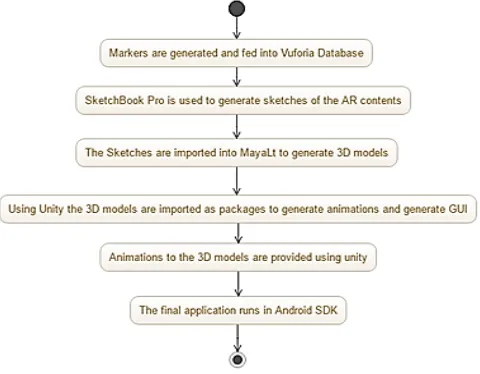
Figure 1. Developer Side Implementation
B. Developer Side Implementation
Fig.1 describes the basic flow of the developer side implementation.
1. The proposed system is implemented in several phases: Model Creation: In this step, 3D models are created using Maya and Sketchbook Pro. 2. These models are created relevant to the topics in
the textual materials. Maya allows the developer to provide textures, colours and shapes in multiple dimensions.
3. Animation Module: In this step, the 3D models are given characteristic animations like rotation, translation, scaling etc. to depict the relevant processes and mechanisms.
4. The animation is done using Unity. Marker and Feature Point Selection: In this phase, a target marker image is selected from the textual material. 5. On this marker image, feature points are defined
by the user in Vuforia.
6. All the feature points assigned by the developer have to be detected by the device camera for the model to be generated.
7. Vuforia Database Connectivity: In this step, the database of marker images with user defined feature points is imported to Unity to provide connectivity to the 3D models.
8. 3D Model Generation: Once the Vuforia-Unity connectivity is completed, the generation characteristics for the model are defined that include its placement on the target image, the physical parameters of its animation, sound and its size relative to the device screen.
The developer will perform all the above-mentioned steps for each marker image. The developer has to feed the markers of all the required topics in a single database and update the database as and when required.
C. User Side Implementation
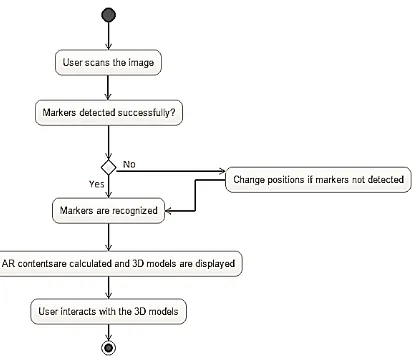
Fig.2 describes the basic flow of user side implementation.
The user requires a smartphone with the application that works as follows:
1. Marker Detection: The user scans the image using the smartphone. First to be scanned are the feature points of the image. For the marker to be detected, all the feature points of the image need to be scanned by the camera.
2. Marker Recognition: The feature point pattern that is detected is then matched with the patterns stored in the application.
3. Model Generation: After the marker is recognized, the 3D model corresponding to it appears on the screen in an augmented view along with its characteristic animations visible on the screen. 4. User Interaction: The user is provided with several
on-click functionalities to interact with the model and view various processes and additional information.
Figure 2. User Side Implementation
D. Generated 3D Model
1. The generated 3D model is accompanied with an interactive GUI that provides the user with on-click functionalities to view various animations of the model.
2. Functionalities included in a model are:
a. Movements: These include rotation, scaling, translation etc. to portray processes.
b. Text Labels: Every model includes text labels that can be hidden/ shown using a button. These labels define the parts of the model generated. For e.g. The Earth’s crust, core etc.
c. Metadata: For each model, a summary is provided in the augmented view that gives a brief overview of the topic it displays.
d. Additional Links: This functionality provides users with additional websites and videos that include additional information about the topic.
The 3D model can be easily viewed from various angles by rotation of the smartphone. The model is anchored to the target image and hence will move along with the target image as long as the image is still in the view of the device camera. The 3D model retains its colour, texture and shape irrespective of the nature of the marker image, i.e. even if the marker image is black and white or a photocopy of the original marker, the 3D model generated will be coloured and will retain all its characteristic properties.
E. Example use-case of Geography textbook
To explain the implementation of this application, a use case of a Geography textbook is used as follows:
To explain phenomenon like movement of planets, solar eclipse and lunar eclipse, two dimensional images provided in the textbooks are not sufficient, thus augmented models of planets, sun and moon are required to display these phenomena satisfactorily.
The developer is required to create 3D models of planets, sun and moon and define their animations respectively and link them with the corresponding images of the text book.
The user is required to hold his smartphone camera with the application in front of the image from the textbook. As soon as the image is detected by the application, 3D models of planets appear on the screen of the user.
The user is provided with functionalities to view the rotation of the planets, their revolution around the sun as well as their characteristic traits like rings, clouds, atmospheres and their moons using a simple click.
These functionalities ensure that the student obtains an in-depth understanding of the phenomena while interacting actively with the generated model and exploring its movements in an augmented manner.
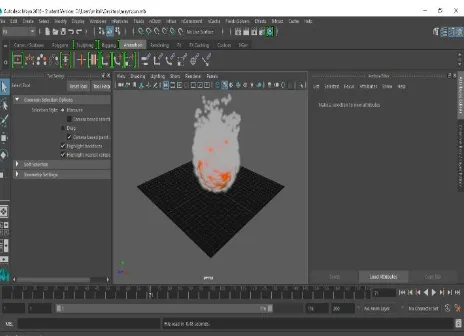
Figure 3. Model Creation of Sun Using Maya
III.RESULTS AND DISCUSSION
To test the application and its working, this application was implemented to act as a supplement to the tenth grade Geography topic about the Solar System.
First, an image of the Sun was selected based on which the model is to be created. This image was selected from a tenth-grade textbook.
The 3D model of Sun has been created using Maya. The texture, shape and colour imparted are analogous to the authentic features of the Sun. As seen in Fig.3, the 3D model of the sun is created with respect to the marker image selected.
Then, the model was imported to Unity and various functionalities were provided to it such as an animation module to show the sun burning with flames.
After this, the image selected was uploaded to the Vuforia database, where the feature points of the image were defined carefully.
After the definition of feature points, the image was updated in the Vuforia database.
Then, the database was imported to Unity and alignment of the model with respect to the marker image was done.
The final application was selected to run in Android SDK environment to be compatible with the smartphone.
On scanning the image marker, the augmented model of the Sun is generated with live animations.
A Graphical User Interface was provided to the user with options such as:
1. Viewing the composition of Sun
2. Rotating and Scaling the Sun for better understanding
3. Viewing Solar Eclipse phenomenon
4. Additional information links to websites and videos.
The system can be used as a supplement to e-books, hardcopies of books, PowerPoint presentations as well as Xeroxed copies of these materials. As it is being developed in Unity, it is compatible with iOS, Blackberry and other platforms as well. It can be used by teachers for creating important notes and assignments. Also, assessments and tests can be conducted using this technology. This application can also be used as a part of virtual laboratory sessions. It can be used for a variety of subjects ranging from History, Geography to Chemistry and Biology. It can completely replace school and college textbooks and help students learn more interactively. Publishers of books can use this application for feeding in markers. Teachers can add important notes as well as summarizations and additional pop ups for the textbook. Thus, this application can prove to be a technological breakthrough in the field of education for schools and colleges.
IV. CONCLUSION
application, students can easily understand by the visualization present on their screens. It helps teachers in conveying concepts that cannot be explained solely by theoretical materials or audio visuals. It uses the concept of augmented reality and implements it in education giving it an edge over the static view provided by 2D videos and images. It proves to be the most optimal supplement to the theoretical content in today’s generation. The application only requires a smartphone and no active internet connection, thus ensuring that the application is feasible and accessible to all students.
V. REFERENCES
[1] Mehmet Kesim and YasinOzarslan“Augmented
Reality in Education: Current Technologies and the
Potential for Education”, (CY-ICER-2012)North
Cyprus, US08-10 February, 2011
[2] OtíliaPasaréti “Augmented Reality in Education”
Chemistry course book, vol. 9, no. 6, pp. 539-546, 2013.
[3] Patrick M. O’Shea “Augmented Reality in Education:
An Exploration and Analysis of Currently Available
Educational Apps” Second International Conference,
iLRN 2016 Santa Barbara, CA, USA, June 27 – July 1, 2015
[4] Chen, Peng, Xiaolin Liu, Wei Cheng, and Ronghuai Huang. "A review of using Augmented Reality in Education from 2011 to 2016." In Innovations in
Smart Learning, pp. 13-18. Springer Singapore, 2017.
[5] Bacca, Jorge, et al. "Augmented reality trends in education: a systematic review of research and applications." Journal of Educational Technology &
Society 17.4 (2014): 133
[6] Shelton, Brett E., and Nicholas R. Hedley. "Using augmented reality for teaching earth-sun relationships to undergraduate geography students."
Augmented Reality Toolkit, The First IEEE
International Workshop. IEEE, 2002
[7] Liarokapis, Fotis. "Augmented Reality Interfaces for Assisting Computer Games University Students."
Bulletin of the IEEE Technical Committee on
Learning Technology 14.4 (2012): 7.
[8] Shelton, Brett E. "Augmented reality and education: Current projects and the potential for classroom learning." New Horizons for Learning 9.1 (2002) [9] Yuen, S., Gallayanee Yaoyuneyong, and Erik
Johnson. "Augmented reality: An overview and five directions for AR in education." Journal of Educational Technology Development and Exchange 4.1 (2011): 119-140
[10] Bower, Matt, et al. "Augmented Reality in education– cases, places and potentials." Educational Media
International 51.1 (2014): 1-15.
[11] Chen, Yu-Chien. "A study of comparing the use of augmented reality and physical models in chemistry education." Proceedings of the 2006 ACM international conference on Virtual reality
continuum and its applications. ACM, 2006.
[12] Larsen, Yelva C., et al. "Evaluation of a portable and interactive augmented reality learning system by teachers and students." Augmented Reality in Education 2011 (2011): 47-56.
[13] Kerawalla, Lucinda, et al. "“Making it real”: exploring the potential of augmented reality for teaching primary school science." Virtual Reality 10.3-4 (2006): 163-174.
[14] Arvanitis, Theodoros N., et al. "Human factors and qualitative pedagogical evaluation of a mobile augmented reality system for science education used by learners with physical disabilities." Personal and ubiquitous computing 13.3 (2009): 243-250.
[15] Kaufmann, Hannes. "Construct3D: an augmented reality application for mathematics and geometry education." Proceedings of the tenth ACM international conference on Multimedia. ACM
Cite this article as :
Mitali Ghotgalkar, Purnima Kubde, Naina Bharadwaj, Shreya Padte, Disha Kalgamwala, "3D Model Generation for Education Using Augmented Reality", International Journal of Scientific Research in Computer Science, Engineering and Information Technology (IJSRCSEIT), ISSN : 2456-3307, Volume 5 Issue 5, pp. 133-138, September-October 2019. Available at doi :
https://doi.org/10.32628/CSEIT195526