IJEDR1502054
International Journal of Engineering Development and Research (www.ijedr.org)288
GAPS-GPS Based Automated Profile Switcher and
Activity Manager for Android
1Abish G J, 2Nishanth S, 3Shilpa B C, 4Venkatesh Prasad V B, 5Lovee Jain 1Student, 2Student, 3Student, 4Student,
1,2,3,4
Department of Computer Science and Engineering,
1NIE Institute of Technology, Mysore, India
________________________________________________________________________________________________________
Abstract – The ubiquity of smartphones together with their ever-growing computing, networking, and sensing powers have been changing the landscape of people’s daily life. The goal of our application ‘GAPS’ is to manage the user activities of the smartphone with respect to locations. Various features of GAPS are Automated Profile Management with auto-response, Location Based Reminders and Log Maintainer. GAPS make use of GPS service for tracking user’s current location and Google map to fetch the information about location detected. The information from Google map is used diversely within the application for various modules. Automated Profile Management is one of the feature which recognizes the type of location and configures the audio profiles. An auto generated message is sent as response to the caller when the user is unable to receive the call. Location based Reminder is a unique feature of the application which reminds the user not only with respect to time but also location. Log Maintainer will keep track of the user visited locations along with the timestamps.
Index Terms – Android, GPS, Google map, SQLite
________________________________________________________________________________________________________
I. INTRODUCTION
The android is the latest and upcoming operating system in the market and application related to this operating system are much faster and easier to work [1]. The use of this operating system is increasing due to its versatility and capability of satisfying the user. Android is smart operating system which is very convenient and useful for the user. It is primarily designed for touch screen mobiles. It is an open source operating system. Applications are developed in the Java language using the Android software development kit (SDK) [2]. The SDK includes a comprehensive set of development tools, including a debugger, software libraries, a handset emulator based on QEMU, documentation, sample code, and tutorials. The officially supported integrated development environment (IDE) is Eclipse using the Android Development Tools (ADT) plugin [3].
GPS stand for Global Positioning System [4, 5], this system is thoroughly supported by Android application. GPS service in Android is Built-in. GPS helps the people to locate the particular area of their interest in a few seconds which has made it convenient for people to even travel unknown places because of its navigation facility. GPS works in any weather condition and anywhere in the world 24 hours a day. There is no fee for subscribing it and changes. GPS system uses a triangulation to calculate user‟s exact location. Today‟s GPS receivers are extremely accurate because a parallel multi-channel design. The accuracy of GPS receiver is 15m. GPS works by a constellation of at least 24 satellites 2, each orbiting the earth every 12 hours, at a height of 20200 km. These satellites broadcast their own location, and a very precise time signal.
Ever faced an awkward situation, where your phone started ringing when you were in the middle of an important meeting or a lecture just because you forgot to put your phone on silent mode? It has happened to everyone! Well in our busy lives many a times we forget such insignificant things that can put you into trouble. We need different profiles when we are at home, offices or any other work place. For this we have to change our profile manually which is very tedious work which required mental alert system too. To overcome this if there is fun way of changing the profile by using default profile manager which is updated with the help of locations. In this system we are going to develop android applications which are location based. Also we will develop some of the application which is occasional. The system updates the profile automatically after entering to a restricted zone. It updates the profile to a desired mode on a particular location.
It is hard for a busy person to maintain his/her past record. In today‟s life, officials keep a personal assistant to maintain the daily schedule. It is difficult for them to query their past schedules. The need for such details is of highly valued during critical interrogations. Our application will help such people by maintaining their schedules and keeping it for a reasonable period of time. The user can make use of the data stored for his/her essential needs.
The GAPS also has a location based reminder feature with which the user can set reminders with respect to locations. If we would like to have a reminder only when we are in a particular place then we can make use of this feature. Assume a person would like to have a reminder at 1 PM when he is in office and if he take a leave someday and stay back at home, office reminders should not disturb him. For such kind of situations this feature would be appropriate.
II. LITERATURE SURVEY
IJEDR1502054
International Journal of Engineering Development and Research (www.ijedr.org)289
profiles as required according to the time set in the settings. For example: If you set that the office timing is from 9am to 5pm the app will put your phone in silent mode during this time. You can set the auto profile by clicking on the top right Clock icon in the App. You will see two options in that work days and other. The other option is available only when you buy the PRO key. The screen for setting up the Auto profile is graphical hence it reduces the hassle to calculate the various timings. The App provides a lot of convenience and you don‟t have to worry about your phone ringing at important meetings or during college/school hours.Sound Manager allows you to configure different device sounds [7]: Call phone, system sounds such as notifications or keyboard, music players or music games and alarms. The unique feature of this application is you can store unlimited configuration profiles and you can set the system volume in Normal, Vibrate or Silent mode with one click. This application is aimed at configuring different audio profiles by the user and store it for further use. The user has to manually select the a udio-profile from the list of stored udio-profiles and should activate it. This is an enhancement for the set of built-in audio-udio-profile configurations provided by the Android.
III. PROPOSED METHODOLOGY
The GAPS handles audio-profiles automatically. It manages profile by recognizing the user‟s current location by using the Global Positioning System and manages the audio profile modes. It allows the user to configure the audio profile in two modes, either manual configuration or automated. In manual configuration user can able to configure his own profile settings according to the specific places or locations. In automated mode the audio-profiles are configured to default settings. It also provide an auto-response to the recipient when the user is unavailable or a situation when user could not auto-response. The application will send notification message to the recipient with respect to the user location. This feature can be selected or deselected by the user with respect to his requirement.
Along with this, the application also maintain a log of the user visiting places. It fetches the current position of the user by the latitude and longitude positions from the GPS and compares them with the previously fetched location, if they differ then that location is saved onto the database along with time and date. This merely help the user to have a record of his daily schedule if he might want it in the future. It also provide location based reminders. Till now no reminder will buzz with respect to a place but our application does. The application fetches the current location by making use of GPS and Google map then it will search for the reminder list of that location. If there are any then it will wait for time elapse and reminders the user.
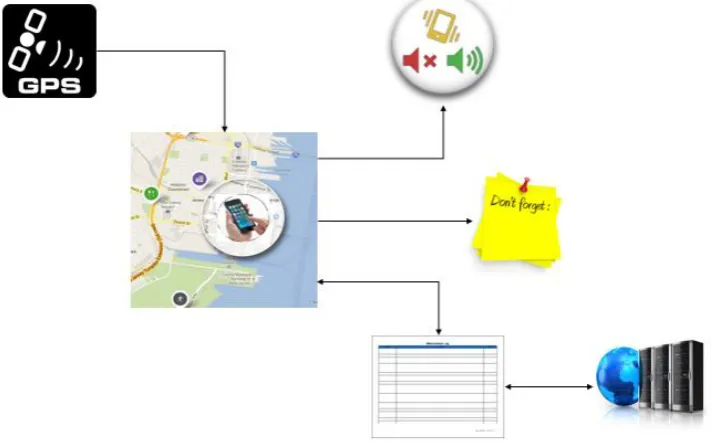
Figure 2.1 Modular view of the application
The above diagram represents critical modules of GAPS. They are described in the following sections individually. The GPS is an embedded system in the smartphone which we make use for our application. We fetch the latitude and longitude positions from the GPS and use it in our applications to provide necessary services.
1. PROFILE MANAGEMENT
Application fetches latitude and longitude co-ordinate values from GPS, and locations are obtained (such as college, hospital, etc.) by comparing with co-ordinate values of Google map and the co-ordinate values fetched from the GPS. Audio profile configurations are analyzed according to the user location, then decision has been made whether to change the audio profile or to retain the current audio profile configuration.
IJEDR1502054
International Journal of Engineering Development and Research (www.ijedr.org)290
the position of the smartphone. When called, it returns the co-ordinate values x and y which is used differently by different callers within the application. Get type of location from Google map: This module has the location parameters such as the latitude and longitude which are obtained from the previous module. Now, the module look into the Google map with the position values (latitude and longitude). Then it fetches the location details. The type of location has to be extracted from this location details.
Analyze: The type of location such as Hospital, Temple and Institutions etc. Which is obtained from the previous module is analyzed in this module. This type of location is compared against a pre-maintained list of location versus profile. For the respective type of location in the maintained table the profile module is fetched. Now if the fetched profile mode is different from the active one then the change profile module is called. If not then retain profile module is called.
Change profile: Whenever this module is called it runs a set of android API routines to access the audio profile from the android setting. Now the application changes the state with respect to type of location has decided by the previous module. Now this current state is updated back to the android settings hence reflected to the user.
Retain profile: whenever this module is called it checks the status of the audio profile, but does not change it. It updates the application with that state.
2. AUTO RESPONSE
Whenever there is an incoming call to the phone and the application is actively servicing, profile module will be checked for the active audio profile. If it does not allow any voice output to the user then a message is sent back to the caller automatically. The message might be of two types either auto formatted or user formatted. The choice of user formatted and auto formatted message sending is an option given to the user.
3. LOCATION REMINDER
Application allows the user to configure reminder feature according to his requirements. User has to set the reminder with respect to the location, time and then the user can place the reminder. Application recognizes the current location by the GPS then checks for any reminder with respect to that location. If there is any, then the application remind the user provided the time is elapsed.
Location based reminder: It is the feature provided by the application to remind the user with respect to location along with the elapsed time verification.
Set reminder: This module will set up the reminder input layout to the user whenever the user interact to set the reminder at the home page.
Set the location: The user selects the location from the graphical representation of the map provided within the layout. The position selected by the user is defined parametrically (position values) and stored along with the reminder.
Set the timestamp and give the reminder note: The user updates the reminder by giving the values like time and date. Along with this the user provides brief note about the reminder.
Place the reminder: All the data provided by the user for the reminders are put in the proper fashion formatted by the application then the reminder is placed in the list of reminders for the application to look into.
Check for reminder: This module is monitoring procedure which always look for any reminder with respect to location. Get the GPS co-ordinates (x, y): This module fetches co-ordinates values. These position values are then compared with
the Google map and the location is obtained. The extracted location is then compared against a list of locations reminder for the presence of any reminder with respect to that location.
Check for the time laps: If there is any reminder found in the previous module then it is checked for the elapsed time. If it is that of reminder time then the buzz reminder is called. Else it keeps on checking for the elapsed time.
Buzz reminder: This module contains code to access the voice output of the phone. It then request the android to service a voice output to remind the user.
4. MAINTAIN LOG
Application maintains a user log by fetching co-ordinate values from GPS and obtain different type of locations by comparing with the Google map. Then a log is prepared and stored in the database. If the user requests for the log view, then proper query is generated to fetch the information stored in the database. The log view has been displayed to the user.
Maintain log: This feature of the application will keep track of the places visited by the user. It maintains the log as per user demand (daily, monthly etc.).
Get GPS co-ordinates(x, y); This module fetches co-ordinates values. These position values are then compared with the Google map and the location is obtained. The extracted location is then compared against a list of locations reminder for the presence of any reminder with respect to that location.
IJEDR1502054
International Journal of Engineering Development and Research (www.ijedr.org)291
Store it in the database: The attributes of the log entity which is generated in the previous module are prepared as aninsert query. The DB is accessed by the application and the transaction channel is established. The insert query of SQL lite is executed to store the values into the DB.
Request from the user for log view: This module will provide display where the user can as to view the log maintained. It also provide options to filter out the log view results.
Prepare appropriate query: the user request from the previous module and the filter parameter are used by this module to prepare a query which will retrieve all the necessary data demanded by the user.
Fetch data from DB: the appropriate query which is prepared in the previous module is executed here it first establishes connection to application and database then it is executed prepared query to fetch the necessary data from the DB. This data is cached within the application.
Display to the user: The data is cached in the previous module is arrange in a user understandable format and display to the user in a row-column fashion.
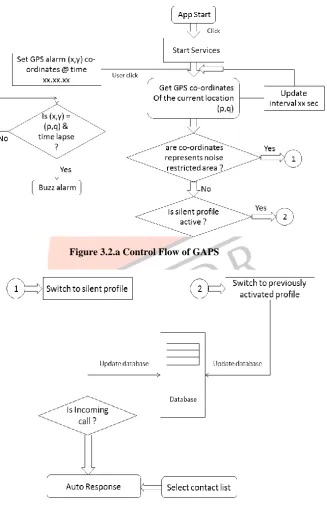
Figure 3.2.a Control Flow of GAPS
Figure 3.2.b Control Flow of GAPS
IJEDR1502054
International Journal of Engineering Development and Research (www.ijedr.org)292
modules will arise. Location Based Reminders will check for the updated co-ordinates and will decide accordingly. The Profile Management system will also look for the updated GPS co-ordinates and fetch the information form Google map and decide whether to change profile or retain profile. Necessary actions are stored in the database for maintaining the log information.IV. CONCLUSION AND FUTURE ENHANCEMENTS
Our project paper of location based activity manager give a clear insight of the application. Android users can make the best use of our application to manage their audio-profiles automatically. Along with that the user can make use of other features like Log Maintainer for keeping their past records and Location Based Reminders to remind them with respect to both place and time.
In the future we aim at providing few other activities on location detection which help the user by automating his work and ease the maintenance. A more precise extraction of the location from the Google map to provide accurate activity triggering with respect to places will be our update work. We will also work on the latest user interface designs as the Android updates the version to look for more interactive and user friendly interfaces helping the user to enjoy his work within the application.
REFERENCES
[1] Android Tutorial: Tutorials Point - http://www.tutorialspoint.com/android/
[2] Suhas Holla, Mahima M Katti, “ANDROID BASED MOBILE APPLICATION DEVELOPMENT and its SECURITY”, International Journal of Computer Trends and Technology – 2012
[3] The Eclipse Integrated Development Environment - https://eclipse.org/
[4] [Richard B Langley, “The Global Positioning System: Past, Present and Future” The future of Geodesy and Geomatics Research and Education Frederiction N B, 23 June 2001
[5] J Parthasarathy, “Positioning and Navigation System using GPS”, International Archives of the Photogrammetry, Remote Sensing and Spatial Information Science, 2006
[6] Audio Guru, An Existing Android Application - http://www.themobimag.com/manage-audio-profiles-automatically/
[7] Sound Manager, An Existing Android Application -