WALLIS, MICHAEL DAVID. JavaTutor – A Remotely Collaborative, Real-Time
Distributed Intelligent Tutoring System for Introductory Java Computer Programming – A Qualitative Analysis. (Under the direction of Dr. James C. Lester).
by
Michael David Wallis
A thesis submitted to the Graduate Faculty of North Carolina State University
in partial fulfillment of the requirements for the degree of
Master of Science
Computer Science
Raleigh, North Carolina 2011
APPROVED BY:
________________________________ Dr. James C. Lester
Chair of Advisory Committee
DEDICATION
BIOGRAPHY
ACKNOWLEDGMENTS
My wife Angela and my three children Aidan, Payton, and Savannah, have sacrificed greatly over the years in my pursuit of furthering my education. Angela has always encouraged me, especially during the many stressful and demanding times and never waved in her support. I will forever be grateful for all she has sacrificed. My son, Aidan, who has asked me many times while being tucked into bed, “Are you going to work on school now,” may now go to bed without worrying about what daddy is working on. To my eldest daughter, Payton, who may now have all of her father’s attention in order to play “princess” and “dress up.” To my youngest daughter, Savannah, may you always be my surprise blessing. My mother, Wanda Jones, and stepfather, Jimmy Jones, have continually provided encouraging words for when I had my doubts. My father, Thomas M. Wallis Sr., and stepmother, Barbara Wallis, have always helped me to stay grounded and to focus my attention on what matters most. My brother, Thomas M. Wallis Jr., who I have always looked to for inspiration, for all of his sacrifices and how he has made such a positive impact on the lives of my children during the time of this work. To my extended family, Elaine Blackmon, Robert and Daynelle Headen, Lynn and Eleanor Felton provided support and reassurance many times over. My friends and “family” at Knightdale Baptist Church have helped to spiritually guide me in all aspects of my life.
Dr. James Lester, my advisor, has provided me with the upmost enthusiasm and encouragement throughout my graduate studies at NCSU. He has shown consistent, unwavering dedication in supporting me, my family, and my efforts in completing this work. Dr. Lester is an exemplary advisor who has provided me with guidance and direction. I cannot thank him enough for all he has done.
technologies. Bradford Mott for his guidance and direction on applicable technologies. Additional colleagues who participated in this work include Eunyoung Ha, Alok Baikadi, Joe Grafsgaard, Jennifer Sabourin, Andy Smith, Robert Taylor, and Donnie Wright. NCSU CSC departmental staff, namely Carol Allen, for arrangement and scheduling of CSC room locations. I extend my many thanks to these individuals for their work and participation for helping to carry out this research.
TABLE OF CONTENTS
LIST OF TABLES ... viii
LIST OF FIGURES ... ix
CHAPTER 1 Introduction ... 1
CHAPTER 2 Background and Related Work ... 2
2.1 Distributed Learning and Relevant Technologies ...2
2.2 Remote Collaboration ...4
2.3 Software Development Environments ...4
CHAPTER 3 System Research, Design, and Development ... 12
3.1 JavaTutor Server ...13
3.2 JavaTutor Client ...17
3.3 Authoring Java Code ...19
3.4 Code Compilation ...20
3.5 Student Program Execution ...21
3.6 Adobe Messaging Services ...26
CHAPTER 4 Tutorial Sessions ... 31
4.1 Participants ...31
4.2 Participant Interaction ...31
4.3 Problem-Solving Task...32
4.4 Procedure ...34
4.5 System Configuration ...34
CHAPTER 5 Results and Analysis ... 35
5.1 User Interface and System Behavior ...35
5.2 Participant Actions and Programming Task Logistics ...41
5.3 Participant Knowledge ...42
5.4 Programming Task ...43
5.5 Recommended Improvements...44
CHAPTER 6 Conclusion ... 46
6.2 Limitations ...47
6.3 Future Work ...47
6.4 Concluding Remarks ...48
GLOSSARY ... 49
REFERENCES ... 50
APPENDICES ... 55
LIST OF TABLES
Table 1. Regular Expressions for User Code Extraction ... 22
Table 2. JavaTutor Top-Down Prioritized Channels ... 29
Table 3. Programming exercise (Version 1) for tutorial sessions ... 56
Table 4. Programming exercise (Version 2) for tutorial sessions ... 58
LIST OF FIGURES
Figure 1. High-Level JavaTutor System Architecture ... 13
Figure 2. JavaTutor Login Screen ... 18
Figure 3. JavaTutor IDE... 19
Figure 4. JavaImport Declaration ... 22
Figure 5. JavaClass Declaration ... 22
Figure 6. JavaTutor Server Template Excerpt ... 24
Figure 7. JavaTutor Server Template Excerpt - Post Main Body Replacement ... 24
Figure 8. Cross Domain Socket Policy ... 25
Figure 9. AdobeBlazeDS/LiveCycle Flex Message Flow - Producer to Consumer(s) ... 27
Figure 10. BlazeDS/LiveCycle Data Services Server Architecture ... 27
Figure 11. JavaTutor IDE Command Buttons ... 36
CHAPTER 1
Introduction
Human-to-human tutoring has been shown to be a highly effective method for delivery of educational and instructional material. Studies of expert human tutoring revealed significant learning gains shown to be more effective than classroom instruction (Bloom, 1984). Replicating the process has been a goal of many educational and artificial intelligence researchers, particularly in the design and development of Intelligent Tutoring Systems (ITS). Several domains have seen the emergence of ITSs, particularly in areas of physics (e.g., ITSpoke (Litman & Silliman, 2004), AutoTutor (Grasser et al., 2003), Andes (VanLehn et al., 2005)), mathematics (e.g., Geometry Explanation Tutor (Aleven et al., 2003)), medicine (e.g., CIRCSIM (Evens et al., 2001)), and computer programming (e.g., ProPL (Lane & VanLehn, 2004), JITS (Sykes & Franek, 2003). No ITS to date has been shown to be as effective as human tutors but all have strived to meet or exceed the same level of effectiveness (VanLehn, 2008). The work reported in this thesis attempts to provide research into existing computer programming ITSs and to implement a prototype system for supporting remotely distributive, real-time collaboration between a student and tutor in the domain of Java programming.
CHAPTER 2
Background and Related Work
2.1 Distributed Learning and Relevant Technologies
The emergence of remote learning and distributed computing systems over recent decades has yielded several diverse and influential approaches to learning, many of which have provided a foundational basis for current learning systems. Through the use of distributed learning systems, geographically, temporally, and culturally displaced participants can work together in an efficient and structured manner. Instructors and students are no longer required to be physically present within the company of one another as advances in distributed computing have made it possible to provide instruction materials and learning environments that better serve the needs of all participants. Advances in distributed learning systems have progressed from one-size-fits-all approaches to being more robust and adaptive to individual learners.
2.1.1 Desktop (thick-client) applications
2.1.2 Web applications (HTML)
With the advent of the web, web-based learning environments for content delivery and eLearning have quickly emerged and have been shown to be quite effective in reaching broad ranges of audiences. Relevant technologies have made their way to the web and have enabled web pages to behave and function in a more responsive, asynchronous manner, render a more visually appealing display, and to be more adaptive to end users (e.g., AJAX, JQuery). Web-based environments range from static formats where content is geared toward a “one-size-fits-all” approach with all content being fixed to formats that are highly-dynamic, responsive, and interactive. Modern web-based learning environments have gone the way of this later format as technology has evolved, leading to more effective ways for learning and for environment customization.
2.1.3 Rich internet applications (RIA)
In efforts to create a more rich environment for the end user, usually mimicking traditional desktop applications, Rich Internet Applications (RIAs) are served over the web, usually via a plug-in that is embedded into internet browsers, and are usually coupled with supporting client-side scripting technologies (e.g., JavaScript). Several platforms have been created for supporting RIAs and have varying shares of market penetrability. The most dominant RIA technologies include Adobe Flash, Microsoft Silverlight, Oracle JavaFX, and the Eclipse Rich Client Platform (RCP). Usage and/or market share of these types of technologies, minus Eclipse RCP1, is at 95.71% for Adobe Flash, 66.23% for Microsoft Silverlight, and 76.37% for Java2. Creating systems using these technologies make distributed client/server model easier for software developers as they provide many programming paradigms that are commonly found in traditional desktop application development. As a result, a reduction in the amount of time taken to learn and to apply these technologies can be achieved, thus yielding the potential for a more productive software development experience. Many ITSs
1 Usage data was not available at the time writing.
researched and developed thus far have used Java Applets or Java in a desktop environment and have been less visible in RIA-based systems.
2.2 Remote Collaboration
Bidirectional, real-time Java source code composition, compilation, and execution thereof between a student and a tutor are essential in the JavaTutor environment. In any given JavaTutor tutorial session and regardless of a participant’s role, immediate feedback of what action has been carried out by one participant (e.g., keyboard typing events including insertion and removal from the Java tutor source code editor or invocation of the Java compiler or execution commands) must be immediately portrayed to the corresponding participant in order to simulate a true one-on-one, collocated tutorial session.
2.3 Software Development Environments
2.3.1 Disjoint/isolated systems
compiler, a remote collaboration system, or provide bi-directional communication would be beyond the scope of this intended purpose. The same type of analysis can be made for each of the components that make up multi-component systems. A compiler is not meant to provide remote collaboration, a chat client is not meant to compile code, and a text editor is not meant to provide bi-directional communication. Integrating the various components in this type of development environment usually proves to be quite a difficult task. Some components may have restrictive licenses that do not permit any modifications or derivative works be produced while other components may be commercial software and are not released in a source code-only format. In a worst case scenario, some components may be complete black boxes and cannot be modified in any form whatsoever. Given the numerous challenges and issues present in this type of software development model, particularly for developing an application such as JavaTutor, another more robust and scalable software development model must be used.
One of the JavaTutor project’s goals is to enable a student to learn to program in Java, without having to require the student to first install a JVM or a given text editor. Instead, the student should be able to open their preferred web browser, navigate to the JavaTutor web site, provide their authentication credentials, and if successful, be redirected to a web page to begin writing, compiling, and running Java code, all without requiring the student install any additional software. Students may not have the permissions necessary to install software on the local machine (e.g., working on a computer in a computer lab as a non-administrative user), thus subsequently preventing the student from establishing the required components of this type of software development model. This limitation establishes a critical blocking issue that cannot be overcome by merely substituting another or modifying an existing software development tool(s). JavaTutor cannot, through design and development alone, bypass this issue and thus has been chosen to be deployed in a web-based, online manner.
2.3.2 Web-based/online systems
implementations. Being that these systems emerged in the context of the web, designers and developers of these systems had to simulate traditional thick-client application behaviors and appearances using web-based technologies such as HTML, AJAX, and JavaScript. While developing for the web has matured over the past two decades, particularly for asynchronous behavior and due to the aid of supplemental technologies (e.g., JQuery, JSON, Web Services, XML), depending on the scope and complexity of desired features, implementing such systems can require substantial levels of time and effort in order to reach maturity. Despite these challenges, there do exist benefits that are not typically offered by traditional thick-client, desktop applications such as, but not limited to, maintaining central control of application management and overall operation and being readily available to anyone with a web browser (possibly with cookies enabled) and an internet connection.
On the most basic end of the spectrum, systems such as JXXX Compiler Service (Tschalär, 2011) accept Java source code and library files via web-based file uploading and allows for the user to specify various options for source code compilation (e.g., debugging tables, optimization, warning suppression, verbosity, and deprecation). Following successful parsing and compilation phases, JXXX Compiler Service provides the user with the results of said parsing and compilation and if no errors were found, several links are provided for downloading the resulting class files, including separate hyperlinks for compressed archives containing the class files. Systems such as JXXX Compiler Service provide the capability to compile Java source code only and do not allow for the user to execute online. Instead, if the user wants to run their code, he or she must first download the generated files and execute them locally. Given this constraint, the user will be required to obtain and install a corresponding version of the Java Runtime Environment (JRE).
most common and widespread methodology used to achieve such styling and behavior is through the use of the JavaScript programming language (also known as ECMAScipt) and Cascading Style Sheets (CSS). When used within a web browser, JavaScript enables client-side, programmatic access to the Document Object Model (DOM) for dynamic interaction with the contents and objects in HTML documents. Event handling through JavaScript enables dynamic and sometimes interactive behavior, usually in response to user actions and control-based events (e.g., keyboard, mouse, focus, and content change). Cascading Style Sheets provide the capability to modify the “Look and Feel” of markup-styled documents and enables separation of document content from document presentation. Common uses of CSS include, but not limited to, styling of font, color, size, and alignment of text and modification of layout and appearance of elements contained within the page. When applied in unison, JavaScript and CSS provide the ideal rich, dynamic client-side behaviors and appearances for authoring of source code in web-based, online software development environments. For example, as a user types characters into an HTML TextArea control, JavaScript event handlers can be invoked to examine the control’s text entered thus far and if language-specific keywords are found, their style can be modified by applying corresponding CSS rules that modify the keyword font weight and color.
with the end user. Only output is generated with these tools and attempts to read user input from a command line are either ignored and compiled out or is stopped by the compiler before an executable can be generated, with the user being subsequently notified of such a limitation. Of these systems, none appear to allow full user interaction at the command line for end users. In addition, these systems lack any remote collaborative capabilities or any type of bi-directional communication between two parties. Usage of any of these tools for the JavaTutor program would not be sufficient due to these limitations.
and provides downloadable hyperlinks for running compiled Java code on the local user machine. However, no real-time remote collaboration or text-based messaging are present, except for the ability to make projects either public or private, which could be picked up throughout a search. WWWorkspace (Ryan, 2007) leverages the plug-in based architecture of Eclipse to provide a Web-IDE plug-in for mimicking the behavior of the Eclipse development platform and is coupled with additional technologies including Eclipse Equinox, Jetty Web Server, the Dojo Toolkit, JavaScript, Comet, JSON, and HTML. This system has shown to be one of the front runners in providing an extremely rich and dynamic user interface, providing file sharing to other users, and textual communication through a customized chat client. However, this system lacks the capability to provide real-time remote collaboration, a necessity of JavaTutor in that tutors must be able to view what the student has typed and what actions have taken place (e.g., initiation of compilation or code execution).
2.3.3 Integrated development environments (IDE)
development and testing. Being an integrated environment, some IDEs are extensible and thus allow for third-party, external systems to be integrated back into the main IDE, thus providing even more functionality to the user. The Eclipse development environment is comprised of features and plug-ins and make up smaller components of the overall Eclipse workbench. Such features and plug-ins may introduce a new or alter an existing perspective, view, or editor or provide the capability to integrate external tools and libraries but in an Eclipse-structured way. As evidenced in the work of (Ho et al., 2004), an Eclipse plug-in named Sangam was developed for enabling real-time, remote collaboration between a tutor and a student. Microsoft Visual Studio allows users to leverage macros and add-ins for customization of the hosting IDE and offers users the ability to introduce automation, customized project systems, debugger, editor, and user interface extensions, authoring and integration for generation of help content, and host of many other capabilities.
operating system related content (e.g., Global Assembly Cache (GAC), WinSxS, user-account specific solution file directories, etc.).
As is the case with learning any new software application, there exists an associated learning curve. IDEs are not immune to this, particularly due to the level of complexity and vast number of features present. Users who have little to no experience at all developing software in an IDE may initially find IDE user interfaces to be overcoming and may negatively contribute to their understanding of the system. Time required learning an IDE and the capabilities it offers can be substantial, so much so that it can often lead to critical decisions being made as to whether or not to even use the IDE to begin with. Therefore, IDE designers and developers must be careful as to how best to organize an IDE, with respect to menu layout, toolbar grouping and categorization, and window placement. For those users who have been exposed to and/or previously operated and developed with an IDE, they will find many common threads between IDEs such as standard menus and commands, project/file views, editor windows, source compilation, and debugging facilities. Such commonly shared, IDE-agnostic features allow for knowledge transfer between different IDEs and enables developers to more rapidly acclimate to new IDEs.
Monetary costs and product licensing can severely impact one’s ability to acquire and legally use an IDE. Some systems are open source and freely available on the internet and come with an appropriate license (e.g., Apache License, GNU General Public License, etc.) while others may be retail and come with a proprietary license and potentially limit the number of users who may use the software. Volume and/or site licensing is sometimes used to allow flexibility in group-level usage while in other cases, per-user, per-machine restrictions may be present.
CHAPTER 3
System Research, Design, and Development
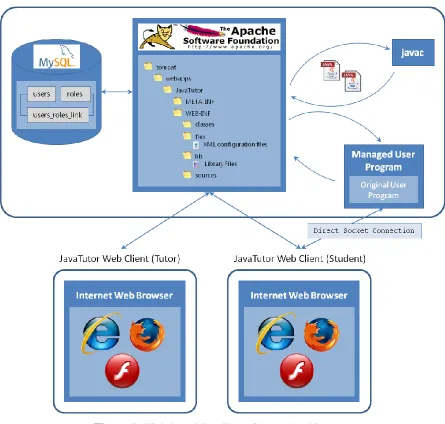
Figure 1. High-Level JavaTutor System Architecture
3.1 JavaTutor Server
including Apache Tomcat, Adobe BlazeDS, J2EE, Adobe Flash, Adobe Flex, MySQL, and JBoss Hibernate and are discussed in details in the sections that follow.
3.1.1 Apache Tomcat
Apache Tomcat is an open source technology that provides a server container implementation of Sun Microsystem’s Java Servlet and JavaServer Pages (JSP) specifications (named Catalina) and contains an HTTP connector component (named Coyote) for hosting Java web applications. Catalina is at the core of the Tomcat system and provides the Java engine (e.g., JVM, JRE) that is central to the entire web server. Coyote listens for incoming connections on a given TCP port and delegates handling the request onto the Tomcat engine for further processing, followed by subsequently issuing a response back to the requesting client. Tomcat was chosen for the JavaTutor prototype because it is lightweight and highly responsive, flexible and scalable, secure, and best of all, free and 100% open source.
3.1.2 Adobe BlazeDS
Adobe BlazeDS, a Java remoting and web messaging system supporting bi-directional, asynchronous data communication for Adobe Flex and Adobe AIR, was chosen as part of the server technology for the JavaTutor prototype. BlazeDS offers many desirable features including improved data transfer rates for improved application performance, allowing data to be loaded up to 10 times faster than with XML or SOAP, remoting with automatic data marshaling between Flash clients and Java methods on a server, real time data pushing over HTTP, publish/subscribe mechanisms that extend current messaging infrastructure (e.g., Java Message Service (JMS)), and is open source. The Adobe Action Message Format (AMF), a binary format that is used to serialize ActionScript objects, was one of the driving factors in the decision for adopting Adobe Flash over other RIA technologies. Using AMF yielded an extremely responsive data transfer for all of the Java code and textual communication being transferred between the student and tutor, a vital part of having a usable system.
configured. Consumers of the BlazeDS technology could download, extract, and install, immediately yielding a working, “out-of-the-box” web server system that could host web applications that include Adobe Flash-based content. This distribution of Apache Tomcat and BlazeDS was used for the JavaTutor prototype system.
3.1.3 J2EE Web Application
The J2EE web component of the JavaTutor system was created using two disparate tools for development. These tools were the Eclipse IDE for Java EE Developers, Helios SR2 distribution and the Adobe Flex Builder 4.0 distribution, and are discussed in detail in the following sections. The resulting JavaTutor web application consisted of two deployments with one deployment coming from the Eclipse IDE and the other from AdobeFlex Builder. With the functionality of these two tools were combined, a fully integrated, Flash/J2EE-based web application was created.
The Eclipse IDE for Java EE Developers provides tools for software developers who are creating Java EE and web applications and provides the infrastructure needed to create and deploy web applications into a variety of web servers including Apache Tomcat, JBoss Application Server, and IBM WebSphere. A traditional, J2EE web application was created using a dynamic web application project template provided by the Eclipse IDE, which consisted of Java code corresponding to all backend server functionality and web-based content including Flash-based files (e.g., HTML web page hosting the JavaTutor SWF file, Flash setup files, etc.) and startup XML configuration files for initialization of the BlazeDS system. The main body of Java code consisted of a “Service” class, which directly responded to and handled all client-side, Flash-based events including user authentication and authorization via the initial login screen and IDE-based controls events such as button clicks for compiling or execution of source code. A “Compiler” class was created for handling submitted Java code to be compiled with the results being sent back down to the Flash-client. The service class actually handles the compilation button click event and delegate event handling to this compiler class for further processing.
created that was embedded within the JavaTutor J2EE web application already deployed on the Tomcat web server. Within this project, MXML and ActionScript files were developed and grouped into a single SWF file for deployment to the Tomcat server. MXML is the extensible markup language first used by Macromedia and is used to model layout, container, and control-based content in a declarative mode with ties back to ActionScript for initialization, event handling, and further customization.
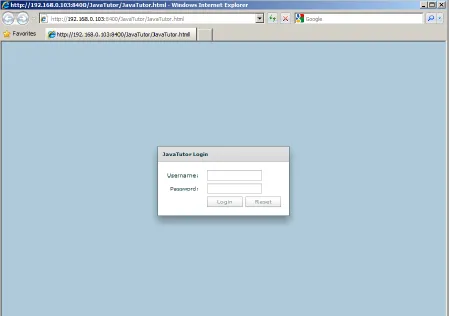
This initial JavaTutor prototype consisted of only two states that the application could be in, which corresponded to either “user logged in” or “user not logged in.” This Boolean state indicator drove which screen would be shown to the user. Following startup of Tomcat, initial visits to the JavaTutor server would route unauthenticated users to a Flash-based login screen where each user would enter their account credentials, which included a login identifier and password. For the purposes of the JavaTutor tutoring studies, generic login identifiers were used (e.g., student1, student2, …, and tutor1, tutor2, …), which help to shielded participants from exposing their true identity. Upon successful authentication steps, users would be redirected to the JavaTutor IDE component. Authentication was performed by accepting a user’s submitted credentials and verifying them against the contents of the user’s login credentials recorded in an underlying MySQL database. User passwords in the JavaTutor database were stored in an MD5 encrypted file format (one-way-hash algorithm) and would later be compared to an MD5 hashed representation of submitted user login credentials. Upon a successful match, the JavaTutor system would redirect the user to the JavaTutor IDE component. Otherwise, the user would be notified about the error and given another opportunity to login.
3.1.4 DBMS: MySQL
Hibernate, the relational persistence tool for Java and .NET, was used to model the JavaTutor database schema via POJO-style domain-specific types. This technology enabled first class data types to be created and operated upon dynamically in a DBMS-agnostic manner. No knowledge of the underlying database or technology making up the database or the DBMS was needed and thus, provided a clear separation between the JavaTutor server business logic and the data layer. Any changes to the database schema would require manual intervention to update the POJO-types and would be affected by the scope and impact of changes made to the underlying JavaTutor database. However, using a relational persistence tool yields tremendous benefits and does scale with respect to the size and complexity of the database being modeled.
3.2 JavaTutor Client
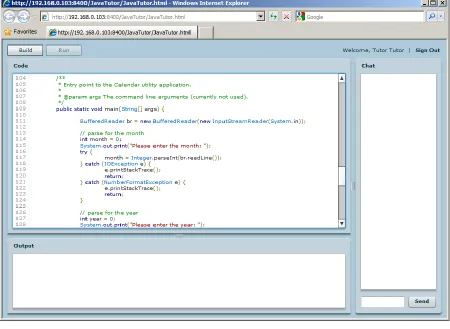
Figure 3. JavaTutor IDE
In development, Microsoft Internet Explorer and Mozilla Firefox were targeted and used extensively, with both web browsers yielding near similar results. Internet Explorer was the only browser used during the tutorial sessions due to a communication failure found to be present in Mozilla Firefox 3.x.
3.3 Authoring Java Code
ActionScript 3.0 provided the initial implementation of the syntax highlighting. Anirudh’s work included applying a lexer to HTML to extract tags and convert source code into plain text. Extracted tokens are then processed for “text decorations,” which decorate the associated token for customized appearance, followed by reassembling of said tokens for redisplaying purposes. This resulting decorated content served as input to the control making use of the syntax highlighting, in JavaTutor’s case a Spark TextArea control.
To achieve a non-blocking, interactive experience for the user when authoring Java code, AS3SyntaxHighlight makes use of Alex Harui’s open source PseudoThread Action Script class, which simulates multi-threading behavior found in traditional programming languages (e.g., Java, C, C++, etc.). Since ActionScript does not allow true multi-threading, Alex’s approach was to provide a pseudo version by dividing computationally expensive functionality into smaller segments and iteratively executing each segment until processing is complete. The PseudoThread class is actually an extension of the
flash.events.EventDispatcher and attaches event listeners (e.g., frame, mouse, and keyboard) to the main drawing area (technically named “Stage”) via use of the application’s
mx.managers.ISystemManager instance, which manages the “Application Window” of a Flash-based application. By adding a generic mx.core.UIComponent as a child to this
ISystemManager instance, the PseudoThread registers itself as an event listener to this child for responding to rendering event changes and uses this time to invoke the callback function provided by the caller. In the case of JavaTutor, this caller would be the AS3SyntaxHighlight component, where it is given time to execute text decoration functionality.
3.4 Code Compilation
Java 6.0 SE brought forth the Compiler API, which enabled software developers to use the javac Java source code compiler programmatically by using the
javax.tools.JavaCompiler class. By using this class’s getTask() method, a new
to the submitted user code, which are embed into javax.tools.SimpleFileJavaObject
derivative types (i.e., wraps the actual user code). The compilation task resulting from the compilation process is then used to invoke the actual process via the
JavaCompiler.CompilationTask.call() method, which returns a Boolean status of whether or not the process failed or succeeded. From this invocation, the output sent to the writer is then routed back to the client for displaying to the end user.
3.5 Student Program Execution
Console-based programming applications, regardless of the language used for implementation, reside and execute on the hosting machine. Since JavaTutor is a distributed application running a web server with clients connected via a web browser, program execution could not be delegated to client machines. In order to simulate client-side console program behavior, several enhancements had to be developed, which are described in detail in the following sections.
3.5.1 Student Code Extraction
Submitted Java code by the student participant required additional parsing and transformation into a format that would be best suited to run within the JavaTutor system. This differs from the “build-only” operation which performs compilation on submitted Java code only and not on any post-processed version. Upon each “run” attempt by the student participant, their Java code is submitted to the JavaTutor server, where it is first parsed for specific content including Java import declarations, Java classes, and a main method, where they are later re-inserted into a statically defined Java server template file (see section 3.5.2) to yield a server-based class that is later executed for carrying out actual student program execution.
Code extraction was achieved by applying regular expressions for locating patterns within the Java source code. The java.util.regex.Pattern and
for easing extraction without having to maintain any type of supporting indexing or positioning information. Since regular expressions were used to find matching content, an understanding of the Java programming language grammar was required. The grammar referenced for this work was from Oracle and provided the rules to follow when attempting to locate content of interest (e.g., Java import declarations, start of class definitions, etc.). Figure 4 and Figure 5 show the grammar rules applied.
ImportDeclaration:
import Identifier { . Identifier } [ . * ] ;
Figure 4. JavaImport Declaration
TypeDeclaration:
ClassOrInterfaceDeclaration ;
ClassOrInterfaceDeclaration:
{Modifier} (ClassDeclaration | InterfaceDeclaration)
ClassDeclaration:
NormalClassDeclaration EnumDeclaration
NormalClassDeclaration:
class Identifier [TypeParameters] [extends Type] [implements TypeList] ClassBody
Figure 5. JavaClass Declaration
From these BNF-style entries, regular expressions were formulated and applied where required. Location of a potential a main method, while not explicitly identified in the grammar, was also identified via a regular expression. Table 1 shows all of the regular expressions applied for aiding in user code extraction.
Table 1. Regular Expressions for User Code Extraction
Search/Match Item Regular Expression
Java Import Declaration \bimport\s[A-Za-z]+[.A-Za-z]*\b
Java Class Declaration \bclass\s[A-Za-z]+\b
3.5.2 Server Code Template
User-submitted code was assumed to be console-based and thus potentially interactive (e.g., not just unidirectional). To simulate this, user code was extracted as described in Section 3.5.1 and later inserted into a statically defined, server template Java source code file. This new template instantiation had to be compiled using the code compilation described in Section 3.4 and subsequently farmed out to a dedicated process for actual execution.
In this template file resided two markers that served as placeholders for the port number to bind to when the instantiated server was actually started and where the main method body in the user’s submitted file should be inserted (Figure 6 shows the marker for the main method body insertion). The port number to be inserted was selected using an internal port management class for open ports (e.g., ports not in use by other running user code). For the main method body to be inserted, if no main method existed in the user submitted code, then the marker was simply removed. Otherwise, a static function call was inserted that corresponded to invoking the original main method but under a different name. Since the main method represents the entry point into the application and contains all of the business logic authored by the user, preserving the original main method was performed by simply renaming the main method to mainMethod. This newly renamed main method is what is invoked statically in place of the corresponding marker in the server template file. Figure 7 shows the main method body marker replacement.
3.5.3 Communication: Sockets
The server template is actually a socket-based server implementation that creates a new instance of the java.net.ServerSocket class that is bound to a supplied port number and subsequently begins to listen for client connections. Upon accepting a client connection, a new java.net.Socket instance is obtained and is where a key part of this design takes shape. This newly created socket provides accessor methods for obtaining the input and output streams, which are later set as the system-level streams to read from and write to respectively in the running server. For output coming from the server, a new
java.io.PrintStream class adds functionality to other output streams and provides several print functions covering various data types. This class can also be configured for automatic data flushing following the writing of a byte array, the invocation of a println() method, or if a new line character or byte (‘\n’) is written. Automatic data flushing is enabled in the JavaTutor server code template by specifying a true Boolean value as the second argument to the java.io.PrintStream constructor. This causes all System.out.println()
statements in the student-submitted code to automatically flush upon invocation. Figure 7 is an excerpt from the server template class and shows how the socket input and output streams are configured.
Figure 6. JavaTutor Server Template Excerpt
Figure 7. JavaTutor Server Template Excerpt - Post Main Body Replacement
3.5.4 Server Socket Policy File/Cross-Domain Permissions
security is required and is achieve through the use of a socket policy file, which specifies site-level permissions and which ports can be accessed from certain domains. The security vulnerability presented by this approach is the potential for files from other domains to assume a user’s credentials when accessing content on a domain in question. Thus, Adobe recommends administration oversight on the usage and content of cross domain policy files.
As to why a cross domain policy file was needed for the JavaTutor prototype system, when the JavaTutor web application would spawn a new process for running client code, it would be configured with a port that was different from the port assumed by the JavaTutor web application. For example, a port of 8400 could have been used to host the JavaTutor web application and would correspond to the JavaTutor login and IDE components. Another port of say 4223 could have been used for running the client code, which corresponds to a different domain. The cross domain file used in shown in Figure 8. This file was placed into the Tomcat /webapps/ROOT directory, which was all that was required for clients to access their programs.
<?xml version="1.0" encoding="UTF-8"?> <cross-domain-policy
xmlns:xsi="http://www.w3.org/2001/XMLSchema-instance" xsi:noNamespaceSchemaLocation="http://www.adobe.com/xml/schemas/PolicyFile.xsd">
<site-control permitted-cross-domain-policies="all"/>
<allow-access-from domain="*" to-ports="4000-8000"/> </cross-domain-policy>
Figure 8. Cross Domain Socket Policy
3.5.5 Limitations
An additional limitation to interactive standard input and output was the type of Java IO readers and writers that could be used from the Java IO package. Buffered readers and writers proved to be troublesome in that explicit flush attempts were required for pushing data over streams, which could not easily be inserted or modified on submitted user code. Thus, operating upon the client socket input stream in its raw form and by wrapping the client socket output stream with the java.io.PrintStream type configured with auto flushing enabled proved to be the best solution while avoiding having to make adjustments to client code.
3.6 Adobe Messaging Services
Figure 9. AdobeBlazeDS/LiveCycle Flex Message Flow - Producer to Consumer(s)3
3.6.1 AdobeFlex Messaging Architecture
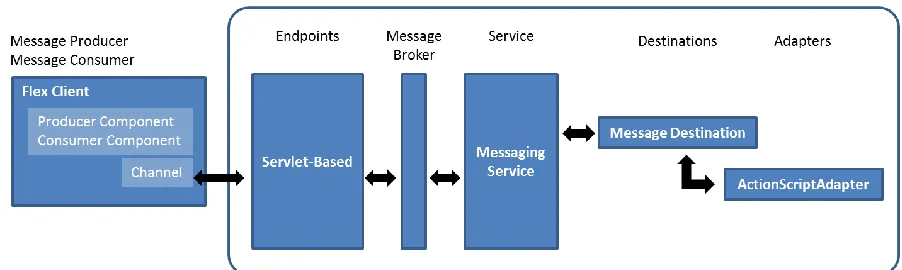
The messaging architecture is comprised of channels, destinations, data adapters, producers, and consumers. Figure 10 provides a high-level overview of the messaging architecture with each of these components discussed in detail in the sections immediately following.
Figure 10. BlazeDS/LiveCycle Data Services Server Architecture4
3 Modified from
http://help.adobe.com/en_US/LiveCycleDataServicesES/3.1/Developing/images/lm_basic_message_arch.png
4 Modified from
3.6.2 Message Protocols
Adobe messaging services support three messaging protocols, namely the Real Time Messaging Protocol (RTMP), Hypertext Transfer Protocol (HTTP), and the Action Message Format (AMF). RTMP uses a dedicated socket connection between the server and a client and is used in the push-model where a server pushes data directly to clients. HTTP is the networking protocol used for the World Wide Web and follows a request/response model for data transfer. AMF is a binary protocol developed by Adobe System Inc. that serializes ActionScript object graphs. AMF encoded objects are representative of the state of an application and are used to persist such state between two endpoints for communicating in a strongly-typed manner. HTTP and AMF channels, when configured with polling enabled, continuously poll the messaging server for new messages when one or more consumers (e.g., tutors and students) are subscribed for receiving messages. Real-time messaging is achieved by using streaming protocols or non-streaming protocols with polling enabled.
JavaTutor used the AMF and HTTP protocols for all forms of data transfer and communication. AMF was chosen over RTMP due to the fact that AMF is sent over HTTP whereas RTMP is sent over TCP. In some environments, RTMP will be blocked (e.g., firewalls) where AMF will not due to it being treated as HTTP traffic. Availability of existing HTTP-based authentication methods also played a part in why JavaTutor used the AMF networking protocol.
3.6.3 Message Channels
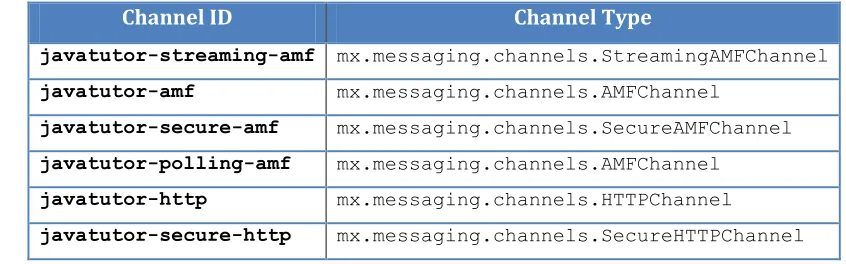
all channels have been tried. JavaTutor declared six channels in its services-config.xml file and were a combination of streaming and non-streaming channels, AMF and HTTP channels, and secure and non-secure channels. Table 2 lists all of the channels specified in JavaTutor services-config.xml file, specifically the channel identifier and type.
Table 2. JavaTutor Top-Down Prioritized Channels
Channel ID Channel Type
javatutor-streaming-amf mx.messaging.channels.StreamingAMFChannel
javatutor-amf mx.messaging.channels.AMFChannel
javatutor-secure-amf mx.messaging.channels.SecureAMFChannel
javatutor-polling-amf mx.messaging.channels.AMFChannel
javatutor-http mx.messaging.channels.HTTPChannel
javatutor-secure-http mx.messaging.channels.SecureHTTPChannel
3.6.4 Message Adapters
BlazeDS allows clients to access a variety of persistent data storage systems including, but not limited to, the Java Message Service (JMS), Enterprise Java Beans (EJB), ColdFusion components, and applications. Messaging adapters provide the connectivity to these storage systems and can be extended to handle other data sources not covered under the existing adapters. The ActionScriptAdapter type is the default data adapter used in BlazeDS and is used specifically for allowing interaction between Adobe Flex clients using the producer/consumer model. Since JavaTutor used only the producer/consumer model, the default ActionScriptAdapter was sufficient for all data persistence needs.
3.6.5 Message Destinations
file or the messaging-config.xml file and may include settings specifying which data adapter and channel(s) to be used by the destination.
JavaTutor used two message destinations to isolate the different types of message content exchanged between a tutor and a student. One destination was used for code editor messages while another destination was used for textual chat messages. This simplified message event handling for both the message producer and consumer by having event handling code separate from one another. For example, in the code editor, every key press event had to be immediately processed whereas textual chat messages only required processing when the user pressed the “Send” button (or enter button on the keyboard).
3.6.6 Message Service
CHAPTER 4
Tutorial Sessions
A qualitative study and analysis of an initial JavaTutor prototype system was the central goal of this work. Having user input and feedback was therefore essential for identifying functionality, behavior, and specific components of the JavaTutor IDE that were either missing or required further improvement. To support this effort, a pilot study consisting of four tutorial sessions was held in order to field test the prototype JavaTutor system. While not an adequate sampling for performing any statistical research, the tutorial sessions were meant to elicit user responses. The remainder of this chapter further describes the tutorial sessions.
4.1 Participants
Each tutorial session was comprised of four participants who assumed one of three roles: a tutor, a student, or a researcher. Two researchers were present in each tutorial session with each being paired with either the tutor participant or the student participant. The tutor and student roles required their corresponding participants to engage one another in an attempt to solve a given problem-solving task (see Section 4.4), with the tutor providing instructional support to the student. The researcher role required administering the tutorial session by providing all materials, answering any questions the participant may have, and observing and documenting any notable findings. All participants were drawn from the NCSU CSC IntelliMedia research group. No compensation was offered and participation was completely voluntary.
4.2 Participant Interaction
identification of either the student or tutor were not permitted. Both researchers followed the same administrative procedures and were nearly identical in the material reviewed, with the exception of having additional instruction provided by the researcher paired with the tutor for the purposes of discussing access and usage of a programming problem solution. Aside from serving as a guide and an information resource when needed, researchers were directed to observe and document student and tutor interaction with the JavaTutor system.
Interaction between tutor and student participants was constrained to two-way textual chat and real-time, remote collaboration with the JavaTutor IDE. Tutor and student participants were instructed to communicate with one another through the textual chat component, specifically for the purposes of initial acknowledgement and subsequent dialogue regarding the programming problem. Tutor participants were instructed to provide assistance on the usage of the Java programming language and on how to go about formulating a solution to the programming problem. Role-specific user names and time stamps accompanied each textual chat entry entered by the tutor and student participants. The JavaTutor IDE provided a real-time view of the student authoring Java code to the tutor, which provided instant feedback regarding student progress and provided insight as into how the student was attempting to solve the programming problem. Every character entered or removed from the code editor was immediately replicated in the corresponding participant view, regardless of assumed role. This included individual key press events, copy and paste events, and caret positioning and automatic scrolling into view events. For the purposes of this study, tutors were not allowed to take control of the Java source code editor to provide their own programming input or solution. Only students were allowed to type into the code editor with the tutor only viewing what was entered or removed by the student.
4.3 Problem-Solving Task
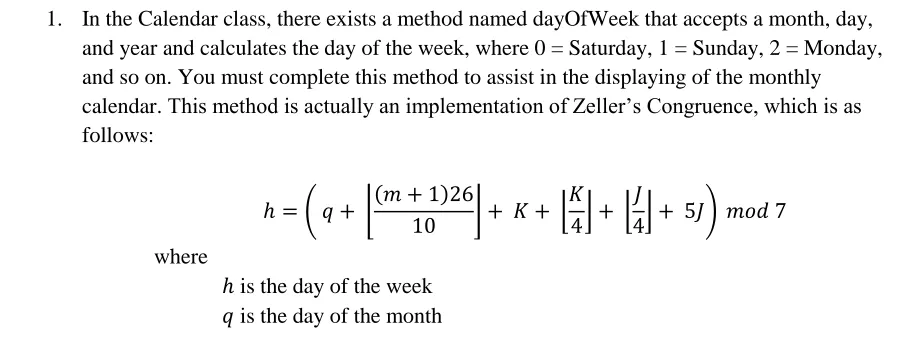
was modeled after the Unix/Linux-based cal command line utility program, which prints a Gregorian calendar given a numerical month and year input (Appendix A). Only a subset of the actual cal program was modeled, which included printing a Gregorian calendar to a console window and did not recognize any of the actual cal-documented command line arguments (e.g., -1, -3, -s, -m, -j, and -y). Having this limited scope of functionality provided enough material for the student to experience authoring a solution in JavaTutor in the allotted amount of time. Such a process included repeated cycles of code writing, building, execution, and testing, coupled with engaging a tutor via the textual communication component.
At the beginning of each tutorial session, tutors were provided with two Java files that corresponded to a solution version and a partially-complete version that would be provided later to the student as a starting point for development. Since tutors were not expected to be advanced in their understanding of the Java programming language, the solution file was provided in order to guide the tutor in assisting the student in their solution development. Given the limited amount of time to complete the task and after having initially seen the programming problem following the start of the tutorial session, having tutors diverted into developing their own solutions would detract from the interaction with the students and would lead to loss of control over how the students were to complete the task.
4.4 Procedure
Prior to the actual tutorial sessions taking place, potential participants were polled for their availability using the web-based Doodle system to broadcast a polling schedule showing open dates and times. After gathering the dates and times provided by each potential participant, a schedule was formed to accommodate having the exact required number of participants be present, which amounted to four (1 student, 1 tutor, and 2 researchers). Each participant was notified via email about the date, time, and location for their assigned tutorial session. By having two separate rooms for each tutorial session, the student participant was directed to appear in the first room while the tutor participant was directed to appear in the second room. This kept the two participants physically separated and thus, did not bias the study by having knowledge of either participant’s identity be known to each other. The two remaining researcher participants were assigned to either room with only having a requirement of serving as either a student or a tutor in a previous tutorial session. Assignment of student and tutor roles were random and the corresponding participants were not screened ahead of time for their background or knowledge of the Java programming language.
4.5 System Configuration
CHAPTER 5
Results and Analysis
5.1 User Interface and System Behavior
5.1.1 Tutor versus Student Environments
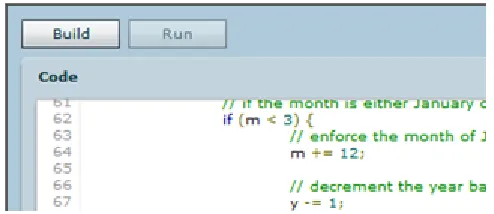
As a prototype system, a single client-side development environment was created that would enable a student to author, compile, and execute Java code. This environment was mirrored and led to an exact replica for the tutor to view in real time. Thus, no distinction was made on how the environment should be rendered regardless of the participant being either a student or tutor. Identifying participant role(s) was possible for customizing the environment as each user login was associated with zero or more roles in the database. This led to having certain user interface features being displayed in the tutor environment that were not applicable in the tutorial sessions. Two buttons were displayed for the student to press, one labeled “Build” for compiling their code and another labeled “Run” for executing their code (see Figure 11). Since tutors were directed to provide instruction only and never assume control over the student’s code either through direct editing, compilation, or execution, there was no need for either of the buttons to be displayed. Valuable screen real estate was thus occupied and did not serve to benefit the tutors.
Figure 11. JavaTutor IDE Command Buttons
5.1.2 Syntax Highlighting Responsiveness
Tutors provided the “shell” of the cal program to be completed by the student. Shortly after students began filling in the missing code sections, it was discovered that the syntax highlighting feature was slow to respond. This was first observed when large amounts of text would be inserted or removed, as in the case when the tutors would paste the cal program template to the students in the code editor. Upon first receiving the code template from the tutors, students would initially see the code but with a standard black/grey font (i.e., in non-syntax highlighted format). The code editor would then immediately follow with creating a pseudo-thread to perform the syntax highlighting. While this approach worked for smaller amounts of text, it was less than ideal for code that expanded beyond the visible area of the code editor. ActionScript does not support multi-threading.
At the time of development, a timer-based, pseudo-thread implementation was the only known solution for simulating multi-threading in a Flash-based environment. Harui’s
Machine (AVM) via the flex.utils.getTimer()method, plus an offset computed from the frame rate of the display stage of the system manager,5 as shown in Figure 12.
Figure 12. PseudoThread Elapsed Time Computation
Where is the display stage frame rate (in seconds), ranging from 0.01s to 1000s, and represents the number of milliseconds that should elapse before terminating the simulated thread. This resulting time was inversely proportional to the display stage frame rate and allows for systems that offer lower frame rates more time for thread invocation. The larger the frame rate, the smaller the elapsed time, and vice versa. While this approach attempts to give equal time to function callbacks under a dynamically set frame rate, it does not help to boost performance of the code executed in the function callback.
A true, multi-threading library is believed to offer a better solution to this problem while continuing to follow the grammar-driven lexing approach. Another possibility is to apply syntax highlighting to the visible area only. In this prototype system, the entire text contained in the code editor was processed for syntax highlighting, despite a portion of the text not be visible in the client windows. This would require finding the starting and ending indices of the visible area on a per-client basis (e.g., tutor and student) and extracting that text portion for further syntax highlighting.
5.1.3 Live Viewing, Scrolling, and Visibility of Work
Tutors were notified about any code editor changes made by students as they occurred. Aside from the content that changed in the students’ code editors, the location of where the changes took place also had to be communicated. This helped to set the vertical and horizontal cursor and scrollbar positions. A problem discovered during the tutorial sessions was scrolling tutors’ code editor windows into a viewable range that contained the students’ cursor
5 The system manager “manages” the application and the display stage represents the main drawing area of the
position, specifically at the bottom of the viewable range. Students would typically have their cursor located at a position that enabled several lines of code to be visible immediately above and below the cursor position.
Students did not type code at the top and bottom boundaries of the viewable range. Tutors’ viewable range was set dynamically via the spark.components.scrollToRange()
method of the code editor spark.components.TextAreaclass, which was the only solution found at the time of development to bring the code being edited into a viewable range for the tutors. This solution has shown that it is not ideal for future development as tutors would have to always look at the bottom of their code editor to see the student’s changes. Tutors could not view surrounding lines of code for establishing context. A better approach should be developed to account for both the students’ cursor position and their vertical and horizontal scrollbar positions. Scrollbar positioning is directly affected by window dimensions and would also need to be communicated from students to tutors for proper scrolling into viewable range.
5.1.4 Student/Tutor Code Editor Window Dimensions and Line Numbering
The JavaTutor IDE layout was designed to be grouped into four separate spaces for functional components to reside. With this layout, students and tutors could adjust the divider bars between components as they saw fit. Disallowing this functionality was contemplated as the spark.components.TextAreacontrol used for the code editor wrapped the text located at the end of each line (i.e., text did not continue into the non-visible range on the same line). Text expanding beyond the horizontal viewable area of the TextArea control wrapped but was reported as a single line in the line numbering code in the code editor TextArea skin6. Visually, a user would see this displayed as a line continuation with the line number on the left only being present for the top line and nothing for the continuation line. On its own, the line number skin worked as expected. When coupled with other position-dependent functionality, problems began to surface. Cursor and scrollbar positioning does not treat customized, single line continuations over multiple physical lines as a single line. Instead,
each line occupied is treated as a line in use. Thus, a single line spanning two lines of space would be treated as one line from the point-of-view of the skin but as two lines from the point-of-view of the cursor positioning. When communicating reference locations in their code editor windows between one another, student and tutors could ultimately refer to different locations. To alleviate this, the divider bar positions could be communicated so as to allow opposite users the opportunity to have their environments change in response. This option is rather stringent and could lead to difficulty for the users to keep track of layout and content. This approach would be best suited for view-only/read-only JavaTutor IDEs and not really ideal for more collaborative, distributed development. A more preferred approach would be to update the spark.components.TextArea class to automatically horizontally scroll to the right on the same line, allowing the viewable range to move along in the same direction as the user is typing (e.g., left-to-right) and include a horizontal scroll bar when needed. The information produced by this approach would be communicated to the opposite end user for incorporating into their environments and adjusting accordingly.
5.1.5 Data Input and Output
with respect to any explicit code references for carriage returns and/or line feeds (e.g.,
System.out.print(), System.out.println()).
The second problem was tied to having a single line of text wrapped into subsequent line(s) and the resulting line numbers that followed. When students submitted code with one or more wrapping lines to the compiler, any errors found in the code would be reported back to the student but with line numbers that differed from those in the code editor. This problem would be alleviated by the correction recommended above to allow for text to span horizontally beyond the visible range.
5.1.6 Chat Window Rendering
Text-based chat messaging between students and tutors was quite simple to build using the Adobe Flex messaging service. Rendering the chat messages that move through the messaging service was a bit more challenging. Custom text formatting and layout was needed for differentiating between senders of chat messages and for proper vertical scrolling of the list control in the chat window. Following the first tutorial session, which in fact served as a pilot test, it was discovered that chat messages would not scroll into a viewable area once the chat window had vertically filled up with chat messages. To address this issue, a custom rendering approach was needed for drawing list-based items in the correct location of a hosting list-based control.
5.1.7 Adobe Flash Player Debugger and Runtime Notifications
Any machine that has the Adobe Flash Player debugger version installed will prompt users with messages about warnings and errors that occur at runtime. In the context of the tutorial sessions, this occurred and was found to be an intrusive pop-op notification that distracted a tutor from the task at hand. The solution to this would be to simply have the non-debugger version of the Adobe Flash Player installed on all of the machines that would be running the JavaTutor client.
5.2 Participant Actions and Programming Task Logistics
5.2.1 Starting and Acknowledgements
Participants noted that after reading through the programming task document, actually starting the process of interacting with the other participant using the JavaTutor IDE was a bit unclear. Participants were logged into the system prior to their arrival, which positioned the participants to come into the tutorial session with an empty development environment view already set to use. When a user logged into the system, a chat message was sent automatically on his/her behalf to announce to other users that he/she had just logged into the system. Since JavaTutor had two users (e.g., student and tutor), whichever user logged in first would see their automatic message, plus the automatic message from the other user (when they came online). The user that logged in last would see their automatic message but not that of the user already logged in. This proved troublesome for users starting their interaction with one another as there were no separate indicators showing which users were online. Once both users acknowledged one another via the chat component, both user names appeared in the chat message history and helped to establish the presence of both users. Following this, the tutorial sessions progressed as expected.
5.2.2 Programming Task Code Template
solution) but already complete. Since the goal of the tutorial sessions was to elicit feedback from participants to improve the JavaTutor system, having tutors spend their limited amount of time developing a solution on their own would have detracted from their time with the students and the JavaTutor environment. The solution file was already opened in a text editor for tutor participants to reference prior to them starting their tutorial session. This was not ideal in that tutor participants had to leave the JavaTutor environment for referencing this material. It would have been preferred to have a single encompassing project to house all relevant files. As a prototype system, JavaTutor was developed to work on only a single file and could be expanded to handle multiple files.
5.2.3 Scope of Student Code Modifications
Students were free to develop their solutions to the programming task and were provided a partially complete Java source code file as a starting point. The programming task was designed to be completely self-contained and did not require any additional resources, libraries, or classes. Only completing the existing empty methods were required of the students. What was not expected and did occur were students going outside of these functions to leverage additional functionality. For example, students would look to import additional classes to help in arriving at a solution. Another example was a student looking to use the Java API and delegated their request to their tutor. This tutor then questioned the researcher present about going outside of the JavaTutor environment for fulfilling this request. External aids could be integrated to alleviate the need for referencing beyond the limits of JavaTutor. In some end-user environments, access to such aids may be limited or unavailable entirely, thus leaving JavaTutor to fulfill this need.
5.3 Participant Knowledge
student was discovered to be advanced in programming in Java and interacted with the tutor for acknowledgement and Java API information requests. Beyond this, the student was quite autonomous and did not require programming assistance from the tutor. As a result, very little interaction took place and led to the chat component to not be used as much as desired. The student progressed through the programming task in the smallest amount of time taken by any other student participant and was able to use the execution feature of the environment to run his/her code, a step some participants failed to reach. In another tutorial session, it was discovered the student had very little knowledge of the Java programming language and ultimately led to very little progress being made. At the time of scheduling the tutorial sessions, the intent was for students who had at least some basic knowledge of the Java programming language would be able to work through the programming task with some assistance. It was not expected that students would sign up to take part without having any programming experience. This level of knowledge in the Java programming language yielded more textual chat messages being exchanged between the student and tutor but failed to get the student to the point of performing any compilation attempts over different parts of the programming task, much less initiating any program execution attempts.
5.4 Programming Task