Improving Scalability Of Storage System:Object
Storage Using Open Stack Swift
G.Kathirvel Karthika1,R.C.Malathy2,M.Keerthana3 1,2,3
Student of Computer Science and Engineering , R.M.K Engineering College,Kavaraipettai.
Abstract— Distributed object-based storage models are an increasingly popular alternative to traditional block-based or file-based storage abstractions in large-scale storage systems. Simple operations such as listing all files in a directory or updating metadata such as file ownership can become tremendously time-consuming. The burden of reliability, availability, and durability in file storage resides with the user by having to correctly use tools such as replication,RAID rebuild, and backup.For Storage growth using file storage is very difficult.Clustered file systems have somewhat reduced this problem, but not to the ease of growing storage .File systems enable sharing across servers, they don’t help with sharing of data across applications. Only the application or a database controlled by the application knows where a file is and this information is unavailable to other applications. Object storage systems are eventually consistent.Eventual consistency can provide virtually unlimited scalability. It ensures high availability for data that needs to be durably stored but is relatively static and will not change much, if at all. This is why storing photos, video, and other unstructured data is an ideal use case for object storage systems.Integrate your applications with object-store interface through Simple or Named Object HTTP. The client application houses the metadata and the Simple or Named Object interface is accessed using HTTP/REST API. Similar to retrieving a URL instead of asking for a Web page, you are asking for an object. The process tolerates Internet latency, provides for programmable storage and efficient metadata management.In this paper,we investigate about the object storage using open stack swift.
keywords—objectstorage,swift,scalability,cloud environment, redundancy
I.INTRODUCTION
Storage technology has improved rapidly, particularly in terms of storage density; but storage throughput has not kept pace with advances in computational performance. This trend has led to increased demand for large-scale storage systems that aggregate and coordinate many storage devices, in turn driving the need for better abstractions to manage those storage devices. Object-based storage [1], [2] has emerged as a strong competitor for the block-based model, quickly becoming a popular underlying model for referencing and accessing data distributed over large numbers of storage devices in these systems. An object is an ordered logical collection of bytes with a numerical identifier. Objects consist of data, attributes describing the object, such as QoS attribute, and devicemanaged metadata, such as security information [1], [3]. Objects have variable sizes and can be used to store any kind of data. The object storage model abstracts away a variety of resource-specific
management tasks, such as block allocation, space management, and various forms of atomicity. However, it still allows considerable flexibility for a variety of higherlevel data models to be built atop it. Although object models Object Storage Abstraction Common storage system functionality (resilience, management, etc.) File System 1 Key/Value Store MapReduce File System 2 Data model instances Storage pool Unified object storage system were originally envisioned as a device-level interface [2], today’s large-scale storage systems more commonly repurpose the object model as a software interface atop a variety of storage substrates [4], [5], [6], [7]. Although several object-based storage models have been implemented and used as the basis for the popular storage and file systems [8], [9], [7], [3], existing object-based storage models are typically tailored to a particular use case or data model, making them difficult to reuse in other contexts. This situation also makes it difficult to share a common storage pool for different big data, cloud storage, or HPC storage tasks, increasing management overhead and adding complexity to the task of storage provisioning for facilities with diverse storage needs. The following list divides them into four categories with representative examples:
• Parallel file systems: Lustre [10], GPFS [11], Panasas [3], PVFS [12], Ceph [8]
•Cloud object storage: Amazon S3 [12], Swift [12], • MapReduce: Google File System (GFS) , Hadoop HDFS •Key/value stores: Dynamo,Redis , Hyperdex , Cassandra
, HBase , BigQuery .
Note that these data models aren’t necessarily mutually exclusive. For example, several parallel file systems have been extended to support MapReduce workloads. We will refer to these classifications in the remainder of the paper for clarity, however, in order to simplify the discussion of use cases and requirements that are shared across groups of storage systems.
II. SWIFT CHARACTERISTICS: Here is a quick summary of Swift’s characteristics:
• Swift is an object storage system that is part of the openStack project.
• Swift is open-source and freely available.
• Swift currently powers the largest object storage clouds, including Rackspace Cloud Files, the HP Cloud, IBM Softlayer Cloud and countless private object storage clusters.
• Swift runs on standard Linux distributions and on standard x86 server hardware.
• Swift—like Amazon S3—has an eventual consistency architecture, which make it ideal for building massive, highly distributed infrastructures with lots of unstructured data serving global sites.
• All objects (data) stored in Swift have a URL.
• All objects are stored with multiple copies and are replicated in as-unique-as-possible availability zones and/or regions.
• Swift is scaled by adding additional nodes, which allows for a cost-effective linear storage expansion.
• When adding or replacing hardware, data does not have to be migrated to a new storage system, i.e. there are no fork-lift upgrades.
• Failed nodes and drives can be swapped out while the cluster is running with no downtime. New nodes and drives can be added the same way.
III.SWIFT REQUESTS
A foundational premise of Swift is that requests are made via HTTP using a RESTful API. All requests sent to Swift are made up of at least three parts:
HTTP verb (e.g., GET, PUT, DELETE) Authentication information
Storage URL
Optional: any data or metadata to be written The HTTP verb provides the action of the request. I want to PUT this object into the cluster. I want to GET this account information out of the cluster, etc.
The authentication information allows the request to be fulfilled.
A storage URL in Swift for an object looks like this: https://swift.example.com/v1/account/container/object The storage URL has two basic parts:
cluster location storage location.
This is because the storage URL has two purposes.
It’s the cluster address where the request should be sent and it’s the location in the cluster where the requested action should take place.Using the example above, we can break the storage URL into its two main parts:
Cluster location: swift.example.com/v1/
Storage location (for an object): /account/container/object
A storage location is given in one of three formats: /account
o The account storage location is a uniquely named storage area that contains the metadata (descriptive information) about the account itself as well as the list of containers in the account.
o Note that in Swift, an account is not a user identity. When you hear account, think storage area.
/account/container
o The container storage location is the user-defined storage area within an account where metadata about the container itself and the list of objects in the container will be stored.
/account/container/object
o The object storage location is where the data object and its metadata will be stored.
Fig 1.account/container/object Swift HTTP API:
Swift's HTTP API is RESTful, meaning that it exposes every container and object as a unique URL, and maps HTTP methods (like PUT, GET, POST, and DELETE) to the common data management operations (Create, Read, Update, and Destroy—collectively known as CRUD). GET—downloads objects, lists the contents of containers or accounts
PUT—uploads objects, creates containers, overwrites metadata headers
POST—creates containers if they don't exist, updates metadata (accounts or containers), overwrites metadata (objects)
DELETE—deletes objects and containers that are empty
Client Libra
ries:-
Open–source client libraries
are available for most modern programming
languages, including:
Python
Ruby PHP C#/.NET Java JavaScript
IV. SWIFT OVERVIEW—PROCESSES
A Swift cluster is the distributed storage system used for object storage. It is a collection of machines that are running Swift’s server processes and consistency services. Each machine running one or more Swift’s processes and services is called a node.
proxy server process running it is called a proxy node. Nodes running one or more of the other server processes (account, container, or object) will often be called a storage node.
Fig 2.Storage service
Server Process Layers Proxy Layer
The Proxy server processes are the public face of Swift as they are the only ones that communicate with external clients. As a result they are the first and last to handle an API request.
All requests to and responses from the proxy use standard HTTP verbs and response codes.
Account Layer
The account server process handles requests regarding metadata for the individual accounts or the list of the containers within each account. This information is stored by the account server process in SQLite databases on disk.
Container Layer
The container server process handles requests regarding container metadata or the list of objects within each container.
It’s important to note that the list of objects doesn’t contain information about the location of the object, simply that it belong to a specific container. Like accounts, the container information in stored as SQLite databases. Object Layer
The object server process is responsible for the actual storage of objects on the drives of its node. Objects are stored as binary files on the drive using a path that is made up in part of its associated partition (which we will discuss shortly) and the operation's timestamp.
The timestamp is important as it allows the object server to store multiple versions of an object. The object’s metadata (standard and custom) is stored in the file’s extended attributes (xattrs) which means the data and metadata are stored together and copied as a single unit. Consistency Services
When account, container or object server processes are running on node, it means that data is being stored there. That means consistency services will also be running on those nodes to ensure the integrity and availability of the data.
The two main consistency services are auditors and replicators.
Auditors
Auditors run in the background on every storage node in a Swift cluster and continually scan the disks to ensure
that the data stored on disk has not suffered any bit-rot or file system corruption. There are account auditors, container auditors and object auditors which run to support their corresponding server process.
If an error is found, the auditor moves the corrupted object to a quarantine area.
Fig 3.Storage Node
Replicators
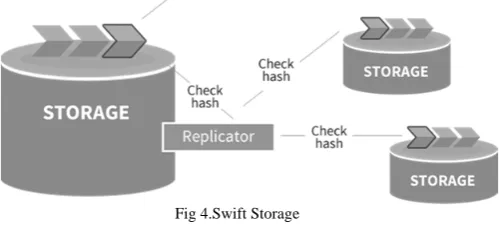
Account, container, and object replicator processes run in the background on all nodes that are running the corresponding services. A replicator will continuously examine its local node and compare the accounts, containers, or objects against the copies on other nodes in the cluster.
If one of other nodes has an old or missing copy, then the replicator will send a copy of its local data out to that node. Replicators only push their local data out to other nodes; they do not pull in remote copies in if their local data is missing or out of date.
The replicator also handles object and container deletions. Object deletion starts by creating a zero-byte tombstone file that is the latest version of the object. This version is then replicated to the other nodes and the object is removed from the entire system.
Fig 4.Swift Storage
V.SWIFT OVERVIEW—CLUSTER ARCHITECTURE
Nodes
A node is a machine that is running one or Swift processes. When there are multiple nodes running that provide all the processes needed for Swift to act as a distributed storage system they are considered to be a cluster.
Within a cluster the nodes will also belong to two logical groups: regions and nodes.
Regions
A cluster has a minimum of one region and there are many single region clusters as a result. A cluster that is using two or more regions is a multi-region cluster.
Fig 5.Regions
Zones:
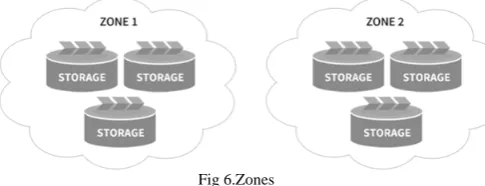
Within regions, Swift allows allows availability zones to be configured to isolate failure boundaries. An availability zone should be defined by a distinct set of physical hardware whose failure would be isolated from other zones.
In a large deployment, availability zones may be defined as unique facilities in a large data center campus. In a single datacenter deployment, the availability zones may be different racks. While there does need to be at least one zone in a cluster, it is far more common for a cluster to have many zones.
Fig 6.Zones
VI.SWIFT OVERVIEW—DATA PLACEMENT
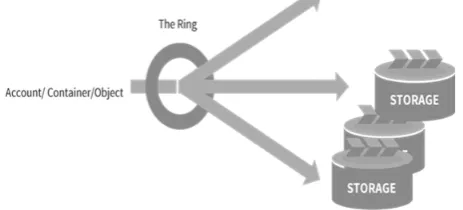
When the server processes or the consistency services need to locate data it will look at the storage location (/account, /account/container, /account/container/object) and consult one of the three rings: account ring, container ring or object ring.
Each Swift ring is a modified consistent hashing ring that is distributed to every node in the cluster. The boiled down version is that a modified consistent hashing ring contains a pair of lookup tables that the Swift processes and services use to determine data locations.
One table has the information about the drives in the cluster and the other has the table used to look up where any piece of account, container or object data should be placed.
That second table—where to place things—is the more complicated one to populate. Before we discuss the rings and how they are built any further we should cover partitions and replicas as they are critical concepts to understanding the rings.
Partitions
Swift wants to store data uniformly across the cluster and have it be available quickly for requests. Never ones to shy away from a good idea, the developers of Swift have tried various methods and designs before settling on the current variation of the modified consistent hashing ring. Hashing is the key to the data locations. When a process, like a proxy server process, needs to find where data is stored for a request, it will call on the appropriate ring to get a value that it needs to correctly hash the storage location (the second part of the storage URL). The hash value of the storage location will map to a partition value. This hash value will be one of hundreds or thousands of hash values that could be calculated when hashing storage locations. The full range of possible hash values is the “hashing ring” part of a modified consistent hashing ring.
The “consistent” part of a modified consistent hashing ring is where partitions come into play. The hashing ring is chopped up into a number of parts, each of which gets a small range of the hash values associated to it. These parts are the partitions that we talk about in Swift.
One of the modifications that makes Swift’s hash ring a modified consistent hashing ring is that the partitions are a set number and uniform in size. As a ring is built the partitions are assigned to drives in the cluster. This implementation is conceptually simple—a partition is just a directory sitting on a disk with a corresponding hash table of what it contains.
Fig 7.Partition
The relationship of a storage node, disk and a partition. Storage nodes have disks. Partitions are represented as directories on each disk.
Fig 8.Rings
Replicas
Swift’s durability and resilience to failure depends in large part on its replicas. The more replicas used, the more protection against losing data when there is a failure. This is especially true in clusters that have separate datacenters and geographic regions to spread the replicas across.
When we say replicas, we mean partitions that are replicated. Most commonly a replica count of three is chosen. During the initial creation of the Swift rings, every partition is replicated and each replica is placed as uniquely as possible across the cluster. Each subsequent rebuilding of the rings will calculate which, if any, of the replicated partitions need to be moved to a different drive. Part of partition replication including designating handoff drives. When a drive fails, the replication/auditing processes notice and push the missing data to handoff locations. The probability that all replicated partitions across the system will become corrupt (or otherwise fail) before the cluster notices and is able to push the data to handoff locations is very small, which is why we say that Swift is durable.
Previously we talked about a proxy server processes using a hash of the data’s storage location to determine where in the cluster that data was located. We can now be more precise and say that the proxy server process is locating the three replicated partitions each of which contains a copy of the data.
Fig 9.An object ring enables a path /account/container/object path to be mapped to partitions
The Rings
With partitions and replicas defined, we can take a look the data structure of the rings. Each of the Swift rings is a modified consistent hashing ring. This ring data structure includes the partition shift value which processes and services use to determine the hash of a storage location. It also has two important internal data structures: the devices list and the devices lookup table.
The devices list is populated with all the devices that have been added to a special ring building file. Each entry for a drive includes its ID number, zone, weight, IP, port, and device name.
The devices lookup table has one row per replica and one column per partition in the cluster. This generates a table that is typically three rows by thousands of columns. During the building of a ring, Swift calculates the best drive to place each partition replica on using the drive weights and the unique-as-possible placement algorithm. It then records that drive in the table.
Fig 10.Replicas Chart
Referring back to that proxy server process that was looking up data. The proxy server process calculated the hash value of the storage location which maps to a partition value. The proxy server process uses this partition value on the Devices lookup table. The process will check the first replica row at the partition column to determine the device ID where the first replica is located. The process will search the next two rows to get the other two locations. In our figure the partition value was 2 and the process found that the data was located on drives 1, 8 and 10. The proxy server process can then make a second set of searches on the Devices list to get the information about all three drives, including ID numbers, zones, weights, IPs, ports, and device names. With this information the process can call on the correct drives. In our examle figure, the process determined the ID number, zone, weight, IP, port, and device name for device 1.
Fig 10.Dev Chart
REFERENCES
[1] M. Mesnier, G. Ganger, and E. Riedel, “Object-based Storage,” Communications Magazine, IEEE, vol. 41, no. 8, pp. 84 – 90, aug. 2003.
[2] T10 Technical Committee of the InterNational Committee on Information Technology Standards, “Object-based Storage Devices - 3 (OSD-3).”
[3] B. Welch, M. Unangst, Z. Abbasi, G. Gibson, B. Mueller, J. Small, J. Zelenka, and B. Zhou, “Scalable Performance of the Panasas Parallel File System,” in In FAST-2008: 6th Usenix Conference on File and Storage Technologies, 2008, pp. 17–33.
[4] A. Devulapalli, D. Dalessandro, P. Wyckoff, and N. Ali, “Attribute Storage Design for Object-based Storage Devices,” in MSST ’07: Proceedings of the 24th IEEE Conference on Mass Storage Systems and Technologies. Washington, DC: IEEE Computer Society, 2007, pp. 263–268.
[5] A. Devulapalli and N. Ali, “Integrating Parallel File Systems with Object-based Storage Devices,” in Proceedings of Supercomputing, 2007. [6] “Librados API documentation.”
[6] Oracle Corporation, “Lustre File System.”
System,” in Proceedings of the 7th Symposium on Operating Systems Design and Implementation (OSDI, 2006, pp. 307–320. [8] D. Beaver, S. Kumar, H. C. Li, J. Sobel, and P. Vajgel, “Finding a
Needle in Haystack: Facebook’s Photo Storage,” in Proceedings of the 9th USENIX Conference on Operating Systems Design and Implementation, ser. OSDI’10. Berkeley, CA, USA: USENIX Association, 2010, pp. 1–8.
[9] “Lustre: A Scalable, High-Performance File System,” Cluster File Systems Inc. white paper, version 1.0, November 2002.
[10] F. Schmuck and R. Haskin, “GPFS: A Shared-Disk File System for Large Computing Clusters,” in Proceedings of the 1st USENIX Conference on File and Storage Technologies, ser. FAST ’02. Berkeley, CA, USA: USENIX Association, 2002.
[11] P. H. Carns, W. B. Ligon III, R. B. Ross, and R. Thakur, “PVFS: A Parallel File System for Linux Clusters,” in Proceedings of the 4th Annual Linux Showcase and Conference. Atlanta, GA: USENIX Association, October 2000, pp. 317–327.