DOI 10.3233/WOR-2012-1337 IOS Press
Touch-screen tablet user con
fi
gurations and
case-supported tilt affect head and neck
fl
exion angles
Justin G. Young
a, Matthieu Trudeau
a, Dan Odell
b, Kim Marinelli
band Jack T. Dennerlein
a,c,∗ aDepartment of Environmental Health, Harvard School of Public Health, Boston, MA, USAbMicrosoft Corporation, Richmond, WA, USA
cDepartment of Orthopaedic Surgery, Brigham and Women’s Hospital, Harvard Medical School, Boston, MA, USA
Received 29 November 2011
Abstract.Objective: The aim of this study was to determine how head and neck postures vary when using two media tablet (slate) computers in four common user configurations.
Methods: Fifteen experienced media tablet users completed a set of simulated tasks with two media tablets in four typical user configurations. The four configurations were: on the lap and held with the user’s hands, on the lap and in a case, on a table and in a case, and on a table and in a case set at a high angle for watching movies. An infra-red LED marker based motion analysis system measured head/neck postures.
Results: Head and neckflexion significantly varied across the four configurations and across the two tablets tested. Head and neck
flexion angles during tablet use were greater, in general, than angles previously reported for desktop and notebook computing. Postural differences between tablets were driven by case designs, which provided significantly different tilt angles, while postural differences between configurations were driven by gaze and viewing angles.
Conclusion: Head and neck posture during tablet computing can be improved by placing the tablet higher to avoid low gaze angles (i.e. on a table rather than on the lap) and through the use of a case that provides optimal viewing angles.
Keywords: Slate computing, media tablets, mobile computing
1. Introduction
Slate, tablet, or media tablet computers (e.g. the Ap-ple iPad ) have recently become ubiquitous portable and mobile computing devices. In 2010, it is estimated that 17.6 million tablets were sold and that number is expected to increase more than three-fold in 2011 [1]. Market projections predict that there could be more than 300 million tablets sold worldwide in 2015, with more than 80 million tablet users in the US alone [1,2]. ∗Corresponding author: Jack T. Dennerlein, Harvard School of Public Health, 665 Huntington Avenue, Boston, MA 02115, USA. Tel.: +1 617 384 8812; Fax: +1 617 384 8767; E-mail: jax@hsph. harvard.edu.
Tablet computers provide a new combination of high portability and simple user interfaces through integrat-ed touch-displays which may illicit usage behavior unique to its form factor. In addition, the sudden pop-ularity and adoption of the media tablet has not al-lowed for typical physical ergonomics parameters such as posture or muscular effort during use to be assessed. As such, no design or usage guidelines similar to those developed for current desktop and notebook (laptop) computers (e.g. ISO-9241, ANSI/HFES 100 (USA), and CSA-Z412-M89 (Canada)) exist. Hence, there is an imminent need for evaluation of tablets while in their early stage of acceptance in order to build a set of rec-ommended guidelines to optimize system performance and users’ well-being.
Table 1
Mean (SD) participant anthropometry
Age Height (cm) Weight (lbs) Hand length (mm) Males (n=7) 29±4 177±9 83.5±7.3 193±11 Females (n=8) 30±6 170±6 65.3±5.9 176±8 ALL (n=15) 29±5 174±8 73.5±11.3 184±13 A major difference between tablet and desktop or
notebook computers is that tablets functionally inte-grate the display and the user input via a touch-screen. This results in the devices being highly portable with many potential display positions and locations during use. Because computer work has been and continues to be associated with discomfort and pain in the neck and shoulders [3–8], many studies have investigated how display/monitor positioning affects neck and shoulder posture and muscle activity [9–11]. Higher display lo-cations lead to decreased head and neck flexion that approach more neutral postures; while lower gazes lead to increasingly flexed postures which are associated with an increase in neck extensor activity [10,12,13]. Biomechanical models of the neck musculature show that excessive headflexion leads to large muscle loads and strains [14]. As a result, it is generally hypoth-esized that very low monitor positions may put users at risk of developing neck and shoulder discomfort or musculoskeletal disorders.
In preliminary observational studies of tablet com-puter users, several different support and grip confi g-urations were adopted, ranging from holding the de-vice in the hands, lifting and supporting it with a fore-arm, placing it in the lap, or using a case to rest the device at a set angle on a table. Placement in the lap suggests the display may be positioned quite low and similar to notebook computers; though the screen tilt cannot be adjusted independently of the keyboard input like with a notebook. As a result, it is unclear what specific postures users assume while interacting with these devices. Therefore, it is the aim of this research study to investigate head and neck posture for various usage configurations commonly observed during typi-cal tablet computer use and how head and neck posture varies with different tablets and their case designs with different tilt angle settings.
2. Methods
To address the study aim, a laboratory-based repeat-ed measures experiment was completrepeat-ed which testrepeat-ed the hypothesis that tablet/case design and user confi g-uration affects head and neck posture. Head and neck
postures were measured whilefifteen adult experienced tablet computer users (Table 1) completed a set of sim-ulated tasks on two media tablet computers in four con-figurations representative of typical observed use. All participants either owned or had experience working with a tablet computer and reported no current or pre-vious history of head, neck, back or upper extremity MSDs. Each participant gave informed consent prior to beginning the study. The Harvard School of Pub-lic Health Office of Human Research Administration approved all protocols and consent forms.
In order to represent typical user situations, partici-pants performed all the tasks while seated in a lounge-type chair with a seat pan height of 44 cm, a slightly reclined backrest, and no armrests (Fig. 1). In addition, a 40 cm tall ottoman-style footrest was provided as an optional accessory. Though not required to use the ot-toman, subjects were free to use it if desired except for conditions when the tablet was on the table. The goal was to have the subject sit in a comfortable position that would be similar to how they would use their own tablet at home or travelling. All nearby light sources in the laboratory were indirect lighting and the chair was positioned to minimize any glare on the tablet screens.
2.1. Independent variables: Tablet and configuration
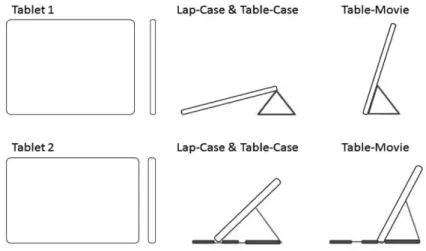
The two media tablet computers tested were Tablet 1, an iPad2 (Apple, Cupertino, CA, USA) with dimen-sions of 241.2×185.7×8.8 mm and mass 601 g, and Tablet 2, a Xoom (Motorola Mobility, Libertyville, IL, USA) with dimensions of 249.1×167.8×12.9 mm and 708 g. Tablet 1 ran on the iOS 4.3 operating sys-tem (Apple, Cupertino, CA, USA) and Tablet 2 ran on the Android 3.0 operating system (Google, Mountain View, CA, USA). Each device was tested only in the landscape orientation. Each tablet also had a propri-etary case that could be fitted to the device and ad-justed in order to prop up or tilt the tablet computer (Fig. 1b, c, d). Only a few different tilt angles are possible with each case and each case’s tilt angles are different: Case 1, the Smart Cover (Apple, Cupertino, CA, USA) allows for tilt angles (from horizontal) of 15◦and 73◦, and Case 2, the Portfolio Case (Motorola
Fig. 1. Example of subject in four usage configurations. (a) Tablet 2 on the lap without its case held by the subject’s hand (Lap-Hand) (b) Tablet 1 on the lap in its case set to its lower angle (Lap-Case). (c) Tablet 2 on the table in its case set to its lower angle (Table-Case). (d) Tablet 1 on the table in its case set to the higher angle for watching movies (Tablet-Movie).
of 45◦and 63◦(Fig. 2). The order of testing the tablets
were randomized and balanced across subjects. Four user configurations, which consisted generally of a location (on the lap or table) and a support condition (hand-held or in a case), were tested (Fig. 1). The four configurations (Lap-Hand, Lap-Case, Table-Case, and Table-Movie) were chosen based on unpublished observations of adult media tablet computer users in their own homes and in usability studies. The order of the configurations were randomized and balanced within each tablet.
For the Lap-Hand configuration (Fig. 1a), the tablet was supported by placing it on the lap (top of the thighs) while one or two hands held and adjusted the tablet tilt. This configuration was actually two conditions, thefirst where only one hand held and adjusted the tablet tilt while the other hand interacted with the screen, and the second where both hands held and adjusted the tablet tilt while only the thumbs interacted with the screen. Since there were no statistically significant differences
in dependent variables between these two specific hand-held conditions, the results were averaged together into the single Lap-Hand configuration. No cases were used with the tablets for the hand-held conditions. The spe-cific position on the lap and the tilt angle were chosen by the participants; they were instructed only to place and hold the tablet in a comfortable position.
For the Lap-Case (Fig. 1b) and Table-Case (Fig. 1c) configurations, the tablets were inserted into their re-spective cases and set to the lower of the two angle settings (15◦ for Tablet 1 and 45◦ for Tablet 2, see
Fig. 2). Similar to the Lap-Hand configuration, par-ticipants were free to set the tablets in their cases on their laps in a comfortable position. For the Table-Case configuration, the tablets were placed in their cases on a 66.7 cm high table. Participants were instructed to position the tablet directly in front of them and at a comfortable distance.
For the Table-Movie configuration, the tablets were inserted into their cases and set to the higher of the two
Fig. 2. Two tested media tablets and cases. Figures are to scale for proper comparison. Each tablet has a case that allows for two screen tilt angles: 15◦and 73◦for Tablet 1 (top) and 45◦and 63◦for Tablet 2 (bottom). All trials were completed with the Tablets in the landscape orientation as shown.
angle settings (73◦ for Table 1 and 63◦ for Tablet 2,
see Fig. 2). Participants were instructed to position the tablet on the table directly in front of them at a distance comfortable for viewing a movie assuming minimal touch interaction would be required.
2.2. Software tasks
During the experiment, participants completed sim-ulated computer tasks representative of typical tablet usage: Internet browsing and reading, game playing, e-mail reading and responding, and movie watching. The five-minute Internet browsing and reading task con-sisted of entering URL addresses, navigating through 4 pages, and reading a newspaper article. The three-minute gaming task consisted of playing the common solitaire card game available on most computers. The three-minute e-mail reading and responding task con-sisted of using the tablet-based email client to read and respond to short email messages in an email account set up by the experimenters. Subjects read messages and responded with short replies answering the simple question in the read message (e.g. “What is your fa-vorite food and why?”). Thefive-minute movie watch-ing task consisted of watchwatch-ing one of three pre-selected online streaming videos. While the two tablets differed in their operating system software, tasks were selected and designed to have similar interface requirements.
Not all tasks were completed in each configuration (Table 2). For the Lap-Hand configuration, partici-pants performed the Internet browsing and reading task and the game playing task only. For the Lap-Case and Table-Case configurations, participants performed the
Internet browsing and reading task and the e-mail read-ing and respondread-ing task only. For the Table-Movie con-figuration, participants performed the movie watching task only. There was a short break (approximately two minutes) between tasks.
2.3. Dependent variables and instrumentation
The primary biomechanical outcomes were head and neck postures represented by three angles: headfl ex-ion, neckflexion, and cranio-cervical angle (Fig. 3). In addition to these postures and due to their interaction with head and neck postures [11] secondary outcomes included the position of the center of the tablet’s screen relative to the eyes (gaze angle and gaze distance) and C7 spinal process (horizontal and vertical position) as well as the orientation of the tablet with respect to the global horizontal (tilt angle) and the direction of gaze (viewing angle). Because the tablet was placed directly in front of the subject, the rotation or lateral tilt of the head and neck was not of interest.
These angles and positions were calculated from 3-dimensional kinematics of the head and trunk measured using an infrared three-dimensional motion analysis system (OptotrakCertus, Northern Digital, Waterloo, Canada). Two clusters of three infrared light emitting diodes (IREDs)fixed to a rigid surface were secured to the head and trunk [15,16]. An additional cluster of 4 IREDs was attached to the upper right corner of the tablet computer. The 3-D position of these IREDs were tracked at 100 Hz and recorded to a personal computer and then digitallyfiltered through a low-pass, fourth-order Butterworthfilter with a 5 Hz cutoff frequency.
Table 2
Four user configurations tested
Configuration Location of tablet Tablet support/basis of tilt Software tasks performed Lap-Hand Subject’s lap One or both hands/self-selected tilt Internet browsing and reading,
Game playing
Lap-Case Subject’s lap Case/lower case tilt setting Internet browsing and reading, E-mail reading and responding Table-Case Table surface Case/lower case tilt setting Internet browsing and reading, E-mail reading and responding Table-Movie Table surface Case/higher case tilt setting Movie watching
Fig. 3. Dependent variables. Head and neckflexion angles and the cranio-cervical angle along with the position and orientation of the media tablet computer relative to both C7 and relative to the eyes. Headflexion angle is the angle between global vertical and the vector pointing from OC1 to Cyclops. Neckflexion angle is the angle between global vertical and the vector pointing from C7 to OC1. The cranio-cervical angle is the angle between the vector pointing from OC1 to Cyclops and the vector pointing from OC1 to C7. Tablet tilt is respect to horizontal. Viewing angle is the angle between the screen surface and the gaze vector. The horizontal and vertical position of the tablet (not shown) is relative to C7.
Using the system’s digitizing probe, the locations of the bilateral outer canthi (head cluster), bilateral trag-ic (head cluster), and C7 spinal process (trunk clus-ter) boney landmarks and the four corners of the tablet (tablet cluster) were digitized relative to their associat-ed IRED cluster. In order to calculate dependent vari-ables, three additional 3-D locations were specified: the midpoint between the left and right outer canthi (‘Cyclops’), midpoint between the left and right tragi (representing the occiput-cervical joint ‘OC1’), and the center of the tablet screen (Fig. 3). For the duration of the measurements, the 3-D position and orientation of these landmarks were calculated based on the po-sition and orientation of their associated IRED clus-ter [17]. Angles were then derived from these segment and landmark positions and orientations as depicted in Fig. 3. Mean values for continuous measures of the
three head/neck angles and 6 position and orientation parameters of the tablet computer were calculated as outcome metrics for each experimental condition (over all tasks performed in that condition).
2.4. Statistical analysis
To test the hypothesis that head and neck postures varied across tablets and user configurations, we em-ployed a 2×4 repeated measures analysis of variance (RMANOVA) for each of the 3 head and neck postures along with the 6 tablet position and orientation met-rics with tablet (Tablet 1/Tablet 2) and configuration (Lap-Hand/ Lap-Case/Table-Case/Table-Movie) set as fixed effects and participant as a random effect. The tablet-configuration interaction term was also includ-ed. When significance was observed for an effect (p < 0.05), a post-hoc Tukey’s HSD test was used to deter-mine if differences in the metrics existed between com-parisons. All analyses were run using JMP Software (SAS Institute, Cary, NC).
3. Results
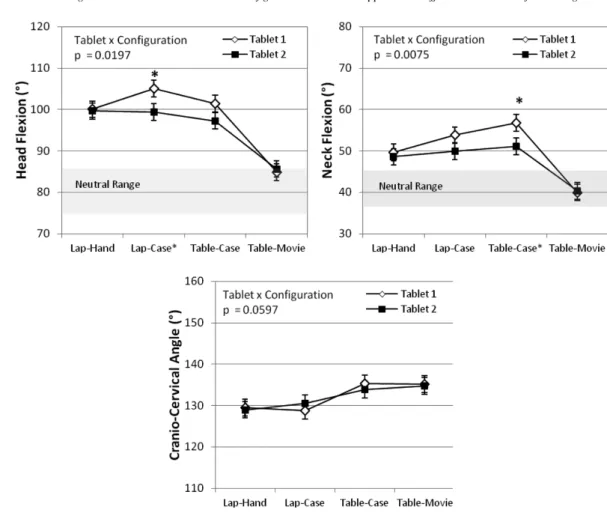
Head and neckflexion postures varied significantly between the two media tablet devices, with Tablet 1 associated with the moreflexed postures (Table 3). The postures also varied significantly between the four us-er configurations with the head and neckflexion being significantly reduced during the Table-Movie confi g-uration (Table 3). For the other three configurations head and neckflexion was quite large, 15 to 25 degrees beyond values associated with “neutral” head and neck postures reported in previous studies [18–24]. The variation across the configurations differed between the two tablets as indicated by a significant interaction term (Fig. 4). Tablet 1 had moreflexed postures when the case was in use. The head neck postures were similar between the two tablets when they were tilted by hand (Lap-Hand) or in the higher case angle position for movie watching (Table-Case). Cranio-cervical angle
Fig. 4. Head and neck postures angles. Across subject average mean angles for each configuration and tablet are presented. Error bars represent
+/−one standard error. The p-value is for the Tablet x Configuration interaction term in the ANOVA model. * indicates post-hoc significant differences within a configuration across the two tablets. The neutral postures are ranges reported in the literature (none found for the adult cranio-cervical angle). Head posture significantly varied across the scenarios and in different ways for the two tablets as indicated by the significant interaction terms (except for the cranio-cervical angle).
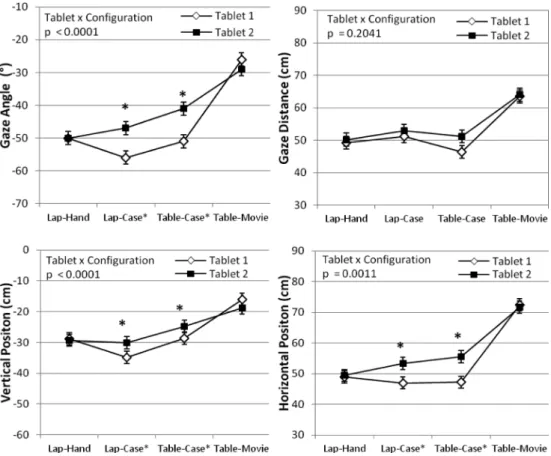
varied in a slightly different fashion as the only signifi -cant difference was associated with the location of the tablet (on the lap or on the table), with greater angles for the lap configurations than the table configurations. Gaze angle varied significantly between the two tablets with steeper gaze angles for Tablet 1 (Table 3). The position of the center of the media tablets’ screen varied significantly across the four configurations with the Table-Movie configuration having the greatest gaze distance and vertical and horizontal position. Except for gaze distance, the variation across the confi gura-tions differed between the two tablets (Fig. 5), with significant differences between the two tablets for the Lap-Case and Table-Case configurations. The varia-tions in gaze angle were similar but inverse to those observed in the head-flexion angle. When using the case, gaze angle was lower for Tablet 1 compared to the
Lap-Hand configurations. For Tablet 2 the gaze angles were lowest for the Lap-Hand configurations.
The tablet tilt angle and the viewing angle varied sig-nificantly between the two media tablet devices, with Tablet 1 having on average 11 degrees more shallow tilt angle and 8 degree more oblique viewing angle com-pared to the Tablet 2 (Table 3). Again, the tilt angle and view angle variations across the configurations dif-fered between the two tablets as indicated by the sig-nificant interaction term (Fig. 6). For the three confi g-urations where the tablets were in their cases, signif-icant differences in tilt angle between the two tablets correspond to differences in their case-specified tilt set-tings (see Fig. 2). While viewing angles were consis-tently near perpendicular across the four configurations for Tablet 2, significantly lower viewing angles were observed for Tablet 1 in the Lap-Case and Table-Case configurations.
Table 3
Least square’s means (SE) for ANOVA main effects Tablet and Configuration
Tablet Configuration
ANOVA1,2 Tablet 1 Tablet 2 ANOVA1,2 Lap-Hand Lap-Case Table-Case Table-Movie
Head/Neck Posture
Head Flexion (◦) p=0.0049 98 (2)A 95 (2)B p <0.0001 100 (2)A 102 (2)A 99 (2)A 85 (2)B
Neck Flexion (◦) p=0.0002 50 (2)A 47 (2)B p <0.0001 49 (2)B 52 (2)A 54 (2)A 40 (2)C
Cranio-Cervical (◦) p=0.6921 132 (2) 132 (2) p <0.0001 129 (2)B 130 (2)B 135 (2)A 135 (2)A
Tablet Position relative to the Eyes
Gaze Angle (◦) p <0.0001 −46 (1)B −42 (1)A p <0.0001 −50 (1)C −51 (1)C −46 (1)B −27 (1)A
Gaze Distance (cm) p=0.0132 53 (1)B 55 (1)A p <0.0001 50 (1)B,C 52 (1)B 49 (1)C 64 (1)A
Tablet Position relative to C7
Vertical (cm) p=0.0195 −27 (1)B −26 (1)A p <0.0001 −29 (1)C −32 (1)D −27 (1)B −17 (1)A
Horizontal (cm) p=0.0003 54 (1)B 57 (1)A p <0.0001 49 (1)B 50 (1)B 51 (1)B 72 (1)A
Tablet Orientation relative to Horizontal and the Eyes
Tilt Angle (◦) p <0.0001 35 (1)B 46 (1)A p <0.0001 36 (1)B 29 (1)C 30 (1)C 67 (1)A
Viewing Angle (◦) p <0.0001 80 (2)B 88 (2)A p <0.0001 86 (2)B 81 (2)C 76 (2)D 95 (2)A 1Repeated Measures ANOVA with subject as a random variable, Configuration and Tablet asfixed effects. The model did include interaction
terms, which are reported in the Figs 4–6.
2For each dependent variables, values with the same superscript letters indicate no significant difference and groupings are ranked such that
A>B>C>D.
Fig. 5. Tablet position relative to the eyes (Gaze Angle and Distance) and C7 (Horizontal and Vertical Position). Across subject average mean-values for each configuration and tablet are presented. Error bars represent+/−one standard error. The p-value is from the Tablet x Configuration interaction term in the ANOVA model. * indicates post-hoc significant differences within a configuration across the two tablets. The gaze angle and position relative to C7 significantly varied across the configuration and in different ways for the two tablets as indicated by the significant interaction term, with differences between the tables occurring for the Lap-Case and Table-Case configurations and no differences observed for the Lap-Hand configuration. The Gaze Angle follows an inverse but similar pattern to headflexion angle (Fig. 4).
Fig. 6. Tablet orientation. Across subject average mean angles for each configuration and tablet are presented. Error bars represent +/- one standard error. The p-value is from the Tablet x Configuration interaction term in the ANOVA model. * indicates post-hoc significant differences within a configuration across the two tablets. The tilt and viewing angle of the tablets significantly varied across the configuration and in different ways for the two tablets as indicated by the significant interaction term, with differences between the tables occurring for the Lap-Case and Table-Case configurations and no differences observed for the Lap-Hand configuration. The viewing angle for Tablet 2 is relatively constant and near perpendicular over the configurations.
4. Discussion
The goal of this study was to assess head and neck posture during touch-screen tablet computer use for several typical usage configurations on two different tablet computers and their respective case designs. The results indicate that both Tablet and Configuration af-fect head and neck postures and that the efaf-fects across configurations varied between the two tablets. Overall, the observed head and neckflexion angles are far from neutral angles reported in the literature. Only for the Table-Movie condition, where the device was set in its steepest case angle setting and at the greatest horizontal and vertical position, did posture approach neutral.
Differences in head and neck angles between the two tablets appear to be driven by differences in case design, which drastically altered the tablet tilt angle and corresponding viewing angle (Fig. 6). Post hoc results indicate that there were no differences between tablets in the hand-held condition for any dependent variable. When the devices were placed in their cases, significant differences between tablets existed for the Lap-Case and Table-Case configurations (Figs 4, 5, 6). Since the device profiles were similar in terms of height, width, and depth along with the accessible viewing area (Fig. 2), the significant main effect of Tablet in the overall analysis must be due to differences in each tablet’s case, specifically the tilt angle.
For both tablets, the gaze angle changed in a simi-lar fashion to the headflexion angle across confi gura-tions (Figs 4 and 5). Differences in headflexion across configurations appear to be driven largely by the gaze angle associated with the vertical and horizontal
po-sition of the tablet screen’s center relative to the eyes (see Fig. 3). Differences in headflexion between the two tablets (which can be attributed to case tilt) may therefore be explained in part by how each case affects the location of the center of the tablet screen. The shal-lower tilt angle of Tablet 1’s case reduces the height of the tablet which should theoretically increase the gaze angle compared to Tablet 2’s in the Lap and Table locations.
Our observed correlation between gaze angle and headflexion is similar to that reported in the review by Straker et al. [11], where the authors compared head flexion versus gaze angle from numerous studies and found a generally linear relationship. While our high head flexion and low gaze angles lay at the extreme end of the spectrum of studies included in the review, our results are similar to those reported in studies in-vestigating notebook and sub-notebook computers [23, 25,26]. The largest previously reported head and neck flexion angles have been observed for writing on pieces of paper or tablet pc’s with a stylus that are lyingflat on a tablet surface [11,27,28] where, similar to a media tablet, the input and the display are combined. Tilt-ing the tablet/writTilt-ing surface up from horizontal can reduce head/neck flexion for writing or touch-screen tasks [29–31]. This suggests that shallower viewing an-gles (non-perpendicular) may cause users to increased head/neckflexion, as our results show.
When in the Lap-Hand configuration, where users can control the tablet tilt angle, subjects selected an average tilt angle of approximately 36◦. This tilt angle
corresponded to a nearly perpendicular viewing angle (mean=86◦). Preferred tilt angle for other confi
gu-rations in unknown, though Albin and McLoon (2007) reported that most usersfind a tablet tilt angle of 45◦
most acceptable for table top use. For Tablet 2, view-ing angle remained relatively perpendicular and con-stant across the other configurations, despite changes in tablet location and tilt angle as set by the case (45◦for
Lap-Case and Table-Case). Preferred tilt angle most likely changes depending on location of the tablet/gaze angle and corresponds to tilt angles that allows for near perpendicular viewing angles, which optimizes lumi-nance and reduces perspective distortion of the dis-play. Viewing angle has rarely been reported as a de-pendent variable for previous studies but can be calcu-lated if screen tilt angle and gaze angle are reported. Self-selected viewing angles were 92–94◦for notebook
computers [25] and 91–99◦for desktop computers [32,
33], which are slightly greater than in the current study. This could be due to the need to interact with the hands rather than just passively viewing information.
Cranio-cervical angle appears to be influenced main-ly by the vertical position of the tablet, with the on-ly significant difference occurring across the lap and table locations but not within. Cranio-cervical angle is a composite of head and neckflexion angles, and therefore in order to stay constant within Lap or Ta-ble configurations any change in neckflexion requires an equal change in headflexion. This suggests that the postural responses to tablet usage configuration are representative of complex changes in the cervical spine/musculature [20].
In comparison to previous studies of head and neck posture during computing,head and neckflexion angles were greater and cranio-cervical angles smaller, in gen-eral, during tablet use than for desktop computing [11] and for notebook computing [15,34,35]. Hence there may be more of a concern for the development of neck and shoulder discomfort during tablet use than for oth-er computing form factors. Although specific evidence linking computer display position and MSD outcomes is limited and conflicting [36–40], no studies have ex-amined health outcomes when users exhibit the highly flexed head and neck postures observed for tablets in the current study. A recent study [14] employing a so-phisticated model of neck musculature concluded that display positions that are associated with gaze angles below−45◦are not recommended due to significantly
increased strain on neck extensors. Therefore, media tablet users may be at high risk to develop neck dis-comfort based on current behaviors and tablet designs. Of course, risk is a combination of posture, duration, and frequency of exposure [41], and usage guidelines
should consider how these factors vary between high-ly portable media tablets and that of traditional com-puting scenarios. Our results suggest that continuous use of tablets for longer durations should incorporate placement of the device on higher surfaces and with steeper case angle settings. However, these steeper tilt angles may be detrimental for continuous input with the hands. Further studies examining the effects of tablet and configuration on arm and wrist postures are needed to clarify and complete the postural evaluation.
These results need to be considered within the con-text of the limitations of the study. This is a laboratory study with simulated tasks and a large amount of in-strumentation attached to the users. As a result users may have altered their behavior from how the otherwise naturally interact with tablets. The measurements for each experimental condition were collected for only a short period of time, which may allow users to adopt a posture that they would not have been able to maintain for a longer period of time. Another limitation is that the two tablets selected for this study have very similar physical dimensions. There were no significant differ-ences observed between tablets in the Lap-Hand (no cases) configuration, but it is likely that differences in posture may have been observed for tablets that were more dissimilar. The broad range of media tablet com-puter sizes currently available to consumers warrants further assessment. This paper does not address the posture of the arms, wrists, and hands, which, due to potential conflicts between visual access and tactile in-put, may have influenced on head and neck posture for certain configurations or software tasks.
5. Conclusions
The use of media tablet computers is associated with high head and neckflexion postures, especially com-pared to those for typical desktop computing scenarios. These postures are affected by the type of case used to support the tablets as well as the location of the de-vice (e.g. lap vs table). These data suggest that head and neck posture can be improved through case designs that allow for optimal viewing angles and elevating the device and avoiding lap-level locations.
These data are valuable for manufacturers to design future products that promote more neutral postures and increase the comfort of users. Results from these stud-ies will be useful for updating ergonomic computing standards and guidelines, which are imminently needed as companies and health care providers weigh options to implement wide-scale adoption of tablet computers for business operations.
Acknowledgments
This study was funded in part by NIOSH R01 OH008373, the National Science Foundation grant 0964220, and a gift from the Microsoft Corporation. The authors would also like to thank Tawan Udta-madilok for her help with data collection.
Conflict of interest statement
Authors Kim Marinelli and Dan Odell are employees of Microsoft, a partial funding source for this study. Dr. Odell and Mrs. Marinelli took part in the experimental and study design, including the selection of specific usage configurations; however, they did not participate in data collection or analysis and interpretation of the results. There is no other potential conflict of interest or the appearance of a conflict of interest with regards to the study.
References
[1] Gartner says Apple will have a free run in tablet market hol-iday season as competitors continue to lag. [press release on Internet]: Gartner, Inc; 2011 [updated 2011, September 22; cited 2011 1 November]; Available from: http://www.gartner. com/it/page.jsp?id=1800514.
[2] Pepitone J. Tablet sales may hit $75 billion by 2015. [webpage on Internet]: CNNMoney; 2011 [updated 2011, April 19; cited 2011 November 1]; Available from: http://money.cnn.com/ 2011/04/19/technology/ tablet forecasts/index.htm. [3] Ari¨ens GAM, Bongers PM, Douwes M, Miedema MC,
Hoogendoorn WE, Wal Gvd, et al. Are Neck Flexion, Neck Rotation, and Sitting at Work Risk Factors for Neck Pain? Results of a Prospective Cohort Study. Occupational and En-vironmental Medicine. 2001; 58(3): 200-207.
[4] Brandt LPA, Mikkelsen S, Vilstrup I, Kryger A, Andersen JH, Lassen CF, et al. Neck and shoulder symptoms and disor-ders among Danish computer workers. Scandinavian journal of work, environment & health. 2004; 30(5): 399-409. [5] Ayanniyi O, Ukpai BO, Adeniyi AF. Differences in prevalence
of self-reported musculoskeletal symptoms among computer and non-computer users in a Nigerian population: a cross-sectional study. BMC Musculoskelet Disord. 2010; 11: 177. [6] Janwantanakul P, Pensri P, Jiamjarasrangsri V, Sinsongsook T.
Prevalence of self-reported musculoskeletal symptoms among office workers. Occup Med (Lond). 2008; 58(6): 436-438. [7] Hakala PT, Rimpela AH, Saarni LA, Salminen JJ. Frequent
computer-related activities increase the risk of neck-shoulder and low back pain in adolescents. Eur J Public Health. 2006; 16(5): 536-541.
[8] Siu DC, Tse LA, Yu IT, Griffiths SM. Computer products us-age and prevalence of computer related musculoskeletal dis-comfort among adolescents. Work. 2009; 34(4): 449-454. [9] Psihogios JP, Sommerich CM, Mirka GA, Moon SD. Afield
evaluation of monitor placement effects in VDT users. Applied Ergonomics. 2001; 32(4): 313-325.
[10] Straker L, Pollock C, Burgess-Limerick R, Skoss R, Coleman J. The impact of computer display height and desk design on muscle activity during information technology work by young adults. J Electromyogr Kinesiol. 2008; 18(4): 606-617. [11] Straker L, Burgess-Limerick R, Pollock C, Murray K, Netto
K, Coleman J, et al. The impact of computer display height and desk design on 3D posture during information technology work by young adults. J Electromyogr Kinesiol. 2008; 18(2): 336-349.
[12] Sommerich CM, Joines SM, Psihogios JP. Effects of computer monitor viewing angle and related factors on strain, perfor-mance, and preference outcomes. Hum Factors. 2001; 43(1): 39-55.
[13] Villanueva MB, Jonai H, Sotoyama M, Hisanaga N, Takeuchi Y, Saito S. Sitting posture and neck and shoulder muscle ac-tivities at different screen height settings of the visual display terminal. Ind Health. 1997; 35(3): 330-336.
[14] Straker L, Skoss R, Burnett A, Burgess-Limerick R. Effect of visual display height on modelled upper and lower cervi-cal gravitational moment, muscle capacity and relative strain. Ergonomics. 2009; 52(2): 204-221.
[15] Asundi K, Odell D, Luce A, Dennerlein JT. Notebook com-puter use on a desk, lap and lap support: effects on posture, performance and comfort. Ergonomics. 2010; 53(1): 74-82. [16] Asundi K, Odell D, Luce A, Dennerlein JT. Changes in posture
through the use of simple inclines with notebook computers placed on a standard desk. Appl Ergon. 2011.
[17] Winter DA. Biomechanics and motor control of human move-ment. 3rd ed. Hoboken, New Jersey: John Wiley & Sons; 2005. xvi, 325 p. p.
[18] Ankrum DR, Nemeth KJ. Head and Neck Posture at Comput-er Workstations – What’s Neutral? Proceedings of the Hu-man Factors and Ergonomics Society Annual Meeting. 2000; 44(30): 565-568.
[19] Jampel RS, Shi DX. The primary position of the eyes, the resetting saccade, and the transverse visual head plane. Head movements around the cervical joints. Investigative Ophthal-mology & Visual Science. 1992; 33(8): 2501-2510. [20] Johnson GM. The Correlation Between Surface Measurement
of Head and Neck Posture and the Anatomic Position of the Upper Cervical Vertebrae. Spine. 1998; 23(8): 921-927. [21] Raine S, Twomey LT. Head and shoulder posture variations
in 160 asymptomatic women and men. Archives of Physical Medicine and Rehabilitation. 1997; 78(11): 1215-1223. [22] Straker LM, Smith AJ, Bear N, O’Sullivan PB, de Klerk NH.
Neck/shoulder pain, habitual spinal posture and computer use in adolescents: the importance of gender. Ergonomics. 2011; 54(6): 539.
[23] Szeto GP, Straker L, Raine S. Afield comparison of neck and shoulder postures in symptomatic and asymptomatic office workers. Appl Ergon. 2002; 33(1): 75-84.
[24] Horton SJ, Johnson GM, Skinner MA. Changes in head and neck posture using an office chair with and without lumbar roll support. Spine (Phila Pa 1976). 2010; 35(12): E542-548. [25] Villanueva MB, Jonai H, Saito S. Ergonomic aspects of portable personal computers with flat panel displays (PC-FPDs): evaluation of posture, muscle activities, discomfort and performance. Ind Health. 1998; 36(3): 282-289. [26] Moffet H, Hagberg M, Hansson-Risberg E, Karlqvist L. Infl
u-ence of laptop computer design and working position on phys-ical exposure variables. Clin Biomech (Bristol, Avon). 2002; 17(5): 368-375.
[27] Straker L, Burgess-Limerick R, Pollock C, Coleman J, Skoss R, Maslen B. Children’s posture and muscle activity at
dif-ferent computer display heights and during paper information technology use. Hum Factors. 2008; 50(1): 49-61.
[28] Straker LM, Coleman J, Skoss R, Maslen BA, Burgess-Limerick R, Pollock CM. A comparison of posture and muscle activity during tablet computer, desktop computer and paper use by young children. Ergonomics. 2008; 51(4): 540-555. [29] Freudenthal A, van Riel MP, Molenbroek JF, Snijders CJ. The
effect on sitting posture of a desk with a ten-degree inclination using an adjustable chair and table. Appl Ergon. 1991; 22(5): 329-336.
[30] Bridger RS. Postural adaptations to a sloping chair and work surface. Hum Factors. 1988; 30(2): 237-247.
[31] Albin T, McLoone H, editors. Effect of tablet tilt and display conditions on user posture, performance and preferences. Pro-ceedings of the 10th Applied Ergonomics Conference; 2007 March 13-15; Dallas, TX: Institute of Industrial Engineers. [32] Shin G, Hegde S. User-preferred position of computer
dis-plays: effects of display size. Hum Factors. 2010; 52(5): 574-585.
[33] Camilleri M, Rempel D, Self-Selected Display Configuration: Effect of Duration and Number-of-Displays. Proceedings of the Marconi Conference; 2011 January 28-30; Marshall, CA: Office Ergonomics Research Committe, Inc.
[34] Sommerich CM, Starr H, Smith CA, Shivers C. Effects of
note-book computer configuration and task on user biomechanics, productivity, and comfort. International Journal of Industrial Ergonomics. 2002; 30(1): 7-31.
[35] Seghers J, Jochem A, Spaepen A. Posture, muscle activity and muscle fatigue in prolonged VDT work at different screen height settings. Ergonomics. 2003; 46(7): 714-730. [36] Gerr F, Monteilh CP, Marcus M. Keyboard use and
muscu-loskeletal outcomes among computer users. J Occup Rehabil. 2006; 16(3): 265-277.
[37] Green BN. A literature review of neck pain associated with computer use: public health implications. J Can Chiropr As-soc. 2008; 52(3): 161-167.
[38] Hunting W, Laubli T, Grandjean E. Postural and visual loads at VDT workplaces. I. Constrained postures. Ergonomics. 1981; 24(12): 917-931.
[39] Marcus M, Gerr F, Monteilh C, Ortiz DJ, Gentry E, Cohen S, et al. A prospective study of computer users: II. Postural risk factors for musculoskeletal symptoms and disorders. Am J Ind Med. 2002; 41(4): 236-249.
[40] Starr SJ, Shute SJ, Thompson CR. Relating posture to discom-fort in VDT use. J Occup Med. 1985; 27(4): 269-271. [41] Winkel J, Mathiassen SE. Assessment of physical work load
in epidemiologic studies: concepts, issues and operational considerations. Ergonomics. 1994; 37(6): 979-988.