Budapest University of Technology and Economics Faculty of Electrical Engineering and Informatics
Department of Control Engineering and Information Technology
Multilingual Web Applications
with Open Source Systems
G´abor Hojtsy ([email protected]) Budapest, May 18, 2007
Consultant:
Thesis Assignment
Multilingual Web Applications with Open Source Systems
Tasks:
1. Define the characteristic requirements of multilingual web sites compared to mono-lingual implementations
2. Demonstrate and classify some of the popular existing open source systems used for multilingual web sites
3. Explain the examined systems’ major weaknesses and the possible solutions 4. Design a prototype implementation for one of the examined systems
5. Implement some of the key elements in the system
Declaration
I hereby declare that this thesis is entirely the result of my own work except where otherwise indicated. I have only used the resources credited in the list of references.
Nyilatkozat
Alul´ırott Hojtsy G´abor, a Budapesti M˝uszaki ´es Gazdas´agtudom´anyi Egyetem hallgat´oja kijelentem, hogy ezt a diplomatervet meg nem engedett seg´ıts´eg n´elk¨ul, saj´at magam k´esz´ıtettem, ´es a diplomatervben csak a megadott forr´asokat haszn´altam fel. Minden olyan r´eszt, melyet sz´o szerint, vagy azonos ´ertelemben de ´atfogalmazva m´as forr´asb´ol ´
atvettem, egy´ertelm˝uen, a forr´as megad´as´aval megjel¨oltem.
Contents
Thesis Assignment i
Declaration iii
Abstract viii
1 Introduction 1
2 Multilingual Web Site Requirements 3
2.1 Terminology . . . 3
2.2 Web Standards . . . 4
2.2.1 Internationalized Resource Identifiers . . . 5
2.2.2 Character Encoding . . . 6
2.2.3 Language Information and Text Direction . . . 7
2.3 Separation of Content and Presentation . . . 8
2.4 Multilanguage Interface and Content . . . 10
2.4.1 Types of Foreign Language Based Web Sites . . . 10
2.4.2 Distinguishing Interface from Content . . . 12
2.4.3 Translation Friendly Composite Text . . . 13
2.4.4 Content Creation Workflow . . . 15
2.5 Translation Outsourcing Solutions . . . 15
2.5.1 Gettext . . . 16
2.5.2 Computer Aided Translation Tools . . . 16
2.6 The Scope of My Thesis . . . 18
3 Popular Systems Used for Multilingual Web Sites 19 3.1 Joomla . . . 19
CONTENTS
3.1.2 JoomFish . . . 20
3.1.3 Evaluation . . . 22
3.2 TYPO3 . . . 22
3.2.1 Interface Translation . . . 23
3.2.2 Multilanguage Content Method . . . 23
3.2.3 Multilanguage Content Integration Method . . . 23
3.2.4 Evaluation . . . 25
3.3 Plone . . . 25
3.3.1 Interface Language Support . . . 25
3.3.2 LinguaPlone, XLIFFMarshall . . . 26
3.3.3 Evaluation . . . 27
3.4 Drupal . . . 27
3.4.1 Interface Language Support . . . 28
3.4.2 Content Translation Support . . . 28
3.4.3 “Internationalization” Module Package . . . 28
3.4.4 “Localizer” Module Package . . . 29
3.4.5 Evaluation . . . 30
4 A Comparison of the Examined Solutions 31 4.1 Language Management and Detection . . . 31
4.2 Interface Translation . . . 32
4.3 Content Translation . . . 33
4.4 Permissions and Workflow . . . 34
4.5 Comparison tables . . . 36
4.6 Choosing a System for My Implementation . . . 38
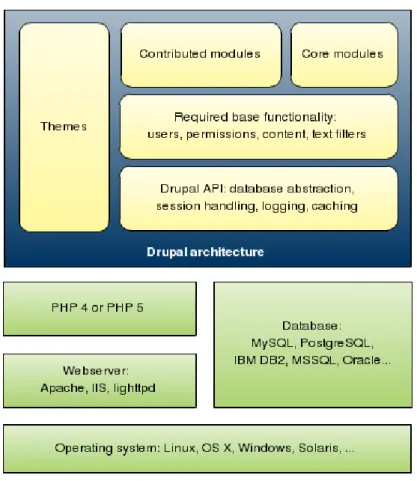
5 Defining Requirements for a Drupal Based Solution 39 5.1 Drupal Architecture . . . 39
5.2 Planned Language Architecture . . . 41
5.3 Source Code Based Interface Translation . . . 41
5.3.1 Installer Localization Support . . . 42
5.3.2 More Efficient Translation Packaging and Importing . . . 42
5.3.3 Local Functionality with Custom Install Profiles . . . 43
5.3.4 Fixing Logic Problems and Adding Smaller Features . . . 44
5.4 Language Management Functionality . . . 44
CONTENTS
5.5.1 Running Multiple Sites on the Same Code Base . . . 45
5.5.2 Types of User Defined Content in Drupal . . . 45
5.5.3 Content Language . . . 46
5.5.4 Content Translation . . . 47
5.5.5 Dynamic Text Translation . . . 47
5.6 Translation Workflow . . . 48
5.6.1 Limiting Permissions Based on Workflow . . . 48
5.6.2 CAT Based Workflows . . . 49
6 Implementing a Solution with Drupal 51 6.1 Source Code Based Interface Translation . . . 51
6.1.1 Installer Localization Support . . . 51
6.1.2 More Efficient Translation Packaging and Importing . . . 52
6.2 Language Management Functionality . . . 53
6.3 User Specified Content Translation . . . 55
6.3.1 Content Language . . . 55
6.3.2 Content Translation . . . 56
6.3.3 Dynamic Text Translation . . . 56
6.4 Translation Workflow . . . 58
6.4.1 Limiting Permissions Based on Workflow . . . 59
6.4.2 CAT Based Workflows . . . 59
6.5 Evaluation . . . 61
7 Summary, Future Directions 64
Acknowledgements x
Glossary xi
List of Figures xiv
List of Tables xv
Abstract
Modern web sites target people across country borders and within countries where multiple languages are spoken. When serving such an international and multilingual community, we need to take into account several factors in order to support these needs and effectively reach our target group.
In my thesis I investigate these special factors that add to common web sites’ needs and often require a different approach to backend development. I also explain some of the standards, recommendations, and best practices that should be followed for this type of web site.
Because most present-day web sites are built on an existing framework that allows developers to reuse established solutions and thus save on development costs, my main targets of examination are these frameworks, the so called content management systems. By comparing and contrasting their strengths and weaknesses as they relate to my focus areas, I devise an implementation plan to fulfill the outlined requirements with the Drupal content management system.
Working with a well-known framework means that my results are critiqued and tested by people interested in using them in real life projects, so the solutions I present here should be both practical for web site implementors and usable for site editors. Although I work in many areas on the multilanguage spectrum, focusing on key aspects allows me to deliver solutions and at the same time open the door for later developments.
My results are freely available to every Drupal user and developer, since they are either integrated into the Drupal core system or are downloadable as Drupal extensions. Further, since the software I have developed is open source, web site implementors can easily adapt it to their special multilanguage requirements by looking under the hood.
Kivonat
A modern webhelyeket sokf´ele nyelvet haszn´al´o k¨ul¨onb¨oz˝o orsz´agok, valamint t¨obbnyelv˝u orsz´agok lakosai l´atogatj´ak. Amikor ilyen nemzetk¨ozi ´es t¨obb nyelvet besz´el˝o c´elk¨oz¨ on-s´eghez sz´olunk, sokf´ele szempontot kell figyelembe venn¨unk, hogy speci´alis ig´enyeiket hat´ekonyan ki tudjuk szolg´alni.
A diplomatervemben ezeket az ´atlagos webhelyek ig´enyeit meghalad´o speci´alis szem-pontokat vizsg´alom meg, amelyek a h´att´erprogramok kialak´ıt´asakor a szok´asost´ol elt´er˝o megk¨ozel´ıt´est ig´enyelnek. Bemutatom a kapcsol´od´o szabv´anyokat ´es aj´anl´asokat valamint k¨ovetend˝o gyakorlatokat, melyeket az ilyen t´ıpus´u webhelyek k´esz´ıt´esekor figyelembe kell venn¨unk.
Mivel napjainkban a legt¨obb webhely egy megl´ev˝o keretrendszerre ´ep¨ul, amely lehet˝ov´e teszi, hogy fejleszt´esi k¨olts´eget is megtakar´ıtva m´ar bev´alt megold´asokat hasznos´ıtsunk ´
ujra, a vizsg´alatom c´elpontjai az ilyen keretrendszerek, az ´un. tartalomkezel˝o rendsze-rek. El˝osz¨or n´eh´any ny´ılt forr´ask´od´u tartalomkezel˝o rendszer er˝oss´egeit ´es gyenges´egeit hasonl´ıtom ¨ossze a t¨obbnyelv˝us´ıt´es szempontj´ab´ol, majd az ig´enyek kiel´eg´ıt´es´ere meg-val´os´ıt´asi tervet dolgozok ki a Drupal tartalomkezel˝o rendszerrel.
Egy ismert keretrendszer alkalmaz´as´anak az egyik el˝onye az, hogy a k´esz¨ul˝o megol-d´asokat gyakorlott tervez˝ok ´es fejleszt˝ok tesztelik ´es b´ır´alj´ak, ami garancia arra, hogy e megold´asok haszonosak legyenek a webhelyek fejleszt˝oi sz´am´ara ´es j´ol haszn´alhat´ok legyenek a tartalomszerkeszt˝ok szemsz¨og´eb˝ol is. A t¨obbnyelv˝us´ıt´es, mint l´atni fogjuk, sokf´ele k´erd´est vet fel, k¨oz¨ul¨uk n´eh´any kulcsfontoss´ag´u szempontra fogok koncentr´alni a diplomatervben. ´Igy haszn´alhat´o megold´asokat tudok kidolgozni, mik¨ozben a lehets´eges k´es˝obbi fejleszt´eseket is figyelembe tudom venni.
Az eredm´enyeim szabadon ´es ingyenesen el´erhet˝ok minden Drupal felhaszn´al´o ´es fej-leszt˝o sz´am´ara, r´eszben a Drupal alaprendszerbe be´ep¨ulve, r´eszben kieg´esz´ıt˝o modulok form´aj´aban. A kifejlesztett szoftverelemek ny´ılt forr´ask´od´uak, ´uj webhelyek kialak´ıt´ asa-kor ig´eny szerint ´atszabhat´ok.
Chapter 1
Introduction
The World Wide Web was an international space from its start with visitors who speak different languages and reside in various countries. Even with only taking multilingual countries into account (like Canada and Belgium), our web presence needs to cater to visitors speaking different languages. If we add international requirements to our task list, we should also consider cultural differences, local customs, time zones, shipping costs, and other issues.
As the user base of web sites and services expands, it becomes natural to provide interface and even content in more languages. Because existing monolingual web site im-plementations are often complicated to migrate to a multilanguage model, it is important to keep this issue in mind when planning a new project that might involve support for multiple languages.
Fortunately building web sites has become easier in recent years with many content management systems now available that allow “click and type” web site creation. These systems help users create and manage content, and often even a community, online. Open source content management solutions first widely became popular among small busi-nesses and hobbyists, and eventually big companies and institutions like Yahoo, NASA, Lufthansa and Nokia realized the benefits offered by these systems and deployed them.
Most of these systems provide convenient ways to manage web site’s architecture and content added by users and editors of the web site. Although these systems are developed by international communities, multilanguage features are not always integrated into them. As noted, these systems are used in situations with widely different needs, from powering simple blogs to major government web sites (as is the case of Brazil [1]). Many of these different use cases share the requirement to support multilanguage features, even if the exact needs in these use cases are different. A single user blog could have content in
different languages, while a complex government site requires parts of its web presence in multiple languages at once.
Mature multilanguage support guides web site visitors to the language version of the content they understand. Content authors and translators can be facilitated with an editorial workflow tailored to their special requirements, possibly including support for interaction with external professional translation service providers.
In the second chapter of my thesis, I look at the challenges multilingual web systems face compared to monolingual implementations and then I specify the areas I will look at in-depth in later chapters. In the third chapter, I examine some of the existing open source solutions, namely Joomla, TYPO3, Plone and Drupal, and look at their approaches to multilingual interface and content management. A comparison of these systems follows in the fourth chapter, based on my focus areas, and it highlights the problems with implementation of some of the desired features. The fifth and sixth chapters present a plan to design an improved multilanguage solution based on my research for the Drupal system, as well as a presentation and evaluation of the actual implementation. Finally, I summarize my work and outline future challenges in chapter seven.
Chapter 2
Multilingual Web Site Requirements
2.1
Terminology
Because the terminology is not clearly defined and is used differently in other papers, it is important to define the basic terms. For my thesis I followed the definitions set forth by the World Wide Web Consortium (W3C) Internationalization (I18n) Activity [2].
Multilingual web site A web site available in multiple languages. Several countries (for example Canada and Belgium) have more than one official language, so a mul-tilingual web site is not necessarily an international one.
International web site A web site intended to be used internationally. This type of web site is not necessarily a multilingual one because residents of multiple countries can speak the same language.
A web site can both be multilingual and international, thus serving people in multiple countries with different languages available. Unfortunately language alone is not always enough to consider when presenting information to a web site visitor.
Locale In computing the locale concept refers to a set of rules for presenting information to a user. Locale includes date formatting, currency, the language variety used, order of sorting and so on.
A multilingual web site should ideally support multiple locales, somultilocale web site
would be a more accurate term, but this is not used in practice, so I will stick with “multilanguage” in my thesis and only refer to locales when the difference is important.
Two essential terms are used when explaining the process of making a web site multi-lingual or international. Internationalization and localization are these two keywords and
2.2. WEB STANDARDS
are sometimes used interchangeably although they have very different meanings. Richard Ishida has good definitions [3] of these terms.
Internationalization Also known as i18n, internationalization is the design and devel-opment of a product, application or document content thatenables easy localization for target groups that vary in culture, region or language (locale).
Localization Also known as L10n, localization is theadaptationof a product, application or document content to meet the language, cultural and other requirements of a specific target market (locale).
This leads to the possibly confusing conclusion that if we want to create a multilingual web site, we need to internationalize it, since this is the term used to represent adding capabilities to support multiple locales. Localizing a web site “only” means adding specific features or content for a particular locale.
Although the World Wide Web was designed to offer interconnectedweb sitesto vis-itors, more traditional applications also found their way onto the internet, which resulted in web applications. There are subtly different descriptions for these two terms. Web sites can be considered collections of interlinked web pages managed together that allow you toread their contents. Web applications, on the other hand, are applications accessed through a web server that allow you to do something. While there are clear examples of both, most web sites are now a mix of pages with application-like functionality. The multilingual principles discussed in this thesis are equally applicable to traditional web sites and web applications, so these terms are used interchangeably.
The synergy between these two terms is also driven byWeb Content Management Systems (WCMS or CMS) that offer convenient content management and application functionality in the same package. The focus of my thesis is web based content, so Enterprise Content Management Systems (built to handle other types of content, like word processing documents and spreadsheets created in the enterprise) are out of my scope.
2.2
Web Standards
When building multilingual web sites, we need to first consider technical requirements and possibilities. Web standards (recommendations and specifications) define our com-munication means between web servers and clients, so these must be examined first. It is important to note that these standards are applicable to single language web sites too,
2.2. WEB STANDARDS
although they are not widely known in English speaking areas of the world because the defaults provided are adequate there, so there is no immediate reason to think of these building blocks.
2.2.1
Internationalized Resource Identifiers
First we need an address to access a web resource. These days users demand web sites in their own languages, including both the interface and the address.
Web addresses are typically expressed using Uniform Resource Identifiers or URIs. The URI syntax, as defined in RFC 3986 [4], restricts addresses to a small number of characters: upper and lower case letters of the English alphabet, European numerals and a small number of symbols. Unfortunately a URI does not allow for non-English characters, which limits its usability internationally. Internationalized Resource Identifiers (IRIs), as specified in RFC 3987 [5], allow for domain names and paths to contain any Unicode character, thus allowing for fully localized web addresses. (Unicode is explained in the next subsection.)
For IRIs to work, the underlying protocol (HTTP, SMTP and so on) should be able to carry the information, the format used (HTML, XML and others) should support Unicode characters, the applications handling these formats should be capable of dealing with them, and the servers hosting the resources addressed should be able to match IRIs to files and other types of resources. Unfortunately IRI supportive web browsers are not yet widely used as of this writing. While the latest Microsoft Internet Explorer Version 7 supports IRIs, this browser is not yet adopted by mainstream users. Microsoft Internet Explorer 6 only supports IRIs with an add-on installed separately. Other browsers have good support for IRIs as W3C test results show [6].
A basic IRI (eg. http://´arv´ız.hu/dokumentumok/v´edekez´es.html) consists of a scheme (http:// in this case), a domain name (´arv´ız.hu) and a path component with a directory and a file name (/dokumentumok/v´edekez´es.html). More complicated IRIs can contain a port number, HTTP GET parameters and a fragment identifier, which are already adequately covered by existing standards, so IRI support evolves around domain names and path values. Internationalized Domain Names in Applications (IDNAs) are mappings of Unicode strings to special US-ASCII strings, which map to IP addresses in the standard domain name system. For example the ´arv´ız.hu name maps to the
xn--rvz-dla6d.hu domain, xn-- being a prefix to identify the IDNA encoding, rvz
being the ASCII characters from the domain name and the -dla6d suffix encoding the accented characters. Path components of IRIs are handled by hosts serving the resource
2.2. WEB STANDARDS
(a web server in this case).
Current support for IRIs only allow for IDNAs, which build on the existing Top Level Domain Name (TLD) set. Localized TLDs are still tested by the Internet Corporation for Assigned Names and Numbers (ICANN) for compatibility [7] and will only be available when reliable server technology is present and ICANN rules make it possible to get them registered.
Once widespread support is available for IRIs, multilingual web sites can make use of them. It is a natural requirement that different language versions of a web site be made available under local addresses like http://www.coffee-bean-ltd.com and
http://www.k´av´e-bab-kft.hu, when branding requirements are not going against lo-calizing the site name.
2.2.2
Character Encoding
Once we have an address, the communication protocol needs to support the encoding of characters used by the desired languages.
The World Wide Web is powered by the HTTP protocol, of which the 1.1 version [8] is used widely, as defined in RFC 2616. Section 3.4 of the RFC explains that HTTP shares the notion of “character sets” with the MIME [9] specification. “Character encoding” would be a better term as described by the HTTP specification, but the term “character set” was kept to stay compatible with the MIME standard.
MIME defines a way to represent multipart messages with headers and content in non US-ASCII encodings. This opened the door for different language encodings to be used in email and later on the web, when HTTP adopted this specification. Responses by web servers include a Content-type header, which specifies the content type and character encoding used. A typical encoding for Hungarian documents is ISO-8859-2 (also known as Latin-2), which contains proper accented characters for the Hungarian language. This encoding uses one byte for every character but limits the possible characters to only those used in Central Europe. The biggest online media outlets, such as http://origo.hu/
and http://mtv.hu/, use the Latin-2 encoding in Hungary as of this writing.
Like Hungarian, every language has one or more specific character encodings assigned to it, which can be used to deliver content on the web. However this causes the problem that encoding needs to be tracked and taken care of on every page. To deliver pages in different languages on the same web site we need our backend software to support every encoding we will use and utilize the appropriate one when presenting a web page to a user. One of the bigger problems of this approach is that it is not possible to mix characters
2.2. WEB STANDARDS
from different languages on the same page, such as including a Japanese performers native name in an entertainment news article on one of the above mentioned media outlet pages while using the ISO-8859-2 encoding.
The Unicode Standard (first published in 1991) was designed by the Unicode Consor-tium [10] to overcome the limitation of traditional encodings and to allow multilingual text presentation. It took many years for the standard to become widely used, but it eventually became a requirement in multilingual systems. Unicode provides a unique code point (a number) for each character, and then different character encodings can be used to map these code points to actual bytes for transmission or storage.
There are multiple ways to encode Unicode characters, of which the most popular is UTF-8 encoding because it is the most compatible with existing ASCII systems and still enables users to simultaneously use the full Unicode character set. UTF-8 is a variable-width encoding, using one to four bytes per code point. UTF-8 is now the de facto standard for multilingual web environments, and so this is the encoding I have chosen to use throughout my thesis. This allows for multiple language characters to be used on the same web page as well as allows common algorithms to be used for character handling and filtering in content management systems.
The W3C has a good explanation of using character encodings in (X)HTML and CSS [11]. The most important rule is that the encoding should be specified in both the HTTP headers and the (X)HTML or CSS document for best compatibility.
Web browsers widely support web pages written in Unicode encodings, so it is possible to build on this feature.
2.2.3
Language Information and Text Direction
Section 8 of the HTML 4.01 recommendation [12] specifies three key attributes of HTML that allow for language identification and directionality setting. The lang attribute, when applied to an element, specifies a language code that defines the base language of the element’s attributes and content. This is useful for a number of reasons, as explained by the recommendation referenced above:
• Assisting search engines
• Assisting speech synthesizers
• Helping a user agent select glyph variants for high quality typography
• Helping a user agent choose a set of quotation marks
• Helping a user agent make decisions about hyphenation, ligatures and spacing
2.3. SEPARATION OF CONTENT AND PRESENTATION
The HTTPContent-languageheader can also be used to specify language, but HTML attributes should override the language where appropriate in a mixed language context.
The hreflang attribute has a similar role. It informs the user agent of the language of a resource being linked to in an HTML link tag.
Language codes in HTML were originally constructed according to RFC 1766, which was most recently replaced by RFC 4646 and RFC 4647 and are jointly referred to as BCP 47 [13]. The structure of a language code is as follows:
language [”-” script] [”-” region] *(”-” variant) *(”-” extension) [”-” privateuse]
The only mandatory part is a language code, which can be followed by an optional script name (Latin, Cyrillic and so on), a regional variant identifier (for example US and UK in English), any number of variant and extension identifiers and an optional private suffix (maintained for backwards compatibility). More information about these tags can be found in the W3C I18N article database [14].
Because different scripts are used for specific languages, it is possible that text be written left-to-right (LTR) or right-to-left (RTL) independently of the language being used. Latin scripts from several languages appeared through the years, replacing or adding to RTL written ones. Although Unicode defines a few control characters to specify direction, it is generally suggested that HTML documents should not use them and build on the related HTML features instead.
HTML provides the dir attribute with RTL and LTRas possible values, which allows for text direction specification. A bidirectional algorithm is specified to handle cases when RTL and LTR text is mixed, and a <bdo> tag is defined to explicitly specify direction when the algorithm gets to an undesired result without further instructions.
As direction is actually presentational information, CSS 2 [15] also has support for the direction property to specify RTL or LTR as well as theunicode-bidiproperty to affect the bidirectional algorithm.
XHTML carries both the language and direction attributes over from HTML, except that the langattribute is replaced with the XML standard xml:lang attribute.
The W3C I18N FAQ has an extensive document [16] on text directionality.
2.3
Separation of Content and Presentation
Once we have the technological base to build on, we need to find ways to utilize it to benefit our users. When designing a web site with multilingual requirements, separation
2.3. SEPARATION OF CONTENT AND PRESENTATION
of content and presentation becomes vital to the success of the project. The key rules are the following:
1. Use CSS extensively. Richard Ishida [3] uses the example of emphasized Japanese text. When resorting to HTML <b>or <i> tags for emphasis, the Japanese letters need to be written in bold or italics. However the Japanese would use dots above the text for emphasis or a different background color, keeping the text itself intact. If we build on CSS, different style sheets for different languages can provide adequate display rules for emphasized text. This also helps prepare for bidirectional text presentation.
2. Avoid text on images when possible. Every image with text on it is an immedi-ate target for replacement on translimmedi-ated versions of the page. Regardless of whether it is a part of the site design or user specified content, it needs to be translated. The web site should be designed so that images are replaceable when different languages are used.
3. Prepare for text expansion and contraction. It is common to design web pages or even smaller areas (like sidebars or blocks) on web pages for a specified screen width. If the width of these parts is not adequately chosen, translated versions of the text written into them can easily not fit or leave an undesired empty area. The OmniLingua Resource Center has good source data [17] on language expansion and contraction. This data shows that English to Finnish translation results in contraction up to 20-30%, while the word length increases by 10-15% at the same time. English to Spanish translation however can lead to 25% longer text. This means that if a layout design does not allow for text to expand or breaks when text gets significantly shorter, it is not suitable for multilingual needs.
4. Think about possible cultural differences ahead of time. When serving an international community, application of colors, alignment and imagery can have very different effects. Jakob Nielsen’s Designing Web Usability has a perfect example [18] with an ad showing a switch. It is turned downwards and the ad says: “Turn this on for more information.” Nielsen notes, that if a switch is turned downwards, it means it is already turned on in many countries around the world. Although cultural differences are not a focus of this thesis, it is important to think about these differences when planning content.
2.4. MULTILANGUAGE INTERFACE AND CONTENT
2.4
Multilanguage Interface and Content
Single language web site builders are in a convenient position to build a system in their native language and post content in the same language. However when building on an existing system, most of the time an English-based engine is working behind the scenes. This is because English is the most common language used by developers around the world, and thus has become a de facto default language for CMS products. Creating a single language web site in a different language with such a system could immediately become difficult, if internationalization is not taken into account in that product. Going further into the requirement of having a multilingual interface and content opens up new layers of required features. The interface can consist of built-in text provided by the system, as well as input provided by the administrators (site name, menu items, disclaimers, etc.).
2.4.1
Types of Foreign Language Based Web Sites
I asked the Drupal community to provide use cases of their existing and planned inter-nationalized web sites in 2006 [19]. Going through the data provided and filtering the comments, I have identified the following practical use cases for web sites built with an English based system but in need of support for foreign languages.
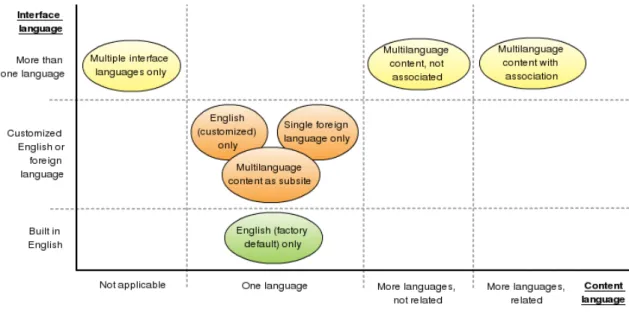
English (factory default) only This is the simplest use case. In fact it means that the English “factory default” text can be used in the project and that English content is posted. User specified interface text is in English. This monolingual scenario is the simplest, and is always supported in every system.
English (customized) only When one needs a customized English language web site (different site design or different wording for text accounting to US and British English differences or stylistic requirements, for example) it is still quite close to what the system provides by default. Only some text and design elements need to be changed. User specified interface text is in English.
Single foreign language only This monolingual scenario is taken into account when a web site is built with a system, but the factory default language should be completely replaced. This requires that the text of the interface be completely translatable and that the language of the resulting site be configurable so the generated web pages show the right content with the proper language code. User specified interface text is given in the actual language used.
2.4. MULTILANGUAGE INTERFACE AND CONTENT
Multiple interface languages only On a photo showcase site or an external data based web site (like a search engine) where content is not a target for translation, it is still a common requirement to allow the interface to be presented in various languages. Users should have the possibility to choose the desired interface language, and the system might choose a reasonable default for the user when visiting the site for the first time. User specified interface text is given in all languages used.
Multilanguage content on the same site, not associated Multilanguage blogs and international community news sites are typical examples of the use case when post-ing of content in multiple languages is a requirement, and these posts remain stand alone pieces and not connected to each other (as translations of the same content). Content needs to be marked as being in a specific language selected from multi-ple languages. Interface language availability for the same languages might be a requirement when building such sites, in which case user specified interface text is given in all languages desired.
Multilanguage content implemented as sub-site Many big international companies have regional sub-sites for their local businesses. However these sites use a slightly different page layout and design elements, and often have a distinctively different structure of pages. For example, these sites do not require the ability to jump to the driving directions page of the German office from the driving directions page of the French office, especially that there is no requirement that both pages exist and are in a similar content structure. This kind of site design allows for the best local adaptation, but does not allow for content to be related between the sub-sites. User specified interface text is managed uniquely on all sub-sites.
Multilanguage content with translation association The most complete approach to multilingual site building is to have copies of the same content in different lan-guages that are linked together so the system can show the user an initial version and then the user can choose a different translation if required. In this use case, the system can show the appropriate interface for the content language desired. The main challenge is that if content is not available in the desired language, there is no direct answer to what should happen: a fallback to some other language, an error message and a redirection to a search page are all possibilities. A system should sup-port different approaches. The design of such a system allows for complex workflows for site administrators and content authors too. Translations of the same content can be monitored for timeliness and multiple language versions of the same content
2.4. MULTILANGUAGE INTERFACE AND CONTENT
can be required to be written before a text is published, for example. User specified interface text is given in all languages.
Figure 2.1: Types of foreign language based web sites
As the figure shows, sub-sites actually have no multilanguage requirements and as a result, workflows and permissions are not related to available languages. This is often a practical way to side-step issues with multilingual content handling but results in a weak user experience and uncontrolled editorial flow. It should be noted, however, that any of the site types involving one or more content languages or at least one non-default interface language require internationalization. Although it is possible to build sites with requirements in most other parts of the type matrix shown above, only the types shown are relevant in this thesis.
Naturally actual web projects often move between these models, so an ideal system should support seamless adaptation to the chosen type of site.
2.4.2
Distinguishing Interface from Content
In traditional desktop applications it is quite straightforward to translate the application interface. In open source systems, this traditionally involves the following steps:
1. The translator runs an extractor program on the source code, which typically gen-erates a text based file in a standard format with interface strings found in the code. Alternatively, programmers can place identifiers in the source code, and a resource file can define the strings for the identifiers.
2.4. MULTILANGUAGE INTERFACE AND CONTENT
2. This file is loaded into a special program or a simple text editor, and text is trans-lated to the required language. A complete translation is saved.
3. Packages of the translation are distributed and – after imported or installed – can be used with the application.
With web site management systems, however, things are very different. First, there is a set of application provided interface elements in some systems written in the “factory default” language, as mentioned above. Then there are possible modules or plugins added to the system with their own interface elements. Site designers refine and extend the built-in built-interface of the application to be better suited for the actual web site’s needs. Fbuilt-inally there are interface elements specified by the site administrator. A prime example of these are menu items and other navigational helpers, which are required to be customized by the maintainers of a web site.
The application and plugin provided user interface elements are possible to be treated like classic desktop applications, translated via an external file generated with an extractor program. The advantage of this approach is that translation teams can provide language files before someone builds a multilanguage site with the system.
Custom web site design elements and site administrator specified text and images are by their nature specific to the actual project being worked on. In the first case, where the custom elements will not change often, we can reuse the desktop application workflow, but with site maintainer specified text and images, a web based frontend should be provided for the comfort of the user.
Distinction of interface from content is especially important in some of the use cases described above in which the web site might use different languages for content and in-terface presentation. Higher level tools for inin-terface and content translation are discussed in the next section.
2.4.3
Translation Friendly Composite Text
When working with interface text, translating complete literal sentences is fairly straight-forward when given a simple mechanism to look up a translation for a specific language. However, composing text of variable parts brings a few issues worth examining. While working on better translation support for Drupal and by looking through recommenda-tions, I have identified the following common issues (examples in PHP, the imaginary
translate()function plays the role of a lookup function for translations, working in the context of the current language used):
2.4. MULTILANGUAGE INTERFACE AND CONTENT
1. Composed text should not be translated as a whole. Once we put variable text segments into the composition, we end up with a potentially endless number of strings to translate. In case we usetranslate(’You have chosen ’. $type), we will have an infinite number of strings for translation, because $type could be anything and is only filled in runtime. Sometimes a set of possible $type values can be collected, but if we think about concatenating numbers into strings the same way too, that leads to an even worse situation.
2. Different word ordering should be supported. If a system does composi-tion with exact variable placement, it is not going to be easily translatable. If we write: translate(’You have chosen ’). translate($type) using string con-catenation, the translator has no way to reorder the words in the sentence, although grammatical rules would enforce reordering in several languages. This is still some-what better than the solution in the previous example, but using translate(’You have chosen %type’, array(’%type’ => translate($type))) would be ideal, given that translate()supports replacement of %type to the specified value. 3. Plural forms of languages are different. When displaying counts of things,
English has the simple rule that “item” is used when there is only one, and “items” is used when there are multiple. Other languages, however, have more complicated rules for plurals. Polish and Russian languages have three types of plurals with different rules for when each of them is used. A sample from the Polish Drupal Aggregator module translations [20] shows an example of how are these used.
Expression Translation if n == 1 %n element else if n%10>= 2 andn%10<= 4 and (n%100<10 or n%100>= 20) %n elementy
else %n element´ow Table 2.1: Polish plural forms example
The software should be aware that different plural form rules apply to different languages and should support the available format. To be able to use this knowledge one needs to use a special translation function, which I will calltranslate plural()
here. The usage of this function could be: translate plural($count, ’1 item removed’, ’%count items removed’) to provide a sensible default for English, yet make it possible to use plural forms.
2.5. TRANSLATION OUTSOURCING SOLUTIONS
4. Specific contexts might need different translations. For example “off” in
’Turn off the %object’ needs different translations in Hungarian depending on what the object is. If the sentence says “Turn off the light,” then the correct Hungarian translation is “Kapcsolja le a vil´ag´ıt´ast”, while in the case of “Turn off the TV,” “Kapcsolja ki a telev´ızi´ot” is the only appropriate translation. Similar problems arise with languages having different articles. ’The %fruit discount expires tomorrow.’ would have “the” translated differently to Hungarian, de-pending on what the value of %fruit starts with. The “alma” (apple) fruit would need the “az” article, but the “k¨orte” (pear) fruit would only allow for “a”.
2.4.4
Content Creation Workflow
When building a multilanguage web site, there are different workflow requirements de-pending on the type of the site being built. Even on a monolingual site, content editors might need to read through and edit text before it is published. When multiple languages are taken into account, this adds an additional layer of complexity.
Users should be able to specify the requirements for their desired workflow, and the system should be able to support these requirements and execute the workflow. Some content might need to have translated counterparts (like news articles on a company web site), while other content will definitely not have them (like forum posts and comments). The user should be guided to translate content easily when required and should not be bothered when translation is not an option.
A more complicated Belgian government use case in my research [19] showed that sometimes text must be available (and approved) in a set of languages before any piece of that content set can be published. In this use case, the official languages (French, Dutch and German) should have the content available already, before it can go to the live web site. A professional grade system should allow for such complicated workflows to be built.
2.5
Translation Outsourcing Solutions
Different systems store and use content and interface translations in incompatible ways, so there is a natural need to integrate these solutions. To do this, a data interchange format supported on both ends is required. Translation support should integrate with external professional translation tools, including automatic draft translation services, translation memories, and spell checkers, and should do this by supporting common formats.
2.5. TRANSLATION OUTSOURCING SOLUTIONS
2.5.1
Gettext
Most open source applications implement an interface translation system based on GNU Gettext [21], which became the de facto standard of interface translations. Three file types are supported by the Gettext tools:
Portable Object Template (POT) Text file with source message strings (usually in English). It can be used to start a new translation or update previously done translations with new interface text from the application.
Portable Object (PO) Text file with source messages translated to a specific language. Some applications can directly import and export Portable Object files, while others need a binary representation.
Machine Object (MO) A binary (compiled) representation of a Portable Object file. As with compiled programs, editing of Machine Object files directly is not possible. Several tools exist to generate POT files and facilitate the translation of these into given languages. When new software releases are published, new templates are gener-ated and the previous translations are merged with these templates, forming the base for updated interface translation. Gettext only supports pairs of strings or at most lan-guage specific plural formula usage, so it cannot be efficiently used for content translation interchange, which would involve large amounts of strings and other related media.
2.5.2
Computer Aided Translation Tools
Computer Aided Translation (CAT) is the process of supporting translators in reusing previously translated text for new works, as well as archiving their current work for the future. The Localization Industry Standards Association (LISA) [22] maintains a working group, which developed the Translation Memory eXchange (TMX) format as a vendor-neutral open XML standard. The OASIS XML Localization Interchange File Format (XLIFF) builds on TMX, defining a markup format and interchange language for localizable data, allowing interoperability between tools. As of this writing, TMX 1.4b and XLIFF 1.2 are the actual stable recommendations.
The philosophy behind CAT based workflows is to extract resources from native for-mats into a common standard localization format that is easier to build tools for. While Gettext is ideal for interface translation based on application source code, Java property files and HTML content are among other popular formats that need tools for translation
2.5. TRANSLATION OUTSOURCING SOLUTIONS
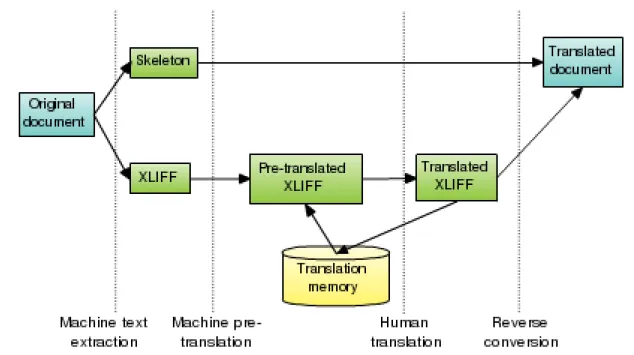
Figure 2.2: Computer Aided Translation workflow with “minimalist” approach and a common translation memory database to reuse. Using XLIFF, the translated re-sources are merged back into their native format when the translation is complete, and the results are stored in a translation memory. Filters and specifications for converting to and from XLIFF have been developed for a number of file types, including Gettext Portable Objects, HTML and Java property files. Of course, not all these formats support the complete spectrum of XLIFF features, but the goal to not loose important translation data along the way is met by these mappings.
There are two types of mapping methods to choose from: a “minimalist” and a “max-imalist” approach, as referred to by the XLIFF standards. These differ in how markup information is retained throughout the translation process. The minimalist approach requires a skeleton generated from the original document and only the translatable re-sources extracted to XLIFF (possibly with some inline markup). Inline markup cannot be removed completely because translators need to know where links and formatting appear in source documents, and they need to be able to insert equivalent markup in the trans-lations they create when the target language requires it. With the maximalist approach, however, all structural and inline markup is encoded in the XLIFF document, and no skeleton is used.
XLIFF has a small number of generic tags used for mapping markup from any type of source document. The rules of the machine text extractor define what approach is used. In case of the minimalist method, placeholders are used in the skeleton to identify
2.6. THE SCOPE OF MY THESIS
relations with parts of the XLIFF file. The extracted text is pre-translated from the previously collected translation memory, then reviewed and fixed by a human translator. The resulting translations are stored in the translation memory and a reverse conversion takes place to generate the translated document (possibly using a skeleton if available).
There are cases when the machine extractor would not be able to automatically identify translatable text or would offer parts (the author name of a document for example) erroneously for translation. A similar problem is that most source formats do not allow placing notes into the documents to instruct or help translators. Therefore the World Wide Web Consortium (W3C) developed a recommendation to aid machine extraction. The Internationalization Tag Set (ITS) [23] recommendation is a fresh development (reached the recommendation stage on April 3, 2007) that specifies a common set of tags for XML based formats to mark parts of the documents as “not for translation”, or “written in a right to left script”. ITS also allows for placing notes for translators and marking up terminology for glossaries.
While XLIFF/TMX (and hopefully soon ITS) based solutions are reusable and basi-cally became an industry standard with the most professional tools like Systran [24] and SDL Trados [25] using them, only a few open source solutions exist to leverage a CAT based workflow, and these are not widely deployed.
2.6
The Scope of My Thesis
Although there are several key issues around multilingual web sites, a more focused scope should be defined for this thesis. As the assignment instructed, I will look into content management systems. Higher level language management, multilanguage content, inter-face translation support and translator workflow features are in my focus. These form a set of technologies that enable the internationalization of products. Both the user inter-face for these features and the implementation are important in designing a solution that fits the types of multilanguage sites outlined in this chapter.
Chapter 3
Popular Systems Used for
Multilingual Web Sites
To find implementation ideas and a target platform to work with, I looked through some of the most popular open source content management systems used to build multilingual web sites and examined their approaches to storage, workflow and display of multilingual text.
3.1
Joomla
Joomla [26] is one of the most well known open source CMS solutions. It is regarded as one of the most user friendly tools and has won several awards including the Packt Publishing Open Source CMS Award in 2006 [27]. Given that the success of a good multilingual system starts at the user interface, Joomla was a logical choice to look into as a possible solution. As of this writing, Joomla 1.0.12 was the latest stable version (1.5 being in the beta stage) and the one I have worked with.
3.1.1
Included Language Support
Joomla has interface language translation support included in its default installation. This allows for uploading pre-created packages of translations, which get saved into the file system and offered to the administrator to help set the interface language. This system only allows the upload of pre-created language packs, and adding a new language is not possible without installing a translation at the same time.
3.1. JOOMLA
specified with placeholders in the sprintf() format, like "Please enter a valid %s". Different plurals are not supported, but the order of placeholders can be changed thanks to sprintf().
3.1.2
JoomFish
JoomFish [28] (created by Alex Kempkens) is the official multilingual content support component. It adds a general translation layer on top of the Joomla database handler. I have examined JoomFish 1.7, which is compatible with Joomla 1.0.12. The configuration of this component depends heavily on the actual database tables and fields, so web based configuration is not possible. XML based configuration files set the translatable table fields and allow for the translation of specific parts of the database.
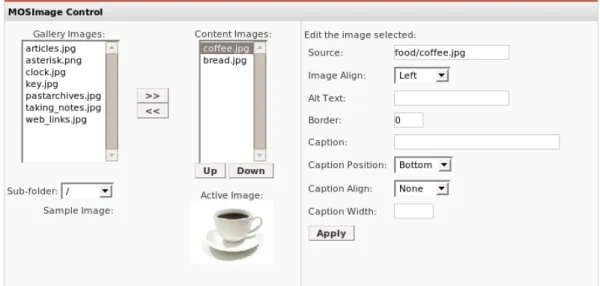
A generic web based editor is provided to type in translations for these fields. Because only text based fields can be translated, simple text editors are provided. In case there is structured information stored in a text database field (like an image file name with metadata), the user must know the structure and be sure not to break its value when editing. Helpers are not included to empower the user. Only single table data is editable, and relations of data (like content to category relations) are not possible to modify.
Figure 3.1: Image control on the original content editor page (arranged horizontally) As the figures show, the image selection control on the content editing page allows the author to browse previously uploaded images, select a list of images used in the current post and preview the selected item. Images can have alignment, alternate text and caption properties set. Joomla provides a rich editing interface for these details.
3.1. JOOMLA
Figure 3.2: Image control on the translation page
However, translators have some difficulties getting an editing area with the serialized information of images. Because the JoomFish translation system is as generic as possible, it does not know that an image editing user interface should be displayed here and it only knows that a specific field of a database table should be edited.
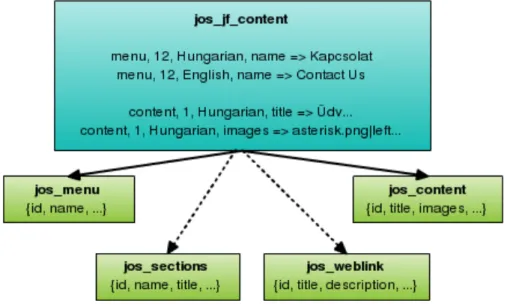
On loading Joomla, the implementation of the JoomFish component replaces the global database layer with its own database abstraction layer. The multilanguage database layer replaces load, update and insert operations, so the translated text can be written into the dedicated JoomFish table with references to the original table and primary key.
Figure 3.3: Database model of JoomFish with some sample data
When loading an object (content, menu item, category and so on), the replaced database layer loads it from the original table and the associated translations from its own table, and then rewrites the object’s values to reflect the translated state. There are some fields excluded from translation, like the author names, published flags, and created dates, and therefore it is not possible to have a different author or publication state for a translation.
3.2. TYPO3
The language used to display a page depends on several factors, if the administrator enables automatic language switching. An HTTP GET parameter specifies the language when available, or a previously set cookie can be used if given. The HTTP Accept-language value set in the user’s browser is used for Accept-language detection if a specific Accept-language is not requested. Finally the site has a default locale set if nothing else specifies a correct language.
3.1.3
Evaluation
Joomla by default allows interface translation. With JoomFish it also provides basic content translation, using a very extendable architecture that can be configured for any database table with simple XML files. This general approach has some drawbacks, though: it is not possible to conveniently translate non-textual content, only a given set of proper-ties are translatable on any content object, and finally the double loading of data results in a performance impact on the database. Unfortunately, Joomla does not come with any tools to support a CAT workflow and XLIFF support is scheduled for JoomFish 2.0 at the earliest [29] (currently 1.8 being under development).
From a visitor’s point of view, the most problematic aspect of Joomla is that the language code is not kept in the URL. Once someone visits a page with a language code in the URL, a cookie is set with the language code and then shorter web addresses are used. This makes it impossible to send links pointing to a particular version of the content and index different language versions by search engines.
Another basic problem with the Joomla system is that it tries to use UTF-8 all around the web site, but the default templates specify ISO 8859-1 encoding for English and ISO 8859-2 for the Hungarian translations (although the translation files use UTF-8 charac-ters). Evidently, encoding handling is not yet clear in the system.
3.2
TYPO3
TYPO3 [30] is one of the most complex and, at the same time, most powerful open source systems on the market. The complexity is easily shown by looking at the TypoScript declarative language especially developed for TYPO3, although the system is generally built on a PHP and database driven backend. It has built-in support for interface lo-calization as well as the so called “multilanguage content” and “multilanguage content integration” methods for content translation. Being built-in features, there is no need to install additional components, the existing solutions are tightly integrated into the
sys-3.2. TYPO3
tem, language controls are placed where the administrator expects them. I have worked with TYPO3 4.1, which was released March 6, 2007.
3.2.1
Interface Translation
TYPO3 implements interface translation based on a custom “locallang-XML” (llXML) format [31]. This allows for meta information and default (English) language text specifi-cation in TYPO3 modules, as well as possibly included translations in published packages. An extension named “llxmltranslate” is provided to assist translators with providing a web interface to translate interface files.
3.2.2
Multilanguage Content Method
Two different multilanguage approaches are supported. Multilanguage content and mul-tilanguage content integration differ in how the site structure is built. TYPO3 models web sites as tree structures of web pages. It allows for translation of web sites by creating different trees (essentially sub-sites) for the translated versions. This is easily done, and also provides the extra feature of possibly having pages in one language that are not suit-able in others. The problem for the end user is that it is not possible to switch languages on the site pages and therefore the language selected on the site entry page is used.
3.2.3
Multilanguage Content Integration Method
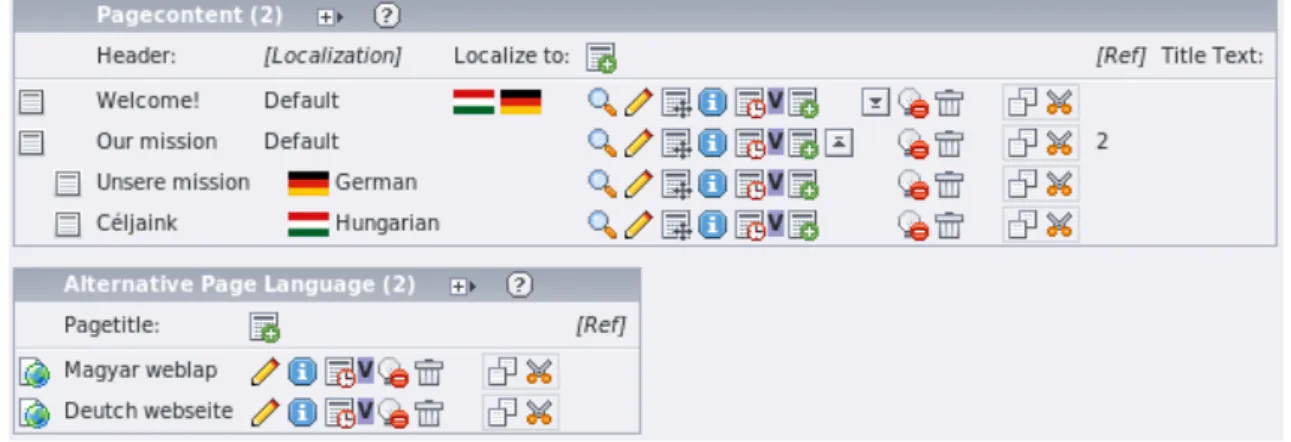
Figure 3.4: Alternative page languages and layers of languages for a page component The multilanguage content integration method allows administrators to have one page tree with translations of page fields saved under the page as alternate values. This is sim-ilar to the Joomla approach with an eagle eye view, but it is implemented differently.
3.2. TYPO3
Every web site tree can have web site languages specified. These have a name and a flag associated with them. Once these languages are set up, the content created in the de-fault language can be localized by addingalternative page languages below the previously created pages. This means that there should be a default language in which pages are added, and the translated contents are layered over the default values when displayed. The default content is used when there is no translation to a specific language.
Among other overview possibilities, a convenient tree view is provided that shows the translated content elements below each element created in the default language. The tree view mirrors the internal implementation of TYPO3, showing that the language layers reference content in the default language, and the alternative page languages define what localization can be added for a page.
Language selectors (flags) can be shown in this mode on the web site so visitors can see content available in different languages. Flags of unavailable content are dimmed. A HTTP GET parameter is used to keep track of what language is selected, and TYPO3 overlays content (menus, pages) available in that language onto the default values on all page views.
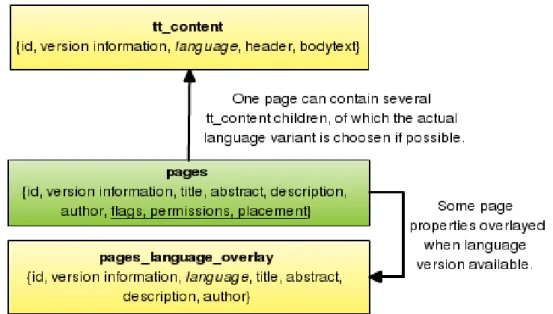
Figure 3.5: Database model of the multilanguage content integration method On the database level, thesys language table contains the list of languages. Thepages
table stores the page details, while the pages language overlay table stores the overlay values for alternate page languages. This includes meta information like author name and email, creation date and content versioning information. Because pages themselves only store higher level information of displayed web pages, the content objects can be
3.3. PLONE
found in the tt content table, for every language. When pages are loaded, the content of these tables are taken into account. Pages, overlays and content objects all support versioning.
Finally, a “Localization Manager” extension was implemented in December 2006 to better support translations’ overview possibilities as well as the import and export of content for translation. This extension uses the Microsoft Excel XML spreadsheet format for external translation support. Although this cannot be used directly in a computer aided translation workflow, Orange Translations, LLC announced [32] that it will sponsor further development of this component to integrate into CAT systems. I was unable to find any publicly available results of these efforts.
3.2.4
Evaluation
The TYPO3 system was not built with end users in mind. To set up a site even with only some simple customizations, administrators need to learn TypoScript and various objects and properties to use. This means that it is mostly popular among solution providers. While the multilanguage concepts and possibilities offered by TYPO3 are adequate for most needs, the complexity of the user administration interface and its steep learning curve does not make it a natural choice in most projects.
3.3
Plone
Plone [33] is a content management system built on the Zope platform and written in Python. One of its immediate marketing points is that it is “built for multilingual content management from the ground up”, and even has support for right to left written languages. As a prime example, Plone was chosen to power the GNOME homepage [34] partly for its strong internationalization support, so this was a good candidate to look at.
3.3.1
Interface Language Support
Plone has content language and interface language support. The administrator can set the language of any content on the site and new content is created as language-neutral. There is a predefined list of languages available in Plone from which the administrator can choose.
The PlacelessTranslationService extension allows for translation of the interface of Plone sites. Precreated translation packages are available in the PloneTranslations
exten-3.3. PLONE
sion (as Gettext Portable Object files).
Finally, the PloneLanguageTool extension can handle automatic language switching. It allows for the setting of a list of languages actually used on the site (a subset of the list of predefined languages available in Plone). A flag (or language name) list is generated for visitors so they can choose from the translations of the current page in those languages, if available.
Plone also supports different language negotiation schemes. The language can be specified in the URL, in a cookie, or in the Accept-language browser setting when these are available, and can be the site’s default setting otherwise.
These tools are still not enough for content translation, and only negotiation and user interface elements are supported by these extensions.
3.3.2
LinguaPlone, XLIFFMarshall
LinguaPlone is what the Plone developers call the third generation of multilanguage support in Plone. The previous generations’ solutions had different approaches, with the second generation being similar to what Joomla and TYPO3 implements. The third gener-ation LinguaPlone tool, however, acknowledges the limitgener-ations of the previous approaches in document workflow, FTP and WebDAV import and export support and compatibility with other existing Plone components.
Figure 3.6: LinguaPlone handles translations as first class objects having relations For these reasons LinguaPlone implements a translation method where different con-tent types can be language-enabled, but translation instances are stored as different first class content objects (unlike TYPO3 and Joomla). This way every existing functionality can work with translated content, and these objects have their own URLs. Language
in-3.4. DRUPAL
dependent fields can be shared between different translation instances. A content object describing an event could have a date field shared, for example, in all translations.
LinguaPlone defines a canonical version for every content object and points trans-lations back to that version. Language independent fields are loaded from this object but are stored in every translation with the same value so every other functionality can work with first class content objects. Property accessors of these shared fields guarantee that changes are made to all instances at the same time. This also means that when LinguaPlone is disabled, every content can still be worked with.
A two pane interface is provided to create content translations and to show the canon-ical version in a second column while the user is typing in translations.
Sasha Vinˇci´c gone even further and implemented XLIFF import and export support in the XLIFFMarshall package so a computer aided translation workflow can also be supported by this package.
3.3.3
Evaluation
Plone, with its mentioned components, allows the complete translation of web sites with workflow support and provides the most comprehensive feature set for multilingual sites among the content management systems I examined. It serves as a good example for implementation in other systems, although some details, like how the accessors for shared fields are allowed by the underlying object database, would not be readily available in other systems.
3.4
Drupal
Drupal [35] is a free software package that allows an individual or a community of users to easily publish, manage and organize a wide variety of content on a web site. Sites are built with Drupal at IBM, NASA, NATO, UN, Yahoo, Sony, MTV, Canonical (ubun-tulinux.com), etc. Drupal has a strong Content Management Framework (CMF) founda-tion that enables it to meet different content management needs.
As of this writing, the 5.1 version of Drupal is the latest stable release, so I used that version as a basis for this comparison. While interface language support is built into the system, content language support is only possible with additional modules. There are two similar module packages built for this task.
3.4. DRUPAL
3.4.1
Interface Language Support
Drupal has built-in interface language support through the locale module. This module allows administrators to set up a list of languages to make the interface available in. The system collects untranslated text on the fly, which allows for web based translation of the interface. It is more convenient, however, to download a pre-translated package of Gettext Portable Object files and import them into the web site’s database. Drupal delivers web pages in different languages based on user settings with anonymous users accessing pages in the site’s default language. The Gettext PO based translation method allows for the reuse of several open source Gettext tools.
The interface language support, however, only spans to “factory built-in” strings. User specified interface elements (menu items, the site slogan, and so on) are not possible to translate.
3.4.2
Content Translation Support
Different objects (menus, categories, site blocks, web site properties, user specified content, comments, etc.) are stored and handled differently in Drupal. Every type of object has dedicated functionality and storage methods, as is the case with Joomla. This means that the translation of a web site does not stop with translating content. As a consequence, different objects might need distinct translation methods to match their purpose.
Because Drupal 5 has a good base of language settings, both well known module sets build on this capability. Users can specify used languages on the locale module interface.
3.4.3
“Internationalization” Module Package
The Internationalization (i18n) module package, developed and maintained by Jose A. Reyero, is the classic choice when building multilanguage sites with Drupal. As of this writing, the current set includes the following most important modules:
i18n.module Allows for language settings of content, categories, menu items and site properties. Handles automatic language selection for the user.
translation.module Stores relations of content and categories, so translations of the same content can be represented.
i18nblocks.module Provides meta-blocks for multilanguage block availability. This en-ables administrators to modify block properties all at once for different translations.
3.4. DRUPAL
i18nprofile.module Implements translation support for user profiles, so profile details can be asked for in the user’s language.
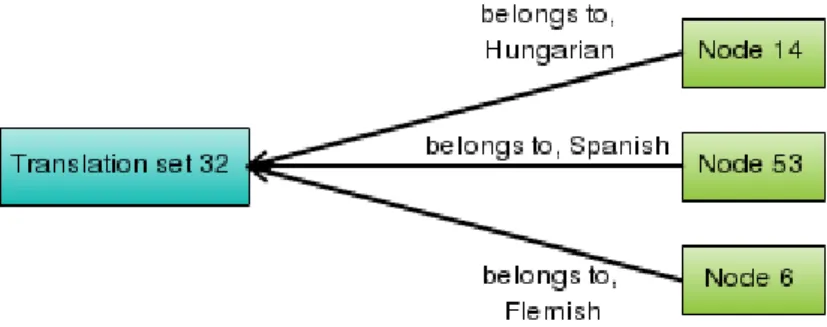
The i18n module set by default takes a similar approach to Plone by storing objects in different languages separately and forming relations between them. This way translations of the same content can be shown to the user. Unfortunately, this results in a sometimes unnecessarily cluttered interface. Many users are not interested in dealing with special meta-blocks for block translation or adding translations of categories in separate instances so they can be related as translations of each other. For this reason there are newer replacement modules in the i18n module set that allow for lower level translation of some objects (menu items, taxonomy terms and generic strings), only allowing “overlays” of textual properties. Having both approaches implemented allows users to select what fits their needs on a case by case basis.
Figure 3.7: Content instances are related to a translation set in i18n module
3.4.4
“Localizer” Module Package
Localizer was born from some of the frustrations mentioned above with the sometimes overwhelmingly complex i18n module interface. It was largely built on the i18n module code base (and also brought some concepts from the translate module built by Rob Ellis), and is developed and maintained primarily by Roberto Gerola. Localizer includes the following modules:
localizer.module Provides a general language setup interface, as well as language selec-tion. A generic string translation mechanism is provided.
localizerblock.module Adds a language field to blocks (but no general placement helpers like i18nblocks module’s meta-blocks).
3.4. DRUPAL
localizernode.module Implements language support on nodes, as well as translation relationships between them, to supply source data for language selection.
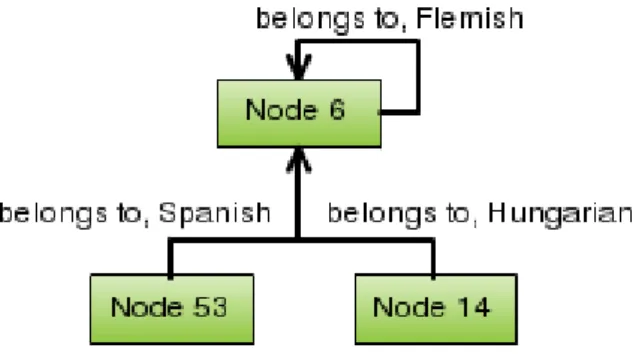
Figure 3.8: Content instances are related to a parent content in localizer
There is also a set of modules built on the generic translation mechanism provided by the localizer module. This mechanism is modeled very similarly to the Joomla approach. Object names and object keys identify a record in the database (like “menu item” and the item identifier). An object field specifies what field is translated from that record. Menu, categories and site properties are translated using this approach. Node transla-tion is similar to what the i18n module implements, although there are some additransla-tional limitations due to content instances not related to a translation set but rather a parent content item.
3.4.5
Evaluation
Drupal comes with two different module packages for multilanguage web sites. While both of the approaches have a Plone-like content translation method (having different instances for translations), other Drupal objects are handled with an approach closer to Joomla in the localizer module package. Extension possibilities are offered by Drupal so that these modules can plug into database query building and interface generation. Still Drupal 5 by its nature is built for single content language web sites primarily, and the solutions used in the mentioned modules sometimes need to work around awkward limitations. It is also apparent that because multilanguage handling is not a core value of the system, third party contributed functionalities need to be taken care of in the language supporting modules.