Graduate Theses and Dissertations Graduate College
2009
An experimental study of the effectiveness of
Panorama as a maintenance tool
Renish Palapetty
Iowa State University
Follow this and additional works at:http://lib.dr.iastate.edu/etd
Part of theComputer Sciences Commons
This Thesis is brought to you for free and open access by the Graduate College at Digital Repository @ Iowa State University. It has been accepted for inclusion in Graduate Theses and Dissertations by an authorized administrator of Digital Repository @ Iowa State University. For more information, please [email protected].
Recommended Citation
Palapetty, Renish, "An experimental study of the effectiveness of Panorama as a maintenance tool" (2009).Graduate Theses and Dissertations.Paper 11059.
An experimental study of the effectiveness of Panorama as a maintenance tool
by
Renish Palapetty
A thesis submitted to the graduate faculty
in partial fulfillment of the requirements for the degree of MASTER OF SCIENCE
Co-majors: Computer Science; Information Assurance
Program of Study Committee: Simanta Mitra, Co-major Professor Carl K. Chang, Co-major Professor
Shashi K. Gadia
Iowa State University Ames, Iowa
2009
TABLE OF CONTENTS
List of Figures iv List of Tables v Abstract vi 1. Introduction 1 2. Related Works 4 2.1. Development Tools 4 2.2. Experimental Studies 7 2.3. Documentation Tools 9 3. Panorama Design 10 3.1. Overview 10 3.2. Design 113.2.1. Panorama Plug-In extensions 12
3.2.2. GUI 16 3.3. Using Panorama 17 3.3.1. Concern management 17 3.3.2. Concern interpretation 19 4. Study 21 4.1. Study Definition 21 4.2. Study Design 23
4.2.1. The poker project 23
4.2.2. Designing Maintenance Tasks 24
4.2.3. Instrumentation 25
4.3. Conducting the Study 26
4.4. Data Collection 27 5. Result Interpretations 29 5.1. Analysis of Task1 29 5.1.1. Defects Repaired 29 5.1.2. Skill Levels 30 5.2. Analysis of Task2 31 5.2.1. Defects Repaired 31 5.2.2. Skill Levels 32 5.3. Summary Analysis 33
5.4. Threats to validity of the study 35
5.4.1. Conclusion validity 35
5.4.2. Internal Validity 35
5.4.4. External Validity 36
6. Conclusion and Future Work 37
References 40
Appendix-1 Pre-Session Questionnaire 45
Appendix-2 Post-Session Feedback 47
List of Figures
Figure 1: Eclipse Extensions 11
Figure 2: Extending Eclipse Views 12
Figure 3: Visualizer View 13
Figure 4: Visualizer Menu View 13
Figure 5: Extending the Visualizer plug-in 14
Figure 6: Panorama View 16
Figure 7: Concern Creation Screen 17
Figure 8: Adding Lines to Concerns 18
Figure 9: Viewing Concerns 19
Figure 10: Task1 - Defects Repaired 29
Figure 11: Task 1- Skill Level Breakdown 30
Figure 12: Task2 - Defects Repaired 31
Figure 13: Task2 - Skill Level Breakdown 32
List of Tables
Table 1: Data for Experimental Group 27
Abstract
It is a well known fact that the amount of time and money spent debugging and maintaining software far outstrips the amount spent developing it. Reports suggest that a majority of this effort is related to information-seeking, concept-location, and software comprehension. In addition to being inherently complex activities, these problems are exacerbated due to the fact that the original developers are often unavailable to help with the maintenance activities. To perform a maintenance task programmers first form dynamic and static mental models of the program based on their prior knowledge of programming and on information available about the program. Aside from high level design documents, Javadoc-like documentation has been the primary means of obtaining such information about
programs. There are two severe shortcomings of this form of documentation: a) as recognized by proponents of AOP, the code for many of the concerns of interest to the maintainer are scattered across different classes and files and b) there are a lot of classes and files for large systems leading to information overload and it is very hard and
time-consuming to identify the few segments of code and documentation that are relevant for a specific maintenance activity.
To address these problems, we have developed an Eclipse plug-in, Panorama, which allow master developers to document sections of code related to a specific developer concern and provides ways to make such information readily available to maintainers. This tool helps directly with information-seeking, concept location, and software comprehension activities and focuses maintainer's attention on the specific code and guidance necessary for a
particular task. To validate the tool and our approach, we conducted an experimental study with 19 subjects assigning them several maintenance tasks on a fairly complex application (a multi-user Poker game). The study showed that the experimental group who had access to Panorama was able to complete more maintenance tasks in less time than the control group who did not have access to the tool. In addition, preliminary results indicate that the tool will have more impact on productivity of persons new to the application and programming environment than on experts.
1.
Introduction
The problem
It is estimated that software maintenance costs around 60% to 80% of total software life-cycle costs [1, 4, 5, 6, 16, 38]. Maintenance tasks are time-consuming, expensive, and error prone. To make changes to a few lines of code the developer has to often hunt through the entire code base to find the different sections of related code. This is often due to the fact that the developer has to first understand the software and then perform the maintenance task [7].
The problem is exacerbated by the fact that typically the programmer assigned the
maintenance task is not the one who developed it. Often software maintenance tasks cross-cut different classes and do not fall into any particular module. The modification task can affect a concern or multiple concerns. A concern can be described as any conceptual unit of the project. For example, a feature in software can be a concern. Concerns can be code specific to non-functional requirements such as performance, security etc or just about anything the developer thinks as a conceptual unit.
Current software development tools overwhelm the programmer with details – with data and not with information or knowledge. The intentions of the original developer are not easy to understand and although modular issues are usually documented in javadoc format - the handling of crosscutting concerns is typically not well documented. Our survey of existing tools shows that although many prototype tools have been developed to find the different parts of concerns, the problem is still largely unresolved.
Work Done: Tool Development
We have developed a tool called Panorama with the specific intention of helping maintainers with the information necessary to perform specific tasks pertaining to concerns of interest. In first pass, developers with a thorough understanding of the software use the tool to quickly add information about different concerns and their related code segments. Later, maintainers, trainees, and others can use the tool to browse through the selected parts of code and documentation and to make changes as necessary.
One way to view the tool is that it provides a layer of information on top of existing documentation – and that it helps the maintainer to focus entirely on only the few elements of code and documentation necessary for a specific maintenance task. Information which cannot be captured by traditional software documentation techniques can be captured here.
We do not put any restrictions on the type of the concern that can be created nor are any restrictions placed on the type of file that can be part of the concern. For example, a part of an XML file can be an element of a concern. Concerns can be organized in a hierarchical manner allowing developers a further structuring mechanism to ease understanding.
Key benefits of the tool are:
• Creation of concerns
o allows arbitrary lines to be selected from arbitrary types of file to be added to concerns.
o addresses concerns involving both code scattering and code tangling. o hierarchy of concerns can be created.
• Documentation of concerns
o provides an expert-guided (the expert creates concerns of interest) learning tool for a new developer/student and for maintainers. Panorama is targeted to facilitate changes to code and debugging.
o Users do not have to make any changes to the original code base – it provides an additional layer of documentation for the code.
• Navigation and Visualization
o The visualiser[3] provides the ability to select concerns of interest for viewing.
o Users can easily navigate to the lines of code pertaining to a concern with the help of the visualiser.
• Reduction of burden on maintainer
o makes the code easier to reason about – and does not introduce any change in flow of execution of the code.
Work Done: Experimental Study
For the purpose of measuring the effectiveness of Panorama as a maintenance tool, an experimental study was conducted. The study was designed and performed as per the guidelines proposed by [26] and [45] and was conducted on a group of 19 subjects of which we had 16MS/PhD students and 3 doctorates. The target application, a Texas Hold-em Poker game, was selected because of the fairly complex nature of the code. The game is a client server application where in there can be multiple clients and one server, with 7 packages and with a total of 69 classes and over 6000 lines of code. The project uses Java SWT for GUI, SSLSocketFactory for sockets, and MySQL for data management.
The following is a summary of the results obtained.
• Question 1: Did the tool help all subjects of all skill levels in performing the maintenance tasks?
Yes, in the study, subjects’ using panorama does perform better than those without the tool.
• Question 2: Was the tool more helpful to novice/intermediate programmers than the experts?
The tool was more helpful for intermediate level programmers than expert level programmers. The study did not show the tool being more helpful for novice over intermediate programmers. Further studies are needed to explore this.
• Question 3: Did the tool help more in crosscutting tasks versus less scattered tasks?
The study seems to indicate this. Further studies are needed to decide this.
The rest of this document is organized as follows. In Chapter 2, we discuss related works – i.e. related development tools, related studies, and related documentation tools. In Chapter 3, we present information about the design of Panorama. In Chapter 4, we present details of the experimental study, followed by Chapter 5 in which we discuss the results. Finally, in Chapter 6 we present conclusions and future works.
2.
Related Works
We have divided up this chapter into three parts: a section on research tools to help with maintenance tasks, a section on documentation tools, and a section on experimental studies on software maintenance task.
2.1.
Development Tools
There are many tools (for example: Mylar, ConMan, Fluid AJ, Jasper, FEAT, JQuery, ConcernMapper, Mismar, Suade, Ferret, and Cosmos) that have been built to help developers cope with information overload and/or to deal with crosscutting concerns in code. The tools most related to Panorama are Jasper[12] and Mismar [14] and then FEAT[40], ConMan[19], and JQuery[21]. Common features of these tools are:
• a representation scheme used to organize information about code,
• a search mechanism used to find relevant sections for the task at hand,
• a navigation mechanism, and
• a visualization mechanism used to view only the relevant sections.
Mylar[23] automatically collects frequently used artifacts (based on user activities) and reduces information overload by displaying only the items that are relevant to the task at hand. There is no way for the user to specify particular items of interest, no way to save the results, and no way to view all the items at the same time. Thus, this tool does not help with work on crosscutting concerns.
FluidAJ[24] uses pointcuts to search for different types of joinpoints (the block linking joinpoint and the overlay linking joinpoint) and similar code with the goal of being able to view all of these sections of code at the same time as well as to make changes in one place to affect all the sections of code. This tool helps to identify such crosscutting sections and to view them dynamically as a module. Note that it is not possible to find all types of
The FEAT tool [40] uses a Concern graph representation[34][35] (which represents structural dependencies) and allows users to create, query, manipulate, and traverse concern graphs. User starts with a single class and then makes queries (such as what is the superclass of this class) on the program structure in an iterative manner to build up the concern graph. It automatically finds dependencies. The information is presented as a forest of trees to help with navigation. It does not allow users to view all the selected segments at the same time and does not allow selection at a finer grain (for example – the user cannot select an arbitrary section of code). Note that a drawback to automatic detection of dependencies is that will result in an explosion of information and typically a lot of the dependencies may not be relevant to the task at hand.
ConcernMapper [41], a newer prototype tool built by the same group that built
FEAT[40], supports only fields and methods as elements of concerns – but allows saving of concerns built based on a combination of text queries and dependency queries. It does not allow organization of relationship between the elements and focuses on gathering of elements rather than their documentation.
The JQuery tool [21] is very similar to FEAT[40]. Unlike FEAT’s own query and representation mechanism, it uses a logic query language to help the user query the syntax tree for the program and allows the user to extend the result by further queries. Like FEAT, it provides information as a forest of trees to help with navigation. It too does not allow users to view all the segments at the same time – and does not allow selection of arbitrary segments of code.
Like JQuery, the Ferret tool [8] also provides a querying mechanism – but it allows for a higher level querying mechanism (called conceptual querying) and attempts to unify different concrete queries available in different tools under one tool.
CME [11][39] comprises of a suite of Eclipse-based tools that aid in identification, encapsulation, extraction, and composition of new and existing concerns in software, and an
integrating platform on which AOSD technology providers can build new tools. However, the notion of concern is more formally used here as first-class entities that can be explicitly represented and encapsulated as modules – rather than our loosely defined notion of concerns as a topic of interest. One such tool, ConMan [19], describes support for multiple,
overlapping, concurrent concerns – but we were unable to find details.
Jasper (built at CMU) [12], like Mylar[23], was built to help developers collect relevant artifacts into a working set. Unlike, Mylar’s automatic selection – Jasper allows the user to add or remove items from the working set – including arbitrary sections of code. It allows simultaneous viewing of the separate items in the working set by opening and arranging separate windows for each of them. Their goal is to facilitate progress on current tasks by allowing developers to save elements of interest that they have already navigated to – thus reducing the time needed to make redundant navigations and the recovery of context. The saved working set allows recovery from interruptions, continuation by other users, and sharing of information. Although related, our research goals are different and our idea is to provide a means to select and document items for a crosscutting concern and to provide maintainers with different views of the items for a concern to help facilitate their work. The focus is on documenting purpose and relationships between items in a concern.
Suade [17] attempts to help maintainers by automatically generating suggestions based on analysis of the structural dependencies in a software system. For a context specified by a developer, it generates a list of other elements that are likely to be relevant.
Mismar [14] is also a concern-oriented approach to documentation like ours. They have a notion of active concerns – where the idea of the documentation is to provide a guide to developers performing some concern related activity. The guide has active steps that associates with elements – for example could be “extend a Class” – and the system will automatically start up a new Class wizard on eclipse when at that step.
Our survey reveals that although a lot of work has been done on identifying elements of concerns, their composition, and their representation – there is plenty of scope for further work in their documentation and in representation and discovery of useful relationships between the elements of concerns.
2.2.
Experimental Studies
Guidance
Before conducting our study, we looked up several similar studies in the literature for guidance in how to conduct the study. In [10] and [26], checklists and preliminary guidance are provided for conducting empirical studies in Software Engineering. In [44],
questionnaires were used to measure effectiveness of learning – and we have adapted that approach to our study. In [13], a survey of empirical studies in software engineering led to the observation that only 1.9% of all software engineering articles report controlled
experiments like ours. The large effort and resources needed to run well-designed experiments were cited as the reason.
Cognitive Levels
The study by [22] suggests that some subtasks within software maintenance are difficult in part because of the higher cognitive levels (based on Bloom’s taxonomy) that
programmers must work at. On the other hand, the study by [32] shows the need to interleave information from multiple sources to help with maintenance tasks. A study by [33] shows that programmers desire a wide range on information content in different diagrams that depend on the context of use.
Wasteful activities
[29] performed a study on how programmers spend their time during maintenance tasks and found that the majority of the time was spent on developers having to constantly
in design documents. Interrupted developers lose track of parts of their mental model resulting in laborious reconstruction.
A study by [27] found that during the performance of a maintenance task, developers spent a lot of time rediscovering relevant code that were discovered earlier. Conventional use of Eclipse’s navigation tools resulted in a lot of overhead.
A study by [31] explores the issue of maintaining visual momentum and how badly designed navigation mechanisms can cause visual disorientation. [36] reports on a controlled study of the use of three specialized software exploration tools (Ferret[8], JQuery[21], and Suade[17]) to make changes to medium sized code by professional programmers. They found that those tools had little apparent effect – and instead the styles and strategies of individuals and the characteristics of the tasks themselves had more of an impact. This is an interesting contrast to our findings that our tools had an impact on the maintainers’ productivity. Information and Navigation Needs
Recently, there have been several studies with the goal of finding out what information and tools programmers need to perform maintenance tasks. A study by [28] compares how experts and novices approach maintenance tasks. [30] performed a study on what developers had to do to make changes to a segment of code that affected one or more crosscutting concerns.
One major study at the University of Calgary [37] observed programmers making changes to medium and large sized code bases and catalogued the questions that
programmers asked during the activity. They then describe how well tools supported the programmers in answering the questions and what features are missing from the existing tools. They found that programmers need better tool support for asking more precise questions, to maintain context, and to connect the pieces of information together.
2.3.
Documentation Tools
Javadoc and Doxygen are the most common documentation tools that are in use today. [20] extends javadocs (by use of tags) to also provide information about aspects along with interface description. Similarly, [43] presents another tool that documents patterns using tags. Elide [9] is a tool that introduces modifiers in the Java language to provide support for
making crosscutting concerns explicit. In [15], Java code is annotated with the goal of making the Eclipse editor presentation more expressive.
progDoc[42] is a documentation tool that espouses the idea of elucidative programming. The authors’ opinion is that nowadays programs are best written with sophisticated IDEs and documentation is best written with powerful word processors, where both of these tools are best suited for their own specific task – while keeping source code and documentation synchronized by connecting them through links.
3.
Panorama Design
3.1.
Overview
The goal of Panorama is to help software maintainers quickly isolate the parts of code necessary for a task, assist in comprehension, and help navigate quickly to desired sections of code thereby save time in performing maintenance tasks like bug fixing and code
enhancements. Panorama is implemented as an Eclipse plug-in. One advantage is that all Eclipse projects irrespective of the programming language in which they are written can make use of the Panorama plug-in.
The tool is used in two phases. In the first phase, a master programmer familiar with the code base identifies and documents segments of code associated with a concern. In the second phase, maintainers use the tool to locate crosscutting concerns and to make the changes necessary to the code for the maintenance tasks. Some of the key capabilities of the tool are:
1. Creation of Concerns: Using Panorama tool, the user can create concerns and add
lines of code/text to the concern by selecting lines from the project files. The selection doesn’t restrict the user based on the type of the file. The description of the concerns and stripes can be added. Detailed comments can be associated with each concern in the hierarchy. This is very useful for comprehension purposes. 2. Editing of Concerns/Stripes: Concerns are editable. Stripes in a concern can be
added/deleted and also the descriptions can be edited.
3. View Concerns: The concern files can be viewed in the editor.
4. Delete Concerns: Concerns can be deleted.
5. View Concern Hierarchy: The hierarchy of concerns can be viewed.
6. View Concern in Visualiser: The concerns can be viewed using the visualiser[3]
component. Each file related to the concerns is shown as a bar and the lines of code pertaining to the concern are marked as stripes. Clicking on the stripe will open the particular file with the line numbers of the stripe highlighted.
3.2.
Design
The Eclipse SDK is a collection of plug contributing to the functionality of the IDE
Environment (PDE) which provides a rich set of tools to create, develop, test, debug and deploy Eclipse plug-ins, fragments, features, update sites and RCP products.
wants other plug-ins to extend or utilize its functionalities, it does so by declaring an extension point. Panorama hooks on to these extensions points provided by th
plug-ins in Eclipse SDK to implement/extend their functionalities.
extension can be seen as similar to a socket and a plug respectively. Extend a plug extension point by plugging into that extension poin
Figure 1: Eclipse Extensions
SDK is a collection of plug-ins built around a small core, with each plug contributing to the functionality of the IDE. Eclipse comes with a Plug-in Development
provides a rich set of tools to create, develop, test, debug and ins, fragments, features, update sites and RCP products.
ins to extend or utilize its functionalities, it does so by declaring an extension point. Panorama hooks on to these extensions points provided by th
ins in Eclipse SDK to implement/extend their functionalities. The extension point and extension can be seen as similar to a socket and a plug respectively. Extend a plug
extension point by plugging into that extension point (See Figure 1).
: Eclipse Extensions
ins built around a small core, with each plug-in in Development provides a rich set of tools to create, develop, test, debug and ins, fragments, features, update sites and RCP products. When a plug-in ins to extend or utilize its functionalities, it does so by declaring an
extension point. Panorama hooks on to these extensions points provided by the different The extension point and extension can be seen as similar to a socket and a plug respectively. Extend a plug-in’s
3.2.1. Panorama Plug-In extensions
Extension for the View plug-in extension point
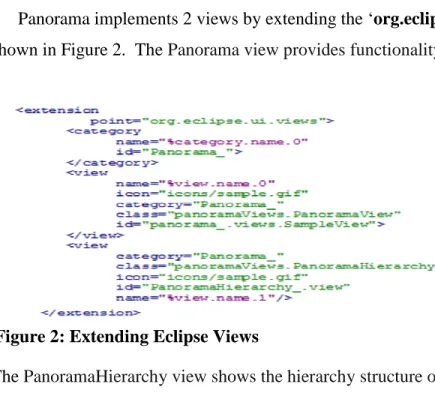
Panorama implements 2 views by extending the ‘org.eclipse.ui.views’ extention-point as shown in Figure 2. The Panorama view provides functionality to create/view/edit concerns.
The PanoramaHierarchy view shows the hierarchy structure of concerns.
Extension for the Visualiser plug-in extension point
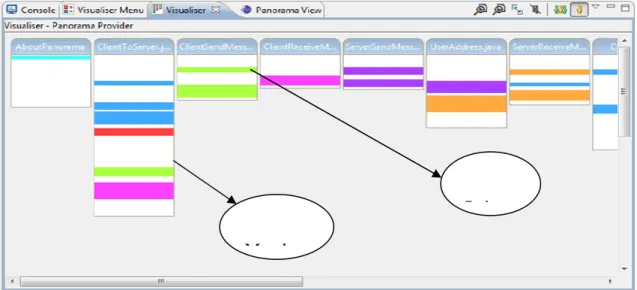
The Visualiser[3] is an extensible Eclipse plug-in that can be used to visualize anything that lends itself to a 'bars and stripes' style representation. Visualiser was a part of AspectJ Development Tools[2] that was originally created to visualize how aspects were affecting classes in a project. It has been given extension points in order that other types of information can be visualized. The panorama plug-in extends the visualiser to provide its own
functionality. The visualiser is used to view the concerns created. The ‘Visualiser’ and the ‘Visualiser Menu’ views are given below in Figures 3 and 4. Concerns can be selected for viewing by using the ‘Visualiser Menu’ view. Clicking on the colored stripe will open the file corresponding to the member and highlight the lines of the files related to the stripe.
Extending the Visualiser plug-in
In Visualiser plug-in, the extension point is declared as <extension-point id="providers"
name="%visualiserProviders" schema= "schema/providers.exsd"/>. The visualiser has an
Member
Stripe
Figure 3: Visualizer View
extension point with id “providers” that can be extended by other plug-ins. To extend the visualiser, the extender plug-in should implement 2 interfaces:
• IContentProvider- implementation of this interface provides information about
the bars that appear in the Visualiser view.
• IMarkUpProvider- implementation of this interface provides information about
the colored stripes that appear on the bars.
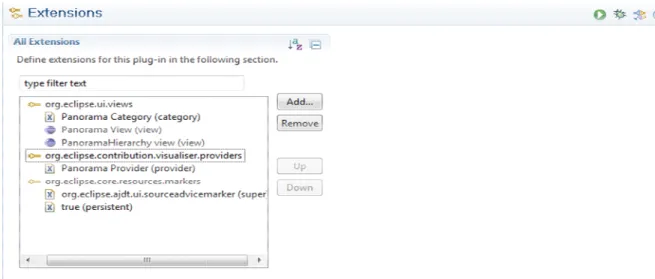
The output of plugin.xml file after extending the visualiser plug-in is given in Figure 5.
Panorama plug-in provides the implementation of IContentProvider and
IMarkUpProvider interface in the classes PanoramaContentProvider and
PanoramaMarkUpProvider respectively. The field ‘name="Panorama Provider"”’ specifies the name of the provider that is displayed on the preferences page.
‘point="org.eclipse.contribution.visualiser.providers"’ specifies that the plug-in is extends the org.eclipse.contribution.visualiser.providers extension point.
Methods that are implemented in the PanoramaContentProvider class are:
• loadVisContents(InputStream in):- The information pertaining to the bars and
stripes are stored in the file Content.vis and MarkUp.mvis respectively. The method public static void loadVisContents(InputStream in) reads the contents of Figure 5: Extending the Visualizer plug-in
the Content.vis file and initializes the bars. When the plug-in loads, the initialize method is called which in turn calls the method loadVisContents(InputStream in).
• Similarly for PanoramaMarkUpProvider, the method loadMarkups(InputStream
in) method is called to define the stripes and markups.
Refreshing the Visualiser Contents dynamically
The Visualiser plug-in is static, i.e. it does not update the contents of the visualiser when the contents of the file are changed. The information for bars and stripes are loaded from the respective files when the plug-in is initialized. To make the plug-in to dynamically update the contents of the visualiser, the method VisualiserPlugin.refresh() should be called. The refresh method reloads the groups and members and updates the Visualiser contents. Before calling the refresh() method, the groups and members have to be updated with the latest information. I.e. we have to load the contents of the Contents.vis and MarkUp.mvis and update the groups, members and markups. A call to the loadVisContents(InputStream in) and
loadMarkups(InputStream in) method will update the groups and markups. Now the refresh()
method of the VisualiserPlugin class will update the contents of the visualiser. Note that the methods are all static; this makes sure that we are working on the same instance of the object.
Processing Mouse Clicks on bars and stripes
processMouseclick(IMember member, boolean markupWasClicked,int buttonClicked):
This method processes a mouse click on a member belonging to this provider. The default implementation of the Visualiser is to open the member view if the user clicks on the bar from the group view; it doesn’t do anything if it is in the member view. The
PanoramaContentProvider implements this method to open the file to which the member
belongs to. When the user clicks on the stripe, the provider opens the file to which the member belongs to and also highlights the starting line of the stripe.
Marker
The Panorama Plug-in also makes use of the marker to show the lines of the selected stripe in the editor.
3.2.2. GUI
Panorama GUI implementation uses standard elements of Java Standard Widget Toolkit (SWT) that are familiar and easy to use.
Panorama view
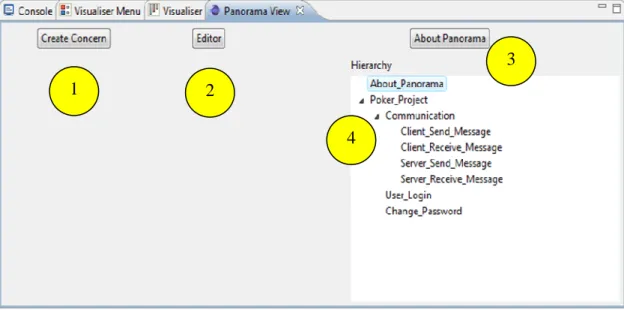
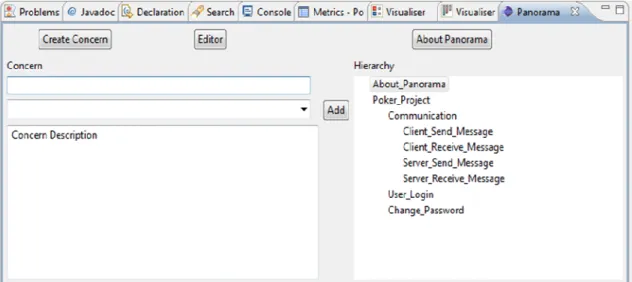
The panorama plug-in view is as shown in Figure 6. There are several controls in the Panorama view. These controls allows user to switch between different panels that provide different features and functionality. Here is the list of the controls (more details for each panel will be provided later in the report):
• Create Concern: allows user to do create new concern.
• Editor: allows user to open the Panorama editor. Panorama editor allows user to add, see and modify the content of a selected, previously created concern.
• About Panorama: basic information about the plug-in.
• Hierarchy: Shows the hierarchy view of the concerns created.
1 2
3
4
3.3.
Using Panorama
3.3.1. Concern management
Creation of concern: On clicking the ‘create concern’ button, Figure 7 appears.
The concern name, parent concern and concern description is taken as input. On clicking the ‘Add’ button, the concern is created and is shown in the hierarchy view.
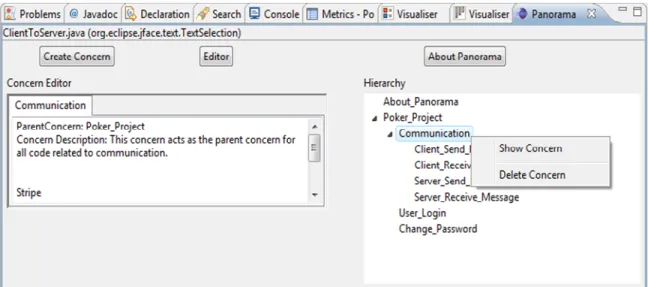
Adding lines to the concern: To add lines to the concern , (1) open the editor by clicking on the ‘Editor’ button, (2) select the lines of text to be added as a stripe, (3) highlight the concern to which the lines are to be added in the hierarchy view, and (4) click on ‘Add Lines To Concern’ button (See Figure 8).
View the Concern: Double click on the concern in the hierarchy tree. The concern file is opened in the Panorama Editor. The concern file can also be viewed by right clicking on the concern in the hierarchy and then selecting the ‘Show Concern’ Menu Item from the popup menu (See Figure 9).
Delete Concern: Right Click on the concern to be deleted in the hierarchy tree and click on the ‘Delete Concern’ item in the popup menu.
1 2
3 4
3.3.2. Concern interpretation
Once the concerns are created for a project, the software maintainers can use them to understand the project better to aid them in performing maintenance tasks. The concern file contains information about the concern description and definition of stripes related to that concern. The concern file output can be viewed using the PanoramHierarchy View. Sample contents of the concern file are as below.
The parent concern, concern description and the stripe definition is given in the concern file. Let us take a closer look at the stripe definition. The line ‘Stripe
:GUI.java:403:/PokerProject/src/clientGUI/GUI.java:152:9’ gives information about the stripe. The file the stripe belongs to is GUI.java and the relative path to the file is
‘/PokerProject/src/clientGUI/GUI.java’ .The stripe starts at line 152 and the depth is 9 which means that lines 152-162 pertains to the stripe. The user can then use the visualiser view to click on the corresponding stripe in the bar to navigate to the part of code described in the stripe. The description of the stripe is also given so as to make it easier for the user to comprehend. This is in addition to the comments that can be given in the program.
The stripes are written to the concern file in a hierarchical form, i.e. the first stripe is the first step/action corresponding to the concern and the second stripe follow the first and so on. This helps the user in navigating the stripes in a step by step manner helping in understanding the concern better. The PanoramaHierarchy view is used in conjunction with the Visualiser to understand the concerns. Clicking on the particular stripe in the visualiser will open the corresponding file and highlight the lines corresponding to the stripe. This makes it easier for the user to navigate to the corresponding parts of code pertaining to the concern.
4.
Study
A survey of empirical studies in software engineering [13] led to the observation that only 1.9% of all software engineering articles report controlled experiments. They
hypothesized that the large effort and resources needed to run well-designed experiments was the reason for the dearth of similar experiments. The study emphasized the importance of controlled experiments as the classical scientific method for identifying cause-effect relationships. To check the effectiveness of Panorama plug-in as a maintenance tool a controlled experiment was conducted. This study was designed and performed as per the guidelines proposed by [26] and [45] and was conducted on a group of 19 subjects of which we had 16MS/PhD students and 3 doctorates. All of them were reasonably capable
programmers.
The goals of the study were:
1. To test whether the Panorama tool helps in performing maintenance tasks in a better way when compared to performing of the tasks without using the tool. 2. To quantify the time and defects repaired.
4.1.
Study Definition
Hypotheses
The following hypotheses were formulated to be tested in the experiment:
1. The Panorama tool does help the subjects of all skill levels in performing the maintenance tasks.
2. The Panorama tool is more useful to novice/intermediate level programmers than experts.
3. Panorama tool helps in performing tasks involving more scattered code across classes than tasks with less scattered code
Variables of the Experiment
Panorama tool support is the only factor of this experiment. This factor is measured in the nominal scale, at two levels: exists, not exists.
There are 2 dependent variables in the study.
1. Time taken for performing the maintenance task measured in minutes: The time is measured as the time taken by the subject to perform task 1 and task 2 with the maximum time of 45 and 30 minutes allowed for subjects to perform task 1 and task 2 respectively.
2. Number of defects repaired: This is measured by examining the code to see the number of defects repaired.
Selection of Subjects
The subjects participated in the study on a voluntary basis. All the subjects were
informed about the details of the study and were informed on the nature of tasks they will be asked to perform. An initial questionnaire [Appendix 1] was given to subjects to assess their programming skills.
Self Assessment Questionnaire Evaluation
The questionnaire presented to the subjects is evaluated to assess the skill level of the subject. The skill level is ranked as novice, intermediate and expert. Each subject will be categorized into any of the three levels. It so turned out upon evaluation of the questionnaire that for the experimental group, we have 4 in the novice group, 3 in the intermediate group and 3 in the expert group. In the case of the control group, the number was 4 in novice, 3 in intermediate and 2 in expert group. Remember that we had assigned subjects to the study group randomly and that the self assessment scores were evaluated upon completion of the tasks.
4.2.
Study Design
The study was designed to measure the effectiveness of the tool, so the only factor relevant is the tool support. For the control group, this factor does not exist and for the experimental group this factor exists. The duration of the study was 2 hours.
The subjects were divided into 2 groups. The grouping of the subjects into control and experiment group was done randomly. This was done to ensure that we have the same (almost) number of participants in both the groups. The control group had 9 students and they were asked to perform the maintenance tasks without the help of Panorama tool. The experiment group consisted of 10 subjects who were asked to perform the maintenance tasks with the help of the Panorama tool.
4.2.1. The poker project
For the purpose of measuring the effectiveness of Panorama, the project selected was the code which simulated the “Texas Hold ‘em Poker” game. This project was selected because of the fairly complex nature of the code. The game is a client server application where in there can be multiple clients and one server. There are 7 packages in the project with a total of 69 classes and over 6000 lines of code. The project uses Java SWT for the GUI,
SSLSocketFactory for sockets, and MySQL for data management. So the subjects should have a good knowledge of these technical aspects in order to understand the working of the code.
Concerns for the poker project were created using the Panorama tool after getting a thorough understanding of the implementation details. Concerns can be any aspect of the project like error logging, user login functionality, user change password functionality, client-server communication etc. For the purpose of our study those concerns were created which will help the subject to understand the code and also help in performing the tasks given as part of the study. The concerns created and their descriptions are given below.
1. Concern Name: Communication. Concern Description: This concern acts as the parent concern for all code related to communication.
2. Concern Name: User Login. Concern Description: The concern details the code pertaining to the Login functionality.
3. Concern Name: Change Password. Concern Description: The concern details the code pertaining to the Change Password functionality.
All the above concerns had code spread over many classes.
4.2.2. Designing Maintenance Tasks
Task 1
The first task was to fix the login functionality of the poker code. To play the poker game the user should be authenticated first by the server. For that, the user is provided a dialog box asking the username and password which is then validated by the server.
Bugs were injected in 4 different places along the execution path of the login code. The subject has to identify them and fix them. The details of the injected bugs are given below.
1. Username: when the user enters the username, the input is converted to Upper Case making the server not recognize the username.
2. Password: when the user enters the password, the input is converted to Upper Case making the server not recognize the password.
3. The Command message takes a parameter for recognizing and interpreting the command. For the login functionality, it is ‘login’. This was changed to ‘Login’ at 2 places (Notice the ‘L’ in login is changed to uppercase). When the client sends server the message , the command parameter was changed to ‘Login’ and also when the server sends the reply message back to the client , the command message parameter was ‘Login’ instead of ‘login’.
To fix these above bugs the subjects should understand how the login functionality works and should also be familiar with the code pertaining to server-client communication and vice-versa.
Task 2
The second task was to fix the ‘Change Password’ functionality. The user can change his/her password once logged in.
Again bugs were injected in 4 different places along the line of execution of the code. The details of the bugs injected are given below.
1. GUI: The GUI for change password doesn’t appear when the clicks on the
‘change password’ menu. The shortcut key in the program was changed from ‘Alt + P’ to ‘Alt + Y’. The accelerator for the MenuItem ‘Change Password’ is set to ‘Alt + P’ whereas the listener is implemented for the accelerator ‘Alt + Y’. 2. Old Password: The old password when entered by the user is changed to upper
case which makes the server declare it as invalid.
3. Command Message: For the change password functionality, it is
‘reset_password’. This was changed to ‘resetPassword’ at 2 places. When the server sends the reply message back to the client, the command message
parameter was ‘resetPassword’ instead of ‘reset_password’ in both the password accepted and rejected cases.
I
n order to successfully complete the task the subjects should be able to understand the code pertaining to the change password functionality and also should be familiar with the basics of Java SWT and socket communication.4.2.3. Instrumentation
The instruments of this study were:
• the eclipse IDE with the poker game code into which defects were injected
• the design documents and javadocs of the poker projects
• the tools (Panorama Hierarchy View, Visualiser Menu, Visualiser) for the experiment group
• the tutorial slides presented to the participants to familiarize them with the poker project
• the tutorial slides presented to the participants in the experiment group to familiarize them with the Visualiser plug-in
4.3.
Conducting the Study
This section details how the experiment was conducted and the data was collected.
1. Pre Study preparation: To prepare the subjects for the study a tutorial detailing the basic GUI screens and functionality was presented. This was followed by
familiarizing the design documents and javadocs of the poker project by the subject for 10 minutes. The experimental group was then given another tutorial to help them familiarize with the Visualiser plug-in and Panorama tool. Subjects were then asked to familiarize themselves with the Communication aspect of the code using the communication concern in Panorama. A time of 20 minutes was given to each subject. The subjects of the control group were asked to familiarize with the communication aspect of the code without the help of the tool for 20 minutes.
2. Task 1: A slide detailing the first task was given to the subjects. The maximum time allowed for performing the task was 45 minutes at the end of which the source code is examined to determine the number of defects repaired by the subject. The experimental group made use of the concerns provided to them by the tool in fixing the defects.
3. Task 2: Similarly the task 2 was given to the subjects and the maximum time given was 30 minutes.
4. Post Session Questionnaire: A post session questionnaire was given to the subjects of the experimental group to get the feedback on the use of the tool. Subjects were asked questions whether they found the Panorama tool helpful in understanding the poker project, whether they found the tool useful in performing the maintenance tasks and also additional comments about the tool.
5. Data Validation: The time on the system clock was noted before and after each task was performed and the subject was not allowed to change the time on the system clock. The defects corrected were measured by examining the code after the completion of each task or after the stipulated maximum time allowed for that particular task whichever is earlier.
4.4.
Data Collection
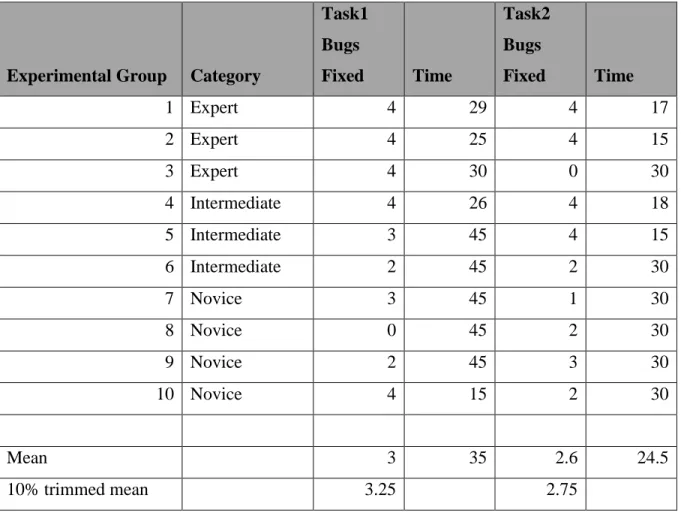
In Table 1 and Table 2, we present the data collected from the study. It was found that the total number of repaired defects is more in the experimental group (with the help of
Panorama) than the control group (without Panorama). Further analyses are provided in Chapter 5.
Table 1: Data for Experimental Group
Experimental Group Category
Task1 Bugs Fixed Time Task2 Bugs Fixed Time 1 Expert 4 29 4 17 2 Expert 4 25 4 15 3 Expert 4 30 0 30 4 Intermediate 4 26 4 18 5 Intermediate 3 45 4 15 6 Intermediate 2 45 2 30 7 Novice 3 45 1 30 8 Novice 0 45 2 30 9 Novice 2 45 3 30 10 Novice 4 15 2 30 Mean 3 35 2.6 24.5 10% trimmed mean 3.25 2.75
Table 2: Data for Control Group
Control Group Category
Task1 Bugs Fixed Time Task2 Bugs Fixed Time 1 Expert 4 45 2 30 2 Expert 0 45 1 30 3 Intermediate 0 45 1 30 4 Intermediate 0 45 1 30 5 Intermediate 2 45 1 30 6 Novice 0 45 0 30 7 Novice 3 45 2 30 8 Novice 2 45 1 30 9 Novice 0 45 1 30 Mean 1.222222 45 1.111111 30 10% trimmed mean 1 1.14286
In this chapter, we analyze the data obtained from the study and present the
5.1.
Analysis of Task1
5.1.1. Defects Repaired
As shown in the figure below experimental group for Task1 is 3 (
1.22 for the control group. This suggests that for Task1 the subjects using the tool repaired more defects than the subjects without the tool.
Out of the 10 subjects in the experimental group 5 could repair all the defects for Task1 whereas out of 9 subjects in the control group only 1 could repair all the defects. The
minimum time taken for completing Task1 in experimental group is 15 minutes whereas it is 45 minutes for the control group. The mean time taken for the completion of Task1 for experimental group is 25 minutes whereas in the case of the control group it is 45 minutes.
Figure
5.
Result Interpretations
In this chapter, we analyze the data obtained from the study and present the
below, the mean number of defects repaired in the case of the experimental group for Task1 is 3 (total number of defects introduced was 4) whereas it is
1.22 for the control group. This suggests that for Task1 the subjects using the tool repaired more defects than the subjects without the tool.
n the experimental group 5 could repair all the defects for Task1 whereas out of 9 subjects in the control group only 1 could repair all the defects. The
minimum time taken for completing Task1 in experimental group is 15 minutes whereas it is or the control group. The mean time taken for the completion of Task1 for experimental group is 25 minutes whereas in the case of the control group it is 45 minutes.
Figure 10: Task1 - Defects Repaired
In this chapter, we analyze the data obtained from the study and present the results.
he mean number of defects repaired in the case of the 4) whereas it is
1.22 for the control group. This suggests that for Task1 the subjects using the tool repaired
n the experimental group 5 could repair all the defects for Task1 whereas out of 9 subjects in the control group only 1 could repair all the defects. The
minimum time taken for completing Task1 in experimental group is 15 minutes whereas it is or the control group. The mean time taken for the completion of Task1 for experimental group is 25 minutes whereas in the case of the control group it is 45 minutes.
We can say from the subjects who completed Task1 that the amount of time taken with the tool is 44% less than the time taken without the tool.
Zero defects were corrected by 5 subjects in the control group whereas the number is only 1 for the experimental group.
The 10% trimmed mean of number of defects repaired for Task1 is 3.25 for the experimental group and 1 for the control group. The 10% trimmed mean gives us a better idea because it trims the top and bottom extremes.
5.1.2. Skill Levels
Now let us analyze the results taking into account the skill level of the subjects calculated from the self assessment questionnaire.
As per the above figure, a
completed Task1 whereas 1 subject out of 2 who are experts in the con
complete Task1. The mean time taken for completion is 45 minutes in the case of the control group and 28 minutes for the experimental group. The mean number of defects corrected is 4 in the case of experimental group and 2 for the control
effectiveness of the tool even though the subjects involved are expert level programmers. Figure
We can say from the subjects who completed Task1 that the amount of time taken with the ol is 44% less than the time taken without the tool.
Zero defects were corrected by 5 subjects in the control group whereas the number is only 1 for the experimental group.
The 10% trimmed mean of number of defects repaired for Task1 is 3.25 for the imental group and 1 for the control group. The 10% trimmed mean gives us a better idea because it trims the top and bottom extremes.
Now let us analyze the results taking into account the skill level of the subjects calculated assessment questionnaire.
As per the above figure, all the 3 expert level subjects in the experimental group completed Task1 whereas 1 subject out of 2 who are experts in the control group could complete Task1. The mean time taken for completion is 45 minutes in the case of the control group and 28 minutes for the experimental group. The mean number of defects corrected is 4 in the case of experimental group and 2 for the control group. This is indicative of the
effectiveness of the tool even though the subjects involved are expert level programmers. Figure 11: Task 1- Skill Level Breakdown
We can say from the subjects who completed Task1 that the amount of time taken with the
Zero defects were corrected by 5 subjects in the control group whereas the number is
The 10% trimmed mean of number of defects repaired for Task1 is 3.25 for the imental group and 1 for the control group. The 10% trimmed mean gives us a better
Now let us analyze the results taking into account the skill level of the subjects calculated
ll the 3 expert level subjects in the experimental group trol group could complete Task1. The mean time taken for completion is 45 minutes in the case of the control group and 28 minutes for the experimental group. The mean number of defects corrected is 4
group. This is indicative of the effectiveness of the tool even though the subjects involved are expert level programmers.
For the intermediate level, there were 3 each in experimental and control groups. 1 subject experimental group could complete Task1 a
is 3 whereas no intermediate level programmer could complete Task1 in the control group and the mean number of defects corrected was .67.
The novice level had 4 subjects each for experimental and control groups. One the experimental group completed Task1. The mean number of defects corrected for the novice level in experimental group is 2.25 and it is 1.25 for the control group.
Therefore we can see that the tool performs better with all levels of program although we cannot say that the grouping of the programmers is foolproof.
5.2.
Analysis of Task2
5.2.1. Defects Repaired
As per the below figure, t
experimental group for Task2 is 2.6 (total number of defects
control group. This suggests that for Task2 the subjects using the tool repaired more defects than the subjects without the tool.
For the intermediate level, there were 3 each in experimental and control groups. 1 subject experimental group could complete Task1 and the mean number of defects corrected is 3 whereas no intermediate level programmer could complete Task1 in the control group and the mean number of defects corrected was .67.
The novice level had 4 subjects each for experimental and control groups. One the experimental group completed Task1. The mean number of defects corrected for the novice level in experimental group is 2.25 and it is 1.25 for the control group.
Therefore we can see that the tool performs better with all levels of program although we cannot say that the grouping of the programmers is foolproof.
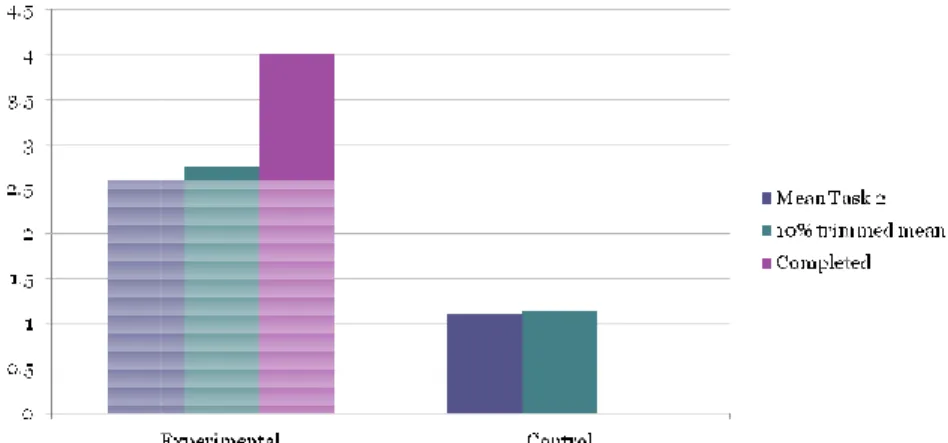
As per the below figure, the mean number of defects repaired in the case of the
experimental group for Task2 is 2.6 (total number of defects is 4) whereas it is 1.11 for the control group. This suggests that for Task2 the subjects using the tool repaired more defects than the subjects without the tool.
Figure 12: Task2 - Defects Repaired
For the intermediate level, there were 3 each in experimental and control groups. 1 nd the mean number of defects corrected is 3 whereas no intermediate level programmer could complete Task1 in the control group
The novice level had 4 subjects each for experimental and control groups. One subject in the experimental group completed Task1. The mean number of defects corrected for the novice level in experimental group is 2.25 and it is 1.25 for the control group.
Therefore we can see that the tool performs better with all levels of programmers
he mean number of defects repaired in the case of the
is 4) whereas it is 1.11 for the control group. This suggests that for Task2 the subjects using the tool repaired more defects
The lower mean when compared to Task1 could be because of the nature of Task2. As described earlier Task2 requires the subjects to have basic knowledge about Java SWT and this could be a reason for the lower mean. Also the amount of time given for performing Task2 is 30 minutes as compared to 45 minutes given for Task1. The assumption that less time would be required to perform Task2 was based on the lesser number of classes that were related to the ‘Change Password’ functionality. This assumption did not prove to be right.
Out of the 10 subjects in the experimental group 4 could repair all the defects for Task2 whereas none in the control group could repair all the defects. The minimum time taken for completing Task2 in experimental group is 15 minutes. The mean time taken for
completion of Task2 for experimental group is 16.25 minutes. 1 subject from each group couldn’t correct any of the defects.
The 10% trimmed mean of number of defects repaired for Task2 is 2.75 for the experimental group and 1.14 for the control group.
5.2.2. Skill Levels
Figure
ompared to Task1 could be because of the nature of Task2. As described earlier Task2 requires the subjects to have basic knowledge about Java SWT and this could be a reason for the lower mean. Also the amount of time given for performing
s as compared to 45 minutes given for Task1. The assumption that less time would be required to perform Task2 was based on the lesser number of classes that were related to the ‘Change Password’ functionality. This assumption did not prove to be right.
of the 10 subjects in the experimental group 4 could repair all the defects for Task2 whereas none in the control group could repair all the defects. The minimum time taken for completing Task2 in experimental group is 15 minutes. The mean time taken for
completion of Task2 for experimental group is 16.25 minutes. 1 subject from each group couldn’t correct any of the defects.
The 10% trimmed mean of number of defects repaired for Task2 is 2.75 for the experimental group and 1.14 for the control group.
Figure 13: Task2 - Skill Level Breakdown
ompared to Task1 could be because of the nature of Task2. As described earlier Task2 requires the subjects to have basic knowledge about Java SWT and this could be a reason for the lower mean. Also the amount of time given for performing
s as compared to 45 minutes given for Task1. The assumption that less time would be required to perform Task2 was based on the lesser number of classes that were related to the ‘Change Password’ functionality. This assumption did not prove to be right.
of the 10 subjects in the experimental group 4 could repair all the defects for Task2 whereas none in the control group could repair all the defects. The minimum time taken for completing Task2 in experimental group is 15 minutes. The mean time taken for the
As per the above figure, 2 out of the 3 expert level subjects in the experimental group completed Task2. Note that no subject in the control group could complete Task2. The mean number of defects corrected by the expert level subjects in experimental group is 2.67 and it is 1.5 for the control group.
Again, 2 out of 3 intermediate subjects in the experimental group could complete Task2. The mean number of defects corrected by the intermediate level subjects in experimental group is 3.34 and it is 1 for the control group.
None in the novice level in both groups could complete Task2.The mean number of defects corrected by the novice level subjects in experimental group is 2 and it is 1 for the control group.
We see a better performance in terms of defects corrected when using the Panorama tool than without in the case of Task2 also.
5.3.
Summary Analysis
Q1: Did the tool help all subjects of all skill levels in performing the maintenance tasks? Yes, the subjects’ using panorama tool does perform better than those without the tool. Thus we can say that our first hypothesis holds true.
The mean number of defects corrected by the subjects is 5.6(Task1 and Task2 combined) with the help of Panorama. The mean for subjects who performed the tasks without the tool is 2.33.
This shows that the time it takes to correct defects is lesser than what it takes without the help of Panorama. Remember that Task1 was given a maximum time of 45 minutes and Task2 was given a maximum time of 30 minutes to complete.
Furthermore, we saw that the results in each skill level are better for subjects with tool support than without.
Q2: Was the tool more helpful to novice/intermediate programmers than the experts? Maybe! From the below figure, the difference of mean number of defects corrected between the groups for expert level for Task1 is 2, 2.33 for intermediate level, and 1 for novice. For Task2 it is 1.17 for expert level, 2.33 for intermediate and 1 for novice. We can see the difference is more in the case of intermediate level for both the tasks. It can be said that the tool is more helpful for intermediate level programmers than expert level
programmers. Therefore programmers with intermediate level skills will find the tool more useful. Also, we can say that the Panorama tool has the potential to be used for training purposes. Unfortunately the same cannot be said about the tool for novice level
programmers. The reason for this can attributed to the fact that the skill levels of programmers were self assessed. Further studies can throw more light into this.
Q3: Did the tool help more in crosscutting tasks versus less scattered tasks? Maybe! Definitely the results for Task1 are better than Task2 and we know that Task1 has more scattered code than Task2. But we cannot say conclusively say that the tool helped in performing Task1 better than Task2 because of time allotted for the tasks. Task2 was allotted 30 minutes as compared to 45 minutes for Task1. This was due to the fact that we had to keep the study time to less than 2 hours due to subject convenience and
availability. Further the nature of the tasks doesn’t allow us to compare them as each task requires different level of familiarity with different technologies.
5.4.
Threats to validity of the study
This section discusses the four types of issues [44] that can threaten the validity of our study.
5.4.1. Conclusion validity
To obtain good statistical power, we used a reasonably large sample size (19), used a 10% trimmed mean during analysis of results, and ensured that the tasks were reasonably hard to complete. To obtain good reliability, we standardized our procedures. The treatment given to all the subjects in the experimental group were the same. Similarly, the same set of instructions and tutorials were given to all the subjects in the control group. To obtain good implementation, we standardized the protocols for administering the study to different
subjects. One weakness in our study is that we could not conduct the study for all the subjects at the same time due to time constraints.
5.4.2. Internal Validity
. Internal validity threat due to selection was avoided by randomly assigning students to the experimental and control groups (so as to avoid bias). Although validity threat due to history was possible because the study was not conducted at the same time for all the subjects (thus subjects can communicate with each other), this was not considered to be probable given that there was no compensation given to the subjects on completion of the tasks and subjects were generally unaware of other participants.
Internal validity threat due to maturity, i.e. naturally occurring changes over time (such as the motivation level, mental alertness at the time of the study, familiarity with the objects of the study etc) were also addressed as follows. Each subject was given 5 time slots from which they could chose any one time for participation in the study. This was done ensure that the subjects participate in the study at their convenient time. The total duration of the study
was designed to be 2 hours so as to avoid fatigue and boredom in the subjects. Any type of unintended learning was avoided as the subjects were presented with the Panorama tool and the poker project immediately before performing the actual tasks. We tried to minimize learning effect (that learning was in progress during the study) by having a standard training session before the actual experiment and providing everyone with the same set of documents and the same amount of time to peruse these documents.
5.4.3. Construct Validity
The measure used here for effectiveness of the tool, i.e. the number of defects corrected in given time, has been used in several similar studies [18]. Several other steps were taken to address threats to construct validity. The experience level of target subjects was fixed to be at a minimum level. The grouping of subjects into different levels of programming skills is not foolproof and is subjective. Tasks were not designed based on the nature of the concerns. Both the tasks were non-functional and had code scattered across classes. Task1 had code in more classes than Task2. Both the concerns crosscut each other.
5.4.4. External Validity
There are several limiting factors that affect external validity of this study:
• Although complex, the project used for the study was a student developed project and was not subjected to the rigorous inspection and testing typical for a
commercial application.
• Subjects were chosen from academia and were not professional software engineers.
• The setting for the study was a relaxed academic lab and not a possibly pressure laden environment of a typical maintenance engineer.
6.
Conclusion and Future Work
We developed Panorama to help maintainers of code from being overwhelmed with the information overload even when having to make changes to only a few lines of code. The tool helps in finding the specific segments, understanding the related issues, and ability to quickly make the necessary changes. In particular, the ability to quickly select elements of a concern and to document these elements with explanatory comments – and conversely, to allow viewing of the elements of the concern as a whole or in a detailed manner as needed for understanding and performing maintenance tasks sets us apart.
A survey of related tools shows that our work is novel in a number of ways. There are three major differences with other tools:
• Most of the other tools define a ‘concern’ formally. In Panorama, anything that the developer wants can be incorporated into a concern. This gives the user the flexibility to create any type of concern. For example, the user can create concerns with arbitrary lines of text from any type of file. Panorama does not overwhelm the user with data and shows information only relevant to the concern.
• Most of the other tools focus on automatically finding related segments of code based on developer work context. Our tool does not try to divine developer intentions and instead uses an expert to find and organize documentation for related segments of code for a concern.
• Our tool focuses on documentation of each stripe in a concern and on describing relationships of stripes in the concern.
We performed an experimental study to validate the tool and our results indicate that use of this tool helps developers fix more bugs in less time. Our positive results were partly unexpected because of the following reasons:
• Our prototype tool does not have some of the improved navigation mechanisms that we thought necessary but were unable to incorporate due to lack of time.
• The target code was complex and huge and the time allocated for each task was quite limited. The experimental subjects were using our tool for the first time with very little time assigned to learning about it.
• The results from a recent study [36] indicated that use of tools similar to ours had little effect on programmer productivity on tasks - and instead styles and
strategies of individuals had more of an impact. At the same time, it must be noted that it is hard to compare between different studies due to several factors.
• We expected maybe a little improvement but the magnitude of the improvement (across all levels of proficiencies) was unexpected.
Although our study clearly shows that the Panorama tool positively affects the
performance of maintenance tasks more studies are required to compare the different tools and verify the effect these tools have on maintainers. The results of the study need to be further validated as the same results may not hold true for a different group of subjects (software professionals) with a different task set.
Future Work
We have several ideas for future work. Some of these ideas were obtained from feedback from participants [Appendix 2] of the study and direct observation of their activities. Some of the ideas are:
• Automatic creation of concerns based on use cases. This will select the lines of code which were executed at the time of execution of a use case.
• Map PanoramaHierarchy View and Visualiser. The PanoramaHierarchy View gives the user the flow of execution of the concern and the Visualiser helps the user navigate to the corresponding stripe. Mapping between the two will help user in navigating the code in the same order as given in the PanoramaHierarchy View.
• The methods calls in each concern should be highlighted.
• Concern should not get affected when the program is modified.
• Ability to automatically insert break points along the execution path of the concern.
• Generation of concern document that could be printed out and read like a javadoc.
• Sequence flow graph for concerns to allow relationships between elements of concerns to be explicitly modeled.
References
[1] Abran, A., Nguyemkim, H., “Analysis of Maintenance Work Categories Tough Measurement”, Proceedings of the Conference on Software Maintenance, Sorrento, Italy, IEEE Computer Society Press, Los Alamitos, CA, 1991, pp. 104-113.
[2] AJDT: AspectJ Development Tools Eclipse Technology Project. http://www.eclipse.org/ajdt.
[3] AJDT: AspectJ Development Tools Eclipse Technology Project. , The Visualiser ,
http://www.eclipse.org/ajdt/visualiser/
[4] Alkhatib, G., “The Maintenance Problem of Application Software: An Empirical Analysis”, Journal of Software Maintenance – Research and Practice, 4(2):83-104, 1992.
[5] Artur, L. J., “Software Evolution: The Software Maintenance Challenge”, John Wiley & Sons, New York, NY, 1988.
[6] Beath, C. N., Swanson, E. B., “Maintaining Information Systems in Organizations”, John Wiley & Sons, New York, NY, 1989.
[7] Boehm, B. W. 1976. Software engineering. IEEE Trans. Comput. 12, 25, 1226– 1242.
[8] Brian de Alwis and Gail C. Murphy, "Answering Conceptual Queries with Ferret",ICSE’08, May 10–18, 2008, Leipzig, Germany.
[9] A.Bryant, A. Catton, K. De Volder, and G. C. Murphy, “Explicit programming,” pp.10-18, In Proceedings of the 1st international Conference on Aspect-Oriented Software Development (AOSD '02), 2002.