Distributed File Systems
Topics
Introduction
File Service Architecture
DFS: Case Studies
Case Study: Sun NFS
Introduction
File system were originally developed for
centralized computer systems and desktop
computers.
File system was as an operating system
facility providing a convenient
programming interface to disk storage.
Introduction
Distributed file systems support the
sharing of information in the form of files
and hardware resources.
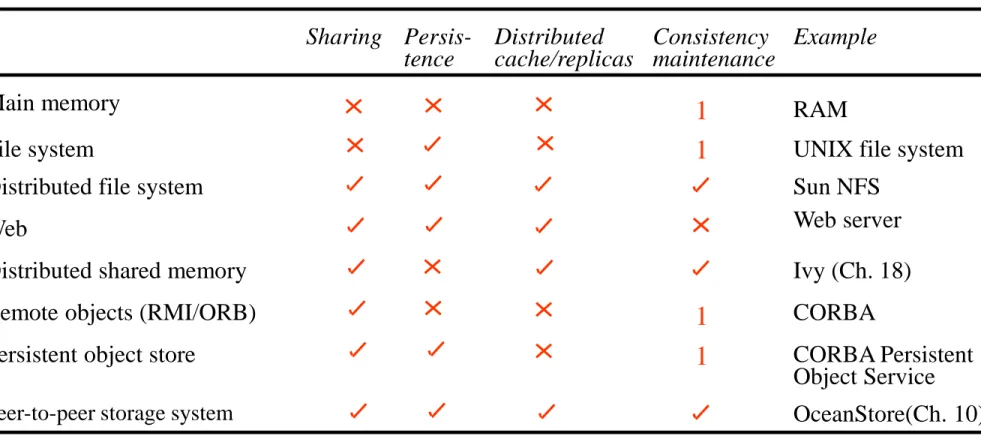
Figure 1
provides an overview of types of
Introduction
Sharing
Persis-tence Distributedcache/replicas Consistencymaintenance Example
Main memory RAM
File system UNIX file system
Distributed file system Sun NFS
Web Web server
Distributed shared memory Ivy (Ch. 18)
Remote objects (RMI/ORB) CORBA
Persistent object store 1 CORBA Persistent
Object Service
Peer-to-peer storage system OceanStore(Ch. 10)
1 1 1
Figure 1. Storage systems and their properties
Types of consistency between copies: 1 - strict one-copy consistency √ - approximate consistency X - no automatic consistency
Introduction
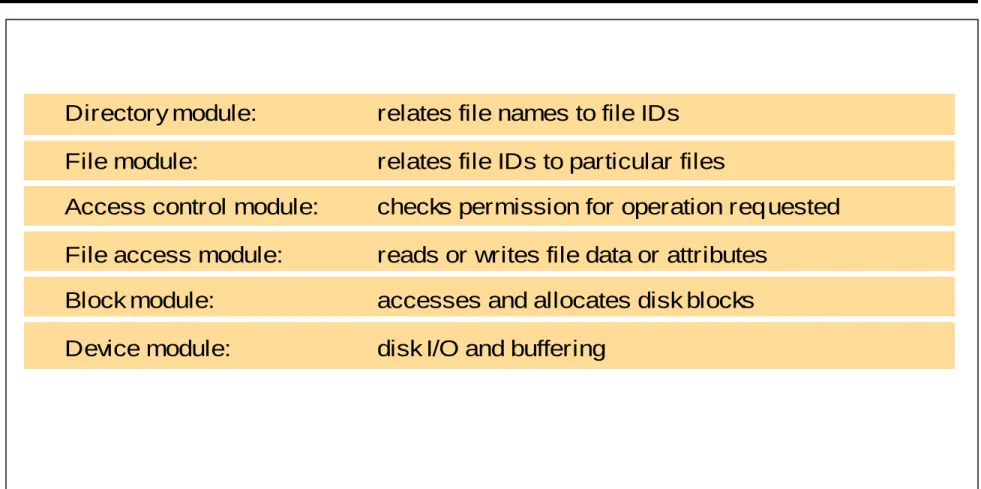
Figure 2
shows a typical layered module
structure for the implementation of a
non-distributed file system in a conventional
operating system.
Introduction
Directory module: relates file names to file IDs
File module: relates file IDs to particular files
Access control module: checks permission for operation requested
File access module: reads or writes file data or attributes
Block module: accesses and allocates disk blocks
Device module: disk I/O and buffering
Figure 2. File system modules
Introduction
File systems are responsible for the
organization, storage, retrieval, naming,
sharing and protection of files.
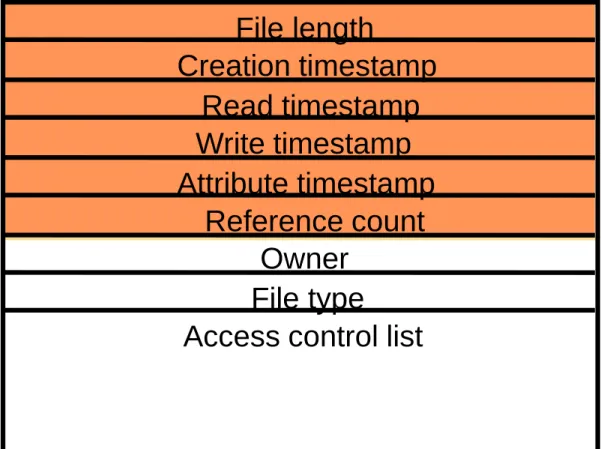
Files contain both data and attributes.
A typical attribute record structure is
Introduction
File length Creation timestamp Read timestamp Write timestamp Attribute timestamp Reference count Owner File typeAccess control list
Figure 3. File attribute record structure
Introduction
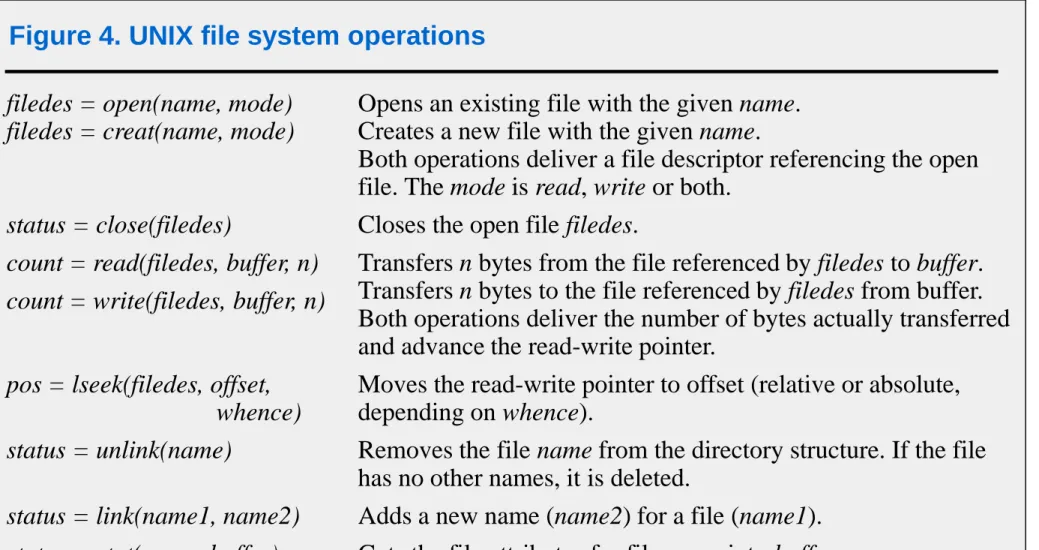
Figure 4
summarizes the main operations
on files that are available to applications in
UNIX systems.
Introduction
filedes = open(name, mode) filedes = creat(name, mode)
Opens an existing file with the given name. Creates a new file with the given name.
Both operations deliver a file descriptor referencing the open file. The mode is read, write or both.
status = close(filedes) Closes the open file filedes.
count = read(filedes, buffer, n) count = write(filedes, buffer, n)
Transfers n bytes from the file referenced by filedes to buffer. Transfers n bytes to the file referenced by filedes from buffer. Both operations deliver the number of bytes actually transferred and advance the read-write pointer.
pos = lseek(filedes, offset, whence)
Moves the read-write pointer to offset (relative or absolute, depending on whence).
status = unlink(name) Removes the file name from the directory structure. If the file has no other names, it is deleted.
status = link(name1, name2) Adds a new name (name2) for a file (name1).
status = stat(name, buffer) Gets the file attributes for file name into buffer.
Figure 4. UNIX file system operations
Couloris,Dollimore and Kindberg Distributed Systems: Concepts & Design Edn. 4 , Pearson Education 2005
Introduction
Distributed File system requirements
Related requirements in distributed file systems
are:
Transparency Concurrency Replication Heterogeneity Fault tolerance Consistency Security EfficiencyFile Service Architecture
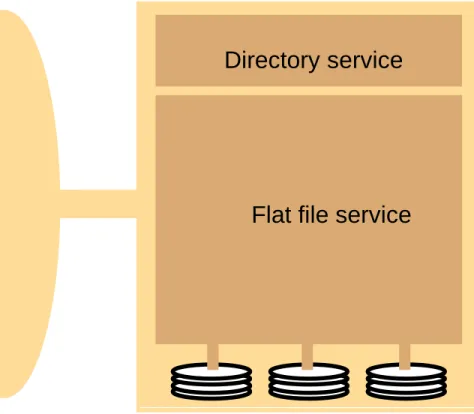
An architecture that offers a clear separation of
the main concerns in providing access to files is
obtained by structuring the file service as three
components:
A flat file service
A directory service
A client module.
The relevant modules and their relationship is
shown in Figure 5.
File Service Architecture
Client computer Server computer
Application program
Application program
Client module
Flat file service Directory service
File Service Architecture
The Client module implements exported
interfaces by flat file and directory services on
server side.
Responsibilities of various modules can be
defined as follows:
Flat file service:
Concerned with the implementation of operations on
the contents of file. Unique File Identifiers (UFIDs) are used to refer to files in all requests for flat file
service operations. UFIDs are long sequences of bits chosen so that each file has a unique among all of the files in a distributed system.
File Service Architecture
Directory service:
Provides mapping between text names for the files
and their UFIDs. Clients may obtain the UFID of a file by quoting its text name to directory service.
Directory service supports functions needed
File Service Architecture
Client module:
It runs on each computer and provides integrated
service (flat file and directory) as a single API to
application programs. For example, in UNIX hosts, a client module emulates the full set of Unix file
operations.
It holds information about the network locations of
flat-file and directory server processes; and achieve better performance through implementation of a
cache of recently used file blocks at the client.
File Service Architecture
Flat file service interface:
Figure 6 contains a definition of the interface to a flat file service.
File Service Architecture
Read(FileId, i, n) -> Data if 1≤i≤Length(File): Reads a sequence of up to n items -throws BadPosition from a file starting at item i and returns it in Data.
Write(FileId, i, Data) if 1≤i≤Length(File)+1: Write a sequence of Data to a -throws BadPosition file, starting at item i, extending the file if necessary.
Create() -> FileId Creates a new file of length0 and delivers a UFID for it.
Delete(FileId) Removes the file from the file store.
GetAttributes(FileId) -> Attr Returns the file attributes for the file.
SetAttributes(FileId, Attr) Sets the file attributes (only those attributes that are not shaded in Figure 3.)
Figure 6. Flat file service operations
File Service Architecture
Access control
In distributed implementations, access rights checks
have to be performed at the server because the server RPC interface is an otherwise unprotected point of access to files.
Directory service interface
Figure 7 contains a definition of the RPC interface to a directory service.
File Service Architecture
Lookup(Dir, Name) -> FileId Locates the text name in the directory and -throws NotFound returns the relevant UFID. If Nameis not in
the directory, throws an exception.
AddName(Dir, Name, File) If Name is not in the directory, adds(Name,File)
-throws NameDuplicate to the directory and updates the file’s attribute record. If Name is already in the directory: throws an exception.
UnName(Dir, Name) If Name is in the directory, the entry containing Name
is removed from the directory.
If Name is not in the directory: throws an exception.
GetNames(Dir, Pattern) -> NameSeq Returns all the text names in the directory that match the regular expression Pattern.
Figure 7. Directory service operations
File Service Architecture
Hierarchic file system
A hierarchic file system such as the one that UNIX
provides consists of a number of directories arranged in a tree structure.
File Group
A file group is a collection of files that can be located on any server or moved between servers while
maintaining the same names.
– A similar construct is used in a UNIX file system. – It helps with distributing the load of file serving
between several servers.
– File groups have identifiers which are unique throughout the system (and hence for an open system, they must be globally unique).
File Service Architecture
To construct a globally unique ID we use some unique
attribute of the machine on which it is created, e.g. IP number, even though the file group may move subsequently.
IP address date
32 bits 16 bits
File Group ID:
DFS: Case Studies
NFS (Network File System)
Developed by Sun Microsystems (in 1985)
Most popular, open, and widely used.
Case Study: Sun NFS
Figure 8
shows the architecture of Sun NFS.
NFS architecture
Client computer Server computer
UNIX file system NFS client NFS server UNIX file system Application program Application program
Virtual file system Virtual file system
O th e r fi le sy ste m UNIX kernel system calls NFS protocol (remote operations) UNIX Operations on local files Operations on remote files UNIX kernel Figure 8. NFS architecture
Case Study: Sun NFS
The file identifiers used in NFS are called
file handles
.
fh = file handle:
Filesystem identifier i-node number i-node generation
Case Study: Sun NFS
A simplified representation of the RPC
interface provided by NFS version 3
Case Study: Sun NFS
• read(fh, offset, count) -> attr, data
• write(fh, offset, count, data) -> attr
• create(dirfh, name, attr) -> newfh, attr
• remove(dirfh, name) status
• getattr(fh) -> attr
• setattr(fh, attr) -> attr
• lookup(dirfh, name) -> fh, attr
• rename(dirfh, name, todirfh, toname)
• link(newdirfh, newname, dirfh, name)
• readdir(dirfh, cookie, count) -> entries
• symlink(newdirfh, newname, string) -> status
• readlink(fh) -> string
• mkdir(dirfh, name, attr) -> newfh, attr
• rmdir(dirfh, name) -> status
• statfs(fh) -> fsstats
Figure 9. NFS server operations (NFS Version 3 protocol, simplified)
Case Study: Sun NFS
NFS access control and authentication
The NFS server is stateless server, so the user's
identity and access rights must be checked by the
server on each request.
In the local file system they are checked only on the
file’s access permission attribute.
Every client request is accompanied by the userID
and groupID
It is not shown in the Figure 9 because they are
inserted by the RPC system.
Kerberos has been integrated with NFS to provide
a stronger and more comprehensive security
solution.
Case Study: Sun NFS
Mount service
Mount operation:
mount(remotehost, remotedirectory, localdirectory)
Server maintains a table of clients who have
mounted filesystems at that server.
Each client maintains a table of mounted file
systems holding:
< IP address, port number, file handle>
Remote file systems may be hard-mounted
or
soft-mounted
in a client computer.
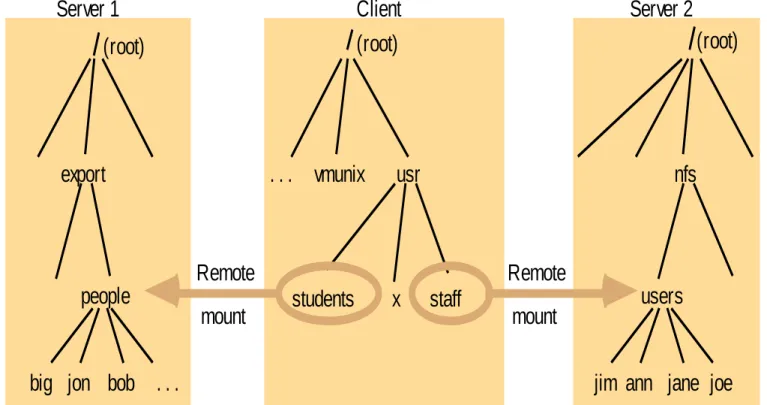
Figure 10
illustrates a Client with two remotely
mounted file stores.
Case Study: Sun NFS
jim ann jane joe users students usr vmunix Client Server 2 . . . nfs Remote mount staff
big jon bob people Server 1 export (root) Remote mount . . . x (root) (root)
Note: The file system mounted at /usr/students in the client is actually the sub-tree located at /export/peoplein Server 1; the file system mounted at /usr/staffin the client is actually the sub-tree located at /nfs/usersin Server 2.
Case Study: Sun NFS
Automounter
The automounter was added to the UNIX
implementation of NFS in order to mount a remote
directory dynamically whenever an ‘empty’ mount
point is referenced by a client.
Automounter has a table of mount points with a
reference to one or more NFS servers listed against each.
it sends a probe message to each candidate server
and then uses the mount service to mount the filesystem at the first server to respond.
Automounter keeps the mount table small.
Case Study: Sun NFS
Automounter Provides a simple form of replication
for read-only filesystems.
E.g. if there are several servers with identical copies
of /usr/lib then each server will have a chance of being mounted at some clients.
Case Study: Sun NFS
Server caching
Similar to UNIX file caching for local files:
Pages (blocks) from disk are held in a main memory
buffer cache until the space is required for newer pages. Read-ahead and delayed-write optimizations.
For local files, writes are deferred to next sync event
(30 second intervals).
Works well in local context, where files are always accessed through the local cache, but in the remote case it doesn't offer necessary synchronization
guarantees to clients.
Case Study: Sun NFS
NFS v3 servers offers two strategies for
updating the disk:
Write-through
- altered pages are written to
disk as soon as they are received at the
server. When a write() RPC returns, the
NFS client knows that the page is on the
disk.
Delayed commit
- pages are held only in the
cache until a commit() call is received for
the relevant file. This is the default mode
used by NFS v3 clients. A commit() is
issued by the client whenever a file is
closed.
Case Study: Sun NFS
Client caching
Server caching does nothing to reduce
RPC traffic between client and server
further optimization is essential to reduce
server load in large networks.
NFS client module caches the results of
read, write, getattr, lookup
and
readdir
operations
synchronization of file contents (one-copy
semantics) is not guaranteed when two or
more clients are sharing the same file.
Case Study: Sun NFS
Timestamp-based validity check
It reduces inconsistency, but doesn't
eliminate it.
It is used for validity condition for cache
entries at the client:
(T - Tc < t) v (Tmclient = Tmserver) t freshness guarantee
Tc time when cache entry was last validated
Tm time when block was last updated at server
Case Study: Sun NFS
t is configurable (per file) but is typically set
to 3 seconds for files and 30 secs. for
directories.
it remains difficult to write distributed
applications that share files with NFS.
Case Study: Sun NFS
Other NFS optimizations
Sun RPC runs over UDP by default (can use TCP
if required).
Uses UNIX BSD Fast File System with 8-kbyte
blocks.
reads() and
writes()
can be of any size
(negotiated between client and server).
The guaranteed freshness interval t is set
adaptively for individual files to reduce getattr()
calls needed to update Tm.
File attribute information (including Tm) is
Case Study: Sun NFS
NFS performance
Early measurements (1987) established that:
Write() operations are responsible for only 5% of server calls in typical UNIX environments.
– hence write-through at server is acceptable.
Lookup() accounts for 50% of operations -due to
step-by-step pathname resolution necessitated by the naming and mounting semantics.
More recent measurements (1993) show high
performance.
see www.spec.org for more recent measurements.
Case Study: Sun NFS
NFS summary
NFS is an excellent example of a simple,
robust, high-performance distributed
service.
Achievement of transparencies are other
goals of NFS:
Access transparency:
– The API is the UNIX system call interface for both local and remote files.
Case Study: Sun NFS
Location transparency:
– Naming of filesystems is controlled by client mount operations, but transparency can be
ensured by an appropriate system configuration.
Mobility transparency:
– Hardly achieved; relocation of files is not
possible, relocation of filesystems is possible, but requires updates to client configurations.
Scalability transparency:
– File systems (file groups) may be subdivided and allocated to separate servers.
Ultimately, the performance limit is determined by the load on the server holding the most
heavily-used filesystem (file group).
Case Study: Sun NFS
Replication transparency:
– Limited to read-only file systems; for writable
files, the SUN Network Information Service (NIS) runs over NFS and is used to replicate essential system files.
Hardware and software operating system
heterogeneity:
– NFS has been implemented for almost every known operating system and hardware platform and is supported by a variety of filling systems.
Fault tolerance:
– Limited but effective; service is suspended if a server fails. Recovery from failures is aided by the simple stateless design.
Case Study: Sun NFS
Consistency:
– It provides a close approximation to one-copy semantics and meets the needs of the vast majority of applications.
– But the use of file sharing via NFS for
communication or close coordination between processes on different computers cannot be recommended.
Security:
– Recent developments include the option to use a secure RPC implementation for authentication and the privacy and security of the data
transmitted with read and write operations.
Case Study: Sun NFS
Efficiency:
–NFS protocols can be implemented for use in situations that generate very heavy loads.
DISTRIBUTED FILE SYSTEM
References
Chapter 12, Distributed Systems Concepts and Design, 5th Edition, by G.
Coulouris, J. Dollimore and T. Kindberg Apache Hadoop