Abstract—The paper presents an original software tool for creating and querying medium sized image collections. The software tool includes a server for a relational multi-user MMDBMS that uses traditional data types (integer, double, char, varchar) and a complex data type, called image. This type is used for storing the image and the extracted information regarding the size and type of the image, color and texture characteristics. An element of originality for this software is the content based retrieval module that allows the user to build content based visual queries to the image level. The color information is represented by the color histograms automatically extracted from the image. The software uses HSV color space, quantized to 166 colors. The dissimilitude between images is calculated using one of the following metrics: Euclidian metrics, histogram intersection or a combination of them. One of the advantages of this tool is that it has a low cost and it is easy to maintain, comparing to other similar database servers.
I. INTRODUCTION
ITH the development of the different technologies, in the last years an impressive number of gray and col-or images have been accumulated. The development of the multimedia field, the creation of new images and video ar-chives of large dimensions, have led a series of researchers to turn their attention, over the past decade, towards creat-ing new tools for retrievcreat-ing the visual data based on their content.
W
The purpose of this process is to retrieve from a database the relevant images for a query. It represents in fact, an ex-tension of the traditional process of information retrieval to visual media.
This paper presents an application that includes a dedi-cated MMDBMS server based on the SQL3 standard, which is less expensive than a commercial database server. The system is platform independent and can easily manage medium sized image collections and alphanumerical infor-mation from the medical domain. It has a standard interface for building content based retrieval using color and texture characteristics and can be easily used by any person work-ing in this area, even if he does not have advanced knowl-edge in using the computer.
This MMDBMS has the following original elements and advantages:
- The way that images are managed
- Visual interface for content-based image query using color and texture characteristics
- Possibility to see the images when the records are viewed
The paper has the following structure: section 2 presents an overview of similar implementation of well known data-base servers. Section 3 presents the implemented applica-tion, section 4 presents the main functions of the MMDBMS, and section 5 presents the conclusions and fu-ture work in this project.
II.SIMILARIMPLEMENTATIONS
In order to manage content based retrieval operations for images collections, there have been implemented a series of applications. Most of them they use classical database sys-tems as: Microsoft SQL Server, My SQL or Interbase.
We will try next to exemplify few of the most representa-tive database servers, from the functionality point of view (possibility to store multimedia data) and from the data stor-age algorithms point of view.
A. Adaptive Server Anywhere/Advantage Server Anywhere
The first database servers analyzed are the one produced by Sybase Company, namely Adaptive Server Anywhere (ASA) and Advantage Server Anywhere (ADS).
These servers contained at the beginning the same mod-ule as Microsoft SQL Server. Until the version 4.9, these products were almost identical (1) (2).
Advantage Database Server is a relational database serv-er, with good performances that supports SQL commands and data indexing. It has the advantage of having a low cost comparing to other products and it is easy to be installed.
Its basic characteristics include data encoding on disk, using partitions and a new technology for queries process-ing that is currently on the patentprocess-ing process. This technol-ogy enhances significantly the performances of the server.
In order to manage unstructured data, ASA/ADS created two kinds of data type that are similarly processed. The first data type is CS_TEXT for text information and the second is CS_IMAGE for image data information.
517
A Multimedia Database Server for information storage and
querying
Cosmin Stoica Spahiu University of Craiova, Craiova,
Romania Email:
CS_TEXT can contain data variable in size, not greater than 2147483647 bytes.
CS_IMAGE is used for image data type information. It describes a variable length attribute, with a size up to 2147483647 bytes, stored binary. CS_IMAGE is defined as unsigned char data: typedef unsigned char CS_IMAGE.
Because the size of this kind of attribute can be very high, the values are not stored inside the table. It will be stored only a pointer of text data type to a special file used only to store these type of information. To avoid the possi-bility that different data with that have the same content are not overlapping, image type column it will be associated a time stamp.
To work with these data types, the server offers few basic functions to load the images, transfer the images and get images size.
To send this data, the clients send information as an un-differentiated data flux using a special function write_text_stream. Because it is not different in parameters, the server cannot use methods frequently used to compute input data: srv_descfmt, srv_bind, and srv_xferdata. It will have to use a set of methods specialized for text and images.
To send text or image data back to the client there are two possibilities depending to the number of columns from a record. In case the record has only one column and that column has the image or text type it can be considered as an undifferentiated data flux. If the returned record contains more columns, including a text/image column, then it will be processed using describe/bind/transfer.
When it is added an information of image or data type, it will be reserved 16 bytes space inside the text/image col-umn, for a pointer. In this case a part of it represents page number of the text/image file header. It is known with the name of first text/image page (FTP).
FTP contains two parts:
• Text Data Page link that contains the useful informa-tion
• Optionally, the data node structure used to access the information in an easy manner.
Once that this FTP is allocated for text/image data, it will never be de-allocated. If a future update of data structure needs a smaller number of pages that were initially allocat-ed, the pages no longer in use will be de-allocated. If all the pages will be set the value to NULL, all pages will be dealo-cated excepting FTP.
The fugure 1 presents the relation between records con-taining images/text and the text/images pages.
It is presented next a program example implemented in C that can be used to send image/text data to a client (2,3,4):
#include <ctpublic.h> #include <ospublic.h> /*
Local prototype. */
CS_RETCODE ex_srv_send_text PROTOTYPE(( SRV_PROC *spp,
CS_COMMAND *cmd ));
/*
EX_SRV_SEND_TEXT
Example how to send text or image data to a client using srv_send_text. This example will send all that the server sent, to a client.
Arguments:
spp – internal pointer.
cmd – command handler for commands returning text It returns:
CS_SUCCEED - Result set succesfull sent. CS_FAIL – error detected.
*/
CS_RETCODE ex_srv_send_text(spp, cmd) SRV_PROC *spp;
CS_COMMAND *cmd; {
CS_BOOL ok; /* Error control flag. */ CS_INT ret; /* ct_fetch return value. */ CS_INT len_read; /* Amount of data read. */ CS_BYTE data[1024]; /* Buffer for text data. */ /* Initialization. */
ok = CS_TRUE;
/* Read the text from the server. */
while ((ret = ct_get_data(cmd, 1, data, CS_SIZEOF(data),
&len_read)) == CS_SUCCEED) {
/* Write text to client a chunck at a time */
if (srv_send_text(spp, data, len_read) != CS_SUCCEED) { ok = CS_FALSE; break; } } switch(ret) { case CS_SUCCEED:
/* The routine completed successfully. */ case CS_END_ITEM:
/* Reached the end of this item’s value. */ case CS_END_DATA:
/* Reached the end of this item’s value. */ break;
case CS_FAIL: /* The routine failed. */ case CS_CANCELED:
/* The get data operation was cancelled. */ case CS_PENDING:
C_INT C_TEX
T C_FLOAT C_IMAGE C_CHAR
FTP
Text / images
pages
FTP
/* Asynchronous network I/O is in effect. */ case CS_BUSY:
/* An asynchronous operation is pending. */ default:
ok = CS_FALSE; }
return (ok ? CS_SUCCEED : CS_FAIL); }
In the previous example srv_send_text is used to send a single attribute of image or text type to a client. Before be-ing called this method the server has to call srv_text_info in order to get the size of the data to be sent.
ASA/ADS consider text and image data as being identi-cal, with only one exception, namely the character set used for conversion.
B. My SQL
MySQL server does not offer any other type that can be used to store images, but BLOB. BLOB data is an object stored in binary form. It can be used to store a variable amount of data. The BLOB data attributes doesn’t have a predefined character data set. They are computed as binary strings (arrays of bytes). Data sorting and comparing can be done only using numeric values of the attributes – numeric values on the bytes from record (5).
There are four types of BLOB data: TINYBLOB, BLOB, MEDIUMBLOB and LONGBLOB. The only difference be-tween them is the maximum size accepted for data.
If it is not active the SQL strict mode and it is put in a BLOB column a value that exceeds the maximum size, it will be truncated to the maximum size. If it is used the strict SQL, when it will be inserted a data bigger than the maximum size, it will not be inserted and it will be returned an error message.
The BLOB data type can be considered to be similar with VARBINARY. This can have an unlimited size. The differ-ence is that if you try to index a BLOB data type it has be specified the desired size of the index. Another difference is that a BLOB data type cannot have default values.
It will be presented next a program example of how to write and read images in and from MySQL tables using C+ + and Trolltech Qt4 tool (5):
Step 1: Create table: CREATE TABLE person (
ID INTEGER AUTO_INCREMENT, IMAGE BLOB,
PRIMARY KEY (ID) ) ENGINE=InnoDB; Step 2: read the image:
QString fileName = "picture.jpg"; QImage image(fileName);
LBL_IMAGE->setPixmap(QPixmap::fromImage(image)); // Adding image in a QLabel object (optional) // Load the image
QFile file(fileName); QByteArray obj; if(file.open(QIODevice::ReadOnly)) { obj = file.readAll(); file.close(); }
// write the image in the table
QSqlDatabase::database().transaction(); QSqlQuery query;
query.prepare( "INSERT INTO picture ( IMAGE ) VAL-UES (:IMAGE)" ); query.bindValue(":IMAGE", obj); query.exec(); if( query.lastError().isValid()) { qDebug() << query.lastError().text(); QSqlDatabase::database().rollback(); } else QSqlDatabase::database().commit(); Step 3: read the field containing the image int idx = 1; // The records ID to recover QSqlDatabase::database().transaction(); QSqlQuery query;
query.prepare("SELECT ID, IMAGE FROM picture WHERE ID=:ID"); query.bindValue(":ID", idx); query.exec(); query.next(); if( query.lastError().isValid()) { qDebug() << query.lastError().text(); QSqlDatabase::database().rollback(); } else {
QByteArray ba1 = query.value(1).toByteArray(); QPixmap pic;
pic.loadFromData( ba1);
// Add the image in a QLabel object LBL_IMAGE->setPixmap(pic); QSqlDatabase::database().commit(); }
C. Microsoft SQL Server
The Microsoft SQL Server treats the image and large text type different from the rest of available data types. The most important aspect that should be considered is that images need a large amount of disc space. That is why it is recom-mended if it is needed to store large data (having a size big-ger than 8KB) to be stored in external files, outside MSSQL Server. In this case it will be stored on the server only the path to the file that has the information. This kind of imple-mentation gives the user the possibility to store large amount of data on different disks and even on a different server.
The big advantage of this approach is that the database can be kept to a low size. It should be mentioned that the default initial size of the database is 20MB, and the future extensions will be made in 5 MB steps.
A possible disadvantage of this approach is that the users have to be careful do not delete the image files from the computer before deleting them from the database.
If it is chosen the solution to store the images inside the tables, a first option would be to use VARBINARY(max) data type. This can store a date having up to 231 bytes,
namely 2GB (6). A big disadvantage is that SQL Server stores a history of the data before and after any update that generating a high volume of data needed to be stored on the disc. This history is used in case of an error, to restore pre-vious data.
It should be monitorized the available disc space to avoid situations when the server suddenly stops and doesn’t exe-cute any query because of the lack of space on the disk.
Microsoft SQL Server also offers to the users an “image” data type, but with no other support. It is considered a bina-ry data with a variable length, between 0 and 231-1
(2,147,483,647) bytes. There are no predefined functions that can be used to extract images characteristics or build-ing content based queries.
More than that, in the SQL Server 2008 it is specified the fact that the “ntext”, “text” and “image” data types will be eliminated in a future version of the server. The recommen-dation was to avoid using these data types in the applica-tions that are currently implemented and to try to change the already implemented applications in order not to use them. Instead of them there should be used nvarchar(max), varchar(max), or varbinary(max) (6,7,8).
It is presented next a usage example for image data type (6,7,8):
1. in this example it will be inserted a new record in Transactions table. In table person it should be inserted an image.
2. It is used the next code:
INSERT INTO Transaction.Record
(PersonId, OperationType, Person, IdProduct) SELECT 2, 1, GETDATE(),1000,PhotoToLoad.*, 1 FROM OPENROWSET
(BULK 'picture.jpg', SINGLE_BLOB) PhotoToLoad 3. After execution the next result is obtained:
(1 row(s) affected)
4. To update the record, first it is selected the PersonID from Transaction. Then it will be added a sub-query that will return a single record with one column:
UPDATE Transaction.Record SET Person = (
SELECT PhotoToLoad.* FROM OPENROWSET
(BULK ‘picture.jpg’, SINGLE_BLOB) PhotoToLoad) WHERE PersonId = 3
5. After execution the next result is obtained: (1 row(s) affected)
For the MS SQL Server, the images cannot be seen di-rectly from server. It is needed an external program that can do that (6,7,8,11).
D. Oracle 10g
The full solution is provided by Oracle – Oracle 10g Database Server and Intermedia tool that support all kind of multimedia data types, including DICOM files.
It offers support for the images by ORDImage data type. In the Oracle 10g Intermedia version it is also offered
sup-port for the ISO/IEC standard 13249-5:2001 SQL/MM Part 5: Still Image Standard. On this standard there are defined relational data types for images and images’ characteristics. Each object type includes attributes, methods and it has as-sociated SQL functions and methods. By using the SQL standard as an interface, gives the possibility for the appli-cations to be more accessible and easy to be transferred on different database servers. The following object types are defined by SQL/MM Still Image:
•SI_StillImage – stores digital images along with the aso-ciated characteristics (height, wide, type, etc)
•SI_AverageColor – describes the medium color charac-teristics of an image.
•SI_Color – has the color values of a digital image. •SI_ColorHistogram – describes the relative frequencies
of the colors inside the image.
•SI_PositionalColor – describes the color characteristics of an image from the location point of view.
•SI_Texture – describes the texture characteristics of an image.
•SI_FeatureList – describe an image that is represented by composed characteristics, based on four basic charac-teristics along with associated values (9) (10).
This type of solution is not always justified and cannot be always implemented by small companies. The reason is that it implies high costs to buy the server and to design com-plex applications for content based retrieval.
a) Files system
A multimedia database server is composed by two com-ponents: an application instance and a system that manages information on the disc (9,10,11).
The Oracle database memory architecture on the server side is called SGA (System Global Area). SGA keeps infor-mation in the cache about: data buffers, SQL commands, and users’ information. The server also keeps log files with the transactions history.
Oracle keeps information in a logic form as tables and physical as files. Tables can contain different types of mem-ory segments as data segments, indexes segments, etc. In re-turn, the segments contain one or several sub-segments. These sub-segments are contiguous groups of data blocks. A data block is the basic unit for storing information. To the physic level, the data files contain one or several data blocks, where the size of blocks can be different from one file to another.
The Oracle server manages its storing capacity using the information kept in the SYSTEM tables. These contain data dictionary and indexes and clusters. A data dictionary is a collection of tables that contain all the information about the objects declared by the users in the databases.
Each Oracle instance reserves a memory buffer when it starts and it is released when it is stopped. The following information are stored in the SGA, each of them having the size defined when the server starts:
• Buffer cache: keeps the most recent data blocks that were not written yet on the disc.
• REDO log file: has a log with all the changes that were made in the database. It is used in case on an error.
• Common area: this area keeps common structures and data from data dictionary
The data dictionary from the cache includes a series of tables and views that forms a map with the database ture. Oracle stores information both about physical struc-tures of the database and logical ones.
The Global Program Zone (PGA) contains control data for Oracle server processes. The size of the PGA depends on the options set up when installing. These options refer to:
o Stack size: the memory that stores the variables from current session.
o Session information: information about the status of current information
o SQL zone: needed variables are stored in the buffer o Sorting zone: a zone where there are stored informa-tion about sorting, indexes, etc.
III. MMDBMS IMPLEMENTED FOR IMAGES MANAGEMENT It can be observed that excepting the Oracle Database server, the other database server analyzed does not offer full support for images management. Most of them recommend using the BLOB data type, with no other support. Nor Ora-cle is always the best solution, because of the high cost in-volved, that making hard accessible for small companies.
As an alternative it has been implemented a Multimedia Database Management Server (MMDBMS) that has includ-ed a new data type callinclud-ed IMAGE. This data type can be used to store images along with color and texture character-istics automatically extracted from images.
The server it is a tool implemented in C++ that has in-cluded special functions for creation, maintenance, simple text based query and content based visual query using color and texture characteristics of the multimedia digital collec-tions.
The tests that have been performed were done on images from medical domain where changes in color or texture are very important. It was observed that the best results were obtained using color histograms for color characteristics and co-occurrence matrix for texture characteristics.
This MMDBMS permits database creation, table and constraints adding (primary key, foreign keys), inserting images and alphanumerical information, simple text based query and content based query using color and texture char-acteristics. The software tool is easy to be used because it re-spects the SQL standard. It does not need advanced infor-matics knowledge and has the advantage of low cost. It is a good alternative for a classical database management sys-tem (MS Access, MS SQL Server, Oracle10g Server and In-termedia), which would need higher costs for database serv-er and for designing applications for content-based re-trieval.
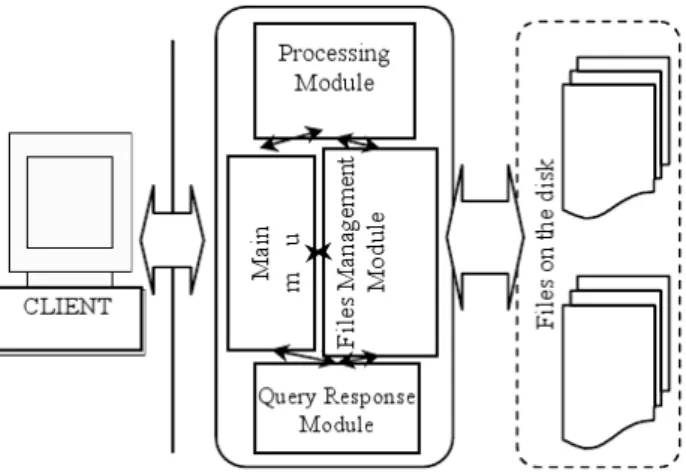
The server is implemented modular, being easy to add new functionalities or to update the already existence mod-ules. It has two main modules: server engine and server files manager.
The server engine includes all functions implemented in the DBMS. It is composed from several sub-modules each of them with specific tasks: the main module, queries
re-sponse module, Select images processing module, Charac-teristics extraction module, Update/Delete module.
The main module is the module which manages all com-munications with the client. It is the one that receives all queries requests, check what is the type of query requested, extracts the parameters of the query and calls the specific module to execute it.
Queries response module is used after the query is exe-cuted. The results will be sent to it in order to be compacted using a standard format. Then return the results o the client. The client will receive it on the same communication chan-nel used to send the request.
Select/Select/Image Processing module. If the main mod-ule concludes that is a SELECT SQL command, it will call the Select Processing module. This module extracts the pa-rameters from the query and then search in the database files for specific information. If the query is a SELECT IM-AGE query, it will use for comparing the similitude of char-acteristics instead equality of parameters.
Characteristics Extraction Module is used when the main module receives a SELECT IMAGE or a UPDATE query which uses an image that is not already in the database. In this case it is needed first to be processed. This module is called to extract the color and texture characteristics of the image. The data of the results will be used to initialize a variable of IMAGE data type.
Update Processing Module. When the query received from the user is an UPDATE command, it will be called to execute it.
Delete Processing Module it is called when the user exe-cutes a DELETE command. The kernel exeexe-cutes only logic deletes. It never executes physical deletes. The physical deletes are executed only when a “Compact Database” com-mand is sent by the user.
The second main module is the Database Files Manager. It is the only module that has access to files. It is the mod-ule that manages the users’ access to database adding or deleting locks to the files. When a client module request a read form a file it is enabled a read lock for the specific file (that represents a table in the database). All other read re-quests will be permitted but no write rere-quests will be al-lowed. If the client module request a write to file, it will be enabled a write lock. No other requests will be allowed until the lock is canceled.
In the next figure is presented the architecture of the im-plemented multimedia database server.
Fig. 2 Architecture of the MMDBMS
IV. THE MAIN FUNCTIONS IMPLEMENTED FOR THE MMDBMS The functions provided by this MMDBMS are:
1. Managing databases structures and information
The functions refer to the following operations: browsing databases, create/delete databases, create/delete tables, defining constraints for the tables (primary keys referential integrity), update information in the tables (insert, update, and delete records). An element of originality is that when seeing the database records, the images can be automatical-ly displayed.
When inserting an image in an Image data record, after the image is selected, the module for processing images is activated. It will automatically extract color information represented by the color histogram with 166 colors and the texture information with 18 values.
The DBMS makes a series of validations both in the design phase and after it, when populating database: unique names for databases, tables, columns, adding data in the fields, etc.
2. Content-based visual query
The MMDBMS offers the possibility to build the content based visual query, in an easy manner, at the image level. The elements that can be used to build the content based re-trieval query are: similar with, select, from, where, features, threshold and maximum images returned.
The retrieval operation uses two functions to calculate dissimilitude between images: one for the texture (Euclidian distance) and one for the color characteristics (the his-togram intersection). The user has the possibility to choose one or both of them. If both distances are used for the query, the total distance is the arithmetical average between them.
The system creates in the background a modified SQL Select command, adapted for content-based image query, using the user preferences. It has the following structure:
Select doctor.name, doctor.img From personnel where doctor.img Similar with Query Image (method : color, max.images 5)
This modified Select command specifies that the re-sults are obtained from personnel table. The values from names field and the images similar with the query image taking into consideration the color feature are displayed.
The result will contain only first 5 images. In the resulting set, it is also presented the similitude distance between the query and the target images.
3. Administrative functions
The MMDBMS offer support for users’ management (creating, deleting users and setting their rights), retrieving databases structure and compacting databases after succes-sive delete/insert operations. For each user there are two kind of rights that can be set up: general rights (creating other users or other databases) and particular rights (rights for a specified database), given by the administrator or by the database owner.
V. CONCLUSIONS AND FUTURE WORK
The paper presents the design and functions implemented for a multimedia database management that can be used for managing medium sized collections of images. There is also
made a survey of the similar implementations of well known database servers. An element of originality is the use of the image data type that stores both images and image characteristics that were automatically extracted. The meth-ods that were implemented for this server are in compliance with the SQL/MM standard.
When an image is added to database, it is processed and stored along with the extracted characteristics using Image data type. The color information is represented in HSV col-or space, quantized to 166 colcol-ors. Fcol-or texture the co-occur-rence matrix is used.
The function that brings originality to the MMDBMS is the content based visual query using color and texture char-acteristics. The client has the possibility to execute query in a visually manner or by using a modified Select command, adapted to this type of query that is specific for multimedia databases.
The application can be enhanced in the future by adding new data type recognized. From the multimedia data point of view there can be added new methods for processing video and audio data. In this way the content based retrieval can be extended to these new data type.
REFERENCES
[1] Sybase. http://en.wikipedia.org/wiki/Sybase.
[2] SYBASE - Open Server Server-Library/C Reference Manual http://download.sybase.com/pdfdocs/cng1250e/osref.pdf
[3] Jensen, Cary i Anderson, Loy. A First Look at Advantage Data-base Server
http://www.sybase.com/files/White_Papers/Sybase_advantage_first_loo k_ads9_wp.pdf.
[4] Adaptive Server Anywhere Data Storage White Paper-Technical: Mobile Enterprise, Database Management. 2008. http://www.sybase.com/detail?id=1009483.
[5] MySQL 5.0 Reference Manual. 2009. http://dev.mysql.com/doc/refman/5.0/en/blob.html. [6] Microsoft SQL Server.
http://en.wikipedia.org/wiki/Microsoft_SQL_Server.
[7] Dewson, Robin. Beginning SQL Server 2005 for Developers. s.l. : Springer-Verlag New York, 2006. 978-1-59059-588-6.
[8] SQL Server 2008 Books Online. [Interactiv] 2009. http://msdn.mi-crosoft.com/en-us/library/ms187993.aspx.
[9] Oracle Databases.
http://en.wikipedia.org/wiki/Oracle_database.
[10] Oracle (2005), Oracle InterMedia: Managing Multimedia Content http://www.oracle.com/technology/products/intermedia/pdf/10gr2_collat eral/imedia_twp_10gr2.pdf
[11] Chigrik, A. (2007), SQL Server 2000 vs Oracle 9i,
http://www.mssqlcity.com/Articles/Compare/sql_server_vs_oracle.htm [12] Del Bimbo, A. (2001), Visual Information Retrieval, Morgan
Kaufmann Publishers. San Francisco USA
[13] Faloutsos, C. (2005), Searching Multimedia Databases by Content. Springer
[14] Gevers, T., Smeulders, W.M. (1999), Color-based object recognition. Pattern Recognition. 32, 453-464
[15] Gevers, T. (2001), Color in Image Search Engines. Principles of Visual Information Retrieval. Springer-Verlag, London