1
This Page Was Intentionally Left Blank
This Page Was Intentionally Left Blank
City of Sacramento
Audit of City Inventory
Systems – Part 1 of 2
Information Technology Department
The inventory system contains significant errors and
omissions
The inventory system has an excessive number of users
with the ability to modify and delete inventory records
Office Of The City Auditor
April, 2014
Report #
2014-01
Jorge Oseguera
City Auditor
Lynn Bashaw
Senior Auditor
2
This Page Was Intentionally Left Blank
3
Contents
Fact Sheet ……….……….……….…...4 Introduction ... 6 Background ... 6 Inventory Management ... 6City Inventory Types ... 8
Risk Assessment ... 9
Information Technology Department ... 11
IT Department Inventory Systems ... 11
KACE ... 12
HelpSTAR ... 13
Objective, Scope and Methodology ... 14
Finding 1: The Information Technology Department’s Inventory System Contains Significant Errors and Omissions. ... 16
Lack of accountability over the inventory system ... 16
Inventory management policies and procedures have not been formally established ... 18
Key data fields are not consistently entered into the inventory system ... 18
Approximately 40 percent of the assets tested contained at least one exception ... 20
Unable to locate ... 20
Orphaned objects ... 21
Duplicate computers ... 22
Incorrect information ... 22
IT assets still assigned to terminated City employees ... 23
We found limited controls to ensure data integrity ... 24
Surplus items cannot be reconciled due to a lack of documentation ... 26
Finding 2: The Information Technology Department’s Inventory System has an Excessive Number of Users with the Ability to Modify and Delete Inventory Records. ... 28
Excessive number of administrators ... 28
User access privileges are not always formally approved ... 30
Policies have not been developed for authorizing user access to the inventory system ... 30
4
A U D I T F A C T S H E E T
A u d i t o f C i t y I n v e n t o r y
S y s t e m s - I T D e p a r t m e n t
April, 2014 2014-01BACKGROUND
The City of Sacramento does not have an overarching inventory system and each department determines how best to track their inventory in relation to the services they provide. The level of sophistication in the management tools varies greatly and is primarily driven by the complexity and distribution of the inventory being managed. Funding for the City’s inventory differs based on the department and the purpose of the inventory items. As there are several City departments managing various types of inventory, we performed a risk assessment and determined our time would be best spent in the IT Department and the Fire Department. This report is the first of two parts and focuses on the IT Department’s inventory systems.
FINDINGS
The IT Department’s Inventory System Contains Significant Errors and Omissions Proper inventory accountability requires that detailed records of acquired inventory be maintained. One of the key factors in developing and implementing an accurate inventory process is to establish accountability. Holding management responsible and answerable for the overall inventory process establishes
accountability for the inventory and is essential for achieving consistent results. However, during our review of the IT Department inventory management system, we found several deficiencies including:
Lack of accountability over the inventory system;
Inventory management policies and procedures have not been formally established;
Key data fields are not being consistently entered into the inventory system;
Approximately 40 percent of the records tested contained at least one error;
IT assets still assigned to former City employees;
Limited controls to ensure data integrity; and
Surplus items cannot be reconciled due to a lack of documentation. The IT Department’s Inventory System has an Excessive Number of Users with the Ability to Modify and Delete Inventory Records
User access to the inventory system should be granted in accordance with the concept of “least privileges” or “need to know” which states that users should have the lowest level of permissions that will allow them to perform their jobs. The purposes for limiting access are to help increase data integrity and prevent fraud. We reviewed user access privileges in the KACE inventory system and found the following:
An excessive number of individuals with the ability to delete and modify inventory records;
User access privileges were not always formally approved; and
Policies have not been developed for authorizing user access to the inventory system.
RECOMMENDATIONS
We made numerous recommendations regarding IT Department inventory management. They include the following:
Assign responsibility for managing the IT inventory system to the Chief Information Officer.
Establish goals and performance measures to increase data accuracy to at least 95 percent.
Develop standardized policies and procedures for inventory management and provide training to staff.
Develop minimum data requirements for inventory records including model number, physical location, status, assignment, cost, and purchase date.
Perform reviews of inventory system data on a regular basis to ensure data accuracy.
Determine why inventory records are not always updated when employees separate from the City and implement a solution.
Develop a process to ensure all new IT hardware purchases are recorded in the inventory system.
Develop controls over the surplus process to provide accountability.
Reduce the number of users with administrator access to be consistent with the concept of “least privileges.”
Establish a formal process for review and approval of new user access to the inventory system.
Develop a process to review user accounts on a regular basis to ensure the number of users and their level of permission is commensurate with their responsibilities.
Formalize logical access to the inventory system in a written policy.
Increase Accountability and Data Accuracy
5
This Page Was Intentionally Left Blank
6
Introduction
In accordance with the City Auditor’s 2012/13 Audit Plan, we have completed the first part of an Audit of City Inventory Systems. In an effort to provide timely reporting, we are presenting this audit in multiple installments. This first segment is a review of the City’s Information Technology Department inventory systems. We conducted this performance audit in accordance with Generally Accepted Government Auditing Standards. Those standards require that we plan and perform the audit to obtain sufficient, appropriate evidence to provide a reasonable basis for our findings and conclusions based on our audit objectives. We believe that the evidence obtained provides a reasonable basis for our findings and conclusions based on our audit objectives.
The City Auditor’s Office would like to thank the Information Technology Department for their time and cooperation during the audit process.
Background
Inventory Management
Accurate and reliable data are essential to an efficient and effective operating environment. Inventory systems provide the data that supports management of materials and equipment. While inventory systems do not make decisions or manage operations; they provide the data to managers who then use the information to make more accurate and timely decisions. For the purposes of this audit, we broadly defined inventory as physical materials or goods held by the City. Establishing strong controls to protect City assets is important to ensure adequate supplies of materials, inventory accuracy, and inventory accountability. In addition, management needs to know how much inventory is on hand and where it is located in order to make effective budgeting, operating, and financial decisions.
According to the Government Accountability Office’s (GAO) Executive Guide on Best Practices in Achieving Consistent, Accurate Physical Counts of Inventory and
Related Property “managing the acquisition, production, storage, and distribution
of inventory is critical to controlling cost, operational efficiency, and mission readiness. Proper inventory accountability requires that detailed records of produced or acquired inventory be maintained, and that this inventory be properly reported in the entity‘s financial management records and reports. For example, detailed asset records are necessary to help provide for the physical accountability of inventory and the efficiency and effectiveness of operations.”
Establishing strong controls to protect City
assets is important to ensure adequate supplies
of materials, inventory accuracy, and inventory
7 The risks of not having accountability over the inventory system are outlined in
Figure 1.
Figure 1: Risks of a Lack of Accountability over an Inventory System
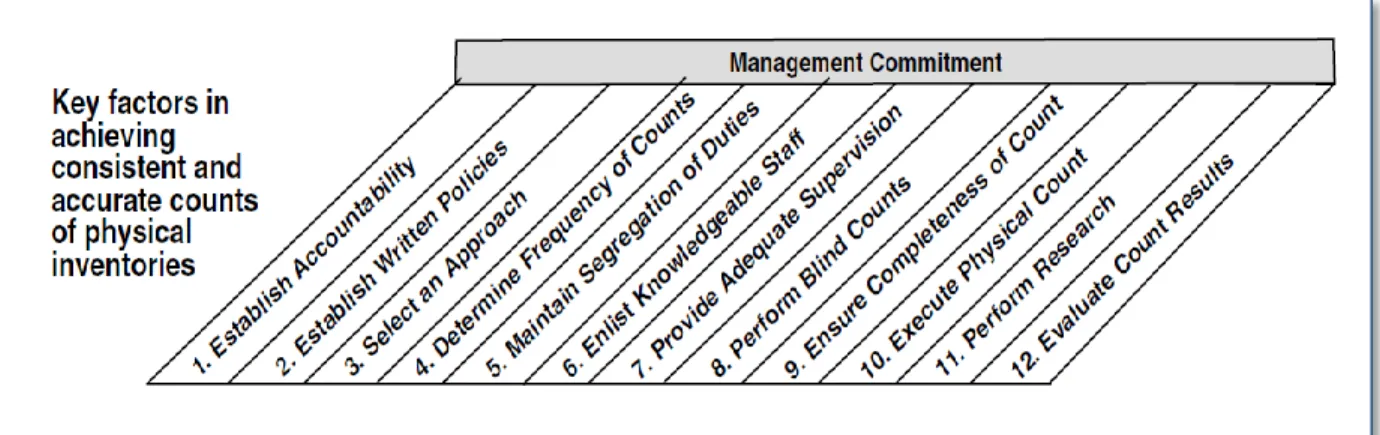
The GAO conducted a study of the processes and procedures used by seven leading-edge companies to identify the key factors that contributed to their success. The graphic below was designed by the GAO as part of an executive guide that managers can use to improve the accuracy and reliability of inventory and related property data.
Figure 2: GAO Guidance on Inventory Management
As shown in the table above, the GAO found 12 key factors essential to achieving consistent and accurate counts of physical inventory. Management’s
commitment to the process is listed at the top of the chart to indicate that it must be present throughout the process. Management’s level of commitment to an effective and reliable inventory process includes developing a disciplined and structured culture which foster’s integrity and a commitment to competence.
Undetected theft and loss, unreliable data,
unexpected shortages of critical items, and unnecessary purchases of items already on hand.
Risks
Source: Auditor generated based on GAO guidance
8
City Inventory Types
In order to determine the types of inventory managed by the City, we conducted a survey of all City department directors and asked them to self-identify
inventory maintained by their respective departments. We compiled the types of inventory into the following table:
Figure 3: Summary of Inventory Types by City Department
Department Inventory General Services Fleet Vehicles Veterinary Supplies Garbage Containers Facilities Equipment Utilities Water Meters Parts and Tools Scrap Metal Public Works Street
Equipment Personal Protection Equipment Traffic Signals/ Poles Survey Equipment Parking Equipment
Police Firearms Phones/ Radios Employee Issued Equipment Evidence Military Surplus Fire Fire Suppression EMS Supplies Personal Protective Equipment US & R and Hazmat Fire Prevention Training Equipment Station Supplies Hose Parks and Recreation Appliances Sports Equipment Safety Equipment Power Tools Information Technology Servers/ Switches Hardware / Software Phones / Aircards Community Development Cameras/ Flashlights Human Resources None Culture and Leisure None Finance None Economic Development None City Manager None City Treasurer None City Clerk None City Attorney None
The City of Sacramento does not have an overarching inventory system or an inventory policy. Each department determines how best to track their inventory in relation to the services they provide. Some departments have purchased specific software to help them manage their inventory and others rely on simple
9 spreadsheets. The level of sophistication in the management tools varies greatly
and is primarily driven by the complexity and distribution of the inventory being managed. Funding for the City’s inventory differs based on the department and the purpose of the inventory items. Many items are funded by the General Fund; however some exceptions to this are the Urban Search and Rescue (US&R) and Hazardous Materials (Haz Mat) equipment which are grant funded.
Risk Assessment
Eight City departments manage over thirty general types of inventory using different software solutions. As a result, we must limit the scope of our audit. In order to do so, we performed a risk assessment of the various types of inventory and the systems used to manage them. Our assessment evaluated controls over inventory systems, the level of management oversight, compliance with prior audits performed, criticality to City operations, logical system access, and physical access to inventory.
The Department of General Services, Utilities, and Public Works have all
experienced some level of inventory system review within the last six years and have worked to make improvements in their processes as a result of those audits. Consequently, we feel our time could be better spent in other areas of the City that have not yet been reviewed. The Parks and Recreation and Community Development Departments largely maintain inventory with low dollar value and short lifecycle due to the nature of the services they provide. As these are lower-risk items, and have a lower level of criticality to the City’s operations, we chose to focus our efforts in other areas. The Police Department uses a software solution called Versadex to manage their inventory of evidence. Evidence must follow a continual chain of custody from original collection to disposal in order to be used in court proceedings. As a result of this requirement, we found a higher level of controls in place compared to other departments we reviewed.
The Fire Department manages several types of inventory and is in the final stages of piloting their recently acquired Operative IQ inventory system designed to help them manage their vast inventory. The Fire Department chose their Emergency Medical Services (EMS) Division as the initial test area for the Operative IQ system. As it is likely they will purchase this system and use it to manage the Department’s inventory in the future, we believe the Fire
Department could greatly benefit from having an assessment of the Operative IQ control system before it is fully implemented.
The City’s Information Technology (IT) Department relies primarily on the KACE and HelpSTAR inventory systems to manage the City’s information technology
Each City department determines how to track their inventory based on the nature of the inventory
and the services they provide.
10 hardware and software resources. Technology resources generally have a high
dollar value and increased likelihood of theft when compared to many other inventory items because of their portable nature. The City Auditor has also received whistleblower complaints regarding the IT Department’s inventory management practices. While these have not yet been substantiated, they do provide a basis for concern. The IT department lacks policies or procedures outlining responsibility for managing inventory and we found limited controls in place to prevent theft or abuse of IT assets.
The results of our risk assessment are demonstrated in Figure 4. The gray inventory types are those that have had some level of secondary review and the red, yellow, and green colors represent high, medium and low risk, respectively. Based on the results of our risk assessment, we will focus our efforts on the City’s IT Department inventory systems for the first phase. The next phase will focus on the Fire Department’s inventory systems.
Figure 4: Risk Assessment of Inventory Types by City Department
Department
Inventory
General Services* Fleet Vehicles Veterinary Supplies Garbage Containers Facilities Equipment Utilities** Water Meters Parts and Tools Scrap Metal Public Works*** Street Equipment Personal Protection Equipment Traffic Signals/ Poles Survey Equipment Parking EquipmentPolice Firearms Phones/ Radios Employee Issued Equipment Evidence Military Surplus Equipment Fire Fire Suppression EMS Supplies Personal Protective Equipment US & R and Hazmat Fire Prevention Training Equipment Station Supplies Hose Parks and Recreation Appliances Sports Equipment Safety Equipment Power Tools Information Technology Servers/ Switches Hardware /Software Phones / Aircards Community Development Cameras/ Flashlights
* Audit of Light-Duty Vehicle Use (Office of the City Auditor Report #2011-05.)
** Audited by the City Auditor in 2008 (Report #2008-01 Inventory Processes & Inventory Reports, Dept of Utilities.) *** Consultation performed in 2008 (24th St Corp Yard Inventory Control Improvement Implementation Plan.)
Source: Auditor generated
Key Red = High Risk Yellow = Medium Risk Green = Low Risk
11
Information Technology Department
The City’s IT Department is comprised of five divisions where the manager of each division reports directly to the City’s Chief Information Officer. Figure 5 shows the current structure of the IT Department.
Figure 5: IT Department Organizational Chart
The Technology Administration division coordinates budgeting and Human Resources activities for the IT Department. PSIT provides IT support primarily for the City’s Police and Fire Departments. The Application and Data Management division directs information planning and business systems integration. Technical Support Services is responsible for infrastructure; which includes the City’s network, servers, and telecommunications. Regional Support offers support services for all City departments except Police and Fire.
Previously, the IT Department was more decentralized and City departments had their own dedicated IT staff. As part of a citywide collaborative IT effort, the IT Department has since moved to this more centralized model in an effort to provide cohesiveness and better support City operations. Furthermore, the IT Department has experienced a notable degree of turnover at the executive level. In the last five years the department has had three different directors. The current CIO was appointed to the position in October of 2013 after serving as Interim CIO for three months. The prior CIO served just under three years and resigned in July of 2013.
IT Department Inventory Systems
As previously mentioned, the City’s IT Department uses two inventory systems to manage information technology assets. KACE is a software solution used by the IT Department for inventory management, applying software updates, and job ticketing. HelpSTAR is a software solution used only by Public Safety IT (PSIT) for inventory management and job ticketing. KACE is used by PSIT to monitor the devices tied to the network and to push out software updates. Previously, PSIT
Chief Information Officer (CIO) Technology Administration Public Safety IT (PSIT) Application and Data Management Technical Support Services Regional Support
12 had begun looking into fully converting from HelpSTAR over to KACE in order to
provide consistency across the IT department and to eliminate the licensing expense associated with HelpSTAR, however due to lack of staffing they did not complete this transition and are still using HelpSTAR to manage inventory and job ticketing.
KACE
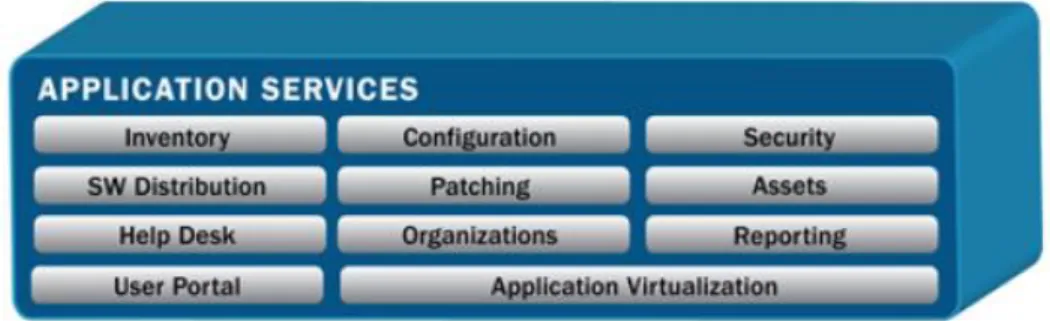
KACE is a software solution offered by Dell that provides a set of applications that IT departments use for computer and server management. Figure 6 shows the application services KACE offers in its suite of products.
Figure 6: KACE Application Services
KACE software was purchased by the City’s Information Technology Department in 2010 for approximately $142,000. The City’s Central IT Department uses KACE primarily as a Help Desk job ticketing tool to help them track and fulfill IT support requests. However, the IT Department also uses KACE for inventory
management purposes such as keeping track of where computer hardware is located and who is using it. Ongoing costs for the system include approximately $30,000 per year for the software license renewal.
To gain an understating of the types of physical inventory tracked in the KACE system, we reviewed the inventory records as of August 2013 and used the information to create Figure 7. There were a total of 8,123 hardware devices in the system which included computers, monitors, printers, servers, wireless devices, projectors, and faxes. Computers include both desktops and laptops.
Source:KACE Website
13
Figure 7: KACE Inventory by Device Type as a Percentage of the Total
HelpSTAR
HelpSTAR was developed by Help Desk Technology International Corporation (HDTIC) as a help desk solution that includes an array of built-in features,
including asset management. HelpSTAR software was purchased in 2008 by PSIT for approximately $24,000 primarily as a ticketing tool to support Police and Fire IT support requests; however PSIT also uses HelpSTAR for inventory
management. The annual license renewal fee for HelpSTAR is approximately $5,000 per year. Inventory records for the Police and Fire Departments are maintained on a separate network from the rest of the City due to their higher security and confidentiality requirements.
We summarized the 3,211 assets in the HelpSTAR inventory system as of November 2013 and created the following chart to demonstrate the results:
Computers 63% Monitors 13% Printers 10% Wireless Devices 7% Servers 7% Projectors 0% Faxes 0%
14
Figure 8: HelpSTAR Inventory by Device Type as a Percentage of the Total
As neither the purchase price nor the current value of assets are recorded in the KACE or HelpSTAR inventory systems, we were unable to determine specific dollar amounts for the inventory managed in those systems. To gain an understanding of the significance of IT inventory managed by the City, we reviewed expenses in the financial system and budget reports to Council. The City spent approximately $5 million dollars in fiscal year 2011/2012 on items defined as “Computer Hardware” in the City’s financial management system and the IT Department estimated anticipated purchases of approximately $7 million in IT-related goods and services for fiscal year 2013/2014 in its annual report to Council.
Objective, Scope and Methodology
The objective of this audit was to assess the IT Department’s inventory system practices to identify areas of risk and opportunities for potential savings. Our scope included all information technology hardware records as of 2012 and 2013. In conducting our review, we defined the types of hardware, summarized the data and conducted data mining for potential issues such as errors or omissions. In order to assess the completeness of the inventory system we selected a sample of new hardware purchases to determine if they were appropriately recorded. To assess the accuracy of the system, we selected a sample of
computer hardware already in the system and verified the existence of the items
Computers 23% Monitor 12% Laptop 9% Digi 7% Display 7% MDC 6% Non-Standard Naming Convention 6% Printer 5% Dock 3% Modem 3% Keyboard 3% Digi - Spare 1% Other 15%
15 listed. We also compared a list of former City employees against the list of
employees currently assigned computer equipment to determine if former employees were still assigned City assets. In addition, we reviewed the inventory system’s administrator and user access privileges for appropriateness.
16
Finding 1: The Information Technology Department’s
Inventory System Contains Significant Errors and Omissions.
According to the GAO1, proper inventory accountability requires that detailed records of acquired inventory be maintained. One of the key factors in developing and implementing an accurate inventory process is to establish accountability. Holding management responsible and answerable for the overall inventory process establishes accountability for the inventory and is essential for achieving consistent results. However, during our review of the IT Department inventory management system, we found several deficiencies including: Lack of accountability over the inventory system;
Inventory management policies and procedures have not been formally established;
Key data fields are not being consistently entered into the inventory system;
Approximately 40 percent of the records tested contained at least one error;
IT assets still assigned to former City employees; Limited controls to ensure data integrity; and
Surplus items cannot be reconciled due to a lack of documentation. In order to address these issues, we recommend the IT Department establish responsibility for the inventory system and develop performance measures aimed at increasing data accuracy. In addition, we recommend developing formal policies and procedures to guide employees on inventory processes and setting minimum guidelines on entering key fields into the system. IT
management should clearly define inventory processes to ensure new purchases are entered into the system and controls over the surplus inventory should be implemented to increase accountability.
Lack of accountability over the inventory system
“Accountability” is defined as being held responsible or answerable for an action. According to the GAO, accountability should exist from the top of the
organization to the lowest level and is established by developing performance goals and holding the appropriate level of personnel responsible for meeting those goals. Explicitly assigning responsibility over a process provides clear direction to employees on who will be held accountable if the process fails to
1 United States Government Accountability Office. Executive Guide on Best Practices in
Achieving Consistent, Accurate Physical Counts of Inventory and Related Property. GAO-02-447G. 2002.
17 meet management’s expectations. The GAO guidance suggests not only holding
management responsible for the overall inventory process, but also pushing accountability to the floor level personnel performing the inventory procedures. This would include setting clear expectations regarding inventory record accuracy levels. During our review, we found a lack of accountability over the IT
Department’s inventory process. For example, management has not developed performance measures or formally assigned responsibility for the data in the inventory system. When we asked IT staff who was responsible for managing the inventory system, they initially appeared uncertain about their role. The
observed lack of accountability and performance measures has contributed to an inventory system that contains significant errors and omissions.
According to the previously mentioned GAO guidance, inventory accuracy goals should be set at 95 percent or higher. To assess the accuracy of the IT
Department’s inventory system, we performed detailed testing by selecting a sample of 782 active and blank status computers out of a population of 4,032. Based on this testing, we found that 41 percent of the assets we tested
contained at least one exception (discussed in more detail later in the report). As a result, we estimate the accuracy rate of the IT Department’s inventory system is approximately 59 percent. This is far below the accuracy goal recommended by the GAO and suggests that the inventory process is not well managed.
In our opinion, the lack of accountability over the inventory system undermines the completeness of the system, creates unnecessary risk, and could ultimately result in undetected theft or losses of City property.
RECOMMENDATIONS
We recommend the City Manager:
1. Assign responsibility for managing the IT inventory system to the Chief Information Officer.
We recommend the IT Department:
2. Establish goals and performance measures to increase data accuracy to at least 95 percent.
2
Random sample with a 90 percent confidence level.
In our opinion, the lack of accountability over the inventory system undermines
the completeness of the system, creates unnecessary
risk, and could ultimately result in undetected theft or
18
Inventory management policies and procedures have not
been formally established
Written policies should be developed to clearly communicate management’s expectations and provide clear guidance on how to complete all aspects of the inventory process. Policies and procedures demonstrate management’s
commitment to inventory management, become the basis for training, and help to inform employees of their responsibilities. We found that IT Department management has not clearly communicated its inventory management
expectations in a formal policy nor have they developed an ongoing process for monitoring the accuracy of inventory records. Lack of defined policies and procedures have resulted in inconsistent inventory management practices among IT personnel.
RECOMMENDATION
We recommend the IT Department:
3. Develop standardized policies and procedures for inventory management and provide training to staff.
Key data fields are not consistently entered into the
inventory system
Proper inventory accountability requires that detailed records of acquired inventory be maintained. In order to have detailed records of inventory, minimum requirements should be established so that key fields are always completed when items are entered into the inventory system. Having a
complete record of each item would typically consist of information such as the asset’s name, model number, physical location, status, assignment, cost, and purchase date. The status and assignment fields are the most basic sets of information in the inventory system as they identify if the computer is active or not and where the computer is located. This information is essential for
performing aggregate analysis of the data in the inventory system. Without this information, management is limited in their ability to perform analysis of the inventory such as calculating turnover ratios, performing cost analysis, or
accurately determining how many active computers a specific department has on hand.
We reviewed the data in the KACE inventory system and found a significant number of omissions in key fields. We began by summarizing all assets identified as “computers” in the KACE inventory system and found several records did not have a status assigned to them. The “status” of a computer is a key field that indicates an asset’s current state such as “active”, “stock”, “stolen” or “surplus”.
19 Without this information, it is difficult for management to determine exactly how
many computers a specific department is actively using or if spare computers are available instead of purchasing new ones. Figure 9 below shows that of the 5,131 computers in the KACE inventory system, 983 (or 19 percent) did not have a status listed. As a result, the inventory system cannot be used to determine the status of nearly 20 percent of the computers in the inventory system. The lack of a status for a significant number of computers in the inventory system demonstrates widespread gaps in the data and indicates poor management oversight.
Figure 9: Status of Computers in KACE
Status Count
Active (Currently in use) 3,049
MIA (Missing in Action) 7
Repurposed (Reassigned to another user) 39
Salvage (Used for parts) 10
Stock (In storage) 345
Stolen (Lost or Taken) 9
Surplus (Sent for disposal) 689
(blank) (No status listed) 983
Grand Total 5,131
In addition to the status field, the “assigned to” field is also another key piece of information we would expect to find in the inventory system. The “assigned to” field describes where a computer is located within the City. This information would be essential in order to physically locate a computer or to perform analysis of how many computers are assigned to a particular department. We reviewed the 3,049 computers identified above as having an “active” status, and found that 444 (or 15 percent) were not assigned to a specific City department or division. In our opinion, all computers should be assigned to a City department so that management knows where they are located and who is responsible for them.
We found similar results when we reviewed the HelpSTAR system. We analyzed the data in HelpSTAR and found 2,487 out of 3,211 (or 77 percent of) devices were not assigned to a specific City employee, vehicle, or department. In addition, 444 devices in HelpSTAR did not have a model type listed3. Without
3 Many of the devices did have a description in the “Name” field to help narrow down the
type of device. However, in our opinion this is not the appropriate field for this purpose and makes aggregating the data more difficult.
20 complete information, management cannot perform aggregate analysis of the
quantity and types of devices being used by staff.
In our opinion, the lack of detailed information regarding the status and location of a significant portion of assets in both the KACE and HelpSTAR inventory systems undermines the completeness and utility of the information in the inventory systems. Without a complete picture that includes the status, location, purchase price, and purchase date of IT assets owned by the City, the inventory cannot be efficiently and effectively managed.
RECOMMENDATION
We recommend the IT Department:
4. Develop minimum data requirements for inventory records including model number, physical location, status, assignment, cost, and purchase date.
Approximately 40 percent of the assets tested contained at
least one exception
Accurate and reliable data are essential to an efficient and effective inventory management system. To assess the accuracy of the system we performed detailed testing by selecting a sample of 784 active and blank status computers out of a population of 4,032. We did not include all key fields in our sample and tested only the physical location of the computers against the information in the inventory system. We were able to locate 63 of the computers in our sample. However, it is important to note that physically locating many of the computers exhausted a considerable amount of time as many of the inventory records were incomplete. As some of the records tested contained more than one exception5, each issue outlined below is considered independently. The exceptions are as follows:
Unable to locate
We were not able to physically locate 9 (or 12 percent) of the computers in our sample. We shared the list of computers that could not be located with the IT Department. The IT Department staff was also unable to locate the unaccounted for computers and concluded that the computers were most likely sent to surplus. However, due to lack of documentation, we could not confirm that the computers had been sent to surplus.
4
This sample was selected using a 90 percent Confidence Level with an Expected Error Rate of 1 percent.
5
We did not consider blank data fields as an exception for this exercise as blank data fields are addressed in another section of this report.
21 If we projected the results of our sample testing onto the entire population of
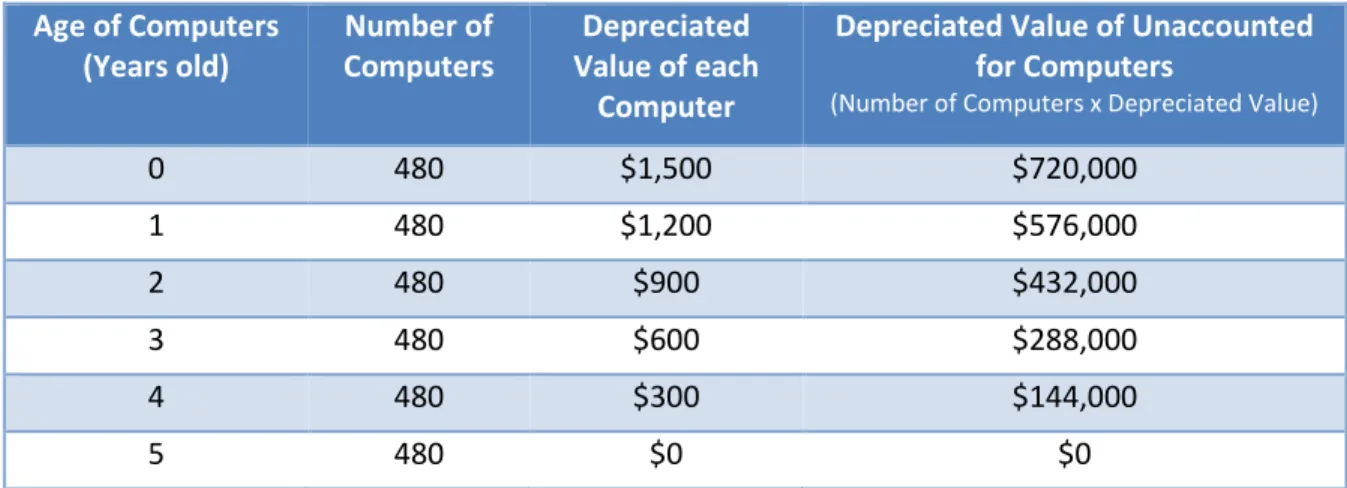
4,032 active and blank status computers, we would expect to be unable to locate roughly 480 computers. We were not able to determine the age or value of the computers in the inventory system as cost and purchase date figures were generally absent. However, using purchasing data from the Finance Department’s accounting system, we estimate the average price of a new computer purchased by the City is approximately $1,500. The table below estimates the value of 480 computers using a simple five-year straight-line depreciation method where the value each computer starts at $1,500 and falls by $300 per year until it reaches zero. As Figure 10 illustrates, we estimate that 480 computers would be worth approximately $720,000 at the time of purchase and their value would decrease each year as they become obsolete.
Figure 10: Potential Estimated Value of Unaccounted For Computers
Age of Computers (Years old) Number of Computers Depreciated Value of each Computer
Depreciated Value of Unaccounted for Computers
(Number of Computers x Depreciated Value)
0 480 $1,500 $720,000 1 480 $1,200 $576,000 2 480 $900 $432,000 3 480 $600 $288,000 4 480 $300 $144,000 5 480 $0 $0
Note:This does not include any residual surplus value.
Depending on their age, the potential value of the estimated number of unaccounted for computers could be anywhere in the range described in the figure above.
Orphaned objects
In addition to the unaccounted for computers identified above, we were unable to locate 6 (or 8 percent of) items that were ultimately identified by the IT Department as “orphaned objects.” According to IT staff, when a new computer is recognized by the City’s telecommunications network, the inventory system automatically creates a new asset record. When IT staff change the computer’s name to their standard naming convention, the inventory system creates an additional record but also retains the original record. When this happens the system retains two records for the same computer that can only be distinguished by their assigned name. The first record that was created by the system is then considered an “orphaned object” because it remains in the system but is no longer used to identify the computer.
22 The orphaned objects appear as physical computers in the inventory system and
could cause the number of computers in system to be overstated. Based on our testing, we estimate 322 (or 8 percent) of the computers in the inventory system may be orphaned objects that do not represent actual computers. However, given the information available in the inventory system, we cannot confirm that the unaccounted for computers listed above are in fact orphaned objects or if they are simply missing.
Duplicate computers
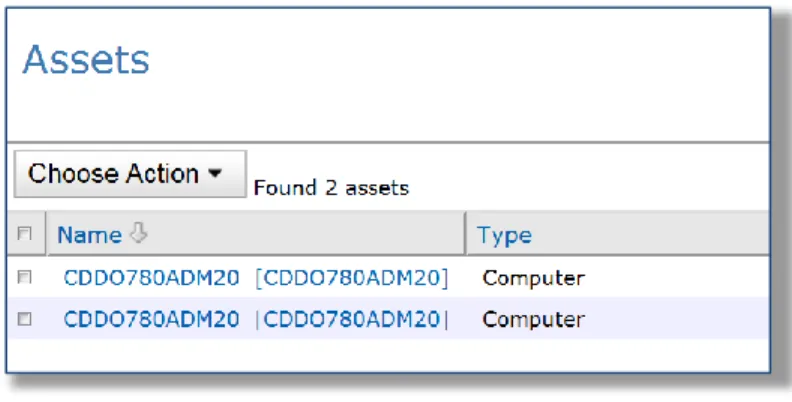
Each unique asset should have its own individual name and be accounted for only once in the inventory system. We found 6 (or 8 percent) of computers were listed twice in the inventory system under the same name. Unlike the orphaned objects described above, where a computer has two different names associated with it, these records have the same name listed twice. The figure below is a screenshot of a duplicate record in the inventory system.
Figure 11: Example of a Duplicate Computer
The example computer in Figure 11 is listed twice in the inventory system and is counted as two separate assets. Duplicate names confirm the inaccuracy of data and result in an overstatement of the inventory on hand. Based on our testing, we estimate 322 (or 8 percent) of the computers in the inventory system are duplicates and not actual computers.
Incorrect information
When changes occur, the inventory system should be updated to reflect those changes. We found 8 (or 10 percent) of the computers in our sample were assigned to the wrong City department or employee and 6 (or 8 percent) had the wrong status. These inaccuracies demonstrate the inventory system is not updated in a timely manner when changes occur. In addition, one computer in our sample had the incorrect model type listed in the inventory system.
23 Overall we found that in our sample of 78 computers, 32 (or 41 percent)
contained at least one exception. If we project the results of our sample testing onto the entire population, this would mean that more than a third of the assets in the inventory system contain at least one error. In our opinion, inaccuracies of this magnitude renders the data in the computer inventory system unreliable and therefore not practical for managing inventory on a City-wide or comprehensive basis.
RECOMMENDATION
We recommend the IT Department:
5. Perform reviews of inventory system data on a regular basis to ensure data accuracy.
IT assets still assigned to terminated City employees
The Employee Separation Policy, API#43 states that when an employee
terminates from the City, the “designated department representative will…notify the City Wide Separation Team via e-mail.” This email notification then prompts the IT Department to disable that person’s computer access and would also provide IT staff an opportunity to update the inventory system records. When employees separate from the City, the inventory system should be updated to reflect the change in ownership of the inventory assets that were assigned to that person. This is important because the City needs to keep track of which assets have been assigned to individuals so that the items can be retrieved when the employee separates from the City. Ideally, we would expect to find a process in place to reconcile the list of separated employees maintained by the Human Resources department to the IT Department’s inventory system. This would help to identify instances where the designated department representative did not send an email to notify the separation team that an employee had been terminated. We found no such reconciling process in place to ensure that terminated City employees were no longer assigned IT assets.
We compared a list of separated employees to the inventory system data and found 75 computers and 4 wireless devices were still assigned to terminated City employees. From the list of 75 computers, we selected a judgmental sample of 10 to determine if they were still located at City facilities. We were able to determine the location of 9 of the 10 computers. One computer was updated to surplus status in the inventory system after the sample was selected, however we were unable to confirm it was sent to surplus. While our testing indicates it is likely that many of the assets assigned to former employee are still with the various City departments where the former employees worked, it also
demonstrates that the inventory system is not being updated in a timely manner
In our opinion, the lack of accountability over the inventory system undermines
the completeness of the system, creates unnecessary
risk, and could ultimately result in undetected theft or
24 and leaves open the possibility that all items may not have been collected from
the employees when they left the City.
RECOMMENDATION
We recommend the IT Department:
6. Determine why inventory records are not always updated when employees separate from the City and implement a solution.
We found limited controls to ensure data integrity
The City’s IT Department estimates the City will spend roughly $7 million in IT-related hardware and software purchases in fiscal year 2013/2014. Given the magnitude of the IT-related purchases, the inventory process should follow a clearly defined transaction flow that documents an item’s lifecycle from purchase to disposal. As part of that process, newly acquired items should be entered timely and accurately into the inventory system in order to ensure inventory records are complete. Lack of complete records could provide opportunities for items to be lost or stolen.
City departments generally determine when they would like to purchase new IT equipment. However, the IT Department is frequently consulted on IT purchases made by other City departments. The City’s Procurement of Supplies Policy API-4001 states that “certain purchases require review by other City Departments or divisions before a purchase can be made. Such reviews are intended to ensure consistency and conformity with City standards.” The policy goes on to state that the Department of Information Technology is responsible for reviewing
purchases of “computer equipment, software, and other information technology items.” This is accomplished through the City’s procurement process whereby any purchase identified as “IT Hardware” is flagged and forwarded to IT staff for approval. The purpose of having the IT Department review IT-related purchases is to make sure the items are compatible with the City’s existing information systems. This also provides the IT Department an opportunity to be aware of new purchases. Figure 12 outlines the general process used by the City to purchase IT equipment.
Lack of complete records could provide opportunities
for items to be lost or stolen.
25
Figure 12: Overview of IT Purchase Process
As Figure 12 demonstrates, orders can be placed and received by both City departments and IT staff. As the process for receiving inventory is not clearly defined, this increases the risk that items may be lost, misappropriated, or simply not recorded in the inventory system.
We selected a judgmental sample of 30 purchases6 of IT hardware from fiscal years 2012 and 2013 to determine if the items had been entered into the inventory system. The 30 purchases in our sample were comprised of 95 individual IT assets such as computers, monitors, tablets, and televisions. We attempted to locate the purchased items in the inventory system and were unable to locate 44 (or 46 percent) of the items by the purchase order number, invoice number, or serial number. We were unable to determine if the items purchased were entered into the inventory system as there is no distinguishing information to trace inventory assets to the specific purchases. The 44 items in our sample that we were unable to locate had a combined purchase price of approximately $55,000. In addition, 6 percent of the items we tested had an incorrect model type listed in the inventory system. This further demonstrates a lack of management oversight and quality control over the inventory system.
6
Sample size is not representative of the population but in our opinion is sufficient to assess accuracy of data.
Requisition Order Created in Ecaps by IT
or
Requesting Department Order Reviewed/ Approved by Department andIT Supervisor or above for compatibility Order Reviewed by Procurement for Purchasing Compliance Purchase Order Created by Procurement
Item Ordered from Vendor by IT
or
Requesting Department Item Received by ITor
Requesting DepartmentItem Recorded in KACE Inventory System by
Department's IT Personnel
26 In addition, there is no mechanism to ensure IT-related purchases are entered
into the inventory system even when the IT Department is the only department ordering and receiving the equipment. For example, two Lenovo tablets purchased for the Office of the City Auditor in June of 2013 were not entered into the inventory system despite having the two tablets ordered, received, and deployed by IT Department staff. As a result, the assets could have been
misappropriated without detection by the IT Department. It is unclear how often this type of incident occurs, but it clearly demonstrates the potential for
misappropriating assets. In our opinion, the lack of a process to ensure new purchases are recorded in the inventory system could lead to theft or abuse of City assets.
RECOMMENDATION
We recommend the IT Department:
7. Develop a process to ensure all new IT hardware purchases are recorded in the inventory system.
Surplus items cannot be reconciled due to a lack of
documentation
Surplus items are generally defined by IT Department staff as obsolete or broken items that have outlived their usefulness and are ready for disposal. In order to appropriately manage items that are identified as surplus, controls should be in place to ensure that items are not sent to surplus in error and to prevent misappropriation of items through the surplus process. Misappropriation may result from an employee inappropriately changing the status of an asset in order to defraud the City. To prevent this type of activity, controls should be in place to ensure the accuracy of the information contained in the inventory system. For example, the controls could include a reconciliation process or a secondary (management level) approval of items updated to surplus status to verify items being sent to surplus have no further value to the City and are ready for disposal. When IT staff identify items that are ready for surplus, they typically schedule a pickup with the City’s surplus vendor. IT Department staff then update the item’s status in the inventory system from “active” to “surplus” which effectively removes the item from the current inventory list. There is no reconciliation process in place to ensure that items identified as surplus in the inventory system were actually sent to the City’s surplus vendor nor is there a secondary approval to ensure the items are not labeled as surplus in error. We performed only a high-level review of the computers listed as surplus in the inventory system as supporting documentation was not available due to lack of a formal process. We
The process for receiving inventory is not clearly defined and increases the risk that items may be lost, misappropriated, or simply
not recorded in the inventory system.
27 found two computers and one iPAD that were incorrectly identified as surplus
and were still actively being used by City staff. As these items were listed as surplus in the inventory system, it is unlikely that the loss would have been detected if these items were stolen.
In our opinion, the lack of controls and process creates ample opportunity to defraud the City of assets. Further, the lack of accountability would make it virtually impossible to detect and deter fraud. Without a complement of strong controls to prevent or deter fraud, the City is unnecessarily exposed to theft of City property.
RECOMMENDATION
We recommend the IT Department:
28
Finding 2: The Information Technology Department’s
Inventory System has an Excessive Number of Users with the
Ability to Modify and Delete Inventory Records.
“User access” refers to the process by which authorized individuals access a computer system and unauthorized individuals are kept from doing so. User access security limits even authorized users to those parts of the system that they are explicitly permitted to use. User access to the inventory system should be granted in accordance with the concept of “least privileges” or “need to know” which states that users should have the lowest level of permissions that will allow them to perform their jobs. The purposes for limiting access are to help increase data integrity and prevent fraud. We reviewed user access privileges in the KACE inventory system and found the following:
An excessive number of individuals with the ability to delete and modify inventory records;
User access privileges were not always formally approved; and Policies have not been developed for authorizing user access to the
inventory system.
We recommend the IT Department review both the number and appropriateness of users with access to the inventory system. In addition, the IT Department should document approval and the reason for providing user access to the system and develop policies that provide clear communication on these processes.
Excessive number of administrators
“Administrators” are generally high-level user accounts that have the ability to make major changes to a system. This may include the ability to grant
permission for other users, change security settings, and install software. According to the GAO’s Federal Information System Controls Audit Manual,
“access should be limited to individuals with a valid business purpose (least privilege). Unnecessary accounts (default, guest accounts) should be removed, disabled, or otherwise secured.” User access privileges provide the means to restrict the ability to make changes to the inventory system to only those that specifically need it. In keeping with the concept of “least privileges” the number of administrators should be limited to the smallest number of individuals
required to maintain the system. As demonstrated by Figure 13, we found 92 users identified as administrators. In our opinion, this is significantly more than the number or employees necessary to perform administrative functions and increases the risk of data integrity errors and fraud.
The excessive number of administrators allows far too many individuals the ability to make high-level changes in the system which
could result in errors to the inventory records and increases the opportunity for
29
Figure 13: Users with the ability to modify and delete records in the KACE inventory system
User Role Number of Users
Ability to modify and delete records in the inventory
system Admin 8 Auditors 1 COFS User 4,210 Desktop Admin 19 Desktop Admin-Labels 2 Desktop Admin-Processes 1
Help Desk Admin 60
Help Desk Only 22
Login Not Allowed 8
ReadOnly Admin -
Scripting Admin 2
User 163
4,496 92
In the KACE inventory system, these administrators have the ability to delete inventory records. Deleting inventory undermines the purpose of the inventory system, which is to maintain a record of assets throughout their lifecycle. When items have reached the end of their lifecycle, their status should be updated in the inventory system accordingly. There should be no reason for deleting records unless an error is made in the process of entering new data, and in those instances a supervisor should be approving the deletion of those records in order to provide some level of control over the process. Deleting records removes the items from the inventory system and restricts management’s ability to then use the data to perform analysis. Deleting inventory records could also conceal fraudulent activity. During our review, we found IT staff routinely deleting inventory records as part of their normal job processes.
In addition, the 92 individuals from Figure 13 have the ability to delete the asset history record which keeps track of who makes changes in the inventory system. Consequently, any of those 92 users could potentially delete an asset from the inventory system and then modify the record history that shows who deleted the asset. The excessive number of administrative level users provides far too many individuals the ability to make high-level changes in the system which could result in errors to the inventory records and increases the opportunity for theft of City assets.
30
User access privileges are not always formally approved
The Institute of Internal Auditor’s Global Technology Audit Guide on Identity and
Access Management (GTAG 9) states that “when a user is granted an identity
through the provisioning process, an evaluation of the access rights being granted or changed should be part of the business owner’s approval and the IT Department’s review of the access request.” We found that management has not established a formal process for documenting approval of new users in the inventory system. While there is an informal understanding that supervisors should approve new user access, it is not always documented. Lack of a formal process for approving new user access makes it more challenging to review and manage the inventory system on an ongoing basis because it may not be clear why certain individuals were granted a particular level of access.
The IIA’s guidance also states that “as part of its IAM (Identity and Access Management) monitoring process, the organization should establish a methodology to periodically review the access rights granted to all identities residing in its IT environment.” We found this ongoing monitoring was not being performed to ensure users continue to have the correct level of permission. User accounts should be reviewed on a regular basis to ensure the number of users and their level of permission is commensurate with their responsibilities and limits the potential for theft or abuse of City assets.
Policies have not been developed for authorizing user access
to the inventory system
According to the GAO’s Federal Information System Controls Audit Manual “in order to adequately control user accounts, an entity should institute policies and procedures for authorizing logical [user] access to information resources and document such authorizations. These policies and procedures should cover user access needed for routine operations, emergency access, and the sharing and disposition of data with individuals or groups outside the entity. The computer resource owner should identify the specific user or class of users authorized to obtain direct access to each resource for which they are responsible.” The IT Department does not have a policy for authorizing user access to the inventory system. The lack of a formal policy could lead to confusion over who is
responsible for granting user access and ultimately lead to unauthorized users or users with permission levels that do not match the access levels needed to perform their jobs.
31
RECOMMENDATIONS
We recommend the IT Department:
9. Reduce the number of users with administrator access to be consistent with the concept of “least privileges.”
10. Establish a formal process for review and approval of new user access to the inventory system.
11. Develop a process to review user accounts on a regular basis to ensure the number of users and their level of permission is commensurate with their responsibilities.