A Multi-user Videoconference-based Collaboration Tool:
Design and Implementation Issues
Cesar T. Pozzer, Luciana S. Lima, Alberto B. Raposo, Carlos J. G. Vieira
Tecgraf (Computer Graphics Group)
Computer Science Department – PUC-Rio, Brazil
pozzer, luciana, abraposo, [email protected]
Abstract
This paper presents CSVTool (Collaboration Supported by Video Tool), a video-based collaboration tool designed to be simple, platform-independent, and to support multiple users over unicast network. Some design and implementation issues are stressed, such as strategies for controlling user participation, which are essential in this kind of collaborative setting, where many participants may interact with each other through audio and video streams. Moreover, we present aspects related to the introduction of the tool in a large company.
1. Introduction
Nowadays, with the increase of computer processing power and network performance, it is becoming viable, especially in large companies, the use of videoconferen-cing tools for a number of purposes, such as meetings and cooperative work among specialists in different areas.
Audiovisual media allows a transparent flow of information among users with their distinct models, projects and applications. Videoconferencing, when using available intranet connections, may be a suitable strategy to overcome geographical distances, share professional information, reduce costs of traveling, and optimize working hours efficiency.
These collaborative settings, where many participants can interact through audio and video streams using peer to peer connections, bring up some problems mainly related to bandwidth and CPU limitations that may become critical when the number of connections increase without control. Any solution to this kind of problem will impose restrictions in the way participants access the collaborative session or in the quality of the media.
In this paper we describe some design and implementation aspects of CSVTool, a tool implemented using Java, CORBA and JMF (Java Media Framework) [1], designed for providing collaborative features to applications with limited or no collaborative resources, used by geographically distributed teams [2].
This article is organized as follows. The next section addresses the necessities that guided the development of CSVTool. Section 3 analyzes some related tools. Section 4 introduces the tool and presents key implementation issues, such as participation control and user interface. Finally, the experience on introducing the tool in a large company is discussed in Section 5. Section 6 concludes this paper.
2. Tool features
The visual integration of applications running in different locations allows geographically distributed end-users to work collaboratively. This reduces communication barriers and increases productivity. In cases where the application itself doesn’t offer collaboration support, the videoconference may be a suitable possibility for information exchange. Besides this main factor, the development of CSVTool is also guided by other requirements related to the highly heterogeneous nature of the problem such as:
• Adaptability: the tool must be platform-independent, running in different operating systems and architectures. It must also provide an easy integration to distributed applications and be customizable and configurable to different uses and applications (see Section 5);
• Low cost: the tool must work on a simple computer using a webcam, connected to an intranet. No dedicated data channels are required, allowing easy installation even for remote sites.
3. Existing tools
Currently, there are many tools, both commercial and academic, for real time collaboration supporting audio, video and textual communication. This section briefly describes some of these tools, focusing on the requirements considered in the implementation of CSVTool.
The CUWorld from QuickNet [3] is the commercial successor of CU-SeeMe, which was one of the first videoconference solutions, originally developed at Cornell University. It does not support data sharing and its current version is restricted to MS-Windows. To
Proc. of the 9th International Conference on Computer Supported Cooperative Work in Design (CSCWiD), p. 547-552. Coventry, U.K., May 2005.
enable the connection of more than two participants, it uses reflectors. In the free version reflectors are proprietary protocols and software is only available for UNIX platforms.
The NetMeeting/Messenger [4, 5] is a very popular videoconference tool, since it is included in recent versions of MS-Windows and has a simple user interface. It offers resources for interface customization and the substitution of audio and video codecs, since it is based on Component Object Model. However it is restricted to the MS-Windows platform and it is limited to two-point conferences, unless used only as an endpoint of a H.323 session controlled by a Multipoint Control Unit (MCU).
Webex [6] is a commercial product providing videoconference and collaboration services via Web. Although this fact guarantees its platform independency, it may only be integrated into Web-based applications.
The VRVS (Virtual Rooms Videoconference System) [7] is a multi-platform academic tool based on the concept of virtual rooms, where distributed users meet for collaboration. The communication among participants is managed by a net of reflectors, used to optimize bandwidth and to enable network load balancing. Although VRVS fulfills many of the above mentioned requirements, it is aimed at academic use. The currently available reflectors are hosted in academic institutions, and there is no reference in business corporations, which is the proposal of CSVTool.
The IBM Sametime [8] is a stable tool, portable for MS-Windows and UNIX. It provides mechanisms for managing the quality of the transmitted media and the bandwidth use. Among the analyzed tools, Sametime was one of the most complete. However, one of its limitations is the use of the “hands-on” technique for access control, i.e., the reception of audio and video is restricted to a single participant at a time. Another limitation of the tool is that its development toolkit restricts its coupling to MS-Windows or Web-based applications.
4. CSVTool implementation issues
The CSVTool is based on a client/server model. The server is responsible for the management of the participants in a single collaborative session. It controls messages exchange within the clients. The server is not prone to traffic overburden because it does not receive the “heavy traffic” (the streams), which is transmitted directly between the clients. The server is located in a fixed address within the corporate network.
The server/client communication is implemented in CORBA, and the communication among clients for the streams transmission is made via RTP (Real-Time Protocol). CORBA was chosen because it provides
platform independence, is extensible and allows easy integration with other distributed applications.
CSVTool is designed to operate in two different modes, as a standalone videoconferencing tool or integrated to a collaborative application. In the integrated mode CSVTool creates a videoconference session over a collaborative session already taking place. The goal is to enable easy utilization, initialization and high adaptability and coupling to applications with collaboration resources in a distributed environment. After the group initialization, which is realized by the host application, the video streams exchange among the participants is automatically started by CSVTool.
4.1. Participation control
Without mechanisms for participation control, the number of RTP connections may increase drastically, overloading CPUs and networks. Considering the existence of a network with low bandwidth nodes, the problem is even more noticeable. However, within a set of connections some of them are more important than others. The user should have an easy way to select information by relevance, avoiding unnecessary connections that may act just as bandwidth consumer. Participation control must be able to associate collaborative session parameters and user centric fields.
Our approach seeks to balance between quality and data availability, in a way that the user can select explicitly the desired send/receive RTP connections from/to any other participant in the session. In case of network overload, the user may keep active most important connections only. By observing stream quality, the user may iteratively remove connections in favor of the most important ones, until data presentation reaches an adequate level. Video compression level may also be used as an additional resource for controlling the ratio between quality/performance and data relevance.
To implement these participation policies, each individual connection is represented by boolean values organized as bi-dimensional square matrices, representing the intentions and permissions on sending and receiving streams among all participants. These matrices, by means of message exchange, move between clients and server, whenever necessary.
The matrices dimension is the number of participants, so they increase as new participants enter the session. We define four kinds of boolean matrices to treat each media type:
1. Key: shapes the collaborative session format. It is generated in the server, taking into account the desired or available capture devices in each participant’s machine. Moreover, session types can also be defined. In a classroom session, the students are able to send streams to the professor, who is able to send streams to all the students. In a public session, each participant may send/receive streams
to/from all the others. The session type parameter has higher priority than others.
2. Intention: stores users’ send/receive intentions to/from others participants. It is subordinated to the key matrix. This means that when the key is false for a given field, this must be false in the intention matrix too. This matrix is individual for each participant.
3. Connection: results from the compilation of all participants’ intention matrices. Taking into account all send and receive intentions, this matrix continuously express enabled connections. A connection is established when send and receive intentions of correlate participants are true.
4. External Intention: complementary to the connection matrix, this one reflects connections that are not established because just one side decided not enable the stream. For example, when participant A wants to send audio to B but B doesn’t want to receive. It’s useful to notify B (considered in this case, from A’s perspective, as an external participant) that A wants to talk to him/her. The values of this matrix are considered just when a given connection is not established.
These four kinds of matrices are used to control, to notify and, especially, to limit all active connections. The way data is stored depends on the type of the matrix. In key and connection, just lines are used. For the intentions, lines represent send intentions, while columns, receive intentions.
All participants are associated with an ID that is used as an index when accessing matrices’ lines and columns.
In subsections 4.1.1 and 4.1.2, we analyze those matrices from the client and server perspectives. Some matrix examples are presented representing parameters for a given hypothetical situation in order to clarify the proposed strategy.
4.1.1. Client perspective. When a user starts the client application, the capture devices to be used in the collaborative session must be selected. These devices, represented as boolean values are sent to the server, which initializes the key, connection and external intention matrices for that participant. These three matrices, including data from other participants, are sent back to the client. This information is used to set up the graphical interface (see Section 4.2) that reflects which connections can be established.
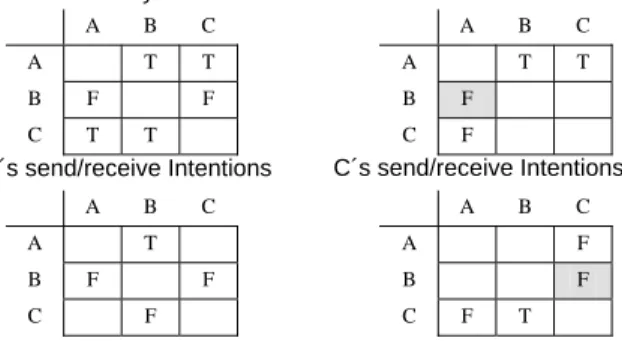
The server is informed when clients’ intentions are changed. At this time, connection and external matrices are rebuilt and sent to all clients, which update their interfaces and the connections (by creating or removing RTP connections) in order to keep the session consistent. Figure 1 presents some video matrices for a session with three participants (a similar configuration is used for audio).
A B C A B C A T T A T T B F F B F C T T C F A B C A B C A T A F B F F B F C F C F T
Figure 1. Example of matrices for controlling permissions and intentions
Observing the global key matrix, one can notice that it is a public session, since participants A and C may send video to all the others. This is observed in the first and third rows of the key matrix, which have only true values. B’s restriction on sending video to the others (false values on the second row of the key matrix) may be a consequence of capture devices unavailability or his/her own intentions. This also restricts the participants from receiving video from B, which is expressed at the A’s and C’s intention matrixes (the dark ‘F’ in A’s and C’s intention matrices).
The remaining matrices represent the users’ intentions on sending and receiving video. For example, A wants to send to B and C (first row of A’s intention matrix) and doesn’t want to receive from C (third element of first column of A’s intention matrix). A cannot receive from B because B is not supposed to send video. Observing B’s and C’s intention matrices, it is possible to verify that B wants to receive video only from A; C wants to send video only to B and doesn’t want to receive from A.
4.1.2. Server perspective. The server acts as a manager for participants, as well as for the audio and video streams exchanged among them. By means of a message broadcasting scheme, it communicates participants about entrance and exit of others, builds and sends new connection matrices as intentions change, and redirects text messages to specific participants.
There are four matrices stored in the server (two for audio and two for video), global send and receive intentions. Connection and external matrices are built from those matrices. When the server receives an intention matrix from a participant with a given ID, its values are copied to the respective send and receive matrices. Sending intentions are copied to rows of the global send intentions matrix, and receiving intentions to columns of the global receive intentions matrix, so that direct Boolean operations can be performed between these matrices to construct the connection matrix. Figure 2 shows the server matrices corresponding to the client matrices presented in Figure 1.
A´s send/receive Intentions Global Key
C´s send/receive Intentions B´s send/receive Intentions
A B C A B C A T T A T F B F F B F F C F T C F F A B C A B C A T T A T F B F F B F F C F T C F F
Figure 2. Server’s global matrices
In the situation of Figure 2, the only video connection occurs between A and B, since A wants to send to B (first row of global send intentions matrix), and B wants to receive from A (second column of global receive intentions matrix). A is not sending to C because C, even though knowing that A wants to send video, doesn’t want to receive. The same occurs among C and B.
When building the global connection matrix it is not necessary take into account the key matrix because it is reflected in the graphical interface, disabling buttons which actions are not allowed.
4.2. User interface
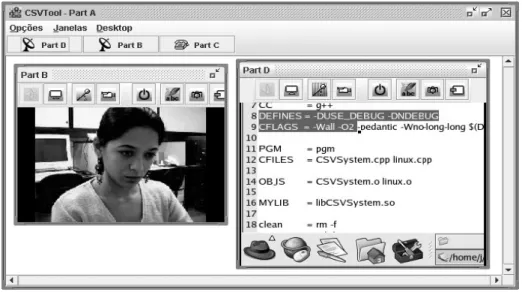
The graphical user interface design plays an important role as a means for allowing user control and awareness over the RTP connections related to him/her. It should be as simple as possible and manage a large number of participants. At the same time, the interface should reflect the current configuration of the matrices received from server (key, connection and external intentions), which are expressed by means of styled buttons, as presented in Figure 3.
Each external participant is represented by a floating window placed inside the main window. In each internal window there is a toolbar and a central panel where received video data is presented. The panel size can be configured, and it is initialized at the received video size. The title of the internal window indicates the login of the respective external participant.
The internal windows can be minimized or maximized. When minimized (participant C in Figure 3), they are accessed in the buttons on menu bar of the main window, with an icon indicating if any RTP connection is active with that participant. In this example, participant C is not active with A (hung up phone icon), while participants B and D are active (antenna icon). C can be called by just clicking in the participant’s button. Obviously, this connection will become active only if C wants to talk with A (C send/receive intentions). When the remote participant receives a call, a window message is displayed, in conjunction with a ring sound.
Through the toolbar, local user intentions can be expressed, and the user may be aware of the streams that are active, those that may be activated, and those that cannot. Moreover, it also offers additional buttons for controlling text messages (chat), snapshots, among others.
Each audio/video control button may assume five different configurations:
1. Disabled: When the respective stream cannot be active. It occurs when the capture device is unavailable or disabled by the user or session type. The button becomes gray.
2. Active: When the connection is active.
3. Off: When both participants don’t want to activate the stream. The button is dashed and hachured. 4. Waiting: When the local participant wants to
activate the streams, but the remote participant doesn’t. The button is hachured.
Figure 3. CSVTool GUI from participant A’s perspective, who receives a video stream from B and the desktop content from D.
External Intention Global Connection Global Receive Intentions Global Send Intentions
5. External: When the remote participant wants to activate the streams, but the local participant doesn’t. The button is dashed.
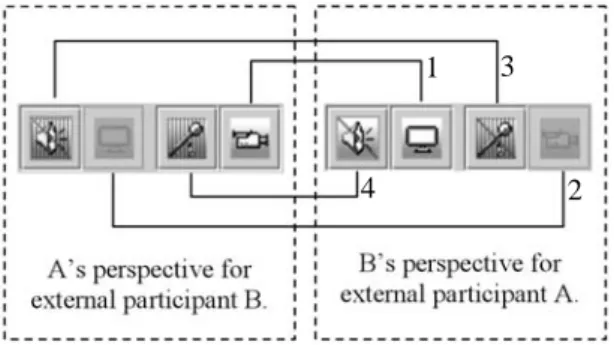
Figure 4 shows the toolbars button representations that may be available for two participants (A and B). Each toolbar have two buttons for controlling audio and video receiving (on the left), and two others for sending (on the right). In the figure, the left side represents the toolbar associated with the external participant B, from the A’s perspective, and the right side, the opposite. Once A is sending video to B, both the A’s send video button and the B’s receive video button are active (label 1 in Figure 4). Since B can’t send video, A can’t receive it (disabled buttons, labeled 2). Regarding audio, B doesn’t want either to send or receive (dashed audio buttons in B’s perspective and hachured buttons in A’s perspective, labeled 3 and 4). On the other side, A wants to send, what puts B’s receive audio button in the external state (dashed, but not hachured button, indicating A’s intention, labeled 4).
Figure 4. Relation among buttons between two participants
When any button is pressed (status change), the local intention matrix is sent to the server. After compilation, when the new connection and external intention matrices return from the server, buttons are updated, as well the streams being sent and received by the local participant.
4.3. Selecting video source
In many situations, like a presentation or software demonstration, it may be useful to send more than one video stream from a single participant. For example, one stream focusing the speaker and other the presentation or content. In most common cases, the audience attention is directed to only one stream, which may continuously switch during the presentation.
Our approach to tackle content transmission is to create a resource that allows the user to select the information being sent. We consider that there is the option to transmit the video stream or the desktop content (Figure 3), which is done by a module that runs in the same machine. To the interface, the data being presented is transparent. Since both data types share the same data channel, the sender can switch between them whenever necessary.
5. Real world scenario analysis
Petrobras is a large Brazilian governmental oil & gas company. Since it is present in many regions, including administrative offices and production fields, strategies for communication among these places become necessary. CSVTool has been conceived in cooperation to Petrobras Research Center (CENPES) to comply with their necessities.
Most of the interface and usability features resulted from real experiments in Petrobras, by observing and collecting opinions from the users and administrators about technical requirements, adaptability, and mainly the problems present in the company that this kind of tool could solve. Many different scenarios were analyzed and tested [9], including sessions on heterogeneous networks.
A pilot version of CSVTool ran integrated to a distributed host application, NetGocad [10, 11], a multi-platform tool designed for the collaborative construction of earth-models for application in geosciences.
Applications with some collaboration resources can also be easily coupled to the CSVTool as a means to add or extend audiovisual communication. The coupling process requires that the host application implements only the CSVTool CORBA integration API (Figure 5), which is required for the videoconference session initialization. After the establishment of the distributed group, the host application is in charge of the management of the session.
The target audience is another important issue for the tool’s acceptance. Initially, the tool was aimed at technical people, interested in consultancy sessions with experts or distributed operational meetings, such as for accompanying a well-drilling. When a demand for administrative use appeared, it became essential to change the access interface, avoiding IP numbers, transmission configuration parameters, and so on. Since the tool doesn’t work with a directory service yet, the solution was to create fixed group servers and configure specific clients to automatically connect to their group server when the user logs on.
Figure 5. CSVTool integration schema The process of adopting collaboration tools in organizations is very sensitive; “if sold off the shelf in the usual fashion, it (the tool) can be doomed” [12]. This process is sometimes considered as a “dual process of both adapting the organization of work to the conditions of the tool, and adapting the tool to meet this 1 2 3 4 Host Application CSVTool collaborative sessions CORBA API Host Application CSVTool CORBA API
organization of work” [13]. Although we do not disagree with this consideration, it is our belief that the chances of success are immensely higher if we adopt collaboration solutions that meets the actual organization of work in the company. Therefore, the CSVTool project has a dynamic and somehow unforeseeable nature, being guided according to its use in the target real world scenario.
An example of the dynamic nature of the development is the creation of VDTool (Virtual Desktop Tool), an independent tool based on the desktop content transmission allowed by CSVTool (Section 4.3). This tool was created because some users in the company noticed that in many situations (such as training, on line help, among others) desktop transmission is more important than audio/video themselves (they prefer to use phone or chat to discuss the data being presented). In order to comply with these users, we created VDTool, which is simpler than CSVTool and doesn’t need a server, since clients talk directly.
6. Conclusion
This paper describes CSVTool, a video-based collaboration tool designed mainly to be simple, platform-independent, and to support multiple users over unicast networks. The project of the tool is guided by the necessities of a large company.
The paper stresses the user-centric participation control strategy aiming to overcome CPU and bandwidth limitations. By means of a graphical interface, in conjunction with a mechanism that manages the creation of RTP peer-to-peer connections among them, participants can express their own intentions on sending and receiving audio and video streams to/from the others. Thus, participants are able to add or remove connections depending on the system performance and bandwidth availability.
An important issue in future CSVTool implementation is the design of a session directory for facilitating participants’ access (for example, using LDAP - Lightweight Directory Access Protocol [14]). Finally, it is also necessary to find solutions to avoid bandwidth overflow when the use of the tool becomes widespread at the company, for example, considering priority levels and access restrictions.
Acknowledgments
The research in collaborative applications at Tecgraf/PUC-Rio is mainly supported by Petrobras and RNP (National Research Network) – GIGA project. Special thanks to Prof. Marcelo Gattass, head of Tecgraf. Alberto Raposo was financed by individual grant awarded by the Brazilian National Research Council (CNPq), process nr. 305015/02-8.
References
[1] Sun Microsystems. Java Media Framework, 2003. Available at: http://java.sun.com/products/java-media/jmf/ [2] C.T. Pozzer, et al. “CSVTool – A Tool for Video-Based Collaboration”, WebMidia 2003, Salvador, Bahia, November 2003, pp. 353-367.
[3] CUWorld, 2003. Available at: https://www.cuworld.com/ [4] Microsoft. Net Meeting, 2003. Available at: http://www.microsoft.com/windows/netmeeting/
[5] Microsoft. Windows Messenger v4.0, 2003. Available at: http://www.microsoft.com/windowsxp/pro/evaluation/overvie ws/communication.asp
[6] Webex. Web Conferencing, Video Conferencing and Online Meeting Services, 2004. Available at: http://www.webex.com/
[7] VRVS: Virtual Rooms VideoConferencing System, 2003. Available at: http://www.vrvs.org/
[8] IBM. Lotus Instant Messaging and Web Conferencing
(Sametime), 2004. Available at: http://www.lotus.com/sametime
[9] I.H.F. Santos, A.B. Raposo and M. Gattass, “Finding Solutions for Effective Collaboration in a Heterogeneous In-dustrial Scenario”. 7th Int. Conf. on Computer Support-ed
Cooperative Work in Design, Rio de Janeiro, 2002, pp. 74-79.
[10] Gocad. Earth Modeling Solutions: Earth Decision Sciences, 2003. Available at: http://www.earthdecision.com [11] Gocad. Research Consortium, 2003. Available at: http://www.ensg.inpl-nancy.fr/GOCAD
[12] J. Grudin, “Groupware and Social Dynamics: Eight Challenges for Developers”, Communications of the ACM, 37 (1), January 1994, pp. 92-105.
[13] J.E. Bardram, “Organizational Prototyping: Adopting CSCW Applications in Organisations”, In G. Mark et al. (organizers), CSCW 96 Workshop “Introducing groupware in organizations: What leads to successes and failures?”, 1996. [14] Howes, T.A., et al, Understanding and Deploying LDAP