HONEYWELL
MULTICS
SUBJECT
MULTICS
ADMINISTRATION, MAINTENANCE,
AND OPERATIONS COMMANDS
Description of Multics Commands Available for Use by System Administrators, System Maintainers, and System Operators
SPECIAL INSTRUCTIONS
This document contains Multics commands consolidated from the following Multics manuals: MAM System Administrator (AK50), MAM Project Administrator (AK51), MAM Registration and Accounting Administrator (AS68), IvIAivI Resource Control (CC74), ivfAivl Communications (CC75), Bulk I/O (CC34), Multics Operator's handbook (AM81), Multics System Metering (AN52), and Multics System Diagnostic Aids (AR97).
Throughout this' manual, marginal change indicators (change bars and asterisks) only indicate technical information added (or deleted) to support Multics Release 11.0. Marginal change indicators are not used to indicate information shifted from another manual.
SOFTWARE SUPPORTED
M:ultics Software Release 11.0
ORDER NUMBER
PREFACE
This document describes those Multics Commands specifically designed for use by individuals filling the roles of (1) system administrators, (2) system maintainers, or (3) system operators.
System administrators provide their sites with a particular Multics operating environment. They are responsible for such tasks as controlling and allocating resources; registering projects and users; creating load control groups; setting prices on resources; setting limits on, and billing for, resource usage; scheduling system activities such as hours of operation, shift change times. and unattended service; describing site parameters and setting site options; and assuring system security.
System maintainers configure and tune the operating system to make it comply with the special requirements of their sites. They are responsible for such tasks as backing up and recovering the system, salvaging and scavenging, analyzing crashes, balancing disks~ setting up I/O daemons and the message coordinator, metering and tuning, and maintaining system databases.
Operators are responsible for everyday central site services such as system startup and shutdown, mounting and demounting of storage devices. operation of the I/O daemons. communication with remote users, and first-level maintenance.
A detailed description of the procedures associated with each of the three user groups (administrators, maintainers, and operators) is found in the following three manuals:
This manual is designed as a reference work to be uSed together with one of the procedural manuals specified above. Those manuals function
as
"how to" documents, making reference.as
needed, to the specific commands required to implement the various procedures. This manual complements the procedural manuals by providing a detailed description of the commands.Each command description in this manual provides. minimally, the long and short name, syntax line, and function of the program. Standard headings. in the order in which they appear, when present, are
as
follows:SYNTAX AS A COMMAND
SYNTAX AS AN ACTIVE FUNCTION FUNCTION
ARGUMENTS
CONTROL ARGUMENTS ACCESS REQUIRED NOTES
EXAMPLES
Syntax lines give the order of required and optional arguments accepted by a command or active function. Optional portions of syntax are enclosed in braces ({}). The syntax for active functions is always shown enclosed in brackets ([]), which are required for active function
use.
To indieate that a command accepts more than one of a specific argument, an "s" is added to the argument name (e.g., paths, {paths} ,{-control_args} ).
A series of arguments enclosed in nested braces (e.g., {argl {arg2 {arg3}}}) indicate that, while you can omit all the arguments, if you give anyone of them, you must also give the ones preceding it in the list. .
Siruificant Changes
inGB64-00A
In the following lists, the number in parentheses is the section where the command is, or was, documented.
The following commands are new; they contain no change indieators. adddev (4)
copy_disk (9) debu!Lfnp (2) deldev (4)
display _lo!Lsegment (2) display _proc_audit_flags (2) edit_process_audit_flags (2)
edit_project (2)
lock_mea (2, 4, and 9) restore (9)
save (9)
set_process_audit_flags (2) unlock_mea (2, 4, 9)
The following commands are not privileged; they have been removed from the manual. They belong in the Commands manual (AG92).
The following commands were accidentally left out for MR11.0: display _disk_label (2)
read_cards (6)
The following command is obsolete: bos (9)
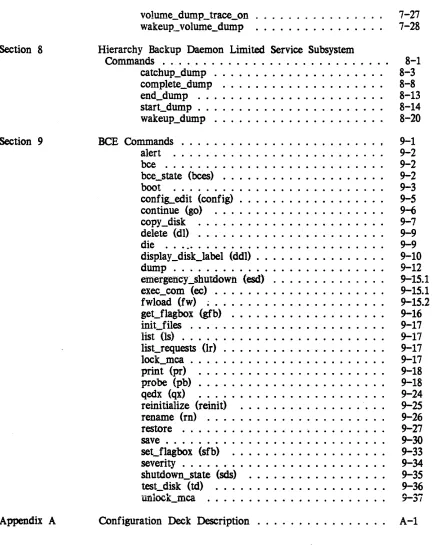
Section
1
Section
2
CONTENTS
Introduction . . . . Organization of the Commands . . . . Moving From One Command Environment to Another BCE Command Environment . . . . Initializer Command Environment . . . . User Command Environment . . . . Registration and Accounting Command
Environment . . . . Daemon Command Environment . . . . Getting Online Help with Commands . . . . Privileged Multics Commands . . . _. . . . add_mail_table_entry . . . . . . . add_ volume_registration (avr) . . . . admin_mode_exit (arne) . . . . admin_util . . . . adopt_seg . . . . alarm_clock_meters . . . . analyze_multics -(azm) . . . . as_who . . . . ~kup __ dumJt . . . . backup __ load . . . . bind_fnp . . . . before.,joumal_meters (bjmt) . . . . bootload_fs . . . . cache_meters . . . . change_kst_attributes . . . . . . . change_tuninLparameters (ctp) . . . . change_volume_registration (cvr) . . . . channel_comm_meters . . . '. . . .. . . . charge_disk . . . . check_cpu __ speed. . • • . . . • • • • • . . . . • • check_dir . . . . check_mdcs . . . . check_IDSt . . . . check_sst_size . . . . check_tc_data_size . . . . clea.n._C&,iQ_'pool • • • • • • • • • • • • • • • • • • • • clear_partition . . . . clear-Pl'ojfile . . . . clear_reqfile . . . . . . . clear_resource (cIt) . . . . . . . . command_usage_count (cuc) .. . . . . compact_mail_table (salvage_mail_table) . . . . compare_configuration_deck . . . . . compare_IDSt . . . .
compute_bill . . . . console_report . . . . convert_con figuration_deck . . . . copy _as_meters . . . . copy _deadproc . . . . copy _dump . . . = • • • •
copy_mst (cpm) . . . . copy_registry . . . . create_daemon_queues (cdq) . . . . create_mail_table . . . . create_pnt . . . . . . . create_urf . . . . cv_cmf . . . . cv_dmcf . . . . cv_pmf . . . . cv _prt_rqti . . . . cv_rtmf . . . . daily_summary . . . . deactivate_seg . . . . debug,.Jnp (db_fnp) . . . . define_ work_class (dwc) . . . . delete_mail_table_entry . . . . delete_old_pdds . . . . delete_proj . . . . delete_registry . . . . delete_volume_registration (dvr) . . . . deregister_resource (drr) . . . . disk_meters . . . . disk_queue (dq) . . . . disk_stat_print . . . . disk_usage_stat . . . . disklow . . . . display _account_status (das) . . . . display _anst . . . . display _aste . . . . display_aut . . . . display_branch . . . . display _cache_threshold . . . . display_edt . . . . display _cpu_error . . . . display _disk_label (ddl) . . . . display _dut . . . . display _fnp_idle . . . . display _ioi_data . . . . display_kst_entry . . . • . . . display _loLsegment . . . . display _mstb . . . . display _process_audit_flags . . . . display
_prt_fqti . . . .
display -l>SP • • • • • • • . • • • • • • • • • . • . • . display _pvte . . . .
display _ vtoce . . . . dm_Iock_meters . . . . dm_Iock_status . . . . dm_send_request . . . . dm_set.Journal_stamps . . . . . . . dm_set_system_dir . . . . dm_system_shutdown . . . . . . .
dump~firmware . . . • . . .
dump_mpc . . . . dump_partition . . . . ed_installation_parms . . . . ed_mgt . . . . edit_process_audit_flags . . . . edit_proj . . . ' . . . . edit-Pl"oj$change_all . . . . eis_tester (et) . . . . enter_Iss . . . . excerpt_mst . . . . exercise_disk . . . . file_system_meters (fsm) . . . . fim_meters . . . . fix_quota_used . . . . flush . . . . . . fnp_data_summary . . . . fnp_throughput . . . . format_disk_pack (fdp) . . . .
generate~mst(gm) . . . .
get_flag'box . . . . get_uid_with_lastname . . . . hc_pf_meters . . . . hp_delete (hpdI) . . . . bp_delete_acl (hpda) . . . . hp_delete_ vtoce . . . . hp_set_acl (hpsa) . . . . hpset_dir_rinLbrackets (hpdsrb) . . . . hpset_rinLbrackets (hpsrb) . . . . idump . . . . inhibi t_pv . . . '. . . install . . . . instr_S})eed . . . . interrupt_meters (intm) . . . . io_error_summary . . . . iod_command . . . . iod_tables_compiler . . . . iod_val . . . . is_he_user . . . . is_Iegal_proj . . . . link_meters . . . . list_as_requests . . . . list_delegated_projects • . . . • . . . . list_extra_personids . . . .
list~t . . • . . . • . . • . . .
list_partitions . . . . list_proc_required . . . .
2-158
2-161
2-163
2-164
2-166
2-167
2-168
2-171
2-172
2-174
2-175
2-191
2-208
2-208.1
2-208.5
2-210
2-240
2-240
2-241
2-243
2-252
2-254
2-255
2-255
2-257
2-258
2-262
2-270
2-272
2-272
2-274
'" ",,,,r
list_vols . . . . list_volume_registration (Ivr) . . . . load_ctl_status . . . .
1", ... ~ ... _
lVUW_llJ.}"W • • • • • • • • • • • • • • • • • • • • • • • •
lock_mea . . . . make_commands . . . . make_volume_labels . . . . map355 . . . . mc_trace (mct) . . . . mcs_ version . . . . meter_fnp_idle . . . . meter-sate (mg) . . . . meter_rcp . . . . meter _sigIlal . . . . . . . monitor_cache . . . . monitor_sys_log (msI) . . . . mos_edac_summary . . . . move_dir_quota . . . . move_los-segments . . . . mpe_data_summary . . . . ms_create (mscr) . . . . new_user . . . . patch_firmware . . . . pdt_copy . . . .
:P011_fnp . . . • . . . • . . •
:POll_mos_memory . . . .
:P011_mpe . . . • . . • . . . • . . .
post_purge_meters (ppm) . . . . print_apt_entry (pae) . . . . print_devices . . . . print_disk . . . . print_iod_tables . . . . print_line_ids . . . . print_meters . . . . print_pdt . . . . prin t-Pll t . . . . print_projfile . . . . print_req.file . . . .' . . . print_sat . . . . print_spoolinLtape . . . . prin t_sys_Iog (psI) . . . • . . . . • . . . print_tuninLparameters (ptp) . . . . print_urf . . . . priv _move_quota . . . . process_id . . . . proLusage_report (pur) . . . . read_early _dump_tape (redt) . . . . reclassify _dir . . . .
reclassify _seg . . . .
reclassify _sys_seg . . . . reconfigure . . . .
2-299 2-304 2-305 "'" """,
register _mdir
. . . .
register_resource (rgr) . . . .
reload
. . . .
remove_registry . . . .
retIlove_user . . . .
reset_edt_meters . . . .
reset_disk_meters . . . • . . .
reset..:.,.soos • • • • • • • • . • • • • • • . • • • • • • •
reset_usage . . . .
reset_use_totals . . . .
r~nse_meters
. . . .
restore_pdt_access . . . .
retrieve . . . .
rinLzero_dump (rzd) . . . .
salvage_dir . . . • . . . . . . . .
salvage_mstb . . . .
save_history _registers . .. . . . .
sc_command . . . .
scavenge_vol . . . .
sector_to_record . . . .
send_adMin_command (sac) . . . .
send_daemon_command . . . .
send_ips . . . .
send_wakeup . . . .
set_dir_quota . . . .
set_flag'box . . . .
set_loLhis-tory:..,.dir . . . .
set_mc_message_limits . . . • . . .
set_mos_pollinLtime . . . .
set_proc_required (sprq) . . . .
set_process_audit_flags . . . .
set_Quota
(sq) . . . • . • . . . . • . . . . .set_SODS_ volume . . . • . . . .
set_special_password . . . .
set_system ... audit_flags . . . .
set_systeM_console . . . .
seL~stem_priv
. . . .
set_system_search_rules • . . . .
set_ timax (stm) . . . .
set_tpp (stpp) . . . .
set_ work_class (swc) . . . .
set_x25_packet_threshold . . . .
sort_projfile . . . .
sort_reqfile . . . .
summarize_sys_log (ss1) . . . .
C!U7_'"
., .... 'WW',t' • • • • • • • • • • • • • • • • • • • • • • • • • •
sweep_pv . . . .
sys_fu1l_report . . . • . . . .
systen1_comm_meters .. . . . .
system_daily _report . . • . . • • • ;, • . • . . . .
~tem_link_meters
. . . .
system_monthly_report . . . .
~tem_performance..sraph(spg) . . . .
system_total . . . • . . .
test_cpu . . . . test_dcw . . . 0 0 0 • • •
test_fnp . . 0 • 0 • 0 • 0 • • 0 0 0 0 0 0 • 0 • 0 0 0 0
+~+ : ... ...:I~ ...
-~"_lU_U4Cl11U1J. • • • 0 0 0 • 0 0 0 0 0 • 0 0 • • 0 0 •
test_taJ)e . . . 0 0 0 • • • • • • 0 0 0 0 0 0 0 • 0 • • •
total_time_meters (ttm) . . 0 0 • • 0 0 0 0 • 0 • 0 0
traffic_control_meters (tern) 0 • • • • • • • • • • • •
traffic_control_queue (tcq) 0 0 • • • 0 • • • • • 0 0 •
tty_dump . . . 0 • • 0 • • • • • • • • • 0 • • • • •
tty_lines . . . 0 • • • • • 0 • • • • 0 0 • • • 0 0 •
tune_disk . . . 0 • • 0 • 0 • • • • • • • 0 • •
tune_work_class (twc) . 0 • 0 • • 0 • • • 0 0 0 0 0 •
unlock_mca . . 0 • • • • 0 • 0 0 • • 0 0 • 0 0 • • 0 •
unwire_pages 0 • 0 • • • • • • 0 • • • • • • • • • • • •
up_ctr . 0 • • • 0 • 0 • • • • • • • • • 0 • • 0 • • • •
update_mail_table_entry . 0 • • • • • 0 • • • 0 0 • •
usage_and_revenue . 0 • • • • • 0 • • 0 • • 0 0 • • 0
usage_total 0 0 • • • 0 0 • 0 • • • • • • • • • 0 0 0 0 •
vtoc_buffer_meters . . . . 0 0 • 0 0 • • • • 0 0 0 0 •
vtoc_pathname 0 • 0 0 • 0 0 0 0 0 0 • 0 0 • ' . 0 0 0 0 0
vtocx_ to_record 0 • • • • • • 0 0 0 0 0 • 0 • • 0 0 0 •
wire_pages . . . 0 • • • • • • • • • • 0 0 • • 0 0 • • 0
work_class_meters (wcm) . . . 0 • • 0 0 • • 0 • •
write_acct_bill 0 0 0 0 • • • 0 • • • 0 • 0 • 0 0 • 0 0 0
write_billin&-summary . 0 • • • • 0 • • • • 0 0 • • •
write_notify _test . . . 0 • 0 • • 0 • • 0 •
write_user_usage_report . 0 • • • 0 • • • • • • 0 • •
Section 3 Accounting Commands· . . . . add_anon . . . 0 • • • • 0 • 0 • • • • • • 0 • •
bill . . . 0 • 0 • •
chaddr . . . 0 •
chalias . . . 0 • • • • • • • • 0 • 0 • • • change . . 0 • • • • 0 • • • • • • • • • • • • 0 • • • • charge . . ' . . . 0 • • • • • • • • • • • • • • • •
chcJ)8SS . . . ' . . . 0 • • • • •
chdf -Pl'o j . . . 0 • • • • • • • • • • • • • • • •
check_log . . . . chname . . . 0 • • •
chJ)aSS . . . 0 • • • • • • • • •
chprog . . . 0 • •
credit . . . 0 • • • • • • • • • • • • • • • • • •
cu . . . 0 • • • • • • • • • • • • •
day . . . . delegate . . . 0 • • • • • • • • • • • • • • • •
disk_report (drp, disk_auto) . . . . dmisc . . . . dptIlf . . . . dproj . . . . edit_proj . . . • . . . install . . . 0
Section 4
pmisc . . . • . . . . . 3-36 proLmtd . . . . . 3-38 recov . . . . . 3-39 register . . . . . 3-39 rename_proj . . . . . 3-41 rqm . . . . . 3-42 setcrank . . . 3-43 setdisk . . . ~ . . . ... . . . . 3-43 undelegate . . . 3-44 upmf . . . • . . . .. 3-45 who_delg . . . . . 3-46
Initializer Commands . . . . abs • . • • • • • • • • • • • • • • • • • . • • • • . •• accept . . . . add_Iv (alv) . . . . add_pdir _volume . . . . adddev (addd) . . . . add_vol (av) . . . . adddev (addd) . . . . admin . . . . attach . . . . 'bee • • • • • • • • • • • • • • • • • • • • • • • • • • • bump . . . . cripple . . . . . . • . . . debug . . . . define . . . . del_Iv (dlv) . . . . del_pdir_ volume . . . . del_vol (dv) . . . . deldev (deld) . . . .
deroute . . . .
detach . . . . disconnect . . . . display_volume_log . . . . down . . . • . . . drop . . . . dump_mpx . . . .exec (x) . . . .
force_reset . . . . go . . . . help . . . . hmu . . . . init_ vol . . . . intercom . • . . . . list_disks (ld) • . . . load_mpx • . . .lock_mea . . . • . . .
log . . . • • • . . . login (logi) . . . .. . . .. . . . logout (logo) . . . . maxunits (maxu) • . • • • • • • • • • . • • • • • . . • mc_list . • . . . • . . • . . . .
Section
5
multics (mult) . . . . . 4-43 no_start (ns) . . . . . 4-44 preload . . . . . 4-44 quit . . . 0 0 • 0 • • • • • • • • • • 4=45
rep . . 0 • 0 0 • • • • • • • • • • • • • • • • • • • • • 4-45
rebuild_disk . . . 0 0 0 0 0 0 0 0 0 • • • • • • • • 4-47
reconfigure (ref) . . . 0 • • • • • • • • • • • • • 4-48
recover_volume_log . . . . 0 • • • • 0 • • • • • • • • 4-51
redefine . 0 • • • • • • • • 0 0 0 0 0 0 0 0 0 • 0 • 0 0 4-52
release 0 . . . 0 • 0 0 0 • 0 • 0 0 0 4-53
reload . 0 • • 0 • 0 0 0 0 • • • • • • • • • • • • • • • 4-54
reload_system_release . . . . . 4-58 reload_volume . . . . 0 0 • • • 0 • • • • 4-62
remove . . 0 • • • • • • • • 0 • • 0 • • 0 • • 0 0 0 • 0 4-65
reply (d . 0 0 • • 0 0 • • 0 • • 0 • 0 • • • 0 • • • o. 4-65
reregister . . 0 • • • • • • • ' 0 • • • • • • • • • • • • 4-66
reroute 0 0 0 • • • • • 0 0 • 0 • 0 0 • • • • • • • • • 0 4-67
reset 0 0 0 0 0 0 o. 0 • • • • • 0 • 0 • 0 0 • 0 • • 0 • • 4-68
route . . . 0 • • 0 • 0 0 0 0 0 0 0 • • • 0 0 • 0 • • • • 4-68
salvage_dirs (salv) . . . .. . . . . 4-69 salvage_vol 0 • 0 0 • • • 0 0 • • • • • 0 • • 0 • • • • • 4-69
set_drive_usage (sdu) 0 • • • • • • • • • • • • 0 0 • • 4-70
set-Pdir~volumes . . . . 0 • • • • • • 0 0 • 0 • • • • 4-71
shift . 0 • • • • 0 0 • • 0 • • • • • • 0 • 0 • 0 • 0 O . 4-72
shutdown (shut) . . . . 0 0 0 0 • • 0 4-74
sign_off
0... 0
4-75 sign_on . . . . . 4-75 standard (stan) . . . 4~ 76 start_mpx . " . . . 4-76 startup (star) . . . . . 4-77 stop . . . . . 4-77 stop_mpx . . . . 0 0 • 0 • • • • • 0 • 0 • • 0 • • 4-78sUbstty . 0 0 0 0 • 0 0 • 0 0 0 • 0 0 • 0 0 0 0 0 0 • 0 0 4-79
sysid 0 0 0 • • 0 • 0 • • • • • • • • • • • • • • • 0 0 0 4-80
terminate (term) . . . 0 • • • • • 0 0 0 • • 0
o.
4-81unbump
0...
o.
4-82 undefine . . . . 0 • • • • • 0 0 • • • • • • • • 0 0 O . 4-82unload . . . 0 • 0 • • • • • • • • • 0 0 0 4-83
unlock_mea . . . 0 • 0 • • • • o. 4-84
vacate-Pdir _volume . . . 0 • • • 0 0 0 • • • • • •
o.
4-84warn (w) . . 0 0 • 0 0 • • • • 0 • • • 0 • 0 0 • 0 • O . 4-85
who 0 • • 0 • 0 • • • • • 0 • • 0 • 0 • • • • • • • • 0 0
4-86
word . . 0 • 0 0 • 0 • 0 • 0 • 0 • 0 • • 0 • • 0 • 0 • • 4-88
Initializer
Exec Commands . . .
0 • • • • •attended (attend) . . . 0 • • • • • • • • • • • • •
auth . . . 0 • • • • • • 0 • • • • • • 0 • • • • • •
auto . 0 • • • • • • • • 0 0 • • • • 0 • • • 0 • • • • •
cat . . . ; : : ; ; ; . . . complete_volume (vcomp) . . . . .; . . . . consolidated_volume (vcons) . . . . 0 0 • • • • • • •
echoplex . . . 5-8 end_dump . . . " . . . . 5-9 inc . . . 5-9 incremental_volume (vinc) . . . 5-10 io . . . . . 5-11 iol . . . 5-11 meter . . . . . 5-11 print_queues (pq) . . . . . 5-12 punch (puna) . . . 5-12 punch_end (end_punch) . . . 5-12 punch_restart . . . 5-13 read_cards (cards. rc) . . . 5-13 repair . . . . . 5-13 reprint (rep) . . . . . 5-14 reset_phcs_access (rpa) . . . . . 5-15 reset_tabs (tabs, rt) . . . . . 5-15 scav . . . . . 5-16 set_fdump_number (set_fdump, sfdn) . . . 5-16 set_phcs_access (spa) . . . 5-17 unattended (unattend) . . . . . 5-17 wakeup_dump . . . . . . . 5-18 Section 6 I/O Daemon Commands . . . . . 6-1
auto_queue . . . . . 6-2 auto_start ... delay . . . . . 6-2 banner_bars . . . 6-3
banner~type . . . "6-3
cancel . . . 6-4 clean_pool . " . . . . . . . . 6-5 copy . . . 6-5 ctl_term . . . 6-6 deier . . . . . 6-7 defer_time . . . . . 6-7 go . . . . . 6-8 halt . . . . . 6-8 hasp_host_operators_console (hhoc) . . . . . 6-9 help . . . 6-11 help . . . 6-11 hold . . . 6-11 inactive_limit . . . 6-12 kill . . . 6-12 list . . . 6-13 listen . . . . . . . 6-13 logout . . . 6-13 logout . . . 6-14
master . . .
6-14Section
7
prt_control . . . .
pun_control . . . .
punch . . . .
rpJtd_cards . . . •
ready . . . .
receive . . . .
reinit . . . .
release . . . . . . .
re<l-status . . . . . . .
request_type (rqt) . . . .
restart . . . . . . .
restart_q . . . .
restart_status . . . .
runout_spa.cing . . . .
sample . . . .
sample_f orm . . . .
sample_hs . . . .
save . . . .
sep_cards . . . .
single . . . .
slave . . . .
slave_term . . . .
start . . . .
start . . . .
station . . . .
status . . . .
step . . . .
term . . . .
wait_status .". . . . x (xxxx) . • . . • • • . • • • • • . • • . • • . . .
Volume Backup Daemon Limited Service Subsystem
Commands . . . .
complete_volume_dump . . . .
consolidated_volume_dump . . . .
delete_volume_log . . . .
display _pvolog . . . .
display_volume_log . . . .
dmpr_unlock_pv . . . .
end_volume_dump . . . .
incremental_volume_dump . . . .
list_retrieval_requests (Irr) ., . . . .
merge_volume_log . . . .
preattach_dump_ volumes . . . .
purge_volume_log . . . .
rebuild_pvolog . . . .
recover_volume_log . . . • . . . .
reloa.d_ volume . . . .
retrieve_from_ volume . . . .
= = •set_volume_log . . . ; . . .
set_volume_wakeup_interval . . . .
Section 8
Section
9
[image:16.612.93.526.104.649.2]Appendix A
Figure
1-1.
volume_dump_trace_on 0 • • • 0 • 0 0 • 0 0 • • • • •
7-27
wakeup._volume_dump . . .
7-28
Hierarchy Backup Daemon Limited Service Subsystem
Commands . . . . catchup_dump . . . . complete_dump . . . . end_dump . . . . start_dump . . . . wakeup_dump . . . .
BCE Commands . . . . I alert . . . . bce . . . . bee_state (bees) • . . • . . . • . . • • • • • • • • . • boot . . . . confis-edit (config) . . . . continue (go) . . . . copy_disk . . . . delete (d}) . . . . . . die . . . . display _disk_label (ddI) . . . . dump . . . .
emergency_shutdown.
(esd) . . . • • . . . exec_com (ec) . . . . fwload (fw) ~...get_flagbox (gfb) . . . . . . . init_files . . . . list (Is) . . . . • . . . . • . . • • . . . . • • . • . . . list_requests (Ir) . . . . • . • . . • . . . • .
lock_mca . . . . print (pr) . . . • . . . • . . . probe (pb) . . . • . . . . qedx (qx) . . . . reini tialize (reini t) . . . . rename (rn) . . . . restore . . . ' . . . . save . . . . set_flagbox (sfb) . . . . severity . . . . shutdown_state (sds) • • • . • • • • • . • • • . • . . test_disk (td) . . . • • . . . • . . .
unlock_mea . . . .
Configuration
Deck
Description8-1
8-3
8-8
8-13
8-14
8-20
9-1
9-2
9-2
9-2
9-3
9-5
9-69-7
9-9
9-9
9-10
9-12
9-15.1
9-15.1
9-15.2
9-16
9-17
9-179-17
9-17
9-18
9-18
9-24
9-25
9-26
9-27
9-30
9-33
9-34
9-35
9-36
A-1
IllustrationsTable 1. Index
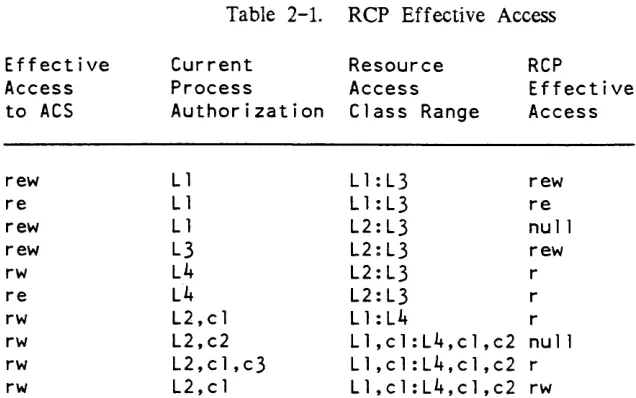
Rep Effective Access . . . .
Tables 2-414
[image:17.613.187.518.106.144.2]SECTION 1
INTRODUCTION
ORGANIZATION OF THE COMMANDS
The commands in this document are organized into eight sections (Section 2 through Section 9), as described below.
The commands in Section 2 do not require you to be in a "special" environment They do, however, require that you have access to the segments and directories they reference. At most sites, required access are set only for those individuals on the SysAdmin, SysMaint, or Opr projects.
The commands in Section 3 are entry points (labels) in master.ec. The registration and accounting administrator issues a limited set of entry points in master.ec. The system administrator can act in the role of registration and accounting administrator.
The commands in Section 4 can
Pe
used only when communicating with the initializer process.The commands in Section 5 can be used only when communicating with the initializer process. These commands are also contained within admin.ec and require that you type "exec" (x) prior to typing the command.
The commands in Section 6 can be used only when communicating with the I/O daemons (i.e., the I/O daemon coordinator and drivers).
The commands in Section 7 are contained within a Honeywell-provided limited-service subsystem and are used for communicating with the Volume_Dumper. Daemon, the Volume_Reloader.Daemon, or the Volume_Retriever . Daemon.
•
The commands in Section 9 can be executed only within the restricted environment of the Bootload Command Environment (BeE).
COMMAND ENVIRONMENTS
The Multics system "handles" each command by first interpreting the request and then invoking the necessary system software components to perform the required function. The commands in this manual are organized according to the system software components (the environment) required for execution.
It is the presence of the different software components that forms the "command environment" The way in which you enter a specific command environment is described at the beginning of each command-specific section. The system software components required for command execution are automatically made available when you perform the required actions.
MOVING FROM ONE COMMAND ENVIRONMENT TO ANOTHER
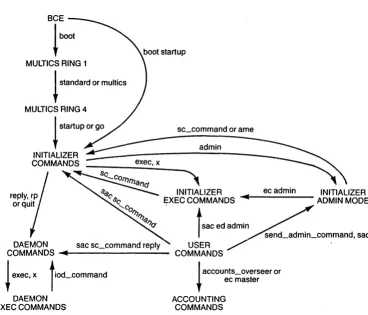
In some cases you can log in in one environment and move to another environment The Multics system includes various transitional commands that permit you to enter two or more command environments while logged in at a single session. Figure 1-1 shows the commands that you can issue to move from one command environment to another; that process is described below.
BCE Command Environment
The first activity in starting or bringing up a Multics system involves the • loading of the BCE (Bootload Command En:vironment) software. While BCE is
running, you can enter and execute only BCE commands.
Once the Multics operating system software is bootloaded and the initializer process is active, it is not possible, without executing the shutdown command, to • reenter the BCE command environment
Initializer Command Environment
The initializer process is the system control process for Multics. The initializer process is created automatically as a result of a successful Multics bootload operation.
If Multics is not booted with the boot star command, the initializer is first brought to command level in ring 1. The initializer remains in ring 1 until the operator moves it to ring 4 using the standard command or the multics command. The operator must then issue the startup command or the go command to make the system available for normal user sessions (users can log in from remote terminals).
You use the initializer commands and the initializer exec commands to communicate with the initializer process. Certain initializer commands can be used only when the initializer process is operating in ring 1. Others can be used only when the initializer process is operating in ring 4. Some can be used at either time. The description of the initializer commands in Section 4 indicates when the individual command can be used. The initializer exec commands can be used only when the initializer is operating in ring 4.
The initializer process remains active as long as the system is running. In its normal mode of operation the initializer responds only to initializer commands or initializer exec commands. Sometimes, however, it is desirable to use the initializer process to execute a "normal" Multics command (i.e., any command that is not an initializer command, an initializer exec command, or a BCE command). To use the
*
initializer to execute a "normal" command you must enter the initializer admin mode by issuing the admin command. When in admin mode the initializer process responds to "normal" commands instead of to the initializer commands or the initializer exec commands.Once in admin mode you can- -shift -back to the -- initializer command environment by issuing the admin_mode_exit command. Alternatively, if you want to remain in admin mode but want to execute a single initializer command from time to time, you can do the following:
1. if you want to enter an initiaiizer commana \excepting the exec commands), you must use the sc_command together with the desired initializer command, as in
2. If you want to enter an initializer exec command, you must use the ec admin command together with the desired exec command, as in
ec admin attended
While in the initializer command environment, you can communicate with the system daemon process(es) by the initializer reply command. You use the reply command together with the daemon driver label and the daemon command, as in
reply prta go
User Command Environment
Once the bootload/initialization sequence is complete the system becomes available for normal user sessions. Users log in at remote terminals to perform assigned work. in a normal session you can use a wide variety oi commands, including the privileged commands (see Section 2) as well as the commands described in the Commands manual (AG92).
While in the user command environment, you can't use any of the "special" environment commands described in this manual; you can, however, move to those special environments by using transitional commands:
1. If you want to enter an initializer command (excepting the exec commands), you must use the send_admin_command command (which enters initializer admin mode) and the sc_command command together with the desired initializer command, as in
sac sc_command maxu auto
2. If you want to enter an initializer exec command, you must use the send_admin_command command and the ec admin command together with the desired exec command, as in
sac ec admin attended
3. If you want to submit a "normal" command to the initializer process, you must enter initializer admin mode by using the send_admIn_command command together with the selected "normal" command, as in
sac set_system_consoie -reset·
4. If you want to enter a daemon command, you can use the send_daemon_command command, as in
Alternatively, you can use the send_admin_command command and the sc command command together with the initializer reply command, the daemon driver label, and the desired daemon command, as in
sac sc_command reply prta go
5. If you are a system administrator, you can enter an accounting command by changing your working directory to >udd>SysAdmin>admin (see Section 3) and using the ec master command together with the selected accounting command, as in
Registration and Accounting Command Environment
A registration and accounting administrator is restricted by a special process overseer to a limited set of commands and cannot move to another command environment If you are a system administrator. you can move into. or out of, the registration and accounting command environment by changing your working directory (see Section 3).
Daemon Command Environment
The I/O daemon command environment uses a special process overseer Hod-overseer) and a special set of search rules; you can't shift from this environment to another. The commands in the volume backup daemon command environment are contained within a Honeywell-supplied limited-service subsystem; you can't shift from this environment to another. The commands for two of the hierarchy backup daemons (Backup.SysDaemon and Dumper.SysDaemon) are also contained within a Honeywell-supplied limited-service subsystem; you can't shift from this environment to another.
GETTING ONLINE HELP WITH COMMANDS
There are information segments (info segs) for the commands in this manual in the following directories:
Commands
Directories
Commands in Section
2>doc>pr i v i 1 eged
Commands in Section 3
>doc>ss>accounting
COiin"iiands in e __ . : __ J. >doc>ss>Operator
~C"'LIUII
...
(Ring 4 commands only)
Commands in Sect
ion 4
>doc>ss>rl in it
iali zer
(Ri ng
1commands onl y)
Commands in Section
5
>doc>ss>operator
Commands in Section 6
>doc>ss>io_daemon
Commands in Section
7
>doc>pr i vi 1 eged
Commands in Section
8
>doc>pr i v i 1 eged
Commands
in Section Q ,.,>doc>ss>bce
If you're in the user command environment, the volume backup limited-service subsystem, or the hierarchy backup limited-service subsystem, you can use the user help command to look at the above info segs. When using the help command, however, you must specify the absolute pathname of the info seg, as in the following
example.
help >doc>privileged>set_system_console
Alternatively, you can add one or more directories to your info search list by adding a line to your start_up.ec; for example,
asp info >doc>privileged
Then, you can look up info segs in the directories without having to specify the absolute pathname; for example,
If you're in the ring 4 initializer command environment, you can look at info segs for ring 4 initializer commands by using the initializer help command; for example,
help down
If the info seg you want to look at is for an exec command, you must specify the name in the format "x. command , " as in
help x.attended
If you're in the ring 1 initializer command environment, the registration and
BCE
l
boot MULTICS RING 1l
standard or multicsMULTICS RING 4
boot startup
sc_command or arne admin
..
t
sac ed adminDAEMON sac sc_command reply" USER / ' COMMANDS ...
11---
COMMANDSecadmin
~
exec, x tiO(LCOmmand+
I
accounts_overseer orec master DAEMON
EXEC COMMANDS
ACCOUNTING COMMANDS
INITIALIZER ADMIN MODE
[image:24.613.150.518.198.513.2]SECTION 2
PRIVILEGED
MUL
TICS COMMANDS
SYNT AX AS A COMMAND
FUNCTION
adds an entry to the mail table and specifies the entry's mailing address. This command is used by system administrators to specify names. usually names of users on other systems, that can be used to designate mailboxes (Person_id.Project_id). mailing lists. and Forum meetings. The name must not already exist in the mail table or the person name table (PNT). Names are not distinguished by case (e.g.. Sackman and sackman are the same name).
ARGUMENTS
name
IS a string that specifies the name to be gi\'en to this mail table entry. It must be enclosed in quotation marks if it contains blank spaces.
address
is a destination specifier. that is. a mailing address in the form used by the -mailbox or -user control arguments (see below). It can be used instead of the -mailbox or -user control arguments.
CONTROL ARGUMENTS
-acs_path path
specifies the Access Control Segment (ACS) which controls who may update the entry's mail address. rv.- access to the ACS indicates that a user may update the entry. If this is not specified or is the null string. only users with access to mail_table_pri,,_ may update the entry.
-alias name
specifies an alternate name for the name being defined. If this control argument is specified mUltiple times. all the names are defined as aliases for the entry.
-log path
specifies the pathname of a logbox and is equivalent to:
-mai lbox >udd>Project_id>Person_id>Person_id.sv.mbx
_~'l~l1-.",v ~'llh _~'hv ~')th I I l U ! ! vv .. '\. p"' .... I.1, 1.L.11o..J1\. t""L.LJ.
specifies the pathname of a mailbox. The suffix "mbx" is added if necessary.
-mailing_list path. -mls path
-meeting path, -mtg path
specifies the pathname of a Forum meeting. The suffix "control" is added if necessary.
-save path, -sv path
specifies the path name of a savebox. The suffix "sv.mbx" is added if necessary. STR -at FSystem {-via RelayN ... -via Relayll
specifies an address on another computer system. SIR identifies the user (or group of users) to receive the message and is not interpreted in any way by the local system. FSystem is the name of the foreign system where the address is located. If you give no -via, FSystem must be one of the names of a foreign system in the local system's network information table (NIT). If, however, you give -via, the foreign system name does not need to be known to the local system.
If you specify -via, they identify an explicit route to be used to reach the foreign system. In this case Relay1 must be one of the names of a foreign system in the local system's NIT. Mail destined for this foreign address is forwarded to the system identified in Relayl. From there it is forwarded to the system identified as Relay2, and so on until it reaches the system identified as RelayN, where it is delivered to the system on which the foreign address actually resides. When the NIT is querried for either FSystem or Relay 1, the query is performed in a case-insensitive manner.
-user Person_id.Pro ject_id
specifies the given user's default mailbox under the specified project This control
~1"Ol1",pnt ;C! pnnh,glpnt tn
. . .&.O...u..&.~.LI.'" .&WI' ~ ... .a., ... £...,~.&~ ... "
-mailbox >udd>Project_id>Person_id>Person_id.mbx
EXAMPLES
The command line
links the name John Jones to MLutyens.Mktg on SystemA so that any time the name Mary Lutyens appears in an address used by the send_mail command, Executive Mail. or Emacs Mail, the message is sent to MLutyens.Mktg on SystemA.
The command line
add_mail_table_entry "Mary Lutyens" MLutyens.Mktg -at SystemA
-alias ML
add_ volume_registration
To add an entry for a mailing list, you must use -mls instead of the address argument:
add_mail_table_entry mix -mls mixed_list
ACCESS REQUIRED
You must have e access to the gate mail_table_priv_.
Name; add_volume_registration, avr
SYNTAX AS A COMMAND
avr -control_args
FUNCTION
registers a new physical volume. If the specified logical volume does not exist, it is registered
as
well.CONTROL ARGUMENTS
The following control arguments pertain to the registration of a physical volume. -device_model N, -model N
specifies the Honeywell model number for the disk device. The following values are valid for N:
VALUE
DEVICE
400
MSu0400
402
"'SU0402
451
"'SU0451
500
"'SU0500
501
"'SU0501
3380
"'SU3380
3381
"'SU3381
add_ volume_registration
-location STR, -loc STR
specifies the current location of the disk pack. This is for administrative information only. STR can be any 32 characters (e.g.. "offline--in cabinet 13"). (Default "uninitialized")
-logical_volume LVNAME, -Iv LV_NAME
SYNTAX AS A COMMAND
ame
FUNCTION
returns to initializer command level from admin mode.
SYNTAX AS A COMMAND
admin_uti 1 {args}
FUNCTION
sets and prints values in the segment sys_admin_data in the working directory. This segment is normally kept in >udd>SysAdmin> lib (with
a
link to it in >udd>SysAdmin>admin). It contains a number ofvalues
used by system administration-procedures. One of these values is a lock, which prevents two system administrators from modifying the system administration databases simultaneously. This command also sets several values in the header of the administrator's copy of the SAT (smf.cur.sat, in the working directory). You canuse
the print_sat c.ommand to print information in either >scl>sat or >udd>SysAmin>admin>smf.cur.satARGUMENTS
lock wait_time
attempts to lock the lock in sys_admin_data. If the lock is already locked (by another process) and remains locked for more than the specified Wait_time (in seconds), then an error message is printed and the program_interrupt condition is signaled. (Default: 60)
prints all values in sys_admin_data.
set key value, default key value, dft key value
sets the variable indicated by key to the given value.
Since some
of the se!table variables are default values of project parameters, used when a new project is created, the words "default" and "dft" are acceptedas
synonyms for "set." The keys correspond to three classes of variables: installation-dependent items, project parameters, and the SAT header.unlock
attempts to unlock the lock in sys_admin_data. If the lock was not locked by the process that is executing the command, an error message is printed. If it was locked by an existing process (other than the one executing the command), it is not unlocked.
LIST OF INSTALLATION-DEPENDENT VARIABLES
The following variables contain installation-dependent items that are printed on monthly bills and other administrative documents. Enclose the values of these items in quotes if they contain any blanks or other special characters.
user_aeets XX, user_accts_office XX
where XX is the official name of the office responsible for Multics billing, for example: "Fiscal Office" or "Accounting Department" It is the first line of a return address printed on bills by the mailinLpage_ subroutine. It can be up to 64 characters long.
user _aeets_addr XX
where XX is the address of the above office, for example, a building and room number or a mail station. It is the second line of a return address printed on bills. It can be up to 64 characters long.
user _accts_phone XX
where XX is the phone number of the above office. It is also printed on bills. It
can
beup
to16
characters long.bl XX, b2
xx.
b3XX:
where XX strings, each of which can be up to 10 characters long. are printed in large letters by the mailinLpage_ subroutine, as a set. below and to the left of the address of the bill recipient For example,
INTER
DEPARTMENT
LIST OF PROJECT PARAMETER VARIABLES
attributes XX
where XX, enclosed in quotes if it contains any blanks, must be acceptable to the parse_attributes_ subroutine. This string sets the default attributes for a new project. The anonymous (anon) attribute, which allows anonymous users to be registered on a project, can only be assigned by a system administrator. For a more detailed description of registration of anonymous users done by the Project administrator see the Mu/tics Project Administrator's manual (AKS1). The other attributes can be assigned by a project administrator if the system administrator has set them for his project. For convenience, all the valid attributes are listed below.
administrator
no_primary
nopreempt
admin
no_prime
op_login
anonymous
no_secondary
daemon
anon
no_sec
preempting
brief
no_start_up
bumping
dialok
no_warning
save_pdir
dial
nowarn
save_on_disconnect
disconnect_ok
nobump
save
guaranteed_login
no 1 i st
v_home_dir
guar
vhomedir
none
igroup
null
v_process_overseer
•• : .... : + ... ~
V"" "'.." """"
multi _login
multip
audit XX
where XX is the default audit
flags
to be used when new projects are created or new users registered. For a description of the audit flags see the new_user command.grace N
where N is the default grace time (in minutes) for a new project The grace time specified by N is the length of time primary users retain their primary status (protected from preemption). (Default: 2880 minutes or 48 hours, which really
means "never
to besubject
topreemption")
.
group XX
admin_util
max_ring
Nwhere the ring number specified by N is the default max_ring for new projects. (Default: 5)
LIST OF SAT HEADER VARIABLES
The following variables are in the header of the SAT. uwt weight
XX
is the load control weight for the corresponding process overseer named
XX.
which can be up to 64 characters long. The weight must be an integer, equal to 10 times the actual weight For example, users with the standard process overseer (process_overseerJ have a weight of 1, which is expressed as 10; users who have a process overseer that restricts them to an edit-only environment (for example, clerical personnel engaged in typing tasks) might have a weight of 0.5, which is expressed as 5. The default value of uwt depends on the process overseer, for example:
Weight
10 10 10
5
Overseer
process_overseer_
>system_library_tools>iod_overseer_
>system_library_tools>card_overseer_
>limited_service_system
You can give the word ··delete" (d}) instead oi weight to deiete the process overseer
XX
from the list The maximum number of unit weight table entries is24.
administrator 1 User_id administrator2 User_id
These two items are the User_ids of two persons who are permitted to act as system administrators. They may be specific people or, more general, User_ids. For example,
JBSmith.*
*.SysAdmin
max_units N
The N is the load limit. which is 10 limes the actual user weights. For example. if the system can handle 80 users of weight 1. the N should be 800. The default value of max_units is 750.
This limit is usually overridden by the per-shift values from the configuration table in the installation_parms segment. However. when automatic load control is disabled (in a special session. for example). the max_units figure in the SAT header is used.
SYNT AX AS A COMMAND
adopt_seg pvname vtocx path
FUNCTION
reconstructs a directory branch for a segment or directory whose branch has been lost but whose VTOCE exists. Individual segments may be adopted by the use of the adopt_seg command.
ARGUMENTS
pvname
is the physical volume name of a mounted physical volume. 011 which the VTOCE
for a branch that is to be constructed exists.
vtocx
path
is the VTOC index. in octal. of that VTOCE.
is the pathname of the entry to be constructed for the segment or directory. The directory portion of this pathname must specify an existent directory.
ACCESS REQUIRED
Use of the adopt_seg command requires access to the phcs_ and hc_backup_ gates.
NOTES
Segments whose branches are to be constructed by adopt_seg can only be returned to their original position in the hierarchy; the superior directory must exist.
The new branch that is created is lacking certain attributes, these attributes can be reconstructed either manually or by use of the rebuild_dir command. Default values are supplied for the following attributes:
ACL name
ring brackets safety switch copy switch access class bit count TPD switch
null
entry portion of path val idation level of caller off
off
from VTOCE
36854*current length as determined from VTOCE off
The fix_quota_used command and exec_com have to be used on directories that adopt segments in this way to correct quota used totals. This is always necessary if quota has been corrected since the branch was first lost.
SYNTAX AS A COMMAND
FUNCTION
displays information about the behavior of the simulated alarm clock used within the M ul tics system.
CONTROL ARGUMENTS
-report_reset. -rr
generates a report and then performs the reset operation.
-reset. -rs
resets the metering interval for the invoking process so that the interval begins at the last call with -reset specified. If -reset has never been given in a process, it is equivalent to having been specified at process initialization time.
ACCESS REQUIRED
This command requires access to phcs_ or metering~ate_.
NOTES
The following are brief descriptions of the variables printed out by alarm_clock_meters. No. alarm clock sims
is the total number of times that an alarm clock wakeup was generated. Simulation lag
is the average value of the simulated clock delays (i.e., the time difference between when the alarm should have gone off and when it was actually processed).
Max. lag
is the largest of the simulated delays that has occurred since the time of bootload. This value is not affected by the -reset control argument
Priority boosts
is the number of times the alarm clock went off indicating a priority scheduling process on the ready list should be granted high priority, i.e., have its waiting time before rescheduling set to O. This variable is not printed if zero.
Priori ty elig. lost
is the number of times the alarm clock went off indicating a priority process that had been running lost its eligibility because it had used up its eligible time. This variable is not printed if zero.
EXAMPLES
The following is an example of the information printed when the alarm_clock_meters command is invoked with no control argument.
Total metering time
1:36:35
No. alarm clock sims.
Simulation lag
"'ax.
1ag
Priority boosts
2274
91.676
msecs.
analyze_multics analyze_multics
Name: ana!yze_multics, azm
SYNTAX AS A COMMAND
azm {-control_args}
FUNCTION
invokes a subsystem that aids in system crash analysis. It can analyze dumps created by the bootload command environment (BCE) dump command and copied into >dumps in the Multics hierarchy by the copy _dump command. It can also analyze processes saved by the answering service after a fatal process error and copied by the copy _dea.dproc command.
CONTROL ARGUMENTS
-abbrev, -ab
enables abbreviation expansion of request lines. -no_abbrev, -nab
does not enable abbreviation expansion of request lines. This is the default -no_prompt
suppresses the prompt for request lines in the request loop.
-no_start_up, -nsu
does not execute any startup exec_com. This is the default -profile PATH, -pf PATH
specifies the patbname of the profile to use for abbreviation expansion. The suffix "profile" is added if necessary. This control argument implies -abbrev. -prompt STR
sets the request loop prompt to STR. The default is the ioa_ STR: "/azm" [ ("d)"] :"2x
-request STR, -rq STR
executes STR as an azm request line before entering the request loop_ -start_up, =-su
executes the exec_com "start_up.azmec" upon invocation of azm. This start_up exec_com is first searched for in your home directory, then in your project directory (>udd>Project_id), and last in >site. The first exec_com found is used. -quit
analyze_multics analyze_multics
NOTES
This command uses the standard search list mechanism to locate dumps. If it does not find a "dumps" search list. it creates one, placing >dumps and >dumps>SA VE_pdrs in the search list as the default. If additional search paths are desired. the add_search_path command can be used to define them.
V / RTUAL ADDRESS CONSTRUCTS
Accessing data requires some pointer value to define an address space. The generation of the pointer value is performed by resolving a virtual address (virtual-addr). A virtual-addr consists of two parts: a segment number and a word offset.
The command resolves virtual-addrs from the following types of information:
Symbol:
is a symbolic name for a segment number and an offset that can be resolved by data in definitions_ (i.e.. sst$ptl can be res01ved to the correct segment number and offset of the page table lock).
Segment name:
a segment name can be resolved in many ways. but it can only provide one part of the virtual address: azm uses 0 as the default offset for this pointer value (i.e.. tc_data is resolved to SEGNO
I
0).Segment number:
a segment number needs no resolution. but a default action needs to be taken for the offset (the default is O. i.e .. SEGNO! 0).
Segment name/number and offset:
the virtual-addr in this case can be a segment name or segment number and an octal offset (i.e .. the construct of pds 120 is translated to SEGNO 120 or dseg 15 is 015). The notation
"I"
and "$" must be used without spaces (e.g.. 24410 or sst$cmp).Temporary pointers:
azm keeps a set of 11 temporary pointers per translation. (See the set request for a list of these pointers.) A translation is one complete entity such as a "dump". These pointers can be set with the set request (e.g.. set sp 2301100). They can be referenced by other requests as another type of "symbol" in a virtual-addr expression. after they have been set. If not set. these pointers are null.
Offset operators:
analyze_multics analyze_multics
Indirection:
a virtual-addr can imply indirection. The indirect word can be used as an ITS pair if it is a valid ITS word pair: if not. the upper half of the word is used. The following virtual-addr construct is used to specify indirection (sst$cmp.*). The format of an indirect pointer value is:
s e 9 nolo f f set , ~':
temp_ptr, ~':
segnameloffset,* symbol,* temp_ptrloffset,*
EXAMPLES OF INDIRECTION
171230 , ~': sp, ~',
sstI230,* sst$cmp,*+2 sp 1230, ~',
LIST OF REQUESTS
a bsol ute_address. a bsadr
SYNTAX
absadr virtual-addr
SYNTAX AS AN ACTIVE REQUEST
[absadr virtual-addr]
FUNCTION
translates a "virtual address" to an absolute memory address.
ARGUMENTS
virtual-addr
can be a segment number. name. or symbolic address (e.g., 64. prds, prds$am_data). See "Virtual Address Constructs" above.
ACTIVE REQUEST EXAMPLE
display_absolute [absadr sstScmpJ 2
analyze_multics analy ze_m ul tics
SYNTAX
arqt path
FUNCTION
adds a user-defined request table In the list of request tables being searched by the current azm invocation.
ARGUMENTS
path
is the pathname of the request table to be added. This request table must be consistent for use with the subsystem utility. (Refer to the Multics Programmer's
Reference Manual, Order No. AG91. for request table structure.)
apply~ ap
SYNTAX
ap virtual-addr {range} command_l ine
FUNCTION
extracts all or part of a segment specified by VIRTUAL-ADDR from the selected dump, and places a copy in a temporary segment. This pathname is passed as the last argument in the command_line.
ARGUMENTS
yirtual-addr
may be a segment number, name or symbolic address (e.g .. 64, prds. prds$am_data).
See "\Tirtual Address Constructs" abo'le.
range
specifies the number of words in octal to be copied. The default is the entire segment.
command_line
analyze_multics analyze_multics
NOTES
The offset in the virtual address specifies where the copying of the segment begins. When only part of a segment is extracted, it goes at the beginning of the temporary segment. For example:
ap pds$am_data 400 dump_segment
puts 256 (decimal) words at the beginning of the segment.
apte
SYNTAX
apte {proc_indicator} {-control_args}
FUNCTION
displays active page table entry (APTE) information for processes in a dump whose states match the states specified.
ARGUMENTS
proc_indicator
used for specifying individual processes. It can take one of three forms:
The decimal index (starting at zero) of a process in the dump.
- The octal APTE offset of the process. - The octal process_id of the process.
CONTROL ARGUMENTS
-alL -a
displays APTE information for all processes in any state. This is the default.
-blocked, -blk
displays APTE information for all processes in the blocked state.
-count. -ct
specifies the total number of processes meeting the criterIa specified by control_args. With -all, it gives the counts of each process state.
-current. -cur
displays APTE information for the current process.
-page_tbl_Iock, -pt1
analyze_multics analyze_multics
-ready, -rdy
displays APTE information for all processes in the ready state.
-run
displays APTE information for all processes in the running state.
-stopped. -stop
displays APTE information for all processes in the stopped state.
-wait
displays APTE information for all processes in the waiting state.
EXAMPLES
apte 2
displays information for process 2 in a dump.
apte 10600
displays information for the process with APTE offset 10600 (octal).
apte 3500555555
displays information for the process with octal process_id 003500555555.
associative_memory, am
SYNTAX
am {-control_argsl
FUNCTION
displays SDW and/or PTW associative memories.
LOCATION CONTROL ARGUMENTS
-dump
displays the "dump" assoclatlVe memories from the bootload CPU at the time the dump was taken. This is the default.
-prds
analyze_multics analyze_multics
CONTROL ARGUMENTS
-alL -a
displays all entries in the associative memories. The default is to display only those entries that are valid (i.e., the full bit is on).
-ptw
displays only the PT\V associative memories.
-pageno PAGENO
displays only those entries in the PTW assoclatlVe memories that have a page number that matches the value of PAGENO (which is an octal page number).
-sdw
displays only the SDW associative memories.
-segno SEGNO
displays only those entries in the SDW and PTW assoclatlVe memories that have a segment number that matches the value of SEGNO. which is an octal segment number. (See assoc_mem.incl.pU.)
NOTES
If no control arguments are given. both the SDW and PTW associative memories are displayed for the "dump" associative memories.
aste
SYNTAX
aste segno/segname {-control_args}
FUNCTION
displays active segment table (AST), page table. and trailer information. The default displays active segment table entry (ASTE) and page table information only.
ARGUMENTS
segno / segname
is the segment number or segment name of interest.
CONTROL ARGUMENTS
-aste
displays AST information for the selected entry.
-at offset. -at virtual-addr