H()NEYlVILL
.
I
MULTICS EMACS
i
EXTENSION
WRITER'S
MULTICS
EMACS EXTENSION WRITER'S GUIDE
SUBJECT
Guide for Programmers Writing Extensions and Terminal Control Modules (CTL) in the LISP Programming Language for the Emacs Text Editor
SPECIAL INSTRUCTIONS
This manual presupposes thorough familiarity with the Emacs Text Editor,
which is described in the Emacs Text Editor User's Guide (Order No. CH27).
Extensions and CTI1s ·can be written by those Without programming experience, but familiarity with some programming language is valuable. Experience with LISP is useful, but not necessary.
This document supersedes the previous edition, Order No. CJ52-00, dated
Jan-uary 1980 and its addendum CJ52-00A, dated July 19~1. Throughout the
docu-ment change bars are used to indicate technical changes and additions; asterisks denote deletions.
SOFTWARE SUPPORTED
Multics Software Release 10.1
Includes update pages issued as Addendum A in February 1983.
ORDER NUMBER
CJ52-01 July 1982
PREFACE
This manual d~~c~ibes how to write user extensions to the Multics Emacs edito~. The reader should be thoroughly familiar with the Emacs editor, proficient in its use, and acquainted with its visible organization. The Emacs Text Editor User's Guide,
Orde~ No. CH27, provides this necessary information. The methods for writing terminal control modules (CTLs) to support additional terminal types are also described here.
Programming knowledge is not necessary to write extension~ successfully, although it is helpful. Section 1 is a short introduction to extension writing. Section 2 provides a short course in Lisp, the programming language used for writing extensions, and the language in which the Emacs editor itself is written. Basically, the extension writer only needs to learn enough about Lisp to be able to imitate examples .
. Section 3 shows, by example, how to write extensions. It includes the functions and forms most likely to be needed by the extension writer. Section 4 describes LDEBUG mode, the Emacs mode for debugging the Lisp code used in extensions. Finally, Section 5 demonstrates how to write a CTL to support a new terminal type. Again, the CTL writer uses existing CTLs to learn to write his own.
The information and specifications in this document are subject to change without notice. This doc-ument contains information about Honeywell products or services that may not be available out-side the United States. Consult your Honeywell Marketing Representative.
This manual contains sufficient information to effectively
write and debug Multics Emacs extensions. However, it is not
intended to be a reference document for either Lisp, in general;
or Multics MacLisp. Reference documentation for MacLisp is
available from:
MIT Information Processing Center Publications Office
60 Vassar Street
Cambridge, MA 02139
Significant Changes in CJ52-01A
New Emacs functions include:
kill-pop
kill-ring-top
reverse-regexp-search rotate-kill-ring
New defcom keywords include:
&cleanup &epilogue &inverse &numeric-function
.,
I
I
I
,
I
I
I
I
I
I
I
I
I
I
I
I
I
I
I
For purposes of clarity and ease of use, the MPM set has
I
been reorganized. The six former· MPM manuals, the Tools manual,
I
and the RCP Users' Guide have been consolidated into a new set of
I
three manuals:
I
Multics Programmer's Reference Manual (AG91)
contains all the reference material from
eight manuals. the former
Multics Commands and Active Functions (AG92)
contains all the commands and active functions from the former eight manuals.
Multics Subroutines and Input/Output Modules (AG93)
2jff3
contains all the subroutines and I/O modules from the former eight manuals.
iii CJ52-01A
The· following manuals are obsolete: Name
MPM Peripheral Input/Output MPM Subsystem Writers' Guide
Programming Tools
MPM Communications I/O
Resource Control Users' Guide
Order No. AX49
Section 1 Section 2
Section 3
2/83
CONTENTS
Introduction
. .
.
. .
.
.
.
.
.
An Introduction to Lisp s . • • • • •
Predicates • . . • • . . • • • • • s • Predicate for Numbers • . • • . Predicates for Strings • •
Predicates for· Any Objects Lisp Special Forms • . • • • •
The if Special Form • • • • • • The setq Special Form • • • • • The do-forever and stop-doing
Special Forms • • • • • • • • The let Special Form • • • • • The prog and go Special Forms • • • The or And and Special Forms, And
not • • • . . . • • • • • The progn, prog1, and prog2 Special Forms • • • • • • • . Symbols • • • • • • • • • .Lisp Lists • • • • • • • •
Other list Primitives • . • • • Lisp Macros • • • • • • •
List Structure as Code • • • • Using Lisp Macros • • • • • Printed Representation of Lisp Objects
read-from-string • . • • . • • Writing Emacs Extensions • • . • • •
Using Emacs Requests in Extension Coding • • • • • • • • • • • • • Marks and Their Management • • • • The set-mark, release-mark and
wipe-point-mark Functions The with-mark Special Form
The save-excursion Special Form . . The save-excursion-on-error Special
Form . . . . . . . Killing, Saving, and Modifying in
Extension Code . • . • . . • . . Cleanup Handlers . • . . • • . . •
The unwind-protect Special Form • •
Section 4
CONTENTS (cont)
Useful Predicates • . . . . . Whitespace Management • • e • • • Extracting Text From the Buffer . • . Talking to the Use~ ~ • • e ~ ~ •
Message Printing Functions Variables ...,~. II" . . . . ' . . . . . . •
de-fvar .. . .. • •. .. • .' e' . ' e .. . . Provided Global Variables • .. • Per-Buffer Variables • • • • e • •
Example of Local, Variables . Registered Variables .. ~ • Mod~ Hooks • . ~ ~ ~ •
Other Use~ Hooks • .. • La~ge Scale Output • • • • • • .' • Manipulating Buffers • .. • • •
Creating a Temporary Buffer • • do n t.-n 0 tic e ~mod i fie d - bu f fer
Variable for Buffer Manipulation The save-excursion-buffer Special
Form • • .. • .. • .. e • • • Calling the Redisplay • .. • .. • •
Positioning Text on the Screen
EIS Tables • • ~ • • • . . • • • • Functions Using the Charscan Table Options • • • • • • • • • • • • • Name Scope Issues • .. . . .
Modes • • • . • . .. • • Major Modes . . . . . . . Minor Modes . . . . • • Character Dispatching . . . • • . • • Reading Characters from the Terminal • Program Development . . . . .
Coding Problems • . . • . . • • Compilation . . . • . . . Documenting Requests . . . • . • . Window Man~gement • . . . • • • • writing Searches . . . .
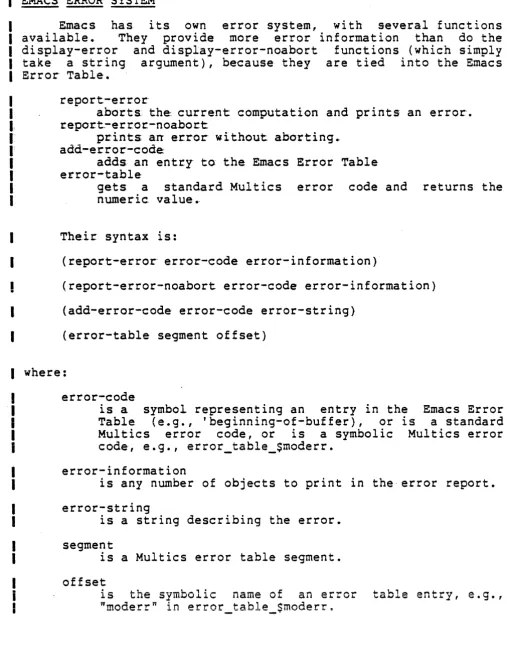
Calling Multics Commands • Multics Error Table • . . Emacs Error System . . . • • •
Defining Requests with defcom . Undoing a Request . . . . . . . A Detailed Example of a Function
Definition
Ldebug Mode . . . . LDEBUG Buffer . . . . LDEBUG Buffers . . . .
Section 5
Appendix A
Appendix B Index
2/83
CONTENTS (cont)
Page
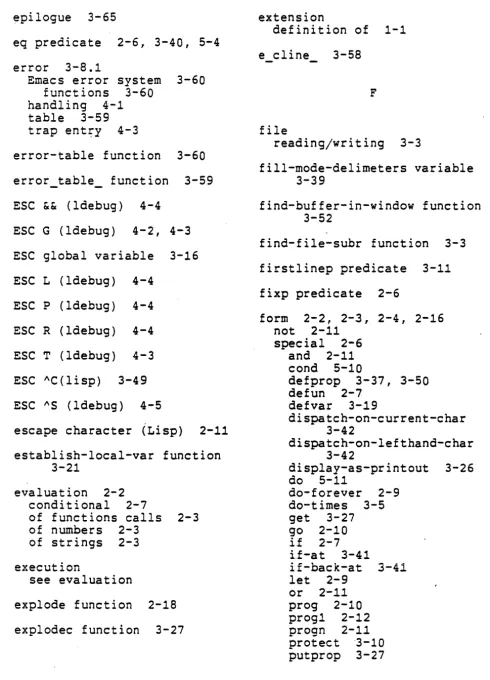
Emacs and Lisp Debug Mode • . 4-2 Error Trap Entries to LDEBUG . 4-3
Code Breakpoints . . . • 4-4
Function Tracing with LDEBUG . • • 4-5 Writing Emacs Terminal Control Modules
( CTLs ) • • . . • • . • • • • • . 5-1
The Backquote Facility
A-I
Quick Reference . • B-1
i-I
SECTION 1
INTRODUCTION
An editor extension is a user-provided capability, which is added to the editor to extend its power. It is different from a macro, which is simply a collection of editor requests gathered
up and -(perhaps) given a name. Extensions are programs; they are written in the language of the Multics Emacs environment. An extension is a body of code that augments the editor's capability, but does not embed or require knowledge of how data in the editor is stored or manipulated. In this sense, all of the word, sentence, paragraph, and Lisp-list requests; and the various "modes" (e.g., PL/I mode) are extensions.
The person who wishes to add to his Emacs environment any powerful or sophisticated capability must learn to write extensions. The keyboard macro facility (AX(, AX» is not intended Lor such usage. This manual explains how to write extensions.
One of the guiding design principles in the Emacs editor was that the creation of editor extensions, either by the editor implementors or end users, should be in a programming language of established elegance and power. Lisp was the language chosen. This primer gives you a starting point for writing Lisp code to
run as editor extensions in the Emacs environment. If you have some knowledge of Lisp already, it will be of value. However, it is assumed in this manual that the reader has no familiarity with Lisp, but does, perhaps, with PL/I or BASIC.
SECTION 2
AN INTRODUCTION TO LISP
Lisp programs are built of functions, which are similar to
procedures or subroutines in other languages, although more akin
to PL/I and ALGOL functions. You write a Lisp program by
creating a file full of function definitions. A function
definition specifies the name of a function, and what it does. Here is a sample function definition:
(defun addandmult (a b c)
(* (- a b)
(+ abc}»
iThis i's a comment
This defines a function named addandmult that takes three
arguments, called a, b, and c. The addandmult function computes
the result of multiplying the difference of a and b by the sum of
a; b; and C; and returns that number as a result; or valuee The
semicolon on the first line above begins a commenti comments
throughout the examples provide some additional information about the code.
Here is another function definition:
(defun squareprint (arg)
(print "The square of") (print arg)
(print "is")
(print (* arg arg»
5)
This function prints the message "The square of", prints the value of its argument, prints the word "is", and prints the value
of the square of its argument. In addition, it returns the value
5. The function "squareprint" has side effects: it causes
output on the terminal. It also returns a value, the number 5.
Note that all Lisp functions produce a value; only some produce
side effects. The first function defined returns the product of
those numbers as a value; the second returns 5.
If you look at squ~reprint, you see that it consists of several statements, the "print. statements" that pr int things. These statements are called forms, and they are, in fact, calls to other functions, in this case the builtin print function. In the form:
(print "The square of")
the. string "The sq~ar-e- of" is· being passed as an argument to the-print function. Li.ke- a.ll. func.tio.ns, print returns a value, which
is not used in thi.s CaSe".. The side effect of printing something does occur~ In the form~
(+ abc:)
you are' invoking the
"'+"'
function, which is also builtin. The values of the parameter variables a, b, and c are passed to it as arguments. It returns· a value, which is the· requested sum, and produces no. side e·ffects ..There are sgua-reprint:
five: forms in
(print "The squa~e of") (print arg)
"is")
(print (* arg arg»
5·
the function-definition for
Forms immediately inside a function definition are ex·ecuted sequentially, Ii ke sta.tements in other' programming languages. The value produced by the last form is the one the function itself returns. What does it mean - to "execute" a 5? Execute is not exactly the right term: what really happens is that these forms are evaluated. This means that a value is produced from them. Evaluating a 5 produces the number 5; evaluating the form::
(+
a
b c)calls the
"+"
function with the appropriate arguments, and produces whatever value the"+"
function returns. The value produced by the "print" function is something that is notNumbers, like 5, and strings, like "The square of", are said
to evaluate to themselves. Things between parentheses, like:
(+ a b c)
(print "The square of")
are calls to functions, which are evaluated by calling the
function indicated, and producing the value it returns.
Function calls have the syntax:
(FUNCTIONNAME ARGFORMl ARGFORM2 ARGFORM3 •.• ARGFORMn)
where FUNCTIONNAME is the name of the function to call and the
ARGFORMs are themselves forms, which are evaluated to produce the
arguments to give to the function. Thus, to evaluate (i.e.,
"execute" and find the value returned) a form like:
(+ (* a b) 15
c)
B evaluate the inner form (* a b) to produce a value
B evaluate the 15 to produce 15 (remember, numbers and
strings evaluate to themselves)
B evaluate the variable c to produce its value
B pass these three values on to the
"+"
function, andreturn what it returns~
The newlines are ignored.
Thus, forms are either numbers like 5, str-ings like "is",
variables like b, or function calls like (* a b).
Variables are much like variables in other languages. A
variable has a value, which is called its binding. At this
stage, assume that this value must be a string or a number. When
a function is invoked, the parameter variables (like a, b, and c above) of the function acquire the arguments of the function call
as bindings. Evaluating a variable produces its binding as a
value. For instance, if someplace in a function you evaluate the
form:
(addandmult 2 (+ 3 2) 6)
a, b, and C' will have the bindings 2, 5, and 6 while the f'o·rms in
the definition of addandmult are being evaluated. This is not unlike the subroutine parameter mechanism in other languages. It is different insofar as it specifies what value a variable has during "subroutine" execution. In PL/I or FORTRAN, a paramet'er is associated'with a variable in the calling pr-ogr'am, not a value, during s'ubroutin-e exe'cution.
There are: paralllet-er variables, as used above, temporary variables., de'scribed below, and global variables., Regardless of the; kind o·f variable... thev' all have- bi"ndinas (values), and: e·valuation' of the v~ri~ble'-produces that value ....
T'o summarize::
L.
Lisp programs are built of functions.2. Function definitions consist of the word "defun", the function's name, a paramet'er list, and a number of forms, which are to be sequentially evaluated at function call ~ime, with a pair of parentheses around .L...'L._ ... ' - . - , _ ... 'L..! ...
I;.ue wUUJ.C t,..UJ.U~.
3.. The value of the- last form in a function is the value returned. by that function.
4 .. Forms can functions. which are
results'.
be strings, numbers, variables, or calls to Forms are evaluated to produce values, passed between. functions as arguments and
s.
Strings and numbers evaluate to themselves.6. Variables evaluate to the datum to which they
are
bound, which, for a parameter, is the corresponding argument to the containing function.
PREDICATES
Programming languages need conditional execution. In order to control conditional execution, you need things upon which to base a decision. Two data objects in the Lisp world correspond to truth and falsity, for the purposes of parts of the Lisp system that deal with conditions. A set of functions called predicates return these objects as values. For instance, a function called ">", invoked as:
(> 4 6)
returns the indicator of falsity, and when invoked as:
(> 4 1)
returns the indicator of truth. Predicates work just like other builtin and nonbuiltin functions, like print, addandmult, squareprint, and +. They take arguments, and produce a result.
In the case of predicates, however, the result is not a string or a number, but an indication of truth or falsity. The result of a predicate can be used by the if special form (see below) to control the execution of a function.
The following are some of the most useful Lisp predicates. In all of these examples, Al, A2, 51, 01, etc., stand for forms, which means they can be 12, (+ 6 q), (myfun 33 (- a b», etc. "Al is a number," below, means that Al is some form which evaluates to a number, such as 3, (+ 6 2), or x49, if x49's value is indeed a number.
Predicate for Numbers
Ai and A2 are numbers: Predicate
=
> <
Example
(= Ai A2)
(> Ai A2)
« Ai A2)
Returns TRUTH if
.
.
.
,
otherwise falsity.Ai and A2 are the same number. Ai is a bigger number than A2. Ai is a smaller number than A2.
Predicates for Strings
5~ and 52 are strings:
samepnamep.
(samepnamep 51 52) 51 and 52 are "same string". strings are the
strings of identical content, i.e., the This is the standard way to see if two samer as in (samepnamep test "-hold")
alphalessp
(alphalessp S~ 52)
S~ collates before 52 alphabetically, e.g., (alphalessp "Able'" "Baker") returns truth, but (alphalessp "Zeke" "Joe") does not~
Predicates .for Any Objects
01 is some object, of perhaps unknown type (objects are discussed later):
eq (eq: 01 02) 01 and 02 are the same symbol
or the same cons. fixp (fixp 01) 01. is a. number·, as opposed to
some other kind of object. stringp (stringp 01) 01 is a string, as opposed to
anything else.
symbolp (symbolp 01) 01 is a symbol, as opposed to anything else.
null (null 01) 01 is not only a symbol, but the important and
critical symbol named "nil"e
LISP SPECIAL FORMS
A number of special forms in Lisp do not go by the simple rules given above. You have already seen one. The function-defining form, which begins with the word "defun", is not simply a function call with forms to produce the function's arguments. By all rights, a form like:
(defun square (x) (* it
x»
should evaluate, in order, to produce arguments for "defun":
2. The form, (x), calling a function named "x" with no arguments.
3. The form, (* x x), multiplying the value of a variable named "x" by. itself,
This form should then pass these three values on to the defun function. This, however, is not what actually happens. Evaluating the defun form causes a function named square to be defined, whose parameter list and "body" are as given. Defun is a special form, and when Lisp sees "defun" as the function name in a form, it acts in a special way. In this case, Lisp defines a function built out of this form itself. The above is not a call to defun with arguments. rr--may seem unusual, but you-;Ust have at least one such special form in order to have an operative Lisp system.
The if Special Form
A special form in the Multics Emacs Lisp environment, called if, controls conditional evaluation. An example of its use:
(defun which-is-greater (first second) (if (> first second)
(print "The first one is the greater.") else
(if (> second first)
(print "The second one is greater") else
(print "They are equal"jj) The syntax of if is as follows:
(if <PREDICATE> <THEN-FORM-I> <THEN-FORM-2> <THEN-FORM-m> else
<ELSE-FORM-I> <ELSE-FORM-2> <ELSE-FORM-n>)
Any number, including none, of THEN-FORMs can be supplied. Similarly, any number, including none, of the ELSE-FORMs can be given. If there are no ELSE-FORMs, then the keyword "else" may
be omitted, too. .
Note that all the forms in the if are not sequeritially
evaluated: the word else is not even intended to be a form. If
all of the forms- inside the if were evaluated, it would be
useless, for evaluation would not be conditional. That is why if is a special form; there are special rules about how forms inside
it are to be evaluated. The rule for all nonspecial forms is the
same: you, evaluate all the subforms sequentially to produce the
arguments to the function. Each speciaL form has its own rules.
The if special form evaluates the' PREDICATE': if i t
results-in' truth,- the, THEN-FORMs; are' sequentially evaluated, and the
value of the last on~ is returned as th& value of the if.
Otherwise, the ELSE'-FORMs are evaluated sequentially, and the
value of the last returned. If there are none, the symbol nil
(see below) is returned~
There are two global- variables
"nil"r whose bindings are always
indicators, respectively~ Thus:
(if t.
{nrint- "'T'rl1rh"\ '1:"- -' .• -, - -
----I else
(print "Not so truth"»
when evaluated, always prints "Truth".
in Lisp, called
the truth and falsity "t" and
The actual object used as the indicator of falsity is the
symbol named nil (see "Symbols~ below). All predicates return
this symbol to indicate falsity. The usual indicator of truth is
the symbol named t; however, all special forms and functions that
test predicates consider any object, other than nil, to be an
indicator of truth. Thus, many functions return the symbol named
nl~, to indicate failure and some "good" value (not nil) to indicate success.
The setg Special Form
Variables acquire values by being parameters, and acqulrlng
values at function call time. In addition, variable values can
be changed by the special form setg:
(defun adder-of-one (x)
(print "The value of x is")
(print x)
{"And the value of x plus one
(seta x (+ xl))
A setg form has the word "setg", the name of a variable, and an
inside form. The inside form is evaluated, and that value
assigned to the variable. It is like an assignment statement in
other languages.
The do-forever and stop-doing Soecial Forms
The construct for loooina in the Emacs Lisp environment is also a special form, called-do:forever:
(do-forever
(print "Yay Multics") (print "scitluM yaY"»
When evaluated, it prints these two sayings forever.· The way you
stop doing in a do-forever is to evaluate the stop-doing special
form:
(defun print-n-times (n) (do-forever
(if (= n O)(stop-doing»
(print "foo")
(setq n (- n
1»»
This function, given a number as an argument, prints "foo" that
many times. The ":" builtin function/predicate compares its two
arguments, which must be numbers, and returns truth or falsity
-depending on whether or not they are numerically equal. The
arguments to = are not nand 0, but rather, the numbers that are
the bindings of nand O. The number which is the binding of n is
different each time around the loop; that is the point of the
program. ·It is setg that changes the value of n each time
around, as do-forever executes the loop. A do-forever form
generally returns something useless (nil), unless you exit by
saying (return 5) or (return nil), or (return a). In the latter
case, the value of the variable a is returned.
The let Special Form
You can acquire temporary variables via the let special
form:
(defun sumtimesdif (x y)
(let «sum (+ x y»
(dif (- x y»)
(print "Sum times difference is ")
(print (* sum dif»
(print "Sum squared is")
(print (* sum sum»»
This function has two temporary variables, sum and dif, which are
initialized to the values of (+ x y) and (- x y). The general
syntax of let is:
(let {(VARl VALl) (VAR2 VAL2)
• • • • ' . . . ' e· •
(VARn VALn» <FORMi>
<FORM2>
...
<FORMm»
The temporary variables VAR1 ••• VARn exist only within the
let. They get the initial values of VALl through VALn, which are
forms that will be evaluated. All the VALs are evaluated before
any of their values are assigned to the VARs. Then, with all
these- temporary variables set up and initialized, each FORMi is
evaluated sequentially, and the- value of the last FORMi is
returned by
let.-The prog and go Special
Another, less useful way of acqulrlng temporary variables is
via the special form~. Forms inside a prog are evaluated
sequentially, like forms 1n a function definition. However, the
first form in a prog is not really a form at all, but a list of
temporary variables used in the prog, such as "(a b c)". That is
why prog is a special form. The value returned by prog is
usually useless, unless (return ••• ) is used to return something
meaningful.
Inside a prog, you can put labels, to use for go-to's:
(defun bar2 (x y)
(prog () ;note the empty variable list
(if «
x
1)(go lab1»(print "X is not less than Y")
(return nil) ;return "false" indication
labi
(print "so be it!")
(return t») ;return "true" indication
In the special form S2" its operand (not argument) is a label to
which to go, i.e., continue sequential evaluation of forms in the
prog. Labels are rarely needed, due to the powerful if and
The or And and Special Forms, And not
There are special forms for or-ing and and-ing predicate
results: they are special because they stop evaluating their
operands (from which arguments are produced) when they "know"
their answer for certain:
(if (and (not (= x 0»
(>
(II
10 x) 5»(print "Quotient too large."»
The not function inverts truth and falsity. The double slash
indicates division, because slash is the escape character in
Lisp.
The and does not attempt to evaluate the second form within
it if the-lirst produces falsity. This prevents an error that
would result if an attempt were made to divide by zero.
Sequential execution and stopping at an intermediate result are
defined and useful features here, as opposed to the logical
'operators of, say, PL/I.
The progn, prog1, and prog2 Special Forms
Three more special forms are progn, prog1, and prog2. To
force sequential execution of forms and return the value of the
last, use progn. For instance:
(if (and (> x 3)
(progn (print "Oh dear this is getting serious")
(> y
5»
(print "Fatal difficulty"»):
In the above, progn returns the value of its last form. Thus,
the and tests whether x is greater than 3, and y is greater than
5, before the "print" of "Fatal difficulty" is evaluated. The
printing of "Oh dear ••• " occurs as part of the evaluation of the
progn, but the and sees only the second value in the progn. The
progn is used to force evaluation of the print form.
A progl is just like progn, except that it returns its first
argument, evaluated, rather than its last. It must have at least
two arguments. It is useful for saving some value that is
subsequently going to be destroyed. The following form, when
evaluated, interchanges the values of x and y:
(setq
x
(progl y(setq y x-}})
~ the- value of y is obtained here,
~ and remembered as it is here.
; x is evaluated, and that value
; assigned- to y. The value of
~ setq form is that value.
rn
the above, however, th~ value of prog~ is that value of y asi t was before i t was assigne~ into y, and now the outer setq
assigns that to x. A prog2 1S an older form of progl and is
similar, except it returns its second argument.
SYMBOLS
Another type of data object in Lisp is called the symbol. Symbols are named data objects kept in a registry of symbols (the
obarray), by Lisp. For current purposes, there is only one
symbol of any name. Symbols are used in Emacs to represent
buffer names, and various quantities associated with buffers.
Lisp uses symbols to keep track of functions, and internally to
keep track of global variables.
To use a symbol in a program, give the name (the printname)
of the symbol preceded by an apostrophe ('). For instance, the form:
(setq x 'Brunhilde)
assigns the symbol named Brunhilde to x.
different from:
Note that this is
(setq x "Brunhilde")
which assigns the string Brunhilde to x, and from:
(setq
x
Brunhilde)LISP LISTS
The final Lisp data type of importance in writing extensions is the cons (for construct), and the larger data type built out of it, the list. A cons is a block that relates to two (usually other) objects in the environment, known as its ~ and its cdr. The function cons, given two objects, produces a new cons, whose car and cdr, respectively, are the two objects given. For instance, if the variable x has a value of the string "Brunhilde", as above, then:
(cons 7 x)
produces a cons whose car is the number 7 and string "Brunhilde", returning it as a value. and cdr can be used to obtain the car and cdr set the. variable c to the result of the form then:
(car c)
produces the number 7 as a value.
whose cdr is the The functions car of a cons. If you (cons 7 x) above,
Usually, you make larger and larger structures out of conses, by setting up conses whose car and cdr are more conses, and so forth, until you have a large enough structure to represent all the values you need. The resulting construction serves the same purpose as a PL/I structure: .its various parts have meaning assigned by the programmere
The most common construction of conses is the list. A list is defined as a chain of conses, each of which has the next one in the chain as its cdr, except the last one, which has the symbol "nil" as its cdr. A list built in this way of n conses is called a list of n elementS;--the elements being the n objects that are the cars of the conses. The cons at the head of the list is identified as being "the list": its car is the first element in the list, its cdr is the cons whose car is the second element of the list, and so forth. To construct a list of the numbers 2, 4, 5, and 7, in that order, and set the variable b to it, you would need:
{setq b (cons 2 {cons 4 {cons 5 (cons 7 nil»)})
(Note that the variable "nil" is peculiar insofar as its value is always the symbol "nil", thus you need not say 'nil.)
A function that simplifies the writing of such forms, fo~
constructing lists, builds lists directly and accepts any number
of arguments. It p~oduces the same result as the type of
construction shown above. It is called "list":
(setq b (list 2 4 5 7»
To get the third element of the list, once this form is
evaluated, you could evaluate the form:
(car {cdr (cdr b) ) )
(i.e~, th~ car of the cons that is the cdr of
the cdr of the cons that is the value of b).
Lisp functions to simplify such constructions. equivalent to:
(caddr b)
the cons that is Again, there are The above form is
In general, for up to 4 cars and cdrs deep, total, functions like
cadr~ cdar, caddr, cadar, and so forth, are provided (up through
caaaar and cddddr). The first four elements of ~ list are gotten
by car', c'adr, caddr, and cadddr (i t is a good exercise to work
+- ""' "" ... " ... "" ~ .... ... ""' ... '" """" .. "' .... ':t ... '" 1 " ' 9 ""' a " , , -~ U' "'" - ~ 4!." 7.11 h • ." .. "" ~,. ..,. .. "" - - - \
v'\;_ .. J.J. """"J. I."".~ .~ I.J.,U; .... C1;:)C; J •
When lists are printed out by Lisp, they are represented as
a ~air of parentheses around the printed representations of all
of the elements, in sequence, separated by spaces. Thus, if Lisp
printed out the list that was b's value above, it would appear:
(2 4 5 7)
A cons whose cdr is the symbol nil can always be viewed as a list
of one item, and is so printed out by Lisp, unless it is in the
process of printing a larger list of which the cons at issue is a chain-link. A cons whose cdr is neither nil nor another cons is
printed with a dot preceding the cdr. Thus:
(cons 'a 'b) => (a. b)
(cons 'a nil) => (a) ;a list of one element
(cons 'a (cons 'b 'c» => (a b. c)
{cons 'a (cons 'b nil» => (a b) ;list of two elements
(cons 'a (cons (cons 'b 'c) (cons 'd nil»)
Lists can be put into programs, by quoting them, as symbols are quoted:
(setq bi '(this is (a list)(of lists»)
Two functions are provided to redefine the car or cdr of an
existing cons. They can be very dangerous if misused, especially
if they alter a list as in the form above, which is written into
a program as a constant. The rplaca function (replace car) and
the rplacd function (replace cdr) each take two arguments. The
first is the cons that is to be altered, and the second is the
new car or new cdr, respectively. The returned value is the cons
itself.
Other list Primitives
A variant of list, list*, is just like list except its last
argument becomes the cdr of the last cons constructed. That is,
list*, given n arguments (n > 2)'1 constructs a list of its first
n-1 arguments; the same as -list given those n-1 arguments, but
instead of the last cons having nil as its cdr, the nth argument
is made its cdr. Thus,
(list* :2 3 5 7) => (2 3 5
.
7)Note that:
(list 2 3 5 7) => (2 3 5 7
.
nil)=> (2 3. 5.7)
and:
(list 2 3 5) => (2 3 5
.
nil)=> (2 3 5)
Another function for manipulating Lisp lists is append. It
accepts any number of arguments, each of which is a list of zero
or more elements, and constructs a list containing all the
elements of all the lists, in order. Thus,
( a ppe n d '( a ( b ) c) '( a b 1 e ba k e r ) '( 2 3 j )
=> (a (b) c able bake~ :2 3)
The append function constructs a new list. A "destructive" form of append, called ncone, creates the result it returns by "patching" its input arguments to create a longer list, i.e., it changes the cdr of the last cons of each input list to be the first cons of the next list. The nconc function must be used with caution: e.g., it is always an error to give a constant (i.e., a quoted piece of list structure) as an argument to nconc.
Another Lisp function for dealing with Lisp lists is reverse. Given a list, it returns a list with the sam~ elements as the input list but in reversa order. The nreverse function is similar ~o reverse but, lik~ nconc, does its work by
destructively modifying the input list.
A superlative method for writing code that builds list structure is provided by the Lisp "backquote" facility. The backquote facility is described in Appendix A.
LISP MACROS
List Structure as Code
-One of the most powerful features of Lisp is the ability of Lisp programs to manipulate Lisp programs easily. The internal representation of Lisp programs during compilation and debugging is that of Lisp lists. You may have noticed that Lisp lists strongly resemble pieces of Lisp programs. For example, the form:
(setq x (+ y z»
is simply a printed representation of a list of three elements: the symbol setq, the symbol x, and the list (itself of three elements) of the symbols +, y, and z. Thus, a form is simply a
piece of Lisp structure that is intended to be evaluated. In fact" the eval function does precisely that: given a piece of list structure, i.e., a form, as an argument, eval evaluates it and returns the value of that form. Note how symbols represent both functions and variables, depending upon where they appear in forms. Symbols have bindings, which represent the binding of the variable represented by the symbol, and functional properties via which the associated function or code for a special form can be
found. Thus, if the symbol (and thus variable) f is bound to: (setq x (+ y .., ... J
, ,
I(se tq x (+ y z»
a list of three elements. Evaluation of: (eval f)
would pass that list of three elements as an argument to eval, causing its evaluation, which would cause x to have a binding of 7 and return 7· as a resul t.
In some sense, the basic action of Lisp is that of evaluation. However, user programs, other than Lisp debuggers or interpreters, rarely use the eval function. If you think you have to use eval (except sometimes in macros: see below), you are probably having difficulty with the concept of evaluation.
Using Lisp Macros
Lisp macros. allow a user to specify the translation of code with a syntax of his choosing into code representing the meaning he assigns to that syntax. A macro is defined just like a function, except that the word (symbol) "macro" (without quotation marks) appears between the function name and the parameter list. For instance:
(defun t-return macro (x)
(append (cons 'progn (cdr
x»
'(t»)defines a macro named t-return. When the compiler or interpreter sees a form whose car (i.e., where the function name belongs) is a symbol that has a macro definition (as above) associated with it, it passes the entire form to the macro as an argument, runs the macro (i.e., calls it--wIth that argument), and reconsiders the result as if it were encountered in place of the original form. Thus, if a program contains a form:
(and (> xiS)
(t-return (setq flag nil» (return x»
at the time this form lS evaluated or compiled, in place of the
second form, the form:
(progn (setq flag nil) t)
will be evaluated or compiled. This is because t-return has been defined as a macro: the funct·ion defined by t-return, when called with:
(t-return (setq flag nil»
as an argument, produces:
(progn (setq flag nil) t)
as a value. The fact that t-return has been defined as a macro causes the compiler to invoke t-return to translate the t-return form into its meaning, so that can be compiled or evaluated in its place.
The backquota facility (see Appendix A) is extremely useful
f~r defining macros. Using backquote, you could define- the macro
abov~ as:
(defun t-return macro (x) '(progn ,@(cdr x)
t»
See Appendix A for another example of a macro. Additional examples of macro definitions are contained in the e-macros.incl.lisp include file (after the first two pages if you dprint it). Bear in mind when studying them, however, that they reference internal Emacs variables and functions or embed certain knowledge that they are designed to hide.
PRINTED REPRESENTATION OF LISP OBJECTS
Lisp objects exist in the Lisp or Emacs environment. They relate to each other, and they denote each other. The calling of functions, whether built-in, Emacs-provided, or user-provided, creates new objects and changes the relationships among existing objects.
Objects are symbols, conses, and strings in the ~isp environment; they are not parentheses and words on paper or 1n a buffer. However, you often need to obtain the printed representation of a Lisp object or generate a Lisp object based upon its printed representation. This is most commonly the case with numbers; in Emacs, the decimal-rep function obtains the printed representation of a decimal number as a string.
The conversion of numbers by explode is controlled by two
global variables, base and *nopoint: base is the output radix,
which is eight by default, indicating octal; *nopoint is nil,
indicating that numbers are to be converted with a decimal point
if base happens to be ten. Thus:
( 1 e t ({ ba s e 1
a • )
(*nopoint t»
(apply-catenate (explode
x»)
obtains the printed representation of the value of
x,
withnumbers converted as decimal, without decimal points.
read-from-string
The Lisp read-from-string function constructs Lisp objects
from strings (or symbols with a meaningful printname). Given a
valid printed representation of a Lisp object, read-from-string
recursively constructs (for lists), creates (for numbers or
,strings), or finds on the obarray (for symbols) the appropriate
objects. Thus, if x is bound to the string "(a bc)", the form:
(read-from-string x)
would produce as a value a list of the three symbols a, b , and c.
In converting numbers with read-from-string, integers followed ~Y
a decimal point (e.g., 6., 27., and 259., but not 5.0, which 1S
floating point) are converted as decimal. Unpointed integers are
converted as per the value (as radix) of the ibase global
variable, which is normally eight. Thus,
(let «ibase 10.})
(read-from-string x»
converts the value of x with all unpointed numbers assumed
decimal. ,
SECTION 3
WRITING EMACS EXTENSIONS
Writing extensions is basically a matter of building new
I
functions out of the standard functions provided in the EmacsI
Lisp environment. These new functions can be hooked up to keysI
in the same fashion as standard Emacs functions, via the set-keyI
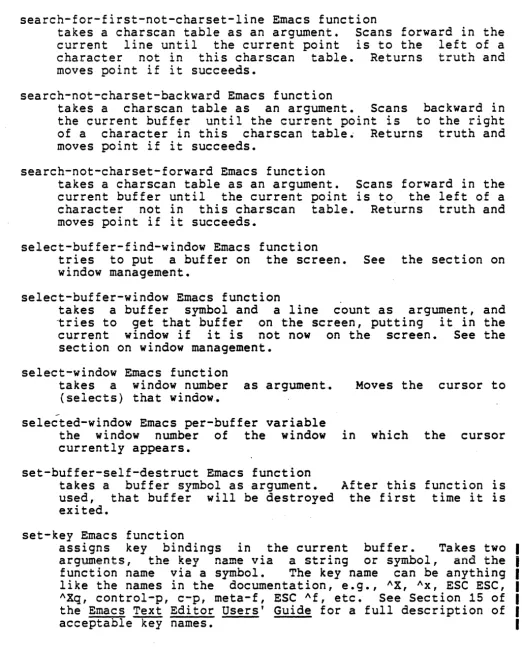
and set-permanent-key functions.
I
Many useful extensions can be made simply by stringing
I
together groups of Emacs requests. For instance, to go to theI
beginning of a line, delete all whitespace there, go to the end of the line, do the same, and then return to the beginning of the line, you could type:Alternatively, you could write a function, called shave-line here, to do the same:
(defun shave-line ( ) : keystroke functions take no args. (go-to-beginning-of-line)
·
,
function hooked to "A key (delete-white-sides)·
,
function hooked to ESC \ key (go-to-end-of-line) function hooked to "E key (delete-white-sides)·
,
ESC \(go-to-beginning-of-line»
·
,
"AI
I
I
I
I
Write this function into a file. When in Emacs, type ESC X loadfile PATHNAME CR, to load it in as code. Then hook it up, perhaps by typing (when typing this, type the caret key for ",
I
not the control key):
I
ESC X set-key "XA shave-line CR Thereafter, hitting "XA (control X
function to be run.
I
If you want a function that goes to the beginning of a lineI
and deletes all words that start with "foo" from the beginning ofI
the line, for example, you need to use Emacs conditionals andI
variables.(%include e-macros) (defun foodeleter ()
(go-to-beginning-of-line) (do-forever
(if (look-ing-at "faa"") (delete=word)
(delete-white-sides) else (stop-doing»»
The (%include e-macros) must be at the beginning of any file that uses the Emacs environment Lisp macros. The e-macros.incl.lisp file should be in your "translator" search path in order to do any Emacs extension development work.
What this function does in essence is type AA, and as long as the first three characters on the line are "foo", does an ESC D, followed by ESC \ to remove the whitespace after the word. When the first three characters are no longer "foo", it returns. The "looking-at" is an Emacs predicate (to be described in detail below) that tests whether a given string is to the right of the current "~ursor". For this function and any others that you write, you could set a key as described above (AXA for shave-line) •
of printing,
The scre~n or
by the Emacs about in coding The code for the foodeleter makes no mention
output, or displays - because it does not need to. printing terminal is managed automatically redisplay. The display need never be thought Emacs extensions.
USING EMACS REQUESTS IN EXTENSION CODING
Many of the Emacs requests can and should be used in coding extensions, for example, go-to-end-of-line, forward-char, go-to-beginning-of-buffer, delete-word and skip-over-indentation. Some requests, however, should not be used in extension code. For example, if you want to search for some string, you do not want to invoke string-search (AS), since that prompts the user in the minibuffer for a search string. The following table lists some important keystroke requests whose command names you should
not use and gives alternative functions to use.
KEY
---
DO NOT USE USE INSTEAD~N next-line-command next-line
The next-line-command function is unnecessarily expensive in considering screen position, and handles numeric arguments. The next-line function always goes to the beginning of the next line.
Ap prev-line-command prev-lin~
Same reasons as above. The prev-line function always goes to the beginning of the previous line.
~K kill-lines kill-to-end-of-line
delete-char (at eol)
The kill-lines function is complex, has many cases, and handles numeric arguments.
~S string-search forward-search
The forward-search function takes a string as a Lisp argument, does not prompt, moves the cursor if the search succeeds, and returns truth or falsity to indicate result.
AR reverse-string-search reverse-search Same as AS.
AXAR read-file read-in-file
The read-in-file function takes a Lisp argument for pathname, does not prompt.
AXAW write-file write-out=file
AW' wipe-region wipe-point-mark Use local marks, see below.
ESC W copy-region point-mark-to-string
does not require modifying the user-visible mark or the kill stack.
ESC / regexp-search-command regexp-search
Same issues as AS. Takes a Lisp argument, no slashes. Returns falsity if not found or moves cursor to after, and returns mark to before, matched string= Be careful to release this mark (see below).
~XB select-buffer go-to-or-create-buffer Takes an argument, does not prompt.
~XAF find-file find-file-subr
"L. redisplay-command full-redisplay
redisplay-current-window-relative
Two separate functions, less dealing with numeric
arguments.
Requests that accept a positive numeric argument as meaning
repeat that number- of times, e.g., "B, "0, "F , ESC B, ESC 0, ESC
P, ~, ESC
i,
etc., ar~ acceptable in extensions; they do notinspect their arguments. They are invoked multiple times by the
Emacs: listener if appropriate'... Requests' whose- names include· the
word.. "command"" are usually' not intended to be- used. in c.ode.
The value of a numeric argument, e.g., 5 in ESC S "B, is
available- as the binding of the global variable "numarg"; if no numeric argument is given, this variable is set to the symbol
"nil"" (not to be confused with the global variable nil, whose
binding ia the symbol nil), which is the representation of
falsity.
The normal printing characters are bound to the self-insert
function, which inserts the last physical character typed at the
current point in the buffer. This is clearly unusable from code,
if your desire is to insert text into the buffer. For this
purpose, the Emacs environment provides the insert-string
function, whose argument is a string to be inserted into the
buffer at the cursor. As in typing in text manually, the cursor
is left after the inserted text:
(defun make-a-point ()
(go-to-beginning-of-line)
(insert-string "CASE IN POINT:
"»
This make-a-point function, when invoked, goes to the
beginning of the line, and inserts the string "CASE IN POINT: "
in the buffer. The cursor is left after the inserted string.
As used here, phrases like, "the cursor is moved around" or
"a string is inserted" in a function, do not imply that the user
watching the screen can see all these things happen. No action
on the screen occurs until the entire function has finished
running, at which time the screen is updated all at once, showing
the cumulative effect of what has happened, regardless of how it
happened.
MARKS AND THEIR MANAGEMENT
Like the cursor, a mark is a conceptual pointer to the
posi~ion between two characters in the current buffer. Marks remaln between these two characters regardless of other insertions or deletions in the same buffer, even on the same line as the mark. Marks are valuable because regions of text in the buffer are specified as the extent between the current conceptual cursor, (the point)r and a. given mark. Marks are a type of data object in the Emacs Lisp environment, like strings, numbers, and symbols. The value of any variable can be made to be a mark. The value of several variables might even be the same mark. The words "the-mark" used in Emacs descriptions designate one mark that is the value of a global variable that many supplied functions know about. Emacs functions use many temporary marks.
The set-mark, release-mark and wipe-point-mark Functions
The set-mark function creates a new mark, which points to the current point in the current buffer. It stays around, and is updated by the editor, any time text is inserted or deleted in this buffer. This is expensive, so you must take care to discard, or release marks when you are done using them. This is don~ by giving them to the release-mark function~ An example of a function which deletes three words and everything between them
follows:
(defun delete-three-words ()
(let «temp-mark (set-mark») (do-times 3 (forward-word» (wipe-point-mark temp-mark)
(release-mark temp-mark»)
;make a mark in :a temp var. ;3 words forward ;wipe out the stuff ;between point and iwhere point was.
The variable temp-mark is set to a mark representing the point at the time delete-three-words is entered. The "do-times" is a special form that repeats the evaluation of one or more forms a given number of times. Its syntax is:
(do-times <HOWMANY> <FORMi> <FORM2> <FORMn»
The wipe-point-mark is a function that, given a mark, takes all the text between point at the time it is invoked and that mark
The with-mark Special Form
The sequence of setting a mark, using it, and releasing it is so common that a special construct in the Emacs Lisp environment is provided that takes care of all of this, including the creation ?f a temporar¥ variable, so no
Ei£s
or let is needed. It 1S called w1th-mark. The delete-three~words function, rewritten to use it, looks like this:(defun delete-three-words ()
(with-mark m jm is usually used for the name of a mark (do-times 1 (forward-word»
(wipe-paint-mark m») The syntax of the with-mark construct is:
(with-mark <MARKNAME> - <FORM1>
<E'ORM2>
...
<FORMn> )
I t means: "Where- I am now, call tha t <MARKNAME>. Eval ua te the f.orms <FORM1> to <FORMn>, sequentially, returning the value of the last one as a value. Before returning anything, however, free the mark I made."
Marks allow you to return easily to where you were at the time you started something. The following function truncates a line longer than 50 print positions, and handles backspaces and tabs properly:
(defun trunc-50 () (with-mark m
(go-to-end-of-line) {if (> (cur-hpos) 50.)
(go-to-hpos 50.)
;remember where you started ;dot is for decimal
;default is octal
(kill-to-end-of-line» jwhat AK does at not e.o.l. (go-to-mark m») ;return to where you were
A function that tells you the horizontal position (on a dprint, not on the screen) of the current point is cur-hpos (the left margin is considered to be 0). It takes no arguments. The function go-to-hpos moves point to a position on the current line whose horizontal position is its argument. If the line is shorter than that horizontal position, the point goes to the end of the line and go-to-hpos returns nil. Otherwise: if it succeeds in moving point to the specified position, it returns the number gone to. Thus, this function can be used as a predicate. Therefore, the "if" in the above example could
instead be:
(if (go-to-hpos 50.)
(kill-to-end-of-line)}
The " (go-to-mark m)" above tells the current point in this buffer to the point
time the mark called "m" was created.
,
The save-excursion Special Form
editor to move the where it was at the
Although moving the editor's point to previously saved marks is extremely useful, you often use marks simply to return to the place where you were before you began a sequence of requests. This case is so common that a special mechanism is provided just for this: it is called save-excursion, and it takes care of all the problems of temporary variables and releasing the mark when done. The sample function trunc-50 recoded to use save-excursion
looks like this:
(defun trunc-5Q () (save-excursion
(go-to-end-of-line)
(if (> (cur-hpos) 50.)
(go-to-hpos 50.)
(kill-to-end-of-line»»
The save-excursion. special form does the following: remembers where you are, Vla a mark saved in an internal variable, evaluates all of the forms within the save-excursion, and returns as a value the value of the last one. Before returning anything however, it moves the editor point back to where it was when the save-excursion was first entered, and releases the mark used to remember this place.
If point were at print position 75 at the time trunc-5Q was called, it winds up at position 50, even though the mark to which it wants to return points to what was at position 75. No ~rror is indicated, or has occurred. Marks remain even
if
characters to the right or left of them are deleted.The save-excursion-QQ-error Special Form
I
The special form, save-excursion-on-error, is used in the
I
same way as save-excursion. It returns to the original pointJ
KILLING, SAVING, AND MODIFYING IN EXTENSION CODE
Most Emacs functions that delete text from the buffer save the text on the kill ring. Functions that you define that use these standard functions (such as delete-three-words, above), therefore, also save the deleted text.
To prevent deleted text from being' saved, wrap the code that
will delete text in the wLthout-saving spec ial. form. For
example::
(without-saving (wipe-point-mark m»
deletes: all the- text between the current. point and the posi tion designated by the mark m without saving it on the kill ring. Any text deleted by an internal deletion primitive while the code contained within a without-saving special form is executing will not be pushed onto the kill ring.
The without-modifying special form is similar to without-saving. It is used to enclose code that deliberately modifies read-only buffers, such as those used by the directory and buffer editors. For example:
(without-modifying
(go-to-beginning-of-line) (delete-char)
(insert-string
"X"»
might appear in a menu-type editing subsystem change the space at the beginning of some line user selects an object for deletion.
within Emacs to to an X when the
Text can be explicitly pushed onto the kill ring by the killsave-string function. It takes a single argument, which is a Lisp string or symbol, and pushes it in the usual way onto the top of the kill ring.
Other functions which interface to the kill ring include
kill-ring-top, kill-pop, and rotate-kill-ring. The kill-ring-top
function returns the first item on the kill ring (as does Ay).
The kill-pop function returns. the first item on the kill ring and
rotates the kill ring (as does ESC Y). The first item becomes
the last item, the second item becomes the first item, and so on. The rotate-kill-ring function just rotates the kill ring.
CLEANUP HANDLERS
You may have wondered, in the previous section, what happens
if an extension encounters an error while executing, and never
gets to release a mark it has set. When errors occur (for
example, moving past the end of the buffer), Emacs aborts
execution of request functions, returns to its listener, and
The unwind-orotect Special Form
Since the releasing of marks is important, a facility like a cleanup-handler is needed. to make sure that marks get released when code is aborted. There is ·such a facility in Lisp that is useful for many other things, too: save-excursion returns the cursor to the point at which it found it if aborted through;
save-excursion-buffer returns to the buffer where it found the editor if aborted through; all the mark-handling forms release their mark, and so forth. These Emacs-environment primitives use the cleanup-handler facility internally, so you need not worry about cleanup-handlers if you use them. However, occasionally (see the code for columnating the Emacs wall chart, for example) you must use cleanup-handlers explicitly. The Lisp form unwind-protect is the primitive cleanup-handler. Its syntax is:
(unwind-protect <SUBJECTFORM> <CLEANUPFORM1> < CLEANUPFORM2 > <CLEANUPFORMn»
The <SUBJECTFORM> is evaluated, and then <CLEANUPFORM1> to <CLEANUPFORMn> (any number of cleanup forms are permissible), and the value of the <SUBJECTFORM> returned. So far, unwind-protect is much like prog2 or progn. The difference, however, is that <CLEANUPFORM1> to <CLEANUPFORMn> are executed even i.f the execution of <SUBJECTFORM> fails and aborts. Similarly, the cleanup forms are executed even if things like a return from a prog inside the <SUBJECTFORM> causes its execution to terminate prematurely.
Thus, the cleanup forms are executed after every termination of the <SUBJECTFORM>, whether normal or abnormal. The following use of unwind-protect (which could be done in simpler ways, but is here for illustrative purposes) performs "complex-function", and returns the cursor to the beginning of the buffer, even if
"complex-function" explodes: (unwind-protect
(complex-function)
(go-to-beginning-of-buffer»
If you want more than one <SUBJECTFORM>, you should use progn to encompass them, and make you~ <SUBJECTFORM> this progn.
Unlike Multics PL/I cleanup handlers, unwind-protect cleanup forms are executed upon normal termination of the subject form, too.
I
The protect Special FormI
The e-macros special form, protect, can be used in place ofI
unwind~protect. Its syntax is:I
(protect FORMl FORM2 FORM3 FORM4 •••I
&always CLEANUPl CLEANUP2 •••I
&success SUCCESSl SUCCESS2 •• ~I. -
&.failure E'AILURE~ E'AILURE2 •.• ,.,)i
I
I
I
I
I
I
I
I
I
I
I
where:
FORMi
CLEANUPi
SUCCESSi
FAILUREi
are forms to be evaluated~
are forms to be evaluated after the FORMs, whether or not an error occurs in evaluating the FORMs.
are forms to be evaluated only if no errors occur in evaluating the FORMs.
are forms to be evaluated only if an error does occur in e,valuating the FORMs.
I
Any of the clauses &always, &success, or &failure can be omitted.I
Forms that were written using unwind-protect, e.g.,I
I
I
can(unwind-protect (progn FORMl FORM2 ••• ) CLEANUP 1. CLEANUP2 0 0 II )
now be written using protect as follows:
I
(protect FORMl FORM2 ••• &always CLEANUPl CLEANUP2 ••• )USEFUL PREDICATES
The following predicates in the Emacs environment are basic
to all extension-writing; they are used to test various
hypotheses about point, marks, and the buffer:
(eolp)
t:' .... ~ ""i= 1 ~.... ...,...~~~,.. +-~. "",...".a. ~; ... ~ ""+- ; e
a+-~"""" \ , I . . • ... us tJ.&. ... \"oa\... ._..,.... .... t o ' " . u \ . . w '- end of a