International Journal of Emerging Technology and Advanced Engineering
Website: www.ijetae.com (ISSN 2250-2459,ISO 9001:2008 Certified Journal, Volume 3, Issue 1, January 2013)
269
Friendly MobiMinder – Reminder Based On User‘s Location
Using GPS
Akshata B. Angadi
1, Nivedita V.Shetti
21Department of Computer Science and Engineering, Tontadarya College of Engineering, India.
2Department of Information Science and Engineering, Tontadarya College of Engineering, India.
Abstract—Mobile communication systems of today provide increased availability, miniaturization and enhanced data rates. In this paper, we introduce a MobiMinder, a location based reminder application that runs on mobile phones .We describe the design of MobiMinder and elaborate how this design influences development of a more comprehensive location -based reminder system. The paper also reveals that location-based reminders are useful because people use location in information in many activities. Further associating audio messages or pictures with reminders would offer greater convenience to the people.
Keywords— GSM (Global System for Mobile Communication), GPS (Global Positioning System), Location Based Reminder, Location Based Services, Google Maps.
I. INTRODUCTION
GPS is a complex system which combines three segments – space, control and user segment. Such distinction of segments emphasises the main objective of the combined segments: to create a functional system that at a global level makes people aware of the possibility and potential of the services based on navigation. GPS uses the satellite constellation, where each of the satellites transmits the signal in the range which encompasses the message navigation. The latter contains also the information necessary to determine the satellite coordinates and brings the satellite clocks in accordance with the GPS time .The figure1 shows the architecture of the GPS [6,7].
Figure1.Architecture of GPS
The architecture of the location-based reminder called GpsALARM consists of several segments that are sufficient to create a fully functional unit. The absence of any of these parts means at the same time the impossibility of developing the system.
As can be seen, there are three basic segments:
1. User – represents a person who uses the possibilities provided by the mobile device and the GpsALARM application installed on the mobile device;
2. Mobile terminal device – hardware-equipped terminal which enables the usage of GpsALARM application; 3. GPS system – system of satellites and receivers
intended for positioning.
The purpose and functionality of GpsALARM application is informing the users when they arrive to a certain location, provided the user has requested to be alarmed at precisely that location, i.e. provided the user has entered the geographical coordinates of the respective location.
The basis for the running of the application lies in the mathematical concept, i.e. formula which compares the geographic position entered into the application and at which the user wants to be alarmed, and the position given by the GPS system that shows at which coordinates the mobile terminal device is currently located.
The pervasiveness of mobile communications is such that it is affecting virtually everyone‘s life. Mobile phones provide a potentially convenient and truly ubiquitous platform for the detection of personal context such as location, as well as the delivery of reminders. [1, 8].
Everyday we use special messages in order to help us remember future tasks. These messages, known as reminders, take many forms, such as post-it notes, emailing one self, to-do lists, and electronic calendar alerts. For example, a student may send himself an email to remind himself to bring a book for class the next day.
International Journal of Emerging Technology and Advanced Engineering
Website: www.ijetae.com (ISSN 2250-2459,ISO 9001:2008 Certified Journal, Volume 3, Issue 1, January 2013)
270 There is a lot of reminder and alert system in today‘s mobile phones. But all these reminder system work based on time and date. Sometimes there is desire for reminders based on Location. For an example in daily routine we go to grocery stores to purchase listed items and most of the times we forget some of the items to be purchased. We want ourselves to be reminded of the things next time we are at the grocery store.
So proposed application ‗MOBIMINDER- Location Based Reminder on Mobile Phones‘ overcomes these types of problems by allowing users to set reminders based on location in the mobile phones. Once the reminder is set say for grocery store, every time when we go to the grocery store the reminder will be displayed on our mobiles. So this application will act as a personal secretary using which we can do our work correctly in the correct place at correct time.
Consider some real world situations:
1. Some people tend to forget things when they leave home for work or school.
2. A person went to office and thought of doing some work in home when he returns to home,
3. Person may like to purchase a birthday gift the next time when near the mall.
4. A person went to the grocery store from home and forgot to bring a list of items which he had written on a piece of paper.
5. . It is desired that there would be a reminder system or application to automatically remind people what they might have forgotten to bring along just when they step at that particular location.
The present application is motivated by these situations. Thus our proposed application ―MOBIMINDER-Location Based Reminder‖ solves all such situations by giving a beep/message whenever he reaches location.
The paper is organized into 7 sections as follows: Section II gives related work, Section III gives system analysis and system design is presented in Section IV. Section V gives implementation, Section VI gives conclusion and an improvement of application is given in Section VII.
II. RELATED WORK
Dey and Abowd (2000) developed a context aware reminder system called CybreMinder[5],which allowed a user to set reminders based on location, time and other contextual information. The system allowed delivery of reminders via SMS, email and even by printing reminders to local printers. However, the system relied on special sensing hardware for getting contextual information, which makes it difficult to use for a mass market.
Marmasse and Schmandt (2003) developed a system called commotion[4], which used GPS technology to learn over time about the users frequently visited locations, and allowed users to label these and to attach reminders to these places. The reminders could be audio- or text based to-do lists containing a number of items. Again however, the hardware required, which included a laptop, made it unrealistic to use such a system for a mass market, and since GPS was used for place detection, many places could not be covered.
Sohn et al (2005) developed an application called Place-Its[1], which instead of using special hardware and GPS receivers for place detection used GSM phones and GSM cells for place detection. This made a system that in principle could be used on many regular cell phones. Using this system, users could detect places, which were identified by set of cells between which the cell phone was usually connected when stationary at one location. 8 out of 10 respondents appreciated to constantly have a location-based reminding system available on their mobile phone and lessened their use of other reminder tools. They also discovered that users often used the application to create motivational reminders, ―similar to using post-it notes in highly visible areas for motivation‖.
Ludford et al. (2005) developed the concepts from the Place-Its project, and built an application called PlaceMail[3]. This system utilized the built in GPS of the phone used in the study to detect locations. Locations were calculated using a three-tier procedure. GPS was used when available, if the GPS signal was lost the primary fallback was the last GPS reading, or if that reading was either older than 12 hours or located further away than 2 miles from the current serving GSM cell, the coordinates of the serving GSM cell was used. Reminders were triggered not only by the proximity of the previously defined "places" to the current location, but also on the speed and direction which the mobile phone travelled [2].
The results indicated a high interest in getting reminders, but the timing of the reminders were based on an algorithm, this resulted in reminders often being sent at moments when the user wish to remember things based on location and time, which would otherwise will be based only on time. This will help user to remain free from burden of remembering things which they should do at particular location and time.
III. SYSTEM ANALYSIS A. Existing System
International Journal of Emerging Technology and Advanced Engineering
Website: www.ijetae.com (ISSN 2250-2459,ISO 9001:2008 Certified Journal, Volume 3, Issue 1, January 2013)
271 If the reminder is working only based on time and date then we don‘t get the alerts properly based on the situation and place.
Disadvantages of the Existing System
1. Existing reminder and alert system on mobile phones are based on time and date.
2. There is no reminder based on situation and time.
B. Proposed System
In our proposed system, reminder works 1. Based on the locations.
2. Based on the time.
Once if all the constraints are satisfied then only we will get alerts. That is nothing but if the mobile customer had set some reminder based on some time and also based on particular location then only alerts will be displayed.
Advantages of Proposed System
1. We can set reminders for the locations all over the world.
2. We can reduce the paper work.
3. This application will act as a personal secretary. 4. We can do our work correctly in the correct place at
correct time.
5. This application is more sensitive than the normal reminders which we are having currently.
6. Keep your life more organized with a location-based to-do list
7. We can set reminders for the locations all over the world.
IV. SYSTEM DESIGN
[image:3.612.337.567.302.688.2]A. System Architecture
Figure 2. Architecture of MobiMinder
Description
The above figure 2 shows the overall architecture of the application. When the mobile phone comes under the range of location L for which user has set the reminder previously it gets current location L‘s latitude and longitude by requesting the GPS (Global Positioning System).
If there is a match between latitude and longitude of location L that is retrieved from GPS with the locations latitude and longitude that are stored in mobile phone as well as if the reminder is in active state then an alert will be displayed showing the text that user had specified while adding the reminder.
The reminder is given to the user whenever user enters the particular range of the specified location. Depending on the range and time specified, user is reminded of the work he has to do when he is at or near given location.
Flowchart:
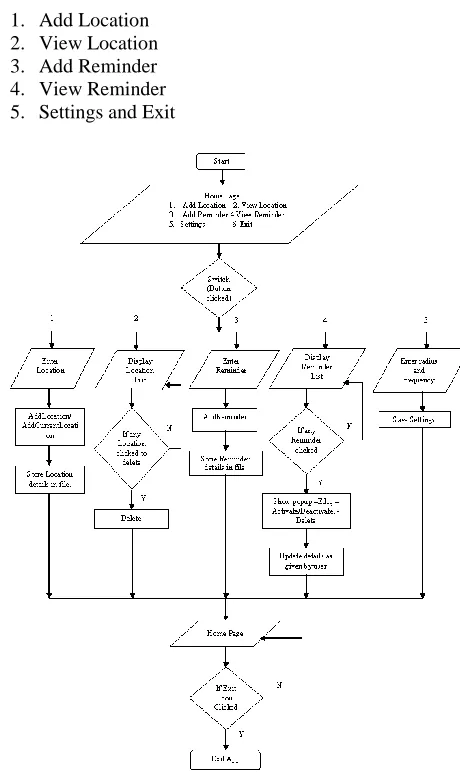
The Figure.3 depicts or shows the model of the application presented in the paper. The very first block in the Figure.3 is the Homepage , which consist of 5 modules i.e
[image:3.612.49.282.451.628.2]1. Add Location 2. View Location 3. Add Reminder 4. View Reminder 5. Settings and Exit
International Journal of Emerging Technology and Advanced Engineering
Website: www.ijetae.com (ISSN 2250-2459,ISO 9001:2008 Certified Journal, Volume 3, Issue 1, January 2013)
[image:4.612.67.277.135.366.2]272
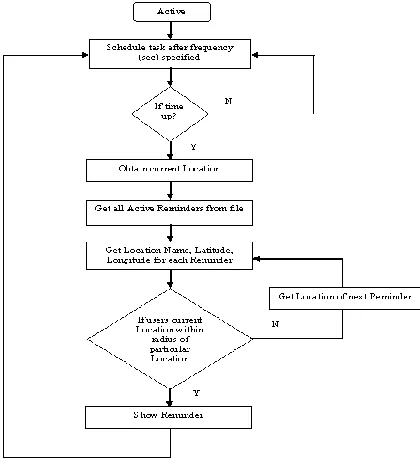
Figure 4. Flow diagram of location tracking
1. Add Location
This module (Fig.5-Rightside) allows user to add the locations for which he wants to set reminders. User can give name of location, latitude and longitude of location if he is far away from the location. Google Maps can be used to obtain the latitude and longitude of location. To add reminders for current location no need to explicitly specify the latitude and longitude as it will be taken simultaneously by GPS.
2. View Locations
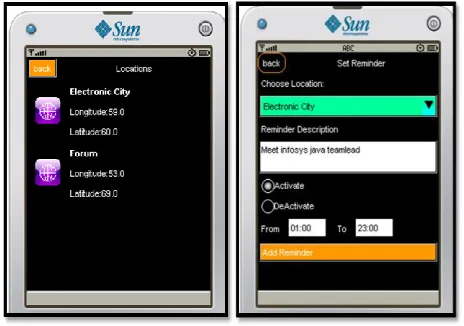
This module (Fig.6-Leftside) allows user to view all locations which user has added. If user wants to delete any of the previously added locations then he can click on the location which will be deleted after confirmation.
3. Add Reminder
This module (Fig.6-Rightside) allows user to add the reminders. User can choose the location which is already added in the add location module and can set the description of reminder. User can also set the reminder based on time also after setting the location. For example, user can choose location as ―Electronic City‖ and set the description as ―Meet Infosys java teamlead‖. Once the reminder is added, when user is near the location, the text description will be alerted to the user.
4. View Reminders
This module (Fig.7-Leftside) allows user to view all reminders which user has added. In this module there are three options present which allows user to make any changes if required.
Edit
Activate/Deactivate
Delete
5. Settings
This module (Fig.7-Rightside) allows user to set some settings for the applications like frequency and radius. Where frequency refers to set time where the latitude and longitude of the location of the user is compared with the given latitude and longitude and then for every set time it gives us the reminder.
6.Exit
If we click exit immediately the application will close.
Four objectives guiding the design of input focus:
Controlling the amount of input required
Avoiding delay
Controlling errors
Keeping the steps simple and user friendly.
In this application we are not using a special database as backend. Already mobile applications are running with many memory constrains so in that case if a database software is set then the memory allocated will be heavy so to overcome this problem a file system is used that to in the format of xml.
Here we are using two xml file one is called as Location XML to store the location name, latitude and longitude and one more called Reminder XML and its is used to store the location name, Reminder, Active or inactive condition.
The output screen will be displayed only if the following condition satisfies.
1. We must have location sorted with correct latitude and longitude.
2. A reminder must be set and the reminder must be in active condition.
3. A time must be set for the particular reminder in particular location.
4. If the user is within the range of radius in km.
International Journal of Emerging Technology and Advanced Engineering
Website: www.ijetae.com (ISSN 2250-2459,ISO 9001:2008 Certified Journal, Volume 3, Issue 1, January 2013)
273 V. PRESENTATION OF APPLICATION DEVELOPMENT AND
IMPLEMENTATION
[image:5.612.50.287.233.402.2]The figure 5 shows the Homepage which has 5 modules i.e Add Location, Add Reminder, Settings, Locations, Reminders and Location Form. Here a user can select any of the module he wish. In the figure above Add location icon is enabled ,thus a the location form will be displayed on the screen, which is used to add new location name or add current location along with its latitude, longitude.
Figure 5. Homepage and Location Form
The figure 6 shows all the locations that are present in the location list which was submitted in the location form, if present and the reminder form is used to set the reminder by giving Location name and the subject to be performed by user when he comes nearer to that location, which is done by activating the radio button. This will activate the reminder and alarm is given when the user reaches near by the location.
Figure 6.Location List and Reminder form
The figure 7 shows all the reminders which user has added using Reminder form and the Settings form is used to set the frequency tab and the perimeter of the distance which shows the seconds we have set for the reminder to be flashed on the screen.
[image:5.612.324.558.243.414.2]According to the Figure.7 Setting Form, when a user reaches nearer i.e around 0.5km of radius to Electronic City, an alarm is beeped on screen for every 30 seconds showing the subject which user had written while adding reminder.
Figure 7. Reminder List and Setting form.
VI. CONCLUSION
The time based reminders are common but, are not useful always, as people work based on location. The application developed is an improvement over the existing reminders. There is scope for combining time and location information in building more efficient reminder systems.
The application presented offers many services like, Keep an ongoing list of things to buy next time you're at the grocery store, Tell you to take the trash to the street when you get home after work, Keep your life more organized with a location-based to-do list, Prompt you to purchase a birthday gift the next time you're near the mall, Tell you to deposit your paycheck next time you're near the bank, Remind you to call a client the next time you arrive at the office, Ability to save favorite locations for future use, Easy to use interface for quick and efficient navigation, Option to re-enable alerts from the past.
VII. IMPROVEMENTS OF APPLICATION
[image:5.612.52.284.510.673.2]International Journal of Emerging Technology and Advanced Engineering
Website: www.ijetae.com (ISSN 2250-2459,ISO 9001:2008 Certified Journal, Volume 3, Issue 1, January 2013)
274 First, given the limited text entry mechanisms available on mobile phones, a way of associating audio messages or pictures with reminders could offer greater convenience, encouraging unique and more opportunistic use.
Second, it is more appropriate to have reminders based on location and time as well as date. As an added feature, priority can be assigned to the reminders.
Finally, to naturally support the use of recurring reminders, we propose a change to the user interface. Rather than the application automatically removing a MobiMinder when it is detected and presenting it as an explicit reminder notification, the application would continuously display a list of nearby MobiMinders as to-do items, sorted by proximity to the current location. Alerts could still be provided when location certainty is high.
Acknowledgment
We are grateful to Mr. Abhinay B. Angadi who helped to complete the paper and participated in valuable discussions while writing the paper.
REFERENCES
[1 ] Timothy Sohn, Kevin A. Li, Gunny Lee, Ian Smith, James Scott, and William G. Griswold Place-Its: A Study of Location-Based Reminders on Mobile Phones.
[2 ] Björn Hedin, Johanna Norén-Mobile location-based learning reminders using gsm cell identificationdey, IADIS International Journal on WWW/Internet Vol. 7, No. 1, pp. 166-176.
[3 ] Ludford, J. et al., 2006. Because I carry my cell phone anyway: functional location-based reminder applications. Proceedings of the SIGCHI conference on Human Factors in computing systems, Montreal, Canada, pp. 889 – 898
[4 ] Marmasse, N. and Schmandt, C., 2003. Location-Aware Information Delivery with ComMotion, Lecture .
[5 ] A.K. and Abowd, G.D., 2000. CybreMinder: A Context-Aware System for Supporting Reminders, Lecture Notes in Computer Science, Vol. 1927/2000, pp 201-207.
[6 ] Dragan Peraković ,Vladimir Remenar, Sinisa Husnjak :Reminder based on the user's location.
[7 ] Ramjee Prasad, Marina Ruggieri: Applied Satellite Navigation using GPS, GALILEO and augmentation systems, Artech House mobile communications series, USA 2005, pp. 38 – 52.
[8 ] Beigl, M. MemoClip: A Location-Based Remembrance Appliance. Personal and Ubiquitous Computing 4(4), pp. 230-233.
Akshata B. Angadi1 received the B.E degree in Computer Science from Visvesvaraya Technological University, India in 2011.
Nivedita V. Shetti2 received the B.E