A Study of Portable Computers
and Interactive Multimedia as a
New Tool for Interpreting
Museum Collections
James A. Evans
Contents
Chapter 1 The Research Project: A Background and Context
1.1 Interactive Multimedia Technology: A Critical Review 4
1.2 Interactive Multimedia 9
1.2.1 Audio Guides 9
1.2.2 Laserdiscs 10
1.2.3 Computer Based Interactive Multimedia 11
1.2.4 Interactive Multimedia Development 14
1.2.5 Portable Computers in Museums 15
1.3 Virtual Reality 18
1.3.1 3D Digitisers 22
1.3.2 QuickTime VR (QTVR) & Surround Video 23
1.3.3 Virtual Reality on the World Wide Web 23
1.4 World Wide Web 24
1.5 Innovative Interactive Multimedia Installations 27
1.5.1 Croydon Clock Tower: Lifetimes 27
1.5.2 The National Gallery: Micro Gallery 28
1.5.3 Virtual Stonehenge 28
1.5.4 The Natural History Museum: Virtual Endeavour 29 1.5.5 National Museums and Galleries on Merseyside: 29
Conservation Centre
1.5.6 BT Touchpoint & Magic Touch Kiosks 29
1.5.7 Science Museum: Information Kiosks 30
1.5.8 Carnegie Museum of Natural History: Robot Tour Guide 30
1.6 Classification Framework 31
1.7 Selection of a Research Area 32
1.7.1 Interactive Interpretation Pavilion 32
1.7.2 Education Focused Museum Web Site 33
1.7.3 Portable Computers for Interpretation 33
1.7.4 Selection of a Research Area 34
Chapter 2 Research Methods
2.1 Research Aims 37
2.2 Exploratory Research 39
2.3 A Critical Review of the Literature 41
2.4 A Field Study of Heritage Attractions and Museums 43
2.4.1 Observation Procedure 47
2.4.2 Initial Heritage Attraction Field Survey 51 2.4.3 United Kingdom Heritage Attraction Field Survey 51
2.5 A Survey of Heritage Attraction and Museum Web Sites 55
2.5.1 United Kingdom Heritage Attraction Web Site Survey 56 2.5.2 United States Heritage Attraction Web Site Survey 57
2.6 A Review of Interactive Multimedia Technology in the Marketplace 60
2.6.1 Heritage Specific Interactive Multimedia 60
2.6.2 Computer Based Interactive Multimedia 61
2.7 Evaluating a Portable Computer for Museum Interpretation 62
2.7.1 Test Bed Site 63
2.7.2 Portable Computer Hardware 64
2.8 Visitor Evaluation Study 65
2.8.1 Research Sample 65
2.8.2 Questionnaire Survey 66
2.8.3 Observation 67
2.8.4 Interaction Logs 67
Chapter 3 Design & Development
3.1 Selection of an Appropriate Test Area 70
3.1.1 Front-End Analysis 72
3.2 Design Brief 72
3.3 Interactive Multimedia Development Methodology 73
3.3.1 Application Structure 74
3.3.2 Visual Screen Design 77
3.4 Media Acquisition and Creation 89
3.5 Authoring 90
3.6 Interaction Logs 91
3.7 Formative Evaluation 92
Chapter 4 Visitor Evaluation Study
4.1 Research Methods Appropriate to the Evaluation Study 97
4.1.1 Questionnaire Surveys 97
4.1.2 Interviews 99
4.1.3 Focus Groups and Panel Surveys 100
4.1.4 Observation 102
4.1.5 Case Study Research 103
4.1.6 Data Collection Techniques 104
4.2 Research Methodology Framework 104
4.2.1 Aims and Objectives of the Visitor Evaluation Study 104
Contents 108 110 110 111 115 118 123
4.2.3 Piloting the Survey
4.3 Visitor Questionnaire Survey
4.3.1 Administering the Questionnaire Survey 4.3.2 Sample Size & Selection
4.3.3 Conducting the Survey
4.4 Visitor Observation
4.5 Interaction Logs
4.6 Data Entry and Content Analysis 124
Chapter 5 Visitor Evaluation Study: Findings, Analysis and Synthesis
5.1 CONTROL GROUP: Findings and Analysis 129
5.1.1 Visitor Classification and Profile 129
5.1.1.1 A Profile of Visitor Demographics 129
5.1.1.2 A Profile of Textile Museums and Textile Heritage 130 Attraction Visits
5.1.1.3 Refusals to Participate in the study 131 5.1.1.4 Analysis of Visitor Classification and Profile 131 5.1.1.5 Summary of Visitor Classification and Profile 132
5.1.2 Visitor Recognition and Recall 132
5.1.2.1 Recognition of a Textile Machine and Process 132
5.1.2.2 Recall of Processes 132
5.1.2.3 Analysis of Visitor Recognition and Recall 133 5.1.2.4 Summary of Visitor Recognition and Recall 134
5.1.3 Visitor Opinion 135
5.1.3.1 Visitor Opinion of the Gallery: Post-Visit 135
5.1.3.2 Analysis of Visitor Opinion 135
5.1.3.3 Summary of Visitor Opinion 136
5.1.4 Observed Visitor Behaviour 136
5.1.4.1 Observed Time in the Gallery 136
5.1.4.2 Observed Visitor Behaviour 138
5.1.4.3 Analysis of Observed Visitor Behaviour 139 5.1.4.4 Summary of Observed Visitor Behaviour 139
5.2 COMPUTER GROUP: Findings and Analysis 140
5.2.1 Visitor Classification and Profile 140
5.2.1.1 A Profile of Visitor Demographics 140
5.2.1.2 A Profile of Textile Museums and Textile Heritage 141 Attraction Visits
5.2.1.3 Refusals to Participate in the study 142 5.2.1.4 Analysis of Visitor Classfication & Profile 142 5.2.1.5 Summary of Visitor Classification & Profile 142
5.2.2 Visitor Recognition and Recall 143
5.2.2.1 Recognition of a Textile Machine and Process 143
5.2.2.2 Recall of Processes 143
Contents 5.2.2.3 Analysis of Visitor Recognition and Recall 144 5.2.2.4 Summary of Visitor Recognition and Recall 145
5.2.3 Visitor Opinion 146
5.2.3.1 Visitor Opinion of the Gallery: Post-Visit 146 5.2.3.2 Visitor Opinion of the Portable Computer 146 5.2.3.3 Visitor Opinions on Depth of Exploration and Learning 148
5.2.3.4 Analysis of Visitor Opinion 149
5.2.3.5 Summary of Visitor Opinion 150
5.2.4 Observed Visitor Behaviour 150
5.2.4.1 Observed Time in the Gallery 151
5.2.4.2 Observed Visitor Behaviour 152
5.2.4.3 Analysis of Observed Visitor Behaviour 152 5.2.4.4 Summary of Observed Visitor Behaviour 152
5.2.5 Computer Interaction 153
5.2.5.1 Analysis of Computer Interaction 154
5.2.5.2 Summary of Computer Interaction 155
5.2.5.3 Comparison of Observed Behaviour and 155 Computer Interaction Logs
5.3 Synthesis of Findings 157
5.3.1 Visitor Use and Interaction with the Portable Computer 157
5.3.2 Visitor Opinion of the Portable Computer 159
5.3.3 Visitor Behaviour 162
5.3.4 Visitor Knowledge and Understanding 164
Chapter 6 Discussion, Conclusions and Further Research
6.1 Key findings and Conclusions 168
6.1.1 Visitor Use and Interaction with the Portable Computer 170 6.1.2 Visitor Opinion of the Portable Computer 170
6.1.3 Visitor Behaviour 171
6.1.4 Visitor Knowledge and Understanding 172
6.2 Current Research Projects using Portable Computers 173
6.2.1 Broadbent - Italy 173
6.2.2 Davies - United Kingdom 173
6.2.3 International Cultural Heritage Informatics Meeting (ICHIM'99) 174
6.2.4 Opperman - Germany 174
6.2.5 Anderson - USA 175
6.2.6 Hyper-Interaction within Physical Spaces (HIPS) 175
6.2.7 Portable Computer Research Taxonomy 176
6.2.8 Comparison of Portable Computer Research Projects 177
6.3 Challenges 180
6.4 Issues Raised 182
Contents Appendix A
UK Heritage Attraction Field Survey UK Heritage Attraction WWW Survey USA Heritage Attraction WWW Survey
A Comparison of the WWW Sites of UK and USA Heritage Attractions
Appendix B
Media Content List
Appendix C
Record Sheet Visual Aid
Appendix 0
Spreadsheet A - Control Group Questionnaires Spreadsheet B - Computer Group Questionnaires Spreadsheet C - Control Group Observed Behaviour Spreadsheet D - Computer Group Observed Behaviour Spreadsheet B - Computer Group Interaction Logs Graph A - Demographic Profile of Visitors
Graph B - Demographic of Control Group Graph C - Demographic of Computer Group
Graph D - Recognition of Textile Machine & Process for Control Group Graph E - Recognition of Textile Machine & Process for Computer Group Graph F - Recognition of Textile Machine & Process Vs Gender
Graph G - Recognition of Textile Machine & Process Vs Age for Control Group Graph H - Recognition of Textile Machine & Process Vs Age for Computer Group Graph I - Recognition of Textile Machine & Process Vs Prior Visitation
Graph J - Recall of Processes for Control Group Graph K - Recall of Processes for Computer Group
Graph L - Recall of Processes Vs Gender for Control Group Graph M - Recall of Processes Vs Gender for Computer Group Graph N - Observed Total Time in Gallery
Graph 0 - Duration of Access to each Section Graph P - Percentage of each Section Accessed
Appendix E
ICHIM'99 Conference Paper
References
List of Figures
Figure 1.1: Co-Operative Bank Pavilion 33
Figure 2.1: Record Sheet - Page 1 49
Figure 2.2 : Record Sheet - Page 2 50
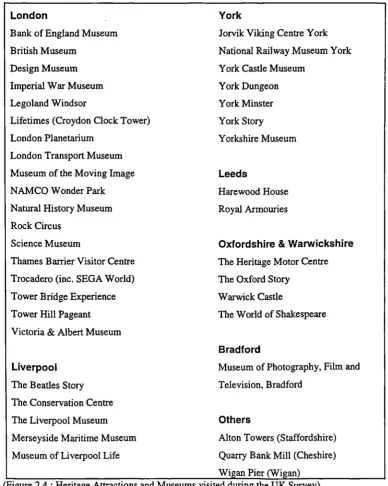
Figure 2.3 : Heritage Attractions and Museums visited in Greater Manchester 51 Figure 2.4 : Heritage Attractions and Museums visited during the UK Survey 53 Figure 2.5 : Heritage Attractions and Museums contacted 54
Figure 3.1: Fibres, Fabrics and Fashion Gallery 71
Figure 3.2 : Fibres, Fabrics and Fashion Gallery 71
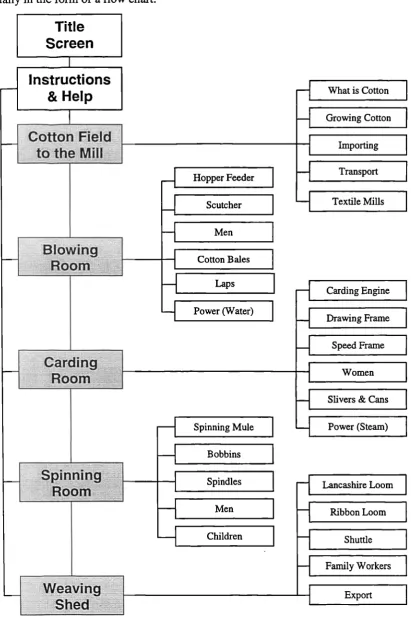
Figure 3.3 : Interactive Multimedia Application Flow Chart 76
Figure 3.4 : High level screen layout 78
Figure 3.5 : Navigation Menu - Storyboard 79
Figure 3.6 : Navigation Menu - Actual Screen 79
Figure 3.7 : Title Screen- Storyboard 80
Figure 3.8 : Title Screen - Actual Screen 80
Figure 3.9 : Cotton Field To The Mill - Storyboard 81 Figure 3.10: Cotton Field To The Mill - Actual Screen 81
Figure 3.11: Blowing Room - Storyboard 82
Figure 3.12 : Blowing Room - Actual Screen 82
Figure 3.13 : Carding Room - Storyboard 83
Figure 3.14: Carding Room - Actual Screen 83
Figure 3.15 : Spinning Room - Storyboard 84
Figure 3.16 : Spinning Room - Actual Screen 84
Figure 3.17 : Weaving Shed - Storyboard 85
Figure 3.18 : Weaving Shed - Actual Screen 85
Figure 3.19 : Textile Mill Plan - Storyboard 86
Figure 3.20 : Textile Mill Plan - Actual Screen 86
Figure 3.21 : Gallery Map - Storyboard 87
Figure 3.22 : Gallery Map - Actual Screen 87
Figure 3.23 : Generic Textile Machine Information Page - Storyboard 88 Figure 3.24 : Lancashire Loom Information Page - Actual Screen 88 Figure 3.25 : Macromedia Director authoring environment 90
Figure 3.26: Sample Interaction Log 91
Figure 4.1: Visitor Survey Dates 114
Figure 4.2: Gallery Layout, Observation Area and Researcher Position 121
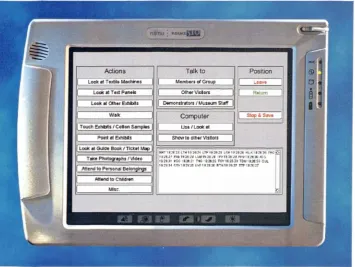
Figure 4.3 : Computerised Observation Schedule 122
Figure 4.4: Computerised Observation Schedule Coding Scheme 123
Figure 5.1 : Gender distribution of Visitors 129
Figure 5.2 : Age range of the Control Group 130
Figure 5.3 : Age range of the Control Group 130
Figure 5.4 : Prior visitation to a museum with a textile gallery or textile mill 130 Figure 5.5 : Textile Museums and Textile Mills previously visited 131 Figure 5.6 : Prior visitation to the Fibres, Fabrics and Fashion gallery 131 Figure 5.7 : Recognition of Textile Machine & Process 132
Figure 5.8 : Number of Processes recalled 133
Figure 5.9 : Number of Processes recalled 133
Contents
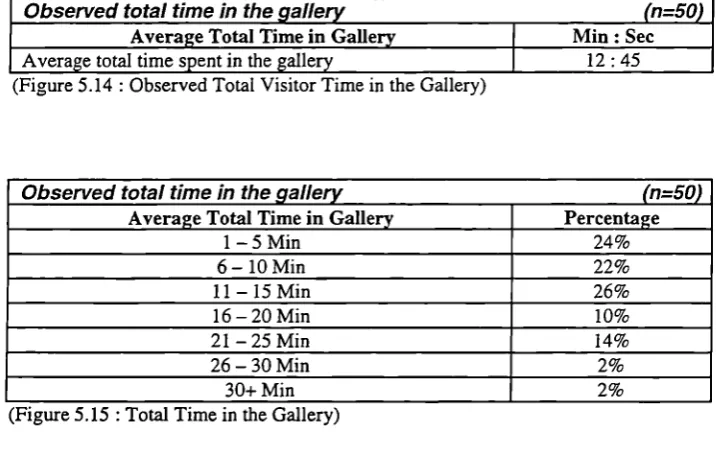
Figure 5.11: Features which were most popular with visitors 135 Figure 5.12: Features which were least popular with visitors 135 Figure 5.13 : Fibres, Fabrics & Fashion Gallery Layout 137 Figure 5.14: Observed Total Visitor Time in the Gallery 138
Figure 5.15 : Total Time in the Gallery 138
Figure 5.16: Observed Visitor Time inside and outside the observation area 138 Figure 5.17 : Percentage of Total Time spent inside and outside 138
the observation area
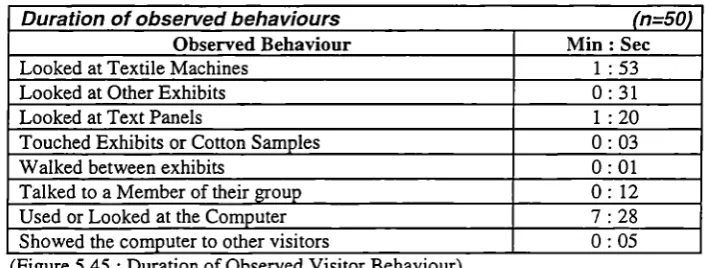
Figure 5.18 : Percentage of Visitors leaving the observation area 138 Figure 5.19 : Duration of Observed Visitor Behaviour 139
Figure 5.20 : Age range of the Computer Group 140
Figure 5.21 : Age range of the Computer Group 141
Figure 5.22: Gender distribution of Visitors 141
Figure 5.23 : Prior visitation to a museum with a textile gallery or textile mill 141 Figure 5.24: Textile Museums and Textile Mills previously visited 141 Figure 5.25 : Prior visitation to the Fibres, Fabrics and Fashion gallery 142 Figure 5.26 : Recognition of Textile Machine & Process 143
Figure 5.27 : Number of Processes Recalled 143
Figure 5.28 : Number of Processes Recalled 144
Figure 5.29 : Recall of Individual Processes 144
Figure 5.30 : Features which were most popular with visitors 146 Figure 5.31: Features which were least popular with visitors 146 Figure 5.32 : Popularity of the portable computer with visitors 146 Figure 5.33 : Ease of use of the portable computer 147 Figure 5.34 : Features of the portable computer which were popular with visitors 147 Figure 5.35 : Features of the portable computer which were unpopular 147
with visitors
Figure 5.36 : Features of the portable computer which made it easy to use 148 Figure 5.37 : Features of the portable computer which made it difficult to use 148 Figure 5.38 : Depth of exploration using the portable computer 148 Figure 5.39 : Level of learning using the portable computer 148 Figure 5.40: Observed Total Visitor Time in the Gallery 151
Figure 5.41 : Total Time in the Gallery 151
Figure 5.42 : Observed Visitor Time inside and outside the observation area 151 Figure 5.43 : Percentage of Total Time spent inside and outside 151
the observation area
Figure 5.44 : Number of Visitors leaving the observation area 151 Figure 5.45 : Duration of Observed Visitor Behaviour 152 Figure 5.46 : Number of visitors who accessed each section 153 Figure 5.47 : Average duration of access per visitor to each section 153 Figure 5.48 : Average percentage of each section accessed 153
Figure 5.49 : Depth of Access 153
Figure 5.50 : Average duration of access to each sub-section type per 154 visitor accessed
Figure 5.51 : Number of visitors who accessed each textile machine 154 Figure 5.52: Comparison of Observed Behaviour and Computer Interaction Logs 156
Figure 5.53 : Total time in Gallery 163
Figure 6.1: Taxonomy of Portable Computer Research 176
Acknowledgements
I would like to express my sincere gratitude to my supervisor, Dr Pat Sterry, Director Centre for Heritage Studies, University of Salford, for her enduring support, guidance, enthusiasm and encouragement throughout the research project.
I am also indebted to Professor James Powell, and to the GEMISIS 2000 team, Professor Bob Wood, Dr Keith Lawrence, Sarah O'Donnel, Katherine Hills and Nigel Yates for their support and assistance.
I am especially grateful to Dr Patrick Green for consenting to the research taking place at the Museum of Science and Industry in Manchester, and to Nick Dixon, Alison Vincent, Tudor Gwynn, Elizabeth Oxborrow-Cowan, Christine Chadwick, Vincent Newton, Raymond Watson and Rick Jacobs who each made an invaluable contribution during the development of the interactive multimedia application and organisation of the visitor evaluation study.
Special thanks must also go to Damien Markey, Louisa Yong, Stuart Birchall, Simon Robertshaw, David Bird, Mark Zurawski and Mark Scargill from the University of Salford, and to Peter Battrick and Ryan Foster from Quarry Bank Mill, for their assistance in the development of the interactive multimedia application and interest in my research.
Exhibit
Exploratory Research
Frequency
Focus Group
Glossary of Terms
Glossary of Terms
Application A term used to describe a computer program or piece of
computer software
Audio Guide A device which provides additional audio interpretation of Exhibits. Early systems were based the audio cassette, modern systems the audio-CD or solid-state electronics.
Browser Case Study CD-ROM Client-Server Closed Questions Codified
A software program which facilitates the viewing of WWW pages created in HTML. The two most popular browsers are Netscape Navigator and Microsoft Internet Explorer.
The in-depth investigation of an individual case, employing multiple research methods and a qualitative approach.
A silver plastic disc which is identical to an audio
compact disc, but contains data which can be accessed by a computer.
A model for the computerised storage and distribution of data. The data is stored on the Server and transmitted on demand to the Client.
Questions where respondents must select an answer to questions from several pre-determined responses.
A structured approach with predetermined categories which is suited to the collection of quantitative data.
DVD Digital Versatile Disc (DVD) is a high storage capacity evolution of the CD-ROM. Initially DVDs are being used for movies, however they can be used with computers to provide programmes with high levels of interaction.
A single object, interactive or case with the whole gallery.
Initial research conducted to gain an appreciation of the area of enquiry and to identify topics for further research.
A count of how often a variable occurs in the data.
A research methodology where a group of individuals discuss or are interviewed regarding a topic or set of topics.
HyperText Mark-up Language (HTML)
Infrared Transmitter & Receiver
Interaction History
Geographic Positioning A technology which can accurately calculate the Systems (GPS) geographic position of the unit using information from
satellites.
Heritage Attraction A site or building visited by the general public which makes reference to a heritage theme or story, and includes museums.
The text based language used to create WWW pages.
A system for identifying position/location using a receiver and network of infrared light transmitters.
A computerised record of interactions with an application. Can be used to tailor the information provided to visitors based upon what they have already seen.
Interaction Log A text file produced by an application which records the
visitors interactions. Frequently used to analyse visitor interaction with multimedia application.
Interactive The combination of some or all of the elements of text,
Multimedia graphics, sound, animation, video and interactivity.
Internet The communications backbone which supports network
applications including e-mail and the WWW.
Interpretation The process of selecting appropriate media and
approaches to effectively communicate information about artefacts and their importance to visitors.
Interviews
Kiosks
A method of collecting data by asking individuals questions, which may be conducted either face to face or over the telephone.
A substantial structure, typically of similar proportions to a small wardrobe which houses a computer, monitor and input device.
Laserdiscs A large silver disc, that is similar in appearance to an audio compact disc, but with approximately twice the diameter. Laserdiscs can store images, sound tracks and video information.
Metaphor A term used within multimedia design to describe a
Glossary of Terms Non-Probability A sampling approach often employed for small scale
Sampling surveys were the likelihood of each unit being selected is not known.
Observation Schedule A codified record sheet, which assists researchers in
recording observed behaviours.
Open Questions Questions where respondents are free to provide answers in their own words.
Palm Top Computer A portable computer, which resembles a conventional laptop but is approximately half the size. Typically these computers use the Windows 95/98 operating system and run the majority of Windows applications.
Panel Survey A research method where focus groups meet on several occasions over time, and is frequently used during market research to assess trends.
Personal Digital A handheld touch screen electronic device. Early
Assistants (PDA) examples were based on electronic organisers, however recent models are significantly more powerful and run the Windows CE operating system.
Plug-In A small software application that extends the functionality of a Browser, typically adding the ability to display
additional multimedia content.
Portable Computer
Probability Sampling
A computer, typically the size of a clip board, which has the functionality to a laptop combined with a touch screen interface.
Sampling approach often used for large scale surveys were the likelihood of each unit being selected is known.
Qualitative Research A research method which adopts a holistic and in-depth approach, and is concerned with understanding views and options.
Quantitative Research
Questionnaire
QuickTime
Virtual Reality (QTVR)
A research method which adopts a numerical approach, and is concerned with statistics and generalising results.
A method of collecting data based upon individuals responses to questions. Questionnaires can be administered by an interviewer or completed independently by the respondent.
The creation of a virtual reality environment by stitching a series of photographs together to form panoramas or objects.
User Profile
Virtual Reality (VR) Quota Sampling
Random Sampling
Record Sheet
A sampling approach were interviewers are given a quota of individuals with certain characteristics. By combining the results from a number of quota, a representative picture of the target population can be formed.
A sampling approach where each unit or individual has the same probability of been selected.
A structured research instrument with predetermined and codified categories which assists a researcher in recording the responses to questions.
Survey A research method which uses the results from a
representative sample to predict or generalise for the whole population.
Systematic Sampling A sampling approach were individuals are selected at equal and regular intervals.
Touch Screen An input device which fits in front of or is incorporated into a computer monitor. The touch screen calculates the position where the screen was touched and this
information is used to make on-screen selections.
Tracker Ball
Triangulation
An input device that resembles an oversized upside down mouse. The ball is used to manipulate an on screen cursor and make selections.
The combination of several research methods or data collection techniques, also referred to as multi-methods.
A model of users preferences and interests.
The creation of a three dimensional, computer generated world or object that can be explored andlor manipulated.
Virtual Reality Modelling A text based language, which resembles HTML, and is Language (VRML) used to create Virtual Reality objects and environments
which can be accessed over the WWW.
Windows CE
Wireless Network
A cut down version on the Windows 95/98 operating system designed specifically for portable devices.
Similar to a conventional computer network except that it uses radio transmitters/receivers instead of cables to transport data between computers.
World Wide Web The most rapidly expanding element of the Internet. To (WWW) view the WWW a computer requires a Browser to display
Abstract Abstract
A Study of Portable Computers and Interactive Multimedia as a New Tool for Interpreting Museum Collections
James A. Evans
Over the last two decades the introduction of interactive multimedia applications complimenting existing interpretative techniques in museum displays has become a widely accepted practice. Indeed fixed interactive multimedia applications can communicate large amounts of often complex information in a user friendly and accessible way. A drawback is their fixed position. This research project identified the potential of using a portable computer with an interactive multimedia application manipulated through a touch screen interface. This thesis describe& the results of a series of empirical studies to design and test the effectiveness of a portable computer as a new tool for interpretation in a museum gallery.
The central aim of the research, funded by the GEMISIS 2000 initiative, was to examine potential innovative applications of new interactive technologies for heritage attractions and museums. Exploratory research progressed from discovery and gaining insights into the diversity of interactive multimedia applications in heritage attractions to the dynamics of interactive multimedia as a powerful communication medium. The main study fell into three distinct yet complimentary research pathways namely 1) to design an interactive multimedia application for a portable computer, 2) to examine the use and effectiveness of the portable computer with museum visitors, 3) to assess the application as a new tool for interpretation in a museum setting. The conclusions of this research project are based upon the results of a rigorous and comprehensive evaluation study, which combined a questionnaire survey, structured unobtrusive observation and interaction logging.
As the research project was initiated there were few other projects in this field of study, and no formal evaluation had been published. At the completion, four research projects were identified and are detailed in the conclusion.
The results of this research project have confirmed the hypothesis that a portable computer with an interactive multimedia application has the potential to enhance interpretation and to become a new tool for interpreting museum collections. As the number of homes with multimedia capable computers equipped with CD-ROM drives and connected to the Internet grows and exposure to computers at work and at school increases, visitors are well prepared to handle the new technology. The projects results show ease of use and an increased recall of exhibits by visitors. Visitors experienced discovery based learning at their own pace facilitated by a portable touch screen computer.
Limitations of the project are discussed and future research topics identified. These included expanding the interactive multimedia application to cover the whole gallery, exploring alternative interaction models, evaluating the impact of age and gender, evaluating the portable computer within other categories of museums, to evaluating location aware positioning systems and to investigating Personal Digital Assistants as a potential hardware platform.
Chapter 1
Chapter 1 The Research Project: A Background and Context
Chapter 1 The Research Project: A Background and Context
The central aim of this research project funded by the GEMISIS 2000 initiative was to examine innovative applications of new interactive multimedia technologies for heritage attractions. GEMISIS 2000 is a collaboration between the University of Salford, Cable and Wireless Communications, the City of Salford, the City of Manchester and the Manchester Training and Enterprise Council. The objectives of GEMISIS 2000 are to promote economic regeneration, to forge links between the public and private sectors, to improve the quality of life for the community and to provide test-bed sites for multimedia initiatives. A vital element of GEMISIS 2000 was the establishment of an inter-disciplinary program supporting thirty postgraduate doctoral research students, undertaking innovative research projects. The research areas are cross-disciplinary and include; Government, Education, Medicine, Industry, Society and the Information Superhighway (GEMISIS). This research project was endorsed and funded by GEMISIS 2000.
Over the last two decades the introduction of interactive multimedia applications complementing existing interpretative techniques in museum displays has become a widely accepted practice. Indeed fixed interactive multimedia applications can communicate large amounts of often complex information in a user friendly and accessible way. A drawback is their fixed position. This research project examined the feasibility of using a portable computer with an interactive multimedia application manipulated through a touch screen interface. This thesis describes the results of a series of empirical studies to design and test the use and effectiveness of a portable computer and interactive multimedia application as a new tool for interpretation in a museum gallery.
Exploratory research progressed from discovery and gaining insights into the diversity of interactive multimedia applications in heritage attractions to the dynamics of interactive multimedia as a powerful communication medium. The main study fell into three distinct yet complementary research pathways namely 1) to design an interactive multimedia application for a portable computer, 2) to examine the use and effectiveness of the portable computer with the museum visitor, 3) to assess the portable computer and interactive multimedia application as a new tool for interpretation in a museum
setting. The conclusions of this research project are based upon the results of a visitor evaluation study, which combined a questionnaire survey, structured unobtrusive observation and interaction logging.
This research project provides a new contribution to knowledge as this is the first time that a portable computer and interactive multimedia application have been used within a museum gallery to provide additional interpretation, and they have been formally evaluated.
The hypothesis was that it was feasible to employ a portable computer and interactive multimedia application to enhance interpretation and to become a new tool for interpreting museum collections.
The term portable computer covers a wide range of products from Personal Digital Assistants (PDA's) to Notebook and Laptop Computers. In this instance, a portable computer is a piece of specialist computer hardware measuring approximately 30cm x 22cm x 4cm, with a 26cm colour touch screen display running the Windows95 operating system.
Interpretation is the process of selecting appropriate media to communicate information about artefacts and their importance to visitors. A tool is an instrument, which assists an individual in accomplishing a task. In the context of the research, the tool is the portable computer and interactive multimedia application, which assists the museum in communicating the meaning and significance of exhibits to visitors.
It was the intention that the research would provide an indication of whether it was feasible for a portable computer and interactive multimedia application to be used by visitors to a museum gallery to provide additional interpretation. The criteria for success were: visitors spending longer in the gallery, increased recall of exhibits by visitors, and that visitors found the portable computer and interactive multimedia application both easy to use and enjoyable.
Chapter 1 The Research Project: A Background and Context
The project's results show ease of use and suggest a significantly increased recall of exhibits by visitors. Visitors experienced discovery based learning at their own pace facilitated by a portable touch screen computer.
The findings provide an original contribution to knowledge in the field, and the study reflects the researcher's background in information technology and an interest in innovative applications of new technology. The research project also reflects the aims and objectives of the GEMISIS 2000 initiative. Although the research by its very nature has explored methods of interpretation, visitor studies and the critical and interpretative design dimension of museums and heritage attractions, it is not directly concerned with these disciplines.
The research provides an insight into an innovative application of new interactive multimedia technology and its use in a museum gallery. The findings of this research project will provide a sound basis upon which future studies can build.
1.1 Background and Context for the Research
This chapter provides a background and context for the research. The diverse range of interactive multimedia technologies currently employed in heritage attractions is critically reviewed, and a selection of the more innovative applications and installations are described. Innovative applications within the context of the research included new technologies and new applications of existing technologies. The chapter concludes with a classification framework of interactive multimedia applications within heritage attractions and identifies potential areas for further research.
For the purpose of this research project a heritage attraction is defined as a site or building visited by the general public which makes reference to a heritage theme or story. Thus the term heritage attraction is wide ranging and includes museums, heritage centres, urban heritage parks, restored docklands and theme parks. (Sterry 1994)
Over the last two decades the use of interactive multimedia to support interpretation in heritage attractions has grown widely and is an increasingly successful practice. Almost all visitors to heritage attractions have the opportunity to interact with and to experience sophisticated interactive multimedia exhibits. (Garfield, Cassedy and Roth
1992, Jones 1992, Koester 1993, Lydecker 1993)
In the context of this research project interactive multimedia includes exhibits which are under the control of visitors, and encompasses audio guides, interactive multimedia kiosks, CDROMsfD\TDs, Virtual Reality environments and World Wide Web (WWW) sites. Interactive multimedia is defined as the combination of some or all of the elements of text, graphics, sound, animation, video and interactivity. (Bunzel and Morris 1994, Lopuck 1996, Prochak 1990, Vaughan 1994) The term 'Hypermedia' is used where interactive multimedia is combined with a hypertext navigation system, similar to that used on the World Wide Web and moves away from linear interaction models. (Alsford 1991, Nakano 1995, Signore 1995, Tsichritzis and Gibbs 1991)
Interactive multimedia applications are being used to provide interpretation, yet this is still a relatively new discipline for heritage attractions and particularly for museums, when compared to more established interpretation mediums. (Aisford 1991, Heinecke
1995, Thomas 1993, Visser 1993) The successful use of interactive multimedia in
museums has coincided with changes in the design management of museum exhibitions. No longer are museums merely custodians of artefacts in glass cases, as many now provide vibrant displays with interactive multi-sensory experiences. Therefore a museum visit is no longer a passive experience, but one in which the visitor participates. (Besser 1997, Hunter 1996, Lewis 1991, Valls 1994) The first International Conference on Hypermedia and Interactivity in Museums (ICHIM) was held in 1991 and the first International Conference on Museums and the Web as recently as 1997, illustrating the growing interest in the two disciplines. (Bearman 1991a, Bearman and Trent 1997b, www.archimue.com)
Chapter 1 The Research Project: A Background and Context
figure refers to the museums total budget, or a spedcific budget for an individual gallery or exhibit.
Recognition of the effectiveness of interactive multimedia as a new medium for communication with Visitors, in comparison with traditional media is of crucial importance, (Beniger 1987, Fahy 1995, Gwaltney 1991, Koester 1993) and museums are by their very nature multimedia environments. (Bearman 1991, Gordon 1995b, Koester 1993, Laetsch et al 1980) Interactive multimedia can present complex information in a dynamic, entertaining and easily understood way, which empowers visitors to access the information they require at their own pace. (Dube 1997, Hoffos 1987, Martlew 1990, Winterbotham 1994) Interactive multimedia can complement existing interpretative techniques, can place objects in their social and historical context and are undoubtedly popular with Visitors. (Allison and Gwaltney 1991, Nakanol995, Swift 1997) Swift has identified several studies where interactive exhibits have repeatedly been identified by visitors as the most enjoyable and most memorable. (Swift 1997) Allison and Gwaltney conduced research into the application of multimedia interactives with the 'Information Age' gallery at the Smithsonian Institution, USA. It is recognised that this gallery was not representative of all museum galleries, as its theme was communication, and the gallery included 62 computer workstations, 44 laserdisc players, 7 projectors, 20 video monitors and a 12 screen video wall. Based upon their research they concluded that interactive multimedia exhibits are a powerful communication medium, which is a valuable addition to traditional displays, and are very popular with visitors. (Allison and Gwaltney 1991) Research by Nakano has identified that interactive multimedia exhibits can assist in displaying exhibits in context. (Nakano 1995)
Interactive multimedia exhibits are now of crucial to the visitor experience of new attractions and galleries as it is recognised not only how effectively they communicate to visitors, but also how they can complement more established interpretative formats. (Bearman 1995, Martin 1996f, Valls 1994) Allison & Gwaltney discovered that visitors who used computer interactives spent longer in the gallery looking at other exhibits than they would otherwise have done. (Allison & Gwaltney 1991) Research at the Haverfordwest Town Museum revealed that the museum was using interactive multimedia to extend the range of interpretative materials available to visitors, to
supplement the existing information provided on graphic panels and to make it a more engaging and interactive experience for the museum visitor. (Martin 19960
The appeal of multimedia exhibits can distract visitors from other exhibits. (Martin and Frazer 1997a, Hoffos 1987, Winterbotham 1994) However as seductive as new interactive technologies are, they are just another tool for the exhibition designer, they will not replace the physical objects which they strive to interpret, nor are they intended to. Therefore it is essential that the designer does not focus on the technology, which is not an end in itself. (Gleeson et al 1996, Lydecker 1993, Mintz 1990, Prochak 1990) This has been recognised by a number of leading commentators such as Mintz and Gleeson et al who advise that museums must be careful not to "be seduced by the technology." (Gleeson et al 1996, Mintz 1990)
Society is becoming increasingly computer literate. As the number of homes with multimedia capable computers equipped with CD-ROM drives and connected to the Internet grows and exposure to computers at work and at school increases, visitors are expecting and demanding more from the museum experience and are well prepared to handle the new technology. MacDonald and Aisford, and Lydecker have speculated that in the near future visitors to museums will have grown up within a technological environment. Beniger called it the "Information Society" where interactive multimedia has a major influence on their lives, at school, at work and during recreation. (Beniger
1987, Dube 1997, Lydecker 1993, MacDonald and Aisford 1997)
The WWW has expanded rapidly in recent years, as have the numbers of heritage attractions and museums with Web sites. Campbell and Wells explain that in "recent months, the use of the Internet as a communications tool has grown exponentially." (Campbell and Wells 1996) Morrison, Bowen and Bennett expand that the Internet is almost doubling in size every year. (Morrison, Bowen and Bennett 1997) Jonathan Bowen, founder of the Virtual Library Museum Pages (VLMP) explains that "currently several museums a day are joining the Internet around the world." (Bowen 1996) Noack expands that "almost every museum in the world now has a Web page." (Noack 1995)
Chapter 1 The Research Project: A Background and Context
perceived image. (Clutten 1996, Daniel 1996, Gollow 1996) Museums are using their Web sites to provide general visitor information (e.g. admission times and prices) through to on-line interactive multimedia exhibits. (Duffy 1995, Noack 1995, Standage 1995, Zorich 1997) An attraction's virtual presence on the Web will become of
increasing importance as access is not restricted only to those with a computer, it is now possible for everyone to have easy access to the Web from their living room just like subscribing to another satellite or cable television channel. This has been achieved using cheap and in most cases free, easy-to-use set-top boxes, which can provide access to the Internet and the Web through a standard television. (Kirwan 1 997c, Look 1997, Woods 1997, Youlgreave 1997, www.cwcom.com , www.ntl.com)
However the World Wide Web is not the only medium available to heritage attractions and museums wishing to communicate with the public beyond the physical boundaries of their site. Several television channels dedicated to history and science are already available through satellite and cable television subscriptions, including The History Channel, National Geographic and The Discovery Channel. With the launch of Digital TV in the United Kingdom during October 1998 and the potential for broadcasting over 200 channels, and with producers looking for quality programme content, museums with their extensive collection are in a prime position to contribute as content providers. (Bearman 1989, Friedlander 1993, Gordon 1995b, Hoekemal99l)
Exploratory research revealed that there have been few studies addressing the impact of interactive multimedia applications on the visitor experience. (Garfield, Cassedy and Roth 1992, Heinecke 1995, Hilke 1996, Hilke et al 1988, Koester 1993, Lydecker 1993, Martlew 1990, McMannas 1987, Reid 1997) A number of commentators have observed that many museum professionals are unimpressed by the majority of interactive multimedia exhibits and are unconvinced of their educational or interpretative benefits. (Garfield, Cassedy and Roth 1992) This situation is further explored by Heinecke and Koester who found that there are few studies of interactive multimedia exhibits to date. Lydecker is emphatic in that no studies have yet proved quantifiable benefits. This confirms the view that there is potential to explore further the complexity and impact of such applications in museums further. (Heinecke 1995, Koester 1993, Lydecker 1993)
The following section, critically reviews the range of interactive multimedia technology currently being employed at heritage attractions and museums. Its purpose is to provide
a context for the subject area and reviews the strengths and weaknesses of each interactive technology.
1.2 Interactive Multimedia Technology: A Critical Review
For some visitors it appears that a multimedia application is a natural extension of the museum, which have traditionally presented themselves as multimedia experiences. (Aisford 1991, Bearman 1991, Koester 1993, Laetsch et al 1980) The most frequently encountered interactive multimedia applications are Audio Guides, LaserdiscstDVDs and Computer Based Interactives.
The following sections will critically review the varied range of interactive multimedia applications found in heritage attractions and museums, although it should be remembered that these are not discrete groups and that there is often a blurring of boundaries between categories.
1.2.1 Audio Guides
The audio guide has become an established interpretative device within many attractions especially art galleries and temporary exhibitions. These systems do not require visitors to read lengthy descriptions from guidebooks or labels, and are often available in multiple languages for overseas visitors. However, the functionality of audio guides based on the audio cassette are limited to providing a linear commentary, following a fixed, pre-defined route through the gallery or exhibition. (Kelly 1997, Martin, Frazer and Wilson 1997, Whittington 1997, Wilson)
Chapter 1 The Research Project: A Background and Context
The solid state system also has the facility to monitor and record which commentaries the visitor accessed and in which order they were accessed. This information can be invaluable to exhibition designers in monitoring visitor circulation and evaluating if some areas to the gallery that are not generating the anticipated levels of interest from visitors and thus, may need to be revised. An additional advantage of the solid state system that results from the commentaries being stored digitally in memory, is that it is relatively straight forward and cost effective to change or update the commentaries. This is not the case with specially recorded cassette tapes or CD's.
However, one limitation, which applies to the audio guide systems discussed, is that one visitor can only use each system. However it is acknowledged that InfraRed and Sound Cone systems can facilitate group participation. This is not ideal, as most people visit heritage attractions and museums as part of a social group. (Alison & Gwaltney 1991, Falk and Dierking 1992, Wood 1996, McMannas 1988) If this group is divided into individuals, each using a personal audio guide, each member must tour the exhibitions in isolation. However, this may also be a strategy employed by attractions in order to generate maximum revenue by charging each visitor to use an audio guide. The Tower Bridge Experience (London), the Bank of England Museum (London), The National Gallery (London) and the Conservation Centre (Liverpool) have all used audio guides to enhance the existing interpretation within their respective galleries.
1.2.2 Laserdiscs
Laserdiscs have proved to be popular for interpretation within heritage attractions and museums because of their large storage capacity (100,000 images or 30 minutes of video) and reliability. The systems are extremely reliable, because there is no physical contact between the media and the playback head. Therefore they can be used, almost indefinitely without the degradation in quality associated with videocassette tapes when used repeatedly. (Bearman 1989, Cash 1988, Roberts 1988, Rumbold 1995) However, bespoke laserdiscs which are produced to individual museums requirements are expensive to manufacture and cannot be updated should revisions be required at a later date. (Beniger 1987, Binder 1992, Hoffos 1987, Mintz 1990)
It appears that even when coupled with a computer to control playback, laserdiscs can provide only limited interaction for the visitor. Therefore laserdiscs are particularly suitable for the continuous playing of looped audio or video sequence or for
installations where visitors can select to view one of a number of video features. However laserdiscs are not appropriate where a higher level of interaction is desirable.
Laserdiscs can be found in virtually every museum that features video footage, examples include the National Museums and Galleries on Merseyside, the Thames Barrier Visitor Centre, the Museum of the Moving Image, the Natural History Museum, the Science Museum, the Imperial War Museum and the Museum of Science & Industry in Manchester.
In the last year Digital Versatile Discs (DVDs) have found favour with heritage attractions and museums which have found their combination of storage capacity, reliability and affordability to be well suited to the tasks previously performed by laserdiscs.
1.2.3 Computer Based Interactive Multimedia
The limitations of audio guides and laserdiscs, combined with a move towards greater participation and interaction within galleries have hastened the introduction of computers and interactive multimedia applications for interpretation within heritage attractions and museum galleries. (Aisford 1991, Koester 1993, Martin and Frazer 1997a, Swift 1997) Advances in computer performance, reductions in cost and the availability of multimedia authoring packages, (Besser 1991, Lydecker 1993, Oker 1991, Valls 1994) have promoted a move to computer based interactive multimedia, which is considered a promising interpretative format for heritage attractions and museums. (Dube 1997, Hilke et al 1988, Lewis 1991, Visser 1993)
Interactive Multimedia exhibits are excellent tools, they can provide large amounts of often complex information in a user friendly and interesting way which is easily understood and enjoyable for the museum visitor. (Allison and Gwaltney 1991, Fahy 1995, Hoffos 1987, Lewis 1993) These interactive exhibits can empower visitors,
Chapter 1 The Research Project: A Background and Context
Griffiths and Wilirich 1996, Martin 1996f, Nakano 1995) These applications can also help to overcome the physical space and access constraints that museums face when trying to provide public access to collections while at the same time preserving the individual artefacts. (Dube 1997, Francis, Grigg, Nairne and Pring 1992, Martlew 1990, Valls 1994) Research by Swift and other leading experts has found that interactive exhibits are extremely popular with visitors and are frequently one of the most memorable parts of their visit to a heritage attraction or museum. (Koester 1993, Martin and Frazer 1997b, Reid 1997, Swift 1997)
However there are drawbacks associated with introducing interactive multimedia exhibits. Initially there is the cost of developing the exhibit, the average cost for a single multimedia kiosk (hardware and software) is between £5,00O-30,000 with much greater sums for larger and more sophisticated multiple installations. (Martin 1997c, Mintz 1990, Prochak 1990, Swift 1997) Once installed within the gallery there is the problem of robustness, interactive exhibits are subject to greater wear and tear than passive exhibits, so regular maintenance will be required, if out of order exhibits are to be minimised. (Bitgood 1991, Swift 1997, Winterbotham 1994, Visser 1993) The relative novelty of the interactive multimedia when compared to other techniques may result in the technology being the most memorable part of the visit, rather than the exhibit it was designed to interpret. Ideally multimedia interactives should be designed as an integral part of the exhibit from its conception and not grafted on as an after thought, with the technology and the user interface being transparent to the visitor. (Farnell 1996, Koester 1993, Martin and Frazer 1997a, Winterbotham 1994)
The installations typically found within heritage attractions and museums consist of either a Personal Computer (PC) secured to a desk or one housed within a custom kiosk. Exploratory research identified that kiosks are far more common, being observed in 17 attractions, compared to PC's which were observed in 8 attractions. This may be because the computer equipment is significantly more protected from potentially destructive visitors when housed within a kiosk. (Hoffos 1987, Oker 1991, Swift 1997, Woolsey and Semper 1991) Secondly, when the PC is housed within a kiosk it looks less like a computer and therefore may be less intimidating for technophobic or the non-computer literate visitors, however as society becomes increasingly non-computer literate this will be less of an issue in the future. (Dube 1997, Farnell 1997a, MacDonald and Aisford 1997, Martlew 1990) Examples of multimedia kiosks can be found at the Bank
of England Museum, the Croydon Clock Tower, the Imperial War Museum, the Natural History Museum, the Royal Armouries and the Tower Bridge Experience.
Touch screens and tracker-balls are the most common hardware interface between the museum visitor and the computer. (Driscoll 1991, Lewis 1991, Oker 1991, Preston 1996) Exploratory research identified that touch screens were present in 15 attractions compared to tracker-balls, which were present in 14 attractions. This is probably because, when compared to traditional computer interfaces (e.g. mice and keyboards) they are generally easier to use and much more resistant to harsh treatment. (Driscoll 1991, Lewis 1991, Oker 1991, Preston 1996) However, touch screens are not free from problems, finger prints on the screen can detract from the visual quality of the experience, as can reaching across the screen to make selections obscuring the view of other visitors. Tracker-balls too are not indestructible and can be susceptible to dirt and sweaty hands.
The use of joysticks was observed on relatively few occasions despite their robustness and ease of use. This is may be due to their games playing roots, which is deemed inappropriate for the museum gallery. (Hoffos 1987, Oker 1991, Preston 1996) However joysticks are finding favour for the navigation of virtual environments. The National Museums and Galleries on Merseyside have adopted a different approach to their hardware interface design, which is consistent throughout each of their galleries. The interface is based around three buttons, Up, Down and Select. This simplistic interface utilises extremely robust buttons that are cheap to replace if broken, something which cannot be sald of the other more sophisticated hardware interfaces. However, the interaction possibilities for the visitor using this interface are extremely limited and this may reduce their enjoyment and the educational potential of these interactives.
Chapter 1 The Research Project: A Background and Context
image from the computer onto a large screen rather than using a single computer monitor. (Bath 1996, Jones 1992, Koester 1993, Lewis 1991)
Examples of museums where these approaches have been adopted include the Science Museum, the Tower Bridge Experience, the Croydon Clock Tower and the Imperial War Museum. An alternative solution is to install multiple kiosks each running the same interactive multimedia application, examples of this approach can be found at The Natural History Museum, The National Gallery and the Croydon Clock Tower. This provides the opportunity for several individuals or small groups to participate simultaneously, however this will significantly increase the cost to the museum and the space required for such an installation. (Spicer 1996)
A potential problem facing museums is the pace at which technology advances (Hermann 1997, Martlew 1990, Oker 1991, Signore 1995), as it appears that systems which are state of the art today will be common place next year and redundant the following year, if not before. This is particularly evident in museums where galleries can have a life span of up to 25 years. (Roberts 1988) However, it is not necessary for museums to continually update their computer based interactives, as long as they still achieve their original aims. Although if applications rather than the hardware thry run on appear to be outdated to the visitor, in terms of their speed or visual presentation then there is the danger that they will simply be ignored.
1.2.4 Interactive Multimedia Development
When considering the development of an interactive multimedia application, whether it is a touch screen kiosk, CD-ROM or Web site, heritage attractions face the decision of developing the application in-house or contracting out the development to an external consultant. (Koester 1993, Oker 1991, Patten 1996, Roberts 1988) This section discusses the strengths and weaknesses of each option.
The advantages of developing an interactive multimedia application in-house are that the individual or group undertaking the development will already be familiar with the heritage attraction or museum, exhibit or gallery, and will understand the unique demands of visitors to heritage attractions. The in-house developer is well placed to design and produce an interactive multimedia application which reflects the museum's objectives. However the in-house developer may lack the design experience and
technical expertise required to produce an interactive multimedia application of professional quality. (Driscoll 1991, Lydecker 1993, Oker 1991, Vanausdall 1986) Few attractions can afford to employ a full-time multimedia specialist, and typically buy in the expertise as needed on for each individual project basis. However larger museums are increasingly employing a permanent WebMaster to update and administer their Web site. Employing an external consultant or developer is the route chosen by the majority of heritage attractions which do not have the requisite in-house expertise in interactive multimedia development. Experienced consultants can design and produce interactive multimedia applications more quickly than in-house developers and typically of a much higher quality. However external may not understand fully the unique requirements of heritage attractions and their visitors. If heritage attractions fall to clearly specify their requirements then there is the danger that the external consultant may develop what they think the heritage attraction actually wants, not what the attraction actually needs. It is also recommended that the consultant should agree to train someone from the museum to perform maintenance activities, this is especially important for Web sites which require regular updates, but less of an issue with multimedia kiosks which once installed are seldom altered. (Prochak 1990, Roberts 1988, Vanausdall 1986, Veithoren and Seijdel 1996)
Interactive multimedia development is typically undertaken by a multidisciplinary team including interactive designers, graphic designers, animators, photographers, musicians, camera operators and video producers depending upon the demands of the project. A single individual typically does not possess all the required skills to design and develop an interactive multimedia application, although they may be multi-skilled. It is important not only that the development team possesses the appropriate skill set, but also that the team works closely with the heritage attraction or museum curator and designer, so that they clearly understand the unique requirements of the heritage attraction and the target audience. (Glushko 1991, Philips 1992, Vaughan 1994, Wolfgram 1994)
1.2.5 Portable Computers in Museums
Chapter 1 The Research Project: A Background and Context
These units are being used primarily for visitor navigation and orientation however they may have more sophisticated interpretation applications in the future.
Screven expressed the view that "... it will be economically and technically feasible for visitors to carry handheld electronic clipboard-like screens with them throughout their visit ..." and that visitors would "... use the clipboard to obtain and keep track of routes personalised for visitors time frames and interests." He expands that "the clipboards may even evaluate (for museum use) visitor usage of exhibits during their visit ... each clipboard communicated via text, images, and/or audio in a variety of interactive formats." (Screven 1990)
Personal Digital Assistants are typically marketed as enhanced electronic organisers that run cut-down computer applications for word-processing, spreadsheets and databases. However, they can have useful applications within museums. For example, at the Deutsches Museum in Munich, one of the largest technology museums in the world, Wolfram Wach, a museum guide, uses a Psion Series 3a PDA during his guided tours of the museum. Not only does he keep agendas of tours on his PDA, but also the script for the tour and an additional database of facts and figures should it be required to answer questions from the visitors. (Beishon 1997)
At the Smithsonian they have taken a conventional audio tour, digitised it and made it available to visitors on a PDA, in this case an Apple MessagePad. Not only does the unit provide random access to the commentary to any exhibit by keying in a number on the touch screen, it also contains selected maps of the museum and limited text descriptions of some exhibits. The unit also captures information on the order in which visitors viewed exhibits, this can be used for evaluation and future exhibition planning. (Vodde 1997)
A similar system is currently being developed at the Civic Museum of Rovereto, Italy. The project utilises the Apple Newton Palmtop computer to facilitate what the developers call an augmented museum visit, by providing information based upon the visitors' current location and interaction history. Through the combination of an infrared receiver built into the headphones and a network of infrared transmitters located throughout the museum, the system can identify its position and access the relevant data stored on the hardware. The system primarily provides audio information
on the exhibits and with the addition of a map assists the visitor in navigating the museum. The prototype uses audio descriptions and directions which have been pre-recorded, however the developers have discussed the potential to create commentaries dynamically using natural language generation and speech synthesis technology. (Not et al 1997)
Useful and innovative as the above two examples are they are still limited in the information and interaction that they can provide to visitors due to the constraints of the hardware and development environment. Therefore it appears to be advantageous to use a portable computer with a touch screen interface as this has the performance and functionality closer to that of desktop PC, it should be relatively easy to use and can provide interactive multimedia interpretation to the museum visitor.
At the Museum of Santa Maria della Scala a "Location Aware Interactive Guide" is currently under development. (Broadbent and Marti 1997) The completed system will combine a touch-screen portable computer, a wireless network and Geographical Positioning System (GPS) to assist visitors in navigating the museum and to locate a gallery andlor specific exhibitions/objects within the gallery by the use of maps and audio instruction via headphones. As visitors approach an exhibit the system will provide personalised information by detecting the location of the visitor, based on previously supplied information. The unit contains minimal information, with the required data being transmitted on demand over a wireless network using the client-server model.
Chapter 1 The Research Project: A Background and Context 1.3 Virtual Reality
With increases in computing power and a greater demand for interactive and immersive experiences by visitors, heritage attractions and museums are starting to realise the potential of Virtual Reality (VR) as a viable medium for interpretation. (Bevan 1996d, Emmett 1998, Stone 1997, Walser 1991a) Virtual Reality goes beyond the interaction of multimedia and can immerse visitors within an interactive, three dimensional computer generated world, which allows the visitor to explore and interact with virtual objects and the virtual environments in real-time. (Eddings 1994, Jacobson 1995, Lanier 1992, Traub 1991)
Gradecki explains that in his opinion there:
"... are two basic components that a true virtual reality program must contain:
• A first-person user viewpoint that has complete movement at will in real time • The ability to manipulate and/or change the virtual environment in real time" (Gradecki 1994)
Jacobson expands upon this definition, explaining that:
"Virtual reality refers to the experience of interacting with a computer system that presents a 'virtual world' of simulated sights and sounds. The virtual world is not prerecorded; it is generated on-the-fly by the computer. You can navigate and interact with the virtual worlds and its contents at will. Based on your action - where you look, what direction you move, what objects you manipulate - the image display responds accordingly." (Jacobson 1994)
There are two broad classifications of Virtual Reality systems, Jmmersive and Desktop. Eddings explains that "Immersion refers to the system's ability to make a person feel 'immersed' in the computer-generated simulation." (Eddings 1994) Jrnrnersive VR requires additional peripherals, including visual display (e.g. Head Mounted Display (HMD), Fakespace BOOM), input device (e.g. Dataglove, SpaceMouse, Joystick) and a Position Tracker to completely immerse the user within the virtual environment. Whereas Desktop VR uses a conventional computer with no additional hardware, the monitor acts as a window into the virtual world, which is navigated using a mouse or keyboard. (Hedberg 1995, Helsel 1997, Kalawsky 1994, Lantz 1992) Cave Automatic Virtual Environments (CAVEs) and Camera-\'R systems, are two other types of
immersive Virtual Environments. CAVEs were first developed by the Electronic Visualisation Laboratory (EVL) at the University of flhinois (LISA). A CAVE resembles a cube, which surrounds the user, with projection screens on three sides, the floor and the ceiling. Camera-YR uses blue screen chroma-key technology to place the user in a virtual world. "Videoplace", developed by Myron Krueger was the first Camera-YR exhibit, and opened in 1984 at the Connecticut State Museum of Natural History. (Brill 1994b, Fernstom and Bannon 1997, Hsin 1997, Krueger 1991, www.evl.uic.edu/evl/vr/systems.html#cave)
Virtual Reality can bring the past to life and can assist visitors in understanding historical objects, environments and events. YR has been particularly useful for large scale architectural reconstructions and visualisations, outstanding examples include Stonehenge (YR Solutions) and the Collosseum (Infobyte). (Bevan 1997, Kennedy 1996, SGI 1998, Stone 1997, www.infobyte.it ) In addition to interpreting historical buildings and events the technology can also be used to explain concepts and principles to visitors. Virtual Reality also makes it possible to visit places that would be inaccessible or otherwise be too dangerous for visitors. For example inside a volcano or a nuclear reactor, or to shrink down so that it is possible to examine objects at the atomic level or to grow so that you can hold the universe in your hand. (Crabb and Layer 1996, Lantz 1992, Mahoney 1998, Traub 1991)
YR can also improve access to collections and historical sites, an additional benefit derived from members of the public not physically visiting sites is reduced impact from erosion, a common problem at historic monuments. This also applies to artefacts, if the number of times they are transported or handled is reduced then the wear and tear on fragile and valuable objects, and the chances of accidental damage can be reduced. (Bevan 1996a, Breaks 1993, Kennedy 1996, Stone et al 1991)
Chapter 1 The Research Project: A Background and Context
video camera positioned above the headset. The visor of the headset, which the user cannot see through, contains two LCD screens. The computer-generated images are superimposed with the images from the video camera before being displayed on the LCD screens. Both approaches have advantages and disadvantages, and the individual application will dictate which approach is most suitable. Both systems require accurate positioning systems if the real and virtual worlds are to be accurately aligned, and as with VR, latency can also be a problem. If it takes too long for an image to update then the user may become disoriented or the virtual object may appear to float in space. (Bevan 1996c, Mahoney 1999a, Mahoney 1999b)
The concept of creating Virtual Humans has also been discussed, in the future it may then be possible to tour a historic building guided by a prominent figure from history. Leading research in this area is currently being undertaken by Professor Nadia Thalmann, head of Miralab at the University of Geneva. At the Virtual Heritage '96 conference Professor Thalmann demonstrated a simulation which brought two soldiers from the terracotta army to life. However a large amount of additional research and investment will be required before interactive virtual humans appear at heritage attractions and museums. (Bevan 1997, Kennedy 1996, Statham 1993, Traub 1991) Thalmanns research has concentrated primarily on developing images and animations, however research by Badler at the Centre for Human Modelling and Simulation and the University of Pennsylvania, USA has focused on simulating behaviour, and development of the 'JACK' software application. JACK is a human modelling and simulation system which provides an interactive 3D environment where a detailed human model including behavioural controls can be manipulated. The software enables the evaluation of tasks, collision detection and avoidance scenarios. (www.cis.upenn.edul-.badlerlhome.html)
There is currently a small but growing number of VR exhibits installed in museums. When a VR exhibit was introduced at the Strong Museum in New York (USA), visitors queued for over two hours before the doors opened to get a free ticket to experience the YR exhibit, and attendance doubled when compared to the same period twelve months earlier. (Brill 1994b, Goetcherian 1997, Schafer 1995, Stone et al 1991)
The majority of YR installations in museums have not fulfilled their initial promise, (Eddings 1994, Emmett 1998, Mahoney 1999, Statham 1993) and there are a number of
obstacles facing the wide spread adoption of immersive VR by heritage attractions and museums. Firstly the computer hardware and peripherals are prohibitively expensive, although as prices continue to fall the equipment will become more affordable. (Bevan 1996a, Bevan 1996d, Kalawsky 1994, Walser 1991a)
A second, and potentially more difficult problem to overcome is that these expensive, state of the art exhibits can typically only be used by one visitor at a time. As with multimedia kiosks several museums have installed overhead monitors or large projection screens so that visitors who are not actively participating can be part of the experience. (Jones 1992, Emmett 1998, Koester 1993, Nadis 1998) The exceptions to these are the simulator capsules frequently found at theme parks such as Universal Studios and Disney MGM Studios. These installations are now finding their way into museums, especially science museums, including Science Museums (London) and the Museum of Science and Industry in Manchester. (Bevan 1995b, Gilling 1997a, Jarratt 1997, Van Meter 1996) In most cases they are a way to generate additional revenue, however their educational value is questionable. Unfortunately as the number of visitors participating increases, the level of interaction for each visitor decreases, until you are left with little more than a stationary hydraulic roller-coaster. However there are some good examples of where these systems have been used effectively. A large capsule is located within the Flight gallery at the Science Museum in London where visitors can experience the sensation of flying in a Harrier Jump Jet, whilst at the same time learning about the principles of flight. (Hine 1999) MaxFlight, a company specialising in the development of simulator capsules and the video entertainment features shown within them, is beginning to develop educational features for museums and science centres.
Gary Arvedon the marketing director describes one such feature:
"... invite your visitors to experience the history and feel of flight. Start with the Wright Brother's first ride down the sand dunes of Kitty Hawk. The experience continues in a WWII spitfire, F-16 fighter jet up to the space shuttle docking in space." (Hine 1999)