IBM
3270
Workstation Program
Programming
Guide
84X0390 SA23-0343-0
Programming
Guide
First Edition (April 1987)
References in this publication to IBM products, programs, or services do not imply that IBM intends to make these available in all countries in which IBM operates. Any reference to an IBM licensed program in this publication is not intended to state or imply that only IBM's licensed program may be used. Any functionally equivalent program may be used instead.
Publications are not stocked at the address given below. Requests for IBM publications should be made to your IBM representative or to the IBM branch office serving your locality.
A form for readers' comments is provided at the back of this publication. If the form has been removed, address comments to IBM Corporation, Department 95H/998, 11400 Burnet Road, Austin, TX 78758. IBM may use or distribute whatever information you supply in any way it believes appropriate without incurring any obligation to you.
Preface
This manual describes how to use the services provided by the Application Program Interface (API) for the IBM 3270 Workstation Program (also referred to as the workstation program).
This book consists of five parts:
• The chapters in Part 1 introduce the Application Program Interface (API) and the two types of services you can use:
Application program services that most application programs will use. Described also are some supervisor services that directly support the application program services.
Those supervisor services that allow application programs to run together under the multitasking capabilities of the workstation program.
• The chapters in Part 2 tell you how to invoke the application program services. A sample block of code is provided for each service, so that you can see how it is used in context.
• The chapters in Part 3 describe, and tell you how to invoke, the supervisor services. A sample block of code is provided for each service, so that you can see how it is coded in context.
• The chapters in Part 4 contain representative sample programs using most of the services described in Parts 2 and 3.
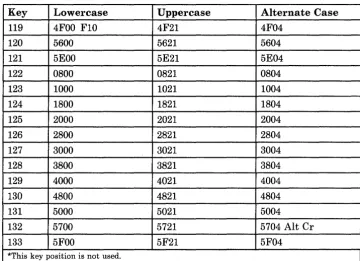
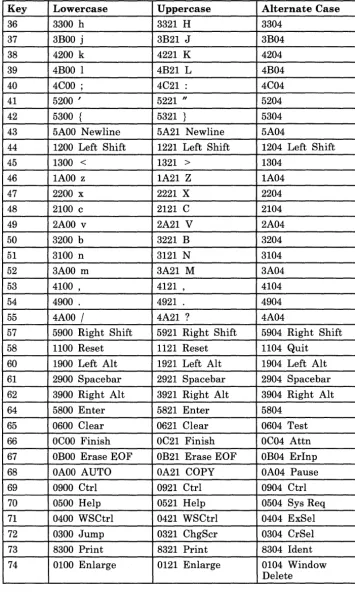
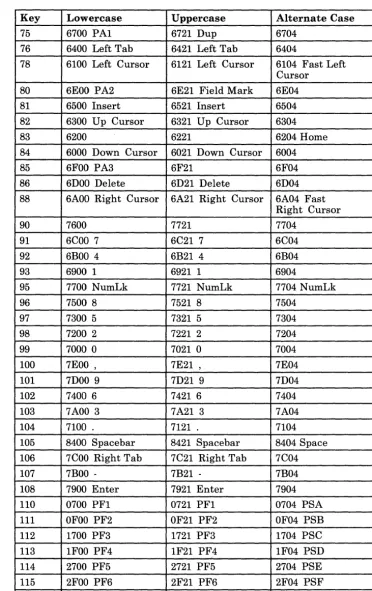
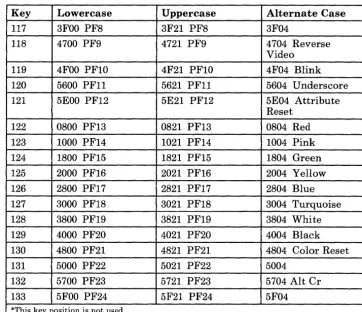
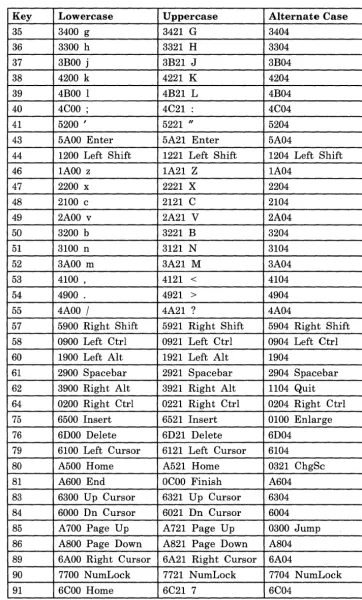
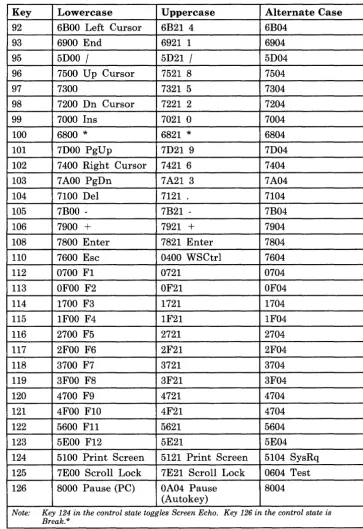
• Part 5 consists of appendixes with specialized information. In particular, Appendix A provides information on scan codes and shift states for all supported keyboards. Appendix A also contains ASCII/ASCII-mnemonic values common to all languages and the additional values specific to U.S. English.
You will also want to use Appendix H, "Return Codes."
Preface III
Enhancements
The 3270 Workstation Program Programming Guide contains revisions to
the 3270 PC Control Program Programming Guide, and incorporates the
following new material:
• Non-3270 PC Hardware. IBM Personal Computer AT® and XT system
units, without the keyboard adapter and 3270 PC display adapter cards installed, are supported in this release. IBM Personal Computer AT and XT keyboard foldouts can be found at the back of this book.
• ASCII keystroke API support. The Keyboard Service API allows
applications to send and receive keys in ASCII or ASCII mnemonics. The 3270 Emulation Services API allows you to receive keystrokes in ASCII. Chapters 5 and 9 contain more information on ASCII keystroke API support.
• Keystroke API Support for READ. Keystroke API support for READ
now allows you to receive keys with a NOW AIT option which prevents you from being suspended while waiting for input on your queue.
• Outbound Data Stream Preprocessor Option. ODSP allows the
preprocessing of a 3270 outbound data stream which can reduce the amount of data traffic flowing through a network. See Appendix I for more information on ODSP.
• SPIF Utility Enhancement. The SPIF utility has been enhanced to
allow you to run an application that installs an interrupt handler which changes to its own stack and then enables interrupts. This may cause unpredictable results on systems with an XMA card installed unless you use the SPIF utility to update the INDIBM2.SIF file first. See the IBM 3270 Workstation Program User's Guide and Reference for more
information about updating INDIBM2.SIF.
Prerequisites for Your Using the API
IV
The API is written for application and system programmers who are responsible for the design and implementation of assembler-language programs for the IBM 3270 Personal Computer.
To use the API, you must have available the following software:
• DOS 3.2
• The IBM 3270 Workstation Program
Prerequisite knowledge needed to be able to use the information in this manual includes:
• Proficiency in the use of the IBM Personal Computer Macro Assembler language
• Knowledge of the steps required to assemble, link, and run a macro assembler program on the IBM 3270 Personal Computer
• Familiarity with the DOS function calls that can be used in a macro assembler program
• Familiarity with the IBM 3270 data stream.
Related Publications
The following books are related to the 3270 Workstation Program and its prerequisite hardware and software:
• Guide to Operations
The Guide to Operations shipped with your system unit contains
information about your work station hardware. It tells you how to set up, use, and diagnose problems with the hardware.
• 3270 Personal Computer Hardware Introduction and Preinstallation Planning1
This book contains information to help evaluate and plan for the 3270 PC hardware requirements at your site. For example, it lists the physical dimensions and electrical requirements for all 3270 PC hardware models.
• The following items are shipped with the workstation program diskettes:
3270 Workstation Program User's Guide and Reference
This book contains information about setting up and using the workstation program.
3270 Workstation Program Problem Determination Guide and Reference
Contact your local IBM sales representative for information on how to obtain copies of these books.
VI
This book explains the procedures, messages, and return codes that will help you solve software problems.
3270 Workstation Program Keyboard Quick Reference Cards
These cards are keyboard-specific synopses of information from the
User's Guide and Reference. You can use the one that relates to
your keyboard for quick reference. There are three cards in the workstation program package:
• 3270 PC keyboard Quick Reference
• Enhanced PC keyboard Quick Reference
• AT and XT keyboard Quick Reference
3270 Workstation Program Keyboard Templates
The keyboard templates provided in the package assist you in using the workstation program functions on your particular keyboard. There are three templates in the package:
• Enhanced PC keyboard template
• AT keyboard template
• XT keyboard template
Online tutorial diskette (Helper)
This diskette contains introductory information and practice exercises to help in learning to use the 3270 Workstation Program.
• 3270 PC High Level Language Application Programming Interface
(HLLAPI)2
The diskette and book that comes in this package make it possible for you to write application programs in BASIC, Pascal, or COBOL
languages to use the API functions provided with the 3270 Workstation Program.
• The IBM Programmer's Guide to the Server-Requester Programming Interface for the IBM Personal Computer and the IBM 3270 PC2
This book explains how to write PC applications that request services from an application at an IBM System/370 type host system. In this relationship, the PC application is called the requester and the host
application is called the server. This book also contains the return
codes that are generated at the work station if problems occur in transmitting requests or replies.
For information on IBM Personal Computer DOS, refer to the DOS manuals that were shipped with the version of DOS you are using.
For information on IBM Personal Computer assembler language, use this manual:
• IBM Personal Computer Language Series: Macro Assembler3
Provides a reference for experienced assembler language programmers who use the IBM Personal Computer Macro assembler. Specific information is provided on how to use the Macro assembler,
cross-reference facilities, pseudo-operations, and machine instructions. (Includes diskette.)
For information on the IBM 3270 data stream, use this manual:
• IBM 3270 Information Display System: Data Stream Programmer's Reference3
Provides information for programmers who need to know what is
involved in using the 3270 data stream to produce panels or information at displays and printers.
3 Contact your local IBM sales representative for information on how to obtain copies of these books.
Contents
Part 1. Introduction to the API
Chapter 1. Functions the API Provides . . . 1-1 Overview of API Services . . . 1-2 Terms You Need to Know . . . 1-3 Examples of Using the API . . . 1-4 Simplifying Setup and Control of Multiple Host Sessions . . . 1-4 Using the Work Station Control Functions of the IBM 3270 Personal
Computer . . . 1-5 Enhancing Interaction between the Operator and a Host . . . 1-5 Extending the Workstation Program through the Use of System
Extensions . . . 1-5 The Application Program Services .. , . . . 1-5 Session Information Services . . . 1-6 Keyboard Services . . . 1-6 Window Management Services . . . 1-6 Host Interactive Services . . . 1-6 Presentation Space Services . . . 1-6 3270 Keystroke Emulation Services . . . 1-7 Copy Services . . . 1-7 Translate Service . . . 1-7 Operator Information Area Services . . . 1-7 Multiple DOS Support Services . . . 1-7 The Supervisor Services . . . 1-7 Supervisory Object Services . . . 1-8 Request Services . . . 1-8 Task State Modifier Services . . . 1-8 Semaphore Management Services . . . 1-8 Logical Timer Management Services . . . 1-8 Fixed-Length Queue Management Services . . . 1-8 Interrupt Handler Management Services . . . 1-9 Environment Manager Services . . . 1-9 Using the Application Program Interface . . . 1-9
Chapter 2. Programming Considerations . . . 2-1 Introduction . . . 2-2 System Information Files . . . 2-2 Program Information Files . . . 2-3 Creating and Modifying Program Information Files (PIFs) . . . 2-4 Restrictions on Running under the Workstation Program . . . 2-5 Guidelines for Running under Multi-DOS . . . 2-6 How Multi-DOS Affects Application Program Performance . . . 2-7 Using the Interrupt X'10' Function . . . 2-8 Tips on Writing Applications to Run in Multi-DOS . . . 2-9 When Personal Computer Sessions Will Be Suspended . . . 2-10 Non-3270 PC Hardware Restrictions . . . 2-11 Determining the Type of PC Your Application Program Is Running On 2-13 Determining the Level of the Control Program or the Workstation
Program That Is Loaded . . . 2-13
x
Part 2. Application Program Services
Conventions Used in the API Service Descriptions
Chapter 3. Coding Supervisor Services . . . 3-1 Introduction . . . 3-2
Obtaining the Gate Name for the Services Your Application-Program Will Use . . . 3-2 Obtaining the Results of Services You Have Requested
Asynchronously . . . 3-3 Creating Fixed-Length Queue Entries . . . 3-3 Obtaining Data from a Fixed-Length Queue . . . 3-3 Deleting Fixed-Length Queues . . . 3-4 Requesting the Supervisor Services . . . 3-4 Supervisor Service X'81': Name Resolution . . . 3-5 Supervisor Service X'83': Get Request Completion . . . 3-7 Supervisor Service X'04': Create Fixed-Length Queue Entry . . . 3-9 Supervisor Service X'13': Dequeue Data . . . 3-12 Supervisor Service X'06': Delete Entry . . . 3-15
Chapter 4. Coding Session Information Service Requests . . . 4-1 Introduction . . . 4-2 Requesting the Session Information Services . . . 4-3 Return Codes for the Session Information Services . . . 4-4 Session Information Service X'Ol': Query Session ID . . . 4-5 Session Information Service X'02': Query Session Parameters . . . 4-10 Session Information Service X'04': Detach Session ID . . . 4-14 Session Information Service X'05': Attach Session ID . . . 4-17 Session Information Service X'06': Query W)ndows in Environment . 4-20 Session Information Service X'07': Query Environment of Window .. 4-23 Session Information Service X'08': Query PC Session Program
Information File (PIF) Information . . . 4-26 Session Information Service X'OA': Query Base Window . . . 4-30 Session Information Service X'OB': Query Session Cursor . . . 4-33
Chapter 5. Coding Keyboard Service Requests . . . 5-1 Introduction . . . 5-2 Scan Code/Shift States . . . 5-3 ASCII/ASCII Mnemonics . . . 5-7 Keyboard Services . . . 5-7 Requesting the Keyboard Services . . . 5-8 Return Codes for the Keyboard Services . . . 5-8 Keyboard Service X'Ol': Connect to Keyboard . . . 5-9 Keyboard Service X'02': Disconnect from Keyboard ... . . . . . . . .. 5-13 Keyboard Service X'03': Read Input . . . 5-16 Keyboard Service X'04': Write Keystroke . . . 5-22 Keyboard Service X'05': Disable Input . . . i 5-30
Keyboard Service X'06': Enable Input . . . 5-33 Keyboard Service X'07': Post Status Code . . . 5-36
Requesting the Window Management Services . . . . Return Codes for the Window Management Services . . . . Window Management Service X'Ol': Connect to Work Station Control Window Management Service X'02': Disconnect from Work Station
Control . . . . Window Management Service X'03': Add Window . . . . Window Management Service X'04': Change Window Position on
Screen . . . . Window Management Service X'05': Change Window Size . . . . Window Management Service X'06': Change Window Color . . . . Window Management Service X'07': Change Window Position on
Presentation Space . . . . Window Management Service X'08': Change Hidden State . . . . Window Management Service X'09': Change Enlarge State . . . . Window Management Service X'OA': Change Screen Background .. . Window Management Service X'OB': Query Window Position on
Screen . . . . Window Management Service X'OC': Query Window Size . . . . Window Management Service X'OD': Query Window Colors . . . . Window Management Service X'OE': Query Window Position on
Presentation Space . . . . Window Management Service X'OF': Query Hidden State . . . . Window Management Service X'10': Query Enlarge State . . . . Window Management Service X'll': Query Screen Background Color Window Management Service X'12': Query Window Names . . . . Window Management Service X'13': Clear Screen . . . . Window Management Service X'14': Select Active Window . . . . Window Management Service X'15': Redraw Screen . . . . Window Management Service X'16': Redraw Window ... . Window Management Service X'17': Delete Window . . . . Window Management Service X'18': Query Active Window . . . . Window Management Service X'19': Query Active Screen . . . . Window Management Service X'lA': Query Window Attributes Window Management Service X'lB': Change Window Attributes Window Management Service X'lC': Select Active Screen . . . .
Chapter 7. Coding Host Interactive Service Requests . . . . Introduction . . . . Requesting the Host Interactive Services . . . . Return Codes for the Host Interactive Services . . . . Host Interactive Service X'Ol': Connect to Host Session . . . . Host Interactive Service X'02': Disconnect from Host Session ... . Host Interactive Service X'03': Read Structured Field . . . . Host Interactive Service X'04': Write Structured Field
Host Interactive Service X'05': Define Buffer . . . .
Chapter 8. Coding Presentation Space Service Requests . . . . Introduction . . . . Requesting the Presentation Space Services . . . . Return Codes for the Presentation Space Services . . . . Presentation Space Service X'Ol': Define Presentation Space ... . Presentation Space Service X'02': Delete Presentation Space ... . Presentation Space Service X'03': Display Presentation Space
Presentation Space Service X'04': Set Cursor Position . . . 8-17
Presentation Space Service X'05': Switch Presentation Space . . . 8-21
Chapter 9. Coding 3270 Keystroke Emulation Service Requests . 9-1 Introduction . . . 9-2
Field Attribute Definition for 3270 Keystroke Emulation . . . 9-2
Presentation Space Format for 3270 Keystroke Emulation . . . 9-4
Requesting the 3270 Keystroke Emulation Services . . . 9-5
Return Codes for the 3270 Keystroke Emulation Services . . . 9-5 3270 Keystroke Emulation Service X'OI': Connect for 3270 Keystroke
Emulation . . . 9-7 3270 Keystroke Emulation Service X'02': Disconnect for 3270
Keystroke Emulation . . . 9-10 3270 Keystroke Emulation Service: Read Attention Identifier (AID)
Key . . . 9-13
Chapter 10. Coding Copy Service Requests . . . 10-1 Introduction . . . 10-2
Requesting the Copy Services . . . 10-3
Return Codes for the Copy Services . . . 10-4
Copy Service X'OI': Copy String . . . 10-5
Copy Service X'02': Copy Block . . . 10-12
Copy Service X'03': Connect for Copy to PC Session . . . 10-19
Copy Service X'04': Disconnect for Copy to PC Session . . . 10-22
Chapter 11. Coding Translate Service Requests . . . 11-1 Introduction . . . 11-2
Requesting the Translate Service . . . 11-2
Return Codes for the Translate Service . . . 11-2
Translate Service X'OI': Translate Data . . . 11-4
Chapter 12. Coding Operator Information Area Service Requests 12-1 Introduction . . . 12-2
Requesting the Operator Information Area Services . . . 12-3
Return Codes for the Operator Information Area Services . . . 12-3
Operator Information Area Service X'OI': Read Operator Information Area Image . . . 12-4
Operator Information Area Service X'02': Read Operator Information Area Group . . . 12-7
Chapter 13. Coding Multi-DOS Support Service Requests . . . 13-1 Introduction . . . 13-2
Requesting the Multi-DOS Support Services . . . 13-2
Return Codes for the Multi-DOS Support Services . . . 13-3
Multi-DOS Support Service: Query Environment Size . . . 13-4
Multi-DOS Support Service: Asynchronous DOS Function Requests 13-7
Multi-DOS Support Service X'Ol': Get Storage . . . 13-12
Multi-DOS Support Service X'02': Free Storage . . . 13-15
Multi-DOS Support Service X'03': Set Storage Allocation . . . 13-18
Part 3. Supervisor Services
Conventions Used in the API Service Descriptions
Chapter 14. Supervisor Services . . . 14-1 Introduction . . . 14-2 Supervisory Object Creation and Deletion . . . 14-2 Tasks . . . ' . . . 14-2 Components . . . 14-3 Semaphores . . . 14-4 Fixed-Length Queues . . . 14-4 Gates . . . 14-5 User Exit Tables . . . 14-5 The Supervisor Call Instruction (SVC) Table . . . 14-5 Creating Objects with Names . . . 14-5 Supervisory Object Services Your Application Program Can Use 14-6 Task Requests . . . 14-6 Use of Wait States . . . 14-7 Sending a Request to Another Task . . . 14-8 Receiving a Request from Another Task . . . 14-8 Replying to a Request from Another Task . . . 14-9 Obtaining Request Completion from Another Task . . . 14-9 Task Request Services Your Application Program Can Use . . . 14-9 Task State Modifiers . . . 14-10 Dispatch Cycles . . . 14-10 Task Dispatching Procedure . . . 14-10 Task Dispatch Activity . . . 14-11 Task Dispatcher States . . . 14-11 Task State Modifier Services Your Application Program Can Use . 14-12 Semaphore Management . . . 14-13 Considerations for Using Code Serialization Semaphores . . . 14-13 Restrictions on the Use of Semaphores . . . 14-13 Semaphore Management Services Your Application Program Can
Use . . . 14-14 Logical Timer Management . . . 14-14
Logical Timer Management Services Your Application Program
Can Use . . . 14-15 Fixed-Length Queue Management . . . 14-15
Fixed-Length Queue Management Services Your Application
Program Can Use . . . 14-15 Interrupt Handler Management . . . 14-15 Hardware Interrupt Handlers . . . 14-16 Software Interrupt Handlers . . . 14-17 Interrupt Handler Management Services Your Application
Program Can Use . . . 14-19
Chapter 15. Coding Supervisory Object Services . . . 15-1 Introduction . . . 15-2 Requesting the Supervisory Object Services . . . 15-3 Return Codes for the Supervisory Object Services . . . 15-3 Supervisory Object Service X'92': Create Task Entry . . . 15-4 Supervisory Object Service X'93': Create Component Entry . . . 15-8 Supervisory Object Service X'94': Create Semaphore Entry . . . 15-11 Supervisory Object Service X'04': Create Fixed-Length Queue Entry 15-14 Supervisory Object Service X'9A': Create Gate Entry . . . 15-17 Supervisory Object Service X'97': Create User Exit Table Entry . . . . 15-21
XIV
Supervisory Object Service X'OE': Install User Exit Table Entries 15-24 Supervisory Object Service X'81': Name Resolution . . . 15-27 Supervisory Object Service X'Ol': ID Resolution . . . 15-30 Supervisory Object Service X'06': Delete Entry . . . 15-32
Chapter 16. Coding Request Services . . . . Introduction . . . . Requesting the Request Services . . . . Return Codes for the Request Services . . . . Request Service X'09': Make a Request . . . . Request Service X'96': Get a Request . . . . Request Service X'82': Reply to a Request . . . . Request Service X'83': Get Request Completion . . . . Request Service X'12': Send a Signal to a Task . . . .
Chapter 17. Coding Task State Modifier Services . . . . Introduction . . . . Requesting the Task State Modifier Services . . . . Return Codes for the Task State Modifier Services . . . . Task State Modifier Service X'9C': Query Active Task . . . . Task State Modifier Service X'02': Set Task "Ready" . . . . Task State Modifier Service X'05': Set Task "Unready" . . . . Task State Modifier Service X'08': Set Task "Preemptable" . . . . Task State Modifier Service X'07': Set Task "Nonpreemptable" Task State Modifier Service X'03': Change Task's Priority . . . . Task State Modifier Service X'95': Return to Dispatcher . . . .
Chapter 18. Coding Semaphore Management Services . . . . Introduction, . . . . Requesting the Semaphore Management Services . . . . Return Codes for the Semaphore Management Services . . . . Semaphore Management Service X'OD': Claim a Semaphore . . . . Semaphore Management Service X'OA': Release a Semaphore ... . Semaphore Management Service X'OB': Query a Semaphore . . . .
Chapter 19. Coding Logical Timer Management Services . . . . . Introduction . . . . Requesting the Logical Timer Management Services . . . . Return Codes for the Logical Timer Management Services ... . Logical Timer Management Service X'85': Get Logical Timer . . . . Logical Timer Management Service X'84': Set Logical Timer . . . . Logical Timer Management Service X'8A': Release Logical Timer
Chapter 20. Coding Fixed-Length Queue Management Services Introduction . . . .
Requesting the Fixed-Length Queue Management Services . . . . Return Codes for the Fixed-Length Queue Management Services Fixed-Length Queue Management Service X'OC': Enqueue Data .... Fixed-Length Queue Management Service X'13': Dequeue Data
Fixed-Length Queue Management Service X'OF': Purge Queue Data .
Chapter 21. Coding Interrupt Handler Management Services .. Introduction . . . .
Requesting the Interrupt Handler Management Services . . . 21-2 Return Codes for the Interrupt Handler Management Services 21-3 Interrupt Handler Management Service X'86': Install a Hardware
Interrupt Handler . . . 21-4 Interrupt Handler Management Service X'87': Install an Interrupt
Handler . . . 21-7 Interrupt Handler Management Service X'88': Query Interrupt Vector
Contents . . . 21-10 Interrupt Handler Management Service X'89': Remove an Interrupt
Handler . . . 21-12
Chapter 22. Environments and the Environment Manager . .. .
Introduction . . . . Environments . . . . Stoppable Environments . . . . N onstoppable Environments . . . . Environment Access Restrictions . . . . Environment Management Services Your Program or System
Extension Can Use to Control Environments . . . . Resource Managers . . . .
Environment Management Services Your System Extension Can Use to Control Resource Management . . . .
Chapter 23. Coding Environment Manager Services . . . .
Introduction . . . . Requesting the Environment Manager Services . . . . Return Codes for the Environment Manager Services . . . . Environment Manager Service X'10': Identify Resource Manager .. . Environment Manager Service X'8E': Add Resource . . . . Environment Manager Service X'8B': Delete Resource . . . . Environment Manager Service X'8C': Query Resource . . . . Environment Manager Service X'90': Suspend/Resume Environment Environment Manager Service X'99': Stop/Reset Environment ... Environment Manager Service X'll': Query Task's Environment ID .
Environment Manager Service X'8D': Query Environment
Characteristics . . . .
Chapter 24. Coding System Extensions . . . .
Introduction . . . . How to Create a System Extension . . . . Resident Code . . . . Fixed Data
Initialization Code
How to Tell the Workstation Program about Your System Extension Customization Procedure . . . . Creating and Modifying System Information Files (SIFs) . . . . How to Determine the Numbers to Use for Your System
Information File . . . . How a System Extension Is Loaded . . . . System Extension Messages and Return Codes . . . . System Extension Return Codes . . . . The System Extension Message Service . . . .
XVI
Identifying Error Return Codes with the System Extension
Message Service . . . 24-16 Requesting Error Messages with the System Extension Message
Service . . . 24-17 Requesting Informational Messages with the System Extension
Message Service . . . 24-17 Coding the System Extension Message Service to Identify Return
Codes . . . 24-18 Coding the System Extension Message Service to Request Error
Messages . . . 24-20 Coding the System Extension Message Service to Request
Informational Messages . . . 24-23 Managing Resources . . . 24-26 Design Considerations for System Extensions and the XMA Card ... 24-26 Components . . . 24-27 Tasks . . . 24-27 Fixed-Length Queues . . . 24-27 General Notes . . . 24-27
Part 4. Sample Programs
Chapter 25. Sample Program 1 25-1
Chapter 26. Sample Program 2 26-1
Chapter 27. Sample Program 3 27-1
Chapter 28. Sample Program 4 28-1
Chapter 29. Sample Program 5 29-1
Part 5. Appendixes
Appendix A. Scan-Code/Shift-State and ASCII/ASCII-Mnemonic Values . . . A-I
Introduction . . . A-2 Scan-Code/Shift-State Values . . . A-2 Scan Code . . . A-2 Shift State . . . A-4 ASCII/ASCII Mnemonics . . . A-4 Default Scan Codes for the IBM 3270 PC Keyboard (PC Mode) . . . A-5 Default Scan Codes for the IBM 3270 PC Keyboard (MFI Mode) A-9 Default Scan Codes for the IBM Enhanced PC Keyboard (PC Mode) A-13 Default Scan Codes for the IBM Enhanced PC Keyboard (MFI Mode) A-16 Default Scan Codes for the PC XT Keyboard (PC Mode) . . . A-19 Default Scan Codes for the IBM PC XT Keyboard (MFI Mode) A-22 Default Scan Codes for the IBM Personal Computer AT Keyboard
(PC Mode) . . . A-25 Default Scan Codes for the IBM Personal Computer AT Keyboard
Additional ASCII Characters Used by U.S. English . . . A-37
Appendix B. Destination/Origin Structured Fields . . . B-1 Introduction . . . B-3 The 3270 Outbound Data Stream . . . B-3 The 3270 Inbound Data Stream . . . B-3 Verifying That the IBM 3270 Personal Computer Interface Is
Operational . . . B-4 The Read Partition Query Structured Field . . . B-4 The Query Reply Structured Field . . . B-4 Query Reply . . . B-6 Input Control . . . B-6 PC Application Program and Display Interaction . . . B-7 Exception Handling . . . B-8 Structured Fields . . . B-9 Destination/Origin . . . B-9 Exception Condition . . . B-10 X'DO' Structured Fields for Sending Data from the Host to the 3270
Personal Computer . . . B-11 The Open X'DO' Structured Field . . . B-12 The Insert and Insert Data X'DO' Structured Fields . . . B-15 The Close X'DO' Structured Field . . . B-18 X'DO' Structured Fields for Sending Data from Personal Computer to
Host . . . B-20 The Open X'DO' Structured Field . . . B-21 The Set Cursor and Get X'DO' Structured Field . . . B-24 The Close X'DO' Structured Field . . . B-28
Appendix C. Using Command Procedures for Save and Restore
and for File Transfer . . . C-l Introduction . . . C-2 Command Procedures for Save and Restore . . . C-2 Creating an AUTOEXEC.Bat File . . . C-3 Programmed Command Procedures . . . C-4 File Transfer Command Procedures . . . C-6
Appendix D. Technical Notes . . . D-l Introduction . . . D-2 3270 Limitations . . . D-2 3270 Data Stream Functions . . . D-3 In terface Codes . . . D-3 Attributes . . . D-6 Commands . . . D-8 Write Control Character . . . D-9 3270 Data Stream Orders . . . D-11 Outbound 3270 Data Stream Structured Fields . . . D-12 Inbound Structured Fields . . . D-21 Transmission of Buffer Addresses . . . D-31 Changes or Limitations to the Personal Computer Session . . . D-34 N on-3270 PC Hardware Restrictions . . . D-34 Personal Computer Physical Cursor . . . D-35 Personal Computer Print Spooling . . . D-35 Control Unit Communication Session Termination . . . D-36
XV111
IBM 3270 Personal Computer Failure . . . . Color Limitations . . . . Notes on AII-Points-Addressable Graphics . . . . Using the Full-Screen APA Mode . . . . Changing the Cursor Size or Position . . . . Personal Computer Session Screen Size . . . .
Appendix E. Problem Determination Procedures and Debugging D-36 D-36 D-37 D-37 D-38 D-38
Information . . . E-l
Introduction . . . E-2 System Error Problem Determination Procedures . . . E-2 Dump Data Utilities . . . E-3 Preparing Formatted Dump Diskettes . . . E-3 Taking the Dump . . . E-4 Using the Display Utility . . . E-5 U sing the Trace Command . . . E-8 Workstation Program Loading Procedure . . . E-9 Debugging a PC Application Program . . . E-I0 Debugging a System Extension . . . E-I0 Control Blocks You Can Use during Debugging ... . . . . . . . . . . . . .. E-I0 The Supervisor's Data Area . . . E-ll The Dispatcher's Data Area . . . E-ll The Task Control Block . . . E-12 The Supervisor Name Table . . . E-14
Appendix F. Presentation Space Considerations . . . . Introduction . . . . . . . Attributes . . . .
Field Attributes
Extended Field Attributes and Character Attributes
Presentation Space Character Tables . . . . Host and Notepad Session Character Codes . . . . Personal Computer Session Character Codes . . . . Presentation Space Sizes . . . . Distributed Function Terminal (DFT) Host Presentation Space Sizes Control Unit Terminal (CUT) Host Presentation Space Size ... . Notepad Presentation Space Size . . . . Personal Computer Presentation Space Size . . . .
Appendix G. Calling Save, Restore, Send, and Receive from Your Application Program . . . . Introduction . . . . The DOS SETBLOCK Function Call . . . . The DOS EXEC Function Call . . . . The Environment String . . . . The Command Line . . . . The File Control Blocks . . . .
F-l F-2 F-2 F-3 F-4 F-6 F-6 F-7 F-7 F-7 F-8 F-8 F-8 G-l G-2 G-2 G-3 G-3 G-4 G-4
Appendix H. Return Codes . . . H-l
Function IDs X'24' or X'25': System Loader Return Codes . . . . Function ID X'30': DFT Operations Return Codes . . . . Function ID X'32': Host Interactive Services Return Codes . . . . Function ID X'46': CUT Return Codes . . . . Function ID X'51': Notepad Operations Return Codes . . . . Function ID X'62': Keyboard Services Return Codes . . . . Function ID X'63': Window Management Services Return Codes Function ID X'64': Copy Services Return Codes . . . . Function ID X'67': Draw Service Return Codes . . . . Function ID X'69': Presentation Space Services Return Codes
Function ID X'6B': Session Information Services Return Codes Function ID X'6C': Translate Services Return Codes . . . . Function ID X'6D': OIA Services Return Codes . . . . Function ID X'6E': 3270 Keystroke Emulation Services Return Codes Function ID X'6F': Keystroke Definition Return Codes . . . . Function ID X'72': Error Handler Return Codes . . . .
H-22 H-26 H-32 H-33 H-34 H-35 H-38 H-41 H-43 H-44 H-47 H-49 H-50 H-51 H-52 H-53 Function ID X'7F': Dump Task Return Codes . . . H-54 Function ID X'81': Enhanced Connectivity Router Return Codes ... H-55 Function IDs X'Dx through Fx': User System Extension Return
Codes . . . H-56 Return Code Error Steps . . . H-57
Appendix I. Outbound Data Stream Preprocessor (ODSP) Option 1-1 Introduction . . . 1-2 Customizing for ODSP . . . 1-2 Initializing ODSP . . . 1-2 Using ODSP . . . 1-3 Entry Parameters . . . 1-4 Return Parameters . . . 1-4 ODSP Restrictions and Recommendations . . . 1-5 Sample Program for Outbound Data Stream Preprocessing . . . 1-5
Index . . . X-I
Figures
1-1. Overview of the Application Program Interface . . . 1-2 A-I. Default Scan Codes for IBM 3270 PC Keyboard (PC Mode) .. A-5 A-2. Default Scan Codes for IBM 3270 PC Keyboard (MFI Mode) . A-9 A-3. Default Scan Codes for IBM Enhanced PC Keyboard (PC
Mode) . . . A-13 A-4. Default Scan Codes for IBM Enhanced PC Keyboard (MFI
Mode) . . . A-16 A-5. Default Scan Codes for IBM PC XT Keyboard (PC Mode) .. A-19 A-6. Default Scan Codes for IBM PC XT Keyboard (MFI Mode) . A-22 A-7. Default Scan Codes for IBM Personal Computer AT Keyboard
(PC Mode) . . . A-25 A-8. Default Scan Codes for IBM Personal Computer Keyboard
(MFI Mode) . . . A-28 A-9. Valid ASCII Characters Common to All Countries . . . A-31 A-10. Valid ASCII Mnemonics Common to All Countries . . . A-34 A-II. Additional ASCII Characters Used by U.S. English . . . A-37 B-L Read Partition Query Structured Field Format . . . B-4 B-2. Query Reply Structured Field Format . . . B-5 D-L United States EBCDIC I/O Interface Code . . . D-3 D-2. EBCDIC Control Character I/O Codes . . . D-5 D-3. Field Attribute Byte Bit Positions . . . D-6 D-4. Field Attribute Character Bit Assignments . . . D-6 D-5. The Structure of an Attribute Pair . . . D-7 D-6. Attribute Type X'41' - Extended Highlighting . . . D-7 D-7. Attribute Type X'42' - Color . . . D-7 D-8. Attribute Type X'43' - Character Set Selection . . . D-7 D-9. 3270 Data Stream Commands . . . D-8 D-10. Non-SNA Channel Commands . . . D-8 D-11. Write Control Character Reset Actions . . . D-IO D-12. 3270 Data Stream Orders . . . D-l1 D-13. Set Reply Mode Structured Field Format . . . . . . . . . . . . . . .. D-13 D-14. Erase/Reset Structured Field Format . . . D-14 D-15. Outbound 3270DS Structured Field Format . . . D-14 D-16. Read Partition Structured Field Format . . . D-15 D-17. Inbound 3270 Data Stream . . . D-17 D-18. Short Read Format . . . D-18 D-19. Read Modified and Read Modified All Format . . . D-18 D-20. Read Buffer Format in Field Reply Mode . . . D-19 D-2L Read Buffer Format in Extended Field and Character Mode . D-20 D-22. Usable Area Query Reply Structured Field Format . . . D-22 D-23. Character Sets Query Reply Structured Field Format ... D-23 D-24. Character Set Descriptors . . . D-24 D-25. Reply Modes Query Reply Structured Field Format ... D-24 D-26. DDM Query Reply Structured Field Format . . . D-25 D-27. Auxiliary Device Query Reply Structured Field Format .... D-25 D-28. Document Interchange Architecture Query Reply Structured
Field Format . . . , . . . D-26 D-29. Direct Access Self-Defining Parameter . . . D-26 D-30. Color Query Reply Structured Field Format . . . D-27
XXll
D-31. Highlight Query Reply Structured Field Format . . . D-28 D-32. Implicit Partition Query Reply Structured Field Format .... D-29 D-33. Self-Defining Parameters . . . D-30 D-34. Hexadecimal Representations . . . D-33 E-l. Frequently Used Trace Buffers . . . E-7 E-2. Dispatcher Data Address Offsets . . . E-12 E-3. Name Table Address Offsets . . . E-14 F-l. Field Attribute Bit Positions . . . F-4 F-2. Field Attribute Bit Assignment . . . F-4 F-3. Extended Field Attribute and Character Attribute Bit Positions F-5 F -4. Extended Field Attribute and Character Attribute Bit
Assignment . . . F-5 F-5. Host and Notepad Presentation Space Character Table ... F-6 F-6. Personal Computer Presentation Space Character Table ... F-7 F-7. DFT Host Presentation Space Sizes . . . F-8
IBM 3270 Personal Computer U.S. English Keyboard ... FO-l IBM 3270 Enhanced Personal Computer U.S. English
Keyboard, PC Mode . . . FO-3 IBM 3270 Enhanced Personal Computer U.S. English
Part 1. Introduction to the API
The chapters in Part 1 introduce the Application Program Interface (API) and the two types of services you can use:
• Application program services that most application programs will use. Described also are some supervisor services that directly support the application program services.
• Those supervisor services that allow application programs to run together under the multitasking capabilities of the workstation program.
The chapters in this part are:
• Chapter 1, "Functions the API Provides," which contains an overview of the API services and how you can use them.
• Chapter 2, "Programming Considerations," which introduces system information files, describes program information files, and provides tips and guidelines for coding programs.
Chapter
1.
Functions the API Provides
Overview of API Services . . . 1-2 Terms You Need to Know . . . 1-3 Examples of Using the API . . . 1-4 Simplifying Setup and Control of Multiple Host Sessions . . . 1-4 Using the Work Station Control Functions of the IBM 3270 Personal
Computer . . . 1-5 Enhancing Interaction between the Operator and a Host . . . 1-5 Extending the Workstation Program through the Use of System
Extensions . . . 1-5 The Application Program Services . . . 1-5 Session Information Services . . . 1-6 Keyboard Services . . . 1-6 Window Management Services . . . 1-6 Host Interactive Services . . . 1-6 Presentation Space Services . . . 1-6 3270 Keystroke Emulation Services . . . 1-7 Copy Services . . . 1-7 Translate Service . . . 1-7 Operator Information Area Services . . . 1-7 Multiple DOS Support Services . . . 1-7 The Supervisor Services . . . 1-7 Supervisory Object Services . . . 1-8 Request Services . . . 1-8 Task State Modifier Services . . . 1-8 Semaphore Management Services . . . 1-8 Logical Timer Management Services . . . 1-8 Fixed-Length Queue Management Services . . . 1-8 Interrupt Handler Management Services . . . 1-9 Environment Manager Services . . . 1-9 Using the Application Program Interface . . . 1-9
Overview of API Services
Overview of API Services
I
Multi
DOS KEYBOARD API
The Application Program Interface (API) is just what the name implies: an interface between an application program and the IBM 3270 Workstation Program. Your application program requests services from the workstation program using the API. The kinds of services that your application can request are grouped into two categories:
• Application program services
• Supervisor services.
The application program services are services that most application programs will use. The supervisor services are services that provide support for applications that use the multitasking capabilities of the IBM workstation program.
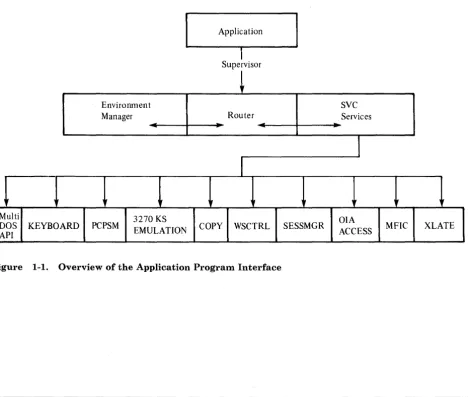
[image:27.617.57.526.351.748.2]Service requests to the workstation program are generated by your application program. The supervisor processes the requests or routes the request to the appropriate API service.
Figure 1-1 illustrates the flow of a request from an application program.
Application
I
Supervisor
~
Environment SVC
Manager Router Services
""'-I
I
~ f if if
3270 KS OIA
PCPSM EMULATION COpy WSCTRL SESSMGR
ACCESS MFIC XLATE
Figure 1-1. Overview of the Application Program Interface
Terms You Need to Know
Terms You Need to Know
ASCII American National Standard Code for
\ Information Interchange. ASCII/ASCII
mnemonics can now be sent or received on the Read Input and Write Keystroke API.
EGA Enhanced Graphics Adapter. For more
information, see the Technical Reference Options and Adapters manual.
environment A contiguous area of storage and a collection of system resources that are managed by an operating system to allow a program or a system extension to run. A program or a system extension is said to "run in an environment."
stoppable environment A type of environment that is used for running DOS or personal computer application
programs. Stoppable environments can be used for any program that can be removed from the system without causing other
programs to fail. That is, programs running in stoppable environments must not offer services to programs running in other environments.
nonstoppable A type of environment used to run
environment system extensions. These system extensions offer services to programs running in other environments and need to be in the system at all times.
Non-3270 PC Hardware IBM Personal Computer AT® and/or XT system units without the keyboard adapter and 3270 PC display adapter cards installed.
ODSP Outbound Data Stream Preprocessor. ODSP
allows the preprocessing of a 3270 data stream, which can reduce the amount of traffic flowing through a network.
presentation space An area of storage that represents a logical display. All IBM 3270 host sessions, IBM personal computer sessions, and notepad sessions have a presentation space. The data contained in a presentation space, or a portion of that data, is displayed on the screen when that session's window is visible on the screen.
session A connection between your work station and a host computer, personal computer, or notepad.
Examples of Using the API
system extension
window
XMA card
Code that runs in a nonstoppable environment. It is loaded as part of the workstation program and starts running automatically when the workstation program is IPLed. A system extension may offer services that other programs can use.
The portion of the screen through which you view a session's presentation space. A window can be the same size as your full IBM 3270 Personal Computer screen or as small as one character.
Expanded memory adapter card. The XMA card is a hardware option card that provides up to 2Mb of additional storage for as many as 6 PC sessions.
Examples of Using the API
The Application Program Interface (API) allows an assembler-language application program in the personal computer session to use a powerful set of services from the workstation program.
U sing these services, the application program can:
• Simplify setup and control of multiple host sessions
• Use the work station control functions of the IBM 3270 Personal Computer
• Enhance interaction between the operator and a host
• Extend the workstation program through the use of system extensions.
Simplifying Setup and Control of MUltiple Host Sessions
1-4
The Application Program Services
Using the Work Station Control Functions of the IBM 3270 Personal
Computer
Your application program can size and move windows, change the foreground and background colors of windows, jump to other windows, enlarge and hide windows, or do any of the other functions that are available in work station control mode.
For example, your application program can translate a single key typed by the operator into a series of work station control commands to set up the IBM 3270 Personal Computer for data entry into a particular window on the screen.
Enhancing Interaction between the Operator and a Host
For example, your application can log onto four host sessions and bring up a different application on each host. Your application can present the work station operator with a menu of functions to perform and then transform the operator's choice into a command to the appropriate host application.
Extending the Workstation Program through the Use of System Extensions
You can write a system extension that is loaded with the workstation program when the system is IPLed. A system extension can perform services for other application programs that you write, and act as a
resource manager to allocate and deallocate resources to those application programs.
The Application Program Services
The API provides the following kinds of application program services:
•
Session information services•
Keyboard services•
Window management services•
Host interactive services•
Presentation space services•
3270 keystroke emulation services•
Copy services•
Translate serviceThe Application Program Services
• Operator information area services
• Multiple DOS support services.
Session Information Services
Keyboard Services
The session information services allow your application program to query the workstation program to find out what sessions are currently defined, attach and detach from these sessions, and query what the characteristics of these sessions are.
The keyboard services allow your application program to read and write keystroke data from a specified session, to disable and enable operator input from the keyboard of a specified session, and to notify the
workstation program of the status of your application program's keystroke processing.
Window Management Services
The window management services allow your application program to use the functions of the work station control session of the IBM 3270 Personal Computer. Using these services, your application program can determine the current size, position, or color of a window, and change them if desired. You can jump to specified windows, enlarge or hide windows, or change to a different screen profile. You can add a window, delete a window, or clear the entire screen.
Host Interactive Services
The host interactive services allow communication between a personal computer application program and a host application program using the destination/origin structured field protocol. The host interactive services also allow a personal computer application program to be notified when a host presentation space or operator information area is updated.
Presentation Space Services
1-6
The Supervisor Services
3270 Keystroke Emulation Services
Copy Services
Transla te Service
The 3270 keystroke emulation services enable you to type into a personal computer presentation space as if it were a host presentation space.
The copy services allow your application program to copy data into a personal computer window, as well as copy data from one area of a personal computer window into another area within the same personal computer window. The copy services also allow copying of data from and to host and notepad sessions.
Data that is displayed in host and notepad presentation spaces is
represented by numbers called host/notepad character codes. Data that is
displayed in personal computer presentation spaces is represented by ASCII codes. The translate service allows your application program to translate the data in a buffer from one type of data representation to the other.
Note: You cannot translate graphic characters or programmed symbol set characters.
Operator Information Area Services
The operator information area services allow your application program to determine the current status of a session as shown on the operator
information area (OIA).
The contents of the OIA can be determined by reading:
• An image of the OIA
• A bit string that represents a group of relatedOIA values.
Multiple DOS Support Services
The multiple DOS support services allow your application program to query the size in paragraphs of a specified environment, and to request DOS INT 21H function calls asynchronously.
The Supervisor Services
The API provides the following kinds of supervisor services:
• Supervisory object services • Request services
• Task state modifier services
The Supervisor Services
• Semaphore management services • Logical timer management services • Fixed-length queue management services • Interrupt handler management services • Environment manager services.
Supervisory Object Services
Request Services
The supervisory object services allow your application program to create gates and user exit tables, and create and delete tasks, components, semaphores, and fixed-length queues. The supervisory object services also allow your application program to obtain the numeric ID of a supervisory object by specifying its alphanumeric name, or obtain the alphanumeric name of the supervisory object by specifying its numeric ID.
The request services allow tasks and components in your application program to request services of other tasks or components and respond to requests from other tasks.
Task State Modifier Services
The task state modifier services allow your application program to change the dispatch state or priority of a task.
Semaphore Management Services
The semaphore management services allow your application program to control the access to resources and the execution of nonreentrant code.
Logical Timer Management Services
The logical timer management services allow your application program to control time-dependent events through the use of logical timers.
Fixed-Length Queue Management Services
1-8
The fixed-length queue management services allow your application
U
sing
the API
Interrupt Handler Management Services
The interrupt handler management services allow environments to share the interrupt vector table on a cooperative basis. On hardware interrupts, a device handler in any environment can receive control.
Environment Manager Services
The environment manager services allow a system extension to act as a resource manager to control the allocation and de allocation of resources to application programs. An application program has the ability to control its own environment using the environment manager services.
U sing the Application Program Interface
To use the API, your program must store the required values in the system registers. Services that need more information than can be contained in the system registers use a data area called a parameter list to contain the
additional information. System registers ES and DI must point to the
segment and offset addresses of the parameter list. To request an API service, your application must issue an INT '7 A' instruction to signal the workstation program that it has a request to process.
U
sing
the API
U
sing
the API
Chapter 2. Programming Considerations
Introduction . . . 2-2 System Information Files . . . 2-2 Program Information Files . . . 2-3 Creating and Modifying Program Information Files (PIFs) . . . 2-4 Restrictions on Running under the Workstation Program . . . 2-5 Guidelines for Running under Multi-DOS . . . 2-6 How Multi-DOS Affects Application Program Performance . . . 2-7 Using the Interrupt X'10' Function . . . 2-8 Tips on Writing Applications to Run in Multi-DOS . . . 2-9 When Personal Computer Sessions Will Be Suspended . . . 2-10 Non-3270 PC Hardware Restrictions . . . 2-11 Determining the Type of PC Your Application Program Is Running On 2-13 Determining the Level of the Control Program or the Workstation
Program That Is Loaded . . . 2-13
System Information Files
Introduction
Many application programs written for the IBM PC assume that the PC is dedicated to running a single application program at a time. Without the workstation program, this assumption is valid, since DOS provides a single environment to run programs and does not provide multitasking facilities. Some of these application programs take advantage of facilities available in the PC that are not supported by DOS,or bypass the DOS facilities to run more efficiently.
The Multi-DOS feature of the workstation program provides a set of environments in which personal computer application programs can.run, and a set of supervisor services that allow you to write programs that take advantage of this multitasking capability. To preserve the integrity of application programs running at the same time, the workstation program uses program information files (PIFs) and system information files (SIFs) to keep track of the application programs and system extensions that are running in the system.
System Information Files
2-2
System information files are used by the workstation program to allocate system resources for system extensions as well as for PC applications. A system extension is a module that you code. It is loaded with, and runs as part of, the workstation program. System extensions must observe all the rules for well-behaved programs that are described in this chapter. To include a system extension in your system, you must answer some questions about that system extension during customization, and you must create a system information file for that system extension. Chapter 24, "Coding System Extensions," describes system extensions and discusses things you need to know to create system information files.
There are several different system information files, which serve different purposes. They are:
• INDIBMl.SIF - A special system information file which must be on the IPL disk when you initialize the workstation program. It is created during customization. It tells the workstation program how many system resources to allocate for all the workstation program's system extensions.
Program Information Files
• Individual SIFs - Every user system extension must have a system information file to tell the workstation program how many system resources to allocate for its use. See the IBM 3270 Workstation Program User's Guide and Reference for more information on system
information files.
The rest of this chapter concentrates on program information files.
Program Information
Files
Program information files are used by workstation programs configured for Multi-DOS to control the execution of personal computer application programs. The workstation program needs to know whether or not the application program observes the rules for well-behaved programs so that the program does not interfere with other application programs that may be running at the same time.
To obtain optimum performance, any application that is written to use the API services should be well-behaved. If you have customized your system to include the Multi-DOS option, you should create a program information file to tell the workstation program that your application is well-behaved.
Note: If you do not have a PIF, your application will be considered ill-behaved and may suspend when it is not active.
There are different program information files which serve different purposes. They are:
• 3270PC.PIF - This "consolidated PIF" must be on the IPL disk when you initialize the workstation program. It is copied to the IPL disk as part of the customization procedure. It contains program information for many different programs, including the 3270 PC utilities. It is read at IPL time. It is not in the same format as an individual PIF, described below. Program information may be added to the consolidated PIF by using the INDSPIF utility. Refer to the IBM 3270 Workstation Program User's Guide and Reference for more information about the consolidated
PIF.
• Individual PIFs - Every application COM or EXE file may have a corresponding PIF. An individual PIF may be created by either the INDSPIF utility or the TopView "Create Program Information" utility (if you use TopView). The individual PIFs used by the 3270 workstation program are compatible with the individual PIFs used by Top View. However, TopView PIFs have a different format than 3270 PC PIFs and require that you identify the specific interrupts your program will take over, even if your program takes them over using DOS and BIOS. The workstation program, however, requires you to identify the interrupts your program takes over only if you do not use DOS and BIOS. This means that, if you use your TopView PIF, the workstation program will . interpret your program as poorly behaved even if it is well-behaved. See the IBM 3270 Workstation Program User's Guide and Reference for
more information about PIF files.
Creating and Modifying PIFs
All of these PIFs and SIFs may be created, read, and modified using the INDSPIF utility, except TV.PIF. '\
When a PC application is run, the workstation program first searches to see if there was a record for it in the consolidated PIF (3270PC.PIF). Failing to find it there, it will look for an individual PIF. If that fails, the
workstation program will assume that the answer is "yes" to all PIF questions and that vectors to be swapped are OO-FF.
Since the consolidated PIF and all SIFs are read at IPL time, any changes in these files will not be reflected until the next IPL of the workstation program. A change in an individual PIF will take effect when that program is next loaded.
Creating and Modifying Program Information Files
(PIFs)
2-4
You use the INDSPIF utility to create and modify PIFs. The INDSPIF utility is provided on your workstation program diskettes.
To use the INDSPIF utility, follow these steps:
1. Determine the name of the EXE or COM file you will use.
Note: If you use a BAT file to run an application, you must create a PIF for the EXE or COM file, not for the BAT file.
2. Decide whether the module is a system extension or a personal computer application program.
a. For system extensions, determine how many of each type of control block are needed for the system extension to run.
b. For application programs, determine which options apply to the application.
3. At the DOS prompt, enter the INDSPIF command by typing INDSPIF and then pressing the Enter key.
4. On the home panel, you may enter the module name or the path name.
a. To create a system information file, press PF2.
b. To read an existing system information file, press PF3.
c. To create a program information file, press PF4.
d. To read an existing program information file, press PF5.
e. To read existing program information from the consolidated PIF (3270PC.PIF), press PF6.
Restrictions on Running under the Workstation Program
5. Depending on your choice, you will see either the PIF or the SIF panel.
6. Complete all items on the panel. When you are done, press PF3 to save the PIF or SIF on diskette, or press PF4 to save the program
information into the consolidated PIF.
7. You may then press either Home, to return to the Home panel, or Esc, to quit the INDSPIF utility; or you may change any information on the panel and save it again.
Restrictions on Running under the Workstation Program
A number of situations should be avoided if the application is to run on the 3270 PC in a Multi-DOS environment. In general, anything that will cause a contention for nonshareable resources should be avoided. The most common example is reading or writing to fixed memory addresses. An application should only read or write to addresses within its own address space. If an application needs to interact with the hardware, it should do so by issuing BIOS function calls, DOS function calls, or 3270 PC API function calls.
The following are not supported and will cause system failures:
• Programming the Intel 8259 Interrupt Controller chip.
• Taking over interrupts X'50' through X'57' or X'7 A'.
• Disabling interrupts for an extended period of time.
• Disabling Direct Memory Access (DMA).
• Jumping to hard-coded addresses in the BIOS. All BIOS calls should be made through the interrupt mechanism.
• Running two workstation program applications on the 8087 or 80287 math co-processor.
• Running an application that installs an interrupt handler that changes its own stack and then enables interrupts. This will produce
unpredictable results on systems with an XMA card installed unless you revise the INDIBM2.SIF file. See the IBM 3270 Workstation Program
User's Guide for more details about updating INDIBM2.SIF.
• Using application hardware interrupt handlers that modify the registers and then CALLF AR the CHAINON address.
• For Uni-DOS on non-3270 PC hardware, an application is assumed to be ill-behaved. The application will be suspended when:
It is not the top or active window The WSCtrl key is pressed.
Guidelines for Running under Multi-DOS
Guidelines for Running under Multi-DOS
2-6
Programs running with Multi-DOS should observe the following rules for optimum performance:
• The program should not write to storage reserved by BASIC. See the
Technical Reference manual for the IBM PC/XT for these locations.
Note: Since BASIC itself writes to these locations, programs written in BASIC violate this rule.
• The program should not write to the PC's interrupt vector table. The DOS function calls or the supervisor interrupt handler management services should be used to set interrupt vectors.
• The program should not write to the display refresh buffer. The BIOS or DOS facilities should be used to write to the screen.
• The program should not reprogram the PC's timer. On non-3270 PC hardware, reprogramming the PC's timer will cause host communication failure.
• The program should not reprogram the PC's speaker.
• The program should not communicate directly with the keyboard. The BIOS or DOS facilities should be used to read data from the keyboard.
• The program should not wait in an idle loop until keys are pressed.
• The program should not directly poll the Asynchronous
Communications Adapter (ACA). Instead, you should write an interrupt handler to communicate with the ACA.
• The program should not use graphics modes.
• The program should not read from, or write to, the BIOS data areas.
• For non-3270 PC hardware (XT only), if an application is intercepting keystrokes from a PC session that is running an ill-behaved application which takes over interrupt vector X'9', the first PC session will not receive any keystrokes. It will work only if you are running a well-behaved application.
• ANSI.SYS is not supported under Multi-DOS.
• Virtual Device Interface (VDI) is not supported under Multi-DOS.
How Multi-DOS Affects Program Performance
How Multi-DOS Affects Application Program
Performance
Following is a list of the special actions the workstation program may take if your application program does not observe some of the rules described:
• If your application program issues a function call to DOS, this request is serialized. You may not be able to jump to another PC window until that request is completed. You can jump to a host or notepad window, however, as long as that window follows the PC window in an
alphabetic sequence of short names. For instance, if you are issuing DOS function calls in a PC window with a short name of A, then the host or notepad window you want to jump to should have a short name ofB.
• If the program writes to storage reserved by BASIC, the Multi-DOS manager saves an image of this storage before it runs the program. Each time the program is suspended or put into a wait state, the
Multi-DOS manager saves the current contents of the storage and swaps them with the original image of storage. Before the program is allowed to run again, the Multi-DOS manager again swaps the original image of storage with the image that was saved when the program was
suspended.
• If the program writes to the PC's interrupt vector table, the Multi-DOS manager saves an image of these vectors before it runs the program. Each time the program is suspended or put into a wait state, the
Multi-DOS manager saves the current contents of the vectors and swaps them with the original contents of the vectors. Before the program is allowed to run again, the Multi-DOS manager again swaps the original contents of the vectors with the contents that were saved when the program was suspended.
Note: The workstation program fails if any program writes directly to interrupt vector X'7 A'.
• If the program writes to the display refresh buffer on 3270 PC hardware, the Multi-DOS manager suspends the program any time you jump to another PC session. For non-3270 PC hardware, the Multi-DOS manager suspends the program when it is not in the active window.
• If the program reprograms the PC's timer, the Multi-DOS manager suspends the program any time it is not in the active window. Jumping to another PC window causes the timer to be reset to its default value.
Note: If you are on non-3270 PC hardware, you should not reprogram the timer.
• If the program reprograms the PC's interrupt controller, the system fails.
• If the program communicates directly with the keyboard (that is, it takes over interrupt X'09' and reads keyboard data directly), the
Using the Interrupt X'lO' Function
Multi~DOS manager suspends the program any time it is not in the active window.
• If the program uses graphics modes, the Multi-DOS manager on 3270 PC hardware suspends the program any time you jump to another PC session. For non-3270 PC hardware, the Multi-DOS manager suspends the program when it is not in the active window. Only one PC session at a time may use graphics.
Using the Interrupt X'lO' Function
2-8
On the PC, there are three ways of doing text output to the display screen. You can use DOS function calls, use BIOS function calls, or write directly to the video refresh buffer. The last method is frequently the only method acceptable where performance is a consideration. Unfortunately, using this method causes your application to be suspended when it is not the active window, in orderto support Multi-DOS applications. If you want to run only on the workstation program, there is an alternative. You can do your video output through the API. This restricts your application to the 3270 PC.
There is a way to achieve high-performance screen output on a normal PC or on a 3270 PC with Multi-DOS without incurring performance
degradation. This also works under Top View.
To get the address of your presentation space:
1. Load ES:DI with the assumed address of the video buffer (BOOO:OOOO).
2. Load AH with X'FE'.
3. Issue an interrupt X'lO'.
4. The address of your presentation space will be returned in ES:DI. You should do all your display output to the address returned.
To display your data:
1. Load ES:DI with the address of the first character in the buffer that has been modified since the last display request.
2. Load CX with the number of sequential characters or attribute bytes that have been modified.
3. Load AH with X'FF'.
4. Issue an interrupt X'lO'.
5. Data at ES:DI for CX bytes will be displayed in your PC window.
These two functions allow an application to run under Top View and 3270 Workstation Program, as well as on a PC running DOS.
Tips on Writing Applications to Run in Multi-DOS
Tips on Writing Applications to Run in Multi-DOS
Multi-DOS provides you with some powerful tools. For example, an application may download data from a CICS system, format it, and send it in the form of keystrokes to a customer's spreadsheet program.
There are, however, a number of restrictions. These restrictions are required because of the nature of existing PC software, software that was written to run in a single-tasking environment.
You should, for example, be aware that your application can be suspended when it is