3
© 2007 Marty Hall
Customized J2EE Training: http://courses.coreservlets.com/
Servlets, JSP, Struts, JSF/MyFaces, Hibernate, Ajax, GWT, Java 5, Java 6, etc. Ruby/Rails coming soon. Developed and taught by well-known author and developer. At public venues or onsite at yourlocation.
© 2007 Marty Hall
Creating Custom
JSP Tag Libraries:
Advanced Topics
Originals of Slides and Source Code for Examples:
http://www.coreservlets.com/JSF-Tutorial/
4
© 2007 Marty Hall
Customized J2EE Training: http://courses.coreservlets.com/
Servlets, JSP, Struts, JSF/MyFaces, Hibernate, Ajax, GWT, Java 5, Java 6, etc. Ruby/Rails coming soon. Developed and taught by well-known author and developer. At public venues or onsite at yourlocation.
© 2007 Marty Hall
For live JSF training, please see training
courses at http://courses.coreservlets.com/.
Taught by the author of Core Servlets and JSP, More
Servlets and JSP, and this tutorial. Available at
public venues, or customized versions can be held
on-site at your organization.
•Courses developed and taught by Marty Hall
–Java 5, Java 6, intermediate/beginning servlets/JSP, advanced servlets/JSP, Struts, JSF, Ajax, GWT, custom courses.
•Courses developed and taught by coreservlets.com experts (edited by Marty)
–Spring, Hibernate, EJB3, Ruby/Rails
5 J2EE training: http://courses.coreservlets.com
Agenda
•
Manipulating the tag body
•
Tags with dynamic attribute values
•
Tags with complex objects for attributes
•
Looping tags
•
Nested tags
•
Using SAX and TagLibraryValidator to
validate tag library syntax
6
Uses of JSP Constructs
•
Scripting elements calling servlet
code directly
•
Scripting elements calling servlet
code indirectly (by means of utility
classes)
•
Beans
•
Servlet/JSP combo (MVC)
•
MVC with JSP expression language
•
Custom tags
•
MVC with beans, custom tags, and
a framework like Struts or JSF
Simple
Application
7 J2EE training: http://courses.coreservlets.com
Tags that Manipulate Their Body
•
Earlier, we had tags with bodies. But:
–
Tags did not modify the body content
–
Tag behavior did not change based on the body content
•
To manipulate the body, pass a custom
Writer to the invoke method
–
The Writer should buffer the results
•
StringWriter is simplest
•
Very similar to approach of output-modifying filters
–
The tag can then modify or examine the buffer
–
The tag is responsible for outputting the buffer
•
Using getJspContext().getOut() as in normal tags
8 J2EE training: http://courses.coreservlets.com
Manipulating Tag Body
•
Including tag bodies (unchanged)
getJspBody().invoke(
null
)
•
Modifying tag body
StringWriter stringWriter = new StringWriter();
getJspBody().invoke(
stringWriter
);
String modifiedBody = modifyString(stringWriter.toString());
getJspContext().getOut().print(modifiedBody);
•
Changing behavior based on tag body
StringWriter stringWriter = new StringWriter();
getJspBody().invoke(
stringWriter
);
String body = stringWriter.toString();
if (hasCertainProperties(body))
doThis(body);
else
9 J2EE training: http://courses.coreservlets.com
An HTML-Filtering Tag
(Java Code)
public class HtmlFilterTag extends SimpleTagSupport { public void doTag() throws JspException, IOException {
// Buffer tag body's output
StringWriter stringWriter = new StringWriter(); getJspBody().invoke(stringWriter);
// Filter out any special HTML characters // (e.g., "<" becomes "<")
String output =
ServletUtilities.filter(stringWriter.toString());
// Send output to the client
JspWriter out = getJspContext().getOut(); out.print(output);
} }
10
HTML-Filtering Tag
(TLD File)
... <tag>
<description>
Converts special HTML characters such as less than and greater than signs to their corresponding HTML character entities such as < and >.
</description>
<name>filterhtml</name>
<tag-class>coreservlets.tags.HtmlFilterTag</tag-class> <body-content>scriptless</body-content>
11 J2EE training: http://courses.coreservlets.com
HTML-Filtering Tag
(JSP Page)
<TABLE BORDER=1 ALIGN="CENTER">
<TR CLASS="COLORED"><TH>Example<TH>Result
<%@ taglib uri="/WEB-INF/tlds/csajsp-taglib-adv.tld" prefix="csajsp" %>
<TR>
<TD><PRE><csajsp:filterhtml>
<EM>Some emphasized text.</EM><BR>
<STRONG>Some strongly emphasized text.</STRONG><BR> <CODE>Some code.</CODE><BR>
<SAMP>Some sample text.</SAMP><BR> <KBD>Some keyboard text.</KBD><BR> <DFN>A term being defined.</DFN><BR> <VAR>A variable.</VAR><BR>
<CITE>A citation or reference.</CITE> </csajsp:filterhtml></PRE>
<TD>
<EM>Some emphasized text.</EM><BR> ...
</TABLE>
12 J2EE training: http://courses.coreservlets.com
13 J2EE training: http://courses.coreservlets.com
Tags with Dynamic Attribute
Values
•
What if you want request time values for
your custom tags?
–
<mytags:if test="${myBean.missingValue}">
${myBean.errorMessage}
</mytags:if>
–
<mytags:prime
length=" <%= (int)(Math.random()*100000) %>"/>
–
<mytags:showCalendar month="<%= new Date() %>"/>
•
Solution: specify true for rtexprvalue in
attribute declaration
–
<attribute>
…
<rtexprvalue>true</rtexprvalue>
</attribute>
14
Simple Looping Tag
(Java Code)
public class ForTag extends SimpleTagSupport { private int count;
public void setCount(int count) { this.count = count;
}
public void doTag() throws JspException, IOException { for(int i=0; i<count; i++) {
getJspBody().invoke(null); }
15 J2EE training: http://courses.coreservlets.com
Simple Looping Tag
(TLD File)
...
<tag>
<description>
Loops specified number of times.
</description>
<name>for</name>
<tag-class>coreservlets.tags.ForTag</tag-class>
<body-content>scriptless</body-content>
<attribute>
<description>
Number of times to repeat body.
</description>
<name>count</name>
<required>true</required>
<rtexprvalue>true</rtexprvalue>
</attribute>
</tag>
16 J2EE training: http://courses.coreservlets.com
Simple Looping Tag
(Servlet)
public class SimpleLoopTest extends HttpServlet {
public void doGet(HttpServletRequest request,
HttpServletResponse response)
throws ServletException, IOException {
CoinBean coin = new CoinBean();
request.setAttribute("coin", coin);
String address =
"/WEB-INF/results/simple-loop-test.jsp";
RequestDispatcher dispatcher =
request.getRequestDispatcher(address);
dispatcher.forward(request, response);
}
17 J2EE training: http://courses.coreservlets.com
Simple Looping Tag
(Bean)
public class CoinBean implements Serializable {
public String getFlip() {
if (Math.random() < 0.5) {
return("Heads");
} else {
return("Tails");
}
}
}
18
Simple Looping Tag
(Results Page)
<H1>Simple Loop Test</H1> <P>
<%@ taglib uri="/WEB-INF/tlds/csajsp-taglib-adv.tld" prefix="csajsp" %>
<H2>A Very Important List</H2> <UL>
<csajsp:for count="<%=(int)(Math.random()*10)%>">
<LI>Blah
</csajsp:for>
</UL>
<H2>Some Coin Flips</H2> <UL>
<csajsp:for count="<%=(int)(Math.random()*10)%>">
<LI>${coin.flip}
</csajsp:for>
19 J2EE training: http://courses.coreservlets.com
Simple Looping Tag
(Result)
20 J2EE training: http://courses.coreservlets.com
Tags with Complex Objects for
Attributes
•
What if you want type other than String or a
primitive type for a tag attribute value?
–
E.g., to access values stored by a servlet in the results
page of an MVC response
•
Issues
–
Must declare setter to accept Object type
–
Must declare attribute with rtexprvalue as true
–
Usually supply value with the JSP EL
•
Although JSP expression is technically legal
–
Harder to do error checking than with String values
•
If value is incorrect type, it never gets passed to your
21 J2EE training: http://courses.coreservlets.com
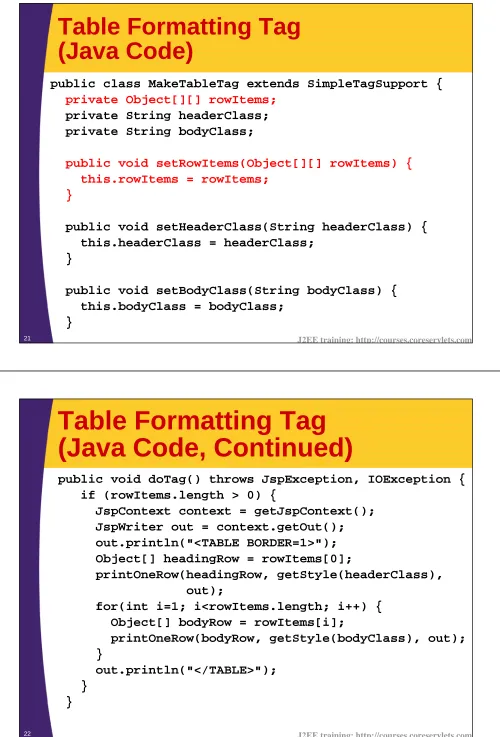
Table Formatting Tag
(Java Code)
public class MakeTableTag extends SimpleTagSupport {
private Object[][] rowItems;
private String headerClass; private String bodyClass;
public void setRowItems(Object[][] rowItems) { this.rowItems = rowItems;
}
public void setHeaderClass(String headerClass) { this.headerClass = headerClass;
}
public void setBodyClass(String bodyClass) { this.bodyClass = bodyClass;
}
22
Table Formatting Tag
(Java Code, Continued)
public void doTag() throws JspException, IOException { if (rowItems.length > 0) {
JspContext context = getJspContext(); JspWriter out = context.getOut(); out.println("<TABLE BORDER=1>"); Object[] headingRow = rowItems[0];
printOneRow(headingRow, getStyle(headerClass), out);
for(int i=1; i<rowItems.length; i++) { Object[] bodyRow = rowItems[i];
printOneRow(bodyRow, getStyle(bodyClass), out); }
out.println("</TABLE>"); }
23 J2EE training: http://courses.coreservlets.com
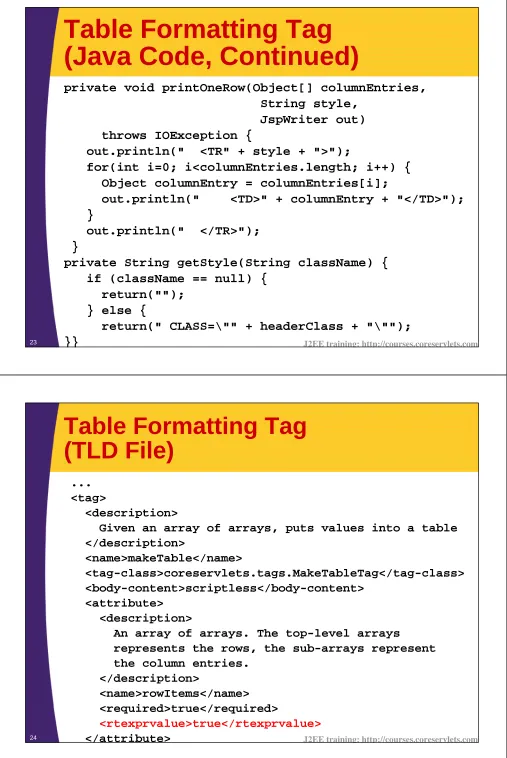
Table Formatting Tag
(Java Code, Continued)
private void printOneRow(Object[] columnEntries, String style,
JspWriter out) throws IOException {
out.println(" <TR" + style + ">");
for(int i=0; i<columnEntries.length; i++) { Object columnEntry = columnEntries[i];
out.println(" <TD>" + columnEntry + "</TD>"); }
out.println(" </TR>"); }
private String getStyle(String className) { if (className == null) {
return(""); } else {
return(" CLASS=\"" + headerClass + "\""); }}
24 J2EE training: http://courses.coreservlets.com
Table Formatting Tag
(TLD File)
... <tag>
<description>
Given an array of arrays, puts values into a table </description>
<name>makeTable</name>
<tag-class>coreservlets.tags.MakeTableTag</tag-class> <body-content>scriptless</body-content>
<attribute> <description>
An array of arrays. The top-level arrays
represents the rows, the sub-arrays represent the column entries.
</description>
<name>rowItems</name> <required>true</required>
25 J2EE training: http://courses.coreservlets.com
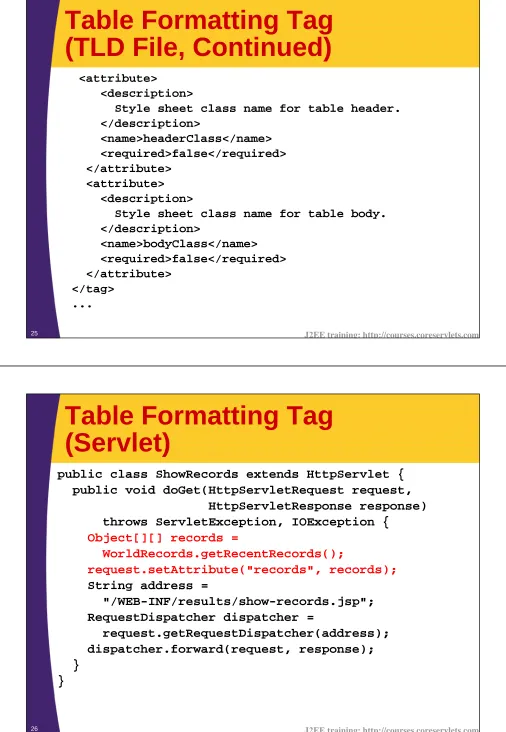
Table Formatting Tag
(TLD File, Continued)
<attribute>
<description>
Style sheet class name for table header. </description>
<name>headerClass</name> <required>false</required> </attribute>
<attribute> <description>
Style sheet class name for table body. </description>
<name>bodyClass</name> <required>false</required> </attribute>
</tag> ...
26
Table Formatting Tag
(Servlet)
public class ShowRecords extends HttpServlet { public void doGet(HttpServletRequest request,
HttpServletResponse response) throws ServletException, IOException {
Object[][] records =
WorldRecords.getRecentRecords();
request.setAttribute("records", records);
String address =
"/WEB-INF/results/show-records.jsp"; RequestDispatcher dispatcher =
request.getRequestDispatcher(address); dispatcher.forward(request, response); }
27 J2EE training: http://courses.coreservlets.com
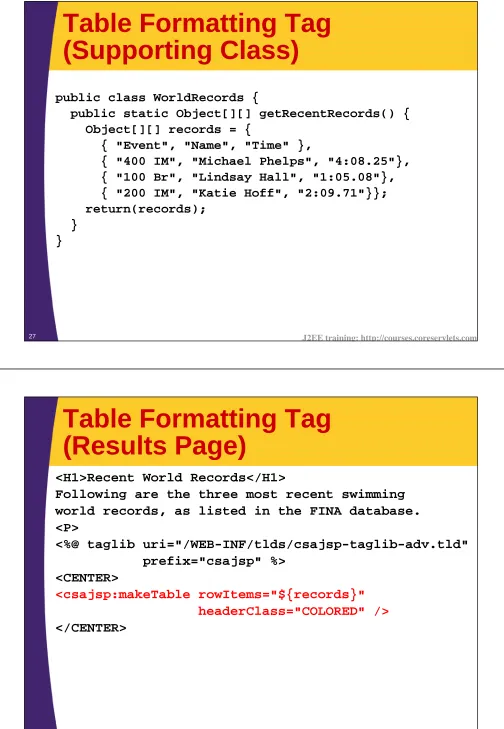
Table Formatting Tag
(Supporting Class)
public class WorldRecords {
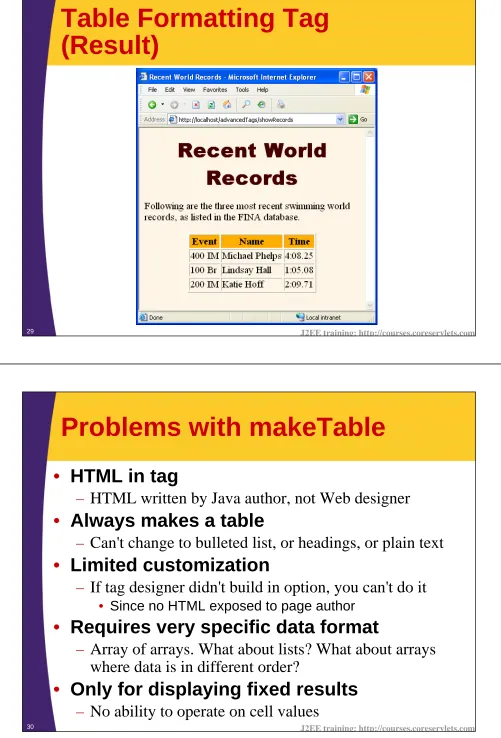
public static Object[][] getRecentRecords() { Object[][] records = {
{ "Event", "Name", "Time" },
{ "400 IM", "Michael Phelps", "4:08.25"}, { "100 Br", "Lindsay Hall", "1:05.08"}, { "200 IM", "Katie Hoff", "2:09.71"}}; return(records);
} }
28 J2EE training: http://courses.coreservlets.com
Table Formatting Tag
(Results Page)
<H1>Recent World Records</H1>
Following are the three most recent swimming
world records, as listed in the FINA database.
<P>
<%@ taglib uri="/WEB-INF/tlds/csajsp-taglib-adv.tld"
prefix="csajsp" %>
<CENTER>
<csajsp:makeTable rowItems="${records}"
headerClass="COLORED" />
29 J2EE training: http://courses.coreservlets.com
Table Formatting Tag
(Result)
30
Problems with makeTable
•
HTML in tag
–
HTML written by Java author, not Web designer
•
Always makes a table
–
Can't change to bulleted list, or headings, or plain text
•
Limited customization
–
If tag designer didn't build in option, you can't do it
•
Since no HTML exposed to page author
•
Requires very specific data format
–
Array of arrays. What about lists? What about arrays
where data is in different order?
•
Only for displaying fixed results
31 J2EE training: http://courses.coreservlets.com
Looping Tags
•
What if you want a tag that outputs its body
more than once?
–
Of course, the body should give different values each
time
•
Issues
–
Attribute should accept a collection
•
Covered in previous section
–
Attribute should be defined with rtexprvalue as true
•
Covered in section before that
–
Body should have access to each item in collection
•
New feature needed: tag should call Use
getJspContext().setAttribute(key, object) to place a bean
that is accessible
only
within the body of the tag, i.e., in tag
scope
32 J2EE training: http://courses.coreservlets.com
ForEach Tag
(Java Code)
public class ForEachTag extends SimpleTagSupport { private Object[] items;
private String attributeName;
public void setItems(Object[] items) { this.items = items;
}
public void setVar(String attributeName) { this.attributeName = attributeName;
}
public void doTag() throws JspException, IOException { for(int i=0; i<items.length; i++) {
getJspContext().setAttribute(attributeName, items[i]); getJspBody().invoke(null);
33 J2EE training: http://courses.coreservlets.com
ForEach Tag
(TLD File)
... <tag>
<description>
Loops down each element in an array </description>
<name>forEach</name>
<tag-class>coreservlets.tags.ForEachTag</tag-class> <body-content>scriptless</body-content>
34
ForEach Tag
(TLD File, Continued)
<attribute>
<description>
The array of elements.
</description>
<name>items</name>
<required>true</required>
<rtexprvalue>true</rtexprvalue>
</attribute>
<attribute>
<description>
The name of the local variable that
each entry will be assigned to.
</description>
<name>var</name>
<required>true</required>
</attribute>
35 J2EE training: http://courses.coreservlets.com
ForEach Tag
(Servlet)
public class LoopTest extends HttpServlet { public void doGet(HttpServletRequest request,
HttpServletResponse response) throws ServletException, IOException {
String[] servers =
{"Tomcat", "Resin", "JRun", "WebLogic", "WebSphere", "Oracle 10g", "JBoss" }; request.setAttribute("servers", servers);
Object[][] records = WorldRecords.getRecentRecords(); request.setAttribute("records", records);
String address = "/WEB-INF/results/loop-test.jsp"; RequestDispatcher dispatcher =
request.getRequestDispatcher(address); dispatcher.forward(request, response); }
}
36 J2EE training: http://courses.coreservlets.com
ForEach Tag
(Results Page)
<%@ taglib uri="/WEB-INF/tlds/csajsp-taglib-adv.tld"
prefix="csajsp" %>
<H2>Some Java-Based Servers</H2>
<UL>
<csajsp:forEach items="${servers}" var="server">
<LI>
${server}
</csajsp:forEach>
37 J2EE training: http://courses.coreservlets.com
ForEach Tag
(Results Page, Continued)
<H2>Recent World Records</H2>
<TABLE BORDER=1>
<csajsp:forEach items="${records}" var="
row
">
<TR>
<csajsp:forEach items="
${row}
" var="col">
<TD>
${col}
</TD>
</csajsp:forEach>
</TR>
</csajsp:forEach>
</TABLE>
38
39 J2EE training: http://courses.coreservlets.com
Nested Tags
•
What if tag behavior depends on surrounding tag
or earlier tag?
–
<mytags:if test="<%= Math.random() < 0.5 %>">
<mytags:then>Heads</mytags:then>
<mytags:else>Tails</mytags:else>
</mytags:if>
•
Communicating with surrounding tag
–
getParent returns directly surrounding tag
• Returns null if no surrounding custom tag
–
SimpleTagSupport.findAncestorWithClass(this, OuterTag.class)
finds possibly indirectly surrounding tag of given type
• Returns null if no surrounding tag of given type found
•
Communicating with earlier tag
–
Earlier tag finds surrounding tag and stores result
–
Later tag finds surrounding tag and retrieves result
40 J2EE training: http://courses.coreservlets.com
If Tag
(Java Code)
public class IfTag extends SimpleTagSupport { private boolean test;
public void setTest(boolean test) { this.test = test;
}
public boolean getTest() { return(test);
}
public void doTag() throws JspException, IOException { getJspBody().invoke(null);
41 J2EE training: http://courses.coreservlets.com
Then Tag
(Java Code)
public class ThenTag extends SimpleTagSupport {
public void doTag() throws JspException, IOException { // Get parent tag (if tag)
IfTag ifTag = (IfTag)getParent(); if (ifTag != null) {
// Decide whether to output body of then if (ifTag.getTest()) {
getJspBody().invoke(null); }
} else {
String msg =
"Error: 'then' must be inside 'if'."; throw new JspTagException(msg);
} } }
42
Else Tag
(Java Code)
public class ElseTag extends SimpleTagSupport {
public void doTag() throws JspException, IOException { // Get parent tag (if tag)
IfTag ifTag = (IfTag)getParent(); if (ifTag != null) {
// Decide whether to output body of else if (!ifTag.getTest()) {
getJspBody().invoke(null); }
} else {
String msg =
"Error: 'else' must be inside 'if'."; throw new JspTagException(msg);
43 J2EE training: http://courses.coreservlets.com
If Tag
(TLD File)
... <tag>
<description>If tag</description> <name>if</name>
<tag-class>coreservlets.tags.IfTag</tag-class> <body-content>scriptless</body-content>
<attribute>
<description>Condition of the if</description> <name>test</name>
<required>true</required>
<rtexprvalue>true</rtexprvalue> </attribute>
</tag>
44 J2EE training: http://courses.coreservlets.com
Then/Else Tags
(TLD File)
... <tag>
<description>Then tag (goes with If tag)</description> <name>then</name>
<tag-class>coreservlets.tags.ThenTag</tag-class> <body-content>scriptless</body-content>
</tag>
<tag>
<description>Else tag (goes with If tag)</description> <name>else</name>
<tag-class>coreservlets.tags.ElseTag</tag-class> <body-content>scriptless</body-content>
45 J2EE training: http://courses.coreservlets.com
If Tag
(JSP Page)
<%@ taglib uri="/WEB-INF/tlds/csajsp-taglib-adv.tld" prefix="csajsp" %>
<H2>SSL Usage</H2>
<csajsp:if
test="${pageContext.request.protocol==https}"> <csajsp:then>Using SSL.</csajsp:then>
<csajsp:else>Not using SSL.</csajsp:else> </csajsp:if>
<H2>Coin Tosses</H2> <UL>
<csajsp:for count="5">
<LI><csajsp:if test="<%=Math.random()<0.5%>"> <csajsp:then>Heads</csajsp:then>
<csajsp:else>Tails</csajsp:else> </csajsp:if>
</csajsp:for> </UL>
46
47 J2EE training: http://courses.coreservlets.com
Semantics of Custom Tag
Usage
•
System already uses the JSP DTD to verify
that the standard tags are used properly.
•
System will already verify basic custom tag
syntax
–
Tags are well formed
–
All tag and attribute names spelled properly
–
Required attributes supplied
–
No undeclared attributes used
•
But, what about deeper issues?
–
Certain custom tags must be nested in certain patterns
–
A custom tag has two attributes: both must appear or
neither must appear.
48 J2EE training: http://courses.coreservlets.com
Idea: Use Ordinary XML Tools
<?xml version="1.0" ?> <jsp:root …>
<jsp:text>
<![CDATA[ <DOCTYPE…>… ]]> </jsp:text>
<jsp:expression> Math.random() </jsp:expression> <myTags:doSomething> Blah
</myTags:doSomething> <jsp:text>
<![CDATA[ </BODY>… ]]> </jsp:text>
</jsp:root> <DOCTYPE …>
…
<%= Math.random() %> <myTags:doSomething> Blah
</myTags:doSomething> </BODY></HTML>
49 J2EE training: http://courses.coreservlets.com
Checking Tag Library Syntax
with TagLibraryValidator
•
Create a subclass of TagLibraryValidator.
•
Override the validate method.
public ValidationMessage[] validate(String prefix, String uri,
PageData page) { InputStream stream = page.getInputStream();
// Pass stream to SAX parser; return null if valid
• The InputStream reads a pure-XML version of the JSP page. E.g,
<%= foo %>will be read as <jsp:expression>foo</jsp:expression>.
•
Declare the validator in the TLD file.
<taglib>… <validator>
<validator-class>
somePackage.SomeValidatorClass </validator-class>
</validator> … </taglib>
50 J2EE training: http://courses.coreservlets.com
Example: Enforcing Nesting
Order
•
outerTag cannot be nested
•
innerTag can only appear within outerTag
–
Directly or indirectly
•
innerTag can be nested arbitrarily
Illegal:
<test:innerTag/>
Also Illegal:
<test:outerTag> <test:outerTag/> </test:outerTag>
Legal:
<test:outerTag> <test:innerTag>
<test:innerTag/> </test:innerTag> <test:innerTag>
51 J2EE training: http://courses.coreservlets.com
Enforcing Nesting Order:
SAX Handler
public void startElement(String namespaceUri, String localName, String qualifiedName, Attributes attributes) throws SAXException {
String tagName = mainTagName(qualifiedName); if (tagName.equals(outerTagName)) {
if (inOuterTag) {
throw new SAXException("\nCannot nest " + outerTagName); }
inOuterTag = true;
} else if (tagName.equals(innerTagName) && !inOuterTag) {
throw new SAXException("\n" + innerTagName +
" can only appear within " + outerTagName);
} }
52 J2EE training: http://courses.coreservlets.com
Enforcing Nesting Order:
SAX Handler (Continued)
public void endElement(String namespaceUri, String localName, String qualifiedName) throws SAXException {
String tagName = mainTagName(qualifiedName); if (tagName.equals(outerTagName)) {
inOuterTag = false; }
53 J2EE training: http://courses.coreservlets.com
Summary
•
Tags with dynamic attribute values
–
Specify true for rtexprvalue
•
Tags with complex objects for attributes
–
Have setter accept complex type, use true for rtexprvalue
•
Manipulating the tag body
–
Pass custom writer to invoke
•
Looping tags
–
Call jspContext.setAttribute; read it via EL in tag body
•
Nested tags
–
Call getParent, cast to tag type, check for null
•
Using TagLibraryValidator
–
Extend TagLibraryValidator, override validate
–
Get InputStream to read XML representation of page
© 2007 Marty Hall
Customized J2EE Training: http://courses.coreservlets.com/
Servlets, JSP, Struts, JSF/MyFaces, Hibernate, Ajax, GWT, Java 5, Java 6, etc. Ruby/Rails coming soon. © 2007 Marty Hall