Aztec C86 User Manual Release 1.05i
June 83
Copyright (C) 1983 by Manx Software Systems All Rights Reserved
Worldwide
Distributed by: Manx software systems
P. O. Box 55
Aztec C86 Introduction
INTRODUCTION
Welcome to the growing number of Aztec C86 users. This manual will describe the use of the various components of the Aztec C86 system.
1.1 Origin of "C"
Dennis Ritchie originally designed .. c .. for the UNIX project at Bell Telephone Laboratories. All of the UNIX operating system, its utili ties, and application programs are written in "C".
1.2 Standard Reference Manual for "C··
The standard reference for the "C" language is: Brian W. Kernighan and Dennis M. Ritchie, The C
programming Language. prentice-Hall Inc., 1978~ (Englewood Cliffs, N. J.)
The above text besides providing the standard definition and reference for the "C" language is an excellent tutorial. Aztec C86 can be conveniently used in conjunction with the K & R text for learning the "C" language. Aztec C86 is a complete implementation of the K & R standard "C". The K & R book is an essential part of the Aztec C86 documentation. Most questions regarding the "C" language and many questions on the run time library package will only be answered in the K & R text.
1.3 Basic Components of the Aztec C86 system
The Aztec C86 system consists of a comprehensive set of tools for producing software using the "C" programming language. The system includes a full feature "C" compiler, a relocating assembler, a linkage editor, an object library maintenance utility, plus an extensive set of run time library routines. Also included are interfaces to the MSDOS/PCDOS assembler, MASM, and Digi tal Research's SID86 debugging system.
1.4 Brief System Overview
The Aztec C86 compiler is a complete implementation of UNIX version 7 "C", with the exception of the bit field datatype. The compiler produces assembly language source code which can be read by the Manx AS86 assembler or the PCDOS/MSDOS assembler, MASM. programs generated by the compiler have a physical code segment and a physical data segment, each of which can be up to 64 K bytes long.
The Manx AS86 relocating assembler accepts the same language as the PCDOS/MSDOS assembler and the Intel AS86 assembler. I t has support for codemacros, but not for macros. The assembler is used
Aztec C86 Introduction
to assemble the output of the compiler and for writing assembly language subroutines to be combined with "C" routines.
The relocatable object files produced by the assembler are combined with other relocatable files and library routines by the Manx LN linkage editor. The linkage editor will scan through one or more run time libraries and incorporate any routines that are referenced by the linked modules.
The Aztec C86 system also includes LIBUTIL, an object library utility. LIBUTIL allows a user to change the contents of the standard Manx supplied run time library or to create private run time library.
The run time library is included in the standard package in source form, in Manx library format, and in MICROSOFT library format.
1.5 System Requirements
Aztec C86 runs on any PCDOS, MSDOS, or CP/M-86 system with at least l28K of memory and two disk drives. There are no special terminal requirements for Aztec C86 other than the ability to produce upper and lower case and the special characters:
{ } ( ) [ ] < > _
+
= ~ ! ? \ / A %*
& : i II I1.6 Cross Compilers
A UNIX/PDPll cross compiler is available for Aztec C86. The output of the compiler, assembler, or linker can be downloaded to the target machine.
1.7 portability
Code written for Aztec C86 can be compiled with Aztec C II, the Manx 8080 and
zao
C compiler, and with Aztec C65, the Apple DOS 3.3 "C" compiler.Aztec C86 License
SOFTWARE LICENSE
Aztec C86, Manx AS86, and Manx LN are licensed software products. Manx Software systems reserves all distribution rights to these products. Use of these products is prohibited without a valid license agreement. The license agreement is provided with each package. Before using any of these products the license agreement must be signed and mailed to:
Manx Software Systems P. O. Box 55
Shrewsbury, N. J 07701
The license agreement limits use of these products to one machine and explicitly limits duplication of the products to no more than two copies whose sole purpose will be for backup. Any uses of these products that might lead to the creation of or distribution of unauthorized copies of these products will be a breach of the licensing agreement and Manx Software Systems will excercise its right to reclaim the original and any and all copies derived in whole or in part from first or later generations and to pursue any appropriate legal actions.
Software that is developed with Aztec C86, Manx AS86, or Manx LN can be run on machines that are not licensed for these products as long as no part of the Aztec C86 software, libraries, supporting files, or documentation is distributed with or required by the software. In the latter case a licensed copy of the appropriate Aztec C software is required for each machine utilizing the software. There is no licensing required for executable modules that include library routines. The only restriction is that neither the source, the libraries themselves, or the relocatable object of the library routines can be distributed.
COPYRIGHT
Copyright (C) 1981, 1982, 1983 by Manx Software systems. All rights reservec. No part of this publication may be reproduced, transmitted, transcribed, stored in a retrieval system, or translated into any language or computer language, in any form or by any means, electronic, mechanical, magnetic, optical, chemical, manual or otherwise, without prior written permission of Manx Software Systems, Box 55, Shrewsbury, N. J. 07701.
DISCLAIMER
Manx Software Systems makes no representations or warranties with respect to the contents hereof and specifically disclaims any implied warranties of merchantability or fitness for any particular purpose. Manx Software Systems reserves the right to revise this publication and to make changes from time to time in
Aztec C86 License
the content hereof without obligation of Manx software Systems to notify any person of such revision or changes.
TRADEMARKS
Aztec C86, Manx AS86, and Manx LN are trademarks of Manx Software Systems. CPM86 and SID86 are trademarks of Digital Research. MSDOS, MASM, and LINK are trademarks of Microsoft. UNIX is a trademark of Bell Laboratories.
Aztec C86
CONTENTS
SECTION
Installation
...
Overview...
Aztec C86 CompilerI
II
III
MANX AS86 Relocating Assembler... IV
MANX LN Linker
MANX LIBUTIL Library utility
Library Functions
V
VI
VII
Error Codes and Error processing . . • . . . • . . • . . . • . • • • VIII
I/O Redirection and Buffered I/O
Unbuffered I/O
Assembly Language Support
Data Formats
IX
X
XI
XII
Floating Point Support •.•...•.••..•...•....•...•••.•••••• XIII
SID Support XIV
Aztec C86 INSTALLATION
INSTALLATION
To begin using Aztec C86, we recommend that you first create a "working disk" by copying the files listed below from the distribution disk onto the working disk.We recommend that you then compile, assemble, link, and execute the supplied sample program, EXMPL.C. This procedure is described in chapter 2. To execute the program after i t has been created, type:
EXMPL
The program will display: enter your name
When you enter your name, followed by a carriage return, the program will display a simple greeting.
Your Aztec C86 system is now installed and ready to go.
A. INSTALLING AZTEC C86 FOR USE WITH MSDOS OR PCDOS
When your operating system is MSDOS or PCDOS, Aztec C86 can be used with either the Manx assembler and linker or with the MSDOS/PCDOS assembler (MASM) and linker (LINK). When the Manx assembler and linker are to be used, the following files should be copied onto your working disk:
C86.EXE AS86.EXE LN.EXE LIBC.LIB MATH. LIB LIBC.H
When the MSDOS/PCDOS assembler and linker are to_ be used, the following files should be copied onto the working disk:
C86.EXE LIBCMS.LIB MATHMS.LIB LIBC.H
B. INSTALLING AZTEC C86 FOR USE WITH CPM86
A CPM86 working disk is created by copying the following files from the distribution disk to the working disk:
C86.CMD AS86.CMD LN.CMD LIBC.LIB
Aztec C86
MATH. LIB LIBC.H
copyright (c) 1983 by Manx Software Systems
INSTALLATION
AZ~rEC C86 OVERVIEW
OVERVIEW
This chapter describes the basic procedure for generating an executable version of a C program. section A describes the procedure for using Aztec e86 with MSDOS/PCDOS and the Manx assembler and linker. Section B describes the procedure when using Aztec C86 with MSDOS or PCDOS and their assembler and linker. Section C describes the procedure when using CP/M-86. Section D describes the creation of object file libraries.
The use of the compiler, assembler, linker, and object file librarian are described in more detail in subsequent chapters.
A. using Aztec C86 with MSDOS/PCDOS and the Manx assembler and 1inker
The following commands will produce an executable file, EXMPL.EXE, from the file EXMPL.C, which contains a C source program:
C86 exmpl.c
AS86 exmpl. asm
LN exmpl.o libc. lib
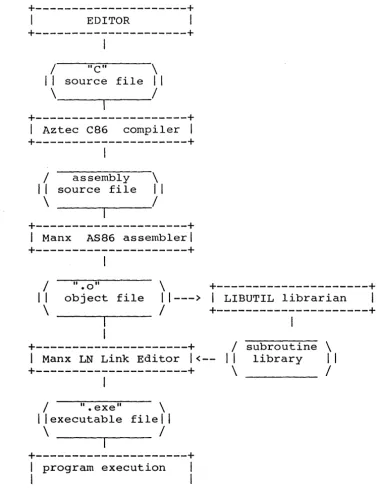
This procedure is depicted in figure 1.1
The first command activates the compiler, e86, which compiles the program in exmpl.c and writes the assembly language source to an intermediate file, exmpl.asm.
The second command activates the Manx assembler, AS86, which assembles the code in the intermediate file and writes the resulting relocatable object code to the file exmpl.o.
The third command activates the Manx linker, LN, which links exmpl.o, getting any needed modules from the object library, libc.lib, and writes the executable program to the file exmpl.exe. If the program in exmpl.c performed floating point operations, the command to link i t would be
LN exmpl.o math. lib libc.lib
AZTEC C86 OVERVIEW
Figure 1.1 depicts the basic steps for producing a binary image of a lie" program. It also indicates the path for producing and using run time subroutine libraries.
+---+
I
EDITORI
+---+
I
I
"C" \I I
source fileI I
\_----...---_1
+---+
I
Aztec C86 compilerI
+---+
I
I
assembly \I I
source fileI I
\
I
+---+
I Manx AS86 assembler 1
+---+
I
/ ".0" \
+---+
I I
object file11---> 1
LIBUTIL librarianI
\
I
+---+
1
+---+
I
subroutine \I Manx LN Link Editor 1<-- II library I I
+---+
\
I
I
I
".
exetl\
I I
executable filelI
\
/
+---+
I
program executionI
I
I
+---+
Figure 1.1: Developing "C" Programs with Aztec C86 under MSDOS or peDOS and using the Manx assembler and linker
[image:10.618.110.492.105.593.2]AZ'rEC C86 OVERVIEW
B. using Aztec C86 with MSDOS/PCDOS and their assembler and linker
The following commands can be entered to produce an executable file, exmpl.exe from the C-language file exmpl.c, when using the MSDOS/PCDOS assembler and linker:
C86 -M exmpl.c
MASH exmpl:
LINK exmpl",libcms
This procedure is depicted in figure 2.2.
The first command activates the Aztec compiler, C86, which compiles the C program in exmpl.c and writes the resultant assembly language source to the file exmpl.asm.
The second command activates the MSDOS/PCDOS assembler MASM, which assembles the code in exmpl.asm and writes the resulting object code to the file exmpl.o.
The third command activates the MSDOS/PCDOS linker LINK, which links exmpl.o, getting any needed modules form the object library, libcms.lib, and writes the executable program to the file exmpl.exe.
If the exmpl.c program performed floating point operations, the command to link i t would be:
LINK exmpl",mathms.lib+libcms.lib
AZTEC C86 OVERVIEW
Figure 2.2 depicts the basic steps for producing a binary image of a "C" program when using MSDOS or PCDOS and their assembler and linker. It also indicates the path for producing and using run time subroutine libraries. The process depicted is fairly basic.
+---+
I
EDITORI
+---+
I
/ "C" \
I I
source fileI I
\
/
+---+
I
Aztec C86 compilerI
+---+
I
/ "ASM" \
I I
source fileI I
\
/
+---+
3.
I
MSDOS AssemblerI
+---+
I
/ ... obj"
\
+---+
II
object file\
11---> I
MSDOS LIB librarianI
/
+---+
I
+---+
/
subroutine \4.
1
MSDOS Link Editor1<-- II
library1 I
+---+
\
/
I
/ ".exe" \
I 1 executable fi1el 1
\
/
+---+
1 program execution 1I 1
+---~----+
Figure 2.2: Developing "C" programs with Aztec C86 under MSDOS or PCDOS, and using their assembler and linker
[image:12.620.108.497.124.619.2]AZTEC C86 OVERVIEW
C. Using Aztec C86 with CP/M-86
The following commands can be entered to produce an executable file, exmpl.cmd, from exmpl.c:
C86 exmpl.c
LN exmpl.o libc .1ib
The first command activates the compiler, e86, which compiles the C program in exmpl.c and writes the resulting assembly language source to the intermediate file $tmp.$$$. C86 then activates AS86, which assembles the code in the intermediate file and writes the resulting object code to the file exmpl.o.
The second command activates the Manx linker, LN, which links exmpl.o, getting any needed modules from the object library, libc.lib, and writes the executable program to exmpl.cmd.
If the exmpl program performed floating point operations, the link command would be:
LN exmpl.o math. lib libc.lib
D. Object libraries
The Manx linker, LN, can link any number of object files together. One way to do, this is to explicitly tell LN of each object module which is to be linked together. Another way is to place commonly used modules in an object file library, using the Aztec object file librarian, LIBUTIL. When a program is linked which requires modules which are in the library, just include the object file library in the l i s t of files passed to LN. LN will search the library, and automatically copy modules from i t which are needed. Only the needed modules will be copied. Any number of object libraries can be searched by LN.
Aztec C86 for MSDOS and PCDOS comes with four object libraries: LIBC.LIB is used when linking any program using LN.
MATH. LIB is used when linking any program using LN which performs floating point operations.
LIBCMS.LIB is used when linking any program using the MSDOS or PCDOS assembler, LINK.
MATHMS.LIB is used when linking any program using LINK which performs floating point operations.
Aztec C86 for CP/M-86 comes with two object libraries: LIBC.LIB is used when linking any program using LN.
AZTEC C86 OVERVIEW
MATH. LIB is used when linking any program, using LN, which performs floating point operations.
AZ'l'EC C86 COMPILER
C86 COMPILER
The Aztec C86 compiler uses the book The C programming Language, by Brian W. Kernighan and Dennis M. Ritchie, for a programmer's reference manual. This book can be also be used as a tutorial, for learning C.
A. Operating Instructions C86 is activated by entering:
C86 <command tai1>
where <command tail> specifies the name of the file containing the C program, and "dash options"; that is, optional flags and parameters which override default compiler assumptions. The source file name and each of the dash options are separated by spaces.
All dash options begin with a dash (-), immediately followed by a letter which defines the option. After that, the syntax differs for the various dash options. For some, that's all there is. For others, a number follows which is the value of the option. In another case, the next field is a file name. The dash options are described below.
The compiler generates assembly language code and sends i t to a disk file. There are some differences in itls operation when using MSDOS/PCDOS and when using CP/M-86. Under MSDOS and PCDOS, the assembly language code by default is sent to the file whose name is the same as that of the C language source file, with the extent changed to I.asm l . This default file name can be overriden using the 1.-0 1 option, described below. For example, to compile the program in foo.c and send the assembler source code to foo.asm when using PCDOS, enter:
C86 foo.c
Under CP/M-86, by default the assembly language source code is sent to an intermediate file, named l$tmp.$$$I, and the MANX AS86 assembler is activated. The assembler generates object code, sending i t to a file whose name is the same as that of the C language source file, wi th extent 1.01• This default name for the
object file can be overriden using the 1-0 1 option, described below. For example, to compile and assemble the program in mycprog.c and send the object code to mycprog.o, when using CP/M-86, enter:
C86 exmp1.c
Also under CP/M-86, the default chaining of the assembler to the compiler can be overriden using the I-AI option. In this case,
AZTEC C86 COMPILER
the compiler will stop after compilation, and won't invoke the assembler. The assembler source by default will be sent to the file whose name is derived from the C source file name by changing the extent to 'a86'. This default can be overriden using the '-0' option.
B. Compiler options
Under MSDOS or PCDOS, the dash option specifiers must be entered in upper case. with CP/M-86, they can be entered in either upper or lower case, since CP/M-86 translates the command tail to upper case.
1. 1-0 1 option
The '-0' option allows the user to explicitly select the output file of the compiler (or the assembler, as described above). The syntax is 1-0 <output filename>', where there is a space between '-0' and <filename>. For example, under PCDOS, to compile exmpl.c on the default drive and send the output to exmpl.asm on the default drive, just enter:
C86 exmpl.c
s t i l l under PCDOS, to compile exmpl.c and send the assembly language output to b:exmpl.asm, enter:
e86 exmpl.c -0 b:exmpl.asm
or
C86 -0 b:exmp1.asm exmpl.c
If you're running with CP/M-86, to compile and assemble exmpl.c, which is on the default drive, and send the object code to exmpl.o on the default drive, enter:
e86 exmp1.c
Still under CP/M-86, to compile and assemble exmpl.c and send the object code to b:exmpl.o, enter:
C86 exmpl.c -0 b:exmpl.o
or
C86 -0 b:exmp1.o86 exmpl.c
s t i l l under CP/M-86, to compile exmpl.c, send the assembly language output to exmpl.a86, and not activate the assembler automatically, enter:
e86 exmpl.c -A
AZTEC C86 COMPILER
s t i l l under CP/M-86, to compile exmpl.c, send the assembly language output to b:exmpl.a86, and not activate the assembler automatically, enter:
C86 exmpl.c -A -0 b:exmpl.a86
2. I_MI option
This option causes the compiler to generate assembler source for the Microsoft MASM assembler. For example, to compile exmpl.c and then assemble the resulting assembler source file, exmpl.asm, enter:
3. I_TI option
C86 -M exmp1.c MASH exmp1;
This option causes the compiler to copy the C source statements to the assembly language source file as comments. The e comment in the assembly language file is followed by the assembly language code generated from i t . If not specified, the compiler doesn't copy e source statements to the assembly language file.
4. I_EI option
specifies the number of entries in the expression work table. The default size is 120 entries. Each entry uses 14 bytes. If the compiler terminates with error 36, the expression work table has overflowed.
The size of the table immediately follows intervening spaces. For example, to compile expression work table of 300 entries, enter:
e86 foo. c -E300
5. I_Xl option
• -E' , foo.c,
with with
no an
This option specifies the size, in bytes, of the macro table. Each '#define' in a e program creates an entry in this table. The default table size is 2000 bytes. If the compiler aborts with error 59, you need a larger macro table.
The size of the macro table immediately follows the I_Xl, with no intervening spaces. For example, to compile myprog.c with a macro table of 3000 bytes, enter:
e86 -X3000 myprog.c
AZTEC C86 COMPILER
6. I_y' option
Specifies the maximum number of outstanding cases allowed in a switch statement. Default size: 100 outstanding cases. If the compiler terminates with error 76, you need to recompile with more outstanding cases. For example, the following code segment will use four, not five, entries in the case table:
switch (a) { case 0:
a += 1;
break: case 1:
switch (x) { case I a I :
functl (a) ; break; case, I b I :
}
funct2(b)i break;
a
=
5;case 3:
funct2(a); break;
}
The size of the case table immediately follows I_yl. For example, to compile exmpl.c to allow 300 outstanding case statements, enter:
e86 exmpl.c -Y300
7. I_Z' option
This option specifies the size, in bytes, of the string table. The table defaults to 2000 bytes. If the compiler terminates with error 2, the program requires a larger string table.
The size of the table immediately follows the I_ZI, with no intervening spaces. For example, to compile foo.c with a 3000 byte string table, enter:
C86 -Z3000 foo.c
8. I_S' option
By default, Aztec e86 expects that pointer references to members within a structure are limited to the structure associated with the pointer. To support programs written for other compilers where this is not the case, the I_SI option is provided. If I_SI is specified as a compile-time option and a pointer reference is to a structure member name that is not defined in the strcture
AZTEC C86 COMPILER
associated with the pointer, then all previously defined structures will be searched until the specified member is found. The search will begin with the structure most recently defined and search backwards from there.
9. '_L' option
This option specifies the number of entries allowed in the local symbol table. It defaults to 40 entries. Each entry requires 26 bytes. If the compiler aborts with the message 'local symbol table full', the program being compiled requires a larger local symbol table.
The number of entries immediately follows the '-LI, with no intervening spaces. For example, to compile exmpl.c with a local symbol table having 100 entries, enter:
C86 -LI00 exmpl.c
10. '_D' option
This option allows a symbol or macro to be defined to the compiler as if i t had been a #define statement in a program.
The syntax is -Dstringl[=string2], where stringl is the symbol or macro being defined and string2 is the value of the symbol. the brackets surrounding =string2 mean that =string2 is optional. If =string2 isn't entered, the value of the symbol defaults to 1. No spaces are allowed between the first character of stringl and the last character of string2.
For example, to compile exmpl~c and to define the symbol DEBUG to the program from the command line, and give i t a value of 1, enter:
C86 exmpl.c -DDEBUG
To compile exmpl.c and define the macro x(y) = lO*y, enter: C86 exmpl.c -Dx(y)=10*y
If the compiler is running under CP/M-86, all references within the program being compiled to a command line-defined symbol or macro must be in upper case, since CP/M-86 translates the command line to upper case before activating C86.
If the compiler is running under PCDOS or MSDOS, a program being compiled to a command line-defined symbol or macro must refer to i t exactly as entered on the command line, since PCDOS and MSDOS don't translate the command line to upper case.
On PCDOS and MSDOS, the strings can be either upper or lower case; the program being compiled must refer to the symbol just as
AZTEC C86 COMPILER
i t ' s entered.
AZTEC C86 COMPILER
C. Cornpi1er Error Messages
ERROR NUMBER
1 2 3 4 5 6 7 8 9 10 11 12 13 14 15 16 17 18 19 20 21 22 23 24 25 26 27 28 29 30 31 32 33 34 35 36 37 38 39 40 41 42 43 44 45 46 47 48 49 50 EXPLANATION
bad digit in octal constant
string space exausted (see COMPILER
-z
option) unterminated stringcompiler error in effaddr illegal type for function inappropriate arguments bad declaration syntax name not allowed here must be constant
size must be positive integer data type too complex
illegal pointer reference unimplemented type
unimplemented type storage class conflict data type conflict unsupported data type data type conflict too many structures structure redeclaration missing )'s
struct decl syntax undefined struct name need right parenthesis expected symbol here
must be structure/union member illegal type CAST
incompatable structures structure not allowed here missing : on ? expr
call of non-function
illegal pointer calculation illegal type
undefined symbol
Typedef not allowed here
no more expression space (see COMPILER -E option) invalid expression
no auto. aggregate initialization no strings in automatic
this shouldn't happen invalid initializer too many initializers
undefined structure initialization too many structure initializers bad declaration syntax
missing closing bracket
open failure on include file illegal symbol name
already defined missing bracket
AZ'rEC C86 51 52 53 54 55 56 57 58 59 60 61 62 63 64 65 66 67 68 69 70 71 72 73 74 75 76 77 78 79 80 81 82 83 84 85 86 87 88 89 90 91 92 93 94 95 96 97 98 99
must be lvalue
symbol table overflow multiply defined label too many labels
missing quote
missing apostrophe line too 'long
illegal # encountered
COMPILER
macro table full (see COMPILER -X option) output file error
reference of member of undefined structure function body must be compound statement undefined label
inappropriate arguments illegal argument name expected comma
invalid else syntax error
missing semicolon bad goto syntax
statement syntax statement syntax statement syntax
case value must be integer constant missing colon on case
too many cases in switch (see COMPILER -Y OPTION) case outside of switch
missing colon duplicate default
default outside of switch break/continue error
illegal character
too many nested includes illegal character
not an argument null dimension
invalid character constant not a structure
invalid storage class symbol redeclared
illegal use of floating point type illegal type conversion
illegal expression type for switch bad argument to define
no argument list missing arg
bad arg
not enough args
conversion not found in code table
Aztec C86 ASSEMBLER
AS86, the MANX 8086 relocating assembler
I. OPERATING INSTRUCTIONS
AS86 is activated by entering on the command line: AS86 <command tai1>
where <command tail> specifies the source file to be assembled and the Itdash optionslt, that is, the optional flags and parameters which override default assembler assumptions.
In the command tail, the source file name and each of the dash options are separated by spaces and can be entered in any order. All dash options begin with the dash character (-) and are immediately followed by a letter which defines the option. After that, the symtax for the various dash options can differ. In some cases, thatls all there is to the option. In others, the letter defining the option is followed by a number which gives a value relating to the option. In another case, the next field following the option is a file name. The various dash options are described below.
A. Source Fi1e
The source file name can either specify the disk drive containing the file or not. If itls not specified, the assembler assumes the file is on the default drive.
B. Object Fi1e
AS86 writes the object code to a file. If the file doesnlt exist, A86 will create it; if i t does exist, AS86 will erase i t and create a new one.
By default, the name of the object file is derived from the source file, is given extent 1.01, and is placed on the same drive as the source file. For example, to assemble b:subl.asm and place the object code in b:subl.o, enter:
AS86 b:subl.asm
The default name for the object file can be overriden by specifying the 1-0 1 dash option when the assembler is invoked. In this case, the object file name is in the field following the 1
-01 option. For example, to assemble b:subl.asm and place the
object in a:out.o, enter:
AS86 b:subl.asm -0 a:out.o
There must be spaces between 1-0 1 and the object file name.
Aztec C86 ASSEMBLER
C. Listing File
A886 does not currently generate a listing. D. Dash options
1. I_SI option: Symbol table size
By default,the symbol table can have 500 entries. TO select another value, use the '-8' dash option, where the desired size immediately follows the '-8', with no intervening spaces. For example,
AS86 subl.asm -SlOOO
assembles subl.asm using a symbol table having 1000 entries.
2. I_ZI option: string space size By default, Istring spacel
, the area where symbol names and other
character strings are stored, is 200 bytes long. To select another size, use the I_Z' option, where the desired size immediately follows the I_ZI, with no intervening spaces. For example,
AS86 -Z1500 subl.asm
assembles subl.asm using a lSOO-byte string space. 3. I-C' option: Codemacro table size
By default, the codemacro table can have 50 entries. Use the I_CI
dash option to 'select another value, where the desired size immediately follows I_C I with no intervening spaces. For example,
AS86 -CIOO subl.asm
assembles subl.asm using a codemacro table having 100 entries. 4. I-V' option: Verbose option
Entering '_Vi will cause the assembler to l i s t statistics after i t finishes. It will l i s t the number of symbol table entries used, the number of bytes of string space used, and the number of entries in the codemacro table that were used.
II. programmer Information
The Manx A886 assembler accepts the same assembly language as does the MSDOS/PCDOS assembler, MASM, and as does the Intel ASM86 assembler, with the exceptions noted below. The Intel assembler is defined in their manual ASM86 Language Reference Manual, order
Aztec C86 ASSEMBLER
number 121703-002. The exceptions are:
1. Statement names can be up to 255 characters, and a l l characters are part of the name (not just the f i r s t 32 characters, as in the MSDOS/PCDOS and Intel assemblers).
Global symbols, however, while they can contain up to 255 characters within a single program, are truncated to 8 characters in the object file. Thus, i f A program has an entry point named 'A very long label', within the program i t is refered to by its full name. Other programs in other files would refer to the entry point using its truncated name, 'A_very_l'.
2. Statement names are case sensitive; ie, the label 'A label' is different from the label 'a label'. All other symbols
(instructions, register names, operators) aren't.
3. Only two physical segments are allowed: all logical segments (ie, those defined within a program using the 'segment' directive) with class name 'code' go in the code physical segment; all other logical segments go in the data physical segment.
4. In the MSDOS/PCDOS and Intel assemblers, code within a logical segment is contiguous in memory, even if a segment is closed, another opened and closed, and the first reopened. In AS86, the only segments for which this is true is segments whose eombinability type is 'common'. Code in other segments is placed in memory in the order encountered in the program. For example, consider this program:
datasegl segment varl: db ?
datasegl ends dataseg2 segment var2: db ?
dataseg2 ends datasegl segment var3: db ?
datasegl ends
With AS86, varl, var2, and var3 will be located in memory in the order in which they appear in the program; that is, varl, var2, var3. This is not true for segments having combinability type 'common'. If datasegl was of type common, the variables would be grouped in memory in this order: varl, var3, var2.
5. The ASSUME directive has no function with AS86: it's accepted, but nothing is done with it. AS86 and LN assume that the CS segment register points to the physical code segment, and DS, S8, and ES point to the physical data segment.
6. Code macros are supported by AS86, as defined by the Intel
Aztec C86 ASSEMBLER
ASM86 Language Reference Manual (order number 121703-002), and are similar to those of the Digital Research ASM86 assembler (but the DBIT directive of the Digital Research assembler isn't supported; instead, the RECORD directive of the Intel assembler is supported).
7. Floating point instructions are not supported by AS86. You can make AS86 support them by including the codemacros for them in your programs.
8. To include a file in the assembly of a program being assembled, enter
INCLUDE <fi1ename>
in the program being assembled, where <filename> is the name of the file to be included. Included files can be nested five deep.
9. AS86 supports conditional assembly. The statements: IF <condition>
<block> ENDIF
will result in the assembly language statements in <block> being assembled if <condition> has a non-zero value. If <condition> has the value zero, the <block> statements will be ignored.
The statements: IF <condition>
<true block> ELSE
<false block> ENDIF
will cause <true block> to be assembled if <condition> is non-zero, and <false block>, otherwise.
The IF constructs can be nested.
AZTEC C86 LINKER
LINKER
I. Operating Instructions
The Manx link editor, LN, combines object files produced by the Manx AS86 assembler, copies needed modules from object libraries which have been created using LIBUTIL, the Manx object file librarian, and produces an executable file.
To activate the linker, enter
La <command tai1>
where <command tail> is a l i s t of file names and dash options. The command t a i l fields, that is, file names and dash options, are separated by spaces. A 'dash option ' is used to override a default assumption by the linker. The dash options are described below.
The linker can link together any number of object files and search any number of libraries. Object files are included in the order encountered in the command tail, and libraries are searched sequentially in the order of specification.
When LN includes a module from a library which satisfies unresolved references, new unresolved references may be created, due to the external symbols referenced by the library module. The linker will not go back through libraries which have already been searched or through the part of the current library which has already been searched to try and find modules which contain symbols which satisfy the unresolved references. I t will press on!
When LN is used with MSDOS or PCDOS, the resultant executable program is written to a file whose name is derived from the first object file name in the command t a i l by changing the extent to I.exe l • This default assumption can be overriden using the 1-0 1
option, described below.
When LN is used with CPM86, the resultant executable program is written to the file whose name is derived from the first object file in the command tail by changing the extent to .cmd. This default assumption can be overriden using the 1-0 1 option.
Supplied with Aztec C86 are the object libraries libc.lib and math. lib. In most cases, libc.lib must be specified when linking a program. Math.lib must be included when linking a program which performs floating point operations, and must be specified in the LN command tail before libc.lib.
To link a simple program, which doesnlt perform floating point, and whose object code is in the file exmpl.o, enter
AZTEC C86 LINKER
LN exmpl.o libc.lib
The linker will place the executable code in the file exmpl.exe, when running with PCDOS or MSDOS, and in exmpl.cmd, when running with CP/M-86.
If the above program performed floating point operations, i t would be linked by entering:
LN exmpl.o math.lib libc.lib
If the exmpl program called functions whose object code is in subl.o, sub2.o and sub3.o, i t could be linked by entering
LN exmpl.o subl.o sub2.o sub3.o math. lib libc.lib
If subl, sub2, and sub3 are commonly used functions, they could be put in an object file library which weIll call sub2.lib, using the Manx program LIBUTILi then exmpl could be linked by entering
LN exmpl.o subs. lib math. lib libc.lib
Dash Options
1. '-0' option
This option specifies the name of the f i l e to which the executable program generated by LN is sent. If not specified, LN generates the output file name from the name of the first object module in the command tail as described above.
For example, to link exmpl.o and send the output to b:exmpl.exe, enter
LN -0 b:exmpl.exe exmpl.o libc.lib
2. I_TI option
This option causes the linker to generate a symbol table which can be read by the Digital Research debugger, SID86. The name of the file to which the symbol table is sent is derived from that of the file containing the executable program by changing its extent to I.syml.
For example, to link exmpl.o and generate a symbol table in the file exmpl.sym, enter:
LN -T exmpl.o libc.lib
To link exmpl.o, send the output to foo.exe, and send a symbol table to foo.sym, enter:
AZTEC C86 LINKER
LN -T -0 foo.exe exmpl.o libc.lib
3. I_C I option
This option specifies the starting address for the code portion of the output. If not specified, the starting code address is 3. In bytes 0, 1, and 2 the linker places a jump instruction to $begin, which performs system initialization functions.
The starting code address immediately follows the I_C I , with no intervening spaces.
For example, to link exmpl.o, where the code starts at OX300, enter:
LN -C300 exmpl.o libc.lib
4. I_DI option
This option specifies a starting address for the data and common segments in the data block. I t defaults to O. The address immediately follows I_DI with no intervening spaces.
5. I_FI option
This option causes LN to merge the contents of a file with the command tail. The name of the file follows the I_FI, with spaces between the two.
For example, to link exmpl.o, subl.o, sub2.o, sub3.o, and edit math. lib and libc.lib, the following could be entered:
where exmpl.lnk contains:
exmpl.o subl.o sub2.o sub3.o math. lib
libc.lib
6. '-5' option
LN -F exmpl.1nk
This option is used to explicitly select the amount of extra space the linker includes in the data segment above the linked data. The size defaults to 4096 bytes.
The size, in hex, immediately follows the 1-8 1 option, with no intervening spaces.
AZTEC C86 LINKER
For example, to link exmpl.o and give i t lOOB extra bytes above the data, enter
LN exmpl.o -SlOO
II. programmer's Information
The LN linker can create two physical segments for a program: a code segment and a data segment. Each physical segment can be up to 64 K bytes long. Logical segments from the assembler, ie, those defined by the 'segment' and 'ends' directives in an assembly language program, are grouped into physical segments as follows: logical segments whose combinability type is 'common' are included in the physical data segment. Segments whose class name is 'code' are included in the physical code segment. All other segments are included in the physical data segment.
Aztec C86 LIBUTIL LIBRARY UTILITY
LIBRARY MAINTENANCE
LIBUTIL
A. SUMMARY
The LIBUTIL LIBrary UTILity is used in order to:
1. create a library
2. append modules (-a)
3. produce an index list (-t) 4. extract modules (-x) 5. replace modules (-r)
6. create a library using an extended command line (
.
)1. LIBUTIL -0 example. lib x.o x.o
USE - to create a library
FUNCTION the following creates a private library, example.lib, containing modules subl.o and sub2.0
>LIBUTIL -0 example.lib subl.o sub2.0 2. LIBUTIL option-a
USE - to append to a library
FUNCTION- the following appends exmpl.o to the example.lib
>LIBUTIL -0 example. lib -a exmpl.o
this function can be used to append any number of .0 files to the library. For example, the following appends exmpl.o and smpl.o to the example. lib >LIBUTIL -0 example.lib -a exmpl.o smpl.o
3. LIBUTIL option-t
NB If a large number of files need to be appended to a library, i t i s advantageous to use the SUBMIT option
(see item 7)
USE - to produce an index listing of modules in a given library
FUNCTION- the following displays a listing of all
Aztec C86 LIBUTIL LIBRARY UTILITY
modules in a particular library, example.lib:
>LIBUTIL -0 example. lib -t
NB this function will allow only one library to be listed at a time
4. LIBUTIL option-x
USE - a. copies a particular library module into a relocatable object file
b. copies a complete library into relocatable object files
FUNCTION- a. the following copies library module, exmpl into a relocatable object file: >LIBUTIL - 0 example.lib -x exmpl
b. the following copies a complete library, example.lib, (including all modules contained within it) into relocatable object files:
>LIBUTIL -0 example. lib -x
5. LIBUTIL option-r
NB. I t should be noted that when copying a single module the LIBUTIL executes the command and returns. When copying a complete library, the LIBUTIL lists the modules being copied.
USE - to replace a library module wi th the contents of a relocatable object file FUNCTION- th'e following replaces the library
module subl with the relocatable object file subl.o
>LIBUTIL -0 example. lib -r subl.o
6. LIBUTIL -0 library name . USE
FUNCTION
>xsub
to create a library using an command line
the following creates a charles.lib and appends to i t sub2.0, sub3.o, sub4.0, etc.
extended library, subl.o,
Aztec C86 LIBUTIL LIBRARY UTILITY
LIBUTIL -0 charles lib . subl.o sub2.0 sub3.0 sub4.0
B. DETAILED EXPLANATION Creating a Library
The command for creating a library has the following two formats: format 1:
LIBUTIL [-0 <output library name>] <input file list> format 2:
LIBUTIL [-0 <output library name>] <input file list> one or more lists, each an <input file list>
If the optional parameter [-0 <output library name>] is specified, the name of the file containing the library to be created is <output library name>; i f this parameter is not specified, the name of the file containing the library to be created is "libc.lib". In either case, LIBUTIL proceeds by first creating the library in a new file having a temporary name; i f the creation is successful, LIBUTIL then erases the file named <output library file>, i f i t exists, and renames the file containing the newly created library to <output library file>. <input file list> defines the files containing the modules which are to be placed in the library. An input file can be either
(1)
a file created by the Manx assembler, AS, in which case i t contains a single relocatable object module, or i t can be (2) another library which was created by LIBUTIL. In either case, the input files are not modified by LIBUTIL; LIBUTIL just copies the modules in the input files to the output library.
An <input file list> is one or more names, separated by spaces. A name can be one of the following: (1) a complete CP/M file name; eg, b:subl.o; (2) a CP/M file name which doesn't specify the disk drive on which the file resides; eg, subl.o; in this case, LIBUTIL assumes the file is on the default disk drive; (3) a name which doesn't specify an extension; in this case, LIBUTIL assumes the file name is <name>.o. For example, i f the name is subl, LIBUTIL assumes the file name is subl.o and is on the default disk drive. If the name is b:subl, LIBUTIL assumes the file name is b:subl.o.
When an input file contains a single relocatable object module, the name by which the module is known in the library is the filename, less the disk drive identifier and the extension. For example, i f the input file is b:subl.o, then the module name within the created library is subl.
Aztec C86 LIBUTIL LIBRARY UTILITY
When an input file is itself a library, the member names in the created library are the same as the member names in the input library. For example, if an input file is a library containing modules subl, sub2, and sub3, then the name of these modules in the created library are also subl, sub2, and sub3.
To specify that there are additional lines of <input file lists>, a period surrounded by at least one space on either side must appear in the <input file· list> on the first line of the command. Of course, LIBUTIL doesn't assume that such a period is a name; i t just acts as a flag to LIBUTIL, specifying that there are additional lines of <input file list>s. Also, names can both preceed and follow the period flag.
The order in which modules are placed in the created library is specified by the order of the names in the input file lists.
If there is only one input file list, for example: subl.o sub2.o sub3.o ,
where the input files each contain a single relocatable object module, then the order of the modules in the library would be: subl, sub2, sub3.
If an input module is itself a library, then its modules are copied to the created library in the same order. If there is only one input file list, for example
subl.o libl.lib sub2.o
where subl.o and sub2.o each contain a single relocatable object module and libl.lib is a library containing modules sub3, sub4, and subS, in that order, then the created library would contain modules in the following order:
subl, sub3, sub4, subS, sub2.
If there are additional lines of input file lists, then modules are placed in the created library in the following order: first, the modules in the files preceeding the period flag are placed in the created library, as defined above; second, the modules in the additional input file lists are placed in the created library, third, the modules in the files succeeding the period flag are placed in the created library. For example, suppose LIBUTIL is invoked with the following sequence:
LIBUTIL -0 newlib.lib subl.o • sub2.o sub3.o sub4.o
subS.o sub6.o
I f each of the input files contains a single relocatable object module, then the created library would contain the following modules in the specified order: subl, sub3, sub4, subS, sub6, sub2.
Aztec C86 LIBUTIL LIBRARY UTILITY
Listing the modu1es in a 1ibrary
To have LIBUTIL produce a listing of the modules in a library, LIBUTIL must be invoked with a "dash parameter" which contains the character ' t ' . A dash parameter is simply a parameter which has a dash (-) as its first character. LIBUTIL lists only the modules in the library, not the functions.
The user can explicitly tell LIBUTIL the name of the library file to be listed by including the character '0' in a dash parameter; in this case, LIBUTIL assumes that the following parameter is the name of the library file.
The user can implicitly tell LIBUTIL which library file is to be listed by not including the character '0' in a dash parameter; in this case, LIBUTIL assumes that the file libc.lib is to be listed.
LIBUTIL will not perform multiple functions during a single invocation. For example, you can't make i t create a library and then list the contents with only a single activation of LIBUTIL; you would have to activate i t to create the library, then activate i t again to list the contents.
The parameter l i s t to LIBUTIL, when i t is to perform a listing, can include either one or two dash parameters. If one is used, then both the It' character and the '0' character (if" specified) are in i t : in this case, they can appear in any order. If two dash parameters are used, then one contains the single character It I and the other the single character 1 01• The only restriction in this case is that the name of the library file must be the parameter string immediately following the dash parameter which has the 1 01•
EXAMPLES:
LIBUTIL - t
lists the modules in the library file libc.lib LIBUTIL -ot example. lib
LIBUTIL - t -0 example.lib
LIBUTIL -0 example.lib - t
each of these three lines causes LIBUTIL to l i s t the modules in the library example. lib
Adding modu1es to a 1ibrary and rep1acing modu1es in a 1ibrary
LIBUTIL can be told to add modules to a library or replace modules in a library by including one of the characters la' or I r' in a dash parameter. There is only one function, which
Aztec C86 LIBUTIL LIBRARY UTILITY
performs both an 'add' operation and a 'replace' operation. Either character, 'a' or Ire causes LIBUTIL to perform the function. The user also tells LIBUTIL, either explicitly or implicitly, the name of the library file on which the operation is to occur arid gives LIBUTIL a l i s t of files whose modules are to be added to or replaced in the library. Each of these files can contain either a single relocatable object module or can be itself a library. In the following paragraphs, the library file on which the operation is to occur is called the 'subject library file' and each file which is to be added or replaced is called an 'input file'.
LIBUTIL proceeds as follows: i t creates a library file with a temporary name. Then i t copies modules one at a time from the subject library to the new library; before copying each module, i t checks whether there is a file in the input file l i s t whose name, less drive specification and extent, is the same as that of the module; if not, the module is copied. If they do match, LIBUTIL copies the contents of the matching file to the new library, and the module from the subject library is not copied. If, after LIBUTIL has processed all modules in "the subject library in this manner, any files in the input file l i s t remain which haven't been copied to the new library, LIBUTIL then copies the contents of these files to the new library. Finally, LIBUTIL erases the original subject library and renames the new library, giving i t the name of the subject library file.
The user can give LIBUTIL the name of the subject library either explicitly or implicitly. To explicitly define it, the user includes the character '0' in a dash parameter; the parameter immediately following this dash parameter must then be the name of the subject library file. To implicitly define it, the user simply doesn't include the '0' character in adash parameter: LIBUTIL then assumes that the name of the subject library file is
, libc .lib' •
All parameters which follow the dash parameters and the subject file name are names of input files. The drive identifier and/or the extent of these names can be optionally ommitted. If the drive identifier is omitted, LIBUTIL assumes the file is on the default drive. If the extent is omitted, LIBUTIL assumes the extent is 'ext'.
LIBUTIL can be told to read additional input file names from one or more lines on the console device by including the character '.' in place of one of the input file names on the LIBUTIL command line. In this case, LIBUTIL will read input file names from the console until another '.' is read where a file name was expected. LIBUTIL then continues reading input file names from the original command line.
Once LIBUTIL has finished its copy-with-replace function from the subject library to the new library, i t will append the input files which haven't been copied to the the new library in the same order in which i t read their names from the command lines.
Aztec C86 LIBUTIL LIBRARY UTILITY
EXAMPLES
1. Let example.lib be a library file on the default disk drive which contains the modules subl, sub2, and sub3. To append the module in the file newsub.o, which is also on the default drive, to example.lib any of the following commands could be issued:
LIBUTIL -oa example.lib newsub LIBUTIL -oa example. lib newsub.o LIBUTIL -ao example.lib newsub LIBUTIL -a -0 example. lib newsub.o LIBUTIL -0 example.lib -a newsub
After LIBUTIL is done, there will be a new library file named example.lib, and i t will contain the following modules, in the order specified: subl, sub2, sub3, and newsub. The module in the file newsub.o doesn't have a name; i t only gets one when a copy of i t is placed in a library. The name of the module is derived from the name of the file in which i t was originally contained by stripping that file name of the disk drive prefix and extent suffix. In this example, the name of the module which is appended to example.lib is thus 'newsub'. Just to beat this example to death, suppose that we are back at the point at which we have the original example.lib, containing modules subl, sub2, and sub3, and that we have the file newsub.o. After entering the following commands:
rename sub4.0=newsub.o
LIBUTIL -oa example. lib sub4
example.lib will contain modules named subl, sub2, sub3, sub4.
2. Let example. lib contain the modules subl, sub2, and sUb3; and let newlib.lib contain the modules newsubl, newsub2, and newsub3. We can tell LIBUTIL to append the modules in newlib.lib to example.lib by entering any of the following lines:
LIBUTIL -oa example. lib newlib.lib LIBUTIL -a -0 example.lib newlib.lib LIBUTIL -0 example. lib -a newlib.lib
After LIBUTIL is done, there will be a new example.lib, and i t will contain the following modules, in the specified order: subl, sub2, sub3, newsubl, newsub2, newsub3.
To illustrate another point, let's rerun LIBUTIL again with the comand specified above, starting with the original example.lib, containing subl, sub2, and sub3, and with the library file new lib.lib containing the modules sub3, newsubl, subl, and newsub2. After LIBUTIL completes, there will be a new example.lib, and i t will contain the following modules, in the specified order: subl, sub2, sub3, sub3, newsubl, subl, newsub2. The first subl module in the new example.lib will be that from
Aztec C86 LIBUTIL LIBRARY UTILITY
the original example. lib, and the second will be from newlib.lib. The first sub3 module in the new example.lib will be from the original example. lib, and the second will be from newlib.lib. The point being exemplified is that LIBUTIL will not replace modules in the original library with modules from an input library; i t will only append modules in the input library to the subject library.
3. Let example.lib be a library containing the modules subl, sub2, and sub3. To replace module sub2 with the contents of the file named sub2.0 and to append the modules in the library file newlib.lib ( which are modI, mod2, and mod3) and the module in the file
newsubl.o to example.lib any of the following commands could be entered:
LIBUTIL -oa example.lib sub2 newlib.lib newsubl
LIBUTIL -a -0 example. lib sub2.0 newlib.lib newsubl.o
After LIBUTIL is done, there will be a new example.lib file, and i t will contain the following modules, in the order specified: subl, sub2, sub3, modl, mod2, mod3, and newsubl. The sub2 module in the new example.lib is the same as that in sub2.o.
4. Let example.lib be a library containing the modules subl, sub2, and sub3. The following submit file, when
activated, will cause LIBUTIL to replace module sub2 with the module in file sub2.o, and append the modules in the library newlib.lib (which are modI, mod2, and mod3), and the modules in the files newsubl.o, newsub2.o, newsub3.o, newsub4.o, newsub5.o, newsub6.o, and newsub7.o:
xsub
LIBUTIL -oa example.lib newsubl.o • newsub7 sub2 newsub2 newsub3 newsub4
newlib.lib newsub5 newsub6
After LIBUTIL is done, there will be a new example.lib, containing the following modules, in the specified order: subl, sub2, sub3, newsubl, newsub2, newsub3, newsub4, modI, mod2, mod3, newsub5, newsub6, newsub7. The module sub2 will be a copy of that in the file sub2.o.
Aztec C86 LIBRARY FUNCTIONS
STANDARD LIBRARY FUNCTIONS
A. SUMMARY
1. Buffered File I/O (" K & R chapter 7)
agetc aputc clrerror fclose feof ferror fgets fopen fprintf fputs fread fscanf fseek ftell fwrite getc getchar gets getw printf putc putchar puts putw scanf sscanf ungetc close creat lseek open posit read rename unlink 2.
(stream) ASCII version of getc (c,stream) ASCII version of putc (stream) clear error on stream (stream) closes an I/O stream
(stream) eof on stream?
(stream) error on stream?
(buffer, max, stream) reads text from stream to buffer (name, how) opens file name according to how (strm, format, argl •.. ) writes formatted print to stream (cp, stream) writes string cp to stream
(buf, sz, cnt, strm) reads cnt items from strm to buffer (fp, control, pI, p2, ... ) converts input string
(stream, pos, mode) positions stream to pos
(stream) returns current file position
(buf, sz, cnt, strm) writes count items from buf to strm (stream) gets a character from file stream
() read from standard input
(buffer) reads a line from the console (stream) returns a word from stream
(format, argl, arg2 ••• ) writes formatted data on console (c, stream) writes character c into stream
(c) writes to standard output
(cp) writes string cp onto console (c, stream) writes a word c to stream
(control, pI, p2, . . . ) formats input from standard in (str, control, pI, p2, .•. ) reverse of sprintf
(c, stream) pushes c back into stream
Unbuffered I/O (fd)
(name, mode) (fd, pos, mode) (name, rwmode) ( fd, num)
(fd, buf, BUFSIZE) (oldname, newname) (filename)
( K & R chapter 8 ) closes file fd creates a file
positions file desc according to mode opens file according to read/write mode positions file fd to number record
reads from fd to buf BUFSIZE bytes renames a disk file
erases a disk file
Aztec C86
write (fd,buf, BUFSIZE)
3. String Manipu1ation atof atoi atol ftoa index rindex strcmp strcpy strlen strncmp strncpy (cp) (cp) (cp)
(m, cp, prec, type) (cp, c)
(cp, c)
(strl, str2) (dest, src) ( cp)
(strl, str2, max) (dest, src, max) 4. uti1ity Routines alloc blockmv clear exit format isdigit islower isupper sprintf tolower toupper (size)
(dest, src, length) (area, length, value)
(n)
(func, format, argptr)
(c) (c) (c)
(buff, form, argl,arg2)
(c) (c)
LIBRARY FUNCTIONS
writes from buffer to fd BUFSIZE bytes
converts ASCII to floating converts ASCII to integer converts ASCII to long
converts floating point to ASCII returns cp from beginning of string returns cp from end of string
compares strl with str2 string copy routine
returns length of string
compares srtl to str2 at most max string copy at most max characters
allocate space
moves length bytes from src to dest initializes area to value
stop program
formats data using routine function checks for digits 0 . . . 9
checks for lower case checks for upper case
places string format data in buffer converts to lower case
converts to upper case 5. Operating System Interface
bdos exit fcbinit settop
(bc, de)
( n)
(name, fcbptr) (size)
calls bdos
returns to the operating system initializes file control blocks bumps top of program memory 6. Math and Scientific Routines
acos asin atan atan2 cos cosh cotan exp log 10glO pow random sin sinh (x) (x) (x)
(x, y)
(x) (x) (x) (x) (x) (x)
(x, y)
( )
(x) (x)
inverse cosine of x (arcos x) inverse sine of x (arcsin x) inverse tangent of (arctan x) arctangent of x divided by y cosine of x
hyperbolic cosine cotangent of x
exponential function of x natural log of x
logarithm basi of x
raise x to the y-th power random number generator sine of x
hyperbolic sine function
Aztec C86
sqrt tan tanh
(x) (x)
(x)
LIBRARY FUNCTIONS
returns the square root of x tangent of x
hyperbolic tangent function
B. DETAILED LISTING OF LIBRARY FUNCTIONS
Explanation of Format of Library Descriptions
The following is a sample library function description. Each of its parts is numbered and explained in the paragraphs below. All the library functions found in this section of the manual follow this format:
l.fseek
l.fseek
2.int
3.fseek
2.int 3.fseek 4. (stream, pos, mode) 5.FILE *stream;
6.int pos, mode
The word located in the left margin is the name of the function to be described. The functions are listed in alphabetical order according to category.
This is returned. could be etc) .
a definition of the type of value Here, i t is an integer. (other types longs, characters, doubles, pointers,
This again is the name of the function. 4. (stream, pos, mode)
This is a prototype of the parameter list. In this example, II stream II is a pointer (*) to a structure
of type "FILE". The parameters of IpOS" and "mode" are integers.
5.FILE *stream This defines the "stream II parameter as type FILE.
6.int pos,mode
NOTES:
All parameters must be defined as they are in the function definition.
This defines defines pos and mode as integers.
1. FILE is defined in file libc.h or stdio.h.
Standard I/O functions
Aztec C86 LIBRARY FUNCTIONS
These functions provide a uniform I/O interface for all programs written in Aztec C86 regardless of the operating syst