Apple Comp ter
Apple Cluster Controller
and Appleline
I
Acknowledgements:
The following people at Apple Computer were principal contributors to this guide:
Jim Armstrong, Ferhan Cook, Dennis Demos, Barney Dewey, Bruce Friesen, Arnie
Lapinig, Jane Silverstein, and Dave Susarret.
Some of the information contained in this guide is from communications hardware and
software manufacturers liturature and industry trade publications, and therefore subject to
updating. This Guide is informational in content and products mentioned do not constitute
endorsement by Apple Computer, Inc. Apple Computer cannot be responsible for
changes in information given here regarding pricing, rates, availability or suitability of
products for any purpose. If you find incorrect information in this guide, please let us
know, and we will attempt to include them in future updates.
Notice of copyrights, trademarks, service marks, and registrations:
Apple, Apple II,
lie,
Access II,
Access III,
Access 3270, Lisa, Lisa Terminal, Macintosh,
and Mac Terminal are registered trademarks of Apple Computer, Inc.
IBM is a trademark of International Business Machines Corporation
Table
of
Contents
Selling and Reference Guide for:
Synchronous Communications Products
Introduction
Chapter 1
Chapter 2
Chapter 3
Chapter 4
Chapter 5
Chapter 6
... Page 1
Communications Market Overview
The 3 Worlds of Communications - Figure 1
Introduction to Data Communications
The IBM Big Picture - Figure
2
A Brief Introduction to the IBM 3270 World
Protocols and Protocol Converters
Customer Requirements
Apple Personal Computers as Terminals
Terminal Types
Apple Synchronous Products Overview
Apple Solutions - Figure
3
AppleLine
Apple Cluster Controllers
Page 2
... Page 6
... Page 15
Qualifying the Prospect
... Page 18
Selling Appleline and Apple Cluster Controller
How to Demonstrate the Products
... Page 28
Chapter 7
Chapter 8
Competitive Product Listing
... Page 48
Appendices
. . . .. . .. . .. . . .. . . Page 51
Figures 5-10
Glossary
Reading List
In troduction
Purpose of the Sales and Reference
Guide on Synchronous Communications
Products:
The purpose of this selling guide is to quickly familiarize an Apple Authorized Dealer or
Salesperson with the Appleline and Apple Cluster Controller products. This guide will also explain
the concepts of terminal emulation and protocol conversion. Furthermore it will serve as a useful
reference source and provide background material for seminars and demonstrations.
A glossary of data communications terminology is provided at the back of this guide. If data
communications terms are unfamiliar to you, you may want to look at the glossary before you read
the rest of this guide.
The Organization of this Guide:
Chapter 1
Chapter 2
Chapter 3
Chapter 4
Chapter 5
Chapter 6
Chapter 7
Chapter 8
covers synchronous and asynchronous communications worlds.
is an introduction to data communications and an overview
of customers needs.
tells how Apple products meet customers needs.
covers sales scenarios qualifying the prospect.
covers the demonstration of Apple synchronous
communications products.
lists compatible and competitive software products.
lists competitive hardware products.
Chapter 1
COMMUNICATIONS MARKET OVERVIEW
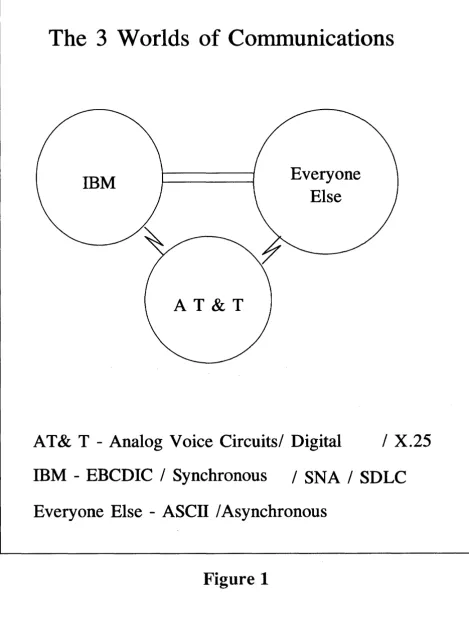
The 3 Worlds of Communications
One could say that there are three independent, yet interrelated worlds of data communications. The American Telephone and Telegraph world is by far the biggest with yearly revenues of over $165 billion dollars. This world comprises the highways and by-ways of voice and data communications. Wherever there is a communications wire between two points, chances ~re that AT&T owns it.
The next biggest world is IBM. With yearly revenues of ovec $40 billion dollars, and about a 65 % share of the mainframe computer market, it is nearly as big as everyone else in the computer business put together. IBM's communications are primarily EBCDIC character based and synchronously transmitted, with either a bisync or SDLC protocol.
When standards regarding communications are set, generally they are patterned after either AT&T or IBM. The third communications world is 'everyone else in the business -of moving information electronically. This world is primarily Ascn character based and asynchronously transmitted. This world has its origins in equipment that has evolved since the 1800's - well before the first electronic computer.
The Micro-to-Mainframe Marketplace
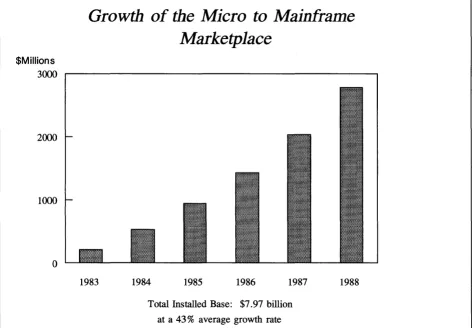
The exciting and demanding new micro-to-mainframe marketplace for communications products is just now starting to explode. In the early days of computers, the market was primarily technology driven. But the micro-to-mainframe market is primarily customer driven. Early users of personal computers in major corporations have helped generate a pent-up demand for methods to access existing data stored in their companies' mainframe computers. As the number of installed personal computers in large businesses doubles and quadruples, so too will the products that connect them to the corporate mainframe computers. International Resource Development has projected the size of this market and it is graphed in Figure 2.
The 3 Worlds of Communications
IBM
AT&T
Everyone
Else
AT & T - Analog Voice Circuits/ Digital
/ X.25
mM -
EBCDIC / Synchronous
/ SNA / SDLC
[image:8.615.70.540.75.707.2]Everyone Else - ASCII / Asynchronous
$Millions
Growth of the Micro to Mainframe
Marketplace
3~ ~---~
2000
1~
o
1983 1984 1985 1986 1987 Total Installed Base: $7.97 billion
at a 43 % average growth rate
1988
Micro to Mainframe Communications Products
Hardware and Software sales for the next 5 years
[image:9.613.74.546.56.384.2]Source: International Resource Development, Inc
Front-End
Processor
3705,3725
3274/76 IBM Cluster Controller
..
.
...
]
[image:10.615.52.573.52.648.2]..
...
..
HOST CPU (370, 303X, 308X)
43XX
Local 3274 cluster controller
System 3X
IBM CLUSTER CONTROLLER
The IBM Big Picture
Figure 3
I~
Chapter 2
INTRODUCTION TO DATA COMMUNICATIONS
A Brief Introduction To The
mM
3270 World
In order to express the significant benefits offered by Appleline and Apple Cluster Controller to the potential corporate customer, it is necessary tp understand the nature of that customer's environment. This brief introduction to that environment is intended to provide that understanding. For those who desire additional depth, a glossary of IBM software and hardware terminology and a guide to IBM product numbering is provided in Chapter 8.
The great majority of large corporations today use large-scale IBM or IBM plug-compatible mainframes as the central computer in their data processing systems. Typically, hundreds or even thousands of CRT terminals and printers are in use on these systems. If all of these had to be handled directly by the mainframe little capacity would remain for actual computing. IBM had therefore chosen to distribute this terminal-handling burden to intelligent control devices (called, simply enough, controllers). Thus, a mainframe rarely communicates directly with a user's terminal or printers, but instead does so through a number of controllers arranged in some form of communications network.
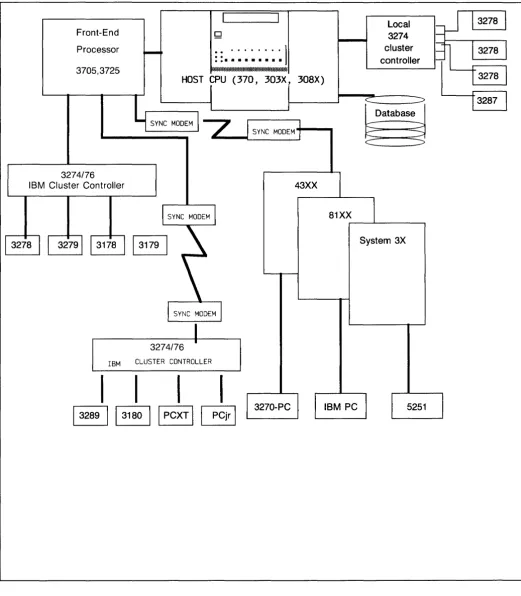
The most widely used communications network type utilizes an interrelated group of controllers, terminals, printers, and miscellaneous devices called, collectively, the 3270 or 327X family. When an IBM mainframe system is installed or expanded, members of this family are arranged building-block style into a 3270 Communications Network. Many such configurations are possible, and a fairly representative one is diagrammed on Figure J. You may wish to refer to this diagram as the individual components are briefly described below.
Remote controllers, as the name implies, are located anywhere from a few miles to several thousand miles away from the host computer site. Remote terminal controllers are not managed directly by the host, but are instead supported by an IBM Communications Controller (sometimes called a "front-end processor" or simply a "front-end"). It is typically a model 3705, though a newer version called the 3725 is starting to appear. Like a local terminal controller, a Communications Controller is channel-attached directly into the host. Remote terminal controllers communicate with the 3705 or 3725 via modems and communications lines (such as standard dial-up phone lines or dedicated transmission lines). A single 3705 or 3725 can be configured to support up to 32 remote terminal controllers in this way.
Local controllers in a 3270 network are typically model 3274's. Remote controllers are typically either 3274's or 3276's. You should note that a local 3274 and a remote 3274 are slightly different models and are not interchangeable. Either one, however, can be configured to support up to 32 peripheral devices (i.e., terminals and printers). On the other hand, a 3276 can only support up to eight peripheral devices. The Apple Cluster Controller emulates an mM 3274176 to the IBM host, but can have either 3 or 7 ports. A 3276 does have a CRT terminal built into it, while a 3274 does not.
Each terminal controller (also called a cluster controller) acts as a communications hub for the peripheral devices clustered in its vicinity. Each peripheral device is connected to the cluster controller with a coaxial cable (similar to that used in cable television connections, and often called just "coax") which may be up to 5,000 feet long. The attached peripheral devices are most often terminals or printers, but various other input/output devices such as card readers and bar code readers are also supported.
A number of different models of IBM printers are used with 3274 and 3276 cluster controllers. The 3287, 3288, and 3289 are fairly common models.
The 3270 series CRT terminals, called terminal workstations in the IBM world, are available in both
monochrome (model 3278) and color (model 3279) versions. Screen size options are available for both models. These options are (columns x rows): mod I (80x12 or 40x24), mod 2 (80x24), mod 3 (80x32), mod 4 (80x43), and mod 5 (132x27). The mod 1, mod 4, and mod 5 options are only available for the 3278. The 3278 and 3279 are each also available in either full-graphics or character-only versions. This is indicated with a suffix as follows: B or G suffix = full graphics, A or no suffix = character only.
As an example, the most common terminal workstation, the 3278 mod 2 (or mod 2A), is a monochrome, 80x24, character-only terminal. This is often represented simply as a model 3278-2 or 3278-2A. The color equivalent of this, which is fairly common, is the 3279-2 (or 3279-2A). The less common 3279-2G
(or 3279-2B) is a color, 80x24 , full-graphics terminal.
The 3278 and 3279 terminal workstations are "dumb" terminals; that is, they have no stand-alone computing capabilities. Replacing them with an "intelligent" terminal which has full stand-alone computing capabilities is very attractive to IBM 3270 Network users.
You should note that a 3274 controller can support both newer 3278/3279 terminals and older 3277 terminals. (3276 controllers do not support 3277's) The 3274 accomplishes this through the use of terminal adapters; Type A adapters work with 3278's and 3279's and Type B adapters work with 3277's.
You will often hear the terms BSC and SNA/SDLC applied to a 3270 environment. These are software protocols, one or the other being used for the transmission of data through a given 3270 Network. BSC, which stands for Binary Synchronous Communications (often called bi-synch), is an older protocol, but remains popular. SNA/SDLC, which stands for System Network Architecture/Synchronous Data Link Control
often called just SNA or SDLC), is more powerful, but also much more expensive. These protocols differ substantially at points in the network. However, the protocol used between a cluster controller and a 3278 or 3279 terminal is essentially the same in the BSC and SNA/SDLC environments.
Protocols and Protocol Converters
Protocols are established rules governing communications. Whenever two pieces of equipment are connected together, certain rules must be preset in order for communications to take place. Transmission speed, how to verify connection, the organization of one's and zero's to identify characters, which characters are control characters, and which are data, and so forth, are just a few of these rules.
Therefore, a protocol provides a method for the orderly and efficient exchange of data by establishing rules for the proper interpretation of controls.
ASCII asynchronous communications are one type of protocol and EBCDIC synchronous BSC and SNA/SDLC are other types of protocols.
Some of the key tasks of a communications protocol are: • Specify the Code Set - i.e. ASCn or EBCDIC
• Specify Data Format - Asynchronous or Synchronous - Full or Half Duplex • Initiate and Verify a Communications Connection
No
Parity
Start 1 2 3 4 5 6 7 8 Stop
~ ~:~e~
______________________
rl~
____
~~
+-
ASCII - Character Code for "A"
2 3 4 5 6 7 8
1 Mark
o
Space+-
EBCDIC - Character Code for "A"
Start Character Stop Start Character Stop Start Character Stop
1
...
1 _---.1 ... 1
+- ...
1 ....
1 ______
1
... 1
+-
1
...
1 _---.1 ... 1
Asynchronous Transmission
Sync Sync SOH Header STX Data ETB BCC BCC Sync Sync SOH Header
1
1
1
1
I
I
1
I
Bisynchronous Transmission
Begin Frame End Begin
Flag Address Control Information Check Flag Flag Address Control Information
8 Bits 8 Bits 8 Bits Multiple of 8 Bits 16 Bits 8 Bits
Synchronous Data Link Control (SDLC) Transmission
Customers' Requirements:
The integration of microcomputers, either as personal computers or as intelligent workstations, into the data processing environment of major organizations--corporate, governmental, and institutional--became a key issue of the data processing industry during 1983. The question is not whether microcomputers should be integrated into mainframe environments, but rather how this integration can best be accomplished for the most efficient utilization of an organization's computing resources.
The first generation of personal computers communicated through very slow 300
bit-per-second modems and were used primarily to link to the new information utilities. After 1980, however, as VisiCalc revolutionized the corporate professional's working methods, a major change began to occur. A demand for access to corporate information stored in mainframe data bases began to grow. It was led by managers and professionals who found that re-entering data from printed spreadsheets wasted time and effort when the same data was already stored in digital form on the corporate mainframe. During the past two years, the demand for access to mainframes through micros has reached a crescendo.
In making an attempt to replace DEC and IBM terminals with microcomputers, it is important to understand the different types of users and what their needs are. Following is a brief profile of the various terminal users and how we best answer their needs.
The 4 Types of Users:
1. Casual - The casual user is usually a professional, who has minimal requirements for accessing the mainframe. He/She may query a database once or twice a day, he/she may use an electronic mail system, and check the prices of securities. Even though the requirements are small it is important to have this capability at his/her fingertips. These users are perfect candidates for the kind of capabilities Apple offers in the area of data communications. They usually do not want a lot of equipment on their desk; therefore, the concept of the integrated workstation is very attractive.
2. Clerical - POWER ENTRY! This user probably spends about 7 112 out of 8 hours in a day at his/her terminal inputting data. Therefore the user is always in terminal mode. He/she may input inventory
when he/she is terminal mode and then re-keying the data into the spreadsheet. This powerful integration provides all the processing power right on the desktop. The professional is an ideal candidate for the sale of Mac's and Lisa's, which integrate the personal computing functions required by the individual and the terminal software with Appleline or Apple Cluster Controller to give him/her access to the mainframe.
Apple Personal Computers as Intelligent Terminals
Since Apple computers are programmable, they can emulate many different types of terminals, the most common being the DEC VT-IOO.
The IBM 3278 and 3279 display stations are dumb terminals. Replacing them with
an intelligent terminal which has full stand-alone computing capabilities is a very attractive solution to IBM 3270 Network users. The most common of the IBM 3278's and 3279's can be replaced by an Apple Computer and a terminal emulation device. In particular, the IBM 3278 model 2, monochrome, character-only terminal, with a typewriter-style keyboard, is easily replaced by an Apple personal computer.
The biggest advantages and benefits for using personal computers as intelligent terminals instead of using dumb terminals are:
• Cost Advantages
• Ease of use with Lisa Technology, Mice and Pull-Down Menus • Downloading and Remote Storage of Information
• Remote Processing
• Creating, Editing and Uploading of Information • Elimination of Duplicate Equipment
• Eliminate Re-keying of Information
• The Capability of End-Users Writing Their Own Programs • Remote Mainframe Program Creation, Testing, Updating. • Running Applications Not Available on Mainframe Computers
Terminal Types:
The following is a list of the most popular terminal types, beginning with IBM models and followed by mode. 3178 Models C1 and C2. Replacements for the 3278
3179 Color replacement for the 3279 3180 Monochrome replacement for 3278 3275 Discontinued Models 1,2,11,12,
3276 Control Unit Display Station. Models 1,2,3,4 11,12,13,14. 3277 Model 2 Display Station
3278 Models 2 3 4 5 Display Station 3278 Personal Computer Adapter
3278 Attachment Option. An adapter in the IBM PC to interface wi 3278 keyboard 3279 Color terminal Models S2A, S2B, S3G, 2X, 3X
3280 Display Station replacement for 3278 3290 Plasma Information Panel Display
5150 Personal Computer. 3770, 3101 3278 emulation
5160 Personal Computer XT/370. Models 568 and 588. 3277 and 3101 emulation.
5251 Model 11112 Terminal for the System 34, 36 and 38 5271 3270 Personal Computer
Terminals from other manufacturers:
ADDS Regent 25,60, Viewpoint 60, 78, 90, Executive 80, V210 Ampex 80,81
Anderson Jacobson 510,520, APL Beehive DM5, DM78, Topper
Burroughs SR 110, TD830, MT983, ET 1100, ET 2130/2230
Data General Dasher D-I00, D-200, D-400, 6052, 6053 DEC VT52, VT-61,VT100,101,102,125,131,132, VT200 Esprit 78,51
Hazeltine 1400's and 1500's, Esprit
Hewlett-Packard 86, 125, 2621, 2622A, 2624, 2626, 2641, 2645A Honeywell VIP 7700, 7800
Lear Siegler ADM-3A, ADM-5, ADM 11, ADM 12, ADM 24E, 31 NCR 501, 796, 7900, Model 3, NCR-I, NCR-4
Microdata Sequoia and Reality Perkin Elmer 1251
Prime PT45, PST100 Renex 278, 378,379 Soroc IQ-120
Sperry Uniscope 100, U200, UTS 20
Tektronix 4010 Series 4010,4012,4014,4016 and 4662 Option 31 Televideo 900 Series
Teletype Corp TTY KSR 33, 43, 5420 Texas Instruments 911
THE
BIG
PICTURE
USING
APPLES
AS
TERMINALS
NCP, PEP, OR EP (SFTWR)
APPLE LINE
Local
3274
cluster controller
[image:19.617.44.547.39.743.2]Chapter
3
APPLE SYNCHRONOUS PRODUCTS OVERVIEW
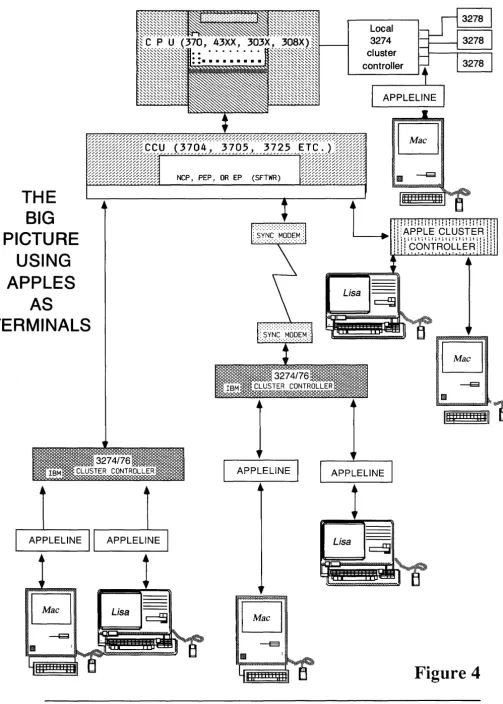
Following is a description of two solutions, Appleline and Apple Cluster Controller (ACC), for
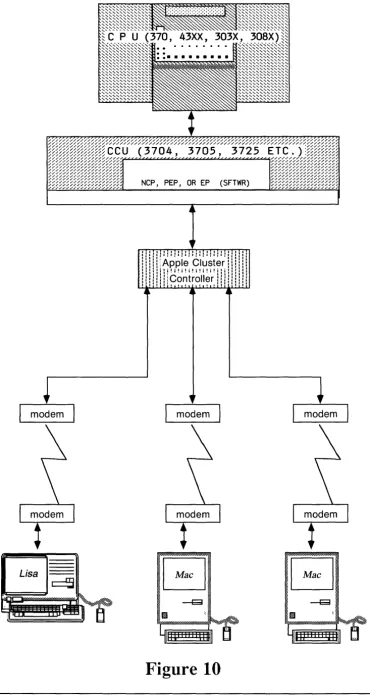
using your Apple computer as an IBM 3278-2 terminal. Refer to Figure 4 for a visual
representation of where they fit in the IDM environment.
What is Appleline?
Appleline is a powerful, cost effective solution to terminal emulation and protocol conversion
device that allows Apple computers to communicate in an IDM mainframe environment. Appleline
allows Apple computers to emulate the functions of the 3278-Model 2 (3278-2) terminal (with
typewriter-style keyboard).
Where does Appleline Fit?
Appleline is installed at a controller site via a direct coaxial cable connection to an IBM 3274, 3276,
or integral terminal controller with Type "A" adapters. 3274 controllers can have either Type "A"
or Type "B" adapters but 3276 controllers will have only Type "A". The protocol used between the
IDM
3274/76
and the 3278-2 terminal is essentially the same in BSC and
SNA/SDLC
environments. Appleline operates with BSC or
SNAISDLC
linked 3274 controllers that are either
channel-attached or remote. The Apple computer communicating with the 3274 controller via the
Appleline can be either remotely attached to the Appleline using a full-duplex modem or directly
attached to Appleline by an RS-232 cable.
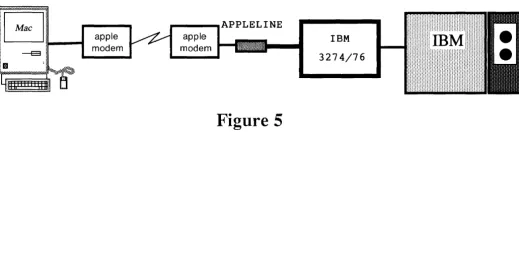
The two configurations described above for Appleline are described
in
Figure 4.
Corporations with large 3270 installations win find this solution attractive because it allows them to
preserve their investment in coaxial cable. Customers who already have existing 3270 controllers
can simply replace a
32'78
display with an Apple and Appleline without changing host software or
network configuration.
The Appleline solution expands the potential market for Lisa's and Macintosh's because it allows
access to channel-attached 3270 controllers.
It
is estimated that 50% of the installed 3270
controllers are connected to the IDM mainframe via its channel (direct to host).
How does Appleline Work?
Appleline's on-board, high-speed microprocessor (8x305) handles the 3270 coaxial protocol. A
second microprocessor handles the RS-232 protocol independently.
Appleline's 3278-2 emulator package includes a menu-driven configuration routine. This routine is
used to establish the communications requirements for the attached device and to select the
passwords for Appleline. There is no additional software or special network configuration needed
to accomodate Appleline.
To aid in the security of the network, multi-level password selection is provided in the
configuration process.
Appleline Feature/Benefit Summary:
Feature:
Coaxial cable protocol connector which works with mM 3270 controllers (3274/6).
Benefit:
Allows Apple Computers to attach to BSC to
SNA/SDLC
networks.
Preserves coaxial investment.
Feature:
Allows Apple Computers to emulate IBM 3278-2 terminals.
Benefit:
Transforms a Macintosh, Lisa, Apple II, or Apple III into a multi-functional
workstation. Network flexibility.
Feature:
Muti-level password scheme: one supervisor and 4 users.
What is an Apple Cluster Controller?
The Apple Cluster Controller (ACC) is a stand-alone device manufactured by Protocol Computers,
Inc. (PCI). This unit allows up to 7 serial devices--Apple Personal Computers, Imagewriters,
Daisy Wheel Printer, or Scribe Printer to be attached to an IBM 3270 network. These devices are
connected to the ACC via serial (RS-232C) ports. The ACC "looks like" an IBM 3274 or 3276
cluster controller to the IBM network.
How _does the Apple Cluster Controller work?
The ACC communicates to the IBM mainframe with either IBM Binary Synchronous
Communication (BSC) protocol, or IBM System Network Architecture/Synchronous Data Link
Control
(SNA/SDLC) protocol. (different ACC versions are required)
It,
in tum, communicates to
Apple systems using a DEC VT -100 asynchronous ASCII protocol, instead of the 3278
high-speed coaxial protocol. In simple terms, the ACC acts like an IBM 32711 32741 3276 cluster
controller to the IBM mainframe. On the terminal side, the ACC connects to almost any
asynchronous serial terminal device. The Apple personal computers communicate to the ACC with
VT-100 type protocol.
The ACC is an 8 bit Z-80A-based microcomputer configured with 16KB of ROM and 32KB of
RAM. Each unit is equipped with its own internal power supply.
Apple Cluster Controller
Feature/Benefit Summary:
Feature:
Benefit:
Feature:
Benefit:
Feature:
Benefit:
Feature:
Benefit:
Enables Apple Computers to emulate an IBM 3278-2 terminal and 3287-1 printer
attached to a 3271,3274, or 3276 cluster controller, either locally or remotely
attached with either BSC or SDLC protocols.
Allows users access to mainframe database information.
Has diagnostic testing built-in for power-up and line monitoring.
User is assured equipment is functioning properly when it is turned on and while it
is operating.
Xon/Xoff flow control for printer operation.
Printer functions at maximum speed without loosing characters.
Communication speed up to 9600 bps.
Chapter 4
QUALIFYING THE PROSPECT
Selling Appleline and the Apple Cluster Controllers
Wherever IBM mainframes, Apple personal computers, and 3270 peripherals are found, Appleline and Apple Cluster Controllers are a great potential sale. Because of IBM's considerable marketing power, the list of qualified organizations includes the vast majority of governments, universities, financial institutions, utilities, and the coveted Fortune 1000 companies. The list doesn't stop there, however. The recent popUlarity of IBM's low-cost 4300 series mainframes has delivered 3270 Networks into the hands of tens of thousands of smaller concerns as well. In short, 80 % of all medium to large corporations are probably prospects for Appleline, Apple Cluster Controller and the Apple personal computers it allows to attach.
Further qualifying should guide you towards the people in these organizations who can benefit most directly from Apple personal computers. Current Apple application programs support two major groups of users: executives and data processing professionals.
The executives are decision-makers whose jobs depend upon information. Often the information can be found on the organization's mainframe. The ability to access and process that information on their own Apple personal computer is extremely attractive to these people. They are prime candidates for Appleline sales. The DP people create and use tools to access mainframe information. Though their own needs may not be great, they are still tremendously valuable to your sales campaign since they are developing tomorrow's tools for the executive. Their support is invaluable, and your greatest successes will come from customers whose DP shops are sold on Apples as terminals.
The most important selling points of Apple computers connected to Applelines or Apple Cluster Controllers are:
Appleline:
1. Combines easy-to-use Apple personal computers with the IBM mainframe environment. (BSC or SNA/SDLC)
2. Transforms your Macintosh, Lisa, Apple III, or Apple II into a multi-functional workstation.
3. Network flexibility through dial-up capability (which cannot be done with an IBM 3278-2).
4. Preserves investment in coaxial cable.
5. If customer is currently tying ASCII terminals to IBM mainframes through the use of NTO software on the front-end controller. (NTO is very expensive and usually leased by customer--refer to discussion on NTO in the following section on WHEN TO SELL APPLE CLUSTER CONTROLLER OR WHEN TO SELL APPLELINE).
Apple Cluster Controller:
1. Combines easy to use Apple personal computers with the IBM mainframe environment (BSC or SNA/SDLC).
2. Provides less expensive solutions to users of IBM mainframe computers. 3. Provides IBM mainframe users with more flexible network hardware solutions. 4. Dial-up capability allows users access to the IBM network from remote locations. 5. If customer is currently tying ASCII terminals to IBM mainframes through the use of
Network Terminal Option (NTO) software on the front end controller. (NTO is very expensive and usually leased by customer--refer to discussion on NTO in the
When To Sell Appleline:
Customer has an existing (or is about to purchase) a 3274 or 3276 cluster controller with type A adapters. Customer has a channel-attached controller (approximately 50% of IBM mainframe world is
channel-attached--Refer to Figure 2). ACC's do not connect to 3274's. Customer wants a coaxial connection.
Customer has a fully loaded 3705 or 3725 and wants to connect a personal computer to the IBM network. Customer has NTO (defined in glossary) on front-end to handle protocol conversion of ASCII terminals. NTO is a very expensive software extension to NCP, which customers lease and Appleline eliminates the need for NTO. If an organization has NTO on their front end, they are an excellant prospect for the sale of Apple systems.
When To Sell Apple Cluster Controller:
Customer is cost-conscious and wants cheapest connect cost per attachment. A 3 port ACC cost's $2,900, compared to 3 Appleline's, which would cost $3,885.
Customer has 3 or more personal computers in a remote location (not near an IBM 3274176) and needs to dial into an IBM network asychronously.
Customer wants to replace IBM 3274176 to have personal computers as terminals on the network. Customer has various types of personal computers and wants to hook them all up to the same protocol converter.
Customer has NTO (defined in glossary) on front-end to handle protocol conversion of ASCII terminals. NTO is a very expensive software extension to NCP, which customers lease and Appleline eliminates the need for NTO. If an organization has NTO on their front end, they are an excellant prospect for the sale of Apple systems.
Customer needs to hook up printers directly to the converter or Apple computer.
APPLE SYSTEMS VS. IBM PC FAMILY
ffiMPC
Hardware (256K)
IrmaCard
Total
ffiM PC/XT
Hardware (256K)
IrmaCard
Total
mM 3270 PC
Appleline
$2420
$1195
$3420
$4395
$1195
$5395
Hardware (256K)
$3785
Hardware (512K)
$4650
SCENARIO I
Replacing IBM
Communications Equipment
Assumed System Configuration with IBM Equipment:
[ Host
CPU
J.- [
3705FoE.Po
J.-
6 IBM ClusterControllers
Same Configuration with Apple Equipment:
[ Host
CPU
J.- (
3705FoEoPo
J.-
7 Apple ClusterControllers
7 3278 Terminals,
1 3287 Printer
per Cluster Controller.
Total: 42 terminals,
6 printers
6 Macintoshes,
1 Printer
per Cluster Controller.
Total: 42 terminals,
SCENARIO I
Increnlental Cost COnlparison
*
(Software not Included)
mMCPU
Fr. End Processor (3705)
6 Cluster Controllers
Terminals (3278's, Mac's)
Printers (mM' s, ASCII)
Total Incremental Cost
Added Convenience of
Having a P.C.
IBM Solution
N/A
N/A
$ 36,000 ($6000 x 6)
$ 96,600 ($2300 x 42)
$ 36,000 ($6000 x 6)
$168,000
No
NOTE: Average savings per Apple Cluster Controller:
$24,400 - 7
=
$3,485. (Worth 1 additional PCplus software and printer.)
~~ple Solution
N/A
N/A
$ 34,300 ($4900 x 7)
$105,000 ($2500 x 42)
$ 4,900 ($700 x 7)
$144,200
Yes
* Items used in both solutions not included (e.g., 4800 baud modem included in both solutions; therefore, no incrsmental charge for Apple).
Savings with
~~ple
N/A
N/A
$ 1,700
$<8,400>
$31,100
CPU
F.E.P.
ffiM 3274
Terminal
3278 Emulator
(Irma, AppleLine)
Total
Incremental Cost
SCENARIO
II
Using AppleLine & Macintosh
vs.
ffiM PC & Irmacard
IBM 3278 IBM PC (256K)
N/A
N/A
N/A
N/A
N/A
N/A
$2,300 $2,420
N/A
$1,000$2,300 $3,420
Apple
Macintosh
N/A
N/A
N/A
$2,500
$1,295
IBM SYSTEM EQUIPMENT PRICES*
IBM Front - End Processor
$46,600/10 lines
· Comes with 10 to 312 lines.
IBM 3274 Cluster Controller
$ 6,000
· Can accomodate up to 32 terminals.
· Typically contains 7 terminals, 1 printer.
· Cost per port: $750
IBM 3278-2 Terminal
IBM 3287 Printer
Model 1 (80 cps)
Model 2 (120 cps)
$ 2,300
$ 4,830
$5,150
*
Obtained from IBM product center. Prices do not include
Comparative Pricing of Personal Computer Systems
with 3278 Terminal Emulation Capability
Remote Configuration
mM 3178 mMPC
3270 PC
Macintosh
Terminal
$1650
$2505
$5285
$2495
3278 Emulator
$240
$1295
PC Attachment
$2400
Comm Software
$700
$700
$99
Modems & Cables
The Following are the current prices for Appleline and Apple Cluster Controller: Appleline:
Apple Cluster Controller: 3 port
7 port
$1,295
$2,900
=
$966/port$4,900 = $700/port
Total System Prices - Applelihe MAC
Mac
Macterminal Appleline $1,295 TOTAL
APPLE lie
$2,495 Apple I Ie
$ 100 Super Serial Card Access II $1,295 Appleline
$3,890 TOTAL
Total System Prices for Apple Cluster Controller - Per port price using price of 7 port ACC
MAC APPLE lie
Mac $2,495 Apple lie
LISA $1,295 Lisa 2110 $ 140 Lisaterminal $ 75 Office System $1,295
$2,795 TOT AL
$1,395 Macterminal $ 100 Super Serial Card $ 140
ACC $ 700 ACC TOTAL $3,295 TOTAL
IBM 3278-2 terminal is currently priced at: $2,382 IBM 3274 controller is currently priced at: $5,587
price per port: $ 699
$ 700 $2,235
$5,495 $ 295 $ 295 Appleline
$7,380
LISA Lisa 2/10
Lisaterminal Office System ACC
TOTAL
Chapter 5
HOW TO DEMONSTRATE THE PRODUCTS
The following is a guide to assist you in demonstrating the Appleline and Apple Cluster Controller.
Preparation and set up procedures are covered to assure your success. Appleline will be covered
first followed by the Apple Cluster Controller.
Appleline:
Pre-demo preparation at customer site
There are various ways to demo Applelines to your customer. The most effective way is to tie the
Appleline into the customers existing mainframe environment so that he/she can be assured that the
two work together. It has a great effect on the customer see his IBM mainframe screens appear on
the Apple computer. The other way is to subscribe to a timeshare service and tie into it. There is a
section to follow on tieing into a timeshare service.
At this point, we will assume you are hooking up to the customers mainframe. There are two
things you must ensure before you decide on an Appleline demo, they are:
1. There is a 3274/76 IBM cluster controller with type "A" adapters.
2.The IBM controller has a port generated for a 3278 model 2 terminal with typewriter keyboard.
If
the answer is no to this question then you must work with the systems programer in charge of
communications to gen a line for a 3278 model 2 in order to assure proper functioning of the
Appleline.
When both of the above are ensured you may go on to the actual preparation of the equiment at the
customer site.
There are two possible set ups for the Appleline:
1). With the Appleline near an Apple computer (Refer to Figure 4) and;
2). With the Appleline away from an Apple computer (Refer to Figure 5).
The configuration with the Appleline near your Apple is covered first and the latter covered
second.
Equipment needed:
1.
Appleline
2.
Apple serial cable
3.
Gender changer provided with the Appleline
4.
Coaxial cable up to 5000 ft. (customer usually provides this)
5.
Wall mounting transformer, provided with Appleline
6.
Self-test plug (loop back plug), provided with Appleline
7.
Communications software; the following is a recommended
software list to be used with the various Apples:
LISA - Lisaterminal
Macintosh - Macterminal
Apple
II -
Access
II
Apple
III -
Access 3270 or Access
III
In
addition to the above items, the following equipment is needed when hooking up Appleline
away from your Apple:
1.
Set of full duplex, asynchronous modems (Apples modems work
perfectly).
Installation steps for an
Appleline near an Apple computer
1.
Connect coaxial cable to Appleline connector labeled controller.
2.
Connect the other end of the coaxial cable to the
3274/76 configured
for a 3278-2 terminal with a typewriter keyboard.
3.
Connect wall mounting transformer to port labeled 24V AC and to
power source in wall. (when Appleline is on
it
consumes 50 watts
of power, as much as an electric clock)
4.
Tum on Apple computer and create a document from the appropriate
terminal software.
Appleline away from an Apple computer:
If
an Appleline and an Apple computer must be more than 5 meters away from each other (in order
for the Appleline to reach the IBM Control Unit), they can not be connected with ordinary cable.
They must communicate by means of telephone lines and a pair of asynchronous modems, like the
Apple Modems. In this case, attach one Apple Modem to the serial connector on the back of
Appleline and a second Apple Modem to the serial connector on the back of your Apple computer.
The Appleline is still connected to the IBM 3274/76 controller via coax cable the same way it was
described above. For instructions on operating the Apple Modem 300/1200, consult the
appropriate manual. Once the installation of the modems is complete, the rest of the set up is the
same as in local connect, eliminating step 3 of installation procedures.
7.
At this point there are a few avenues to take; we will make the assumption the Appleline has
never been used and therefore there are two procedures which must be performed These are:
a.
Sending the autobaud message
b.
Using the supervisor program
Once this has been done it is not necessary to do it again.
Power on the Appleline (switch is located on right side, switch to 1 )
Initially the red, green, and yellow LED's (on front) all blink.
The red LED then goes out.
Finally, the yellow and green blink alternately;
Appleline has gone through its self test sucessfully.
8.
a.
Press the BREAK key (labeled ENTER to the right of the space bar)
then press the RETURN key. This is the autobaud message.
b.
Your Appleline will respond by displaying an identification line across the top of your
screen, followed by this message:
Press RETURN to begin log-on sequence.
9.
a.
Press RETURN . Your Appleline will reply with this prompting:
Enter . Password:
b.
Type APPLES and press RETURN.
A terminal type must be selected before you continue.
Possible selections:
A - Lisaterminal
B - Macterminal
C - Access 3270
D -
VT100
Your selection [Lisaterminal]:
The Lisaterminal in brackets means that it is the default setting. For practice we'll change the
terminal to Macterminal, assuming we are using a Macintosh to communicate and not a Lisa.
c.
Press B and RETURN.
This tells the Appleline that you are using Macterminal to communicate with it.
Your Appleline will reply with this prompting message:
Current terminal type is "Macterminal".
Is
this correct [Y]?
d.
Press RETURN.
Pressing RETURN accepts the default response shown inside the brackets
(in this case the default is Y, which stands for yes).
Your Appleline will reply with this prompting message:
Appleline Supervisor Logged-ON
Possible selections:
A - Display terminal type and modem settings
B - MOdify terminal type and modem settings
C - Change USER or SUPERVISOR passwords
D - Log-off and hang up modem
E - Log-off and return to logon screen
At this point you can make any of the above 5 selections to:
A - Display the communications parameters stored in Appleline
for the communication between the Apple and Appleline.
B - Modify the communications parameters stored in Appleline
for the communication between the Apple and Appleline.
C - Change the default passwords (supervisor or any of 4 user).
D - Log-off the supervisor program.
E - Log-off the supervisor and return to Appleline screen.
Select option "A" to make sure the default settings meet with your requirements. If the default
settings do not match your needs, select option "B" and run through all of the currently stored
options by pressing return to accept or by selecting the proper option and then pressing return to
accept.
Refer to the Appleline User's Manual (Chapter 3 part 1) for specific infonnation about Appleline
parameter definitions.
9.
At this point you can make selection "E" and log-on to Appleline and
begin demonstration.
Demonstrating Appleline:
1.
Press RETURN to begin log-on sequence. Appleline responds by asking
for your password:
Enter password:
2.
Type your user password.
If
no special password has been established through the
supervisor program you can use any of the 4 provided by the default settings of Appleline; they
are:
APPLE!
APPLE2
APPLE3
APPLE4
3.
When the Appleline recognizes your password, the screen will go blank and then a new
message will appear on it, transmitted from the IBM mainframe. NOTE: If the Appleline does not
recognize your password, it will ask to enter it again After 3 attempts, the Appleline will ignore
further password attempts for 20 seconds.
Apple-to-Using Your Apple Computer Like an IBM Terminal
Now you can start using your Apple keyboard and monitor screen as if they were the keyboard and
screen of an IBM Model 3278-2 terminal. The Operator Information Area, by which the IBM
system informs you of its status, will appear as the bottom line on your (24 line by 80 column)
Apple screen. (To see the twenty fifth line of the IBM 25 line by 80 column display, press the
ESCAPE key twice.
Special IBM Keys
The Model 3278-2 terminal has keys with special labels on them ("ATTN," "SYS REQ," etc.)
which do not exist on your Apple keyboard. However, all their functions are still available. To
achieve the same result with your Apple as you would by pressing these keys on a 3278-2
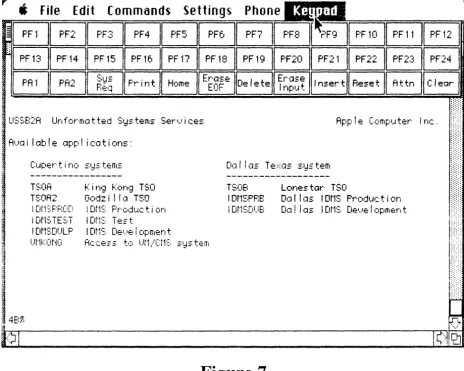
terminal, you use a combination of keystrokes. These combinations are listed in Figure 9. In
addition, Macterminal has a built-in pictoral keypad which allows you to select the IBM keys (also
referred to as PF keys) by pointing and clicking with the mouse. (Refer to Figure 10).
5.
Logging-off:
A.
Have customer log-off of his/her IBM environment.
B.
There are 3 different log-off procedures you can use
to terminate a work session with your Appleline,
depending on what you have been doing and what
you want to do next. They are as follows:
a.
If
you have been working with the mainframe
and want to quit, just break off communication with
your Appleline. How you break off communication
depends on how your Appleline is connected:
b.
If the Appleline is connected directly to your Apple
computer, simply quit the communication program
you have been using.
If
you are not sure how to do
this, consult the user's manual for your
communication program.
If
you have been working with the mainframe and want to switch to your Appleline's supervisor
program, log the mainframe first and then press ESCAPE and then hold down CON1ROL and
press
z.
Your Appleline will display the message:
Appleline User Logged OFF
but will not discontinue communication. Twenty seconds later, it will automatically return to the
start of its log-on sequence. At this point you can log back on the Appleline with the supervisor
password.
Subsequent Demonstrations of Appleline:
Assuming the default parameters have been defined, subsequent use of Appleline does not require
resetting the parameters. Therefore, when Appleline receives power, the user will be prompted to
enter the password. Enter the user password.
If
the password is acknowledged by Appleline,
communication with the mainframe is established.
Problems During and After Installation
If you have any problems with Appleline in bringing it up during and after installation, there are a
few things to be aware of.
Baud Rates:
1. If a line of garbage appears on the screen, the baud rates on Appleline and the terminal emulator
do not match.
Solution: Appleline will autobaud by pressing the break key for several seconds and then hitting
the enter key. If it doesn't work the first time,
try
again.
Framing Error:
2. Again the baud rates do not match. Try autobauding first. If this does not work, reset
Appleline with the loopback plug (comes with the Appleline). This will set the baud rate to 4800.
Set the terminal software to 4800 and
try
connection again. Following is the procedure for using
the loopback plug:
a. Tum your Appleline's power switch to OFF.
b. Unplug its connection to your apple computer.
c. Replace the plug that went to your Apple with the loop-back plug.
d. Tum the power switch ON.
To get around the problem in the meantime, a reset will clear it. This should be CONTROL-R.
Other strange numbers may appear on the status line. First check and make sure you are connected
to port 'gened' for a 3278 model 2 or 3279 mode12A with typewriter keyboard.
Anytime you get a -F, you've typed on the keyboard before the controller is ready for you. A reset
(control and R) should clear it.
If
your screen is blank with a blinking cursor even after depressing the escape key twice. You are
not getting a connection to your controller. Controller connection will always give you a 4A, 4B,
6A or 6B in the bottom left comer of the screen.
Solution:
A - Check coax connection
B - Check coax wire for breaks
C - Change coax
D - Check RS-232 connections
E - Check RS-232 for breaks
F - Repair or change RS-232 cable
Apple Cluster Controller:
Pre-demo preparation at customer site:
The following discussion assumes that you will be tying the Apple Cluster Controller (ACC) into
the customers existing network. If you will be tying into your own system or a timeshare service
then you will work out your own set-up for the ACC based on your services requirements. Tying
into your own system has one advantage in that you need only set up the hardware once, however,
it is not as convincing to the customer as tying into the customers existing network.
Before installing your Apple Cluster Controller, you should have a discussion with the operator of
the IBM host computer. He/she will need to inform the host Network Control Program (NCP) of
the addition of your ACC. Tell the host operator which ACC model you are going to install so that
he/she can properly SYSGEN the host computer. Changes to the NCP when a Model 76 is added
are the same as those required when an IBM 3276/12 or 3274 is added. Changes when a Model
71 is added are the same as those required when an IBM 3276/2 is added.
You also need to indicate to the systems programmer the type of devices which will be hooked up
to the ACC.
If
your computer will be emulating a 3278-2, you indicate to the programmer that the
device to be attached to the ACC is a 3278-2. If you are hooking up a printer, then you indicate to
the programmer which ports on the ACe should be reserved for the printer.
The host operator will inform you of your user ID and password, and of any operating
characteristics you need to know about in order to properly set up and configure your ACC to
communicate with the IBM host.
If
the customer has only a channel attached IBM controller, you cannot disconnect their controller
and hook-up an ACC, the reason being that there is not channel cable connectors on the ACC.
(If this is the case perhaps the solution is an Appleline).
Setting up the equipment for demo at customer site
Equipment Needed:
1.
Apple Cluster Controller
2.
RS232 cables (one for each computer or printer hooked up)
3.
2 RJ-11 phone cords
4.
Power cord
5.
Terminal software; the following list is recommended to be
used with the various computers:
Lisa - Lisaterminal
Macintosh - Macterminal
Apple II -
Access II
Apple III -
Access III
There are three possible set ups for
the ACC.
Deciding on Your Set Up
Your next step is to decide how you are going to physically set up your ACC and Apple computers
andlor printers. You need to think about where they will be located and how you will assign
printers.
Device Location
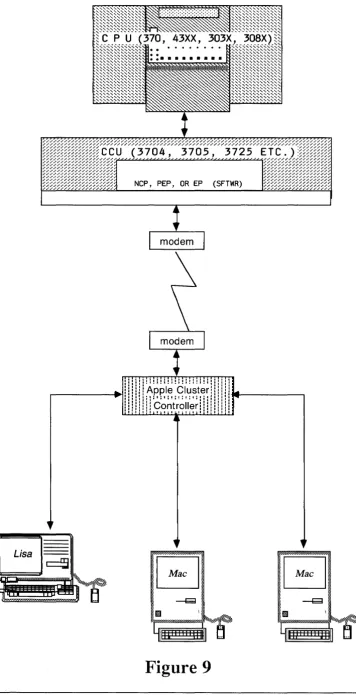
You can locate your ACC either in the same computer room as the IBM mainframe host to which it
is connected or in a remote location. The former set up permits the fastest communication with the.
IBM host. You can connect your ACC to as many as seven Apple computers or six printers,
either directly or through individual asynchronous modems if you want to place your computers
andlor printers in remote locations.
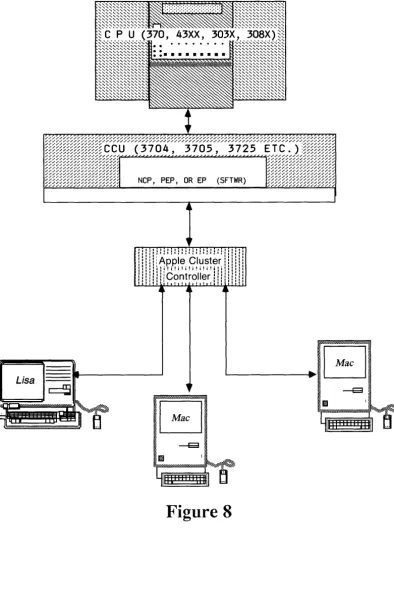
These options give rise to three possible set ups. The IBM mainframe host, the ACC, and the
Apple computers and/or printers can all be located in the data center. In this situation the ACC is
directly attached to the front end processor (3705, 3725, etc.). (Refer to Figure 12).
SNA/SDLC (or BSe) Port
The first set of questions pertain to the SNA/SDLC (or BSC) port.
1.
How will the ACC be connected to the IBM front-end
processor-directly, or through a modem?
2.
Does the IBM host use NRZI format coding?
3.
What is the polling address of the ACC? (This is normally a
two-letter hexadecimal code, and should be the same address
code as that of the IBM front-end processor).
4.
At what speed will the IBM host be operating? (This speed is
normally specified in bps, and can be 1200, 2400, 4800, or 9600).
Asynchronous Ports:
The second set of questions pertain to the asynchronous ports.
1.
Will the ACC be connected to the Apple computer/printer directly, or through a modem?
2.
Do you want to set the port to autospeed? (Automatic speed detection) Autospeed allows the
incoming data to set the speed of the ACC port.
It
is used when a port is connected to a
modem whose data rate may change; usually between 300 and 1200 bps.
3.
At what speed will the port be operating? (This speed can be 300, 1200, 2400, 4800, or
9600 bps; however,
if
a port is set to autospeed, then it must be set to 1200 bps).
4.
Will a printer be connected to the port?
5.
If
so, what is the delay requirement of the printer?
Configuring The Hardware
Once you and your customer have determined the configuration requirements, you must configure
the ACC hardware itself to meet your specifications. Ideally the hardware configuration itself
should be done before the day of the demo. The set up is not difficult, but it looks a little messy;
therefore, you may want to spare the customer from this task.
Refer to the Cluster Controller User's Manual (A9L0301) Part 1: Reference, pages 16-23 for the
details on the ACC configuration. Configuring the hardware requires you to take off the cover of
the ACC and set quite a few switchs, etc. The ACC manual diagrams the internals very well.
NOTE:
If
you will always be demoing your own ACC via a timesharing network to which you
have subscribed, you need only set up the ACC once to meet that system's requirements.
Installation Steps
1.
Place the ACC in its operating position. Make sure that all the cables
you are planning to use can reach the rear of the unit.
2.
Connect the cable coming from the mM front-end processor (either directly or through a
synchronous modem) to the SNAISDLC (or BSC) port on the rear of the ACC.
3.
If
you are planning to use an asynchronous modem to connect either printers or Apple
computers to the ACC, make sure that the modem is set as follows:
Orginate mode
Full duplex
Speed set to match the printer or computer.
4.
Connect the cables coming from your Apple computers, printers, or modems to the
asynchronous ports. Secure the cable connectors to the ACC.
NOTE: There is no need for modem eliminator cables in this set up.
5.
Make sure that the POWER switch is turned OFF. Then plug the power cord into the
connector marked 115 V AC 60 HZ at the rear of the ACC. Plug the other end of the cord
into the wall outlet.
Demonstration of the
Apple Cluster Controller:
1.
Power on appropriate computer and create a terminal document with the proper settings.
(Refer to diagram) (If the ACC is linked to the Apple computer via an asynchronous
modem you must establish communications with the ACC at this point).
2.
Power on the ACC and wait for self test to finish (green light on front panel will go on when
complete). The following ACC banner message is displayed on your screen:
«AppJe/SSS-N VY,Z AA
BB CC DD RRRR TTTT LU:X»
This banner message gives information about your ACC's configuration:
Message Component
SSS
N
VY,Z
AA
BB
CC
DD
RRRR
TTTT
LU:X
Meaning
SNA for Model
76
BSC for Model 71
Number of ports recognized
by the ACC
Internal software version number
Y is a number
Z
is a letter
SWO address setting of
SNA/SDLC
or BSC polling address
SW
1 terminal type setting
SW2 prompting and autospeed
detection settings
SW3 printer optionsetting
Current retransmission count
from host to ACC
Current retransmission count
from ACC to host computer
Refers to local address of the terminal
3.
The terminal type must be identified to the ACC. Press ESCAPE CONTROL-B and the
ACC displays a list of terminal types and asks you to choose one. Your response will
depend on what type of Apple computer you have.
4.
Press ESCAPE CONTROL-D, you will get a prompt:
«Enter XID:»
5.
If
you are communicating from the ACC to the front end via a synchronous modem you
must establish communication at this time.(Sync modem set-up: plug modem to AC line (set
switch on front plate to talk, phone line goes to connector on back of modem labeled DIAL
LINE, plug phone into connector labeled TEL SET on back of modem, power on modem
and check for dial tone).
6.
Dial phone number if using modem. When you hear tone set modem front plate switch to
NORMAL mode.
7.
At this point you should get the host's banner screen transmitted to your computer.
8.
Your Apple computer is now an IBM 3278 terminal. If you are logged-on to the customer's
system you should allow the customer to experiment using his/her own system.
Special IBM
Keys
Refer to Figure 11 for the appropriate Lisa and Mac 3278-2 keyboard equivalents when using the
ACC. Refer to the Apple Cluster Controller User's Manual for greater detail on the use of the
ACC.
Using Timesharing Services for Demos
Following is a partial list of timesharing services to which you can
subscribe in order to demonstrate the Apple Cluster Controller and Appleline:
Boeing Computer Services
Litton-Mellonics
Electronic Data Systems (EDS)
The greatest advantage to using a timeshare service is that you can control the demo to a greater
extent. However, it is more believable to the customer if he can tie into his/her existing network.
Important Demoing Tips and Hints:
First, create a data-set on your IBM mainframe within the environment that you will be tying into.
For example, under TSO, you can create a data set under the ISPF editor. Your technical support
person should be able to do this either by using the help facility under ISPF or by purchasing the
appropriate user's guide from IBM.
In
some cases your timeshare service will create a data-set for
a fee. The data-set should contain a small model (approximately 5x5 matrix) of numbers.
It
should
also contain titles over the columns. Once the data set is stored you can use it as the permanent
information to be copied and then pasted into a calc model. The data-set is on the mainframe and
therefore can be accessed by Macintosh or Lisa using either the Appleline or ACC.
To set up the demo refer to the following discussions on Demonstrating Macterminal or
Demonstrating Lisaterminal in 3270 environment.
Demonstrating MacTerminal
in the 3270 Environment
Create a multiplan model containing titles and formulas to receive the data-set which will be copied
from the mainframe. Remember to leave enough columns and rows blank (5x5 matrix), in order to
paste the data successfully. The formulas must be put into the model in advance so that the
calculations will be performed as the numbers are pasted.
Create a Macterminal document using the settings outlined in figures 7
&
8. Make your connection
to the IBM mainframe, following the instructions for demonstrating Appleline or ACC depending
on which one your using.
If
you are using TSO;
Type" TSO"
Type "your user ID"
Type "your password"
Type "ISPF"
Type "your demo data-set name"
Select the numbers you want copied (5x5 matrix)
Select COpy TABLE
Use the menu keypad PF keys to back out of ISPF. Stress the importance of the user interface and
ease of use. The keypad feature is unique to Macterminal.
Logoff of TSO
Quit Macterminal
Open Multiplan model
Select 5x5 matrix
Demonstrating LisaTerminal
in the 3270 Environment:
The most important aspects to demonstrate on Lisa are the multiple window, multiple session
capability as well as the ease of use and integration capability. Lisaterminal does not have PF keys
on the menu, therefore, emphasize the above features.
Create a LisaTerminal document and set the parameters as outlined in Figure 6.
Create a Lisacalc document and add the same titles and formulas to fit the data set from the
mainframe.
Connect to the mainframe using the instructions on demonstrating appleline or ACC, depending on
which one your using.
Access the data-set which you have stored on the mainframe in the same manner indicated for
Mac Terminal. LisaTerminal requires you to set tab stops in between columns on the mainframe
before copying the data-set to be pasted into multiplan. Follow instructions in the Lisaterminal
manual on copying numbers from mainframe to Lisaterminal.
Copy the data-set using the copy command on Lisa.
Open the LisaCalc model which you have previously set up.
Select the upper left cell contained in your matrix.
Chapter 6
COMMUNICATIONS SOFTWARE PRODUCTS
The Desktop to Database Dating Decision or
The Micro to Mainframe Software Marriage
Typical uses of corporate databases exist in the accounting, design and engineering, distribution,
manufacturing, sales and marketing, research and development and service departments. When
considering software for the micro to mainframe marriage, people should consider those packages
that are easy to use by non-technical personnel: this software should not require a programmer!
analyst to operate it.
Here are a few important areas of software consideration:
o Access to corporate databases
Ability to do file transfers and extract partial reports
Upload and download screens of information
View and change information as needed
o Accuracy, Integrity, Security, and Reliability of Information
Systematic backup of information
Passwords to restrict access to people vlith a need to know
Error
che~kingbuilt into hardware and software
o Auditibility - being able to trace transactions from input to update to output
o Application Software - on the Mainframe and on the Micro
Accounting -
AlP, AIR, GIL, Payroll, Inventory
Communications - Text File Transfer, Graphics Transfer
Databases
-Mainframe: lOB, IMSIDB, IDMS-R, Nomad, Ramis
Micro: dBase 11,111, DB Master, QuickFile
Decision Support Software / Financial Modeling
SASIETS
econometric
&
modeling software
DSSIF
Graphics Packages
Integrated software packages for multiple use applications
Appleworks from Apple Computer
Lotus 1-2-3 and Symphony
Framework from Ashton-Tate
3 EZ Pieces from Haba Systems
Spreadsheets
Mainframe: IFPS
Micro: Visicalc
Supercalc
Multiplan
Statistics
BMDP
,SPSS
,Statpro
Specialized and Vertical Market
Medical, Insurance, Banking, Construction, Legal
Wordprocessing
Applewriter from Apple
Wordstar from Micropro
Microsoft Word
Appleworks / 3 EZ Pieces from Apple and Haba Systems
o Cost controls governing software purchase should be put in place
o Documentation that is easy to read and comprehensive is a must
o Operating Environment on Mainframe and on Micro:
Mainframes and Minis:
CICS, CMS, TSO,
OS,
DOS/VSE, MVS, VM, VTAM, IMS/DC,
MVSIXA, ISAM, NCP with NTO, UNIX
Micro:
DOS 3.3, CP/M, UNIX, ProDOS, MS-DOS, UCSD p-System
o Training and support from the dealers and vendors
Software Products for Micro to Mainframe Links
The following is a list of compatible and competitive software products for use on either the mainframe end or the microcomputer end of a communications link. The reason that both compatible and competitive products are given is that products that are one day competitive are the next day comp