-
-
-VERSION
5
.
c++
Programmer's
Guide
Borland may have patents and/or pending patent applications covering subject matter in this document. The furnishing of this document does not give you any license to these patents.
COPYRIGHT © 1996 Borland International. All rights reserved. All Borland products are trademarks or registered trademarks of Borland International, Inc. Other brand and product names are trademarks or registered trademarks of their respective holders. .
Printed in the U.S.A.
lEOR0196 WBC1350WW21771 9697989900-9 8 7 6 5 4 3 2 1 D2
Contents
Introduction
1
How this book is organized. . . . 1
Typefaces and icons used in this book. . . . 2
Part I
Programming with Borland C++
3
How this part is organized .3 Parentheses . . . 21Braces . . . 22
Comma . . . 22
Semicolon . . . 22
Colon . . . ' . . . 22
Ellipsis . . . .. . . . . 23
Asterisk (pointer declaration) . . . 23
Equal sign (initializer) . . . 23
Pound sign (preprocessor directive) . . . 23
Chapter 2
Chapter 1
Lexical elements
5 Language structure
25
Whitespace. . . .. . 5Line splicing with \. . . . 6
Comments . . . 6
C comments. . . . 6
C++ comments . . . . 7
Nested comments . . . .. . . . . 7
Delimiters and whitespace . . . . 7
Tokens . . . 8
Keywords . . . 8
Table of C++-specific keywords . . . 8
Borland C++ keyword extensions. . . . 9
Identifiers. . . 10
Naming and length restrictions . . . 10
Case sensitivity . . . 10
Uniqueness and scope. . . 10
Constants. . . 11
Integer constants . . . .. . . . . 12
Decimal . . . 12
Octal . . . ; . . . 12
Hexadecimal . . . . 12
long and unsigned suffixes. . . . 12
Floating-point constants. . . 13
Character constants . . . 14
The three char types. . . . 15
Escape sequences . . . 16
Wide-character and multi-character constants . . . 17
Multi-character constants. . .. . . . . 17
String constants. . . 17
Enumeration constants. . . 18
Constants and internal representation . . . 19
Constant expressions . . . 20
Punctuators . . . 21
Declarations . . . .. 25 .
Objects . . . 25
Objects and declarations . . . 26
lvalues . . . 26
rvalues . . . 26
Storage classes and types . . . .26
Scope . . . 27
Name spaces . . . 27
Visibility . . . 28
Duration. . . .28
Static . . . 29
Local '.' . . . 29
Dynamic. . . 29
Translation units . . . .29
Linkage . . . 30
External and internal linkage rules . . . 30
Name mangling . . . 31
Introduction to declaration syntax. .. . . 31
Tentative definitions. . . .32
Possible declarations. . . .32
External declarations and definitions . . . . .34
Type specifiers . . . .36
Type categories. . . .36
Type void . . . 37
The fundamental types . . . .38
Integral types . . . 38
Floating-point types. . . 39
Standard arithmetic conversions . . . 39
Special char, int, and enum conversions . . 40
Initialization. . . .40
Syntax for initializers . . . 40
Rules governing initializers. . . 41
Declarations and declarators . . Storage class specifiers . . . . Variable modifiers . . . .
42 43 44
const ' . . . '.' . . . 44
volatile . . . . 46
Mixed-language calling conventions. . . . . 46
cdecl, _cdecl, __ cdecl . . . 47
pascal, _pascal, __ pascal . . . 47
_stdcall, __ stdcall. . . 48
_fastcall, __ fastcall. . . ; . . . 48
Multithread variables. . . . 48
Pointer modifiers . . . .. . . . . 49
Function modifiers . . . 49
__ interrupt functions . . . 51
Pointers. . . . 52
. Pointers to objects . . . . 52
Pointers to functions . . . 53
Pointer declarations. . . . 53
Pointer constants . . . . 54
Pointer arithmetic. . . 55
Pointer conversions. . . 55
, C++ reference de.clarations 56 Arrays .. '.' . . . .56
Functions. . .. . . . . I. • • • • • • • • 58 Declarations and definitions. 58 Declarations and prototypes . . 58
Definitions. . . 60
Formal parameter declarations. 61 function calls and argument conversions. 61 Structures. . . 62
Untagged structures and typedefs . 62 Structure member declarations. 63 Structures and functions. . . 63
Structure member access. . . 64
Structure word alignment. . 65
Structure name spaces . . . . 65
Incomplete declarations . . . 66
Bit fields . . . 66
Unions . . . 67
Anonymous unions (C++ only) . . . 68
Union declarations . . . 68
Enumerations . . ~ . . . . 69
How to overload enum operators . . . . .. 70
Assignment to enum types . . . 71
Expressions . . . . 72
Precedence of operators . 75 Expressions and C++ . . . 76
ii Evaluation order . . . Errors and overflows. Operators summary . . . . . . . . : .. 76
. . . 77
77 Primary expression operators . . . 78
Postfix expression operators . . . 79
Array subscript operator . . . .80
Function call operator . . . .80
Direct member selector . . . . .81
Indirect member selector . . . .81
Increment/ decrement operators. . . . .82
Increment operator ( ++ ). . . . . . . . . 82
Postincrement operator. . . . 82
Preincrement operator. . . . 82
Decrement operator (--) . . . . 83
Unary operators. . . . 83
Reference / indirect operators. . .'. . . . .83
Referencing operator (&) . . . 83'
Indirection operator ( * ). . . . 84
Plus operator + . . . . .84
Minus operator -. . . . .85
Bitwise complement operator - . .85 Logical negation operator! . . . . .85
Increment operator ++. . . . .85
Decrement operator - - . • . . . . .85
The sizeof operator. . . .. .86
Binary operators . . . .'. . . '. . . . 87
Additive operators. . . .88
Addition +. . . . . . . . . . .88
Subtraction - . . . .. ...88
Multiplicative operators.. . . .89
Bitwise logic operators. . . .89
AND& . . . 89
Exclusive OR 1\ • • • • • • • • • • • • • • • • • 90 Inclusive OR I . . . . . 90
Bitwise shift operators. . . .90
Shift «< and ») . . . 90
Relational operators . .. . . . .91
Less-than < . . . 91
Greater-than> . . . 92
Less-than or equal-to <= . . . '.' . . . 92
Greater-than or equal-to >=. . . 92
Equality operators . . . .92
Equal-to == . . . 92
Inequality != . . . 93
Logical operators. . . . .93
AND&& . . . 93
OR II . . . 93
Assignment operators . . . 94
Simple assignment
=. . . .
95Compound assignment . . . . 95
Comma operator . . . . 95" C++ specific operators . . . 96
Statements . . . 96
Blocks . . . 98
Labeled statements . . . 98
Expression statements . . . '. . . 98
Selection statements . . . 98
Iteration statements. . . . 99
Jump statements. . . 99
The mainO function. . . .. . .. .. 99
Arguments to mainO. . . . ." . . . 99
Example of how arguments are passed to main() . . . 100
Wildcard arguments . . . 101
Example of using wildcard arguments . with main() . . . 101
Windows users . . . .102
DOS users . . . . 102
Using __ p (Pascal calling conventions) . . . 102
The value mainO returns. . . 102
Passing file information to child processes . . . . Multithread programs .
Chapter 3
C++
specifics
103 103105
Namespaces . . . 105Defining a namespace . . . . ~ . . . . .106
Declaring a namespace. . . .107
Namespace alias. . . .107
Extending a namespace . . . . 107
Anonymous namespaces . . . .108
Accessing elements of a namespace . . . . .109
Accessing namespaces in classes. . . .109
Using directive. . . .110
Using declaration . . . 110
Explicit access qualification .. . . . .111
New-style typecasting . . . 112
consCcast. : . . . 112
dynamic_cast . . . .112
reinterpret_cast . . . .114
Run-time type identification (Rm) . . . .115
The typeid operator . . . 116
__ rtti and the -RT option. . . . .117
-RT option and destructors. . . . .118
Referencing . . . .119
Simple references . . . 119
Reference arguments . . . 119
Scope resolution operator ::. . . .121
The new and delete operators . . . 121
Operator new . . . . .. . . . . 121
Operator delete. . . . 123
Example of the new and delete operators. . . . 123
Operator new placement syntax. . . . 124
Operator new with arrays . . . . 125
Operator delete with arrays. . . . 126
::operator new. . . . 126
Overloading the operator new. . . '.' . . . 126
Overloading the operator delete. . . . 127
Example of overloading the new and delete operators. . . . 127
Classes . . . .128
Class memory model specifications. . . . . 129
Class names . . . ., . . . . 129
Class types. . . . 129
Class name scope. . . . 130
Class objects. . . . 130
Class member list. . . . 130
Member functions . . . .. . . . . 131
The keyword this . . . 131
Static members . . . 131
Inline functions . . . . 132
Inline functions and exceptions . . . . 133
Member scope. . . . 134
Nested types . . . .135
Member access control . . . .136
Base and derived class access . . . 137
Virtual base classes. . . . 138
Constructors for virtual base classes. . . . . 139
Friends of classes. . . . 139
Constructors and destructors; . . . ; .140
Constructors. . . . 142
Constructor defaults. . . . 142
The copy constructor . . . .143
Overloading constructors. . . ; .143
Order of calling constructors. ... . . . 144
Destructors. . . .147
Invoking destructors. . . .148
atexit, #pragma exit, and destructors . . . .148
exit and destructors . . . 148
abort and destructors . . . .148
Virtual destruCtors . . . .149
Overload:ing operators. . . . ~ . . 150
Example for overloading operators . . . . . 151
Overload:ing operator functions . . . 153
Overloaded operators and inheritance. . . . 153
Overloading unary operators . . . 153
Overloading binary operators . . . .154
Overloading the assignment operator =. '.' . . . : . . . .154
Overloading the function call operator () . . . .154
Overloading the subscript . operator [] . . . .155
Overloading the class member access operator -> . . . 155
Polymorphic classes . . . 155
Virtual functions . . . . 155
Virtual function return types. . . .156
Abstract classes . . . . 157
C++ scope . . . 158
Class scope. . . '.' . . .159
Hiding . . . 159
C++ scoping rules summary . . . . 159
Usmg templates .. -. . . 160
Template syntax. . . .160
Template body parsmg . . . 161
Function templates . . . 162
Overriding a template function . . . .162
Implicit and expliCit template functions. . . .163
Class templates . . . 164
Template arguments . . . 165
Us:irlg angle brackets in templates . . . 165
Using type-safe generic lists in templates .. 165
Eliminating pointers in templates . . . .166
Compiler template switches .. . . . .167
Using template switches. . . .167
Separate file template compilation. . . .168
Exporting and importing templates . . . . . 169
Exportable/importable template declarations . . . .169
Compiling exportable templates . . . 170
Using import templates . . . 170
iv
Chapter 4
Exception handling
173
C++ exceptionhandlmg.. . . . . 173Exception declarations . . . 174
Throwing an exception . . . . 174
Handling an exception. . . . 175
Exception specifications . . . 176
Sample output when I a' is the input. . . . .178
Constructors and destructors . . . 179
Unhandled exceptions. . . .180
C-based structured exceptions . . . 180
Using C-based exceptions m C++ . . . 181
Handling C-based exceptions . . . 181
ChapterS
Programming for portability
Compilmg and linking a Wmdows program . . . . Resource script files . ; Module definition files.183
. . . . 183.. 184
. .. 184
Import libraries . . . .185
WmMam. . . .186
Prologs and epilogs. . . .186
_export, __ export. . . . 187
_import, __ import . . . : . . . . 188
Prologs, epilogs, and exports: a summary. . . . .189
Compiler options and the __ export keyword . . . .189
The Borland heap manager. . . .190
32-bit Wmdows programming. • . . . .191
Win32 . . . 191
The Win32 API . . . .191
Writing portable Windows code. . . . 192
STRICT . . . 192·
Making your code STRICT-compliant .. 193
STRICT conversion hints. . . 194
The DINT and WORD types. . . . . 195
The WINAPI and CALLBACK calling conventions . . . 195
Extracting message data. . . .196
Message crackers. . . .196
Porting DOS system calls. . . . . . . 197
Common compiler errors and warnings. . . .. 198
Chapter 6
.
~sing
dynamic-link libraries
201
Creating a DLL . . . 201
Static linking. . . .201
Dynamic linking. . . " . . . . .202
DLL . . . 202
LibMain and DllEntryPoint. . . 202
WEP (Windows Exit Procedure) . . . 203
Exporting and importing functions . . . 204
Exporting functions. . . .204
Importing functions. . . . . ~ . . . .204
DLLs and 16-bit memory models . . . 204
Exporting and importing classes. . . .. 205
Static data in 16-bit DLLs . . . : . . . . 206
Borland DLLs . . . 206
Chapter 7
Using inline assembly
209
Inlihe assembly syntax and usage . . . 209Inline assembly references to data and functions . . . .211
Inline assembly and register variables . . . .211
Inline assembly, offsets, and size overrides. . . ... . . .211
Using C structure members. . . .211
Using jump instructions and labels. . . .212
Compiling with inline assembly . . . 213
Using the built-in assembler (BASM) . . . . 213
Opcodes . . . 214
String instructions . . . 215
Jump instructions . . . 215
Assembly directives . . . 216
Chapter 8
Header files summary
217
Using precompiled headers. . . 220Setting file names . . . .220
Precompiled header file overview. . . 221
Precompiled header limits. . . 221
Precompiled header rules. . . 221
Optimizing precompiled headers . . . 222
alloc.h. . . 223
assert.h . . . 224
bios.h . . . 224
conio.h . . . ... . . .224
ctype.h . . . .225
dir.h . . . 226
direct.h . . . 227
dirent.h. . . .227
dos.h . . . 227
errno.h . . . .230
fcntl.h . . . 231
£loat.h . . . 231
generic.h . . . .232
io.h . . . 232
iomanip.h . . . .. . . . .233
limits.h . . . ; . .233
locale.h . . . .234
malloc.h . . . 234
math.h . . . 235
mem.h . . . 236
memory.h . . . 237
new.h . . . 237
process.h. ' . . . 237
search.h. . .. . . . .238
setjmp.h . . . .238
share.h . . . 239
signal.h . . . 239
stdarg.h. . . .239
stddef.h. . . .240
stdio.h. . . .240
stdiostr.h . . . 241
stdlib.h . . . 241
string.h . . . .243
sys\locking.h . . . 243
sys \stat.h. . . .244
sys\timeb.h . . . 244
sys\types.h . . . 244
time.h . . . 245
utime.h. . . .245
values.h. . . .246
varargs.h. . . .246
bwcc.h . . . 247
_defs.h . . . 247
_nfile.h . . . 247
_null.h. . . 248
Chapter 9
Using EasyWin
Converting DOS applications to249
Windows . . . 249EasyWin C example . . . .250
EasyWin C++ example. . . .. . . .250
Using EasyWin from within a Windows program . . . 250
_InitEasyWin example . . . .250
EasyWin features . . . 251
, Printing . . . 251
Scrolling buffer . . . 252
Autoscrolling . . . .252
Saving text in an output file. . . .252
Clipboard support. . . .253
Example . . . 253
Chapter 10
Math
255
Floating-pointII
0 . . . . 255Floating-point options . .. . . .'. . . 255
Emulating the 80x87 chip . . . .256
Using the 80x87 code. . . .256
No floating-point code . . . 256
Fast floating-point option . . . .256
The 87 environment variable . . . .257
Registers and the 80x87 . . . .257
Disabling floating-point exceptions . . . . .258
Using complex types. . . 258
Using bcd types. . . 259
Converting bcd numbers. . . .260
Number of decimal digits . . . .260
Chapter 11
16-bit memory management
263
Running out of memory. . . 263Memory models. . . 263
The 8086 registers. . . . '.' . . . .264
General-purpose registers. . . .264
vi Segment registers. . . .265
Special-purpose registers . . . .265
ThEdlags register. . . .265
Memory segmentation~ . . . 266
Address calculation . . . .266
Pointers. . . . 267
Near pointers . . . .267
Farpointers . . . 267
Huge pointers . . . 268
The six memory models. . . . 269
Mixed-model programming: Addressing modifiers . . . .' .273
Segment pointers. . . . 274
Declaring far objects . . . . 275
Declaring functions to be near or far. . . . . 275
Declaring pointers to be near, far, or huge . 276 Pointing to a given segment:offset address. . . .. . . . .277
Using library files. . . . 277
Linking mixed modules. . . . 277
Chapter 12
ANSI implementation-specific
standards
Part II
Borland C++ DOS
programmer's guide
Chapter 13
279
291
DOS memory management
293
Overlays (VROOMM) for DOS . . . ' . . . 293How overlays work . . . . 293
Guidelines for using Borland C++ overlays effectively. . . .295
Requirements . . . .. . . . . 295
Exception handling and overlays . . . . 296
Using overlays . . . . 296
Overlayexample. . . .297
Overlaid programs. . . .. . . 297
The far call requirement. . . .297
Buffer size . . . .297
What notto overlay . . . .298
Debugging overlays . . . .298
External routines in overlays. . . . .298
Chapter 14
Video functions
Video modes. . .
301
301
Windows and viewports. . . 302
Programming in grCl-phics mode . . . 302
The graphics library functions . . . .303
Graphics system control. . . .303
A more detailed discussion. . . . ; . . . . .304
Drawing and filling . . . .305
Manipulating the screen and viewport . . . 306
Text output in graphics mode . . . .307
Color control . . . .309
Pixels and palettes . . . 309
Background and drawing color . . . .310
Color control on a CGA . . . .310
CGA low resolution.. . . . 310
CGA high resolution . . . 311
CGA palette routines . . . 311
Color control on the EGA and VGA. . . . .311
Error handling in graphics mode . . . .312
State query. . . . ~ . . . .313
Part III
Borland C++ class
libraries guide
Chapter 15
315
Using Borland container classes
317
Container library implementation . . . 318ADT and FDS classes. . . .318
ADT classes . . . .. . . . .318
FDS classes . . . .319
Class na:m.mg conventions. . . .319
Class function codes . . . .321
Simplified class template names . . . .322
Using containers . . . 322
Using class templates . . . 322
Using direct and indirect classes . . . .323
HandlL Lg pointers in direct and indirect containers . . . .324
Using memory-managed classes. . . .324
Using sorted classes . . . 324
Using iterator classes . . . 325
Using iterator members . . . 326
Callback functions . . . .327
Object ownership. . . . 328
The user program:m.mg interface. . . . 329
Creating a container object . . . .329
Adding objects to a container. . . .329
Sea,rching for an existing object in a container . . . . 329
Removing an object from a container. . . .329
Retrieving objects from a container . . . . .330
Iterating through objects stored in a container. . . .330
Displaying data stored in containers . . ~ .330·
Container coding guidelines . . . . 330
Selecting and defining your container class . . . 331
Modifying your container class . . . .331
Coding your program. ... . . ; . . .332
Code example. . . . 332
Output . . . 334
Chapter 16
Using iostreams classes
335
What is a stream? . . . . . . 335The iostream library . . . . ~ . . . .335
The streambuf class . . . . 336
The ios class. . . . 336
Stream output. . . .337
Fundamental types. . . . 337
I/O formatting . . . • . . . . 338
Manipulators . . . . 338
Filling and padding . . . . 340
Stream input. . . .. . . .340
I/O of user-defined types . . . 341
Simple file I/O . . . 342
String stream processing. . . . .342
Screen output streams. . . . 344
Chapter 17
Using persistent streams classes
347
What's new with streaming . . . 348Object versioning. . . . ~ . . . . . 348
Reading and writing base classes . . . . 348
Reading and writing integers. . . . 349
Multiple inheritance and virtual base support. . . . 349
WriteBase-Creating streamable objects. . . 350
Defining streamable classes . . . .351
Implementing streamable classes. . . .352
The nested class Streamer . . . .354
Writing the Read and Write functions. . . .354
Object versioning . . . 356
Chapter 18
Using the mathematical classes
359
Using complex types. . . 359Using bcd types. . . 360
Converting bcd numbers. . . .361
Number of decimal digits . . . .361
PartN
Standard class libraries
guide
363
Reading this part . . . 363Typeface conventions used in this part. . . 364
What is the Standard c++ Library? . . . . . 364
Does the Standard c++ Library differ from other libraries? . . ., . . . 365
What are the effects of non-object-oriented design? . . . 365
Smaller source code. . . . 365
Flexibility. . . . 366
Efficiency. . . .366
Iterators: mismatches and invalidations. . . .366
Templates: errors and "code bloat" . . . 366
Multithreading problems . . . .367
How should·I use the Standard C++ Library? . . . 367
Using the Standard Library. . . ; . . 368
Using the Standard Template Library with Borland C++. . . 368
Member function templates. . . 368
Template parameters . . . : .. 369
Default template arguments . . . 369
Using template parameters to define default types. . . .369
Using the STL header files. . . 370
Running the tutorial programs. . . 370
Terminology used in this part. . . " . . . . 370
viii
Chapter 19
Iterators
373
Varieties of iterators . . . .374Input iterators. . . . 375
Output iterators. . . : . . . . 376
Forward iterators. . . ., . . . . 377
Bidirectional iterators : . . . : . . 378
Random-access iterators. . . . 379
Reverse iterators . . . . 380
Stream iterators. . . ; . . . .380
Input stream iterators . . . . 380
Output stream iterators . . . . 381
Insert iterators . . . 381
!terator operations . . . .383
Chapter 20
Functions and predicates
385
Functions. . . 385Predicates . . . 386
Fun~tion objects. . . .386
Negators and binders . . . 389
Chapter 21
Container classes
391
Selecting a container . . . 391How are values goingto be accessed? ; .. 392
Is the order in which values are maintained in the collection important? . 392 Will the size of the structure vary widely over the course of execution? . . . . 392
Is it possible to estimate the size of the collection? . . . 392
Is testing to see whether a value is contained in the collection a frequent operation? . . ; . . . . 392
Is the collection indexed? That is, can the collection be viewed as a series of key/value pairs? . . . 392
Can values be related to each other? . . . . 393
Is finding and removing the largest value from the collection a frequent operation? . . . 393
At what positions are values inserted into or removed from the structure? . . . 393
Memory management issues . . . 393
Container types not found in the standard library . . . 394
Chapter 22
vector and vector<bool>
397
The vector data abstraction . . . 397Vector include files . . . .398
Vector operations. . . 398
Declaration and initialization of vectors . . . 399
Type definitions. . . .400
Subscripting a vector. . . .400
Extent and size-changing operations. . . . .401
Inserting and removing elements. . . . .. .402
Iteration. . . .403
Vector test for inclusion . . . .403
Sorting and sorted vector operations. . . . .404
Useful generic algorithms . . . .404
Boolean vectors . . . 405
Example program: sieve of Eratosthenes . . . 405
Chapter 23
list
407
The list data abstraction . . . 407List include files . . . .407
List operations. . . 407
Declaration and initialization of lists. . . . .409
Type definitions. . . .. . . . .410
Placing elements into a list . . . .411
Removing elements. . . .. . .412
Extent operations . . . .414
Access and iteration. . . .414
Listtest for inclusion . . . .414
Sorting and sorted list operations. . . .415
Searching operations. . . .415
In-place transformations. . . .415
Other operations . . . .416
Example program: an inventory system . . . 416
Chapter 24
deque
419
Deque data abstraction. . . .. . . . .. 419Deque operations. . . .420
Example program: radix sort. . . .421
Chapter 25
set, multiset, and bit_set
425
The set data abstraction . . . 425Set include files . . . . 425
Set and multiset operations. . . ... . ... 425
Creation and initialization. . . . 426
Type definitions. . . . 427
Insertion . . . . 428
Removal of elements from a set . . . . 428
Searching and counting . . . . 429
Iterators . . . 429
Set operations. . . . 429
Subset test. . . .430
Set union or intersection. . . .430
Set difference . . . .431
Other generic algorithms·. . . . 431
Example program: a spelling checker . . . . .431
The class biCset. . . .. . . . .432
Initialization and creation. . . . 432
Accessing and testing elements . . . . 433
Set operations. . . . 433
Conversions. . . . 434
Chapter 26
map and multimap
435
The map data abstraction . . . .435Map include files. . . . 436
Map and multimap operations. . . .436
Creation and initialization. . .. . . . . 437
Type definitions. . . . 438
Insertion and access . . . . 438
Removal oEvalues . . .. .. . . . . 439
Iterators . . . . 439
Searching and counting . . . . 439
Element comparisons . ... . . . 440
Other map operations. . . . 440
Example programs. . . .440.
Example program: a telephone database . . . 440
Example program: graphs. . . . 442
Chapter 27
, stack and queue
447
The stack data abstraction. . . 448
Example program: an RPN calculator... . . 448
The queue data abstraction . . . 450
Example program: bank teller simulation. .451
Chapter 28
priority_queue
455
The priority queue data abstraction . . . 455The priority queue operations . . . 456
Application: event..:driven simulation. . . . 457
An ice cream store simulation. . . .459
Chapter 29
Generic algorithms
A63
Initialization algorithms . . '. . . 465Fill a sequence with an initial value . . . . .465
Copy one sequence onto another sequence . . . .466
Initialize a sequence with generated values . . . 468
Swap values from two parallel ranges. . . .469
Searching operations. . . 470
Find an element satisfying a condition. . . .471
Find consecutive duplicate elements . . . 472
Find a subsequence within a sequence . . .473
Locate maximum or minimum element ... 474
Locate the first mismatched elements in parallel sequences . . . .475
In-place transformations. . . 476
Reverse elements in a sequence. . . .476
Replace certain elements with fixed value .477 Rotate elements around a midpoint . . . . .478
Partition a sequence into two groups . . . .479
Generate permutations in sequence . . . . .480
Merge two adjacent sequences into one. . .481
Randomly rearrange elements in a sequence . . . '. .482
Removal algorithms . . . 483
Remove unwanted elements . . . .484
Remove runs of similar values . . . . .'. . .485
Algorithms that produce a scalar result . . . 486
Count the number of elements that satisfy a condition. . . .486
x Reduce sequence to a single value. . . .487
Generalized inner product . . . .'. . . . 488
Test two sequences for pairwise equality. . . . 488
Lexical comparison. . . . 489
Sequence generating algorithms. . . .490
Transform one or two sequences. . . . 491
Partial sums . . . . 491
Adjacent differences . . . . 492
Miscellaneous algorithms. . . .493
Apply a function to all elements in a collection. . . .' . . . 493
Chapter 30
Ordered collection algorithms
495
Algorithm include files . . . . 496Sorting algorithms . . . .497
Partial sort . . . .498
Nth element . . . .498
Binary search . . . .499
Merge ordered sequences. . . .501
Set operations . . . .. . . . .502
Heap operations . . . .503
Chapter 31
Exception handling
505
The standard exception hierarchy . . . .505Using exceptions . . . 506
Example program: exception handling. . . .507
Chapter 32
auto-ptr
509
Creating and using auto pointers . . . 509Example program: auto_ptr . . . .510
Chapter 33
complex
513
Creating and using complex numbers .. .513Header files . : . . . . 513
Declaring complex numbers . . . . 513
Accessing complex number values . . . . . 514
Arithmetic operations . . . " . . . . 514
Comparing complex values. . . . 515
Stream input and output . . . . 515
Trigonometric functions . . . .515
Transcendental functions . . . .515
Example program: roots of a polynomial. . . 516
Chapter 34
string
517
The string abstraction . . . 517String include files . . . .518
String operations . . . 518
Declaring string variables . . . . ·.518
Resetting size and capacity . . . .518
Assignment, append, and swap'. . . .519
Character access. . . .520
Iterators. . . .520
Insertion, removal, and replacement. . . . .520
Copy and substring. . . .521
String comparisons. . . . .. . . .521
Searching operations . . . .521
Example function: split a line into words . . . 522
Chapter 35
Numeric limits
523
Numeric limits overview . . . 523Fundamental data types. . . 523
Numeric limit members .'. . . 524
Members common to all types . . . .524
Members specific to floating point values . . . 525
Part V
ObjectComponents
programmer's guide
Chapter 36
527
Overview of ObjectComponents
529
OLE 2 features supported by ObjectComponents . . . 530How ObjectComponents works . . . 532
How ObjectCoinponents talks to OLE. . . .532
How ObjectComponents talks to you . . . .533
Linking and embedding connections . . . .533
Automation connections. . . .534
Building an ObjectComponents application. . . . 536
ObjectComponents Programming Tools . . . . '.' . . . 537
Utility programs . . . . 537
Chapter 37
Turning an application into an
OCX or OLE container using
ObjectComponents
539
Step 1: Including ObjectComponents header files. . . .540Step 2: Creating an OLE memory allocator object . . . .540
Step 3:. Creating OLE registration tables . . .540
Step 4: Connecting an ObjectComponents application object to the main window . . . .541
Step 5: Connecting an ObjectComponents.view object to the view window. . . .542
Step 6: Handling OLE messages . . . .543
Using the new message-handling classes. . . .. . . . . 545
Step 7: Handling OLE menu commands . . . '.' . . . 545
Handling the InsertObject command . . . . 546
Handling other OLE commands. . . . 546
Step 8: Creating a registrar object . . . .547
Step 9: Compiling and linking the application. . . .548
Chapter 38
Turning ari application into
an OLE server using
ObjectComponents
549
Step 1: Including ObjectComponents header files. . . .550Step 2: Creating an OLE memory allocator object . . . 550
Step 3: Creating registration tables and a document list object. . . .550
Step 4: Connecting an
Step 5: Connecting an ObjectComponents
view object to the view window . . . 552
Step 6: Handling OLE messages . . . 553
Handling selected application events . . . .554
Handling selected view events . . . .554
Painting the document. . . .555
Using the new message-handling class . . .555
Step 7: Creating a factory callback function. 555 Step 8: Creating an ObjectComponents registrar object. . . 557
Step 9: Compiling and linking the application . . . 558
Creating a DLL OLE server . . . 558
Pros and cons of DLL servers. . . .559
Advantages . . . . .559
Disadvantages . . . . .559
Debugging a DLL OLE server . . . 560
Tools for DLL OLE servers . . . 561
REGISTER.EXE . . . .561
DLLRVN.EXE . . . 561
Chapter 39
Turning an application into an OLE
automation server
563
Step 1: Including ObjectComponents header files. . . 563Step 2: Creating a registration table . . . 564
Step 3: Creating a registrar object. . . . 564
Step 4: Declaring automatable methods and properties . . . 565
Writing declaration macros . . . .565
Providing optional hooks for validation and filtering . . . 567
Step 5: Defining external methods and properties. . . '. . . 568
The parts of a definition macro . . . .569
Data type specifiers in an automation definition. . . .570
Step 6: Compiling and linking an automation server. . . 570
xii Exposing collections of objects . . .. . . . . .571
Constructing and exposing a collection class . . . 571
Other ways to expose a collection object . . . . i. • • • • • • • • • • • • • • 572 Implementing an iterator for the collection. . . . 573
Adding other members to the collection class . . . 575
Exposing data for enumeration. . . .575
Combining multiple C++ objects into a single OLE automation object . . . 577
Telling OLE when the object goes away . . . 578
Localizing symbol names . . . .579
Putting translations in the resource script . . . 581
Marking translatable strings in the source code . . . . 581
Creating a type library. . . .583
Chapter 40
Turning an application into ·an OLE
automation controller
585
Step 1: Including ObjectComponents header files. . . .585Step 2: Creating a memory allocator object. .586 Step 3: Declaring proxy classes . . . 586
Step 4: Implementing proxy classes . . . .587
Specifying arguments in a proxy method . . . 589
Step 5: Creating and using proxy . objects. . . . .590
Step 6: Compiling and linking an automation controller . . . . .590
Enumerating automated collections. . . .591
Declaring a proxy collection class . . . . 591
Implementing the proxy collection class . . . 592
Declaring a collection property. . . . 593
Part VI
Visual Database Tools
developer's guide
595
How this part is organized . . . 596
Visual Database Tool architecture . . . 596
Data sources . . . .598
Visual Database Tools components . . . . .598
Data-access components. . . .599
Data-aware controls . . . .600
Database Desktop. . . .601
Developing applications for desktop and remote servers. . . 601
Database application development methodology. . . 602
Development scenarios. . . .602
Database application development cycle . .603 Design phase . . . ... 604
Implementation phase. . . .604
Deployment phase. . . .605
Deploying an application . . . 605
Deploying 16-bit applications. . . .605
Deploying 32-bit applications. . . .606
Deploying BDE support. . . .607
Language drivers. . . .607
ODBC Socket . . . .. ;607
Using third-party VBX controls. . .' . . . 607
Chapter 41
Creating applications with Visual
Database Tools
609
Programming with components . . . 609Properties. . . .609
Methods . . . .610
Events . . . '.' . . . 610
Setting properties. . . 610
Setting properties at design time . . . .610
Setting properties at run time . . . 611
Calling methods. . . 611
Responding to events. . . 612
Defining the event source . . . 612
Defining the event sink. . . .613
Connecting the event sink to the handler method . . . . .. . . . .613
Connecting the event source to the event sink . . . 614
Event handling summary . . . 614
An event-handling example . . . 614
Creating the container class . . . 615
Connecting the event source to the event sink. . . .615
Changing the form's color . . . 616
Component Object Model (COM) classes. . . ..617
Building database forms . . . 618
Making the connections: linking database components . . . 619
Creating a master-detail form . . . . 620
Sample database applications . . . 621
Chapter 42
Using data-access components
and tools
623
Data-access components hierarchy . " . . . .623Using datasets. . . .624
Dataset states . . . . 625
Opening and closing datasets. . . . 626
Navigating datasets . . . . 627
The Next and Prior methods. . . .627
The First and Last methods. . . .627
The AtBOF and AtEOF properties. . . . .. 628
The MoveBy method . . . .629'
Modifying data in datasets . . . . '. . . . 630
The CanModify property. . . .630
Posting data to the database . . . .630
Editing records . . . .. . . . .631
Adding new records. . . .631
Deleting records . . . .631
Canceling changes . . . .631
Working with entire tecords . . . 631
Setting the update mode . . . .633
Bookmarking data . . . . 634
Disabling, enabling, and refreshing data-aware controls . . . . 635
Using dataset events . . . 635
Using OnCalcFields . . . .635
Using TIable . . . .636
Specifying the database table. . . . 636
The TableType property. . . . 637
Using Goto methods . . . 637
Using Find methods . . . .639
Using the KeyExclusive property in searches . . . . ~ . . . .639
Limitirig records retrieved by an application . . . .640
Using partial keys . . . 641
The KeyExclusive property ... - . . . 641
Indexes . . . .642
The Exclusive property; . . . .643
Other properties and methods . . . .643
The ReadOnly and CanModify properties . . . .643
The GotoCurrent method. . . .643
Creating master-detail forms . . . .644
The Field Link Designer. . . .644
Using TDataSource. . . 645
Using TDataSource properties . . . .645
The DataSet property . . . . .645
The Enabled property . . . 645
Using TDataSource events . . . 645
The OnDataChange event. . . .645
The OnStateChange event. . . .646
Using TField components and the Fields editor . . . 646
What ate TField components? . . . 647
Using the Fields eciitor. . . .647
Starting the Fields editor . . . .648
Adding a TField component . . . .648
Deleting a TField component. . . .. .649
Defining a calculated field . . . 649
Programming a calculated field . . . 650
Writing an OnCalcFields event handler . 650 A calculated field example. . . . 651
Modifying a TField component. . . .653
Formatting fields . . . .654
Handling TField events . . . .. . .654
Using TField conversion functions. . . . . .655
Changing afield's value . . . .656
Displaying data with standard controls. . . 656
Using the Fields property ~ . . . .656
Using the FieldByName method. . . .657
Using the TBatchMove component . . . 657
Batch move modes . . . .657
Data type mappings . . . . .658
Executing a batch move . . . .660
Handling batch move errors. . . .660
Using TSession . . . : . ~ . . . 660
xiv Controlling database connections . , . .. . 660
Getting database information ... 661
Accessing the Borland Database Engine directly . . . 661
Chapter 43
Using data-aware controls
663
Data-aware component basics . . . .664Placing data-aware controls on forms. . . .' 665
Updating fields . . . . .665
Displaying data with TDBText . . . 666
Displaying and editing fields with TDBEdit . . . 666
Editing a field . . . 666
Viewing and modifying data with a data grid . . . .667
Setting grid options . . . . 667
Editing in the data grid . . . . 668
Navigating and manipulating records with TDBNavigator . . . 668
Hiding and disabling navigator buttons . . . . 669
Displaying and editing BLOB text with TDBMemo . . . 670
Displaying BLOB graphics with TDBImage . . . 670
Using list and combo boxes . . . 671
TDBListBox . . . 671
TDBComboBox. . . ... . . . 672
TDBLookupCombo . . . . 673
A TDBLookupCombo example . . . .674
TDBLookupList . . . 674
TDBCheckBox . . . 675
TDBRadioGroup . . . .676
Chapter 44
Using
SQl
in applications
677
Using the TQuery component . . . 677When to use TQuery. . . . 678
How to use TQuery . . . . 678
The SQL property . . . . 679
Creating the query text .. . . . .679
Executing a query . . . . 680
The UniDirectional property. . . .681
Syntax requirements for live
result sets . . . 681
Dynamic SQL statements . . . ... . . 682
Supplying values to parameters . . . .682
Preparing a query. . . .683
Using the Params property . . . .. . . .683
Using the ParamByName method . . . .684
Using the DataSource property. . . .684
Creating heterogenous queries. . . 685
Chapter 45
Building a client/server application
687
Portability versus optimization. . . 687Server portability . . . . 688
Client! server communication portability . . . .688
Connecting to a database server . . . 689
Connectivity. . . .689
Using TCP lIP. . . . .. . . . .. . . . . . . . 689
Connection parameters. . . . , . . . .689
Using ODBC. . . .690
Handling server security. . . ; 690
Using the TDatabase component. . . 691
, Connecting to a database server . . . .691
Creating application-specific aliases . . . . .692
Understanding transaction C011.trol. . . 693
Handling transactions in applications. . . .693
Implicit transaction control . . . 694
Explicit transaction control . . . 694
Setting the SQL passthrough mode . . . . .694
Transaction isolation levels . . . .695
Using stored procedures. . . 696
Input and output parameters. . . . 696
Executing a stored procedure. . . .697
Oracle overloaded stored procedures . . . .698
Upsizing . . . 698
Up sizing the database . . . .698
Upsizing the application. . . .699
Deploying support for remote server access . . . . : . . . 700
Oracle servers . . . .700
Sybase and Microsoft SQL servers. . . .701
Informix servers. . . .701
16-bit InterBase clients . . . 702
TCP lIP Interface. . . .702
Other communication protocols. . . .703
32-bit InterBase clients. . . . 703
TCP lIP Interface. . . .703
Other communication protocols. . . .703
Chapter 46
Programming with third-party
vex
controls
Installing a VBX control in the Borland705
C++IDE . . . 705The TVbxControl class. . . .706
Using the VbxGen utility . . . 706
Loading and initializing the Visual Basic emulator. . . .706
Using the BIVBX library functions . . . 707
Chapter 47
Using local
SQl
709
Naming conventions for tables . . . 709Naming conventions for columns . . . 710
Data manipulation . . . 710
Parameter substitutions in DML statements . . . 710
Supported set (aggregate) functions . . . 710
Supported string functions . . . . 711
Supported date function. . . . 711
Supported operators. . . . 711
Using SELECT . . . ; 712
Using the FROM clause. . . .. 712
Using the WHERE clause. . . .712
Using the ORDER BY clause. . . . . . . 712
Using the GROUP BY clause. . . .. 713
Heterogeneous joins. . . .713
Using INSERT . . . , . . . . 713
Using UPDATE . . . ; . . . 713
Using DELETE . . . . 713
.Data definition . . . 714
Using CREATE TABLE . . . . 714
Using ALTER TABLE . . . 715
Using DROP TABLE . . . 716
Using CREATE INDEX . . . 716
Part VII
Borland Windows Custom
Controls guide
717
Chapter 48
Using Borland Windows custom
controls
719
Using the Borland custom dialog
class . . . 719
Customizing existing applications for Borland Windows custom controls. . . . .719
Loading BWCC to enable Borland custom controls . . . .720
Borland custom controls. . . .720
Borland button and check box enhancements . . . .721
Chapter 49
Designing Borland Windows
Custom Control dialog boxes
723
Panels . . . 723Main panel. . . .723
Action panel . . . .724
Fonts . . . 724
Group boxes. . . ... 724
Group box title. . . .725
Group box elements . . . .725
Push buttons. . . 725
Action panel push buttons. . . .. . . . .726
Examining your dialog box . . . 726
Appendix A
What is OLE?
727
Common uses for OLE. . . 727. Linking and embedding. . . .727
Aut()mation . . . .728
What does OLE look like? . . . 728
Inserting an object. . . 729
Editing an object in place . . . 730
Activating, deactivating, and selecting an object. . . 731
Finding an object's verbs. . . 732
xvi Linking an object . . . .733
Opening an object to edit it . . . .734
Glossary of OLE terms. . . .736
Index
Activate. . . 736Aggregation . . . 736
Automated object. . . 736
Automated application. . . 736
Automation . . . 736
Automation controller . . . 737
Automation server . . . ... . . 737
BOCOLE support library . . . 737
COM object. . . : . . . 737
Compound document . . . 737
Compound file. . . 737
Connector object. . . 738
Container. . . 738
DLL server. . . .'. . 738
Document . . . 738
Embedded object . . . 738
EXE server'. . . .'. 739
GUID . . . 739
IDispatch interface . . . 739
In-place editing . . . 739
In-process server . . . ... . . 739
Interface . . . 739
. IUnknown interface. . . 740
Linked object . . . 740
Link source. . . 740
Localization . . . .. . . . 740
ObjectComponents framework. . . 740
ObjectWindows library . . . 741
OLE . . . 741
OLE interface . . . 741
Open editing. . . 741
Part . . . 741
Reference counting . . .. . . . 742
Registrar object . . . 742
Registration database. . . 742
Registration table . . . 742
Remote view. . . 743
Select . . . 743
Server . . . 743
System registration database . . . 743
Type library . . . 743
Verb . . . 744
View . . . 744
Introduction
Borland C++ is a powerful,. professional programming tool for creating and maintaining DOS, Win16, and Win32 applications. Borland C++ supports both the C and C++ langugages with its integrated development environment and conunand-line tools.
How this book is organized
Thls book is divided into the following parts:
• Part I, "Programming with Borland C++" describes the implementation and extensions to the C and C++ programming languages. It provides you with programming information on C++ streams, container classes, persistent streams, inline assembly, and ANSI implementation details.
• Part II, "Borland C++ DOS programmer's guide," provides information you might need to develop 16-bit applications that are targeted to run under DOS.
• Part III, "Borland C++ class libraries guide," is a programmer's guide to using Borland's implementation of container classes, iostreams classes, persistent streams classes, and mathematical classes.
• Part IV, "Standard class libraries guide," documents the Rogue Wave Software, Inc., implementation of the Standard C++ Library.
• Part V, "ObjectComponents programmer's guide," describes how to create different kinds of programs using ObjectComponents, a set of classes for creating OLE 2 applications in C++.
• Part VI, "Visual Database Tools developer's guide," explains how to use Visual Database Tools to build database applications using C++.
• Part VII, "Borland Windows Custom Controls guide," explains how to use the Borland custom dialog class to change the appearance of your dialog window depending on the target display device. It also presents design considerations for custom dialog boxes.
Typefaces and icons used in this book
This book uses the following special fonts:
Monospace
Italics
Bold
Keycap
Key 1 +Key2
ALL CAPS
This type represents text that you type or text as it appears onscreen.
These are used to emphasize and introduce words, and to indicate variable names (identifiers), function names, class names, and structure names.
This type indicates reserved keywords words, format specifiers, and command-line options.
This type represents a particular key you should press on your keyboard. For example, "Press Del to erase the character."
This indicates a command that requires you to press Key1 with Key2. For example, Shift+a (although not a command) indicates the uppercase letter "A."
This type represents disk directories, file names, and application names. (However, header file names are presented in lowercase to be consistent with how these files are usually written in source code.)
Menu I Choice This represents menu commands. Rather than use the phrase" choose the Save command from the File menu," Borland manuals use the convention" choose File I Save." .
Note This icon indicates material that you should take special notice of.
Programming with Borland
C++
I
Part I contains materials for the advanced programmer. If you already know how to program well (whether in C, C++, or another language), this manual is for you. It describes the implementation and extensions to the C and C++ programming
languages. It is a language reference, and provides you with programming information on C++ streams, container classes, persistent streams, inline assembly, and ANSI implementation details.
How this part is organized
Chapters 1-5 describe the C and C++ languages as implemented in Borland C++. Together they provide a formal language definition, reference, and syntax for both the C++ and C aspects of Borland C++. These chapters do not provide a language tutorial. We use a modified Backus-Naur form notation to indicate syntax, supplemented where necessary by brief explanations and program examples. The chapters are organized in this manner:
• Chapter 1, HLexical elements," shows how the lexical tokens for Borland C++ are categorized. It covers the different categories of word-like units, known as tokens,
recognized by a language.
• Chapter 2, HLanguage structure," explains how to use the elements of Borland C++. It details the legal ways in which tokens can be grouped together to form expressions, statements, and other significant units.
• Chapter 3, HC++ specifics," covers those aspects specific to C++.
• Chapter 5, IIProgrammingfor portability," explains the basics of programming under Windows. See Part II, "Borland C++ DOS guide" for information on DOS programming.
• Chapter 6, IIUsing dynamic-link libraries," explains dynamic-link libraries and dynamic linking.
• Chapter 7, IIUsing inline assembly," explains how to embed assembly language instructions within your C/C++ code.
• Chapter 8, IIHeader files summary," explains how to use precompiled headers to greatly speed up compilation times.
• Chapter 9, IIUsing EasyWin," explains how to compile standard DOS applications that use traditional "TTY style" input and output so they run as Windows programs.
• Chapter 10, IIMath," covers floating-point issues. Much of the information regarding math operations is specific to DOS applications.
• Chapter 11, 1116-bit memory management," explains what memory models are, how to choose one/and why you would (or wouldn't) want to use a particular memory model.
• Chapter 12, I I ANSI implementation-specific standards," describes those aspects of the ANSI C standard that have been left loosely defined or undefined by ANSI. This chapter tells how Borland C++ operates in respect to each of these aspects.
Borland C++ is a full implementation of AT&T's C++ version 3.0, the object-oriented superset of C developed by Bjarne Stroustrup of AT&T Bell Laboratories. This manual refers to AT&T's previous version as C++ 2.1. In addition to offering many new features and capabilities, C++ often veers from C in varying degrees. These differences are noted. All Borland C++ language features derived from C++ are discussed in Chapter 3.
Borland C++ also fully implements the ANSI C standard, with several extensions as indicated in the text. You can set options in the compiler to warn you if any such extensions are encountered. You can also set the compiler to treat the Borland C++ extension keywords as normal identifiers (see Chapter 3 of the C++ User's Guide).
There are also" conforming" extensions provided via the #pragma directives offered by ANSI C for handling nonstandard, implementation-dependent features.
Lexical elements
These topics provide a formal definition of the Borland C++ lexical elements. They describe the different categories of word-like units (tokens) recognized by a language.
The tokens in Borland C++ are derived from a series of operations performed on your programs by the compiler and its built-in preprocessor.
A Borland C++ program starts as a sequence of ASCII characters representing the source code, created by keystrokes using a suitable text editor (such as the Borland C++ editor). The basic program unit in Borland C++ is the file. This usually corresponds to a named file located in RAM or on disk and having the extension .C or .CPP.
The preprocessor first scans the program text for special preprocessor directives. For example, the directive #include <incJile> adds (or includes) the contents of the file
inc Jile to the program before the compilation phase. The preprocessor also expands any macros found in the program and include files.
In the tokenizing phase of compilation, the source code file is parsed (that is, broken down) into tokens and whitespace.
Whitespace
the collective name given to spaces (blanks), horiz~ntal and vertical tabs, newline characters, and comments. Whitespace can serve to indicate where tokens start and end, but beyond this function, any surplus whitespace is discarded. For example, the two sequences
int i; float f;
and
int i; float f;
• int
• i
..
,
• float • f
..
,
The ASCII characters representing whitespace can occur within literal strings, in which case they are protected from the normal parsing process (they remain as part of the string). For example,
char name[] = "Borland International";
parses to seven tokens, including the single literal-string token "Borland International."
Line splicing with \
A special case occurs if the final newline character encounteredis preceded by a backslash (\). The backslash and new line are both discarded, allowing two physical lines of text to be treated as one unit.
"Borland\ International"
is parsed as "Borland International" (see "String constants" later in this chapter for more information).
Comments
Comments are pieces of text used to annotate a program. Comments are for the programmer's use only; they are stripped from the source text before parsing.
There are two ways to delineate comments: the C method and the C++ method. Both are supported by Borland C++, with an additional, optional extension permitting nested comments. If you are not compiling for ANSI compatibility, you can use any of these kinds of comments in both C and C++ programs.
You should also follow the guidelines on the use of whitespace and delimiters in comments discussed later in this topic to avoid other portability problems.
C
comments
A C comment is any sequence of characters placed after the symbol pair /*. The comment terminates at the first occurrence of the pair */ following the initial /*. The entire sequence, including the four comment-delimiter symbols, is replaced by one space after macro expansion. Note that some C implementations remove comments without space replacements.
Borland C++ does not support the nonportable token pasting strategy using /** /. Token pasting in Borland C++ is performed with the ANSI-specified pair ##, as follows:
1* won't work *1
#define VAR(i,j) #define VAR(i,j) #define VAR(i,j)
(i/**/j)
(i##j) (i ## j)
1* OK in Borland c++ *1 1* Also OK *1
In Borland C++,
int 1* declaration *1 'i 1* counter *1;
parses as these three tokens:
int i;
See "Token Pasting with ##" in the online Help for a description of token pasting.
c++ comments
c++ allows a single-line comment using two adjacent slashes
(I
I). The comment can start in any position, and extends until the next new line:class X { II this is a comment
...
};You can also use
II
to create comments in C code. This is specific to Borland C++.Nested comments
ANSI C doesn't allow nested comments. The attempt to comment out a line
1* int 1* declaration *1 i 1* counter *1; *1
fails, because the scope of the first /* ends ?-t the first
*
I.
This givesi ; * /
which would generate a syntax error.
By default, Borland C++ won't allow nested comments, but you can override this with compiler options. See the c++ User's Guide, Chapter 3 for information on enabling nested comments.
Delimiters and whitespace
In rare cases, some whitespace before
1*
andII,
and after*1,
although not syntactically mandatory, can avoid portability problems. For example, this C++ code:int i = jll* divide by k*/k;
+m;
parses as int i
=
j +m, not asint i = j/k;
+m;
as expected under the C convention. The more legible
int i = jl 1* divide by k*1 k;
+m;
Tokens
Tokens are word-like units recognized by a language. Borland C++ recognizes six classes of tokens.
Here is the formal definition of a token:
keyword
identifier
constant
string-literal
operator
punctuator (also known as separators)
As the source code is scanned, tokens are extracted in such a way that the longest possible token from the character sequence is selected. For example, external would be parsed as a single identifier, rather than as the keyword extern followed by the identifier
al.
See "Token Pasting with ##" in the online Help for a description of token pasting.
Keywords
Keywords are words reserved for special purposes and must not be used as normal identifier names;
You can use options to select ANSI keywords only, UNIX keywords, and so on; see the
. C++ User's Guide, Chapter 3, for information on these options.
If you use non-ANSI keywords in a program and you want the program to be ANSI-compliant, always use the non-ANSI keyword versions that are prefixed with double underscores. Some keywords have a version prefixed with only one underscore; these keywords are provided to facilitate porting code developed with other compilers. For ANSI-specified keywords there is only one version.
Note Note that the keywords __ try and try are an exception to the discussion above. The keyword try is required to match the catch keyword in the C++ exception-handling mechanism. try cannot be substituted by __ try. The keyword __ try can only be used to match the __ except or __ finally keywords. See the discussions on C++ exception handling and C-based structured exceptions for more information.
Table of C++-specific keywords
There are several keywords specific to C++. They are not available if you are writing a C-only program.
Table 1.1 All Borland C++ keywords
asm mutable this
bool namespace throw
catch new true
class operator try
consCcast private typeid
delete protected typename
dynamic_cast public using
explicit reinterpret_cast virtual
false _rtti wchar_t
friend static_cast
inline template
Table 1.2 T~ble of Borland C++ register pseudovariables
_AH _CL _EAX _ESP
_AL _CS _EBP _FLAGS
_AX _CX _EBX· _FS
_BH _DH _ECX _GS
_BL _D1 _ED1 _S1
_BP _DL _EDX .:..SP
_BX _DS _ES _SS
_CH _DX _ES1
These pesudovariables are always available to the 32-bit compiler. The 16-bit compiler can use these only whe you use the option to generate 80386 instructions.
Borland C++ keyword extensions
Borland C++ provides additional keywords that are not part of the ANSI or UNIX conventions. You cannot use these keywords in your programs if you set the IDE or command-line options to recognize only ANSI or UNIX keywords.
Table 1.3 Borland C++ keyword extensions
-asm __ except _interrupt - -rtti
asm _export interrupt __ saveregs
cdecl far -loadds _saveregs
cdecl -far loadds __ seg
cs __ huge near _seg
__ declspec _huge near ss
ds huge -near thread
-ds _import _pa".:al --try
es __ import __ pascal
Identifiers
Here is the formal definition of an identifier:
identifier:
nondigit
identifier nondigit
identifier digit
nondigit: one of
abc d ef ghij klmnop qrstu vwxy z_
ABC D E F G H IJK L M N
or
Q R S TUV W XY Zdigit: one of
o
1 2 3 4 56 7 8 9 .Naming and ,length restrictions
Identifiers are arbitrary names of any length given to classes, objects, functions, variables, user-defined data types, and so on. (Identifiers can contain the letters a to z and A to Z,
.the underscore character
(J,
and the digits 0 to 9.) There are only two restrictions:• The first character must be a letter or an underscore.
• By default, Borland C++ recognizes only the first 32 characters as significant. The number of significant characters can be reduced by menu and command-line options, but not increased. See Chapter 3 of the C++ User's Guide for information on these options.
Case sensitivity
Borland C++ identifiers are case sensitive, so that Sum, sum, and suM are distinct identifiers.
Global identifiers imported from other modules follow the same naming and significance rules as normal identifiers. However, Borland C++ offers the option of suspending case sensitivity to allow compatibility when linking with case-insensitive languages. With the case-insensitive option, the globals Sum and sum are considered identical, resulting in a possible "Duplicate symbol" warning during linking.
An exception to these rules is that identifiers of type _ _ pascal are always converted to all uppercase for linking purposes.
Uniqueness and scope
Although identifier names are arbitrary (within the rules stated), errors result if the same name is used for more than one identifier within the same scope and sharing the same name space. Duplicate names are legal for different name spaces regardless of scope rules.
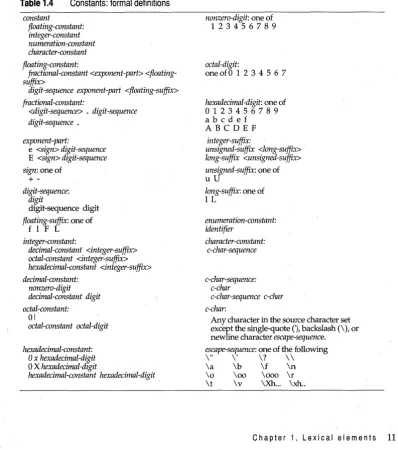
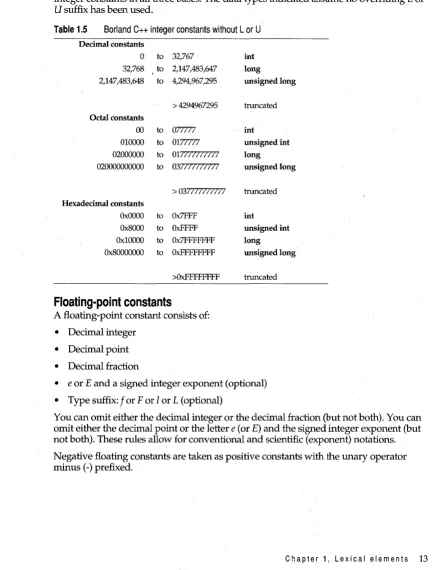
Constants
Constants are tokens representing fixed numeric or character values.
Borland C++ supports four classes of constants: integer, floating point, character (including strings), and enumeration.
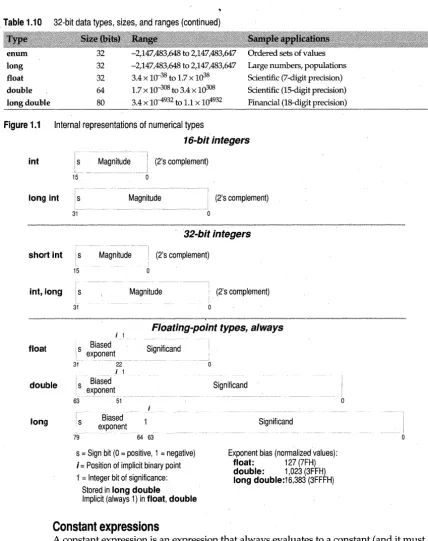
Internal representation of numerical types shows how these types are represented internally.
[image:30.489.59.458.179.629.2]The data type of a constant is deduced by the compiler using such clues as numeric val