Implementation of E-Learning System:
Findings and Lessons Learned
Namsraidorj Munkhtsetseg, Sambuu Uyanga
Department of Information System, School of Mathematics and Computer Science, National University of Mongolia, Ulaanbaatar, Mongolia
Email: [email protected], [email protected]
Received November 12, 2012; revised December 12, 2012; accepted December 19, 2012
ABSTRACT
This paper describes the implementation of the e-learning system at the School of Mathematics and Computer Science, National University of Mongolia. The paper includes in-house development of Edunet 1.0 e-learning system, compara- tive analysis on LMS, evaluation methodology, selection of e-learning systems, and comparative analysis on imple- mentation of Edunet, Moodle and Canvas systems.
Keywords: E-Learning System; Moodle; Canvas; LMS; Qualitative Weight and Sum Approach; National University of
Mongolia
1. Introduction
The National University of Mongolia (NUM) is the country’s oldest and only comprehensive university and a leading center of science, education and culture. It has more than 30 schools, institutions and research centers. There are more than 10,000 students in 16 branch schools. The School of Mathematics and Computer Science (SMCS) of the National University of Mongolia has three branches: Theoretical Mathematics, Application Mathe- matics and Information Technology.
The School of Mathematics and Computer Science (SMCS) is planning to build infrastructure model for e- learning. This paper addresses selection and evaluation of most appropriate e-learning system within the above objective.
Building the infrastructure for online learning requires that many factors be considered, so it is difficult to pro- vide a straight-forward checklist or recipe to follow. All educational endeavors are systems, made up of various interconnected components [1].
Our infrastructure model for e-learning system con- sists of following interconnected components:
E-learning system;
University Management Information System;
E-library system;
E-content development;
Other services to students.
There are two development aspects:
1) Waterfall development [2]. To develop complex in- formation system, which includes all sub-systems;
2) Agile development. To develop system by develop- ing sub-systems separately and integrating them.
Usually developers use a waterfall method when de- veloping e-learning. The most used one is the ADDIE model, where development has five phases: analysis, de- sign, development, implementation and evaluation. It worked for years but it takes a long time to go through all the phases, not really suited for on demand responses. We need to get faster and more iterative [3].
The iterative nature of agile development means fea- tures are delivered incrementally, enabling some benefits to be realized early as the product continues to develop. A key principle of agile development is that testing is inte- grated throughout the lifecycle, enabling regular inspec- tion of the working product as it develops [3].
Therefore we selected Agile development method for building infrastructure model for e-learning system.
The SMCS has been implementing an open source e-learning system based on international standard since 2009. During this period we have implemented several systems [4].
develop-ment and impledevelop-mentation of e-learning system.
2. In-House Development of E-Learning
System
We developed e-learning system named Edunet 1.0 [4] on Rails framework based on Ruby programming language [7] with MVC [8] architecture. The system has following modules or functionalities:
Message: This module supports information flows: Education department-lecturer, lecturer-lecturer and lecturer-student. Also file attachment is available.
Course: This module allows students to receive all information and lecture materials of specific course.
File: This module allows to lecturer to upload course related files to the system and to students to download course materials.
Homework: This module allows the Education de- partment and lecturer to receive tasks and homework in file format within pre-defined period.
Quiz: Quiz module allows the lecturer to set quiz tests, to set a time period for testing and to export to MS excel file. Quizzes can allow multiple attempts.
Journal: This module allows the lecturer to insert student’s entry, activity or participation. The marks for quizzes will be inserted automatically to the jour- nal.
Discussion: This module provides a simple commu- nication method between lecture and students. A stu- dent can open a dialogue with a lecturer and ask que- stions.
This system is important in terms of supporting learn- ing activities and helping to conduct training. However this system does not meet all functionalities of modern learning systems such as discussion, content develop- ment and electronic presentation of course materials etc. Thus, the users requested updates.
Due to the lack of human resources in the development team, it was impossible to improve the content develop- ment and other technical issues in the system. Therefore, we have decided to implement another e-learning sys- tem [6].
The following problems occurred during the two years implemetation of the Edunet 1.0 [4] system:
1) Development of new function, module or applica- tion according to each new requirement. Duration of de- velopment takes usually 1 - 2 months;
2) Lecturers send lecture materials to students directly; 3) Quiz module supports only few simple types of que- stions;
4) Impossible to use course materials in the next aca- demic year or backup course materials;
5) Impossible to analyze students activity or participa- tion;
6) Lack of key e-learning modules such as team man- agement, virtual classroom etc.
3. Comparative Analysis on LMS
For comparing LMS products, we used
www.edutools.info tools [5]. The comparative analysis on key modules of LMSs, such as Blackboard [9], Angel [10], JoomlaLMS [11], Moodle [12], and ATutor [13] described in Table 1, where “+” marks availability of
current function. For example, five “+” for file exchange module of Black-Board LMS and one “+” for Moodle system. It means the Blackboard has a five different method of file exchange and Moodle has only one.
Our study shows that commercial systems have more functionalities than open source free systems. But open source systems have most of key necessary functional- ities and possibility for future development according to the user needs and requirement.
Therefore based on our studies we decided to imple- ment Moodle [12] open source system.
4. Comparison on Adaptation of Open
Source E-Learning Systems by Using
Evaluation Methodology: Qualitative
Weight and Sum Approach
One of key issues to consider when developing and im- plementing e-learning systems is the adaptation of the current system to the cognitive learning characteristics of the students. Implementation of the adaptation is not a simple process, since it implies the study and conjunction of technical and pedagogical issues [14].
Therefore we evaluated an adaptation of systems based on evaluation study of open source e-learning platforms/ Virtual Learning Environment [15]. The most adaptable system is selected on results of evaluation on adaptaion systems using Qualitative Weight and Sum Approach method [6].
There are two main points on evaluation of e-learning systems:
Selection of modules to be evaluated;
Selection of evaluation method.
Evaluation was carried out by using the Qualitative Weight and Sum Approach method according to the IEEE LTSA [6] reference model. The qualitative weight and sum (QWS) approach is a well-established approach for the evaluation of software products. It establishes and weights a list of criteria. QWS is based on the use of symbols. There are six qualitative levels of importance for the weights, frequently symbols are used: * = ex- tremely valuable, # = very valuable, + = valuable, | = marginally valuable and 0 = not valuable.
Table 1. Comparative analysis on LMS.
Product Name Blackboard [9] ANGEL [10] Joomla LMS [11] Moodle [12] ATutor [13]
Developer Name Blackboard ANGEL E-Learning Force Inc. Moodle ATRC Uni of Toronto
Communication Tools
File Exchange +++++ ++++ +++ + ++++
Online Journal/Notes +++++ +++ ++ +
Real-Time Chat ++++++ ++++++++ +++++ +++++ +++
Whiteboard ++++++ +++++++ +++++ + +
Administration Tools
Authentication ++++++++ ++++++++ ++++++ ++++++++ ++++
Course Authorization +++++ ++ ++++ ++++ ++++
Registration Integration +++++++ +++++++ ++++ +++++++ +++
Hosted Services ++ ++ ++ ++ ++
Content Development Tools
Accessibility Compliance ++++ ++++ ++ ++ ++++
Content Sharing/Reuse +++++ +++++ ++ ++ ++++
Course Templates +++++ +++++ ++++ +++ ++
Customized Look and Feel ++++++ ++++++ ++++ +++++ ++
Instructional Design Tools ++++ ++++ +++ +++ +++
Instructional Standards
Compliance +++SCORM 2004 ++++SCORM 2004 ++ +++ +++
Company Details/Licensing
Costs/Licensing Commercial Commercial Commercial GPL GPL
Open Source No No No Open Source Open Source
Support of dynamic communication;
Sustainability of development;
Good documentation of the system.
The following modules of the ATutor, Dokeos, ILIAS, Moodle, OpenUSS, Sakai, and Canvas systems have been examined:
Communication tools;
Learning objects;
Management of user data;
Usability;
Adaptation;
Technical aspects;
Administration;
Course management.
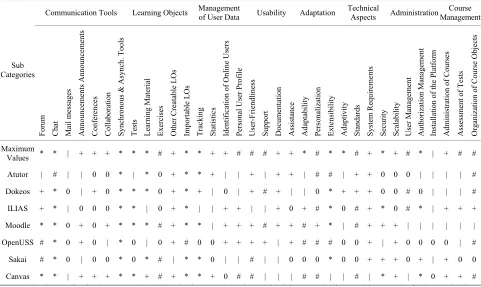
After defining above modules we divided these mod- ules into sub-modules and carried out weight of each sub-module. Maximum value is a maximum value of cur- rent criteria. List of modules and sub-modules by each system are presented in Table 2, where red color is best
one. Table 2 shows Canvas-five, Moodle-two and ILIAS-
[image:3.595.64.535.101.484.2]one best result. Summarized evaluation is presented in
Table 3. Figure 1 shows that weights of Canvas [17] and
Moodle systems are higher than others.
We started to implement Moodle system since 2009- 2010 academic years and developed 20 course materials to the system. We are still using this system in conjunc- tion with other systems. We also decided to implement the Canvas Learning Management System that was se- lected because of its:
clean and user-friendly interface;
rich collaboration and discussion tools;
ability to embed multi-media and web-based re- sources;
integration with communication tools such as Face- book, GoogleDocs, Skype and Google Apps for Edu- cation, and compatibility with other existing teaching technologies [15];
great course management and organization tools in- cluding a calendar that integrates and displays due dates and academic activities for students;
Table 2. Evaluation results of e-learning platforms for each subcategory.
Communication Tools Learning Objects Management of User Data Usability Adaptation Technical Aspects AdministrationManagementCourse
Sub Categories
Forum Chat Mail m
essages
Announcem
ents Annou
ncem
ents
Conferences Collabor
ation Synchr ono us & As ynch. T ools
Tests Lear
ning M
ater
ial
Exercises Other
Cr eatable LOs Im por table L O s
Tracking Statistics Identification of O
nline Users
Per
sonal User Pr
ofile User-F rien dlin ess Suppor t Docum entation
Assistance Adaptability Per
sonalization
Extensibility Adaptivity Standar
ds
System
Requir
em
ents
Security Scalability User
M anagem ent Author ization M anagem ent
Installation of the
Platform Adm inistr ation of Cour ses Assessm ent of Tes ts Or ganization of C our se Objects Maximum
Values * * | + + + * * * # + * * + + # # # + + * # * * # + * + # * | + # #
Atutor | # | | 0 0 * | * 0 + * * + | | + | + + | # # | + + 0 0 0 | | | | #
[image:4.595.57.538.103.390.2] [image:4.595.55.542.418.732.2]Dokeos + * 0 | + 0 * * * 0 + * + | 0 | + # + | | 0 * + + + 0 0 # 0 | | | #
ILIAS + * | 0 0 0 * * | 0 + * | | + + | | + 0 + # * 0 # + * 0 # * | + + +
Moodle * * 0 + 0 + * * * # + * * | + + + # + + # + * | # + + + | | | | | |
OpenUSS # * 0 + 0 | * 0 | 0 + # 0 0 + + + + | + # # # 0 0 + | + 0 0 0 0 | #
Sakai # * 0 | 0 0 * 0 * # | * * 0 | | # | | 0 0 0 * 0 0 + + + 0 + | + 0 0
Canvas * * | + + + * * + # + * * + 0 # # | | | # # | | # | * + | * 0 + + #
Table 3. Summarized evaluation by using method qualitative weight and sum approach.
0 = not valuable | = marginally valuable . = valuable # = very valuable * = extremely valuable
Moodle 2 8 11 5 8
ILIAS 7 7 10 3 7
Dokeos 8 8 9 3 6
Atutor 6 13 7 4 4
OpenUSS 11 6 9 6 2
Sakai 13 7 5 3 6
Canvas 2 8 9 7 8
0% 10% 20% 30% 40% 50% 60% 70% 80% 90% 100% 2 7
8 6 11 13
2 8
7 8 13
6 7
8 11
10 9
7 9 5
9
5 3
3 4 6 3
7
8 7 6 4 6 8
2 *=extremely valuable #=very valuable .= valuable |= marginally valuable 0=not valuable
Figure 1. Summarized evaluation by using method qualita- tive weight and sum approach.
well-designed rubrics and grading tools. Within the implementation of the system, we:
1) Implemented vitual server at http://lesson.num.edu. mn and uploaded more than 200 hours lecture materials; 2) Carried out the localization of the Canvas system to Mongolian language;
3) Uploaded localized system to the server conducted training on system usage to all lecturers.
According our survey and analysis, learning manage- ment systems should have following functionalities [18]:
Logon/authentication with high security;
Ability to configure according to user requirements;
Ability to integrate student activities;
Course management;
Student enrollment;
Communication support (social networking, discus- sion forms, live chat etc.);
[image:5.595.101.495.473.737.2] Support of SCORM 2004.
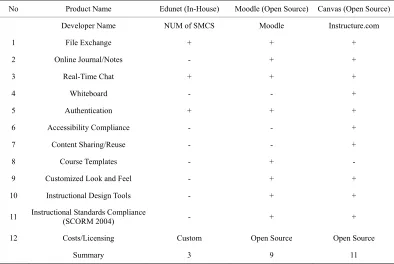
Table 4 shows that our developed Edunet system has
only three of the 12 above mentioned functions.
5. Survey on System Usage
We conducted a survey on those systems in 2009-2010 and 2010-2011 academic years. The survey covers total of 1426 students in 2009-2010, 756 students in 2010- 2011, and 670 students in 2011-2012 academic years. Survey results are presented in Tables 5 and 6.
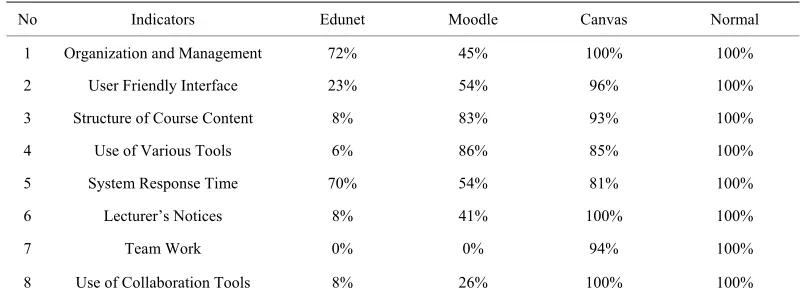
Based on our survey, we compared system normal use with all three systems using following formula:
X Y *100 Z
where, X-percentage of quality of current indicator, Y- number of responses on Мoodle and Canvas systems, Z- total number of students participated in survey.
Final result is presented in Table 7.
Figure 2 shows that most indicators were unsatisfac-
tory for the in-house Edunet system.
The system response time for Edunet system was higher than Moodle system because of the functionalities of the system are less than Moodle and the system doesn’t require additional libraries. Because of its use of web services for team works and collaboration activities, related indicators for the Moodle were unsatisfactory in
our survey. The most indicators were satisfactory for the Canvas system in development mode and approximate to the normal level. System response time can be higher in production mode than development mode.
6. Conclusions
The success of e-learning in tertiary education may be attributed to the following factors:
Sustainable finding;
Total commitment and support from top management;
Participation, cooperation and support from other ma- jor universities and IT communities;
Sufficient development and support staff with ad- vanced technical skills;
Strong technical support;
Expertise in instructional design.
Considering the rapid development of the ICT, espe- cially that of the educational technologies, networks and software, design and implementation of an e-learning system, the customized system in-house by the institute itself is not best option. Because, our lessons and prac- tices show that, the in-house development of learning system by academic institutions (especially in developing countries) may experience following disadvantages:
Development and implementation costs are high;
The development team is not fully familiar with the standards of e-learning systems for which in most cases, some training classes are held to educate the team.
Table 4. Comparison of three implemented systems.
No Product Name Edunet (In-House) Moodle (Open Source) Canvas (Open Source)
Developer Name NUM of SMCS Moodle Instructure.com
1 File Exchange + + +
2 Online Journal/Notes - + +
3 Real-Time Chat + + +
4 Whiteboard - - +
5 Authentication + + +
6 Accessibility Compliance - - +
7 Content Sharing/Reuse - - +
8 Course Templates - + -
9 Customized Look and Feel - + +
10 Instructional Design Tools - + +
11 Instructional Standards Compliance (SCORM 2004) - + +
12 Costs/Licensing Custom Open Source Open Source
Table 5. Survey results: 2010-2011 academic years.
Edunet Moodle Indicators/Systems
Satisfied Not Satisfied Satisfied Not Satisfied
1 Organization and Management 71.88% 28.13% 45.31% 54.69%
2 User Friendly Interface 23.44% 76.56% 54.69% 45.31%
3 Structure of Course Content 7.81% 92.19% 83.59% 16.41%
4 Use of Various Tools 6.25% 93.75% 86.72% 13.28%
5 System Response Time 70.31% 29.69% 54.69% 45.31%
6 Lecturer’s Notices 7.81% 92.19% 40.63% 59.38%
7 Team Work 0.00% 100.00% 0.00% 100.00%
[image:6.595.103.497.296.462.2]8 Use of Collaboration Tools 7.81% 92.19% 26.56% 73.44%
Table 6. Survey results: 2011-2012 academic years.
Moodle Canvas Indicators/systems
Satisfied Not Satisfied Satisfied Not Satisfied
1 Organization and Management 24.71% 76.47% 100.00% 0.00%
2 User Friendly Interface 30.59% 69.41% 95.29% 4.71%
3 Structure of Course Content 70.59% 29.41% 92.94% 7.06%
4 Use of Various Tools 27.06% 76.47% 84.71% 15.29%
5 System Response Time 58.82% 29.41% 81.18% 18.82%
6 Lecturer’s Notices 38.82% 61.18% 100.00% 0.00%
7 Team Work 23.53% 76.47% 94.12% 5.88%
8 Use of Collaboration Tools 23.53% 76.47% 100.00% 0.00%
Table 7. Comparison on system usage.
No Indicators Edunet Moodle Canvas Normal
1 Organization and Management 72% 45% 100% 100%
2 User Friendly Interface 23% 54% 96% 100%
3 Structure of Course Content 8% 83% 93% 100%
4 Use of Various Tools 6% 86% 85% 100%
5 System Response Time 70% 54% 81% 100%
6 Lecturer’s Notices 8% 41% 100% 100%
7 Team Work 0% 0% 94% 100%
8 Use of Collaboration Tools 8% 26% 100% 100%
System development demands a close collaboration between the IT professionals and the educational ex- perts.
If the development team’s output is low, the actual overall expenses for this approach would be higher than other solutions [8].
The SMCS uses SISI University information man-
agement system. Current open source e-learning systems can receive users and course related information from SISI system using LDAP server in real-time.
We are planning to conduct online trainings using the Moodle and Canvas systems in future, and started to im- plement these systems, which cover following activities:
[image:6.595.96.496.490.639.2]0% 10% 20% 30% 40% 50% 60% 70% 80% 90% 100%
Edunet
Moodle
Canvas
[image:7.595.105.505.85.259.2]Normal
Figure 2. Comparison on system usage.
lecturers and students;
2) Conduct trainings for system administrators;
3) Develop user manual of the Moodle and Canvas systems in Mongolian language;
4) Conduct trainings on development of e-courses for lecturers. These trainings will cover applications such as eXe, Courselab, Articulate, Ispring, Adobe Flash which support Scorm standard;
5) Import data of all system users and courses from SISI system.
REFERENCES
[1] Terry Anderson & Fathi Elloumi, “Theory and Practice of
Online Learning,” 2010.
[2] http://en.wikipedia.org/wiki/Waterfall_model
[3] http://www.agiledevelopment.org/
[4] NUM, SMCS in house system
[5] http://www.edutools.info
[6] S. Graf and B. List, “An Evaluation of Open Source
E-Learning Platforms Stressing Adaptation Issues,” Pre-sented at ICALT 2005.
[7] Ruby. http://rubyonrails.org
[8] http://en.wikipedia.org/wiki/Model viewcontroller
[9] http://www.blackboard.com
[10] http://www.angellearning.com
[11] http://www.joomlalms.com
[12] http://moodle.org
[13] http://atutor.ca
[14] S. Graf and B. List, “An Evaluation of Open Source E-
Learning Platforms Stressing Adaptation Issues,” Women’s Postgraduate College of Internet Technologies, Vienna University of Technology, Vienna, 2002.
[15] ISO/IEC 19796-3, “Information Technology—Learning,
Education and Training—Quality Management, Assur- ance and Metrics—Part 3: Reference Methods and Me- trics,” 2009.
[16] P. Baumgartner, H. Häfele, and K. Maier-Häfele, “E-
Learning Praxishandbuch—Auswahl von Lernplattformen.”
[17] http://instructure.com
[18] H. Wharekure and K. Aoteareo, “Technical Evaluation of