ASPIRE: Functional Specification and
Architectural Design
Antonija Mitrovic
Brent Martin
Pramuditha Suraweera
Konstantin Zakharov
Nancy Milik
Jay Holland
Technical Report TR-06/05, 8 September 2005
Intelligent Computer Tutoring Group
Content
1. Introduction
1.1. Background
1.2. Constraint-Based Tutors 1.3. The WETAS Tutoring Shell
2. The ASPIRE Architectural Framework 2.1. ASPIRE-Tutor
2.2. ASPIRE-Author
3. Data Model
3.1. User Data 3.2. Domain Model 3.3. Student Modelling 3.4. Sessions
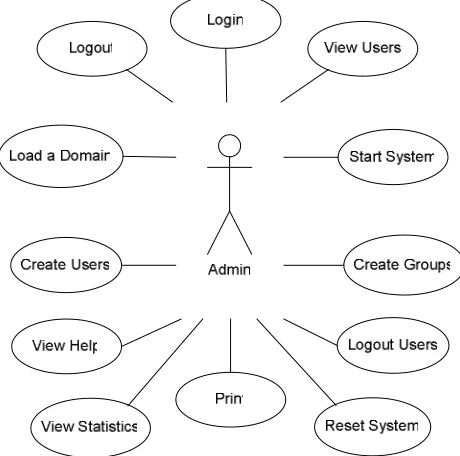
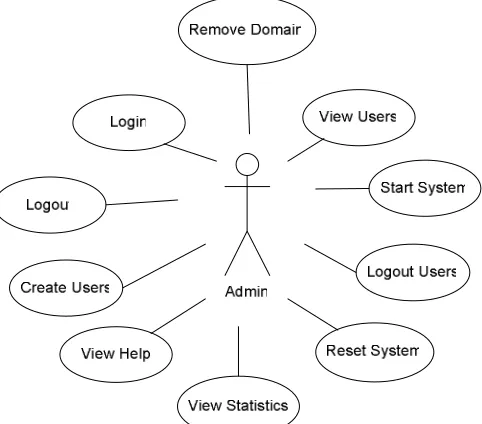
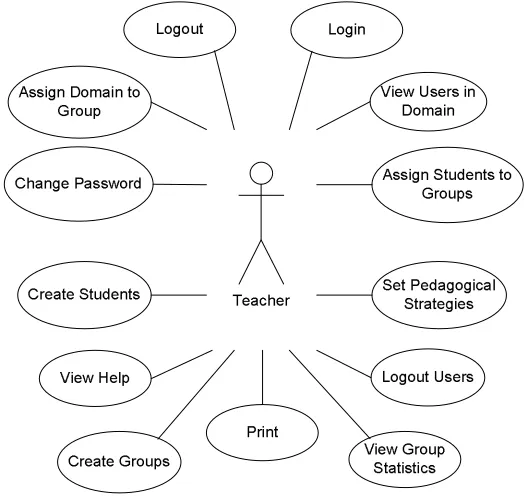
4. Functionality: User Stories 4.1. Student User Stories 4.2. Author User Stories 4.3. Administrator User Stories 4.4. Teacher User Stories
5. Knowledge Representation Language 5.1. Problem specification 5.2. Constraint language 5.3. Further extensions
6. Session Manager
7. Conclusions
1. Introduction
This document reports the work done during the initial two months of the ASPIRE project, funded by the e-Learning Collaborative Development Fund grant 502. In this project, we will develop a Web-enabled authoring system called ASPIRE, for building intelligent learning agents1 for use in e-learning courses. ASPIRE will support the process of developing intelligent educational agents by automating the tasks involved, thus making it possible for tertiary teachers with little computer background to develop systems for their courses. In addition, we will develop several intelligent agents using the authoring system, so that we can evaluate its effectiveness and efficiency. The resulting e-learning courses will overcome the deficiencies of existing distance learning courses and support deep learning. The proposed project will dramatically extend the capability of the tertiary education system in the area of e-learning.
In this first report on the ASPIRE project, we start by presenting the background for the project, and then describe our previous work. Section 1.2 presents the basic features of constraint-based tutors, while Section 1.3 presents WETAS, a prototype of a tutoring shell. ASPIRE will be based on these foundations.
The first project milestone is the architecture of ASPIRE, which is discussed in Section 2. We first present the overall architecture of ASPIRE, and then turn to details of ASPIRE-Tutor, the tutoring server, followed by a similar discussion of ASPIRE-Author, the authoring server. Section 3 presents the data model and discusses individual classes. We then present the functionality of the system in terms of user stories in Section 4.
Section 5 presents the results of the second project milestone – designing the knowledge representation language used to generate domain models. The third milestone, the Session Manager, is presented in the last section.
1.1. Background
E-learning is becoming more and more popular with the wide-spread use of computers and the internet in educational institutions. Current e-learning courses are almost invariably developed using course management systems (CMS), such as WebCT or Blackboard. Although CMS tools provide support for some administrative tasks and enable instructors to provide instructional material, they offer no real support for learning. In such e-learning courses, the student has access to on-line material, simple multi-choice quizzes and chat tools. However, there is no ability to track the student’s progress and adapt the learning material and instructional session to the individual student. In such courses, a student cannot obtain individualised domain-level feedback on his/her performance, which is critical for successful learning. This “one-size-fits-all” approach is the main deficiency in existing e-learning courses.
The solution to this situation is in adaptive intelligent educational systems, which track students’ progress and generate models of students’ knowledge, which are later used to adapt instructional sessions towards knowledge, needs and abilities of each individual student. Adaptation can be done in various ways: the student might be given feedback tailored towards the student’s level of understanding, problems are selected so that they extend the student and provide new opportunities to e-learning and so on. Such educational systems have been shown to result in significant improvement over simplistic e-learning courses in domains that require extensive practice (Corbett et al., 1998; Koedinger et al., 1997; Mitrovic & Ohlsson, 1999).
Although intelligent educational systems are very effective, they are still not commonly available due to the high development costs. These systems require not only detailed knowledge of the instructional domain, but also extensive expertise in Artificial Intelligence, Computer Science, Education and
Psychology. There has been some research done on developing authoring systems, which make the development of intelligent educational systems easier. However, there are only a few authoring systems developed worldwide, and all of them are only used within research laboratories. These authoring systems are highly specialised, and usually support a very limited set of instructional domains (such as algebra). Also all existing authoring systems require that the authors have substantial knowledge of the tool itself. The proposed project aims to resolve all these limitations.
The Intelligent Computer Tutoring Group (ICTG2) at the University of Canterbury have developed a methodology for building intelligent educational systems, which has been recognised internationally as one of the most promising approaches. Using this approach, we have developed several intelligent educational agents that have been thoroughly evaluated with local and international students (Mitrovic et al., 2004). We have proved that our intelligent agents support learning effectively, resulting in significant increase in students’ knowledge. For example, the evaluation of SQL-Tutor, an intelligent tutoring system that teaches the SQL database language, showed that the students who used this system for only two hours achieved significantly higher marks in an exam than students who only had classroom instruction (the difference was 0.63 standard deviations) (Mitrovic & Ohlsson, 1999). In other studies students using our intelligent educational systems also achieved one grade higher than their peers in the traditional classroom situation. We discuss the general features of our intelligent learning agents in the following subsection.
1.2. Constraint-Based Tutors
Intelligent Tutoring Systems (ITS) are developed with the goal of automating one-to-one human tutoring, which is the most effective mode of teaching (Bloom, 1984). ITS offer greater flexibility in contrast to non-intelligent software tutors since they can adapt to each individual student. Although ITSs have been proven to be effective in a number of domains, the number of ITSs used in real courses is still extremely small (Mitrovic, Martin & Mayo, 2002). The goal of ICTG is to develop a powerful methodology for developing constraint-based tutors. Our methodology is based on Ohlsson’s (1996) theory of learning from performance errors.
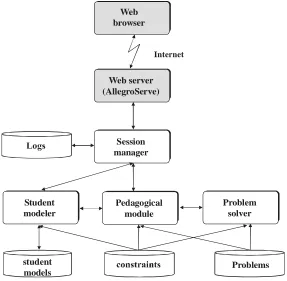
The typical architecture of constraint-based tutors is given in Figure 1. The tutors are developed in AllegroServe Web server, an extensible server provided with Allegro Common Lisp. All student models are kept on the server. At the beginning of interaction, a student is required to enter his/her name, which is necessary in order to establish a session. The session manager requires the student modeller to retrieve the model for the student, if there is one, or to create a new model for a new student. All student actions are sent to the session manager, to be linked to the appropriate session and stored in the student’s log. The action is then sent to the pedagogical module (PM). If the submitted action is a solution to the current step, the PM sends it to the student modeller, which diagnoses the solution, updates the student model and sends the result of the diagnosis back to the PM, which generates feedback.
Domain knowledge consists of a set of constraints. Constraint-Based Modelling (CBM) (Ohlsson, 1994; Mitrovic & Ohlsson, 1999) is a student modelling approach that is not interested in the exact sequence of states in the problem space the student has traversed, but in what state he/she is in currently. As long as the student never reaches a state that is known to be wrong, they are free to perform whatever actions they please. The domain model is a collection of state descriptions of the form:
If <relevance condition> is true, then <satisfaction condition> had better also be true, otherwise something has gone wrong.
The knowledge base consists of constraints used for testing the student’s solution for syntax errors and comparing it against the system’s ideal solution to find semantic errors. The knowledge base enables the tutor to identify student solutions that are identical to the system’s ideal solution. More importantly,
this knowledge also enables the system to identify valid alternative solutions, i.e. solutions that are correct but not identical to the system’s solution. Each constraint specifies a fundamental property of a domain that must be satisfied by all solutions. Constraints are problem-independent and modular, and therefore easy to evaluate. They are written in Lisp, and can contain built-in functions as well as domain-specific ones. For examples of constraints, please see (Mitrovic, 1998a, 2002; 2003; Suraweera & Mitrovic, 2001; 2002; Martin & Mitrovic, 2003; Mitrovic, Koedinger & Martin, 2003). If the satisfaction condition of a relevant constraint is met by the student solution, the solution is correct. In the opposite case, the student will be given feedback on errors.
One of the advantages of CBM over other student modelling approaches (Mitrovic, Koedinger & Martin, 2003) is its independence from the problem-solving strategy employed by the student. CBM models students’ evaluative, rather than generative knowledge and therefore does not attempt to induce the student’s problem-solving strategy. CBM does not require an executable domain model, and is applicable in situations in which such a model would be difficult to construct (such as database design or SQL query generation). Furthermore, CBM eliminates the need for bug libraries, i.e. collections of typical errors made by students. On the contrary, CBM focuses on correct knowledge only. If a student performs an incorrect action, that action will violate some constraints. Therefore, a constraint-based tutor can react to misconceptions although it does not represent them explicitly. A violated constraint means that student’s knowledge is incomplete or incorrect, and the system can respond by generating an appropriate feedback message. Feedback messages are attached to the constraints, and they explain the general principle violated by the student’s actions. Feedback can be made very detailed, by instantiating parts of it according to the student’s action.
The student modeller evaluates the student’s solution against the knowledge base and updates the student model. The short-term student model consists of a list of violated and a list of satisfied constraints
Web server (AllegroServe)
Session manager
Student modeler
Problem solver Pedagogical
module
student
models Problems
Web browser
[image:5.595.171.458.219.500.2]Internet
for the current attempt. The long-term model records the history of usage for each constraint. This information is used to select problems of appropriate complexity for the student, and to generate feedback.
The pedagogical module (PM) is the driving engine of the whole system. Its main tasks are to generate appropriate feedback messages for the student and to select new practice problems. PM individualises these actions to each student based on their student model. Unlike ITSs that use model tracing (Anderson et al., 1996; Corbett et al., 1998; Koedinger et al., 1997), constraint-based tutors do not follow each student’s solution step-by-step: a student’s solution is only evaluated once it is submitted, although the student may submit a partial solution to get ideas on how to progress.
The feedback is grouped into six levels according to the amount of detail: correct, error flag, hint,
detailed hint, all errors and solution. The first level of feedback, correct, simply indicates whether the
submitted solution is correct or incorrect. The error flag indicates the type of construct (e.g. entity, relationship, etc.) that contains the error. Hint and detailed hint offer a feedback message generated from the first violated constraint. Hint is a general message such as “There are attributes that do not belong to any entity or relationship”. On the other hand, detailed hint provides a more specific message such as “The ‘Address’ attribute does not belong to any entity or relationship”, where the details of the erroneous object are given. Not all detailed hint messages give the details of the construct in question, since giving details on missing constructs would give away solutions. A list of feedback messages on all violated constraints is displayed at the all errors level. Finally, the complete solution is displayed at the solution level.
Initially, when the student begins to work on a problem, the feedback level is set to the correct level. As a result, the first time a solution is submitted, a simple message indicating whether or not the solution is correct is given. This initial level of feedback is deliberately low, as to encourage students to solve the problem by themselves. The level of feedback is incremented with each submission until the feedback level reaches the detailed hint level. Automatically incrementing the levels of feedback is terminated at the detailed hint level to encourage to the student to concentrate on one error at a time rather than all the errors in the solution. Moreover, if the system automatically displays the solution to the student on the sixth attempt, it would discourage them from attempting to solve the problem at all, and may even lead to frustration. The system also gives the student the freedom to manually select any level of feedback according to their needs.
When selecting a new problem, the PM firsts decides what concept is appropriate for the student on the basis of the student model. The concept that contains the greatest number of violated constraints is targeted. We have chosen this simple problem selection strategy in order to ensure that students get the most practice on the concepts with which they experience difficulties. In situations where there is no obvious “best” concept (i.e. a prominent group of constraints to be targeted), the next problem in the list of available problems, ordered according to increasing complexity, is given. We have also experimented with alternative problem-selection strategies, using Bayesian nets (Mayo & Mitrovic 2000; 2001) and neural networks (Wang & Mitrovic, 2002).
1.3. The WETAS Tutoring Shell
While CBM reduces the effort of building domain models for ITS, the task of building a constraint-based tutor is nevertheless still large. To reduce the authoring effort we have developed WETAS (Web-Enabled Tutor Authoring Shell), a web-based tutoring engine that provides all of the domain-independent functions for text-based ITSs (Martin & Mitrovic, 2003). WETAS removes much of the effort required to build an ITS, but it does not directly facilitate the building of the domain model, which is arguably one of the most difficult tasks.
particular, it provides the following functions: problem selection, answer evaluation, student modelling, feedback, and the user interface. The author provides the domain-dependent components, namely the structure of the domain, the domain model (in the form of constraints), the problem/solution set, the scaffolding information (if any), and possibly an input parser, if any specific pre-processing of the input is required. WETAS provides both the infrastructure (e.g. student interface) and the “intelligent” parts of the ITS, namely the pedagogical module and the domain model interpreter. The former makes decisions based on the student model regarding what problem to present to the student next and what feedback they should be given. The latter evaluates the student’s answers by comparing them to the domain model, and uses this information to update the student model.
A prototype of WETAS has been implemented and used to evaluate its effectiveness in reducing the ITS building effort. To demonstrate the flexibility of WETAS we have re-implemented two existing constraint-based tutors, SQL-Tutor (Mitrovic, 1998a, 1998b, 1998c) and EER-Tutor (Zakharov, Mitrovic & Ohlsson, 2005), and developed a new Language Builder ITS (LBITS) which teaches vocabulary skills in English. These domains have very different problem/solution structures. We have evaluated LBITS in a New Zealand elementary school (Martin, 2003; Martin & Mitrovic, 2002), and the other two tutors at the University of Canterbury. The evaluations show that students’ learning increases significantly with the support of these ITSs.
Although WETAS has proved to be an effective tool for developing ITSs, the task of developing the domain model still requires significant knowledge and experience. The goal of the ASPIRE project is to build upon our experiences in developing constraint-based tutors and the WETAS authoring shell. ASPIRE will not only provide a tutor-deployment platform, as WETAS does; it will also provide support for the authoring phase. Most notably, it would support the author in developing the domain model.
2. The ASPIRE Architectural Framework
Figure 2 depicts the overall architecture of ASPIRE. Tutor delivery and authoring assistance will be delivered via the internet and a standard browser, and will be kept separate; we will develop two standalone Web servers, ASPIRE-Author and ASPIRE-Tutor. Communication between the servers will be afforded by the sharing of instructional content. The important architectural considerations are:
• The system will be developed using Allegro Common Lisp and the AllegroServe lightweight web server.
• To minimise compatibility problems, all functionality will be provided server-side as far as possible: Client-side scripting (e.g. Javascript) will be used only where there is no simple alternative, e.g. communicating with JAVA applets where they are deployed.
• Code maintenance will be made easier by the use of “Web Actions” – generic Web objects that consist of combinations of static HTML (where applicable) and Lisp functions. Web Actions may also include server-side scripting. Each Web service will be developed according to what is most efficient for that particular service.
• Each Web server will be divided into modules, where each module performs a major high-level function, e.g. the diagnostic module. This will be achieved by breaking the system into packages. • The CLOS object-oriented system will be used to aid structural transparency and ensure
Figure 2. The overall view of ASPIRE
2.1. ASPIRE-Tutor
The ASPIRE-Tutor server is broken up into a set of modules, where each module has specific responsibilities in the serving of intelligent tutoring systems. ASPIRE-Tutor is based on the Model-View-Controller (MVC) architecture (Krasner & Pope, 1998). Model-View-Model-View-Controller is a software architecture that separates the user interface, control logic and application’s data model into three distinct components so that modifications to the system components, and in particular the interface, can be made with minimal impact to the data model. Such separation allows multiple views to share the same data model, which makes multiple clients easier to implement, test and maintain. When developing applications with multiple interfaces, the interface code should not be intertwined with non-interface code, because it will lead to duplicate efforts in testing, maintenance and modification. The data and the operations on data should be encapsulated in the Model component.
It is straightforward to map MVC concepts into the domain of Web based applications: • The Model represents data and rules that govern access to and updates of this data;
• The View renders the contents of a Model. It accesses the data through the Model and specifies how the data should be presented. It is the View's responsibility to maintain consistency in its
presentation when the Model changes.
Figure 3. The MVC architecture
The typical sequence of interactions between the MVC components starts with the View sending input to the Controller. The Controller translates the input into an operation on the Model. When processing is complete, the Controller issues a command to update the View. Then the View updates itself by getting the current state of the Model. This interaction is illustrated in Figure 3.
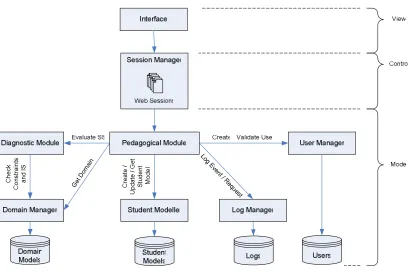
The general architecture of ASPIRE-Tutor is illustrated in Figure 4. The individual modules are discussed in the following subsections.
Get D omain
Log Ev ent / R
equ est C
re at e /
U pd at e / G et
S tu de nt
M od el C
he ck
C on st ra in ts
an d IS
Figure 4. The architecture of ASPIRE-Tutor
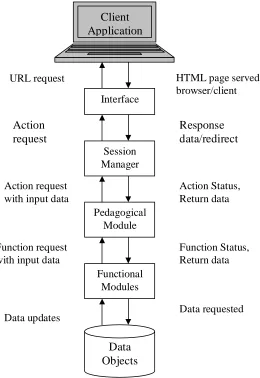
1. The client application sends a request via the Interface (the view) to the Session Manager (the
controller).
2. The Session Manager unpacks the request and passes the appropriate request(s) to the Pedagogical
Module (the model). The Session Manager thus manages the flow of control of the interaction.
3. The Pedagogical Module decides what actions to take to fulfil the request, and does so by sending appropriate requests to the functional modules, i.e. any/all of the Diagnostic Module, Domain
Manager, Student Modeller, Log Manager and User Manager. The Pedagogical Module thus
manages the pedagogical decisions that determine what the response to each request will be.
4. Each request to a functional module results in a status and optional data being returned to the Pedagogical Module. In addition, the functional modules may access and/or update data objects, e.g. student model, domain model, logs. The various components of the model may also be updated. 5. The Pedagogical Module returns the final status and data to the Session Manager.
[image:10.595.154.414.303.681.2]6. The Session Manager organises the result to be returned to the client, by packaging up a response and/or indicating what Interface object should be presented next.
Figure 5. Flow of control in ASPIRE-Tutor
Interface
Session Manager
Pedagogical Module
Functional Modules
Data Objects Client Application
URL request
Action request
Action request with input data
Function request with input data
Data updates Data requested
2.1.1. Interface
ASPIRE will offer three types of interfaces: Web interfaces, XML-RPC (eXtensible Markup Language Remote Procedure Call) interfaces and a typical window-based interface. Both Web and XML-RPC interfaces are based on the HTTP protocol. A Web interface is a ubiquitous way of accessing information and services on the World Wide Web. Web interfaces usually consist of sets of dynamic HTML pages.
RPC is remote procedure calling using HTTP as the transport and XML as the encoding. XML-RPC is a software interface rather than a user interface: it does not have the means of visualising the data and controls required for interaction between the client and server, unlike Web interfaces, where HTML (Hypter-Text Markup Language) is used for visualisation of data and interface elements. Instead, ASPIRE will provide an XML-RPC entry point to its functionality, allowing any third-party client application to interface with ASPIRE and thus support intelligent tutoring. The implementation of the actual client interface communicating with the server through XML-RPC is left up to the designers of the client side.
A standard window-based interface is going to be used locally on the server for administration and maintenance tasks. This interface is not going to be available to authors and students.
We anticipate that the most commonly used interfaces to ASPIRE would be Web interfaces. A Web interface consists of a set of dynamic HTML pages that externalise the system functionality to the users. The Interface can be viewed in a standard Web browser. The initial page of the system may be accessed through a bookmark, link on another page, or the user may need to type the starting page URL into the location bar of the browser. For further interactions with the system, the Interface will provide navigational support like with any dynamic Web site. The user interaction with the rest of the system happens as follows:
• When the user performs input or navigates through the interface, on behalf of the user the browser sends URL requests to the Web server.
• On the server, each request is mapped to a response page.
• The server calls the functions responsible for processing the user input and actions associated with the request.
• When processing has been completed, the response page, possibly containing some dynamic content, is sent back to the browser and displayed to the user.
• The server will keep processing user requests in this way for the duration of the session.
Each client action will be represented by a separate URL. The URLs will be mapped by the Session Manager to the underlying operations on the user session data. The student functions (URLs) the interface will support are:
• Log in;
• Display main menu (a list of available tutors); • Select/change sub-domain;
• Select new problem. There will be various options on how the problem may be selected. The user will be able to choose the next problem in the list of problems, choose any problem in the list of problems or ask for system’s choice.
• Submit solution for evaluation; • View history;
• View student model; • Log out.
2.1.2. Session Manager
Communication between the browser and server is built on the basis of Hyper Text Transfer Protocol (HTTP). Since HTTP is stateless, ASPIRE is responsible for maintaining the state of each user session. The Session Manager is responsible for maintaining coherent communication with each client. Clients are usually Web browsers, but may optionally be some other applications. The Session Manager module is implemented on the basis of Allegro Web Actions framework. The Web server, AllegroServe is a part of the Web Actions framework. The Session Manager performs the following actions:
• The Web server accepts HTTP connections and retrieves URL requests associated with them; • The Web server retrieves that data associated with each request and passes the request on to the
Web Actions framework.
• For each request, the Web Actions framework associates the request with the appropriate user session.
• Based on the requested URL and data associated with it, the Session Manager passes on the request (and data) to the Pedagogical Module for processing.
• On the completion of processing, the Pedagogical Module returns the result to the Session Manager, which then updates the state of the user session.
• At this stage the server produces the appropriate response. This will either be in the form of an HTML page to be returned to the browser (either by providing content or by directing the browser to the appropriate next page), or optionally an XML response message if the client was some other application.
• Pass the response back to the client.
Detailed information about Session Manager is presented in Section 6.
2.1.3. User Manager
The User Manager is responsible for managing the set of users who are authorised to use the system. Functions include:
• Create/maintain lists of users, including usercodes and passwords, and the type of user (student, teacher, author, and administrator).
• Maintain the access rights of each user (i.e. which domains they may use). • Validate users at login.
2.1.4. Diagnostic Module
The Diagnostic Module (DM) analyses a student’s solution to the current problem by comparing it to the ideal solution using the domain model, which consists of the constraint set and associated macros. The result of this analysis is a list of errors that the student made, if there are any.
2.1.5. Domain Manager
The Domain Manager manages the domain model and makes it available to the other modules, particularly the Diagnostic Module and the Pedagogical Module. The Domain Manager is also responsible for loading the domain models initially, when ASPIRE-Tutor is started. It also contains parsers for constraints and solutions. In addition, it externalises parsed constraints, problems and ideal solutions. More information about the domain model is given in Section 3.2.
2.1.6. Pedagogical Module
The Pedagogical Module (PM) decides how to respond to each student request, based on the current pedagogical strategy, the student model and their current request/attempt. It handles the following student’s requests:
• Select/Change sub-domain (when applicable);
• New problem: There may be several options offered by the tutoring system for selecting a new
problem. The options are:
o next problem, in which case PM selects the problem from the list ordered by the increasing
level of complexity;
o system’s choice, when PM selects the best problem based on the state of the student model;
o user’s choice, which provides the list of problems to the student and he/she can select a
problem from that list.
• Submit solution. The pedagogical module requests the Diagnostic Module to analyse the student’s
submission. Based on the result of the diagnosis, PM either congratulates the students or offers feedback on errors.
• View History: This option allows the student to see the summary of his/her interactions with the
tutoring system.
• View Model: This option presents a summary of the student model to the student, so that the student
can reflect on their knowledge.
Implicit functions, which might be sub-modules of the PM, are:
• Curriculum sequencing (choose next sub-domain or domain concept) • Problem selection (sequencing, dynamic problem selection)
• Feedback generation (selecting the appropriate level of feedback, possibly including dialogue generation)
• History visualisation
• Student model visualisation (and, potentially, model interaction)
2.1.7. Student Modeller
The Student Modeller (SM) is responsible for maintaining a long-term model for each student, and providing this information to other modules. SM is responsible for the following functions:
• Maintaining the state of each student model. The PM will call upon the SM to update the student model each time the student performs some significant action, such as submitting a solution. The PM will pass the required information (e.g. lists of satisfied and violated constraints) to the SM. • Informing the PM of the student state. For example, the PM may request the current user’s
knowledge of a particular constraint, so that the PM can decide what level of feedback to give for this constraint.
2.1.8. Log Manager
The Log Manager maintains and accesses logs of detailed information about all system usage, such as submissions to the system, requests for history, logging in and out, etc. Logging information is primarily used for infrequent requests for detailed information. Specific functions include:
• Write details of every student’s request to the log database, including timestamps; • Retrieve history for presenting to the student;
• Calculate learning curves and other specialised statistics for evaluation/analysis.
2.2. ASPIRE-Author
Authoring in ASPIRE-Author is a semi-automated process carried out with the assistance of an expert of the domain. The domain expert (i.e. the author) starts by developing the ontology for the chosen instructional domain, and provides the system with typical problems and their solutions. ASPIRE-Author then analyses the ontology and the problems to generate syntax and semantic constraints for the domain. Finally, the author validates the generated constraints by analysing the generated English descriptions of the constraints.
The process of generating a domain model for a domain using ASPIRE-Author involves six steps:
1. Composing an ontology of the domain;
During the ontology composition stage, the domain expert domain models the domain as a hierarchy of concepts using the provided Ontology Workspace.
2. Modelling the solution representation structure;
The author specifies the structure of solutions to problems in the chosen instructional domain.
3. Designing the tutor’s interface;
During this step, the author specifies the characteristics of the tutoring system’s interface.
4. Adding problems and solutions;
The author is requested to input problems and solutions of the domain during this stage. The interface of the problems and solutions editor is generated according to the solution representation structure and the interface characteristics specified during the previous step.
5. Generating constraints (syntax and semantic);
This step involves the generation of both syntax and semantic constraints. The Syntax Constraints Generator generates constraints by analysing the completed ontology. The Semantic Constraints Generator analyses both the ontology and the problems and solutions provided by the author to generate constraints.
6. Validating the generated constraints.
The constraint validation stage involves automatic validation of the constraint base by the Constraint Validation Module and manual validation by the domain expert. The domain expert would inspect a system generated high level description of each constraint and label invalid constraints. The author has to provide example problems to the system in order to illustrate the error.
Figure 6. The architecture of ASPIRE-Author
2.2.1. Authoring Interface
The interface of ASPIRE-Author consists of four main components: Ontology Workspace, Tutor GUI Designer, Problem/Solution Editor and Constraint Validation Interface. Each component will be designed to assist the author during the respective stages of the authoring process and to ease the burden on the user. The Ontology Workspace enables the author to describe the chosen instructional domain in terms of an ontology. An ontology is an explicit specification of a conceptualisation (Gruber, 1993). In other words, an ontology is a description of concepts of a domain. Typically, the domain concepts are organized in an ontology into a hierarchical structure with super-concepts and sub-concepts. The Ontology Workspace allows the author to model concepts of the ontology using the provided graphical representation. The workspace also allows the specification of properties of each concept and relationships between concepts.
The Tutor GUI Designer is used to perform two tasks: • Modelling a representation for solutions
• Designing the tutoring system’s student problem solving interface
The author specified a representation for solutions by decomposing the solution into components and specifying the type of elements held by each of them. Such a decomposition of a solution into meaningful components enables the student to focus only on a part of a solution while solving a problem. The diagnosis of a solution can also be structured according the solution’s components.
visualising the solution structure. The interface design task involves the arrangement of the solution components within the interface and setting other visual characteristics such as colour, a logo etc.
The main goal of the Problem/Solution Editor is to provide an easy to use, intuitive interface for composing problems and their solutions. The author is encouraged to provide many correct solutions for a problem outlining different ways of solving the same problem for the process of generating constraints. The interface of the Problem/Solution Editor would reflect the interface designed using the Tutor GUI Designer. This enables the author to add problems and solutions using an interface similar to that of the student’s problem-solving interface. This enables the author to evaluate the usability of the tutoring system’s interface, while entering in problems and solutions.
The Constraint Validation Interface would be used for validating the constraints generated by the system. It will allow the user to perform the following functions:
• Inspect the generated constraints
• Mark constraints as illegal or incorrect
• Add feedback messages to constraints
2.2.2. Authoring Controller
The Authoring Controller is responsible for managing the authoring process and guiding the user through the various steps involved in authoring a domain model. The Authoring Controller receives all requests from the interface layer, initiates processes within other modules and guides the author to the different modules of the interface. The Authoring Controller receives a number of Web requests from the interface. The following requests are handled by the Authoring Controller:
• Validate login
o Retrieve the user information from the Ontology Manager and if valid, invoke ontology workspace;
o if invalid, invoke log in interface.
• Composing ontology complete
o Pass on ontology to the Ontology Manager for persistence; o Invoke solution representation interface.
• Solution representation modelling complete
o Pass on solution representation information to the Problem Manager; o Invoke Tutor GUI Designer.
• Tutor GUI design complete
o Pass on the GUI design specification to the Ontology Manager;
o Invoke the Problem Editor (pass the solution representation and GUI design information)
• Problems and solution editing complete;
o Pass on Problems and solutions to problem-manager o Invoke syntax constraints generator (pass ontology)
o Invoke semantic constraints generator (Pass ontology, problems and Solutions) o Invoke constraint validator (Pass generated constraints)
o Invoke constraint validation interface (Pass generated constraints)
• Constraint validation complete;
o Pass on constraints to constraint-manager for updating constraint bases
• Generate tutoring system.
2.2.3. Constraint Generator
The Syntax Constraint Generator is responsible for generating syntax constraints by analysing a completed ontology. Semantic constraints are generated by the Semantic Constraint Generator. It analyses the problems and their solutions as well as the ontology for generating semantic constraints. Multiple solutions provided for a single problem are used for generating constraints that are able to identify different correct solutions by comparing the student’s solution to a single ideal solution.
2.2.4. Constraint Validator
The Constraint Validator is responsible for the validation of constraints generated by the constraint generators. The validation process involves a high level of interaction between the author and the system. Depending on the validation strategy used, the Constraint Validator may generate solutions to be validated by the author, or generate an English description of the constraint to be presented to the author for validation.
2.2.5. Ontology Manager
The Ontology Manager maintains ontologies and makes them available to the Authoring Controller. It is responsible for loading, saving and updating of ontologies and tutoring interface specifications. It also keeps a track of author details including their user ids and password information for authenticating users.
Transfer of data between the interface residing at the user’s browser and the Authoring Controller is achieved using an XML representation. Converting the database representation of the ontology to XML and vice-versa is function of the Ontology Manager.
2.2.6. Problem/Solutions Manager
Problems and their solutions are managed by the Problem/Solutions Manager. It is responsible for saving, retrieving and modifying problems and solutions. Similar to the Ontology Manager, this module is also capable of converting the database representation of problems and solutions into an XML representation.
2.2.7. Constraints Manager
The Constraint Manager is responsible for managing both semantic and syntax constraints for a domain.
3. Data Model
Central to the ASPIRE system is the representation of the relevant data structures, and how these will be processed. The main aspects are:
• What data structures are required?
• What “language” will they be represented in? • How will they be stored in the system? • How will they be processed?
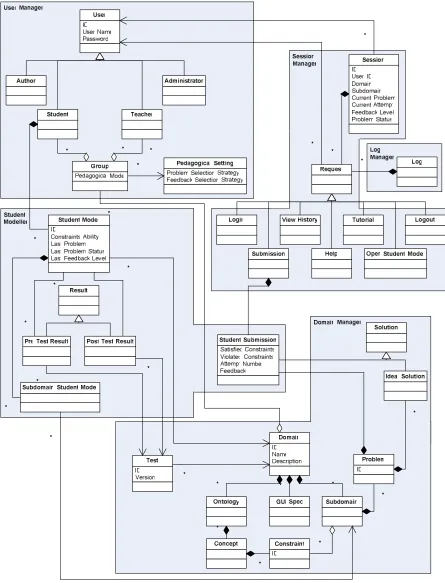
Note the following information describes the static representation of the domain knowledge; these will be loaded when the server is started (or a domain reload request is received), and may be stored in some other format within ASPIRE. The main data objects required by the system are given in Figure 7, which shows the UML class diagram for the ASPIRE-Tutor system3.
3.1. User Data
All the classes discussed in this subsection belong to the User Manager. The User class contains information that is global to an individual user, including the username, password and any other general user profile information. There are different types of ASPIRE users (shown in Figure 6 as subclasses of the User class):
• Student: interacts with the tutoring system(s);
• Author: creates new domains / modifies the content of existing domains;
• Teacher: sets up access to the tutors (creates users and maps them to domains that are available
on the system);
• Administrator: maintains the system, control deployment of new tutors, control the creation of
“privileged” accounts (i.e. those that are not student accounts).
One of the responsibilities of a teacher is to set up a group of students who are allowed to use a specific tutoring system. The Group class allows the teacher to specify the students who are authorised to use a specific tutoring system. The teacher can also specify a particular Pedagogical Setting for a group of students. This class includes specific pedagogical strategies (such as problem selection or feedback selection) for each group, as well as other options, such as the date of pre-post tests.
3.2. Domain Model
The domain model consists of all knowledge necessary to solve problems in a particular instructional domain. Domain Models belong to the Domain Manager. Each domain model consists of the following components:
• Domain definition: specifies parameters that indicate how the system should operate, including style information.
• Sub-domain definition: a domain may have one or more sub-domains.
• Problems: Each problem consists of multiple parts, including the problem text (which may include machine-readable elements such as tags) and the solution. There may be multiple problem sets if there are multiple sub-domains for this domain.
• Constraints and associated macros/functions • Ontology(s) for authoring and feedback control
Note that a domain may also contain sub-domains. In general, each of the above can appear at either the domain or sub-domain level, except problem sets, which always occur at the sub-domain level.
3.2.1. Domain/Sub-domain definition
The Domain and Sub-domain classes allow each instructional domain/sub-domain to be specified in terms of a number of parameters including:
• Dialogues or other domain/subset-specific pedagogical information • Domain-wide appearance parameters, e.g.
o Field sizes
o Scaffolding information
o Domain description (for menus)
o What to call sub-domains (domain only) o Appearance information
• Generic feedback messages for this domain
• Domain-specific help (i.e. help text that is displayed if the student requests help on this domain/subset).
3.2.2. Ontology
An ontology is a specification of domain concepts and their mutual relationships (Gruber, 1993). The ontology for an instructional domain would be developed in the authoring phase. The ontology is used also in the deployment phase (i.e. ASPIRE-Tutor) by the pedagogical module to make various pedagogical decisions, such as instructional planning. The ontology is also used by the Domain Manager to organise constraints.
3.2.3. Problems
Each sub-domain has a set of problems defined for it. The Problem consists of: • Problem number
• Problem name • Problem difficulty
• Problem text (human-readable) • Problem statement (machine-readable) • Solution (human readable)
• Solution (machine readable)
For each problem, the author defines an ideal solution (i.e. a correct solution). The Ideal Solution class contains the correct solution for each problem.
3.2.4. Constraints
Constraints are the “knowledge units” of the domain model. They may be stored at the domain or a sub-domain level. The Constraint class consists of:
• Constraint number • Relevance condition • Satisfaction condition • Feedback message(s)
• Related component of the solution
• Variable being tested (for returning a list of the erroneous parts)
The relevance and satisfaction conditions will be stored as logical expressions incorporating pattern matches. The language for specifying constraints is defined in Section 5.
3.2.5. Macros/Functions
Macros and functions are pieces of logic code that may be incorporated into constraints. They have three main functions:
• Reduce redundancy;
• Separate generic domain logic from declarative knowledge that is particular to the current problem set;
• Make the constraints more maintainable and readable.
Macros/functions could either be written in the same language as the constraints or be code fragments (e.g. LISP functions). The knowledge representation language is presented in Section 5.
3.2.6. Test
3.3. Student Modelling
The User Manager will maintain general information about each student (including the user code and password) as attributes of the User class. Within ASPIRE-Tutor it is necessary to keep a model of the student’s knowledge for each instructional domain. This information is distributed over several data classes covered in this subsection, all of which belong to the Student Modeller.
3.3.1. Pre/post Test Results
In instructional domains for which tests have been specified, the student will be given one of the tests (selected randomly) as a pre-test. The student’s result on the pre-test would serve as an initial indication of the student’s knowledge of the domain (i.e. pre-existing background knowledge). The pre-test would be given the first time the student log on to the tutoring system. When the teacher has specified that the students should sit a post-test4, a different test would be given to the student as a post-test. The result of the post-test serves as an indication of the student’s knowledge after interacting with the tutoring system. The Pre-test Result and the Post-test Result classes store the date the test was taken, the student’s answer to each question, and the total score.
3.3.2. Student Model
The Student Model class contains a model of the student’s knowledge of a particular instructional domain. This includes:
• Performance on each domain constraint the student has used; • Proficiency for the domain as a whole;
• The last sub-domain the student has worked on; • The last problem the student has attempted;
• Information about the feedback the student received on the last submission;
3.3.3. Sub-domain Student Model
If the instructional domain contains several sub-domains, it is also necessary to store the student’s level of proficiency for each individual sub-domain. The Sub-domain Student Model class includes:
• Proficiency for this sub-domain;
• The last problem worked on within the sub-domain;
• A list of the problems and their states (one of new, attempted or solved);
3.3.4. Student Submission
The Student Submission class records detailed information about every submission received by the system. It contains the following information:
• The date/time the submission was received; • The selected instructional domain;
• The problem the student is working on; • The attempt number on the current problem; • The raw submission received;
• The state of the solution (correct or incorrect); • A list of satisfied constraints and their bindings; • A list of violated constraints and their bindings;
• The feedback that the student has received on the submission.
3.4. Sessions
The Session class contains information about current sessions. For each session, the Session Manager maintains information about the user and the state of the session. Depending on the type of user (such as student or teacher), the Session Manager stores the information necessary for ASPIRE to provide continuous support. More information about this class can be found in Section 6.
4. Functionality: User Stories
As specified in Section 3.1, there are four classes of users in ASPIRE: student, author, teacher and administrator. In this section we present the use cases for all types of users.
4.1. Student User Stories
Figure 8 illustrates the use cases for a student interacting with the tutoring system. Each user case is then described via a “user story”.
4.1.1. A student logs in
• The student accesses the tutoring system via a Web browser or a client application (XML-RPC). For Web users, they are taken to a login page. A student logs in only once, and can then use whichever domains they have access to.
• The student enters a username and password.
• A “new guest account” checkbox is presented. Selecting this checkbox indicates the student only wishes to have access to those domains that are publicly available. Otherwise, the student needs to have been registered on the system.
• The user selects “submit” and a URL request (“log in”) is sent.
• The request is received by AllegroServe, initiating a Web action in the Session Manager. The Session Manager checks for an existing session (but fails to find one).
• The Session Manager sends a “check user” request to the Pedagogical Module, passing the student’s username and password.
• The Pedagogical Module sends a “check user” request to the User Manager. • The User Manager checks the username/password is valid:
o If the user has requested to be a new guest user, there must not be a matching username in the database. In this case the User Manager will create the new user record;
• The Pedagogical Module sends a “log event” request to the Log Manager, along with the relevant information.
• The Session Manager determines what to do next:
o For a Web user, the “select domain” form is displayed;
o For an XML-RPC user a “success” response is returned, along with a list of valid domains for this user.
Student
Login Select a Domain
Select a Subdomain
Select a Problem
Submit Attempt View History
Logout
View Help View Student Model
View Tutorial Work on a Probelm
Sit a Pre-test Sit a Post-test
Figure 8. Student Use Cases
4.1.2. The student selects a domain to work on
• The student selects a domain (i.e. a tutoring system) to work on.
• The client (browser or application) sends a “set domain” request to the Session Manager.
• The Session Manager sends a “set domain” request to the Pedagogical Module, passing the student and domain names.
• The Pedagogical Module sends a “load student model” request for this student/domain to the Student Modeller:
o If the student model exists, it is loaded;
o If the student model does not exist, it is created by the Student Modeller.
• The Pedagogical Module sends a “log event” request to the Log Manager, along with the relevant information.
4.1.3. The student selects a sub-domain to work on
• The student selects the sub-domain via a Web page or in a client application. • A “set subset” request is sent to the Session Manager.
• The Session Manager retrieves the user’s session state from the Web Session, and sends a “set sub-domain” request to the Pedagogical Module.
• The Pedagogical Module sends a “set sub-domain” request to the Student Modeller.
• The Student Modeller sets the current sub-domain for this domain/user in the appropriate student model.
o If the student sub-domain model exists, it is loaded;
o If the student sub-domain model does not exist, it is created by the Student Modeller. • The Pedagogical module selects the next problem for the student to solve:
o If the last problem they were working on is unsolved, this is selected, else;
o If the student has unsolved problems in this domain/sub-domain, the most recent of these is selected, else;
o The Pedagogical Module selects the most appropriate problem.
• The Pedagogical Module sends a “set problem” request to the Student Modeller.
• The Student Modeller sets the current problem to be the one selected. If the student has already attempted this problem, the last attempt is returned.
• The Pedagogical Module sends a “log event” request to the Log Manager, along with the relevant information.
• The Pedagogical Module returns the status and selected problem to the Session Manager. • The Session Manager decides what to do next:
o If a Web request, the main interface page is displayed, which serves up the selected sub-domain; o If an XML-RPC request, the status and selected sub-domain are returned.
4.1.4. The student sits a pre/post test
• The Pedagogical Module determines when the student is required to sit a pre/post test, and sends a “get pre-test” request to the Student Modeller.
o If the student pre-test result exists, it is returned;
o If the student pre-test result does not exist, “does not exist” status is returned.
• The Pedagogical Module decides which test version the student should sit, and requests it from the Domain Manager.
o If the student pre-test result exists, a different test version is presented as a post-test;
o If the student test result does not exist, a randomly selected test version is presented as a pre-test.
• The Session Manager determines what to do next: o If a Web application, the test page is displayed.
o If an XML-RPC application, the test is returned to the caller. • The student sits the test and submits the solution.
• A “submit test” request is received containing: o The student/domain/sub-domain/test version; o The student’s solution.
• The Session Manager retrieves the session context.
• The Session Manager sends a “check test solution” request to the Pedagogical Module.
• The Diagnostic Module sends a “get test” request to the Domain Manager, which returns the solution. • The Diagnostic Module checks the solution using the domain model, and returns the following to the
Pedagogical Module:
o The overall outcome (succeeded or failed); o A list of correct question numbers;
o A list of incorrect question numbers.
• The Pedagogical Module sends an “update student model” request to the Student Modeller.
• The Pedagogical Module determines what action to take and communicates this back to the Session Manager. This could be one of:
o Display feedback. The Pedagogical Module will retrieve the feedback from the Domain Manager (per question) and pass this back to the Session Manager.
o Start a dialogue. The Pedagogical Module will retrieve the dialogue content from the Domain Manager and return it to the Session Manager.
• The Pedagogical Module sends a “log event” request to the Log Manager, along with the relevant information.
• The Session Manager determines what to do next:
o If a Web request, the feedback is displayed according to the action type returned from the Pedagogical Module.
o If an XML-RPC call, the feedback information is returned to the caller.
4.1.5. The student selects a problem to work on
• The student requests a problem to work on. This may be one of: o The NEXT problem in the domain
o The SYSTEM’s choice o A specific problem number
• A “select problem” request is sent to the Session Manager.
• The Session Manager retrieves the user’s session state from the Web Session, and sends a “select problem” request to the Pedagogical Module.
• The Pedagogical Module requests information about problems solved from the Student Modeller. • The Pedagogical Module selects the problem according to the method requested.
• The Pedagogical Module sends a “set problem” request to the Student Modeller.
• The Student Modeller sets the current problem to be the one selected. If the student has already attempted this problem, the last attempt is returned to the Pedagogical Module.
• The Pedagogical Module sends a “log event” request to the Log Manager, along with the relevant information.
• The Pedagogical Module returns the problem/solution information to the Session Manager. • The Session Manager decides what to do next:
o If a Web request, the main interface page is displayed, which serves up the selected problem; o If an XML-RPC request, the status and selected problem are returned.
4.1.6. The student works on a problem
• The student is presented with the appropriate problem interface. Each domain has its own interface with its appropriate fields/components.
o Making a selection.
• The client application provides the student with immediate cues in response to the student interactions and updates the interface when necessary.
4.1.7. The student submits an attempt
• A “submit” request is received from either a Web browser or an XML-RPC application, containing: o The student/domain/sub-domain/problem number;
o The required feedback level; o The student’s solution.
• The Session Manager retrieves the session context.
• The Session Manager sends a “check solution” request to the Pedagogical Module.
• The Pedagogical Module sends a “diagnose solution” request to the Diagnostic Module, passing the solution and domain/subset/problem number.
• The Diagnostic Module sends a “get problem” request to the Domain Manager, which returns the
parsed ideal solution.
• The Diagnostic Module sends a “parse solution” request to the Domain Manager, passing the student’s solution, and receives the parsed solution.
• The Diagnostic Module checks the solution using the domain model, and returns the following to the Pedagogical Module:
o The overall outcome (succeeded or failed); o A list of satisfied constraint numbers;
o A list of violated constraint numbers and identifiers (bindings) for the failed components.
• The Pedagogical Module sends an “update student model” request to the Student Modeller, passing the lists of constraints.
• The Pedagogical Module determines what action to take and communicates this back to the Session Manager. This could be one of:
o Display feedback. The Pedagogical Module will retrieve the feedback from the Domain Manager (per constraint) and pass this back to the Session Manager.
o Start a dialogue. The Pedagogical Module will retrieve the dialogue content from the Domain Manager and return it to the Session Manager.
• The Pedagogical Module sends a “log event” request to the Log Manager, along with the relevant information.
• The Session Manager determines what to do next:
o If a Web request, the feedback is displayed according to the action type returned from the Pedagogical Module.
o If an XML-RPC call, the feedback information is returned to the caller.
4.1.8. The student views help/history/tutorial/student model
• A “view” request is received from either a Web browser or an XML-RPC application. This may be one of:
o view help o view history o view tutorial o view student model
• The Pedagogical Module determines where to retrieve the information from:
o If a “view help”/“view tutorial” request, the request is sent to the Domain Manager. o If a “view history” request, the request is sent to the Log Manager.
o If a “view student model” request, the request is sent to the Student Modeller.
• The Pedagogical Module sends a “log event” request to the Log Manager, along with the relevant information.
• The Pedagogical Module returns the information to the Session Manager. • The Session Manager determines what to do next:
o If a Web request, the information is displayed.
o If an XML-RPC call, the information is returned to the caller.
4.1.9. The student prints
• The student chooses to print their current screen, and selects which sections of the interface to print. This may include:
o The current problem text o The current attempt
o The current feedback message(s)
• The Session Manager receives a “print” request and its parameters from the Web browser or client application and determines what to do next:
o If a Web request, the “print preview” page is displayed followed by a print dialog to set the printer and related options.
o If an XML-RPC call, the information is returned to the caller.
4.1.10. The student logs out
• The student requests to log out of the tutoring system.
• The Session Manager retrieves the session context, and sends a “log out”, request to the Pedagogical Module.
• The Pedagogical Module sends an “update student model” request to the Student Modeller, passing the last state of the current session, this may include:
o The current problem and its state; whether new, attempted or finished. o The current attempt.
o The level of the last feedback.
• The Pedagogical Module sends a “log out” request to the User Manager.
• The Pedagogical Module sends a “log event” request to the Log Manager, along with the relevant information.
• The Session Manager deletes the current student session once the Pedagogical Module returns “success” status.
• The Session Manager determines what to do next: o For a Web user, the “login” page is displayed;
4.2. Author User Stories
Figure 9 illustrates the use cases for an author interacting with ASPIRE. Each user case is then described via a “user story”.
Author
Login
Select a Domain Logout
View Help
Print Deploy a Tutoring
System
Validate Constraints
Generate Constraints
Compose an Ontology Set a pre/post Test
Add a Problem Design Tutor
Interface
Add a Solution
Figure 9. Author use cases
4.2.1 An author logs in
• The author accesses the authoring system via a Web. The users are taken to a login page. (NB: An author logs in only once, and can then use whichever domains they have created or create new domains.)
• The author enters a username and password.
• The user selects “submit” and a URL request (“log in”) is sent. • The request is received by AllegroServe, initiating a Web action.
• The Authoring Controller sends a “check user” request to the ASPIRE-Tutor, passing the author’s username and password.
• The ASPIRE-tutor checks the user is valid:
o If the author is valid, a “success” status is returned.
4.2.2. The author selects a domain to work on • The author selects a domain to work on.
• The client sends a “set domain” request to the Authoring Controller, passing the author and domain names.
• The Authoring Controller sends a “retrieve ontology” request for this author/domain to the Ontology Manager:
o If the ontology exists, it is returned;
o If the ontology does not exist, a new/blank one is created by the Ontology Manager. • The “ontology workspace” form is displayed with retrieved ontology
4.2.3. The author composes an ontology
• The author composes, or edits an existing, ontology for their domain using the ontology workspace. • The Authoring Controller receives the completed ontology, and passes it to the Ontology Manager. • The Ontology Manager saves/persists the ontology and returns a “success” status.
4.2.4. The author designs the tutor interface
• The author chooses to design the tutor GUI interface.
• The Authoring Controller invokes the “solution representation” form for identifying the composition of a solution.
• At the completion of modelling the solution structure, the interface passes on the solution structure and interface parameters to the Authoring Controller.
• The Problem Manager receives the solution structure for persistence and returns a “success” status. • The Ontology Manager receives the interface parameters for persistence and returns a “success”
status.
4.2.5. The author adds a problem/solution
• The author chooses to add a problem to the current domain/ontology. The author may choose to divide the domain into sub-domains, each with its set of problems and solutions, and constraints.
• The Authoring Controller invokes the “problem editor” and passes the interface parameters.
• The author enters the problems and solutions. A problem may have multiple correct solutions. The author is encouraged to supply many problems, each with a set of different solutions to illustrate different ways of solving the same problem.
• The Authoring Controller receives “add problem”/“add solution” requests along with the complete set of problems/solutions.
• The Authoring Controller passes the problem/solution to the Problems Manager for persistence.
4.2.6. The author generates constraints
• The author chooses to generate constraints.
• Upon completion, the generated syntax constraints are passed to the Constraint Manager for persistence.
• The Authoring Controller retrieves the problems and solutions from the Problems Manager and invokes the “semantic constraints generator”, passing the ontology and the problems and solutions. • The generated constraints are passed to the Constraint Manager for persistence.
• Authoring Controller invokes the “constraints validation” form.
4.2.7. The author validates the constraints
• The author chooses to validate the constraints.
• The Authoring controller retrieves constraints from constraint manger and passes them to the Constraint Validator for automatic validation.
• The Authoring Controller invokes the “Constraint validation interface” and passes the automatically validated constraints, for the author to validate.
• The author validates the constraints and adds appropriate feedback messages to the constraints.
• The author validated constraints and an “update constraints” request are sent by the Authoring Controller to the Constraint Manager.
4.2.8. An author deploys a tutoring system
• The author completes the development of the new tutoring system (or modifies an existing one) using ASPIRE-Author.
• ASPIRE-Author sends the domain model to ASPIRE-Tutor and requests to the domain to be (re)loaded.
4.2.9. The author prints
• The author chooses to print the current screen.
• The Authoring Controller receives a “print” request and its parameters from the Web browser or client application.
• The Authoring Controller invokes the “print preview” page followed by a print dialog to set the printer and related options.
4.2.10. The author views help
• The author requests to view the help page of the current task.
• The Authoring Controller receives the “view help” request, along with the current task name. • The Authoring Controller selects the appropriate help page to display, and returns it to the interface.
4.2.11. The author logs out
• The author requests to log out of the authoring system.
• The Authoring Controller retrieves the session context, and determines what to do next: o If there are any unsaved changes, the author is asked whether to save or not.