Proceedings of the Thirteenth Workshop on Innovative Use of NLP for Building Educational Applications, pages 89–100
COAST – Customizable Online Syllable Enhancement in Texts:
A flexible framework for automatically enhancing reading materials
Heiko Holz∗ Zarah Weiß∗ Oliver Brehm Detmar Meurers
LEAD Graduate School & Research Network
ICALL Research Group†
University of T¨ubingen
{heiko.holz,zarah-leonie.weiss}@uni-tuebingen.de,
[email protected],[email protected]
Abstract
This paper presents COAST, a web-based ap-plication to easily and automatically enhance syllable structure, word stress, and spacing in texts, that was designed in close collaboration with learning therapists to ensure its practical relevance. Such syllable-enhanced texts are commonly used in learning therapy or private tuition to promote the recognition of syllables in order to improve reading and writing skills. In a state of the art solutions for automatic syl-lable enhancement, we put special emphasis on syllable stress and support specific marking of the primary syllable stress in words. Core features of our tool are i) a highly customiz-able text enhancement and template function-ality, and ii) a novel crowd-sourcing mecha-nism that we employ to address the issue of data sparsity in language resources. We suc-cessfully tested COAST with real-life practi-tioners in a series of user tests validating the concept of our framework.
1 Introduction
Reading and writing disabilities are a pressing is-sue for today’s society – approximately 4–8 % of the German population suffer from dyslexia (Moll and Landerl, 2009; Bundesverband Legasthenie und Dyskalkulie e.V,2014). Research on reading acquisition has shown that phonological awareness is a crucial skill for successful reading and writing acquisition (R¨ober-Siekmeyer,2005). Important dimensions of phonological awareness are syllable synthesis and analysis. Syllable synthesis refers to the ability to blend syllables to a whole word, and syllable analysis to the ability of segmenting a word into its syllables. Experimental studies have shown that syllable synthesis and syllable analysis are essential components of evidence-based read-ing trainread-ing (Galuschka and Schulte-K¨orne,2016;
∗These authors contributed equally to this work. †http://icall-research.de
Galuschka et al.,2014). Scheerer-Neumann(1981) have shown that specific training of segmenting words into syllables can improve reading accuracy of impaired German primary-school children sig-nificantly. Additionally, computer-based programs for primary-school children that sequentially speak and highlight syllables can facilitate the learning process of reading (Jim´enez et al.,2007;Olson and Wise,1992).
Based on these empirical findings, enhanced texts with custom spacing and syllables alternately displayed in different font colors are commonly used in teaching and learning therapy to support ac-quisition of reading and writing. This so-called Sil-benmethode(syllable method) (Mildenberer Verlag,
2018) teaches children to focus on and understand syllables and their structures rather than single char-acters and is commonly used in Germany, which is reflected by popular reading materials , such as
ABC der TiereandLesel¨owe, and by available tools that facilitate the learning process of reading and writing, such asCeleco DruckstationandABC Sil-bengenerator.
While first language acquisition happens through mere exposure, learning to read and write is a learned skill and thus requires explicit instruction, similar to Second Language Acquisition (SLA). In this regard, insights form SLA research on input enhancement relate to reading and writing acqui-sition. The well-establishedNoticing Hypothesis
(Schmidt,1990) states that learning requires the exposure to salient linguistic constructions that may be recognized by the learner. To facilitate this recognition of relevant linguistic constructions,
Input Enhancement(Smith, 1993) has been suc-cessfully used, in particular in terms of visual en-hancement of texts (e.g. colors, font changes, cap-italization, spacing), cf. (Rello and Baeza-Yates,
2017;Zorzi et al.,2012;Meurers et al.,2010). In response to this, we developed COAST.1
1www.sfs.uni-tuebingen.de/coast/
COAST is a web-based application to easily and au-tomatically enhance syllable structure, word stress, and spacing in texts. Its primary focus is on func-tionality and practicability. In terms of functional-ity, COAST offers a high degree of customization for text enhancement, supports management of an-notation schemes, and includes syllable stress. The performance of detecting syllable stress strongly predicts dyslexia (e.g.,Goswami et al.(2013); Lan-derl(2003)) and correlates highly with reading and writing skills (Sauter et al.,2012) and, thus, is of special importance for dyslexic children. Trainings to improve the awareness of syllable stress are be-ing developed and evaluated (Holz et al.,2017). We extend the approach of text enhancement that are provided by state of the art tools to make syllable structures and stress more salient for German native (dyslexic) speakers using NLP resources. Enhanc-ing the text with such additional lEnhanc-inguistic infor-mation might boost children’s ability to segment words into relevant components and might help them to learn to focus on relevant areas of words – as major orthographic challenges, such as vowel length markers, mainly occur in (conjunction with) stressed syllables (Staffeldt,2010). To account for practicability, we implement this functionality by collaborating closely with prospective users and in particular teaching practitioners to meet real-life demands.
The remainder of the article is structured as fol-lows: In Section2, we report findings of a require-ment analysis that we conducted in form of expert interviews prior to the system design to determine the wishes and needs of practitioners and compare COAST to two state of the art tools currently used in learning therapy and reading and writing acqui-sition. In Section3, we describe the framework of COAST and explain the two core functional-ities crowd-sourcing and text enhancement with real-life use cases. In Section4, we evaluate the usability and user experience of COAST by means of user tests conducted with learning therapists and validate its practical applicability. We conclude by describing the current state of COAST and pro-viding an outlook for its further development in Section5.
2 Requirements Analysis 2.1 Expert Interviews
As the primary focus of our work was on the design of a tool that allowed for the immediate practical
application by language teachers and learning ther-apists, we performed a requirement analysis for our system preceding its implementation. We con-ducted four expert interviews with teaching thera-pists to establish their wishes and requirements for a text-enhancement tool that would facilitate their work. During this process, we identified a series of concrete requests going beyond the tool’s basic text analysis functionality. They were centered around four main issues: i) input/output options, ii) flex-ible customization settings, iii) user profiles and re-usability of settings, and iv) optional expert/user judgments.
Input/Output Options proved to be of particu-lar interest for prospective users. They emphasized the wish to not only be allowed to upload their own texts, but also to be able to flexibly edit them while seeing the syllable enhancement. Therefore, we provide a text box for users in which they may enter and alter their texts. Regarding output options users expressed interest in being able to choose between the formats HTML, MS Word, and PDF/printing, or simply copying texts with enhancements to the clipboard. All of these were incorporated into our system.
User Profiles and Re-Usability became rele-vant concerns in the course of our expert interviews: Our flexible customization options give users the freedom to design text representations and visual enhancements that are tailored specifically to their purposes. However, users stressed the importance that they could re-use their elaborate customization across sessions, and that they need to be able to switch between various customized enhancement templates. To allow users to save, manage, and re-use their templates, we created user accounts that allow users to locally save their customization. Users may also save the texts they uploaded under a user-defined title in previous sessions.
Expert/User Judgments proved to be a final, pressing issue for prospective users: The option to adjust the automatic analyses in cases where users disagree with the syllabification or stress annota-tion performed by the system was crucial to our prospective users. To give them complete authority over their analyses, each of both analyses may be al-tered by the user on click. Furthermore, they asked us to flag words that were unknown to our system and thus more error prone. To facilitate manual corrections, we offer users to review all unknown words consecutively in a separate view, where they are supported by the syllabification and stress sug-gestions of our systems. All changes conducted by users are saved in their local syllabification data base and used for future analyses. Users may re-view and edit these new entries in their account settings. A final suggestion of our expert users was to allow the system to learn from user feedback. We thus include a crowd-sourcing based mecha-nism for updates to the global data base, which is explained in detail in Section3.2.
2.2 Related Work
There are two dominant syllable enhancement tools for German whose functionality is centered around the so calledSilbenmethode (“syllable method”), in which reading is taught by focusing on sylla-bles and their pronunciation rather than single char-acters: theSilbengenerator(“syllable generator”) and theCeleco Druckstation(“Celeco printing sta-tion”).2 Table1shows a comparison of the tools withCOAST based on the characteristics that we identified in our expert interviews and some more
2We are not aware of any tools for the English market that
provide any syllable enhancement beyond character-based markings.
System Feature Silbengenerator Celeco COAST
Platform Independent 7 7 3
Web-Based 7 7 3
Freely Available (3) 7 3
Free Text Input 3 3 3
Text Box 7 3 3
Basic Text Layout Customization 3 3 3
Additional Text Layout Customization 7 (3) 3
Customizable Syllable Enhancement 7 3 3
Configuration Templates 7 n.a. 3
Stress Annotation 7 7 3
Syllable Arcs 7 3 7
Customizable Analysis (3) (3) 3
Crowd-Sourcing 7 7 3
[image:3.595.310.529.62.196.2]Exercise Generation 3 3 7
Table 1: Comparison of ABC Silbengenerator,
Celeco Druckstation, andCOAST.
general usability considerations.
Silbengenerator is a Windows program pub-lished byMildenberger Verlag(2018).3 It is part of theirABC der Tiere(“animal alphabet”) series of learning materials based on syllabification as read-ing aid. Its main functionality is to allow teachers to visually enhance syllables in their reading ma-terials. While the full version has to be purchased, a free demo is freely available for downloads on their web page.The tool allows users to upload own texts for analyses, but not to modify them from within the tool via some form of text box. Sup-ported output formats for enhanced texts are MS Word or PDF/print. The general text layout is ad-justable in terms of line spacing, fonts, font sizes, text alignment, line breaks, and background color. However, more advanced changes to the text lay-out, such as customized syllable, character, or word distances are not supported. The latest customized layout may be re-used upon system restart, but it is not possible to store multiple templates. Sylla-bles are visually enhanced using the conventions of theABC der Tierematerials, which hyphenates syllables and additionally marks alternating sylla-bles with red and blue font. Monosyllabic words default to blue. Word stress is not encoded. To accommodate limited printing capacities, syllables may be enhanced using gray and black instead of red and blue, but further customization is not sup-ported. Users may locally overwrite the syllable boundaries set by the system for individual words by editing a plain text file outside of the program. Changes are applied to all documents upon restart. Changes during run-time or for individual docu-ments are not supported User corrections are not
3For details, see:www.abc-der-tiere.de/index.
re-used to improve the system’s syllabification per-formance. The Silbengenerator also includes a limited tutoring functionality, which includes two variations of syllable reading exercises as well as capitalization, vowel, and spelling training. Celeco Druckstation is a Windows program dis-tributed byCeleco(Klische,2007).4 Since there is no free demo version, we base our review on the elaborate tool description provided on their web page. It should be pointed out that – unlike the Sil-bengeneratorand our system – theCeleco Druck-stationis distributed as a full fledged diagnosis and therapy tool for reading disorders for learning ther-apists and home tutoring alike. It thus provides a number of tests and exercises for reading and diag-nosis, which are generated from texts specified by the user. This also includes a syllable enhancement facility that allows to load texts into the program, visually enhance syllables, and print them.Celeco Druckstationoffers to adjust the basic text layout in terms of fonts, font size, font color, and back-ground color. It also supports advanced layout modifications in terms of text segmentation: users may choose to put spaces after every syllable or every 3rd, 4th, or 5th character. Syllables are en-hanced with two alternating, freely customizable colors, or with syllable arcs. No special encoding of word stress is offered. Users may provide indi-vidual syllable analyses of unknown words. These are saved in a local data base. However, the syllab-ification of known words can – as far as we could determine – not be altered by the user. We could not determine whether enhancement settings may be saved and re-used as templates.
3 Tool
3.1 System Description
We developed COAST as a platform-independent web-based tool that is deployed with Apache on a server hosted on the Amazon Web Services (AWS).5The front-end was developed with HTML, CSS, JavaScript, and AngularDart. 6 The back-end was developed with Python using the frame-works Flask,7and SQLAlchemy.8 We use spaCy (Honnibal and Johnson,2015) for natural language processing (NLP).
4www.celeco.de/ 5www.aws.amazon.com/ 6www.angulardart.org/ 7www.flask.pocoo.org/ 8www.sqlalchemy.org/
Target Users are on the one hand teaching prac-titioners, but on the other hand any person with an interest in syllabified reading material, such as tu-tors or parents. We account for this divide with two separate types of user accounts: regular and expert users. Currently, this distinction is relevant for our crowd-sourcing mechanism, which is discussed in Section3.2.
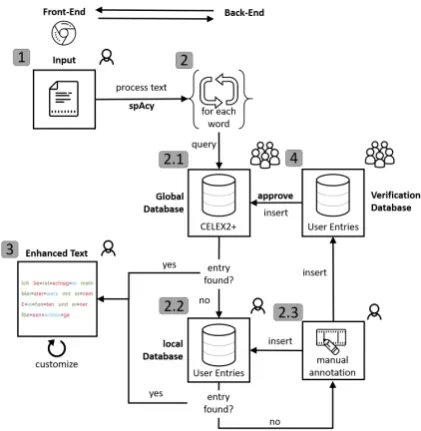
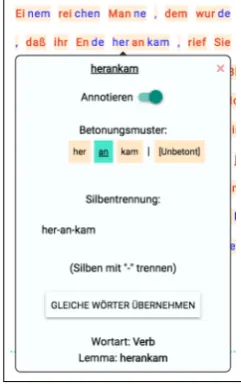
Analyzing Input Texts is the core functionality of COAST. Figure1shows the workflow of auto-matic text analysis and enhancement. Before users can enhance texts in the front-end as described in Section3.2, texts need to be processed accord-ingly: First, spaCy is used for parsing, tokenization, and part-of-speech (PoS) tagging. The letters of a word and its PoS are used as a combined pri-mary key to query the global and local database stored in SQLite. The global database is initialized with the German version of the language corpus CELEX2 ofBaayen et al.(1995) and is available to all users. For the approximately 360,000 lem-mas and inflected word forms that are included in CELEX2, we infer primary word stress and syl-lable structure from CELEX2’s orthographic and phonetic transcriptions.The local database consists of manually annotated entries and is only avail-able to the specified user. If an entry was found, the syllabification, syllable stress, and lemma of the word are returned. If no entry was found, the word is marked as unknown and must be manually annotated. Manually annotated entries are auto-matically stored in the local database of the user and forwarded to the crowd-sourcing mechanism explained in detail in Section3.2. The annotated information is used afterwards to enhance syllables and words of the text as can be seen in AppendixA, Figure5. Further linguistic information for each enhanced word may be obtained individually, see AppendixA, Figure6.
3.2 Features
Figure 1: System overview of COAST.
for German this issue is particularly pressing, be-cause irrespective of the size of the underlying data base, morphological composition and derivation are highly productive in German, which makes the occurrence of unknown words more likely. This issue of data sparsity is well-known from other NLP applications such as machine translation or information retrieval, and often addressed in work on compound splitting (Ziering and van der Plas,
2016;Weller et al.,2014). Furthermore, both pro-cesses may alter the word stress making the issue more difficult (F´ery,1998).
During the expert interviews it became apparent that prospective users prefer to be alerted to un-known words that may have been mis-analyzed, so they may review and if necessary manually correct them. In this context, we found that users would also prefer the system to learn from their correc-tions so that they could contribute to making the system more efficient in the long run. Together with our experts we therefore developed a crowd-sourcing mechanism, that would allow local cor-rections of users to be incorporated to our system’s global data base after they have been verified by either two more users or an expert user. We de-rived this role of an expert user to prioritize the votes of learning therapists and linguists over lay-man judgments. Upon registration, new users may self-identify as experts or as regular users. A veri-fication of this self-assignment remains for future work.Experts may also revoke crowd-induced up-dates to the data base. With this combined expertise
and additional layer of control through experts, our system may draw from a constantly growing pool of analyses, which ultimately increases its usability and robustness while building a promising resource for future work.
The verification mechanism is located on a sep-arate page that asks users to voluntarily identify syllable boundaries and word stress of words un-known to the system. To facilitate analyses, we provide users with information on how our auto-matic tools would analyze a word as help as well as with previous analyses of other users. We incor-porate the freely accessible MARY-TTS (Schr¨oder and Trouvain,2003) for automatic suggestions for stress annotation and Pyphen for syllabification. We require users to manually annotate each word unknown to the database due to insufficient per-formance of automatic stress assignment. This is an extensible framework, which may be expanded with more detailed information in the future.
The following use case illustrates this process: User 1 uploads a text containing two words un-known to the system:Hitzeschock(“heat shock”) andHacken(“heels”). She is asked to determine the syllable boundaries and stress (marked in bold font) for both words and submitsHit-ze-schockand
Hac-ken. This syllabification assumes a bisyllabic consonant doubling for both terms. While this is correct for most consonants at syllable boundaries,
ck is an exception to this rule which is unknown to many laymen. Thus, when our system prompts Users 2 and 3 to verify User 1’s analysis, they agree with her and both analyses are updated to the global data base. User 4 uploads another text containing
Hitzeschock. Afterwards, the word is not flagged as unknown, but analyzed together with all other words that were originally included in the data base. Expert User 5 is asked to review the updates to the data base. She identifies the mistake that has been made and revokes the analysis ofHackento Ha -cken. The entry is immediately corrected in the global data base and will be displayed correctly for all future analyses.
Figure 2: Template inspired byABC der Tiere.
of their texts, but also want to re-use and switch be-tween templates. Therefore, we not only facilitate advanced customization options for the text and enhancement layout, but also allow users to store various templates, which may be consecutively ap-plied to a text with a simple click.
Our settings feature two main categories: First, they allow to modify the enhancement of syllable stress by allowing users to choose freely the col-ors assigned to i) stressed syllables, ii) unstressed syllables, and optional iii) the second unstressed syllable. Stressed syllables may be enhanced with bold font. Users can choose whether to apply the color enhancement to the font or the syllables’ background. Furthermore, syllable boundaries may be made more salient by using a syllable delim-iter character that users may choose freely. Finally, users may specify to which extend certain parts of speech should be analyzed, e.g. they may choose to ignore articles or to default connectives to be enhanced as unstressed. Second, they allow users to customize the text layout independent of the syl-lable enhancement. This includes basic options such as adjusting font size or line space. How-ever, we also allow to freely choose the distance of words, syllables, and characters. Users may further make word boundaries more salient by choosing a background color for them. The combination of these syllable enhancement and text layout set-tings may be saved under a descriptive title as a template, which may be re-used and altered at any point across texts or sessions.
The following use case illustrates how this works: User 1 works with children with reading dis-abilities from two groups: Group A uses theABC der Tierematerials in school. The children are thus used to the blue and red layout, which User 1 wants to alter as little as possible, while still providing her pupils with materials that also mark syllable stress. Therefore, she customizes a template to use the
Figure 3: Template inspired byLesel¨owen.
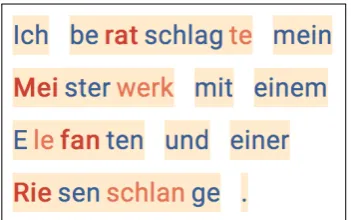
ABC der Tierestyle for her enhancement. Figure2
shows the result for the sentenceIch beratschlagte mein Meisterwerk mit einem Elefanten und einer Riesenschlange(“I consulted my masterpiece with an elephant and a giant snake”).
She sets the marking color of stressed syllables to dark red and of unstressed to blue. In order to make the alternation of syllables more salient, sec-ondary unstressed syllables are also marked in red. To clearly distinguish them from stressed syllables, she additionally uses bold font to mark stress and uses a lighter type of red to mark secondary un-stressed syllables. BecauseABC der Tierecolors monosyllabic words in blue, User 1 further sets typically monosyllabic parts of speech, such as articles and prepositions, from the analysis to be analyzed as unstressed. Finally, she makes syllable boundaries more salient by widening the distance between syllables. To make word boundaries more salient, despite this increased syllable distance, she further widens word distance and assigns a beige background color to words.
Children from Group B do not use theABC der Tierematerials at school, but they are reading syl-labified stories at home from theLesel¨owen (“read-ing lions”) materials by the Loewe publisher.9 These materials use three colors to mark alternating syllables and they do not treat monosyllabic words differently from others. For this group, too, User 1 wants to make stressed syllables more salient in her materials, while otherwise not deviating much from the layout the children are already used to. Thus, she designs a second layout which mimics the Lesel¨owen style. The result of applying this template to the same sentence she used for Group A may be seen in Figure3.
The colors used by Lesel¨owen are green, red, and blue. She assigns stressed syllables the color
9www.loewe-verlag.de/
[image:6.595.315.519.61.173.2]green and again additionally marks them with bold font. Unstressed and secondary unstressed sylla-bles are colored red and blue. Because this style already features three colors, she does not want to use a background color for words. At the same time, she wants to make word as well as syllable boundaries more salient. For this, User 1 chooses to mark syllable boundaries with a delimiter (in this case=) but without additional space between syllables and increases the distance between words. While the initial customization took a couple of minutes, User 1 may re-apply her two templates to any text in the future, reducing the time required for customization to mere seconds. She may also alter the templates at any time or add new ones when required.
4 Evaluation
We conducted user tests to evaluate COAST with both practitioners as well as with non-experts. Prior to these, we performed an internal pilot testing to identify runtime issues that are not directly related to the functionality of COAST.
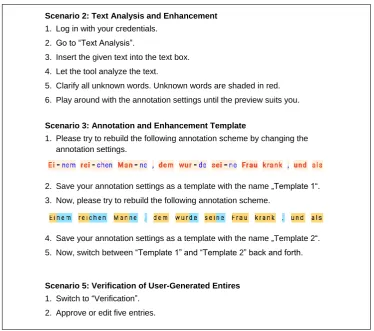
Five scenarios were defined to evaluate the tool’s functionality, usability, and user experience. They cover i) account creation, ii) text analysis and enhancement, iii) generation and use of annotation templates, iv) reuse of previously stored texts, and v) verification of user-generated entries (“crowd-sourcing”).
In the first scenario, the users were asked to create an account with given credentials.
The second scenario consisted of four major steps: First, users were asked to log into the re-cently created account. Secondly, they had to switch to theText Analysis view of the tool and to analyze and enhance a given text. After analyz-ing the text, they were told to clarify all words un-known to the system, which are flagged and shaded in red. Finally, users were asked to adjust the anno-tation settings based on their personal preferences. The third scenario covered the instructed genera-tion and use of annotagenera-tion templates. Users were asked to rebuild two annotation schemes by adjust-ing the annotation settadjust-ings and save them as new templates.
In the fourth scenario, users were asked to store the analyzed text in their account and re-analyze it by selecting the stored text in theAccount viewof the tool.
In the fifth and final scenario, users were re-quired to verify entries added by other users that are unknown to the global database. In order to do so, they were asked to switch to theVerification view(see Figure7) and approve or edit five entries.
The second, third, and fifth scenario are of spe-cial importance as they cover the core-functionality of COAST and can be seen in Figure8.
User Tests were conducted by seven users from two groups: three experts (learning therapists) to receive subject-specific feedback and four laymen to evaluate the general usability of the tool. The three experts were women aged between40and51
(M = 45). The laymen aged between22and27
(M = 25) included two men and two women with
non-educational professions. The user test was carried out equally for both groups. None of the participants had interacted with the system before. We used the after-scenario questionnaire (ASQ) by Lewis (1995) for quantitative data analysis. They were answered for each scenario directly after its completion. The ASQ consists of three ques-tions covering ease of use, time efficiency, and documentation of the tool:
1. Overall, I am satisfied with the ease of use of completing the tasks in this scenario
2. Overall, I am satisfied with the amount of time it took to complete the tasks in this scenario
3. Overall, I am satisfied with the support and documentation when completing the tasks We used a five-point Likert scale ranging from
strongly agreetostrongly disagree.
For qualitative analysis, the users were explic-itly instructed to “think-aloud” (Rauterberg,1996) while working on a scenario, thus told to accurately comment each of their actions and to express ex-pectations, thoughts, and critics.
After clarifying all questions, users processed all scenarios consecutively in fixed order. The user tests were concluded with an interview to get gen-eral feedback and to assess the usefulness of the tool with respect to the users’ professions.
4.1 Results
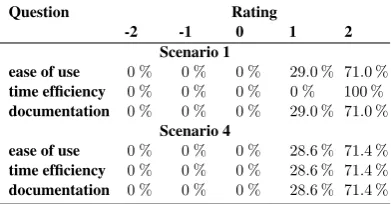
The results of the second, third, and fifth scenario are explained in detail due to their relevance, results for scenario one and four can be found in the Table
2.
We normalized the options of the ASQ to range from−2(strongly disagree) to+2(strongly agree)
with0(neither) being neutral. In the following, we
report positive values (i.e. agree, strongly agree) as positive feedback, negative values (i.e. disagree, strongly disagree) as negative feedback. For a more detailed differentiation of the user feedback, please see Figure4.
The second scenario was successfully completed by all users. The ease of use (M = 1.57, SD = 0.53) and documentation (M = 1.57, SD= 0.53)
of the tool was rated100 %positively in the ASQ,
time efficiency received86 %positive and 16 %
neutral ratings (M = 1.57, SD = 0.78). Some
users criticized the layout of theText Analysis view, suggesting a more compact representation of the annotation settings.
The third scenario was completed by five users without help, two needed hints from the investiga-tor to complete all tasks. While the first template could be rebuilt by all users, two users required help with the second template. Error source was the confusion about and between the featuresSilbe hervorheben(enhance syllables), with which either the fore- or background color of syllables could be adjusted accordingly, and Wort Hintergrund-farbe (word background color), with which the background color of words could be set (see Fig-ure 5). Three users completed this scenario by trial-and-error. The ease of use of this scenario was
Question Rating
-2 -1 0 1 2
Scenario 1
ease of use 0 % 0 % 0 % 29.0 % 71.0 %
time efficiency 0 % 0 % 0 % 0 % 100 %
documentation 0 % 0 % 0 % 29.0 % 71.0 %
Scenario 4
ease of use 0 % 0 % 0 % 28.6 % 71.4 %
time efficiency 0 % 0 % 0 % 28.6 % 71.4 %
[image:8.595.307.530.65.322.2]documentation 0 % 0 % 0 % 28.6 % 71.4 %
Table 2: Results of the ASQ for scenario 1 and 4.
Ease of Use Time Efficiency Documentation Scenario 2
0
20
40
60
80
100
strongly disagree disagree neither agree strongly agree
0
20
40
60
80
100
Ease of Use Time Efficiency Documentation
Ease of Use Time Efficiency Documentation
Scenario 5
0
20
40
60
80
100
57.0%
43.0%
14,29 % 14,29 % 71,43 %
57,0 %
43,0 %
71,43 % 71,43 % 71,43 %
28,57 % 28,57 % 28,57 %
28,57 % 28,57 % 28,57 %
14,29 % 28,57 % 28,57 %
28,57 % 57,14 % 14,29 %
[image:8.595.74.270.637.739.2]42,86 %
Figure 4: Results of the after-scenario questionnaire
completed for scenario 2, 3, and 5.
rated 71.4 % positively and 28.57 % negatively
(M = 0.57, SD= 1.27), the time efficiency71%
positively and29 %negatively (M = 0.86, SD= 1.34), and 57.2 %positively,14.3%neutral, and
28.6%negatively in terms of documentation and
support (M = 0.57, SD= 1.14).
The fifth and last scenario was completed by all users successfully. Ease of use, time efficiency, and documentation of this functionality were rated
100 %positively (M = 1.71, SD= 0.49for each
item respectively). Users suggested to design this functionality to be more user friendly by displaying and processing multiple entries at once.
of unchecking the annotation of typically monosyl-labic parts of speech was requested, vi) fore- and background color of syllables and words should independently be customizable.
5 Conclusion and Outlook
COAST is a highly user-oriented, platform inde-pendent, web-based and easily extensible frame-work for the automatic augmentation of texts with syllable, stress, and word enhancement. It was de-veloped in close collaboration with practitioners and includes a series of features which were ex-plicitly requested by prospective users and that are lacking from currently available, state of the art systems. This paper presents and evaluates its abil-ity to generate appropriate reading materials based on real-life use cases. Additionally, we evaluated the practical applicability of our tool by conducting user tests based on a series of real-life scenarios.
Our exemplary enhanced texts (see Figure2and
3) prove that appropriate reading materials can be easily generated automatically, customized, and exported with COAST. The use cases show that the tool meets the requirements deduced from the
a priorirequirement analysis based on our expert interviews. Compared to other tools that support syllable enhancement, COAST offers a higher de-gree of customization and more features, such as annotating syllable stress, setting spacing of lines, words, syllables, and characters. The automatic analysis of syllable stress and part of speech also make COAST linguistically more informed than other tools. Finally, we carried out user tests with special focus on practical application. These indi-cate that the majority of users were able to solve the tasks intuitively and time efficiently for each of the scenarios.
We have successfully shown that the current ver-sion of COAST allows practitioners to generate enhanced texts as reading materials for their teach-ing. Being able to save annotation templates and texts has proven to be an especially useful func-tionality to easily generate new reading materials within the application with little time effort. Fur-thermore, COAST features a novel crowd-sourcing approach to overcome the pressing issue of limited resources and data sparsity. This is particularly rel-evant for languages other than English. Currently, our tool illustrates this for the German language. However, the entire framework was designed to be easily extended for any other language for which
sufficient resources are available.
Our consultation with prospective users also yielded a series of practical suggestions to opti-mize user experience further and to include more features. In particular, we aim at including the fea-tures discussed in Section4.1. We also plan to re-design COAST’s visual appearance. Furthermore, we intend to elaborate on the current documen-tation and to provide application-oriented feature tutorials. To improve the reliability of our proposed crowd-sourcing mechanism, we plan to address the verification of user roles, i.e. expert and regular users. In this regard, the need of further user type customization shall be analysed and implemented accordingly. Finally, we intend to carry out user studies to compare COAST’s efficiency and effi-cacy to state of the art tools that support syllable enhancement in texts.
Our ultimate goal is to develop and include a front-end for learners, theCOAST App. This results in a tutoring system offering reading and spelling exercises optimized for mobile devices. The cur-rentCOAST Toolcould be used by practitioners to generate teaching materials to be shared with the
COAST Appand, thus, to supply exercises directly to their pupils.
Acknowledgments
This research was funded by the LEAD Graduate School & Research Network [GSC1028], a project of the Excellence Initiative of the German federal and state governments. Heiko Holz is a doctoral student at the LEAD Graduate School & Research Network.
References
R. Harald Baayen, Richard Piepenbrock, and L´eon
Gu-likers. 1995. CELEX2 LDC96L14. Web Download.
Philadelphia: Linguistic Data Consortium.
Bundesverband Legasthenie und Dyskalkulie e.V.
2014.Der aktuelle Wissensstand ¨uber Legasthenie.
Caroline F´ery. 1998.German word stress in optimality
theory. Journal of Comparative Germanic
Linguis-tics, 2(2):101–142.
Katharina Galuschka, Elena Ise, Kathrin Krick, and
Gerd Schulte-K¨orne. 2014. Effectiveness of
Treat-ment Approaches for Children and Adolescents with Reading Disabilities: A Meta-Analysis of Random-ized Controlled Trials.PLoS ONE, 9(2):e89900. Katharina Galuschka and Gerd Schulte-K¨orne. 2016.
Spelling Disorders in Children and Adolescents.
Dtsch Arztebl Int., 113(16):279–86.
Usha Goswami, Natasha Mead, Tim Fosker, Martina
Huss, Lisa Barnes, and Victoria Leong. 2013.
Im-paired perception of syllable stress in children with dyslexia: A longitudinal study. Journal of Memory and Language, 69(1):1–17.
Heiko Holz, Katharina Brandelik, Jochen Brandelik, Benedikt Beuttler, Alexandra Kirsch, and Detmar
Meurers. 2017. Prosodiya–a mobile game for
ger-man dyslexic children. InInternational Conference on Games and Learning Alliance, volume 10653 of
Lecture Notes in Computer Science, pages 73–82, Cham. Springer International Publishing.
Matthew Honnibal and Mark Johnson. 2015. An
Im-proved Non-monotonic Transition System for De-pendency Parsing. InProceedings of the 2015 Con-ference on Empirical Methods in Natural Language Processing, pages 1373–1378, Lisbon, Portugal. As-sociation for Computational Linguistics.
Juan E. Jim´enez, Isabel Hern´andez-Valle, Gustave Ram´ırez, Ma Del Rosario Ortiz, Mercedes Ro-drigo, Adelina Est´evez, Isabel O’Shanahan, Eduarde
Garc´ıa, and Mar´ıa De La Luz Trabaue. 2007.
Com-puter speech-based remediation for reading disabil-ities: The size of spelling-to-sound unit in a trans-parent orthography.Spanish Journal of Psychology, 10(1):52–67.
Anja Klische. 2007. Leseschw¨achen gezielt beheben:
Individuelle Diagnose und Therapie mit dem Pro-gramm celeco. Tectum-Verl.
Karin Landerl. 2003. Categorization of vowel length in
German poor spellers: An orthographically relevant phonological distinction. Applied Psycholinguistics, 24(4):523–538.
James R. Lewis. 1995. IBM Computer Usability
Sat-isfaction Questionnaires: Psychometric Evaluation and Instructions for Use. International Journal of Human-Computer Interaction, 7(1):57–78.
Detmar Meurers, Ramon Ziai, Luiz Amaral, Adriane Boyd, Aleksandar Dimitrov, Vanessa Metcalf, and
Niels Ott. 2010.Enhancing authentic web pages for
language learners. InProceedings of the 5th Work-shop on Innovative Use of NLP for Building Educa-tional Applications (BEA-5) at NAACL-HLT 2010, pages 10–18, Los Angeles.
Mildenberer Verlag. 2018. Eine Einf¨uhrung in die
Sil-benmethode. Mildenberer Verlag.
Mildenberger Verlag. 2018. ABC der Tiere –
Silben-Generator f¨ur die Grundschule.
Kristina Moll and Karin Landerl. 2009. Double
Disso-ciation Between Reading and Spelling Deficits. Sci-entific Studies of Reading, 13(5):359–382.
Richard K. Olson and Barbara W. Wise. 1992.
Read-ing on the computer with orthographic and speech feedback.Reading and Writing, 4(2):107–144.
Matthias Rauterberg. 1996. Usability Engineering.
Morgan Kaufmann.
Luz Rello and Ricardo Baeza-Yates. 2017. How
to present more readable text for people with dyslexia. Universal Access in the Information So-ciety, 16(1):29–49.
Christa R¨ober-Siekmeyer. 2005. Die ber¨ucksichtigung des kindlichen sprachwissens f¨ur den schrifterwerb.
In Hans-Werner Huneke, editor, Geschriebene
Sprache. Strukturen, Erwerb, didaktische Modellbil-dungen, pages 129–144. Mattes Verlag, Heidelberg. Katharina Sauter, J¨urgen Heller, and Karin Landerl.
2012. Sprachrhythmus und Schriftspracherwerb.
Lernen und Lernst¨orungen, 1(4):225–239.
Gerheid Scheerer-Neumann. 1981. The utilization of
intraword structure in poor readers: Experimental evidence and a training program. Psychological Re-search, 43(2):155–178.
R. W. Schmidt. 1990. The Role of Consciousness in
Second Language Learning1. Applied Linguistics, 11(2):129–158.
M. Schr¨oder and J. Trouvain. 2003. The German
Text-to-Speech Synthesis System MARY: A Tool for Re-search, Development and Teaching. International Journal of Speech Technology, 6:365–377.
Michael Sharwood Smith. 1993. Input Enhancement
in Instructed SLA. Studies in Second Language Ac-quisition, 15(02):165.
Sven Staffeldt. 2010. Einf¨uhrung in die Phonetik,
Phonologie und Graphematik des Deutschen Ein
Leitfaden f¨ur den akademischen Unterricht.
Stauf-fenburg, T¨ubingen.
Marion Weller, Fabienne Cap, Stefan M¨uller, Sabine Schulte im Walde, and Alexander Fraser. 2014.
Distinguishing degrees of compositionality in com-pound splitting for statistical machine translation. In
Proceedings of the 1st Workshop on Computational Approaches to Compound Analysis, pages 81–90. Patrick Ziering and Lonneke van der Plas. 2016.
Towards Unsupervised and Language-independent Compound Splitting using Inflectional Morpholog-ical Transformations. Proceedings of the 2016 Con-ference of the North American Chapter of the Asso-ciation for Computational Linguistics: Human Lan-guage Technologies, pages 644–653.
Marco Zorzi, Chiara Barbiero, Andrea Facoetti, Is-abella Lonciari, Marco Carrozzi, Marcella Montico, Laura Bravar, Florence George, Catherine Pech-Georgel, Johannes C Ziegler, and Michael Posner.
2012. Extra-large letter spacing improves reading
A Supplemental Material A.1 Screenshots of COAST
Figure 5: COAST – View for text analysis and enhancement. Users can insert or edit text in the lower
text box. The preview of syllable enhancement is given in the upper box. On the left side, users can edit settings regarding syllable annotation: boldness, colors of stressed and unstressed syllables (either background or foreground), background color of words, font size, and spacing between syllables, words, and lines.
Figure 6: COAST – Word-Popup. Popup with additional information that is invoked when a known word
[image:11.595.237.358.489.684.2]Figure 7: COAST – Verification-view of entries added by users unknown to the global database. Current word isgeschlossenen(ge-schlos-sen-en, closed). Users can edit stress assignment and syllabification on the left side or agree to a user’s judgment or to automatically generated suggestions on the right side.
Scenario 2: Text Analysis and Enhancement
1. Log in with your credentials.
2. Go to “Text Analysis”.
3. Insert the given text into the text box.
4. Let the tool analyze the text.
5. Clarify all unknown words. Unknown words are shaded in red.
6. Play around with the annotation settings until the preview suits you.
Scenario 3: Annotation and Enhancement Template
1. Please try to rebuild the following annotation scheme by changing the annotation settings.
2. Save your annotation settings as a template with the name „Template 1“.
3. Now, please try to rebuild the following annotation scheme.
4. Save your annotation settings as a template with the name „Template 2“. 5. Now, switch between “Template 1” and “Template 2” back and forth.
Scenario 5: Verification of User-Generated Entires
1. Switch to “Verification”. 2. Approve or edit five entries.
Figure 8: User tests of scenario 2 (text analysis and enhancement), 3 (creation and use of annotation and
[image:12.595.112.487.378.709.2]