International Journal of Computer Applications (0975 – 8887) Volume 180 – No.29, March 2018
A Java based University Library Management System
Asaduzzaman Noor
Programmer
Integrated Software Development Team Southeast University, Bangladesh
Md. Sharif Hossen
Lecturer
Department of Information and Communication Technology
Comilla University, Bangladesh
ABSTRACT
In the era of modernization, everything is accomplished or thought to be accessed through internet so that do not need to waste time and face any inconvenience. Using internet, the democratization of knowledge has been easier. The concept of sharing knowledge is centralized in a digital library, which plays a vital role in the dissemination of knowledge and spiritual civilization. The level of maintaining a library is closely related to the quality of teaching in Universities. With the increasing of number of students in Universities, maintaining a library using the old management methods is too much complex and time consuming and hardly possible to adapt to the development of times. To overcome this situation appeared in most of the middle level countries like Bangladesh, authors develop an automated digital library management system. The main features of this software are user interactive graphical representation (using bar diagram and pie chart) of the total number of books requested, books uploaded, yearly books count etc. Besides, notifications and reports are viewed instantly for corresponding users. Another thing is that using this software, user could find out books searching by any one of these: title, author’s name, subject, publication, series, ISBN/ISSN, etc. That is, the developed automated library management software would meet the needs of the growing students and teachers demand.
Keywords
Library management system; Application; Software; Java
1.
INTRODUCTION
In most universities, there are well-equipped libraries with excellent infrastructure facilities having a large collection of books. Compared to public libraries, university libraries have a large collection on science and engineering where readers get scope for gathering vast knowledge on respective fields. Because of the dispersion of knowledge, this collection increases rapidly day by day [1]. Although there are many existing software tools, most of those are not proper user interactive and have some limitations for accessing the books. Besides, most universities in mid-level countries like Bangladesh still are using traditional way to manage their library, which prevents faster searching for a book, and faster report generation. This leads to develop an online digital library management system [2]. A good interactive interface was available and users could obtain a fresh and different feeling [3]. Proper security has been maintained in the proposed system because only authorized users could access this application by doing the registration. Users need to have online connection and an email account [4] to register and use this software.
Library management system has three modules, which are Admin Module, Librarian Module, and Student Module. First module assists administrator to register shelf and category, change book status, issue library card, configure to registered users, and
backup database. Second module helps students to find out books by searching by title, author’s name, subject, publication, series, ISBN/ISSN, etc. In the last module, librarian can issue and fine for books received after due date. The developed library management system has a nice functionality to upload and download online book and resources. From this library management system, any educational institute can easily set all required library settings like as late fee amount, maximum borrowed books, maximum borrowed time etc. Besides, the system will auto generate students late fee, book availability, book place, top books etc.
Another important feature is to provide portability of the software. This feature indicates, “write once” and “run anywhere” of the application on multiple platforms [5]. In the development of this software, Java is used as the development tool considering its various advantages [6], [7], [8], e.g., platform independence, polymorphism, automatic garbage collection etc. Hence, NetBeans IDE is used with version 8.2 [9]. Besides, authors use MySQL database server and FTP (File Transfer Protocol) server for storing data and transferring files respectively.
Using this software, librarian could easily generate reports and take quick decisions on any transaction of books about the availability of resources [10]. The rest of this paper is structured as follows. Section 2 shows the database design including relationship schema. Section 3 presents the systematic procedures to setup and run this application. In Section 4, conclusions and future works are presented.
2.
DATABASE DESIGN
In this software development, MySQL is used as the database server. A database is a collection of interrelated data stored with minimum redundancy to serve many users quickly and effectively. The general objective is to make information access easy, quick, inexpensive and flexible for performing overall all operations by users. In addition, following considerations are taken during the development: controlled redundancy, data independence, accuracy, and integrating more information at low cost, recovery from failure, privacy and security, performance, ease of learning and use [11].
Fig. 1. Use Case Diagram
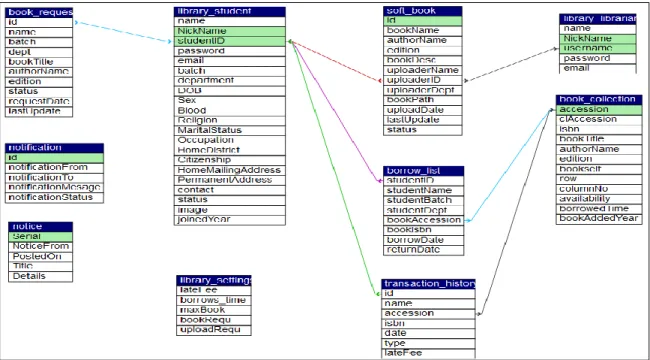
Figure 2 describes the relationship schema of the library management system. Here, the tables ‘library_student’, ‘library_librarian’,and‘book_collection’contain respectively the details of the students, the librarians, and the books. Similarly, the details of the requested, newly uploaded, and borrowed books are stored respectively in the tables, namely,
‘book_request’, ‘soft_book’, and ‘borrow_list’. Besides, the details of each transaction, notification and notices updated by admin or librarian are stored respectively in ‘transaction_history’, ‘notification’, and ‘notice’ tables. Finally, the settings related information are stored in ‘library_settings’ table.
Fig. 2.Relationship Schema
3.
IMPLEMENTATION
In this library management system, there are three types of users’ roles: Admin, Librarian and Student. Here, Admin is the main
3.1
Admin Module
International Journal of Computer Applications (0975 – 8887) Volume 180 – No.29, March 2018
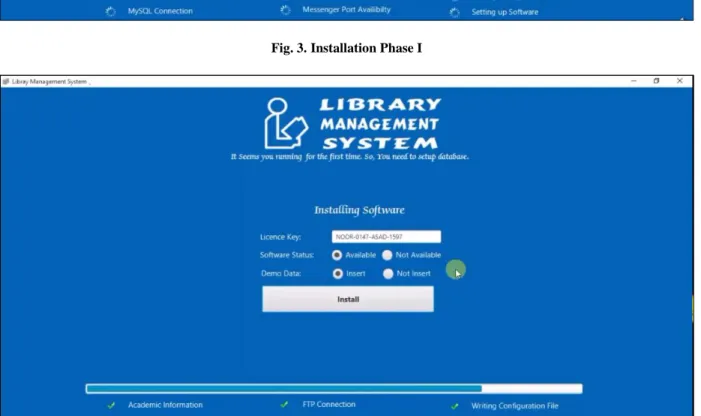
system will ask for a license key, software status (available for other users or not) and demo data (to test the software) which is shown in Figure 4. If all the information are correctly given, then it will install the software and create a configuration file in a
directory. Then, the system will automatically send a confirmation email with the institution’s unique name and admin password.
Fig. 3.Installation Phase I
Fig. 4.Installation Phase II
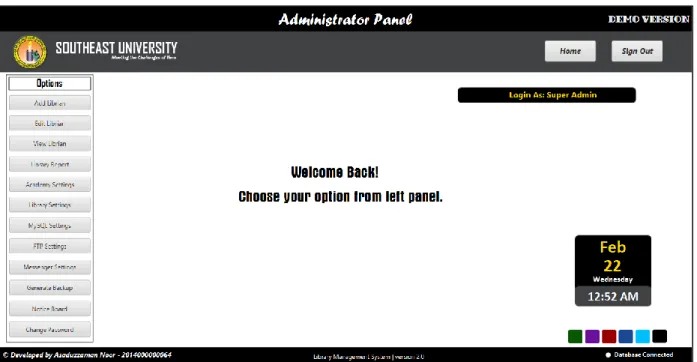
After successful connection, login panel will be appeared, where unique name and password are required (not shown here to make short). A user could change the password later. If login credentials are correct, then admin home page (as shown in
Fig. 5.Admin Home Page
In the right options of the above figure, Admin can add a new librarian, edit existing librarian profile and password, and see librarian details. In the Library Report section, a user can see graphical representation of the summary of library, where pie
charts show book request and upload statistics while histogram shows Book Count and Student Count statistics depending on
year as shown in Figure 6.
Fig. 6.Library Home Page and Statistical Reports
In addition, admin can update academic information with logo using Academic Settings section, which can change automatically for all users as shown in Figure 7. In Library Settings section, admin can update library rules like as late fee amount, maximum borrowed book count, book borrowed time, maximum uploaded books, and request at a time count. Admin can also change MySQL database location, FTP information,
International Journal of Computer Applications (0975 – 8887) Volume 180 – No.29, March 2018
Fig. 7.Academic Setting
3.2
Librarian Module
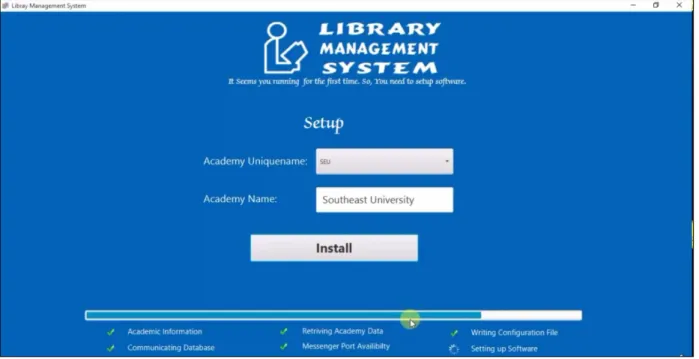
In this case, user as a librarian need to select the institution unique name and press install button. Then librarian will login with the username and password in login panel (not shown here).
Fig. 8.Librarian Installation
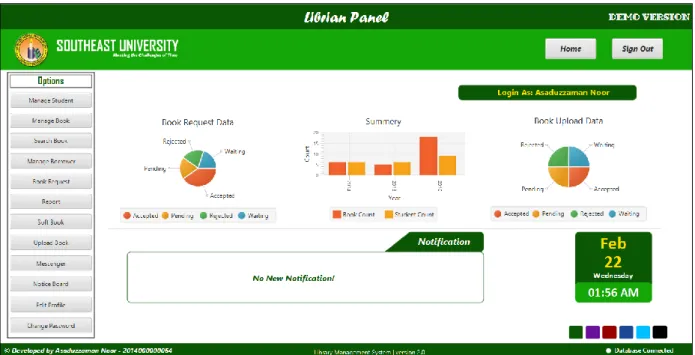
If login credentials are correct in Figure 8, then the librarians’ home page will be appeared as shown in Figure 9. He can choose
Fig. 9.Librarian Panel
In Manage Student section, there are 3-tabs namely, ‘Add Student’, ‘Edit Student’ and ‘Student Details’. From ‘Add Student’ tab, a new user can be added. If all information is valid, then a new student will be added into database. From ‘Student Details’ tab, an existing user profile will be shown. Librarian can be also set as Active/Inactive. If a student is set as inactive, then
this student cannot borrow book, upload and request for books. A warning will be shown in student’s profile and student’s main page. From ‘Edit Student’ tab, an existing user profile can be edited. If all the information are valid, then user profile will be updated.
Fig. 10.Managing Student
In Manage Book section, there are also 3-tab panes, namely, ‘Add New Book’, ‘Edit Book’ and ‘List of Books’. Using ‘Add New Book’ tab, a new book can be added. Here, Accession number is a book id, which is unique. ISBN number is also unique for each books. If an ISBN already added, then Book Title, Author, Edition will automatically be shown. Otherwise, all the
International Journal of Computer Applications (0975 – 8887) Volume 180 – No.29, March 2018
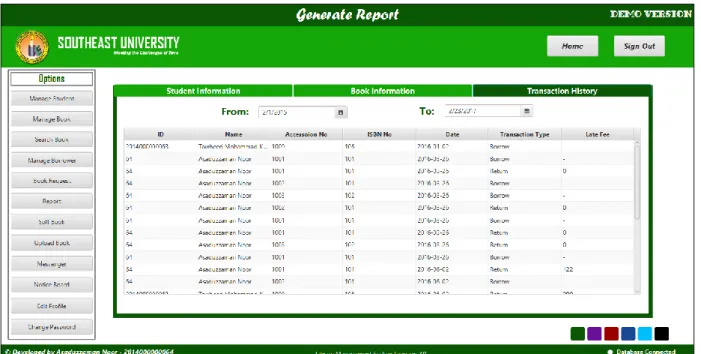
see the books, which students want to read. Librarian can also change the status of this request. In Report option, a librarian can generate report in three different categories for Students, Books and Transactions as shown in Figure 11. In Soft Book option, a librarian can see the list of soft book uploaded in the server. In Upload Book option, a librarian can upload soft book into server. In addition, he/she can accept, reject or pending uploaded soft
book by students. From Messenger option, a librarian can communicate with another librarian if online. There needs to run another software for running messenger as a server. Notice Board is similar to Admin Panel. Here, Librarian also can post and view notices posted by admin and librarian. Librarian can update own profile in Edit Profile section and change own password or student’s password on request.
Fig. 11.Report Panel
3.3
Student
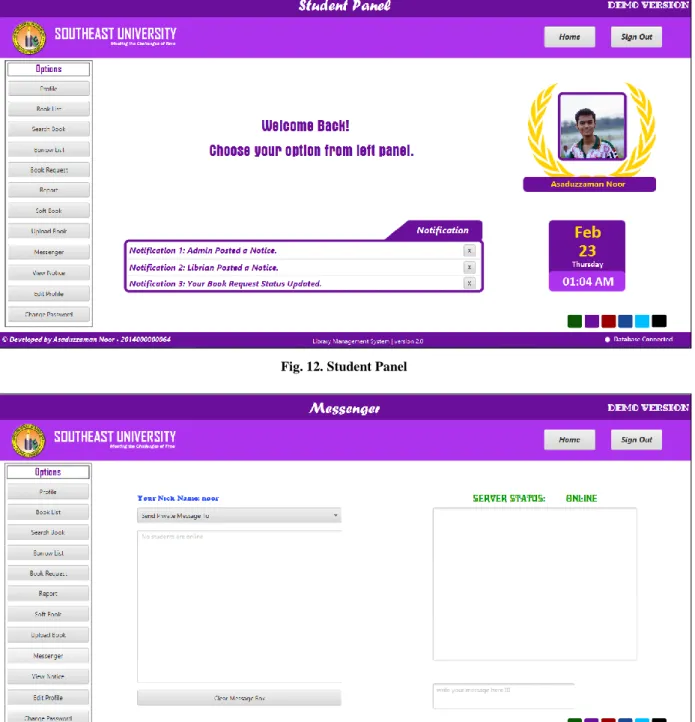
To maintain the role of a student, first a user needs to install this management system in student mood. If login credentials are correct, then student’s home page as shown in Figure 12 will be appeared. From right panel, a user choose admin option where a summary of the library statistics and notifications about books and notices will be shown. Here, students can see their profile information, all book list with book information, and search books. Borrow List section will show the list of books which borrowed by login user. Book Request section has two tabs, one is for adding the book request and other is for book request list. In ‘Add Request’, student can add the book request, which needs to add in library. In ‘Your Request’ tab, students can see the requests sent and their status. In Report option, students can generate reports in three different categories for Book, Book
Fig. 12.Student Panel
Fig. 13.Messenger
3.4
Other View
When a user enter wrong credentials, then he/she will see a red error. By clicking on “red error forgot password page”, user could notice a notification, i.e., “Enter Valid Email Address”. Pressing verify button, he/she could send an email with new password.
4.
CONCLUSION AND FUTURE WORKS
In this paper, an online Java based user interactive database management system is successfully developed, which is much applicable to University libraries. Using this software any user without having any knowledge of Java could easily be able to
on any operating system having Java virtual machine. From a proper analysis of positive points and constraints, it can be concluded that this is a highly efficient GUI based software. This library management system is working properly and meeting to all user requirements according to the educational institutions.
In near future, mobile-based applications rather than web based and desktop, will be developed. Besides, this software will be extended by adding more features after getting feedbacks from the customers.
International Journal of Computer Applications (0975 – 8887) Volume 180 – No.29, March 2018
[2] J. M. Hellerstein, M. Stonebraker, J. Hamilton, “Architecture of a Database System,” Journal Foundations and Trends in Databases, USA, Vol 1, Issue 2, pp 141-259, 2007.
[3] Y. Nie, “Digital Library Billing Management System Design and Implementation,” Advanced Research on Electronic Commerce, Web Application, and Communication. Communications in Computer and Information Science, vol 143. Springer, Berlin, Heidelberg, pp 352-358, 2011.
[4] R. Salman, “Developing Multithreaded Database Application Using Java Tools and Oracle Database Management System in Intranet Environment,” International Conference on Advanced Information Technologies and Applications, pp. 67–79, 2015.
[5] A. I. Wasserman, “Software Engineering Issues for Mobile Application Development,” Workshop on Future of software engineering research, Santa Fe, New Mexico, USA, 2010.
[6] P. Deitel, and H. Deitel, “Java™: How to program,” 9th Edition, Prentice Hall, 2015, ISBN 978-0-13-257566-9.
[7] H. Schildt, “Java™: The complete reference,” 9th Edition, Oracle Press, 2015, ISBN: 978-0-07-180856-9.
[8] M. S. Hossen, and S. Ahmed, “Development of a Java based simulator for OFDM system,” International Conference on Materials, Electronics and Information Engineering, Rajshahi University, Bangladesh, 2015.
[9] NetBeans, “https://netbeans.org/features/java/index.html”.
[10]Y. T. Yang, J. C. S. Kumamoto, “Data Warehouse Applications in Libraries - The Development of Library Management Reports,” IEEE International Congress on Advanced Applied Informatics, Japan, 2016.